1.0 Introduction
OpenCart Infinite scroll extension provides seamless navigation over multiple pages and a hassle-free shopping experience to online users. It slows down pagination as it is one of the biggest obstacles in working on any website. OpenCart infinite scroll enables websites to remove this hurdle by providing single-click access with the least inconvenience to the users.
Generally, customers have to browse multiple pages in search of the desired product on the website. However, this could lead to loss of time and even interest of customers too. OpenCart infinite scroll extension is the modern advancement to slow down pagination and provides seamless navigation of all the products on a single page. With the help of the dropdown scrolling module, customers can load the products of the next page on the current one just by scrolling down the page.
OpenCart Infinite scroll extension enables automatic loading of pages without even scrolling down the page. It also helps to easily navigate through the product catalog. As all the products are available on a single page, customers need not to move from one page to another for the product.
1.1 Striking Features of Infinite Scroll Extension for OpenCart
The OpenCart Infinite Scroll Extension provides you multiple features that are fully customizable and easy to configure from the backend interface without requiring any coding knowledge. The various striking features of the OpenCart Infinite Scroll Extension have been listed below:
- The OpenCart fast scroll module enables automatic page loads and search results without scrolling down the page.
With the help of the OpenCart quick scroll module, customers can navigate to the next page of product listing without reloading the next page. - The OpenCart infinite scrolling plugin offers compatibility with SEO friendly URLs.
- The OpenCart dropdown scrolling module gives a ‘Load More’ feature to pause infinite scroll after a definite interval of pages.
- This page interval for load more feature can be set from the backend of the Infinite Scroll module.
- Store admin can test the working of the Opencart infinite scroll module by enabling the sandbox setting and enter the specific IP address.
- The admin interface of the OpenCart plugin is extremely easy to use and requires no use of coding knowledge to implement.
- This OpenCart Infinite Scroll module offers a ‘Go to Top’ link feature to reach that start point of any product listing page.
- OpenCart list view module provides SSL compatibility.
- This OpenCart Infinite Scroll displays a loader while loading the next page products on the same page. This loader can be configured and disabled if required from the back-end interface.
- Store admin can change the background and text color of the end page message and go to the top link.
- The OpenCart Infinite Scroll Module allows the admin to show a custom message to the customers after all the product listings have been loaded on the front.
- Admin can choose to display the product listings in grid or list view format via OpenCart quick Scroll module.
- This Infinite Scroll extension for OpenCart gives an option to include CSS and JS code from the back-office. Using the custom CSS and JS store admin can change the look and feel of the Opencart infinite scroll module.
- The OpenCart infinite scroll module offers compatibility with all the OpenCart themes, so the admin can configure the look and feel of the infinite scroll as per their site theme.
- The OpenCart fast scroll module offers multi-store compatibility.
- The Opencart infinite scroll module offers the store admin to set the selector settings of the module like selector pagination, selector container, etc.
- The functionality of the OpenCart quick scroll module doesn’t conflict with any other installed modules of the store.
- The Opencart infinite scroll module is mobile responsive.
1.2 Technology for Development
Language: PHP
Framework: OpenCart
2.0 Installation Guide
To install this OpenCart Infinite scroll Module, please follow the following steps:
Purchase the OpenCart Infinite scroll Extension from the Knowband store. You’ll get following files:
- Zipped File containing the source code of the OpenCart Infinite Scroll module.
- User Manual of OpenCart Infinite Scroll plugin.
Follow the steps below in order to install the OpenCart Infinite Scroll Extension in OpenCart store:
1.Unzip the zipped. You’ll get the folders as shown in the image below:


2.Copy all the files and folders of the zip file in the Root Directory of OpenCart setup via FTP manager.
3.The OpenCart Infinite Scroll module is now installed and is ready to use. Go to Admin -> Main Menu -> Extensions as shown in the image below:
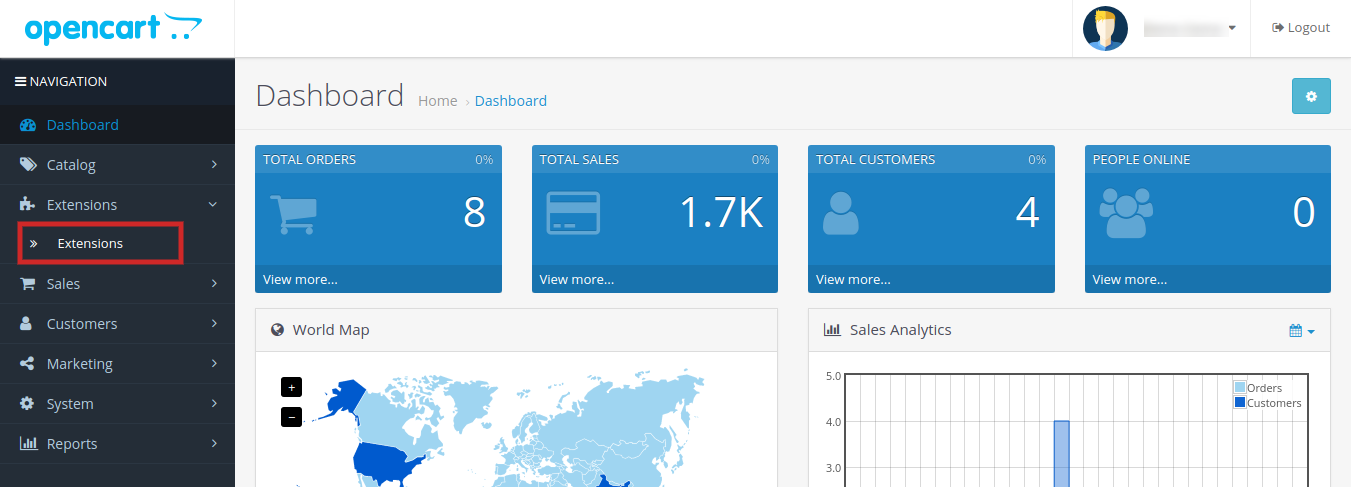

4.Select Infinite Scroll from the list of the modules and click on the Edit button as shown in the image below:
3.0 Admin Interface of OpenCart Infinite Scroll Extension
OpenCart Infinite Scroll extension offers easy customization option to the store admin. The various configuration options are discussed in detail below:
3.1 General Settings
Under this tab the store admin can find the basic settings of the module and configure the module.
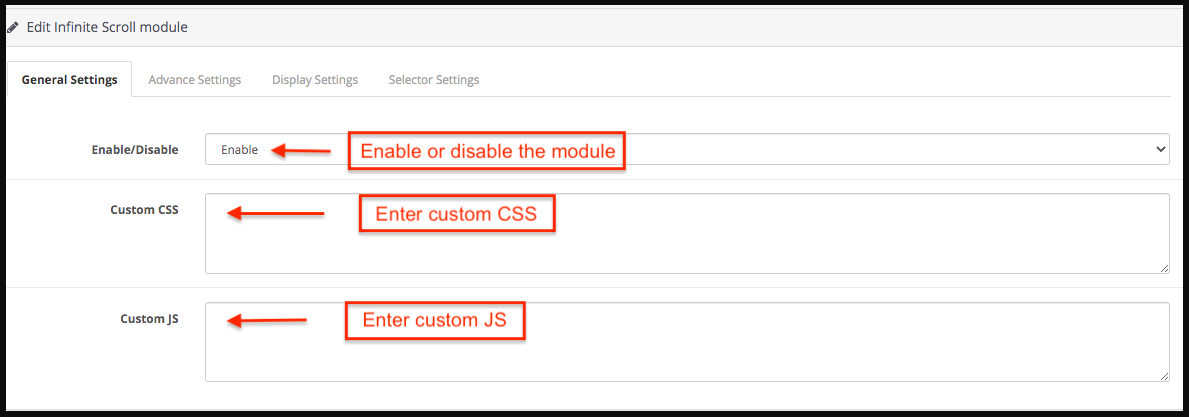
- Enable/Disable: Enable or disable the Opencart infinite scroll module in a single button click.
- Custom JS: Enter custom JS accordingly.
- Custom CSS: Store admin can enter custom CSS to change the look and feel of the Opencart infinite scroll module.
3.2 Advance Settings
From this tab the store admin can set the advance settings of the Opencart infinite scroll module.
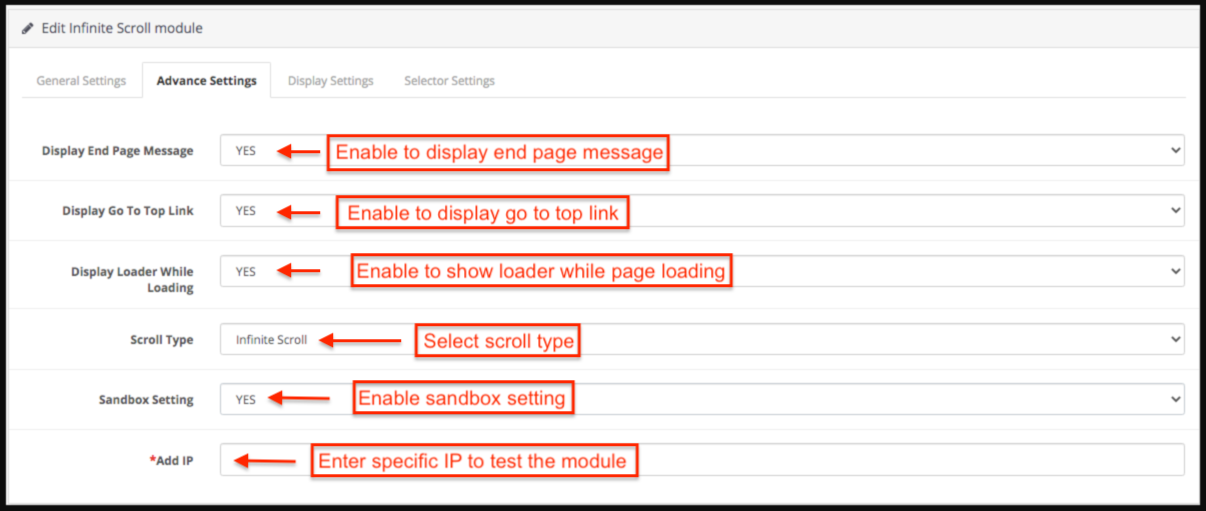
- Display End Page Message: Select Yes to display the end page message. If the store admin enables this then an end page message appears at the ending of the products.
- Display Go To Top Link: Select Yes to display Go to Top link. If store admin enables this then a go-to top link appears when the customer scrolls the page.
- Display Loader While Loading: Select Yes to display loader while loading.
- Scroll Type: Select infinite scroll from the drop-down list to select scroll type.
- Show load more link after pages: If store admin selects the scroll type as load more products link then store admin has to enter the number of pages after which load more link appears.
- Sandbox Setting: Select Yes or No from the drop-down list for the Sandbox setting.
- Add IP: Store admin can add the specific IP address to test the working of the Opencart infinite scroll module.
3.3 Display Settings
Following are the settings listed under this tab:
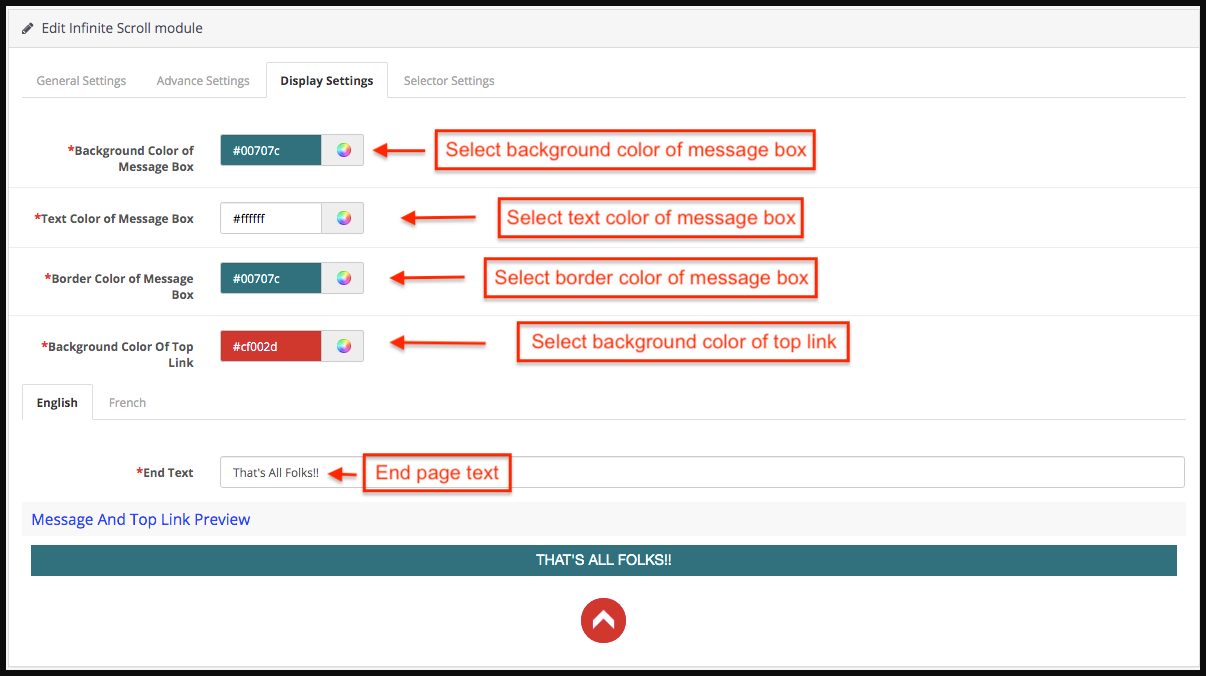
- Background Color of Message Box: Select the background color of the message box.
- Text Color of Message Box: Select the Text-color of the message box.
- Border Color of Message Box: Select the border color of the message box.
- Background Color Of Top Link: Select the background color of top link.
- End Text: Enter the end text in either English or French language.
- Message and Top link preview: Store admin can the seethe preview of the end page message and go to the top link.
3.4 Selector Settings:
From this tab the store admin can set the selector details of the Opencart infinite scroll module. Please do not edit these settings if you are not fully sure about it as modification in these settings may lead to improper working of the module.
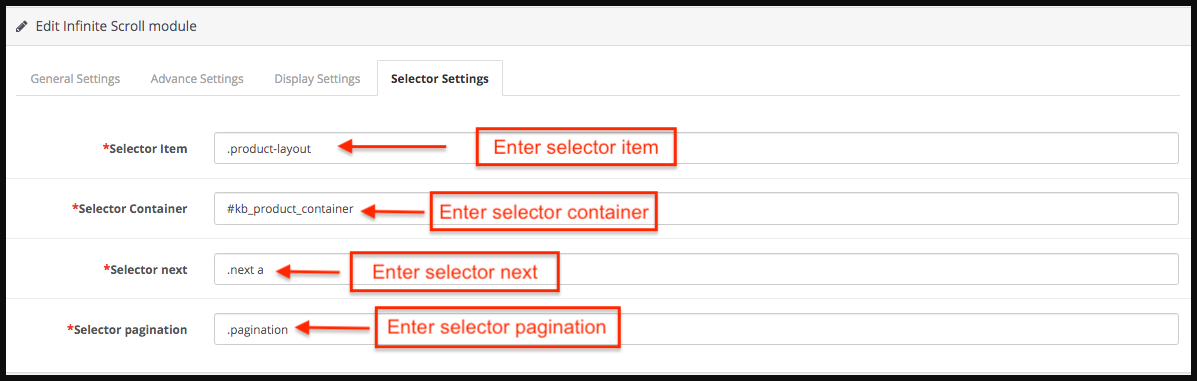
- Selector Item: Enter the selector item.
- Selector Container: Enter the selector container.
- Selector next: Enter the selector next.
- Selector pagination: Enter the selector pagination.
4.0 Front End of the OpenCart Infinite Scroll Module
When the OpenCart list view module by Knowband is enabled from the admin panel then on every product listing page pagination of the products would not appear. The customer will be able to view all the products just by scrolling down on the page and if the display go to top link is enabled then the link will appear on the bottom right of the page to scroll the customer back to the top of the page. When all the pages are loaded a message appears in the bottom which states that all the pages are loaded now.

Go to top link and End page message:

- Click here for Module link
- Click here for Admin Demo
- Click here for Front Demo
5.0 Tutorial: Watch the Video Guide
To help you set up and use the Knowband OpenCart Infinite Scroll extension, we have created a comprehensive YouTube tutorial. This step-by-step video guide walks you through the installation process, configuration options, and how to enable automatic product loading on your store for a smooth, seamless shopping experience.