The world is going mobile, and so are the shoppers. If your OpenCart store is not yet optimised for mobile shoppers, you are missing out on huge sales. The OpenCart Mobile App Builder by Knowband is a solution that allows you to bring your online shop directly to your customers’ phones, supporting both Android and iOS devices.
You do not have to write code or hire developers. With a few clicks, you will be able to start a professional, fast, and responsive OpenCart eCommerce Mobile App Builder, which will stay synchronized with your website in real-time.
Why Store Owners Need an OpenCart Mobile App Maker Addon
Shoppers love convenience. They make more frequent purchases when they can shop using a mobile application. The Android and iOS Mobile App Builder Addon for OpenCart allows you to give them that experience.
Your mobile app will keep your products in your customers’ pockets. You can share them with offers, their order, and abandoned cart details with push notifications. Moreover, the mobile app provides quick and easy checkout. Hence, with all this, you can build long-term relationships with your customers.
Data indicate that application shoppers spend three times more time shopping than web shoppers. Hence, stores with apps record more frequent re-orders. This is why the OpenCart Mobile App Maker Plugin by Knowband is one of the most intelligent additions to your online business.
Key Benefits of Using the OpenCart Android & iOS App Builder Extension
OpenCart Android App Builder Extension by Knowband is used by thousands of store owners because of its great benefits, as follows:
Boost Conversions: Apps convert better than websites.
Build Loyalty: An app keeps your customers connected as they feel comfortable using a mobile app instead of a website.
Increase Visibility: Reach Android and iOS users through app stores.
Save Time: Moreover, you can manage everything from your OpenCart dashboard. Hence, no need to change platforms.
AdMob Integration: You can add advertisements in various pages of your app with AdMob integration, which this module provides for some extra income.
Thus, whether you’re just starting or managing a big OpenCart store, Knowband’s Mobile App Builder Plugin for OpenCart is the simplest way to go mobile.
Features That Make the Mobile App Builder for OpenCart Powerful
The OpenCart Mobile App Creator by Knowband is full of features that enable you to manage your app with ease and efficiency:
No-Code Setup: You don’t need any technical expertise to install and configure the module.
Real-Time Store Sync: Products, categories, and stock are automatically synchronised between the website and the app, thanks to Knowband’s OpenCart Mobile App Builder Module, which provides real-time sync.
Multi-Device Compatibility: Moreover, the addon is compatible with all Android and iOS devices.
Push Notifications: You can use push notifications to share festival offers, new products, orders, and more.
Easy Checkout Integration: Moreover, the module provides a quick and easy checkout process.
Personalised Style: The store owner can easily customise the home page layout elements, like adding products, categories, banners, and many more, to fit their brand.
Multi-language and Multi-Currency Support: In addition, with the support of multiple languages and currencies, you can sell internationally with ease.
In short, it is not just a mobile app; Knowband’s No-code App Builder puts your whole store in the hands of your customers in days.
How the OpenCart Mobile App Builder Module Works
The setup process of the OpenCart No Code Mobile App Builder Plugin is extremely easy:
General Settings
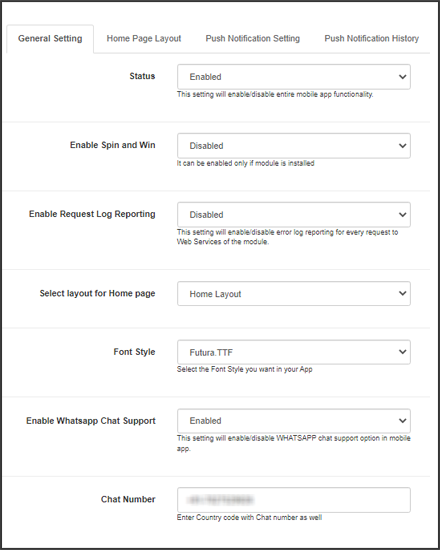
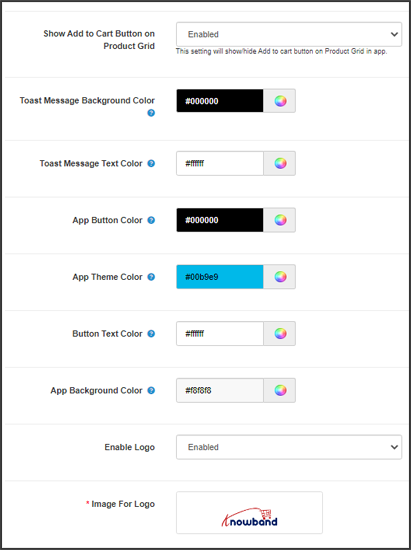
After installation, you will first go to the configuration settings on the module, where you can turn the entire module on or off with just one click. Next, you can enable/disable the spin and win module integration, logo, fingerprint login, phone number registration, sign-in/login popup, and more. Here, you can also customise the font and colors of the buttons and page.
Push Notifications
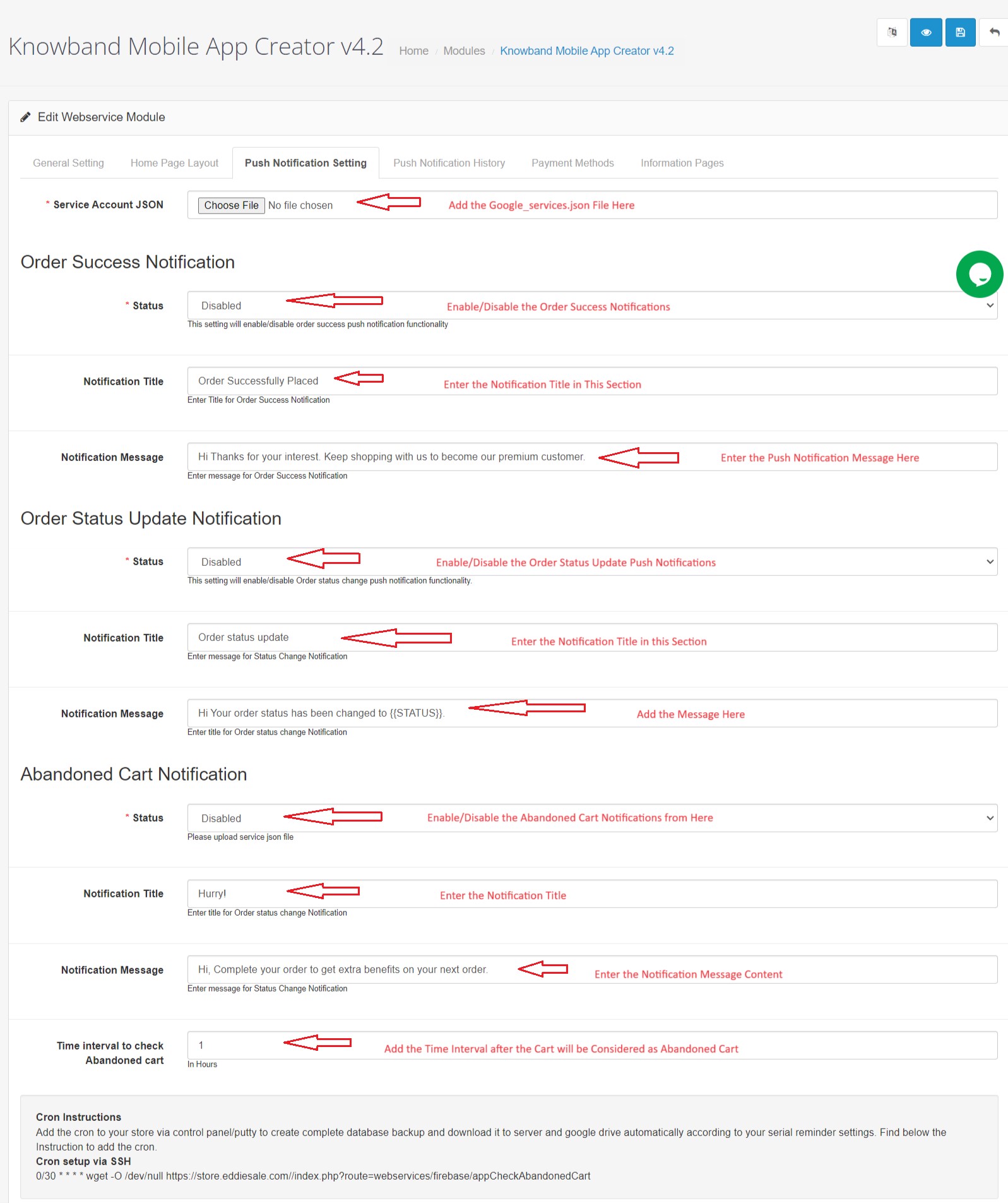
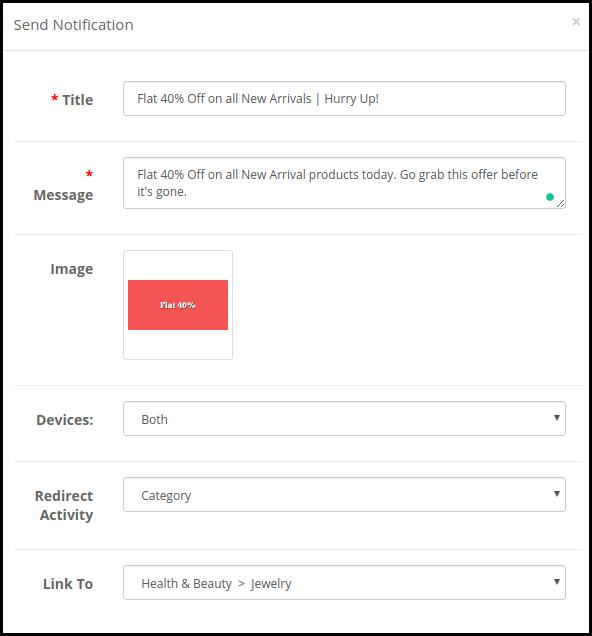
Here, you will first add a JSON file to enable push notifications. After which, you can enable the notification setting and add a custom notification message and title for created orders, order status, and abandoned carts. Moreover, in push notification settings, you can see the notification history, and you can share an instant notification from there with a clickable image.
Payment Method
Here, you can add multiple payment methods that are added to your website. As a result, it will support all the payment methods that your default website supports. Not only that, you can add the payment option for the backend configuration, too.
Home Page Layout
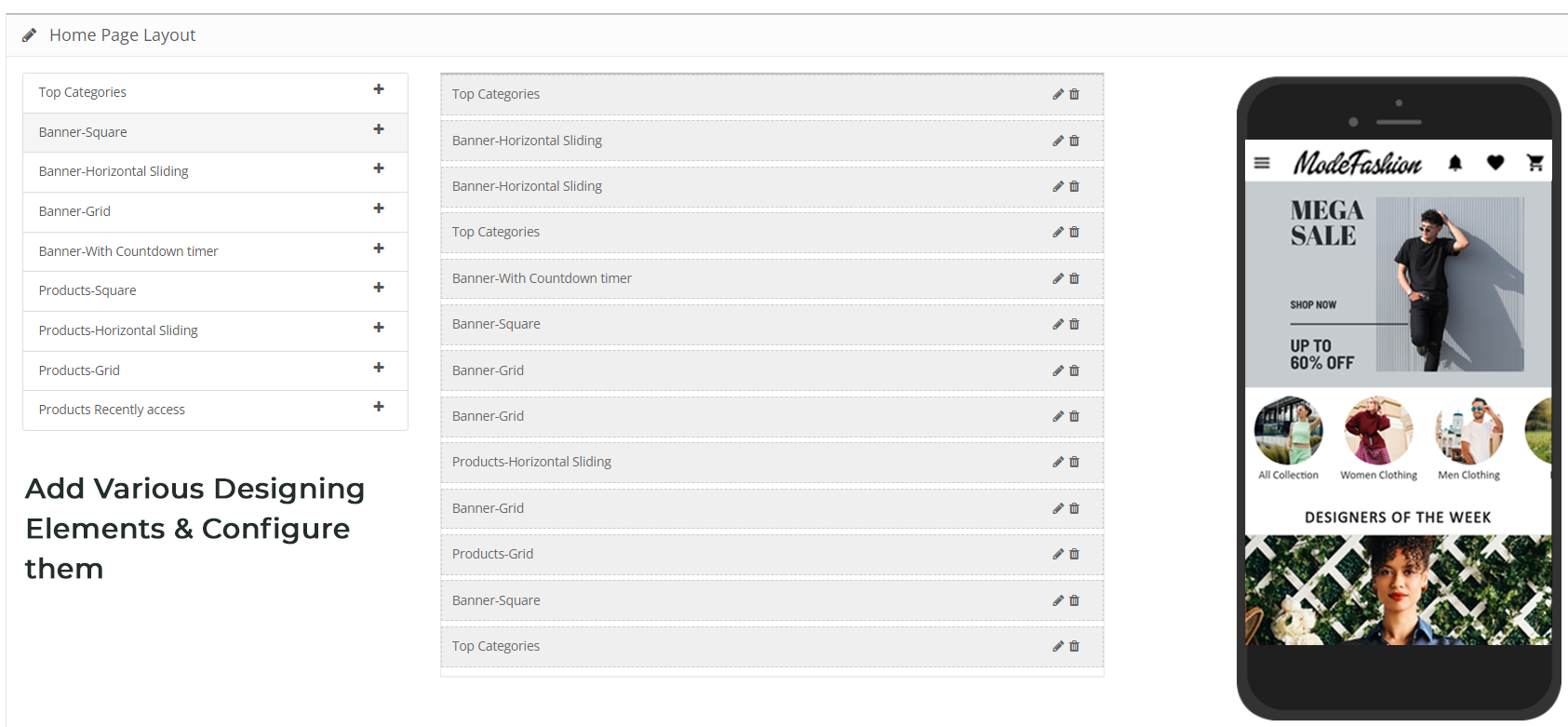
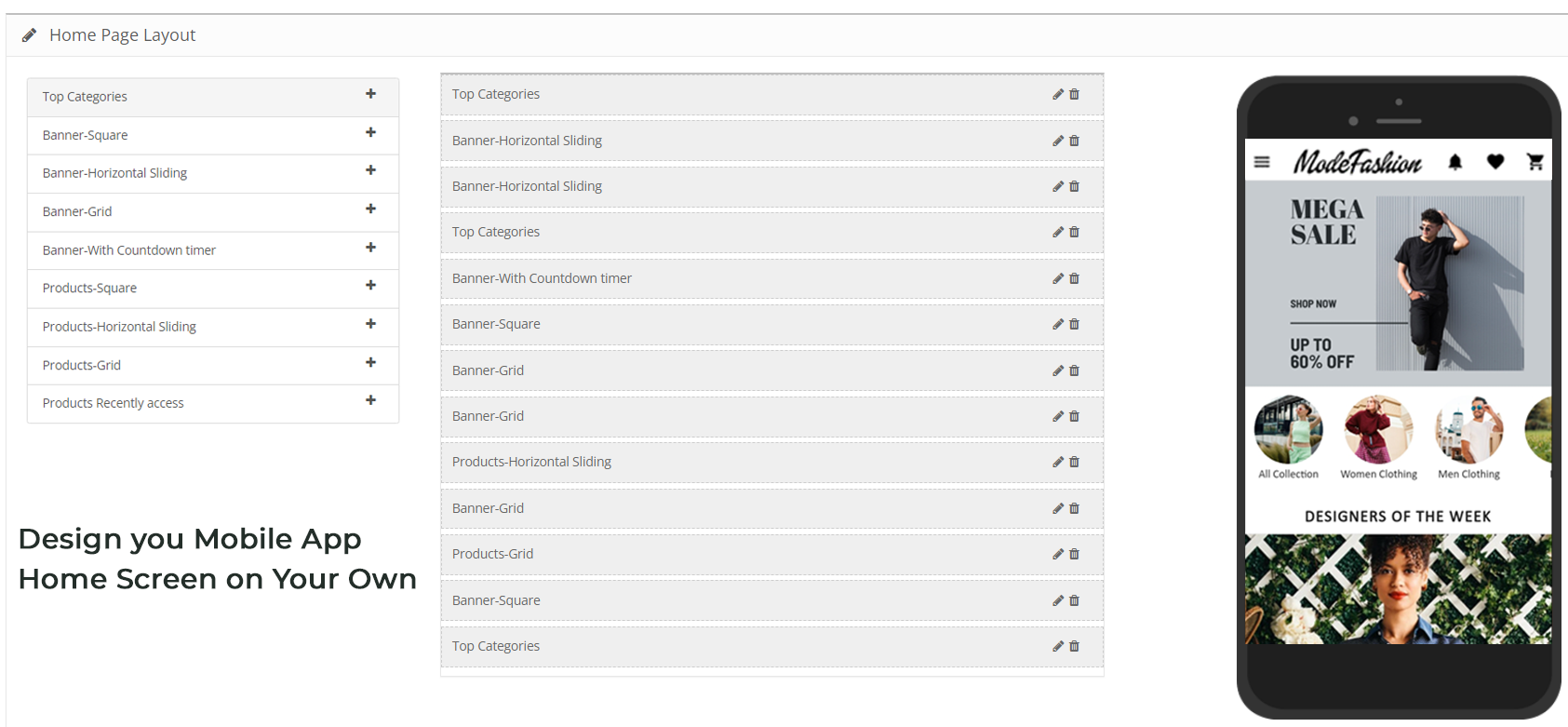
Here, you can personalise the entire home page by just dragging and dropping multiple elements on the page, such as a square banner, a grid banner, a countdown banner, a login/signup popup, a recently accessed product, and more.
GDPR Settings
This OpenCart Mobile App builder includes features that support GDPR requirements, such as user data access, deletion requests, and consent management. Moreover, the plugin provides synchronisation between CMS pages, which helps the store owners to export any CMS data to the GDPR Page.
Advertisement Settings
Lastly, the No Code Mobile App Builder for Opencart allow the store owners to add advertisements on home, product, category, and CMS pages. This helps in increasing revenue and boosting sales.
Conclusion
In the modern world, having a website is nice, but having a mobile app is better. OpenCart Mobile App Builder by Knowband is a product that helps in developing Android and iOS apps in small duration of time, without any coding. The mobile app is automatically synchronized with the website, compatible with all devices, and it helps you to sell more.
Hence, if you want to boost sales, expand your market, and provide a more convenient shopping experience, it is time to upgrade your store.
Online retail has progressed well beyond the desktop experience. Most shoppers today browse and shop using mobile apps because they provide convenience and personalisation with a simple tap. For store owners, this shift from desktop shopping to mobile apps creates both an opportunity and a challenge. How to deliver an app experience without complicated development and costs is the biggest challenge.
To fill that void for the e-commerce market, Knowband has developed the PrestaShop Mobile App Builder Module and the OpenCart Mobile App Builder Extension, two out-of-the-box solutions that can convert an existing store into fully functioning e-commerce Mobile Apps on Android and iOS. These modules give great app performance, customisation, and easy implementation to every merchant without the use of any code.
Why Businesses Are Choosing Knowband’s Mobile App Builders
The PrestaShop Mobile App and OpenCart Mobile App Builder Addon provide merchants with an easy way to enter the mobile market.
First, they reduce development time dramatically. Instead of spending time or money to hire a team or waiting for months for developers to complete work, merchants can publish a professional Android and iOS app in a very short period of time. Both App Builders are also connected to the online store and automatically sync with it, so whenever an update happens (whether it be for a product, price, or stock), it is instantly updated in the mobile app with no extra effort from the merchant in the back office.
Additionally, apps remain installed on users’ devices, which keeps the brand in the forefront of their minds, even when they are not shopping. You can also send push notifications at any time and send offers, product alerts, and order updates, which encourages users to engage in the app and make their next purchase.
Lastly, and possibly the best part, is that the modules offer complete design freedom. Store owners can design home screens that match their store, change banners in the app, update categories, or completely redesign layouts at any time and at any point in the future. With both the PrestaShop and OpenCart Mobile App Builder Plugin, there is absolute control over creative designs, and the best part is that it requires zero code.
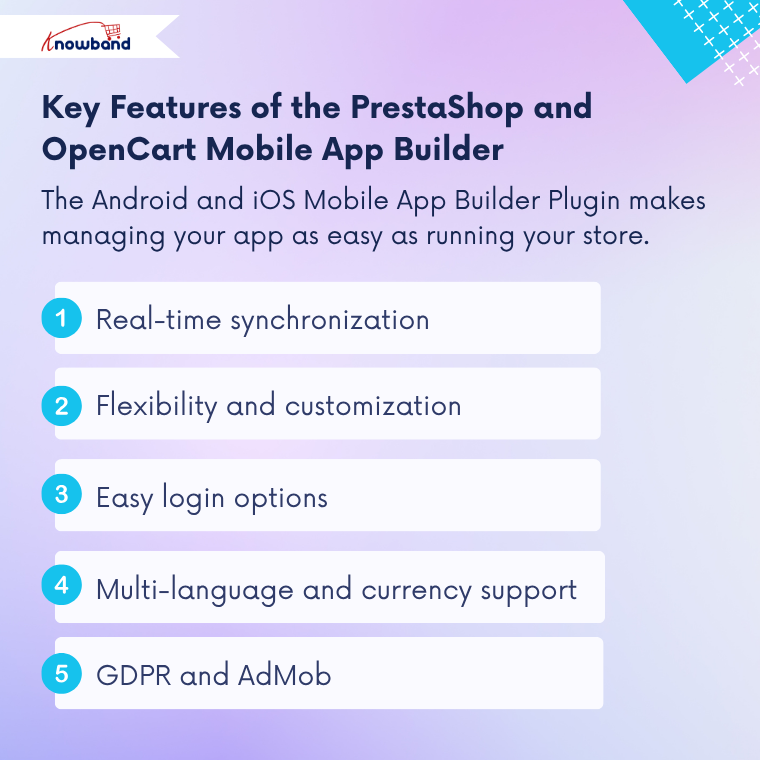
The Prestashop Android and iOS Mobile App Builder Plugin for both platforms has smart features that make running an app as simple as running a store.
Real-time synchronization
Everything you edit in your store, adding a product, changing price, and updating inventory, gets synced immediately with the app. It saves time and keeps the store and app in sync.
Flexibility and customisation
The Prestashop Mobile App Maker Addon offers store owners a simple way to customise app layouts. The merchant can build the home screen of the app, using banners, sliders, product grids, and promotion blocks. You can adjust colors, fonts, and icons as needed to find the right fit for the store branding.
Easy login options
Both modules provide an easy one-click login option with Google, Facebook, Fingerprint, and OTP verification. Hence, faster access leads to an improved checkout flow and would bring customers back again and again.
Support for Multiple Languages and Currency
The PrestaShop Android and iOS Mobile App Creator Addon and the OpenCart Android and iOS Mobile App Creator Plugin support multiple languages and currencies, enabling businesses to communicate with an international audience with ease.
GDPR and AdMob
Both modules are compliant with GDPR. Hence, they allow merchants to link consent to CMS pages for privacy. They also have AdMob support for the store owner to display ads and generate revenue right from the app user interface.
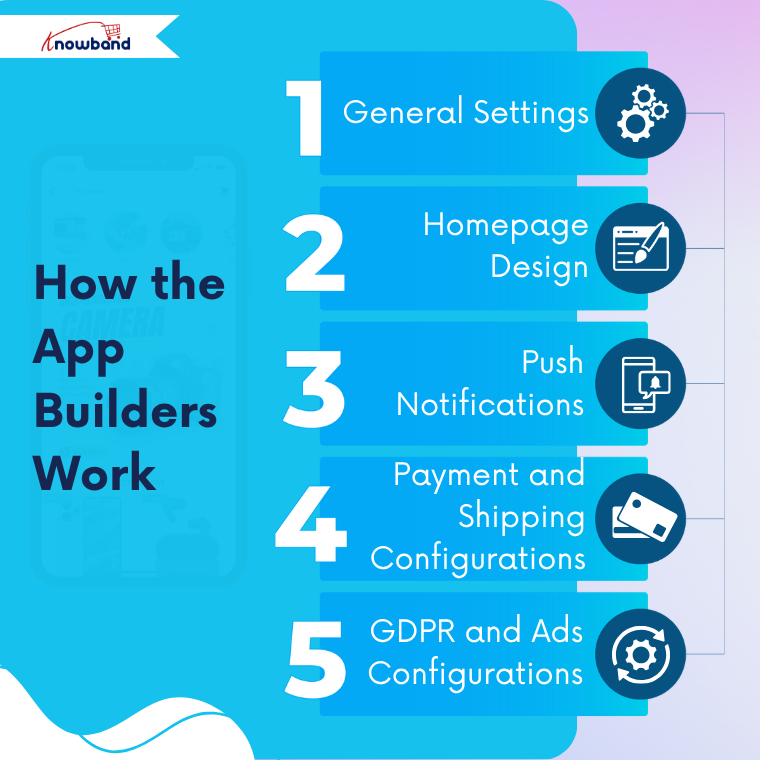
How the Knowband OpenCart Mobile App Builder Works
General Settings
The process begins with the General Settings section. Here, the admin can turn on or off the entire module with one click. Moreover, the admin can customize button designs or text labels, or turn on features like WhatsApp chat, fingerprint login, or phone number registration. Anything you change here will show up in the app instantly.
Homepage Design
The next stage configures the look and feel of the front end. Using a drag-and-drop feature, merchants can design layouts using banners, sliders, a countdown timer, or featured today categories. Both modules offer pre-built templates for specific industries such as fashion, electronics, or grocery, and are customizable at any time for a new season or a festival.
Push Notifications
Store owners can send automatic notifications using Firebase integration for new orders, order status changes, or abandoned carts. Moreover, store owners can also create custom messages with links and images to ensure customers stay engaged, and merchants stay connected to their customers.
Payment and Shipping Configurations
The OpenCart Mobile App Builder Addon automatically syncs payment and shipping methods from their respective stores. The store owners can add and disable them if necessary and keep a consistent checkout experience on both mobile applications.
GDPR and Ads Configurations.
Finally, the admin can enable GDPR compliance by adding the consent options to any of the privacy pages. They can also turn on AdMob to integrate ads at any screen they want, such as the home screen, product pages, etc, to monetize the store.
Together, these sections make these modules easy to configure and use, so that any store can go mobile in hours instead of weeks.
Conclusion
Mobile shopping has taken over as the leading growth driver in eCommerce, and Knowband’s PrestaShop and OpenCart Mobile App Builder Addon helps each store to be part of that growth with ease.
Whether you have a PrestaShop or OpenCart store, Knowband’s Mobile App Builder Module will convert your online store into an app in just a few days, at a low cost, and with ease.
If you have ever been to Dubai, you understand that the city is a mixture of cultures. Imagine now, craving your favourite Russian chocolates or the authentic European cheeses, but then struggling to find them in your common supermarkets. That is exactly what FMCG Basket solves.
Along with everyday groceries, they are distributing high-quality Russian and European food items directly to customers in the UAE who desire nothing less than the original. It’s like a connecting bridge; just a few taps away.
But nowadays, people don’t like to browse on desktops. They shop on their phones and with no Mobile App for their OpenCart store, this became a huge issue for FMCG Basket.
The Hurdle: Meeting Shoppers Where They Are
Running a food store on the Internet is a thrilling experience as it comes with challenging problems, and it did not take long before FMCG Basket realised that there are two issues:
Mobile shoppers were impatient and frustrated. They hate waiting and having to zoom in and out on a site.
Competitors were increasing. In Dubai, a large number of food stores were already app-first and provided smoother shopping, faster checkout, and push notifications.
The million-dollar question that FMCG Basket asked: “How to give a smooth mobile experience to customers under budget?”
The Turning Point: Partnering with Knowband
This is when FMCG Basket came across the Knowband OpenCart Mobile App Builder Module.
They selected a ready-to-use plugin instead of recruiting developers, waiting several months, and spending lots of money on them. Their website became a Mobile App in a few days.
No coding. No headaches. And now the FMCG Basket App was in customers’ pockets.
How the Knowand’s Opencart Mobile App Builder Helped FMCG
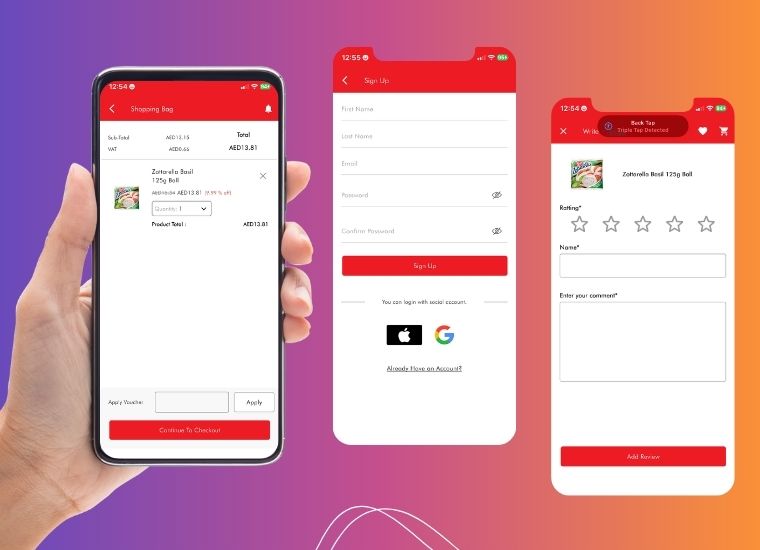
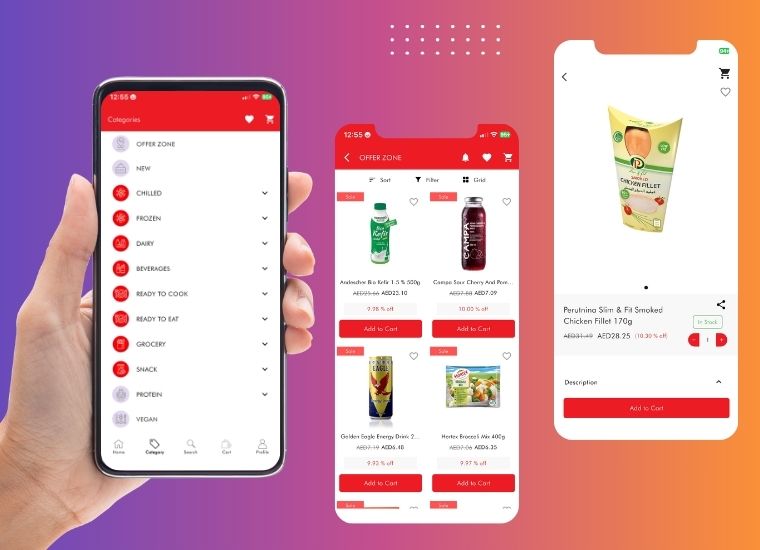
Real-Time Sync:Real-Time Sync: With the help of the Mobile App builder, the FMCG was able to create an application without any coding requirements. Additionally, they didn’t need the product to be uploaded differently as the module has the synchronisation features for Prices, stock, and new arrivals updated in real time.
Push Notifications: The app sends direct information on new promotions, restocking, and product releases right to the phones of customers. Hence, FMCG Basket now stays in touch with its customers and can increase repeat visits without much effort.
Multi-Language and Multi-Currency: The app is multi-language and multi-currency to cater to the international customers of Dubai. This will make sure that all the customers can comfortably shop in their own language and even make payments using their own currency.
Various Payments: FMCG Basket has added multiple safe payment and delivery methods. Hence, customers can select their preferred options and have a more convenient checkout.
Custom Branding: The app reflects FMCG Basket’s unique brand identity with banners, layout, and font. Hence, keeping consistency between the app and the website for a seamless user experience.
Additional Revenue: The app also became an additional revenue, because of Google AdMob integration, which converted user engagement into a steady income for FMCG Basket.
What Changed When the Mobile App Went Live
Here’s what changed within weeks of launch:
2x Extra Browsing Time: Customers did not drop off. Hence, they took more time to view products.
Improvements in conversions: Smooth checkout led to a decrease in the number of abandoned carts.
Purchases- Returned: Individuals were returning due to push notifications of offers and back-in-stock products.
The level of trust increased: An official app helped FMCG Basket to become larger, stronger, and trustworthy.
More for Customers: At last, customers were now able to browse Russian candies, European cheeses, and pantry items anytime, anywhere, even when they are on the road or taking a coffee break.
One of the customers even wrote: “Now I actually feel like I am shopping back home, only with my phone in Dubai!”
The Bigger Picture: Lessons from FMCG Basket’s Success
The journey of FMCG Basket shows this: today, you do not require a huge budget or an army of coders to remain relevant in the mobile-first world.
They did not just launch an app with the Mobile App Builder Plugin by Knowband for their OpenCart store; they created a bridge between the cultures: connecting expats and locals with the real flavours of Europe and Russia with just one swipe.
The transformation of FMCG Basket from just another online store to a pocket-sized grocery destination is evidence that the right help at the right time can redefine the future of a brand.
Running an online store today means handling many tasks at once. First, you manage products and customers. Then, you deal with shipping and daily operations. However, there’s one more thing you need to consider: mobile shopping.
Why Your Store Needs a Mobile App
Today’s customers spend most of their time on smartphones. In fact, they find it much faster to shop through apps than websites. Furthermore, mobile apps offer a smoother shopping experience. Therefore, if your store doesn’t have an app, you might be losing customers to competitors.
This is where an Opencart mobile app builder becomes essential. Specifically, Knowband’s mobile app solution helps OpenCart store owners create apps without any technical skills.
Understanding the Mobile App Builder
The mobile app builder is a simple tool that works with your existing OpenCart store. First, you install it like any other extension. Next, you set up basic details such as your logo and colours. After that, the system automatically creates both Android and iOS apps for you.
Most importantly, you don’t need to write any code or hire developers.
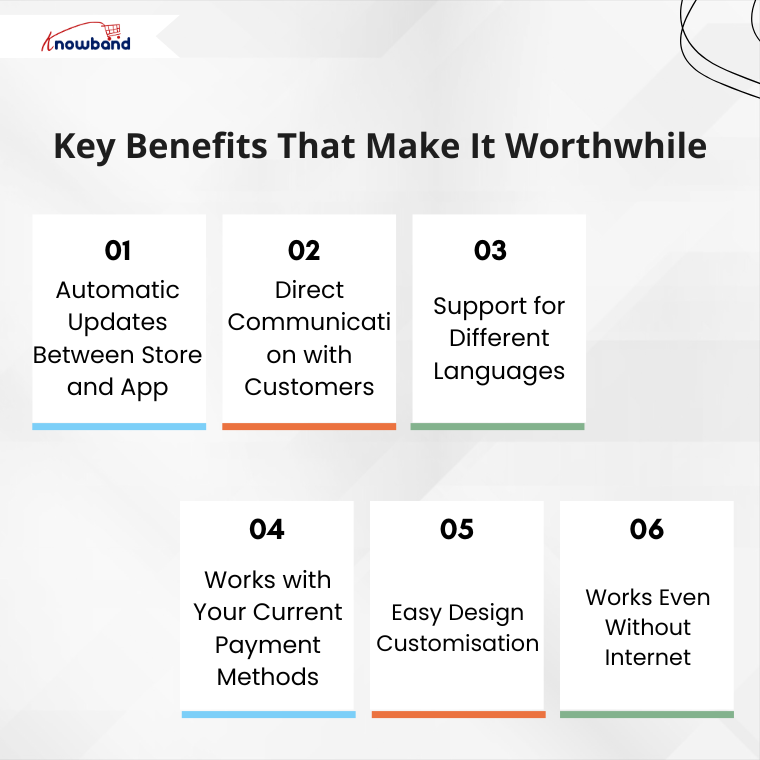
Key Benefits That Make It Worthwhile
1. Automatic Updates Between Store and App
When you change something on your website, it immediately appears in your mobile app. For example, if you update product prices or add new items, customers see these changes right away. As a result, you save time and avoid mistakes because everything stays in sync.
2. Direct Communication with Customers
Instead of relying only on emails, you can send instant messages to app users. For instance, you can notify them about sales, order updates, or remind them about items in their cart. Consequently, this leads to more sales and better customer engagement.
3. Support for Different Languages
If you serve customers from various countries, this feature is particularly useful. Then Knowband’s Opencart Mobile app Builder Extension works with multiple languages, including those that read from right to left. Therefore, all your customers can use the app created from Mobile App Builder comfortably in their preferred language.
4. Works with Your Current Payment Methods
The app automatically includes all your existing payment options. Whether you accept credit cards, PayPal, or cash on delivery, everything works the same way. Additionally, you don’t need to set up anything new.
5. Easy Design Customisation
You can change how your app looks without any technical knowledge. Simply update your logo, colours, or banner images from your admin panel. Moreover, you can even add video banners to make your app more attractive. As a result, your app reflects your brand perfectly.
6. Works Even Without Internet
Unlike many mobile apps, this one lets customers browse even when their internet connection is weak. Although they can’t complete purchases offline, they can still look at products. This small feature greatly improves the user experience.
Getting Started: Simple Steps
The setup process is straightforward and user-friendly. Here’s what you need to do:
First, purchase and install the Opencart Mobile App Builder Extension on your store. Then, fill in basic information such as:
Your app’s name
App icon and splash screen
Notification settings
Color preferences
After you complete these steps, the Knowband team creates your app files. Finally, you receive ready-to-publish apps for both the Android and iOS stores.
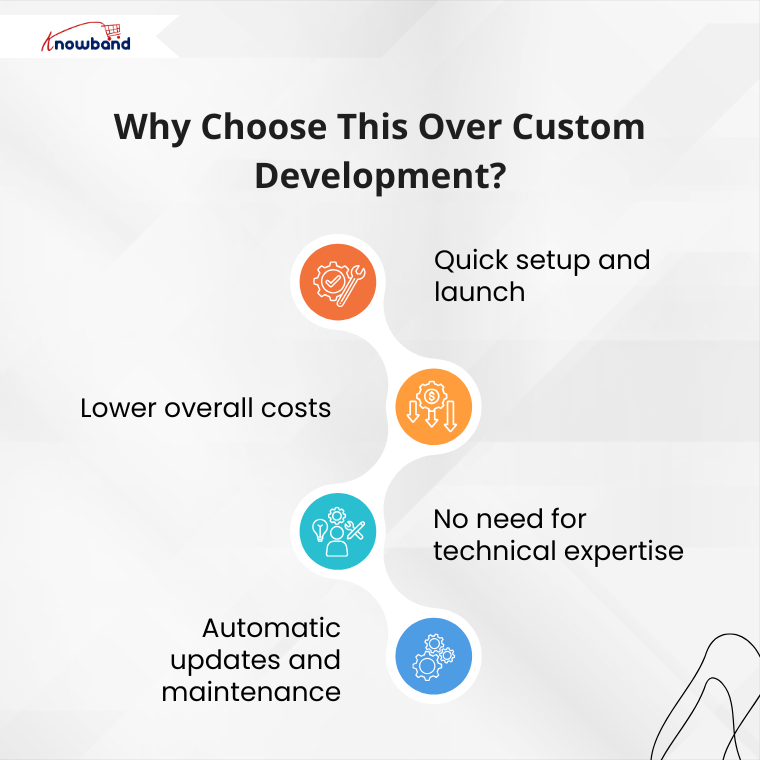
Why Choose This Over Custom Development?
You might wonder why not hire a development team instead. However, custom development has several drawbacks:
Traditional development takes months to complete. Additionally, it costs much more money upfront. Furthermore, you need ongoing technical support for updates and maintenance.
In contrast, using this app builder offers several advantages:
This Knowband’s Opencart Mobile App Builder Plugin offers more than just a mobile app. Instead, it provides a complete mobile shopping experience for your customers. Moreover, it helps you compete with larger retailers who already have mobile apps.
When customers can shop easily on their phones, they’re more likely to buy from you again. Additionally, mobile apps often lead to higher sales compared to mobile websites.
Making Your Decision
In conclusion, creating a mobile app for your OpenCart store is a smart business move. The mobile app builder handles all the technical work, so you can focus on growing your business.
If you’re still unsure, consider trying the demo version first. This way, you can see exactly how it works. Remember, in today’s mobile-first world, having an app isn’t just nice to have – it’s becoming essential for business success.
In today’s fast-paced digital world, most people use mobile apps instead of websites as mobile apps are more convenient to use. With more consumers shopping on mobile devices, businesses must adapt to this shift to stay ahead of the competition. A properly designed and easy-to-use mobile app not only enhances the shopping experience for the customers but also enhances the customer experience.
The PrestaShop Mobile App Builder by Knowband offers a powerful and user-friendly solution for PrestaShop store owners to create a custom mobile app for their stores. Moreover, by simplifying the app creation process, the Mobile App Builder module for store owners to deliver a smooth mobile shopping experience.
Here are 5 proven strategies to leverage Mobile App Sales through Mobile App Builder
Enhance User Experience with a Customizable App Interface
With the Prestashop Mobile App Builder by Knowband, store admins can create a completely customizable interface that reflects your brand and gives your customers a seamless shopping experience. Moreover, a well-designed mobile app enhances user experience, leading to increased customer satisfaction and higher sales.
Push Notifications for Targeted Marketing
Push notifications can be a powerful strategy that can help you re-engage your customers and encourage them to make more purchases, which can increase your overall sales.
With the PrestaShop Mobile App Builder by Knowband, you can send personalized alerts straight to your customers’ phones. Use them for new product launches, flash sales, or order updates. Sending the right notification to the customers helps drive repeat purchases and increase conversions.
Offer Exclusive Mobile-Only Discounts and Promotions
Encourage more users to shop through your mobile app by offering exclusive mobile-only discounts and promotions. In addition, these exclusive deals can increase app downloads and engagement, ultimately driving sales. Additionally, The mobile app creates urgency and excitement around mobile-only deals to boost both new and returning customer purchases.
The iOS Mobile App Builder for Prestashop integrates seamlessly with the payment methods and gateways. A quicker and easier checkout process is very important because it helps customers finish their purchases faster, which often leads to more sales. By offering multiple payment options credit cards, digital wallets, and COD, you give customers more flexibility, improving their shopping experience.
Leverage Social Media Integration to Expand Reach
Lastly, promoting your mobile app through social media channels can significantly increase brand visibility and drive more traffic to your store. The Prestashop Mobile App Builder allows easy integration with social media platforms, enabling users to share products directly from the app to their social profiles.
Increased Sales and Revenue: Firstly, by offering a mobile app to your customers, you make it easier for customers to browse and purchase products on the go, leading to higher conversion rates and increased sales.
Improved Customer Engagement: Push notifications, personalized offers, and updates keep customers engaged, informed, and coming back for more. Moreover, you can send real-time notifications about sales, discounts, or new arrivals, which helps drive customer retention.
Enhanced Brand Visibility: A mobile app increases your store’s visibility by keeping your brand right on your customers’ home screens. Furthermore, this makes it easier for them to shop and engage with your business at any time.
Seamless Shopping Experience: Furthermore, the mobile app ensures a smooth and responsive experience on all devices, providing users with quick access to the store and a user-friendly checkout process.
Improved Customer Loyalty: Lastly,by providing a mobile app, you offer a personalized shopping experience that builds customer loyalty. Moreover, Loyalty programs, exclusive offers, and personalized recommendations enhance the overall experience and make customers feel valued. Significantly, this integration of a mobile app into your prestashop store can help you tap into a wider audience, and engagement of customers. Additionally, the mobile app encourages viral marketing, leading to more purchases and higher sales.
Conclusion
The Prestashop Mobile App Builder by Knowband offers an all-in-one solution for Prestashop store owners to create a powerful mobile app without any technical expertise. Moreover, by implementing these strategies, you can improve user engagement and increase sales.
Don’t miss the chance to grow your business by creating a custom mobile app with the PrestaShop Mobile App Builder. It’s a great way to reach more customers, improve their shopping experience, and boost your sales.
In today’s digital-first world, having a mobile app is essential for any eCommerce business to thrive. OpenCart, a popular platform for online stores, has continuously adapted to this demand. Furthermore, with the release of the latest OpenCart Mobile App Builder v4.5 by Knowband, OpenCart store owners can now take their mobile app experience to the next level.
Moreover, this new version is packed with customization features and the added benefit of Google AdMob integration, creating new opportunities for branding and revenue generation.
In this article, we’ll explore the exciting new updates to the OpenCart Mobile App Builder and how these enhancements can make your OpenCart eCommerce Mobile App more effective and profitable.
Enhanced Customization Options with OpenCart Mobile App Builder v4.5!
One of the standout features in the latest version is the enhanced tab bar layout customization. The tab bar is the bottom navigation menu of the app, which users interact with frequently as they browse products or navigate the store. Therefore, with the new version, the OpenCart Mobile App Maker offers store admins full control over this layout, allowing them to tailor the appearance and functionality to their brand’s unique style and customer needs.
1. Customizable Icons for Bottom Navigation:
With the OpenCart Mobile App Builder v4.5, the Mobile App for OpenCart allows you to change the icons in the bottom navigation. Now, store admins can select icons that align with their brand aesthetics, whether they want to stick with classic icons or add a unique twist.
Thus, visually appealing bottom navigation can lead to a smoother and more engaging user experience, making it easier for customers to explore your store, access key features, and browse products efficiently.
2. Flexible Redirect Activities:
The latest OpenCart Android and iOS Mobile App Builder Plugin also enables you to customize where each tab leads. For example, you may want one tab to direct users to a specific category, a sale page, or even a promotional section. Therefore, this increased flexibility allows store admins to direct users to high-conversion pages, enhancing the overall shopping experience while driving sales.
3. Text and Color Customization for Icons:
In addition to customizing icons, the OpenCart Mobile App Builder now allows admins to change the text and text color for each icon in the tab bar. This seemingly small change can significantly impact the app’s overall look and feel, making it possible for store owners to match the navigation bar to their brand’s color scheme and style.
Furthermore, these three options make the OpenCart Android and iOS Mobile App Builder Module a powerful tool for creating an app that’s visually appealing, easy to navigate, and consistent with your brand’s identity.
Monetize Your Mobile App with In-App Advertising!
Besides customization, OpenCart Mobile App Builder v4.5 introduces a game-changing feature: Google AdMob integration. This feature allows store owners to earn revenue by displaying advertisements within their OpenCart Android App or OpenCart iOS App.
The integration of Google AdMob means that you can now place ads on various screens within your OpenCart Mobile App. This presents an opportunity for OpenCart Mobile App Creators to generate passive income through ad placements on product pages, the home screen, or other sections that users frequently visit.
Whether it’s banner ads, interstitial ads, or rewarded video ads, AdMob offers a variety of ad types to suit different app layouts and preferences. Moreover, Android and iOS App Makers for OpenCart can now choose to include ads on pages with high user engagement, ensuring better visibility and higher revenue potential.
With the competitive landscape in eCommerce, having a mobile app that is not only user-friendly but also customizable and monetizable is a significant advantage. OpenCart Mobile App Builder Plugin v4.5 addresses these needs, offering:
Flexibility and Control:Customizable navigation options make it easy for you to direct users to essential areas, enhancing user experience.
Revenue Potential:With in-app advertising through AdMOB, your app can generate income passively.
Brand Consistency:The new tab bar customization options allow you to align every aspect of the app with your brand’s identity.
At Knowband, we also offer demo versions to try out these features before committing to a premium version. This makes it easy to see the value of the Mobile App Builder Plugin for OpenCart firsthand.
Conclusion!
The OpenCart Mobile App Builder v4.5 by Knowband is a comprehensive solution for OpenCart store owners looking to take their mobile app to the next level. Furthermore, with advanced customization options for the tab bar layout and the ability to integrate Google AdMob for in-app advertising, it provides tools to improve user experience while creating a new income stream.
Explore the possibilities with OpenCart Mobile App Builder v4.5 and transform your mobile shopping experience today!
In the rapidly evolving world of eCommerce, having a mobile app is no longer just a luxury—it’s a necessity. For OpenCart users, the OpenCart Mobile App Builder Plugin has long been a go-to tool for creating feature-rich and user-friendly apps.
But what if your app could do more than just sell products via apps? What if it could also be a steady source of additional income? That’s exactly what the new in-app advertisement banner feature in Knowband’s Opencart Android and iOS Mobile App Builder Plugin promises. By integrating ads into your mobile app, you can open up exciting new revenue streams and further monetize your business.
Why In-App Ads Matter for Your eCommerce Business?
As eCommerce businesses continue to grow, competition is fiercer than ever. To stay ahead, businesses need to explore multiple revenue avenues. Thus, relying solely on product sales can limit your earnings. That’s where in-app advertisements come in.
With the OpenCart Mobile App Builder, you can now include advertisement banners within your mobile app. Moreover, these banners offer a great opportunity to feature ads from third-party companies or promote your own products, services, and deals. The revenue generated through these advertisements can provide a financial boost to your business.
This new feature is available across both OpenCart Android and iOS Mobile App Builder Modules, making it accessible to anyone running a mobile app for their OpenCart store. Whether you use a Mobile App Builder Plugin for OpenCart, this new functionality will allow you to earn extra income effortlessly.
How Advertisement Banners Work in OpenCart Mobile Apps?
The new advertisement banner feature in the OpenCart Mobile App Builder Plugin is designed to be simple, effective, and user-friendly. You, as the store admin, have full control over the banners, deciding where and when they appear within your app. This allows you to strategically place ads where they’ll be most visible to users, increasing the chances of engagement and click-throughs.
Here’s a quick overview of how you can make the most of the in-app ads:
Third-Party Ads:You can display ads from third-party ad networks and earn income through clicks or impressions. This turns your mobile app into a source of passive income.
Self-Promotion: In addition to third-party ads, you can use the banner space to promote your own products, services, or special offers. This is a great way to drive traffic to specific pages or products on your store.
Customizable:The OpenCart App Maker allows you to customize the banners to fit the design of your app. Furthermore, you can adjust sizes, colors, and placements to ensure the ads blend seamlessly with your app’s aesthetics.
This flexibility is key, as it ensures that ads don’t disrupt the user experience while still being effective.
Benefits of In-App Ads in Your OpenCart Mobile App:
Create Android & iOS App for Your Opencart Store
Purchase the Extension and Get Your Apps on Same Day
Now that you know how the advertisement banners work, let’s explore some key benefits:
New Revenue Stream: The most obvious benefit is the additional income generated through ad placements. Moreover, the in-app ads give you a way to monetize your app without compromising the user experience.
Passive Income:Once your ads are set up, you can continue earning revenue with minimal effort. As long as your app is being used, you’re making money—whether users click on the ads or simply view them.
Enhanced User Engagement: If you use the ads to promote your own products, you can increase customer engagement by pushing new products, sales, or promotions right in front of your app users.
Better Return on Investment:The OpenCart Android App Maker already helps businesses reach more customers through mobile platforms. Furthermore, with the addition of ads, you can further maximize the ROI of your mobile app by generating income beyond product sales.
Scalable:As your user base grows, so does your revenue potential. The more app downloads you achieve, the more impressions and clicks your ads will receive.
Final Thoughts
The new advertisement banner feature in the OpenCart Mobile App Builder by Knowband is a game-changer for store owners who want to unlock additional income streams. Whether you use a free OpenCart Mobile App Builder for Android or iOS, this feature allows you to monetize your app beyond product sales.
Thus, by incorporating ads, you can generate passive income, increase user engagement, and boost your overall revenue. It’s an easy, effective way to maximize the value of your mobile app and ensure it’s working hard for your business.
In the fast-paced world of digital commerce, staying ahead means continuously enhancing the functionality and user experience of your mobile applications. Ensuring the fact, that the latest upgrades to the OpenCart Mobile App Builder Plugin are designed to do just that. We are going to offer exciting new features that help businesses optimize their online presence. This blog post explores these new functionalities and their impact on your business’s mobile commerce strategy.
The new automated banner sliders in the OpenCart Mobile App Builder allow for the scheduling of rotating banners directly from the module backend. This feature is a significant enhancement for businesses looking to automate and optimize their mobile app visuals for promotions and announcements. Moreover, in the upcoming module update, we are going to provide an option to the admin to enter the time for the automated banner sliders. This will ensure the seamless synchronization between the backend and the mobile apps.
Key Benefits:
Dynamic Content: Keep the app content fresh and engaging with timely banner updates.
Strategic Promotions: The OpenCart store admin can schedule banners in alignment with your marketing campaigns for maximum impact.
Ease of Use: Set up and forget functionality allows for effortless content management.
Seamless Login/Sign-Up: Enhancing User Onboarding
Capturing the customers’ email addresses is one of the most important aspects for eCommerce businesses. These emails can not only be used for marketing campaigns but also to increase the customer database. Thus, enhancing user experience, the OpenCart eCommerce Mobile App will feature a login/sign-up pop-up for non-logged-in users. Furthermore, this addition streamlines the transition from guest browsing to active customer engagement, potentially boosting conversion rates and enhancing customer retention.
Key Benefits:
Streamlined Access: The login/sign-up pop-up for non-logged-in customers simplifies the onboarding process for new app users.
Increased Engagement: Lower barriers to entry increase the likelihood of user registration and retention.
Valuable Insights: Capture essential data on user preferences and behaviors from the outset.
Notifications Feature: Keep Your Customers Engaged
The introduction of the notification features in the OpenCart Android and iOS Mobile App Builder Plugin represents a strategic tool for maintaining customer engagement. Furthermore, this functionality allows businesses to send personalized updates and offers, keeping users connected and informed.
Therefore, customers can also check all the previous notifications with clicks right in their mobile app.
Key Benefits:
Direct Engagement: Utilize notifications to inform users about new products, offers, and updates directly.
Boosted Retention: Regular notifications can significantly enhance user return rates and app engagement. Moreover, customers can check notifications and offer anytime in the upcoming notification tab in the Android and iOS App maker for OpenCart.
Customized Messaging: Tailor notifications to user behaviors for more effective communication.
CMS Pages and Layouts: Streamlined Content Management
The latest update enriches the OpenCart iOS App Maker by integrating CMS pages and layout as new redirect activities. This enhancement improves content management capabilities, allowing for better structured and more navigable app interfaces.
Key Benefits:
Enhanced User Experience: Users enjoy smoother navigation and easier access to important information.
Cohesive Branding: Maintain a consistent look and feel throughout the app with integrated CMS pages.
Flexible Content Options: Manage and present diverse content types more effectively within the app.
Conclusion!
The upcoming enhancements to the Mobile App Builder Plugin for OpenCart significantly improve both the aesthetic appeal and functionality of your mobile eCommerce platform. Thus, by upgrading, businesses not only enhance the user experience but also bolster engagement and sales conversions. Consider these advancements in the OpenCart Android and iOS Mobile App Creator Plugin to maintain a competitive edge in the dynamic marketplace of today.
Moreover, if you have any queries/suggestions regarding upcoming Opencart Mobile app builder enhancements, you can also reach out to our support team at our email address support@knowband.com.
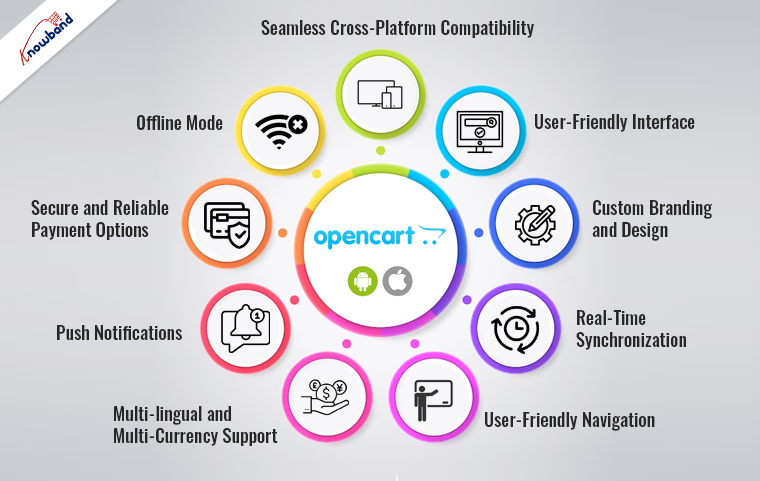
In today’s fast-paced digital world, mobile commerce has become a dominant force in the e-commerce industry. Furthermore, modern shoppers are increasingly turning to their smartphones and tablets to browse, shop, and make purchases. Recognizing this trend, at Knowband we offer Opencart Mobile App Builder which empowers online store owners to create feature-rich mobile apps for their businesses. Thus, in this article, we will explore the top features of the Opencart Android and iOS App Builder and how it can make mobile shopping a breeze for your customers.
1. Seamless Cross-Platform Compatibility:
The Opencart Mobile App Builder by Knowband is designed to cater to a wide audience by offering compatibility with both Android and iOS platforms. Moreover, with a single plugin, you can create mobile apps for both major mobile operating systems. Ensuring that you don’t miss out on any potential customers.
2. User-Friendly Interface:
Designing a mobile app for your Opencart store is made easy and user-friendly by the Opencart App Builder, eliminating the need for advanced technical skills or coding knowledge. Its intuitive interface enables effortless customization, making it accessible even to non-technical users.
3. Custom Branding and Design:
Your mobile app represents your brand, and it should mirror your website’s branding. Therefore, Knowband’s Opencart Mobile App Builder lets you customize the app’s appearance, including the logo, color scheme, and layout, ensuring that your app aligns perfectly with your brand identity.
4. Real-Time Synchronization:
One of the standout features of the Opencart Mobile App Maker is its real-time synchronization with your Opencart store. This means that any changes you make on your website, such as product updates, pricing changes, etc. are instantly reflected in your mobile app. This ensures that your customers always have access to the latest products and information.
5. User-Friendly Navigation:
Navigation is a critical factor in ensuring a smooth shopping experience. Opencart App Creator provides user-friendly navigation menus and filters, making it easy for customers to explore your product catalog and find what they’re looking for quickly.
6. Multi-lingual and Multi-Currency Support:
In the era of global e-commerce, it’s essential to cater to a diverse customer base. Therefore, the Opencart eCommerce Mobile App offers multi-lingual and multi-currency support. Allowing you to reach a broader international audience. This feature helps you expand your business to new markets effortlessly.
7. Push Notifications:
Engaging with your customers is vital for building brand loyalty and increasing sales. Opencart Android and iOS App Builder Plugin includes push notification functionality. You can send personalized messages, promotions, and updates directly to your app users, keeping them informed and engaged.
The Android and iOS apps also provide a notification tab for the customers. Furthermore, the app users can check all the recent notifications in a single place, ensuring seamless information and updates for the customers.
8. Secure and Reliable Payment Options:
Online shopping requires top-notch security measures. Opencart App Maker integrates with secure payment gateways, ensuring that your customer’s payment information is safe and transactions are processed smoothly. This trust in payment security can boost customer confidence and increase conversions.
9. Offline Mode:
Sometimes, customers may have limited or no internet connectivity. Opencart Mobile App Builder includes an offline mode that allows users to browse and add products to their cart even without an internet connection. Once online, the app syncs the data with your store, providing a seamless shopping experience.
10. Login-Sign Up Pop-Up:
The mobile apps streamline the login process by presenting a convenient login/sign-up pop-up directly on the app’s home screen. This feature not only simplifies the login experience for users but also aids e-merchants in collecting customer emails for marketing initiatives.
Conclusion!
In the ever-evolving world of e-commerce, having a mobile app is no longer an option; it’s a necessity. The Opencart Mobile App empowers Opencart store owners to tap into the mobile shopping revolution with ease. Moreover, its user-friendly interface, cross-platform compatibility, and feature-rich capabilities make it a valuable tool for enhancing the mobile shopping experience for both you and your customers.
Stay ahead of the competition, expand your reach, and provide your customers with the convenience they desire. Mobile shopping has never been easier thanks to the Opencart App Builder.
Develop FlutterOpenCart Mobile App for your eCommerce store with KnowBand’s OpenCart Mobile App Builder & start observing a sudden growth in your store conversions & sales.
1.0 Introduction
If you are an OpenCart website owner & currently selling products on your website, try KnowBand’s automated mobile apps solution & take your business to the mobile world. The OpenCart Mobile App Builder is the pre-configured framework designed to develop FlutterAndroid & iOS apps for your online website. This ready-to-go mobile app solution is the most advanced & smartest solution to own a pair of fully functional Android & iOS stores without any coding or technical skills.
KnowBand has made a mark in the eCommerce industry as a leading mobile app provider for almost all the major eCommerce platforms. Its OpenCart Mobile App Builder is the easiest way to build feature-packed OpenCart Mobile Apps in just 3 simple steps:
2. Share the app-related specifications & requirements.
3. Get your own FlutterOpenCart Apps in 2-3 days.
We, at KnowBand, are an exceptionally skilled and proficient pool of programmers, designers, and other involved professionals. We can deliver an OpenCart mobile app that closely matches your personal expectations and business requirements. If you are not sure about the utility of this mobile app for your OpenCart store, let us throw some light on this amazing OpenCart Mobile App Builder.
Latest Enhancements in Opencart Mobile App Builder v4.8
The OpenCart Mobile App Builder Extension now introduces two powerful new integrations with the AI-Powered Chatbot Extension and the Opencart VideoMate Extension. These latest integrations significantly improve customer engagement, automate support, and enhance product presentation within your mobile application.
The Opencart AI Chatbot Extension leverages popular and advanced AI models of 2026, such as OpenAI ChatGPT, Google Gemini, Claude, and DeepSeek, enabling intelligent, real-time customer interaction directly inside the mobile app.
The Opencart Video Manager Extension transforms the shopping experience with immersive video carousels and a floating video player, helping merchants showcase products in a more engaging and conversion-driven format.
Together, these features make the OpenCart Mobile App Builder a complete AI-powered mobile commerce solution for modern eCommerce stores.
1.1 Prominent Features of OpenCart Mobile App Builder:
The following are some of the major features you’ll get in your OpenCart Mobile Apps:
–> Customizable Home Screen Layout (Complete Flexibility)
1.2 Recent Enhancements in Opencart Mobile App Builder!
1. Dynamic Position of the Signup-Login Popup in Home Page Layout: Admins can now customize the position of the signup-login popup on the home page, offering a more flexible user experience.
2. Enhanced Review Pages:
Write Review: Simplified process for customers to leave feedback.
Read Review: Improved interface for browsing reviews.
Review on Product Page: Reviews are now more accessible directly on product pages.
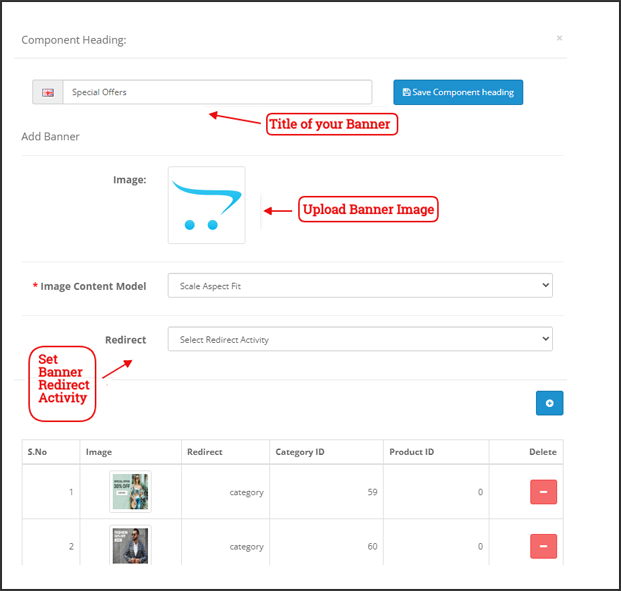
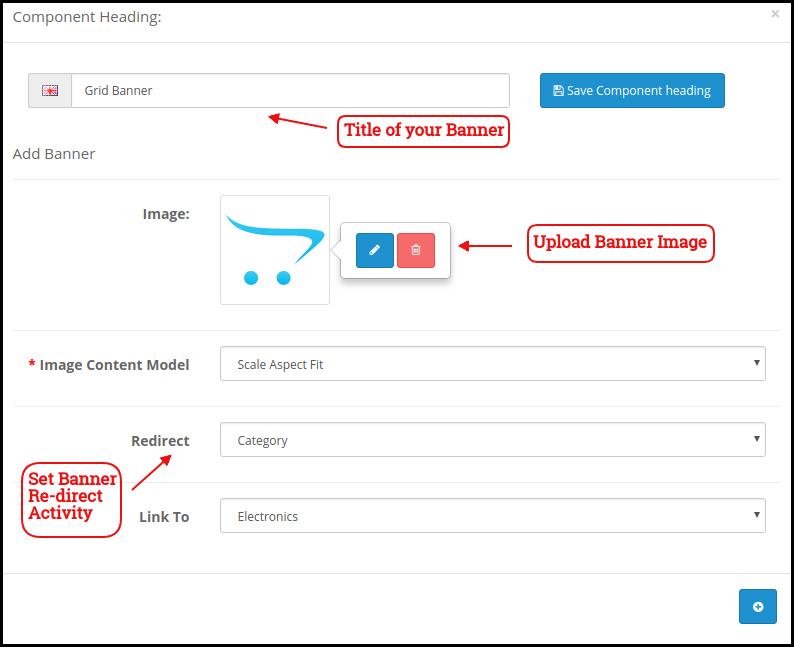
3. Video in Banner Elements: We have introduced video options in the banners available for the app’s home page layout. Now, the admin can add a YouTube video or can also upload a video below 2 MB for the square, horizontal, grid, and countdown banner components.
4. Push Notification Updates: Recently Firebase has officially deprecated the older cloud messaging API. Due to that the admin configurations now support uploading Firebase key JSON files for better management.
5. CMS and Layout Redirection in Banners and Category Elements: Banners and category elements available in the home page layout now support redirection to CMS and multi-layered layouts.
6. Automatic Banner Sliding in Horizontal Banner Slider: Horizontal banner sliders now feature automatic sliding, improving user engagement. The admin can also add the time difference on which he wants to slide the banners automatically.
7. List and Grid View for Product Listing Screen: Users can toggle between list and grid views on the product listing screen for more convenient browsing. This new feature not only improves the UI but also provides more convenience to the customers while browsing the products.
8. Common Notification by Admin: Admins can now send common notifications to all users, ensuring important messages reach everyone. Furthermore, customers can check all the past notifications in the notification tab available in the app.
9. Custom Banner Element in Home Page Layout: Now, the Opencart admin can upload banners of any size, offering greater customization of the home page.
10. Redirection in Top Category Element: Top category elements now support redirection to specific layouts, improving user navigation.
11. Advertisement Setting: The enhanced OpenCart Mobile App Builder allows store admins to turn their apps into revenue-generating channels by incorporating in-app advertisements. With Google AdMob integration, admins can now display banner ads on various app pages, creating a seamless way to generate additional income while keeping users engaged.
12. Navigation Setting: With flexible customization options, the store admin can adjust the look and feel of the tab bar layout. Now, the modules allow the admin to choose the names, set redirections, choose icons, and personalize color schemes, offering a unique and branded app experience that aligns with their store’s style.
Knowband’s OpenCart Mobile App Builder
The OpenCart Mobile App Builder by Knowband helps you create a mobile app for your store without coding. Easily turn your website into a user-friendly app!
KnowBand offers a demo of OpenCart Mobile Apps before actual mobile app development. We have brought free of cost demo for all the eCommerce store owners out there.
2.1 View Our Demo Store working on Apps
Take a look at our app functionalities with our demo OpenCart Mobile Apps. We have integrated our demo store with the app in order to let you explore the app working. All you need to do is to follow these simple instructions:
Step 1: Download and install the Nautica OpenCart Mobile App on your testing device. Here, are the links to OpenCart Demo Apps:–> Apple App Store–> Google Play Store
Step 2: Open the App and tap the “View Demo” button being displayed on the splash screen. Enter some relevant details like Name, E-mail & Store URL & experience our demo store running on the demo app.
Note: To access the Admin Panel of KnowBand’s OpenCart Mobile App Builder on our demo store, visit here.
2.2 View Your Store working on Demo Apps
Want to test your own store on the demo apps. Well, we made even that possible with 3 simple steps:
Step 2: Install the Demo Apps (links in the previous section) on your mobile testing device. Open the App & enter your website URL in “View Your Store”.
Step 3: Tap “View Your Store” and start experiencing your own store on OpenCart Demo apps.
Note: This Free version of Mobile App Builder is just for the demo purpose & no APK/IPA files will be provided with this module. In order to get your own APK/IPA files, you need to purchase the paid version of the OpenCart Mobile App Builder.
3.0 Build OpenCart Mobile App in 3 Simple Steps
Once you are satisfied with the demo apps working, it’s time to build your own mobile apps. The process to develop mobile apps with OpenCart Mobile App Builder is only a matter of these 3 simple steps:
Step 1: Purchase & Install Module on your website.
If there is any issue while publishing the app on respective stores, we would get it done for you.
4.0 Admin Panel Screens
Once the OpenCart Mobile App Builder is installed on the website, let’s take a look at its backend panel configuration. First of all, go to Extensions>>Modules>>KnowBand Mobile App Creator & click on configure option. It will bring the following interfaces to you:
4.1 General Settings:
a) Status: Enable/disable the OpenCart Mobile App Builder module to make the apps work on mobile devices.
b) Enable Back in Stock: This option allows the admin to enable/disable Knowband’s back-in-stock module in the apps.
c) [New] Enable Spin & Win: This option allows the admin to enable or disable the Knowband’s Spin & Win Module in the mobile app.
d) [New] Enable AI Chatbot: You can now enable the AI Chatbot on your mobile app using the Opencart AI Chatbot Extension.
e)[New] Enable Videomate: Now, admins can easily add the instagram reels, shorts, videos in trending vidgets using the Opencart Videomate Extension
f) Font Style: This option provides multiple font styles to suit your app’s appearance.
g) Show Add to Cart Button on Product Grid: If you want to show/hide the “add to cart” button from the product listing pages, you can manage the same from this button.
h) Mandatory Phone Number at Registration: Make the mobile number field optional/mandatory on the app’s sign-up page from here.
i) Redirect on Cart Page when Add to Cart: If you want users to directly redirect to the cart page upon clicking on the “add to cart” button, you can enable this option from here.
j) Enable Notification List Feature: This button allows the store admin to enable/disable the notification feature in the Android and iOS apps.
k) Enable Sing-up Pop-up: You can enable/disable the login pop-up for the non-logged-in customers in the app.
l) Enable Request Log Reporting: Enable the error log on mobile apps. This log file is used when the app shows any error or abnormal behaviour.
m) Select Layout for Home Page: Choose the desired layout for your app home screen. You can create multiple layouts under the Home Page Layout tab.
n) Enable WhatsApp Chat Support: Enable/disable the WhatsApp chat option on mobile apps.
o) App Button Color: Choose the button color for your apps.
p) App Theme Color: Choose the theme color for your apps.
q) App Button Text Color: Choose a button-text color for your apps.
r) App Background Color: Choose a background color for your apps.
p) Enable Logo: Enable the logo in your mobile apps. You can upload the logo image which will be displayed on the header of the mobile apps.
q) Fingerprint Login: Enable/disable fingerprint login in mobile apps.
r) Phone Number Login: Enable/disable phone no login in the mobile apps.
s) Disabled Shipping Methods: Disable the shipping methods that you do not want to display in the apps.
4.2 Payment Methods:
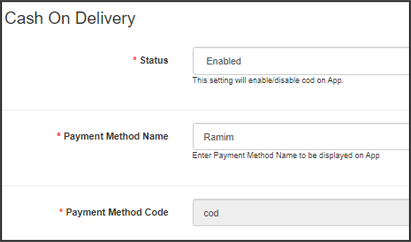
The OpenCart Mobile App Creator offers additional COD payment option to make the payments easier in the apps. The mobile apps with this extension already support web-view payment options in mobile apps.
4.3 Push Notifications:
a) Service Account Json: In order to set-up the push notification in both the Android and iOS app, you will have to add the google_services.json file in this section. You can get the same in your Firebase account or can also ask the Knowband support team for the JSON file for your Firebase project.
b) Order Success Notification: Configure an automated order creation push notification which would be sent automatically on the user’s apps who successfully create an order.
c) Order Status Update Notification: Configure an order status update notification which would be sent automatically to the users whenever there is an update in order delivery status.
d) Abandoned Cart Notification: Configure automated abandoned cart notification which would be sent automatically to the users who left their products in the cart.
e) Send Notification: The store admin can even send manual notifications & highlight any deal or discount to the mobile app users.
4.4 Information Pages:
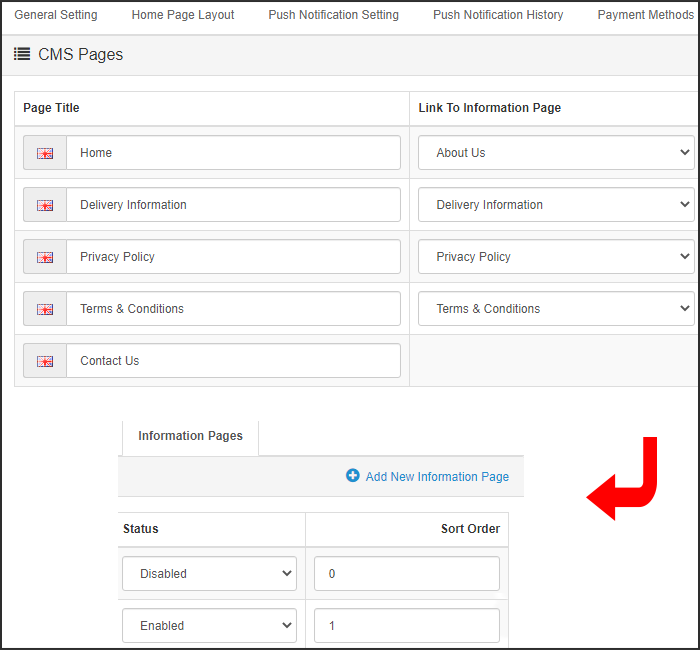
This tab of the OpenCart Mobile App Maker allows you to manage the CMS pages on the apps. You can customize the name and landing page of various CMS along with their sort order. New pages can also be added from here if there is a requirement.
4.5 Home Page Layout:
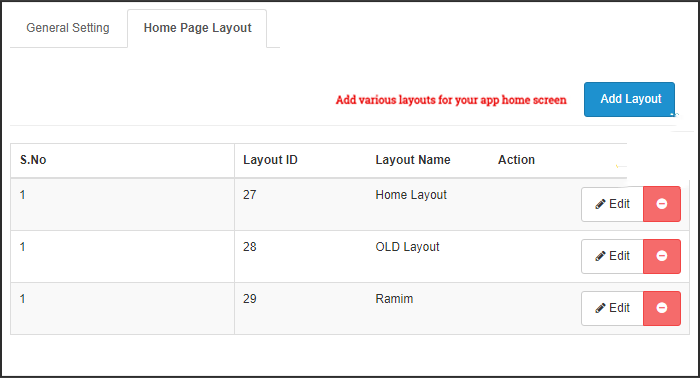
The OpenCart Mobile App Builder allows you to create & save various intuitive & appealing layouts for your mobile app home screen.
After adding the layout, click on Edit option & start adding & configuring various elements for your app home screen.
The store admin can configure the following design elements on the mobile app home screen:
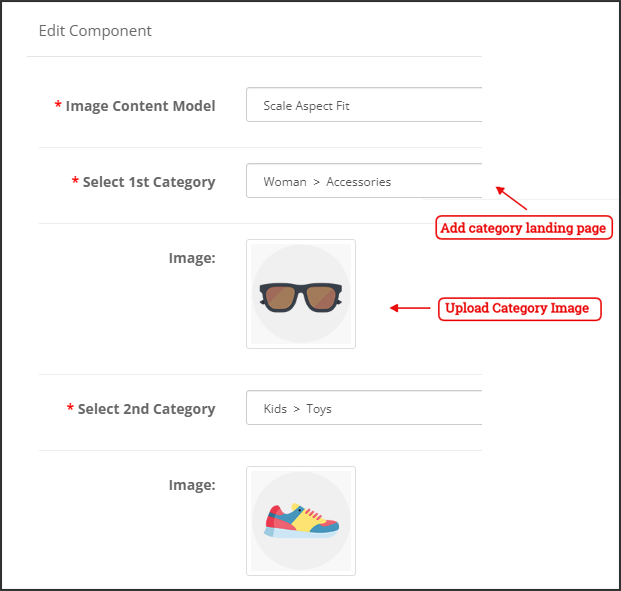
Top Categories:
These are the categories displayed on the top of the home screen in the form of squares. You can configure their images & landing pages from the backend. Maximum 8 such categories are added of which 4 are mandatory.
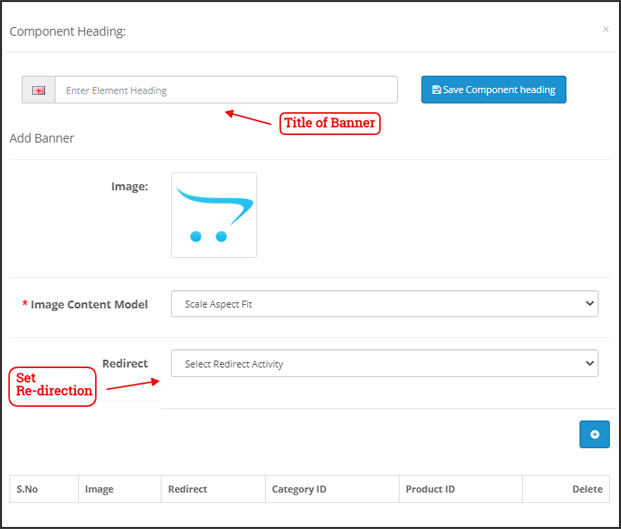
Square Banner:
You can offer a square-shaped banner on the home screen of OpenCart Mobile App whose image & landing page link can set from the backend.
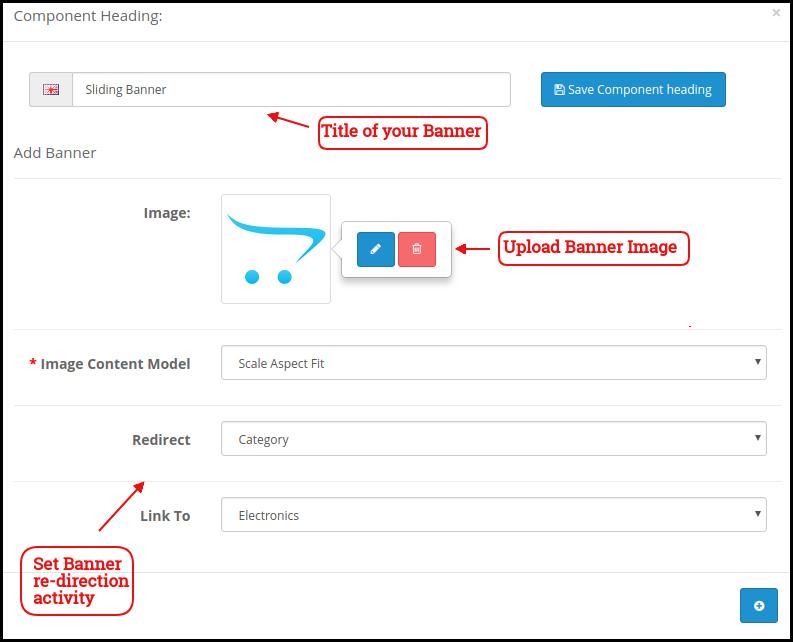
Sliding Banner:
These are the sliders for your home screen which can be configured from the module backend.
Grid Banner:
These are the banners for the app home screen displayed in the form of a grid listing & can be customized accordingly.
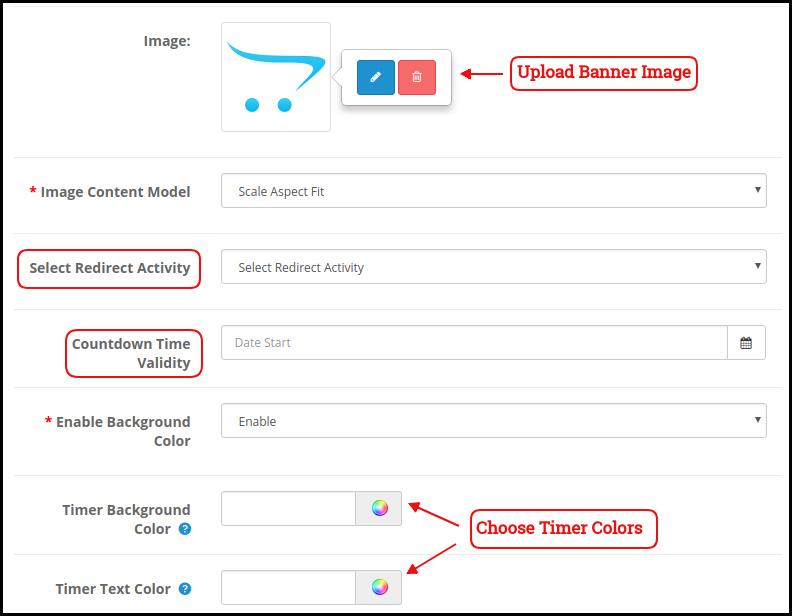
Countdown Banner
The OpenCart Mobile App Maker offers a count-down timer banner in your mobile apps. You can configure the banner image, landing page, and timer from the backend.
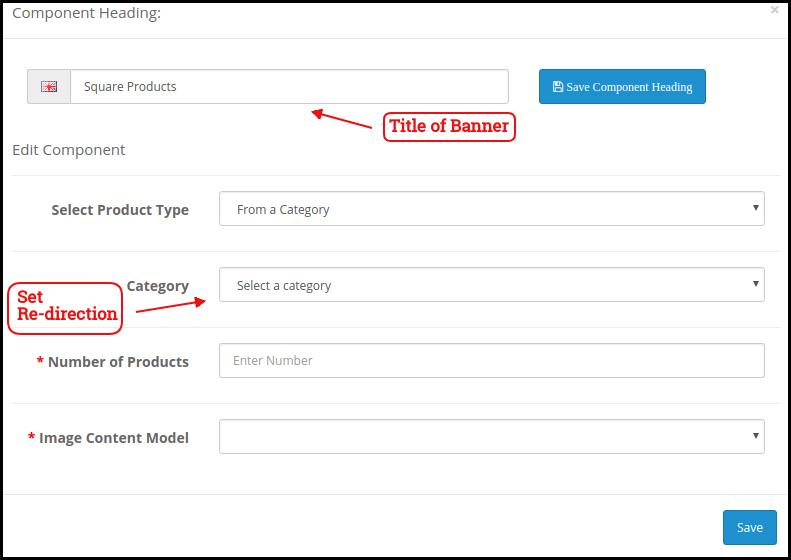
Square Products:
You can even list the products in square listing on the mobile app home screen.
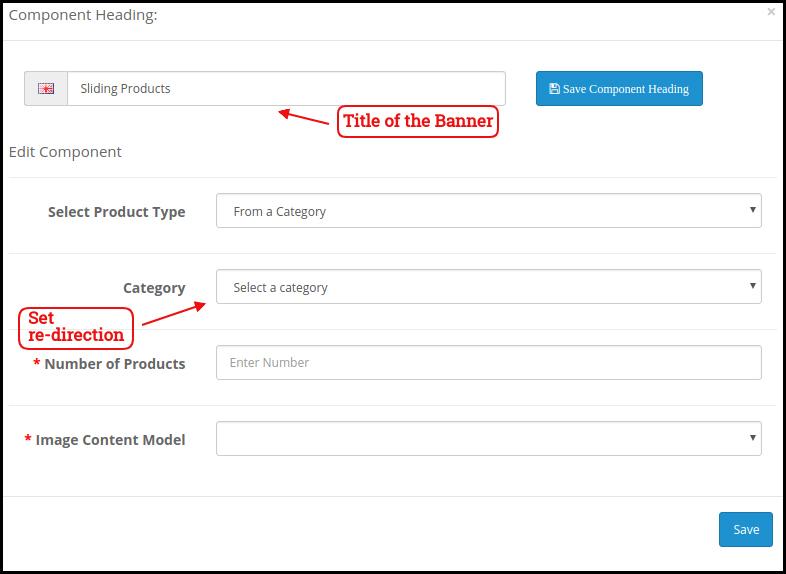
Sliding Products
The products can be displayed in the slider view on the mobile app Home Screen & can be configured from backend panel.
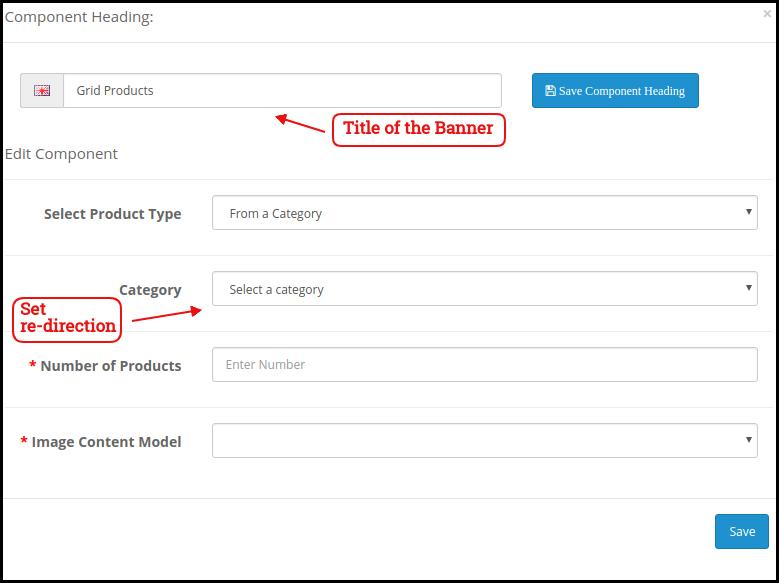
Grid Products:
The products can be displayed in the grid view on the home screen.
Products Recently Accessed:
The OpenCart Mobile App Creator offers the recent products tab on the mobile app home screen which displays recent products viewed by the user. You can just add the element in your layout to display the same on the home screen.
Login/Sign up Pop-up:
The Opencart admin can encourage the customers to keep their account logged in in the apps by showing a dynamic login/sign-up pop-up on the home page of the app.
Advertisement Banner:
The Opencart App admin can select the position of the advertisement banner on the home page with this layout component.
Note: The store admin can add up to 20 elements while designing the layout in the backend panel.
4.6 Advertisement Setting:
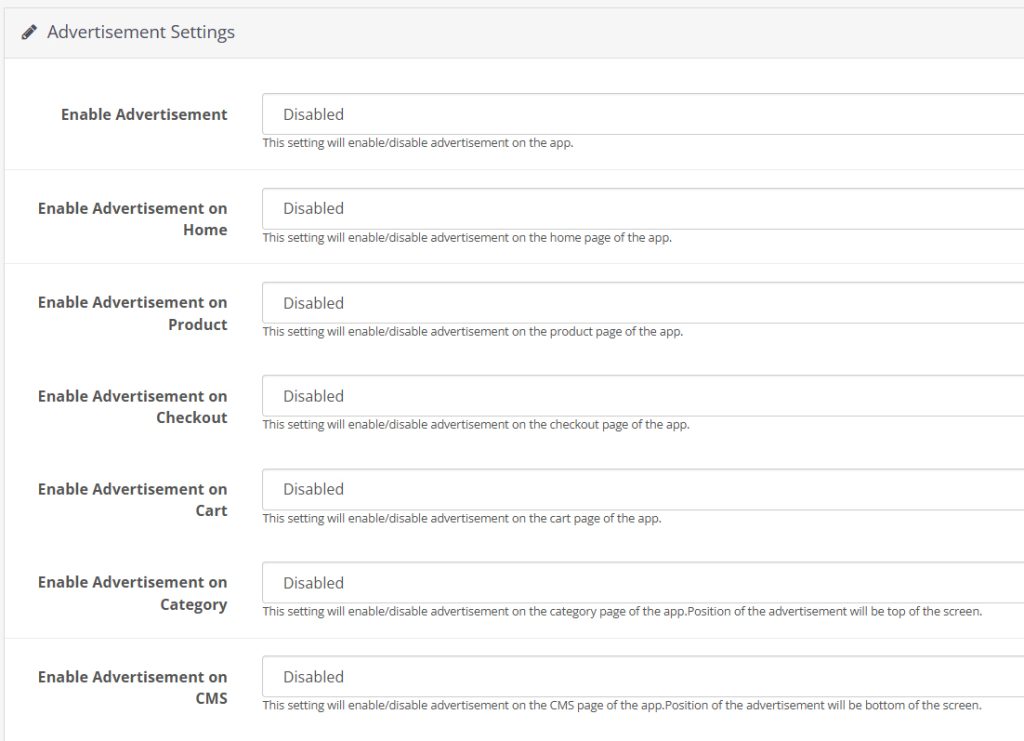
The updated Opencart App Maker allows the store admin to use their apps as an additional income channel by providing in-app advertising features in the apps. The new app comes with Google AdMob integration that allows the admin to show banner advertisements on the different pages of the app.
Enable Advertisement:
This setting will enable/disable the advertisements in the apps.
Enable Advertisement on Home:
If you want to enable/disable the advertisement feature on the home page of the app, you can use the following button.
Home Ad Unit ID:
The admin can find the Ad Unit ID on the Google AdMob console. Once done, you can enter the unit ID in the following section.
Enable Advertisement on Product:
This button will enable/disable the advertisement on the product page of the app.
Product Ad Unit ID:
Enter the Product Ad Unit ID in this section.
Select Product Position:
Using this option, the store admin can select the position of the Ad on the product page. This feature allows the admin to select from the below product image and description or above the add to cart button or related product section, providing more flexibility to the store admin.
Enable Advertisement on Checkout:
Using this button, the store admin can enable/disable the Advertisements on the checkout page.
Checkout Ad Unit ID:
Enter the Unit ID here.
Select Checkout Position:
Select the Advertisement position from here. The store admin can select from various options like top of the screen, bottom of the screen, above the products, and below the shipping methods.
Enable Advertisement on Cart:
Enable/Disable the advertisement on the cart page with this button.
Cart Ad Unit ID:
Enter the Unit ID for the banner on the cart page.
Select Cart Position:
The store admin can select the ad position from here. This option allows the admin to select from below the products or above the products option.
Enable Advertisement on Category:
This feature will enable/disable the Advertisement on the category page.
Category Ad Unit ID:
Enter the category Ad Unit ID.
Enable Advertisement on CMS:
Enable/Disable the advertisement on the CMS pages from here.
CMS Ad Unit ID:
Add the CMS Ad Unit ID.
4.7. Navigation Setting:
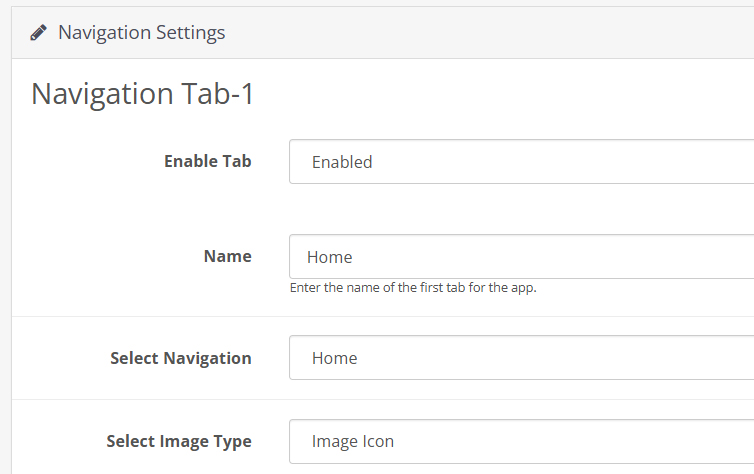
The Opencart Mobile App Builder provides the admin with the option to modify the look and feel on the bottom navigation bar of the app. Using the built-in features, the store admin can modify the name, redirection, icon, and color combinations of the tab bar layout.
Here is a detailed overview:
Enable Tab:
The store admin can enable/disable the bottom navigation icons from the following option.
Name:
Enter the navigation icon name here.
Select Navigation:
Select the redirect activity from home, cart, category, search, and profile from here.
Select Image Type:
The store admin can select if he wants to upload a custom image for the navigation bar components or the option to select built-in images is also there under the configurations.
In total, the app provides 5 different bottom navigation bar icons that can be configured with the help of the above-mentioned guide.
5.0 Mobile App Screens:
5.1 Home Screen:
The OpenCart Mobile App Builder offers a dynamic home screen in the mobile apps which can be easily designed from the backend panel. The store admin gets the complete flexibility to design & craft the home screen as per his/her choice. The OpenCart Mobile App Builder offers the following designing elements:
–> Top Categories
–> Square Banners
–> Sliding Banners
–> Grid Banners
–> Square Products
–> Sliding Products
–> Grid Products
–> Countdown Timer Banner
–> Recently Viewed Products
-> Login/sign up Pop-up.
The positioning of these attributes can also be changed as well just with simple drag & drop.
a) Dynamic Layouts: Craft alluring home screen layouts on your own which connect with the users & compel them to make the purchase.
b) Website Logo: Add your store logo in the module backend & display the same on the header of the app.
c) Search: The search option in the OpenCart Mobile App allows the users to search for products without any hassle. Keyword makes it easier for the buyers to get the right product in the least time.
d) Wishlist: Wishlist option in the OpenCart Mobile App lets you bookmark the products regarding future purchase.
e) Shopping Cart: The users can access the shopping cart from the top-right corner of the home screen.
f) WhatsAppYour OpenCart Mobile App users can directly contact you regarding any query or concern through WhatsApp chat option on the home screen.
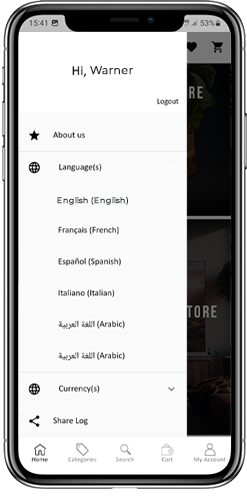
5.2 Accordion Menu (Navigation Bar)
The OpenCart Mobile Apps for Android & iOS come up with easy to use categorization of your store products. The online shoppers get to browse all the categories in the navigation bar along with all CMS pages.
The Accordion menu categories are the same as of your store & it provides the following options:
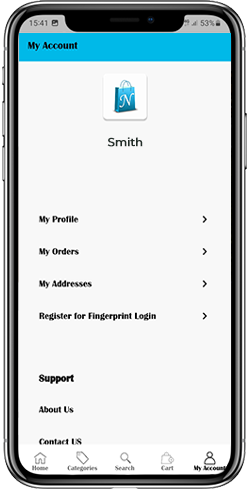
My Account: The My Account screen of OpenCart Mobile App contains all the user information like Personal Details, Shipping Address(s) & Order Details. There is even an option for the users to register their fingerprints. The online shoppers get to view complete personal details from here & update the password as well.
Categories: All your store categories are fetched on the mobile apps as well. Offer a multi-level categorization to your app users & let them browse products with ease.
CMS Pages: All of your website CMS pages like About Us, Contact Us, Terms & Conditions, etc will be displayed here.
5.3 Category Screen:
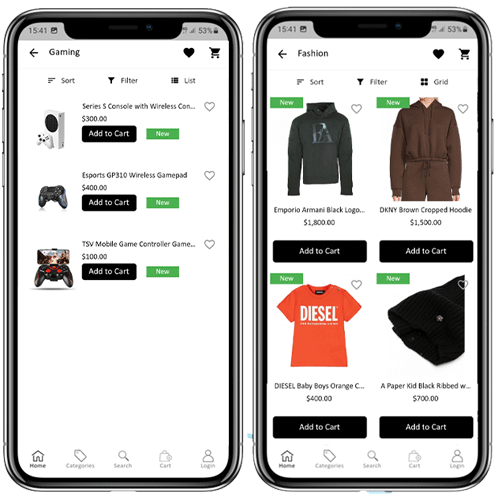
All sorts of categorizations available on your the OpenCart stores will be displayed in the mobile apps as well. The category screen has two views: Grid & List view. The product image, name, and price is displayed for all product listings. The mobile apps with OpenCart Mobile App Maker have multiple filter & sorting options which simplify product search for the users.
Sort: Sort option in OpenCart Mobile Apps allow the users to view products in Low to High or High to Low category.
Filter: Filter down the category products with various attributes like price, cost etc. & search desired products without any efforts.
5.4 Product Screen:
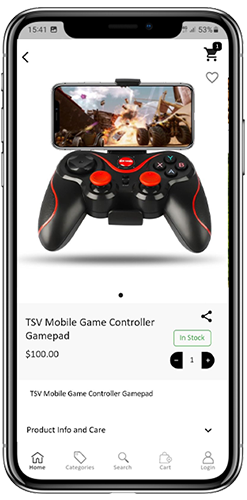
The product screen of the OpenCart Mobile App is as simple & easy-to-use as it could get. Every product has multiple images displayed along with its name & price. The product availability is also displayed as “In Stock” or “Out Of Stock”. The product screen has the following other options:
Product Options: Various options related to the product like size, color, etc. are displayed on the product screen. These options are the same as available on your website.
Short Description: Users get to read the short description of your product to quickly make up their minds. The OpenCart Mobile App displays both short & full descriptions of the products.
Product Info & Care: All the information related to the specific product is displayed under this section. This is the same information as of the website.
Add To Wishlist: The users can even add the products into the wishlist bag from here. The products added in wishlist are bookmarked for the future purchase.
Add To Cart: The Add To Cart button allows you to add product in the cart which can be processed further in successful order creation.
Product Social Sharing: The OpenCart Mobile App has the option to share the products on different social platforms, Bluetooth & e-mail. The users can share the products with their friends & relatives & bring potential users to your store.
5.5 Wishlist Screen:
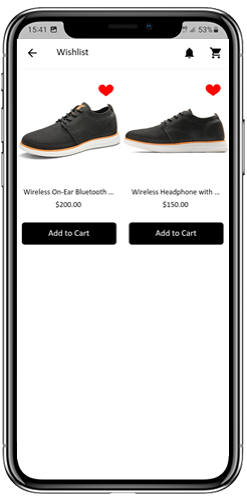
The OpenCart Mobile App Builder has a wishlist bag allowing the users to bookmark products for future purchases. The users can view the list of all wishlist products from this screen. It has the following options:
Add To Cart:
The app users can add the wishlist product directly into shopping cart with Add To Cart option.
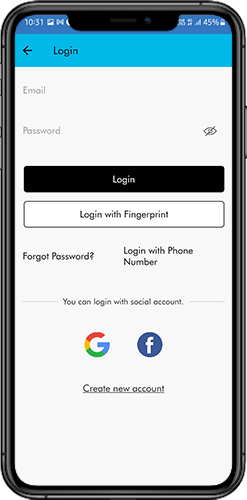
5.6 Login Screen
The OpenCart Mobile App Creator offers various one-tap login options & make sign-in/registration process more seamless:
Login: The app users can authenticate & access OpenCart Mobile Apps using e-mail sign-in credentials.
Sign Up: All the new users can sign-up & create their account on the store from the mobile App. The sign-up form of the OpenCart Mobile App is fully uncluttered.
Login with Phone Number: Your OpenCart Mobile App comes up with a phone number login option as well which allows users to verify OTP & log in without any hassle.
Login with Fingerprint: Your app users also get an option to log in with a fingerprint. This biometric authentication allows the users to login apps in seconds.
Login with Facebook: The users can log in into mobile apps using their Facebook Account Credentials.
Log in with Google: The users can log in into app using their Google Account Credentials.
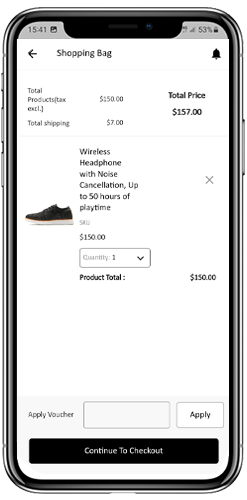
5.7 Shopping Cart Screen:
The Shopping Cart screen of your OpenCart Mobile App will display all products added into shopping cart.
The app user’s can view Product name, quantity, total price & shipping cost. This screen has the following options:
1. Apply Voucher:This option allows the users to get discounts & offers by entering valid coupons & voucher running on your website.
2. Total Product Price:The users can view the complete cost of their shopping bag which is automatically updated as per any addition in the cart.
3. Update Product Quantity:The users can even update the specific product quantity.
4. Remove Product:The app users can simply remove the product from the cart.
6. Continue To CheckoutThe app users can proceed further to the checkout & payment screens just by tapping the “Continue To Checkout” option. It will re-direct users on the checkout screen.
5.8 Checkout Process:
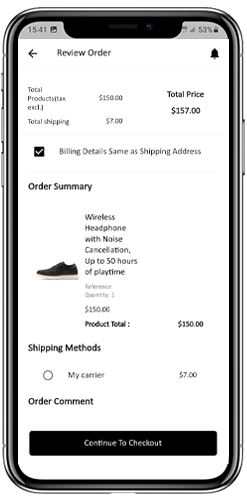
There is a simplified checkout process in the OpenCart mobile app builder. Details like shipping details, billing details, order numbers, order comments, and others are available for customers in the checkout process of the mobile app.
Orders can be placed by just following a few easy steps on the eCommerce mobile apps.
Users can choose a product and add it to their cart. After clicking on the shopping bag, the customer can select the appropriate amount of a product. In addition, mobile app users can view the total number of products and shipping prices.
At the bottom of the same page, the customer also gets the option to apply any vouchers and coupon codes.
2. The user can review the order after selecting the Continue to Checkout option and can see various details. Such as product pricing, shipping cost, shipping address (editable on the same page), order summary (number of products), and total price.
Moreover, the customer can choose their preferred shipping method on the same page. In addition, the user can specify any particular requests or requirements in the order comment field at the bottom of the screen.
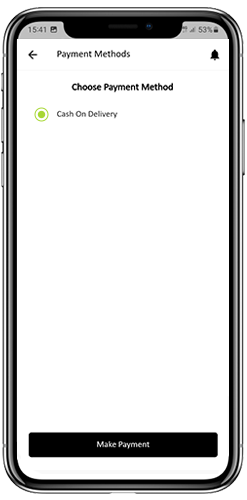
3. After clicking on the continue to checkout option, the front end mobile app user will be redirected to the payment method screen. On this screen, customers can choose from all the payment alternatives available on the e-commerce website. The Android and iOS apps consist of a cash-on-delivery payment option by default.
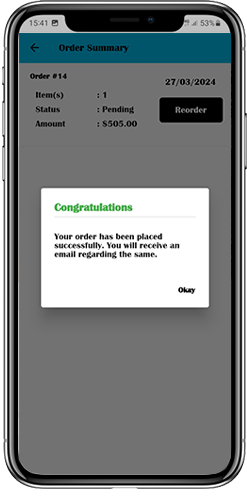
4. Once the user has completed the online payments, he or she will be forwarded to the order summary screen. In which, the customer can view the order status, order number, and amount, along with other information. The order confirmation popup message will also appear on the screens of mobile app users.
5.9 Payment Screen:
The payment screen on OpenCart Mobile App displays both web-view & Flutterapp payment methods. The OpenCart Mobile Apps supports all sorts of website payment options along with PayPal & COD payment methods. Moreover, various other native payment options like PayU, Apple Pay, Amazon Pay, Braintree, Stripe etc. can also be added in your mobile app over a fair price.
5.10 My Account Screen
My Account screen of the OpenCart Android/iOS App allows the users to view the complete account details including a list of all previous orders by just tapping on my orders option. My Account screen has the following other options:
Order History:The users get to know about complete order details created on the app. The order creation date, reference, price & delivery status is available on this screen.
Update Profile:Users can also update their pre-saved profile details like First or last name, phone number & password.
Shipping Address(s):The app users can see the complete list of saved Shipping Addresses. New Shipping address can also be added from here.
Order Details:The app users can view the complete list of the previously placed orders from the app.
Re-order feature:There is a direct re-order functionality allowing the users to repeat the order just by clicking the “Re-order” button
5.11 Order Detail Screen
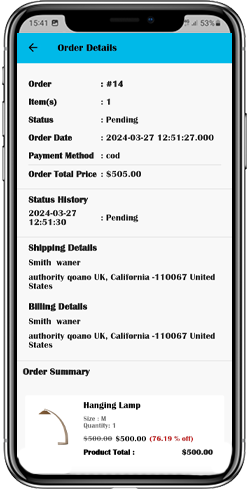
Order details screen of OpenCart Android & iOS App provides complete order detail such as shipping address, product summary, shipping and payment method, and total cost summary. This order detail is of the previous order placed by you. The users can even track the delivery of previously placed orders directly from this screen.
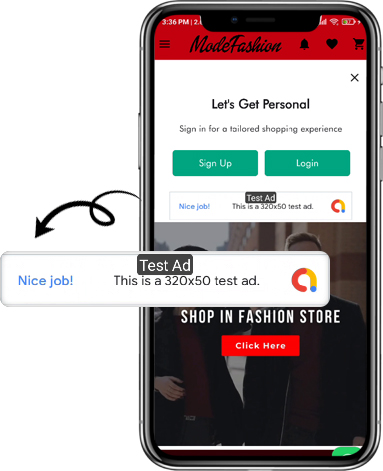
5.12. In-App Advertisement Samples:
The admin can set the advertisement banners on the different pages of the app. Here’s how it will look to your customers.
6.0 Advanced OpenCart Marketplace with Mobile App
KnowBand’s OpenCart Marketplace converts your online website into a fully-fledged marketplace. The OpenCart Mobile App Builder is fully compatible with OpenCart Marketplace extension. This means you can bring the entire marketplace listing on the same OpenCart Android & iOS Mobile Apps. Thus, launch a pair of Marketplace-compatible Mobile Apps with KnowBand & attract a large base of sellers & customers to your store.
–> As the user clicks on the Seller option, he/she is redirected to the Seller page of the mobile store. The user can view the list of the sellers of the marketplace along with their ratings.
–> The customers can click on the name of the seller in order to see his profile and the product being offered. The sellers can log in with their username and password. They are then redirected to the dashboard.
7.0 OpenCart Mobile App Builder for Android and iOS – Video Tutorial
This video tutorial walks you through the complete configuration of the OpenCart Mobile App Builder extension by KnowBand. Learn how to set up your app from backend to frontend with step-by-step guidance on:
General Settings
Push Notification Settings
Payment Methods
Home Page Layout
And many more essential configurations
By the end of this tutorial, you’ll be able to fully configure your OpenCart mobile app for both Android and iOS, ensuring a smooth and professional setup.