Offer quick customer logins with this Ajax Popup Login Extension for Magento sites

Customers have become impatient due to their busy lifestyles and are not ready to spend even few minutes on a site for login and registration issues. Infact, these are some of the core issues that have contributed in higher bounce rates and shopping cart abandonments on an eCommerce site. Nobody would like to spend their precious time in login and registration issues and would like to look out for a better alternative site that can offer these difficult tasks in a smooth manner. With the endless hard work and flawless expertise of its web developers, Knowband has come up with this Magento Ajax Popup Loginizer extension that is built to transform the entire login and registration process without any trouble. Here are the various reasons that make this Magento extension a priceless extension among various site owners.

Eliminates the time consuming page reloading

This Ajax Popup login extension for Magento sites has achieved much respect in eCommerce business environment due to its quick login and registration process. This has actually become possible due to the presence of Ajax web technology which is involved behind the development of this Magento extension. It has eliminated the default page reloading problem of Magento sites during login and registration process.

Offers customization facility for site admin

It is now much easy to make any changes in the login and registration facility on your site with the help of this Magento Quick login extension that has an interactive backend interface. Site admin can make various configurations and customizations like hiding/showing signup and forget password options, making changes in link text and much more.

Can be installed and configured in a coherent manner

We all know the life of certain non technical people become miserable when it comes to installation and configuration of a software application. Keeping this concern in mind, Knowband has introduced this Magento Ajax Popup for login and registration that can be installed and configured within few clicks only. There is no requisite for any special skills and development knowledge regarding the installation and configuration of this Magento extension.

Works independently with other available extensions

This Ajax Popup login extension for Magento sites is designed in such a way that it can work without interfering with other available Magento extensions on your site. You don’t have to take troubles regarding the working of this Knowband Extensions as it does not require any special API or upgrades.

Comes equipped with free technical support

It is possible that certain issues can arise with this free Magento extension regarding its configuration and customization that can affect your overall performance in the long run. If you encounter any such problem, you can get free technical assistance from our Knowband team by visiting this link.

It is now a thing of past to have time consuming and difficult login and registration process with the emergence of this Ajax Popup login extension for Magento sites. You would not have to suffer trust deficit and bounce backs of your customers due to this Ajax based Magento extension. Visit our Knowband store and redefine the login and registration related processes of your site with the help of this Magento Ajax Popup Loginizer module.

You Might Also Like:
Magento Ajax Popup Loginizer – User Manual

Steps For Installation of Magento Ajax Popup Loginizer Extension

Required Materials:

  • All files used by the extension.
  • FTP access to your website.

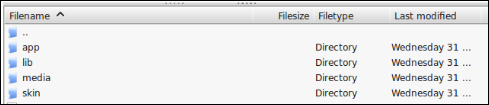
The connect manager is a useful tool for installing extensions, but prefer hands-on method when it comes to installations. It feels more comfortable when you are personally in control of the process. Do you see an app-code directory there, what about app-etc-modules? If you don’t see these directory paths and files contained within them, chances are that the extension download was faulty. Take a look at the package.xml file, this is the blueprint used by Magento Connect to arrange the files in the proper places. You may need to use this to ensure that everything is as it should be. Once you have reviewed the extension files you are ready to perform the last step. Using your FTP client, drag all of the files onto the store root of the magento instance.

Depending on the number of files in the extension, this may take a few moments. Now go to the admin console and click Flush Cache Storage. This is the requirement for any extension that adds pages to the admin console. Logging out and back in is also required to ensure that everything loads properly. If you cannot clear the cache via the admin console for any reason, you will need to clear the cache manually via your FTP client (see the first FAQ question for assistance). That is the final step. Congratulations on a successful installation.

Troubleshooting and FAQs

I loaded all files onto my Magento store, and now get a white screen for some or all of the admin console.

This is a fairly common problem, and 99% of the time it is cache related. If you can get to it, go to System->Cache Management and click Flush Cache Storage. This will ensure that everything cached by Magento is deleted and will to be regenerated. Log out and back in to complete the process.

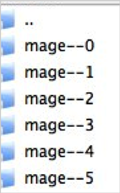
If you are completely cut off from the admin console, navigate to the var-cache directory of your website. You should see a series of directories named mage*. Delete all of these directories (DO NOT DELETE var-cache). This is the equivalent of flushing the cache storage from the admin console.

I am receiving a Magento error when accessing certain pages. How can I debug this?

This question really deserves a blog post all to itself, but a good start would be to go into the errors directory of your store. Locate the local.xml.sample file and rename it local.xml. The next time you see the error detailed information will be provided explaining where the error took place. Dont forget to change this back when you are finished troubleshooting!

I have a critical error with my webstore and need to turn off an extension I cannot access the admin console. What do I do?

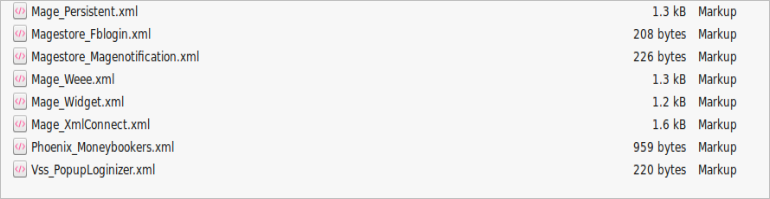
Go to the app-etc-modules directory and open the file that goes with your extension. The naming convention is generally DeveloperName_ExtensionName.xml. In this case it would be Vss_PopupLoginizer.xml.

Look for the active tags in the file, change the value from true to false and save your changes. This tells Magento that the extension is disabled and not to run any code associated to it. Deleting the Magento cache is recommended (and most likely required) for this change to take effect.

User Guide

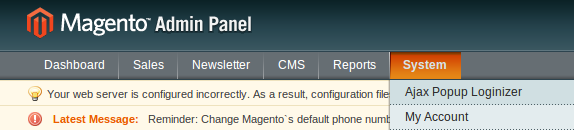
1. To access the Ajax Popup Loginizer Module . Click on System menu and then click Popup Loginizer as seen below.

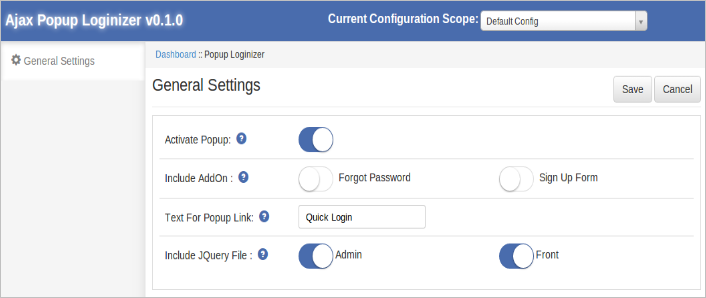
2. After clicking the module settings will display like shown below.

In modules top navigation bar, there are following controls:

  • Current Configuration Scope : This option is used to change the store configuration scope.
  • Save : This option is used to save the module settings.
  • Cancel : This option will cancel the current changes in settings.

General Settings

On clicking the module link, this tab will be open by default as shown as above screen. This tab has following options :

  • Activate Popup: This option is used to enable or disable the module.
  • Include Addon: This option is used to add Forgot form and Registration form with in popup. When there are included then user get the forgot password form and registration form within popup as shown in above Introduction section. Otherwise when user will click on forgot password or sign up link, he will be redirect to forgot password page or registration page respectively.
  • Text for Popup link: Enter the text you want to display as a link next to default login link i.e. in top links.
  • Include jQuery: jQuery i.e. a javascript framework is required for this plugin to work. Sometimes themes used in Magento already includes it but sometime they do not. If jquery is already included in your theme then deactivate else activate to include it.

We hope that we have covered all the concerns regarding the installation and product guide of this Magento Extension. You should also check our blog on Registration Related issues of Magento Ajax Popup Login.

Liked This? You’ll Like These Too