1.0 Introduction
Infinite scrolling loads web page content continuously as the user scrolls down the web page. Basically, infinite scrolling is the technique of web design to eliminates pagination from the website. Magento 2 Infinite Scroll Extension by Knowband does the same. It removes the pagination and page reload functionality from the website and make navigation easier for your Magento store visitors to view the next set of products without reloading the web page.
1.1 Features of Magento 2 quick scroll extension:
- Magento 2 Infinite Scroll extension replaces the pagination system from the website.
- Magento 2 fast scroll extension reduces the load time of the website.
- Store admin can enable or disable the Magento 2 infinite scroll module in a single button click.
- Magento 2 quick scroll extension offers sandbox testing option to the admin. After enabling this store admin needs to enter the specific IP address to test the module.
- Infinite scroll for Magento 2 extension serves better user experience.
- Magento 2 fast scroll module optimizes the navigation of the site.
- The admin can specify the number of pages after which, “Load More” will be shown. Store admin can also adjust the loader speed.
- Store admin can display end page message after the completion of the product listing.
- Magento 2 endless scroll extension works smoothly with list views as well as the grid view.
- Store admin can set the background color and text color of the end page message and go to the top link.
- Magento2 infinite scroll module offers the store admin to add the selector setting.
- Magento 2 infinite scroll module is mobile responsive.
2.0 Installation Steps of Infinite scroll for Magento 2 Extension:
The steps to install the Magento 2 quick scroll extension are mentioned below:
1. Buy the Infinite scroll for Magento 2 extension from Knowband. You can download the extension package.
2. The package has a zipped file that contains the user manual and the source code of Magento 2 Infinite Scroll Extension. Unzip the package.
3. Create a folder {Magento root}/app/code/Knowband/Infinitescroll
4. Upload the extracted content in the above folder via FTP manager (like Filezilla or WinSCP – download here: https://filezilla-project.org/).
5. Now run below commands to install the Magento 2 Infinite Scroll Extension:
php -f bin/magento module:enable –clear-static-content Knowband_ Infinitescroll
php -f bin/magento setup:upgrade
php -f bin/magento setup:di:compile
php bin/magento setup:static-content:deploy
php bin/magento cache:clean
6. The extension is now installed and ready for use. In Admin Panel go to “Knowband Extensions > Infinite Scroll”.
You can now configure and use the Magento 2 Infinite Scroll extension.
3.0 Admin Interface
Magento 2 fast scroll extension offers following interfaces to be configured:
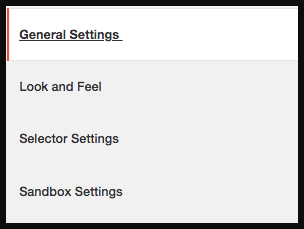
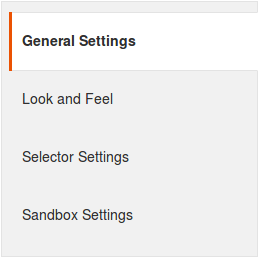
- General Settings
- Look and Feel Settings
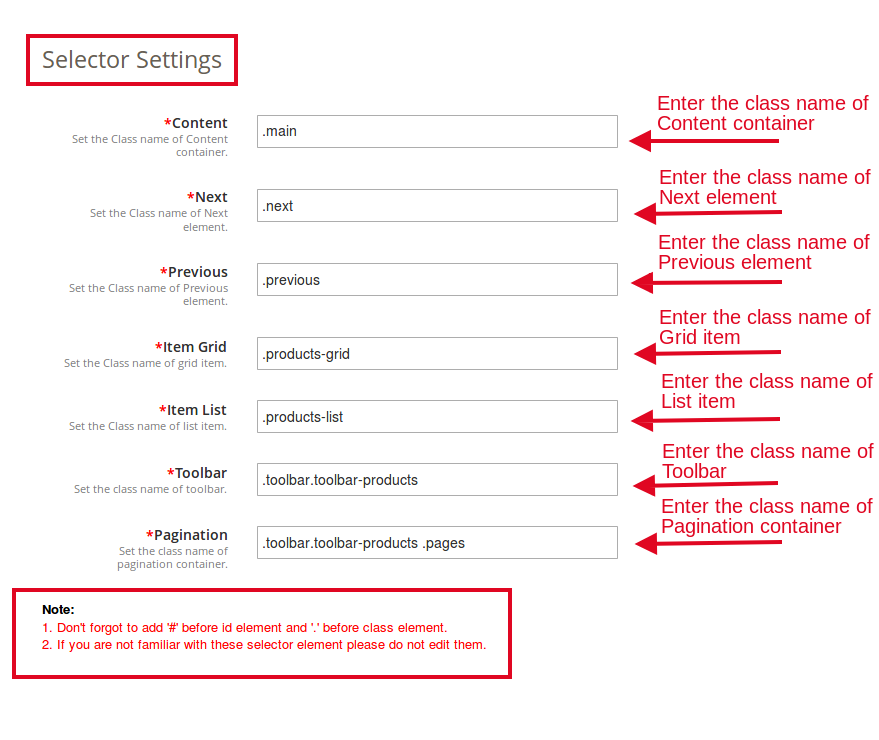
- Selector Settings
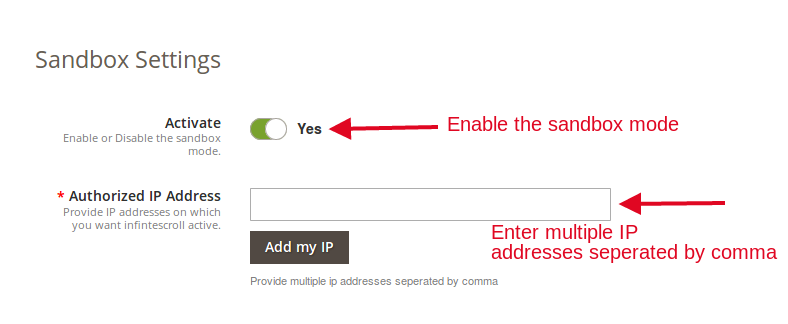
- Sandbox Settings
Below is the detailed description of every setting:
3.1 General Settings
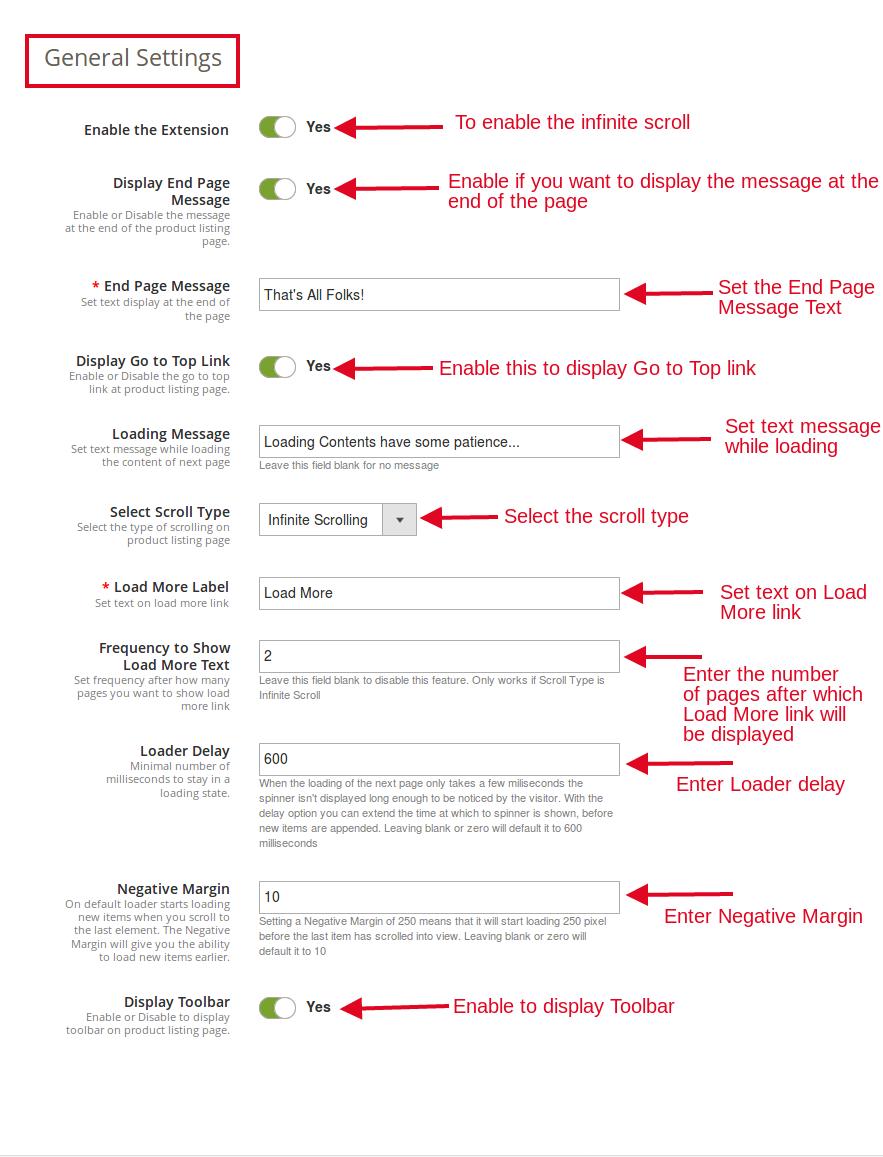
From this tab, store admin can adjust the general settings of the Magento 2 infinite scroll module.
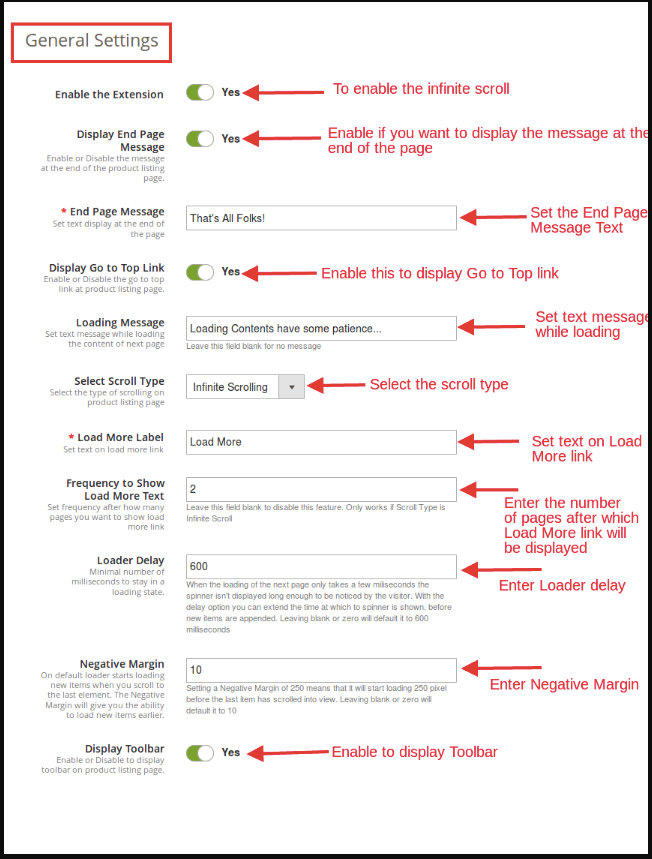
- Enable the extension: This tab of Magento 2 fast scroll will enable the infinite scroll option. The admin can enable/disable this Magento extension whenever needed.
- Display End Page Message: This field of Magento 2 quick scroll extension allows the admin to enable/disable the message that would be displayed at the end of the product listing page.
- End Page Message: This field of Magento 2 endless scroll extension allows the admin to set the text of the end page message that would be displayed at the end of the product listing page.
- Display Go To Top Link: The Magento 2 infinite scroll module allows the admin to display the “Go To Top Link” option that helps the users to jump to the top of the product listing page.
- Loading Message: This section of Magento 2 fast scroll extension offers the admin to set the text while loading the content of the web page.
- Select Scroll Type: The Magento 2 quick scroll extension provides the admin to select the type of scrolling on product listing page. Following options are given in scroll type:
a. Infinite Scrolling
b. Load More Link
- Load More Label: When “Load More Link” option is selected, this field will be shown. This field of Magento 2 infinite scroll extension let the admin to set the text on Load More link.
- Frequency to show Load More text: This field of Magento 2 fast scroll extension will work only when “Scroll Type” is “Infinite Scroll”. This field allows the admin to set the frequency of load more link to be shown in the front-end.
- Loader Delay: This field of Magento 2 infinite scroll module allows the admin to set the minimal number of milliseconds to stay in a loading state.
- Negative Margin: This field of Magento 2 quick scroll extension will give you the ability to load the new items earlier before you reach to last item of the page. By default, the loader starts loading new items when the user scrolls to the last element of the page. The admin can set the number of products here. For instance, if the number ‘X’ is entered here, then, the loader will start loading before there are X number of products left in the web page.
- Display Toolbar: This field of Magento 2 endless scroll extension will allow the admin whether to display the Toolbar on product listing page or not.
3.2 Look and Feel Settings
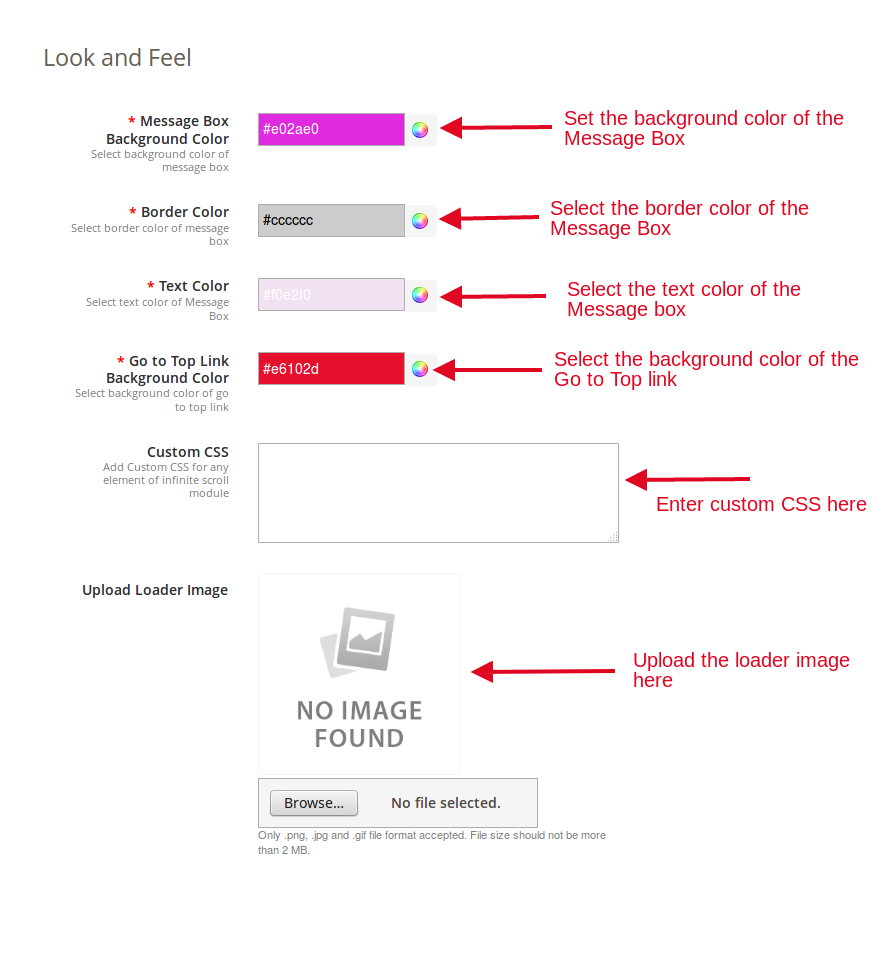
From this tab, the store admin can adjust the background and text color of the message box and go to top link.
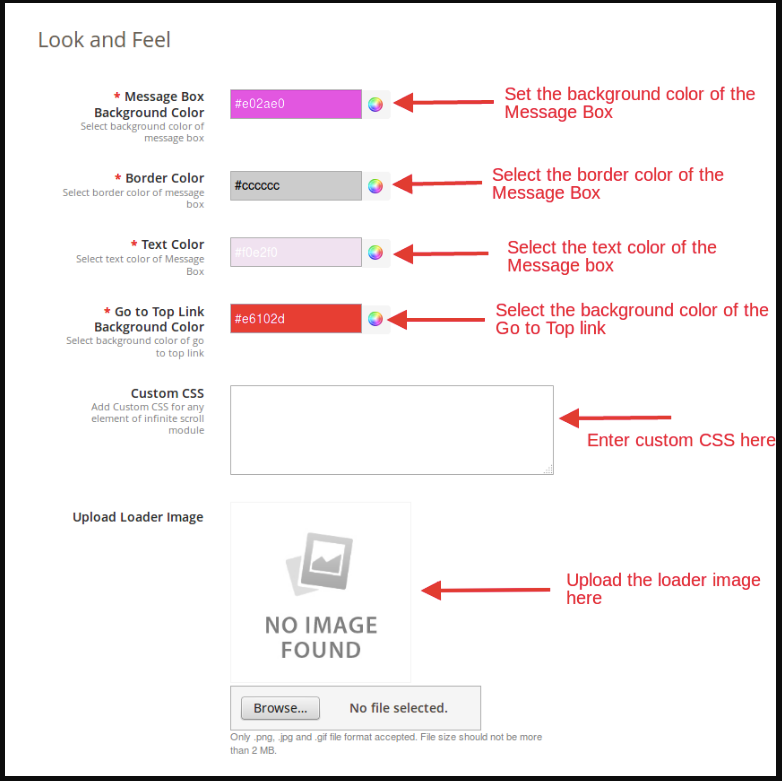
- Message Box Background Color: This tab of Magento 2 endless scroll extension offers the admin to set the background color of the message box.
- Border Color: The Magento 2 Infinite Scroll extension allows the admin to customize the border color of the message box as per his preferences.
- Text Color: The admin can customize the text color of the message box as per his choice. He can do the same just by selecting the color from the color picker.
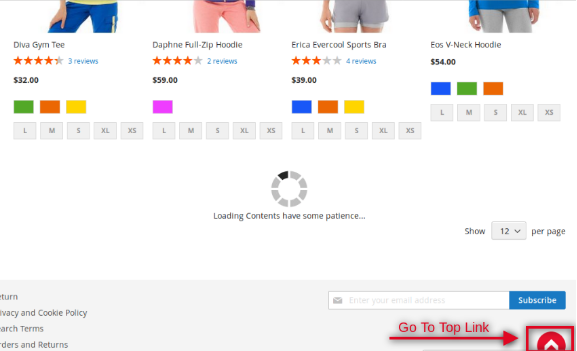
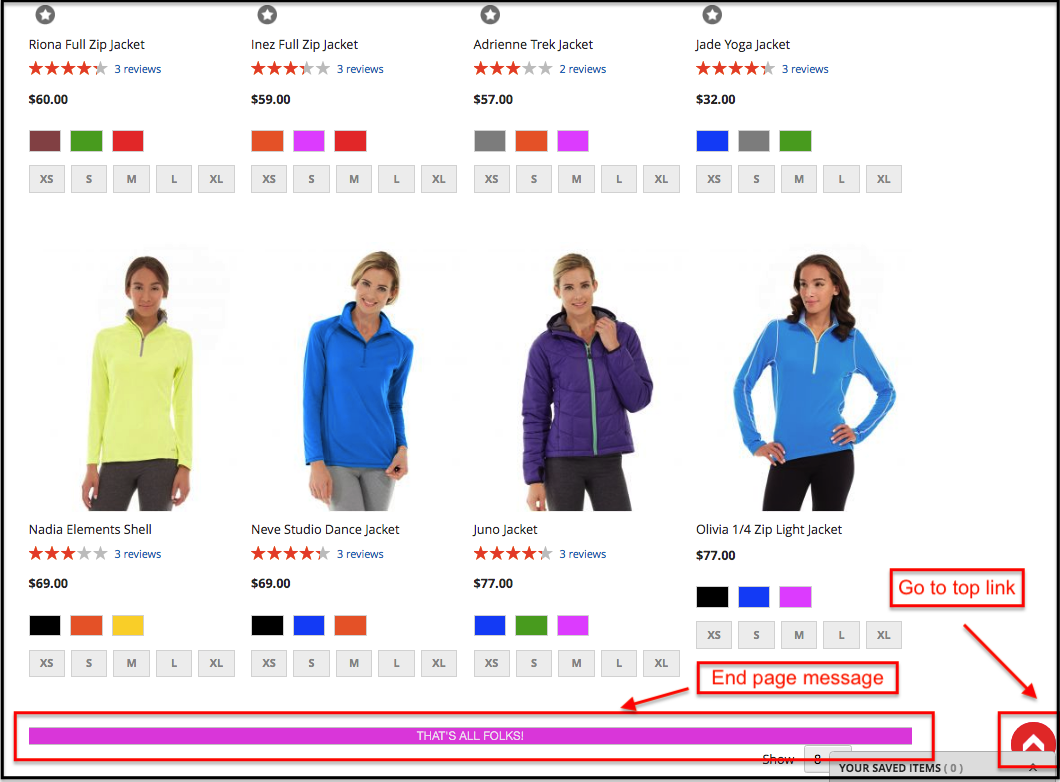
- Go To Top Link Background Color: This field of Magento 2 fast scroll extension allows the admin to set the background color of the “Go To Top Link”. Below is the screenshot of the Go To Top Link:
- Custom CSS: If the admin wants to add the custom CSS for any element of Infinite scroll for Magento 2 extension, then, he can do the same by adding CSS in this field.
- Upload Loader Image: This tab of Magento 2 endless scroll extension allows the admin to upload the loader image of his choice. The admin can upload .jpg, .png and .gif format images only. Image size should not be more than 2 MB.
3.3 Selector Settings:
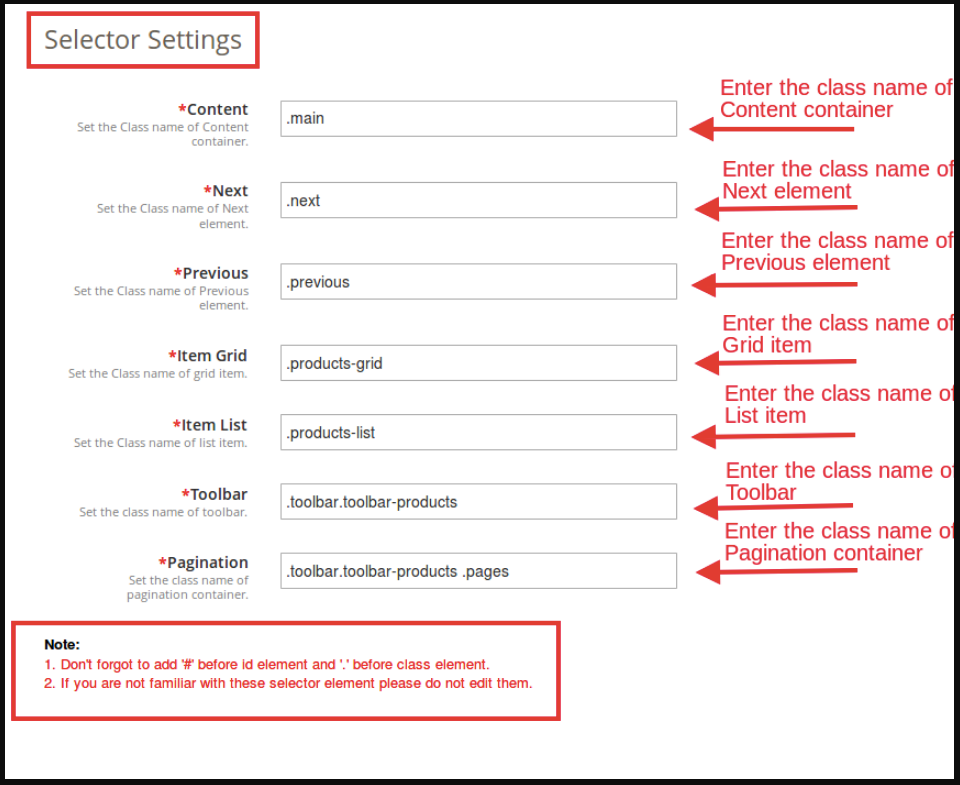
- Content: This tab of Magento 2 Infinite Scroll extension allows the admin to set the Class name of the Content container.
- Next: This tab of Magento 2 fast scroll extension offers the admin to set the Class name of Next element.
- Previous: This tab of Magento 2 quick scroll extension allows the admin to set the Class name of the Previous element.
- Item Grid: This field of Magento 2 endless scroll extension allows the admin to set the Class name of Grid item.
- Item List: This field of Magento 2 endless scroll extension allows the admin to set the class name of the list item.
- Toolbar: In this field of Magento 2 infinite scroll module, the admin will have to set the Class name of the Toolbar.
- Pagination: This tab of Magento 2 quick scroll extension allows the admin to set the Class name of the pagination container.
NOTE:
1. Don’t forget to add ‘#’ before id element and ‘.’ before the class element.
2. If you are not familiar with these selector elements please do not edit them.
3.4 Sandbox Settings:
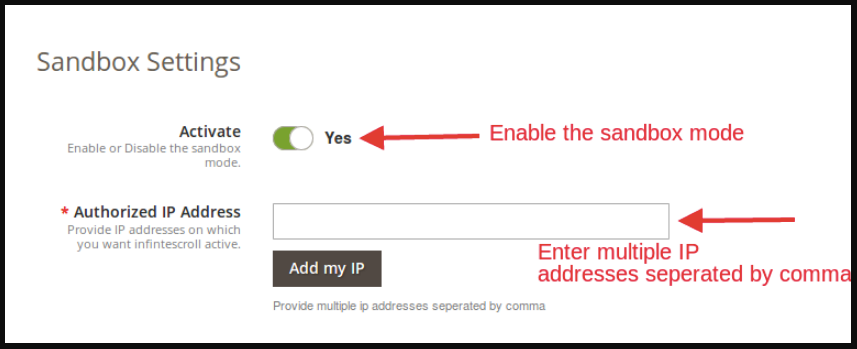
The Sandbox Settings tab of the Magento 2 infinite scroll extension offers the admin to test the extension before implementing it on the site.
- Activate: Enable this field of Magento 2 fast scroll extension to test the extension.
- Authorized IP Address: In this field of Magento 2 quick scroll extension, enter the IP addresses on which you want infinite scroll active. Make sure that the entered IP addresses are separated by a comma. You can add the IP by clicking on “Add my IP” option.
4.0 Store Front-end
The Magento 2 endless scroll extension will be enabled on the whole website where pagination occurs. The Infinite scroll for Magento 2 extension would appear at the front as follows:

End page message and top link:

Find more details about this Infinite scroll for Magento 2 below:
Magento 2 endless scroll extension Admin Demo
Magento 2 fast scroll extension Extension Front Demo
“Also, explore more Magento 2 Extensions for your store.”