Top 7 Email Strategies to Win Back Abandoned Carts Using Knowband

Nearly every e-commerce business struggles with customers leaving items in their carts without completing the purchase. Customers add products but leave without purchasing, resulting in lost sales and engagement opportunities. Therefore, Knowband’s PrestaShop Abandoned Cart Module, PrestaShop Spin & Win Module, and PrestaShop Back In Stock Module offer a powerful way to recover these potential sales through emails.

Here are seven effective email strategies to bring those customers back.
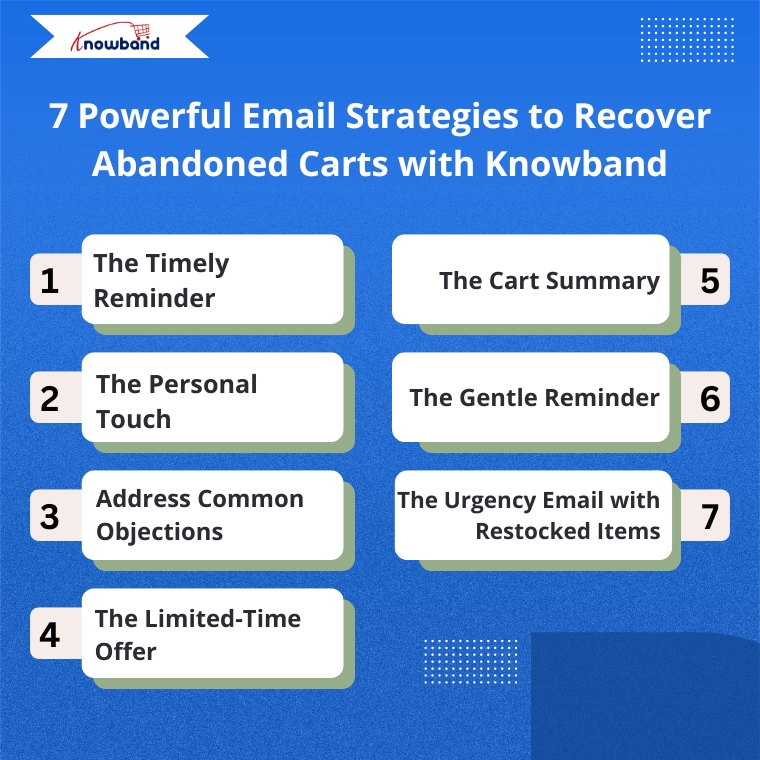
1. The Timely Reminder

Timing is everything when recovering abandoned carts. Therefore, the Abandoned Cart Addon for PrestaShop allows you to send the first reminder email within 1-3 hours after abandonment when your store is still fresh in the customer’s mind. Moreover, Knowband’s Abandoned Cart Addon allows you to set up automated sequences with precise timing, maximizing your chances of recovery.

2. Targeted Email Engagement

One way is to address customers by name and reference specific items they left behind.  Knowband’s PrestaShop Abandoned Cart Module automatically captures this information, allowing you to create personalized emails that show customers you value their individual shopping experience.

3. Address Common Objections

There can be many reasons for abandoned carts, like product cost, shipping cost, payment, or technical issues. So, Knowband’s Spin & Win module allows the admins to add coupon discounts, which can motivate the customers to go back and make purchases. 

4. The Limited-Time Offer

Create urgency with time-sensitive offers. The Abandoned Cart module allows you to include discount and coupon emails, and expiration dates on discount codes, encouraging quick action. For example, a 10% discount that expires within 24 hours can be the perfect motivation to complete a purchase.

5. The Cart Summary

Provide a clear summary of the abandoned cart in your email. This includes product images, names, quantities, and prices, making it easy for the customer to recall what they were interested in. The Abandoned Cart Module for PrestaShop by Knowband sends the email when the user abandons the cart, so keep the email template concise and visually appealing to spark interest and remind them of the value they were about to purchase

Integrate Your Opencart Shop with Abandoned Cart Module

No Coding Skills Required

SHOP NOW

6. The Gentle Reminder

Sometimes, customers abandon their carts by mistake or forget they left items behind. A gentle reminder email can be sent a day after abandonment using Knowband’s Abandoned Cart Module and can impact them without being too pushy. Additionally, this email should be friendly and polite, encouraging them to return and complete their purchase

7. The Urgency Email with Restocked Items

If an item that was abandoned is back in stock, the store owner can send an email informing the customer that their desired item is available again. This can be achieved by implementing the PrestaShop Back In Stock Module by Knowband, which can help create urgency, especially when products are in limited supply or high demand, and can drive the customer to act quickly.

How These Modules Operate

The Abandoned Cart Module helps you track, manage, and recover incomplete purchases through automated, personalized email campaigns. Moreover, the Prestashop Abandoned cart email follow-up addon enables store owners to set up smart reminders, offer discounts, show product images, and include one-click recovery links, making it easy for customers to return and complete their orders.

The Spin & Win Module for PrestaShop, on the other hand, helps prevent abandonment before it even happens. Moreover, this interactive pop-up module for Prestashop captures visitor emails by offering them a chance to win attractive discounts through a gamified interface. Moreover, this not only adds fun to the user experience but also provides coupons for purchases and grows your email list for future marketing.

The Back In Stock Module for PrestaShop allows your customers to subscribe to restock alerts for out-of-stock products. Furthermore, as soon as an item is available again, customers receive an automated email notification, giving them a chance to return and complete their purchase even without any manual effort from your side.

Putting It All Together with Knowband

Implementing these strategies becomes simple with Knowband’s PrestaShop Abandoned Cart Module, PrestaShop Spin & Win Pop, as well as PrestaShop Back In Stock.

 These modules offer:

  • Automated email sequences with custom timing
  • Personalized content for each customer
  • Built-in discount code generator
  • Detailed analytics to refine your approach
  • One-click cart recovery links
  • Mobile-responsive email templates

Furthermore, these PrestaShop modules by Knowband are user-friendly add-ons that allow you to track recovery rates and revenue gained, helping you continuously improve your abandoned cart strategy.

Start Recovering Lost Sales Today

Cart abandonment doesn’t have to mean lost revenue. With Knowband’s PrestaShop Abandoned Cart Module, PrestaShop Spin & Win Entry Pop-Up Module, PrestaShop Back in Stock, and these seven email strategies, you can effectively bring customers back and increase your conversion rates significantly.

Therefore, install Knowband’s PrestaShop Modules today and transform abandoned carts into completed orders with these proven email strategies.

For more details, check out the Prestashop Abandoned Cart E-mail Reminder Module which is available for PrestaShop, OpenCart, Magento, and WooCommerce.

Easy Strategies for Writing Product Descriptions that Drive Sales in PrestaShop!

In the fast-paced world of eCommerce, your product descriptions play a critical role in converting casual browsers into paying customers. For PrestaShop store owners, crafting compelling product descriptions can make the difference between a sale and a missed opportunity. Whether you are new to the platform or looking to optimize your listings, this article will outline easy strategies for writing product descriptions that effectively drive sales.

1. Understand Your Audience:

The foundation of any effective product description is knowing who you’re writing for. Before putting words on the page, take time to define your target audience. Are they budget-conscious shoppers, tech-savvy consumers, or trend-following fashion enthusiasts? When you know your audience, you can tailor your language and tone to resonate with them.

For instance, if you’re targeting a young, fashion-forward crowd, your descriptions can be casual and fun, while a more professional audience may respond better to formal language and detailed specifications.

2. Focus on Benefits Over Features:

While listing product features is essential, it’s the benefits that truly sell. Shoppers want to know how a product will improve their lives, not just what it does. For each feature you list, think about how it benefits the customer. Will it save them time, increase comfort, or enhance their appearance?

For example, instead of writing “This coat has a waterproof exterior,” you can say, “Stay dry in any weather with this coat’s waterproof exterior, ensuring comfort no matter the conditions.”

3. Use Engaging and Clear Language:

Clarity is key when writing product descriptions. Avoid technical jargon unless your audience is highly specialized. Furthermore, you should always use short sentences, simple words, and a conversational tone that makes it easy for customers to understand. Engaging language doesn’t have to be complicated — it just needs to communicate the essential information while keeping the reader interested.

At Knowband, we specialize in offering top-notch eCommerce extensions for platforms like PrestaShop, Opencart, WooCommerce, and Magento 2. Our extensions not only enhance the functionality of your store but also allow you to implement strategies like these more efficiently.

4. Tell a Story:

Storytelling is a powerful tool in marketing. When possible, incorporate a story into your product description that helps the customer imagine themselves using the product. This could be as simple as describing a scenario in which the product solves a problem or improves their experience.

For example, if you’re selling a pair of running shoes, you might write, “Imagine lacing up these ultra-lightweight shoes and hitting the pavement, feeling the breeze as the cushioned soles protect your feet with every step.”

5. Incorporate Keywords for SEO:

Search engine optimization (SEO) is essential for driving organic traffic to your PrestaShop store. Including relevant keywords in your product descriptions helps improve your ranking on search engines, making it easier for potential customers to find you. Focus on long-tail keywords that match the product and its use, such as “lightweight running shoes for women” rather than just “running shoes.”

While you want to optimize for SEO, remember not to stuff your descriptions with keywords — always prioritize readability and flow.

6. Use Bullet Points for Easy Scanning:

Many customers don’t read product descriptions word-for-word. Instead, they scan for key information. Using bullet points is an effective way to present features and benefits clearly and concisely. Bullet points help break up text, making it easier for shoppers to pick out the information they need quickly.

For example, if you’re selling a laptop, you could list its key features in a bullet format:

  • 8GB RAM for smooth multitasking
  • 256GB SSD for faster boot times
  • 15.6” Full HD display for vibrant visuals

7. Create a Sense of Urgency:

Sometimes, customers need a little push to make a purchase decision. Creating a sense of urgency in your product descriptions can encourage them to act quickly. Phrases like “Limited stock available,” “Only a few left,” or “Special price ends soon” can motivate customers to buy before they miss out.

At Knowband, we provide PrestaShop store owners with extensions like abandoned cart recovery tools, which allow you to follow up with customers who didn’t complete their purchases. With the right tools, you can recapture sales and boost your store’s performance.

8. Leverage Social Proof:

Social proof, such as customer reviews, user-generated content, and ratings, can significantly influence a customer’s buying decision. In your product descriptions, highlight positive feedback from customers to build trust and encourage others to buy. For example, include a quote from a satisfied customer or mention how many people have already purchased the product.

9. Include a Call-to-Action (CTA):

After highlighting the product’s benefits and features, guide the customer toward the next step. CTAs like “Order now,” “Add to cart,” or “Get yours today” can prompt immediate action and drive more conversions.

A CTA turns a well-crafted product description into a powerful sales tool by creating a clear path for the customer to follow.

Knowband’s Prestashop Plugins

Enhance your PrestaShop store with Knowband’s powerful plugins, offering features like one-page checkout, abandoned cart, mobile app builder, and more for seamless e-commerce management.

SHOP NOW

Conclusion!

Writing product descriptions that sell isn’t about filling up space with words — it’s about crafting compelling, clear, and concise messages that address your customers’ needs. By focusing on benefits, using engaging language, and optimizing for SEO, you can create descriptions that not only inform but also persuade.

At Knowband, we’re here to help PrestaShop store owners succeed. With our range of eCommerce extensions, including tools for SEO optimization, cart recovery, and more, you can take your product listings and your entire store to the next level. Explore our offerings today and see how we can assist in making your PrestaShop store a top performer.

5 Reasons That Lead to Cart Abandonment on eCommerce Websites!

Cart abandonment is a significant issue that eCommerce businesses face today. According to various studies, the average cart abandonment rate across different industries hovers around 70%. Moreover, this means that seven of every ten potential customers leave without completing their purchase. Now, there can be a lot of reasons that might be impacting your business directly or indirectly by playing a part in cart abandonment.

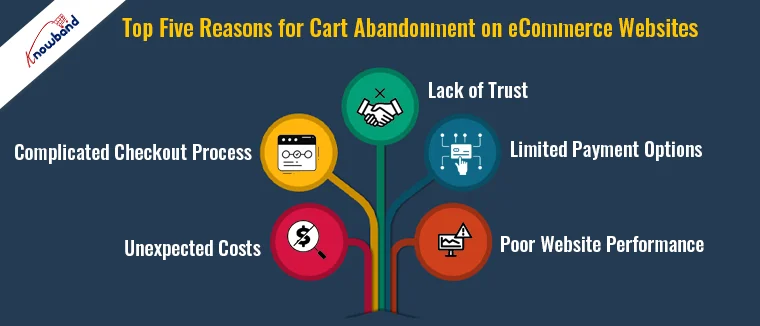
Thus, understanding the reasons behind this can help businesses implement strategies to reduce these rates and increase conversions. Here are the top five reasons for cart abandonment on eCommerce websites.

1. Unexpected Costs:

One of the primary reasons customers abandon their carts is unexpected costs. These include high shipping fees, taxes, and other additional charges not disclosed upfront. Thus, when customers see a final price that is significantly higher than what they initially expected, it often leads to abandonment.

Solution: To avoid such situations, the store admin should be transparent about all costs from the beginning. Therefore, you can display shipping fees, taxes, and any other charges on the product page itself. Furthermore, offering free shipping or flat-rate shipping can also significantly reduce cart abandonment rates.

2. Complicated Checkout Process:

A complicated or lengthy checkout process can frustrate customers and lead to abandonment. If customers are required to fill out multiple forms, create an account, or navigate through several pages, they are more likely to abandon their cart.

Solution: Simplify the checkout process. Implement a one-page checkout system and offer guest checkout options. Furthermore, at Knowband we provide the One Page Supercheckout extension for Opencart and Prestashop platforms that allows the store admin to provide the customers will a single form to complete the checkout process.

3. Lack of Trust:

Trust is crucial in eCommerce. Therefore, if customers feel that their personal or payment information might not be secure, they will hesitate to complete their purchase. This is especially true for new or lesser-known websites.

Solution: You can address this kind of concern by displaying trust signals prominently on your site. These can include SSL certificates, trust badges, customer reviews, and clear return policies. A well-designed and professional-looking website can also help build trust.

4. Limited Payment Options:

Offering limited payment options can be a significant barrier for customers who prefer using specific payment methods. If their preferred method is not available, they might abandon their cart.

Solution: As an eCommerce store admin, you should always provide a variety of payment options on your eCommerce store.

In addition to credit and debit cards, consider offering PayPal, Apple Pay, Google Wallet, and other popular payment methods. Furthermore, this flexibility can cater to a broader range of customers and reduce cart abandonment.

5. Poor Website Performance:

A slow-loading website or frequent crashes can deter customers from completing their purchases. In today’s fast-paced world, customers expect quick and seamless online experiences. If your website fails to deliver, they will likely abandon their cart and look for alternatives.

Solution: Optimize your website for speed and performance. Regularly test your site to ensure it loads quickly and functions smoothly on all devices. Implementing a content delivery network (CDN) and optimizing images can also help improve site speed.

Prestashop Abandoned cart addon

Discover how Knowband’s Prestashop Abandoned Cart addon helps recover lost sales by targeting abandoned carts effectively.

SHOP NOW

Knowband’s Solutions for Abandoned Cart Recovery!

At Knowband, we understand eCommerce businesses’ challenges with cart abandonment. That’s why we offer powerful solutions designed to help you recover lost sales and enhance the customer experience.

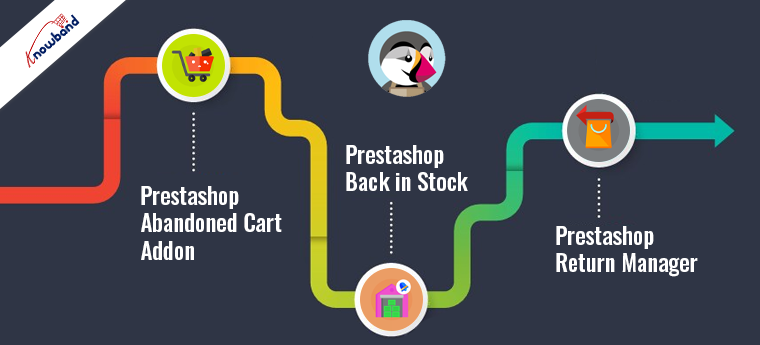
1. Prestashop Abandoned Cart Addon:

Our Prestashop Abandoned Cart Addon helps you tackle cart abandonment effectively. This tool allows you to track abandoned carts and send automated follow-up emails to remind customers about their incomplete purchases. Thus, by offering personalized discounts and engaging reminders, you can encourage customers to return and complete their transactions.

2. Prestashop Back in Stock:

Never miss out on potential sales with our Prestashop Back in Stock Addon. This tool notifies customers when out-of-stock products are available again. Moreover, by capturing customer interest and keeping them informed, you can reduce the chances of losing sales due to stock issues.

3. Prestashop Return Manager:

Enhance customer satisfaction and build trust with our Prestashop Return Manager Addon. Furthermore, this comprehensive solution simplifies the return process for your customers, making it easier for them to return products if needed.
Thus, a hassle-free return policy can significantly reduce cart abandonment rates by giving customers the confidence to make a purchase.

Conclusion!

Reducing cart abandonment is essential for maximizing conversions and driving growth in your eCommerce business. By addressing the common reasons behind cart abandonment, such as unexpected costs, complicated checkout processes, lack of trust, limited payment options, and poor website performance, you can create a smoother shopping experience for your customers.