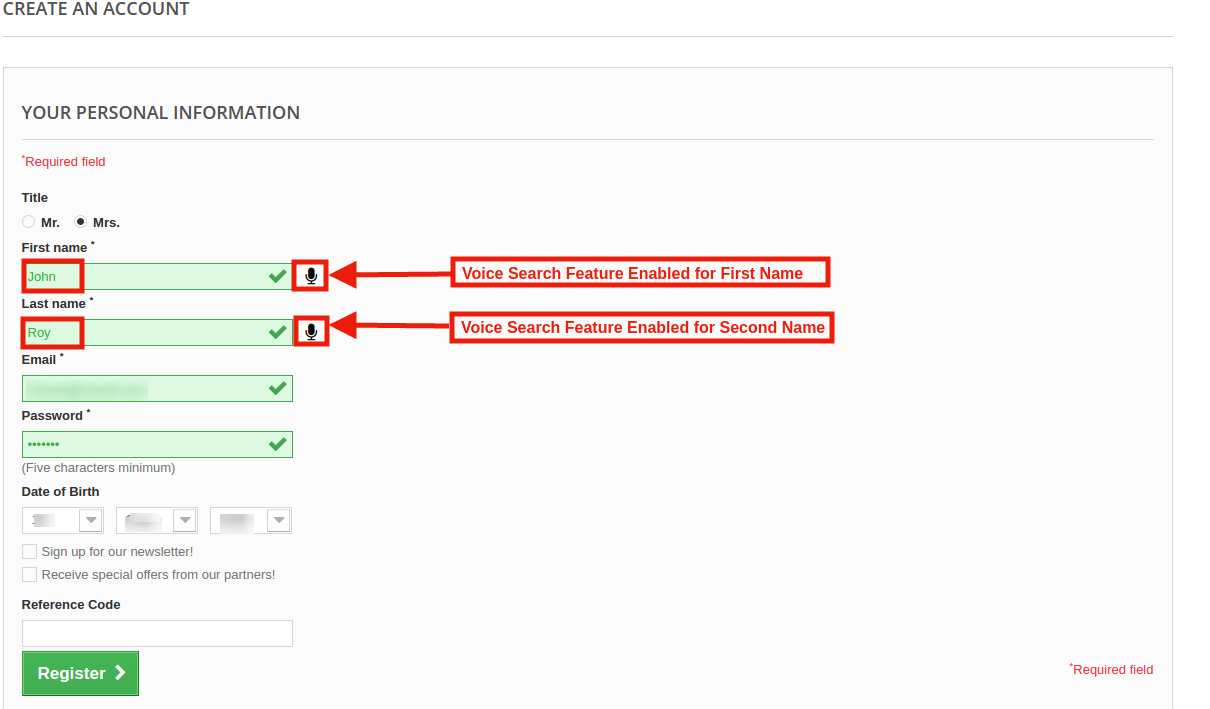
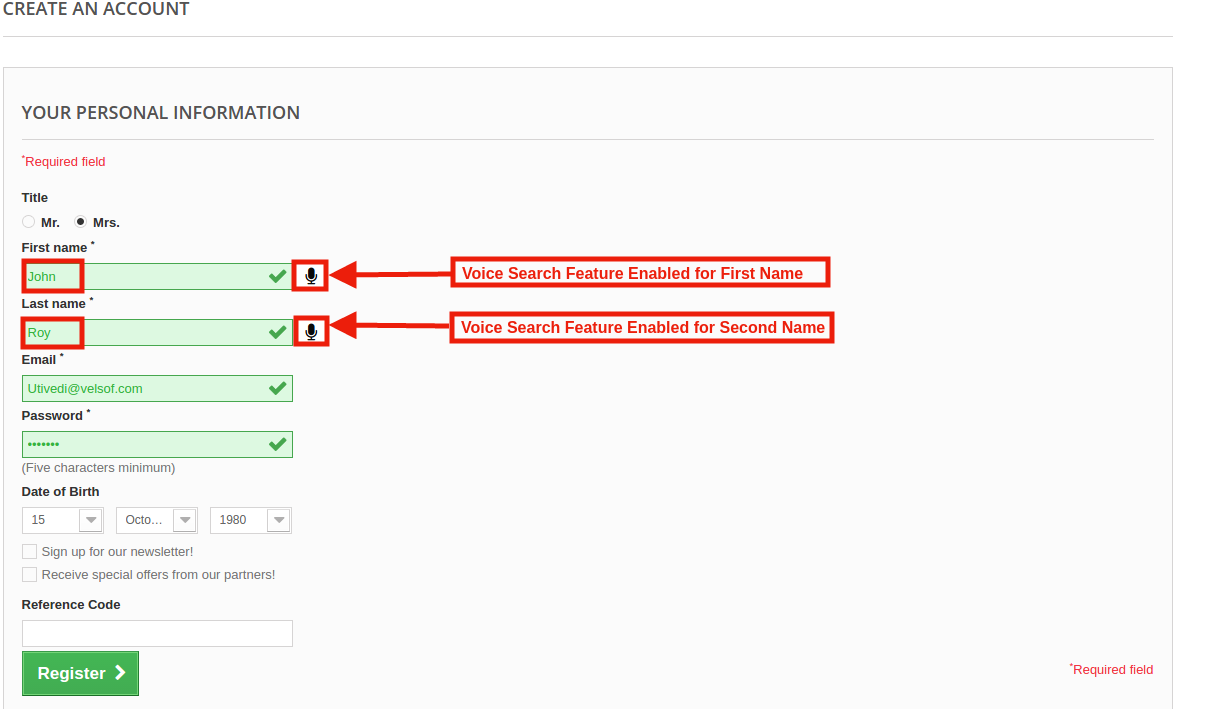
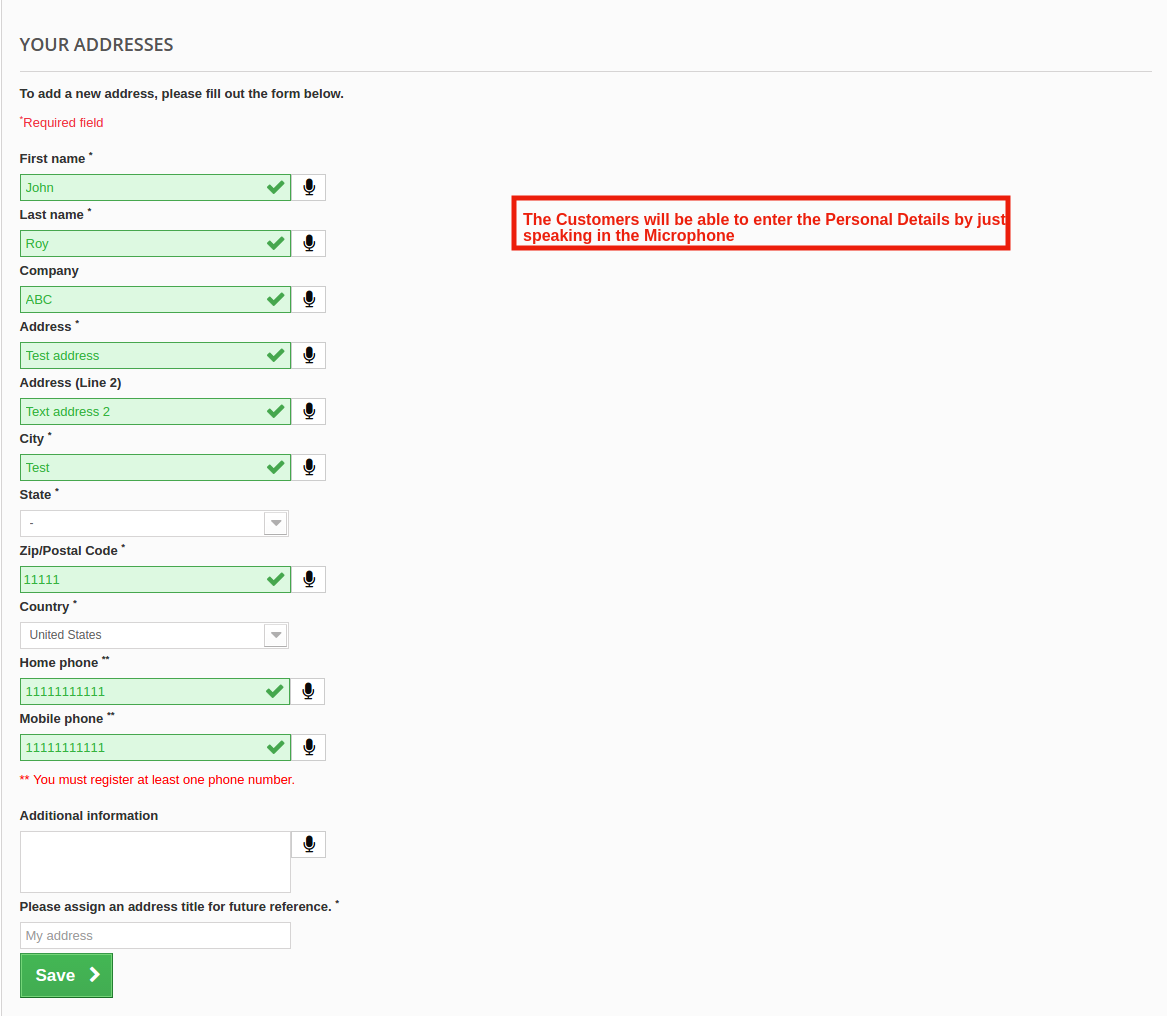
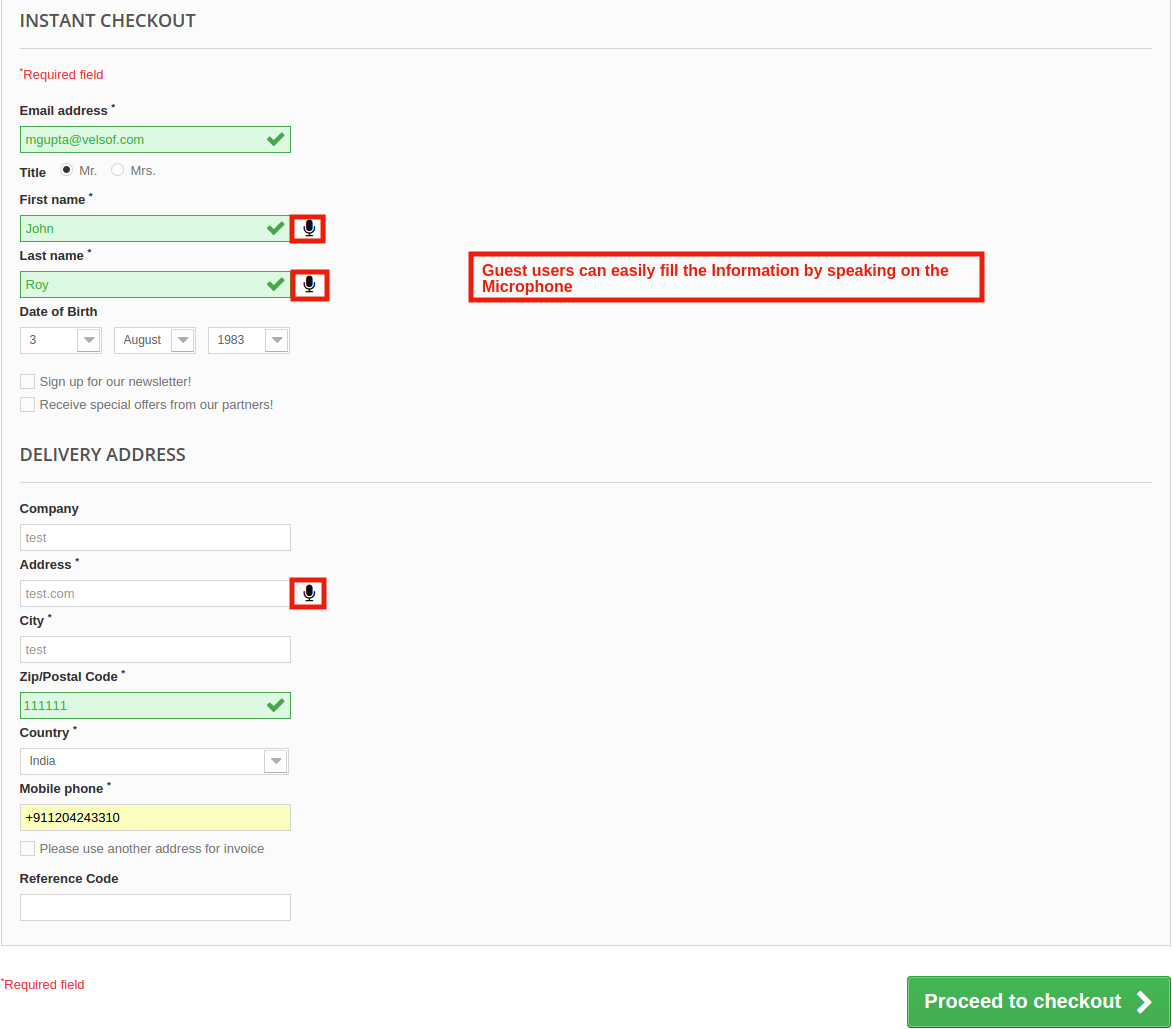
Knowband’s Prestashop Voice Search and Typing module integrates the Voice recognition functionality in your PrestaShop store with ease. With Prestashop Vocal Search Addon, the e-merchant has the ability to makes the account registration and checkout process easier and faster. The customers can insert all the required details by just speaking in the microphone. Additionally, they get an option to search the desired product using voice command. Prestashop Voice Recognition System devises a hand-free method to give inputs while query searching or while filling up checkout forms or PI forms. Voice Search and Typing addon ensure that the customer gets simple and best results with minimal efforts.
1.1 Features of Prestashop Voice Search and Typing Addon:
1. Prestashop Voice Search and Typing Addon by Knowband allows the customer to search for anything on your website just by speaking on the microphone.
2. Prestashop Responsive Voice recognition module easily recognizes the voice of the customer and processes the command.
3. The Prestashop store admin can enable/disable the vocal search option in the Search bar.
4. By using the Prestashop voice search and Typing module, the admin can enable the Voice recognition option in Mobile or Tablet device as well.
5. The store admin can enable the Voice recognition option on the Registration form as well. The Voice input works on the fields selected by the admin form the back-office.
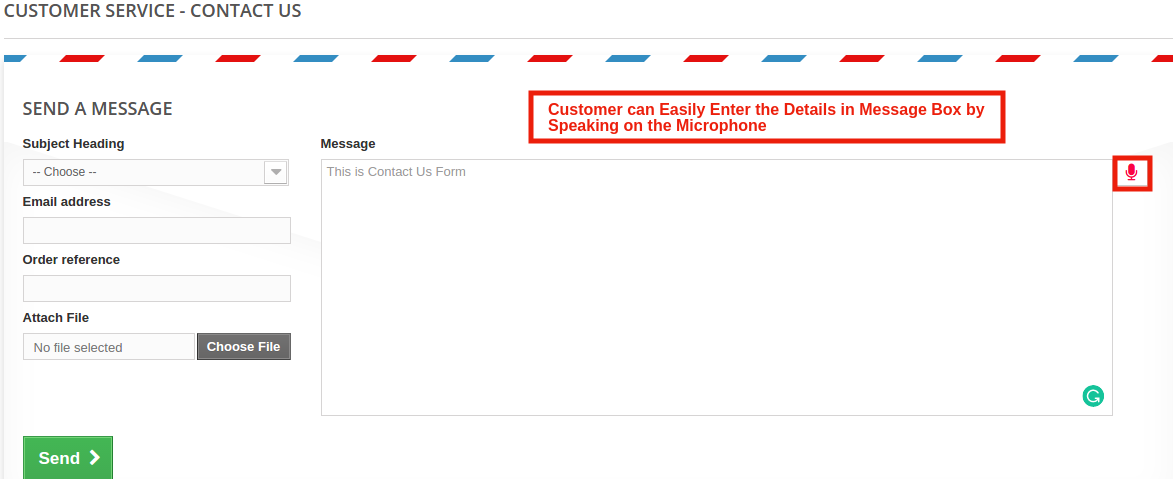
6. Knowband Prestashop voice commander module can be enabled for the Address form, Guest Checkout form, Contact Us form, Personal information form and more.
7. The Prestashop Voice Search and Typing Module offers the admin Voice type on focus option.
8. The Customer can get the desired result easily.
9. Prestashop Voice Recognition System is multi-store compatible.
10. Prestashop Search By Voice Module by Knowband is Multilingual.
11. Prestashop Vocal Search Addon is SSL compatible.
12. Prestashop Voice Commander module is easy to use and handle.
Technology for Development
Language: PHP
FrameWork: PrestaShop
2.0 Steps For Installation of Prestashop Voice Search and Typing Addon:
1. The folder structure of the Prestashop Vocal Search Addon.
2. Copy the whole folder named as product update into your modules folder of the root directory of your PrestaShop store through FTP.
3. You will be able to find the product Voice Recognition System ready to be installed in the Modules in your PrestaShop store as shown below.
4. Click on the Install link to install the plugin.
Now, your Prestashop Search By Voice Module is ready to use and click on “Configure” link to configure this Prestashop Voice Commander module by Knowband.
3.0 Admin Interface of Prestashop Voice Search and Typing
After installing Prestashop Voice Search and Typing Module in the store, the Prestashop addon will provide the following interfaces:
1. General Settings
General Settings of this Knowband’s Voice Commander Module for Prestashop is explained below.
3.1 General Settings
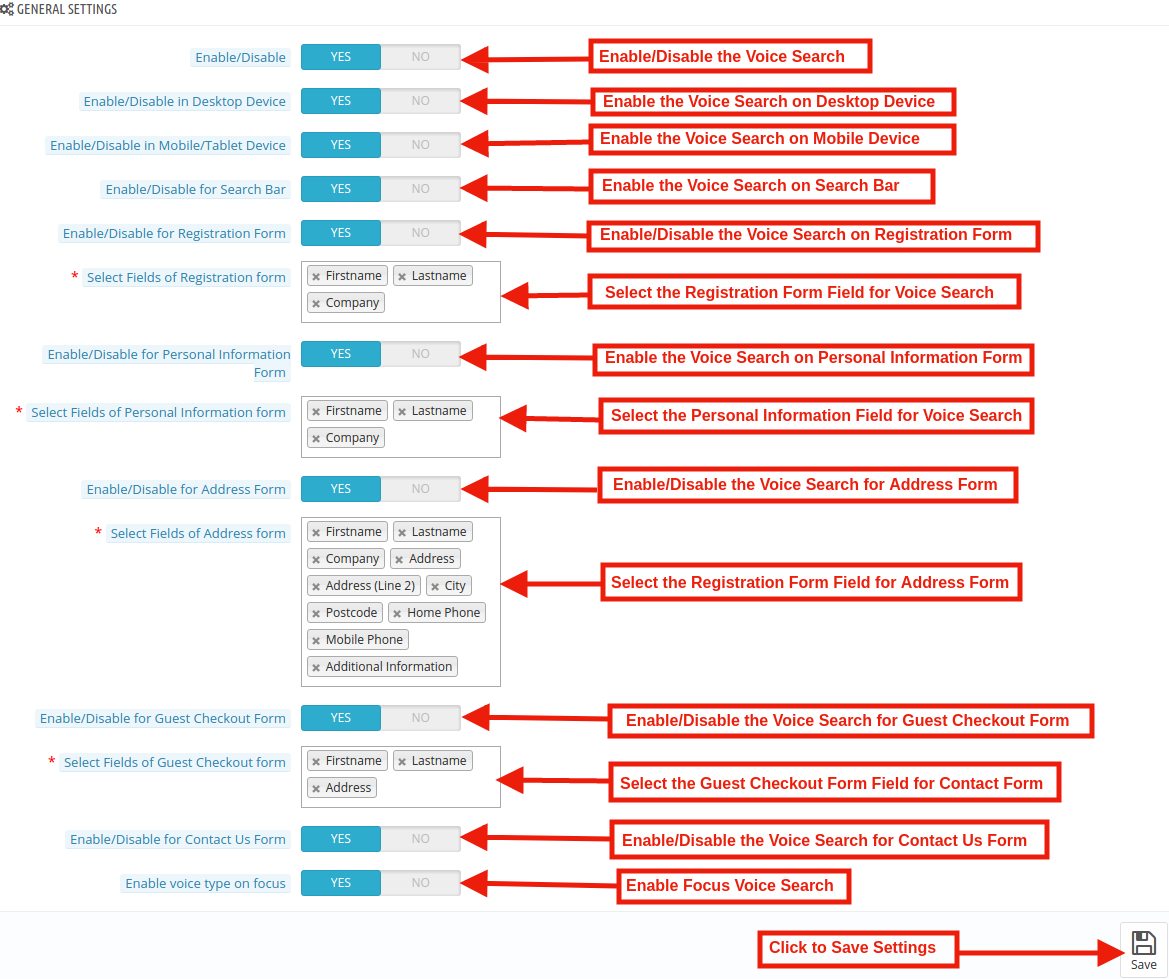
In this tab of the Prestashop Voice Search and Typing Addon by Knowband, the admin can enable/disable the Voice Command feature of the various section like: Registration page, Contact us page, Additional information page, guest checkout form and Search bar of this Prestashop module in various languages. This tab will have the following options:
General Settings tab of this Prestashop Search by Voice addon has the following options:
Enable/Disable: Initially, this field of Prestashop Voice Search and Typing Module by Knowband will be disabled. The admin can enable/disable the Addon by toggling the button.
After enabling this voice search setting, it will add the Voice Search feature to your store. The customers get easy navigation option. They can browse the category or land on the desired product just by using voice assistant. This saves the effort of typing manually.
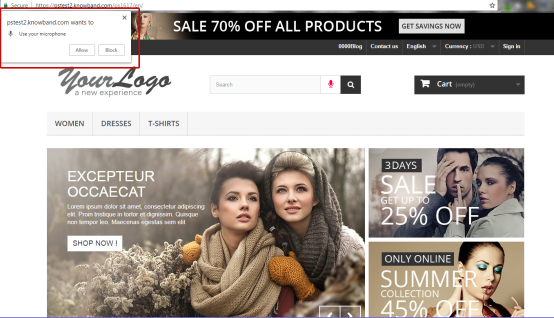
When the customer clicks on the Voice Command button, the pop-up notification appears on the screen asking permission for accessing the microphone as shown below:
After enabling the notification, the customer will be able to speak on the microphone.
Enable/Disable in Desktop Device: In this section, the store admin can enable the voice command feature in the desktop site as well.
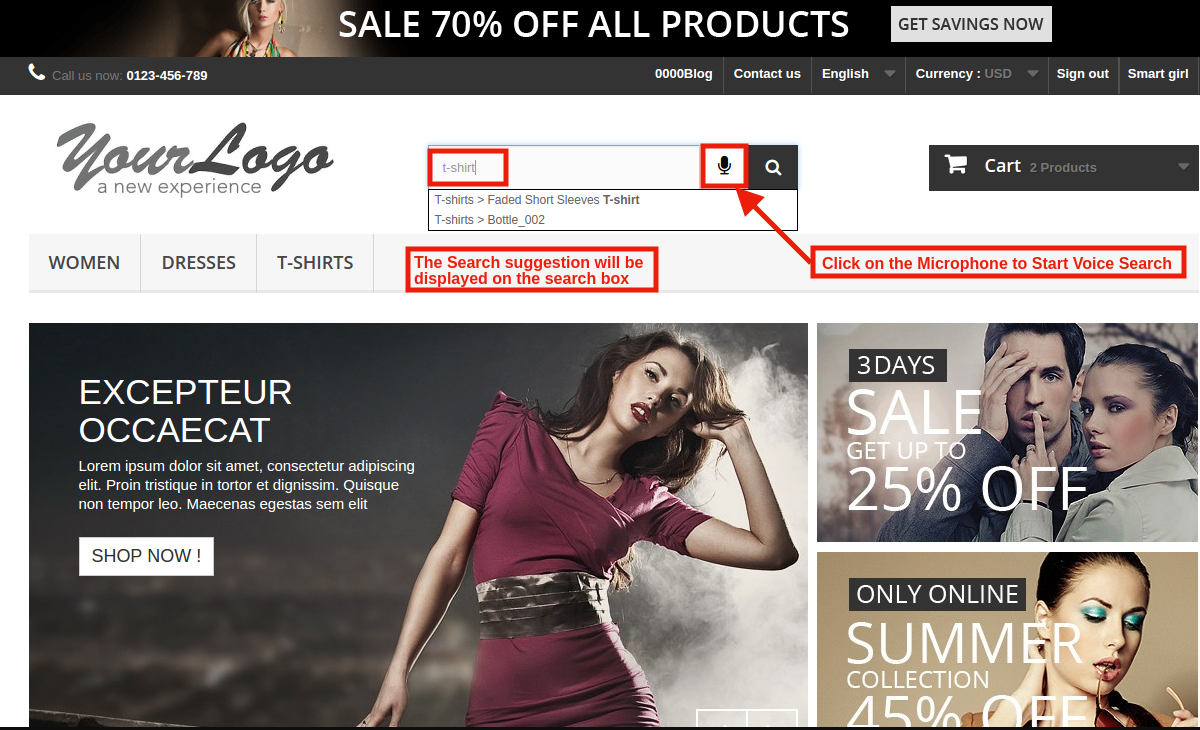
Front End Preview:
The customers can easily browse the desktop website device just by speaking the microphone.
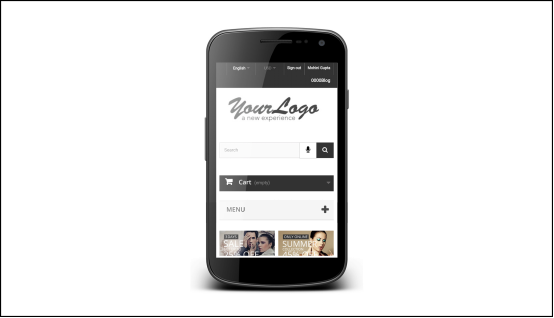
Enable/Disable in Mobile/Tablet Device: By using this Prestashop Vocal Search Addon, the admin can enable the Voice recognition feature on Mobile Device just by toggling the button.
Front End Preview:
Enable/Disable for Search Bar: Using this option of the Prestashop Voice Recognition System Module, the store merchant can enable the voice command functionality for Search Bar.
Enable/Disable for Registration Form: Prestashop Voice Search and Typing Module gives an option to the eCommerce retailer to enable the Voice Recognition System on the Registration form.
Select Field for Registration Form: Here, the store merchant can select the registration form field. In which they want to enable the Voice feature like: First name, Last Name and more.
Enable/Disable for Personal Information Form: This option allows the admin to offer the Voice command feature on the customer personal information form. The customer can update the information just by speaking the microphone. The addon will capture the command given by the user through a microphone and input the same in the respective field.
Select the Personal Information Field: The admin can select the field for providing the voice option.
Enable/Disable for Address Form: Prestashop Voice Search and Typing Module gives an option to the eCommerce retailer to enable the Voice Recognition System on the address form.
Select the Address Form Field: In this field, the Prestashop store admin can allow the customer to fill the Address by speaking on the Microphone. As per the requirement, the admin can enable voice commander function First name, Last name, Company name, Address and more. The customer can easily fill the personal information by speaking in the Microphone.
Enable/Disable for Guest Checkout Form: Prestashop Voice Search and Typing Addon gives an access to the guest users to fill the checkout information whatever the Guest user speaks on the microphone.
Select the Guest Checkout Form Field: With the help of Prestashop Voice Reminder module, the Prestashop store owner can enable the voice recognition feature in Guest Checkout form as well.
Enable/Disable for Contact Us Form: The Prestashop Search By Voice Module allows the store admin to enable the voice recognition function on the contact form.
Enable Voice Type on Focus: The Customers can activate the Microphone without clicking on it if the admin enables Voice type on focus setting then Microphone will be activated at the same time when the customers click on the field.
On Thursday, August 16, 2018, Apple was probed in Japan for anti-competitive practices against Yahoo game platform. Apple has been accused of applying pressure to prevent publishers from working with Yahoo’s Game Plus Platform. As per Japanese Media , the Fair Trade Commission (FTC) is investigating these antitrust allegations.
The Whole Story
In July 2017, Yahoo Japan came up with the Game Plus platform allowing the users to stream games online without needing to download them. Also, it benefitted the developers with fewer restrictions regarding sales, fees, and updates in comparison to the Apple App Store. This platform gained the interest of a number of companies with some big names on the list as Square Enix Holdings and many more.
Apple, who recently became $1 Trillion company, took this Game Plus Model as a direct threat to their App Store. It started pressurizing the companies to back away from Yahoo. It even got some of them off from the list. Apple apparently believed that the deal of Yahoo with around 50 big organizations can damage App Store’s business and thus tried its money and power to put pressure on them.
How has it affected Game platform?
Apple pressure on Yahoo to quash the Game Plus Platform slashed its budget in September 2017. After the organizations started withdrawing from the platform, Yahoo has now stopped promoting its services. Yahoo has been reporting these issues to Fair Trade Commission and industry ministry from the last autumn and now they are investigating the matter.
Antitrust allegations aren’t new to Apple
Going through Antitrust allegations isn’t new to Apple. Its Universal compatibility violation is the latest on the plate. Its Irish tax bill and Qualcomm antitrust battle are also leading the list. Apple hasn’t responded to any of this accusation of Yahoo. A spokesman at Yahoo Japan said that they are adding game titles on the website. Let’s wait for Apple to comment on the matter and see where this fight goes in future.
Recently, Apple became the first $1 trillion company. Apart from being the biggest tech organization, it is best among its counterparts. From building a motherboard without a monitor and keyboard (Apple I) to the newest iPhone X (Behemoth), Apple has left every tech biggie behind. Apple, primarily being a product-based company focused on their iPhone instead of trying their hands everywhere and see where it has brought them. Their one Smartphone’s progress is so high that the other phone makers can’t even move the needle. Let’s dig deep into Apple’s Success Story and know how it all happened.
Apple and technology are like two sides of a coin. The way they are bringing the amazing new technologies in these small-sized handsets is just incomparable. Its current dominance and rise is quite puzzling for its competitors and even for us.
Both past and the recent success of Apple are based on the growth of its products. Other than their trademark iPhone, Apple has even other successful products. For instance, its iPad brought the tablets into the market. iPad boasted 46% of US market share and grabbed $5.9 revenue. It is by far the most successful tablet in the world.
Apple’s Evolution: When Apple was nearly bankrupt
Apple’s journey has been a bit extraordinary from the beginning. Who would have thought then that a 21-year-old college dropout would have this enormous vision?
It all started with Jobs hanging out in a garage with his two friends Steve Wozniak and Ronald Wayne. Jobs and Wayne started working for a gaming company while Wozniak worked for the Hewlett Packard. But, on April 1, 1976, this trio built the first Apple computer and it was the first foot of this remarkable journey.
But, Wayne sold its Apple shares for just $800 just three months after the initiation of Apple while the two Steves went on with their vision.
Everyone is aware that Apple had a great fourth quarter and has became the first $1 trillion company, but the way to success hasn’t been an easy one for the iPhone maker. The iPhones are doing better than ever today. But, very few of us know that Apple was once on the brink of bankruptcy. Yeah right! It happened 20 years ago in the August of 1997. Let’s take a detailed look at what happened with the Apple in the back of summer of 1997.
Apple was going through a disastrous phase at that time and it was on the verge of getting defunct. Apple decided to buy a computer company ‘ NEXT’ with the hope of a right direction to their company. But, Steve Jobs convinced the board of rather getting a help from an established organization than to buy a company. Steve Jobs knew that if Apple was to be saved, the only chance was to seek help from the competitors.
Microsoft realized that eliminating competition isn’t the only way to win and it came forward to rescue Apple. It invested $150 million in return for non-negotiating shares. It assured Apple that it would support Mac for five years. In the favor, Apple dropped the lawsuit against Microsoft that claimed that Microsoft had copied Mac OS to make Internet Explorer the default browser in computers instead of a choice. After the agreement, Jobs even thanked Bill Gates for their support, which was even reported in the Time Magazine that year:
Summer of 2018: When Apple is worth $1 trillion
Various tech biggies such as Alphabet (Google), Amazon, Microsoft have been doing a great job in the technology space. On Aug 2, 2018, Apple hit the market value with $1 trillion in which iPhone X played a major role. iPhone sales increased in such a way that when it grew by 1 percent, revenue instantly jumped by 20 percent. With $53.3 billion in revenue, the company managed to grow by 17 percent per year. Other Apple services may not be showing the same magical growth, but iPhone is killing from one side and it’s enough of what Apple requires.
When we talk about market capitalization, Apple has been the biggest company in the world for all these years. Now, Apple and Tim Cook are becoming more powerful than ever and we can hope that they make fruitful use of this success.
PrestaShop Mobile App Builder
Get the mobile app created for your store in few hours with Knowband Mobile App Builder Module.
The company’s bright fortune is surely a good news for the individual investors. The stock of Apple is widely owned by teachers to electricians to lawyers. By rising to $1 trillion, it has given a reflection of how big is the investor’s scope with Apple. Apple is now at a position where it is growing and is profitable for investors of all sort, be it the newbie’s or the established ones.
Kate Warne, the investment strategist at Edward Jones, says,” Apple’s $1 trillion valuation is a great reminder to investors that companies with innovative ideas combined with world-class products and service can create value for investors over time”.
Apple rose to $1 trillion: now the hard part
Every area that Apple is targeting and investing money has got competitors lurking around. Whether it’s for the Chatbots and AI to cars and voice, hungry co-opted companies are following it like a shadow.
Apple surpassed the one trillion dollar mark and left us all amazed. But, can they maintain their edge in the tech market? Can Apple provide the amazing technological advancements as it has done in the past? Will it be able to engage more loyal customers? Because if we look behind, there are other competitors in the race. Sustaining such big numbers won’t be easy when they have other competitor biggies who themselves carry the potential to overpower it.
Actually, the main challenge would be to manage complacency of this growth. As they say, success comes with both blessing and curse, thus, Apple has to plan their next moves properly.
Apple and controversies have never left each other’s side. Various allegations have followed Apple in the past two decades. Lately, Google has been fined $5B over Android Abuse and the sword is even hanging on Apple. Here, are few allegations which Apple has faced in the past:
The list isn’t ending here; big or small Apple’s span is full of allegations. But, somehow it dodges them every time. Negativity has always been there around Apple, but it never lets itself undermine.
Apple’s reign is full of loss, defeats, triumphs, and controversies, but it has proved its potential in the market. It hasn’t built its empire overnight. Apple has overcome product flops, near bankruptcy, the death of its founder to be worth $1 trillion. Had Microsoft not invested in Apple, the company would not have come this far. Imagine today’s world without technologies like iPhone, iPad, Mac etc.
Apple’s success story is full of efforts and sacrifices, so, it won’t let anyone overpower so easily. It isn’t hidden from anyone that it has some tough competition in the market. It would be interesting to see the technology fight put up by other companies to surpass Apple and how will Apple counter them. That time will tell.
On 9th of August, 2018, Qualcomm, the largest chipmaker announced that a mutual settlement has been agreed between them and Taiwanese regulators in Antitrust abuse case over $774 million fine.
Actually, last year in the month of October, Taiwan announced a fine on this chipmaker organization for increasing the licensing fees of the devices used in the smartphones. In the lawsuit, Taiwan alleged Qualcomm of abusing its monopoly power over smartphone modems. In short, Qualcomm has tried to forbid the new companies from setting their foot in the market and this is not the first time it is in a legal battle. Qualcomm’s patent battle with Apple is also a big highlight these days.
Lately, Google has also been fined $5B by EU over Android abuse. News regarding Antitrust abuse are coming from all directions. In the settlement between Qualcomm and Taiwan, the initially announced fine has been dropped but Qualcomm is bound to invest money in Taiwan and work with its Government to bring 5G services in the country. Qualcomm can’t even pull off its chip supplies in this deal.
Whenever it comes to publishing Android app, Google Play Store is usually a go-to place. Being the biggest app distributor in the mobile app market for a long time, it is the most obvious choice for the app developers. “The green robot” is way ahead of other platforms, if we look at the number of Android devices. One reason behind its popularity is that Play store is pre-installed in all the Android devices. However, there are even other stores available which allows the users to sail through the ocean of apps and can give additional downloads for your Android app.
Why look for an alternative to Google Play Store?
Now, the question arises, are we limited to just Google Play Store for app distribution? I would suggest checking for the alternatives to Google Play Store. Various other App Stores allows publishing Android app for developers. They are not as big as Play Store, yet carry a huge customer base and can easily take your app to thousands of users every day.
Publishing Android app to multiple app stores increases your app’s visibility and ultimately enhances your revenue. Exploring your options isn’t a bad deal when the growth of your application is on the line. Find some more information on the alternatives available for Google Play Store mentioned-below.
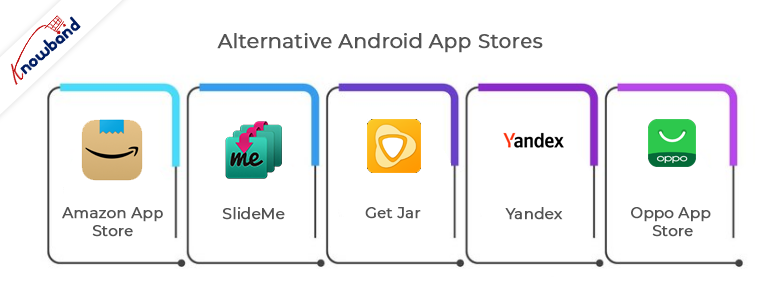
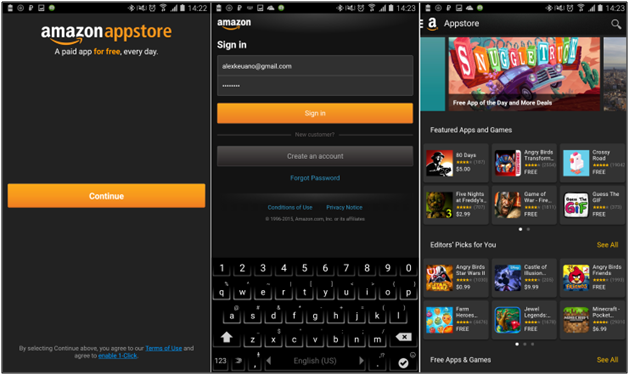
Amazon app store is the most popular among all third-party platforms for sharing your Android application. Its progress can only be determined with the fact that from offering content to Kindle owners it has expanded itself to a well-flourished store.
Earlier, it became quite popular for a service ‘Free App of the Day’ in which it offers a free app to users for which they have to pay on the Google Play Store. Amazon even provided several paid titles free for publishing Android app.
Publishing Android app on the Amazon Store is pretty straightforward. For in-app purchases or paid apps, you can go to Amazon Underground Store. App submission is quite simple with the Amazon but your app has to clear an approval process. HTML 5 and web apps are also allowed in this store.
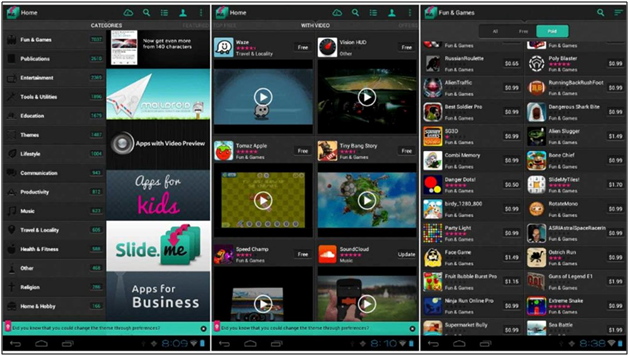
SlideMe is the oldest app store with all sort of free and paid Android apps. Its app store SAM (SlideMe App Market) got a better user interface than others. Users can simply categorize products and even look for community reviews and comments.
App publishing is quite simple with SlideMe. SlideMe takes 20% of the income of the publisher as a commission. It offers various payment modes like PayPal, which even Google Play doesn’t provide. It is even older than Google Play Store and thus connects with a huge section of android users. You should certainly give it a try.
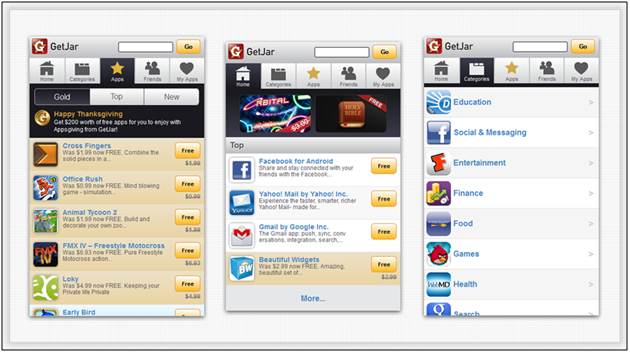
Get Jar is also one of the oldest app stores offering a wide range of apps in the Android Market. Its website and app share the same view, users can browse for the apps anywhere.
Publishing app on the Get Jar is free of cost. Developers can make an account and get full access of their application. Developers are even allowed to submit different versions of the same application and target different audience groups.
Yandex, being one of the biggest search engines in Russia, provided its App Store. It is the most suitable option for the developers if they want to expose their app mainly in Russia. You just require to make a Yandex account to publish your app.
For app submission process, you just need to provide a relevant category that defines your application, target countries for your app and related images. Yandex regulators review your app before making it live on their store.
Chinese smartphone developer, Oppo has its own app market which recently took a leap and came to the 6th position in top 10 list of app stores. In 2015, it was out from the list. This App store has recently came ahead in the App market and made its impact by gathering huge customers.
Regarding app submission, it has few simple guidelines through which you can submit your app. Along with easy submission, your app will be among less number of apps and can mark its place along with future growth of store.
Creating an Android app requires a lot of efforts and its growth in the market directly depends on its distribution. Nowadays there are enough choices available for Android developers apart from the Google Play Store. They can even choose whether to target multiple stores or focus on just an independent one. Although the importance of publishing app on Google Play store is irreplaceable, yet these third-party app stores could bring you, potential users. Every app developer should try to grab the opportunities, they’re offering.
Now that you have created an iOS app and are ready to embark on its journey, let’s discuss the process of app publishing. The motive behind app distribution is to distribute iOS app with the right audience. Well, when it comes to app publishing, the obvious option which comes to our mind is the Apple App Store. No one can deny that the user reach of iOS store is exceptional and the services offered by it has their own perks.
Important Update in the eCommerce iOS Mobile App Builder New Versions
Now, store owners can easily manage the navigation menu based on their business needs.
Translation text can be updated and managed from the backend of the mobile app builder, making localisation simple and flexible.
The mobile app now supports video banners, helping you present promotions and content in a more engaging way.
Now users can sign in directly from the home screen for faster access.
Store owners can now upgrade to the latest version of Knowband Mobile App Builder to experience these enhancements.
Apple App Store Distribution:
The most common platform for iOS app distribution is Apple App Store. It makes your app available to every Apple user and it even helps in monetizing the app by setting in-app purchase and assigning a purchase price.
Publishing your app on the iOS store takes your app to a huge customer base. Although being an intuitive platform for the developers, the app approval process can be a bit tricky. There might be a huge delay in the approval process sometimes. In few cases, it even takes months for the apps to get an approval.
The approval process makes sure that your app follows proper guidelines. If your app has any performance issues, buggy or spammed, it will surely be rejected. You can also find the reasons behind app rejection by Apple App Store.
In case the app approval process is getting troublesome for you, then, there are various other alternatives to share iOS app. Some of the alternatives of sharing iOS app on Apple App store are discussed below:
1. Ad- hoc deployment:
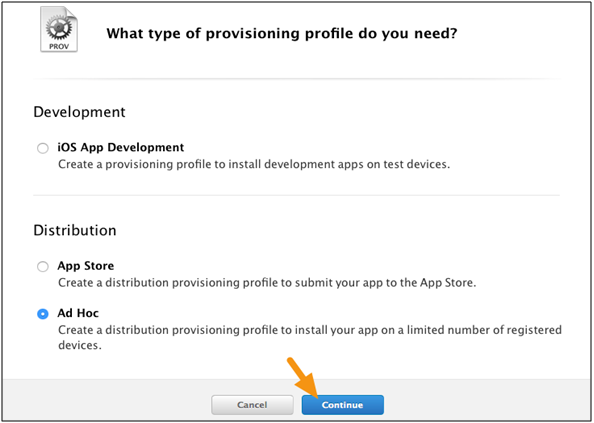
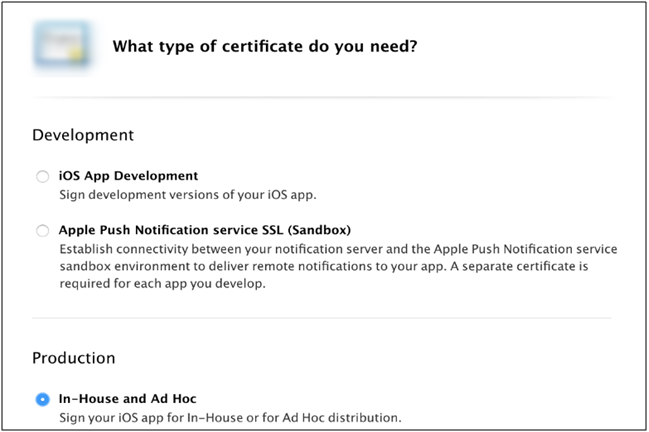
Apple provides an Ad-hoc app deployment option for the developers who want to distribute iOS app for the private beta or a temporary distribution. In this process, the app developer has to deliver the app binary to each user through e-mail or download URL. To make sure that the binary work on user’s device, developer require to add the UDID of each device and register them to Apple Member Center. App binary won’t run on any regular device until it is registered in the ways discussed above. Your ad hoc profile guarantees that test versions of your app are not copied and distributed as per your approval.
Export your application through Xcode option. Once the app binary has been exported, it can be distributed with MDM (Mobile device management). But you still need to add the UDID of each device. There is no alternative to that. After that just install the app on the device.
There are few important points which you need to know before going for this deployment option:
This distribution process is limited to 100 iPhones, 100 iPad, and 100 iPods touch installations. Also, a developer needs to acquire the UDID of each device to share iOS app.
Whenever a new UDID is being added, you need to create a new version of your application. They can be added only till yearly subscription.
Pros of Ad- hoc deployment:
The iOS store’s approval process for your app is not required.
Your app listing will not be visible to the public and they can’t purchase or install it.
Cons of Ad- hoc deployment:
The number of devices is limited to 100 which can be replaced only once during yearly membership.
The UDID (Unique Device ID) of each device must be manually registered with your provisioning profile.
The Apple developer profile is valid only for one year. After that, you need to rebuild your app with a new profile.
2. Enterprise In-House App Deployment:
This app distribution method came to counter the ad-hoc distribution process. Like ad-hoc, here, you don’t need to add UDID of every device. In case you have created an app and want to share iOS app internally with the staff, then, this technique will save you from the extra effort of registering UDID of every device.
Enterprise deployment comes into cause when an app is exported through Xcode and you aim to install it on any device without submission to iOS store or registering device UDID’s. Your app can be distributed through e-mail, URL or MDM.
There are few important points which you need to know before going for this deployment option:
There is no limit to the devices, but the devices must be owned by the organizations.
Pros of Enterprise In-house App Deployment:
The approval process of your app by iOS regulators isn’t required.
Your app won’t be available on the Apple Store. The public can’t purchase or install it.
All the users in the enterprise can use the account to share the iOS app.
Cons of Enterprise In-house App Deployment:
This program is only intended for employees within the small organizations.
The organization is fully responsible for app distribution and updates, whether done manually by email or through an MDM.
Cost is higher for the Enterprise Developer Account at $299 per year as compared to normal account at $99 per year.
3. B2B VPP App Deployment Method:
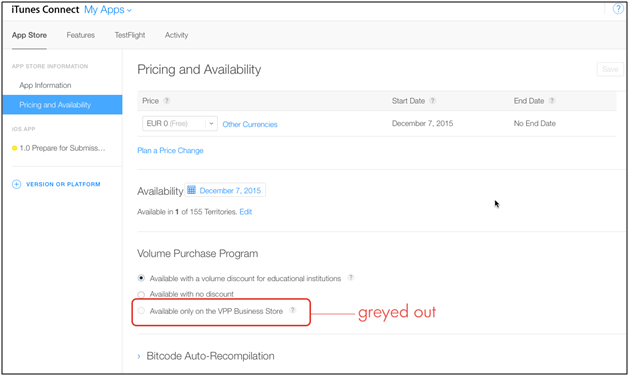
Apple’s Volume Purchase Program allows you to have a private app store for your personal business. You can build internal app binaries for every device which has joined your organization. You even have the option to share iOS app with other businesses.
This process does have an approval process, but it is flexible as your app is not available for the general audience. VPP being a private store, app distribution is handled by the program. This process is mostly used with MDM service.
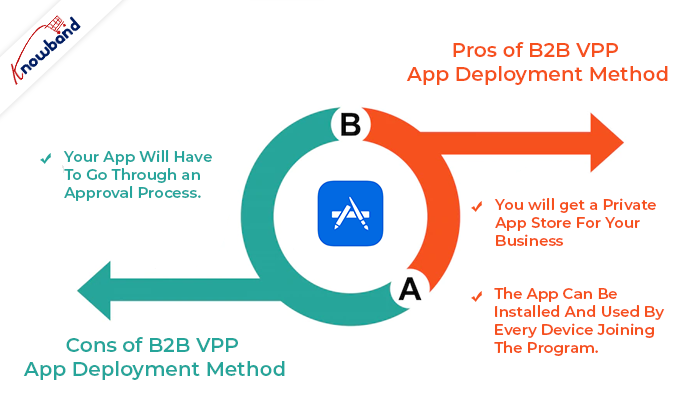
Pros of B2B VPP App Deployment Method:
You will get a private app store for your business.
The app can be installed and used by every device joining the program.
Cons of B2B VPP App Deployment Method:
Your app will have to go through an approval process.
Knowband also provides No Code Mobile App Builder andiOS App Maker for Prestashop, Opencart, Magento, Magento 2, and Woocommerce.
Prestashop Android and iOS Mobile App Builder Addon
Get the mobile app created for your store in a few hours with Knowband’s Android and iOS App Maker for Prestashop.
Choosing the right program to use is as important as the actual app deployment plan. These processes may seem daunting, but with the right approach and proper planning success of your app is ensured. Abide by the rules and guidelines mentioned above and your app will be published without undergoing through any approval process.
Apart from that, at Knowband with 13+ years of web and app development, we provide 100+ plugins for major eCommerce platforms Magento 2, Prestashop, WooCommerce, and Opencart. We provide web and app development services on various frameworks and technologies, you can get in touch with the technical support team at our official email address support@knowband.com.
European Commission claims that smartphone makers have failed in adopting universal compatibility and is planning to enforce a standard on them. It gives a signal that Apple might be the next target of EU.
Actual Story:
In 2009, 14 big companies like Nokia, Samsung, Apple etc. signed a memorandum, agreeing to harmonize their chargers for upcoming phones in the year 2011. This memorandum expired in 2012 and all the companies adopted the standards except for the tech giant Apple.
European Commission’s Move:
After putting a $5B fine on the Google last month, European Commission is now getting ready to put Apple in the line of fire. They are going to conduct an ‘Impact Assessment Study’ to fix a standard for the quality of mobile chargers. EU is going to announce new rules which would force Apple to drop the Lightning port for USB-C.
European Commission is justifying their statements with the fact that lack of compatibility cost 51000 tons of electrical waste every year as users throw their old chargers. The EU executive said they are not happy with the status quo.
On 1st of August, while responding to a query from EU lawmaker, Margrethe Vestager said,” Given the unsatisfactory progress with this voluntary approach, the Commission will shortly launch an impact assessment study to evaluate costs and benefits of different other options”. EU is hoping that this study will decide whether any strong action needs to be taken against the tech biggies. Elzbieta Bienkowska, the market colleague is made in-charge of the matter.
Is Apple really in danger?
Now, the time will tell whether this decision of EU would affect the trillion dollar company or Apple will dodge it off. Till now, Apple has not responded over this issue. It would be interesting to see whether Apple will be fined again as of Irish Tax Bill or left with a warning.
Early on 8th of Aug, the ride-hailing service providers like, Uber Technologies, Lyft found themselves in the eyes of the storm. This time, it is New York City that has hit the brakes over the growth of the app-based ride-sharing companies.
What is the cap proposed on Uber?
The City Council has voted to halt new vehicle licenses for ride-hail services. The lawmakers have approved the proposal to freeze the new licenses for car service drivers for one year. By doing this, New York has become the first city in the US to impose such a restriction.
Along with the cap, another bill would require ride-hailing companies to provide data on usage and charges or face a fine $10,000 for noncompliance. Geographic restrictions and a $15 minimum wage for ride-share drivers were also approved.
New York’s Mayor Bill de Blasio tweeted saying he would sign the bills into law, “Our city is directly confronting a crisis that is driving working New Yorkers into poverty and our streets into gridlock. The unchecked growth of app-based for-hire vehicle companies has demanded action – and now we have it.”
In addition to this, the legislation passed will even set minimum pay levels for the cab drivers and minimum fares. These factors are currently only regulated for the traditional cabs. In a statement to CBS News, Uber said that the decision will “Threaten one of the few reliable transportation options while doing nothing to fix the subways or ease congestion.”
Joseph Okpaku, vice president of public policy at Lyft, was more heat than light over the City Council. Following the vote, he said in a statement, “These sweeping cuts to transportation will bring New Yorkers back to an era of struggling to get a ride, particularly for communities of color and in the outer boroughs. We will never stop working to ensure New Yorkers have access to reliable and affordable transportation in every borough.”
On the other hand, the New York Taxi Workers Alliance are on cloud nine. Having a whale of the time, Bhairavi Desai, executive director of the NYTWA, said in a statement, “This victory belongs to yellow cab, green cab, livery, black car, Uber and Lyft drivers who united together in our union to transform our shared struggle and heartbreak into hope and strength. And this victory belongs to New Yorkers and our allies who have stood with us to say, not one more death, not one more fallen driver crushed by poverty and despair.” NYTWA has pushed hard for the freeze as the taxi industry has been long decimated by Uber’s rise. As per reports, the price of a taxi medallion has plunged from more than $1 million to less than $200,000.
Final Word
The industry experts are saying that a cap on new licence would reverse the progress of the app-based services to the neighborhoods that are poorly served by traditional taxis. However, the cap is definitely in the favor of traditional taxi services that were affected by the tech companies like Uber and Lyft.
1.0 Introduction of Knowband Prestashop Accelerated Mobile Pages (AMP) Addon:
Accelerated mobile pages or AMP can effortlessly boost the performance of the websites on the mobile devices. AMP provides convenient access to information on the Internet from the screens of smartphones and tablets. AMP is an advance Google technology which reduces the load time of the mobile website. With the introduction of mobile-first indexing, the goal of every eCommerce store owner should be to reduce the load time of their websites for the mobile users. High load time increases the bounce rate of the website. For increasing the performance of Prestashop store website on mobiles, Knowband offers the Prestashop Accelerated Mobile Pages (AMP) Module.
Prestashop AMP module allows the admin to convert the home page, category pages, product pages and CMS pages into fast-loading AMP pages. By limiting the data displayed, Prestashop Accelerated Mobile Pages Module reduces the load time of the mobile sites. Also, with the Prestashop addon, the e-merchant has an ability to enable/disable additional sections on the webpages like Best Sellers, Featured Products, New Arrival. You can now provide amazing user experience to your audience base who browses the site through their handheld devices. In the mobile generation, once your mobile-first customers are happy, sales will happen easily.
1.1 Features of Prestashop Accelerated Mobile Pages Module:
1. Prestashop Accelerated Mobile (AMP) Module allows the store admin to convert web page to AMP without making any core changes in the code of the website. This limits the data displayed on the mobile site, thus, boosting the load time of the same. In short, the Prestashop addon can amp up the load time of the mobile sites by creating accelerated mobile pages of the site. However, it will not affect the load time or performance of the desktop sites.
2. With the help of the Prestashop AMP Module, the store admin can convert the home page, category pages, product pages and CMS pages to AMP.
3. Knowband’s Prestashop Accelerated Mobile(AMP) addon provides an option to the store owner to customize the home page, category pages, product pages and CMS pages settings form the back-office.
4. The admin can upload the Business logo on AMP and they can also fix the width and height of the website.
5. Prestashop AMP Module offers the store merchant an option to add the Custom CSS for adding the additional functionality.
6. Google Accelerated Mobile Pages Module enables the store admin to enable/disable the display of the bestsellers option, featured and new products on home page. Apart from this, they can set the number of featured products to be shown in a particular section. The random products are automatically fetched and displayed to the user.
7. The Prestashop store owner can change the banner of the best sellers, featured and new products on the homepage.
8. Prestashop Accelerated Mobile Pages (AMP) module has provided the social media sharing options on the AMP. Even admin can add more icon by adding the script.
9. The Admin can customize the categories of AMP from the back-end of the Prestashop AMP Module. The customers to browse categories from the AMP page.
10. By using the Google Accelerated Mobile Pages Module, the admin can automatically generate AMP sitemap with the help of CRON.
11. The Admin can generate AMP sitemap by click the button.
12. Knowband’s Prestashop Accelerated Mobile Pages Addon supports Google Analytics. The eCommerce admin can enter the Analytics client Id for tracking the AMP performance.
13. Google Accelerated Mobile Pages Module supports multiple languages.
14. With the help of Prestashop AMP Module, the Prestashop store admin can set color and background color for AMP website and other different blocks of AMP.
15. Prestashop AMP module is easy to use and handle.
16. This Knowband’s Prestashop AMP Module also supports GDPR compatibilty. Admin can map the cookie policy to any CMS page of the website.
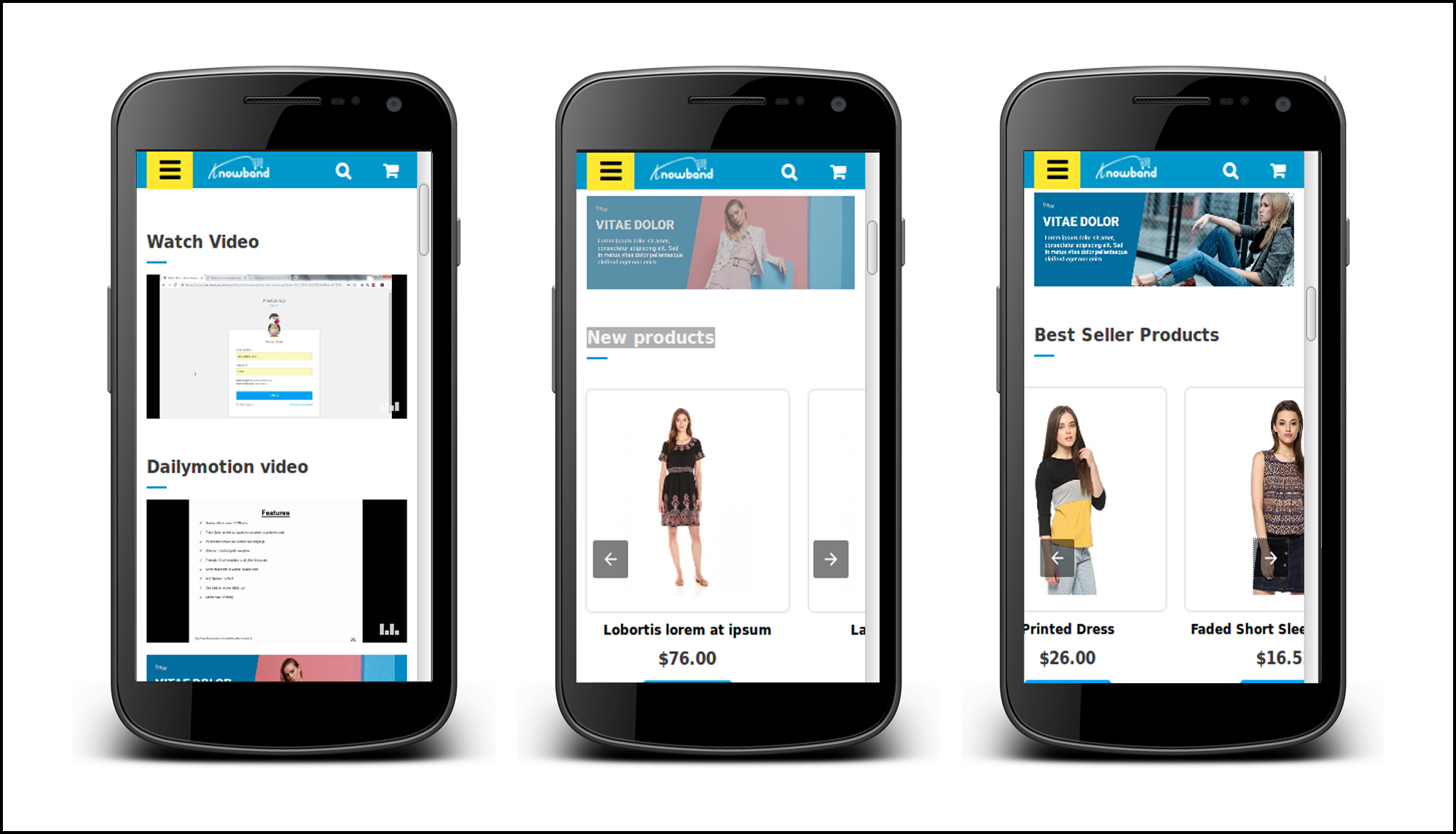
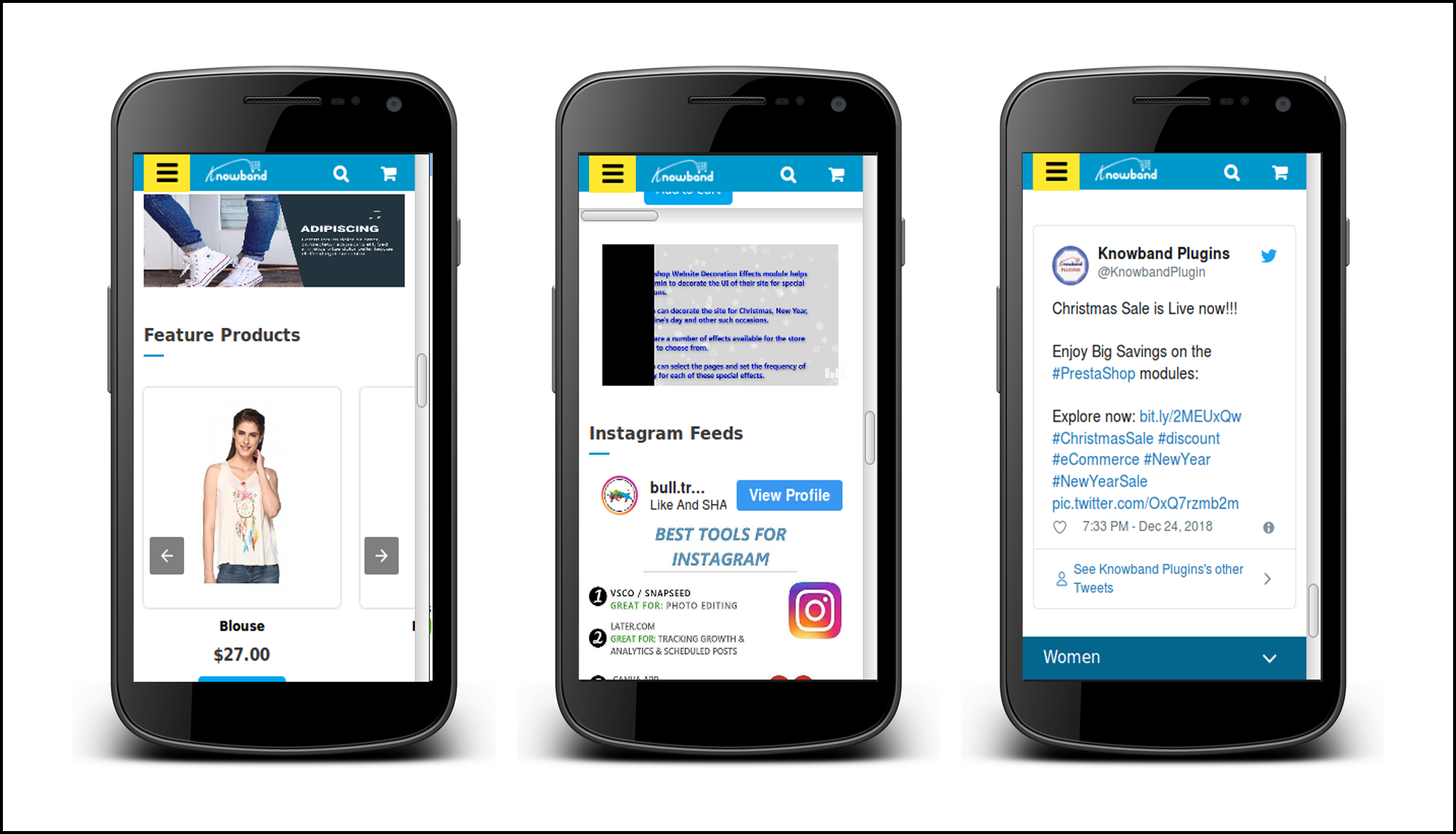
17. The eCommerce store owner can show YouTube, Vimeo and DailyMotion videos on the homepage of mobile pages.
18. Google Accelerated Mobile Pages(AMP) Addon provides an option to display Instagram and twitter feeds on the homepage.
19. The e-merchant can manage the look and feel of cookie consent bar from the admin interface without any hassle.
20. The store admin can display advertisement on all the Mobile Pages by including Google adsense from the admin interface of Prestashop Accelerated Mobile Pages module.
21. The store owner can also implement Facebook pixel on the mobile pages. Facebook pixel is an analytic tool which tracks the store visitors.
Technology for Development
Language: PHP
FrameWork: PrestaShop
2.0 Steps For Installation of Prestashop Accelerated Mobile Pages (AMP) Addon:
1.The folder structure of the Prestashop AMP module.
2. Copy the whole folder named as product update into your modules folder of the root directory of your PrestaShop store through FTP.
3. You will be able to find the product AMP plug-in ready to be installed in the Modules in your PrestaShop store as shown below.
4. Click on the Install link to install the plugin.
Now, your Prestashop Accelerated Mobile Pages (AMP) Plugin is ready to use and click on “Configure” link to configure this Prestashop module by Knowband.
3.0 Admin Interface
After installing Google Accelerated Mobile Pages(AMP) Module into the store, the Prestashop addon will provide the following interfaces:
1. General Settings
2. Home Settings
3. Category Page Settings
4. Product Page Settings
5. Menu Settings
6. Look and Feel Settings
7. Social Media Settings
8. Extra Icon Settings
9. Google Settings
10. Sitemap Settings
Each interface of this Knowband’s Accelerated Mobile Pages (AMP) module for Prestashop is explained below.
3.1 General Settings
General Settings tab of this Prestashop AMP addon has following options:
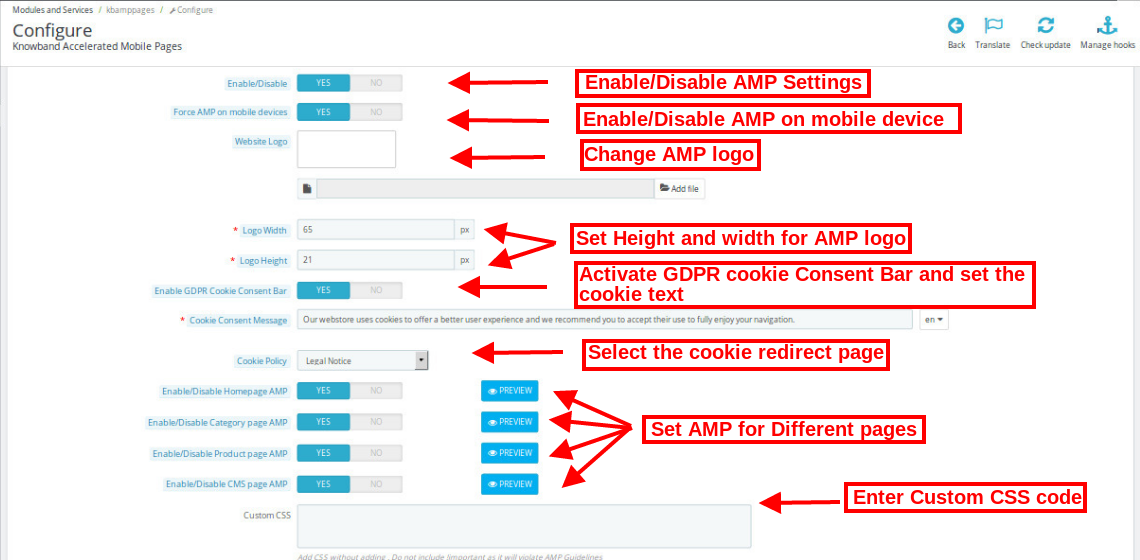
Enable/Disable: Initially, this field of Prestashop Accelerated Mobile Pages module by Knowband will be disabled. The admin can enable/disable the plugin by toggling the button.
Enabling this setting will convert the Website Pages into AMP.
Force AMP on Mobile Device: In this section of Knowband Prestashop AMP addon, the admin can enable the settings to AMP pages on Mobile Device.
Website Logo: Using this option of the Google Accelerated Mobile Pages(AMP) Module, the store merchant can upload or change the logo of the AMP.
Logo Width: Here the store admin can set the width of the Logo in Pixel.
Logo Height: Here the store admin can set the height of the Logo in Pixel.
Enable GDPR Cookie Consent Bar: Admin can enable/disable this setting to display on AMP pages.
Cookie Consent Message: Admin can add custom text for cookie consent bar displayed to the user.
Cookie Policy: Admin can select the page which is to be displayed on Cookie Policy.
Enable/Disable Home Page AMP: The store admin can enable/disable AMP on the Home Page of the site. After enabling the option, the admin can check the Home page AMP by clicking on the Preview button.
Enable/Disable Category Page AMP: The store admin can enable/disable AMP on the category pages. After enabling the option, the admin can check category page AMP by clicking on the Preview button.
Enable/Disable Product Page AMP: Using this option of the Prestashop Accelerated Mobile Page (AMP) addon, the store admin can enable AMP on the product pages AMP of the site and can view the same by clicking on the PREVIEW button.
Enable/Disable CMS Page AMP: Prestashop AMP Page Module gives an option the store retailer to convert the CMS page to AMP. The look and feel of the pages can be viewed by clicking on the Preview button.
Custom CSS: Prestashop store admin can add Custom CSS code as per business requirement in this section.
3.2 Home Page Settings
In this tab of the Prestashop Accelerated Mobile Pages (AMP) Addon by Knowband, the admin can enable/disable the display of new arrivals, best sellers and featured products on the AMP Home page of this Prestashop module in various languages. This tab will have the following options:
1. Home Page Settings 2. Featured Product Settings 3. Best Selling Product Settings 4. New Arrival Product Settings
3.2.1 Home Page Settings:
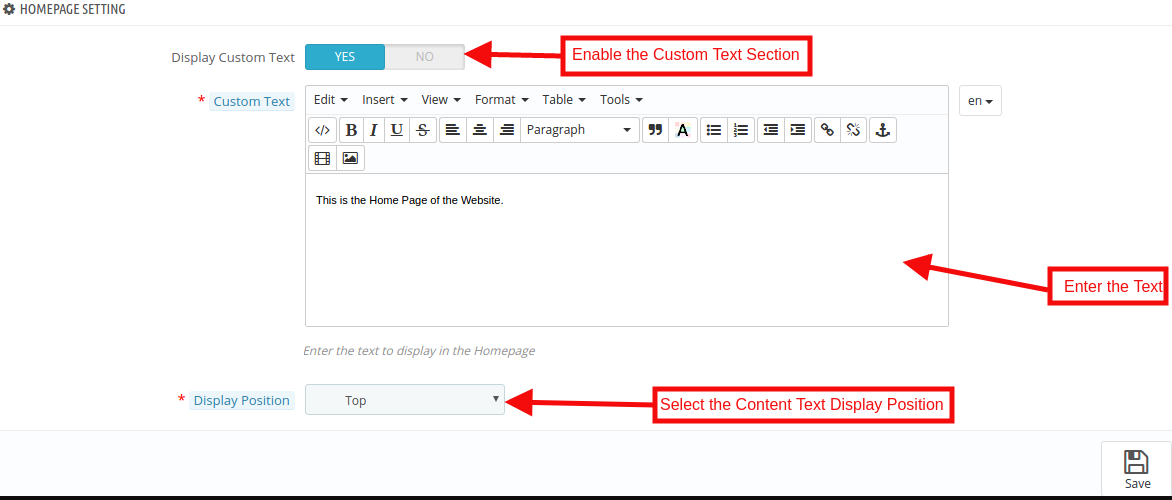
Display Custom Text: The Admin can enable/disable the Custom Text option here.
Custom Text: In this Google Accelerated Mobile Pages Addon, the store admin can change the text of the Home page block.
Display Position: The admin can select the display position that will be reflected the front end of the site.
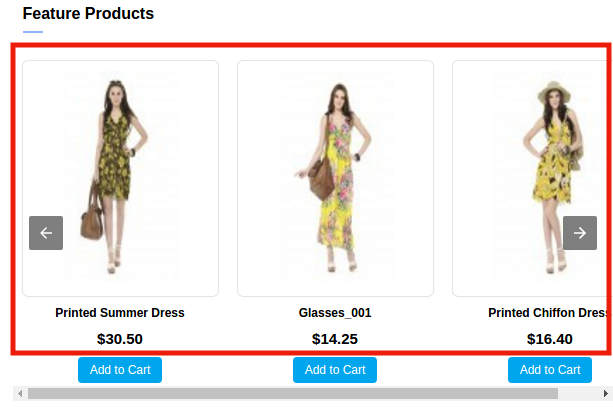
3.2.2 Featured Products Settings:
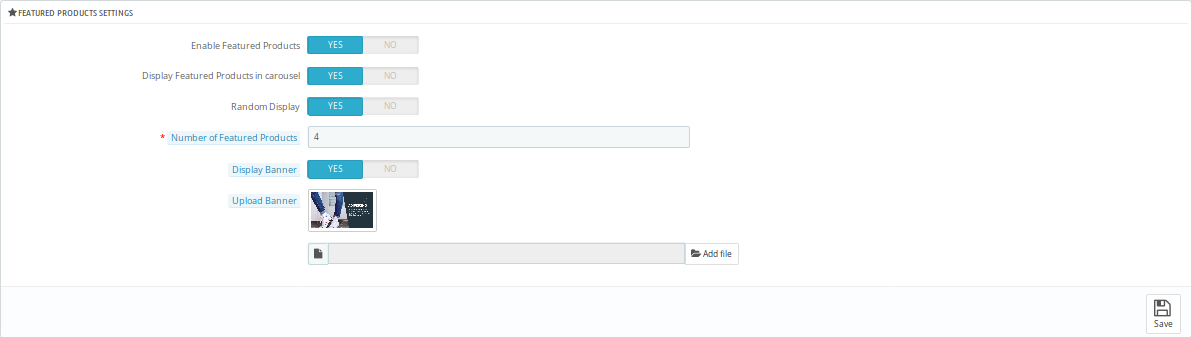
Enable Featured Products: Using this option of the Prestashop AMP extension, the eCommerce store admin can enable/disable the featured products section.
Display Featured Products in Carousel: Here the store admin can the featured products in the carousel.
Random Display: The Store admin can enable/disable the Random product display option. After enabling this feature, random product display in the particular section in AMP.
Number of Featured Products: Knowband’s Prestashop Accelerated Mobile Pages Addon allows the store admin to select the number of products which they want to show in the Feature Product section.
Display Banner: The eCommerce merchant can enable/disable the display banner option.
Upload Banner: In this field, the store admin can upload the banner for the featured product.
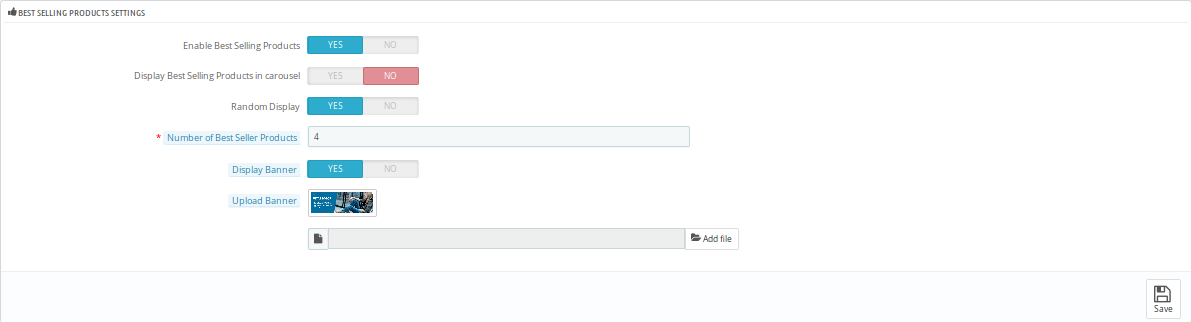
3.2.2 Best Selling Products Settings:
In this tab, the Prestashop store admin can customize the settings of the best selling product. Refer to the attached screenshot below:
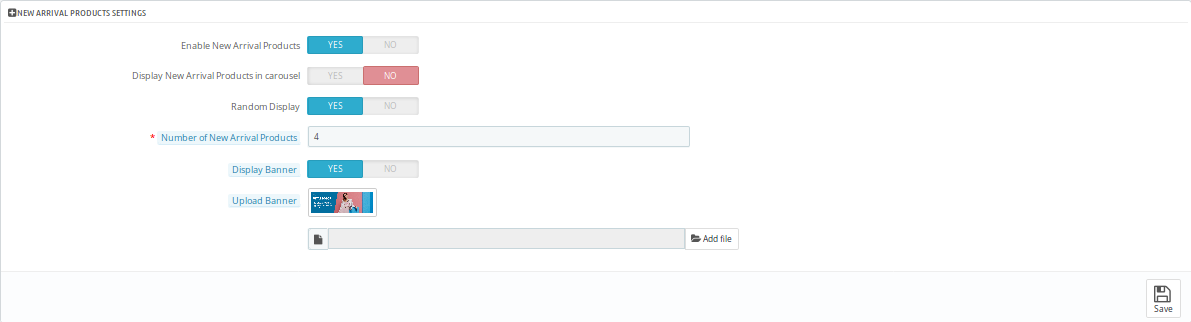
3.2.3 New Arrival Products Settings:
The admin has control over the display of New Arrival Product positions on AMP pages.
3.2.4 YouTube Video
Here, you can apply the settings for showing the YouTube videos.
Display Youtube Video: The store admin can enable or disable the settings to show youtube videos on the homepage.
Youtube video id: The online store admin can enter the video id in order to display it on the homepage.
Enable Youtube header text: The Prestashop Accelerated Mobile Pages Addon provides an option to enable the settings for showing youtube video’s header text.
Youtube header text: Admin can set the header text in various languages.
Autoplay: Admin can apply the settings for video autoplay.
Display controls: Admin can show the display controls by enabling the option.
Display positions: The store admin can show the display position for the videos.
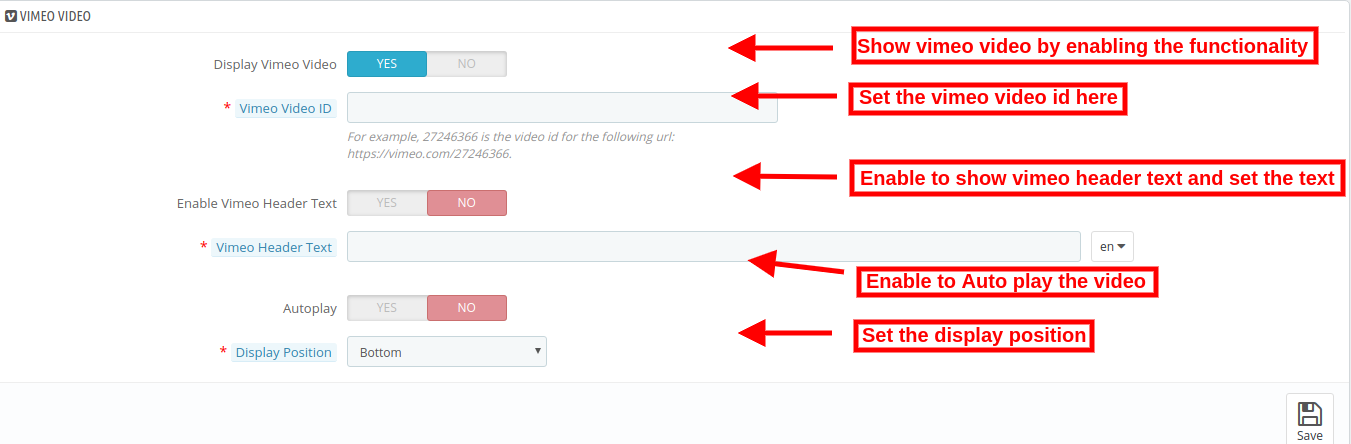
3.2.5 Vimeo Video
The store admin can also show Vimeo videos on the website’s homepage by applying these settings.
Enable the settings for showing Vimeo video on the homepage. Customization options are same as youtube videos.
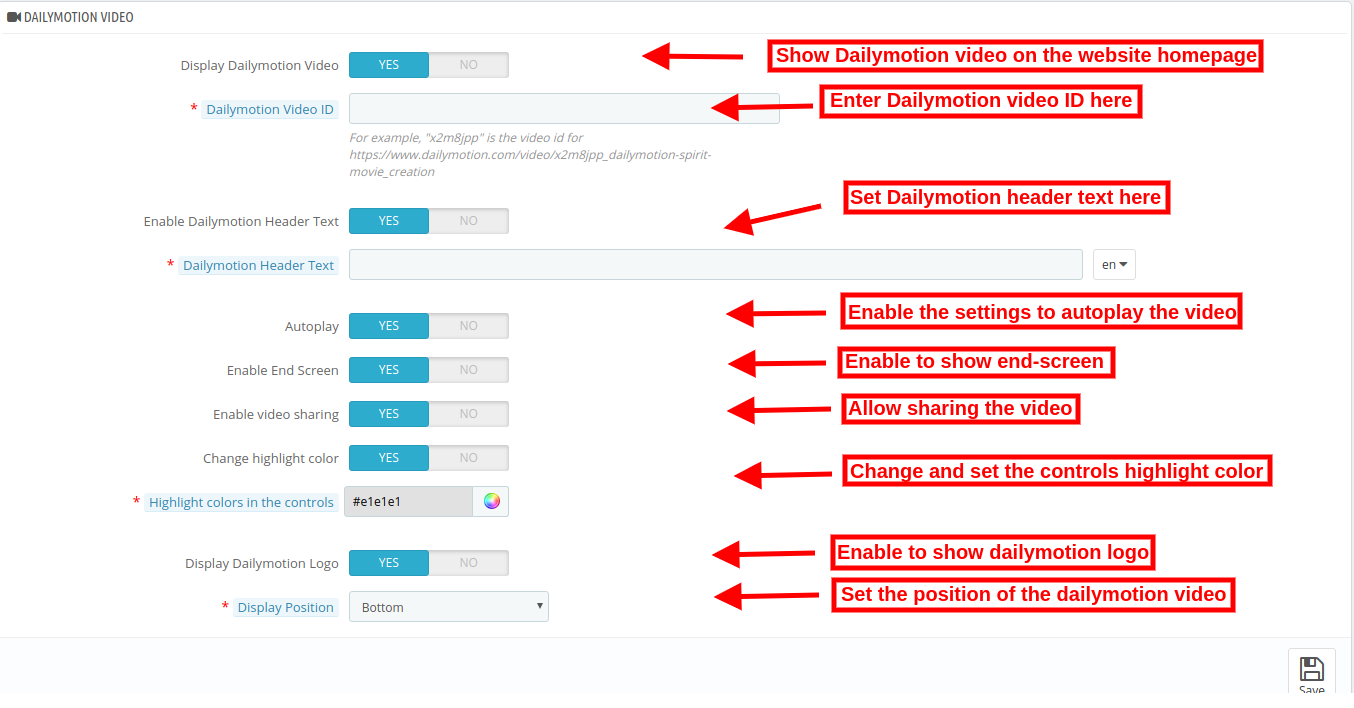
3.2.6 DailyMotion Video
As an eCommerce store admin, you can also show DailyMotion videos on the website homepage by applying these settings.
Display DailyMotion Video: The store admin can show DailyMotion videos on the homepage.
DailyMotion Video ID: The online store admin can enter the DailyMotion video id from the admin interface of this Google Accelerated Mobile Pages (AMP) Addon.
Enable DailyMotion Header Text: The store admin can enable or disable the settings from the admin interface.
DailyMotion Header text: Enter the header text here.
Autoplay: Enable to Auto play videos.
Enable End Screen: Enable the settings to show the end screen.
Enable video sharing: Allow video sharing by enabling the options.
Change Highlight color: Admin can also enable the settings in order to change the highlight color.
Highlight colors in the controls: Set the color from the color picker tool.
Display DailyMotion Logo: Enable the settings in order to display DailyMotion logo.
Display Position: Set the video position from the admin interface.
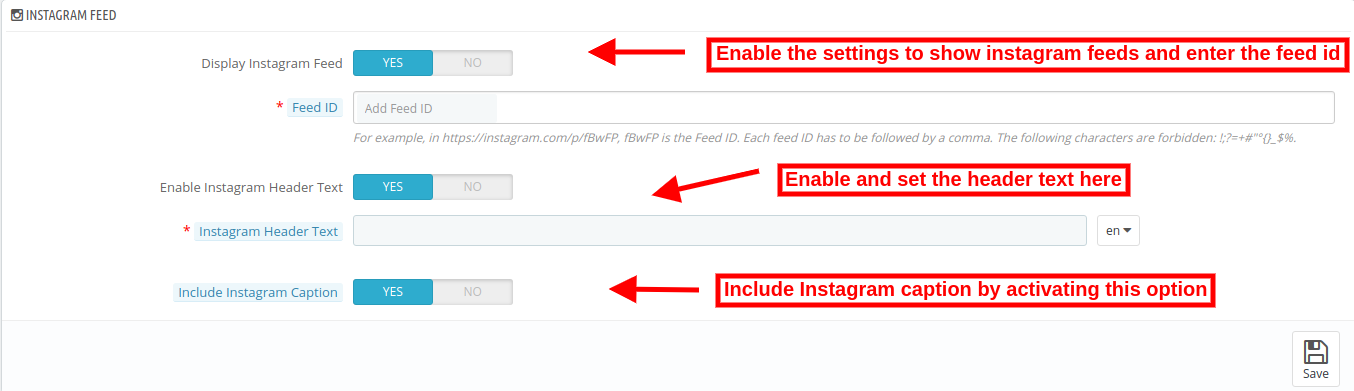
3.2.7 Instagram feed
Admin can show Instagram feeds on the homepage.
Display Instagram feed: Enable the settings to display Instagram feeds.
Feed id: Enter the feed id here.
Enable Instagram Header Text: Switch the button to yes in order to display header text.
Instagram Header Text: Enter the header text for Instagram.
Include Instagram Caption: Enter the Instagram caption in order to display it on the website homepage.
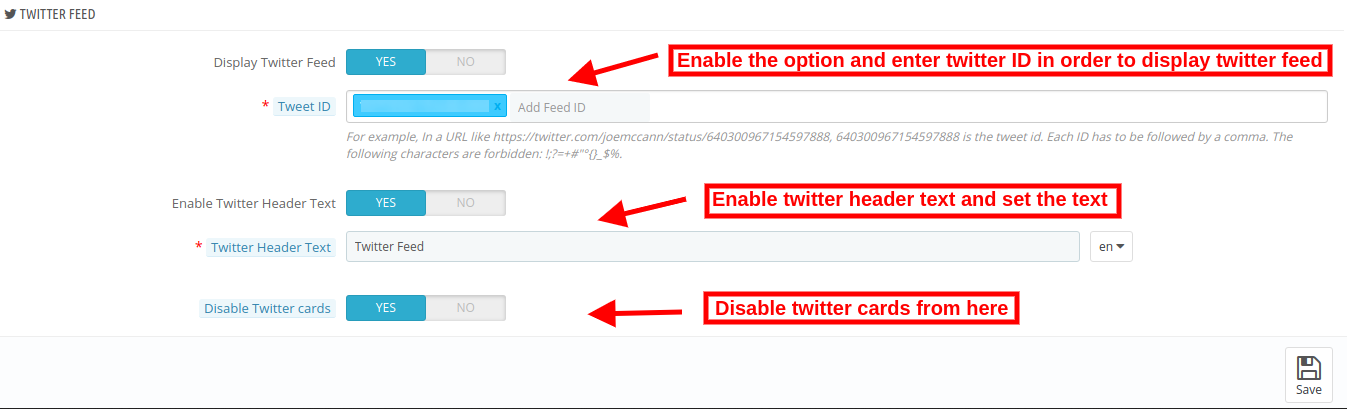
3.2.8 Twitter Feed
The online store admin can show twitter feed on the homepage if he wishes to do so.
Display Twitter Feed ID: Enable the settings in order to display twitter feeds on the homepage of the website.
Twitter ID: Enter the twitter id here.
Enable twitter header text: Enable the settings for showing header text.
Twitter Header text: Set the header text here.
Disable Twitter cards: By enabling the option you can show twitter cards on the homepage.
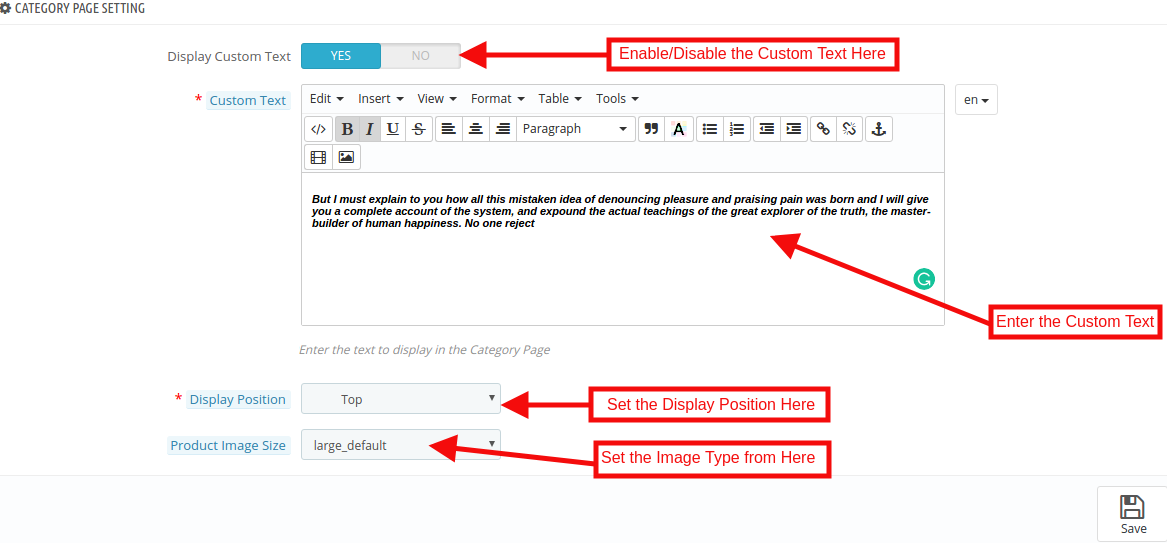
3.3 Category Page Settings
The Category Page Settings tab of the Prestashop Accelerated Mobile Pages Addon allows the admin to add the text and images. Apart from this, the admin can also define the position of the text on the Category page. This tab will have the following options:
Display Custom Text: The Admin can enable/disable the Custom message option.
Custom Text: Using this option of the Prestashop AMP Module, the eCommerce store admin can set the message of the category Page.
Display Position: In this tab, the store admin can change the display position as per desires. These changes will be reflected in the front of the store.
Product Image Size: The Prestashop store admin can set the Image type here.
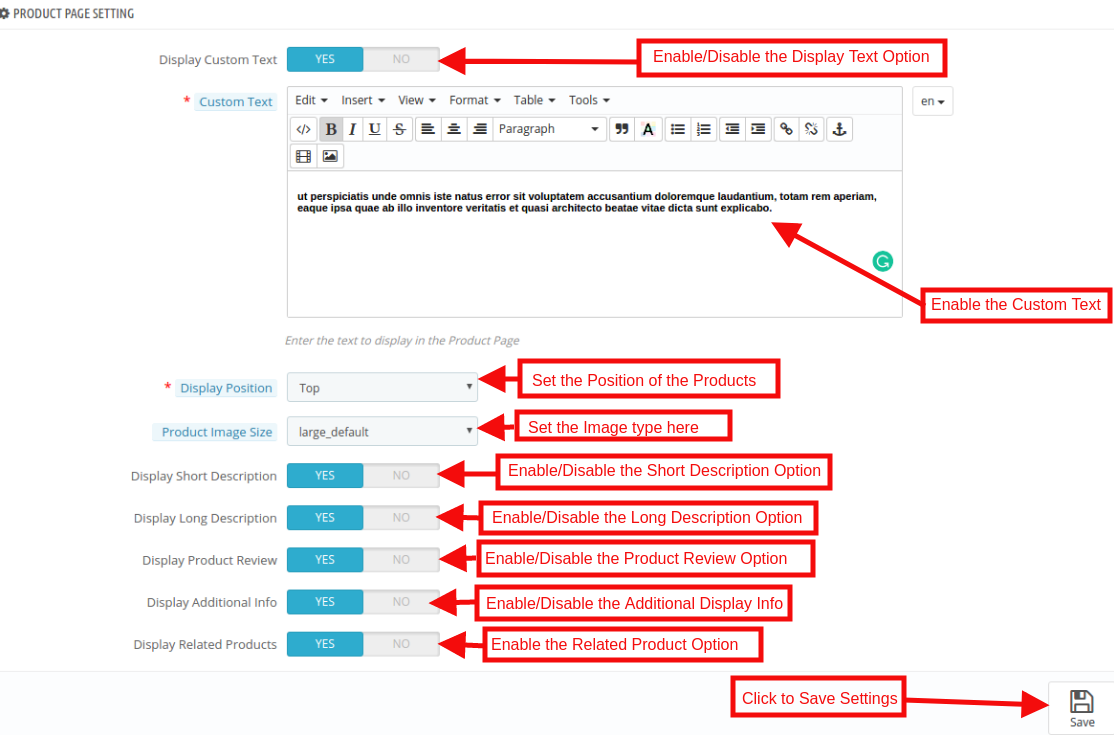
3.4 Product Page Settings
The admin has control over product page settings on AMP pages. This tab will have the following options:
Display Custom Text: The Admin can enable/disable the Custom message option.
Custom Text: Using this option of the Prestashop AMP Module, the eCommerce store admin can set the message of the Category Page.
Display Position: In this option, the store admin can change the display position as per desires. These changes will be reflected in the front-end of the store.
Product Image Size: The Prestashop store admin can select the image size to be displayed here.
Display Short Description: In this option, the store admin can show the short description of the product by enabling this feature.
Display Long Description: The store owner has an option to show the long description of the product as per the requirement.
Display Product Review: By using the Prestashop Accelerated Mobile Pages Module, the store admin can enable the Product review option. After enabling this feature, product review will be shown in the front-end of the store.
Display Additional Info: By enabling this feature, the admin can show the additional info of the products.
Display Related Products: By enabling this option, the store admin can display related product. These changes will be reflected in the front of the store.
3.5 Menu Settings
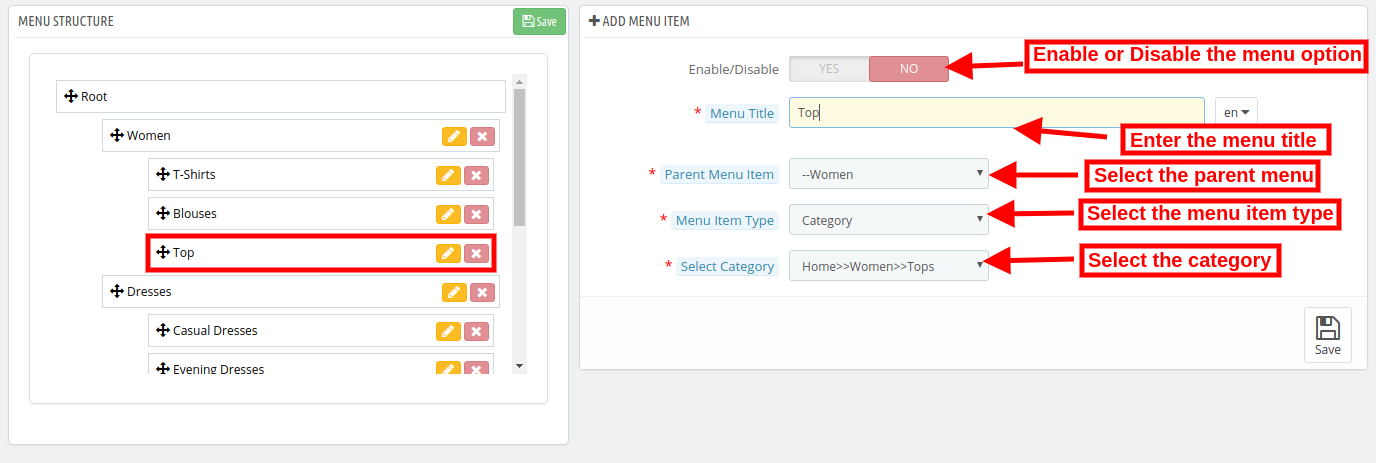
In this Tab, the Prestashop store admin can configure the menus on AMP. The admin can even add new menu options. This tab will have the following options:
Enable/Disable: The admin can enable the AMP in menus by toggling the button.
Menu Title: Prestashop AMP Addon by Knowband allows the store admin to add the Menu by entering the title here.
Parent Menu Item: Here the eCommerce merchant can select the Parent menu as per the desire.
Menu Item Type: The Admin can select the item type of menu.
Select Category: The Store admin can select the specific page where they want to redirect the user to the defined AMP page.
NOTE: These Changes shown in the Menu Structure section.
3.6 Look and Feel Settings
The Admin can control the color settings, personalize their website AMP colors as per your needs. They can change the AMP page colors according to your theme and preferences. This tab will have the following section:
1. General Settings
2. Product Listing Settings
3. Category Settings
4. Product Settings
5. Cookie Consent Bar Settings
3.6.1 General Settings
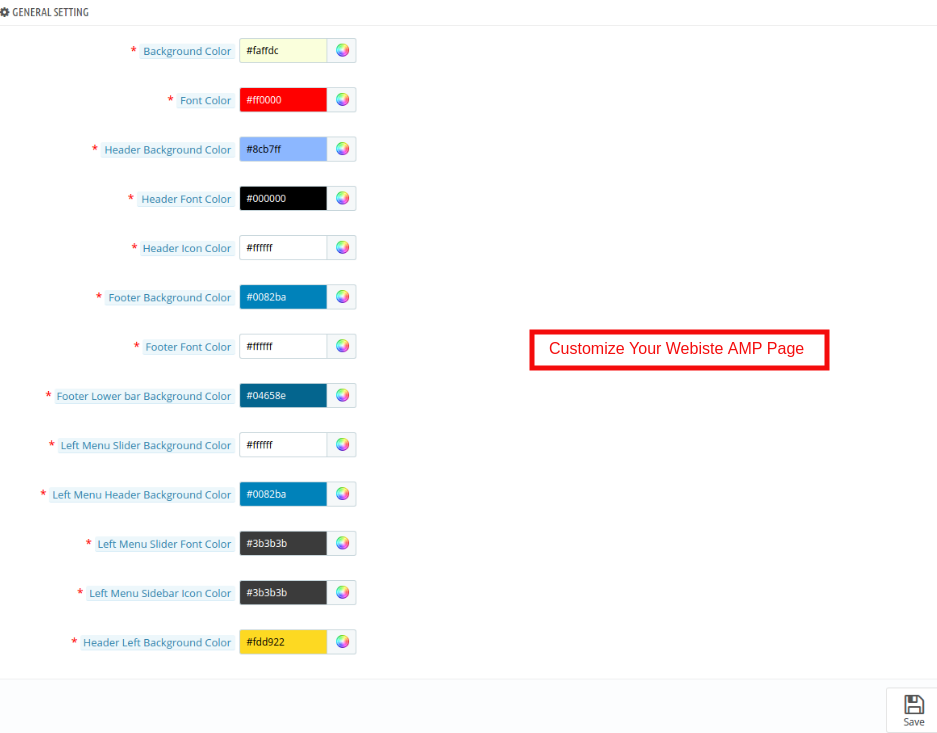
In this tab of the Prestashop Accelerated Mobile Pages(AMP) addon by Knowband, the admin can customize the AMP Homepage settings. This tab will have the following options:
Background Color: The Admin can change the background color of the home page.
Font Color: The admin can change the font color from this section.
Header Background Color: This field of Prestashop Accelerated Mobile Pages (AMP) Module allows the admin to set the header background color.
Header Font Color: Using this option of the Prestashop AMP module, the admin can set the font color of the text displayed in the Header section.
Header Icon Color: The Prestashop store admin can change the icon color of the.
Footer Background Color: This option of the Google Accelerated Mobile Pages(AMP) Module allows the admin to set the background color of the Footer.
Footer Font Color: The admin can change the font color from this section.
Footer Lower Bar Background Color: The Store merchant can change the background color of the Footer Lower Bar.
Left Menu Slider Background Color: The Prestashop Merchant can change the Left menu slider background color in this section of Knowband Accelerated Mobile Pages(AMP) For Prestashop.
Left Menu Header Background Color: The Prestashop store admin can change the left menu header background color as per the requirement.
Left Menu Slider Font Color: The admin can change the font color from this section.
Left Menu Sidebar Icon Color: The admin can change the icon color from this section.
Header Left Background Color: In this section of Prestashop Accelerated Mobile Pages(AMP) Module allows the admin to set the header left background color.
3.6.2 Product Listing Settings
The admin can customize the settings of the Product listing as per the requirement. Below mentioned the option:
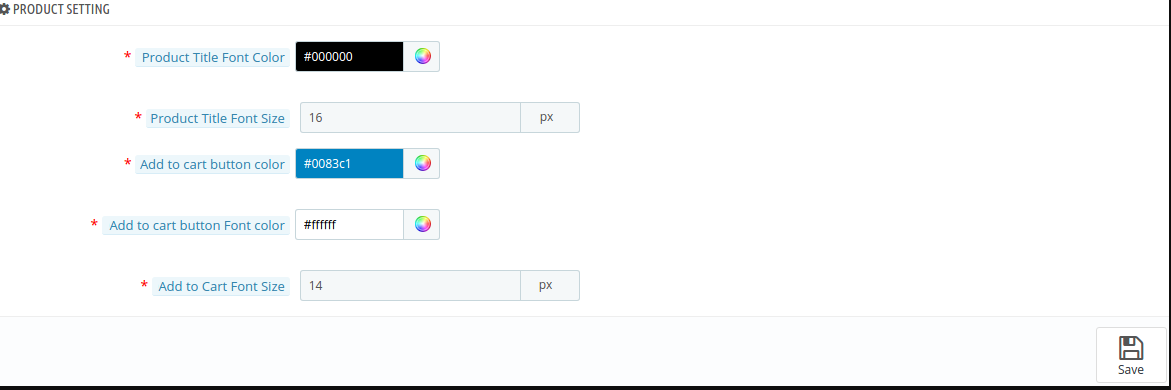
Product Title Color: In this section of Google Accelerated Mobile Pages(AMP) Module allows the admin to change the Product title color.
Product Title Font Size: The Store admin can set the font size of the Product.
Add to Cart Button Color: Knowband’s Prestashop AMP Pages module allows the admin to change the Add to Cart Button Color as per desires.
Add to Cart Button Font Color: The admin can customize the font color of the Add to Cart button.
Add to Cart Font Size: The Store admin can set the font size of the Add to Cart button.
3.6.3 Category Settings
In this tab, the store admin can customize the settings of the Category pages. These changes will be reflected in the front of the store.
Category Heading Font Color: The Prestashop store admin can change the category heading font color as per the requirement.
Category Heading Font Size: The admin can change the font color from this section.
3.6.4 Product Settings
In this section, the Admin can customize the Product settings as per the requirement. The configuration option of this section is same as discussed in the Product listing section.
3.6.5 Cookie Consent Bar
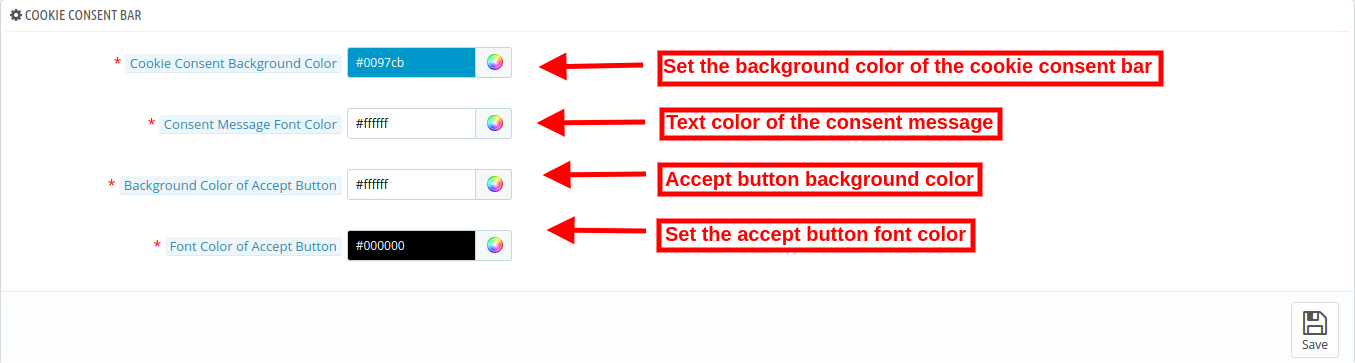
The store admin can set the look and feel of the cookie consent bar.
Cookie Consent Background color: Select the cookie consent background color with the help of color picker tool.
Consent message font color: Select the front color for consent message.
Background color of Accept button: Select the “Accept” button background color.
Font color of accept button: Set the font color of accept button using color picker tool.
3.7 Social Media Settings
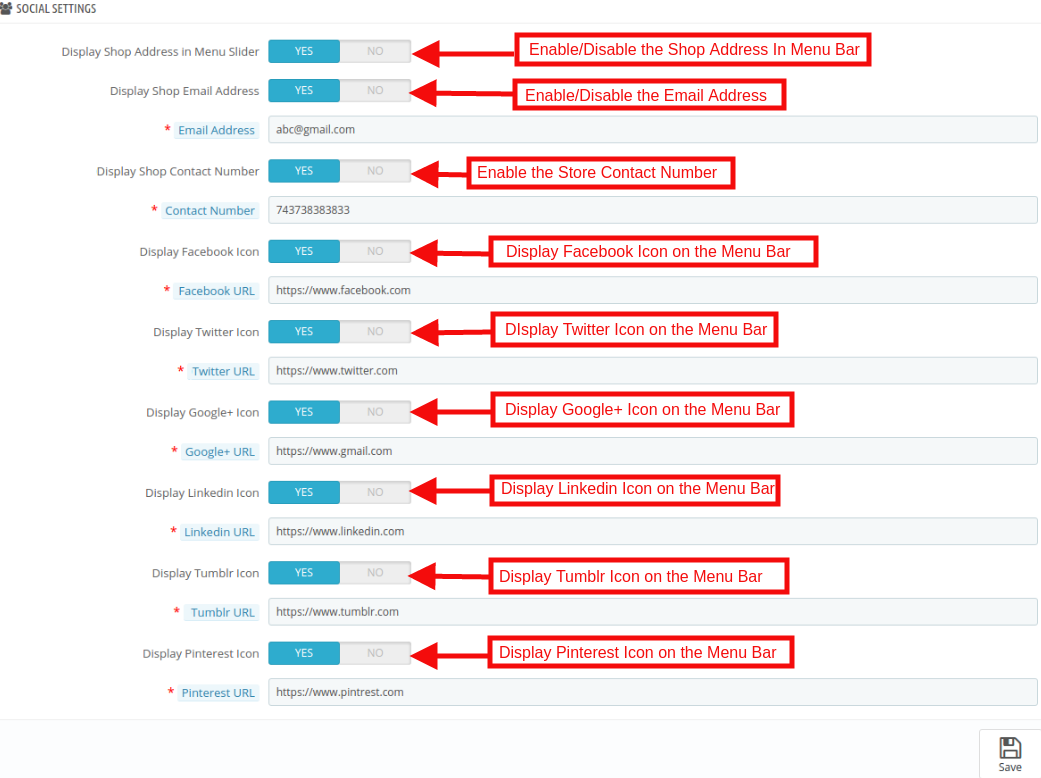
In this section of the Prestashop AMP module, the store admin can enable/disable the social media sharing option on the AMP webpages. All the enabled social media sharing options will be shown on the AMP. This tab will have the following options:
Display Shop Address in Menu Slider: The Admin can show the Store address by enabling this feature.
Display Shop Email Address: The Prestashop store owner can show the email address.
Display Shop Contact Number: In this field, the store admin can display the contact details of the site.
Display Facebook Icon: The store admin has the option to display a Facebook icon in the menu bar. For this admin need to specify the Facebook page URL in the respective field.
Display Twitter Icon: This section the admin can enable/disable the Twitter icon.
Display Google Icon: By using this Option the Prestashop store merchant can display the Google icon in the menu bar. For this admin need to Specify the Google page URL in the respective field.
Display Linkedin Icon: In this section, the store admin can display the Linkedin icon here. The Store admin must need to enter the URL of the profile.
Display Tumblr Icon: The Prestashop store owner can show the Tumblr profile here.
Display Pinterest Icon: The Store admin has the option to display a Pinterest icon in the menu bar. For this admin need to Specify the Pinterest page URL in the respective field.
3.8 Extra Icon Settings
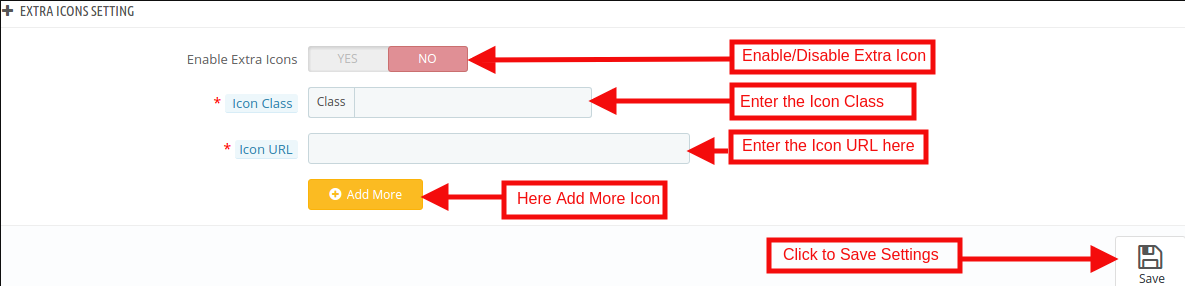
In this section, the admin can add the extra social media icon as per the requirement of the business. This tab will have the following options:
Enable Extra Icon: The Prestashop store admin can enable/disable the extra icon feature. If they want to add more social media icon then they can add here with an ease.
Icon Class: The Admin can enter the Icon class.
Icon URL: In this tab, the store admin can Icon URL as per desires. These changes will be reflected in the front of the store.
3.9 Google Settings
The store admin can apply AMP Google settings from this section.
3.9.1 Google Analytics
Admin will need to have the Analytics Client ID in order to configure this feature.
Enable Google Analytics: If you want to track the performance of the accelerated mobile pages of your site, this feature allows the admin to enter Google Analytics client.
Analytics Client Id: The eCommerce merchant can enter your Google analytics client ID to configure.
3.9.2 Google Adsense
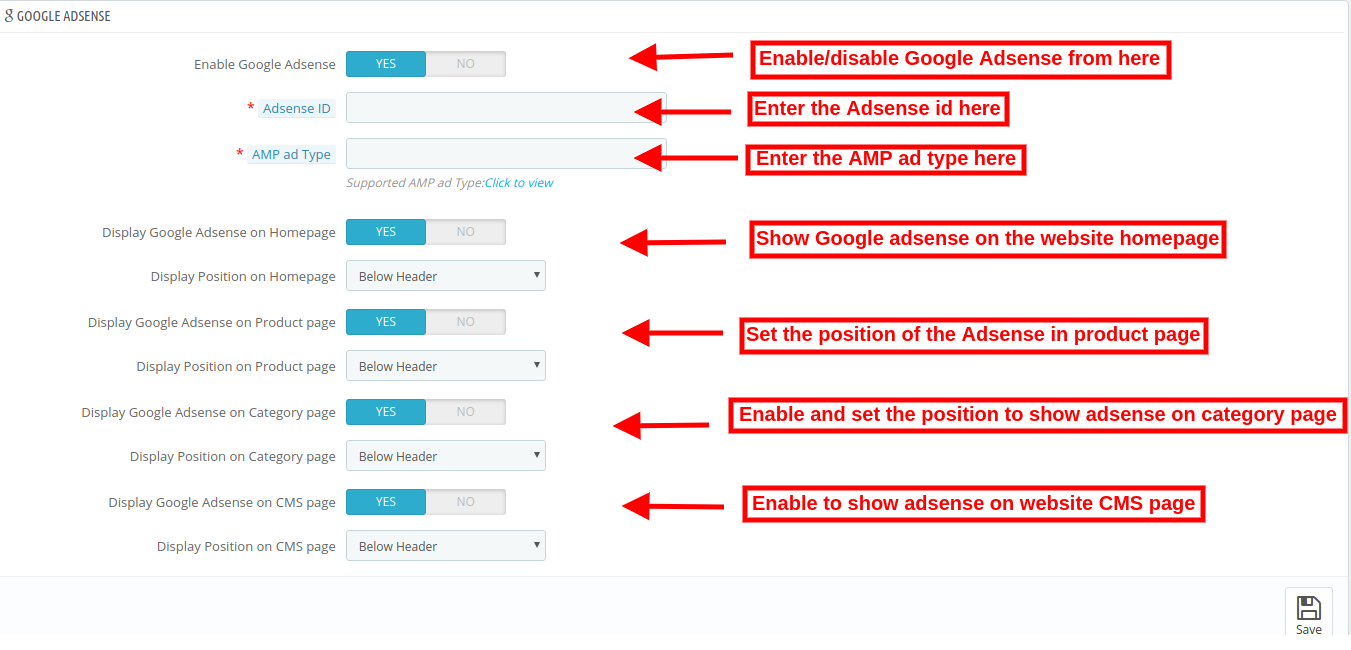
Enable Google Adsense: Activate or Deactivate the functionality from here.
Adsense ID: Enter the Adsense ID here.
AMP ad type: Enter the supported AMP ad type. This way the admin can specify an identifier for the ad network. The type attribute selects the template to use for the ad tag.
Display Google Adsense on Homepage: Enable the option in order to display Google adsense on Homepage.
Display Position on Homepage: Select the position for showing Google adsense on homepage.
Display Google Adsense on Product page: Enable the option to show adsense on Product page.
Display Position on Product page: Select the position for displaying Google adsense on product page.
Display Google Adsense on Category page: Enable the option to show adsense on category page.
Display Position on Category page: Select the position for showing Google adsense on category.
Display Google Adsense on CMS page: Enable the option to show adsense on CMS page.
Display Position on CMS page: Select the position for showing Google adsense on CMS.
3.9.3 Facebook Pixel
Facebook pixel is a analytic tool which helps to track store visitors. You can also implement this to get store visitor details on the Accelerated Mobile Pages.
Enable Facebook Pixel: Enable or disable the option from here for implementing Facebook pixel tool to track site visitors.
Facebook Pixel ID: Enter the Facebook Pixel ID here.
3.10 Sitemap Settings
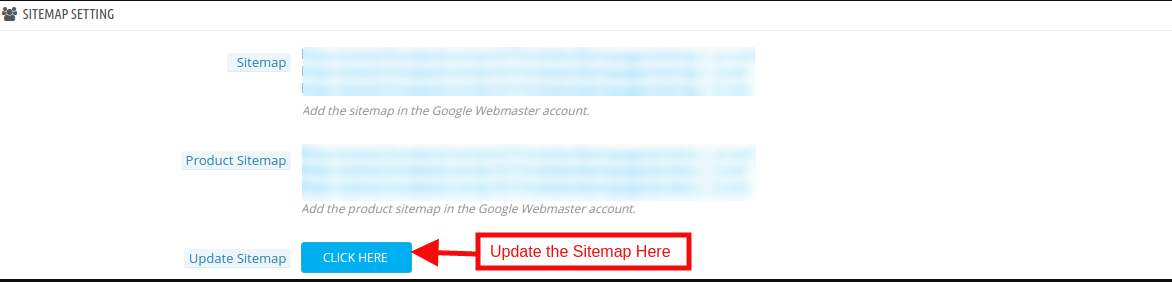
In this section, the store admin can generate the AMP Sitemap by clicking the button.
Generating the Sitemap are here.
How to Generate Sitemap for AMP?
The Admin can generate Sitemap by running CRON.
Accelerated Mobile Pages(AMP) module allows the store admin to setup Cron via
URLs to Add to Cron via Control Panel
Cron setup via SSH
CRON Configuration:
In order to generate the Sitemap automatically, the Prestashop store admin can set up the cron job. There are two options available in the admin panel of the module.
1. The Admin can run the cron manually.
Add the cron to your store via control panel/putty to generate/update the sitemap. Please find the instructions to setup crons below –
4.0 Front Interface of the Prestashop Accelerated Mobile Pages Module:
After enabling the Prestashop Accelerated Mobile Pages(AMP) Module by Knowband the store admin can enable the settings for the home page, category pages, product pages and CMS pages. As per the settings enabled by the admin, AMP will look as shown below:
Home Page:
Prestashop AMP Pages allows the admin to show the Best Seller, New Products and Features Product on the Home page. For better user engagement.
Now the online store admin can also show Youtube video, Vimeo video and Dailymotion video on the website homepage.
Apart from that, the store admin can show Instagram feeds and twitter feeds on the homepage.
Category Page
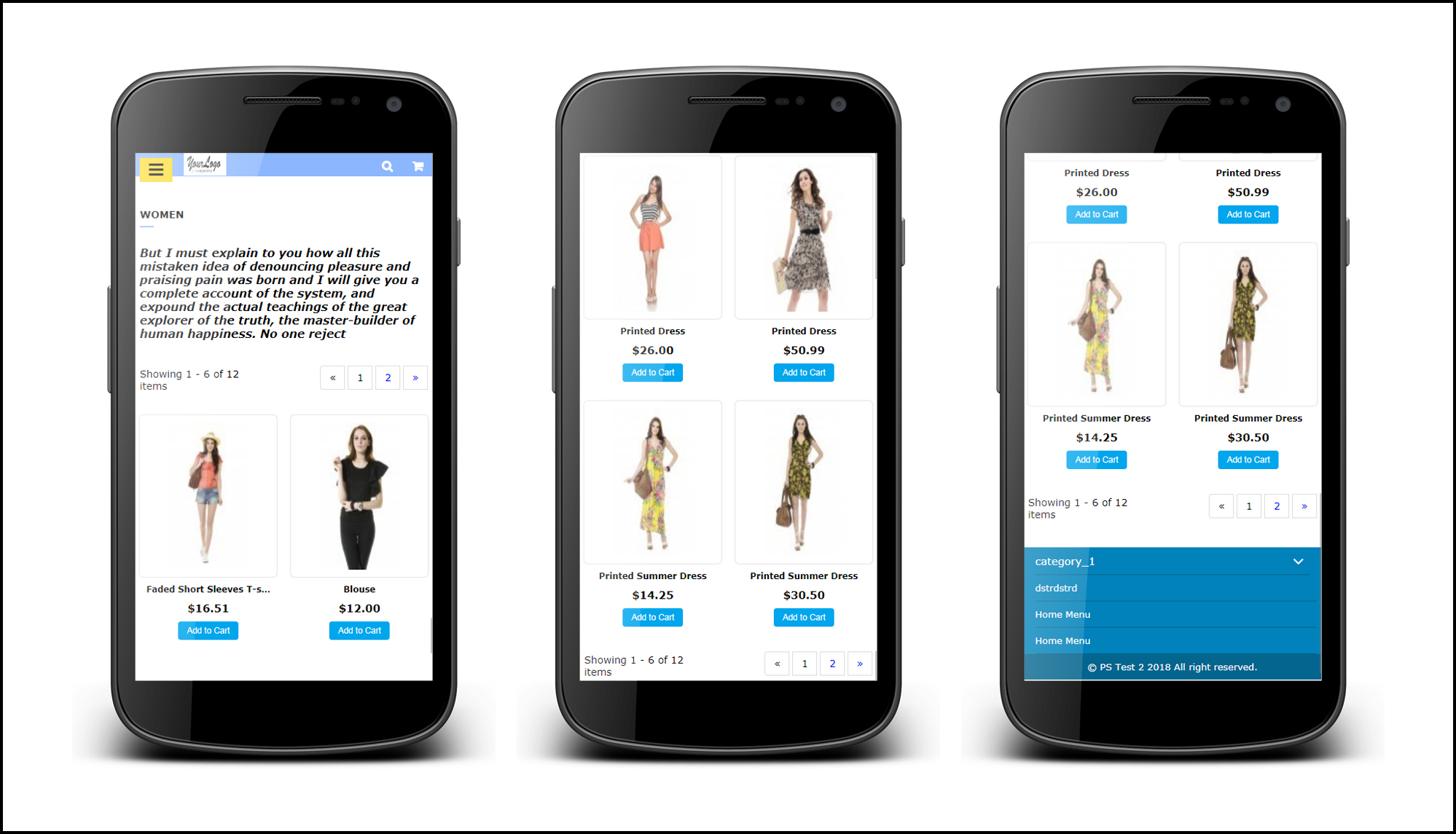
As per the setting enabled by the admin, the Category AMP Pages on the Mobile device will appear like this screenshot.
Product Page
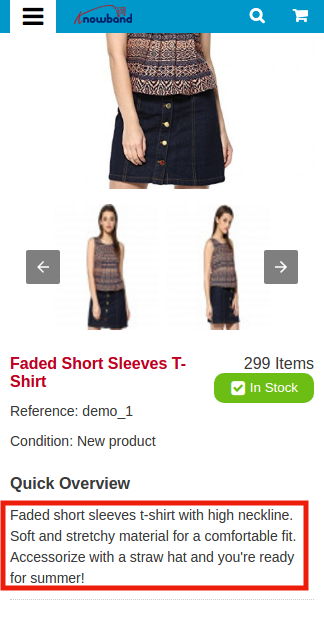
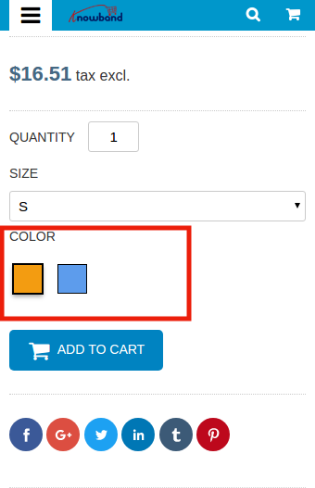
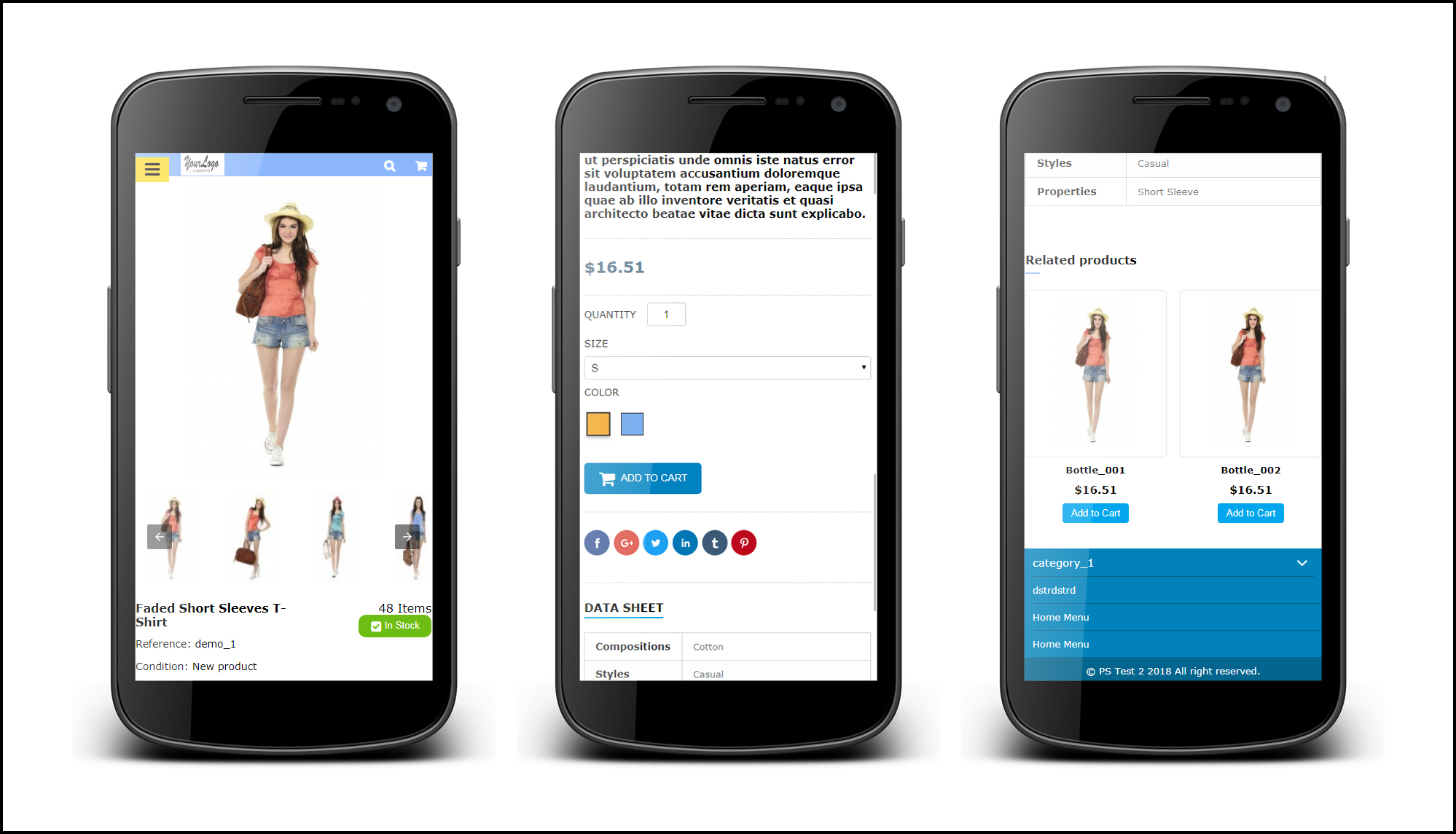
As per the setting enabled by the admin from the back-office the layout of Product AMP Page on the Mobile device will appear like this screenshot.
CMS Page
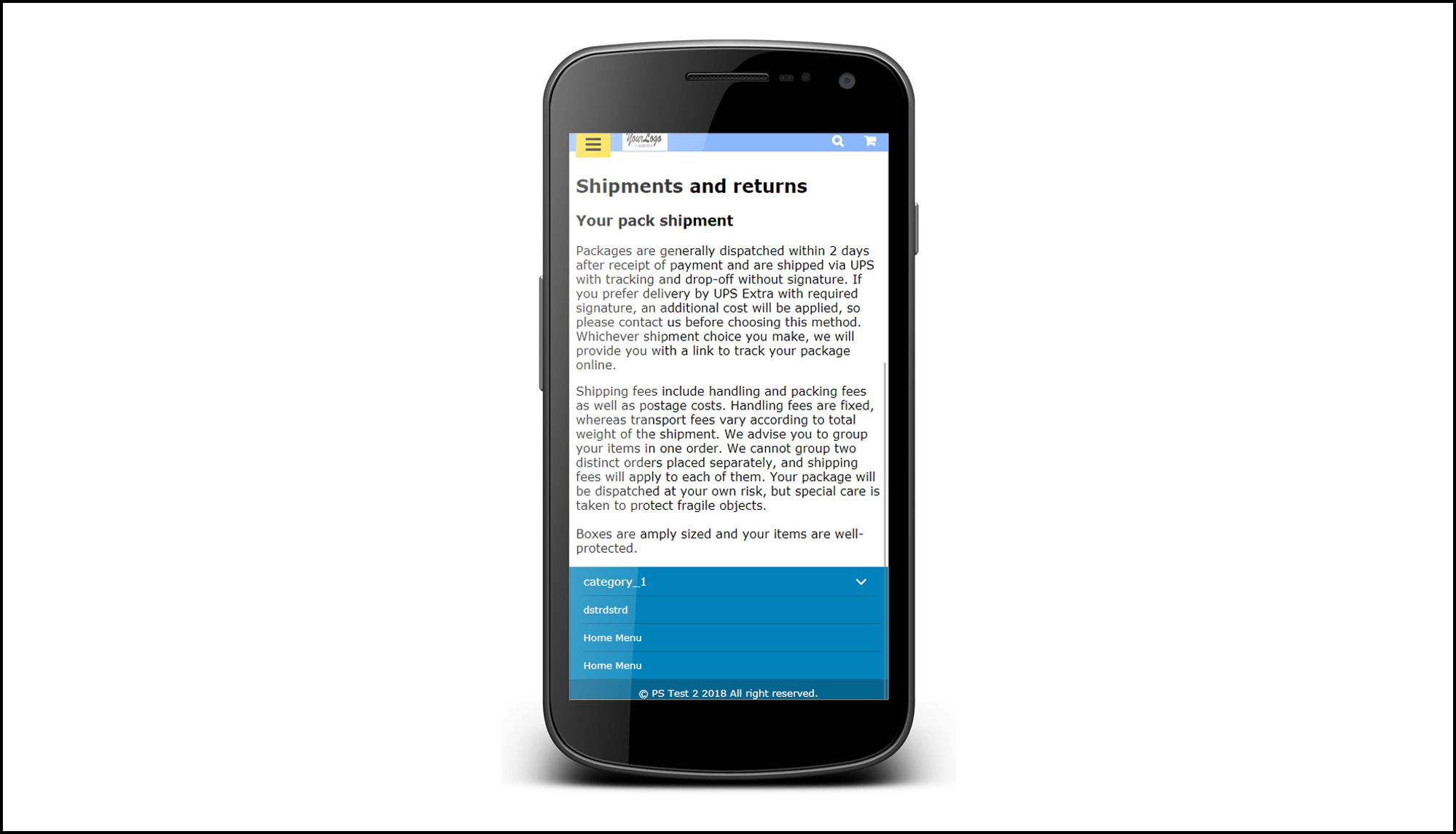
The Admin can view the CMS page setting like below settings.
Menu Icon
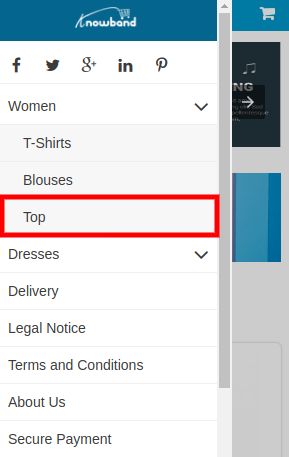
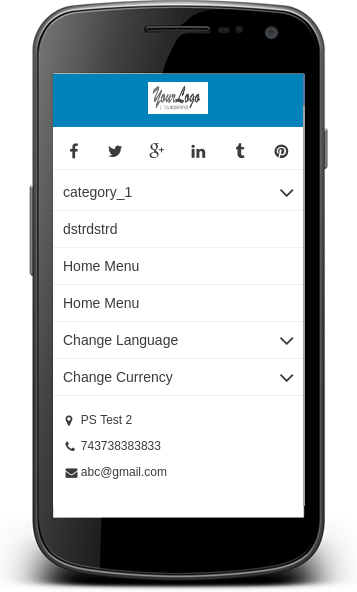
Prestashop Accelerated Mobile Pages shows the Menu icon like this.
Cookie Consent Bar
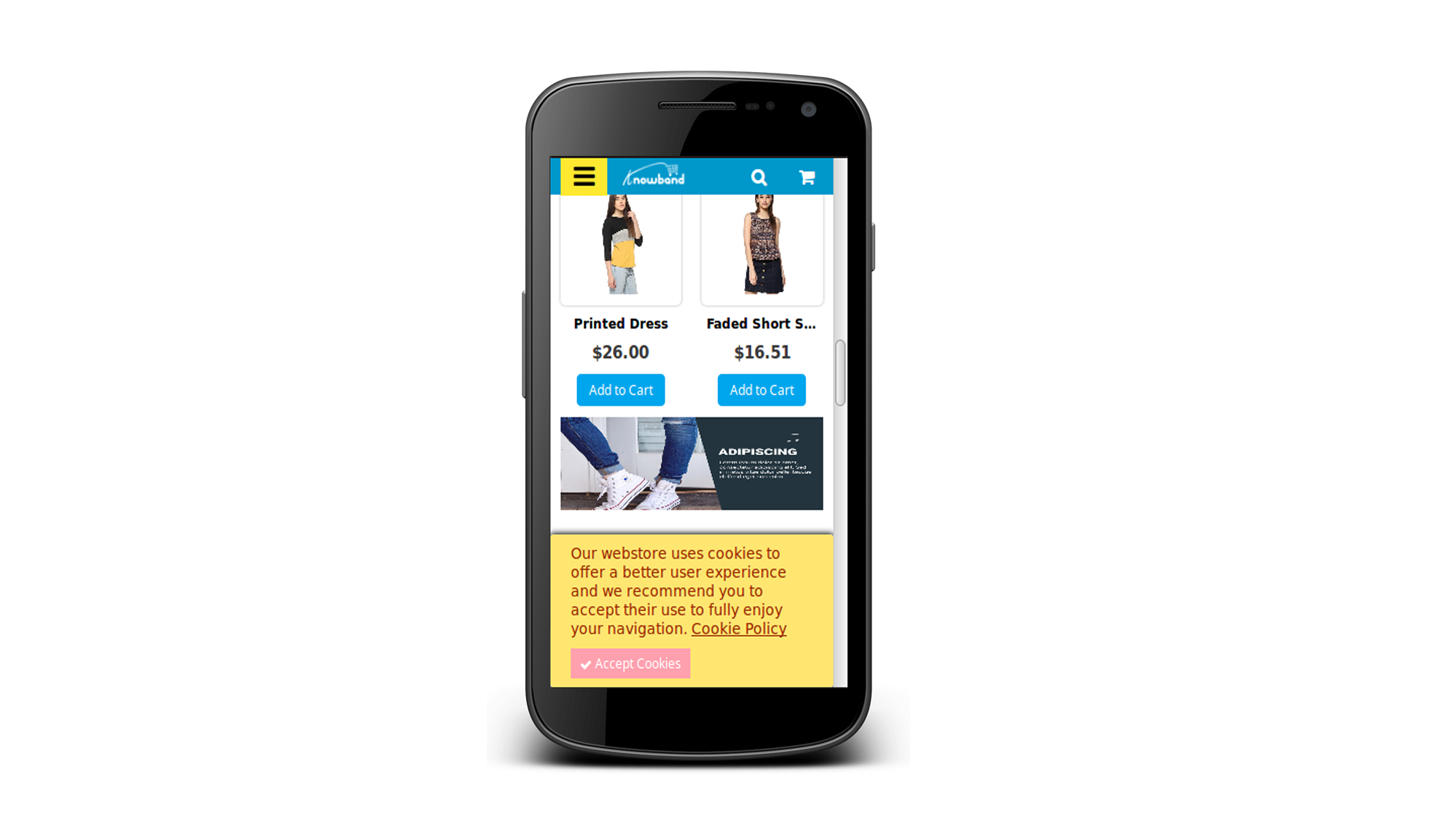
Cookie consent bar will be displayed as shown below:
This way the online store admin can increase the speed of mobile website pages and offer a better store experience to the online store visitors and customers. This Prestashop Accelerated Mobile Pages module converts the general pages into accelerated mobile pages. The Prestashop Accelerated Mobile Pages Addon provides simple and easy steps to set up accelerated mobile pages. The e-merchant can separately configure the homepage, product pages and category pages. The Prestashop store admin can easily manage all the settings of Prestashop Accelerated Mobile Pages module without changing even a single line of codes. The e-merchant can also show product videos, menu items and social media icons easily.
For more information about PrestaShop Accelerated Mobile Pages(AMP) Addon: