Installing Magento Themes
This tutorial will guide you how to install the themes on Magento.
Things to do before Installing Magento themes
- Create an account on Magento Connect. Magento Connect is an extension marketplace, you can find Magento Connect on the link provided below:
|
https://www.magentocommerce.com/magento-connect/ |
Installing Magento Themes
You can follow the below mentioned steps to install the themes:
- Open the back-end of your store and hover your cursor on the System menu and then on Magento Connect option and then click on the Magento Connect Manager option.
|
System Menu(menu bar)>>Magento Connect>>Magento Connect Manager. |
- Under Extensions Tab:
- Make sure that the check-box for “put store on the maintenance mode while installing/upgrading” is marked.
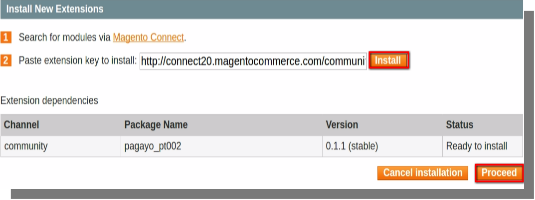
- You will see a “paste extension key to install” option, paste the extension key on the box provided and click on install.
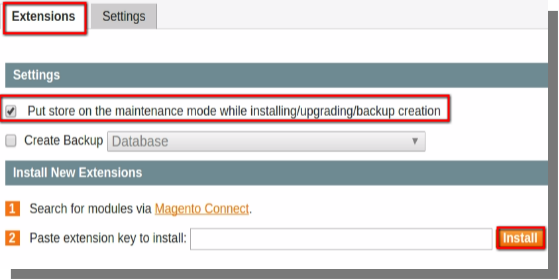
- How to get the extension key for themes:
- Open the magento connect and click on themes on the menu bar.
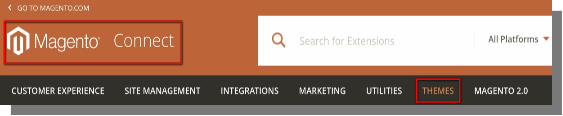
- Here you can Refine your results by choosing type of platform(Enterprise or Community), version etc.
- Select the platform and Version and enter the keyword for the theme which you wish to install(for e.g Fashion,Business service etc).
- Select the theme that fits beautifully according to your need.
- You will be directed to a page where you can will see the install option, click on it you will get the extension key for your theme.
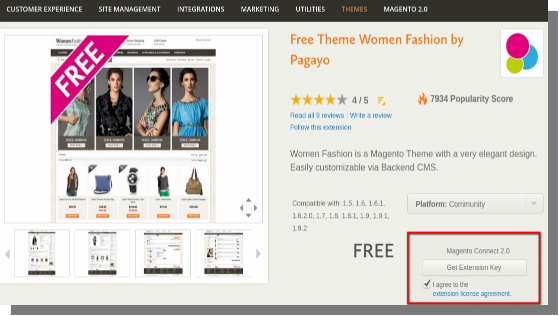
- Copy the extension key and paste it on “paste extension key to install” option at your back-end.
- Click on Install.
- If you get this error after clicking on install:
- Go to Magento connect.
- Change the Magento connect from Magento Connect 1.0 to 2.0.
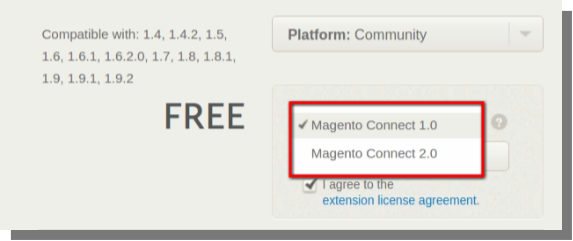
- Click on Get extension Key.
- Copy the key and paste it.
- Again click on Install button and then click on Proceed.
- After completion, click on refresh button below the command window at the bottom of the page.
- The Theme will be installed after completion of the above mentioned steps.
You Might Also Like:

