A growing PrestaShop store can accumulate SEO problems faster than you notice them. Missing metadata, duplicate URLs, broken links, weak product content, indexing issues, and slow pages may sit unnoticed while your team focuses on products and sales.
It’s not a problem to find a PrestaShop SEO Module that boasts many features. The key point is to find a solution that will help you discover your problem, understand its essence, solve the problem, and track your progress towards solving it.
Start With Page-Level SEO Visibility
Checking each product and page of your large catalogue manually will hardly be an option.
A useful PrestaShop SEO Analyser should allow you inspect individual products, categories, CMS pages, manufacturers, and suppliers. More importantly, the audit should explain what is wrong instead of simply showing a score.
For example, a product page might have a missing meta description, weak keyword placement, insufficient content, or missing image alt text. Knowing the exact issue gives your team something actionable to work on.
The PrestaShop SEO Audit Module provides separate SEO and readability scores and shows individual rules with the current result, target, and recommendations. The module can audit products, categories, information pages, manufacturers, and suppliers.
Don’t Overlook Technical SEO Issues
Although people care about content optimization, don’t overlook technical SEO issues.
Consider an old product URL that returns a 404. Or two pages that accidentally use the same friendly URL. However, if these problems are not monitored, the pages will become more difficult to reach, and at the same time, your team will not know about the problem.
While analyzing a PrestaShop SEO Optimizer, you should consider such features as:
404 URL monitoring
Duplicate URL detection
Redirect management
SEO-friendly URL controls
XML sitemap management
Robots.txt management
These aren’t isolated tasks. They form part of keeping a growing ecommerce website technically organized. The PrestaShop SEO Module brings these URL and technical SEO checks together instead of requiring merchants to handle every issue separately. You can find the module on PrestaShop SEO Addons.
What Should You Look for in a PrestaShop SEO Module?
All these features will help you to find problems that can negatively affect your valuable pages and what you need to fix.
Main aspects that you should pay attention to include:
SEO page-by-page analysis: This feature will allow you to review your product, category, CMS, manufacturer, and supplier pages separately, without relying solely on the SEO analysis of the whole store.
Identification of technical issues: This functionality should allow identifying such technical SEO problems as absence of metadata, broken 404 URLs, duplicate URLs, indexing issues, and other on-page SEO issues.
Content and readability analysis: SEO is not only about keywords. In addition to this, content should be reviewed according to such criteria as text length, sentence structure, heading usage, keyword placement, and readability.
URLs and sitemap management: It’s important for merchants to have an efficient way to control redirects and duplicate URLs, as well as manage their XML sitemaps and robots.txt.
SEO performance and search data: Integration of SEO checks with Google Search Console, Google Analytics 4, and PageSpeed information will provide merchants with additional context regarding traffic, search visibility, and performance.
Progress tracking: SEO improvements need to be measured over time. History of the score and trends related to issues help identify if there are any improvements on the part of the store.
This includes page-level SEO, readability, and technical SEO, which includes a URL checker, 404 checker, redirects, sitemap/robots, Google Analytics 4, Google Search Console, PageSpeed Insights, score history, and AI-powered content optimization in PrestaShop.
The most important feature of a reliable PrestaShop SEO Module is that it not only identifies SEO issues but also explains their causes and provides actionable solutions. This guide explains how to conduct an effective SEO audit for your PrestaShop store.
Look Beyond Metadata: Can You Measure SEO Performance?
An SEO audit tells you what may be wrong. Performance data helps you understand what is happening after people search for your store.
Suppose you improve the metadata on 100 product pages. What happens next? Are impressions increasing? Are clicks improving? Which search queries are bringing visitors? Did traffic change after the optimization?
A practical PrestaShop SEO Module such as Knowband’s should make it easier to answer these questions.
Google Analytics 4, Google Search Console, and PageSpeed Insights integration within the PrestaShop dashboard allows having all necessary traffic and visibility, query, and performance data available for SEO purposes.
And that is important, since SEO isn’t supposed to be a checklist that gets ticked off once everything is done. The key goal here is to find out whether your activity impacts the organic performance of the store.
Make SEO Progress Easy to Track
SEO changes rarely happen all at once. Product descriptions get updated, URLs are changed, redirects are added, technical issues are fixed, and new pages are published every week.
Without historical data, it becomes difficult to understand whether the overall store is improving or whether a recent change introduced new problems.
Look for a tool that can preserve SEO snapshots and show changes over time. Score History in the PrestaShop SEO Checker Module by Knowband tracks store SEO scores, issue trends, and page-level improvements or declines, while also allowing comparisons between snapshots.
This gives merchants a more useful question to ask than “What is my SEO score?”
The better question is: “What changed, and did it make the store better?”
Content Optimization Should Not Become a Bottleneck
When working with hundreds or thousands of items, ecommerce teams could spend much time on writing and updating metadata by hand.
An SEO tool may prove to be more helpful if it enables discovering content gaps and facilitates routine optimization processes without eliminating human review.
The Knowband PrestaShop SEO Audit Manager includes a ChatGPT-based assistant for generating SEO fields such as meta titles and meta descriptions. Generated content is written into the selected fields for review rather than being published automatically.
This is an essential thing that must be considered. Though artificial intelligence can help in the creation of the content, it is the merchant who decides what should be put on the website.
Choosing the Right SEO Solution for Your Store
When comparing a PrestaShop SEO Module, avoid choosing based only on the number of features listed on the product page. Instead, ask whether the solution covers the complete workflow:
Discover the issue → understand its implications → make the fix → evaluate the effect.
At the very least, it involves searching for page-level SEO analysis, finding technical issues, URL and redirect management, controlling sitemap and robots.txt files, getting performance statistics, and tracking history.
Additional features, such as content creation with the help of artificial intelligence, may come in handy when the store has an extensive product catalog and little time for optimization.
A Practical SEO Workflow for PrestaShop Stores
For merchants who want to keep SEO work closer to the PrestaShop back office,PrestaShop SEO Audit Manager brings these activities together in one environment. It can audit products, categories, CMS pages, manufacturers, and suppliers while combining SEO and readability analysis with URL optimization, sitemap management, Google Analytics 4, Google Search Console, PageSpeed Insights, score history, and AI-assisted content optimization.
What is needed is an approach to the workflow that will simplify detecting problems, prioritizing tasks, making improvements, and tracking their effect.
For an expanding PrestaShop store, this is the skill that is most valuable – transforming SEO into a continuous process of improvements rather than an isolated set of tasks.
A shopper adds three products, reaches the cart, and disappears. In relation to a PrestaShop store, an abandoned checkout may be indicative of potential sales that were close but never closed.
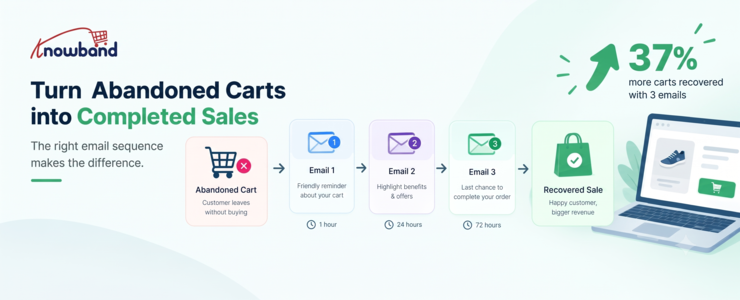
The case for a structured PrestaShop Abandoned Cart Module is straightforward: don’t treat every abandoned cart as a lost customer. A reported 2026 benchmark from Marketing LTB says sending three recovery emails recovers 37% more carts than sending one. That number should not be viewed as an absolute number for all stores, but it provides an interesting point: one reminder does not have to damage recoverable demand.
In the case of abandoned cart recovery of a PrestaShop store, what is recommended is to develop a process where each reminder has a distinct goal. The first is a reminder, the second is overcoming hesitation, and the last message offers a reason to buy. A dedicatedPrestaShop cart recovery addon makes it practical to run that sequence automatically.
Why one abandoned-cart email often isn’t enough
A cart abandonment is not always a checkout issue. Shoppers compare prices, check shipping costs, save products for future reference, or get distracted.
That distinction changes how recovery emails should be written.
Someone who bailed because of a delivery fee appearing out of nowhere requires a different sort of message than someone who just closed their browser while trying to complete the transaction. Using the same type of heavily discounted message for both customers will waste your margins and create an overly promotional brand image.
A proper message flow provides multiple chances for the visitor to come back within the context of the situation.
The three-email sequence worth testing first
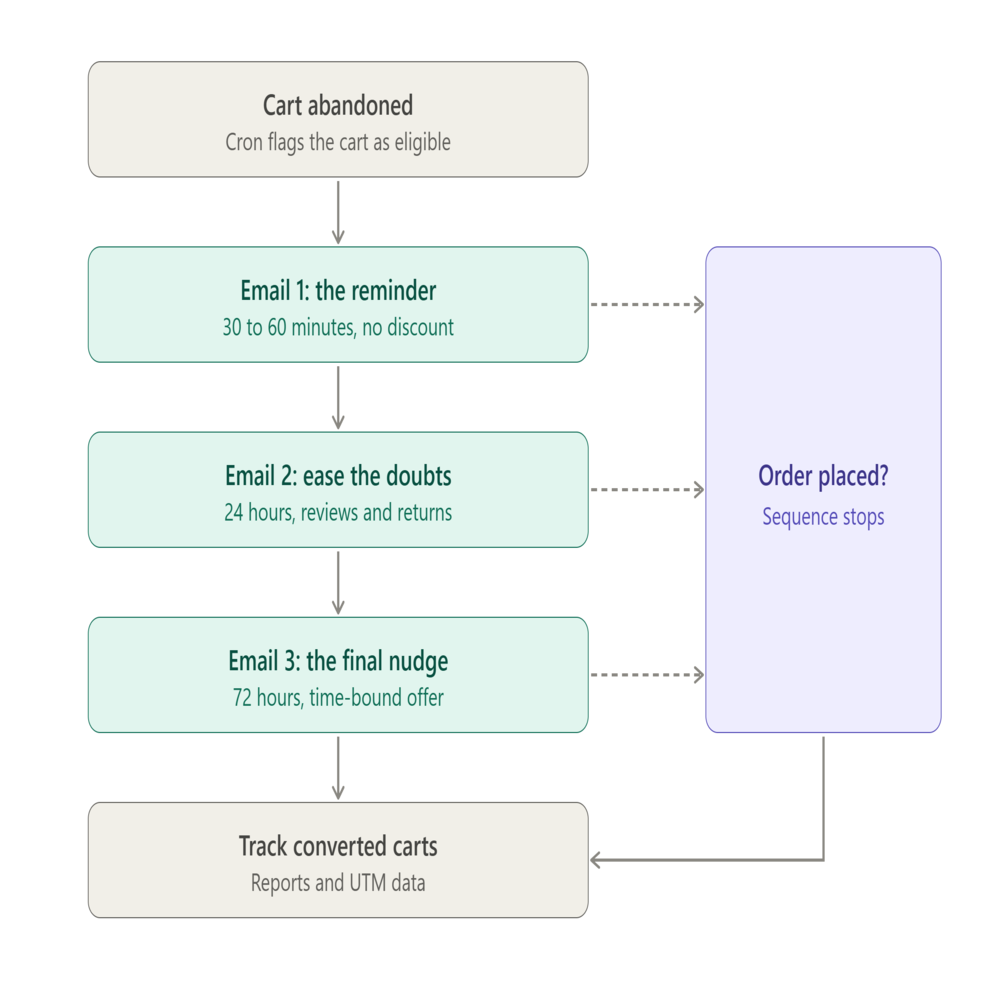
A three-email recovery sequence for PrestaShop: each reminder has a different goal, and the flow stops as soon as the shopper orders.
A useful starting point is a three-message flow spread across roughly three days. The Omnisend recommendations suggest sending the first email between 30 and 60 minutes after abandonment, with follow-up messages sent at 24 and 72 hours. These times will need to be tested according to your specific audience and purchasing process.
Email 1: Recover the interrupted shopping session
Send the first recovery email while the customer’s original shopping intent is still fresh.
Keep the message simple. Show the abandoned products, retain recognizable product names and pricing, and make the route back to checkout obvious. Don’t automatically assume that the customer needs some kind of discount.
A fashion retailer can send something like “Your cart is still waiting” as the subject line with the actual abandoned items included in the message. The call to action can simply return the shopper to the cart.
The objective here isn’t to overcome every possible objection. It’s to reconnect the shopper with a purchase they may have intended to complete.
Email 2: Address the reason they hesitated
The second message has more room to answer doubts.
Product reviews, shipping information, return terms, product benefits, or a reminder of what makes the item useful can all work here. If a shopper was comparing alternatives, this email gives you an opportunity to reinforce value without immediately cutting the price.
This is also where store-specific knowledge matters. A merchant selling expensive furniture may need to reinforce delivery and return information, while a cosmetics store might focus on product benefits or reviews.
Don’t judge this email purely by its open rate. The useful question is whether the message produces additional cart visits and completed orders from people who ignored the first touch.
Email 3: Give the final nudge
The third message can contain a call-to-action in the form of an offer when it makes sense economically.
This can be a one-time use discount code, free shipping, or another kind of time-bound incentive for your customers. Make sure that the offer is clearly defined, especially around minimum cart value and validity.
The point isn’t to discount every abandoned order. If customers learn that leaving a cart automatically produces a larger discount, your recovery strategy can start influencing behavior in the wrong direction.
The sequence should also stop when the shopper purchases. Sending another abandoned-cart message after an order is placed creates a poor customer experience and makes the automation look careless.
The practical challenge is not writing three emails. It is making sure that the store knows when the cart qualifies, which reminder should be sent, whether or not the user has converted, and whether or not automation was applied. A proper PrestaShop Abandoned Cart Module setup with a configured PrestaShop Abandoned Cart Reminder schedule is what makes this possible without manual intervention.
Knowband’s PrestaShop Abandoned Cart Module offers automated and manual follow-ups via email, reminder delay configuration, discounted and non-discounted templates, guest and registered customers monitoring, and abandonment vs. conversion cart reports. As of now, the product page indicates support for PrestaShop 9.x.
The included documentation verifies that the module utilizes serial reminders with discounted and non-discounted reminder types. Reminders can be set up with their own delays, whereas discounting can consist of a discount type, minimum cart value, coupons, a valid period, and free shipping.
That gives merchants enough control to build a sequence rather than repeatedly sending the same message.
For example:
Reminder 1 can use a non-discount email.
Reminder 2 can reinforce product value without an offer.
Reminder 3 can use a discount template with a defined expiry.
The module includes 20 ready-made email templates, split between discounted and non-discounted templates, while administrators can create and customize additional templates.
Timing depends on the store, not just the benchmark
A 30-minute or one-hour first email is a sensible test, not a law.
Omnisend’s 2026 research recommends a first abandoned-cart message around 30 to 60 minutes, followed by additional messages around 24 and 72 hours. It also recommends considering the customer’s local sending window because an email triggered late at night may perform differently from one delivered during active shopping hours.
A store selling inexpensive, frequently purchased products may recover quickly. A business selling high-ticket equipment could need more time because customers may research specifications, compare prices, or discuss the purchase before returning.
Watch the cart abandonment rate alongside recovery performance. A high abandonment figure doesn’t automatically mean the recovery flow is broken, particularly if your products naturally involve comparison shopping.
The better test is incremental performance: how many carts return after each message, how much revenue comes from recovered orders, and whether discounts are actually necessary.
Don’t make discounts the entire strategy
Discounting is easy to implement and difficult to undo.
If the first email always includes 15% off, customers have little reason to complete the purchase immediately. Some may start to view abandonment as part of the buying process.
A better sequence lets the customer return at full price before introducing an incentive. If the final reminder includes a coupon code, give it a clear purpose and a defined validity period.
The Knowband documentation supports both percentage and fixed discounts, minimum cart values, coupon validity periods, and free-shipping options for serial reminders.
That makes it possible to protect margins more carefully. For example, a store could reserve a discount for carts above a certain value rather than attaching an offer to every abandoned cart.
The technical layer matters more than the email copy
Even excellent email copy cannot recover a cart if the automation doesn’t execute.
The module’s workflow depends on cron processes that update abandoned carts and send reminder emails. The supplied manual explains that the cart-update and reminder-email crons run hourly, with the timing determining which carts enter each processing window.
That means developers and store managers should test the automation before judging campaign performance.
The module provides test mode and a cron log, allowing administrators to verify behavior and check whether scheduled processes have executed successfully.
Several implementation issues can prevent an apparently eligible cart from receiving an email. The documentation specifically mentions missing email addresses for guest shoppers, minimum cart-value conditions, reminder delays that have not yet been reached, carts with a zero value, and incorrectly configured cron jobs.
For a developer, this is an important troubleshooting checklist. Don’t rewrite the email template when the real problem is that the reminder job never ran.
Track recovered carts, not just email engagement
An open rate can tell you whether the subject line attracted attention. It doesn’t tell you whether the email generated a sale.
According to Omnisend’s abandoned-cart benchmark report for 2025, the open rate was 35.75%, click-through-to-send rate was 3.84%, conversion rate was 1.51%, and click-through-to-conversion rate was 39.46% among its users. This data provides useful information; however, different factors will affect results at your store.
The Knowband module also provides tracking for abandoned and converted carts and analytics comparing the two. Its documentation defines a converted cart as one where the customer places the order after receiving a reminder email.
That distinction matters.
Suppose Email 1 generates plenty of clicks but few purchases. The problem might be checkout friction rather than email copy. If Email 3 produces most of the recovered revenue but requires aggressive discounts, you may need to test a stronger value proposition earlier in the sequence.
Use UTM parameters as another layer of measurement. The module supports adding UTM parameters to its links so email performance can be tracked in Google Analytics.
Don’t forget shoppers who return to the site
Email doesn’t have to carry the entire recovery strategy.
A returning customer can also encounter a popup reminder showing the products they previously left in the cart. The module supports configurable popup templates and reminder delays, including discounted and non-discounted versions.
The module also supports a push notification channel for browser-based cart reminders. Administrators can configure and monitor web browser reminders separately from email.
Those options make sense when email alone doesn’t reach the customer at the right moment. They shouldn’t become an excuse to send every shopper every possible message. The goal is a coordinated recovery experience, not maximum message volume.
Build the flow around real abandonment reasons
A useful recovery strategy starts with the reasons customers leave.
Baymard’s findings indicate that there is abandonment due to checkout issues, and then there are cases of people abandoning their carts who are merely browsing and have no intention of purchasing.
That suggests a practical decision framework:
If the shopper was distracted: use a direct reminder.
If the shopper may have doubts: reinforce product value, reviews, shipping, or returns.
If price appears to be the barrier: test an incentive late in the sequence.
If the checkout itself causes abandonment: fix the checkout rather than relying on more emails.
This final statement should not be overlooked since recovery automation must serve to prevent lost revenue, but should not take the place of actually addressing any problems with payments, checkout forms that are difficult to understand, missing shipping details, or lack of mobile usability.
Where the PrestaShop Email Follow Up Module fits
For merchants who want this sequence without building the automation logic from scratch, the PrestaShop Email Follow Up Module provides the operational pieces needed to manage serial reminders, templates, automated sending, and cart conversion tracking.
The documentation also confirms support for GDPR-related customer-data deletion requests, test mode, guest and registered customer tracking, and analytics.
One implementation detail deserves attention: guest recovery depends on having an email address available. A store can have a large number of anonymous abandoned carts, but those carts cannot receive an email reminder without an identifiable email address.
That is why checkout design and recovery automation should be treated as connected systems.
A practical setup for a PrestaShop store
A sensible first version doesn’t need a dozen rules.
Start by defining when the cart becomes abandoned. Then create three reminders with different purposes rather than three versions of the same email. Each PrestaShop Abandoned Cart Reminder should earn its place by serving a different customer need.
The PrestaShop Cart Abandoned Addon supports configurable reminder delays and both discounted and non-discounted serial reminders, so merchants can build that progression directly in the module.
Before activating the flow, test the complete path:
Add a product to a test cart.
Confirm the cart becomes eligible after the configured abandonment delay.
Check that the first reminder is triggered.
Verify that subsequent reminders respect their delays.
Place an order and confirm that the customer is treated as converted.
Review the cron log if any step fails.
Check UTM data in analytics.
Test the emails on mobile devices.
This catches technical problems before real customers enter the sequence.
What the 37% figure should actually mean for a merchant
The reported 37% improvement should not become a target that every PrestaShop store is expected to hit.
Marketing LTB reports that three recovery emails recover 37% more carts than one, while other research points to strong performance from automated, behaviour-triggered messages more broadly.
The more useful lesson is that sequence design creates additional opportunities to recover customers who weren’t ready to buy after the first reminder.
Measure your own baseline. Compare one email against three, track recovered orders rather than just clicks, and examine the revenue generated after discounts. If the third message adds conversions without creating excessive discount dependency or complaints, it has earned its place.
Conclusion: Build a recovery sequence, then improve it
An effective PrestaShop Abandoned Cart Module strategy does not rely on sending as many messages as possible. It requires reaching out to the customer at just the right time, and giving a message relevant to why he might have abandoned his cart.
Here are three good emails to get you started. The reported 37% improvement from three recovery emails is a useful benchmark to investigate, not a promise to reproduce.
From there, the real work is measurement. Check converted carts, test timing, monitor discount usage, verify cron execution, and fix checkout friction that recovery emails can’t solve.
For stores that want to put this approach into practice, thePrestaShop Cart Abandoned Addon provides the serial reminders, email templates, automated sending, tracking, analytics, and related recovery tools needed to build and test the workflow. Also available on the Prestashop Addons.
A blog should do more than bring visitors to your store. Content built around customer questions can move readers from search discovery toward relevant products.
A PrestaShop Blog Module provides the infrastructure for that process inside the store. The commercial result depends on how the content is planned and connected.
Build a PrestaShop Blog Module Strategy Around Products
Start with the products or categories you want to grow.
Prioritize products that require comparison or research before purchase. Then list the questions customers ask. A skincare store, for example, could create a guide about choosing products for a specific concern and connect it to suitable products.
This gives each article a commercial context without making it promotional.
For merchants looking to implement this approach directly within their store, ablog module for PrestaShop can provide the publishing environment needed to connect content with the catalogue.
Match Every Article to a Real Search Intent
Match the article to the customer’s intent: informational, comparison-based, or purchase-focused.
Use a simple map:
Problem: What challenge is the customer looking to address?
Search: What might they type into Google?
Content: What answer would genuinely help?
Product: Which products solve the problem?
Next step: Where should the reader go after learning?
PrestaShop’s own SEO guidance recommends broader terms around categories and more specific long-tail expressions around products, supporting a funnel-based approach to ecommerce search.
A blog management workflow can support this process by letting merchants associate products with posts and display linked posts on product pages. The PrestaShop Blog Module by Knowbadn also provides related-product connections and linked blog posts on product pages.
Turn an Article Into a Product Discovery Journey
The article should not end when the reader gets an answer.
For example, a coffee grinder guide can explain grind size, brewing methods, and capacity before presenting relevant grinders.
Keep the product connection relevant. Recommend products because they solve the problem discussed. Answer the main question early, use descriptive headings, and cover the subquestions buyers are likely to have. This guide to AI search provides additional context on how ecommerce content can be structured for AI-driven discovery.
Build Content Clusters Around Commercial Categories
One article rarely answers every question around a category. Build a cluster.
For a home fitness store, a category could support:
How to choose resistance bands for beginners
Resistance bands vs free weights
How to build a home workout routine
Common mistakes when using resistance bands
Which resistance band strength should you choose?
These topics target different questions around the same category.
This is where a PrestaShop AI Content Addon can reduce production friction. Knowband’s PrestaShop Blog Module assists with post content, excerpts, tags, metadata, ALT text, and translations within the post workflow.
Use AI to accelerate execution, not to decide what customers need. The Module should remain a supporting part of that workflow, not the strategy itself. Review outputs for accuracy, originality, product relevance, and brand voice before publishing.
Make SEO Part of Publishing
A useful article can still underperform if its search presentation and structure are neglected.
Before publishing, check:
Does the title match the searcher’s question?
Is the URL clear and relevant?
Do H2 and H3 headings explain the structure?
Are metadata and image ALT text useful?
Are relevant articles and product pages internally linked?
Sitemap: Is the page included in the sitemap and accessible to search engine crawlers?
A PrestaShop SEO Blog Addon can support this process with controls for blog URLs, metadata, sitemap inclusion, RSS feeds, and content organization. The manual documents URL patterns, meta fields, sitemap controls, RSS settings, and related content options. Then connect SEO metrics with commercial behaviour. Search impressions and clicks show discovery, while product clicks, cart activity, and conversions reveal commercial impact.
Prepare Content for AI Search Without Writing for Machines
AI-driven search changes how shoppers may discover information, but the underlying principle remains useful content.
Answer the main question early, use descriptive headings, and cover the subquestions buyers are likely to have.
Google continues to emphasize helpful, people-first content, while current ecommerce content strategies increasingly map articles to different stages of the customer journey.
For a PrestaShop Blog Module, the practical goal is simple: make the page easy for people to understand and easy for search systems to interpret.
Use AI to Scale Execution, Not Strategy
Content teams often lose time on repetitive production work. Once the topic, search intent, product relationship, and editorial angle are decided, AI can accelerate execution.
Knowband’s PrestaShop AI Content Addon can assist with post content, excerpts, metadata, tags, image ALT text, and translations through configured AI providers.
Knowband also gives merchants a way to keep that work closer to the store administration. Publishing becomes easier to manage across categories or languages. The merchant still decides which products, questions, and actions matter.
Measure Revenue Paths, Not Just Blog Traffic
Traffic is an early indicator, not the final objective.
Monitor each content cluster for:
Organic visits
Search impressions and clicks
Clicks from articles to products
Product-page engagement
Add-to-cart activity
Assisted conversions
Revenue associated with content-assisted journeys
If an article gets traffic but little product engagement, revisit the intent match or internal journey. Repeat topics that consistently introduce shoppers to products.
Knowband’s PrestaShop Blog Manager can fit into this workflow by keeping posts, product relationships, SEO settings, publishing, and content organization within the PrestaShop administration environment.
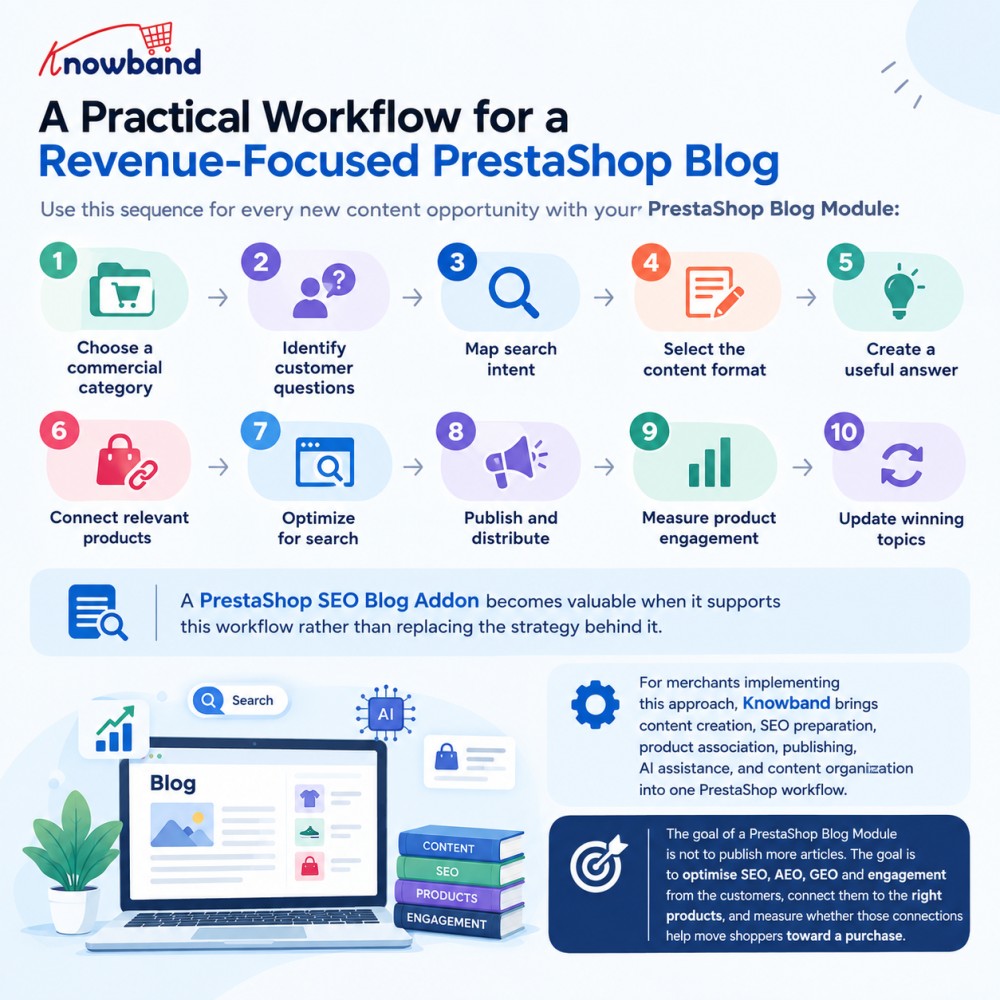
A Practical Workflow for a Revenue-Focused PrestaShop Blog
Use this sequence for every new content opportunity with your PrestaShop Blog Module:
A PrestaShop SEO Blog Addon becomes valuable when it supports this workflow rather than replacing the strategy behind it.
For merchants implementing this approach, Knowband brings content creation, SEO preparation, product association, publishing, AI assistance, and content organization into one PrestaShop workflow.
Explore PrestaShop Blog Manager also available on Prestashop Addons to see how this content-to-commerce workflow can be implemented in a PrestaShop store.
Explore this tutorial to learn how to add blogs to your PrestaShop website without any coding knowledge.
PrestaShop’s new AskAI, introduced with PrestaShop 9.2, is a promising sign of where the platform is headed a native assistant built right into the back office that lets you query your store in plain language. It’s tied to PrestaShop 9.2 specifically, and it relies on two companion modules, the PrestaShop MCP Server and MCP Tools, being installed and configured alongside it before it can see any of your store’s data.
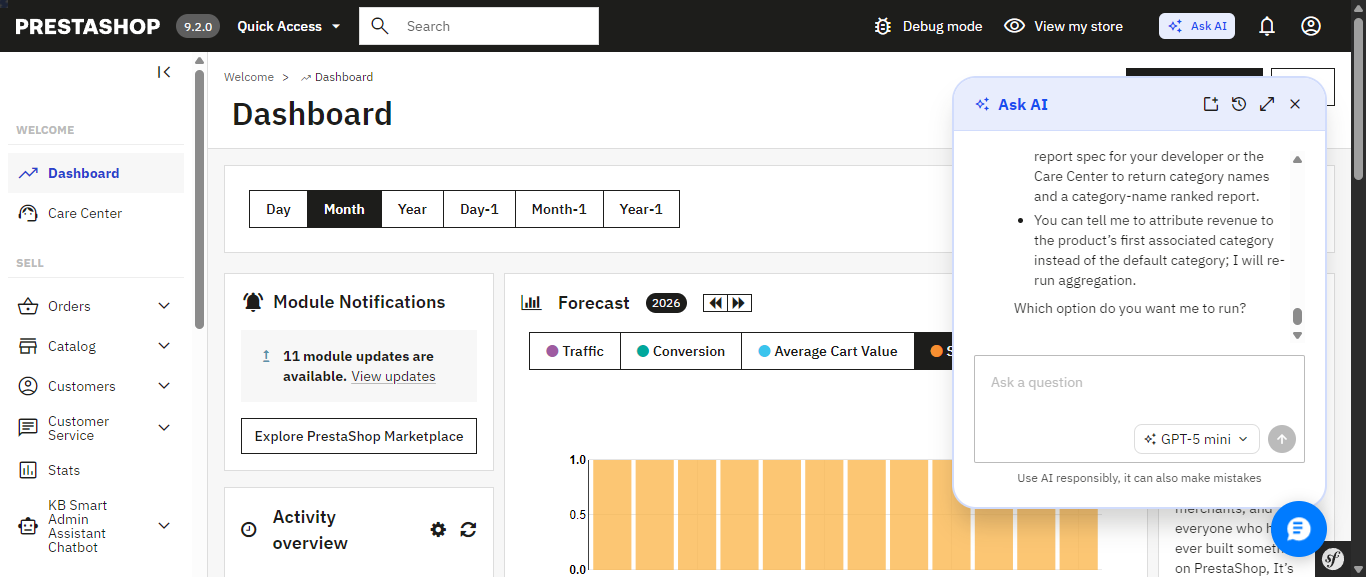
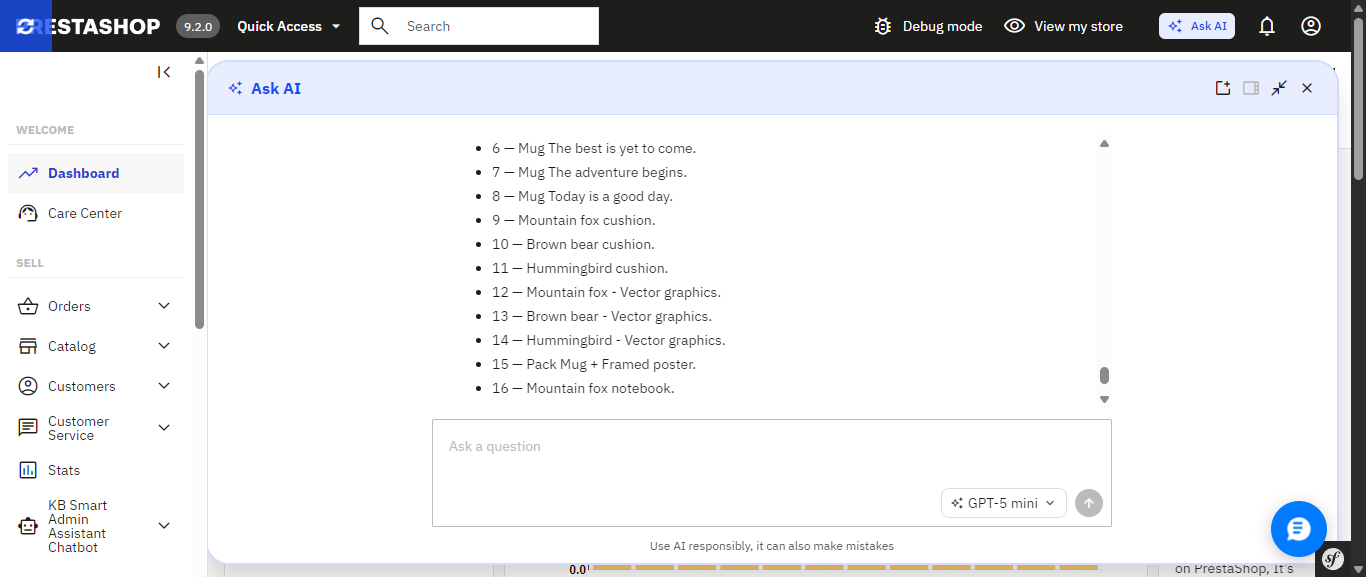
In practice, opening Ask AI drops a chat panel into the corner of whichever admin page you’re on, and it remembers your previous conversation the next time you reopen it. Ask something like “Which products are out of stock right now?” and it doesn’t just answer quietly in the background it shows its work: the specific MCP tool it’s about to call, a “Tool approved” confirmation step, a stated goal, and its reasoning before handing back the answer as a formatted list. That’s a genuinely nice trust signal, though the trade-off is no visible SQL you see the tool call and the goal, not the underlying query.
PrestaShop’s native Ask AI panel, opened from the top admin bar it remembers the previous conversation across sessions.
Ask AI shows its work: the MCP tool it calls, a tool-approval step, and its stated reasoning before answering.
The finished answer, expanded to full width a plain list of out-of-stock products with a follow-up question box ready.
If you’d rather skip that setup, or you’re running an earlier PrestaShop version where Ask AI isn’t an option at all, there’s a module you can install today that already delivers a natural-language AI assistant and builds a good deal more around it, much of which Ask AI simply doesn’t include yet. It’s called Smart AI Admin Assistant.
PrestaShop Ask AI vs Knowband Smart AI Admin Assistant
Feature
PrestaShop Ask AI
Knowband Smart AI Admin Assistant
PrestaShop version support
9.2
1.7.x to 9.x.x
Setup requirements
Requires the separate PrestaShop MCP Server and MCP Tools modules
Install the module, add your API key, and start asking questions
How it accesses your data
Through the PrestaShop MCP Server using defined tool calls
Natural-language-to-SQL against curated, read-only database views
Taking action on your store
Can execute actions with explicit confirmation required
Read-only; blocks DELETE, DROP, UPDATE, INSERT and TRUNCATE
Query transparency
MCP tool calls; SQL is not directly visible
✓ View, edit and re-run the generated SQL
Built-in analytics dashboard
Not Available
✓ 44 widgets covering revenue, orders, stock, best sellers and more
Data export
Not Available
✓ Excel and CSV exports, including full-dataset exports
Voice input
Not Available
✓ Browser-based speech recognition
Quick-access shortcuts
Context-aware suggestions on Product, Order and Customer pages
✓ Editable quick-query chips for common questions
Employee access control
Not Available
✓ Role-based, per-employee configuration
Audit logging
30-day conversation history per user; no SQL or action-level log
✓ Timestamped query and audit log, including executed SQL
Ask AI’s confirmation-before-action design and its native integration into PrestaShop’s core are real strengths, and worth keeping an eye on. But most of what makes Smart AI Admin Assistant a complete toolkit the dashboard, the exports, the access control, the audit trail, the voice input is territory Ask AI hasn’t entered yet.
The Problem that AI Assistant
Every PrestaShop store owner knows this routine: check yesterday’s revenue, scroll through orders looking for anything stuck, check which products are running low, maybe export something to send to a partner. None of it is hard. All of it is repetitive, and all of it eats into the hours you’d rather spend on the parts of the business that actually need your judgment.
Smart AI Admin Assistant replaces that routine with a conversation. You type or speak a question the way you’d ask a colleague, and you get a precise, live answer straight from your store’s database. No dashboards to navigate. No report builder. No SQL. Just a question and an answer, in seconds.
Ask Anything, Get a Real Answer
And this is what the entire module is based upon: an engine that will help analyze the language in the question regarding orders, customers, products, sales, inventory, and coupons without requiring any technical background whatsoever. There’s no need to fill in forms or make choices from a drop-down menu; all one has to do is:
“How many orders were placed today?”
“Show me low stock products.”
“Which customers spent the most this month?”
“What’s my revenue this week compared to last week?”
“Which products are missing descriptions or images?”
“What are my top 10 best-selling products this quarter?”
Both Ask AI and Smart AI Admin Assistant let you ask this kind of question in plain language that part isn’t unique to either one. The difference shows up in everything built around it, starting with how each one actually reaches your data.
Choose the AI Model That Fits the Question. Ask AI Doesn’t Offer This Level of Control
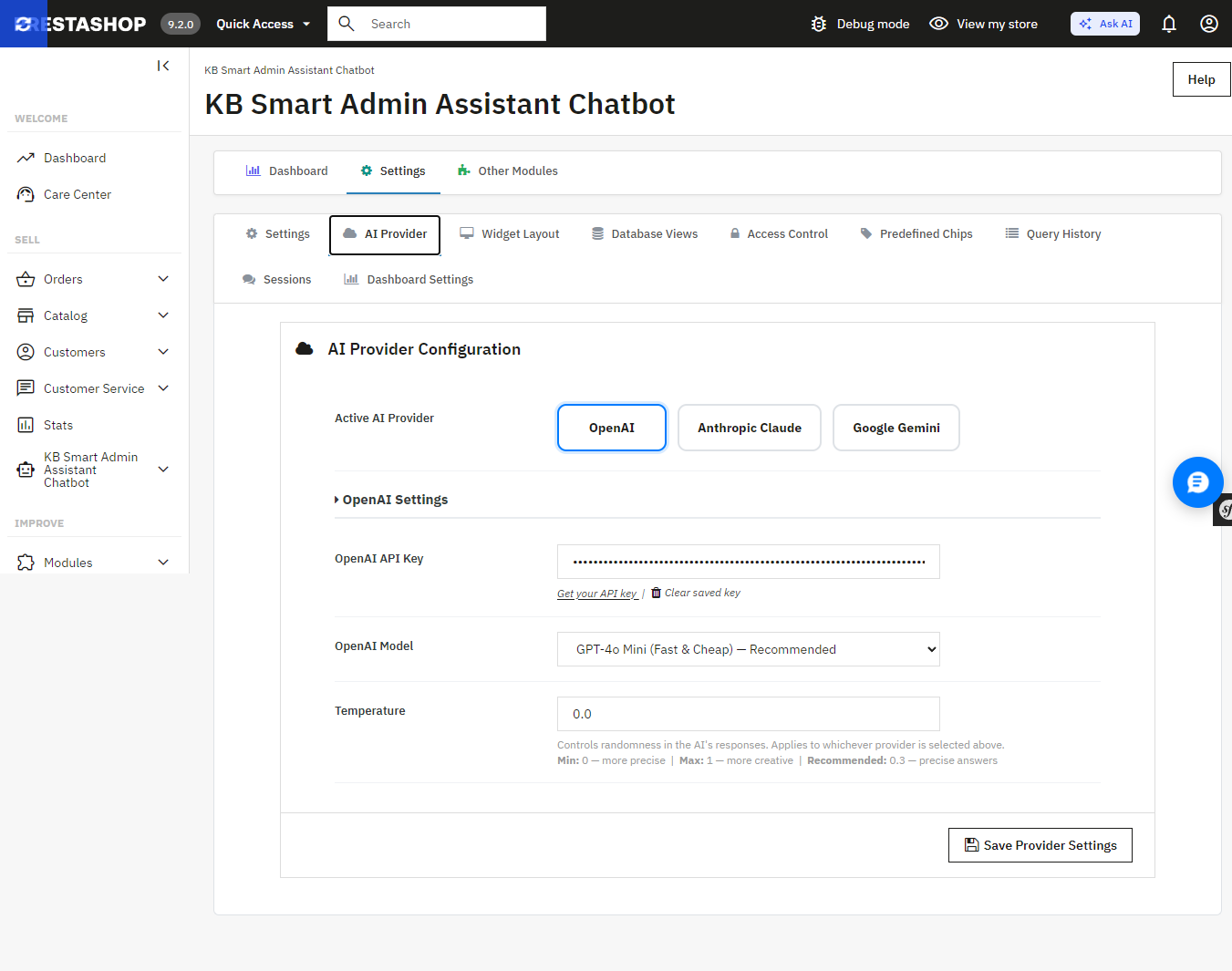
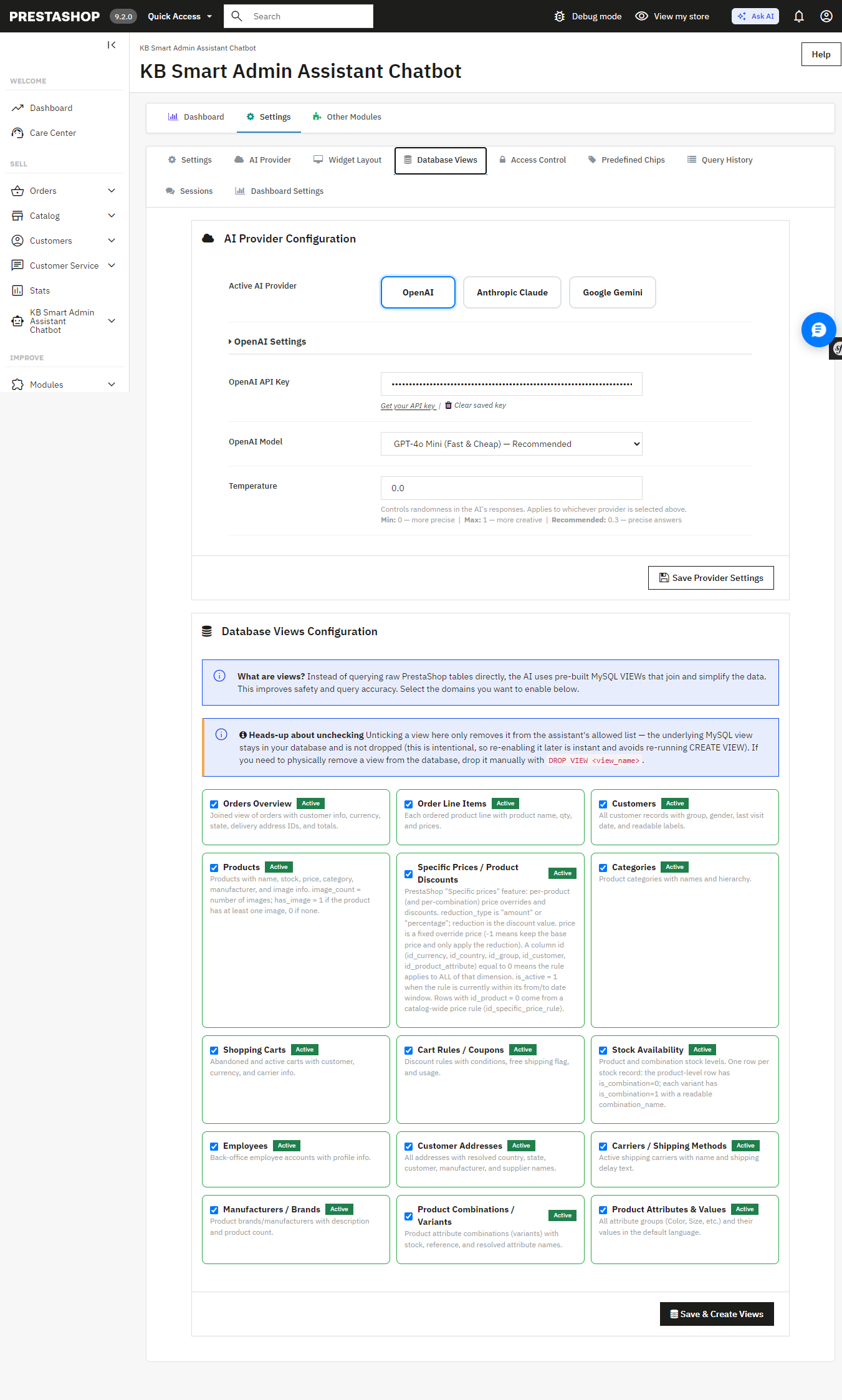
Smart AI Admin Assistant provides a true choice between the providers and the tier models without changing the code, using one settings panel:
OpenAI GPT-4o Mini, GPT-4o, or GPT-5.5
Anthropic Claude Haiku 4.5, Sonnet 4.6, or Opus 4.7
Google Gemini 3.5 Flash or 3.1 Flash-Lite
Want fast, low-cost answers for quick daily checks? Point it at a lighter model. Want the deepest possible breakdown of a slow sales month? Switch to a flagship tier for that one query. Ask AI, by contrast, connects to whichever single provider key you’ve configured it doesn’t offer this kind of tier-by-tier switching from within the assistant itself.
Smart AI Admin Assistant’s AI Provider settings switch between OpenAI, Anthropic Claude, and Google Gemini, and pick a model tier for each.
An Answer, Not Just a Table of Numbers
Every query comes back with more than raw data the assistant generates a plain-language summary alongside it, calling out the trend or number that actually matters. Ask about your inventory and you don’t just get a table; you get told which products are about to become a problem.
A Full Analytics Dashboard Comes Built In Something Ask AI Doesn’t Have
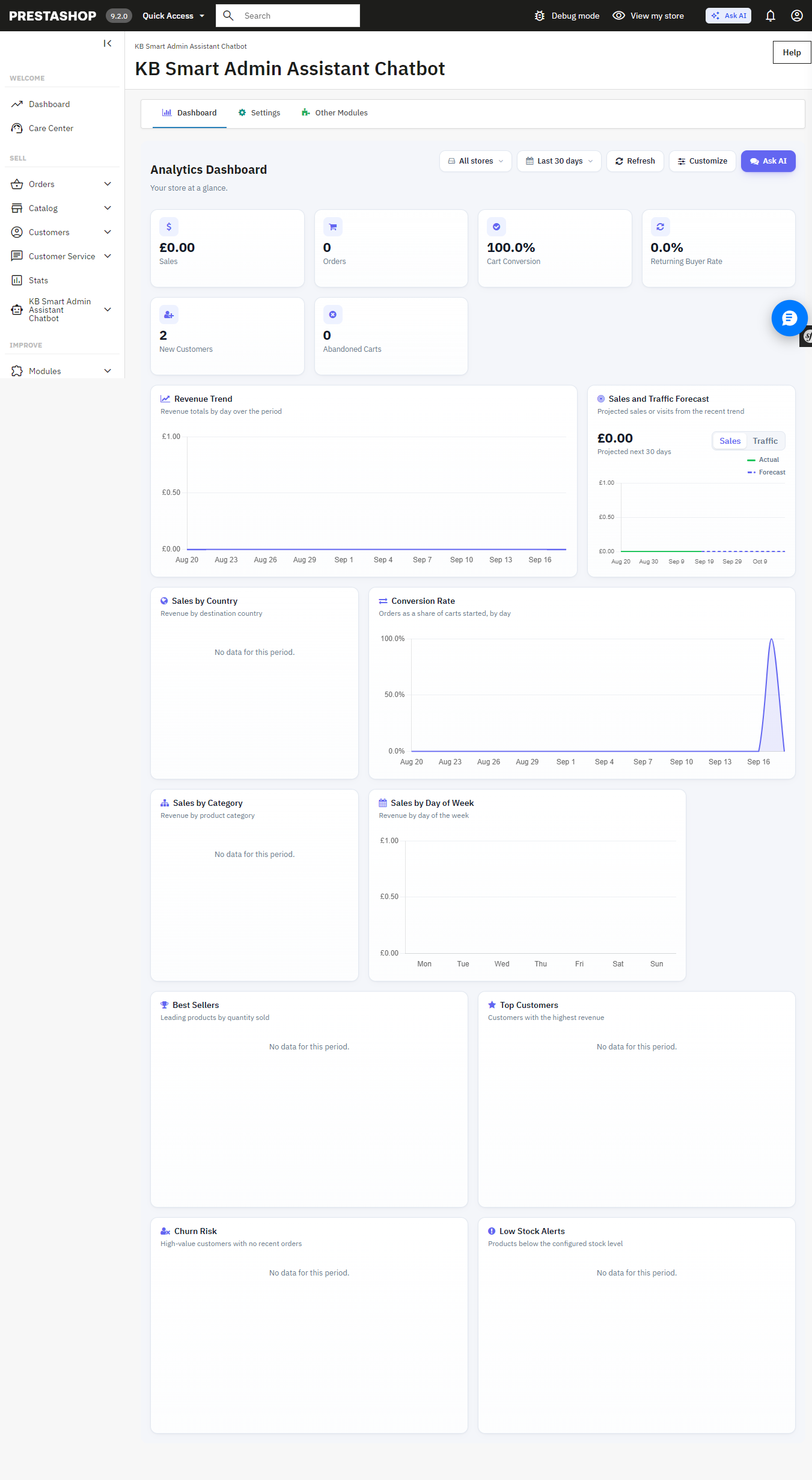
Beneath the chat interface is the full back office analytics dashboard with 34 widgets such as revenue analytics, order quantity, cart conversion rates, customer retention rates, inventory alerts at product level, best sellers, churn rate analytics, sales by countries, categories, payment methods, time slots, etc. Each of these widgets is easily toggleable and reorderable to create your perfect dashboard view. It can also be used as the PrestaShop back office home page.
The built-in Analytics Dashboard revenue, orders, cart conversion, and more, all on one page.
Answers You Can Export, Share, and Verify Not Available in Ask AI
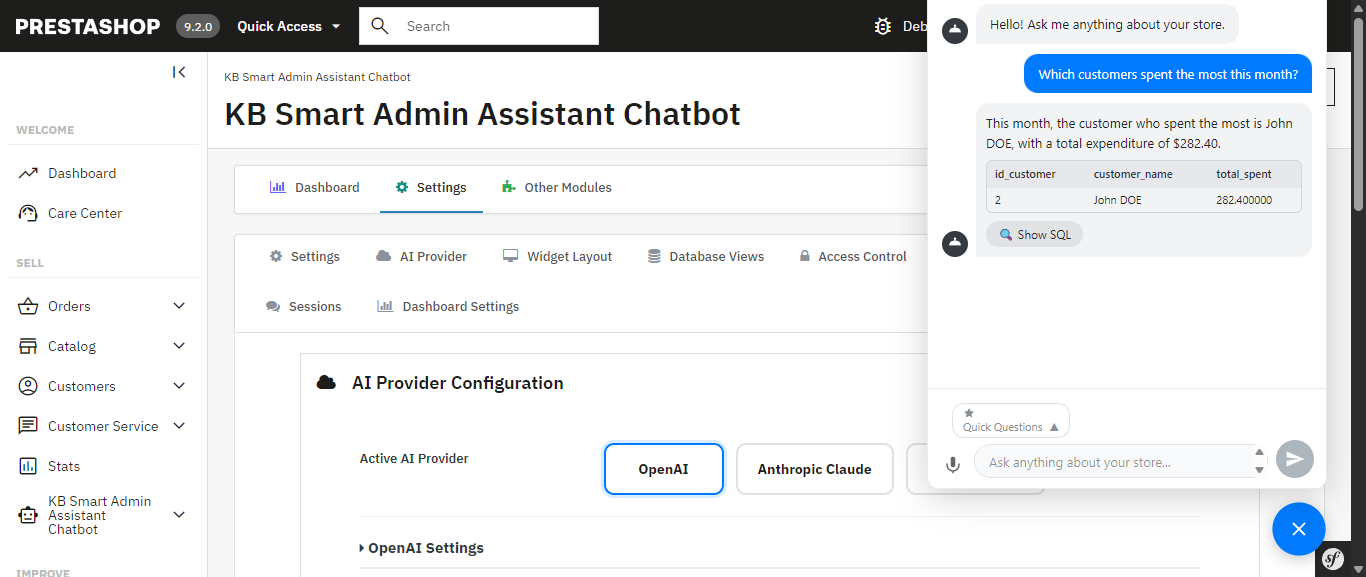
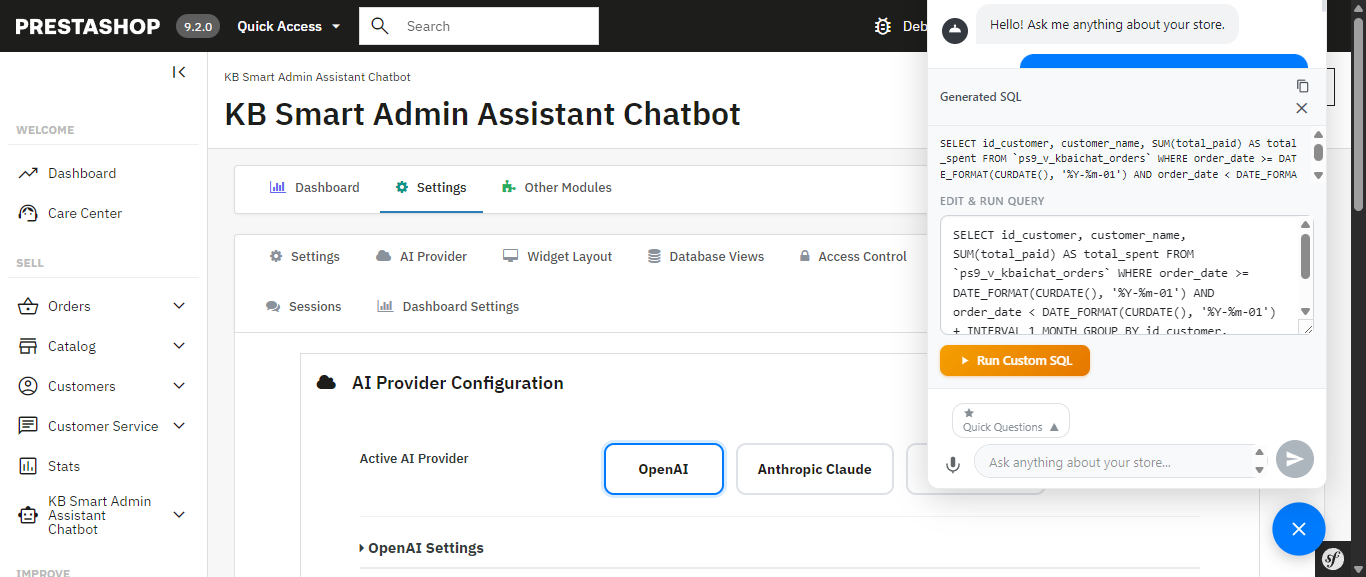
The exact generated SQL is visible, editable, and re-runnable nothing is a black box.Database Views configuration the AI queries curated, read-only MySQL views instead of raw tables I
Get a result you need to hand off? Export it instantly to Excel or CSV full datasets, not just the rows visible on screen. Ask AI has no export functionality; any data it surfaces stays inside the chat conversation.
Allowing the assistant access to your database must be carefully considered, and the module has been designed with this in mind: strict restrictions on DELETE, DROP, UPDATE, INSERT, and TRUNCATE ensure that the assistant can only access your information, not write to it.. Multi-statement execution is blocked and SQL-injection patterns are screened automatically and unlike Ask AI, which works through MCP tool calls with nothing to inspect, you can view, edit, and re-run the exact SQL Smart AI Admin Assistant generated yourself. Nothing runs as a black box.
The exact generated SQL is visible, editable, and re-runnable nothing is a black box.
Database Views configuration the AI queries curated, read-only MySQL views instead of raw tables.
Built for Teams, Not Just Solo Store Owners Ask AI Has No Equivalent
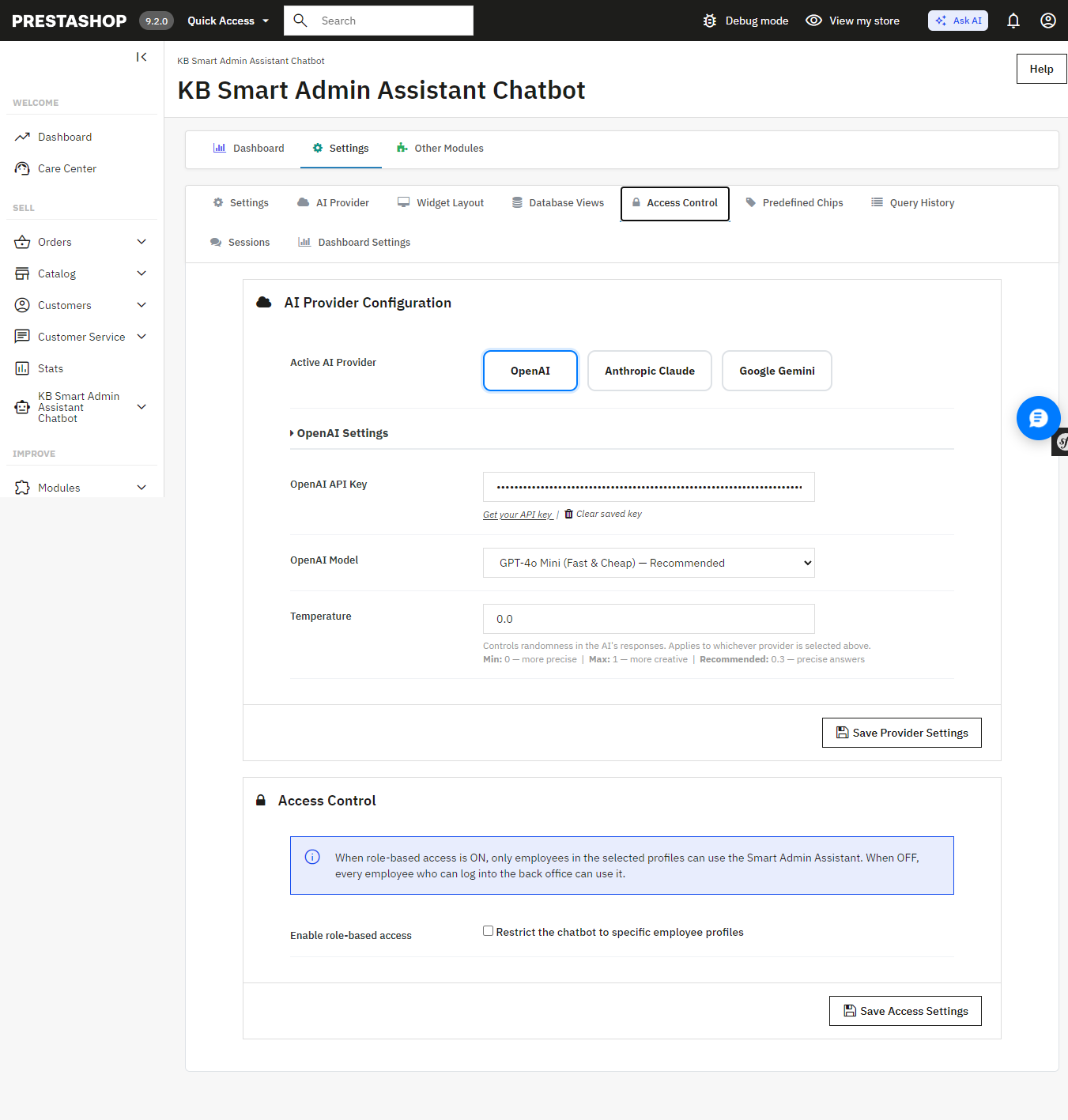
If you have a shop with several admins or you manage this on behalf of your clients as an agency, the module comes with role-based employee access controls, and you get to determine precisely which employees have access to the assistant and what they are permitted to ask. All queries will be timestamped and recorded to provide you with a full audit trail. The Ask AI platform provides 30 days of chat history for each individual; however, it does not provide user permissions and an audit trail per query.
Access Control restricts the assistant to specific employee profiles.
Query History a full, timestamped audit log of every question asked, including the generated SQL.
Speak Instead of Type Ask AI Doesn’t Support Voice Input
Voice input, built on the browser’s native speech recognition, lets you ask your question out loud instead of typing it useful on a warehouse floor, during a busy order-processing morning, or anytime your hands are full. Ask AI is text-only.
Quick-Access Shortcuts for the Questions You Ask Every Day More Flexible Than Ask AI’s Suggestions
The Prestashop AI Admin Assistant ships with ready-to-use “quick query chips”: Total Orders Today, Revenue This Month, Low Stock Products, Abandoned Carts (Last 30 Days), Top Customers by Revenue, and more that you can fully edit and customize. Ask AI offers contextual suggestions on Product, Order, and Customer pages, but they aren’t something you can edit or add to.
Get Started
If you’re ready to stop digging through admin screens and start just asking your store what you need to know, Smart AI Admin Assistant is available, with live admin and front-end demos and a full user manual so you can see exactly what you’re getting before you buy:
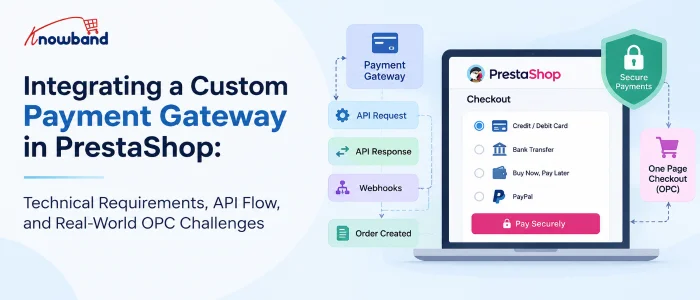
Integrating a payment gateway into PrestaShop can look straightforward on paper.
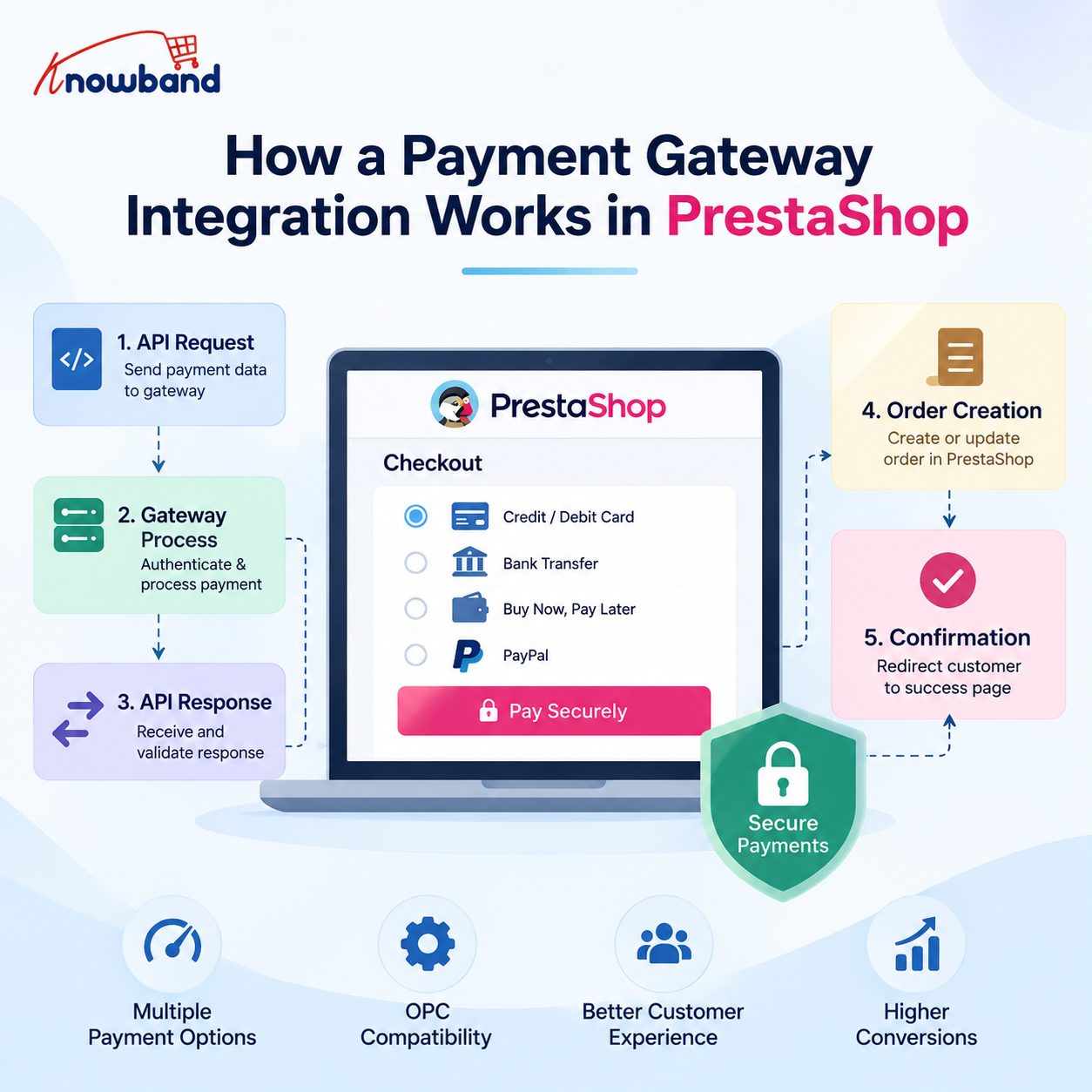
The gateway provides API documentation, sandbox credentials, authentication keys, callback URLs, and a few endpoints. The PrestaShop module then sends the payment request, receives the response, creates the order, and redirects the customer to the confirmation page.
In a real PrestaShop store, however, the payment gateway is rarely working alone.
The moment a store uses a One Page Checkout (OPC) module such as SuperCheckout, multiple payment modules, custom payment flows, iframes, JavaScript-based payment methods, and additional checkout customizations can all interact with each other.
This is where many payment integrations become difficult.
During payment gateway compatibility work, we have encountered cases where a payment method worked perfectly with PrestaShop’s default checkout but behaved differently inside OPC. For example, a payment provider could display correctly on the standard checkout while options such as BLIK, bank selection, or BNPL disappeared inside SuperCheckout.
The important lesson was that integrating a payment gateway is not only about making the API call work. It is about making the entire payment lifecycle work correctly inside the PrestaShop checkout.
1.0 What Does a Custom Payment Gateway Actually Need?
At a high level, a PrestaShop payment integration needs to handle five things:
Display the payment method at checkout.
Send the customer or payment data to the gateway.
Receive and validate the gateway response.
Create or update the PrestaShop order correctly.
Return the customer to the appropriate confirmation or error page.
A typical payment module extends rather than the base class.
The payment module normally works with hooks such as:
The hook is responsible for making the payment method available to the checkout.
The hook handles what the customer sees after returning from the payment process.
For example:
public function hookPaymentOptions($params)
{
if (!$this->active || !$this->checkCurrency($params['cart'])) {
return [];
}

$paymentOption = new PaymentOption();

$paymentOption
->setCallToActionText($this->l('Pay by Card'))
->setAction(
$this->context->link->getModuleLink(
$this->name,
'redirect',
[],
true
)
);

return [$paymentOption];
}
The important point is that this hook should not simply assume that the payment method can always be displayed.
Currency, country, carrier, customer state, cart amount, module configuration, and gateway availability can all affect whether the payment method should be shown.
2.0 The Part That Changes Everything: OPC
The default PrestaShop checkout and a Prestashop One Page Checkout module do not necessarily process payment methods in exactly the same way.
This was one of the most important lessons from working with multiple payment modules.
With the default checkout, a payment module generally controls its own payment option rendering and payment flow.
With an OPC, the checkout module becomes another layer between the payment module and the customer. That means the following can interact:
A payment module can therefore be completely correct from an API perspective and still fail to behave correctly inside an OPC.
This is why payment compatibility testing should always include both:
PrestaShop default checkout
The actual OPC used by the store
Testing only the default checkout can give a false sense that the integration is complete.
3.0 A Real-World Example: PayU Options Missing Inside OPC
One of the practical issues we encountered involved PayU payment options.
On the standard PrestaShop checkout, PayU was able to display its available payment methods correctly. However, inside SuperCheckout, some payment options were missing.
For example, depending on the configuration and cart:
BLIK was not consistently visible.
The bank-selection list did not expand correctly.
Some BNPL/payment rows were missing.
In some cases, BLIK appeared and then disappeared.
At first glance, this looked like a PayU API problem. It wasn’t.
The important diagnostic step was comparing the payment flow between the default checkout and SuperCheckout.
When the same payment module works on the default checkout but fails inside OPC, the investigation should move beyond the gateway API.
We need to check how the OPC builds the payment methods and what information it passes to the payment modules.
4.0 Payment Amount Can Affect Payment Method Visibility
One particularly important part of this investigation was the cart amount. Payment gateways frequently have minimum and maximum transaction limits. For example:
Payment Method↓Check cart amount↓Minimum amount? Maximum amount?↓Eligible / Not eligible
During the PayU compatibility investigation, we traced the payment-method filtering logic to the cart amount being passed through the payment-method checks.
The relevant flow involved PrestaShop’s cart calculation and payment-method filtering, including logic around:
Cart::BOTH
and:
PayMethodsCache::checkMinMax
This matters because a payment option can disappear from checkout without the API itself returning an error.
The gateway may simply be considered ineligible for the amount received by the payment module. That gives us an important debugging rule:
If a payment option disappears from an OPC, don’t immediately assume that the payment API is broken. First verify the cart amount, currency, minimum/maximum limits, and the values reaching the payment-method eligibility checks.
This becomes even more important when discounts, shipping costs, taxes, vouchers, or custom checkout calculations are involved.
5.0 Why Payment Methods Can Work in Default Checkout but Fail in SuperCheckout
A useful way to investigate these problems is to compare the two checkout environments.
Different gateways require different combinations.
6.1 Redirect-based gateway
The customer clicks the payment method and is redirected to the gateway.
Checkout↓PaymentOption↓Module controller↓Gateway
6.2 Embedded payment form
The payment fields are displayed directly in the checkout.
Checkout↓PaymentOption↓Card/payment form↓Gateway API
6.3 Iframe-based payment
The gateway’s interface is embedded into the checkout.
Checkout↓PaymentOption↓Iframe↓Gateway
The last two approaches require additional attention because JavaScript, DOM manipulation, iframe loading, and OPC refreshes can affect the payment interface.
7.0 JavaScript Becomes Critical with OPC
This is one area that generic payment-integration guides often overlook.
An OPC can dynamically refresh portions of the checkout when the customer changes:
delivery address
country
carrier
payment method
billing information
shipping method
When that happens, payment-related HTML can be replaced.
A JavaScript event that worked during the initial page load may therefore stop working after an AJAX refresh.
For example:
Initial checkout load↓Payment JS initialized↓Customer changes payment/shipping information↓OPC refreshes payment section↓Original DOM replaced↓Payment JS no longer attached
This can produce confusing symptoms.
The payment method may appear initially, but clicking it does nothing. An iframe may disappear.
A bank list may stop expanding.
A payment option may appear and disappear after another checkout field changes.
Therefore, compatibility work often requires changes not only in PHP but also in the payment module’s JavaScript.
8.0 A Real Example: SimplyLease + SuperCheckout
Another example involved SimplyLease integration with SuperCheckout. The problem was not limited to the gateway API.
Some SimplyLease information and calculator elements were part of the checkout/payment presentation and needed to work correctly inside the SuperCheckout flow.
The compatibility changes involved both module templates and SuperCheckout-side JavaScript integration. The files involved included:
This is a good example of why payment compatibility sometimes requires changes outside the payment gateway module itself.
The payment provider may expose the correct data, but the checkout still has to:
Render it.
Preserve it during checkout refreshes.
Initialize the required JavaScript.
Keep the payment information synchronized with the current cart.
9.0 Another Common Problem: Payment Method Not Appearing
We also encountered cases where a payment method such as Comfino did not appear in SuperCheckout even though the payment module itself was installed and configured.
This type of issue should be investigated systematically.
Check:
9.1 Is the module active?
$this->active
9.2 Is the currency supported?
$this->checkCurrency($params['cart'])
9.3 Is the country supported?
Some gateways restrict payment methods based on the customer’s country.
9.4 Is the cart total within the gateway limits?
Minimum and maximum transaction values can prevent a method from being displayed.
9.5 Is the carrier supported?
Some payment modules restrict payment methods by carrier.
9.6 Is OPC filtering the method?
The payment module can return valid methods that are collected, filtered, or rendered. But the OPC can still modify how payment
9.7 Is JavaScript hiding or replacing the element?
A payment method can technically be returned by PHP but still not be visible in the final checkout.
This is why browser developer tools are as important as PHP logs when debugging payment integrations.
10.0 Hooks We Actually Need to Pay Attention To
A custom payment integration should not be treated as a single-hook implementation.
The exact hooks depend on the gateway and checkout architecture, but some are especially important.
10.1 paymentOptions
This is the primary hook for exposing the payment method to the checkout.
It is responsible for returning paymentOptions objects.
Typical checks include:
if (!$this->active) { return [];}if (!$this->checkCurrency($params['cart'])) { return [];}
Additional gateway-specific restrictions can then be applied.
10.2 paymentReturns
This is used after the customer has completed or returned from the payment flow. It can display:
order reference
payment status
additional payment instructions
gateway-specific information
10.3 actionPresentPaymentOptions
This hook becomes particularly interesting when multiple payment modules and an OPC are involved.
It operates on the assembled payment options and can be useful when the checkout needs to inspect or modify the complete payment-option collection.
This is different from implementing a single gateway’s paymentoptionshook.
The distinction is important:
aymentOptions↓Each payment module contributes its optionactionPresentPaymentOptions↓The assembled payment options can be processed
When debugging OPC compatibility, understanding where payment options are collected versus where they are finally presented can make the difference between finding the issue quickly and spending hours inside the gateway module.
11.0 Order Creation: Never Trust the Browser
Once payment reaches the gateway, the next critical step is order creation. The most important PrestaShop method here is:
If the integration creates an order every time it receives a webhook, duplicate orders become possible. Therefore, the callback should check whether the cart already has an order before creating another one. Conceptually:
if ($cart->OrderExists()) {// Already processed// Return successful response}
The webhook handler should be designed to safely process repeated notifications.
The customer may return before the final payment confirmation arrives.
Customer↓Gateway↓Return to store↓Pending order↓Webhook↓Verify payment↓Change order state↓Payment accepted
For asynchronous gateways, using a dedicated pending order state is often safer than immediately marking the order as paid.
Once the webhook confirms the payment:
$history = new OrderHistory();$history->id_order = (int) $order->id;$history->changeIdOrderState( Configuration::get('PS_OS_PAYMENT'),$order);$history->addWithemail(true);
This ensures that the order-state transition goes through PrestaShop’s order-history mechanism instead of simply changing the database value.
14.0 One of the Most Useful Debugging Techniques: Compare the Checkout Flows
When a payment method works in the default checkout but not in OPC, we recommend comparing the complete flow.
Step 1: Check PHP
Is hookPaymentOptions() executed?
Step 2: Inspect the returned options
Does the payment module actually return a paymentOption?
Step 3: Check the cart
Compare:
total
currency
customer
country
carrier
discounts
taxes
shipping
Step 4: Check the browser
Look for:
JavaScript errors
missing DOM elements
AJAX requests
failed requests
iframe errors
Step 5: Check the OPC
Determine whether SuperCheckout is:
filtering the payment option
replacing its HTML
refreshing the payment section
changing the cart before the payment module runs
Step 6: Check the gateway
Only after the local checkout flow is confirmed should the investigation move deeper into:
API authentication
request payload
signature
response
webhook
gateway logs
This layered approach is much faster than starting with the gateway API every time.
15.0 Common Payment Integration Problems We Have Seen
Real-world compatibility work usually exposes problems that aren’t obvious from the gateway documentation.
15.1 Payment option disappears
Possible causes:
unsupported currency
country restriction
cart amount outside gateway limits
carrier restriction
OPC filtering
payment module configuration
JavaScript hiding the method
15.2 BLIK or another payment option appears and disappears
Possible causes:
checkout AJAX refresh
payment-option re-rendering
JavaScript initialization
cart total changing
gateway eligibility being recalculated
15.3 Bank list does not expand
Often investigate:
JavaScript errors
dynamically replaced DOM elements
event handlers attached before OPC refresh
payment provider’s JavaScript initialization
15.4 Iframe disappears
Investigate:
checkout refresh
iframe initialization
DOM replacement
JavaScript execution after AJAX updates
15.5 Payment succeeds, but order remains pending
Check:
webhook URL
webhook delivery
signature verification
cart/order lookup
order-state transition
callback authentication
15.6 Payment method works in default checkout but not OPC
This is a strong indication that the problem may be in the interaction between the payment module and the OPC rather than the gateway API itself.
16.0 Security Requirements for a Payment Module
Payment modules handle sensitive operations, so security cannot be treated as an optional improvement. At minimum:
Validate callback signatures.
Validate the cart/customer relationship.
Use HTTPS.
Validate TLS certificates.
Never trust payment status supplied only by the browser.
Never store raw card information unless the architecture and compliance requirements explicitly support it.
Do not log sensitive payment information.
Avoid serialize() and unserialize () / for untrusted external data.
Validate and cast incoming values.
Protect custom AJAX and callback endpoints.
Use secure tokens where appropriate.
Make webhook processing idempotent.
A payment success page is not proof of payment.
The gateway’s verified server-side response is what should determine whether the order is considered paid.
17.0 What Changes When Supporting Multiple Payment Modules?
Another lesson from OPC compatibility work is that adding a second or third payment module can expose problems that were not visible when only one payment method existed.
For example:
PayPal PayUComfinoSimplyLeaseBank transfer
may all contribute payment options to the same checkout. The checkout therefore has to deal with different:
HTML structures
JavaScript
iframe requirements
redirects
API flows
eligibility rules
minimum/maximum amounts
asynchronous callbacks
A change made for one payment method can accidentally affect another. This is why payment compatibility fixes should be narrowly scoped.
For example, instead of changing the entire payment-option processing logic globally, identify the specific payment method and apply the compatibility handling only where required.
18.0 Testing Should Include Real Cart Scenarios
Testing a payment gateway with a simple €10 product is not enough. A proper test matrix should include:
Scenario
What to verify
Single product
Payment option appears
Multiple products
Correct amount reaches gateway
Discount
Final payable amount is correct
Shipping charge
Gateway receives correct total
Tax
Gateway amount matches order
Minimum gateway amount
Method appears/disappears correctly
Maximum gateway amount
Method appears/disappears correctly
Unsupported currency
Method is hidden
Unsupported country
Method is hidden
Default checkout
Payment works
OPC
Payment works
Mobile checkout
UI works
Failed payment
Correct order/payment state
Successful payment
Order is created correctly
Webhook retry
No duplicate order
Customer abandonment
No incorrectly paid order
Gateway timeout
Correct pending/error handling
For OPC integrations, also test checkout refreshes. Change the:
address
carrier
country
payment method
quantity
discount
and verify that the payment options remain correct after every refresh.
19.0 A Practical Development Approach
Based on the issues that commonly appear in real integrations, a safer development order is:
19.1 Make the gateway work with default PrestaShop checkout
And eventually the payment provider changes something that breaks an otherwise stable integration.
For mainstream gateways, an established and maintained module can therefore be significantly cheaper than maintaining custom payment code for several years.
21.0 The Bigger Lesson From PrestaShop Payment Integration
The biggest lesson from working with payment gateways is that the API is often not the hardest part. Sending:
A payment integration is successful only when the entire chain behaves consistently.
This is also why an issue such as “BLIK is missing” or “the bank list does not open” should not immediately be treated as a gateway API problem.
The actual cause could be a cart-total calculation, payment-method eligibility check, OPC rendering, JavaScript initialization, or an AJAX refresh replacing the payment interface.
22.0 Final Checklist for a Custom PrestaShop Payment Gateway
Before considering the integration complete, verify:
Payment module extendsPaymentModule.
paymentOptions is implemented correctly.
paymentReturn is implemented where required.
Payment options use paymentOptions.
Currency restrictions are checked.
Country and carrier restrictions are checked where applicable.
Cart totals are validated.
Gateway responses are verified.
Callback signatures are validated.
ValidateOrder() is called only after successful payment verification.
The amount used for the order is validated against the gateway response.
Webhooks are idempotent.
Duplicate notifications do not create duplicate orders.
Correct order states are used.
Failed and pending payments are handled separately.
Sensitive payment data is never unnecessarily logged or stored.
HTTPS is enforced.
Default PrestaShop checkout has been tested.
OPC has been tested separately.
JavaScript has been tested after AJAX checkout refreshes.
Iframes and interactive payment elements have been tested.
Multiple payment modules have been tested together.
Realistic carts with discounts and shipping have been tested.
Conclusion
A custom payment gateway in PrestaShop is more than an API integration.
The API is only one piece of the implementation. The real engineering challenge begins when the payment module has to coexist with PrestaShop’s checkout, an OPC such as SuperCheckout, other payment modules, dynamic JavaScript, cart recalculations, and asynchronous gateway callbacks.
Our experience with payment compatibility issues reinforced one important approach: always isolate where the failure occurs before changing code.
If the payment method is not returned by PHP, investigate the payment module and its eligibility rules. If PHP returns it but the customer cannot see it, investigate the OPC and frontend rendering. If the UI appears but does not respond, investigate JavaScript and AJAX refreshes. If the payment succeeds but the order remains pending, investigate the callback and order-state flow.
This approach is much more reliable than assuming every payment problem is an API problem.
For developers working on PrestaShop payment integrations, the goal should not simply be to make a gateway accept a transaction. The goal is to make the entire payment lifecycle reliable—from the first checkout render to the final verified order state—even when multiple payment methods and a customized OPC are involved.
If you have questions or need assistance with your website performance or migration, our experts are here to help. Contact the Knowband team at support@knowband.com today for reliable eCommerce plugins tailored to your eCommerce needs.
Balancing the time spent on content and the time spent on running an eCommerce store is difficult for many merchants. With the newPrestaShop Blog Manager by Knowband, the process becomes more manageable because merchants can post articles, work with AI, and manage SEO from their PrestaShop account.
That makes the development worth looking at from two angles. The first is practical: how much content work can store admins handle themselves? The second point is related to strategy. Where does AI assist, and where do humans have to stay in charge?
Where AI-Assisted Blogging Is Important for PrestaShop Stores
Every eCommerce store has enough information about its products on the website, but it is not always sufficient to satisfy the needs of potential customers who are making search queries to get some information before purchasing.
For example, if a person is searching for a coffee machine, they can type questions into Google concerning different aspects such as brewing methods, machine cleaning tips, grinding settings, and so on. Thus, there is an opportunity to prepare relevant informational content to draw the customer’s attention.
AI boosts informational content creation, which is the reason why it was highly appreciated in the content workflow. A recent study conducted by Ahrefs demonstrated that 74.2% of 900,000 newly found English-language webpages in April 2025 were at least partially produced with the help of AI. Most of those pages cannot be referred to as purely AI-written, as they were a combination of the latter and human-created content.
However, it does not mean that the human role was completely replaced by AI. It is possible to optimize the work process by eliminating repetitive steps and entrusting topic selection, product expertise, fact-checking, and final editing to people.
What the New PrestaShop Blog Manager Adds
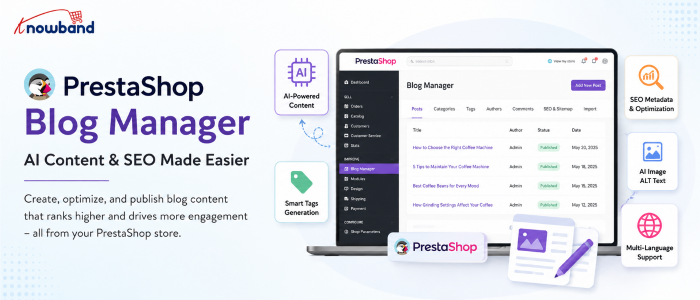
The PrestaShop Blog Manager is developed as a blogging area in the Back Office of the store. After installing the plugin, the administrator gets the opportunity to manage posts, categories, tags, authors, comments, images, SEO and sitemap settings, AI configuration, and content importation all in one place. It totally changes the workflow of the store team.
It is not necessary for the content manager to write the article elsewhere and upload the finished article to PrestaShop manually. The posts can be created, edited, scheduled, categorized, and associated with the relevant products in the store.
The module’s AI functionality adds another layer to this workflow. According to the user manual, administrators can connect either OpenAI’s ChatGPT or Google Gemini and use the configured tools from the post editor. The result is less about replacing a writer and more about shortening the distance between an idea and a usable first draft.
AI Can Help With More Than Writing the Article
A common assumption is that an AI feature simply generates a block of text. The available workflow is broader than that.
Once an AI provider is configured, the editor can provide tools for:
Generating the main post content
Creating an excerpt from existing content
Translating content into another language
Suggesting relevant tags
Generating SEO metadata
Creating ALT text for the featured image
These capabilities are documented in the module manual.
That matters because much of the work involved in publishing an article isn’t the article itself. A writer still has to prepare the excerpt, metadata, tags, image information, and translated versions when a store operates across multiple markets. Automating some of those repetitive tasks can make a small eCommerce team more productive.
At the same time, do not consider generated metadata as being automatically accurate. The AI must have enough context to understand the article, but the store team knows more about their products, customers, terminology, and business needs.
How the Module Fits Into the Existing Store Workflow
The usage of a separate blogging platform works great, but adds one more system to manage. There are issues like content migration, user roles, design consistency, links from articles to products, and the operations gap between the blog and the eCommerce platform.
The PrestaShop Blog Module keeps the publishing workflow closer to the catalogue. Posts can contain related-product links, and the module can optionally display blog content on product pages.
Take a gardening equipment store as an example. In an article on how to prepare a lawn for summer, soil preparation, irrigation, mowing, and equipment selection. Relevant products can then be attached to the article without making each section an advertisement.
That relationship is particularly useful for eCommerce because informational content and commercial pages serve different purposes. The article answers the customer’s question. The product page handles the purchase decision.
SEO Controls Are Part of the Publishing Process
The addition of AI to a blog does not automatically result in the search engine optimization of content. It depends on the fulfillment of search intent, covering the subject properly, using good page titles, and quality visitor experience.
There are editable SEO URL slugs and meta title, description, and keyword fields available at the post level in the Knowband module. Featured images can also have ALT text.
That means SEO work doesn’t need to happen after publication as a completely separate task. A content manager can address the meta title and meta description while preparing the article. The same principle applies to headings and structure. A long article can use a generated table of contents based on H2 and H3 headings, helping readers move through larger pieces of content.
The SEO controls are useful, but they don’t replace SEO judgment. A perfectly filled metadata field cannot compensate for an article that doesn’t answer the searcher’s actual question.
What Current AI Research Says About Search Performance
The growing use of AI has created a reasonable concern for store owners: can AI-assisted content perform in search?
The answer to the question of whether AI takes the place of human beings is far more complicated than ‘yes’ or ‘no’. In 2026, Semrush analyzed 42,000 blog posts ranking for 20,000 keywords. According to their results, only 9% of the pure AI-written posts were in the first position compared to 80% of the human-written ones. The study showed that 64% of the surveyed SEO professionals used the human-led and AI-assisted approach.
Those findings point toward a practical approach for eCommerce teams. AI can help with speed, but the published article needs something beyond generic generated text. That might be direct product knowledge, first-hand experience, original examples, store-specific information, expert commentary, or a clearer explanation of a problem customers actually face.
Ahrefs reached a related conclusion in its research and process guidance: AI works best when it supports research, ideation, outlining, and drafting while people add the original thinking that makes content useful.
A Better Workflow for Using AI in Your PrestaShop Blog
The most straightforward way to misuse AI is using it from a blank prompt and publishing whatever comes back. A stronger workflow starts before the AI tool is opened.
Choose the Topic From Your Customers’ Questions
Read reviews, FAQs, searches, and objections before purchasing. For instance, an eCommerce store selling air purifiers might find out that potential customers ask whether a particular purifier is applicable for a bedroom. That question can become a focused article rather than another generic post about “home air quality.”
Give the AI a Defined Job
The AI will become more helpful if the request has a clear purpose. Instead of ordering “a blog about air purifiers,” it is better to explain to the AI what specific topic, intended audience, related products, key aspects, tone, and unchangeable facts should be covered. The AI can then help produce a working draft rather than deciding the entire editorial strategy from scratch.
Review the Draft Against Real Store Knowledge
Check specifications, product names, compatibility information, measurements, warranties, and claims. A generated article can sound convincing while still getting a small technical detail wrong. Those errors are particularly damaging in eCommerce because readers may use the information to make a purchasing decision.
Optimize the Article Before Publication
Review the URL, headings, metadata, image ALT text, links, and related products. A good PrestaShop Blog Addon should make these publishing tasks accessible from the same administration environment instead of requiring separate technical work.
Use the Data After Publishing
Publishing is only the midpoint. Once articles begin receiving visitors, store teams should look at which topics are attracting attention and whether those visitors are taking useful actions afterward.
Google Search Console can show search queries, clicks, impressions, pages, and other search-performance dimensions. Those reports help identify articles that are appearing for relevant searches but may need stronger titles or more closely aligned content.
Another analytics tool will help you analyze visitor behavior once they reach those pages. Google Analytics 4 is useful for investigating on-site activities and what users do upon landing on a page. The two data sources solve different aspects of the same problem. Search data explains how people find the content. Analytics data helps explain what happens after the visit begins.
For a store owner, that can reveal something more valuable than raw traffic. An article with modest organic traffic might attract highly relevant visitors who continue to product pages, while a high-traffic article could bring people who have little purchasing intent.
Don’t Let Blog Content Slow Down the Store
Adding more content also adds images, scripts, embeds, and page elements. A blog page that contains several large images or embedded videos can behave very differently from a simple product page. That’s why performance should be checked on actual published articles rather than assumed from the homepage.
PageSpeed Insights can help identify performance issues and provides both laboratory and real-user information when field data is available.
Take a look at the Core Web Vitals within the context of your website analysis, but don’t make this process a quest for perfection. An extremely fast page with poor content will fail to satisfy a search user, and vice versa. Image optimization is also important. With the module, admins can set up image sizes for posts, categories, and authors, and regenerate thumbnails in case of any changes in dimensions.
Organize AI-Assisted Content Before It Becomes a Mess
AI makes it easier to produce drafts. That creates a different problem: having too many drafts and not enough editorial direction. Set a clear role for categories and tags. Keep categories broad enough to remain useful as the blog grows, while tags can describe more specific subjects.
The module supports nested categories, tags, author profiles, scheduled posts, and related posts. A simple editorial calendar can then separate content into practical groups such as buying guides, product education, tutorials, industry information, and seasonal topics.
Here’s where an AI-powered PrestaShop Blog Builder comes into the game. This tool will handle the publishing process infrastructure, while the decision on which content to publish is left to the editorial team.
AI Has to Enhance the Process, but Not Replace the Editor
It’s quite appealing to measure the productivity of AI by the speed of creating 2,000 words. That’s the wrong benchmark. The more useful question is how much time the technology saves between identifying a good topic and publishing a genuinely useful article.
According to the Semrush research conducted in 2026, 70% of the respondents among SEO specialists saw the main benefit in speed of content creation by AI, while only 19% claimed AI helped improve content quality. This gap has to be acknowledged. Faster production has value only when the editorial standard remains high.
For a PrestaShop merchant, AI can handle repetitive writing assistance while the store team supplies the details that make an article worth reading. That is especially important for product-specific content, where generic information is easy to generate but useful expertise is harder to replicate.
A Practical Content Setup for Store Owners
When using AI-assisted blogging for the first time, make sure that the process stays manageable. Limit the number of themes to a few topics related to the key products of your business. Give each article one clear search intent and one clear reader outcome.
Then build the page around that purpose:
Choose a specific topic
Create a useful outline
Generate or draft sections with AI where appropriate
Add store-specific expertise and examples
Check every factual product claim
Review the SEO fields
Add relevant products and contextual links
Optimize images
Publish or schedule the article
Monitor its search and engagement performance
The PrestaShop Blog Builder functionality is most useful when these activities form one repeatable workflow rather than a collection of disconnected tasks.
Where the New PrestaShop Blog Manager Makes the Most Difference
The strongest use case is probably not a merchant who wants hundreds of automatically generated articles. It’s the store team that already knows it needs useful content but doesn’t want content production to become a technical project.
With the Knowband module, the administrative side of blogging can stay within PrestaShop. The AI tools can assist with writing and optimization, while the store team retains control over publication, structure, metadata, product connections, and final approval. That workflow also leaves room for existing content. The module supports WordPress and RSS imports, which can be useful for stores moving an established blog into their PrestaShop environment.
The result is a more practical publishing setup for teams that want to build a content channel without maintaining an entirely separate system.
Conclusion: Use AI to Make Better Store Content, Not Just More of It
The PrestaShop Blog Manager integrates several functions related to the blog: from article writing to SEO optimization, publication management, product connection, and work with AI.
What really matters is not only the ability to generate articles faster. What makes the blog helpful is the ability to use it as an additional platform for answering customers’ questions and promoting the product range.
When it comes to using AI as an assisting technology, remember that generated content is just the beginning. Review it, bring real expertise related to your products, optimize the structure, verify the information, and see what happens after publication.
For merchants who want that workflow inside PrestaShop, thePrestaShop Blog Module provides the publishing and AI tools needed to manage the process from the store’s Back Office. The PrestaShop Blog Addon can be a practical option when the goal is to keep content creation closer to the eCommerce operation instead of building another disconnected publishing system.
A growing share of shoppers are now asking ChatGPT, Gemini, or Perplexity a product question instead of using Google search. Similarweb’s tracking of AI referral traffic shows ChatGPT’s share of worldwide generative AI web traffic has actually fallen from around 76% to about 53% over the past year, not because demand for ChatGPT is reducing, but because people are shifting to Gemini and Claude as well. For store owners, the PrestaShop llms.txt generator module is one practical response to this shift, but it only makes sense once you understand what the shift actually involves. This kind of preparation is no longer a future problem to plan around eventually. It’s already happening, and most stores are not set up for it.
This article explains what “AI search ready” means for a PrestaShop store and explores how tools such as a PrestaShop llms.txt generator addon can support a broader AI search optimization strategy.
1.0 Why a PrestaShop LLMs.txt Generator Module Alone Is Not Enough for AI Search
Google’s crawler indexes a page and ranks it against millions of others. An AI answer engine works differently. When someone asks ChatGPT for a product recommendation, the model either accesses previously learned data or retrieves content live through an integrated search tool or, increasingly, both. Then, instead of just providing a list of links, it concatenates an answer.
That shift matters for a store’s visibility in two separate ways. First, whether AI crawlers can access and correctly parse your product, category, and policy pages at all. Second, whether the underlying information in those pages is structured sufficiently for a model to be able to get accurate information, such as price, stock status, shipping terms, etc., and not guess or hallucinate them.
Research data from Similarweb is also showing something interesting: the proportion of answers linking back to sources from citation presence has increased from nearly 1.6% in mid-2025 to approximately 6.8% in May 2026. Still a minority, but rising, it’s climbing, and it means being citable is starting to have a measurable payoff.
ChatGPT, Gemini, and PerplexityBot: all three platforms behave differently. ChatGPT increasingly blends its training knowledge with live retrieval through GPTBot and connected search tools, and its homepage referral behavior shifted sharply after a May 2026 product update. Gemini leans on Google-Extended, a crawler separate from standard Googlebot, and on Google’s existing search index, so a page that already ranks well organically has a head start there. Perplexity is built around live web retrieval and generates answers using information gathered from current online sources. This makes crawler access and clear, up-to-date page content especially important.
An llms.txt file gives AI systems a clear, organized summary of what your site contains, so they can find and reference the right products and pages faster than by crawling everything from scratch. What it can’t do is solve issues with the underlying content: it won’t get a bot past a robots.txt block, and it can’t correct a product page with outdated pricing or a return policy buried in a PDF. Think of it as the index that makes your store easier to reference, not a replacement for having accurate, accessible pages underneath it. PrestaShop LLMs.txt Generator Module is a useful part of the setup, but it cannot replace accurate, accessible, and well-structured content on your store.
2.0 What “AI Crawler Access” Actually Means for Your Store
AI platforms run their own bots, separate from Googlebot, to gather content. GPTBot collects data for OpenAI’s models. PerplexityBot fetches current web content to generate cited answers. Google-Extended is a distinct crawler from regular Googlebot, used specifically for training and grounding Gemini. Anthropic-AI serves the same function for Claude.
None of these bots are automatically blocked, but none are automatically welcomed either. A store’s robots.txt file controls which of these crawlers are allowed in, and a surprising number of PrestaShop stores have robots.txt rules left over from years of accumulated tweaks that nobody has reviewed since. If GPTBot or PerplexityBot is disallowed somewhere in that file, ChatGPT and Perplexity simply cannot see your catalog, no matter how good your product pages are.
This is where a dedicated PrestaShop AI crawler indexing module saves time. Rather than manually editing robots.txt and cross-referencing crawler documentation every time a new AI platform launches a bot, a module built for this purpose manages crawler permissions as a configurable setting, with no manual file edits required. Most stores that skip this step do so because they didn’t find it important enough to address this. But it is. A good PrestaShop AI crawler indexing module is the difference between your catalog being visible to ChatGPT and Perplexity or invisible.
3.0 Understanding the Role of llms.txt in AI Search
lms.txt is a proposed file format, introduced by Answer.AI’s Jeremy Howard in 2024, that is located at a site’s root and gives AI systems a curated, Markdown summary of a site’s most important content. The idea borrows from robots.txt and sitemap.xml but serves a different purpose: instead of controlling crawl permissions or listing every URL, it hands a model a short, human-written index of what the site actually contains.
It is very important to know about the current state of the evidence. Independent analysis of AI crawler traffic, including a review of over 500 million bot requests by the analytics firm Limy, found that the share of requests actually adopting a site’s /llms.txt file was negligible compared to traffic from GPTBot, PerplexityBot, and similar crawlers hitting normal pages. To put it in simple terms, most AI crawlers today are still reading your regular HTML content far more than they’re reading your llms.txt file. That doesn’t mean llms.txt is useless, but it does mean nobody should treat it as a guaranteed ranking lever inside ChatGPT or Gemini.
What a good PrestaShop AI answer engine optimization addon is more reliably good for is structure and control. A well-built llms.txt file gives you a single place to define which products, categories, and CMS pages you want AI systems to reference, and to add short editorial context around them, things like which categories are seasonal, which CMS pages contain your actual return policy versus a placeholder. That’s a real, useful function even if it isn’t yet the ranking signal some vendors imply it is.
4.0 The Foundation of AI Search: Accurate and Structured Product Data
If an AI model is going to accurately describe a product, recommend a size, or state a price, that information needs to be unambiguous on the page itself. This is where most of the real work sits, and it overlaps heavily with practices PrestaShop developers already know from technical SEO.
A few specifics worth checking on a PrestaShop store:
Correct and up-to-date product schema (Product, Offer, AggregateRating if relevant) correctly filled out and updated, as a product with outdated structured data will confidently claim the wrong price.
Clear, simple language on CMS pages for shipping, returns, and sizing (not within a PDF or an image), as AI systems are much more likely to interpret text than scanned documents.
Product and category descriptions that state the facts instead of being totally marketing-oriented, because a summary you write about your page for a shopper must know what to say, not just how to say it.
Canonical URLs kept clean so an AI crawler doesn’t index three duplicate versions of the same product under different filter parameters.
None of this is something new. It’s the same discipline that has always mattered for good ecommerce SEO, just now read by a different kind of visitor.
5.0 Why AI Search Optimization Matters for Your Store Today
The ecommerce-specific numbers back up the urgency, even if they’re still early and moving fast. As reported by eMarketer via retail-focused data from Adobe Digital Insights, AI-referred traffic converted 42% better than non-AI traffic as of March 2026, a significant turnaround from just a year prior, when it was found to convert worse than average traffic. AI-referred visitors, meanwhile, spent more time on the site and made more money per visit than an average shopper, provided by the same data.
That’s not proof that any single tactic guarantees results. It is evidence that the shoppers arriving through AI platforms right now tend to be further along in their decision, and that being visible and accurately represented to those platforms carries real commercial weight, not just novelty value.
6.0 A Practical AI Search Readiness Checklist for PrestaShop Stores
Instead of following every new trend in AI search, retailers can focus on a few practical steps to prepare their stores:
Check robots.txt and ensure that GPTBot, PerplexityBot, Google-Extended, and Anthropic-AI are not being accidentally blocked.
Check product pages for accurate and up-to-date schema, especially price and availability.
Rewrite key CMS pages (shipping, returns, sizing) in plain text rather than images or PDFs.
Publish an llms.txt file using a PrestaShop llms.txt file generator addon that points to your actual catalog structure and policy pages, understanding it as a structure and control tool rather than a guaranteed visibility boost.
Recheck this list quarterly, since crawler behavior and AI platform capabilities are still changing fast.
That fourth step is where a dedicated tool saves real time. Knowband’s PrestaShop LLMs.txt Generator Module will automatically generate and update this file from the store’s data, allowing the administration to choose which AI crawlers (GPTBot, PerplexityBot, Anthropic-AI, Google-Extended, DeepSeekBot, etc) are referenced, filter which products, categories, and CMS pages are included, and add custom context around each section without having to hand-edit a Markdown file every time the store’s data changes. It handles the mechanical part of step four, so the actual product and content work in steps two and three get the attention they need.
PrestaShop AI Search Optimization: Key Takeaways and Next Steps
A PrestaShop llms.txt generator module is a small part of a broader setup. Preparing a store for AI search starts with the fundamentals: allowing AI crawlers to access your site, maintaining accurate structured data, and providing clear, easy-to-read product and policy information. An llms.txt file can complement these efforts by giving AI systems a structured overview of your store. As AI search continues to evolve, keeping these core elements accurate and up to date will remain essential.
If maintaining an accurate llms.txt file manually isn’t practical for your catalog size, the PrestaShop AI answer engine optimization addon is worth a look as a way to keep your llms.txt file up to date without adding it to your team’s manual workload.
👉Explore the Module with Our Video Guide
If you have questions or need assistance with your website performance or migration, our experts are here to help. Contact the Knowband team at support@knowband.com today for reliable ecommerce plugins tailored to your eCommerce needs.
Running a PrestaShop store means protecting more than a website. Your store holds customer accounts, order histories, addresses, admin credentials plus whatever payment, shipping, marketing, and analytics services you’ve plugged in. So PrestaShop security isn’t really a technical checkbox. It’s a business risk, full stop.
AI hasn’t changed security threats so much as it’s sped them up. Phishing emails don’t have the broken grammar and weird phrasing they used to; they read like something a colleague would actually send. Scanning a store for outdated, vulnerable modules used to take a person real time and effort. Now it’s automated and near instant. Same with credential stuffing: what used to require manual grinding can now run at a scale one attacker alone could never have managed a few years ago.
Whether AI is “good” or “bad” for security is kind of the wrong debate anyway. The question that actually matters for a store owner is simpler: is your current setup built to handle attacks that move faster and hit harder than what you were dealing with two or three years ago?
That comes down to the basics, done properly. An out-of-date PrestaShop core version and module version is still the most common source of store compromise. Control access to administrator accounts and their privileges. Authenticate properly and not just using password. Watch for unusual activity instead of assuming silence means safety. Run malware scans regularly. Vet third-party integrations before installing them. And have an actual recovery plan, tested, not just assumed, because eventually something will get through, AI-assisted or not.
1.0 Why PrestaShop Security Concerns Are Changing
Security problems haven’t suddenly become entirely new because of AI. SQL injection, XSS, stolen passwords, malware, vulnerable modules, malicious file changes, and payment-page attacks have existed for years.
The difference lies in how rapidly and in what numbers these vulnerabilities can be found by the attackers.
With the help of AI, they can automate their reconnaissance activities, produce credible phishing material, detect vulnerabilities, and multiply the number of credential attacks.
For a web store, this means that an otherwise unobserved vulnerability may be discovered much sooner.
A typical PrestaShop store may include:
PrestaShop core
Payment modules
Shipping integrations
Analytics and advertising scripts
Custom modules
Third-party themes
Server software
CDN or WAF services
APIs and webhooks
Administrator accounts
Customer accounts
Every additional module/scripts creates another dependency that needs to be maintained.
That doesn’t mean you should avoid integrations. It means you need visibility into what is installed, what has access to your store, and what happens when one component becomes vulnerable.
2.0 The Biggest PrestaShop Security Concerns for Store Owners
1. Outdated PrestaShop Core and Modules
One of the most basic security controls is still one of the easiest to neglect: keeping software updated.
PrestaShop maintains a security advisory process, and its current security policy states that security updates are typically applied to the latest release.
This becomes particularly important when a vulnerability affects an older version or a third-party component.
Patching a vulnerability and cleaning a compromised website are two different jobs.
If you discover suspicious PHP files, unexpected JavaScript, modified templates, unfamiliar administrator accounts, or unexplained redirects, don’t assume that upgrading PrestaShop alone has removed the attacker.
Investigate the store first.
2. Administrator Accounts Are High-Value Targets
Your PrestaShop back office deserves the same level of protection as your storefront. A compromised administrator account can give an attacker access to sensitive settings, customer data, modules, and store content. With sufficient permissions, they could even make changes that introduce malicious code or redirect parts of the shopping experience.
That’s why password-only authentication is increasingly difficult to justify for privileged accounts.
Use MFA/2FA for administrators wherever possible. Also review which employees actually need administrative access and remove dormant accounts.
The principle is simple: give each person only the permissions required to perform their job.
Additional controls can help too. Depending on your environment, you might restrict back-office access through trusted IP addresses, VPN access, firewall rules, or additional authentication layers.
Hiding an administrator URL can reduce exposure to some automated scanning, but it shouldn’t be treated as a replacement for authentication, authorisation, or patching.
3. Credential Stuffing and Automated Login Attacks
Credential stuffing is particularly relevant to e-commerce.
Password guessing is not always needed for attackers; they can use stolen username/password pairs from completely different breaches and try them against other sites.
In case the client reused the password, the attacker might use your store as the next victim.
It is also a case with admin accounts, and the situation is much worse in that case.
Rate limiting, brute-force prevention, strong passwords, MFA, suspicious login detection, and proper account controls should be used in conjunction.
AI and automation make this more relevant because attackers can operate at high volume. AI-related cybersecurity guidance also identifies credential stuffing and password attacks as areas where automation can increase the threat.
4. Malware and Unexpected File Changes
A compromised PrestaShop store doesn’t always look broken.
The storefront may continue to load normally while malicious code sits inside a theme, module, PHP file, JavaScript file, or another part of the application.
That is why malware scanning and file-change monitoring matter.
A particularly serious scenario is payment-page manipulation. PrestaShop issued a security alert in February 2026 describing a digital skimmer that could replace legitimate payment buttons with fraudulent ones. The malicious script was loaded through a modified theme file.
For a merchant, this is a useful reminder that “the website is working” doesn’t mean “the website is secure.”
Regular scanning should be combined with investigation of unexpected changes. If a critical file changes unexpectedly, you need to know:
What changed?
When did it change?
Who or what changed it?
Was the change legitimate?
What other files or accounts should be investigated?
5. Third-Party Modules and Custom Code
PrestaShop’s extensibility is one of its strengths, but every module and customization expands the attack surface.
Security testing should therefore consider more than the PrestaShop core.
A security audit can examine the core application, themes, add-ons, custom code, integrations, authentication controls, and server configuration. Astra’s PrestaShop audit guidance similarly emphasizes examining the broader application rather than treating the core platform as the entire security boundary.
This matters especially for stores that have existed for several years.
A module installed five years ago may still be active even though nobody remembers why it was installed. A custom override may remain after the original developer has left. An abandoned integration may still have API credentials.
A useful maintenance exercise is to create an inventory of:
Installed modules
Active themes
Custom overrides
External APIs
Webhooks
Cron jobs
Administrator accounts
Server services
DNS/CDN/security services
Remove what you no longer need.
3.0 What Does AI Actually Change for PrestaShop Security?
AI isn’t a substitute for a secure PrestaShop installation. Think of AI as an accelerator on both sides.
3.1 Attackers can automate more
The bigger concern for an online store is speed. An attacker no longer needs to perform every step manually. Automated and AI-assisted tools can help with target research, phishing, stolen-credential testing, and large-scale bot activity. For e-commerce businesses, that can translate into more attempts at account takeover, payment fraud, credential stuffing, and scraping,
3.2 Defenders can analyse more
The same basic capability can help defenders.
Security systems can analyse login activity, request patterns, IP reputation, API activity, traffic anomalies, and other events much faster than a person manually reviewing raw logs.
For instance, a manager usually logs into the system from a usual country during office hours. Then, many login failures occur, followed by a successful login from an unusual location. If the system can perform behavioral analysis, then such an event can be detected much quicker than analysing the access logs from yesterday.
AI can also help prioritize alerts. That’s useful because a store generating thousands of requests per minute cannot realistically have a person inspect every event.
4.0 PrestaShop Security Best Practices: A Practical Layered Approach
Security works better as layers than as one “security plugin.”
A practical setup for a PrestaShop store should include several levels.
Layer 1: Keep the application current
Maintain supported versions of:
PrestaShop
PHP
Server software
Themes
Modules
Libraries
Test updates in a staging environment where the store has substantial customizations.
Don’t postpone security updates indefinitely because a normal feature upgrade is inconvenient.
Layer 2: Protect privileged access
For administrator accounts:
Enable MFA/2FA.
Use unique passwords.
Remove unused employees.
Apply least-privilege permissions.
Consider IP/VPN restrictions for sensitive environments.
Monitor successful and failed logins.
Layer 3: Protect the application
A WAF can help filter malicious HTTP requests before they reach the application. Security headers can add browser-level protections. CAPTCHA or bot controls can reduce automated abuse of public forms.
These controls don’t eliminate vulnerabilities in the application itself, rather they add a defensive layer.
Layer 4: Monitor the filesystem
Regular malware scan and file change monitoring can help in detecting the compromises that aren’t visible from the storefront.
Pay particular attention to:
Theme files
PHP files
JavaScript
Configuration files
Upload directories
Module directories
Unexpected modifications deserve investigation.
Layer 5: Monitor the infrastructure
The PrestaShop application isn’t the only thing that needs protection.
Review:
SSH access
Firewall rules
Database exposure
Server users
File permissions
Cron jobs
SSL/TLS configuration
Backup access
Cloud credentials
CDN/WAF configuration
A secure application on an exposed or poorly maintained server is still vulnerable.
5.0 Where a PrestaShop Security Manager Can Fit
Store owners often end up assembling security controls from several independent tools. That can create its own maintenance problem: different settings, update schedules, logs, compatibility issues, and configuration interfaces.
The Knowband Prestashop Advanced Security Manager is one option worth evaluating as part of a layered PrestaShop security setup. Its current product documentation lists controls including 2FA, brute-force protection, administrator IP restrictions, a WAF, security headers, CAPTCHA, login monitoring, and scheduled malware scanning. It supports PrestaShop 1.7, 8, and 9 according to the vendor’s current documentation.
The important point is not to treat a security module as a complete security strategy.
A module can strengthen application-level defenses, but it doesn’t replace:
Secure server configuration
Timely patching
Safe development practices
Backups
Incident response
Vulnerability assessment
Secure third-party integrations
6.0 Don’t Forget Backups and Recovery in Prestashop
Store owners need to have a reliable recovery plan when something goes wrong.
A backup is useful when it’s available, protected, and can be restored. Ideally, keep backups separate from the production environment and test restoration periodically.
You should have reliable backups of:
Database
Product images and other store files
Customer and order data
Configuration
Themes
Custom modules
Critical server files
In case of store owners looking to automate the whole process, one of best backup module which is Prestashop Backup & Restore Modulecan be taken into consideration. This software enables users to take scheduled backups of their databases and files, provides offsite storage, encryption, retention, and restoration facility.
7.0 When Should You Consider a Security Audit?
Automated scanning is useful, but it isn’t the same as a security audit or penetration test.
Vulnerability scanning finds known bugs on the surface & inform what is broken, but can’t tell you how deep a hacker can go.
Penetration testingsimulates a real attack. It chains small flaws together to break deep into your systems and tests the business logic.
For a mature or high-revenue store, consider periodic security assessments, particularly after:
A major PrestaShop upgrade
A large custom development project
A new payment integration
A major module installation
A server migration
A security incident
Significant infrastructure changes
A proper assessment should cover the application and the surrounding environment rather than focusing exclusively on the storefront.
8.0 A Store Owner’s Security Checklist
Before considering your PrestaShop website secure, check the basics:
PrestaShop is running a supported/current release appropriate to your environment.
Modules and themes are maintained and updated.
Unused modules and accounts have been removed.
Administrator accounts use MFA/2FA.
Administrator privileges follow least privilege.
Failed and successful admin logins are monitored.
Brute-force protection is enabled.
A WAF or equivalent application-layer protection is configured where appropriate.
Security headers are configured correctly.
Public forms have appropriate bot/spam protection.
Malware scanning is performed regularly.
Unexpected file changes can be detected.
Server access is restricted and monitored.
Backups are isolated from production and restoration has been tested.
Payment and third-party integrations are reviewed.
There is a documented incident-response procedure.
A security audit or penetration test is performed when the store’s risk justifies it.
9.0 The Real Concern: Speed of Attack Versus Speed of Response
The biggest change brought by AI isn’t that every PrestaShop store suddenly faces an entirely new category of vulnerability.
It’s that the gap between a weakness becoming available and someone exploiting it can become smaller.
That changes how store owners should think about security.
Waiting for a customer to report a strange checkout page isn’t monitoring. Discovering a compromised administrator account after fraudulent orders have been placed isn’t detection. Installing a security tool but never reviewing its alerts isn’t a security process.
A secure PrestaShop store needs layers that work before, during, and after an attack: patching to reduce vulnerabilities, authentication to protect accounts, application controls to filter malicious traffic, monitoring to detect abnormal activity, malware/file scanning to identify compromise, and tested backups to support recovery.
AI can make defensive systems faster and more capable, but the foundation remains the same: reduce the attack surface, control access, monitor what changes, and be prepared to recover.
For store owners looking to strengthen application-level protection, a solution such as Knowband Prestashop Advanced Security Manager can be considered as one component of that layered approach. The right choice depends on your PrestaShop version, hosting environment, existing security stack, and operational requirements.
The best time to discover a security weakness is before an attacker does.
There’s a particular support ticket I’ve learned to dread. A merchant updates a module; it appears to go through, then something stops behaving. Never the whole store. One PrestaShop controller page misbehaving, or a config value that refuses to save, or a listing column that has emptied itself. When I look, the module code is on the new version and the database underneath is still on the old.
That gap is what this article is about. A PrestaShop module is not only the PHP you shipped but it is that PHP plus the tables and columns the PHP expects to find. Skip the PrestaShop database update that should travel with a code release, and you get a module that is installed, apparently working, and quietly wrong.
I have done this to myself more than once. What follows is what I learned about PrestaShop module database updates, the hard way.
1.0 How PrestaShop module updates actually handle the database
store jumping from update from1.9.0 to 2.1.0 doesn’t skip ahead, it runs every upgrade script in between, in order.
Plenty of assumptions float around here, and some are wrong.
Drop a new version into /modules/ and your install routine does not re-run. Tables untouched. What happens instead: PrestaShop reads the module’s upgrade/ folder, finds the files named upgrade-<version>.php sitting between the recorded version and the one your module class declares, and runs those in order.
A store on 1.9.0 receiving 2.1.0 runs three scripts, in order.
Three things follow from that, and all three matter for PrestaShop database changes.
The version in the `module` table is the source of truth. Not the one in your main class file. PrestaShop reads both. What it acts on is the recorded one, and that decides how many upgrade scripts you are about to run.
Your `install()` method is for fresh installs only. Say version 2.0 needs a new table. Put it in install() and anybody coming to 2.0 fresh is covered. The store sitting on 1.9 gets nothing, because its install ran a year ago and is never running again.
One failure stops everything. Return false from an upgrade function and three things happen: PrestaShop halts, records which version fell over, and disables the module. No moving on to the next script. That is deliberate, though it means a half-applied schema change leaves you disabled rather than broken.
This one cost me an afternoon. Either upgrade_module_2_0_1 or upgradeModule201 works as a function name, and PrestaShop looks for both. What it also does, before your file is included, is check whether one of those names exists already. Find it and the file gets marked a duplicate and skipped.
Copying an old upgrade script as a template is exactly how people get here. The name inside it never gets changed. Nothing upgrades, and the error message won’t tell you much.
2.0 PrestaShop database migration: what goes wrong on real stores
All of these happened on stores I worked on.
PrestaShop database schema changes that drift between installs
Version 2.0 needs a new column, so you update install() and write an upgrade script. Both correct. Three versions on, somebody renames the module folder or a merchant reinstalls. On some installs, install() created that column. On others the upgrade path did. Two definitions, drifting apart, and a single version number now covers both of them.
So the definition lives in a single method both paths call. PrestaShop database schema changes cannot drift if there is only one.
Upgrade scripts that assume a clean starting point
ALTER TABLE … ADD COLUMN on a column that already exists throws an error, your function returns false, the module gets disabled. Interrupt a previous update, restore a partial backup, sync from staging twice over: any of those and you are there.
Every schema change I write now checks first. Adding a column means a SHOW COLUMNS beforehand, creating a table means SHOW TABLES, an index means SHOW INDEX. A few lines, and the script survives a second run. That matters, because a stranger’s database can be in any state at all. There is IF NOT EXISTS in both MySQL and MariaDB, but only on some operations, so the explicit check travels better.
Multistore: configuration rows written for one shop only
Quiet and nasty, this one. A per-shop setting arrives in the new version. Default row created by the upgrade script, tested by the developer, all looking fine. But one row got written, for whichever shop was in context, and the merchant runs four.
Three stores are now missing it. Depending how your code reads that, you get a PHP notice, an empty value treated as a real setting, or a blank where a price should be. The multistore documentation covers the context rules. Loop every shop ID in any upgrade touching configuration or per-shop data.
On a single-shop install, this bug is invisible.
ALTER TABLE locks on large catalogue tables
Nothing about adding a column to a 400,000-row table is instant. Depending on the operation, the MySQL version and the storage engine, the whole table may get copied. On a live store during trading hours that lock runs long enough for customers to notice.
So I check table size before writing the migration. If it’s large: maintenance window, or restructure to avoid the rebuild.
The config key with no default value
The one I see most often in other people’s modules, and no table involved.
You add a setting in the new version. The admin form reads it. So does the front controller. Both were written on a machine where the settings page had been saved at least once already. So the key exists and everything looks right. Ship that, and every existing install is reading a Configuration key nobody ever wrote.
What comes back is false. Your default never appears, nor an empty string you could at least test for. From there it goes on to be used as a number, or handed to a function that wanted a string. Debug mode off, and you often get away with it: the merchant sees a page that’s slightly wrong and thinks nothing of it. Debug mode on, and it surfaces as a notice or a type error. Which is how this reaches you as “the module breaks in debug mode”, when debug mode is the only honest party involved.
The same code, with and without the default written.
The fix is dull. Every new config key gets its default written in the upgrade script, for every shop, shipping with the code that reads it. Read it defensively too, because you cannot be sure the upgrade ran.
PrestaShop module database migration versus schema change
Schema changes are the easy half. The hard half is when the meaning of existing data changes: splitting a column in two, moving a CSV field into a related table, re-encoding a status.
That is where I have seen the most damage. A botched ALTER TABLE fails loudly; a botched data transformation succeeds and writes nonsense. A PrestaShop module database migration that moves data needs a count before and after, then compared. Better found inside the upgrade script than by a merchant three weeks later.
3.0 PrestaShop module upgrade best practices I’d actually defend
The ones that have saved me:
Make every migration idempotent
Nothing should change on the second run that the first run did not already handle. Get that property and a whole category of support problem disappears, because the state of the database stops being something you need to establish first. Before writing raw SQL against core tables, PrestaShop’s database layer notes are worth an hour.
The guarded version survives a second run.
Log every failure instead of returning false silently
A bare return false is enough for PrestaShop to stop and disable the module. Not enough for you. So wrap the work. Catch whatever comes out of it, and hand that to PrestaShopLogger with the module name and version attached. Otherwise a merchant reports a failed update and you are guessing.
On PHP 7 and above, catch Error as well as Exception. Get a type error in your own migration code and it arrives as an Error, so a handler watching only for Exception lets it through.
Support every version you have ever shipped
A merchant can be on any version you have released. Somebody going 1.4 to 3.0 runs every script in between, in order, so each has to work on whatever schema the previous one left. That is why old upgrade files stay in the module. Somebody two years behind has no other route forward.
Test on staging, not on a clean local install
A fresh install of the new version proves nothing about the upgrade to it. What you want instead: install the old version, put realistic data in, then upgrade. On multistore too, if you support it.
Better still: take a copy of a real store, and put the upgrade through that instead. Your local install has clean data and four products, which is why it surfaces nothing. A real store carries half-finished imports, rows left by a module uninstalled two years ago, columns a previous developer added by hand, a catalogue big enough that ALTER TABLE takes a while.
Then timing. An upgrade wanting six minutes against real data is better learnt while booking a maintenance window than at eleven on a Friday.
Back up before schema changes, and say so
No snapshot gets taken of your tables before a module upgrade. Not by PrestaShop, not by anything. So if the merchant has no backup and your migration stops halfway through transforming data, that data has gone. Say so in the changelog rather than discovering it together.
Recovering a failed PrestaShop database update
An update failed on a live store; module disabled. Roughly this order:
Find out which version failed. That gets recorded, and if you wrote a log message it’ll be sitting there too. Between them you know which script to open and which changes landed before it stopped.
Check the actual schema, not the version number. All the module table knows is what the last successful upgrade wrote. The real tables are where the answer is, held up against whatever the failed script was trying to do.
Fix forward, not backwards. Rolling the version number back is tempting and usually wrong, because the earlier scripts have already run and re-running them against a partly changed schema turns one problem into three. Write a corrective migration from wherever the schema is to where it should be.
Then work out why the migration was not idempotent. That is the real bug.
A short checklist before you ship a module update
The list I run:
Main class version, highest upgrade-*.php file: do they match?
Each upgrade function named for its own file’s version?
Every schema change checking first whether it already applied?
Every configuration write looping over all shops?
Every new config key given a default for existing installs?
Run against a staging copy of a real store yet?
Old version installed, data added, then upgraded?
Same path on multistore?
Something useful logged before each return false?
Catching Error as well as Exception?
Old upgrade files still in place for merchants several versions behind?
Changelog telling merchants to back up?
On a large table, how long is that ALTER holding a lock?
Items 6 and 7 are the ones people skip, and between them they catch most of it.
Conclusion
PrestaShop module upgrade problems are awkward for one reason: nothing announces them. The module reports its new version quite happily. The admin page loads. No logs, unless you wrote them. Meanwhile your code expects one thing, the database holds another, and that sits untouched until somebody uses the one feature caught in between.
Treat the schema as part of the release. Write migrations that survive a second run. Log what happened. Put it through staging before any merchant does. On the framework side, PrestaShop’s module development documentation is the place to start.
If you have questions or need assistance for your website performance or migration, Our experts are here to help. Contact the Knowband team at support@knowband.com today for reliable ecommerce plugins tailored to your eCommerce needs.
Running an eCommerce store comes with a wide range of challenges. Poor product data can hurt search visibility, weak discovery can limit the impact of conversion efforts, and slow support can turn interested shoppers into lost customers. These issues are closely connected, so the key is to identify which problem is costing your store the most and address it first. Together, even small gaps across these areas can have a significant impact on revenue.
This guide breaks these challenges into seven categories. Each section explains what the problem is, why it happens, and how to fix it. So, you can use these insights to support business decisions.
1. Traffic and Discovery Problems
What are eCommerce discovery problems?
Discovery problems occur when shoppers who want your product never reach your store. Rankings drop, category pages stop getting indexed, or the product appears in Google but never inside an AI-generated answer.
Sudden Traffic Drop: There could be several reasons for traffic to fall, which include SEO problems, indexing problems, broken links, search rankings, and optimization of pages. It is important that merchants check their site to see any problems related to search engine optimization. OpenCart store merchants can consider getting an OpenCart SEO audit done.
Why discovery fails
Search now runs on two separate tracks, and most stores are only optimised for one. Traditional organic results still reward crawlability, internal linking, and content depth. AI-powered search, however, looks for something different. It depends on structured, machine-readable product facts that a model can quote with confidence.
A product page can therefore rank on page one and remain invisible inside an AI shopping recommendation. The model found no clean price, no reliable availability status, and no extractable specification, so it recommended a competitor it could read instead.
How to fix discovery problems
Start by checking your website’s indexation status in Google Search Console. Identify which URLs Google excluded, and fix the underlying cause rather than resubmitting the sitemap. In many cases, faceted navigation creates thousands of similar URLs that compete with each other. Duplicate category paths pointing to the same product are another common cause of indexing problems.
Next, focus on making your product data easier for search engines and AI systems to understand. Every product needs valid Product schema, a resolvable price, an accurate availability field, and specification data in structured fields rather than buried in description HTML. Running a proper AI crawler and indexing audit shows you what the machines actually retrieve, and adding an llms.txt file that points AI crawlers to your product data closes the remaining gap.
2. Product Data and Catalog Problems
What is poor product data quality?
Poor product data quality means product information is incomplete, inconsistent across channels, or factually wrong. Missing attributes, conflicting specifications, duplicate SKUs, and stale inventory all belong in this category.
Why product data breaks
Product catalogs naturally become outdated over time, often without merchants noticing. A supplier changes a specification without notice, a bulk update runs without validation, or a product variant becomes disconnected from its parent listing. Since these issues rarely trigger immediate errors, they often go unnoticed.
The cost is documented and large. Akeneo research found that 66%of shoppers have abandoned a purchase because product information was missing or inaccurate, and 43% returned a product in the past year because pre-purchase information turned out to be incorrect. Salsify’s 2025 consumer research adds that 54% abandon when product information is inconsistent across the websites they check.
These numbers represent customers who already found your store. They were interested in buying but left because they couldn’t confidently verify the product’s details, compatibility, or suitability.
How to fix catalog data problems
Instead of measuring catalog completeness by product, measure it by individual attributes. For example, a catalog reporting 95% completeness overall can still hold zero dimension data in the categories that generate the most returns.
Always validate before importing rather than after. Bulk transfers that run on saved profiles with a full transfer log make every error traceable to a specific run, which manual CSV work never does. For stores handling frequent bulk updates, reusable import profiles with validation and detailed transfer logs help prevent the same mistakes from happening again.
3. Conversion and Checkout Problems
What is cart abandonment?
Cart abandonment is when a shopper adds a product to the cart and leaves without completing payment. According to Baymard Institute’s meta-analysis of 50 studies, the documented average cart abandonment rate is 70.22%, meaning roughly seven in ten carts never become orders.
Why shoppers abandon checkout
Baymard’s data separates the causes cleanly. Unexpected extra costs revealed late in the flow account for 48% of abandonment, making it the largest single cause by a wide margin. Forced account creation causes 26%, and a long or complicated checkout causes a further 22%.
None of those three is a market condition or a competitor problem. Each one is a design decision the merchant controls, which is why the rate moves when stores address them.
How to reduce cart abandonment
Show the full cost, shipping and tax included, before the shopper reaches payment. Offer guest checkout and move account creation to the post-purchase confirmation, when the customer is satisfied rather than impatient. Compress the flow so progress and order total stay visible in a single view, which is the core argument for a one page checkout for PrestaShop.
Baymard estimates that checkout design improvements alone could deliver an average conversion uplift of 35.26%, equivalent to roughly 260 billion dollars in recoverable orders across the US and EU.
Communication problems appear when a store cannot answer a shopper quickly enough to keep the sale, or cannot reach a customer again after they leave. Support backlogs, ignored recovery emails, and repetitive pre-sales questions all belong here.
Why communication breaks down
Support volume grows with catalog size, while support headcount often remains unchanged. The same handful of questions repeat indefinitely: shipping timelines, return windows, sizing, compatibility, and restock dates. A human answers each one, usually several hours after the shopper asked and well after the purchase decision has moved on.
Recovery messaging carries a related problem. Abandoned cart emails still perform reasonably well on open rate, but inbox competition means the reminder often gets read after the intent has cooled.
How to fix communication problems
Automate the repetitive layer first. An AI assistant answering shipping, return, and product queries from live store data removes the questions that never required a person, which frees the team for the ones that do.
For recovery, move to a channel with faster read behaviour. Merchants have been shifting cart recovery from email toward WhatsApp for this reason, because a message read within minutes outperforms one read the following day.
5. Channel Expansion Problems
What are multichannel selling problems?
Multichannel selling problems arise when a store lists on marketplaces or shopping feeds and cannot keep catalog, pricing, and inventory consistent across them. Oversells, rejected feed items, and visible price mismatches follow.
Why channels drift apart
Each channel enforces its own taxonomy, attribute requirements, and image rules. A product that passes validation on your own store fails on Google Shopping for a missing GTIN, or fails on a marketplace because the category mapping is wrong.
Manual listing makes drift inevitable. Once a price gets updated in one place and forgotten in another, any shopper comparing the two learns only that your store is careless.
How to fix channel consistency
Treat your store catalog as the single source of truth and push data outward from it, never sideways between channels. Automated product feed synchronisation then keeps price and stock aligned on a schedule instead of relying on memory.
Treat feed rejections as free diagnostics. When Google refuses an item for a missing attribute, that same gap is usually costing you conversions on your own site too. Merchants weighing a new channel will find the practical considerations before selling on Etsy a useful check before committing.
The mobile conversion gap describes the difference between how much traffic arrives on mobile and how much revenue it produces. Mobile carries the clear majority of eCommerce sessions while converting at roughly half the desktop rate.
Why mobile underperforms
Friction a desktop user tolerates becomes a dealbreaker on a phone. Long forms, tap targets built for a mouse pointer, slow largest contentful paint, and limited payment options each cost a measurable share of completions.
Responsive design solved layout without solving interaction. A checkout designed for desktop and scaled down to fit a phone still asks for the same fifteen fields.
How to close the mobile gap
Fix Core Web Vitals on mobile first, since that is where failures concentrate. Reduce checkout fields, enable autofill, and add Apple Pay and Google Pay as payment options.
Reducing checkout steps on OpenCart returns roughly twice the gain on mobile that it does on desktop. Stores with meaningful repeat purchase rates should also review how app-first competitors win returning customers, because a dedicated app removes the friction rather than managing it.
eCommerce security problems cover unauthorised access to customer data, payment fraud, and automated abuse such as bot registrations, spam form submissions, and credential stuffing.
Why stores get targeted
Online stores hold precisely what attackers want: payment details, addresses, and credentials that customers reuse elsewhere. Smaller merchants attract attention because they maintain security controls less consistently and monitor them less frequently.
Spam is the more common daily problem. Fake registrations fill the customer table, junk form submissions consume support time, and bot traffic can also distort the analytics that inform key business decisions.
How to reduce exposure
Update the platform and every installed extension on a schedule rather than after something breaks. Enforce HTTPS across the store, restrict admin access by role, and keep off-site backups you have tested restoring at least once. A dedicated security module covers the layers that otherwise get forgotten.
Secure the frontend as well. Stopping bots and fake registrations at the form layer protects both the customer database and the reporting you make decisions from, and well-designed forms reduce abandonment on registration and contact pages at the same time.
Turning Store Data Into Decisions
Every problem above stays invisible until you measure it. Most merchants still export order data into spreadsheets, which means the insight arrives weeks after the loss and after the pattern has already changed.
Query the store directly instead. Getting answers from your store data without writing SQL turns weekly reporting into a two-minute question, and smart store analytics identifies which of these seven categories is costing the most right now.
Track four numbers weekly: abandonment rate split by device, feed rejection count, attribute completeness by category, and support tickets grouped by question type.
Where to Start
Work in order of measurable loss rather than in order of visibility.
For most stores, that means checkout first, catalog data second, and discovery third. The first two help convert visitors you have already acquired, which makes them the cheapest available wins. Discovery brings new visitors in, and filling a leaking bucket rarely ends well.
Knowband builds modules across all seven areas for PrestaShop, OpenCart, Magento, and Shopify, covering checkout optimisation, catalog import and export, marketplace integrations, mobile apps, and customer engagement.