We are experts in the eCommerce industry, specializing in high-quality plugin development. With years of experience, we deliver reliable and feature-rich modules for platforms such as Magento, PrestaShop, OpenCart, and Shopify. In addition to ready-made plugins, we also provide custom module development and tailored modification services to meet unique business needs.
Our team stays ahead of industry trends, ensuring every solution we build enhances store performance, user experience, and overall functionality. With a strong customer-centric approach, we have become a trusted partner for businesses seeking powerful and scalable eCommerce plugin solutions.
Having a blog is easy. Making it contribute to store growth is where most ecommerce businesses struggle. Article writing without a defined goal may get some visitors, but it won’t result in any sales automatically. The key is to create a content strategy that helps a customer go from having a problem to its solution, and then to the product.
Here is an effective workflow for making the OpenCart Blog Extension by Knowband your sales solution.
Step 1: Begin With Customers’ Needs
Identify the questions that people have when thinking about purchasing a certain product.
Analyze enquiries, questions, reviews, search queries, and objections, and divide them into the following topics: buying advice, comparison, education, use cases, and troubleshooting.
Implementation: Make a list of content ideas based on the customers’ needs and not based on your guesswork.
Expected impact: You build content around real search intent, giving your store more opportunities to reach potential customers before they are already comparing products.
Step 2: Give Every Article a Specific Job
Do not make every article responsible for “getting traffic.” Think about what you would like the reader to do next.
An awareness article might introduce a problem. A buying guide can help someone compare options. A product-focused article can remove doubts before purchase. A tutorial is used to enhance the experience of an existing customer by providing them with more value from the product.
Implementation: Assign each article a particular function – to attract, to inform, to compare, to convert, to support, or to retain.
Impact expected: Your blog will become a part of the customer journey strategy and not a bunch of random articles.
Step 3: Create Content at Various Purchasing Intent Levels
Once you know the purpose, create content for different levels of purchase intent.
For example:
Awareness: “What to Consider Before Choosing…”
Research: “How to Choose the Right…”
Consideration: “[Option A] vs [Option B]”
Decision: “Best [Product Type] for [Use Case]”
Post-purchase: “How to Set Up and Use…”
At this point, using an OpenCart Blog Builder can be beneficial for you. It allows you to arrange all kinds of content according to your purposes and publish accordingly.
Impact expected: The customers have several ways to come across your store in the purchasing process, and increase the likelihood of going from informational content to the discovery of a product.
Step 4: Associate Useful Content With Relevant Products
It’s great when a customer reads an article, but it’s much better if there is a way for them to shop for a product that really helps to solve their problem.
Suppose an article explains how to choose between different product types. Once the reader understands what to look for, introduce relevant products that match those requirements.
Do not turn the article into a catalogue. The product should appear because it is useful during the customer’s decision-making process.
Expected impact: Reduce the distance between organic traffic and your catalogue, giving informational visitors a clear route toward products.
Knowband’s OpenCart Blog Extension can support this connection between informational content and product discovery within the store.
Step 5: Create Content Using Customer Objections
Some of the most valuable content ideas might be sitting right there in your inbox.
Whenever you get asked by multiple people if a product will work for an application, how two products compare, or how something works, you need to provide a permanent answer.
Implementation: Use frequently asked questions to create FAQ posts, comparison articles, buying guides, tutorials, or articles related to a certain product.
Expected result: You handle objections before they prevent the purchase, but you also create content that covers topics that matter to your customers.
OpenCart Blog Extension approach to blog management can help merchants bring this content into the same store workflow instead of managing a separate publishing process.
Step 6: Build a Content Path Instead of Isolated Articles
One useful article should lead naturally to another.
A broad buying guide could link to a comparison. The comparison could point to a specific use-case article. That article could then introduce relevant products.
Think of it as:
Search → Article → Related Content → Product → Purchase
Use related posts and internal links where they genuinely help the reader continue researching.
Expected impact: Visitors have more reasons to explore your store, while your content develops stronger connections between related topics and important product pages.
This is one of the areas where the OpenCart Blog Plugin by Knowband can support a more organised content structure.
Step 7: Optimise Before You Publish, Not Months Later
Even a good article still needs to be easily readable for both search engines and customers.
Before publication, consider search intent, title, description, URL, headings, images, internal links, categories, and any product relation.
Do not stuff keywords into every paragraph. Create a clear page first, then add SEO elements that accurately describe its contents.
Expected result: Each piece of content gets more chances to be found and read instead of being SEO optimized after the fact.
Knowband’s OpenCart Blog Builder brings content and SEO management together so merchants can handle these publishing requirements within their OpenCart workflow.
Step 8: Use AI to Produce More Articles Without Losing Focus
AI could speed up content production, yet producing more articles should not be the purpose.
Utilize AI in those areas where it replaces routine work: writing the first draft, developing the outline further, translating content, or working on SEO features. Keep your strategy and the final check with your team.
Expected result: A small marketing team can keep a consistent schedule of publications without transforming its blog into an endless flow of generic articles.
The OpenCart Blog Plugin by Knowband provides assistance in content generation, translation, development, and optimization in the context of the blog workflow.
Step 9: Measure What the Content Actually Does
Do not judge the entire blog by page views.
Look at what happens after someone arrives:
Do visitors reach product pages?
Which articles assist conversions?
Which topics attract relevant traffic?
Which posts keep users exploring?
Which articles need updating?
What are other customer questions left unanswered?
Expected result: You will be able to spend more time on content that brings value to your business and less on low-value articles using the OpenCart Blog Extension.
Turn Your Workflow Into a Repetitive Process
The purpose is not to publish more. It is to create a system that improves with every cycle:
Research customer needs → Plan content → Create → Optimise → Connect to products → Publish → Measure → Update → Repeat
Updated September 30, 2026: The OpenCart Blog Manager helps you organize categories, tags, authors, related posts, and linked products from your store’s admin panel. It also includes SEO fields, multilingual publishing, AI-powered content generation with OpenAI and Google Gemini, and an auto-updated XML sitemap for your blog posts. Read our guide on how to organize OpenCart blog categories, tags, authors, and related posts to see the full introduction and features.
With an OpenCart Blog Extension, this process can become part of your regular ecommerce workflow rather than a separate content project.
The full OpenCart Blog Manager – AI Content & SEO Optimization by Knowband is designed to support this kind of workflow, bringing content management, SEO, product connections, multilingual publishing, imports, and AI-assisted content work into the OpenCart environment.
The important part, however, is not the number of tools available. It is what you do with them.
Ask the right question. Create the right content. Connect it to the right product. Measure the result. Then improve the next piece.
This is how the blog for a store can transform from just posting articles to a useful channel of discovery, consideration, and profit generation.
Integrating a payment gateway into PrestaShop can look straightforward on paper.
The gateway provides API documentation, sandbox credentials, authentication keys, callback URLs, and a few endpoints. The PrestaShop module then sends the payment request, receives the response, creates the order, and redirects the customer to the confirmation page.
In a real PrestaShop store, however, the payment gateway is rarely working alone.
The moment a store uses a One Page Checkout (OPC) module such as SuperCheckout, multiple payment modules, custom payment flows, iframes, JavaScript-based payment methods, and additional checkout customizations can all interact with each other.
This is where many payment integrations become difficult.
During payment gateway compatibility work, we have encountered cases where a payment method worked perfectly with PrestaShop’s default checkout but behaved differently inside OPC. For example, a payment provider could display correctly on the standard checkout while options such as BLIK, bank selection, or BNPL disappeared inside SuperCheckout.
The important lesson was that integrating a payment gateway is not only about making the API call work. It is about making the entire payment lifecycle work correctly inside the PrestaShop checkout.
1.0 What Does a Custom Payment Gateway Actually Need?
At a high level, a PrestaShop payment integration needs to handle five things:
Display the payment method at checkout.
Send the customer or payment data to the gateway.
Receive and validate the gateway response.
Create or update the PrestaShop order correctly.
Return the customer to the appropriate confirmation or error page.
A typical payment module extends rather than the base class.
The payment module normally works with hooks such as:
The hook is responsible for making the payment method available to the checkout.
The hook handles what the customer sees after returning from the payment process.
For example:
public function hookPaymentOptions($params)
{
if (!$this->active || !$this->checkCurrency($params['cart'])) {
return [];
}

$paymentOption = new PaymentOption();

$paymentOption
->setCallToActionText($this->l('Pay by Card'))
->setAction(
$this->context->link->getModuleLink(
$this->name,
'redirect',
[],
true
)
);

return [$paymentOption];
}
The important point is that this hook should not simply assume that the payment method can always be displayed.
Currency, country, carrier, customer state, cart amount, module configuration, and gateway availability can all affect whether the payment method should be shown.
2.0 The Part That Changes Everything: OPC
The default PrestaShop checkout and a Prestashop One Page Checkout module do not necessarily process payment methods in exactly the same way.
This was one of the most important lessons from working with multiple payment modules.
With the default checkout, a payment module generally controls its own payment option rendering and payment flow.
With an OPC, the checkout module becomes another layer between the payment module and the customer. That means the following can interact:
A payment module can therefore be completely correct from an API perspective and still fail to behave correctly inside an OPC.
This is why payment compatibility testing should always include both:
PrestaShop default checkout
The actual OPC used by the store
Testing only the default checkout can give a false sense that the integration is complete.
3.0 A Real-World Example: PayU Options Missing Inside OPC
One of the practical issues we encountered involved PayU payment options.
On the standard PrestaShop checkout, PayU was able to display its available payment methods correctly. However, inside SuperCheckout, some payment options were missing.
For example, depending on the configuration and cart:
BLIK was not consistently visible.
The bank-selection list did not expand correctly.
Some BNPL/payment rows were missing.
In some cases, BLIK appeared and then disappeared.
At first glance, this looked like a PayU API problem. It wasn’t.
The important diagnostic step was comparing the payment flow between the default checkout and SuperCheckout.
When the same payment module works on the default checkout but fails inside OPC, the investigation should move beyond the gateway API.
We need to check how the OPC builds the payment methods and what information it passes to the payment modules.
4.0 Payment Amount Can Affect Payment Method Visibility
One particularly important part of this investigation was the cart amount. Payment gateways frequently have minimum and maximum transaction limits. For example:
Payment Method↓Check cart amount↓Minimum amount? Maximum amount?↓Eligible / Not eligible
During the PayU compatibility investigation, we traced the payment-method filtering logic to the cart amount being passed through the payment-method checks.
The relevant flow involved PrestaShop’s cart calculation and payment-method filtering, including logic around:
Cart::BOTH
and:
PayMethodsCache::checkMinMax
This matters because a payment option can disappear from checkout without the API itself returning an error.
The gateway may simply be considered ineligible for the amount received by the payment module. That gives us an important debugging rule:
If a payment option disappears from an OPC, don’t immediately assume that the payment API is broken. First verify the cart amount, currency, minimum/maximum limits, and the values reaching the payment-method eligibility checks.
This becomes even more important when discounts, shipping costs, taxes, vouchers, or custom checkout calculations are involved.
5.0 Why Payment Methods Can Work in Default Checkout but Fail in SuperCheckout
A useful way to investigate these problems is to compare the two checkout environments.
Different gateways require different combinations.
6.1 Redirect-based gateway
The customer clicks the payment method and is redirected to the gateway.
Checkout↓PaymentOption↓Module controller↓Gateway
6.2 Embedded payment form
The payment fields are displayed directly in the checkout.
Checkout↓PaymentOption↓Card/payment form↓Gateway API
6.3 Iframe-based payment
The gateway’s interface is embedded into the checkout.
Checkout↓PaymentOption↓Iframe↓Gateway
The last two approaches require additional attention because JavaScript, DOM manipulation, iframe loading, and OPC refreshes can affect the payment interface.
7.0 JavaScript Becomes Critical with OPC
This is one area that generic payment-integration guides often overlook.
An OPC can dynamically refresh portions of the checkout when the customer changes:
delivery address
country
carrier
payment method
billing information
shipping method
When that happens, payment-related HTML can be replaced.
A JavaScript event that worked during the initial page load may therefore stop working after an AJAX refresh.
For example:
Initial checkout load↓Payment JS initialized↓Customer changes payment/shipping information↓OPC refreshes payment section↓Original DOM replaced↓Payment JS no longer attached
This can produce confusing symptoms.
The payment method may appear initially, but clicking it does nothing. An iframe may disappear.
A bank list may stop expanding.
A payment option may appear and disappear after another checkout field changes.
Therefore, compatibility work often requires changes not only in PHP but also in the payment module’s JavaScript.
8.0 A Real Example: SimplyLease + SuperCheckout
Another example involved SimplyLease integration with SuperCheckout. The problem was not limited to the gateway API.
Some SimplyLease information and calculator elements were part of the checkout/payment presentation and needed to work correctly inside the SuperCheckout flow.
The compatibility changes involved both module templates and SuperCheckout-side JavaScript integration. The files involved included:
This is a good example of why payment compatibility sometimes requires changes outside the payment gateway module itself.
The payment provider may expose the correct data, but the checkout still has to:
Render it.
Preserve it during checkout refreshes.
Initialize the required JavaScript.
Keep the payment information synchronized with the current cart.
9.0 Another Common Problem: Payment Method Not Appearing
We also encountered cases where a payment method such as Comfino did not appear in SuperCheckout even though the payment module itself was installed and configured.
This type of issue should be investigated systematically.
Check:
9.1 Is the module active?
$this->active
9.2 Is the currency supported?
$this->checkCurrency($params['cart'])
9.3 Is the country supported?
Some gateways restrict payment methods based on the customer’s country.
9.4 Is the cart total within the gateway limits?
Minimum and maximum transaction values can prevent a method from being displayed.
9.5 Is the carrier supported?
Some payment modules restrict payment methods by carrier.
9.6 Is OPC filtering the method?
The payment module can return valid methods that are collected, filtered, or rendered. But the OPC can still modify how payment
9.7 Is JavaScript hiding or replacing the element?
A payment method can technically be returned by PHP but still not be visible in the final checkout.
This is why browser developer tools are as important as PHP logs when debugging payment integrations.
10.0 Hooks We Actually Need to Pay Attention To
A custom payment integration should not be treated as a single-hook implementation.
The exact hooks depend on the gateway and checkout architecture, but some are especially important.
10.1 paymentOptions
This is the primary hook for exposing the payment method to the checkout.
It is responsible for returning paymentOptions objects.
Typical checks include:
if (!$this->active) { return [];}if (!$this->checkCurrency($params['cart'])) { return [];}
Additional gateway-specific restrictions can then be applied.
10.2 paymentReturns
This is used after the customer has completed or returned from the payment flow. It can display:
order reference
payment status
additional payment instructions
gateway-specific information
10.3 actionPresentPaymentOptions
This hook becomes particularly interesting when multiple payment modules and an OPC are involved.
It operates on the assembled payment options and can be useful when the checkout needs to inspect or modify the complete payment-option collection.
This is different from implementing a single gateway’s paymentoptionshook.
The distinction is important:
aymentOptions↓Each payment module contributes its optionactionPresentPaymentOptions↓The assembled payment options can be processed
When debugging OPC compatibility, understanding where payment options are collected versus where they are finally presented can make the difference between finding the issue quickly and spending hours inside the gateway module.
11.0 Order Creation: Never Trust the Browser
Once payment reaches the gateway, the next critical step is order creation. The most important PrestaShop method here is:
If the integration creates an order every time it receives a webhook, duplicate orders become possible. Therefore, the callback should check whether the cart already has an order before creating another one. Conceptually:
if ($cart->OrderExists()) {// Already processed// Return successful response}
The webhook handler should be designed to safely process repeated notifications.
The customer may return before the final payment confirmation arrives.
Customer↓Gateway↓Return to store↓Pending order↓Webhook↓Verify payment↓Change order state↓Payment accepted
For asynchronous gateways, using a dedicated pending order state is often safer than immediately marking the order as paid.
Once the webhook confirms the payment:
$history = new OrderHistory();$history->id_order = (int) $order->id;$history->changeIdOrderState( Configuration::get('PS_OS_PAYMENT'),$order);$history->addWithemail(true);
This ensures that the order-state transition goes through PrestaShop’s order-history mechanism instead of simply changing the database value.
14.0 One of the Most Useful Debugging Techniques: Compare the Checkout Flows
When a payment method works in the default checkout but not in OPC, we recommend comparing the complete flow.
Step 1: Check PHP
Is hookPaymentOptions() executed?
Step 2: Inspect the returned options
Does the payment module actually return a paymentOption?
Step 3: Check the cart
Compare:
total
currency
customer
country
carrier
discounts
taxes
shipping
Step 4: Check the browser
Look for:
JavaScript errors
missing DOM elements
AJAX requests
failed requests
iframe errors
Step 5: Check the OPC
Determine whether SuperCheckout is:
filtering the payment option
replacing its HTML
refreshing the payment section
changing the cart before the payment module runs
Step 6: Check the gateway
Only after the local checkout flow is confirmed should the investigation move deeper into:
API authentication
request payload
signature
response
webhook
gateway logs
This layered approach is much faster than starting with the gateway API every time.
15.0 Common Payment Integration Problems We Have Seen
Real-world compatibility work usually exposes problems that aren’t obvious from the gateway documentation.
15.1 Payment option disappears
Possible causes:
unsupported currency
country restriction
cart amount outside gateway limits
carrier restriction
OPC filtering
payment module configuration
JavaScript hiding the method
15.2 BLIK or another payment option appears and disappears
Possible causes:
checkout AJAX refresh
payment-option re-rendering
JavaScript initialization
cart total changing
gateway eligibility being recalculated
15.3 Bank list does not expand
Often investigate:
JavaScript errors
dynamically replaced DOM elements
event handlers attached before OPC refresh
payment provider’s JavaScript initialization
15.4 Iframe disappears
Investigate:
checkout refresh
iframe initialization
DOM replacement
JavaScript execution after AJAX updates
15.5 Payment succeeds, but order remains pending
Check:
webhook URL
webhook delivery
signature verification
cart/order lookup
order-state transition
callback authentication
15.6 Payment method works in default checkout but not OPC
This is a strong indication that the problem may be in the interaction between the payment module and the OPC rather than the gateway API itself.
16.0 Security Requirements for a Payment Module
Payment modules handle sensitive operations, so security cannot be treated as an optional improvement. At minimum:
Validate callback signatures.
Validate the cart/customer relationship.
Use HTTPS.
Validate TLS certificates.
Never trust payment status supplied only by the browser.
Never store raw card information unless the architecture and compliance requirements explicitly support it.
Do not log sensitive payment information.
Avoid serialize() and unserialize () / for untrusted external data.
Validate and cast incoming values.
Protect custom AJAX and callback endpoints.
Use secure tokens where appropriate.
Make webhook processing idempotent.
A payment success page is not proof of payment.
The gateway’s verified server-side response is what should determine whether the order is considered paid.
17.0 What Changes When Supporting Multiple Payment Modules?
Another lesson from OPC compatibility work is that adding a second or third payment module can expose problems that were not visible when only one payment method existed.
For example:
PayPal PayUComfinoSimplyLeaseBank transfer
may all contribute payment options to the same checkout. The checkout therefore has to deal with different:
HTML structures
JavaScript
iframe requirements
redirects
API flows
eligibility rules
minimum/maximum amounts
asynchronous callbacks
A change made for one payment method can accidentally affect another. This is why payment compatibility fixes should be narrowly scoped.
For example, instead of changing the entire payment-option processing logic globally, identify the specific payment method and apply the compatibility handling only where required.
18.0 Testing Should Include Real Cart Scenarios
Testing a payment gateway with a simple €10 product is not enough. A proper test matrix should include:
Scenario
What to verify
Single product
Payment option appears
Multiple products
Correct amount reaches gateway
Discount
Final payable amount is correct
Shipping charge
Gateway receives correct total
Tax
Gateway amount matches order
Minimum gateway amount
Method appears/disappears correctly
Maximum gateway amount
Method appears/disappears correctly
Unsupported currency
Method is hidden
Unsupported country
Method is hidden
Default checkout
Payment works
OPC
Payment works
Mobile checkout
UI works
Failed payment
Correct order/payment state
Successful payment
Order is created correctly
Webhook retry
No duplicate order
Customer abandonment
No incorrectly paid order
Gateway timeout
Correct pending/error handling
For OPC integrations, also test checkout refreshes. Change the:
address
carrier
country
payment method
quantity
discount
and verify that the payment options remain correct after every refresh.
19.0 A Practical Development Approach
Based on the issues that commonly appear in real integrations, a safer development order is:
19.1 Make the gateway work with default PrestaShop checkout
And eventually the payment provider changes something that breaks an otherwise stable integration.
For mainstream gateways, an established and maintained module can therefore be significantly cheaper than maintaining custom payment code for several years.
21.0 The Bigger Lesson From PrestaShop Payment Integration
The biggest lesson from working with payment gateways is that the API is often not the hardest part. Sending:
A payment integration is successful only when the entire chain behaves consistently.
This is also why an issue such as “BLIK is missing” or “the bank list does not open” should not immediately be treated as a gateway API problem.
The actual cause could be a cart-total calculation, payment-method eligibility check, OPC rendering, JavaScript initialization, or an AJAX refresh replacing the payment interface.
22.0 Final Checklist for a Custom PrestaShop Payment Gateway
Before considering the integration complete, verify:
Payment module extendsPaymentModule.
paymentOptions is implemented correctly.
paymentReturn is implemented where required.
Payment options use paymentOptions.
Currency restrictions are checked.
Country and carrier restrictions are checked where applicable.
Cart totals are validated.
Gateway responses are verified.
Callback signatures are validated.
ValidateOrder() is called only after successful payment verification.
The amount used for the order is validated against the gateway response.
Webhooks are idempotent.
Duplicate notifications do not create duplicate orders.
Correct order states are used.
Failed and pending payments are handled separately.
Sensitive payment data is never unnecessarily logged or stored.
HTTPS is enforced.
Default PrestaShop checkout has been tested.
OPC has been tested separately.
JavaScript has been tested after AJAX checkout refreshes.
Iframes and interactive payment elements have been tested.
Multiple payment modules have been tested together.
Realistic carts with discounts and shipping have been tested.
Conclusion
A custom payment gateway in PrestaShop is more than an API integration.
The API is only one piece of the implementation. The real engineering challenge begins when the payment module has to coexist with PrestaShop’s checkout, an OPC such as SuperCheckout, other payment modules, dynamic JavaScript, cart recalculations, and asynchronous gateway callbacks.
Our experience with payment compatibility issues reinforced one important approach: always isolate where the failure occurs before changing code.
If the payment method is not returned by PHP, investigate the payment module and its eligibility rules. If PHP returns it but the customer cannot see it, investigate the OPC and frontend rendering. If the UI appears but does not respond, investigate JavaScript and AJAX refreshes. If the payment succeeds but the order remains pending, investigate the callback and order-state flow.
This approach is much more reliable than assuming every payment problem is an API problem.
For developers working on PrestaShop payment integrations, the goal should not simply be to make a gateway accept a transaction. The goal is to make the entire payment lifecycle reliable—from the first checkout render to the final verified order state—even when multiple payment methods and a customized OPC are involved.
If you have questions or need assistance with your website performance or migration, our experts are here to help. Contact the Knowband team at support@knowband.com today for reliable eCommerce plugins tailored to your eCommerce needs.
Balancing the time spent on content and the time spent on running an eCommerce store is difficult for many merchants. With the newPrestaShop Blog Manager by Knowband, the process becomes more manageable because merchants can post articles, work with AI, and manage SEO from their PrestaShop account.
That makes the development worth looking at from two angles. The first is practical: how much content work can store admins handle themselves? The second point is related to strategy. Where does AI assist, and where do humans have to stay in charge?
Where AI-Assisted Blogging Is Important for PrestaShop Stores
Every eCommerce store has enough information about its products on the website, but it is not always sufficient to satisfy the needs of potential customers who are making search queries to get some information before purchasing.
For example, if a person is searching for a coffee machine, they can type questions into Google concerning different aspects such as brewing methods, machine cleaning tips, grinding settings, and so on. Thus, there is an opportunity to prepare relevant informational content to draw the customer’s attention.
AI boosts informational content creation, which is the reason why it was highly appreciated in the content workflow. A recent study conducted by Ahrefs demonstrated that 74.2% of 900,000 newly found English-language webpages in April 2025 were at least partially produced with the help of AI. Most of those pages cannot be referred to as purely AI-written, as they were a combination of the latter and human-created content.
However, it does not mean that the human role was completely replaced by AI. It is possible to optimize the work process by eliminating repetitive steps and entrusting topic selection, product expertise, fact-checking, and final editing to people.
What the New PrestaShop Blog Manager Adds
The PrestaShop Blog Manager is developed as a blogging area in the Back Office of the store. After installing the plugin, the administrator gets the opportunity to manage posts, categories, tags, authors, comments, images, SEO and sitemap settings, AI configuration, and content importation all in one place. It totally changes the workflow of the store team.
It is not necessary for the content manager to write the article elsewhere and upload the finished article to PrestaShop manually. The posts can be created, edited, scheduled, categorized, and associated with the relevant products in the store.
The module’s AI functionality adds another layer to this workflow. According to the user manual, administrators can connect either OpenAI’s ChatGPT or Google Gemini and use the configured tools from the post editor. The result is less about replacing a writer and more about shortening the distance between an idea and a usable first draft.
AI Can Help With More Than Writing the Article
A common assumption is that an AI feature simply generates a block of text. The available workflow is broader than that.
Once an AI provider is configured, the editor can provide tools for:
Generating the main post content
Creating an excerpt from existing content
Translating content into another language
Suggesting relevant tags
Generating SEO metadata
Creating ALT text for the featured image
These capabilities are documented in the module manual.
That matters because much of the work involved in publishing an article isn’t the article itself. A writer still has to prepare the excerpt, metadata, tags, image information, and translated versions when a store operates across multiple markets. Automating some of those repetitive tasks can make a small eCommerce team more productive.
At the same time, do not consider generated metadata as being automatically accurate. The AI must have enough context to understand the article, but the store team knows more about their products, customers, terminology, and business needs.
How the Module Fits Into the Existing Store Workflow
The usage of a separate blogging platform works great, but adds one more system to manage. There are issues like content migration, user roles, design consistency, links from articles to products, and the operations gap between the blog and the eCommerce platform.
The PrestaShop Blog Module keeps the publishing workflow closer to the catalogue. Posts can contain related-product links, and the module can optionally display blog content on product pages.
Take a gardening equipment store as an example. In an article on how to prepare a lawn for summer, soil preparation, irrigation, mowing, and equipment selection. Relevant products can then be attached to the article without making each section an advertisement.
That relationship is particularly useful for eCommerce because informational content and commercial pages serve different purposes. The article answers the customer’s question. The product page handles the purchase decision.
SEO Controls Are Part of the Publishing Process
The addition of AI to a blog does not automatically result in the search engine optimization of content. It depends on the fulfillment of search intent, covering the subject properly, using good page titles, and quality visitor experience.
There are editable SEO URL slugs and meta title, description, and keyword fields available at the post level in the Knowband module. Featured images can also have ALT text.
That means SEO work doesn’t need to happen after publication as a completely separate task. A content manager can address the meta title and meta description while preparing the article. The same principle applies to headings and structure. A long article can use a generated table of contents based on H2 and H3 headings, helping readers move through larger pieces of content.
The SEO controls are useful, but they don’t replace SEO judgment. A perfectly filled metadata field cannot compensate for an article that doesn’t answer the searcher’s actual question.
What Current AI Research Says About Search Performance
The growing use of AI has created a reasonable concern for store owners: can AI-assisted content perform in search?
The answer to the question of whether AI takes the place of human beings is far more complicated than ‘yes’ or ‘no’. In 2026, Semrush analyzed 42,000 blog posts ranking for 20,000 keywords. According to their results, only 9% of the pure AI-written posts were in the first position compared to 80% of the human-written ones. The study showed that 64% of the surveyed SEO professionals used the human-led and AI-assisted approach.
Those findings point toward a practical approach for eCommerce teams. AI can help with speed, but the published article needs something beyond generic generated text. That might be direct product knowledge, first-hand experience, original examples, store-specific information, expert commentary, or a clearer explanation of a problem customers actually face.
Ahrefs reached a related conclusion in its research and process guidance: AI works best when it supports research, ideation, outlining, and drafting while people add the original thinking that makes content useful.
A Better Workflow for Using AI in Your PrestaShop Blog
The most straightforward way to misuse AI is using it from a blank prompt and publishing whatever comes back. A stronger workflow starts before the AI tool is opened.
Choose the Topic From Your Customers’ Questions
Read reviews, FAQs, searches, and objections before purchasing. For instance, an eCommerce store selling air purifiers might find out that potential customers ask whether a particular purifier is applicable for a bedroom. That question can become a focused article rather than another generic post about “home air quality.”
Give the AI a Defined Job
The AI will become more helpful if the request has a clear purpose. Instead of ordering “a blog about air purifiers,” it is better to explain to the AI what specific topic, intended audience, related products, key aspects, tone, and unchangeable facts should be covered. The AI can then help produce a working draft rather than deciding the entire editorial strategy from scratch.
Review the Draft Against Real Store Knowledge
Check specifications, product names, compatibility information, measurements, warranties, and claims. A generated article can sound convincing while still getting a small technical detail wrong. Those errors are particularly damaging in eCommerce because readers may use the information to make a purchasing decision.
Optimize the Article Before Publication
Review the URL, headings, metadata, image ALT text, links, and related products. A good PrestaShop Blog Addon should make these publishing tasks accessible from the same administration environment instead of requiring separate technical work.
Use the Data After Publishing
Publishing is only the midpoint. Once articles begin receiving visitors, store teams should look at which topics are attracting attention and whether those visitors are taking useful actions afterward.
Google Search Console can show search queries, clicks, impressions, pages, and other search-performance dimensions. Those reports help identify articles that are appearing for relevant searches but may need stronger titles or more closely aligned content.
Another analytics tool will help you analyze visitor behavior once they reach those pages. Google Analytics 4 is useful for investigating on-site activities and what users do upon landing on a page. The two data sources solve different aspects of the same problem. Search data explains how people find the content. Analytics data helps explain what happens after the visit begins.
For a store owner, that can reveal something more valuable than raw traffic. An article with modest organic traffic might attract highly relevant visitors who continue to product pages, while a high-traffic article could bring people who have little purchasing intent.
Don’t Let Blog Content Slow Down the Store
Adding more content also adds images, scripts, embeds, and page elements. A blog page that contains several large images or embedded videos can behave very differently from a simple product page. That’s why performance should be checked on actual published articles rather than assumed from the homepage.
PageSpeed Insights can help identify performance issues and provides both laboratory and real-user information when field data is available.
Take a look at the Core Web Vitals within the context of your website analysis, but don’t make this process a quest for perfection. An extremely fast page with poor content will fail to satisfy a search user, and vice versa. Image optimization is also important. With the module, admins can set up image sizes for posts, categories, and authors, and regenerate thumbnails in case of any changes in dimensions.
Organize AI-Assisted Content Before It Becomes a Mess
AI makes it easier to produce drafts. That creates a different problem: having too many drafts and not enough editorial direction. Set a clear role for categories and tags. Keep categories broad enough to remain useful as the blog grows, while tags can describe more specific subjects.
The module supports nested categories, tags, author profiles, scheduled posts, and related posts. A simple editorial calendar can then separate content into practical groups such as buying guides, product education, tutorials, industry information, and seasonal topics.
Here’s where an AI-powered PrestaShop Blog Builder comes into the game. This tool will handle the publishing process infrastructure, while the decision on which content to publish is left to the editorial team.
AI Has to Enhance the Process, but Not Replace the Editor
It’s quite appealing to measure the productivity of AI by the speed of creating 2,000 words. That’s the wrong benchmark. The more useful question is how much time the technology saves between identifying a good topic and publishing a genuinely useful article.
According to the Semrush research conducted in 2026, 70% of the respondents among SEO specialists saw the main benefit in speed of content creation by AI, while only 19% claimed AI helped improve content quality. This gap has to be acknowledged. Faster production has value only when the editorial standard remains high.
For a PrestaShop merchant, AI can handle repetitive writing assistance while the store team supplies the details that make an article worth reading. That is especially important for product-specific content, where generic information is easy to generate but useful expertise is harder to replicate.
A Practical Content Setup for Store Owners
When using AI-assisted blogging for the first time, make sure that the process stays manageable. Limit the number of themes to a few topics related to the key products of your business. Give each article one clear search intent and one clear reader outcome.
Then build the page around that purpose:
Choose a specific topic
Create a useful outline
Generate or draft sections with AI where appropriate
Add store-specific expertise and examples
Check every factual product claim
Review the SEO fields
Add relevant products and contextual links
Optimize images
Publish or schedule the article
Monitor its search and engagement performance
The PrestaShop Blog Builder functionality is most useful when these activities form one repeatable workflow rather than a collection of disconnected tasks.
Where the New PrestaShop Blog Manager Makes the Most Difference
The strongest use case is probably not a merchant who wants hundreds of automatically generated articles. It’s the store team that already knows it needs useful content but doesn’t want content production to become a technical project.
With the Knowband module, the administrative side of blogging can stay within PrestaShop. The AI tools can assist with writing and optimization, while the store team retains control over publication, structure, metadata, product connections, and final approval. That workflow also leaves room for existing content. The module supports WordPress and RSS imports, which can be useful for stores moving an established blog into their PrestaShop environment.
The result is a more practical publishing setup for teams that want to build a content channel without maintaining an entirely separate system.
Conclusion: Use AI to Make Better Store Content, Not Just More of It
The PrestaShop Blog Manager integrates several functions related to the blog: from article writing to SEO optimization, publication management, product connection, and work with AI.
What really matters is not only the ability to generate articles faster. What makes the blog helpful is the ability to use it as an additional platform for answering customers’ questions and promoting the product range.
When it comes to using AI as an assisting technology, remember that generated content is just the beginning. Review it, bring real expertise related to your products, optimize the structure, verify the information, and see what happens after publication.
For merchants who want that workflow inside PrestaShop, thePrestaShop Blog Module provides the publishing and AI tools needed to manage the process from the store’s Back Office. The PrestaShop Blog Addon can be a practical option when the goal is to keep content creation closer to the eCommerce operation instead of building another disconnected publishing system.
A growing share of shoppers are now asking ChatGPT, Gemini, or Perplexity a product question instead of using Google search. Similarweb’s tracking of AI referral traffic shows ChatGPT’s share of worldwide generative AI web traffic has actually fallen from around 76% to about 53% over the past year, not because demand for ChatGPT is reducing, but because people are shifting to Gemini and Claude as well. For store owners, the PrestaShop llms.txt generator module is one practical response to this shift, but it only makes sense once you understand what the shift actually involves. This kind of preparation is no longer a future problem to plan around eventually. It’s already happening, and most stores are not set up for it.
This article explains what “AI search ready” means for a PrestaShop store and explores how tools such as a PrestaShop llms.txt generator addon can support a broader AI search optimization strategy.
1.0 Why a PrestaShop LLMs.txt Generator Module Alone Is Not Enough for AI Search
Google’s crawler indexes a page and ranks it against millions of others. An AI answer engine works differently. When someone asks ChatGPT for a product recommendation, the model either accesses previously learned data or retrieves content live through an integrated search tool or, increasingly, both. Then, instead of just providing a list of links, it concatenates an answer.
That shift matters for a store’s visibility in two separate ways. First, whether AI crawlers can access and correctly parse your product, category, and policy pages at all. Second, whether the underlying information in those pages is structured sufficiently for a model to be able to get accurate information, such as price, stock status, shipping terms, etc., and not guess or hallucinate them.
Research data from Similarweb is also showing something interesting: the proportion of answers linking back to sources from citation presence has increased from nearly 1.6% in mid-2025 to approximately 6.8% in May 2026. Still a minority, but rising, it’s climbing, and it means being citable is starting to have a measurable payoff.
ChatGPT, Gemini, and PerplexityBot: all three platforms behave differently. ChatGPT increasingly blends its training knowledge with live retrieval through GPTBot and connected search tools, and its homepage referral behavior shifted sharply after a May 2026 product update. Gemini leans on Google-Extended, a crawler separate from standard Googlebot, and on Google’s existing search index, so a page that already ranks well organically has a head start there. Perplexity is built around live web retrieval and generates answers using information gathered from current online sources. This makes crawler access and clear, up-to-date page content especially important.
An llms.txt file gives AI systems a clear, organized summary of what your site contains, so they can find and reference the right products and pages faster than by crawling everything from scratch. What it can’t do is solve issues with the underlying content: it won’t get a bot past a robots.txt block, and it can’t correct a product page with outdated pricing or a return policy buried in a PDF. Think of it as the index that makes your store easier to reference, not a replacement for having accurate, accessible pages underneath it. PrestaShop LLMs.txt Generator Module is a useful part of the setup, but it cannot replace accurate, accessible, and well-structured content on your store.
2.0 What “AI Crawler Access” Actually Means for Your Store
AI platforms run their own bots, separate from Googlebot, to gather content. GPTBot collects data for OpenAI’s models. PerplexityBot fetches current web content to generate cited answers. Google-Extended is a distinct crawler from regular Googlebot, used specifically for training and grounding Gemini. Anthropic-AI serves the same function for Claude.
None of these bots are automatically blocked, but none are automatically welcomed either. A store’s robots.txt file controls which of these crawlers are allowed in, and a surprising number of PrestaShop stores have robots.txt rules left over from years of accumulated tweaks that nobody has reviewed since. If GPTBot or PerplexityBot is disallowed somewhere in that file, ChatGPT and Perplexity simply cannot see your catalog, no matter how good your product pages are.
This is where a dedicated PrestaShop AI crawler indexing module saves time. Rather than manually editing robots.txt and cross-referencing crawler documentation every time a new AI platform launches a bot, a module built for this purpose manages crawler permissions as a configurable setting, with no manual file edits required. Most stores that skip this step do so because they didn’t find it important enough to address this. But it is. A good PrestaShop AI crawler indexing module is the difference between your catalog being visible to ChatGPT and Perplexity or invisible.
3.0 Understanding the Role of llms.txt in AI Search
lms.txt is a proposed file format, introduced by Answer.AI’s Jeremy Howard in 2024, that is located at a site’s root and gives AI systems a curated, Markdown summary of a site’s most important content. The idea borrows from robots.txt and sitemap.xml but serves a different purpose: instead of controlling crawl permissions or listing every URL, it hands a model a short, human-written index of what the site actually contains.
It is very important to know about the current state of the evidence. Independent analysis of AI crawler traffic, including a review of over 500 million bot requests by the analytics firm Limy, found that the share of requests actually adopting a site’s /llms.txt file was negligible compared to traffic from GPTBot, PerplexityBot, and similar crawlers hitting normal pages. To put it in simple terms, most AI crawlers today are still reading your regular HTML content far more than they’re reading your llms.txt file. That doesn’t mean llms.txt is useless, but it does mean nobody should treat it as a guaranteed ranking lever inside ChatGPT or Gemini.
What a good PrestaShop AI answer engine optimization addon is more reliably good for is structure and control. A well-built llms.txt file gives you a single place to define which products, categories, and CMS pages you want AI systems to reference, and to add short editorial context around them, things like which categories are seasonal, which CMS pages contain your actual return policy versus a placeholder. That’s a real, useful function even if it isn’t yet the ranking signal some vendors imply it is.
4.0 The Foundation of AI Search: Accurate and Structured Product Data
If an AI model is going to accurately describe a product, recommend a size, or state a price, that information needs to be unambiguous on the page itself. This is where most of the real work sits, and it overlaps heavily with practices PrestaShop developers already know from technical SEO.
A few specifics worth checking on a PrestaShop store:
Correct and up-to-date product schema (Product, Offer, AggregateRating if relevant) correctly filled out and updated, as a product with outdated structured data will confidently claim the wrong price.
Clear, simple language on CMS pages for shipping, returns, and sizing (not within a PDF or an image), as AI systems are much more likely to interpret text than scanned documents.
Product and category descriptions that state the facts instead of being totally marketing-oriented, because a summary you write about your page for a shopper must know what to say, not just how to say it.
Canonical URLs kept clean so an AI crawler doesn’t index three duplicate versions of the same product under different filter parameters.
None of this is something new. It’s the same discipline that has always mattered for good ecommerce SEO, just now read by a different kind of visitor.
5.0 Why AI Search Optimization Matters for Your Store Today
The ecommerce-specific numbers back up the urgency, even if they’re still early and moving fast. As reported by eMarketer via retail-focused data from Adobe Digital Insights, AI-referred traffic converted 42% better than non-AI traffic as of March 2026, a significant turnaround from just a year prior, when it was found to convert worse than average traffic. AI-referred visitors, meanwhile, spent more time on the site and made more money per visit than an average shopper, provided by the same data.
That’s not proof that any single tactic guarantees results. It is evidence that the shoppers arriving through AI platforms right now tend to be further along in their decision, and that being visible and accurately represented to those platforms carries real commercial weight, not just novelty value.
6.0 A Practical AI Search Readiness Checklist for PrestaShop Stores
Instead of following every new trend in AI search, retailers can focus on a few practical steps to prepare their stores:
Check robots.txt and ensure that GPTBot, PerplexityBot, Google-Extended, and Anthropic-AI are not being accidentally blocked.
Check product pages for accurate and up-to-date schema, especially price and availability.
Rewrite key CMS pages (shipping, returns, sizing) in plain text rather than images or PDFs.
Publish an llms.txt file using a PrestaShop llms.txt file generator addon that points to your actual catalog structure and policy pages, understanding it as a structure and control tool rather than a guaranteed visibility boost.
Recheck this list quarterly, since crawler behavior and AI platform capabilities are still changing fast.
That fourth step is where a dedicated tool saves real time. Knowband’s PrestaShop LLMs.txt Generator Module will automatically generate and update this file from the store’s data, allowing the administration to choose which AI crawlers (GPTBot, PerplexityBot, Anthropic-AI, Google-Extended, DeepSeekBot, etc) are referenced, filter which products, categories, and CMS pages are included, and add custom context around each section without having to hand-edit a Markdown file every time the store’s data changes. It handles the mechanical part of step four, so the actual product and content work in steps two and three get the attention they need.
PrestaShop AI Search Optimization: Key Takeaways and Next Steps
A PrestaShop llms.txt generator module is a small part of a broader setup. Preparing a store for AI search starts with the fundamentals: allowing AI crawlers to access your site, maintaining accurate structured data, and providing clear, easy-to-read product and policy information. An llms.txt file can complement these efforts by giving AI systems a structured overview of your store. As AI search continues to evolve, keeping these core elements accurate and up to date will remain essential.
If maintaining an accurate llms.txt file manually isn’t practical for your catalog size, the PrestaShop AI answer engine optimization addon is worth a look as a way to keep your llms.txt file up to date without adding it to your team’s manual workload.
👉Explore the Module with Our Video Guide
If you have questions or need assistance with your website performance or migration, our experts are here to help. Contact the Knowband team at support@knowband.com today for reliable ecommerce plugins tailored to your eCommerce needs.
Running an eCommerce store comes with a wide range of challenges. Poor product data can hurt search visibility, weak discovery can limit the impact of conversion efforts, and slow support can turn interested shoppers into lost customers. These issues are closely connected, so the key is to identify which problem is costing your store the most and address it first. Together, even small gaps across these areas can have a significant impact on revenue.
This guide breaks these challenges into seven categories. Each section explains what the problem is, why it happens, and how to fix it. So, you can use these insights to support business decisions.
1. Traffic and Discovery Problems
What are eCommerce discovery problems?
Discovery problems occur when shoppers who want your product never reach your store. Rankings drop, category pages stop getting indexed, or the product appears in Google but never inside an AI-generated answer.
Sudden Traffic Drop: There could be several reasons for traffic to fall, which include SEO problems, indexing problems, broken links, search rankings, and optimization of pages. It is important that merchants check their site to see any problems related to search engine optimization. OpenCart store merchants can consider getting an OpenCart SEO audit done.
Why discovery fails
Search now runs on two separate tracks, and most stores are only optimised for one. Traditional organic results still reward crawlability, internal linking, and content depth. AI-powered search, however, looks for something different. It depends on structured, machine-readable product facts that a model can quote with confidence.
A product page can therefore rank on page one and remain invisible inside an AI shopping recommendation. The model found no clean price, no reliable availability status, and no extractable specification, so it recommended a competitor it could read instead.
How to fix discovery problems
Start by checking your website’s indexation status in Google Search Console. Identify which URLs Google excluded, and fix the underlying cause rather than resubmitting the sitemap. In many cases, faceted navigation creates thousands of similar URLs that compete with each other. Duplicate category paths pointing to the same product are another common cause of indexing problems.
Next, focus on making your product data easier for search engines and AI systems to understand. Every product needs valid Product schema, a resolvable price, an accurate availability field, and specification data in structured fields rather than buried in description HTML. Running a proper AI crawler and indexing audit shows you what the machines actually retrieve, and adding an llms.txt file that points AI crawlers to your product data closes the remaining gap.
2. Product Data and Catalog Problems
What is poor product data quality?
Poor product data quality means product information is incomplete, inconsistent across channels, or factually wrong. Missing attributes, conflicting specifications, duplicate SKUs, and stale inventory all belong in this category.
Why product data breaks
Product catalogs naturally become outdated over time, often without merchants noticing. A supplier changes a specification without notice, a bulk update runs without validation, or a product variant becomes disconnected from its parent listing. Since these issues rarely trigger immediate errors, they often go unnoticed.
The cost is documented and large. Akeneo research found that 66%of shoppers have abandoned a purchase because product information was missing or inaccurate, and 43% returned a product in the past year because pre-purchase information turned out to be incorrect. Salsify’s 2025 consumer research adds that 54% abandon when product information is inconsistent across the websites they check.
These numbers represent customers who already found your store. They were interested in buying but left because they couldn’t confidently verify the product’s details, compatibility, or suitability.
How to fix catalog data problems
Instead of measuring catalog completeness by product, measure it by individual attributes. For example, a catalog reporting 95% completeness overall can still hold zero dimension data in the categories that generate the most returns.
Always validate before importing rather than after. Bulk transfers that run on saved profiles with a full transfer log make every error traceable to a specific run, which manual CSV work never does. For stores handling frequent bulk updates, reusable import profiles with validation and detailed transfer logs help prevent the same mistakes from happening again.
3. Conversion and Checkout Problems
What is cart abandonment?
Cart abandonment is when a shopper adds a product to the cart and leaves without completing payment. According to Baymard Institute’s meta-analysis of 50 studies, the documented average cart abandonment rate is 70.22%, meaning roughly seven in ten carts never become orders.
Why shoppers abandon checkout
Baymard’s data separates the causes cleanly. Unexpected extra costs revealed late in the flow account for 48% of abandonment, making it the largest single cause by a wide margin. Forced account creation causes 26%, and a long or complicated checkout causes a further 22%.
None of those three is a market condition or a competitor problem. Each one is a design decision the merchant controls, which is why the rate moves when stores address them.
How to reduce cart abandonment
Show the full cost, shipping and tax included, before the shopper reaches payment. Offer guest checkout and move account creation to the post-purchase confirmation, when the customer is satisfied rather than impatient. Compress the flow so progress and order total stay visible in a single view, which is the core argument for a one page checkout for PrestaShop.
Baymard estimates that checkout design improvements alone could deliver an average conversion uplift of 35.26%, equivalent to roughly 260 billion dollars in recoverable orders across the US and EU.
Communication problems appear when a store cannot answer a shopper quickly enough to keep the sale, or cannot reach a customer again after they leave. Support backlogs, ignored recovery emails, and repetitive pre-sales questions all belong here.
Why communication breaks down
Support volume grows with catalog size, while support headcount often remains unchanged. The same handful of questions repeat indefinitely: shipping timelines, return windows, sizing, compatibility, and restock dates. A human answers each one, usually several hours after the shopper asked and well after the purchase decision has moved on.
Recovery messaging carries a related problem. Abandoned cart emails still perform reasonably well on open rate, but inbox competition means the reminder often gets read after the intent has cooled.
How to fix communication problems
Automate the repetitive layer first. An AI assistant answering shipping, return, and product queries from live store data removes the questions that never required a person, which frees the team for the ones that do.
For recovery, move to a channel with faster read behaviour. Merchants have been shifting cart recovery from email toward WhatsApp for this reason, because a message read within minutes outperforms one read the following day.
5. Channel Expansion Problems
What are multichannel selling problems?
Multichannel selling problems arise when a store lists on marketplaces or shopping feeds and cannot keep catalog, pricing, and inventory consistent across them. Oversells, rejected feed items, and visible price mismatches follow.
Why channels drift apart
Each channel enforces its own taxonomy, attribute requirements, and image rules. A product that passes validation on your own store fails on Google Shopping for a missing GTIN, or fails on a marketplace because the category mapping is wrong.
Manual listing makes drift inevitable. Once a price gets updated in one place and forgotten in another, any shopper comparing the two learns only that your store is careless.
How to fix channel consistency
Treat your store catalog as the single source of truth and push data outward from it, never sideways between channels. Automated product feed synchronisation then keeps price and stock aligned on a schedule instead of relying on memory.
Treat feed rejections as free diagnostics. When Google refuses an item for a missing attribute, that same gap is usually costing you conversions on your own site too. Merchants weighing a new channel will find the practical considerations before selling on Etsy a useful check before committing.
The mobile conversion gap describes the difference between how much traffic arrives on mobile and how much revenue it produces. Mobile carries the clear majority of eCommerce sessions while converting at roughly half the desktop rate.
Why mobile underperforms
Friction a desktop user tolerates becomes a dealbreaker on a phone. Long forms, tap targets built for a mouse pointer, slow largest contentful paint, and limited payment options each cost a measurable share of completions.
Responsive design solved layout without solving interaction. A checkout designed for desktop and scaled down to fit a phone still asks for the same fifteen fields.
How to close the mobile gap
Fix Core Web Vitals on mobile first, since that is where failures concentrate. Reduce checkout fields, enable autofill, and add Apple Pay and Google Pay as payment options.
Reducing checkout steps on OpenCart returns roughly twice the gain on mobile that it does on desktop. Stores with meaningful repeat purchase rates should also review how app-first competitors win returning customers, because a dedicated app removes the friction rather than managing it.
eCommerce security problems cover unauthorised access to customer data, payment fraud, and automated abuse such as bot registrations, spam form submissions, and credential stuffing.
Why stores get targeted
Online stores hold precisely what attackers want: payment details, addresses, and credentials that customers reuse elsewhere. Smaller merchants attract attention because they maintain security controls less consistently and monitor them less frequently.
Spam is the more common daily problem. Fake registrations fill the customer table, junk form submissions consume support time, and bot traffic can also distort the analytics that inform key business decisions.
How to reduce exposure
Update the platform and every installed extension on a schedule rather than after something breaks. Enforce HTTPS across the store, restrict admin access by role, and keep off-site backups you have tested restoring at least once. A dedicated security module covers the layers that otherwise get forgotten.
Secure the frontend as well. Stopping bots and fake registrations at the form layer protects both the customer database and the reporting you make decisions from, and well-designed forms reduce abandonment on registration and contact pages at the same time.
Turning Store Data Into Decisions
Every problem above stays invisible until you measure it. Most merchants still export order data into spreadsheets, which means the insight arrives weeks after the loss and after the pattern has already changed.
Query the store directly instead. Getting answers from your store data without writing SQL turns weekly reporting into a two-minute question, and smart store analytics identifies which of these seven categories is costing the most right now.
Track four numbers weekly: abandonment rate split by device, feed rejection count, attribute completeness by category, and support tickets grouped by question type.
Where to Start
Work in order of measurable loss rather than in order of visibility.
For most stores, that means checkout first, catalog data second, and discovery third. The first two help convert visitors you have already acquired, which makes them the cheapest available wins. Discovery brings new visitors in, and filling a leaking bucket rarely ends well.
Knowband builds modules across all seven areas for PrestaShop, OpenCart, Magento, and Shopify, covering checkout optimisation, catalog import and export, marketplace integrations, mobile apps, and customer engagement.
Launching a new product is only half the job. If it isn’t shared on social media at the right time, you risk missing the initial surge of attention that can drive traffic, engagement, and sales. In many stores, products go live first, while the social media announcement gets delayed or forgotten altogether. By the time someone remembers to post about it, the best opportunity to reach potential customers has already passed. This is where the PrestaShop AI Social Media Post Generator Module by Knowband can make a real difference. But generating captions alone isn’t enough. A truly effective solution should automate the entire workflow, from detecting a newly published product and creating platform-specific content to scheduling or publishing posts automatically. Otherwise, store admins still have to manually generate the content, choose the right social platforms, and publish each post themselves, leaving room for delays and missed opportunities.
Why a PrestaShop AI Social Media Post Generator Module Needs a Workflow
Marketers using AI content generation tools save an average of 6.1 hours per week on content-related tasks, according to HubSpot’s 2026 AI Trends Report, with senior practitioners saving 8 to 10 hours. That number only holds up if the solution they use is actually removing steps from the process, not just replacing a blank caption box with an AI-generated one someone still has to notice and post.
The real challenge with manual social media posting isn’t writing the post. It’s remembering to promote every new product, deciding what to say, and finding the right time to publish it.
A workflow-based setup removes all three decisions from the admin’s daily list, not just the writing part. That’s the actual difference between a caption generator and genuine automation.
The Trigger-to-Post Workflow: How Automated Social Content Actually Moves
Trigger-based automation starts with a store event, not a blank prompt. Here’s the full loop a properly configured setup runs through, from the moment a product changes status to the point an admin reviews what happened and adjusts the system.
Every product event flows through the same loop: a trigger activates, the rule fetches the product data, AI generates the copy, and the post either waits for a human or is directly published, before performance data feeds back into the next round of prompts.
Building a Prompt Strategy So Posts Don’t Sound Like Generic AI Captions
The quality gap between AI social posts almost always comes down to what the prompt actually contains, not which AI model generated it. A prompt built only from a product name and price produces the same generic copy every AI tool writes when given nothing else to work with.
Brand voice closes most of that gap on its own. Feeding the AI a defined tone, whether professional, playful, or urgent, along with the actual industry context, gives it enough to write copy that sounds like a specific store instead of a template.
Product catalog content matters just as much here. A prompt built from the product name, description, price, and URL together produces noticeably more specific captions than one built from the name alone, since the AI has real details to reference instead of filling gaps with generic phrasing.
A word blacklist and per-platform CTA phrases round out the strategy. Blocking competitor names or discontinued product references prevents embarrassing mismatches, and a defined closing line per platform keeps the CTA on-brand instead of leaving the AI to invent one each time.
Choosing Between Draft Review and Auto-Publish with a PrestaShop Social Post Scheduling Addon
Immediate publishing works well once a rule has proven itself, but it’s the wrong starting point for a new rule. Running a new rule in draft mode first lets an admin check tone, accuracy, and CTA phrasing across a handful of real products before trusting it to publish unattended.
A PrestaShop Social Post Scheduling Addon adds a middle option worth using once a rule is trusted: scheduled publishing within a set delay window, rather than immediate or fully manual. Spacing a batch of fifty product posts across several days, instead of publishing all fifty the moment a rule is created, keeps a feed looking like ongoing activity rather than an obvious automated dump.
Limits on posts per day and posts per product per day exist specifically to prevent that dump effect. Restricting a single product to one post per day, even if a rule technically qualifies it for more, keeps the same item from appearing across every connected platform simultaneously and looking scripted.
Where a PrestaShop Social Media Automation Module Fits Into the Bigger Picture
Draft review, prompt strategy, and scheduling all solve pieces of the same problem, but they only work together if one system is coordinating all three. A PrestaShop Social Media Automation Module needs to sit between the store’s product events and the social platforms themselves, translating one into the other automatically.
That coordination is what separates a genuine workflow from a collection of separate settings an admin has to manage by hand. Post history, showing status, platform, engine used, and source, is what makes a PrestaShop Social Media Automation Module auditable rather than a black box once it’s running unattended.
How Knowband’s SocialAI Pro Runs This Entire Workflow
The Knowband SocialAI Pro PrestaShop AI Social Media Post Generator Module runs every stage of this workflow from one back-office panel. Rules handle the trigger logic (New Product, Back in Stock, or Manual); the AI engine (OpenAI ChatGPT, Google Gemini, or Anthropic Claude) generates platform-native copy for Facebook, LinkedIn, and X, and Post History logs every result with its engine, source, and status.
Brand voice fields, including tone, industry context, word blacklist, and per-platform CTA phrases, feed directly into the prompt for every generated post. The scheduled delay window spaces bulk posts across a configurable day range, and daily posting limits per rule and per product prevent the same item from flooding every channel at once.
Putting Your PrestaShop AI Social Media Post Generator Module Workflow Into Practice
A PrestaShop AI Social Media Post Generator Module earns its place by running the full loop, from trigger to publish to performance review, not by writing one caption at a time on request. Starting new rules in draft mode, refining the prompt once real output comes back, and only then moving to immediate or scheduled publishing is the sequence that actually works.
Store admins still assembling this manually, one post at a time, are spending hours a week on something a properly configuredPrestaShop Social Media Automation Module already handles end-to-end. The workflow above is the difference between AI that writes captions and AI that runs a system.
A PrestaShop store is rarely compromised through a single, obvious attack. Instead, security incidents typically develop gradually, with subtle warning signs such as an increase in fraudulent registrations, slower-than-normal admin logins, or unexpected changes to critical files. While these anomalies may appear insignificant in isolation, they often indicate a deeper security issue. By the time the signs become impossible to ignore, attackers have frequently already established a foothold within the system. The good news is that most of these incidents share the same handful of root causes, and each one has a known, practical fix. A properly configuredPrestaShop security setup, such as the PrestaShop Security Module by Knowband, addresses nearly all of them before they ever reach your customers or your admin team.
Below are eleven practical measures to close those gaps, starting with the one most stores overlook first: the admin login itself.
1. Turn On Two-Factor Authentication for Admin Logins
A stolen or reused password shouldn’t be enough to get into your back office. Two-factor authentication requires a time-based code from an authenticator app in addition to the password, so a leaked credential alone can’t grant access, even if it was exposed in an unrelated breach elsewhere.
Implement two-factor authentication in optional (opt-in) mode first. Once all users have successfully enrolled, enforce it as a mandatory requirement across the entire store. Keep at least one trusted IP whitelisted during the implementation, and confirm your emergency recovery link works before switching it on, since a forced 2FA implementation with no fallback is how teams lock themselves out of their own store.
2. Block Brute-Force Login Attempts Automatically
Automated scripts don’t guess passwords one at a time by hand. They try dozens of attempts per minute against your admin login, hoping one lands. This is exactly the kind of attack a PrestaShop Security Module is built to stop before it succeeds.
Brute-force protection bans an IP address after it crosses a set number of failed attempts within a time window, no manual monitoring required. If an attacker’s script tries fifty password combinations against your admin login in under a minute, the ban triggers automatically and clears itself once the ban period elapses, no manual unbanning needed on your end.
3. Restrict Back-Office Access by IP Address
If your team logs in from a known set of locations, there’s no reason to leave the admin login open to the entire internet. Restricting access to specific IP addresses blocks every other visitor before they even see a login form.
This is one of the strongest single controls against external attack attempts, since it happens before any credentials are checked at all. You must whitelist your current IP the moment you enable the restriction, so you don’t accidentally lock yourself out while turning it on.
4. Hide Your Admin URL From Automated Scanners
Bots scan for common admin folder paths the same way burglars check unlocked doors down a street. Renaming your admin folder to a private, unpredictable URL removes your store from that scan list entirely.
Anyone who doesn’t know the new address hits a 404, not a login screen. It’s a low-effort step that removes your store from the automated scanning sweeps that never bother distinguishing a small storefront from a large one.
5. Add a Web Application Firewall
SQL injection and cross-site scripting attacks target the code behind your storefront, not the login page. A PrestaShop Firewall Module inspects incoming requests for these known attack patterns and blocks matches before they reach your PrestaShop installation.
This single layer catches a large share of automated exploitation attempts that never even make it to a human’s attention, and it’s a core piece of any PrestaShop Security Module worth installing.
6. Strengthen HTTP Security Headers to Prevent Browser-Based Attacks
Security headers tell visiting browsers how to handle your site safely, things like blocking clickjacking attempts and refusing to load your store inside a hidden frame on another page. These settings are invisible to shoppers and carry no downside once configured.
They’re also frequently required for PCI compliance and security audits, so this step pulls double duty for any store running a PrestaShop Security Module alongside its existing hosting setup. Enabling HTTPS-only browsing (HSTS) alongside these headers ensures every visitor connects over an encrypted connection by default, rather than relying on them to notice a missing padlock icon.
7. Stop Spam and Fake Account Creation With CAPTCHA
Contact forms and registration pages are magnets for automated spam and fraudulent account creation. Adding CAPTCHA verification, whether through Cloudflare Turnstile, Google reCAPTCHA, or hCaptcha, filters out bots before they submit anything.
A honeypot field adds a second, invisible layer here too: real visitors never see it, but bots that fill in every field get caught instantly.
8. Keep an Audit Log of Every Admin Login
Blocking attacks matters, but knowing what already happened matters just as much. A downloadable log of every login attempt, successful or failed, with the IP address, timestamp, and account involved, turns a vague suspicion into something you can actually investigate.
Pairing this with an email alert on every successful admin login means you’ll know within minutes if someone logs in from an unfamiliar location, well before any damage compounds into something harder to reverse.
PrestaShop Threat-to-Protection Quick Reference
Threat
Protection
Password guessing / credential stuffing
Brute-force protection + 2FA
Bots scanning for the admin URL
Hidden admin folder
SQL injection / XSS
Web application firewall
Fake sign-ups and spam forms
CAPTCHA + honeypot
Unnoticed or suspicious admin logins
Login monitoring + audit log
Bot-driven cart manipulation
Fake-cart protection
Undetected file changes
Scheduled malware scanning
9. Block Bot-Driven Cart Manipulation
Not every bot targets your login page. Some crawl your store using URL parameters to pre-load carts without a real add-to-cart click, distorting inventory data and analytics in the process.
Blocking these GET-based cart manipulation requests keeps cart data clean and reflects actual shopper behavior instead of scripted noise, a detail most generic security plugins outside a dedicated PrestaShop Security Module tend to miss entirely.
10. Run Scheduled File-Integrity Scans
A compromised store doesn’t always announce itself right away. Injected code or a modified core file can sit unnoticed for weeks before it shows up on the storefront.
Scheduled anti-malware scanning compares your installation against a known-good baseline and flags new or changed files, often catching a compromise long before customers do. Knowband builds this scanning directly into its PrestaShop Advanced Security Module rather than treating it as a separate add-on.
11. Bring These Protections Together in One Module
Handling each of the ten points above with a separate plugin means ten different settings screens, ten sets of update notifications, and ten potential compatibility conflicts. This is where the PrestaShop Advanced Security Manager earns a place on this list rather than as an afterthought.
Knowband’s module brings 2FA, brute-force protection, admin IP restriction, a firewall, security headers, CAPTCHA with honeypot, fake-cart protection, and malware scanning into a single back-office screen. As a PrestaShop Advanced Security Module, it also includes a centralized security dashboard showing login attempts, active bans, and flagged IP addresses at a glance, so you’re not piecing together the store’s security data from ten separate logs.
Protecting your online store from malware, brute-force logins, and fraudulent activity is essential in 2026. A dedicated PrestaShop Security Module adds firewall rules, login protection, and suspicious activity monitoring in one place, helping keep customer data safe and building shopper trust. You can find the complete introduction and feature list of the PrestaShop Security Module on PrestaShop Marketplace. (Updated September 30, 2026)
Building These Eleven Protections Into a Working Setup
None of these eleven measures work well in isolation. A firewall without login monitoring still leaves a compromised admin account undetected, and 2FA without a recovery URL can lock out your own team during a rollout.
A PrestaShop Security Module that covers admin protection, frontend defense, and malware scanning together removes the coordination problem entirely. Store owners evaluating aPrestaShop firewall module as a starting point are usually better served checking whether it also covers the other ten features on this list before installing anything.
AI in e-commerce has evolved from being experimental to becoming a practical tool for daily operations and revenue generation. AI-referred traffic to US retail sites grew 393% year over year in the first quarter of 2026, and by March 2026, that AI traffic was converting 42% better than non-AI traffic, according toAdobe Analytics. Shoppers now arrive from ChatGPT, Perplexity, and Gemini already deep into their decision, and they are buying. For e-commerce merchants, the practical question is no longer whether AI belongs in the store, but which applications actually return more than they cost to set up. Some improve customers’ in-store experience directly, through faster responses and better product discovery. Others work quietly in the background, keeping the catalog visible to AI search engines or turning store data into decisions that a merchant can act on the same day. The following seven LLM use cases demonstrate how AI delivers value in e-commerce and how PrestaShop merchants can implement each one in practice.
Why LLM use cases in e-commerce shifted from experiment to revenue in 2026
Customers have started to rely on AI platforms more for their day-to-day decisions. When a customer is trying to figure out what to buy inside an AI chat, they are coming to your store with the intent to buy, which is why AI sessions are converting more than traditional channels and generating more revenue per visit.
As AI has become a bigger part of e-commerce, merchants who optimize their stores for AI visibility, AI-powered customer interactions, and faster content creation gain a competitive advantage.
1. Conversational AI shopping assistants that answer buyers in real-time
Conversational commerce is reshaping how customers interact with online stores. Bots have evolved simple but time-consuming question answering into a sophisticated shopping companionship, guiding customers throughout their journey by being present 24/7. This shift matters for conversion because most abandoned carts are not due to price. They occur because of unanswered questions. An assistant who resolves the question while intent is still warm generates revenue.
For PrestaShop stores, a good PrestaShop AI Chatbot handles this without hiring support staff. The PrestaShop AI Chatbot provides multiple model choices to store admin: ChatGPT, Claude, Gemini, DeepSeek, and trained on your catalog and FAQs, so it answers product and order questions, and suggests relevant items accurately. Because the AI-powered chatbot fetches from live store data, its answers stay accurate as your catalog changes, and a well-configured PrestaShop AI Chatbot quietly reduces the support load that used to take up weeks.
2. AI-generated product content and multilingual catalogs
Product descriptions serve as the foundation of e-commerce listings. But creating a unique product description in multiple languages for thousands of products manually is a very hectic task. At the same time, they have to be convincing enough for a human to buy, and have to be optimized enough to get crawled by Google and AI crawlers. Thin, half-written descriptions fail at both.
This is where language models genuinely earn their place. They draft descriptions, titles, and meta fields in a consistent voice across your whole catalog, then translate as well so you can sell in a new country without hiring a translator. The PrestaShop AI Content Generator and Translator bring both jobs into the back office. The module runs across several providers, Gemini, ChatGPT, Claude, and DeepSeek, writes copy and SEO meta in bulk, also translating catalog into multiple languages for international customers. For growing stores, an AI Content Generator and Translation Module makes it easy to keep product information updated while maintaining a consistent brand voice across multiple languages.
3. AI-powered review generation and authentic social proof
Reviews are one of the strongest conversion triggers. Most shoppers read them before they commit, and a product page carrying honest, specific feedback converts far better than one sitting at zero. The difficulty is rarely the value of reviews. It is gathering enough of them that customers start trusting and purchasing without a second thought.
AI can generate review-style content: star ratings, titles, and body copy written for specific products, published through the native Product Comments module. The PrestaShop AI Review Generator does exactly this, and the e-commerce AI review generation module gives merchants granular control over tone, language, rating distribution, and publishing schedule.
The module generates AI-powered review drafts on demand or according to a predefined schedule, helping merchants keep product pages active with fresh content. Administrators retain full control through configurable publishing rules, scheduled publishing, and manual approval options, ensuring only appropriate reviews appear on the storefront.
Keeping social channels updated with regular postings is where most small teams fall behind. Creating posts for every launch, every promotion, every seasonal push manually consumes time that merchants rarely have. Generative AI can create a week’s worth of social media content using store products, adapting the tone for each platform while keeping your publishing schedule consistent.
SocialAI Pro is the PrestaShop way into this. As a PrestaShop AI Marketing Content Generator Addon, it reads your product data and produces posts, captions, and hashtags you can line up and schedule easily.For stores that rely on social media but lack the time to create content consistently, the PrestaShop AI Marketing Content Generator Addon automatically generates accurate, on-brand posts directly from your product catalog.
5. AI-assisted product video across the storefront
Video sells because it answers what a photo cannot. Watch a product move and you grasp its size, its fit, and how it is used far quicker than any still image explains it, and that understanding turns into conversions. But creating videos for thousands of products is not only time-consuming, but it is also very expensive. AI removes that obstacle by making short product videos in less time and at less cost by using just a prompt.
VideoMate provides the perfect solution for PrestaShop store owners. Merchants looking for a Prestashop AI Video Generator usually want live product video added without the involvement of a developer. The Knowband’s PrestaShop VideoMate helps to generate videos using AI and add them to the home page, product pages, category pages, and best-seller pages from the admin panel with just a few clicks.The Prestashop AI Video Generator makes sure AI-generated product videos are actually displayed on your product pages, where they can influence purchase decisions, instead of remaining unused.
6. Getting your store recommended by AI search engines
AI assistants can only recommend a store they can read, and Adobe has found that many retail sites are not yet machine-readable enough for AI systems to interpret cleanly. If ChatGPT or Perplexity cannot parse your catalog and policies, you are invisible in the answers where high-intent shoppers now start.
An llms.txt file fixes that. It gives AI crawlers a clean, structured summary of what you sell and how you operate, in the format those models actually read.
The LLMs.txt Generator produces that file from your existing catalog. A PrestaShop llms.txt generator module lets you filter to active or featured products, include the CMS pages that answer purchase questions like shipping and returns, and toggle individual crawlers such as GPTBot, PerplexityBot, and Google-Extended. For multistore setups,a PrestaShop llms.txt add-on generates a separate file per shop, and a cron keeps each one updated as your catalog moves. Configured well, a PrestaShop llms.txt generator module is how a store starts being a source that AI engines trust.
7. AI back-office analytics that sharpen every sales decision
Every restock, promotion, and retention call depends on knowing what your data says right now, and manual reporting workflow delivers that answer too slowly to act on.
Large language models reduce that gap. Admins can ask questions in plain English, get the number instantly, and uncover trends and opportunities that traditional reports often fail to reveal.
The PrestaShop Smart AI Admin Assistant puts this capability directly inside the back office. Its PrestaShop Back Office Analytics layer pairs a natural-language query interface with a full dashboard of configurable widgets covering revenue trends, best sellers, slow movers, low stock alerts, and reorder suggestions, all through read-only database access, so nothing in the store can be changed through the chat. Role-based access control means operations staff see the data relevant to their role without exposing financials or customer records across the whole team.
The difference between knowing a product is slowing down and knowing it three weeks before a stockout is the difference between a proactive decision and damage control. Strong PrestaShop Back Office Analytics is what closes that gap, not at the end of the month when the report runs, but the moment someone thinks to ask.
Where these LLM use cases in e-commerce leave your store in 2026
The through-line across all seven is simple. AI now shapes both how customers find your store and how efficiently you run it, and the stores that treat this as a channel are advancing. You don’t need to implement every use case at once; instead, focus on the one that is closest to resolving your current goal, whether that is unanswered questions, thin content, or invisibility in AI search, and build from there.
What makes this practical for PrestaShop merchants specifically is that most of these capabilities already exist as modules that install into the admin you use every day, several of them from Knowband. Start with the use case that is costing you sales right now, and let the rest follow as the channel grows.
Most PrestaShop merchants looking to add a blog to their online store typically choose one of two approaches: they attach a WordPress subdomain and maintain two completely separate systems, or they give up on content marketing entirely because the setup feels too complex to manage. Each approach comes with its own set of challenges. The first creates a fragmented user experience and a technical architecture that requires managing two platforms, two hosting setups, and two content workflows simultaneously. The second leaves one of the most cost-effective long-term traffic channels completely unused. Businesses that blog consistently generate 55% more website visitors than those that don’t, according to HubSpot data that has held roughly steady for years. The challenge for PrestaShop stores specifically has been that blogging wasn’t a native capability until a dedicatedblog solution for PrestaShop, such as PrestaShop Blog Module by Knowband, brings it directly into the storefront without requiring an external CMS at all.
Why Running a Blog Outside PrestaShop Creates More Problems Than It Solves
The WordPress-on-a-subdomain approach is the most common solution, and it works, technically. But it creates a disconnect that becomes more noticeable over time. The blog lives at blog.yourstore.com or yourstore.com/blog on a separate WordPress install, which means a visitor reading a blog post has to navigate back to the main store to browse or buy. That navigation friction can reduce the conversion potential of every piece of content you publish.
From an SEO standpoint, the separation can also limit some of the internal linking benefits that make content marketing most valuable. Blog posts that link to product pages on the same domain help build that domain’s authority for product-related search terms. Blog posts on a separate WordPress install may build more authority for the subdomain itself, with less direct benefit to the main store domain.
The operational overhead matters too. Two platforms mean two sets of updates, two admin panels, two sets of plugin conflicts to manage, and content that exists in a completely different database from the store it’s meant to support. Merchants who’ve maintained this setup for more than a year rarely describe it as sustainable.
What a Native PrestaShop Blog Module Changes About the Content Workflow
A PrestaShop Blog Module embedded directly in the store admin eliminates the platform split entirely. Blog posts, categories, comments, and banners all live in the same back office where the merchant manages products, orders, and customers. No external login, no separate workflow, no synchronisation problem.
The Knowband PrestaShop Blog Module organises content management into five admin sections: General Settings, Category Management, Post Management, Comments Management, and Banner Management. Each post has its own meta title, meta description, and keyword fields, meaning every article the merchant publishes is independently optimised for search without needing a separate SEO plugin. The blog homepage also has its own configurable meta title and meta description, which makes it a properly indexed landing page rather than an afterthought.
Post creation supports rich text formatting, cover images up to 5 MB, short descriptions for short previews, and the ability to mark any post as a popular post for sidebar featuring. Multiple blog themes are selectable from the admin panel without touching code, and the layout is fully mobile responsive across all PrestaShop themes.
How the Related Products Feature Connects Content to Commerce
The most commercially valuable feature in a PrestaShop Blog Module isn’t the SEO controls; it’s the related products display on each post page. The admin can select products to display below each blog article, drawing from either a specific category or a specific manufacturer. A post about outdoor furniture care can show the relevant product range beneath the article. A buying guide for running shoes can display the appropriate category directly in the content context where the reader’s intent is highest.
This feature turns content marketing from a pure traffic play into a conversion layer. The reader who arrives via a search query about “how to maintain garden furniture” isn’t just a pageview; they’re a prospective customer already in a relevant mindset, presented with matching products at the moment their interest is active. That connection between informational content and commercial product display is what makes a native blogging solution more valuable than a detached WordPress blog that can only link to the store externally.
The PrestaShop Content Marketing Module approach, treating each blog post as both a search traffic asset and a product touchpoint, is what separates stores that use content strategically from those that treat it as a branding exercise with no measurable return.
Comment Moderation, CAPTCHA, and Building a Sustainable Content Community
Blog comments are either a community-building asset or a spam management problem, depending on how they’re configured. The module lets the admin decide: comments can be restricted to registered customers only, opened to guest users, or disabled entirely. Admin approval is required before any comment appears publicly, which means the merchant controls what gets associated with the brand.
Facebook comments or the built-in comment system are both available, depending on whether the store wants to tie community discussion to social identity or keep it self-contained. reCAPTCHA integration prevents bot submissions at the comment form level. The admin enters the site key and secret key from the Google reCAPTCHA dashboard, and the verification runs automatically on every submission.
Comment management is handled from a dedicated admin panel where each comment can be approved, disapproved, or deleted. For stores where customer conversation around product-related content is a meaningful part of the brand experience, that moderation control matters more than it seems when first setting up a blog.
SEO Architecture: Categories, Priority Controls, and Sidebar Positioning
The PrestaShop Blog Manager Module includes category and subcategory management with individual meta title and meta description fields for each category, which means the content taxonomy the merchant creates is independently searchable rather than existing purely for navigation. A category called “Kitchen Appliance Guides” can rank for category-level search queries that a list of uncategorised posts cannot.
Sidebar block positioning, for blog categories, recent posts, popular posts, and the search box, is configurable independently from the admin panel, with priority settings that control which blocks appear first. The popular posts block drives internal page depth by showing readers other content worth exploring. The recent posts block keeps repeat visitors updated on new content without any manual curation required.
For merchants running multiple PrestaShop stores, the module is multi-store and multi-lingual compatible. Each store installation can maintain its own blog content, categories, and configuration, with language-specific metadata fields for each post and category. Knowband built this compatibility into the core of the module rather than as a feature addition, which means the admin workflow scales across store configurations without additional setup.
The Traffic Argument That Makes a PrestaShop Blog Module Worth Deploying
Content marketing compounds in a way that paid advertising does not. A product page optimised for a single transactional keyword captures traffic from people already ready to buy. A blog post targeting an informational or research-phase keyword captures traffic from people who aren’t yet in the store’s funnel, and who, given a related products display and a coherent browsing experience, may well enter it.
PrestaShop stores that publish consistently on topics their target customers search for build an organic traffic base that grows over months and years without proportional increases in ad spend. The PrestaShop Blog Module makes that approach available from within the existing admin panel, with the SEO controls, related product links, and comment community tools that turn a simple content feed into a functioningPrestaShop Blog Manager Module for long-term traffic growth.
The setup requires no code changes, no external platform, and no developer. The blog deploys from the module manager and integrates with the existing store theme automatically.
Most PrestaShop merchants think about growth in terms of traffic: more ads, better SEO, wider social reach. What the data increasingly shows is that the stores pulling ahead aren’t necessarily acquiring more customers; they’re keeping more of the ones they already have, and a brandedPrestaShop Mobile App is becoming the primary tool for doing that.
The math is unambiguous. Acquiring a new customer costs five to twenty-five times more than retaining an existing one, and retained customers spend up to 67% more than first-time buyers. Brands with mobile apps see up to 50% higher repeat purchase rates compared to mobile web alone, and app users purchase approximately 33% more frequently than non-app users. For a PrestaShop store with an established customer base, a dedicated app isn’t a feature addition; it’s a structural change to how the business grows.
What a PrestaShop Mobile App Does to Customer Retention That a Website Cannot
A website, however well-optimised, is passive. Customers need to remember the URL or find it through search. A branded PrestaShop Mobile App sits on the customer’s home screen, which is a qualitatively different relationship with the brand. Over a third of consumers keep their favourite brand’s app installed on their phone as a direct signal of trust and ongoing purchase intent.
The engagement gap is equally specific. Shoppers spend roughly 201 minutes per month in shopping apps, compared with around 11 minutes on mobile shopping websites. That difference isn’t explained by any single feature; it’s the cumulative effect of faster load times, saved preferences, native navigation, and the fact that an app is a contained environment without browser distractions. For merchants whose repeat customers are currently browsing, forgetting, and returning only when retargeted, that engagement gap represents recoverable revenue at low marginal cost.
Customer lifetime value responds directly to this shift. When 60% of first-time app buyers go on to make additional purchases, the app becomes less of a channel and more of a conversion funnel for turning single-purchase customers into repeat buyers who drive the majority of any store’s revenue.
Why Push Notifications Change the Economics of Re-Engagement
Email remains the backbone of eCommerce retention for most stores, but its limits are structural; average open rates rarely exceed 20%, and inbox competition compounds every quarter. Push notifications, available only to merchants with a native app, operate differently. They appear directly on a customer’s lock screen, require no inbox to compete in, and can be triggered automatically by purchase behavior or manually from the admin panel.
The Knowband PrestaShop Mobile App Builder includes automated notifications for order confirmation, delivery status updates, and abandoned cart recovery, each configurable with custom messages and time intervals. Manual campaigns can be pushed from the back office with an image, landing page redirect, and device targeting. The practical effect is that a merchant can send a back-in-stock alert, a flash sale notification, or an abandoned cart reminder, and reach customers who are already brand-familiar, without paying for an ad placement or competing in a crowded inbox.
Brands recover up to 22% of abandoned carts through automated push notifications, a channel that simply doesn’t exist for stores operating on mobile web alone. For a PrestaShop merchant running promotions or managing seasonal inventory, that recovery mechanism shifts from optional to significant quickly.
How the App Experience Drives Cross-Selling and Average Order Value
Repeat customers don’t just return more often, they buy more when they do. The app experience contributes to this directly through features that a mobile website handles inconsistently: related products on the product page, wishlist functionality that encourages return visits without requiring an immediate purchase, and a simplified checkout that removes the friction points that reduce order value on the first visit.
The PrestaShop Mobile App includes compatibility with PrestaShop’s Automatic Related Products module, bringing cross-selling directly into the app’s product pages. A customer browsing a jacket can see matching accessories without navigating away, and those related products appear in the same session where intent is already high. For stores where average order value matters as much as repeat frequency, this is a meaningful driver.
The wishlist feature compounds this over time. A customer who saves three items during one session and returns a week later for a specific purchase often converts on items they saved previously, a behavioral pattern that mobile web struggles to support because saved items depend on cookies and browser state rather than a persistent account.
The Brand Ownership Argument Most PrestaShop Merchants Haven’t Made Yet
There’s a competitive dimension to this that goes beyond retention rates. Every customer who downloads a store’s app has made a low-friction commitment to the brand; they found it, trusted it enough to install it, and allowed it to send notifications. That’s a qualitatively different customer relationship than one built through retargeting ads or search traffic, both of which disappear the moment spending stops.
A branded PrestaShop Mobile App with the store’s logo, colors, and theme deployed through Google Play and the Apple App Store gives the merchant a distribution channel they own outright. No algorithm changes, no ad auction dynamics, no platform dependency. The customer relationship exists in the app’s database, communicable directly through push notifications to a segment that opted in.
For international PrestaShop stores, the multi-currency and multi-language support built into the app extends this owned channel globally. A customer in Germany and a customer in Brazil both use the same app, see prices in their local currency, and browse in their native language without requiring separate storefronts or platform configurations.
What Building a PrestaShop Mobile App Actually Requires in 2026
The historical barrier to a branded app was development cost; custom Flutter or React Native builds ran from tens to hundreds of thousands of dollars before a single customer downloaded them. That barrier has changed for PrestaShop merchants specifically.
Knowband’s solution delivers ready-to-publish Android and iOS app files within one to two working days after a merchant shares their specifications. The app runs on Flutter with 100% synchronization to the live store, products, pricing, payment methods, shipping options, and inventory, all of which mirror the website in real time without a separate catalog to maintain.
The admin panel handles layout customization, push notification campaigns, GDPR compliance settings, and payment method configuration without requiring code access or developer involvement. For stores that have been weighing a PrestaShop Mobile App against the perceived complexity of building one, the actual setup process is considerably more straightforward than the question usually implies.
The Window for Early-Mover Advantage Is Still Open
Most PrestaShop stores have not yet deployed a branded app, which means merchants who move now face less customer-awareness competition than they will in two years. A customer who downloads a store’s app and builds a purchase habit inside it is significantly less likely to switch to a competitor, 76% of consumers who use brand apps do so more frequently when offered app-exclusive incentives, and the switching cost of an uninstall is psychologically higher than simply trying a different website.
The channel shift toward apps as the primary mobile commerce interface is already well underway in major retail categories. For PrestaShop merchants ready to stop depending entirely on paid acquisition and start building a retention-first growth model, aMobile App for PrestaShop is the infrastructure that makes that shift possible without rebuilding anything that already works.




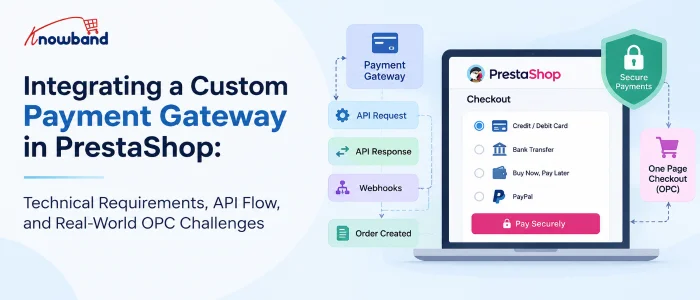
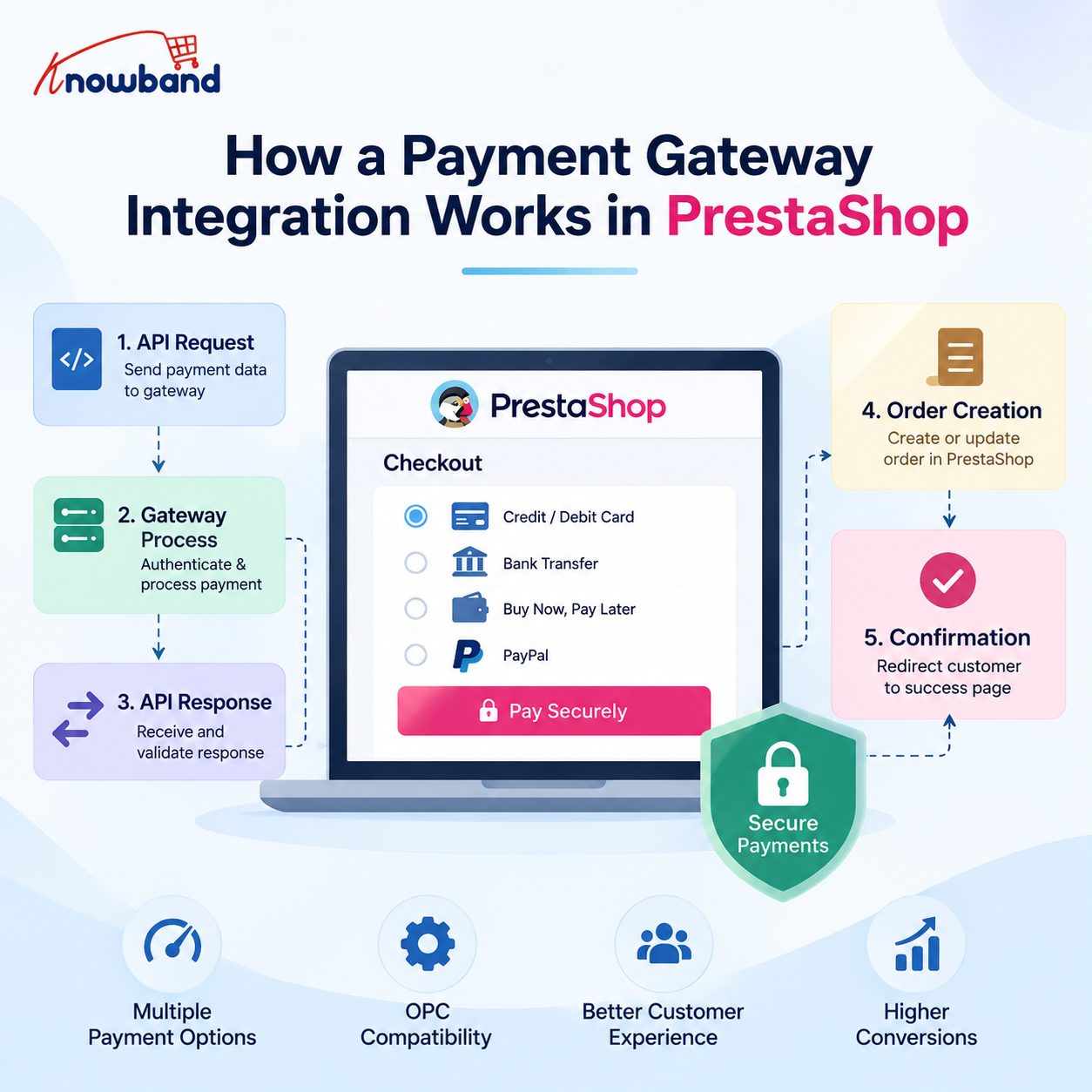

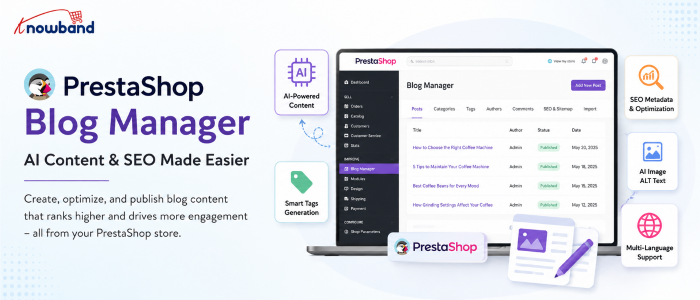
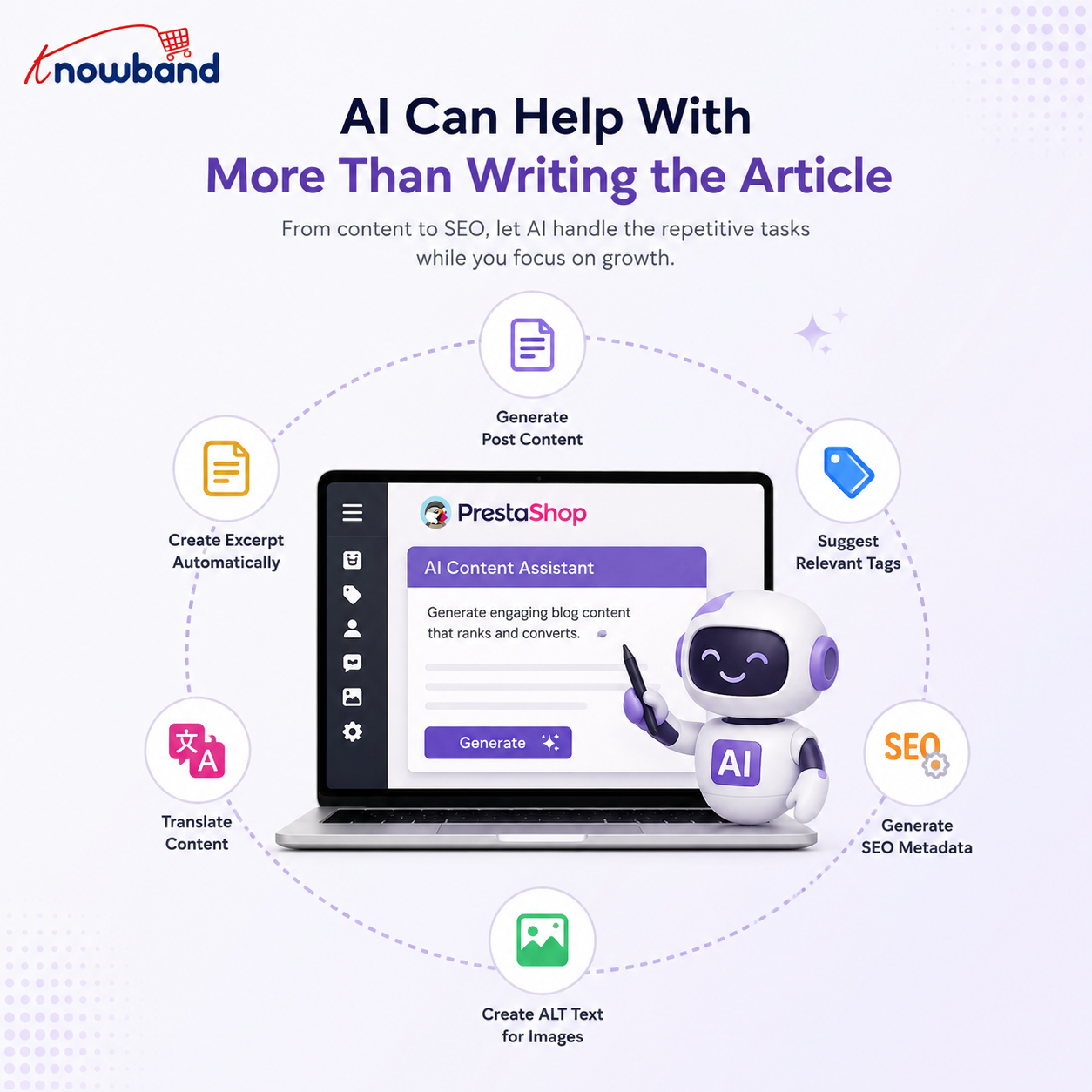


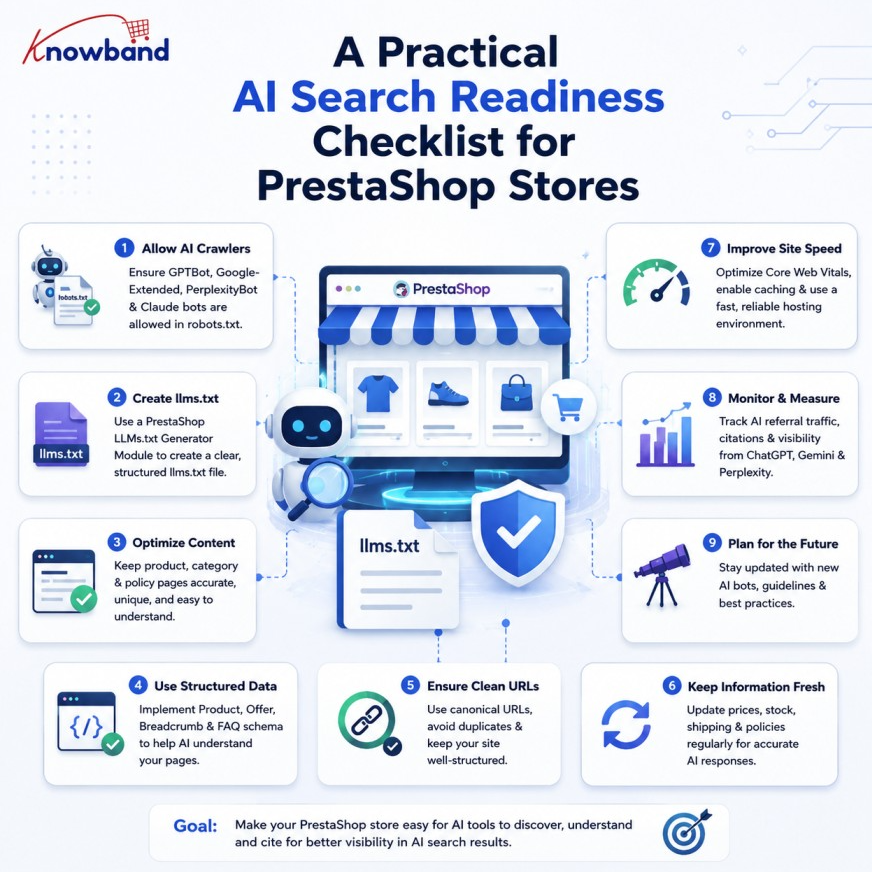


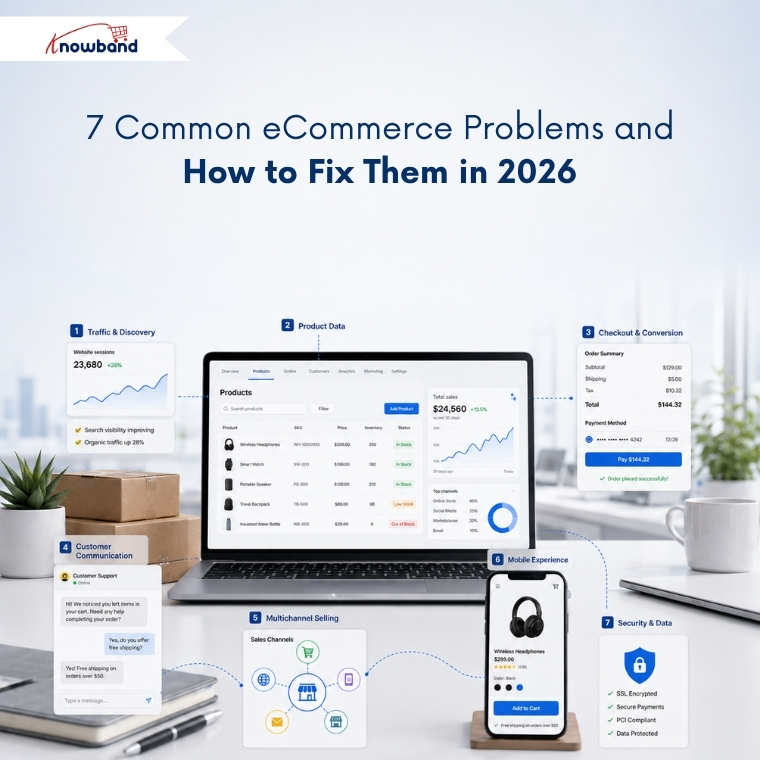
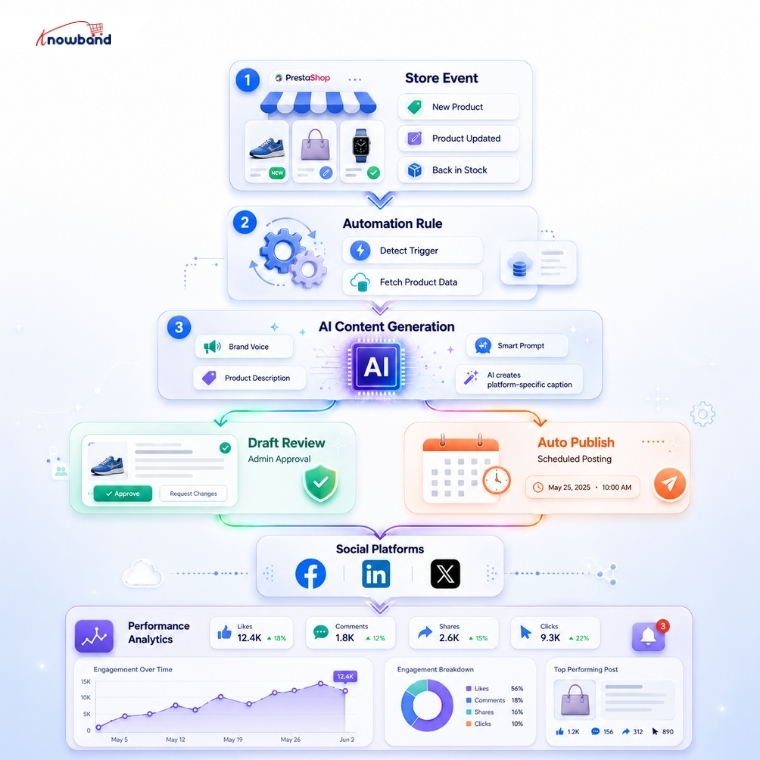

![11 Best Ways to Protect Your PrestaShop Store [2026]](https://www.knowband.com/blog/wp-content/uploads/2026/07/11-Best-Ways-to-Protect-Your-PrestaShop-Store.jpg)