

PrestaShop Smart Admin Assistant: Top Use Cases for Store Owners in 2026
Explore PrestaShop Smart Admin Assistant use cases for AI analytics, database views, access control, and smart store management.
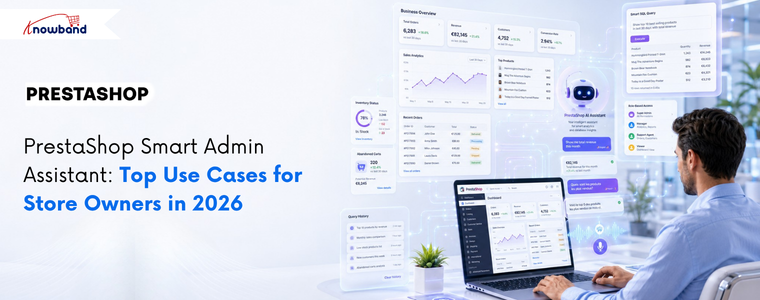
PrestaShop stores generate large volumes of operational data every day, from orders and customers to inventory, abandoned carts, revenue, and employee activity. While the data is readily available, getting to it means navigating multiple report pages, setting filters, and repeating the process for every single question. For admins checking the same figures daily, that time adds up fast. The Knowband PrestaShop Smart Admin Assistant sits inside your back office, and answers store questions in plain language, pulling results directly from your live database. No reports. No navigation. No SQL knowledge required. The module is launching soon. Here are the key use cases that show exactly how it changes day-to-day store management.
AI-Powered Natural Language Queries: No SQL Knowledge Required
Type a question in plain English, and the assistant returns the answer from your live store data within seconds. What makes this genuinely useful beyond convenience is the Show SQL Query feature. When enabled, the assistant surfaces the exact SQL it generated to produce the answer. A second setting, Allow SQL Edit and Re-run, lets the admin change that query and execute a revised version without writing SQL from scratch.
Before this, data requests involving multiple tables or custom filters sat in a developer backlog. Now, any admin can do that without any technical skills required.
Example: An admin wants to find customers who ordered at least three times but have not placed any order in the last 90 days, for a win-back campaign. They type: “Show me customers who ordered at least 3 times but have not placed any order in the last 90 days.”
The PrestaShop Smart Admin Assistant generates and runs this query:
SELECT

c.id_customer, c.firstname, c.lastname, c.email,

COUNT(o.id_order) AS total_orders,

MAX(o.date_add) AS last_order_date

FROM ps_customer c

JOIN ps_orders o ON c.id_customer = o.id_customer

GROUP BY c.id_customer

HAVING

COUNT(o.id_order) >= 3

AND MAX(o.date_add) < DATE_SUB(NOW(), INTERVAL 90 DAY)

ORDER BY last_order_date ASC;

The result is a table with customer name, email, total orders placed, and last order date. Every dormant repeat buyer in one view. The admin then adds a spend filter to focus on high-value customers first:

HAVING

COUNT(o.id_order) >= 3

AND MAX(o.date_add) < DATE_SUB(NOW(), INTERVAL 90 DAY)

AND SUM(o.total_paid) > 200  - admin adds this line

ORDER BY last_order_date ASC;

Re-run. Now, only customers who spent over 200 euros appear. Export from Query History. Win-back list ready. No developer, no phpMyAdmin, no waiting.
Database Views: Manage and Restrict AI Access to Store Data
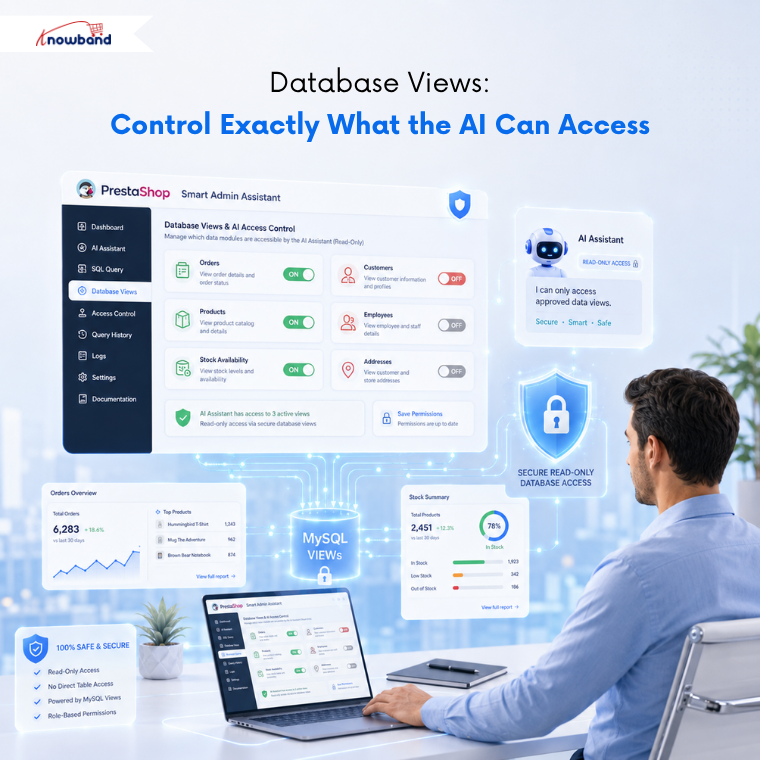
The Database Views tab lets the admin choose which data domains the assistant is allowed to query. Available views include Orders, Customers, Products, Stock Availability, Shopping Carts, Cart Rules, Employees, Shipping Carriers, Product Combinations, and more.
Each view is a pre-built MySQL VIEW rather than a direct raw table query. This keeps things safe in two ways. The AI cannot modify any data because views are read-only. And because the joins are already built into each view, the answers come back more accurately than they would from querying raw tables directly.
Switch a view off, and the AI-powered admin assistant cannot reach that data, no matter the question. This is where PrestaShop back office analytics becomes properly controllable because the admin sets the limits, not the tool.
Example: A store owner wants the logistics team to use the PrestaShop Smart Admin Assistant for stock and order questions, but not customer personal data or employee records. Orders, Stock Availability, and Products stay on. Customers, Employees, and Customer Addresses go off. The logistics team can query what their role actually needs and nothing beyond that.
Role-Based Access Control: The Right Data for the Right Staff
The Access Control tab lets the store owner select which employee profiles can use the PrestaShop Smart Admin Assistant. Tick a profile, and it gets access. Leave all profiles unchecked, and access opens up for everyone. Tick only the ones that should have it, and the rest see nothing when they log in.
Example: A store with six admin accounts wants only the SuperAdmin and sales team to use the assistant. The store owner ticks those two profiles and leaves the rest unchecked. The translator and logistics staff log in, and the assistant is not visible to them at all. No code changes, no theme edits.
Predefined Chips: Daily Store Monitoring with One-Click
Predefined Chips are clickable question buttons that are present inside the chat widget. A predefined query runs instantly with a single click, eliminating the need for manual input.
The default set covers the most common daily checks: Orders Today, Revenue 30 Days, Abandoned Carts, Low Stock, Out of Stock, Active Customers, New Customers This Month, Cancelled Orders, Free Shipping Coupons, and No SKU Products. Every chip is editable, reorderable, and individually toggleable.
For stores running the same checks every morning, this alone saves significant time. The daily review that used to mean opening six different pages is now handled entirely through PrestaShop back office analytics in a single widget, in under a minute.
Example: A store manager checks four things every morning: today’s orders, this month’s revenue, products under five units in stock, and abandoned carts from the last 24 hours. All four are chips. The whole check is done in minutes.
Flexible AI Provider Selection: Choose OpenAI, Claude, or Gemini
The AI Provider tab gives the admin a choice between OpenAI, Anthropic Claude, and Google Gemini. Each requires the admin’s own API key and a model selection from that provider’s available tiers.
For Claude, the options are Haiku 4.5 for fast everyday queries, Sonnet 4.6 for a balance of speed and depth, and Opus 4.6 for complex multi-table work. OpenAI and Gemini follow the same tiered structure. Paying only for actual usage with no intermediary keeps running costs predictable regardless of store size. This is what makes the PrestaShop admin AI module genuinely accessible for stores that cannot commit to a fixed monthly AI subscription.
Example: Large-scale stores can use Haiku 4.5 for routine chip-based queries to maintain lower operational costs.. When the operations manager needs a detailed monthly breakdown across several joined tables, they switch to Sonnet 4.6 for that session and switch back after.
Voice Input, Widget Customisation, and Multilingual Support
Three features cover the remaining day-to-day usability of the PrestaShop Smart Store Management Addon.
Widget Layout puts every visual setting in one place: position, chatbot name, greeting message, avatar, width, height, and more. Changes reflect instantly in a live preview on the right. No CSS involved at any point.
Voice Input lets the admin ask questions out loud instead of typing. The Web Speech API built into the browser handles the transcription. For admins who move around, work on mobile, or simply find speaking faster than typing, this removes the last friction from getting a quick answer.
Chatbot Language gives the admin control over which language the PrestaShop Admin AI Module replies in. Setting it to Back-office Language ties the response to whatever language the admin panel is running in. Setting it to Custom Language lets the admin pick independently, which matters on multilingual teams where the back office language and the working language of individual staff members are different.
Example: A French-speaking operations manager works in a back office set to English for consistency across the team. Custom Language is set to French. The manager speaks a question using Voice Input and gets the answer back in French. Nothing in the back office configuration has changed.
Query History and Session Logs: A Full Audit Trail
Each question sent through the assistant lands in the Query History tab as a permanent record. The log captures the date, the employee, the question, the number of rows returned, response time in milliseconds, which AI provider ran it, the status, and the full SQL that executed.
Logs filter by date and status, and export to CSV or Excel. A retention setting purges entries older than a chosen number of days automatically, so the log table stays lean without manual cleanup. The Sessions tab keeps full conversation threads per employee for anyone who wants to review an earlier exchange or audit how the team is using the tool.
Example: A store owner gets an answer that looks off during the Monday morning check. They open Query History, pull up the exact query that ran, read the SQL, and spot that a database view was serving cached data. They hit Refresh Schema Now, rebuild the schema, and re-run with the correct result.
An AI smart admin assistant is most useful when it works from organised data Before you start asking it questions about sales or stock, it helps to know what your dashboard is already showing you. This guide to PrestaShop back office analytics explains which reports matter and how to read them without wasting time.
How the Knowband Smart Admin Assistant Improves Store Operations
Every feature covered here fills a gap that previously needed either a developer or a report that took too long to build. This PrestaShop admin AI module keeps the depth, the SQL still runs, the data is still live, and the controls are still precise, but the module removes the technical barrier between the admin and the information they need. For store owners spending more time in data analysis than on the business itself, the PrestaShop Smart Store Management Addon is the best practical fix.
The Knowband PrestaShop Smart Admin Assistant is launching next week. Stay tuned to find out more about the module and what it can do inside your back office.
- Best PrestaShop SEO Module: 10 Must-Have Features to Improve Rankings
- Three Recovery Emails Recover 37% More Carts Than One: Building the Right PrestaShop Abandoned Cart Sequence
- How to Create an SEO-Friendly Blog in PrestaShop: A Practical Guide to Content, SEO & AI Search
- How to Turn Your OpenCart Blog Into a Revenue-Generating Content Strategy
- Integrating a Custom Payment Gateway in PrestaShop: Technical Requirements, API Flow, and Real-World OPC Challenges