

Opencart Shipworks – User Manual
Demo to Setup OpenCart Shipworks Plugin Instructions
1. Download & Install the shipworks from https://www.shipworks.com/shipworks/download.php
2. After completion of installation of Shipworks, login into shipworks.
3. Go to Manage -> Stores & Add New Store to add new store if you have added any store in shipworks else shipworks automatically open the Add New Store screen.
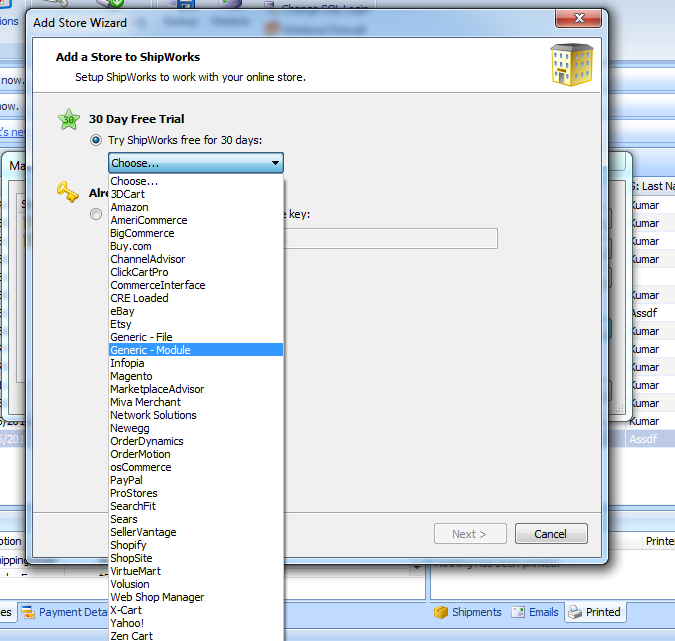
4. Select Generic Module from the cart list as shown below & click Next.
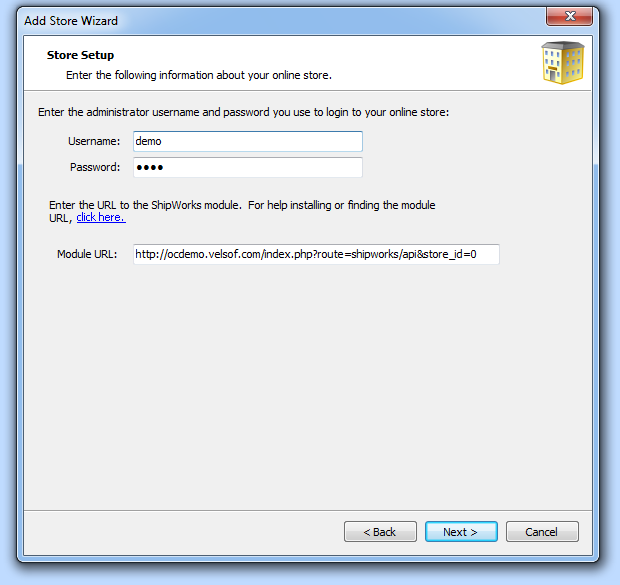
5. On the next screen, enter the following details.
Username: demo
Password: demo
Module URL: https://ocdemo.knowband.com/index.php?route=shipworks/api&store_id=0
6. After adding the Module URL, Click on the Next button & follow the instructions on Shipworks
screen.
7. When Shipworks ask for license key, provide the following license key & click next.
8. After that click Finish button. Now shipworks is ready to download the orders from the server.
9. Click on the Download button to download the orders. System will download the orders into
shipworks from the server.
10. You can test by creating new order on the site i.e. https://ocdemo.knowband.com
- OpenCart SEO Audit Manager User Manual
- OpenCart Backup and Restore Extension: Complete User Manual
- OpenCart Advanced Security Manager Extension – Complete User Guide (Updated)
- OpenCart WhatsApp CRM and Order Notification Extension – Complete User Guide
- OpenCart SocialAI Pro Extension Complete User Manual