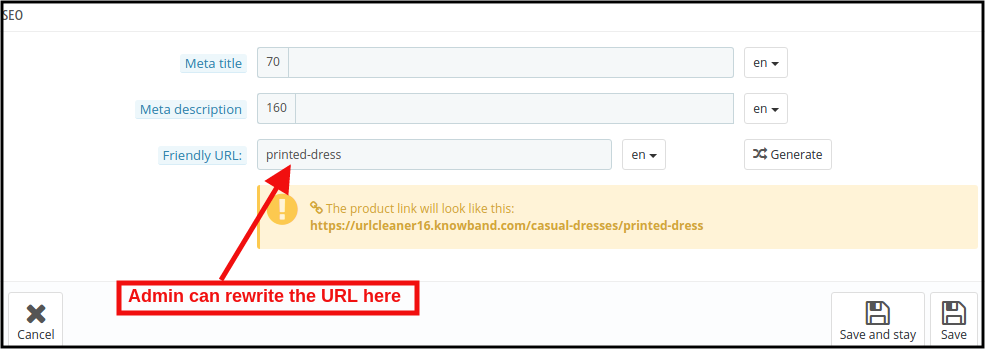
How to setup SEO friendly URL for your prestashop store?

SEO friendly URL is important for your eCommerce business as web URLs play a vital role in Google Search Ranking. URL defined as an address for your web page. These SEO-friendly URLs offer an intuitive user experience for website visitors, who can just by looking at the URL figure out the web page contents. According to Google, “A site’s URL structure should be simple. To construct URLs logically, consider organizing your content. It needs to be done in a manner that is most intelligible to humans (when possible, readable words rather than long ID numbers).” 

For Prestashop, the standard URL structure is https://psm.knowband.com/urlcleaner/16/en/casual-dresses/3-printed-dress.htm. You can see the product URL including the product id also.

Prestashop is better defined as an efficient and innovative e-commerce solution packed with all the features required to build an online store and grow your business. Knowband offers various Prestashop plugins for your eCommerce business.

Therefore, optimize the store URLs for a better ranking on SERP. Hence use PrestaShop SEO Friendly URL Addon.

PrestaShop SEO Friendly URL Addon

Prestashop SEO Friendly URL Addon helps Prestashop owners to remove the ID from the URLs of products, categories, suppliers, manufacturers, CMS, and all other pages of your store. Furthermore, it makes the URLs SEO-friendly. To redirect the old URLs to New URLs, the admin can Prestashop URL Redirects module with the assistance of 301,302 and 303 redirections. 

What are the key features of PrestaShop SEO Optimizer – Clean URLs & 301/302/303 redirection Addon?

Feature 1: Prestashop SEO Friendly URL remove the ID from a different section

Prestashop SEO Friendly URL removes the ID from different sections of the website such as from Product, Category, Manufacturer, Supplier, and CMS page URLs.

By removing the product id and category id, Prestashop URL CLeaner Module makes the product’s URL SEO friendly. Furthermore, the store admin can remove the manufacturer id as well as supplier id from the respective page. To remove the ID from the CMS pages as well as other pages, the store admin can utilize the PrestaShop Rewrite URL module. Also, to remove .html from the URLs, Prestashop Rewrite URL Module even helps merchants.

Feature 2: Prestashop SEO Friendly URL Addon Offers 301 redirects, 302 redirects, and 303 redirects:

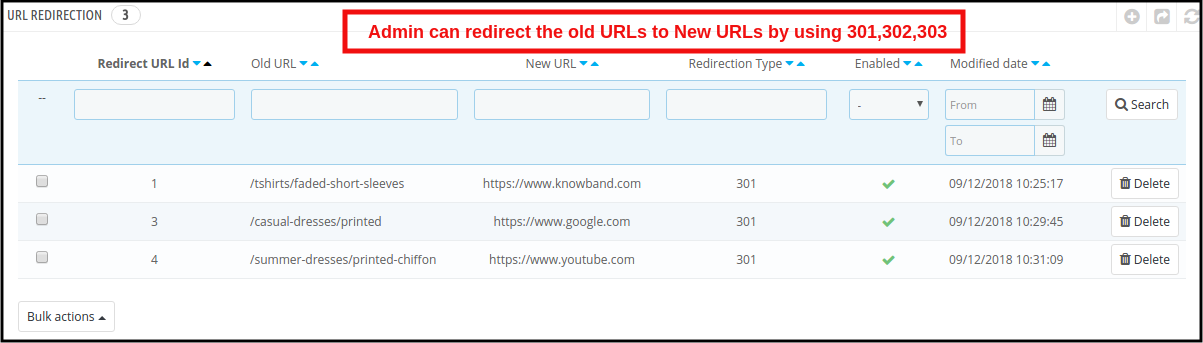
With the utilization of three redirection choices i.e. 301 redirects, 302 redirects, and 303 redirects, PrestaShop 301/302/303 Redirect Module redirects the old URLs to new URLs.

Feature 3: PrestaShop Rewrite URL module Modify Duplicate URLs:

The store merchant can see the duplicate URL report with this PrestaShop Fixed Duplicate URL Addon. Furthermore, to remove the duplicity they can rewrite the same.
How beneficial is PrestaShop URL Cleaner Module?

  • Improve website ranking

Prestashop SEO URL Addon is highly beneficial as it helps merchants to enhance or improve the website ranking in the Google SERP results. Furthermore, it reduces the effort of manual tasking that saves a lot of time for the Prestashop admin.

  • Great for user experience and mobile responsive

For a better and more successful eCommerce business, the admin needs to pay attention to a better user experience as well. Hence, Prestashop URL Cleaner Module leads to improvement in the user experience. Mobile responsiveness is another reason to use Prestashop URL Cleaner Module.

  • Compatibility and support

Prestashop URL Redirect module supports different stores. Further, it is compatible with SSL and is multilingual too. 

  • Easy to use backend interface

Prestashop Clean URL Addon offers easy to use back-end interface. 

Admin Benefits offered by PrestaShop 301/302/303 Redirect Module:

  • PrestaShop 301/302/303 Redirect Module is beneficial for store admin as well. This Prestashop module efficiently optimizes the organic search (SEO) on all searches. Furthermore, with the assistance of the Prestashop URL Redirect module admin can create an unlimited number of redirects.
  • Offers admin 3 flexible choices on redirects i.e. 301 redirects, 302 redirects, and 303 redirects. Furthermore, auto-generated IDS and numbers can be removed by online retailers from the URLs to make them Search Engine Optimization friendly.
  • Store admin can even improve the store’s ranking on Google.

Are customers benefitted from PrestaShop URL Cleaner Module?

Abousltely. Customers have benefitted from Prestashop URL Cleaner Module as well. With the assistance of this module, online shoppers can find and even remember the URL of the products page in future reference easily.

PrestaShop URL Cleaner Addon helps in creating a short and well-defined URL structure that helps visitors quickly get an insight into the page information.

Final Thought

One of the biggest challenges for an online business is higher ranking on the search result pages of search engines like Google, Bing, in order to increase the chances of better sales. As a result, Knowband has developed the URL Cleaner (SEO-friendly) Module to improve the search ranking. 

Knowband

KnowBand is known for providing efficient plugins for eCommerce systems. Furthermore, Knowband has years of experience working with eCommerce websites. Along with Prestashop, Knowband offers plugins for other eCommerce platforms such as Magento, Prestashop, OpenCart, and Shopify. Custom module development as well as customization services provided by Knowband for websites and modules.

 

How to create SEO friendly URLs in Opencart 2.x ?

Introduction

This document will give an idea about how to create SEO Friendly URLs in Opencart (version 2.x). Also will explain how to customize the Opencart function to create SEO URLs other than default pages (product page, category page etc.).

This document will also explain how to 301 redirect URLs from old URL to new URL and URLs deleted.

The main purpose of this document is to learn about creating SEO Friendly URLs in Opencart (version 2.x) and URL redirections to maintain our SEO ranking on Google.

SEO Friendly URLs are well-crafted URLs which provide both humans and search engines with an easy-to-understand indication of what the destination page will be about.

Default Step in Opencart to Enable SEO URL

In Opencart there are setting which we have to manage from the admin panel to activate SEO Friendly URLs.

Following are the steps to enable:

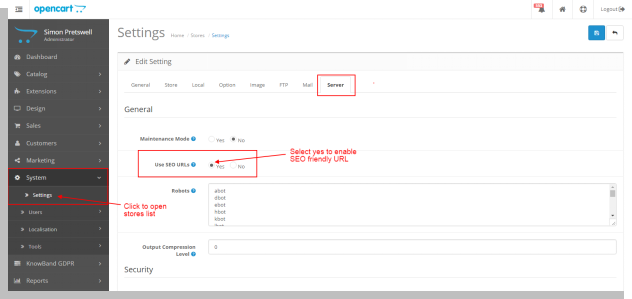
  • Open admin panel. Go to System > Setting. Then click on the edit button corresponding to the store from the store listing page.
  • In the edit system setting page open the ‘Server’ tab.
  • In the server, the tab selects the ‘Yes’ radio button corresponding to ‘Use SEO URL’ and then clicks on the save button.

By doing this admin will be able to use SEO URLs.

Recommended Read: Top 10 Opencart Extensions to Boost Customer Experience

Pages in Opencart have the option to add SEO Friendly URLs

In Opencart there is a default option to create SEO-friendly URLs for the following page:

  • Product page
  • Category page
  • Manufacturer page
  • Information page

For all these above pages there is an option on their respective edit page to enter SEO URL.

Recommended Read: Top 10 Features to Consider While Creating a Marketplace on the OpenCart Platform

Product Page

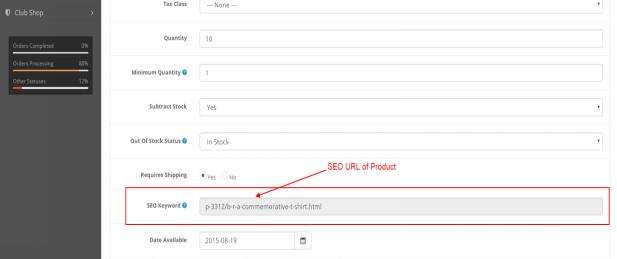
To save the SEO URL of any product page go to Catalog > Products in the admin panel. Click on the edit button corresponding to the product name.
In the edit product page click on the ‘Data’ tab. In the Data tab, there is an option for ‘SEO Keyword’. Enter the SEO URL of the product and then save.
Refer below screen:

Category Page

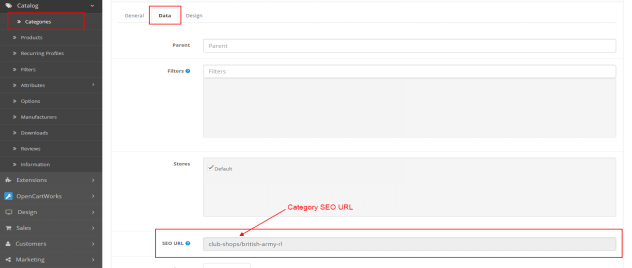
To save the SEO URL of any category page go to Catalog > Categories in the admin panel. Click on the edit button corresponding to the category.
In the edit category page click on the ‘Data’ tab. In the Data tab, there is an option for ‘SEO URL”. Enter SEO URL of category and then save.
Refer below screen:

Manufacturer Page

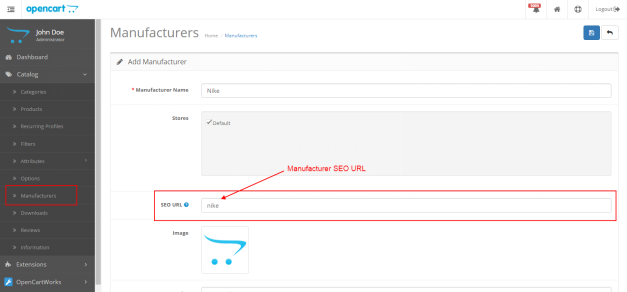
To save the SEO URL of any manufacturer page go to Catalog > Manufacturers in the admin panel. Click on the edit button corresponding to the manufacturer.
On the edit manufacturer page, there is an option for ‘SEO URL”. Enter the SEO URL of the manufacturer and then save.

Refer below screen:

Recommended Read: What are the merits and demerits of using an OpenCart platform?

Information Page

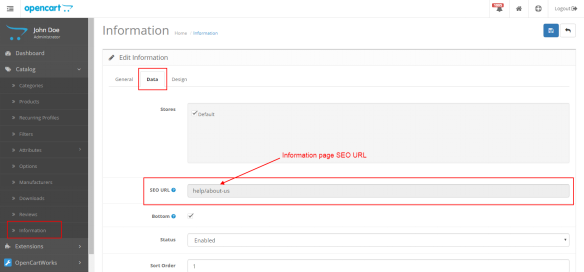
To save the SEO URL of any information page go to Catalog > Information in the admin panel. Click on the edit button corresponding to the information page.

On the edit, the information page clicks on the ‘Data’ tab. In the Data tab, there is an option for ‘SEO URL”. Enter the SEO URL of the information page and then save.

Refer below screen:

Note: Admin can also save SEO URL while adding a new product, category, manufacturer and information page.

If the admin wants to create an SEO URL for any custom pages then he/she has to make changes accordingly (explained below in the same document).

Technical Flow for URLs

In Opencart (version 2.x) when the user hit any URL (SEO or non-SEO) it calls the controller file seo_url.php located at catalogue/controller/startup. This file is called to find the SEO URL.

Note: The SEO URL of each page is stored in the ‘url_alias’ table in the database.

If the customer hit any non-SEO URL then it calls the seo_url.php file. In this file, there is code which searches the SEO URL of the Non-SEO URL in the ‘keyword’ column of the url_alias table corresponding to the ‘query’ column

url_alias Table in the Database

url_alias table is used to save SEO URLs of all pages. There are the following 3 columns in the table by default:

  • url_alias_id: Primary key of the table.
  • Query: contains the id of different pages like product_id, category_id, and other pages.
  • Keyword: contains SEO URL keyword of the corresponding page

SEO URL creation for other than default pages

If the admin has created landing pages and wants to serve an SEO URL for the page. For this first have to make an entry of the page in the url_alias table.

Example 1:
If the admin has created the ‘Sports’ landing page then he has to make an entry in the url_alias table as:

  • In query column: sport_id=1
  • In  keyword column: sports

Admin also has to make changes in controller file seo_url.php for sport_id.  Admin has to add a condition for sport_id same as product_id and category_id.

Now if admin enter URL “host/index.php?route=product/landing_page&sport_id=1” then code will search seo keyword in url_alias table corresponding to sport_id=1 and then serve URL ‘host/sports’.

Example 2:

In this example, we will create an SEO URL for the blog page.

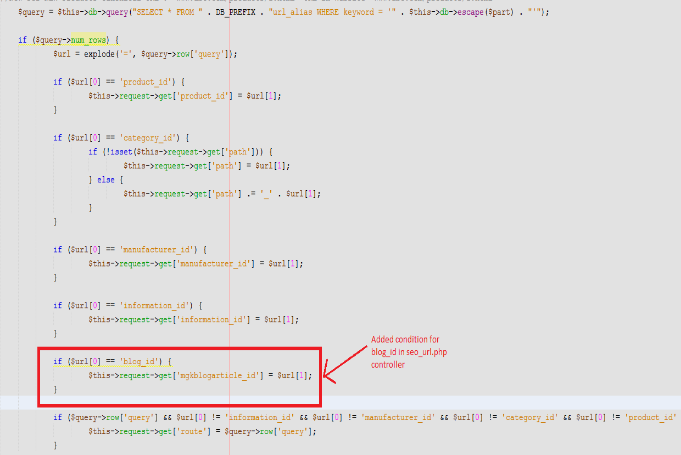
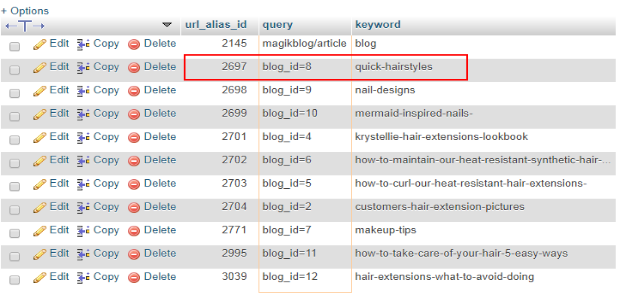
For this we have to add a condition in the controller file and make an entry in the url_alias table corresponding to blog_id:

Refer below screenshot seo_url.php file:

Recommended Read: How can you change the currency format in an OpenCart platform?

Screenshot of url_alias table

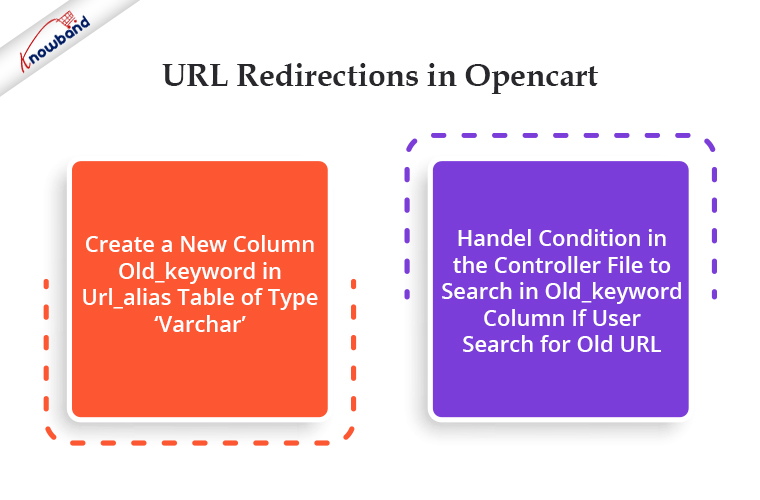
URL Redirections in Opencart

In Opencart if the admin wants to create new SEO URLs and wants 301 (permanent redirection) or 302 (temporary redirection) redirect on a new URL then the admin has to make the following changes in the controller file and url_alias table.

  1. Create a new column old_keyword in url_alias table of type ‘varchar’.
  2. Handel condition in the controller file to search in old_keyword column if user search for old URL.

Example: To redirect from the old URL of the ‘termes and conditions’ page to the new URL.
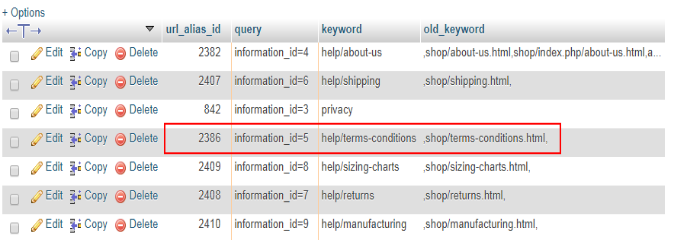
If the admin wants to redirect any information page from the old URL to the new then he has to make an entry in the url_alias table. Refer to the below screenshot:

Here

  • the old keyword is: shop/terms-conditions.html
  • new keyword: help/terms-conditions

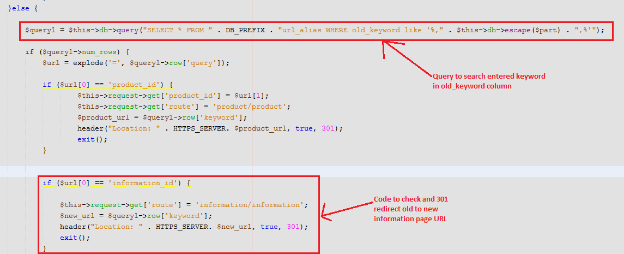
Controller file changes: In seo_url.php controller admin has to handle conditions if enter URL did not found in the keyword column.
The first system will search entered URL in the keyword column. If not found then will search in the old_keyword column. If found then will redirect to the corresponding new URL.
Please refer to the below screenshot:

URL Redirections in Opencart for Deleted Pages

If the admin wants to redirect the URL of deleted categories, products or any other pages on the home page then he can make changes in the controller file accordingly.

Example: Here we will 301 redirect URLs of deleted categories

Steps to redirect URL of deleted categories:

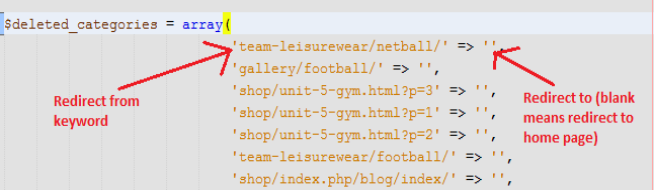
  • Create a file and define an array with the key as deleted category URL and value as URL to which admin wants to redirect. Refer to the below screenshot for creating an array of deleted categories.

    Note: Here we have defined blank value because we want to redirect deleted categories URLs to the home page

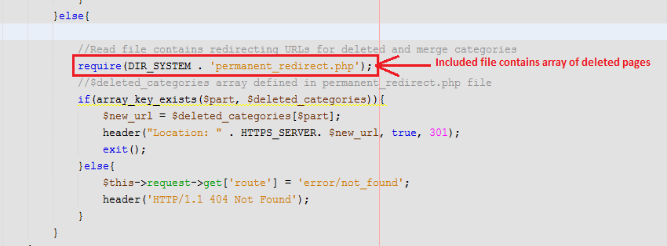
  • Add a condition in the seo_url.php controller to redirect from deleted category URL to the new URL.

In this code first, we have included a file containing URLs of deleted categories and then checked if the entered URL is in the defined array or not. If yes then redirected to a new URL else redirected to the not found page.

In the End:

A variety of OpenCart modules and extensions, both free and paid, are available from Knowband to boost your store’s operation. To know in detail about the OpenCart platforms, modules available or any functionality related to the platform feel free to drop us an email at support@Knowband.com.

PrestaShop SEO Optimizer- Clean URLs & 301/302/303 Redirection Module- User Manual

1.0 Introduction

A higher ranking on the search result page of the search engines like Google, Bing, and others is the biggest challenge for an online business. With a higher ranking, the chances of better sales also increase. In order to improve the search ranking, it is mandatory for the store owners to follow the guidelines issued by the search engines. SEO (Search Engine Optimization) is the way to increase your online presence for a better ranking on the SERPs. The On-Page SEO activities involve – website optimization, meta tag optimization, SEO-friendly URLs, keyword density and more. Among these factors, one factor is the SEO-friendly URLs which play an important role in the ranking. As per Google guidelines, Google recommends that the URL structure of a website should be as simple as possible. SEO-friendly URL is also useful for indexing process flow by the search engine bots.  In clear words, comprising SEO-friendly URLs for a website increases the chances for a website to get higher ranks in the search results. The default URL structure of PrestaShop SEO Optimizer Module includes the product id in the product page URL, Category page URL in the category page URL.

To help the store admin to create SEO-friendly URLs, Knowband has developed the URL Cleaner (SEO-friendly) Module. This PrestaShop SEO Optimizer – URL Cleaner Addon automatically generates the SEO-friendly URL by removing the ID from the URLs of products, categories, suppliers, manufacturers, CMS and all other pages of your store. It allows the admin to implement the 301, 302 or 303 redirection as per the requirement.

1.1 Features of the Prestashop URL Cleaner (SEO-friendly) Addon:

1. PrestaShop SEO-friendly URL Addon is a module that automatically converts the default URL into SEO-friendly URL.

2. The Knowband PrestaShop Rewrite URL Module removes the auto-generated ID from the URLs of the products, categories, suppliers, manufacturers, CMS and all other pages of your store.

3. With the help of this PrestaShop Fixed Duplicate URL Addon, the admin can view the duplicate URL list and modify or remove the URL as per the need.

4. PrestaShop URL Cleaner Module provides an option to the store merchant to redirect the old URL to the new URL. The Store admin has 3 choices on redirects i.e. 301 redirects, 302 redirects, and 303 redirects.

5. SEO URL PrestaShop extension is a module that helps the store merchant in improving SEO.

6. This PrestaShop URL Rewriting Module by Knowband helps the eCommerce owner to improve the website SEO.

7. The PrestaShop store admin can set the URLs to end with or without .html by using this Prestashop URL Cleaner Addon.

8. PrestaShop URL Id Remover Module is multi-store compatible.

9. SEO-friendly Prestashop URL Cleaner Module back-end interface extremely easy to use.

10. With this PrestaShop 301/302/303 Redirect Module, the admin can redirect the N no. of the old URLs to new URLs.

Technology for Development

Language: PHP

FrameWork: PrestaShop

2.0 Steps For Installation

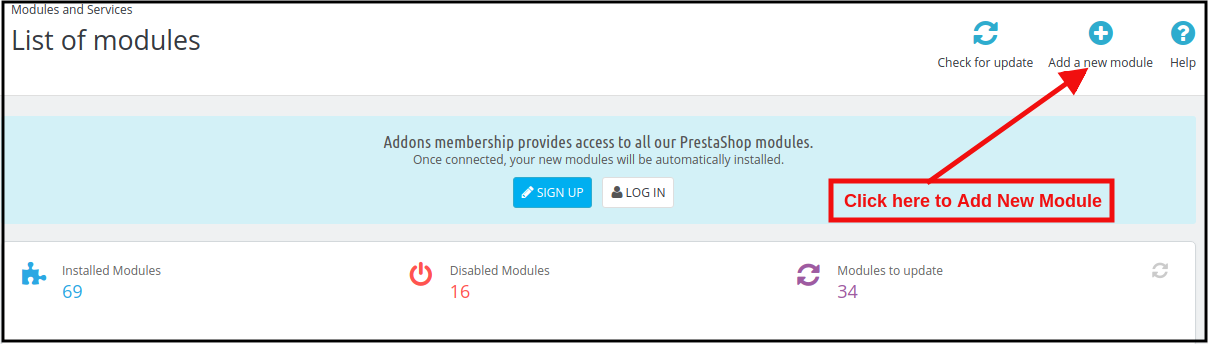
1. To upload the module click on the “Add a new module” button.

2. After clicking on Add New Module now select the module zip file.

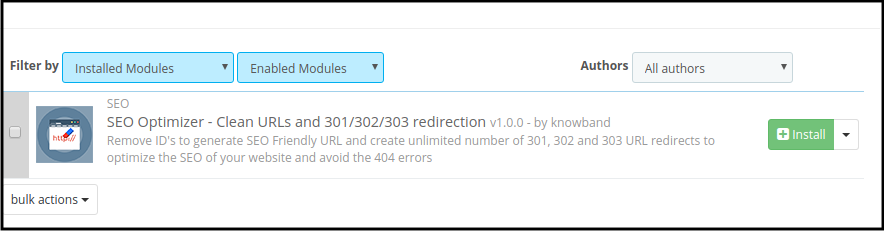
3. Now, You can find the PrestaShop SEO Optimizer Module in the module list and Click on the Install link to install the plugin.

4. After installing the module, the admin will be able to configure the module.

3.0 Admin Interface

After installing the module in the PrestaShop store, the store owner can make the changes without any hassles. There are the following sections available to the admin interface:

1. Module Configuration
2. Duplicate URL Rewrite Products
3. URL Redirection List

Each interface of this PrestaShop URL Cleaner (SEO-friendly) Module is explained below.

3.1 Module Configuration

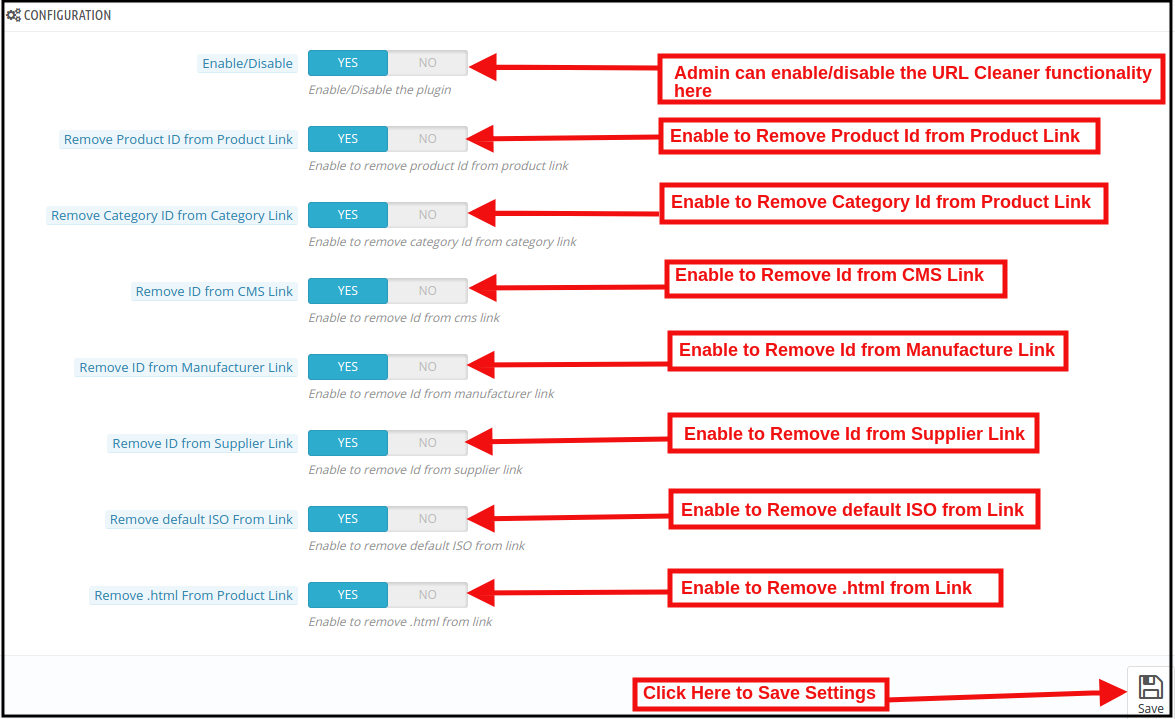
On clicking on the configure link on PrestaShop 301/302/303 Redirect Module, the system will open Configuration tabs of this Prestashop plugin by default as shown in the screen below:

Initially, the fields of this PrestaShop URL Cleaner(SEO-friendly) Addon in the above form will be already filled with their default values.
Enable/Disable: This field will enable the URL Cleaner feature. If enabled, the PrestaShop URL Cleaner will automatically convert the default store URL to SEO-friendly URLs.

Remove Product ID from the Product Link:

The default URL structure of the PrestaShop product page contains a product id and a URL like https://psm.knowband.com/urlcleaner/16/en/casual-dresses/3-printed-dress.html. As you can see the default product URL has the product id. After enabling this feature, the PrestaShop URL Cleaner Module will automatically remove the product id from the product link and the updated link will appear like this:

https://psm.knowband.com/urlcleaner/16/blouses/blouse

https://psm.knowband.com/urlcleaner/16/casual-dresses/printed-dress.html

Remove Category ID from the Category Link:

The default category page link contains the category id and a URL like https://psm.knowband.com/urlcleaner/16/8-dresses. This URL is complex and not SEO-friendly. By enabling this remove category option, the PrestaShop URL Id Remover Module removes the category id from the category link and after removing the category, the updated URL will appear like this:                  https://psm.knowband.com/urlcleaner/16/women/dresses

Remove ID from the CMS Link

The standard URL structure of the PrestaShop CMS page contains numeric values like

https://psm.knowband.com/urlcleaner/16/content/4-about-us. Using this option of PrestaShop SEO-friendly URL Module, the admin can enable this setting to remove the id from the CMS link and the automatic generated URL would look like:

https://urlcleaner16.knowband.com/content/about-us

Remove ID from Manufacture Link

By default, the Manufacture URL contains the Manufacture id in the manufacture URL. With the help of this extension, the admin can remove the id from the manufacturing link.

Remove ID from Supplier Link

PrestaShop does not have the feature to remove supplier link from the URL. After enabling this option, PrestaShop URL Cleaner Module automatically removes the id from the Supplier link.

Remove default ISO from Link

PrestaShop URL Cleaner (SEO-friendly) Module removes the default language’s ISO code from URLs and removes the language ISO code from shop’s default language. So, in this case, it will remove /es/ from all Spanish URLs, but other languages in your shop will still have ISO code in the URL.

For example: By default, the product URLs are like

https://urlcleaner16.knowband.com/en/casual-dresses/printed-dress after enabling the option URL would look like:

https://urlcleaner16.knowband.com/casual-dresses/printed-dress

Remove .html from Product Link: By enabling this option, the PrestaShop SEO Optimizer – Clean URLs & 301/302/303 redirection module remove the .html from the default product URL.

3.2 Duplicate URL Rewrite Products

In case after removing the product ID from the product’s URL, if there are any two product’s URLs are same.

For example, The two product’s URL contains different Id like:

https://psm.knowband.com/urlcleaner/16/en/casual-dresses/3-printed-dress.html
https://psm.knowband.com/urlcleaner/16/en/casual-dresses/4-printed-dress.html

After enabling the remove product id option, the module removes the product id from the URL and product URL like:

https://psm.knowband.com/urlcleaner/16/en/casual-dresses/printed-dress.html

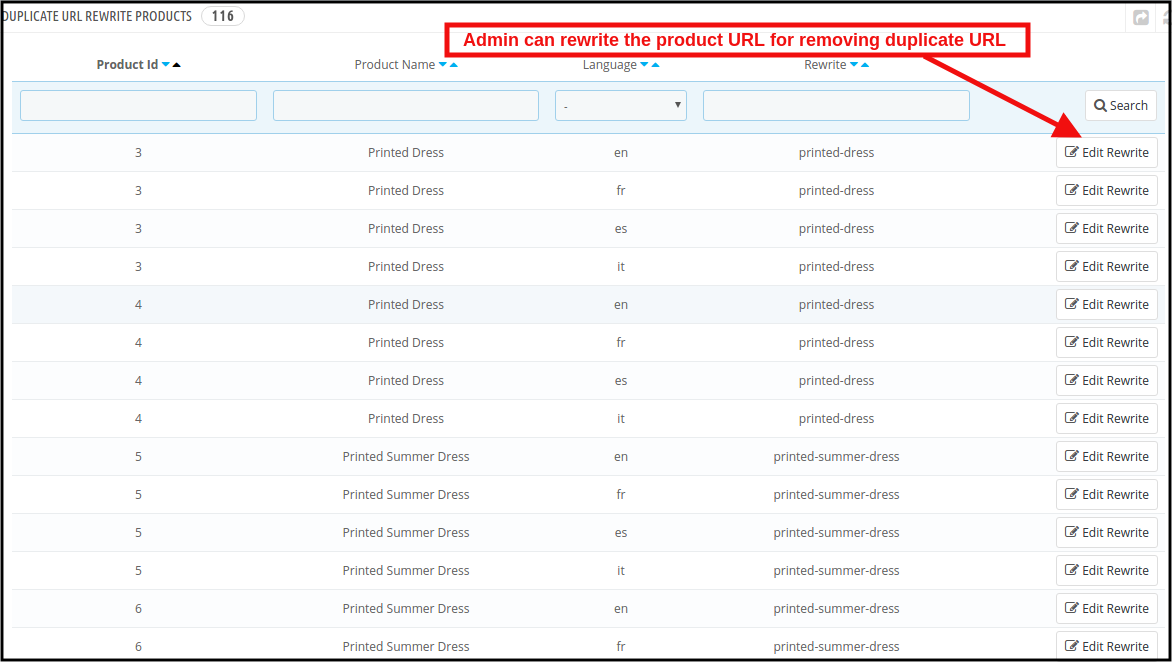
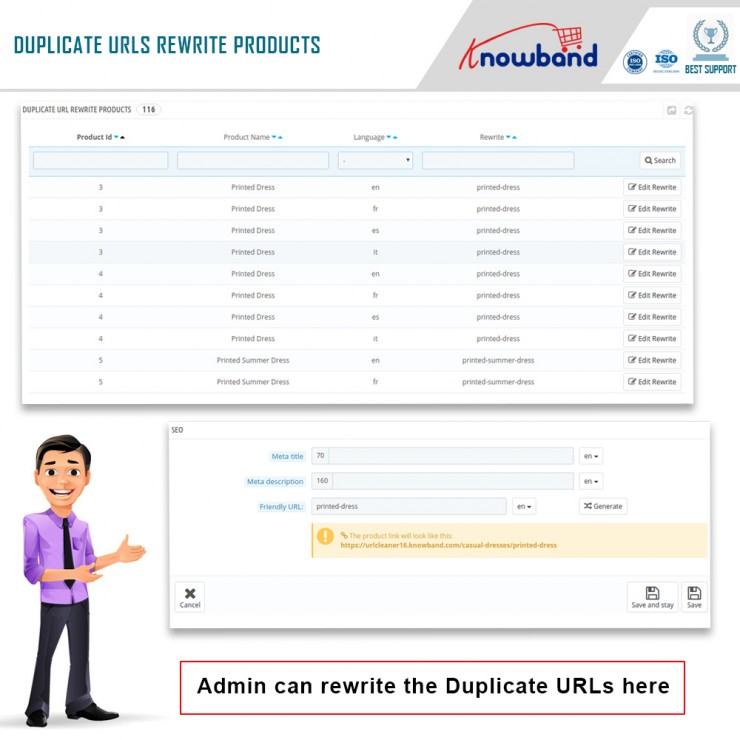
Then this product’s URL list will show on this tab. Find below the attached image:

In this tab, the admin can view all the Duplicate URLs and they can update rewrite value the products as per their convenience.

3.2.1 How to edit the Duplicate URL?

When the store admin clicks on the rewritten link, the PrestaShop URL Redirects Module will redirect the admin to the below-mentioned page:

Here, the store admin can rewrite the duplicate URLs. As soon as the admin will make changes to the URLs, these URLs get removed from the duplicate URL list.

3.3PrestaShop SEO Optimizer Module URL Redirection List

If the store admin changes the URL of any particular product page, the online retailer needs to redirect the old URLs to the new URLs. This PrestaShop 301/302/303 Redirect Module allows the PrestaShop store admin to redirect the old URLs to new ones. This PrestaShop SEO Optimizer Module offers the three redirection options including 301, 302 and 303 to the store owner.

3.3.1 How can Admin Redirect the Old URLs to New URLs?

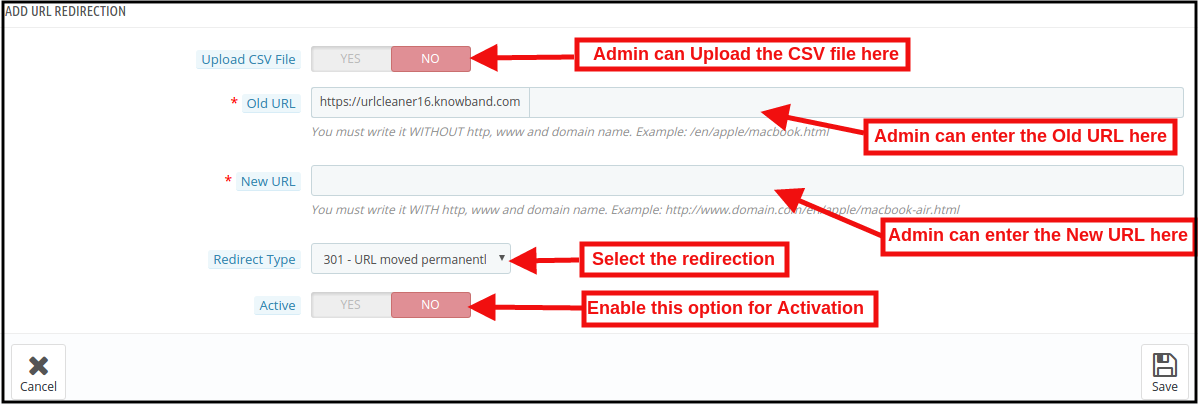
For the redirection of the old URLs to the New URLs, the store admin needs to click on the “Add New” button. After clicking on the Add New button, the below mentioned page open:

Here, the store admin can enter the Old URLs and New URLs, select the redirection from 301 (for permanent redirection), 302 (for temporary redirection) and 303 (to get the method used to retrieve information).

The admin can easily redirect the Old URLs to the New URLs.

URL Redirection through CSV file

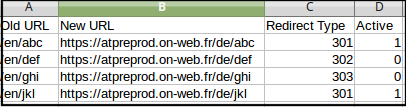
Upload CSV file: In order to redirect the multiple URLs. You can enable the Upload CSV file option. After enabling this option, the admin will be able to download sample CSV file and as per the fields defined in CSV file, the admin needs to enter the details in the CSV and upload the same.

After enabling CSV upload option, the below mentioned page open:

Choose CSV File: The Store admin can upload the sample CSV here for redirecting the products page.

Sample CSV File Format:

4.0 Front End

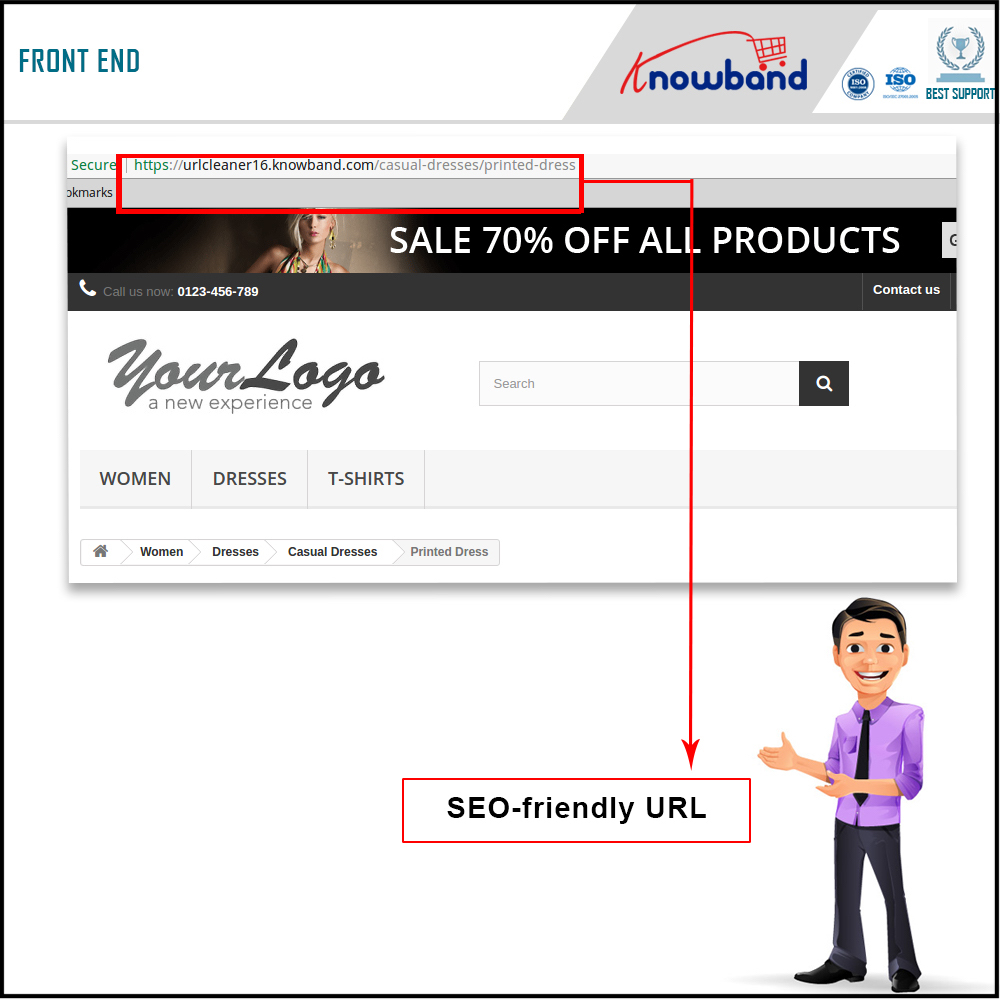
After enabling the PrestaShop URL Id Remover Module by Knowband at the front-end, the users will be able to see an SEO-friendly URL that will clearly highlight the purpose of the page. Google also recommends “A site’s URL structure should be as simple as possible. Consider organizing your content so that URLs are constructed logically and in a manner that is most intelligible to humans (when possible, readable words rather than long ID numbers).” This will also help the admin in improving the search results of the website.

The SEO-friendly URL would appear as follows:

For more information about PrestaShop SEO Optimizer- Clean URLs &301/302/303 Redirection Module:

PrestaShop SEO Optimizer- Clean URLs &301/302/303 Redirection Module Admin Demo

PrestaShop SEO Optimizer- Clean URLs &301/302/303 Redirection Module Front Demo