How Shipping Costs Affect Conversion Rates: Prestashop Seller Guide by Knowband!

In the competitive landscape of e-commerce, conversion rates serve as a critical metric for success. Understanding the factors that influence these rates is paramount for businesses striving to turn visitors into customers. Among these factors, shipping costs play a significant role. Not only does it impact the overall order total but also plays an important role for customers during the decision-making process.

Thus, being one of the major factors for customers, the Shipping costs play a vital role for both store admin and customers. Following the same, this article delves into the impact of shipping costs on sales and highlights how tailored shipping solutions, such as Knowband’s “Prestashop Shipping Cost by Zipcode” module, can optimize conversion rates.

The Influence of Shipping Costs on Conversion Rates:

Shipping costs are a pivotal consideration for online shoppers. It means high shipping fees can prevent potential buyers from making the orders, leading to cart abandonment and lost sales. Therefore, conversely, transparent and reasonable shipping costs can enhance customer trust and increase the likelihood of completing a purchase.

Here’s a closer look at why shipping costs matter so much for customers:

Price Sensitivity: Consumers are highly sensitive to total purchase costs, including shipping. For the same reason, unexpected or high shipping fees can lead to sticker shock, causing shoppers to abandon their carts at the final step.

Perceived Value: Free or low-cost shipping often enhances the perceived value of a product. Customers may perceive the same product as more valuable if they don’t have to pay extra for shipping. Leading further, the following fact boosts the chances for the customer to make orders.

Trust and Transparency: Clear communication of shipping costs on Prestashop upfront fosters trust. On the other hand, hidden fees or late-stage revelations about shipping costs can erode trust and deter purchases.

Competitor Comparison: In a market where comparison shopping is easy, competitive shipping rates can be a deciding factor. Shoppers choose a retailer that offers lower or free shipping over one with higher fees.

Customizing Shipping Costs to Enhance Sales!

One effective way to address these concerns is by customizing shipping costs based on various factors such as location. Furthermore, the tailored shipping solutions not only meet customer expectations but also optimize the business’s operational costs.
The “Prestashop Shipping Cost by Zipcode” module by Knowband offers a sophisticated approach to managing shipping costs.

Benefits of Zipcode-Based Shipping Cost Customization:

Precision: 

With the Prestashop Shipping Cost by Zipcode addon, businesses can set precise shipping rates based on the destination. Moreover, this precision ensures that customers are charged fairly, reflecting the actual cost of delivery to their specific location.

Flexibility: 

Knowband’s Prestashop Shipping Cost by Post Code module allows for flexible pricing strategies. Furthermore, the retailers can offer free or reduced shipping rates in strategic zones to boost sales in targeted areas.

Enhanced Customer Experience: 

Providing accurate shipping costs at the point of checkout improves the overall customer experience. Furthermore, the shoppers appreciate knowing their total cost upfront, which increases the likelihood of completing the purchase.

Operational Efficiency: 

The Prestashop Shipping Cost by Postal Code module helps streamline shipping operations. Thus, by automating the calculation of shipping fees based on zip code, businesses can reduce manual errors and save time.

Practical Implementation with Knowband’s Module!
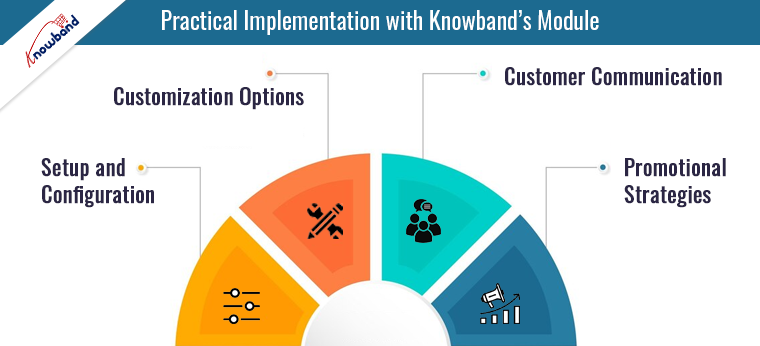
Knowband’s “Prestashop Shipping Cost by Zipcode” module is designed to address these needs effectively. Here’s how it can be implemented to maximize sales:

Setup and Configuration: 

The module is easy to install and configure within the Prestashop platform. Businesses can define shipping rates based on zip code, postal code, or country, ensuring that each location is accurately accounted for.

Customization Options: 

Retailers can set different shipping rates for various locations, including international destinations. This feature is particularly beneficial for businesses looking to expand their market reach without compromising on shipping cost accuracy.

Customer Communication: 

With the Prestashop Shipping Cost by Postal Address module, businesses can communicate shipping costs to customers during the checkout process. This transparency reduces cart abandonment and enhances customer satisfaction.

Promotional Strategies: 

Businesses can leverage the Prestashop Delivery Cost by Post Code module to create promotional shipping offers. For example, offering free shipping in specific zip codes can drive sales in targeted regions.

Conclusion!

Shipping costs have a profound impact on e-commerce conversion rates. By understanding and addressing the factors that influence these rates, businesses can enhance their sales performance. The “Prestashop Shipping Cost by Zipcode” module by Knowband provides a robust solution for customizing shipping costs based on location, ensuring fair pricing, and improving customer experience.

Recommended blog: PrestaShop Shipping Cost by Zip Code Addon


Prestashop Shipping Cost by ZipCode – User Manual

1.0 Introduction

Managing the shipping costs for different countries and regions is the biggest issue while catering to online customers globally. Knowband offers Prestashop Shipping Cost by Zipcode module allows the Prestashop eCommerce store admin to fix different shipping charges for different regions. This Prestashop Shipping Cost by Zipcode addon is one of the best Prestashop extensions. The Prestashop Shipping Cost by Post Code module helps you segregate the countries into the zone. The Prestashop store admin can enter multiple postal codes for the different regions. At the same time, he/she can even set the minimum and maximum range of the postal codes for a particular region from the admin interface of this Prestashop Shipping Cost by the country addon. The shipping cost for each zone can be set easily without any hassle. The charges will be calculated automatically at the checkout page in accordance to the zip code entered by the customer.

This Prestashop Shipping Cost by Zipcode addon is highly customizable and the store admin just needs to configure it as per the requirements. The admin needs to apply shipping cost settings a single time. There is no need to change any setting again and again. The online customers can view the shipping charges at the same time when they enter their area pin code. The transparency of the shipping cost calculation process increases customers trust on the website. The Prestashop zipcode wise shipping cost module makes shipping cost calculation very easy for the online store admin.

1.1. Project Objectives

Listed below are some of the objectives that the store owner can achieve with Prestashop Shipping cost by postal address.

  • The Prestashop eCommerce store admin can fix different shipping charges for the different regions in which the eCommerce site is operating.
  • The shipping charges of the customers are calculated automatically based on the zip code entered by them.
  • The amount charged will including or excluding the tax and handling charges as set by the store admin.
  • Store admin can fix the carrier charges according to the total price or total weight.
  • CSV File upload tab will allow the admin to add the shipping conditions for multiple locations in bulk.

1.2. Features

  • It is very easy to install and configure this Prestashop Shipping Cost by Zipcode addon.
  • The Prestashop Shipping Cost by Post Code module offers a simple and hassle-free implementation.
  • The e-merchant can enable or disable the shipping cost by postal code module just by toggling the button.
  • The admin can select zones from the dropdown list and also can add new zones whenever required.
  • The Prestashop Shipping Cost by Postal Code module admin interface offers a list of the countries to select from.
  • Admin can set shipping cost according to zip codes of the particular region.
  • The Prestashop shipping cost by location module allows admin to set the shipping cost according to the range of the postal codes that exist in that particular region.
  • The Prestashop shipping cost by country allows editing various shipping cost provided by the admin.
  • The shipping cost by zone module allows admin to fix the shipping charge based on zone, country, state/region, city, postcode range.
  • The Prestashop Shipping Cost by location plugin allows the store admin to disable the product delivery for a particular zone or region.
  • The Prestashop Shipping Cost by Postal Code addon is multi-lingual compatible.
  • The Prestashop delivery cost by postcode plugin is compatible with the latest versions of Prestashop.
  • The Prestashop eCommerce store admin can create the term and conditions of the carrier options.
  • ImportCSV file feature in the backend allows the admin to add shipping conditions for various countries, zones, zipcodes in bulk

2.0 Installation

Purchase the Prestashop shipping cost by postcode module from the store. On completing the transaction, follow the below steps:

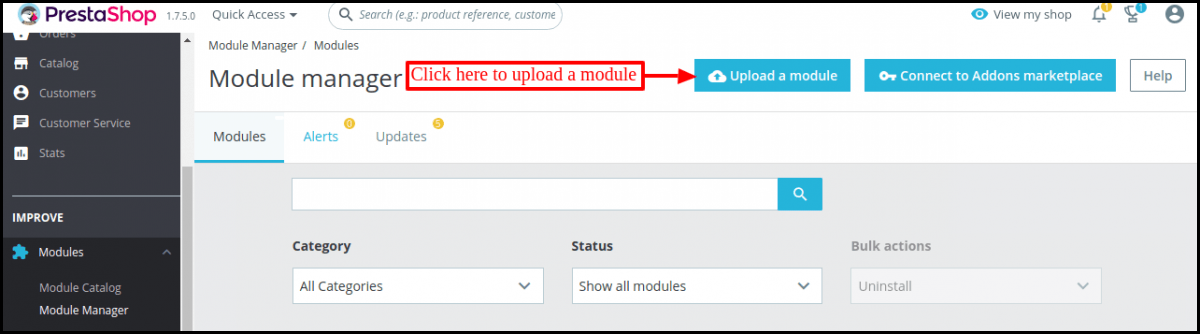
  • From the backend of the store, go to the Module Manager and click on “Upload a module”.

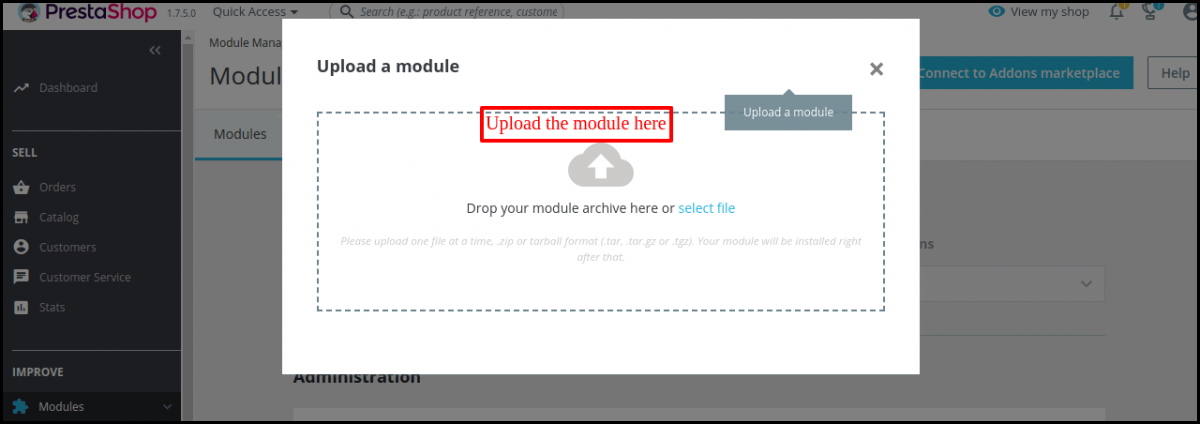
  • Upload the file from the system or drag and drop your module file here in the next tab. This step will install the module and show notification – “Module(s) installed successfully”.

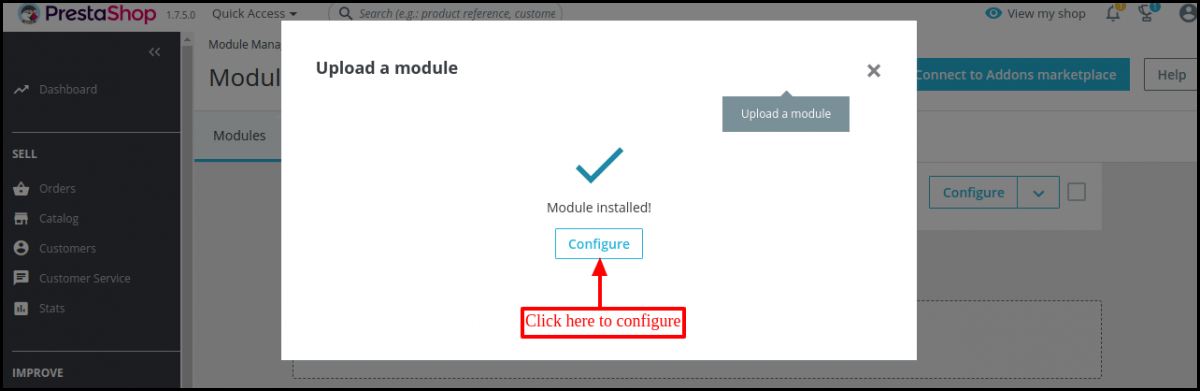
  • Once the installation process is completed, “Module installed” notifications will get displayed.

  • Click on the configure button and your module is ready to use.

In case, you are not able to find the module in the admin modules list, please try searching module by entering the Keyword, Shipping Cost by Zipcode.

3.0 Admin Interface

This Prestashop Shipping Cost by Zipcode module is completely configurable. The settings can be updated via the admin interface.

3.1 How to start using the module?

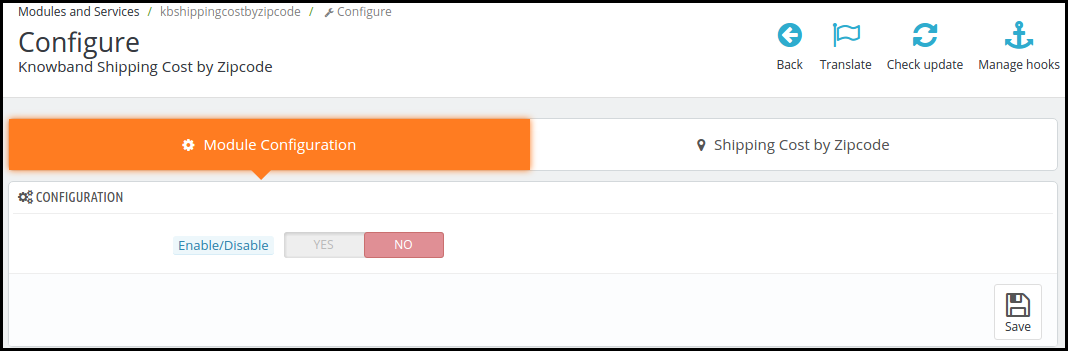
Once the installation is complete, all you need to do is to enable the Prestashop shipment charge by zipcode module on your Prestashop store by toggling the button as shown in the image below.

3.2 How to add new shipping conditions?

The very first step for adding new shipping cost by zipcode is to divide the location where you cater your products into different zones. The Prestashop Shipping Cost by Post Code module allows easy creation of zone and separation of the various regions. Follow the below-mentioned steps in order to create new conditions.

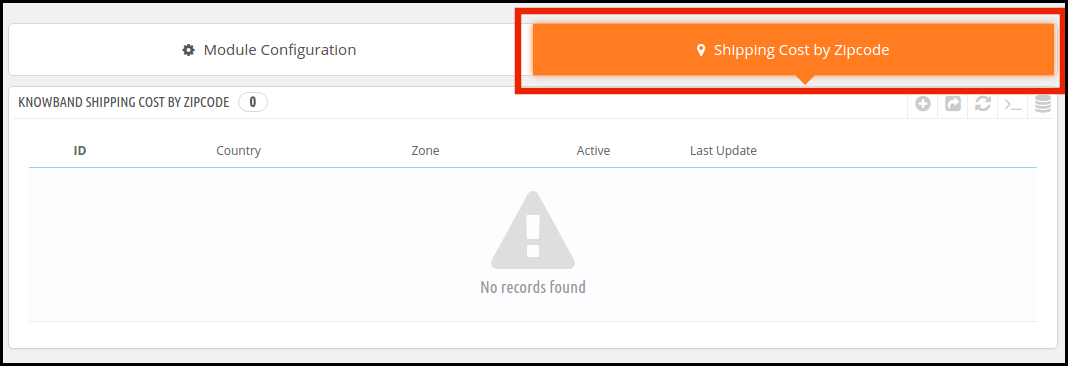
1.  Go to the ‘Shipping Cost by Zipcode’ tab.

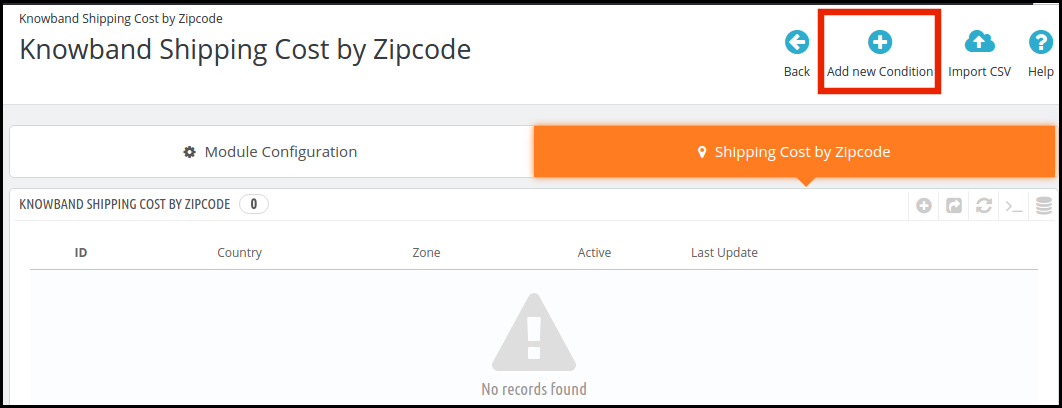
2. In order to create new zones, you need to click on the ‘Add New Condition’ on the top of the admin interface.

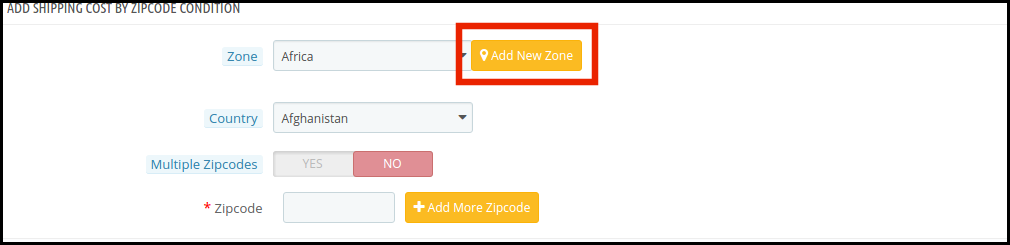
3. Once this is done, you’ll be redirected to the customization page. The Prestashop store admin is required to enter the following information as shown in the image below.

Let us discuss the options one-by-one.

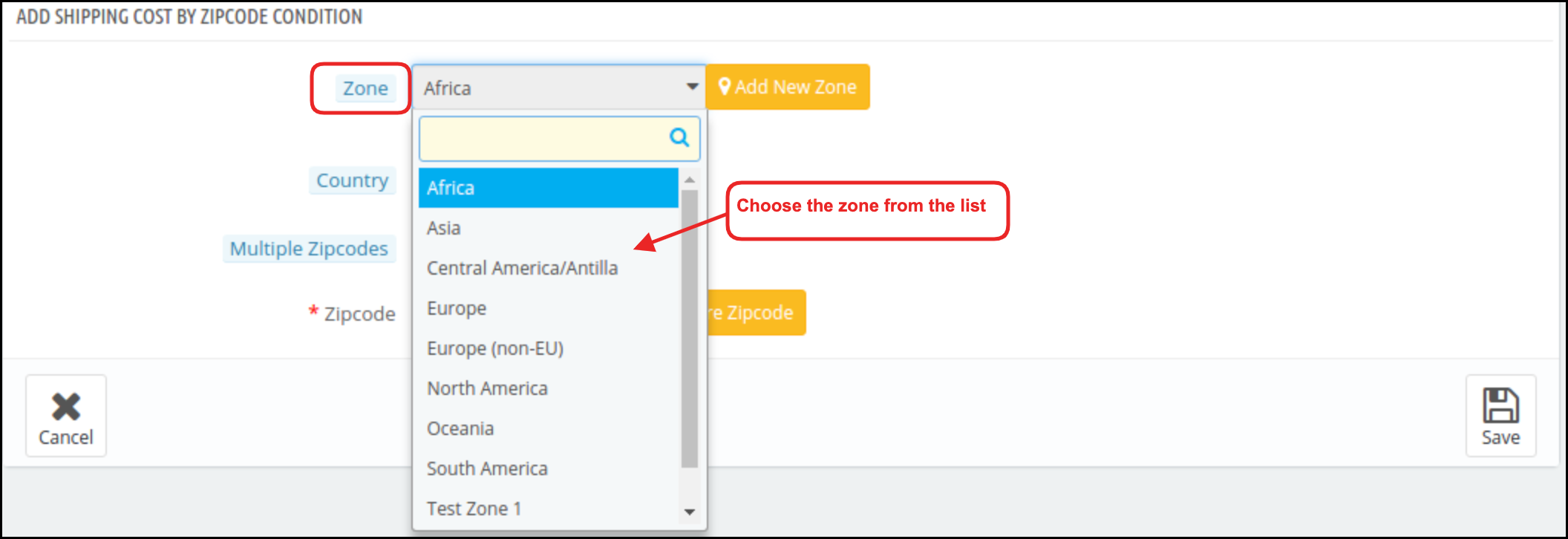
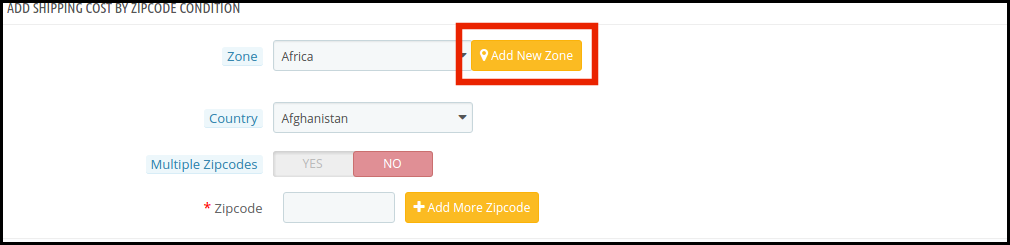
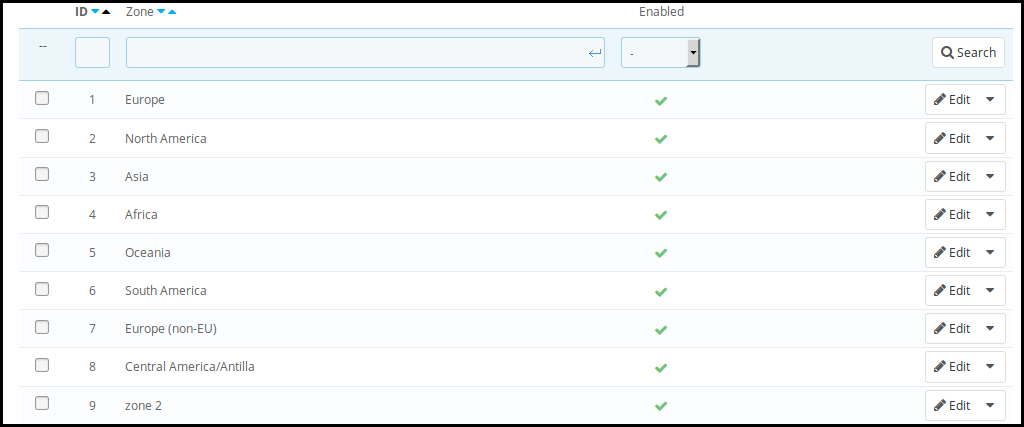
Zone: The various zones already created on the store will be shown in the drop-down list. The Prestashop store admin can select anyone and make the necessary changes.

In case, the admin wants to create a new zone, he can do so by clicking on the ‘Add New Zone’ option.

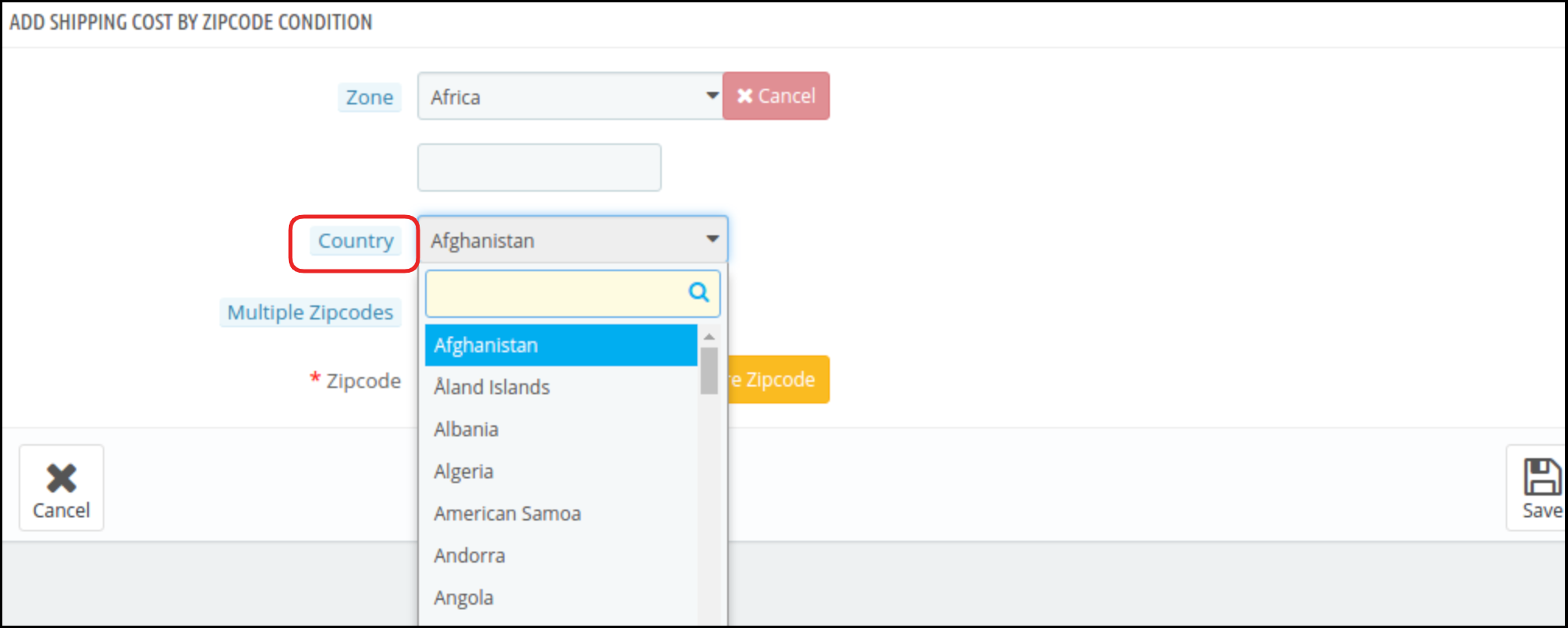
Country: The country for that particular zone can be selected from the list available.

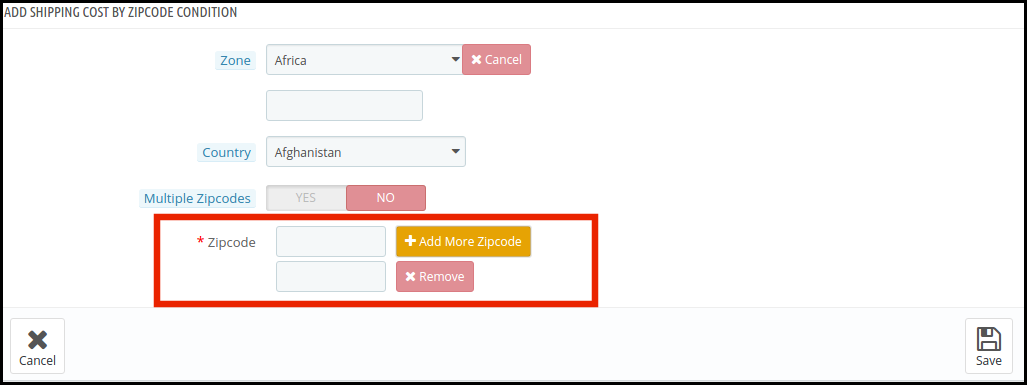
Zipcodes: A particular zone can have either have multiple zip codes. The Prestashop store admin can add the postal codes by clicking on the ‘Add More Zipcodes’.

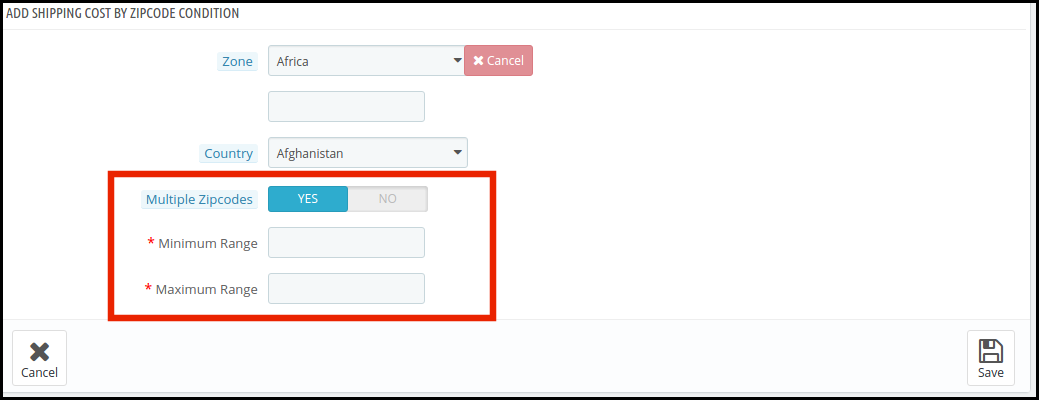
Multiple Zipcode: In case the eCommerce store admin is looking to add the range of the postal codes, he can do so switching this button on.

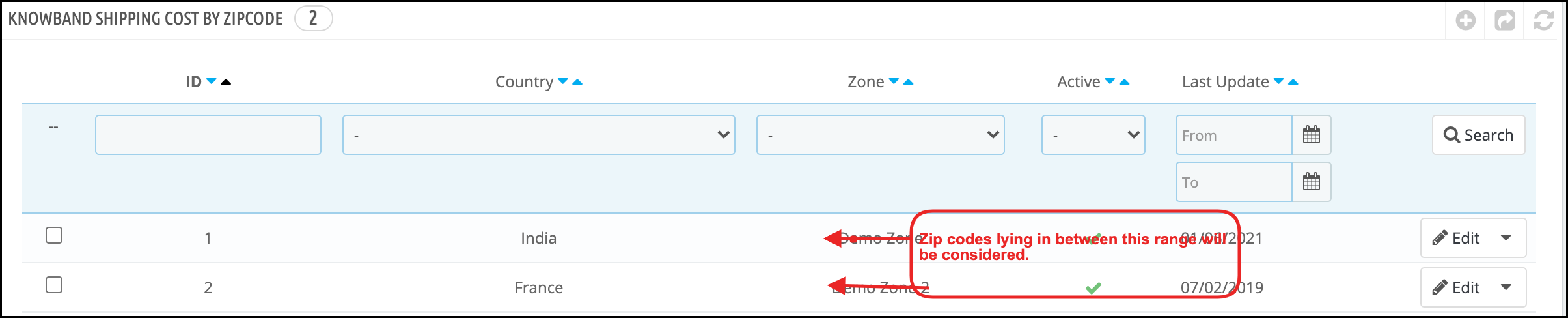
The Prestashop eCommerce store admin can then enter the minimum and maximum range of the postcodes. Any zip codes lying in between this range will be considered in that particular zone and the shipping charges will be calculated accordingly.

The list of the zones created can be viewed in the ‘Shipping Cost by Zipcode’ tab.

The exiting zones can be edited or deleted by clicking on the respective buttons.

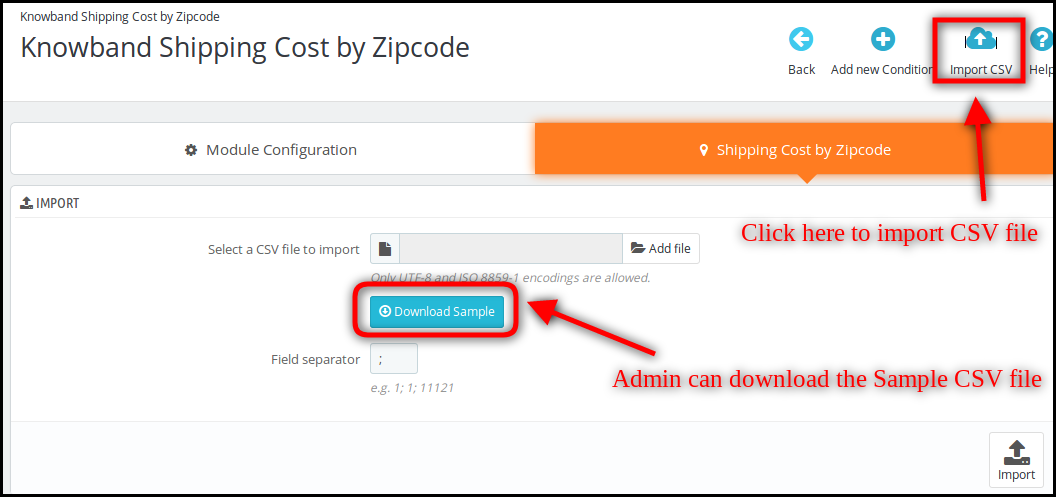
Import CSV:

The store admin can download a sample CSV file for adding multiple zip-codes. The admin just needs to click on the “Import CSV” option. The admin can download the sample CSV file.


Sample CSV File: There are three fields in sample CSV file ie.Country id, Zone and Zip Code.


The admin can enable or disable the zone from the admin panel.

After activating a particular zone the admin can insert the particular country ID and zip code easily. Thus the admin can easily enter multiple zipcodes at a time without any hassle.


3.3 How to enter shipping costs?

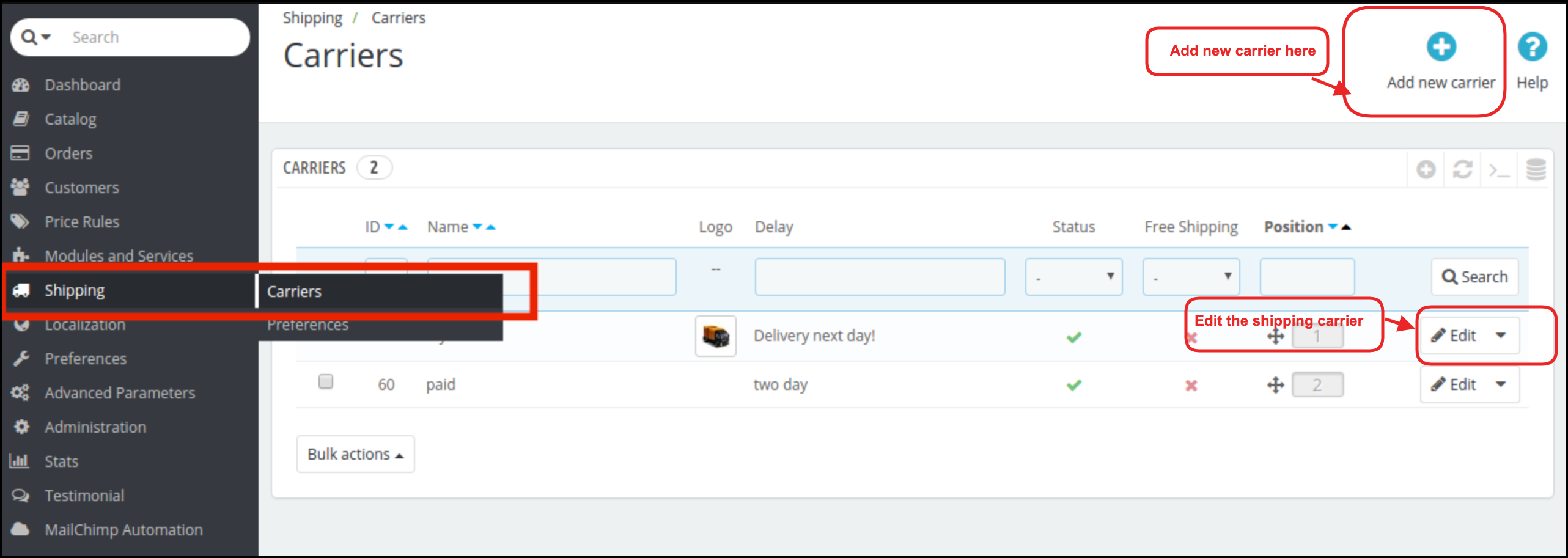
The shipping conditions can be fixed in the Shipping option of the main menu of the admin interface. Follow the below-mentioned root for the same.

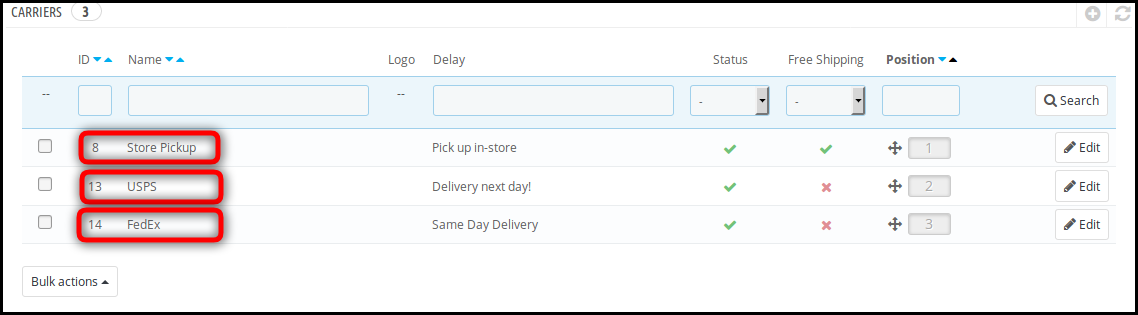
Go to the Main Menu -> Shipping -> Carrier -> Select the carrier option that you want to edit.

The admin can browse the ‘Edit’ option in order to make the necessary changes.

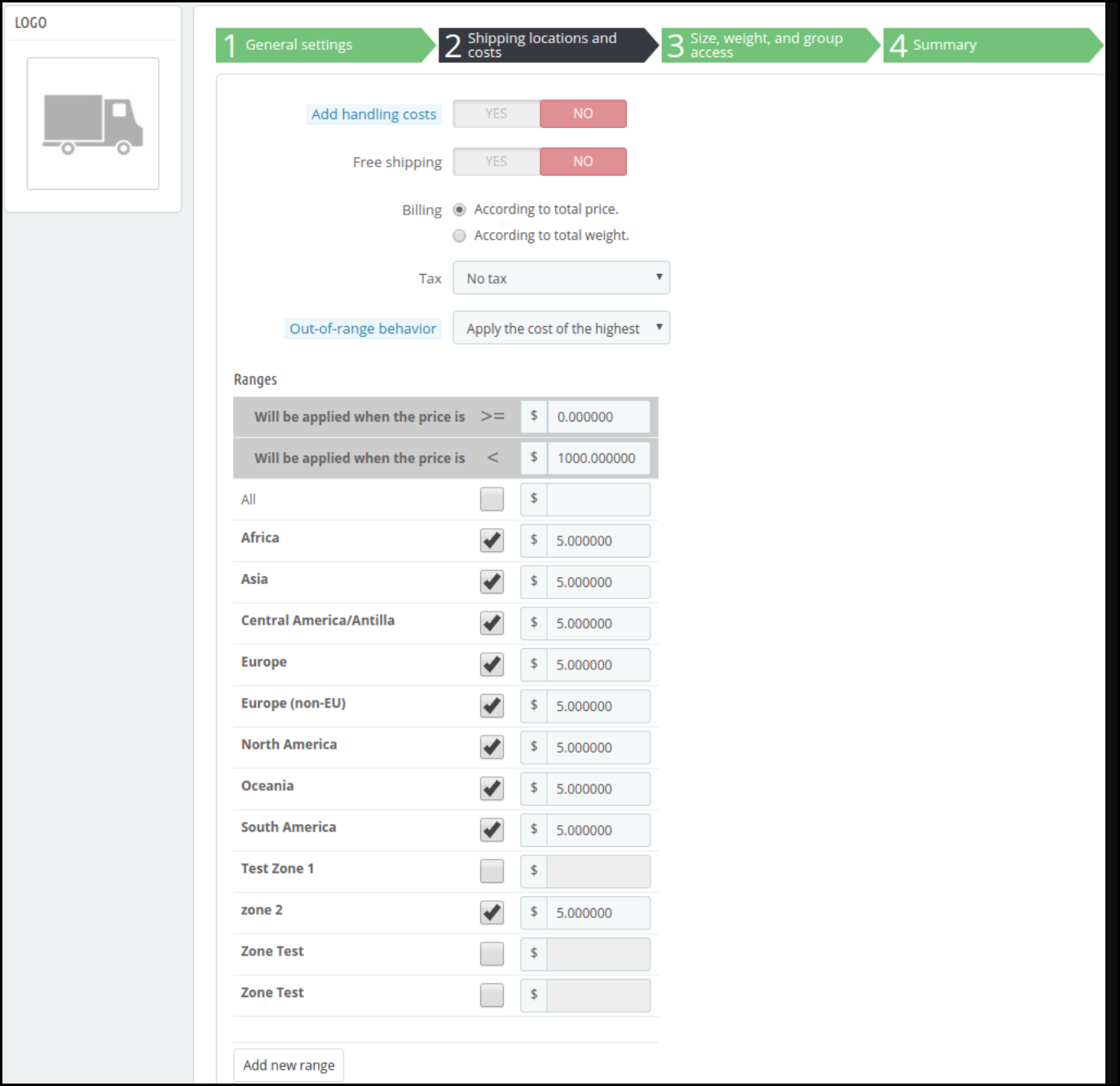
While the ‘General Setting’ and other options remain the same as per the store admin’s requirement, he can change the shipping cost based on the zipcodes. For this, he needs to go to the ‘Shipping Locations and Costs.

The Prestashop eCommerce store admin gets to optimize the shipping management by adding delivery cost for different regions. The shipping cost for the customers will then be calculated by taking all the aspects into account.

4.0 Website UI

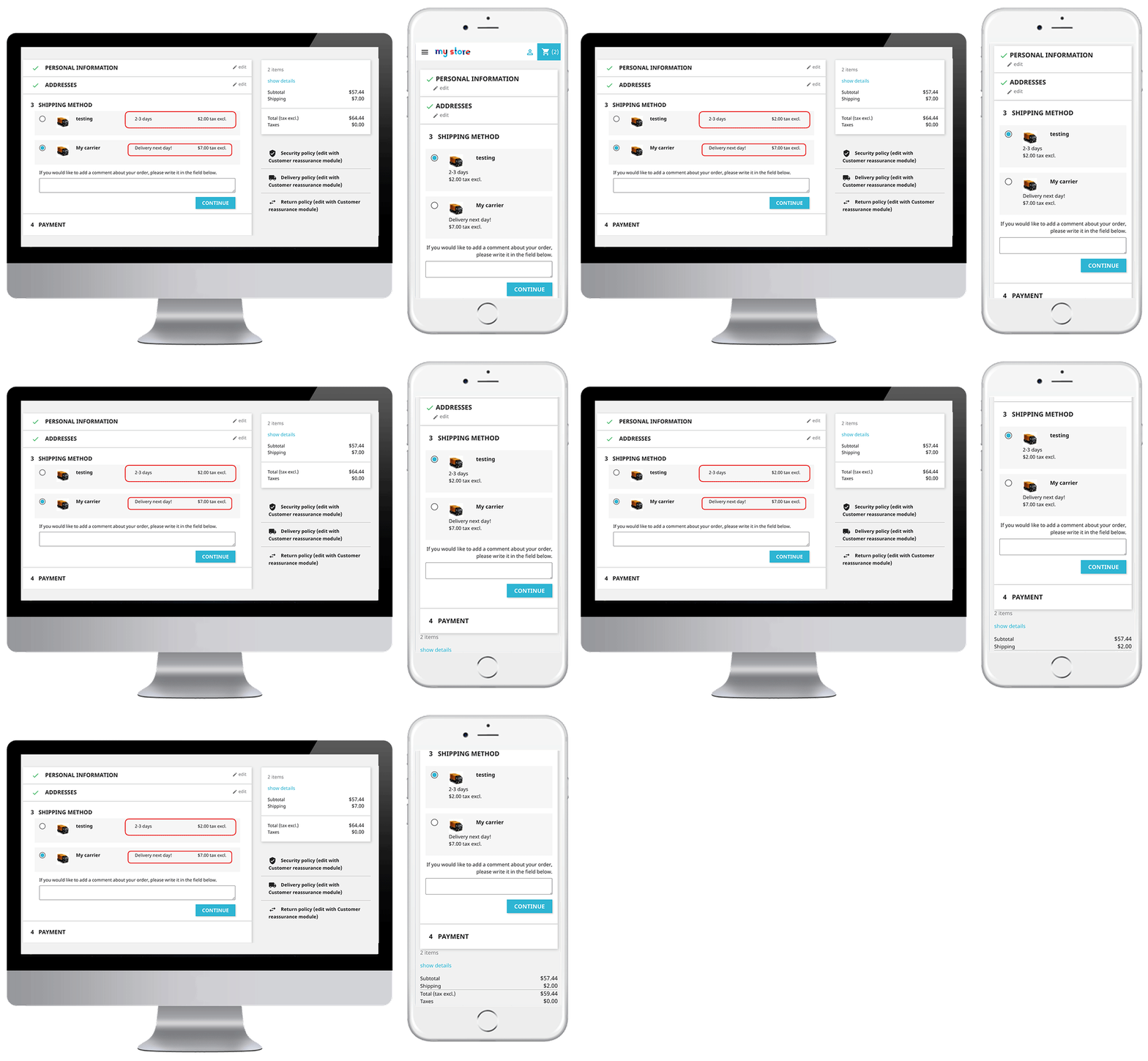
In the front-end of the eCommerce website, the customer can enter their postal code and the carrier option available in that location and the total shipping cost will be calculated and shown in the checkout page as shown in the image below:

This way, the online store merchant can implement Prestashop Shipping Cost by Zipcode addon for automatic cost calculation. The eCommerce store admin can manage the delivery cost as per the customer’s area Pincode. The Prestashop Shipping Cost by Zipcode module allows the online store admin to segregate customers location into regions, countries, zones and area pin codes. The online store merchant can also include tax and handling fee in the shipping charges if he wishes to add it. The Prestashop Shipping Cost by Postal Code module allows the store admin to offer services and products all over the world by simplifying the shipping cost calculation process. After a successful setup, the Prestashop delivery cost by postcode addon automatically calculates the shipping cost on the checkout page.

For additional guidance, please refer to the tutorial video available below, which provides a step-by-step walkthrough of this module.

For more Prestashop Addons please visit Knowband.

For more details about this Prestashop Shipping Cost by Zipcode module:

Buy Now Knowband Prestashop Shipping Cost by Postal Code Module

Knowband Prestashop Shipping cost by postal address Admin Demo 

Knowband Prestashop Shipping rate by zipcode Front Demo

Prestashop zipcode wise shipping cost is also available at the Addon Store

Please contact us at support@knowband.com for any query or custom change request as per your business requirement.