How to Setup SEO-Friendly URLs for your PrestaShop Store – A Comprehensive Guide

PrestaShop is a powerful eCommerce platform that enables businesses to create and manage online stores efficiently. One crucial aspect of running a successful online store is ensuring your website is optimized for search engines. A significant part of SEO (Search Engine Optimization) is creating clean, descriptive, and user-friendly URLs. In this guide, we’ll explore the steps to set up SEO-friendly URLs for your PrestaShop store.

Why Are SEO-Friendly URLs Important?

SEO-friendly URLs are crucial for improving visibility on search engines and enhancing user experience:

  • Improved Rankings: Search engines rely on URLs to interpret a page’s content. You can boost your search rankings by adding more descriptive URLs with relevant keywords
  • User Experience: Clean and readable URLs help users understand what to expect on a page.
  • Increased Click-Through Rates: Well-structured URLs encourage users to click on your links in search results.

Steps to Create SEO-Friendly URLs in PrestaShop

1. Enable Friendly URLs in PrestaShop

PrestaShop includes a built-in feature to generate friendly URLs. Follow these steps to enable it:
Log in to your PrestaShop Admin Panel.

Navigate to Shop Parameters > Traffic & SEO.

Scroll down to the Set Up URLs section.

Toggle the Friendly URL option to “Yes.”
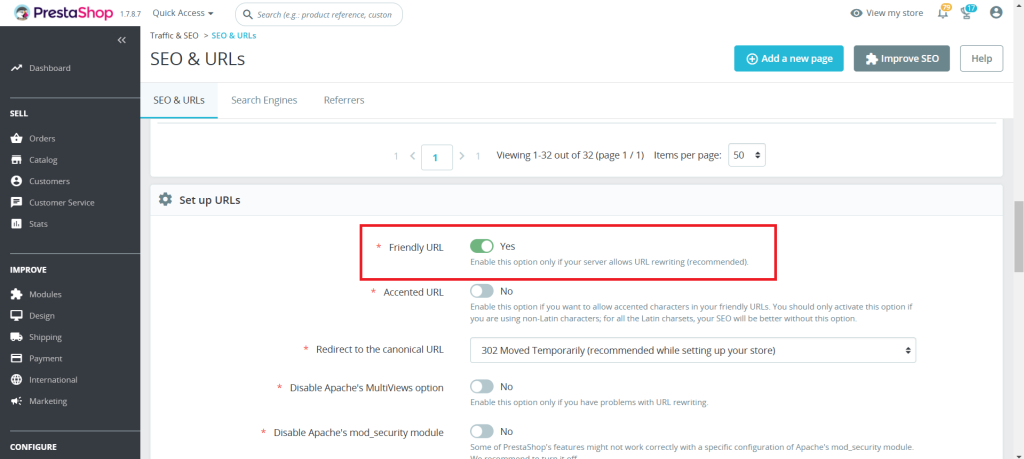
Click Save.

2. Configure URL Settings

1. In the same Traffic & SEO page, you can configure:

  • Accented URL: Decide if your URLs should include special characters.
  • Redirect to the Canonical URL: Enable this to avoid duplicate content issues.

2. Customize the Base URLs for your store’s language preferences if you run a multilingual store.

3. Optimize Individual Product URLs

PrestaShop allows you to manually edit URLs for products, categories, CMS pages, and more. Below are the steps showing how to make the Product URLs SEO-Friendly:

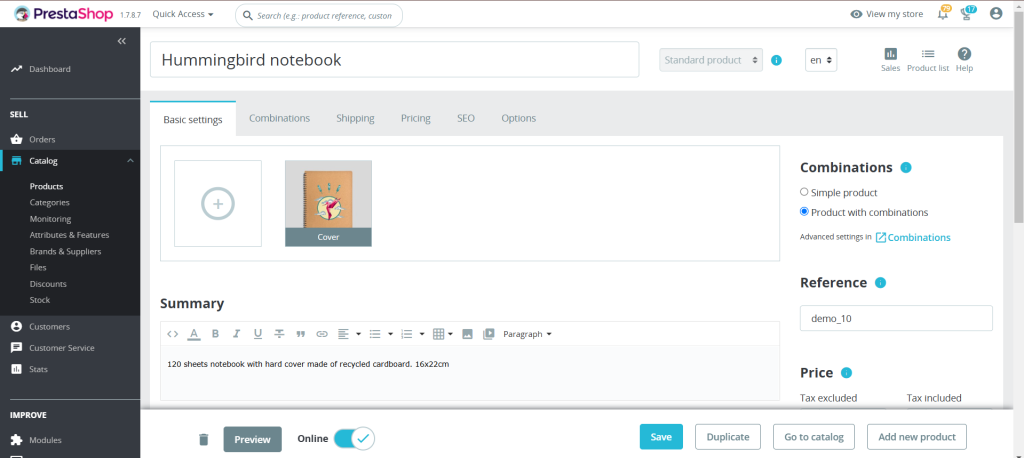
1. In the Admin panel, Open Catalog > Products:
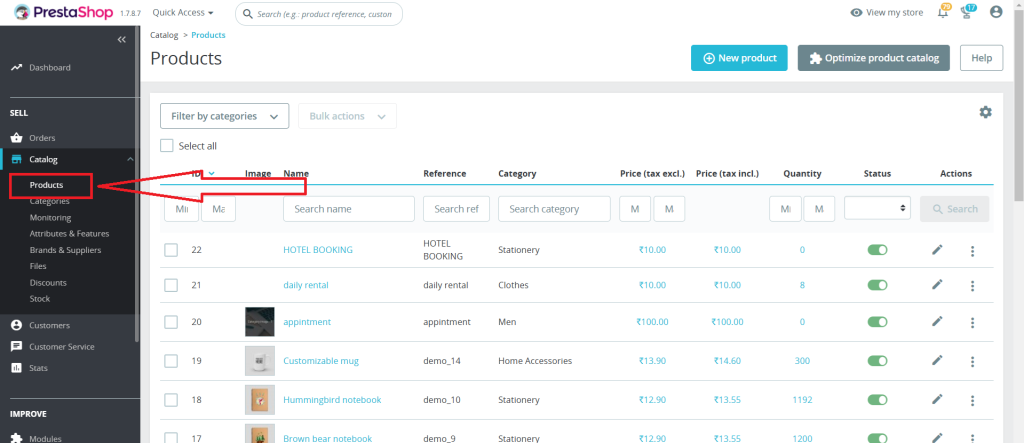
2. Select the product you want to edit.
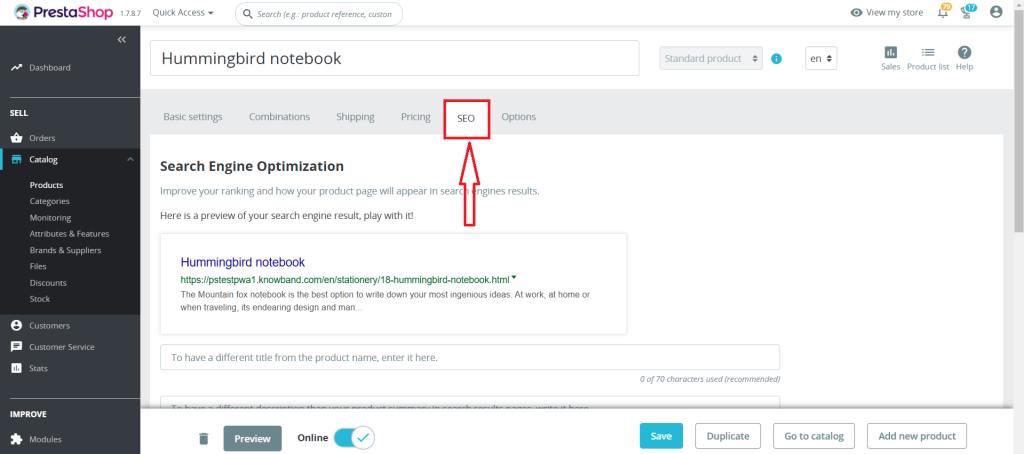
3. Navigate to the SEO tab.
4. Optimize the Friendly URL field by using a concise, keyword-rich URL.
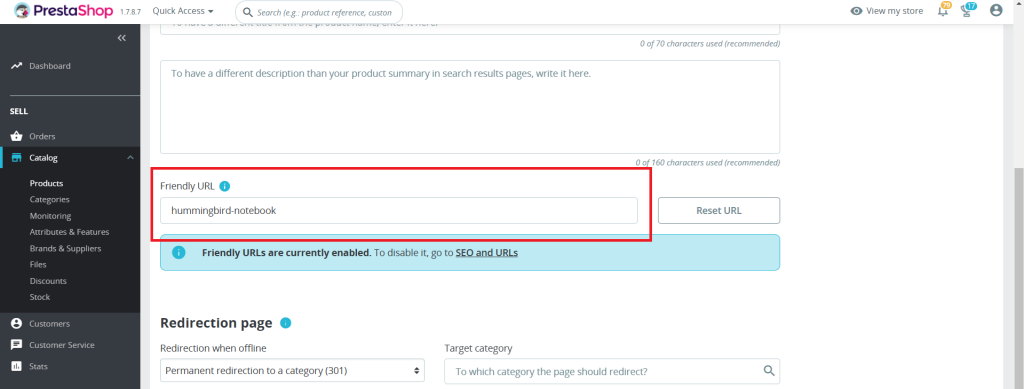
For example:
Instead of the product?id=123, use handmade-ceramic-mug.

5. Save your changes.

Add Clean URLs & 301/302/303 redirection

SHOP NOW

4. Use Keywords Strategically

When crafting your URLs:

  • Include primary keywords related to the page’s content.
  • Avoid stuffing URLs with unnecessary words or repetitive terms.
  • It is recommended to use hyphens (-) for separating the words instead of underscores (_).

5. Avoid URL Parameters

Dynamic URLs with parameters like ?id=123&ref=456 are harder for search engines and users to understand. Use PrestaShop’s friendly URL feature to replace these with clean, descriptive URLs.

6. Redirect Old URLs to New Ones

Implementing a 301 redirect from the old URL to the new one is an essential step that one should ensure while updating the SEO URLs. This helps maintain SEO rankings and prevents users from encountering 404 errors. Redirects can be managed through your server’s .htaccess file or an SEO module.

7. Test Your URLs

After configuring your URLs:

  • Verify they are working correctly.
  • Use online tools like Google’s URL Inspection Tool to check how search engines view your URLs.
  • Test for broken links and resolve them promptly.

Additional Tips for SEO-Friendly URLs

  • Use Lowercase Letters: URLs are case-sensitive. Stick to lowercase letters for consistency.
  • Avoid Stop Words: Words like “and,” “or,” “the” can be omitted unless necessary for clarity.
  • Limit URL Length: Keep URLs concise while still descriptive.
  • Update Sitemap: After making changes, update your sitemap and submit it to Google Search Console.

Recommended Modules for SEO in PrestaShop

To enhance your SEO efforts, consider using these modules:

Conclusion

SEO-friendly URLs are a cornerstone of an effective eCommerce SEO strategy. By following this guide, you can ensure your PrestaShop store’s URLs are optimized for search engines and user-friendly. Regularly review and update your URLs to maintain their effectiveness as your store grows.

Adopting these practices can significantly improve your website’s visibility on search engines, drive higher volumes of targeted traffic, and ultimately lead to an increase in conversions and overall engagement.
Happy optimizing!

Appendix: Common Issues and Troubleshooting

Friendly URLs Not Working

  • Ensure that your server supports URL rewriting (mod_rewrite for Apache).
  • Verify that the .htaccess file is correctly configured and writable.
  • Check permissions for the /var/www/html/ folder if hosted on a Linux server.

Broken Links after URL Changes

  • Whenever you modify URLs on your website, promptly update your sitemap to reflect these changes and resubmit it to Google Search Console. This ensures that search engines quickly discover, crawl, and index the updated URLs, preserving your site’s visibility and SEO performance.
  • Use a redirect manager module or .htaccess to map old URLs to new ones seamlessly.

3. Multilingual Store Challenges

  • Incorporate language-specific keywords in your URLs to enhance localization.
  • Make sure each language version of your store has a unique URL structure.

4. Duplicate Content Due to Canonical Issues

  • Enable “Redirect to Canonical URL” in Traffic & SEO settings.
  • Review all indexed pages using tools like Screaming Frog to detect duplicates.

Optimizing SEO in PrestaShop: Tips for Better Search Rankings!

Running a successful online store hinges on one critical factor – the ability to showcase your products to potential customers. This is where Search Engine Optimization (SEO) plays a pivotal role.

In the realm of e-commerce, PrestaShop is a favored choice, renowned for its versatility and extensive feature set. Nevertheless, like any other platform, it necessitates meticulous SEO optimization to secure a prominent position in search engine rankings.

In this article, we will delve into some essential SEO strategies tailored to enhance the search visibility of your PrestaShop store and draw in more organic traffic.


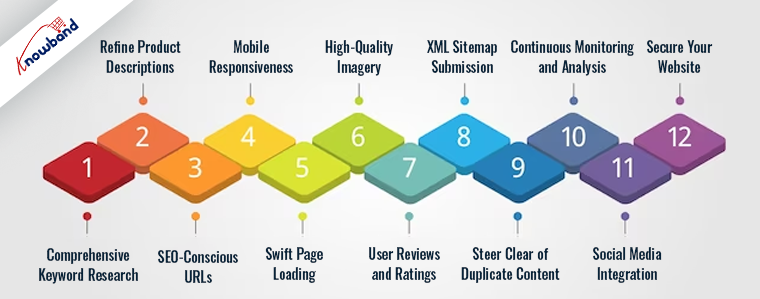
1. Comprehensive Keyword Research:

Keyword research serves as the cornerstone of an effective SEO strategy. Initiate the process by identifying pertinent keywords and phrases that your target audience is likely to employ when searching for the products you offer. Tools such as Google Keyword Planner and SEMrush prove invaluable for discovering these keywords. Skillfully integrating them into your product titles, descriptions, and content can markedly augment the search engine rankings of your PrestaShop store.

2. Refine Product Descriptions:

Crafting unique and compelling product descriptions not only benefits your customers but also appeals to search engines. Abstain from using manufacturer-provided descriptions, which are often duplicated across multiple websites. Instead, create original, informative descriptions that incorporate your target keywords. Emphasize product attributes, advantages, and any distinctive selling points.

3. SEO-Conscious URLs:

PrestaShop permits you to customize your URLs. Optimize them for SEO by incorporating pertinent keywords and keeping them concise. For instance, replace “/product123” with “/red-womens-running-shoes.” Moreover, you can also employ Knowband’s Prestashop SEO Optimizer addon to ensure SEO-friendly page URLs.

4. Mobile Responsiveness:

Google prioritizes mobile-friendly websites in its search rankings due to the larger user base on mobile devices. Consequently, as a PrestaShop administrator, it’s imperative to ensure that your store is responsive and delivers an exceptional user experience on mobile devices. Utilize Google’s Mobile-Friendly Test to assess your site’s mobile optimization.

5. Swift Page Loading:

Site speed constitutes a pivotal ranking factor. Slow-loading pages can provoke user frustration and lead to high bounce rates. To circumvent such pitfalls, leverage tools like Google PageSpeed Insights to identify and rectify speed-related issues. Furthermore, you can optimize load times by compressing images, enabling browser caching, and selecting a dependable hosting provider.

6. High-Quality Imagery:

In the realm of e-commerce, images play an integral role. Employ high-quality images for your products and ensure that you include alt text containing pertinent keywords. Alt text not only enhances SEO but also enhances site accessibility.

7. User Reviews and Ratings:

Encourage customers to provide reviews and ratings for your products. Positive feedback not only bolsters your credibility but also contributes to SEO. Google often displays star ratings in search results, enticing higher click-through rates.

8. XML Sitemap Submission:

PrestaShop automates the generation of XML sitemaps. Submit your sitemap to Google Search Console to ensure efficient crawling and indexing by search engines. This expedites the appearance of your pages in search results.

9. Steer Clear of Duplicate Content:

Duplicate content can compromise your SEO endeavors. To circumvent such scenarios, employ canonical tags to specify the preferred version of a page when multiple similar pages exist. Additionally, set up 301 redirects for outdated URLs to mitigate duplicate content issues.

10. Continuous Monitoring and Analysis:

Regularly monitor your website’s performance utilizing tools like Google Analytics and Google Search Console. Track keyword rankings, organic traffic, and user behavior. This data yields valuable insights into what’s effective and where improvements are warranted.

11. Social Media Integration:

Integrate your PrestaShop store with social media platforms. Sharing your products on social media amplifies visibility, boosts traffic, and can lead to enhanced search engine rankings.

12. Secure Your Website:

Google favors secure websites with HTTPS. Ensure that your PrestaShop store employs an SSL certificate to encrypt data and safeguard customer information.

In Conclusion:

In summary, optimizing SEO in PrestaShop is pivotal for elevating your online store’s search rankings and attracting organic traffic. By adhering to these strategies and staying abreast of SEO best practices, you can bolster the visibility of your PrestaShop store in search engine results pages (SERPs) and ultimately elevate your e-commerce sales.

Bear in mind that SEO is an ongoing endeavor. Continuously refine your strategy, adapt to shifts in search engine algorithms, and stay ahead of the competition to maintain and enhance your search rankings.

How to setup SEO friendly URL for your prestashop store?

SEO friendly URL is important for your eCommerce business as web URLs play a vital role in Google Search Ranking. URL defined as an address for your web page. These SEO-friendly URLs offer an intuitive user experience for website visitors, who can just by looking at the URL figure out the web page contents. According to Google, “A site’s URL structure should be simple. To construct URLs logically, consider organizing your content. It needs to be done in a manner that is most intelligible to humans (when possible, readable words rather than long ID numbers).” 

For Prestashop, the standard URL structure is https://psm.knowband.com/urlcleaner/16/en/casual-dresses/3-printed-dress.htm. You can see the product URL including the product id also.

Prestashop is better defined as an efficient and innovative e-commerce solution packed with all the features required to build an online store and grow your business. Knowband offers various Prestashop plugins for your eCommerce business.

Therefore, optimize the store URLs for a better ranking on SERP. Hence use PrestaShop SEO Friendly URL Addon.

PrestaShop SEO Friendly URL Addon

Prestashop SEO Friendly URL Addon helps Prestashop owners to remove the ID from the URLs of products, categories, suppliers, manufacturers, CMS, and all other pages of your store. Furthermore, it makes the URLs SEO-friendly. To redirect the old URLs to New URLs, the admin can Prestashop URL Redirects module with the assistance of 301,302 and 303 redirections. 

What are the key features of PrestaShop SEO Optimizer – Clean URLs & 301/302/303 redirection Addon?

Feature 1: Prestashop SEO Friendly URL remove the ID from a different section

Prestashop SEO Friendly URL removes the ID from different sections of the website such as from Product, Category, Manufacturer, Supplier, and CMS page URLs.

By removing the product id and category id, Prestashop URL CLeaner Module makes the product’s URL SEO friendly. Furthermore, the store admin can remove the manufacturer id as well as supplier id from the respective page. To remove the ID from the CMS pages as well as other pages, the store admin can utilize the PrestaShop Rewrite URL module. Also, to remove .html from the URLs, Prestashop Rewrite URL Module even helps merchants.

Feature 2: Prestashop SEO Friendly URL Addon Offers 301 redirects, 302 redirects, and 303 redirects:

With the utilization of three redirection choices i.e. 301 redirects, 302 redirects, and 303 redirects, PrestaShop 301/302/303 Redirect Module redirects the old URLs to new URLs.

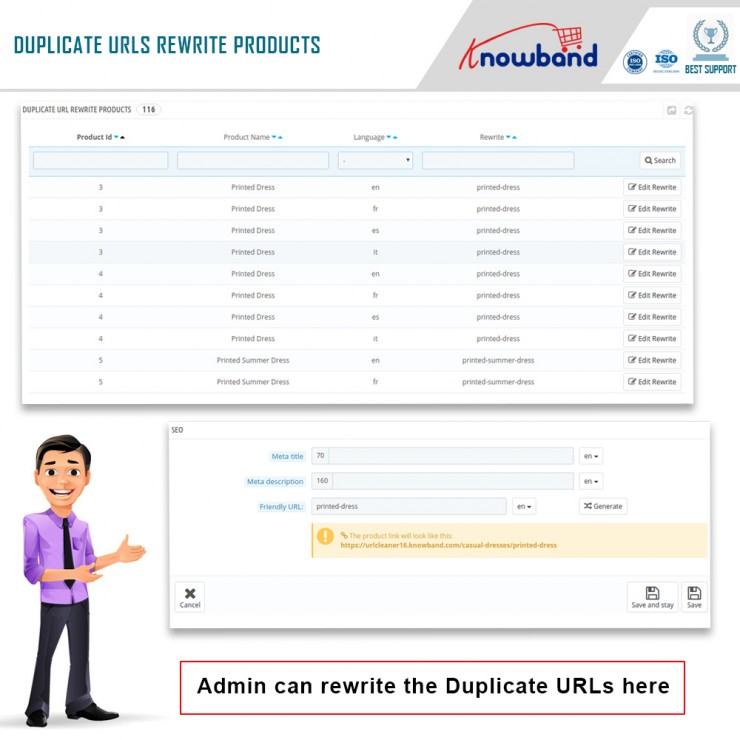
Feature 3: PrestaShop Rewrite URL module Modify Duplicate URLs:

The store merchant can see the duplicate URL report with this PrestaShop Fixed Duplicate URL Addon. Furthermore, to remove the duplicity they can rewrite the same.

How beneficial is PrestaShop URL Cleaner Module?

  • Improve website ranking

Prestashop SEO URL Addon is highly beneficial as it helps merchants to enhance or improve the website ranking in the Google SERP results. Furthermore, it reduces the effort of manual tasking that saves a lot of time for the Prestashop admin.

  • Great for user experience and mobile responsive

For a better and more successful eCommerce business, the admin needs to pay attention to a better user experience as well. Hence, Prestashop URL Cleaner Module leads to improvement in the user experience. Mobile responsiveness is another reason to use Prestashop URL Cleaner Module.

  • Compatibility and support

Prestashop URL Redirect module supports different stores. Further, it is compatible with SSL and is multilingual too. 

  • Easy to use backend interface

Prestashop Clean URL Addon offers easy to use back-end interface. 

Admin Benefits offered by PrestaShop 301/302/303 Redirect Module:

  • PrestaShop 301/302/303 Redirect Module is beneficial for store admin as well. This Prestashop module efficiently optimizes the organic search (SEO) on all searches. Furthermore, with the assistance of the Prestashop URL Redirect module admin can create an unlimited number of redirects.
  • Offers admin 3 flexible choices on redirects i.e. 301 redirects, 302 redirects, and 303 redirects. Furthermore, auto-generated IDS and numbers can be removed by online retailers from the URLs to make them Search Engine Optimization friendly.
  • Store admin can even improve the store’s ranking on Google.

Are customers benefitted from PrestaShop URL Cleaner Module?

Abousltely. Customers have benefitted from Prestashop URL Cleaner Module as well. With the assistance of this module, online shoppers can find and even remember the URL of the products page in future reference easily.

PrestaShop URL Cleaner Addon helps in creating a short and well-defined URL structure that helps visitors quickly get an insight into the page information.

Final Thought

One of the biggest challenges for an online business is higher ranking on the search result pages of search engines like Google, Bing, in order to increase the chances of better sales. As a result, Knowband has developed the URL Cleaner (SEO-friendly) Module to improve the search ranking. 

Knowband

KnowBand is known for providing efficient plugins for eCommerce systems. Furthermore, Knowband has years of experience working with eCommerce websites. Along with Prestashop, Knowband offers plugins for other eCommerce platforms such as Magento, Prestashop, OpenCart, and Shopify. Custom module development as well as customization services provided by Knowband for websites and modules.