How important is an eCommerce loyalty program for an eCommerce store?

Want to encourage customers to purchase from your store? eCommerce Loyalty Program does that for you. An eCommerce loyalty program helps in motivating customers to make repeat purchases in your online shop by rewarding them. Freebies, discounts, coupons, or cashback, all these things can be used as rewards. One of the best examples of an eCommerce loyalty program is Starbucks Rewards Program which lets customers earn stars and for each dollar spent, the buyer can earn one star. After 60 stars, customers will get a free drink or a free slice of cake.  

In this blog, we will try to understand- what makes this program important and the benefits offered by it.

Customer loyalty- what makes it so important?

Should smaller businesses focus on attracting new customers? or should they focus on existing ones and make sure they come back again and again? These are some of the questions that can make budding business owners confused. In case you are one of those budding eCommerce owners and unsure whether you should focus on acquisition or retention, here’s why both types of buyers- existing and loyal buyers matter. 

Retention is an effective way of growing your business and customer loyalty is a major part of it. As per studies, 75% of customers have switched brands for a better loyalty program whereas 52% of customers will prioritize and shop from brands where that have points and rewards in their account.

How beneficial is the eCommerce Loyalty Program?

eCommerce Loyalty Program comes with significant advantages that help your eCommerce store to grow. Following are the perks of the program.

  • eCommerce Loyalty Program results boost customer retention

One of the major reasons for using the eCommerce Loyalty Program is that it boosts customer retention. Existing customers love to be rewarded for more purchases. Furthermore, of companies that run loyalty programs on eCommerce stores, 81% of shoppers remain loyal to such accompanies according to studies. On the other hand, 69% of shoppers say they choose retailers based on customer loyalty and earned rewards.

Hence, such studies have proven that loyalty programs love the opportunity to receive rewards as well as can achieve frequent conversions. Moreover, they are more likely to stay in your business and avoid switching to competitors once customers earn points and level up.

  • Opt for eCommerce Loyalty Program if looking for higher sales

eCommerce Loyalty Program is advisable for merchants that are looking for higher sales. Increasing customer loyalty is very simple. Furthermore, this program even allows store owners to reward their lifelong customers by staying loyal to their business. The more customers you keep, the more your business will grow. 

 A 5% increase in customer retention can increase a company’s profits by 25% to 125% according to an interesting study. Moreover, 81% of shoppers believe that the loyalty program is more likely to continue shopping under the brand. 62% of US mobile shoppers say the loyalty program will increase store visits.

  • eCommerce Loyalty Programs offer budget-friendly sales and marketing strategy

eCommerce Loyalty Programs offers budget-friendly sales as well as an efficient marketing strategy. Furthermore, if we compare customer acquisition and retaining existing customers, customer acquisition is about five times more expensive than retaining existing customers. So to attract existing customers instantly use Loyalty programs. With proper loyalty reward software and optimized content, it’s also very easy to manage.

  • Helps retain existing customers 

On average, loyal consumers spend 67% more than new consumers. This is a non-negligible statistic. At the same time, acquiring customers can cost at least five times more than retaining existing customers. So to have a positive impact on your business, you can apply this idea. Moreover, Loyalty program members can bring more value to your business during difficult times. 

Why choose Knowband modules?

Knowband is famous for offering some of the best plugins for eCommerce systems. With years of experience with eCommerce websites, Knowband knows what works best for the merchants and what does not. Along with efficient plugins for different eCommerce platforms such as Opencart, Prestashop, Magento, and Magento 2, Knowband offers the most efficient after-sales support.

PrestaShop Loyalty Point Module 

The module is beneficial for Prestashop store owners as it allows the admin to provide the store credit to the customers for certain actions. Certain actions include- New order, Sign-up on the store, etc.


Opencart Loyalty Points extension 

Permitting admin to provide loyalty points or store credits to their customers, Knowband’s offers Opencart Loyalty Points Extension. Furthermore, this extension allows customers to make use of their next purchase in the store in the form of a discount.
Magento Loyalty Points Extension

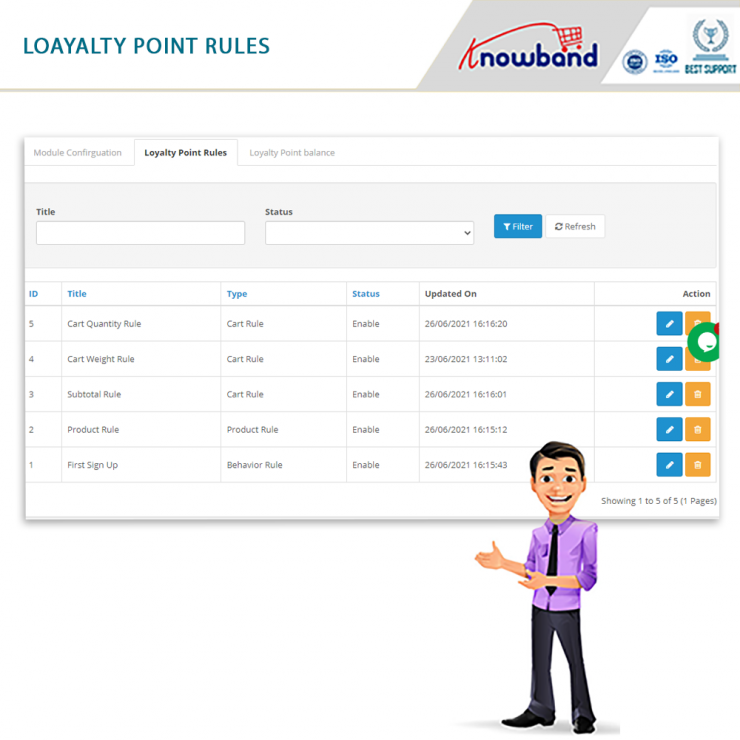
Magento Loyalty Points Extension permits online merchants to provide loyalty points on specific events. Specific events include new registration, first order, on ordering any specific product or products of any specific amount.
Magento 2 Loyalty Points Extension

Magento 2 Loyalty Points Extension allows online admin to provide loyalty points to online buyers. Loyalty points can be offered to online shoppers at different events. For instance, new signup, first order, purchasing a specific product, ordering a product from a specific category, and placing orders of a specific amount or more. 

Final Note:

When loyalty programs come with so many benefits hence it would be great to start one for your business today. With the assistance of Knowband modules, you can make this process easier and can take your business to next level.

As Knowband offers efficient post-sales support to the customers hence feel free to write us at support@knowband.com.


OpenCart Loyalty Points Extension – User Manual

1.0 Introduction

Did you know that increasing your customer retention rate by 5% boosts your profits by as much as 95%? But far too often, businesses choose to focus on attracting new shoppers – not looking after existing ones. Understandably, you want to grow your customer base. But how do you keep hold of the people who are more likely to buy from you again? Well, one solution is to create a customer loyalty program that rewards those shoppers who come back. Knowband OpenCart Loyalty Points Extension can easily solve this problem.

1.1 What are Loyalty Points?

Loyalty points are the reward-based points that are awarded to the customers when they fulfill some conditions on your online store. These conditions can be anything like a specific product, minimum cart value, category, etc. The points collected by the customer can be converted into discounts which can be used by the customer to decrease some amount of the cart.

A loyalty points program is a marketing strategy designed to encourage customers to continue to shop or use the services of a business associated with the program. This is used to engage the customer in making more and more shopping decisions on our web store by giving them more and more points so that the customer has more and more interest in buying more items from the store.

The process of creating a loyalty point program can be a very difficult task, hereby Knowband’s OpenCart Loyalty Points extension will simplify this task for you. This plugin allows the admin to create different types of conditions, if the customer satisfies any of these conditions, the customer will be automatically awarded the loyalty points defined by the admin. This reward point extension will also keep the track of the loyalty points rewarded.

1.2 How does it work?

The working of the OpenCart Loyalty Points module is explained by the following points.

  • Firstly the Admin needs to create rules in the loyalty point rules tab.
  • The Admin also needs to add conditions according to the rules type he/she is creating.
  • Once the rules are created, if the customer fulfills the conditions of a rule, the customer will be rewarded according to the points stated in that particular rule he/ she fulfilled.
  • Once the customer gains some points, they can use those points to get discounts on their next purchase.
  • Once the customer has applied points in the cart and placed an order, the points will be automatically removed according to the points they have used.

1.3 Salient Features of the OpenCart Loyalty Point module

  1. OpenCart Loyalty points system grants loyalty points to your customers for placing an order with a specific cart value, creating an account, ordering a certain product, etc. The loyalty points are defined specifically for different rules.
  2. OpenCart Loyalty reward points can be offered manually or automatically to the customers based on their cart value, product selection, or site activity.
  3. With this Loyalty points module, you can set the discount equivalent to a single loyalty point. A custom conversion rate can be set to different currencies of the module.
  4. OpenCart Loyalty points module gives an option to set minimum cart amount to be eligible to apply loyalty points discount.
  5. The tax over OpenCart loyalty discount coupons can be enabled or disabled from the backend.
  6. The loyalty points module for OpenCart allows you to set various progression names in multiple languages.
  7. OpenCart Loyalty Points module lets you create unlimited loyalty points rules based on the customer’s Cart, Product, or Behavior.
  8. With this reward point plugin, you can set the title, description, the number of loyalty points, start date, end date, and validity for each rule.
  9. You can modify, enable, disable or delete the existing rules from the module Admin settings of the Reward points extension.
  10. The status and detailed history of OpenCart loyalty discount points can be viewed at the backend.
  11. With the OpenCart customer loyalty system, you can easily get into the details of loyalty points earned by the customers of the store. It keeps a list of customers with how many points they have spent, available, and on hold.
  12. The different emails sent for points, credit points cancellation and points redemption can be modified from the back-office of this OpenCart Loyalty reward points module.
  13. OpenCart Loyalty points system is simple to enable or disable from the module Admin settings interface.
  14. The OpenCart loyalty points module is multi-lingual compatible.

2.0 Installation Guide

Once purchased, you will receive the following files in your registered email.

Source code of OpenCart Loyalty Points module in zipped file format.

User Manual of OpenCart Loyalty Points module.

Now to install this on your OpenCart Store, follow the given steps:

Step 1: Unzip the zip file. You will get the folders as shown in the image below

Step 2: Now choose the OpenCart version according to your store and open that specific OC folder. After opening it you will see the following content.

Step 3: Copy and paste the content inside the upload folder inside your Opencart store folder.

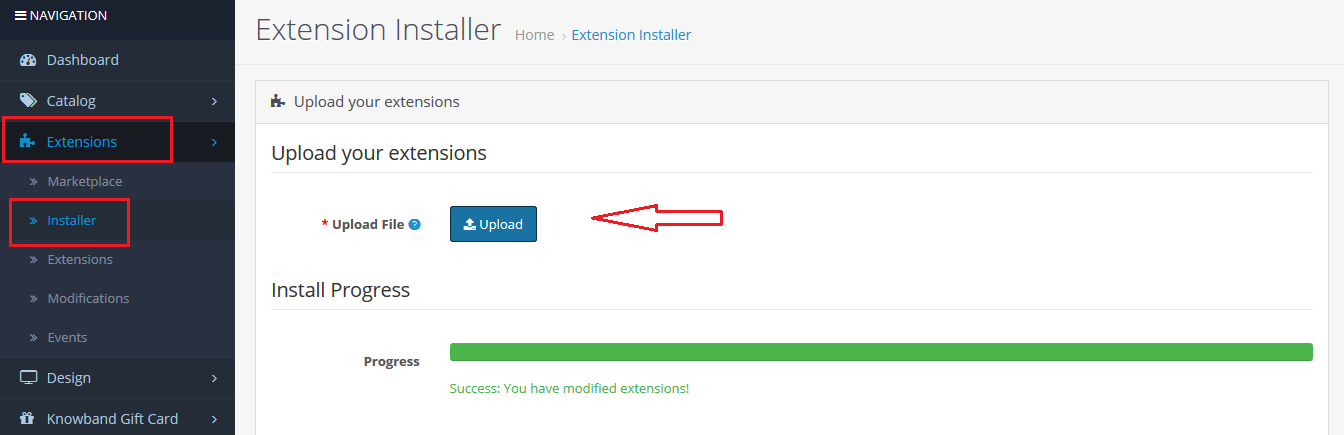
Step 4: Go to Extensions and then Installer. From here, you can upload the ” kbloyalty_point.ocmod.zip” (for OC3.0.x) file and install the extension.

So, the OpenCart Loyalty Points Module is now successfully installed and is ready to use at your store. Go to the admin menu and click on the extensions. Choose the Extension Type as Modules. You will find a list of modules. Select the Knowband Loyalty Point Module.

3.0 Admin Interface

The Admin Interface of OpenCart Abandoned cart recovery email extension includes the following main settings:

  • Module Configuration
  • Loyalty Points Rules
  • Loyalty Points Balance
  • Loyalty Point History

3.0.1 Module Configuration

This tab consists of all the module configurationally settings.

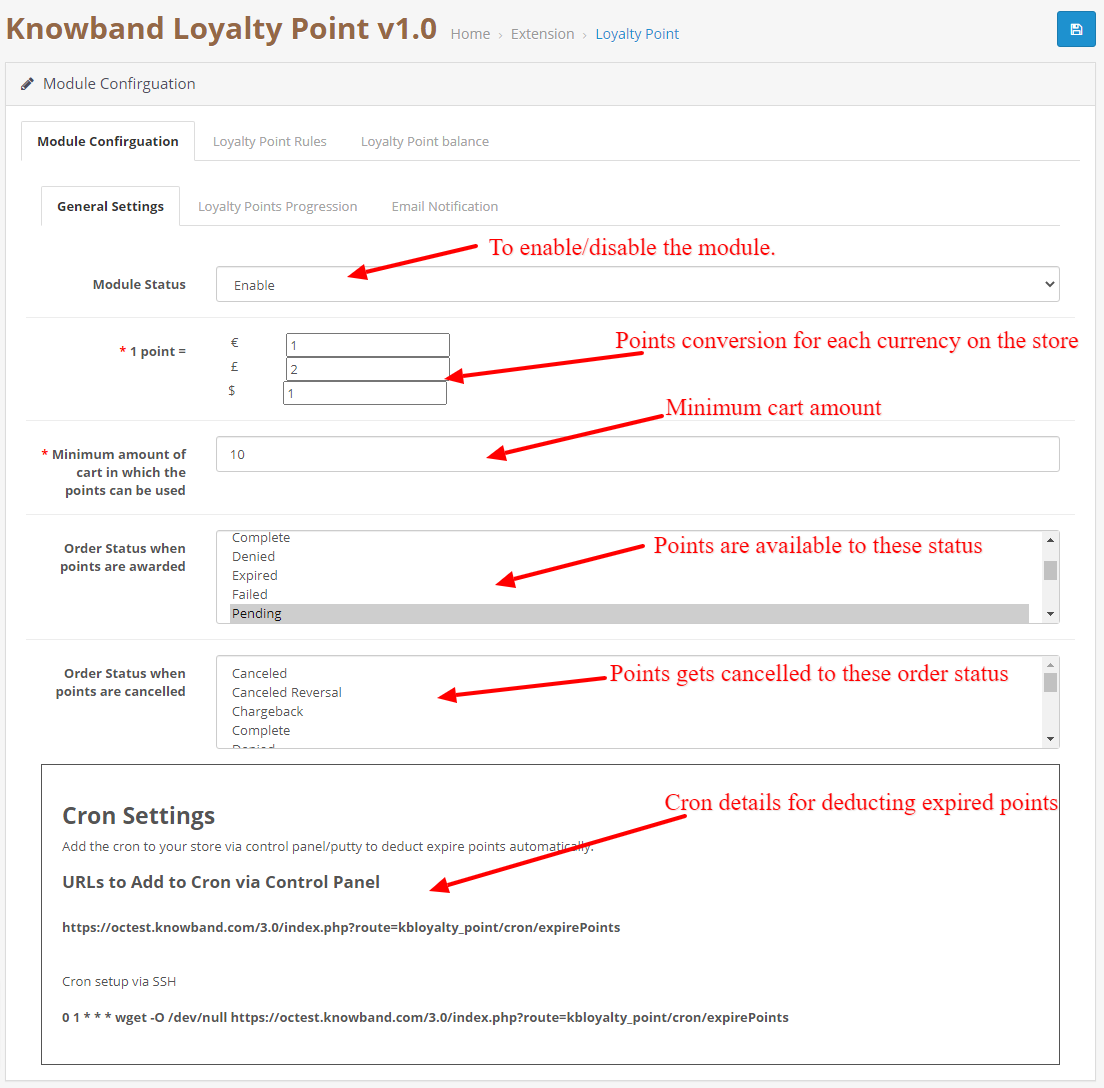
3.0.2.1 General Settings

  1. Enable/Disable: Initially, this field of the OpenCart loyalty points module by Knowband will be “OFF”. Admin can enable/disable the Opencart module by turning ON/OFF in this setting.
  2. Point Conversion: In this field, you can set the conversion rate for each currency added to your store.
  3. Minimum Cart Amount: This filed allows you to set a minimum cart amount on which the points can be used or not.
  4. Apply Taxes:  If enabled, the discount generated by the points will be applied to the taxes as well and if it is disabled the discount will not be applied to the taxes.
  5. Order Status for Available points:  If the order status gets the selected status from admin the points will be automatically available to the customer.
  6. Order status for Cancelled points: If the order status gets the selected status from admin the points will be automatically available to the customer.
  7. Cron Settings: Details of the cron are showed, This cron is used to deduct available points from the customer who has not used and passed the expiration date.

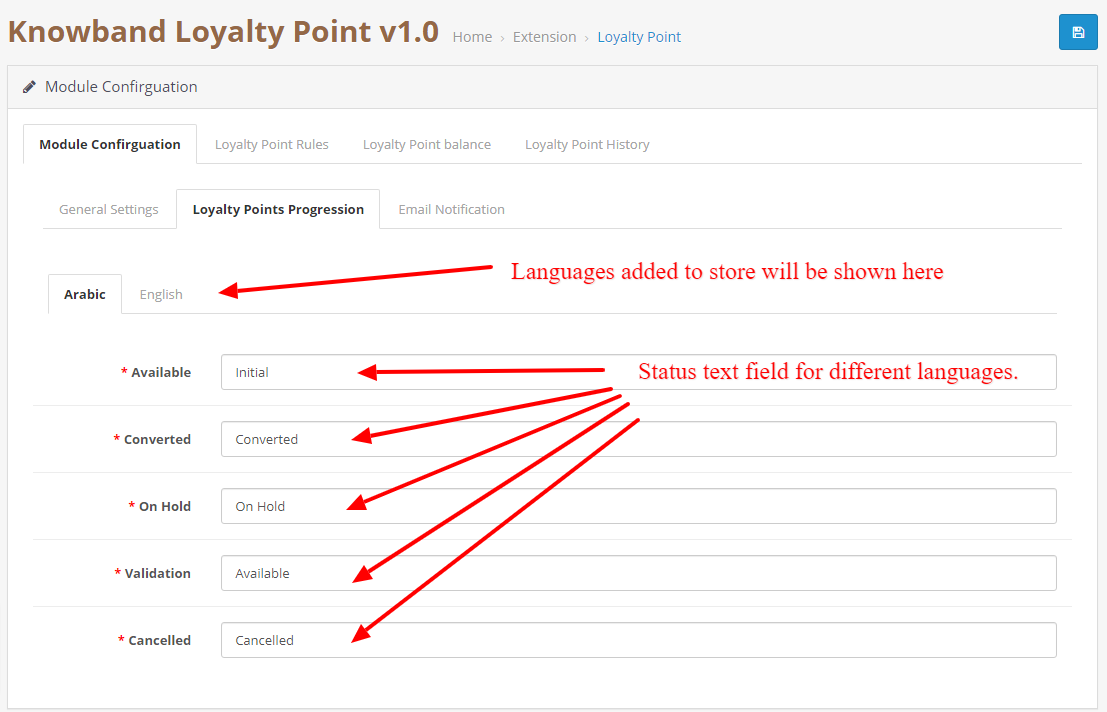
3.0.2.2 Points Progression Settings

This allows you to change the language/text as per your requirement of the loyalty points progression statuses. You can change the language for each status in each language added to your store.

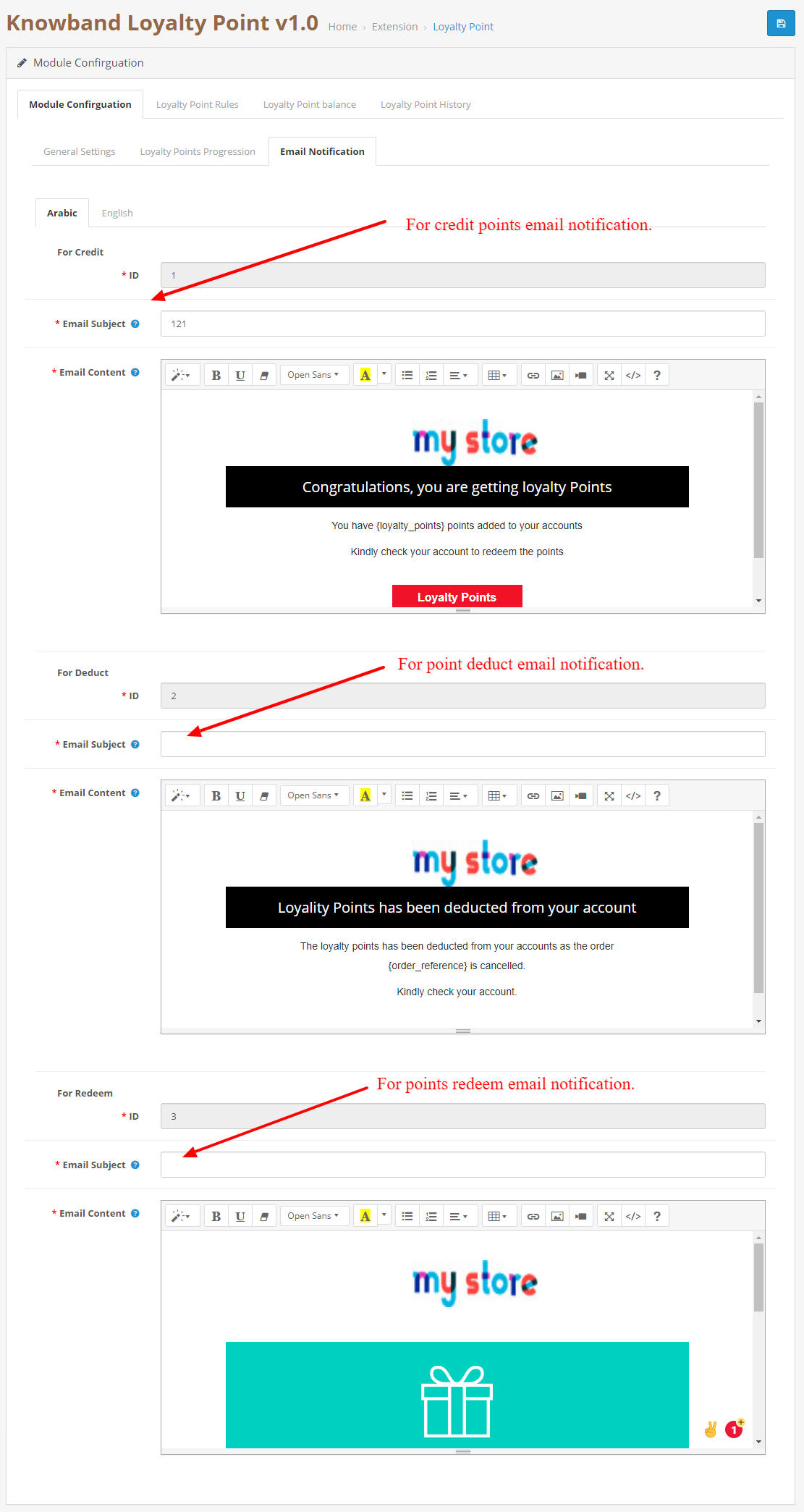
3.0.2.3 Email Notification.

In this tab, you can customize the credit, deduct and redeem notification emails for each language.

3.0.3 Loyalty Point Rules

In this tab, you can see all the rules that are created in the store. The Admin can create new rules and edit the existing rules using this tab.

3.0.3.1 New Rule

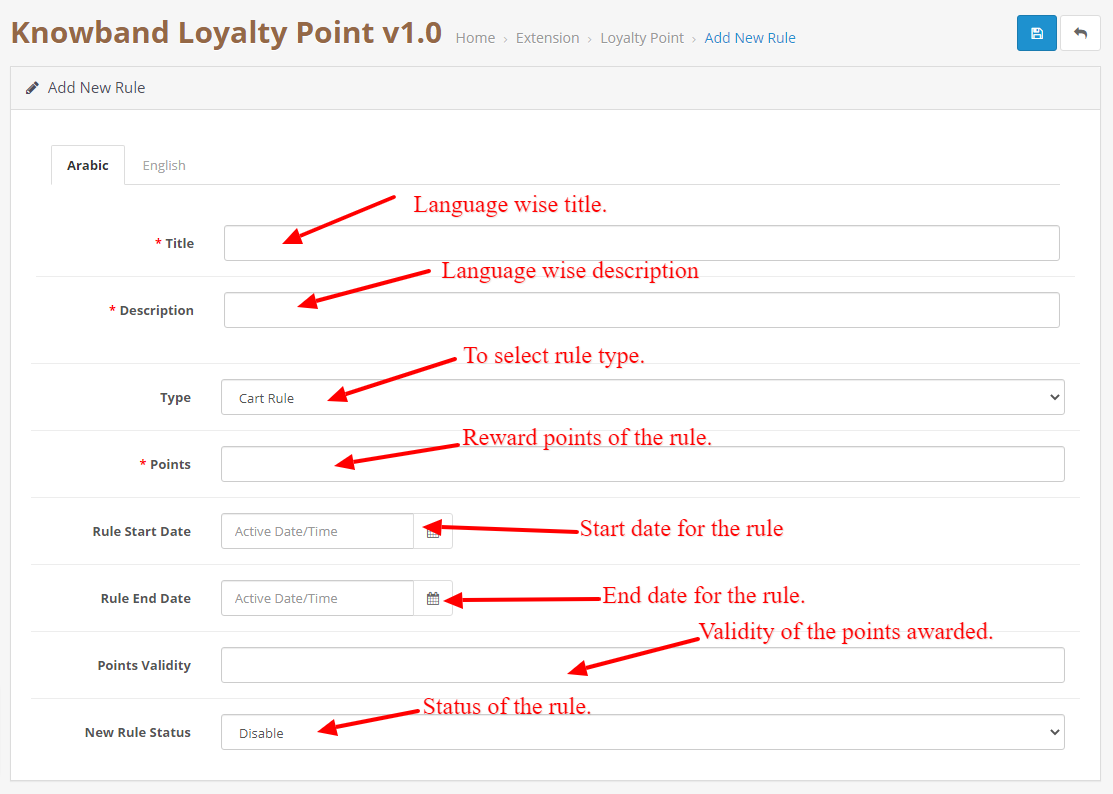
When the Admin will click on the new rule button, they will be redirected to the New rule page. On this page, you can create a new rule by filling the form.

  • Title: Add a title to the rule in each language added to the store.
  • Description: Add description to the rule in each language added to the store.
  • Rule Type: Select the rule type. It can be a cart, product, or behavior rule.
  • Points: Add the number of points that will be awarded to the customer if the conditions are fulfilled.
  • Rule Start Date: This field will be used to add a Start date for the rule.
  • Rule End Date: This field will be used to add an End date for the rule.
  • Validity: This field is used to add validity to the points which will be added to the customer. You can add no. of days in the field.
  • Rule Status: To enable/disable the rule.

3.0.3.2 Edit Rule

This page is used to edit the rule data. It consists of the following tabs:

  • Configuration: This tab is exactly similar to add a new tab but here you can change the details of the rules except for the rule type.
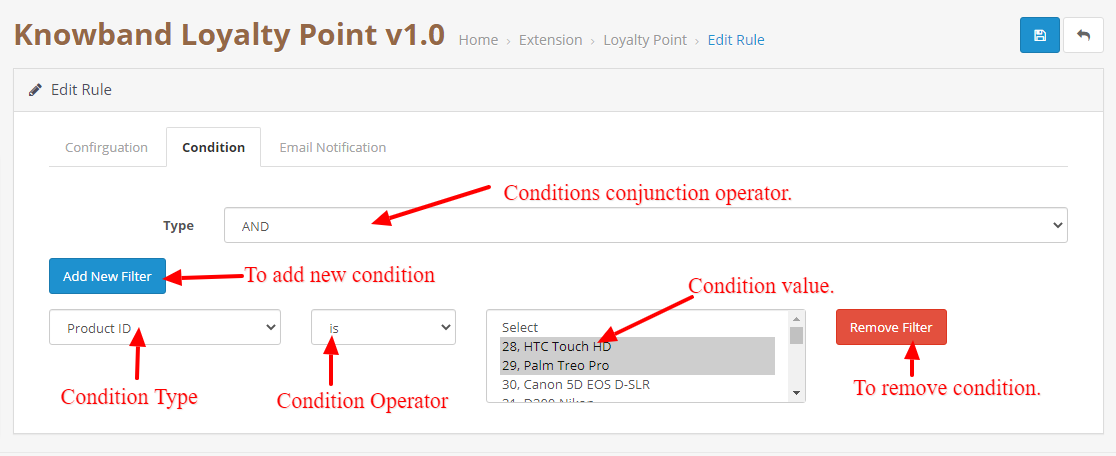
  • Condition: This tab is used to add the condition to the rule. The admin can add or delete the conditions as per their liking and different rule types have different conditions.

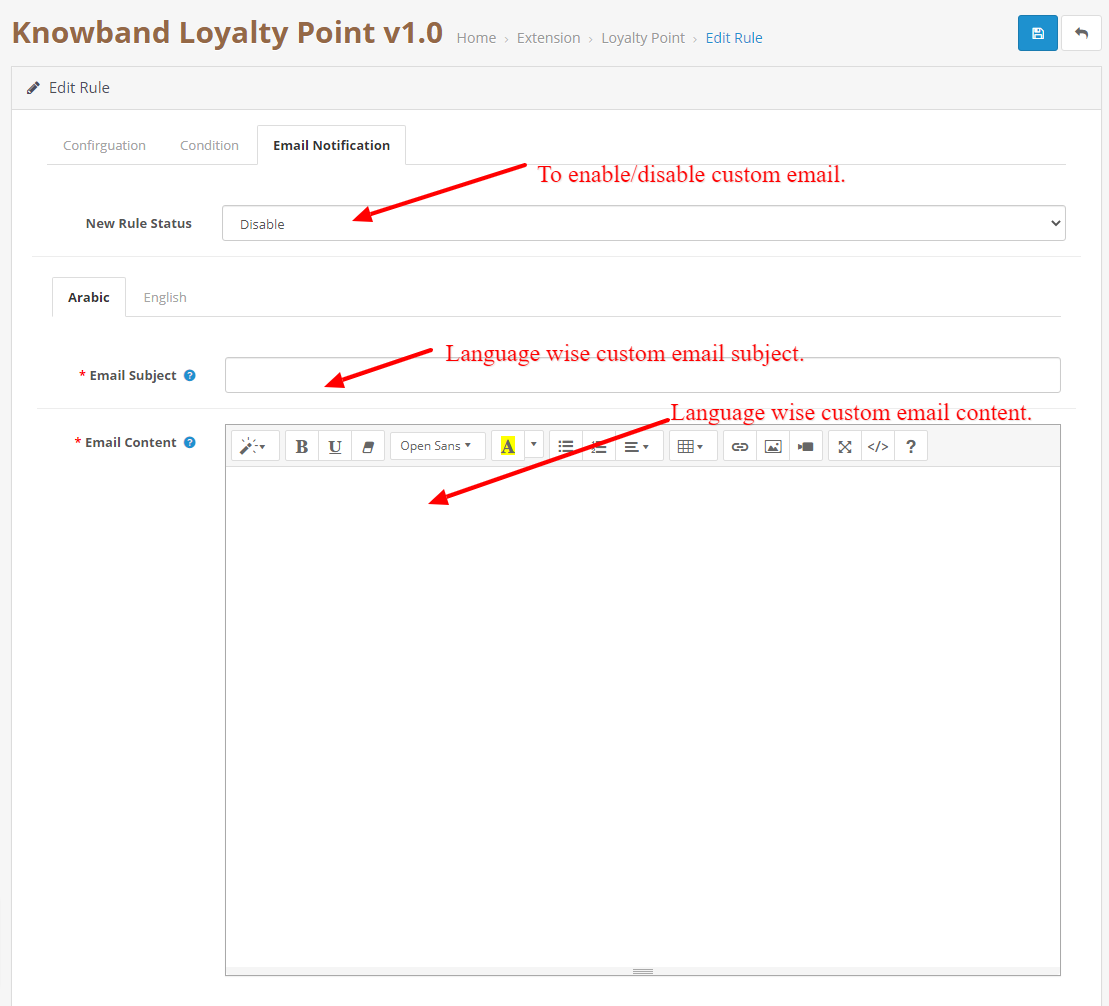
  • Email Notification: This is to add a custom rule notification. This email will be sent if the rule condition is satisfied by the customer and points are awarded to the customer.

3.0.4 Loyalty Point Balance

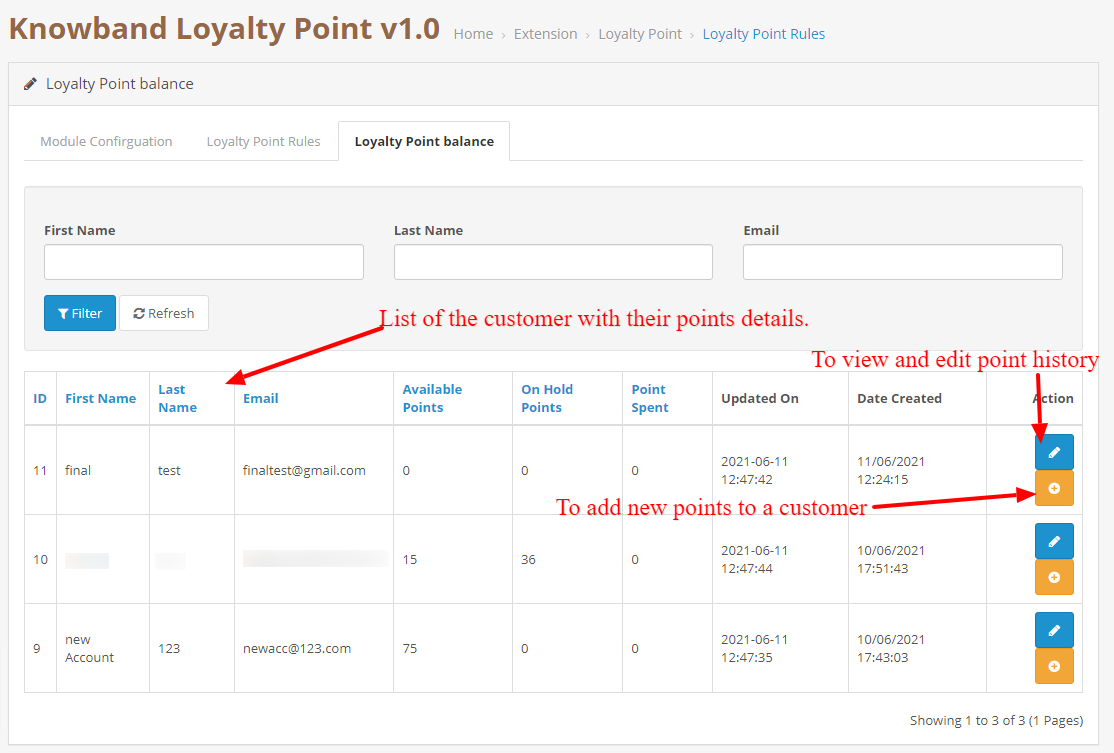
This tab consists of a listing of each customer that has been awarded points. It will contain a list which will describe how many points are available to the customer, how much are on hold, how much they have spent.

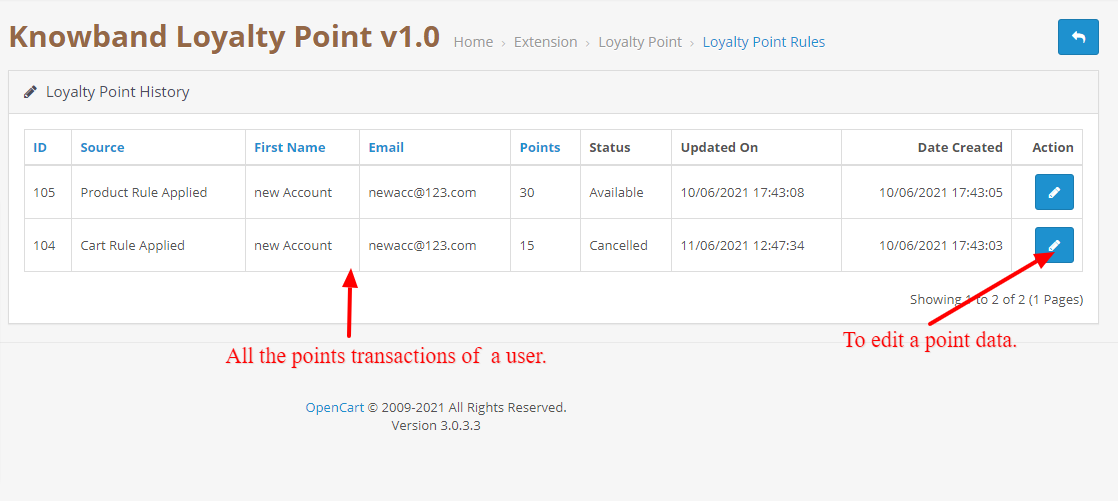
3.0.4.1 Loyalty Point History

When the Admin will click on the edit history button, they will be redirected to the history page which will show all the transactions of the selected customer.

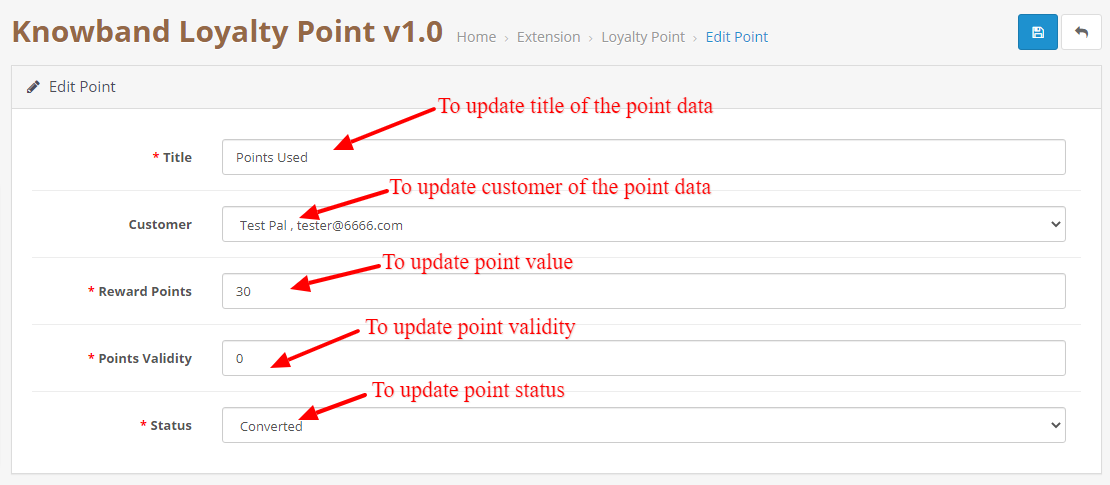
3.0.4.1.1 Edit Point Data

This page can be used to change the point data. This can be used to change the status of the point, point value, point title, and validity. This page is also similar to add a new point data page but this is used to update the data.

3.0.4.1.2 Add New Point Data

This will be opened when the admin will click on the add points button in the balance tab. This is used to add new points to the selected customer.

4.0 User Interface

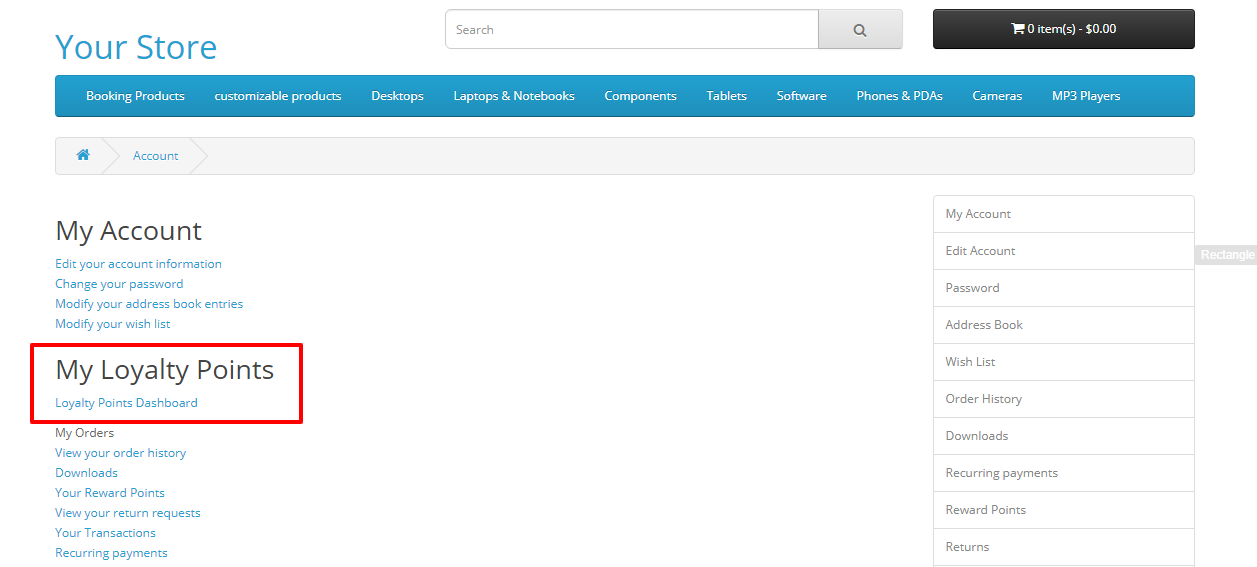
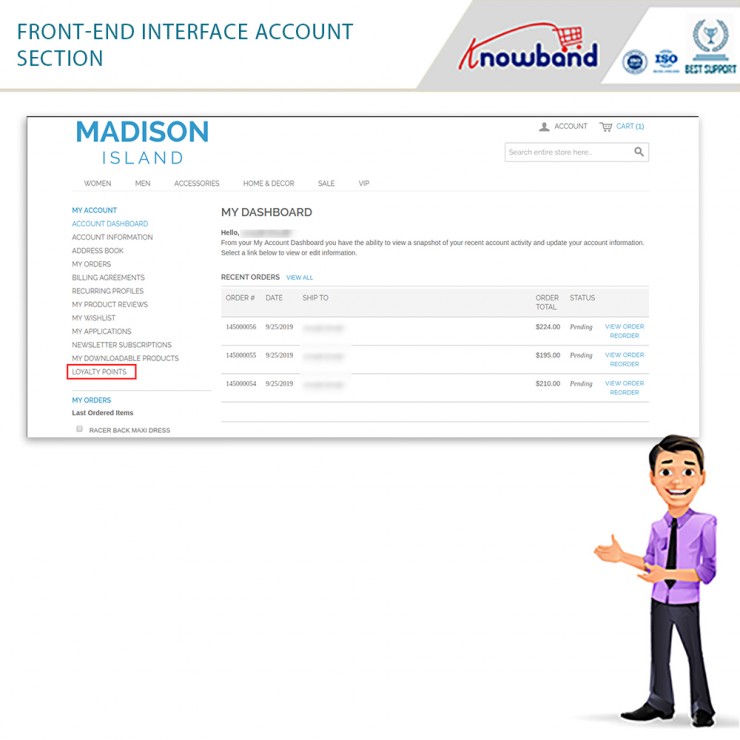
4.1 Once the module is enabled from the customer can go to their loyalty point dashboard by clicking the Loyalty points dashboard in the account section.

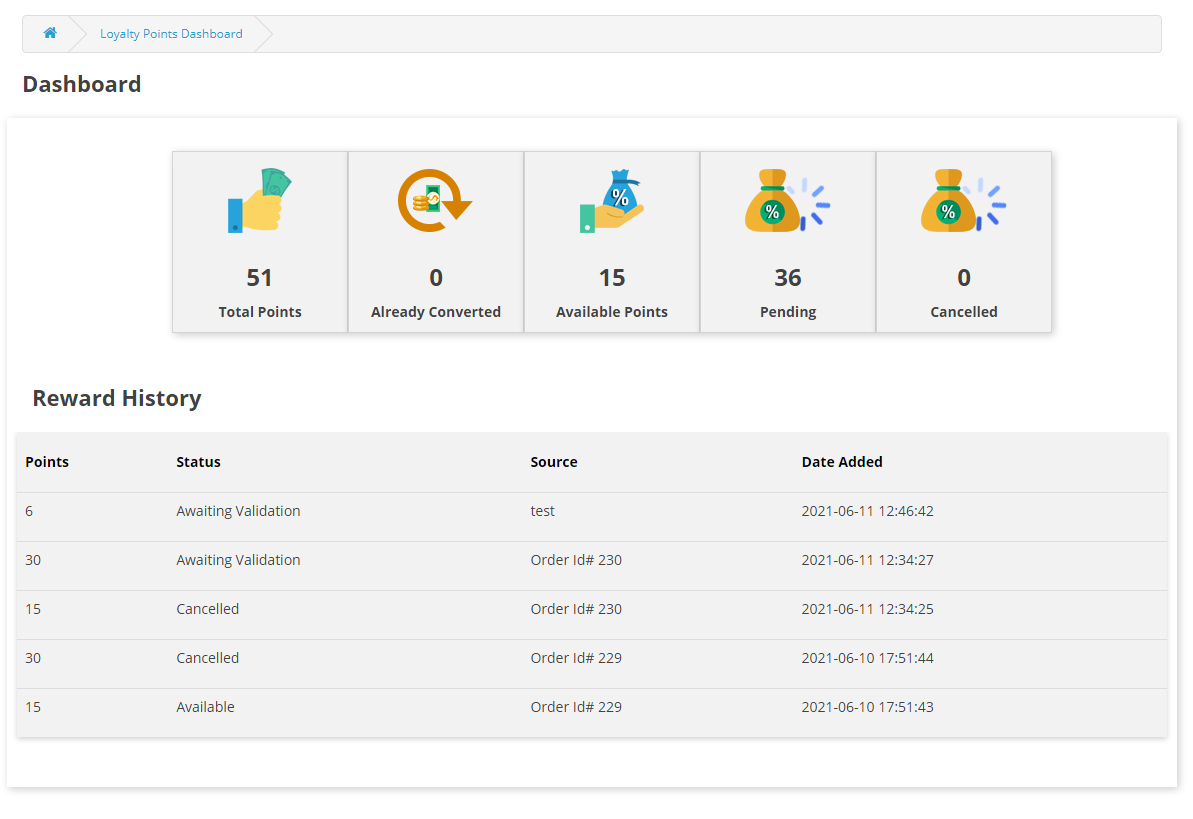
4.2 In the dashboard the customer can see all the point transactions as well as how many points are available to them, how many they have spent and how many points are on hold.

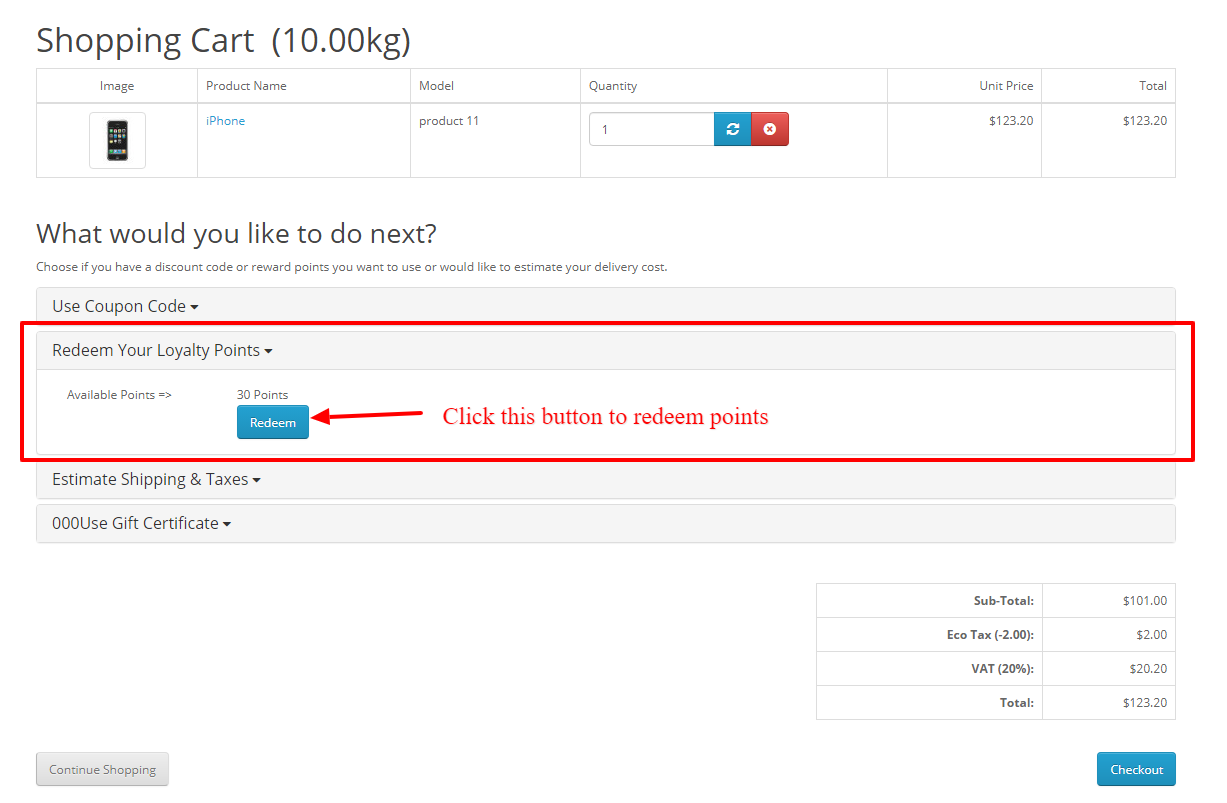
4.3 If the customer has some loyalty points then an accordion will be shown on the cart page where the customer can use those points to convert them into discounts. They just have to click on the redeem now button and the points will be converted into discounts.

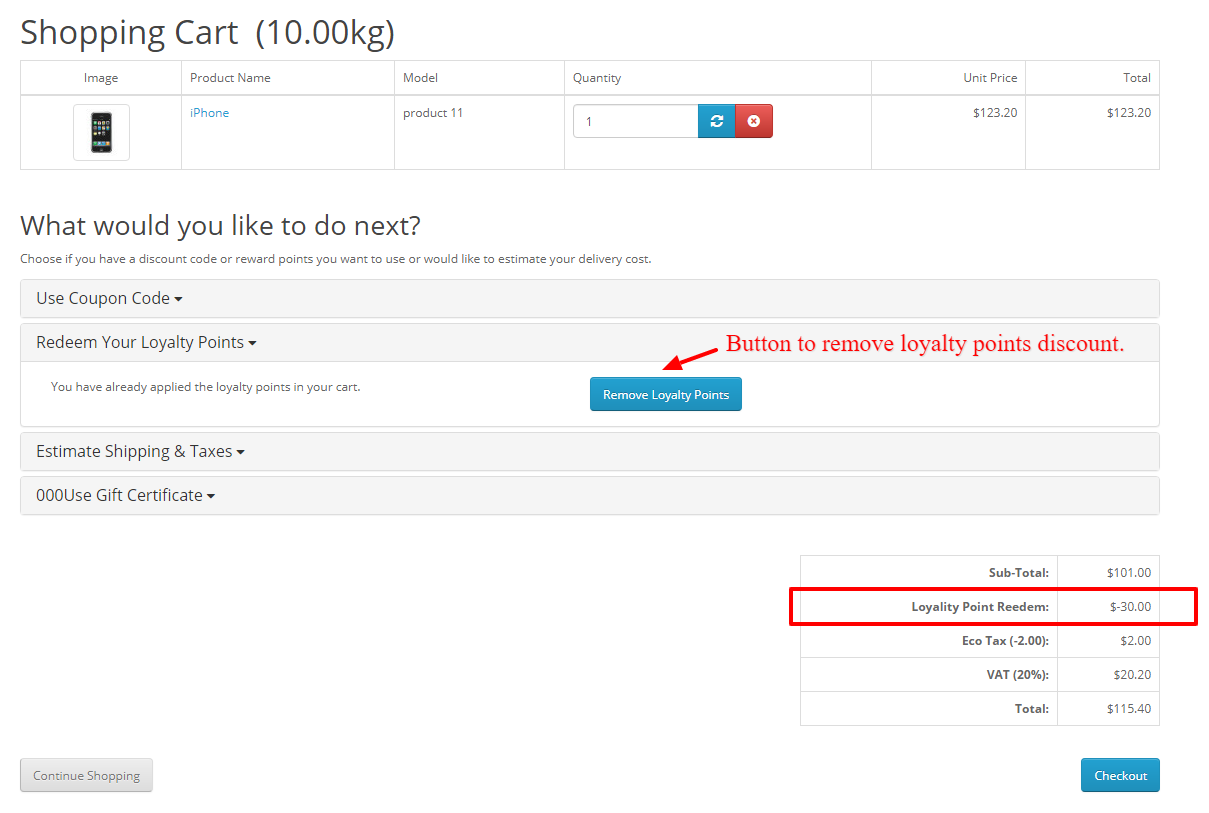
4.4 Once the points are redeemed they will be shown in the cart total section and the customer can also cancel points if they want to by clicking on the remove points button.

In case of any issue, drop an email to support@knowband.com OR click here to raise the ticket.

Buy OpenCart Loyalty Points extension: https://www.knowband.com/opencart-loyalty-points

Admin Demo:

Front Demo:

OpenCart Loyalty Points extension from the OpenCart Marketplace:

Benefits of Customer Loyalty Programs for your Online Business

What are Loyalty Programs? Why have they become an important element for online businesses? What are the benefits of customer loyalty programs? How do loyalty programs work?

If you have these questions running through your mind, you have landed at the right place to get an answer to all these questions. Let’s begin.

When the eCommerce industry was less crowded and people had limited options to shop online, Brands did not use to be much concerned about losing customers. Since the choices were few, people used to shop from the same brand from which they shopped earlier.

But today, when the eCommerce sector has hugely expanded, people have countless options to shop from. This led to brands losing out customers to their competitors, and hence loyalty programs came into existence.

What is a Loyalty Program?

A Loyalty Program is a marketing strategy used by Brands where they reward incentives or loyalty points to the shoppers every time they purchase from their website/store. The points are awarded so that the customer continues to shop from the same brand in his/her future purchases.

Recommended Blog: How important is an eCommerce loyalty program for an eCommerce store?

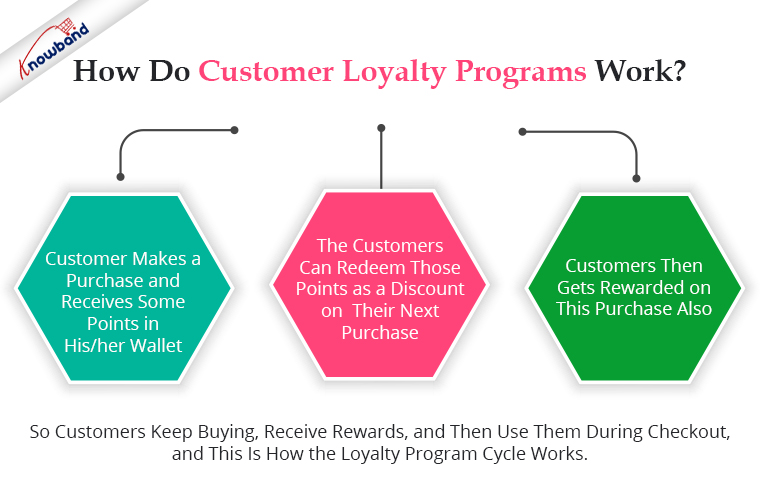
How do Customer Loyalty Programs work?

To begin with, the customer makes a purchase and receives some points in his/her wallet. It is a gesture by a Brand to thank customers for choosing their brand to shop for.

Upon receiving loyalty points, the customers can redeem those points as a discount on their next purchase.

What’s exciting about customer loyalty programs is that it is a continuous cycle where customers get rewarded for every purchase.

So customers keep buying, receive rewards, and then use them during checkout, and this is how the loyalty program cycle works.

The types of loyalty programs vary from business to business but they all have their focus centred around one purpose- Making customers loyal to the brand or in short, building customer loyalty.

Recommended Blog: How PrestaShop Loyalty Point Program can take your Marketing to Next Level

Benefits of Customer Loyalty Programs

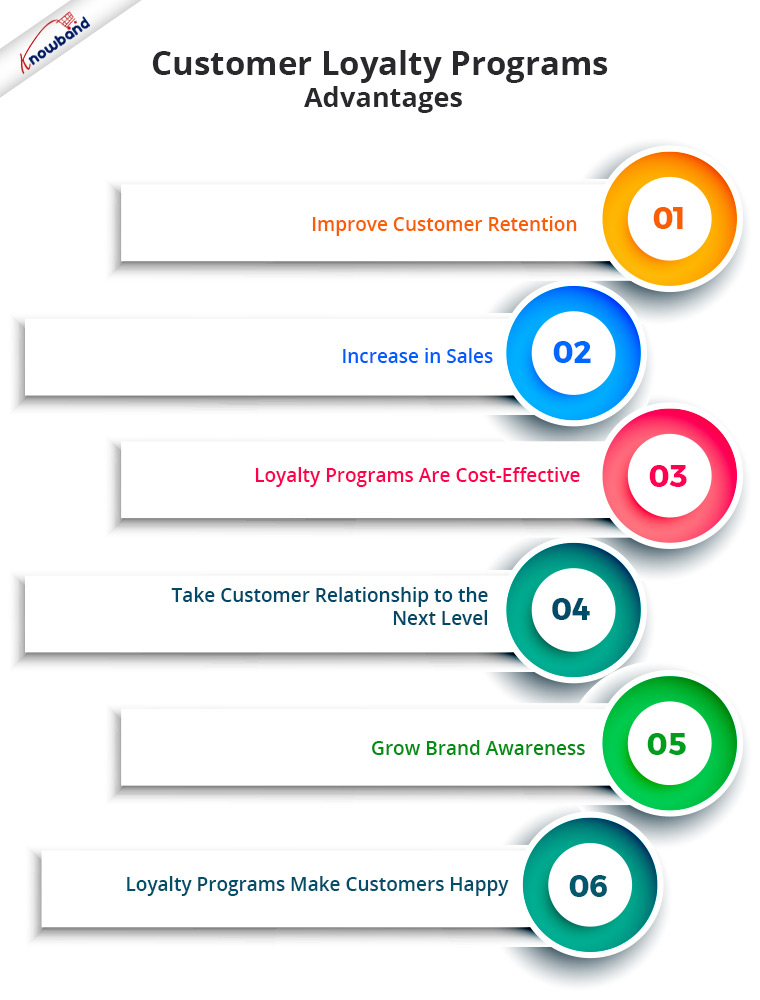
A loyalty program offers numerous benefits. In this article, I have put forward the top 6 benefits of loyalty programs for your online business.

1. Improve Customer Retention

The first and foremost benefit of a loyalty program is it helps you improve customer retention. I mean, every loyalty program has one primary motive, i.e. to retain customers, and they do make one of the best and most effective customer retention strategies.

Did you know around 60% of the retailers find customer retention their biggest obstacle? Loyalty Programs eliminate that hurdle to a certain extent.

2. Increase in Sales

Increased sales are the next advantage of loyalty programmes. So, loyalty programs are highly effective in boosting your eCommerce revenue. Offering loyalty points to a customer for buying products ensures repeat purchases and helps you win customer loyalty over time.

Once you win their loyalty, they will be likely to put more trust in your brand and prefer it over your competitors. And once they become your loyal customers, your sales graph would often remain high.

What if I tell you that existing customers contribute to 65% of a company’s business? I guess this is enough to make you understand the importance of customer loyalty programs.

Recommended Blog: 8 Ways to Build Customer Trust and Loyalty

3. Loyalty Programs are Cost-Effective

Retaining existing customers is comparatively less expensive than acquiring new ones. The credibility that you have built with your existing customers would have taken you a lot of effort, time and money. To turn a new customer into a loyal customer would require the same commitment.

But your existing customers have been through your journey, hence, the expense to persuade them for regular purchases is less than what would be required to influence new customers.

Research says acquiring new customers costs 5 times more than retaining the existing ones.

4. Take Customer Relationships to the Next Level

To grow as a brand requires a healthy relationship with customers, and Loyalty programs help you build a strong bond with your customers.

76% of consumers think that Loyalty programs are a part of their relationship with brands. By getting rewards or loyalty points for making a purchase, customers feel more attracted and emotionally attached to your brand and prefer it as their go-to option for online shopping.

Value your customers, and treat them special. Make them feel that they are important and you want them to return to your store again. Build a personal connection through your loyalty programs.

5. Grow Brand Awareness

Adding to the benefits of customer loyalty programs is they boost your Brand Awareness.

If a customer receives loyalty points on a purchase, he or she will likely suggest your brand to his/her friends, family, colleagues or relatives. Those customers are what we call Brand Advocates who do word of mouth for your brand and bring you, new customers. So we can say that customer loyalty programs are effective in customer acquisition as well.

This gets your brand noticed. More and more people visit your store and look to buy from your brand.

Recommended Blog:  7 Ways to Increase Average Order Value

6. Loyalty Programs make Customers happy

Customer happiness and fulfilment are one things that customer loyalty programmes promise. Any consumer would adore getting anything in return for their buy.

And customers would also appreciate you for this and will have more liking towards your brand. It reflects that you not only see them as one-time customers but want to maintain a healthy relationship with them in the future as well.

Loyalty Points module by KnowBand

If you are also looking to set up a loyalty program for your eCommerce business, our Loyalty Points module will help you do so efficiently. It not only helps you with customer retention but also provides you with an opportunity to acquire new customers. How?

Well, the Loyalty Points module lets you reward a joining bonus to new users when they sign-up on your website and when a user makes a purchase. Customers can use loyalty points in the form of a discount voucher.

This is a feature-packed module that lets you define several conditions for a customer to earn loyalty points, for example, when a user has shopped for a certain amount or a certain quantity, etc. Simply expressed, a user will only be qualified to collect loyalty points if they meet the criteria established by the store.

To make things more interesting, you can surprise your customers by crediting loyalty points in their store wallets anytime. Knowband offers the Loyalty Points module for PrestaShop, OpenCart and Magento 2. Check out the module to know its complete features and benefits-

Over to You

More than 80% of online shoppers said that loyalty programs encourage them to continue purchasing from certain brands. Therefore, you simply cannot overlook the benefits of loyalty programs.

Your competitors, somewhere, are taking away your potential customers from a loyalty program scheme. It’s high time that you have a similar program too. Do not overthink what your competitors are doing. Focus on what you can do best to motivate your customers to remain loyal.

Stats collected from Invesp

I Hope, this information that I shared with you made you understand the importance of customer loyalty programs. If you would like to add something to this article, feel free to leave a comment below. For any assistance or queries regarding the module, you can contact us at support@knowband.com