OpenCart Coupon Extensions to Bring Customers Towards your eCommerce Store

“Discount coupons”, “gift cards”, “voucher cards” or other such shopping offers are the buzz words that can effortlessly grab the customer attention towards an online store without any effort. You need to be constantly on your toes to persuade your targeted customers for making a product purchase through your OpenCart store. No doubt, it is a challenging task considering the changing market dynamics and customer behavior, but the situation can be brought under control with the help of these OpenCart coupon extensions from Knowband store. These modules have been a major force to reckon with when it comes to customer engagement, conversions and product sales.

Want to know more about these OpenCart coupon extensions? Check out below to know more about their amazing features and functionalities that can optimize the performance of your OpenCart store.

1. OpenCart Scratch Coupon

Online shoppers are always looking for exciting shopping offers and deals that can give them ample reasons to indulge in online shopping. If you have this Knowband Opencart Scratch Coupon extension, it will be much easier for you to provide engaging scratch coupon that can be redeemed by the customers effortlessly. In this way, you can bring more site traffic, conversion rates and product sales on your OpenCart store with the help of this scratch coupon module. Here are some of the brilliant features that makes OpenCart Scratch Coupon module as one of the best OpenCart coupon extensions for OpenCart platform.

  • The Opencart Scratch Coupon module facilitates easy installation and configuration by any non technical individual.
  • The Opencart Scratch Coupon module by Knowband supports multiple platforms and devices due responsive design.
  • The Opencart Scratch Coupon module provides facility to make changes in the offered discount amount, eligible time period to avail coupon code and much more.
  • The Opencart Scratch Coupon module offers timely reporting and analytical data to store admin regarding the performance and status of their coupon codes.
  • The Opencart Scratch Coupon module presents detailed information about all the coupon related statistics for understanding the impact of scratch discount coupons on your store.
  • The Opencart Scratch Coupon module provides free technical support and assistance.

It is high time to install this OpenCart scratch coupon extension on your store to minimize abandoned customers and bounce backs on your site. Besides, it can also play an amazing role to improve your sales and conversion rates.

2. OpenCart Sales Coupon Enhancer

If you are not having any idea about how to generate appealing coupon codes, Opencart Sales Coupon Enhancer is surely the module to go for. With multiple features and functionalities, this OpenCart extension has become one of the most popular and sought after OpenCart sale coupon modules that can change the fortune of your store in an effortless manner. Take a look at its salient characteristics that are mentioned below:

  • The Opencart Sales Coupon Enhancer module by Knowband allows store admin to create coupon codes based on customer groups, shipping methods and payment methods.
  • The Opencart Sales Coupon Enhancer module helps in deciding the validation rules for your coupon code.
  • The Opencart Sales Coupon Enhancer by Knowband is compatible with various types of online stores and themes.
  • The Opencart Sales Coupon Enhancer offers free technical support service and updates.
  • The Opencart Sales Coupon Enhancer module can be installed and configured in a seamless manner.
  • The Opencart Sales Coupon Enhancer does not conflict with the existing coupon code system.
  • The Opencart Sales Coupon Enhancer by Knowband offers various statistical reports to get a complete idea about the coupon generation mechanism.

Don’t let the business opportunity pass away to your rivals in terms of customer engagement, conversions and bumper sales. All you need is the support of these OpenCart coupon extensions that have the unmatched potential to achieve initial lead for your eCommerce store. So, just visit our Knowband store and we can help you in the quick makeover of your online business.

This Would Also Interest You:

OpenCart Sales Coupon Enhancer – User Manual

1.0 Introduction

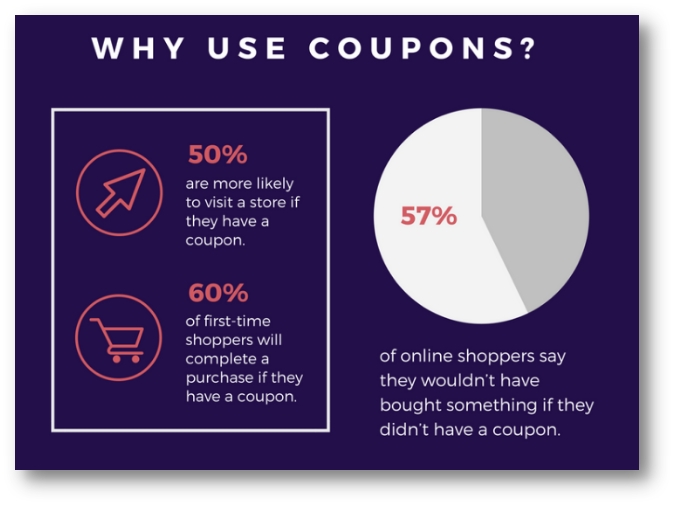
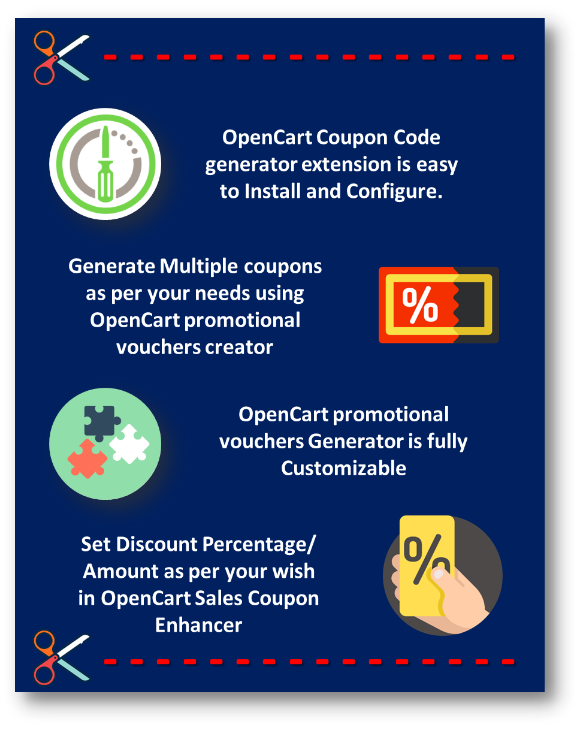
Coupons are the best way to get your Customer’s Attention. The goal of any offer or coupon is to encourage the consumer to try the product or service. Offering Coupons introduce new customers to your store, introducing new product lines, providing a way to get rid of unwanted inventory to make room in your warehouse or store for a newer product, encouraging customers to try a new brand that is more profitable to you or getting customers to come back to your Web store. Opencart Sales Coupon Enhancer by Knowband makes the job of generating these coupons easy for you. You are just one click away of generating your Discount coupons as per your needs by OpenCart Coupon Code generator Extension.

The key to maximizing the advantage of coupons in today’s digital world is using coupons as a way to build your customer base. Coupons can become a crucial part of your social media marketing provided you use them strategically.

Using discounts coupons can be a powerful tool to get you the spike in sales that you are looking for. And once you’ve achieved that, you can then use it as a springboard to skyrocket your sales to even greater heights. You can easily generate your coupons using Opencart coupon code generator extension and thus increasing your sales.


1.1 Features

2.0 Installation Guide

Before starting the installation process, you have to buy the Opencart sales coupon enhancer by the Knowband store. Once purchased, you will receive the following files on your registered email.

  • Source code of Opencart sales coupon enhancer in zipped file format.
  • User Manual of Opencart sales coupon enhancer.

Now in order to install this on your online shop, follow the given steps:

Step 1: Unzip the zip file. You will get the folders as shown in the image below:


Step 2: Copy all the folders of the zip file in the Root Directory of OpenCart setup via FTP manager.

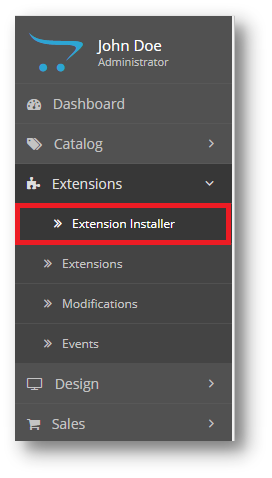
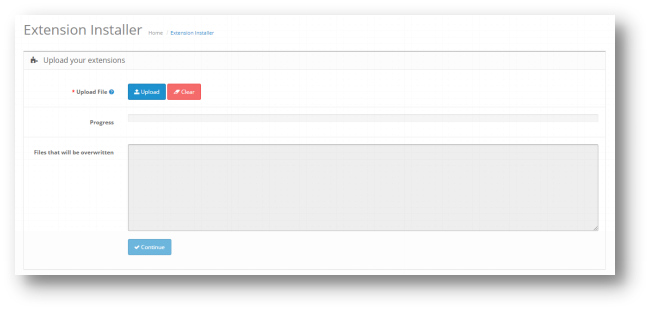
Step 3: There is a file name kbsales_coupon_enhancer.ocmod,xml (for OC<3.0) or  kbsales_coupon_enhancer.ocmod,zip (for OC>3.0). You need to install this file in the following Location:

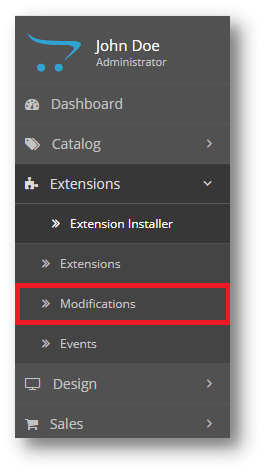
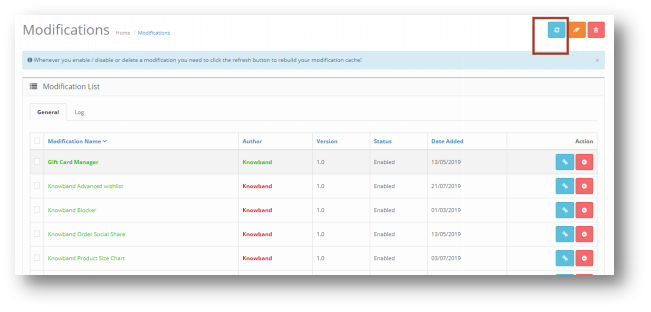
Step 4: After Installation you need to select this file and refresh Modifications:

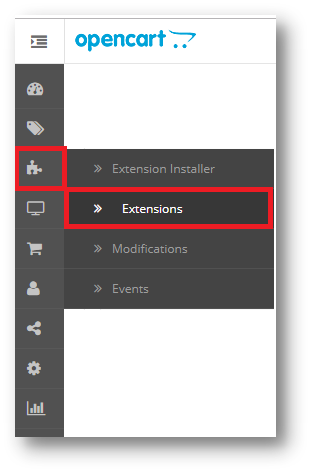
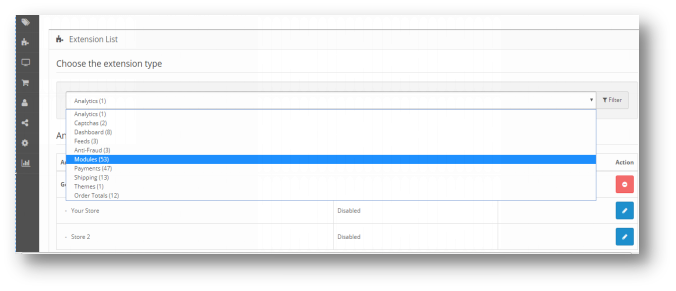
So, Opencart sales coupon enhancer is now successfully installed and is ready to use at your store. Go to the admin menu and click on the extensions. Choose the Extension Type as Modules. You will find a list of modules. Select the Knowband Sales coupon Enhancer.

3.0 Admin Interface of OpenCart Sales Coupon Enhancer

To configure the Sales Coupon Enhancer module for OpenCart, Navigate the settings in the following order:

Admin Panel >> Extensions >> Modules >> Knowband Sales Coupon Enhancer

The Admin Interface of OpenCart Sales Coupon Extension includes four main settings:

  • General Settings
  • Configure Coupons
  • Statistics
  • Coupons

3.0.1 General Settings

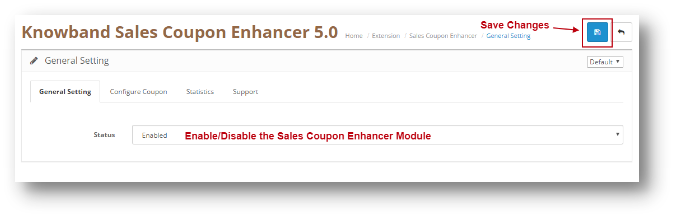
This setting will have the Option to enable/disable the plugin. The page will look like as shown below:

3.0.2 Configure Coupon

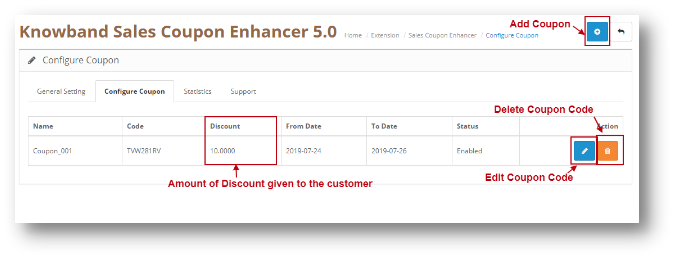
Through this setting of OpenCart Sales Coupon Extension, you can add a New Coupon Code or make changes in the Existing Coupon Codes. The screen will look like as shown below:

  • Edit a Coupon: You can Edit an existing Coupon using the Edit option. The screens for Editing Coupon will be same as Adding a Coupon. The only difference will be that Edit will have the fields already filled.
  • Delete a Coupon: You can delete a Coupon by clicking on the ‘Trash’ Icon.

3.0.2.1 Add a Coupon

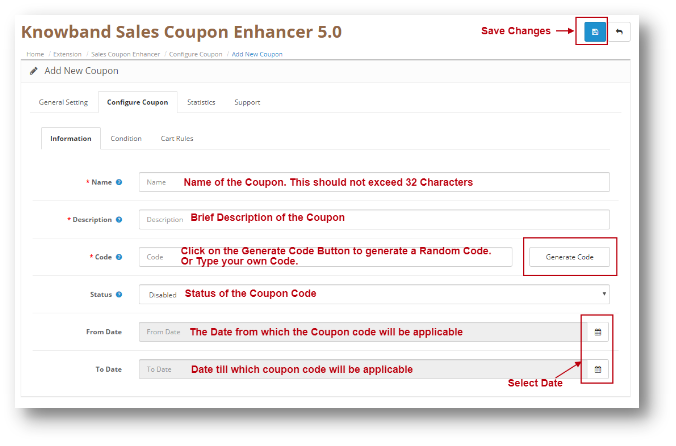
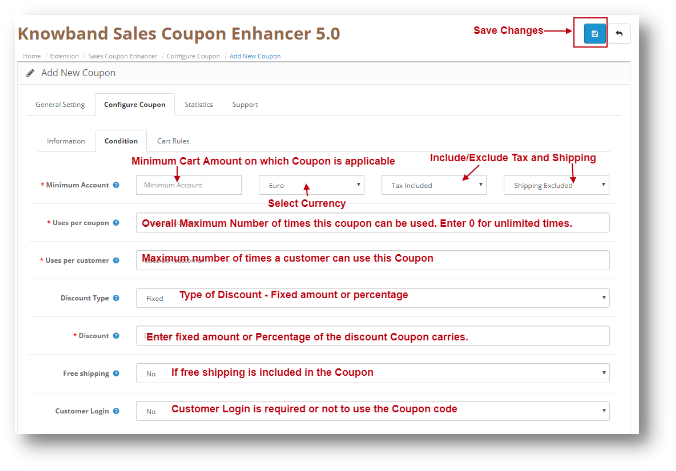
You can add a Coupon Code by Clicking on the ‘+’ Icon provided on the Top of the Page. The following screen will show up. Add Coupon will have three Tabs as explained below:

Information


Condition Tab


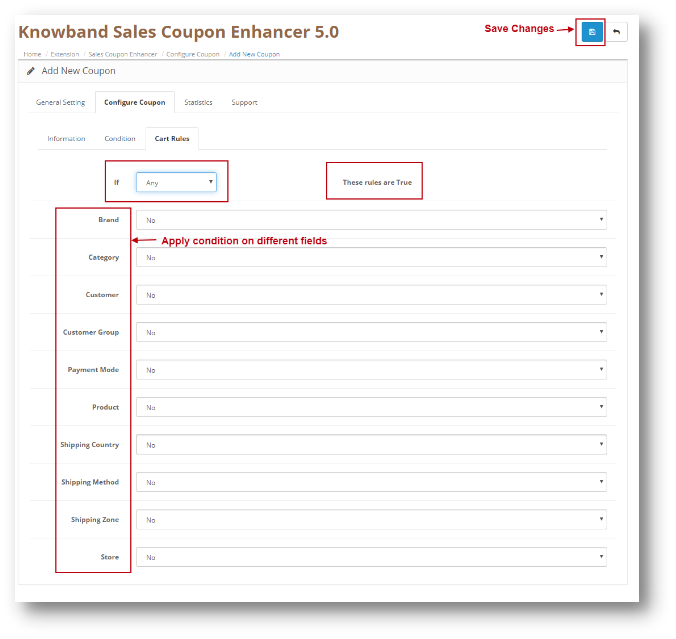
Cart Rules

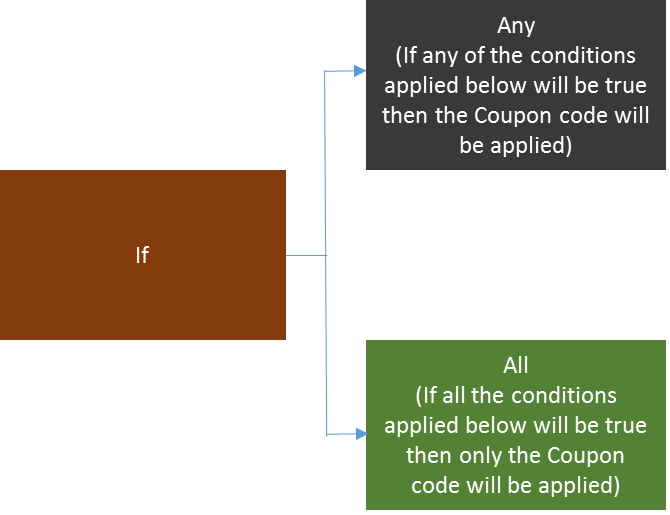
You can apply different conditions on a coupon using Cart Rule Tab in OpenCart promotional vouchers Generator. Conditions are explained in detail below. Let’s have a look at the screenshot:

Conditions on Different fields:

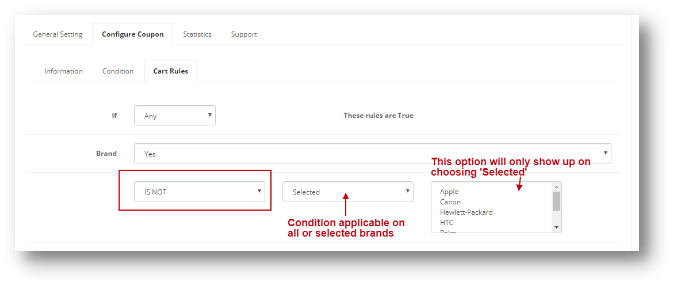
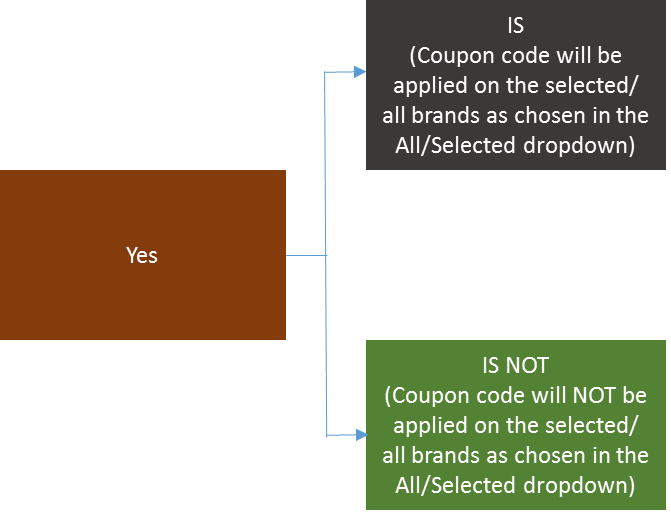
Various fields are shown in the Opencart Promotional Vouchers Creator. Let’s take one example of Brand and apply a condition on it. To apply a condition, select Yes in the dropdown of the Brand. The screen will look like as shown below:


This is how you can select the condition for different fields in the Cart Rules Tab.

3.0.3 Statistics

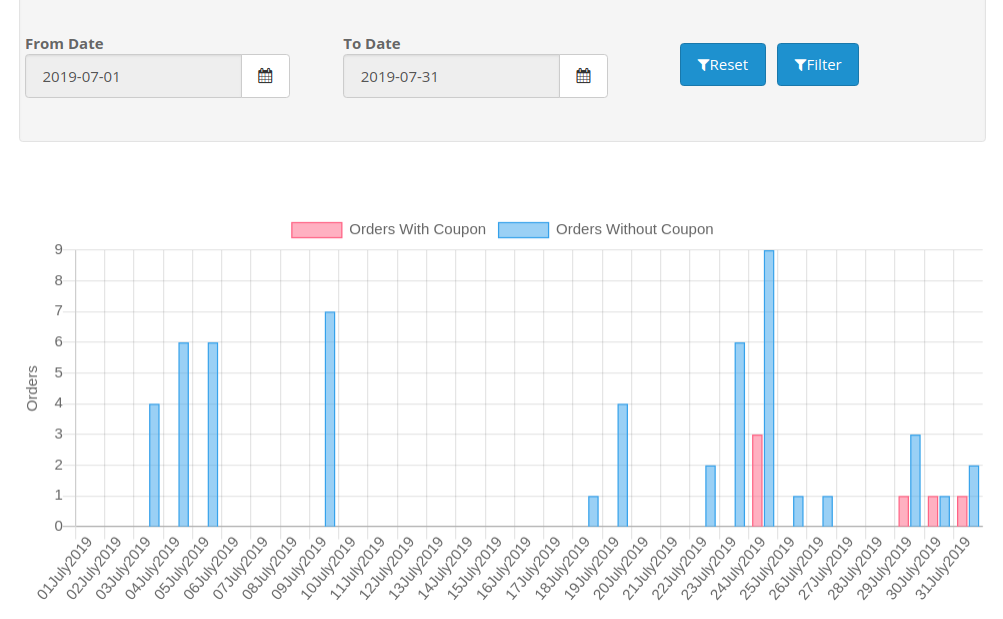
Through this setting of OpenCart Sales Coupon Extension, you can view the statistics of your Coupons. It will show you the graphical representation of Order placed which used coupons and which did not. The screen will look like as shown below:

3.0.4 Support

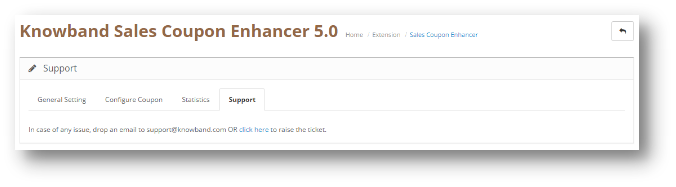
If you need any Support, then drop an email to support@knowband.com OR click here to raise the ticket.


4.0 User Interface of OpenCart Sales Coupon Enhancer

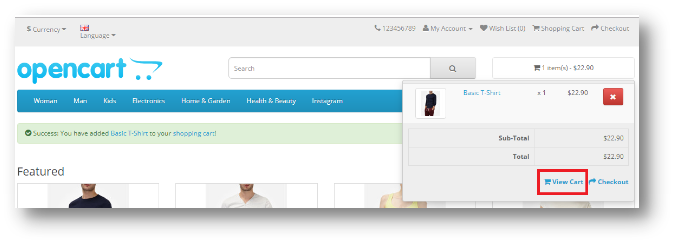
Once you add a Product from cart, Click on View cart as shown in the screenshot below:

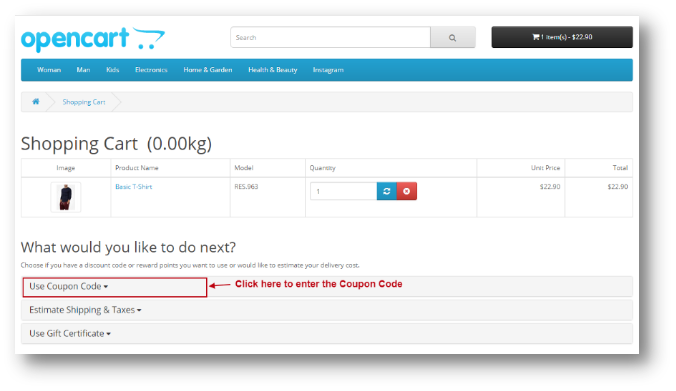
The following page will open up:

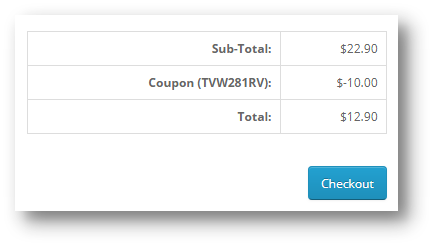
Once the Coupon Code is applied, Amount will be discounted in the Total Section and User can proceed with the Checkout.