Magento Open Source 2.4.7: Key Enhancements and New Features!

Magento is one of the most widely used eCommerce platforms that allows sellers to start an eCommerce website hassle-free. Although, Magento is not known for regular updates, yet, the new and enhanced Magento Open Source 2.4.7 introduces significant improvements and bug fixes, enhancing the platform’s overall performance and security. Furthermore, this version includes updates to third-party libraries and core dependencies, which makes it a valuable upgrade for developers. The update ensures Magento remains a robust and reliable platform for e-commerce businesses, providing a solid foundation for future development and growth.

Introduction to Magento Open Source 2.4.7:

The latest version of Magento Open Source supports PHP 8.3 and expands its GraphQL coverage, including resolver caches and custom attributes. Therefore, this broadens the capabilities and performance of the platform, which allows the developers to build more efficient and responsive applications.
Additionally, Magento 2.4.7 ensures compatibility with UPS and FedEx services, reinforcing its capabilities as a robust e-commerce platform. These updates not only improve performance but also ensure compliance with current standards and practices.

Security Enhancements:

With several new measures implemented to safeguard the platform, security is a primary focus in this release. The new enhancements include improved cache key management, restrictions on coupon code generation, and optimized Admin URL generation to ensure greater randomness and security.

On the other hand, the all-new full-page cache settings have been introduced to minimize risks associated with specific endpoints, and payment pages now support Subresource Integrity (SRI) for enhanced script verification. Additionally, adjustments to the Content Security Policy (CSP) ensure compliance with PCI 4.0 specifications.

Moreover, the rate limitations have been implemented for payment data transmission via GraphQL and REST APIs, and the enhanced email service availability improves the reliability and security of email communications within the platform.

These security measures collectively strengthen Magento’s defense against potential threats, ensuring a safer environment for both merchants and customers.

Platform Improvements:

This release brings several platform improvements that ensure compliance with the latest security standards and improve overall functionality. Therefore, key updates include integrated support for PHP 8.3, while continuing support for PHP 8.2 until December 2025, ensuring long-term stability and security for Magento applications.

The updated RabbitMQ support to version 3.13 and compatibility with Varnish cache enhance the platform’s performance and scalability. Elasticsearch 8.11 and Redis 7.2 compatibility improve search functionality and data caching, respectively, while support for OpenSearch versions 2.12 and 1.3 provides additional flexibility.

Along with the other platform improvements, the core code has been updated to use the latest versions of JavaScript libraries and NPM dependencies, which ensures compatibility and performance improvements.

Additional Upgrades:

The release also includes significant updates to shipping and payment integrations. Magento Open Source 2.4.7 has migrated to the newest Commerce UPS REST API platform and adopted new FedEx RESTful APIs, replacing the older XML and WSDL web services. This transition ensures that shipping integrations are more reliable and up-to-date, providing better performance and fewer issues.

Therefore, the Temando shipping modules have been deprecated from the core code base since version 2.4.4, reflecting Magento’s commitment to maintaining a lean and efficient platform by removing outdated and less-used features.

GraphQL Enhancements:

This version introduces several important improvements to GraphQL, enhancing its performance and capabilities. New mutations, such as clearCart and createGuestCart, replace deprecated ones, simplifying the cart management process and improving the efficiency of these operations. Furthermore, the performance improvements include cacheable GraphQL query resolvers, which enhance the speed and responsiveness of GraphQL queries.

Therefore, the enhanced GraphQL caching capabilities also improve the performance of PWA (Progressive Web Application) pages, ensuring faster load times and a better user experience. These enhancements make GraphQL a more powerful and efficient tool for developers, enabling them to build more dynamic and responsive applications on the Magento platform.

Inventory Management:

The inventory management system in Magento Open Source 2.4.7 has been enhanced to provide more effective tools for managing product inventory within Magento Open-source and Adobe Commerce. Version 1.2.7 offers a comprehensive range of tools to ensure efficient inventory management, helping merchants maintain accurate stock levels and streamline their operations. These improvements make it easier for businesses to track and manage their inventory, reducing the risk of stockouts and overstocking, and ensuring a smoother and more efficient fulfillment process.

Magento Open Source Extension Meta Package!

The Magento Open Source Extension meta package version 1.0.0 now includes several extensions as part of its core release. This update simplifies the process of upgrading extensions by integrating them into the core release, making it easier for developers to maintain and update their extensions.

Thus, by including these extensions in the core release, Magento ensures that they are fully tested and compatible with the latest version, reducing the risk of conflicts and issues. Furthermore, this approach also streamlines the update process, as developers can upgrade their extensions alongside the core platform.

Conclusion!

Whether you are a developer looking to build more efficient applications or a merchant seeking to provide a better user experience, Magento Open Source 2.4.7 offers the tools and features needed to achieve these goals. For detailed information on bug fixes and improvements, refer to the official release notes.

At Knowband, with 13+ years of technical expertise, we provide web and app development services for the Magento 2 eCommerce platform. Our services include 30+ ready-to-use extensions along with custom development services. If you have any queries, you can reach out to us at support@knowband.com.
Opencart Google reCaptcha Module – User Manual

1.0 Introduction

Does your website really need a captcha? In this web world where there are new visitors at a frequent rate, it is important that your website must be working with Google captcha. Captchas are important in validating human and suspicious bot activity at your store. With Knowband’s OpenCart Google reCaptcha extension, you can allow your customers to pass human verification test without entering any extra inputs on the website. Like the websites Gmail, Hotmail, Facebook, Twitter, Yahoo, and others, you also offer free registration to your customers. Therefore, it is important to secure the registration and login procedure at your store. By incorporating Opencart Google Captcha, you can make sure that certain activities are actually committed by humans not bots.

1.1 Striking Features of Opencart Google reCaptcha Module

  • Opencart human verification extension is easily customizable without requiring any coding skills for implementation or modifications.
  • Opencart Google reCaptcha module displays a security captcha to safeguard your website from spam entries or harmful bots.
  • Opencart Google Captcha can be incorporated to registration page, login page, Contact page or forgot password page at your store.
  • You can enable or disable the complete functionality of Opencart Google reCaptcha module without any extra efforts.
  • OpenCart Google reCaptcha extension is compatible with both v2 and v3 reCaptcha systems.
  • With Opencart Google Captcha module, you can easily set the site key and the secret key for your website domain.
  • Opencart human verification allows you the option to select the reCaptcha type for different pages at your website.
  • This Opencart Google reCaptcha module is compatible with SSL enabled stores.
  • Opencart human verification offers multi-store and multi-lingual compatibility.

What’s new in the Recent Enhancements?

Our latest update to Knowband’s OpenCart Google reCaptcha plugin introduces the “Look and Feel Setting” tab. This enhancement allows you to customize reCaptcha with custom CSS and switch between light and dark themes, offering a personalized and visually appealing user experience.

2.0 Installation Guide of Opencart Google reCaptcha Module

Before starting the installation process, you have to buy the Opencart Google Captcha module from the Knowband store. Once purchased, you will receive the following files on your registered email.

  • Source code of Opencart Google Captcha in zipped file format
  • User Manual of Opencart Google Captcha extension

Now in order to install this Google reCaptcha on your website, follow the given steps:

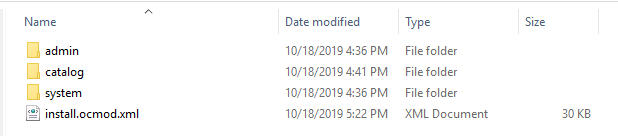
1. Unzip the zip file. You will get the folders as shown in the image below:

2. Copy all the folders of the zip file in the Root Directory of OpenCart setup via FTP manager.

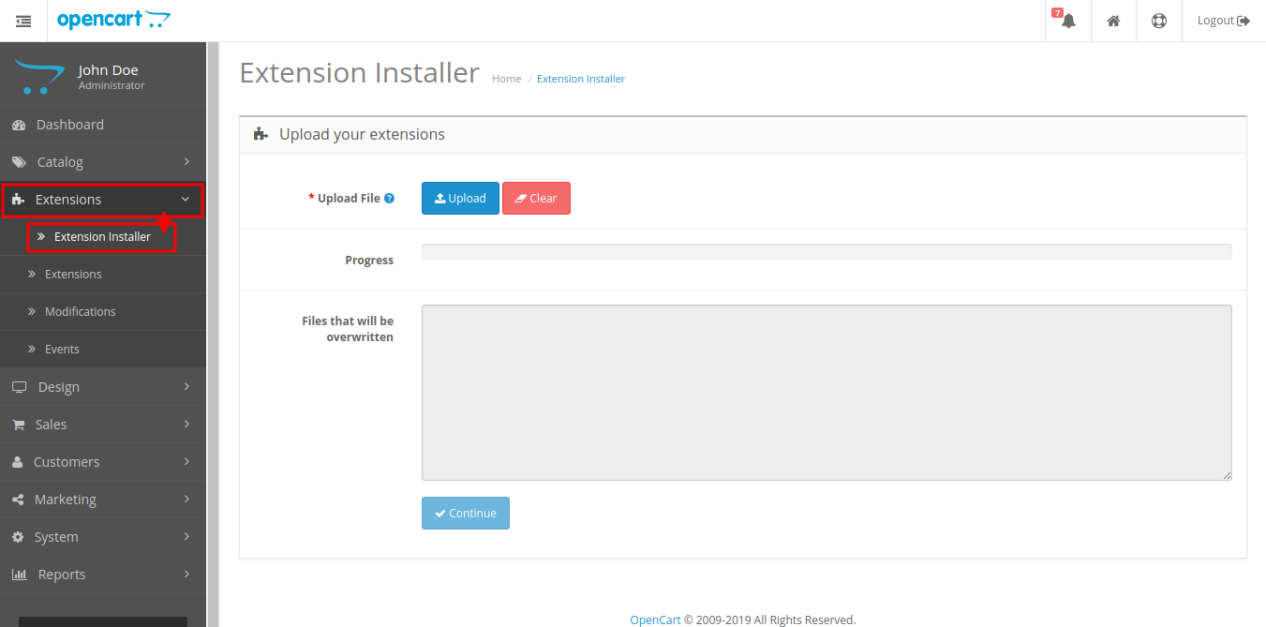
Steps to install Ocmod file using Extension Installer

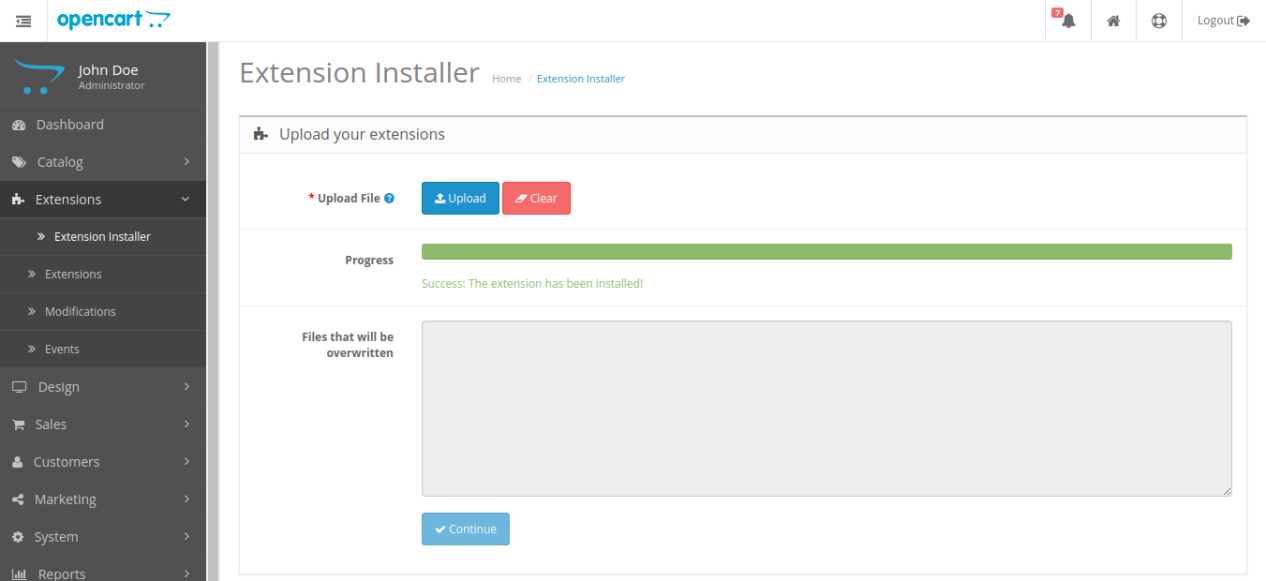
1. Open the Extension Installer window from the admin panel.

2. Click on Upload button to browse and upload the install.ocmod.xml file.

3. Once uploaded, you will see a success message on your screen as shown below.

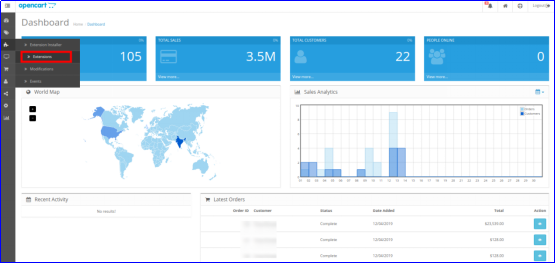
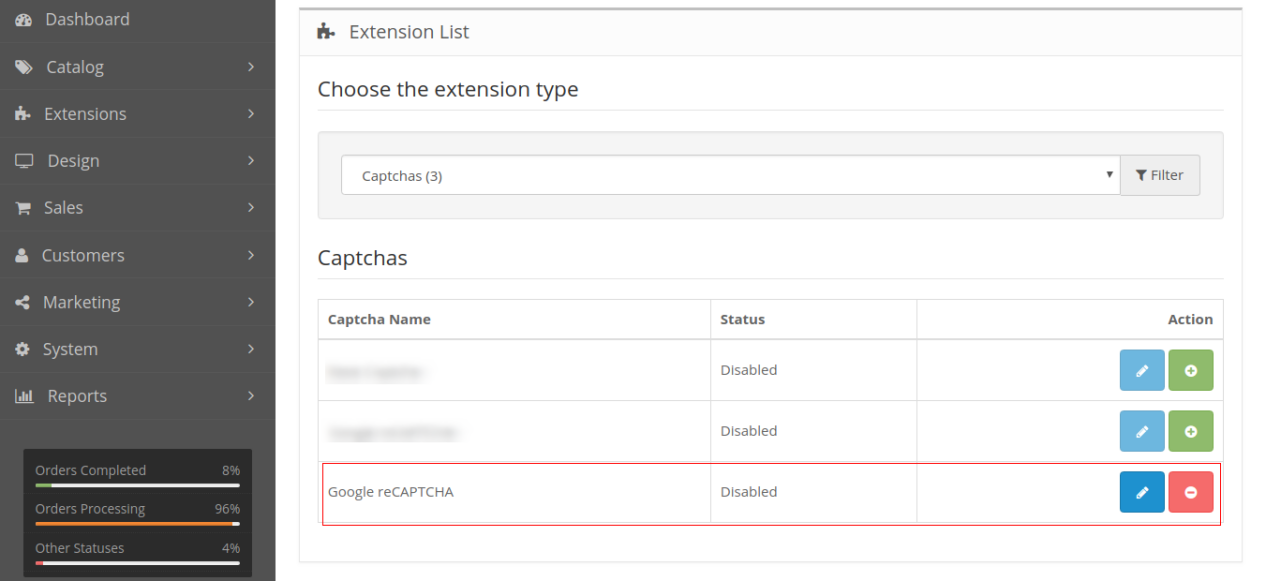
So, Opencart Google Captcha is now installed and is ready to use at your store. Go to the admin menu and click on the extensions. Then, click on Captchas and thereby click on the Edit button next to Google reCaptcha.

OpenCart Google reCaptcha Extension

Protect your OpenCart store from spam and bots with Knowband’s Google reCAPTCHA module, ensuring secure and human-only access.

SHOP NOW

3.0 Admin Interface of OpenCart Google reCaptcha Extension

After the successful installation of Opencart Google reCaptcha module for your website, you can implement version 2 and version 3 reCaptcha as per your business requirements. Navigate the settings in the given order: Admin Panel > Extensions > Captchas > Google reCaptcha.


The simple to understand admin interface of Opencart human verification extension is divided into four sections as:

  1. General Settings
  2. v2 reCaptcha Settings
  3. v3 reCaptcha Settings
  4. Look and Feel Settings

3.1 General Settings

  • Status: This option enables or disables the complete reCaptcha system from your website.
  • Enable Google reCaptcha for: With this option, you can choose the pages for which you want to enable reCaptcha feature.
  • reCaptcha for Login Page: This option allows you to select the type for login page as v2 reCaptcha or v3 reCaptcha.
  • reCaptcha for Registration Page: This option allows you to select the type for registration page as v2 reCaptcha or v3 reCaptcha.
  • reCaptcha for Contact Page: This option allows you to select the type for contact page as v2 reCaptcha or v3 reCaptcha.
  • reCaptcha for Forgotten Password Page: This option allows you to select the type for forgotten password page as v2 reCaptcha or v3 reCaptcha.

3.2 v2 reCaptcha Settings

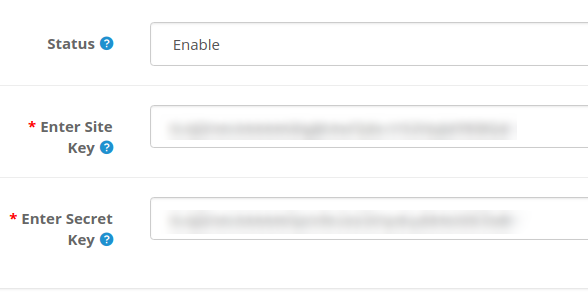
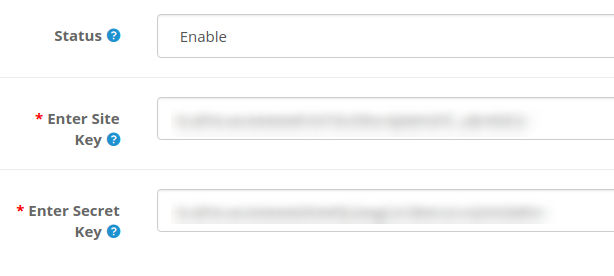
Under this section of Opencart Google Captcha module, you can set the site key and secret key for v2 reCaptcha system.

  • Status: You can enable or disable status of reCaptcha version 2 using this option.
  • Enter Site Key: This option allows you to enter the key of version 2 reCaptcha.
  • Enter Secret Key: With this option, you can enter the secret client ID of version 2 reCaptcha.

In order to get site site key and secret key for v2 reCaptcha, follow the steps discussed in the 3.2.1 section.

3.2.1 Steps to generate API keys for v2 reCaptcha

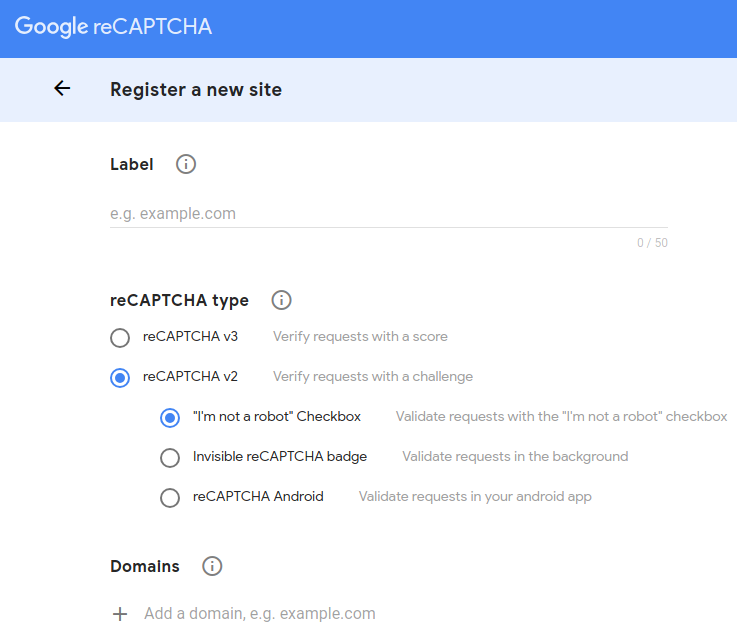
1. Visit https://www.google.com/recaptcha/intro/v3.html
2. At the top ride side, click on “Admin Console”. Here, you can register your own website.


3. Set a desired label which will be used to identify your site in future.


4. Choose the reCAPTCHA type you want to add for your site. Here, you have to select reCAPTCHA v2 and then select the desired sub-type.
5. Enter a valid domain required for reCaptcha registration.
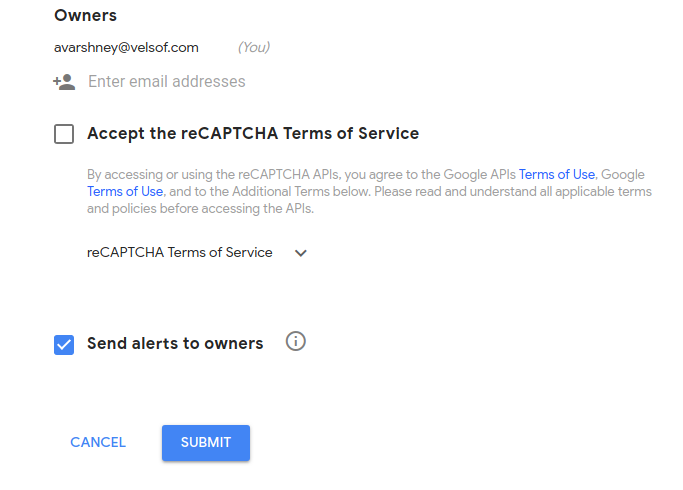
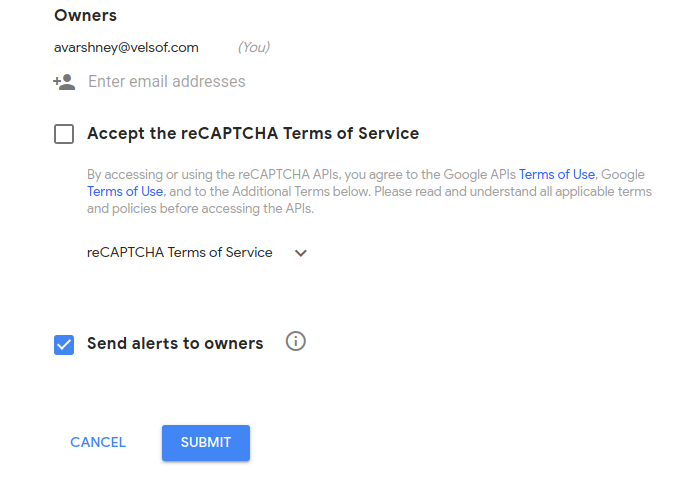
6. You can optionally add other email addresses to manage the site settings.


7. Accept the reCAPTCHA Terms and Conditions and click on “Submit” button.
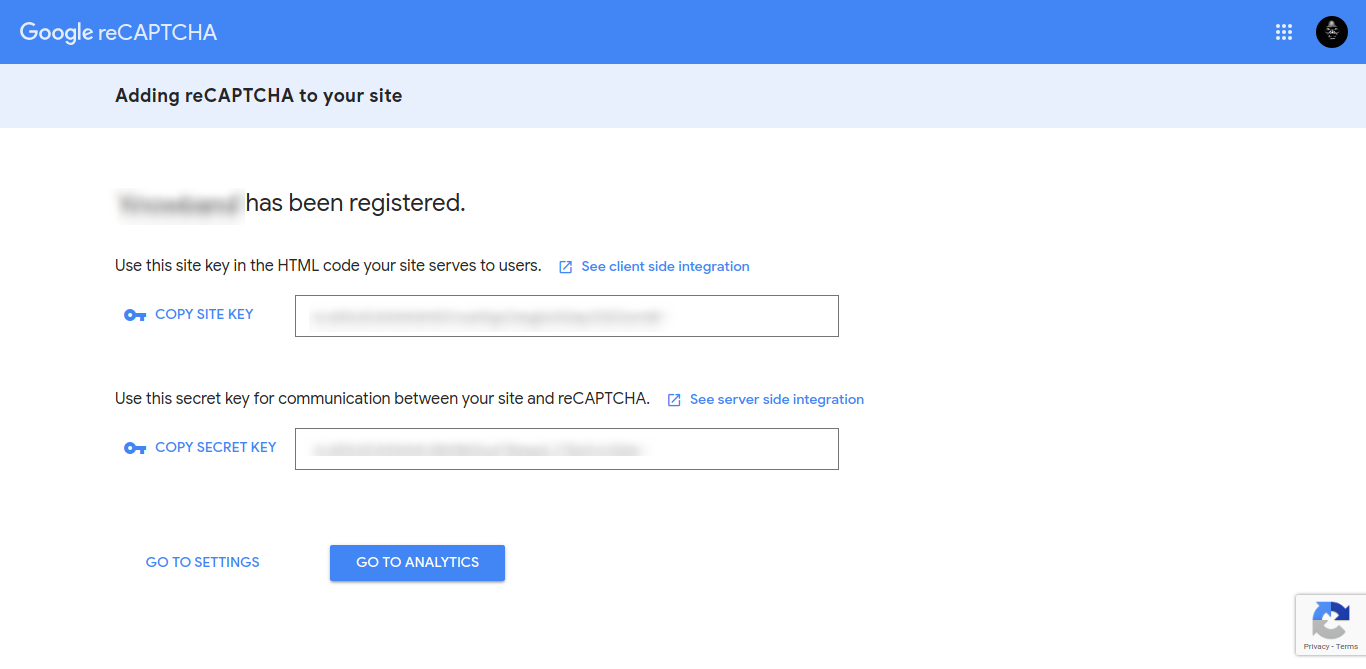
8. You will be redirected to the next page where you will find the Site Key and Secret Key. Copy both the keys to the back-office.

3.3 v3 reCaptcha Settings

Under this section of Opencart Google Captcha module, you can set the site key and secret key for v3 reCaptcha system.

  • Status: You can enable or disable status of reCaptcha version 3 using this option.
  • Enter Site Key: This option allows you to enter the key of version 3 reCaptcha.
  • Enter Secret Key: With this option, you can enter the secret client ID of version 3 reCaptcha.

In order to get site site key and secret key for v3 reCaptcha, follow the steps discussed in the 3.3.1 section.

Note: If you have selected the reCaptcha type as version 2, then site key and secret key for version 2 reCaptcha should be filled into fields, else it gives an error message. Similar thing applies to version 3 reCaptcha.

3.4. Look and Feel Settings:

The Look and Feel settings tab provided in Opencart Google Captcha Verification Extensions allows the store admin to add custom CSS and reCaptcha theme color, providing more control and enhanced functionality.

Theme Color: The Opencart reCaptcha module provides “Dark” and “Light” theme color options. You can modify the theme color from this option. 

Custom CSS: The admin can modify the reCaptcha’s appearance by adding customized CSS in this section.

3.3.1 Steps to generate API keys for v3 reCaptcha

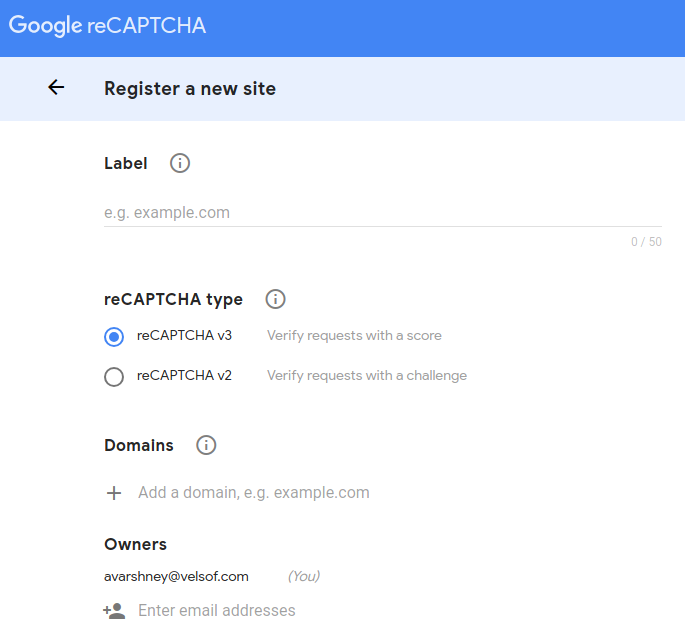
1. Visit https://www.google.com/recaptcha/intro/v3.html
2. At the top ride side, click on “Admin Console”. Here, you can register your own website.

3. Set a desired label which will be used to identify your site in future.


4. Choose the reCAPTCHA type you want to add to your site. Here, you have to select reCAPTCHA v3.
5. Enter a valid domain required for reCaptcha registration.
6. You can optionally add other email addresses to manage the site settings.


7. Accept the reCAPTCHA Terms and Conditions and click on “Submit” button.
8. You will be redirected to the next page where you will find the Site Key and Secret Key. Copy both the keys to the back-office.


4.0 Front Interface of Opencart Google reCaptcha Module

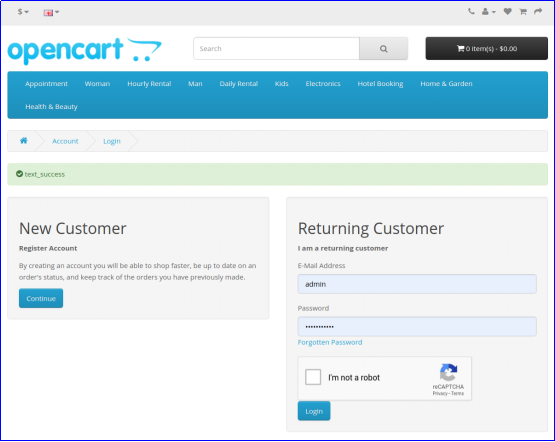
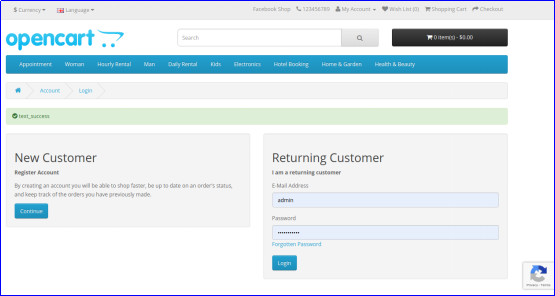
A) Login Page

v2 reCaptcha

v3 reCaptcha

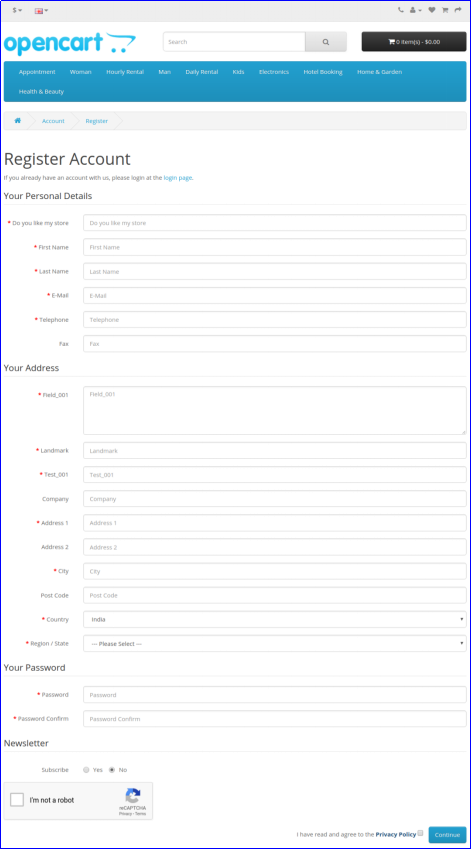
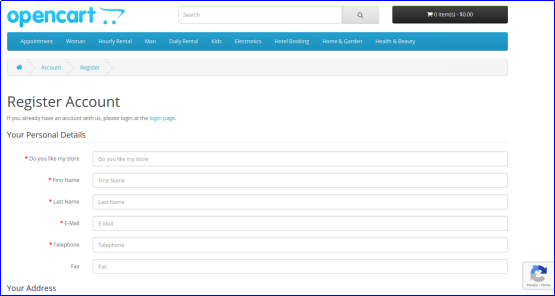
B) Registration Page

v2 reCaptcha


v3 reCaptcha


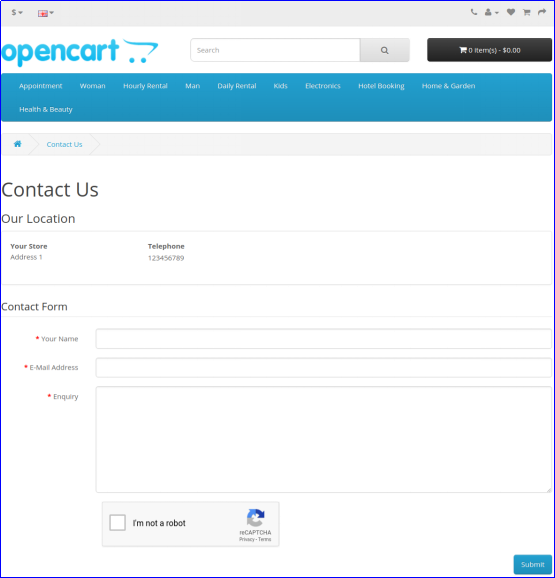
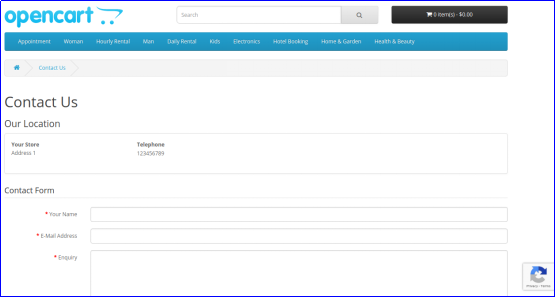
C) Contact Page

v2 reCaptcha


v3 reCaptcha

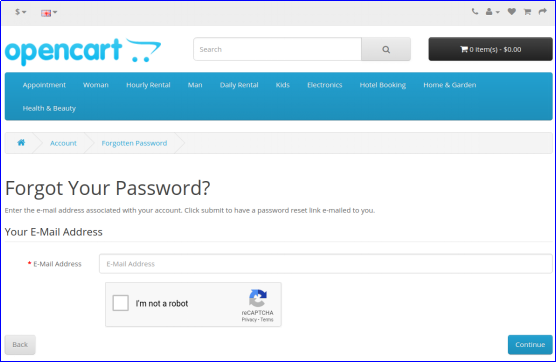
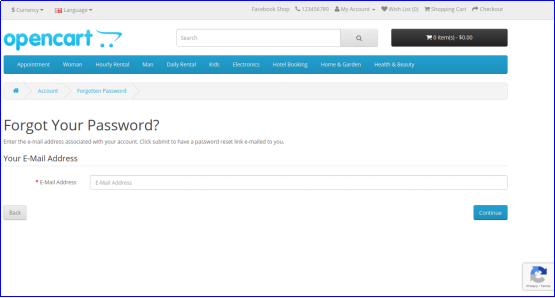
D) Forgot Password Page

v2 reCaptcha


v3 reCaptcha

Also, you can check our Opencart Block Bot module here:

Opencart Block Bot Module

OpenCart Block Bot by IP, Country, User Agent: Secure your OpenCart store by blocking unwanted bots based on IP, country, and user agent.

SHOP NOW

Full Tutorial of Human Verification Extension for Opencart

This OpenCart Google reCAPTCHA tutorial provides a complete step-by-step guide on installing and configuring the Google reCAPTCHA extension, adding reCAPTCHA to login, registration, forgot-password, and checkout pages (including guest, login, and registration steps), selecting between light and dark themes for a seamless user experience, protecting your store from spam, bots, and automated abuse, and enabling both reCAPTCHA v2 and v3 across multiple store pages for improved security and flexibility.

Check out the tutorial here:

Recommended Read:

Protect your OpenCart Store from Bots and Spammers