Using PrestaShop Hooks Effectively in Your Module Development

If you’ve spent any real time building PrestaShop modules, hooks are probably where most of your battles have been fought. They’re how your module speaks to the core — how you plug in functionality without ever cracking open a file you shouldn’t be touching. Knowing they exist is one thing. Using them without shooting yourself in the foot is another.

What a Hook Actually Is

At its simplest, a hook is a moment in PrestaShop’s execution where it pauses and checks whether anyone’s listening. If your module is registered for that hook, it gets a turn to respond.

There are two types worth distinguishing: action hooks and display hooks. Action hooks are for running logic tied to an event,  an order being placed, a product being saved, that sort of thing. Display hooks are for injecting HTML into specific spots on the storefront or back office. The distinction shapes how you write the method. Action hooks process something and usually return nothing meaningful. Display hooks return rendered HTML that PrestaShop slots into the page.

Where Developers Go Wrong with Registration

The most common early mistake is registering hooks in the wrong place or in a disorganized way. Registration belongs in your module’s install() method via $this->registerHook(). You can pass an array of hook names in one call — which is much tidier than stringing together repeated calls.

Just as important: unregister them in uninstall(). It’s easy to skip this and easy to regret. Orphaned hook registrations sitting in the database after a module’s been removed can cause genuinely confusing behavior down the line. A clean pattern looks roughly like this:

public function install()

{

    return parent::install()

        && $this->registerHook(['displayHeader',

           'actionOrderStatusUpdate',

           'displayFooterProduct']);

}


Get the Method Names Right

PrestaShop resolves hook methods by convention: hookHookName(), with the hook name in camelCase. So displayHeader maps to hookDisplayHeader(). Mess up the casing and PrestaShop silently skips your method, no error, no log entry, nothing. 

It’s one of those bugs that can eat an embarrassing amount of debugging time before you spot it.

Every hook method receives a $params array. What’s inside depends entirely on which hook triggered it. During development, dump $params once before writing any real logic. The documentation is a decent starting point but it doesn’t always reflect what actually gets passed in.
 

Handling Display Hooks Properly

For display hooks, the standard approach is to assign variables to Smarty and return the output of $this->display() pointing to a .tpl file. Keep your templates in views/templates/hook/ inside your module,  it’s the conventional structure and makes things easier to navigate as the module grows.

One detail worth emphasizing: always return the output, never echo it. The hook system collects return values and places them where they belong in the layout. If you echo directly, the output ends up at the top of the page regardless of where the hook actually sits.
When Built-In Hooks Aren’t Enough

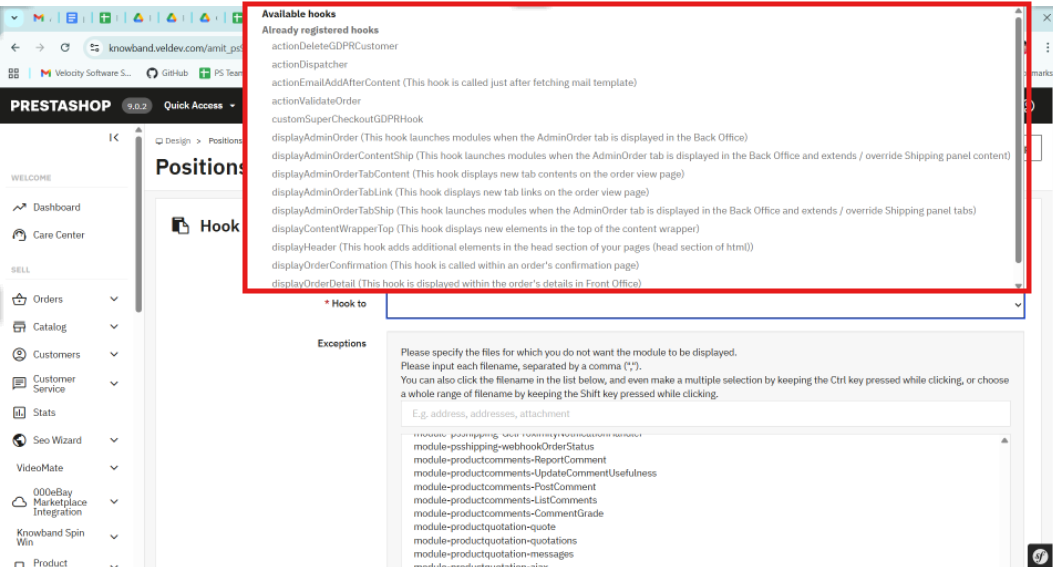
PrestaShop’s native hooks cover a lot of ground, but there are situations — especially when building modules meant to be extended, where you need something more targeted. You can register a custom hook with Hook::register() and fire it using Hook::exec() from anywhere in your codebase.

Custom hooks are particularly useful in multi-module projects. Instead of modules calling each other directly, you expose a hook and let other modules respond independently. It keeps the architecture clean and makes future changes much less painful.

Don’t Ignore the Performance Side

It’s easy to underestimate how much damage a poorly optimized hook method can do. Hooks like displayHeader fire on almost every page load. If your method is hitting the database or calling an external API without any caching, page speed takes a real hit — and your clients will notice before you do.

A few habits help. Cache anything that doesn’t change between requests. Use PrestaShop’s built-in cache layer where it fits. And if your hook logic only applies under certain conditions, check those conditions at the top of the method and return early if they’re not met. Keeps the overhead low and the code readable.

When the Hook Isn’t Firing

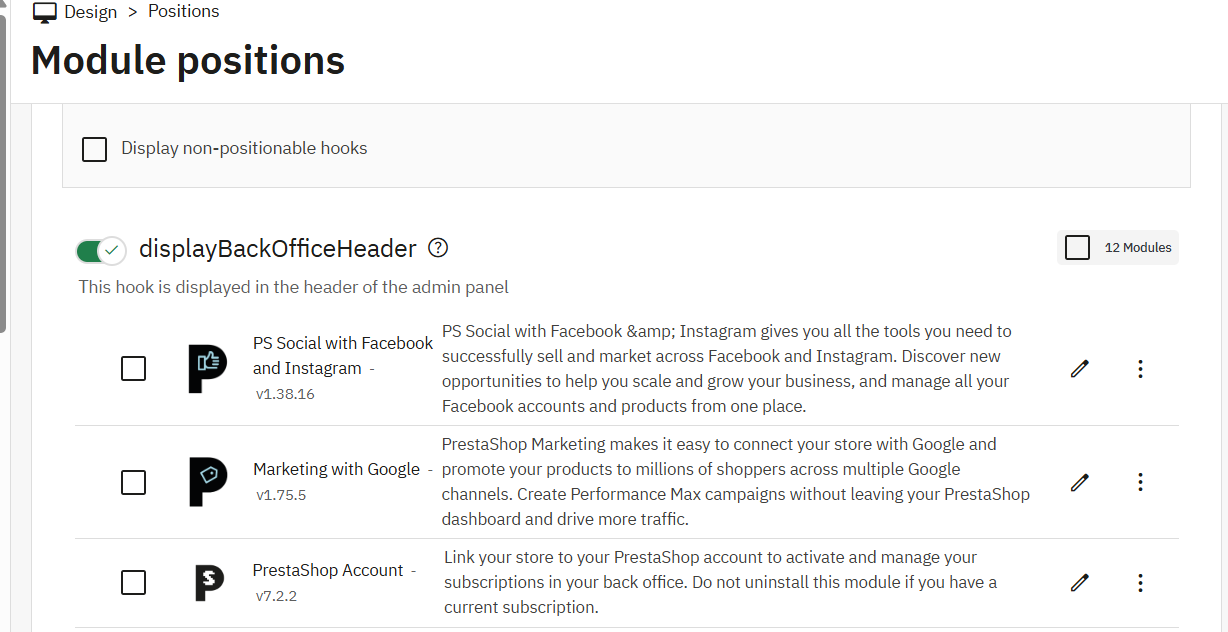
When something isn’t working as expected, the first thing to check is whether the module is actually attached to the hook. Head to Modules > Positions in the back office, or look directly at the hook table in the database. A module can be installed while a hook registration silently failed during setup.

Custom Development Services

Tailored solutions by Knowband for your eCommerce success

Looking for powerful and scalable solutions? Knowband offers expert custom development services to help you build high-performance eCommerce features with ease.

✔ Custom Module Development
✔ eCommerce Plugins
✔ API Integration
✔ Performance Optimization
✔ Third-party Integration

Also worth considering: execution order. If a module earlier in the chain throws an unhandled exception, PrestaShop can stop processing everything else on that hook. The Positions panel lets you adjust the order, and sometimes that’s all it takes to fix what looks like a mysterious disappearing hook.

The Takeaway

Hooks are what make PrestaShop modules actually modular. Used well, they let you build clean integrations that don’t step on the core or on other modules. The fundamentals aren’t complicated: register in install(), name your methods precisely, return from display hooks, cache on high-traffic hooks, and reach for custom hooks when the built-in set falls short.

Once that becomes a habit, the development process gets a lot smoother,  and your codebase stays something you’ll actually want to revisit later

At Knowband, our development team regularly works with complex PrestaShop module architectures, where efficient hook usage becomes critical for performance and scalability. If you’re looking to speed up development or implement advanced functionality, exploring professionally built modules and solutions can save significant time and effort.

What is New in PrestaShop 9.0? Full Feature & Migration Guide

Why PrestaShop?

PrestaShop is a leading open-source e-commerce platform, known for its flexibility, powerful features, and zero licensing costs. Known for its intuitive interface, multi-language/currency support, and rich ecosystem of modules and themes, it’s ideal for SMEs creating customised online stores. PrestaShop 9.0 represents a significant milestone, delivering performance upgrades and essential architectural advancements reflecting modern development standards, scalability, and long-term maintainability.

What’s New in PrestaShop 9.0?

PrestaShop 9.0 brings complete core framework modernisation—a major leap forward, redefining how developers and store owners interact with the system.

Core Architecture Changes

Full Symfony Integration: PrestaShop 9 finalises its transition to the Symfony framework, providing a modern, stable foundation for future development. Legacy classes and outdated controllers have been deprecated or replaced, making the system more maintainable and aligned with best practices.

PHP 8.1+ Support: Requires PHP 8.1 or higher, ensuring compatibility with the latest features, improved security, and faster performance.

Doctrine DBAL: The Database Abstraction Layer improves database interactions, offering better abstraction, query building, and testability—especially beneficial for large-scale customisations.

Composer-Centric Development: Composer 2.x now plays a central role in the development workflow, handling dependency management, module integration, and autoloading seamlessly.. This simplifies version control and enhances CI/CD compatibility.

Back Office & Developer Enhancements

While focusing on backend improvements, merchants and developers will notice:

  • Faster page loads and improved server response times
  • Cleaner codebase through legacy logic removal
  • Improved modularity for cleaner, standalone modules
  • Stronger test coverage for stable, secure releases

Though UI changes are minimal, these under-the-hood updates drastically enhance store stability and maintainability.

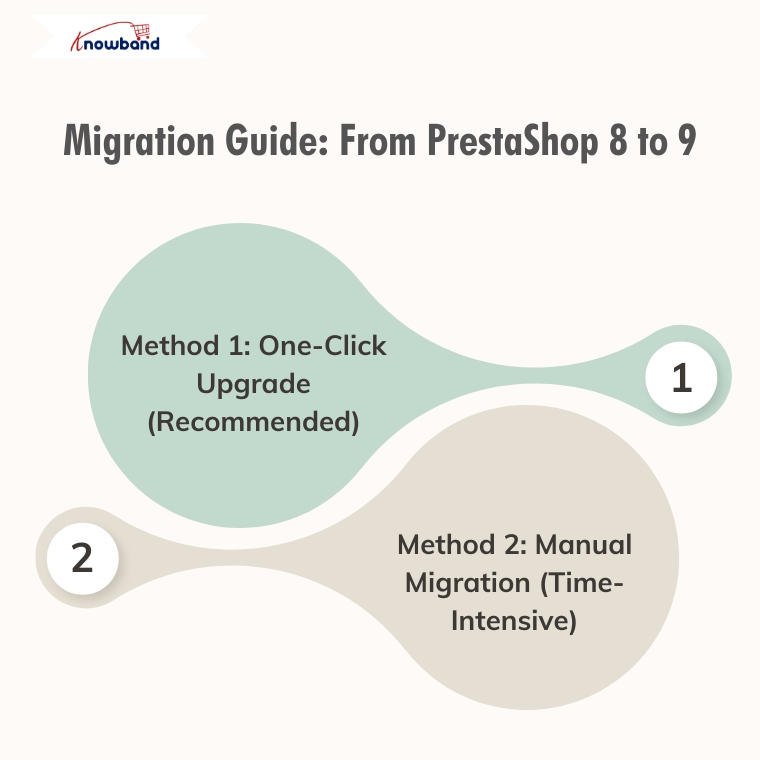
Migration Guide: From PrestaShop 8 to 9

Method 1: One-Click Upgrade (Recommended)

Available Tools:

  • Official 1-Click Upgrade Module: Standard PrestaShop upgrade module handling version transitions automatically
  • MigrationPro: Third-party solution supporting migration with comprehensive data transfer
  • PrestaShop Migrator: Alternative one-click solution for seamless upgrades

Advantages:

  • Automated process with minimal manual intervention
  • Built-in data integrity checks
  • Reduced human error risk
  • Faster migration time
  • Automated backup creation

Autoupgrade Backup Process:

  1. BackupInitialization: Process start, clearing leftover temporary files
  2. BackupFiles: Complete backup of store files, themes, modules, images, and custom code
  3. BackupDatabase: Creates a complete backup of the entire database, including all tables and stored data.
  4. Let me know if you prefer a more concise or more detailed version.
  5. BackupComplete: Process finalisation with verification

Rollback Process: If the upgrade encounters issues, easily revert through the autoupgrade module’s “Rollback” section by selecting the backup archive and monitoring rollback progress.

Data Migration: Automatically handles transfer of products, categories, attributes, customer accounts, order history, CMS pages, configuration settings, images, and compatible module configurations.

Method 2: Manual Migration (Time-Intensive)

Fresh PrestaShop 9 installation followed by manual data migration.

Process Overview:

  1. Review Server Requirements: PHP 8.1+, MySQL 5.7+/MariaDB 10.3+, Composer 2.x, Apache/Nginx
  2. Complete Backup: Database, files, configuration, custom code
  3. Install PrestaShop 9.0: Fresh installation via Git and Composer
  4. Data Migration Strategy: Export from PS8 (products, customers, orders, CMS, configurations) and import to PS9 using native tools, third-party modules, or manual entry
  5. Module Compatibility Assessment: Audit existing modules, update compatible ones, identify alternatives for incompatible modules
  6. Theme Reconstruction: Rebuild themes using PS9’s updated architecture, adapt to Symfony requirements
  7. Comprehensive Testing: Front office (browsing, checkout, payments, mobile) and back office (product management, orders, reporting) functionality

Recommendation

Method 1(One-Click Upgrade) is strongly recommended for most merchants due to:

  • Significantly reduced migration time
  • Lower risk of data loss/corruption
  • Automated handling of complex data relationships
  • Built-in rollback capabilities
  • Professional support availability

Consider Method 2 (Manual Migration) only for specific customisation requirements necessitating a fresh installation or when automated tools are incompatible.

Post-Migration Checklist

Regardless of the chosen method:

  • Verify all critical store functions
  • Test payment and shipping integrations
  • Confirm SEO settings and URL structures
  • Update DNS and SSL certificates if needed
  • Monitor site performance and loading speeds
  • Train staff on interface changes

Final Thoughts

PrestaShop 9.0 sets a strong course toward improved speed, enhanced security, and a more developer-centric ecosystem. Although upgrading requires planning and effort, long-term benefits are considerable—better performance, cleaner code, enhanced scalability, and modern tooling.

If running an older version, evaluate the long-term value of moving to Prestashop 9. If unsure about the process or lacking in-house developers, consulting with a PrestaShop expert or certified partner is highly recommended.

Still deciding whether to switch?

If you’re unsure whether moving from PrestaShop 8 to 9 is the right step for your store, we invite you to check out our detailed comparison and expert insights.

Discover the key benefits, potential risks, and real-world impact of migrating — and make an informed decision for your business.

Explore the PrestaShop 8 vs 9 Comparison Guide

Should You Move from PrestaShop 8.1 to 9.0? A Complete Feature Comparison

With the release of PrestaShop 9.0, the platform is moving toward a more modern, performance-oriented, and developer-friendly future. However, as with any major update, merchants and developers are left with an important question: Is now the right time to migrate from PrestaShop 8.1?

In this blog, we’ll explore the key differences between PrestaShop 8.1 and 9.0. From performance upgrades to developer tools, we’ll cover everything you need to know to make an informed decision about your store’s future.

Symfony Framework Upgrade: From 4.4 to 6.4

To begin with, one of the most significant changes in PrestaShop 9.0 is the upgrade of the Symfony framework from version 4.4 to Symfony 6.4, the latest long-term support (LTS) release. This transition ensures better stability, security, and access to modern development tools.

Symfony 6.4 will be maintained with bug fixes through November 2026 and security patches until November 2027, ensuring long-term stability for evolving projects. By comparison, Symfony 4.4—used in PrestaShop 8.1—has already reached the end of its support life. Therefore, PrestaShop 9.0 becomes the smarter choice for long-term projects.

PHP Compatibility and Performance Enhancements

In addition, PrestaShop 9.0 introduces support for PHP 8.1, 8.2, and 8.3. This allows merchants to benefit from improved performance, better memory handling, and modern PHP features.

Unlike PrestaShop 8.1, which stopped at PHP 8.1, the new version embraces the latest PHP releases, representing a major step forward. As a result, PrestaShop 9.0 is better aligned with modern PHP standards and development practices. However, keep in mind that older hosting environments and custom code may require updates to ensure compatibility.

Modern API Platform for Headless Commerce

Furthermore, PrestaShop 9.0 brings a brand-new API system based on API Platform v3, dramatically improving how it interacts with external applications.

This makes it ideal for headless commerce architectures, mobile app integrations, and third-party services. In contrast, PrestaShop 8.1 relied on a legacy API, which lacked the flexibility and scalability modern developers expect. As a result, the new API system opens up a world of opportunities for automation and integration.

PrestaShop 9 debuts a completely reimagined Admin API, built using API Platform—a cutting-edge PHP framework known for its flexibility and power. This innovation marks a significant leap toward creating a more open, extensible, and developer-focused PrestaShop environment.

Here’s what the new Admin API offers:

  • Simplified integration with external platforms such as ERPs, CRMs, and marketing tools.
  • Automation-ready architecture that helps reduce manual store management and boosts operational efficiency.
  • RESTful structure with JSON formatting, ensuring ease of use for developers accustomed to modern API standards.
  • Future-ready modularity, allowing the system to grow and adapt with community and business demands.

It’s worth noting that the Admin API is still evolving. While the core framework is already in place, additional features and endpoints are being actively developed.

Key Hook Updates in PrestaShop 9

 PrestaShop 9 retains most of the widely used hooks from version 8 to ensure module and theme compatibility. Common front-office hooks like displayHeader, displayFooter, displayHome, and displayProductButtons remain supported. In the back office, important hooks such as displayBackOfficeHeader, displayAdminOrderMain, and displayAdminProductsExtra are still available for extending core functionality.

Alongside these, PrestaShop 9 introduces modern Symfony-based hooks like actionSymfonyResponse, actionAfterCartSave, and actionProductFormBuilderModifier. These offer a cleaner, event-driven approach to customisation and are part of the platform’s move toward a more modular, scalable structure.

Redesigned Back Office Using Symfony and Twig

Another significant improvement is the full revamp of the back office, now built with Symfony and Twig for a more modern and maintainable structure. This results in a more intuitive, mobile-friendly, and user-centred admin experience.

For store owners, the redesigned layout means easier navigation and improved productivity. For developers, the shift supports cleaner templating and reduces legacy code dependencies. On the other hand, PrestaShop 8.1 retains a more traditional interface, which may now feel outdated in comparison.

Developer-Focused Improvements

Additionally, PrestaShop 9.0 has replaced several outdated libraries used in previous versions. For example:

  • Guzzle HTTP Client → Symfony HTTP Client 
  • SwiftMailer → Symfony Mailer 

These updates result in a more secure, efficient, and future-proof module and email handling.

Moreover, the login system has been modernised. Legacy hooks have been removed, and a new actionBackOfficeLoginForm hook has been introduced, offering cleaner and more customizable authentication flows.

Transition Toward Twig Templates

Importantly, PrestaShop 9.0 also makes a bold move toward full Twig integration, gradually replacing the legacy Smarty engine. Twig is now widely used in both front and back offices, offering more readable, modular, and reusable templates.

For theme developers, this is a significant improvement. In contrast, PrestaShop 8.1’s reliance on Smarty limits flexibility and long-term maintainability.

Should You Upgrade to PrestaShop 9.0?

PrestaShop 9.0 brings major improvements—but before upgrading, make sure your store is ready to handle the change. If your themes, modules, and hosting environment are compatible—or can be easily updated—then migrating can bring notable performance and UX benefits.

Alternatively, if your current store depends heavily on legacy plugins or complex custom code, it might be wiser to wait until broader module support becomes available. Testing in a staging environment is highly recommended before committing to a full upgrade.

Migration Tips for Store Owners

Before making the switch, follow these best practices:

  • Backup your entire store, including the database and any custom files.
  • Test the upgrade in a staging environment first to avoid disrupting your live store.
  • Verify compatibility for all third-party themes and modules.
  • Monitor community feedback for bug reports and migration issues.
  • Conduct thorough testing, especially checkout, payment, and product display areas. 

Final Thoughts

PrestaShop 9.0 marks a major leap toward a modern, secure, and scalable e-commerce platform. From faster performance and updated frameworks to a cleaner developer experience, it brings meaningful benefits for merchants and developers alike.

In conclusion, while migration requires effort and planning, the long-term gains make it a worthwhile investment. Whether you’re a seasoned PrestaShop user or planning your first store, now is an excellent time to explore what version 9.0 can do for your business.

If you’re looking for a reliable solution to ensure a smooth upgrade, KnowBand offers custom module development and PrestaShop 9.0-ready extensions that can accelerate your transition. Their expert support and robust library of PrestaShop modules make them a valuable partner during major upgrades.

Top 7 Email Strategies to Win Back Abandoned Carts Using Knowband

Nearly every e-commerce business struggles with customers leaving items in their carts without completing the purchase. Customers add products but leave without purchasing, resulting in lost sales and engagement opportunities. Therefore, Knowband’s PrestaShop Abandoned Cart Module, PrestaShop Spin & Win Module, and PrestaShop Back In Stock Module offer a powerful way to recover these potential sales through emails.

Here are seven effective email strategies to bring those customers back.

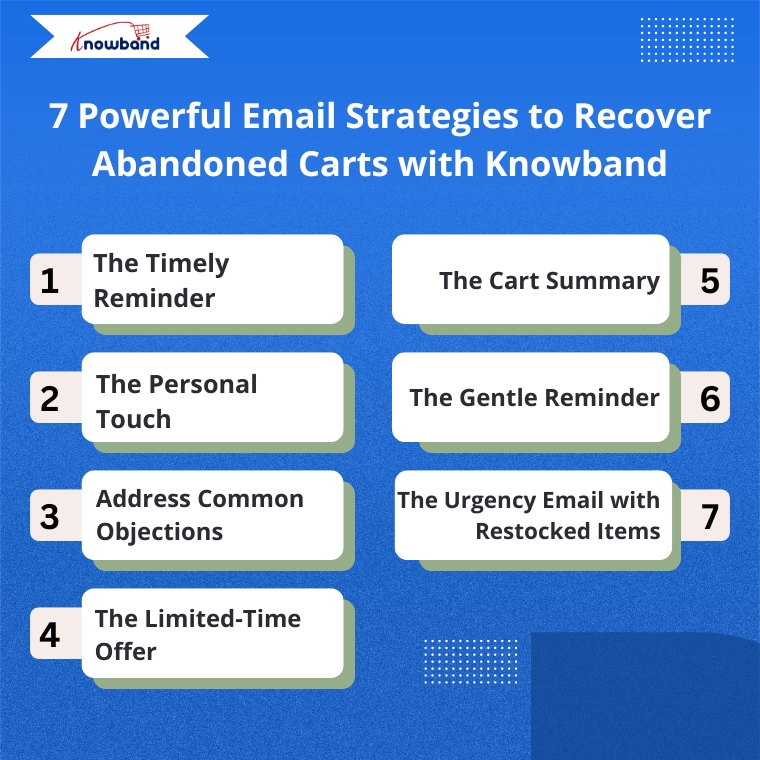
1. The Timely Reminder

Timing is everything when recovering abandoned carts. Therefore, the Abandoned Cart Addon for PrestaShop allows you to send the first reminder email within 1-3 hours after abandonment when your store is still fresh in the customer’s mind. Moreover, Knowband’s Abandoned Cart Addon allows you to set up automated sequences with precise timing, maximizing your chances of recovery.

2. Targeted Email Engagement

One way is to address customers by name and reference specific items they left behind.  Knowband’s PrestaShop Abandoned Cart Module automatically captures this information, allowing you to create personalized emails that show customers you value their individual shopping experience.

3. Address Common Objections

There can be many reasons for abandoned carts, like product cost, shipping cost, payment, or technical issues. So, Knowband’s Spin & Win module allows the admins to add coupon discounts, which can motivate the customers to go back and make purchases. 

4. The Limited-Time Offer

Create urgency with time-sensitive offers. The Abandoned Cart module allows you to include discount and coupon emails, and expiration dates on discount codes, encouraging quick action. For example, a 10% discount that expires within 24 hours can be the perfect motivation to complete a purchase.

5. The Cart Summary

Provide a clear summary of the abandoned cart in your email. This includes product images, names, quantities, and prices, making it easy for the customer to recall what they were interested in. The Abandoned Cart Module for PrestaShop by Knowband sends the email when the user abandons the cart, so keep the email template concise and visually appealing to spark interest and remind them of the value they were about to purchase

Integrate Your Opencart Shop with Abandoned Cart Module

No Coding Skills Required

SHOP NOW

6. The Gentle Reminder

Sometimes, customers abandon their carts by mistake or forget they left items behind. A gentle reminder email can be sent a day after abandonment using Knowband’s Abandoned Cart Module and can impact them without being too pushy. Additionally, this email should be friendly and polite, encouraging them to return and complete their purchase

7. The Urgency Email with Restocked Items

If an item that was abandoned is back in stock, the store owner can send an email informing the customer that their desired item is available again. This can be achieved by implementing the PrestaShop Back In Stock Module by Knowband, which can help create urgency, especially when products are in limited supply or high demand, and can drive the customer to act quickly.

How These Modules Operate

The Abandoned Cart Module helps you track, manage, and recover incomplete purchases through automated, personalized email campaigns. Moreover, the Prestashop Abandoned cart email follow-up addon enables store owners to set up smart reminders, offer discounts, show product images, and include one-click recovery links, making it easy for customers to return and complete their orders.

The Spin & Win Module for PrestaShop, on the other hand, helps prevent abandonment before it even happens. Moreover, this interactive pop-up module for Prestashop captures visitor emails by offering them a chance to win attractive discounts through a gamified interface. Moreover, this not only adds fun to the user experience but also provides coupons for purchases and grows your email list for future marketing.

The Back In Stock Module for PrestaShop allows your customers to subscribe to restock alerts for out-of-stock products. Furthermore, as soon as an item is available again, customers receive an automated email notification, giving them a chance to return and complete their purchase even without any manual effort from your side.

Putting It All Together with Knowband

Implementing these strategies becomes simple with Knowband’s PrestaShop Abandoned Cart Module, PrestaShop Spin & Win Pop, as well as PrestaShop Back In Stock.

 These modules offer:

  • Automated email sequences with custom timing
  • Personalized content for each customer
  • Built-in discount code generator
  • Detailed analytics to refine your approach
  • One-click cart recovery links
  • Mobile-responsive email templates

Furthermore, these PrestaShop modules by Knowband are user-friendly add-ons that allow you to track recovery rates and revenue gained, helping you continuously improve your abandoned cart strategy.

Start Recovering Lost Sales Today

Cart abandonment doesn’t have to mean lost revenue. With Knowband’s PrestaShop Abandoned Cart Module, PrestaShop Spin & Win Entry Pop-Up Module, PrestaShop Back in Stock, and these seven email strategies, you can effectively bring customers back and increase your conversion rates significantly.

Therefore, install Knowband’s PrestaShop Modules today and transform abandoned carts into completed orders with these proven email strategies.

For more details, check out the Prestashop Abandoned Cart E-mail Reminder Module which is available for PrestaShop, OpenCart, Magento, and WooCommerce.