Expanding Your Reach: Why Selling on Multiple Channels Matters
Running an online store isn’t just about setting up a website and waiting for customers. Today’s shoppers explore multiple platforms before making a purchase. If your products aren’t available across channels like Google Shopping, Etsy, eBay, and more, then you’re missing out on potential sales. Multi-channel selling helps you tap into a broader audience, build brand recognition, and create multiple revenue streams. 73% of online shoppers use multiple channels before making a purchase decision.
Key Benefits of Multi-Channel Selling
High Sales and Revenue
Each additional platform you sell on creates new revenue opportunities, allowing you to attract different customer bases that prefer shopping on specific platforms.
Better Visibility and Great Engagement
Your products become more accessible to a larger customer base, increasing the chances of discovery and purchase. With better visibility, your store attracts more visitors, leading to higher engagement and better conversions.
Stronger Brand Recognition
Customers see your products more often, increasing trust, credibility, and brand recall over time. Thus, it helps increase brand recognition. More Customer Base and Increased Sales: Selling on different platforms increases the scalability of the products of your store. That’s why it attracts more customers on different marketplaces.
How to Succeed in Multi-Channel Selling

1. Know Your Audience and Choose the Right Platforms
Every sales platform works differently. Identify where your customers shop the most and focus your efforts there. Whether they browse marketplaces, use social media, or search on Google, understanding their habits helps you sell smarter.
Research Market Trends: Stay updated on industry trends to see where similar products are selling best. Analyze competitors, read customer reviews, and follow market reports to identify the most profitable channels. Look for seasonal trends and emerging shopping habits to stay ahead of the competition, where similar products are selling best.
Consider Product Fit: Each platform caters to a different audience and product type. For example, fashion and lifestyle products perform well on social media, while specialized electronics may sell better on dedicated marketplaces. Therefore, choose platforms that align with your product category and customer preferences to maximize success.
2. Keep Your Inventory in Sync Across Channels
One of the biggest challenges in multi-channel selling is managing inventory efficiently. Selling the same product on multiple platforms without a centralized inventory system can lead to overselling, customer dissatisfaction, and retention.
Automatic Inventory Synchronization: Get Plugins that update your stock on all platforms at the same time. This way, you don’t have to change it manually, and there won’t be mistakes in the product.
Keep Extra Stock: Always have some extra products, especially for popular items. This helps you avoid running out when many people buy at once.
3. Optimize Product Listings for Each Channel
Managing stock across different platforms can get confusing. If you don’t update your products properly, you might sell an item that’s already out of stock or run out of popular products too fast. A good system helps avoid these problems and keeps your business running smoothly.
Managing stock properly is important when selling on multiple platforms. If you don’t keep track, you might sell products that are already out of stock or struggle to fulfil orders. Keeping your inventory updated helps you avoid these problems and keeps your customers happy.
Use automatic stock updates: Use to sync inventory across all platforms in real-time. This means whenever a product is sold on one platform, the stock updates everywhere, preventing overselling or manual errors. Without automation, you might accidentally sell more than you have, leading to cancellations and unhappy customers..
Track best-selling products: The PrestaShop Google Shopping allows the admin to analyze past sales and predict future demand. Some products perform better than others, and by checking which items are selling fast, you can prepare in advance. This helps you stock the right amount of products and prevents running out of popular items.
Knowband’s PrestaShop Modules for Multi-Channel Selling!

At Knowband, we create easy-to-use PrestaShop Modules that help you sell on multiple platforms without extra effort.
1. PrestaShop Google Shopping Integration
Google Shopping is a powerful platform where millions of shoppers search for products daily. By listing your products on Google Shopping, you can increase visibility and attract more buyers. The research has shown that 87% of people begin their search for shopping from Google.
The Knowband PrestaShop Google Shopping Integrator allows you to showcase your products directly on Google Shopping without the need for manual updates. This automation increases product visibility, boosts traffic, and helps drive more sales.
Key Features of the PrestaShop Google Shopping Integration Module.
Automated Product Syncing: Automatically sync your PrestaShop store with Google Shopping so product details stay updated without manual work.
Bulk Product Uploads: Save time by uploading all your products at once. The Knowband’s Google Shopping allows the admin to list the products in bulk at a time, reducing the manual work.
Smart Attribute Mapping: Easily match your product details with Google’s requirements to improve listing accuracy. The admin can map the store’s category with all the attributes to Google’s category.
Auto-Generated Feeds: Keep your listings fresh with automated product feed updates. The extension allows the feed features to automatically sync all the updated product details. With Knowband’s PrestaShop Google Shopping Integration, you can effortlessly display your products in Google search results, driving more traffic to your store.
2. PrestaShop eBay Marketplace Integration
The Knowband PrestaShop eBay Marketplace Integration Extension makes it effortless to manage your eBay store directly from your PrestaShop dashboard. Instead of manually updating listings and tracking stock, this extension automates the entire process, helping you scale your business smoothly.
Key Features of the eBay Integration:
1. Sync Products & Inventory: The Knowband’s PrestaShop eBay Integration module ensures that your product listings and stock levels remain consistent across both platforms. Any changes made to product details, stock quantities, or pricing in your PrestaShop store are automatically reflected on eBay. This prevents overselling and stock discrepancies, ensuring a smooth selling experience.
2. Real-Time Updates: Stay up to date with automated real-time synchronization of orders, pricing, and inventory changes. As soon as a product is sold on eBay, the stock is adjusted in PrestaShop. Order statuses are updated instantly, keeping customers informed and reducing manual effort. This feature helps in avoiding price mismatches, out-of-stock issues, and processing delays.
3. Customizable Product Listings: Easily create and manage eBay product listings directly from your PrestaShop back office. Optimize listings by customizing product titles, descriptions, images, pricing, and attributes for better visibility on eBay. You can also apply different pricing rules for eBay without affecting your PrestaShop store, ensuring better profitability.


3. PrestaShop Etsy Marketplace Addon
Etsy is a leading marketplace for handmade, vintage, and unique products, with over 95 million active buyers. It hosts over 7.5 million active sellers, making it a competitive yet rewarding platform for businesses that specialize in niche and creative products. In 2023 alone, Etsy sellers generated over $13 billion in gross merchandise sales, proving the platform’s massive potential.
The PrestaShop Etsy Marketplace Addon simplifies the process of managing your Etsy store directly from your PrestaShop dashboard. Instead of manually updating listings, tracking orders, or adjusting stock levels, this extension automates everything, saving time and reducing errors.
Key Features of the Etsy Connector:

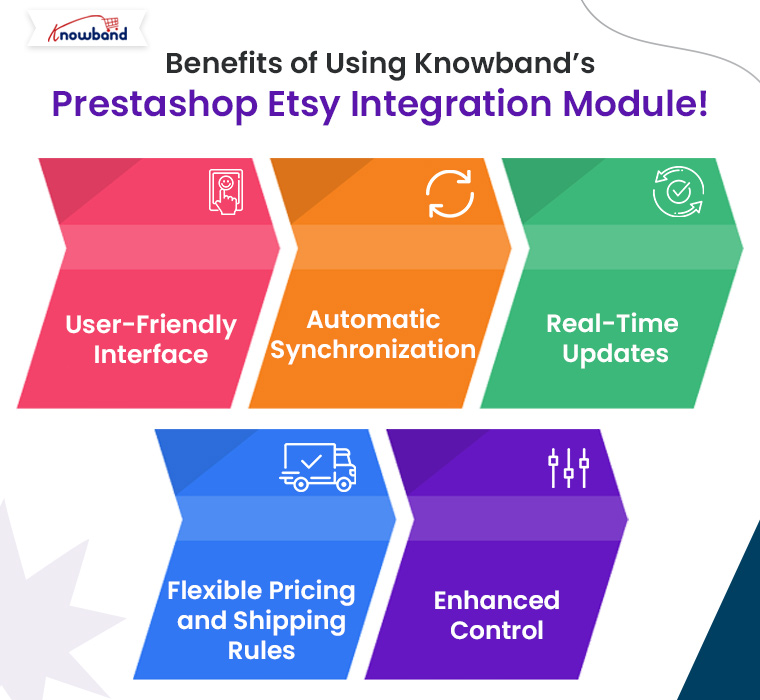
Price and Order Synchronization: Knowband’sPrestaShop Etsy Marketplace Addon ensures real-time price and order synchronization, keeping your inventory and pricing updated across both platforms.
Bulk Uploads: Easily add multiple products to Etsy in one go. The Knowband’s Etsy Marketplace Addon allows the admin to list bulk products at the same time smoothly.
Category Mapping: Ensure your products appear in the right Etsy categories with the correct attributes for better visibility.
Price & Stock Synchronization: Keep pricing and stock updated to prevent overselling. The Knowband’s Etsy Marketplace Integration Addon allows price management within the module.
Conclusion: Sell Smarter with Knowband’s PrestaShop Multi-Channel Extensions
Selling on Google Shopping, eBay, and Etsy opens up new sales opportunities. With Knowband’s PrestaShop solutions, you can automate inventory management, sync orders, and optimize product listings all from one place. The Knowband’s Marketplace Addons save time, reduce manual errors, and help you grow your business effortlessly.
Knowband’s PrestaShop Marketplace Integration Addons simplify the process by automating inventory updates, order synchronization, and product listing management. With these smart integrations, you can sell effortlessly across multiple platforms, save time, and focus on growing your business. Take advantage of multi-channel selling today and unlock new opportunities for success.