Expanding Your Reach: Why Selling on Multiple Channels Matters
Running an online store isn’t just about setting up a website and waiting for customers. Today’s shoppers explore multiple platforms before making a purchase. If your products aren’t available across channels like Google Shopping, Etsy, eBay, and more, then you’re missing out on potential sales. Multi-channel selling helps you tap into a broader audience, build brand recognition, and create multiple revenue streams. 73% of online shoppers use multiple channels before making a purchase decision.
Key Benefits of Multi-Channel Selling
High Sales and Revenue
Each additional platform you sell on creates new revenue opportunities, allowing you to attract different customer bases that prefer shopping on specific platforms.
Better Visibility and Great Engagement
Your products become more accessible to a larger customer base, increasing the chances of discovery and purchase. With better visibility, your store attracts more visitors, leading to higher engagement and better conversions.
Stronger Brand Recognition
Customers see your products more often, increasing trust, credibility, and brand recall over time. Thus, it helps increase brand recognition. More Customer Base and Increased Sales: Selling on different platforms increases the scalability of the products of your store. That’s why it attracts more customers on different marketplaces.
How to Succeed in Multi-Channel Selling
1. Know Your Audience and Choose the Right Platforms
Every sales platform works differently. Identify where your customers shop the most and focus your efforts there. Whether they browse marketplaces, use social media, or search on Google, understanding their habits helps you sell smarter.
Research Market Trends: Stay updated on industry trends to see where similar products are selling best. Analyze competitors, read customer reviews, and follow market reports to identify the most profitable channels. Look for seasonal trends and emerging shopping habits to stay ahead of the competition, where similar products are selling best.
Consider Product Fit: Each platform caters to a different audience and product type. For example, fashion and lifestyle products perform well on social media, while specialized electronics may sell better on dedicated marketplaces. Therefore, choose platforms that align with your product category and customer preferences to maximize success.
2. Keep Your Inventory in Sync Across Channels
One of the biggest challenges in multi-channel selling is managing inventory efficiently. Selling the same product on multiple platforms without a centralized inventory system can lead to overselling, customer dissatisfaction, and retention.
Automatic Inventory Synchronization: Get Plugins that update your stock on all platforms at the same time. This way, you don’t have to change it manually, and there won’t be mistakes in the product.
Keep Extra Stock: Always have some extra products, especially for popular items. This helps you avoid running out when many people buy at once.
3. Optimize Product Listings for Each Channel
Managing stock across different platforms can get confusing. If you don’t update your products properly, you might sell an item that’s already out of stock or run out of popular products too fast. A good system helps avoid these problems and keeps your business running smoothly.
Managing stock properly is important when selling on multiple platforms. If you don’t keep track, you might sell products that are already out of stock or struggle to fulfil orders. Keeping your inventory updated helps you avoid these problems and keeps your customers happy.
Use automatic stock updates: Use to sync inventory across all platforms in real-time. This means whenever a product is sold on one platform, the stock updates everywhere, preventing overselling or manual errors. Without automation, you might accidentally sell more than you have, leading to cancellations and unhappy customers..
Track best-selling products: The PrestaShop Google Shopping allows the admin to analyze past sales and predict future demand. Some products perform better than others, and by checking which items are selling fast, you can prepare in advance. This helps you stock the right amount of products and prevents running out of popular items.
Knowband’s PrestaShop Modules for Multi-Channel Selling!
At Knowband, we create easy-to-use PrestaShop Modules that help you sell on multiple platforms without extra effort.
Google Shopping is a powerful platform where millions of shoppers search for products daily. By listing your products on Google Shopping, you can increase visibility and attract more buyers. The research has shown that 87% of people begin their search for shopping from Google.
The Knowband PrestaShop Google Shopping Integrator allows you to showcase your products directly on Google Shopping without the need for manual updates. This automation increases product visibility, boosts traffic, and helps drive more sales.
Key Features of the PrestaShop Google Shopping Integration Module.
Automated Product Syncing: Automatically sync your PrestaShop store with Google Shopping so product details stay updated without manual work.
Bulk Product Uploads: Save time by uploading all your products at once. The Knowband’s Google Shopping allows the admin to list the products in bulk at a time, reducing the manual work.
Smart Attribute Mapping: Easily match your product details with Google’s requirements to improve listing accuracy. The admin can map the store’s category with all the attributes to Google’s category.
Auto-Generated Feeds: Keep your listings fresh with automated product feed updates. The extension allows the feed features to automatically sync all the updated product details. With Knowband’s PrestaShop Google Shopping Integration, you can effortlessly display your products in Google search results, driving more traffic to your store.
The Knowband PrestaShop eBay Marketplace Integration Extension makes it effortless to manage your eBay store directly from your PrestaShop dashboard. Instead of manually updating listings and tracking stock, this extension automates the entire process, helping you scale your business smoothly.
Key Features of the eBay Integration:
1. Sync Products & Inventory: The Knowband’s PrestaShop eBay Integration module ensures that your product listings and stock levels remain consistent across both platforms. Any changes made to product details, stock quantities, or pricing in your PrestaShop store are automatically reflected on eBay. This prevents overselling and stock discrepancies, ensuring a smooth selling experience.
2. Real-Time Updates: Stay up to date with automated real-time synchronization of orders, pricing, and inventory changes. As soon as a product is sold on eBay, the stock is adjusted in PrestaShop. Order statuses are updated instantly, keeping customers informed and reducing manual effort. This feature helps in avoiding price mismatches, out-of-stock issues, and processing delays.
3. Customizable Product Listings: Easily create and manage eBay product listings directly from your PrestaShop back office. Optimize listings by customizing product titles, descriptions, images, pricing, and attributes for better visibility on eBay. You can also apply different pricing rules for eBay without affecting your PrestaShop store, ensuring better profitability.
Integrate Your Opencart Shop with Etsy Marketplace
Etsy is a leading marketplace for handmade, vintage, and unique products, with over 95 million active buyers. It hosts over 7.5 million active sellers, making it a competitive yet rewarding platform for businesses that specialize in niche and creative products. In 2023 alone, Etsy sellers generated over $13 billion in gross merchandise sales, proving the platform’s massive potential.
The PrestaShop Etsy Marketplace Addon simplifies the process of managing your Etsy store directly from your PrestaShop dashboard. Instead of manually updating listings, tracking orders, or adjusting stock levels, this extension automates everything, saving time and reducing errors.
Key Features of the Etsy Connector:
Price and Order Synchronization: Knowband’sPrestaShop Etsy Marketplace Addon ensures real-time price and order synchronization, keeping your inventory and pricing updated across both platforms.
Bulk Uploads: Easily add multiple products to Etsy in one go. The Knowband’s Etsy Marketplace Addon allows the admin to list bulk products at the same time smoothly.
Category Mapping: Ensure your products appear in the right Etsy categories with the correct attributes for better visibility.
Price & Stock Synchronization: Keep pricing and stock updated to prevent overselling. The Knowband’s Etsy Marketplace Integration Addon allows price management within the module.
Conclusion: Sell Smarter with Knowband’s PrestaShop Multi-Channel Extensions
Selling on Google Shopping, eBay, and Etsy opens up new sales opportunities. With Knowband’s PrestaShop solutions, you can automate inventory management, sync orders, and optimize product listings all from one place. The Knowband’s Marketplace Addons save time, reduce manual errors, and help you grow your business effortlessly.
Knowband’s PrestaShop Marketplace Integration Addons simplify the process by automating inventory updates, order synchronization, and product listing management. With these smart integrations, you can sell effortlessly across multiple platforms, save time, and focus on growing your business. Take advantage of multi-channel selling today and unlock new opportunities for success.
In today’s competitive eCommerce landscape, expanding your online store across multiple sales channels is essential for sustained growth. Etsy, a well-established marketplace for handmade, vintage, and unique goods, offers a golden opportunity to reach a wider audience. If you’re a Prestashop store owner, integrating your shop with Etsy can unlock new sales opportunities, streamline operations, and increase revenue.
In this comprehensive guide, we will walk you through the benefits of selling on Etsy and how integrating it with your Prestashop store can boost your business. We’ll also introduce you to the Prestashop Etsy Integration Addon which simplifies the process and keeps your shop running smoothly across both platforms.
[New] Enhancements in Knowband’s PrestaShop Etsy Integrator 4.0.1
A new version of the Prestashop Etsy Marketplace Addon has been released, which introduces improvements that make selling on Etsy even easier:
OpenAPI Authentication for Etsy APIs
The Prestashop Etsy Marketplace module now supports Etsy’s updated authentication standards. Every API request automatically includes the required headers according to Etsy’s requirements, ensuring smooth and uninterrupted communication with Etsy.
Streamlined Return Policy Management Now with the return policy feature, you can create and sync multiple return policies and link them to profiles. Once linked, any categories under those profiles will automatically reflect the assigned return policy on Etsy, saving time and preventing manual errors.
Why Sell on Etsy?
Etsy is one of the largest global marketplaces, particularly known for attracting customers interested in handcrafted, vintage, and niche products. Whether you’re a small artisan or a large retailer, selling on Etsy provides numerous benefits, including:
Increased visibility: Etsy has a huge user base with millions of active buyers.
Targeted audience: Etsy attracts a specific demographic of customers who are passionate about unique and creative products.
Global reach:Etsy’s international presence can help you reach customers in different countries without having to establish a new market.
Now, if you’re a Prestashop store owner, you might be wondering how to connect your store to Etsy without managing two different inventories or dealing with double listings. This is where Knowband’s Prestashop Etsy Integration Module comes in handy.
Why You Need the Prestashop Etsy Integration Addon!
Managing two different platforms—Prestashop and Etsy—manually can be time-consuming and error-prone. Therefore, the Prestashop Etsy Integration Addon is designed to sync your Prestashop store with Etsy, allowing you to easily manage products, orders, and inventory across both platforms.
Here’s why you should consider using the Prestashop Etsy Integration Plugin for your business:
Centralized Management: Instead of managing separate inventories and listings on Prestashop and Etsy, the Etsy Prestashop Connector helps synchronize everything automatically.
Real-Time Synchronization: With the Prestashop Etsy Synchronization Addon, changes made in your Prestashop store, such as pricing, stock levels, and product details, will be reflected on Etsy in real time. Furthermore, it ensures you never oversell or mismanage inventory.
Bulk Product Uploads: The Prestashop Etsy API Integrator allows you to list multiple products on Etsy at once, saving time on manual uploads.
Order Management: All Etsy orders can be managed directly from your Prestashop back-office, simplifying the fulfillment process.
Automated Shipping and Pricing:The Prestashop Etsy Marketplace Integration Addon helps in automating pricing, shipping settings, and even promotional discounts, ensuring you comply with Etsy’s policies.
Knowband’s Etsy Prestashop Integration Module
Effortlessly sync your Prestashop store with Etsy using the Prestashop Etsy Marketplace Integration, allowing easy product listing and order management between both platforms.
Setting up a Prestashop Etsy Integration Module is straightforward, thanks to user-friendly plugins and addons available for this purpose. Follow these steps to seamlessly integrate Etsy with your Prestashop store:
1. Choose the Right Etsy Integration Addon:
To begin, you’ll need a reliable Etsy Prestashop Integration Addon. Several paid and free Prestashop Etsy Integration modules are available. It’s important to select an addon that supports all your requirements, such as product synchronization, order management, and real-time updates.
At Knowband, we offer an advanced Prestashop Etsy Integrator that ticks all these boxes and more. Whether you’re looking for a free PrestaShop Etsy Connector Addon to test out basic functionality or a premium version for enhanced features, we have you covered.
2. Install the Prestashop Etsy API Integrator:
Once you have chosen the right Etsy Prestashop API Integrator, install it in your Prestashop backend. Follow the provided documentation to configure the module, which typically involves connecting your Etsy seller account with your Prestashop store using API keys. Furthermore, this step enables communication between the two platforms.
3. Sync Your Products:
With the Prestashop Etsy Connector in place, you can now sync your Prestashop product catalog with Etsy. Moreover, the Prestashop Etsy Synchronization Addon will allow you to map categories, set pricing rules, and configure shipping settings to align with Etsy’s requirements.
4. Manage Orders:
As orders start coming in from Etsy, they will be automatically imported into your Prestashop backend. The Etsy Prestashop Synchronization Addon ensures that you can manage and fulfill these orders just like your regular Prestashop orders, streamlining the workflow.
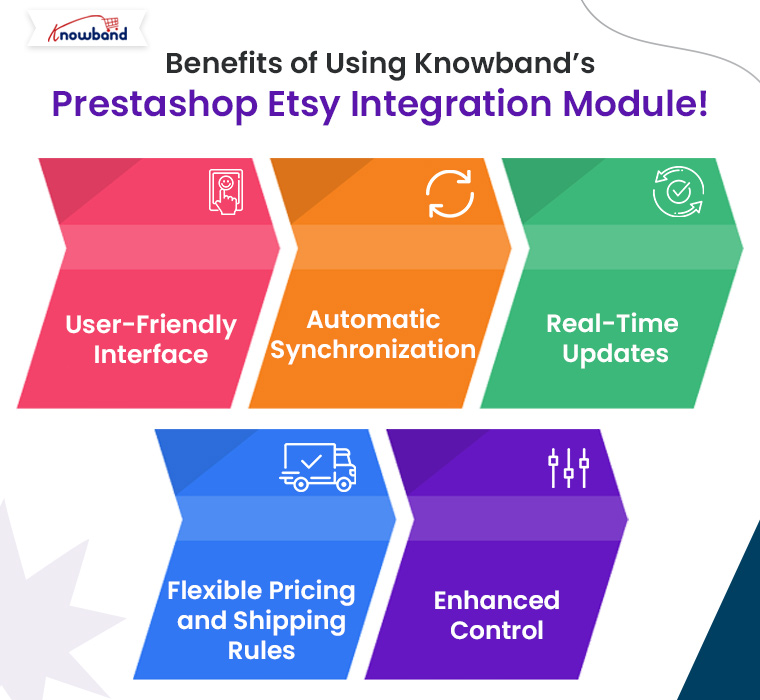
Benefits of Using Knowband’s Prestashop Etsy Integration Module!
At Knowband, we offer one of the most comprehensive solutions for Prestashop Etsy Integration. On top of that, our module simplifies the integration process, providing seamless synchronization between your Prestashop store and Etsy marketplace. Here are some of the key benefits:
User-Friendly Interface:Our Prestashop Etsy Integration Plugin features an intuitive and easy-to-use interface that helps you manage both platforms with ease.
Automatic Synchronization:Products, orders, and inventories are synced automatically, saving time and reducing errors.
Real-Time Updates:Keep your product information, such as prices, descriptions, and stock levels, up to date on Etsy with our real-time Prestashop Etsy Synchronization Addon.
Flexible Pricing and Shipping Rules:Easily manage different pricing strategies for your Etsy listings compared to your Prestashop store using the built-in rule settings.
Enhanced Control: Gain full control over your product listings, including the ability to bulk upload, update, or remove products in a few clicks.
Our Prestashop Etsy Integration Free Module is perfect for small businesses looking to test the integration with basic features. As your business grows, you can opt for advanced features with the premium version of our Etsy Prestashop Connector.
Conclusion!
Expanding your Prestashop store to the Etsy marketplace is a smart move for increasing your reach and boosting sales. By using Knowband’s Prestashop Etsy Integration Addon, you can automate processes, reduce manual workload, and effectively manage both platforms from a single interface. Knowband’s Prestashop Etsy Integrator is the ideal tool for simplifying this integration, offering both free and premium options to suit businesses of all sizes.
If you’re ready to take your Prestashop store to the next level, explore Knowband’s Free PrestaShop Etsy Integration module and get started on Etsy today!
You may also like to read: See how this free connector simplifies Etsy integration for your PrestaShop store and enhances marketplace reach.Read More
In the fast-paced world of eCommerce, managing multiple online platforms can be a daunting task. For businesses that sell on both Prestashop and Etsy, keeping everything in sync while trying to maximize sales can become overwhelming. Therefore, enter the Prestashop Etsy Marketplace Integration Addon — a game-changing solution that simplifies your workflow, allowing you to focus on growing your business rather than getting bogged down in the details.
Upgrade to Prestashop Etsy Integrator v4.0.1 for New Key Enhancements
The latest version of our Etsy integration module has been released and is designed to make your workflow with the Etsy marketplace smoother.
Here’s what’s new in V4.0.1:
1. OpenAPI Support for Etsy Etsy’s API now requires OpenAPI authentication. Now the module contains the necessary authentication header change according to Etsy’s requirements, so your PrestaShop store continues the connection with Etsy without interruption. Make sure to upgrade before 18 January, as connections may be disrupted if the update isn’t applied by then.
2. Improved Return Policy Handling Admins can now manage and sync multiple return policies and map them to specific profiles. Furthermore, categories associated with these profiles automatically update the return policies on Etsy, making returns management effortless and accurate.
Why You Need the Prestashop Etsy Marketplace Integration Addon:
Running an online store involves a lot of moving parts, from managing product listings to tracking inventory and fulfilling orders. If you’re operating on multiple platforms like Prestashop and Etsy, these tasks can multiply, leading to increased chances of errors and wasted time. On the other hand, Knowband’s Prestashop Etsy Integration Addon is designed to automate these processes, providing a seamless connection between your Prestashop store and your Etsy shop.
With the Prestashop Etsy Integration Module, you can synchronize your products, manage orders, and handle inventory across both platforms effortlessly.
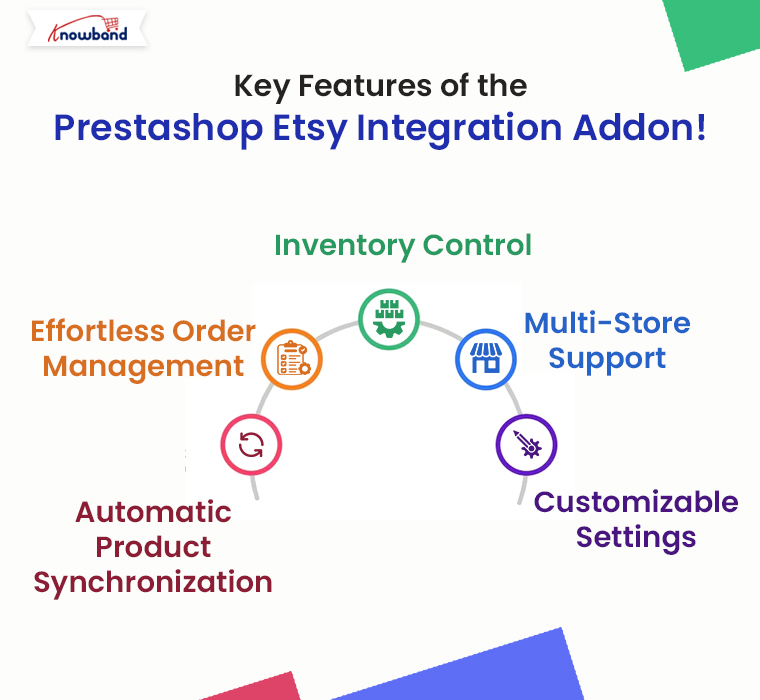
Key Features of the Prestashop Etsy Integration Addon!
The Prestashop Etsy Integration Extension comes packed with features that make it an indispensable tool for any eCommerce business looking to expand its reach on Etsy without the added workload. Here are some of the standout features:
Automatic Product Synchronization:The Prestashop Etsy Synchronization Addon allows you to sync products between Prestashop and Etsy automatically. Any changes you make in your Prestashop store, whether it’s updating product descriptions, changing prices, or adjusting stock levels, are instantly reflected on your Etsy shop.
Effortless Order Management:Managing orders across multiple platforms can be tricky, but the Etsy Prestashop Integration Addon simplifies this by centralizing order management. Furthermore, all orders placed on Etsy are automatically imported into your Prestashop store, where you can process them alongside your other orders.
Inventory Control:The Prestashop Etsy Connector ensures that your inventory is always up-to-date across both platforms. This means you’ll never have to worry about overselling a product on one platform because of outdated stock information.
Multi-Store Support:If you manage multiple Etsy shops, the Prestashop Etsy Integration Plugin can handle them all. The addon allows you to connect multiple Etsy stores to a single Prestashop installation, making it easy to manage all your shops from one central location.
Customizable Settings: The Etsy Prestashop API Integrator provides a range of customization options, allowing you to tailor the integration to suit your specific needs. Whether you want to synchronize only certain products or control how orders are imported, the addon offers the flexibility to adapt to your workflow.
Knowband’s Prestashop Etsy Marketplace Integration module helps Prestashop store owners seamlessly connect their stores with Etsy to expand their reach and increase sales.
Benefits of Using the Prestashop Etsy Marketplace Integration Addon!
Integrating your Prestashop store with Etsy using this powerful addon offers several benefits:
Save Time:By automating routine tasks such as product updates and order processing, Knowband’s Prestashop Etsy Integration Module frees up valuable time that you can invest in growing your business.
Reduce Errors:Manual data entry is prone to mistakes, which can lead to incorrect product listings, pricing discrepancies, and stock issues. Therefore, the Etsy Prestashop Connector eliminates these risks by ensuring all data is synchronized automatically.
Increase Sales:With accurate and consistent product listings across both platforms, you can attract more customers and boost sales. The Prestashop Etsy Integration Extension helps you maintain a professional and reliable online presence, which is crucial for building trust with your customers.
Simplified Multi-Channel Management: The Etsy Prestashop Synchronization Addon consolidates all your eCommerce operations into one platform, making it easier to manage your business as it grows.
How to Get Started with the Prestashop Etsy Integration Addon
Getting started with the Prestashop Etsy Marketplace Integration Addon is straightforward. Here’s a simple guide to help you begin:
Install the Addon:Download and install the Prestashop Etsy API Integrator from your Knowband account. If you’re looking for a cost-effective solution, you might also explore the Free Etsy PrestaShop Integration module options available online.
Configure Your Settings: Once installed, navigate to the addon settings in your Prestashop dashboard. Here, you can connect your Etsy account, configure product synchronization settings, and customize how orders are handled.
Sync Your Products: After configuring your settings, start syncing your products. The Prestashop Etsy Integrator will handle the rest, ensuring all your product details are accurately reflected on Etsy.
Manage Orders:With the addon in place, you’ll receive Etsy orders directly in your Prestashop store. Process these orders as you would any other, and watch as your business runs more smoothly than ever before.
Knowband’s Etsy Prestashop Integrator stands out for its ease of use, reliability, and comprehensive feature set. Whether you’re just starting or have an established business, this addon provides the tools you need to succeed on Etsy without the hassle of manual management.
For those who are cost-conscious, consider exploring a Prestashop Etsy Integration Free Module. These options can provide a great starting point and give you a taste of what full integration can do for your business.
Conclusion!
The Prestashop Etsy Integration Addon is a must-have for any eCommerce business looking to sell more while managing less. By automating key processes, this addon not only saves time and reduces errors but also opens up new opportunities for growth on the Etsy platform. Whether you’re a seasoned seller or new to eCommerce, the Etsy Prestashop Connector is the ultimate tool for streamlining your multi-channel strategy and maximizing your online sales.
You may also like to read: See how this free connector simplifies Etsy integration for your PrestaShop store and enhances marketplace reach.Read More
In the dynamic world of e-commerce, platforms like Etsy have carved out a niche for artisans, crafters, and vintage sellers. Due to the wide seller base, Etsy is a kind of marketplace that emphasizes unique, handmade, and bespoke items. Thus, if you are willing to purchase any handmade or art-category products, the first thought will be checking on Etsy.
Etsy marketplace holds one of the most colossal customer bases in the market. This factor not only indicates the potential for newcomers but also highlights the marketplace’s popularity.
Therefore, for Prestashop sellers looking to expand their reach and tap into Etsy’s vibrant community, the Prestashop Etsy Marketplace Connector by Knowband emerges as an indispensable tool. Thus, in the following guide, we will delve into five compelling reasons to leverage this powerful module in 2024, unlocking new avenues for growth and success.
1. Access to a Global Marketplace:
Etsy’s platform is synonymous with a global audience passionate about supporting independent sellers and unique products. By integrating your Prestashop store with Etsy via the Prestashop Etsy Integration Addon, you can showcase your products to millions of potential customers.
Furthermore, this not only amplifies your brand’s visibility but also significantly boosts sales opportunities beyond local boundaries.
2. Streamlined Operations and Synchronization:
Managing inventory and orders across multiple platforms can be daunting. And, this factor sometimes triggers the thought of business management in two different places.
On the other hand, the Prestashop Etsy Synchronization Addon simplifies this process by ensuring seamless synchronization between your Prestashop inventory and your Etsy shop. Moreover, the real-time updates on stock levels, order statuses, and product listings prevent overselling and ensure a smooth operational flow, letting you focus more on product development and customer service.
3. Enhanced Brand Recognition:
Selling on Etsy through the Prestashop Etsy Integration Extension provides an excellent opportunity for brand exposure. Therefore, Etsy’s community of buyers appreciates the story behind each product and seller, allowing you to create a more personalized shopping experience. Thus, by leveraging Etsy’s platform, you can narrate your brand’s story, connect with your audience on a deeper level, and cultivate customer loyalty that transcends the transactional nature of typical online sales.
4. Efficient Use of Resources:
For Prestashop sellers, utilizing Knowband’s Prestashop Etsy Integration Module means more than just accessing a new sales channel; it’s about optimizing resources.
The integration facilitates automatic listing creation, updates, and order management, significantly reducing the manual effort and time investment required to manage multiple sales channels. Moreover, this efficiency allows sellers to allocate their resources more effectively, focusing on strategic growth areas such as marketing, product development, and customer engagement.
5. Competitive Edge in a Niche Market:
Etsy offers a platform for products that might not compete as effectively on more generalized e-commerce sites.
With the Prestashop Etsy API Integrator, sellers can tap into this niche market, where the demand for handmade, vintage, and unique items thrives. The specialized nature of Etsy’s marketplace allows Prestashop sellers to stand out more easily, catering to specific customer interests and trends, and building a loyal customer base that values the uniqueness and quality of their products.
🛍️ Also on OpenCart?
A Beginner’s Guide to Connecting Your OpenCart Store with Etsy Using the Integration Module
Running an OpenCart store? The Etsy Integration Module by Knowband is available for OpenCart too, bulk product uploads, automated inventory sync, centralised order management, shipping template sync, and custom Etsy-specific product listings. Compatible with 4.x
Entering the Etsy marketplace in 2024 with the help of the Prestashop Etsy Marketplace Connector offers a plethora of advantages for Prestashop sellers. From accessing a global customer base and streamlining operations to enhancing brand recognition, efficiently using resources, and gaining a competitive edge in a niche market. The benefits are clear. Integrating your Prestashop store with Etsy is not just about expanding your sales channels; it’s about embracing an opportunity to grow your brand in a community that values authenticity and creativity. Whether you’re a seasoned seller or new to e-commerce, leveraging the Prestashop Etsy Integration Plugin could be your next strategic move toward achieving your business goals. ( Updated October 5, 2026)
Knowband has developed an interface for the Prestashop store owners that can help them start selling on the Etsy marketplace. Further, the Prestashop Etsy integration addon saves the time of the sellers. How? By reducing the time involved in the manual listing process. In fact, the Prestashop Etsy marketplace integration module offers them a feature to handle the inventory. In addition, handle orders for the Etsy shop from the Prestashop back office.
Etsy is a marketplace that works as an intermediary between customers and artists. In addition, craftsmen of handmade items, or collectors of vintage products. Furthermore, the Etsy marketplace connector provides a unique platform to sellers to showcase their products. Thus, they can spread awareness regarding their products and services through this platform. It is also important for the marketplace to offer the best services to consumers. In fact, consumers like to have options and alternatives to choose from. Hence, the marketplaces are competing to win the sellers and offer great services to them to connect with their stores. Further, Etsy has more than 25 million visitors each month. Further, which gives sellers a wonderful opportunity to reach a larger audience network.
1.1 Key features of the Prestashop Etsy Integration module:
Simple installation and quick starting: The Etsy Prestashop integration module can install quickly. Further, the user-friendly interface of the Prestashop Etsy integration allows an easy process to list the products on the Etsy marketplace.
Bulk uploading of the products: By using this Prestashop Etsy integration addon, the admin can upload products in bulk.
Mapping of the store category with Etsy category: Sellers can easily map the product attributes and category with the Etsy category. Further, with the profile-based listing of the Prestashop Etsy API integrator.
Shipping template synchronization: Create shipping templates from the back-end of the Prestashop Etsy integration extension. Moreover, sync these templates with Etsy with the help of the cron jobs.
Order Synchronization: Manage and keep track of Etsy orders from the admin interface of the Etsy Prestashop API integration addon.
Order Status update: The Admin can update the order status of the Etsy marketplace orders with the help of the cron jobs. Furthermore, offered by the Prestashop Etsy integration module.
Inventory management: The admin can manage inventory for the Etsy store products from the Prestashop Back Office. The current status of the products can sync with the help of the cron jobs. Further, offered by the Prestashop Etsy synchronization extension. Suppose, they make any changes in the product inventory or attributes in the Prestashop store. Further, they can synchronize with Etsy with a button click with the Etsy Prestashop synchronization module.
Language translations: Prestashop Etsy integrator offers multi-lingual support. The admin can select the second language for the store. Moreover, easily synchronizes it with the Etsy marketplace shop. Further, through the cron job offered by the Etsy Prestashop integrator.
New Features offered by Knowband’s Prestashop Etsy Integrator Version 4.0.1:
OpenAPI Authentication for Etsy APIs: We have updated the module to work with Etsy’s new OpenAPI authentication. Now, all Etsy API requests include the required authentication headers, following Etsy’s latest standards, so your integration continues to work smoothly.
Return Policy Configuration & Mapping: A new return policy feature has been added to the module. Now admins can now create and manage multiple return policies and map them to specific profiles. Any products linked to a profile will automatically update on Etsy with the assigned return policy.
Key Features offered by Knowband’s Prestashop Etsy Integrator Version 2.0.0:
UX-related changes: To improve the user experience the interface of the shipping template has been changed. In addition, all the options for shipping template creation have been merged onto the same page. Furthermore, just like the Prestashop Etsy Marketplace interface.
Code Optimization: Now the admin can sync the products from the Products Listings page. There are 3 options for product sync:
Local Sync: Local Sync option allows the admin to sync the PrestaShop store products to the Etsy PrestaShop Integration module. All the products which are mappable to a Profile will list in the Product Listings. Moreover, the admin can list the individual products on the Etsy Marketplace.
Sync Products: Sync Products option will sync the products to the Etsy Marketplace. All the enabled products will sync to the Etsy Marketplace. To avoid the syncing error, the admin can select the number of products. Further, to sync in one go under the General Settings. Cron setup is available to automate the process to list the products.
Sync Product Status: The admin can get the listing status of the syncing products by using the Sync Product Status.
Products Listings: In case you want to set the products as Inactive, Delete those products from this page only (Instead from the Etsy account). In fact, setting the product as Inactive on the Etsy account directly will relist the item on Etsy. Further, on the next CRON run.
The admin can view the Etsy store products from the Products Listings tab. Further, click on the Listing Id. In addition, it will open the Etsy store listing.
The admin can view the PrestaShop store listing by clicking the Product Name.
The admin can view the product listing page in the back office by clicking the ID.
Store admin can add Etsy store orders with store carriers.
Store admin can add the tracking numbers on Etsy orders.
Stora admin can add a size chart image for each profile and this additional image will be uploaded to Etsy.
Now instead of listing the variations separately on the Products Listings page, all the variations list under the product name.
The admin can sync the individual products to the Etsy Marketplace instead of listing the entire profile.
The admin can Disable/Enable Items before syncing and only enabled items will list to the Etsy store.
Custom Product Information: Now, the Prestashop Etsy Connector addon allows the admin to list the same product with different product details (product title and description) on Etsy Marketplace.
Profile Level Synchronization: We have recently introduced the profile level synchronization feature that allows the store admin to list/update the products from a particular category only instead of all.
Prestashop Etsy Marketplace Integration module
Knowband’s Prestashop Etsy Marketplace Integration module helps Prestashop store owners seamlessly connect their stores with Etsy to expand their reach and increase sales.
Additional features of the Etsy Prestashop Integration module
Attribute Mapping: All the PrestaShop store attributes will sync to the Etsy Marketplace Integration module automatically. In addition, the admin just needs to map these attributes to the Etsy Marketplace.
Etsy Category Attribute: The Etsy Category Attributes are now available in the Etsy Marketplace Integration module. Further, the admin can set the various attributes. For instance, Primary Color, Secondary Color, Holiday, and Accessory Style.
Product or Category Mapping: The PrestaShop Etsy marketplace Integration module enables syncing. Further, the selected products or entire category to the Etsy Marketplace. Furthermore, under the Profile Management tab of the Etsy Marketplace connector module, the admin can select the Product/Category option to sync the store products.
Custom Pricing: Etsy Prestashop integration module allows the admin to list the products on the marketplace at a different price. In fact, the admin can change the price of the products. Further, that displays on the marketplace by a fixed amount or a percentage amount. As per the requirement, the admin can increase or decrease the price of the products. In fact, he can do it from the back-end of the Prestashop Etsy integration addon.
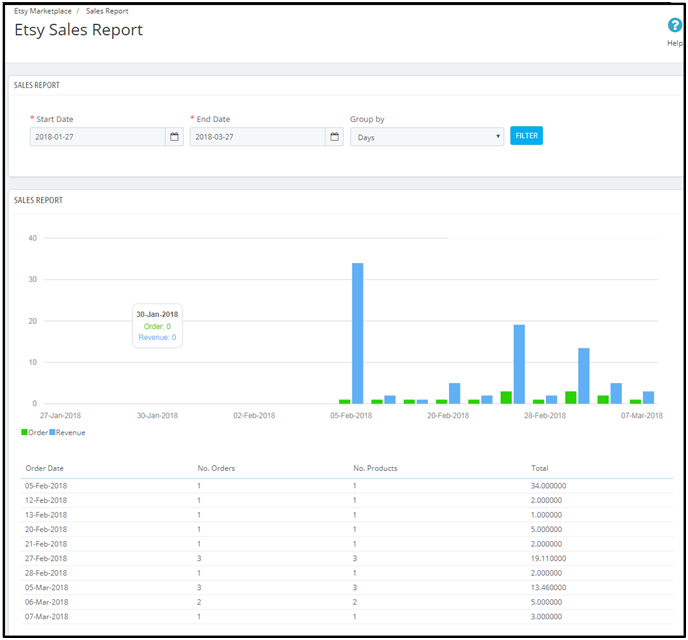
Sales Report: The sales report tab of the Etsy Prestashop integration plugin allows the sellers to check the order and revenue report.
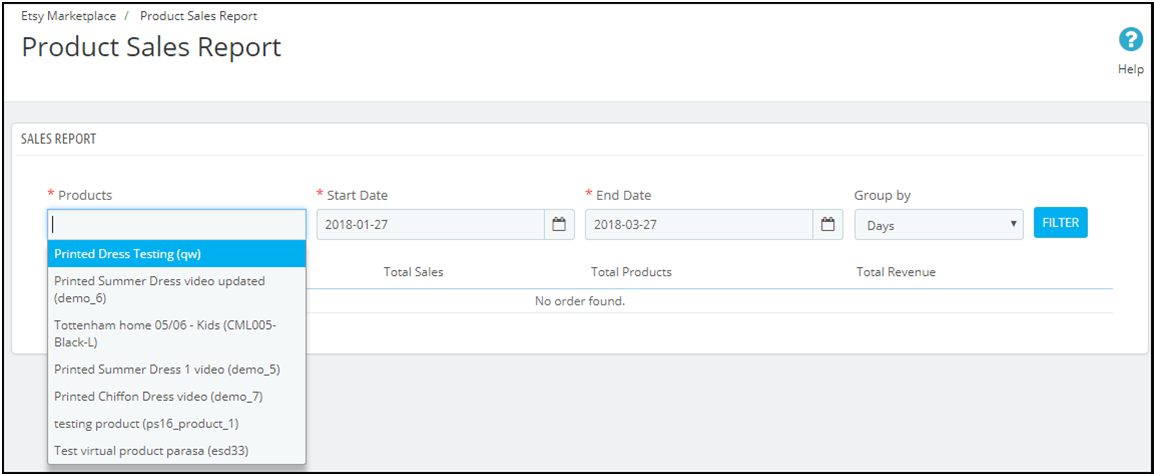
Product Sales Report: The admin can even view the sales report of particular products. In fact, he can do it from the back-end of the Prestashop Etsy integration plugin.
Shop Section: The Prestashop addon offers an option of adding a shop section in the front-end of the Etsy marketplace to the e-sellers. Further, the shop section allows the admin to categorize the products in a particular category. In fact, the created shop section will display at your Etsy shop.
Product Description Template: The e-sellers can use different placeholders for their product description to make them more impactful.
You can also watch the video on “Upgrade Guide – Knowband’s Prestashop Etsy Connector v3.0.4” here:
2.0 Installation
After purchasing the Prestashop Etsy integration extension, you will get the following files as available below:
1. kbetsy.zip (contains source code of the module)
2. User Manual
Follow the following steps to install the Etsy Prestashop integration extension:
Unzip the kbetsy.zip file. It would contain files and folders as shown below –
Copy all the files and folders of the unzipped folder into your store “modules” directory on the path – Root Directory/modules/.
Now module is ready to install on your store. Moreover, you can find that in Store Admin -> Modules and Services. Further, it would be shown as below –
In case, you are not able to find the module in the admin modules list. Further, please try searching the module with the following details –
Keyword – Etsy
Category – Other
Filter By – Installed & Not Installed / Enabled & Disabled
Click on the “Install” button to install the module. It would show a pop-up for your confirmation. Further, click on the “Proceed with the installation” option. In fact, this step will install the module and show a notification – “Module(s) installed successfully”.
3.0 System Setup
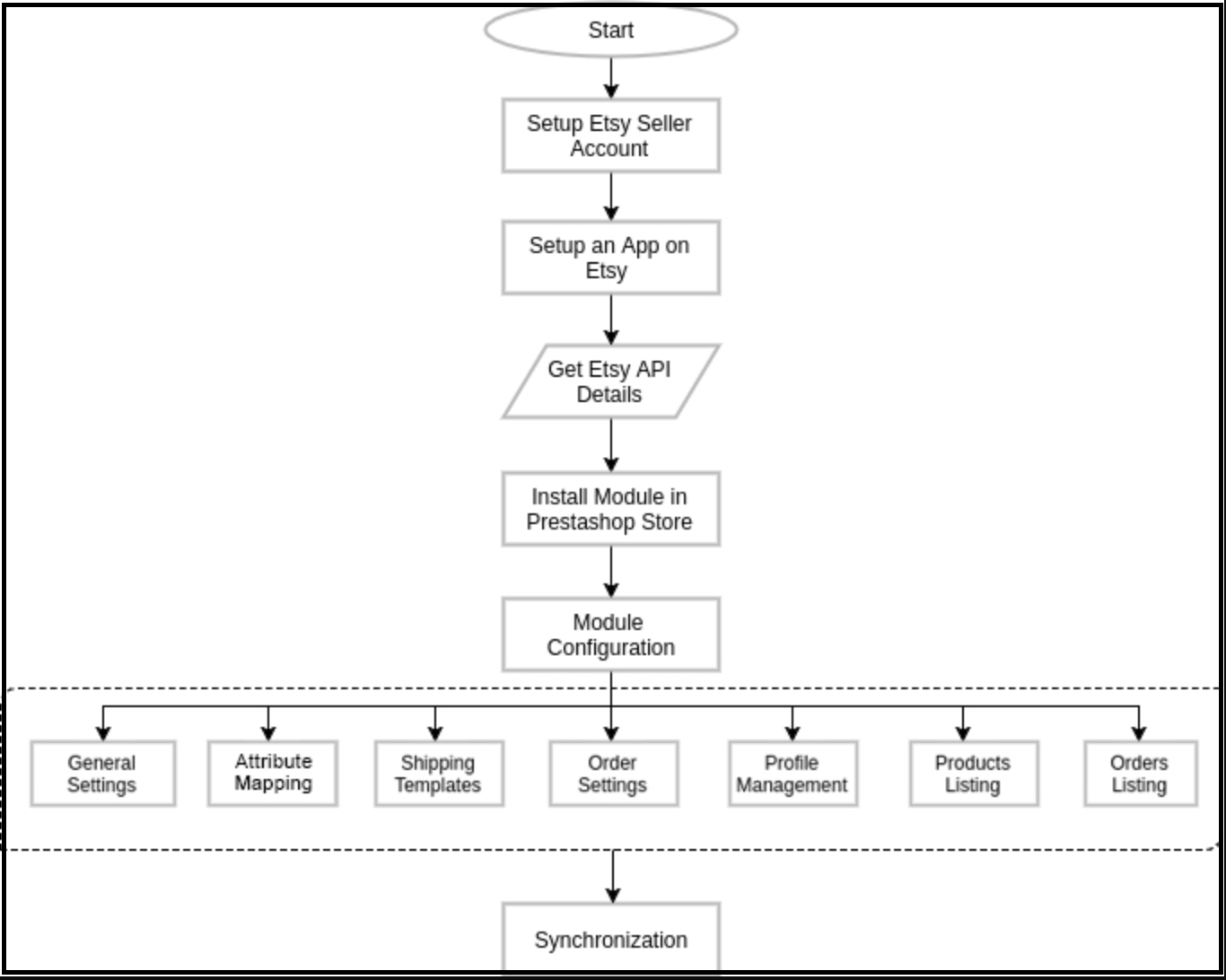
Before proceeding ahead, it is important to know what is the correct flow of actions. Further, to set up this system as several things are dependent on other things. In addition, if we do not take care, then it will become difficult to process smoothly or may be error-prone.
You need a seller account on Etsy to start selling on Etsy Marketplace. Moreover, to configure the Etsy Prestashop integration addon. In this section, we are listing all the steps to create a seller account on Etsy. Please find them below –
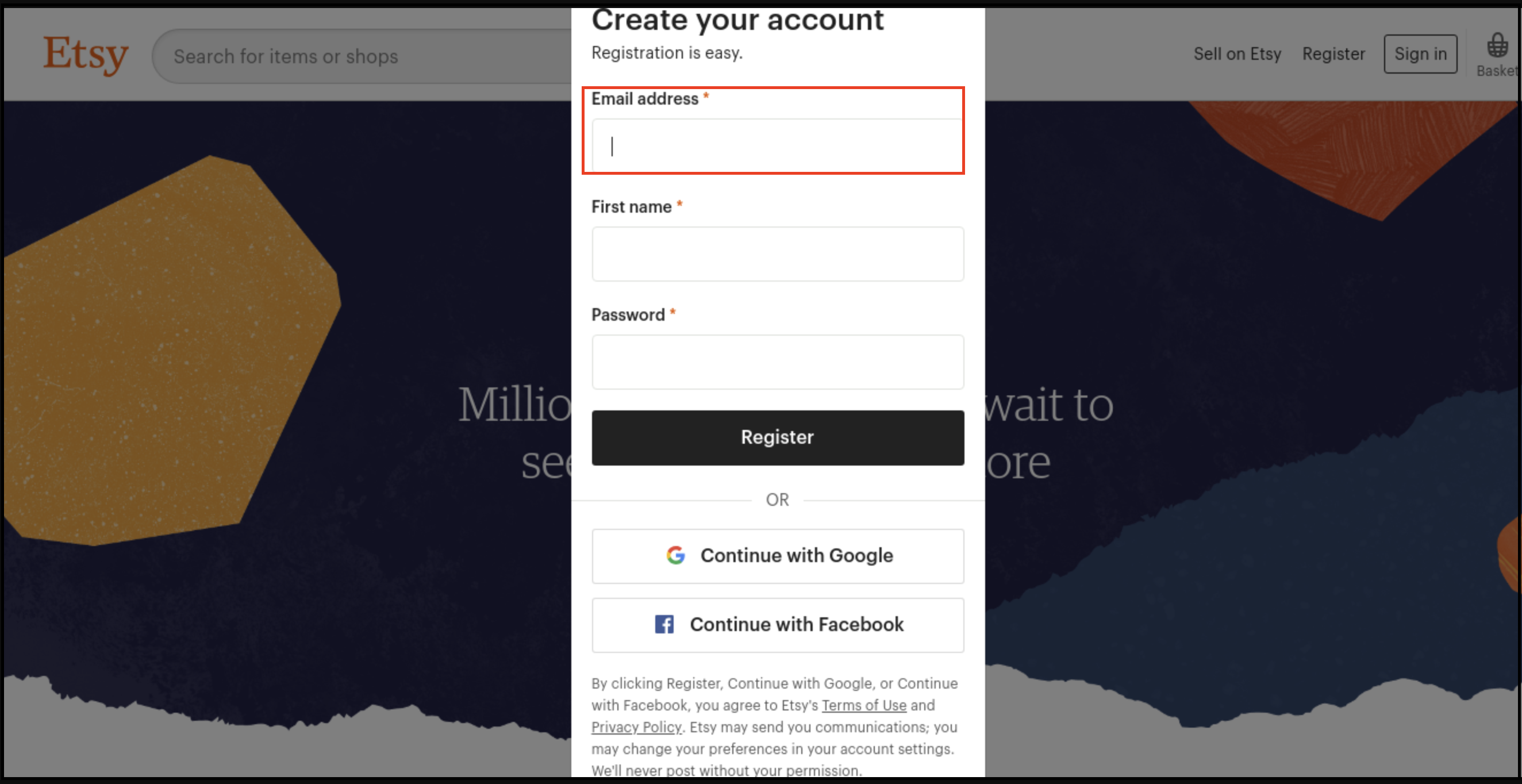
Click on the “Sell on Etsy” button present at the top right corner.
Click on the “Register” button on the page you are visiting now. Further, refer to the screenshot given below.
Fill up the registration form and click on the “Register” button. In fact, it would create your seller account and send a verification email to the provided email address.
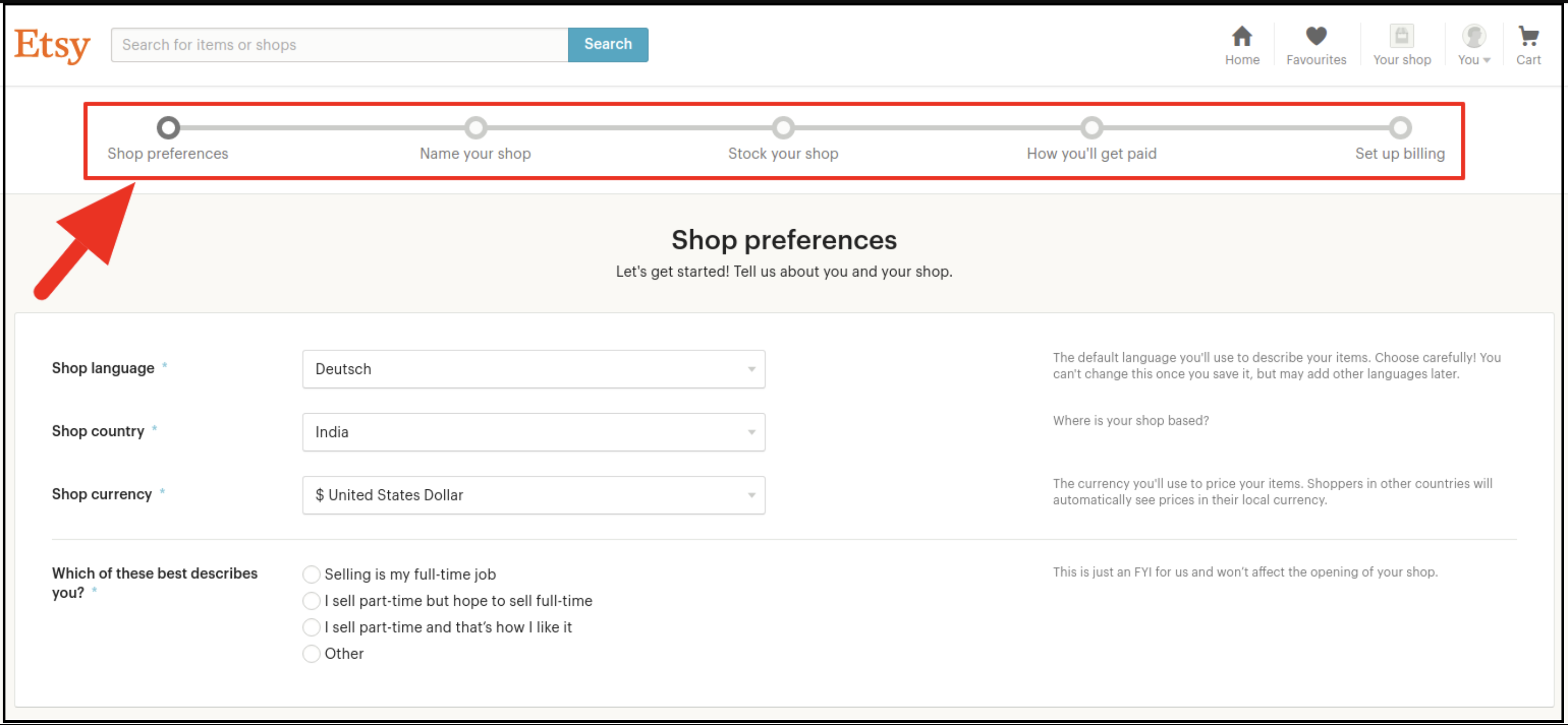
Now, it would also redirect you to another page as shown below.
Now, it is asking to set up your shop preferences. Further, complete all the highlighted sections. For instance, Shop Preferences and Name your shop, Stock your shop, How you will get paid, and Set up Billing.
5.0 Etsy Marketplace Integration- Setup an App
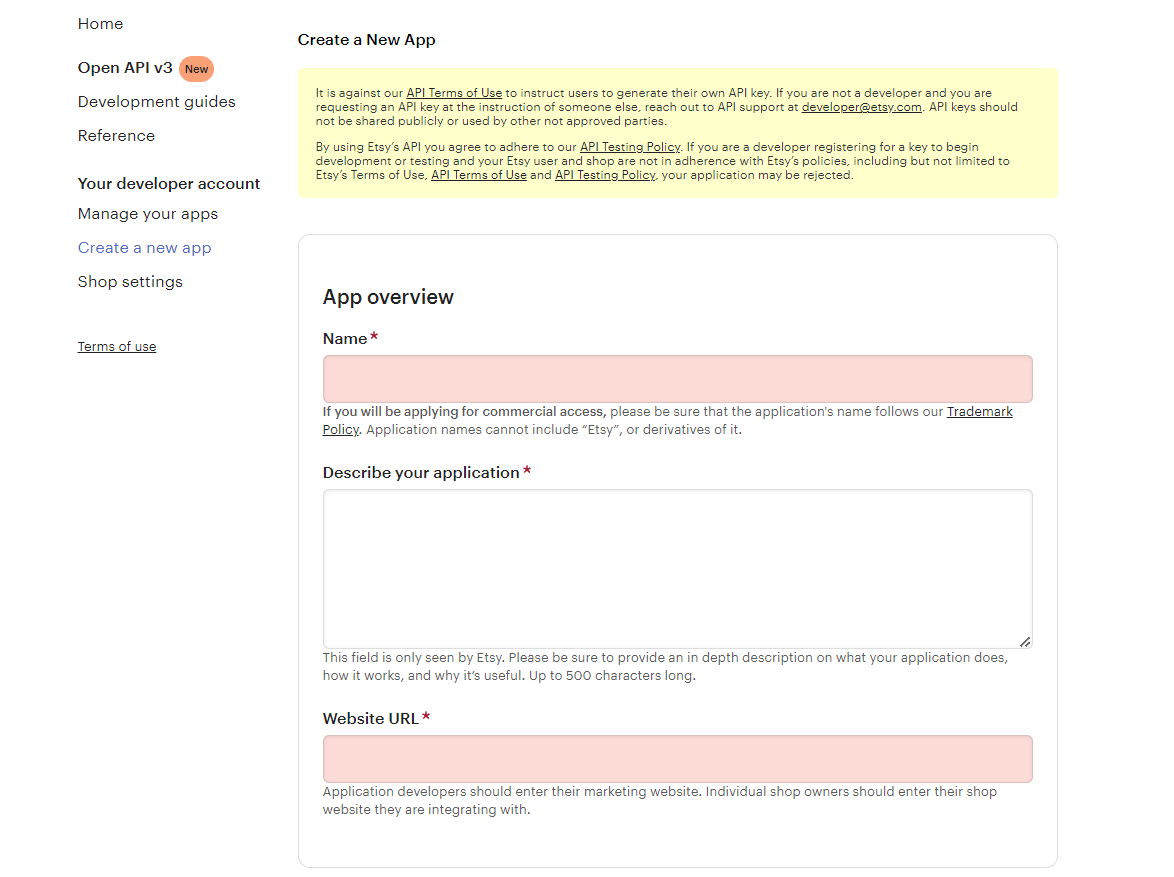
To start communication between Prestashop Store and Etsy Seller Account, you need to create an App on Etsy Marketplace. Further, the following are the steps to create an App on Etsy –
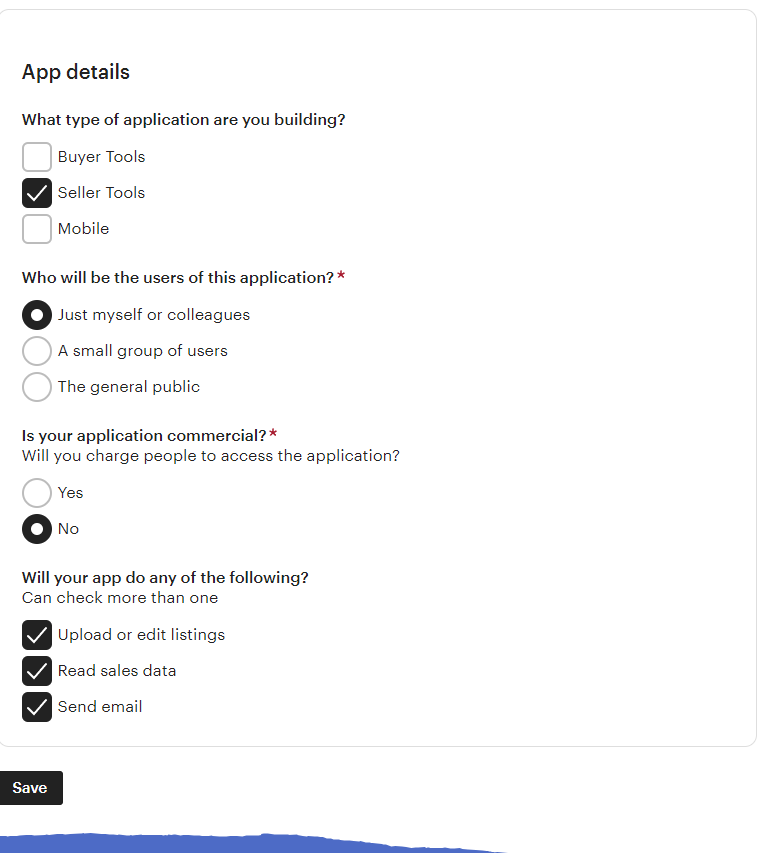
It would open a page where a form will be shown with a few input fields as shown below.
Fill up the form and click on “Read Terms and Create App”. Further, please make sure that you left the “Inventory Management Compatibility” checkbox is checked.
It would ask to accept “terms and conditions”. In fact, accept and click on the “Create App” button.
It would register your App on Etsy Marketplace and provide API details.
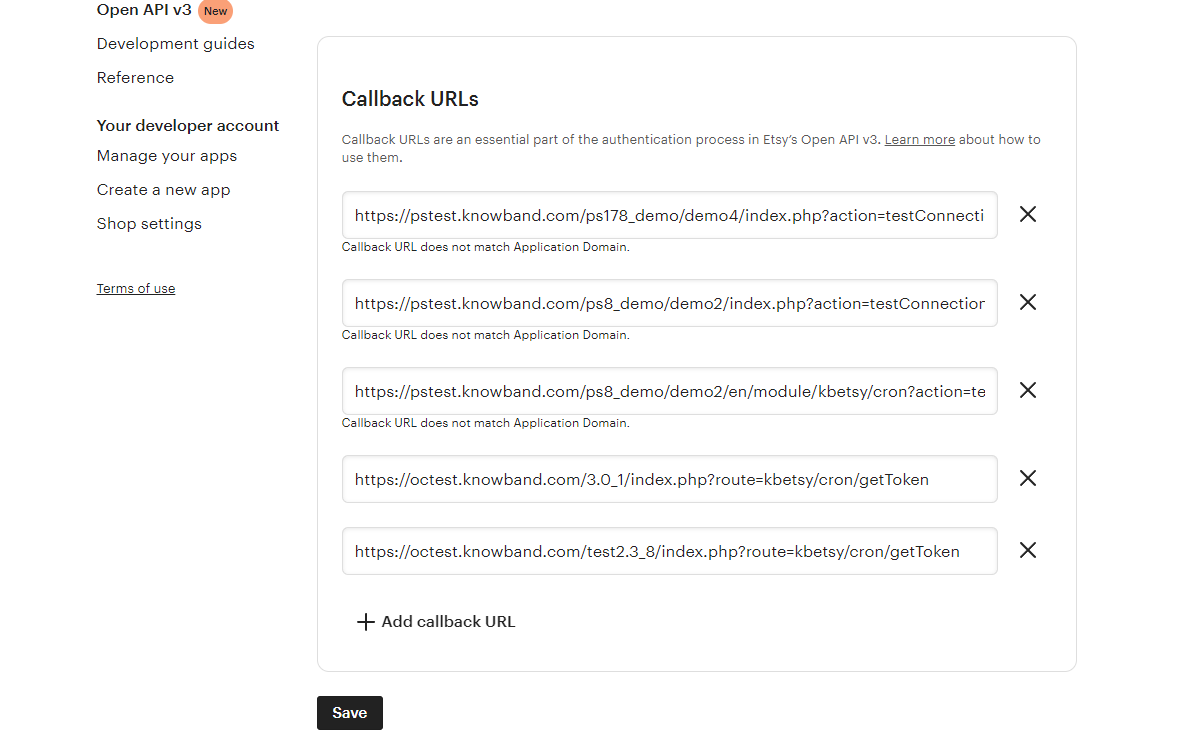
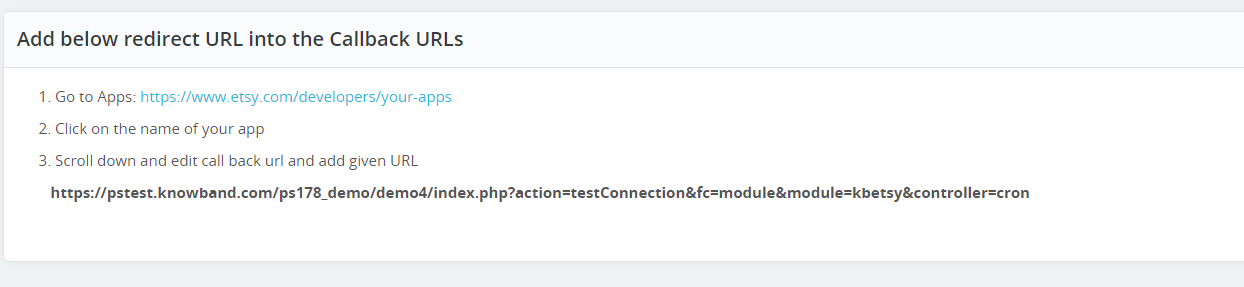
Once you successfully created the API, add the callback URL.
Click on the name of your App
Click on edit your callback URLs. After clicking on the following button, the page shown in the image will appear.
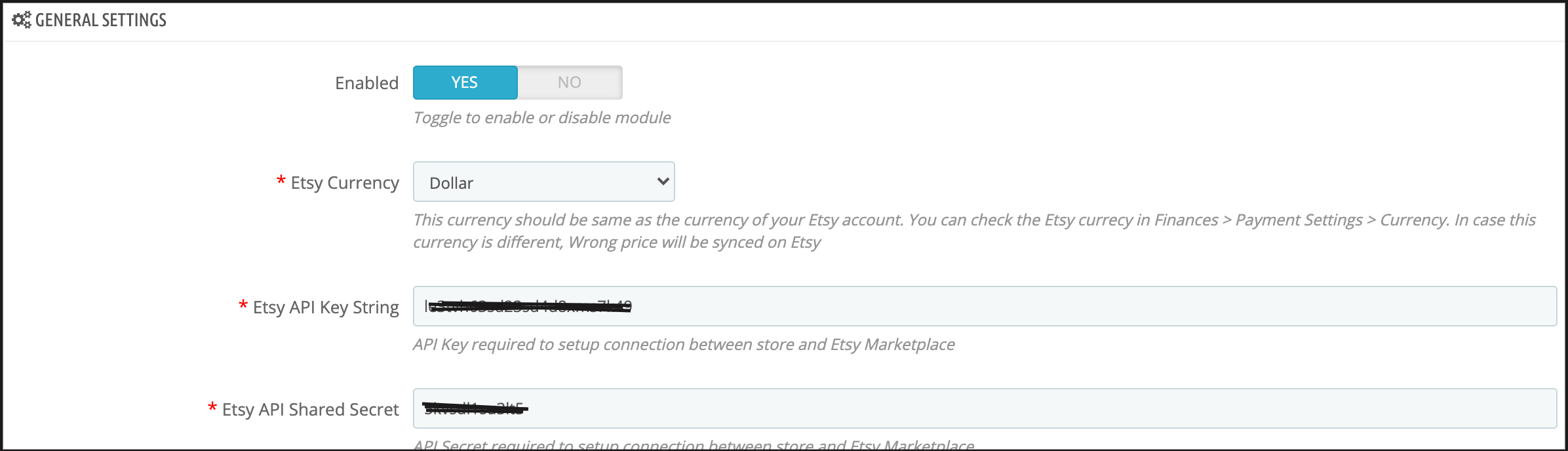
For finding the callback URL, please refer to the general setting section of our Prestashop Etsy Marketplace module. Copy the shown URL in the below image and paste the same on Etsy.
Click on the save button.
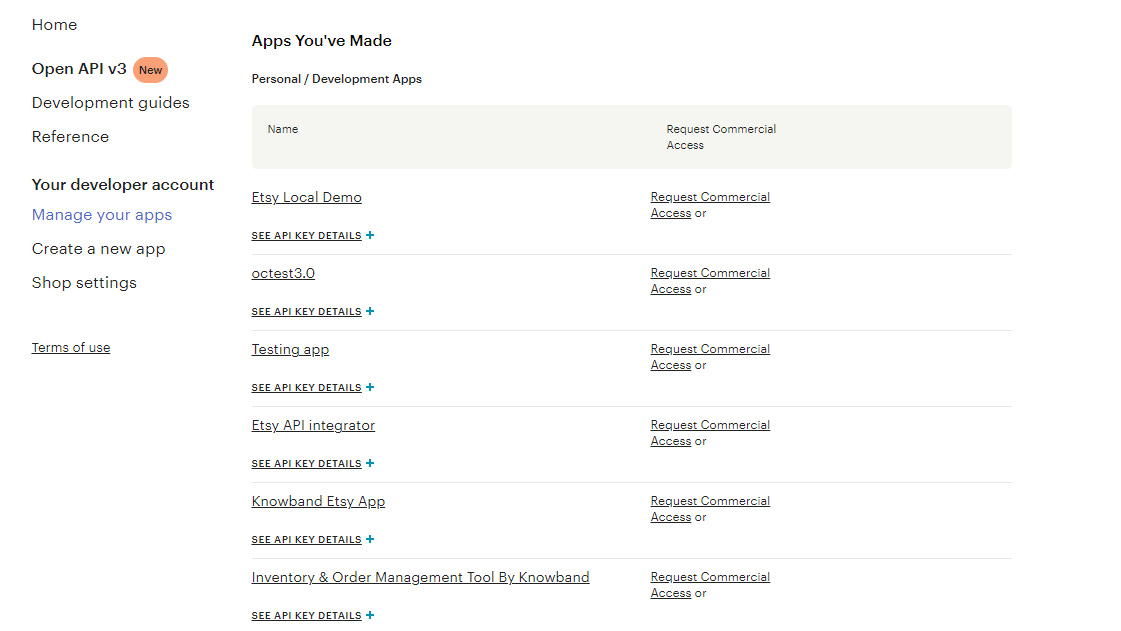
After saving the data, you will find the API page, where you can manage all of your Etsy Apps.
6.0 Admin Interface
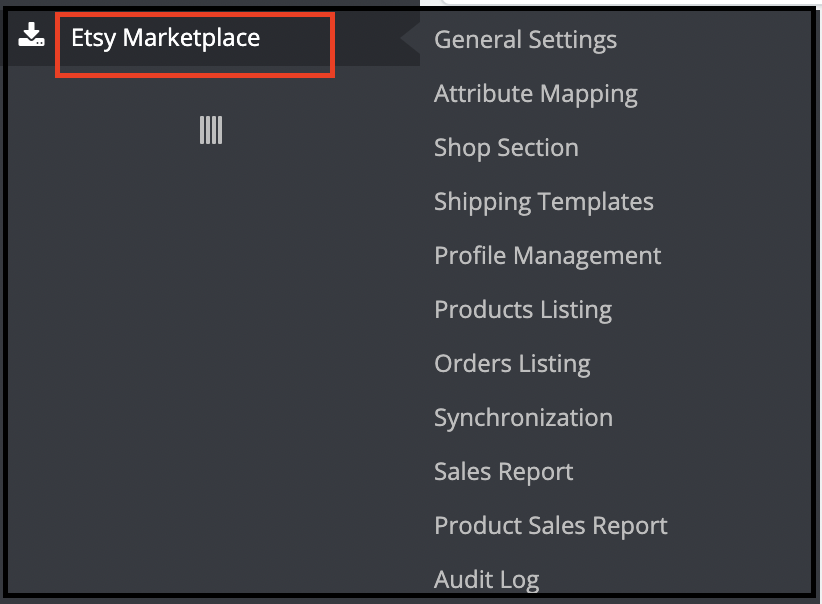
This Prestashop Etsy Integration addon is configurable. Moreover, the configuration settings can be updated via the admin interface. Further, after installation, store admin can find a menu named “Etsy Marketplace” in the left panel of Admin as shown below –
“Etsy Marketplace integration addon” menu contains the following options –
General Settings
Attribute Mapping
Shop Section
Shipping Templates
Profile Management
Products Listing
[New]Return Policy
Orders Listing
Synchronization
Sales Report
Product Sales Report
Audit Log
Each tab is explained below.
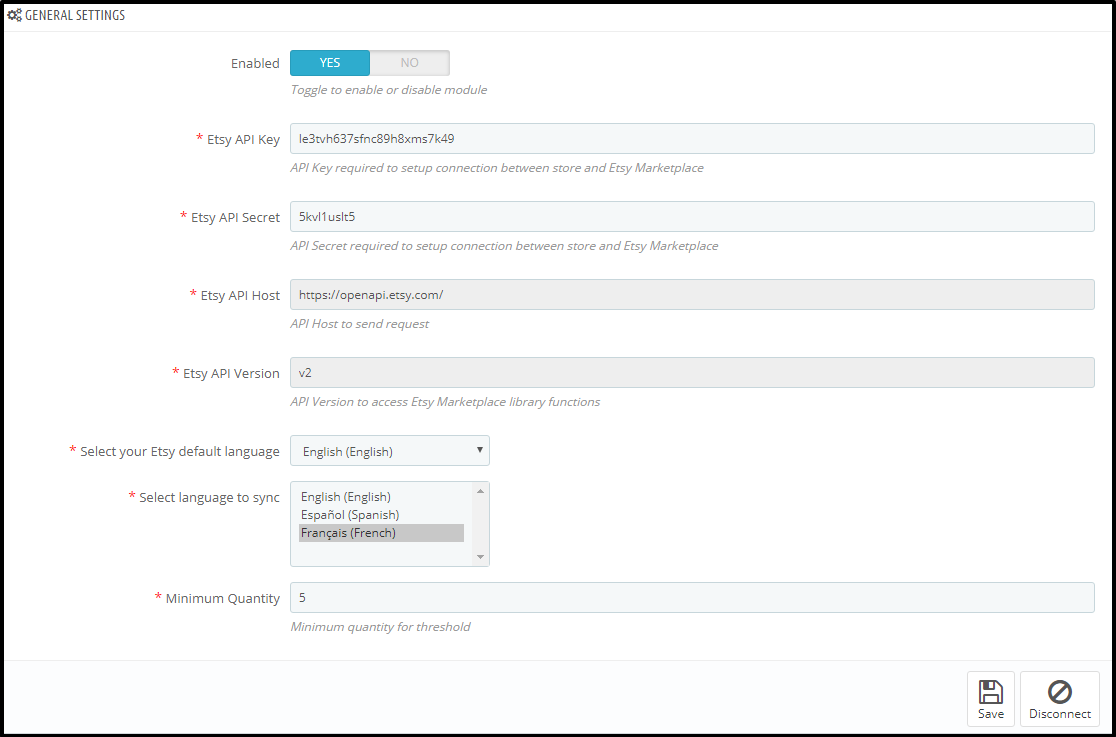
6.1 General Settings
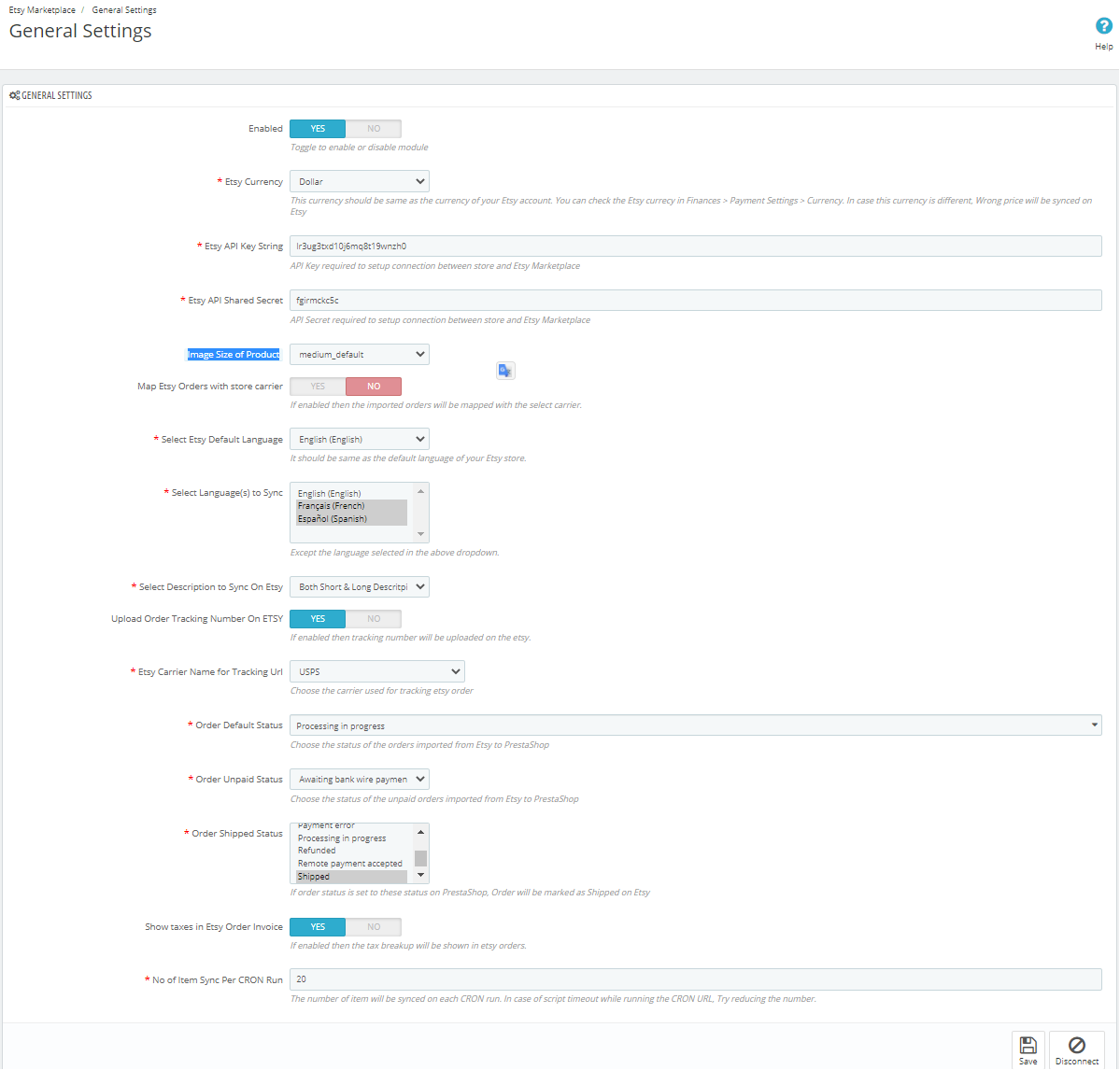
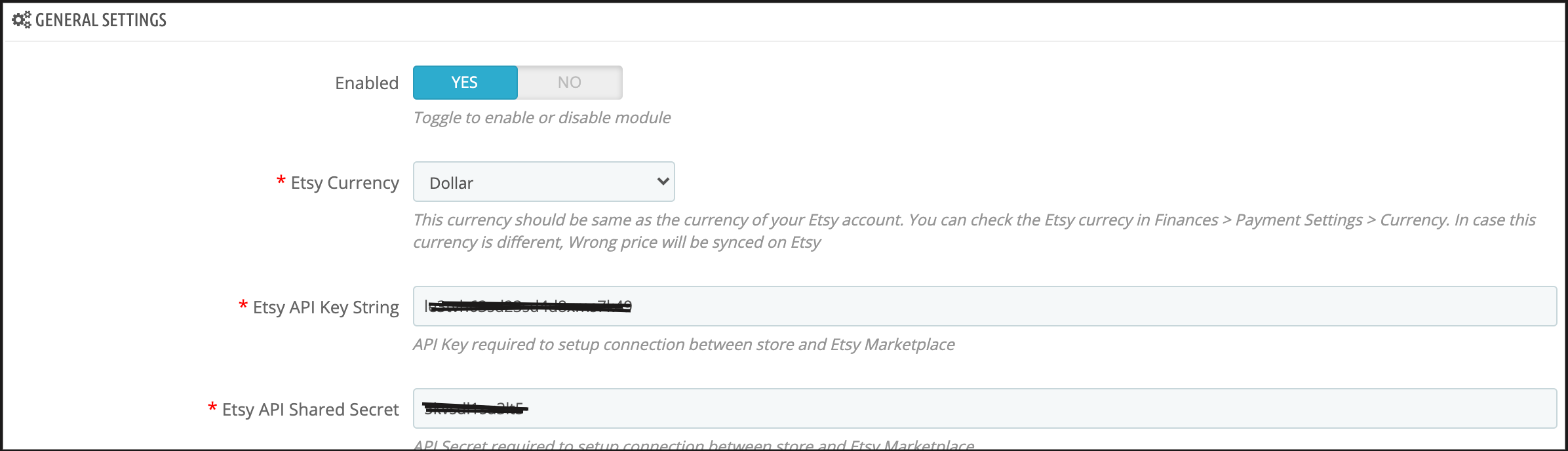
The General Settings tab of the Prestashop Etsy API integrator is there for capturing details. Further, of Etsy Prestashop Marketplace API like API Key, Host, etc. Please find the description of each input field below –
1. Enabled
Admin can Enable/Disable this Etsy Prestashop API integration module by the toggling button. If enabled, the Prestashop Etsy connector and all its settings will be working. Further, otherwise, there will be no impact of this module on the store.
2. Etsy Currency
This is a drop-down where the admin has to choose the appropriate currency. Further, for their which is similar to their Etsy Account.
3. Etsy API Key
This is a text box in which the admin has to enter Etsy API Key. Furthermore, which will authenticate the connection being established between the store and Etsy.
4. Image Size of Product
This feature allows the admin to select the size of the product image. Further, that will sync to Etsy Marketplace from PrestaShop.
5. Etsy API Secret
This is a text box in which the admin has to enter Etsy API Secret Key mandatory for authentication. Furthermore, between the Prestashop store and Etsy Marketplace.
6. Map Etsy Orders with Store Carrier
If enabled then the imported orders will be mappable with the select carrier.
7. Select Shipping Methods for Etsy orders
Store admin can select the shipping methods for Etsy Orders from the given list.
8. Etsy Default Language
The Etsy Prestashop Integration module allows the store admin to select the default language of the store.
9. Select Language to Sync
Admin can select the secondary languages to sync with Etsy Marketplace.
10. Select the Description type to sync on Etsy
This option enables Etsy sellers to the long description and short descriptions. In fact, or both they want to sync with the marketplace. Furthermore, they can select any one option from the descriptions that will sync according to the selection.
11. Upload the Order Tracking Number On Etsy
If enabled then the store admin can add the tracking number on orders and it will be uploaded on Etsy.
12. Etsy Carrier Name for Tracking Url
Store admin can choose the carrier used for tracking Etsy orders.
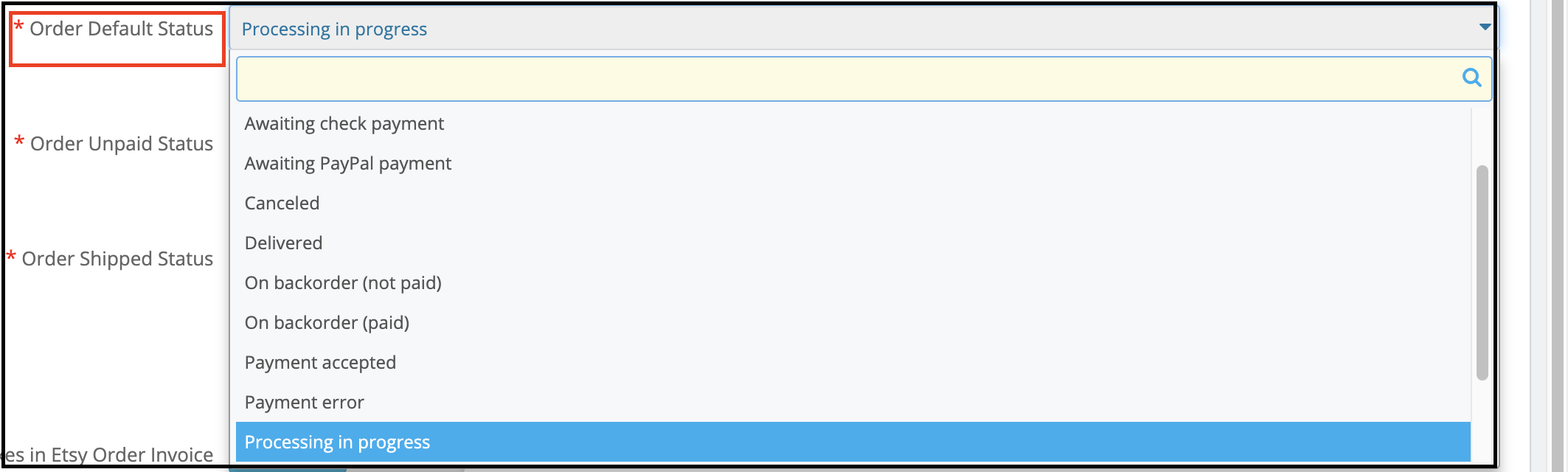
13. Order Default Status
This is a drop-down menu. Moreover, the admin has to choose order default status for orders imported from Etsy to PrestaShop.
14. Order Unpaid Status
This is a drop-down menu. Moreover, the admin has to choose order unpaid status imported for orders imported from Etsy to PrestaShop.
15. Order Shipped Status
This is a drop-down menu and the admin has to choose order shipped status for orders imported. In addition, if the order status is set to this status the orders will be marked as shipped on Etsy.
16. Show taxes in Etsy Order Invoice
If enabled then the tax breakup will be shown in Etsy orders.
17. No. of Items sync per cron
This is a text box and the admin has to define several items that he wants to sync per cron.
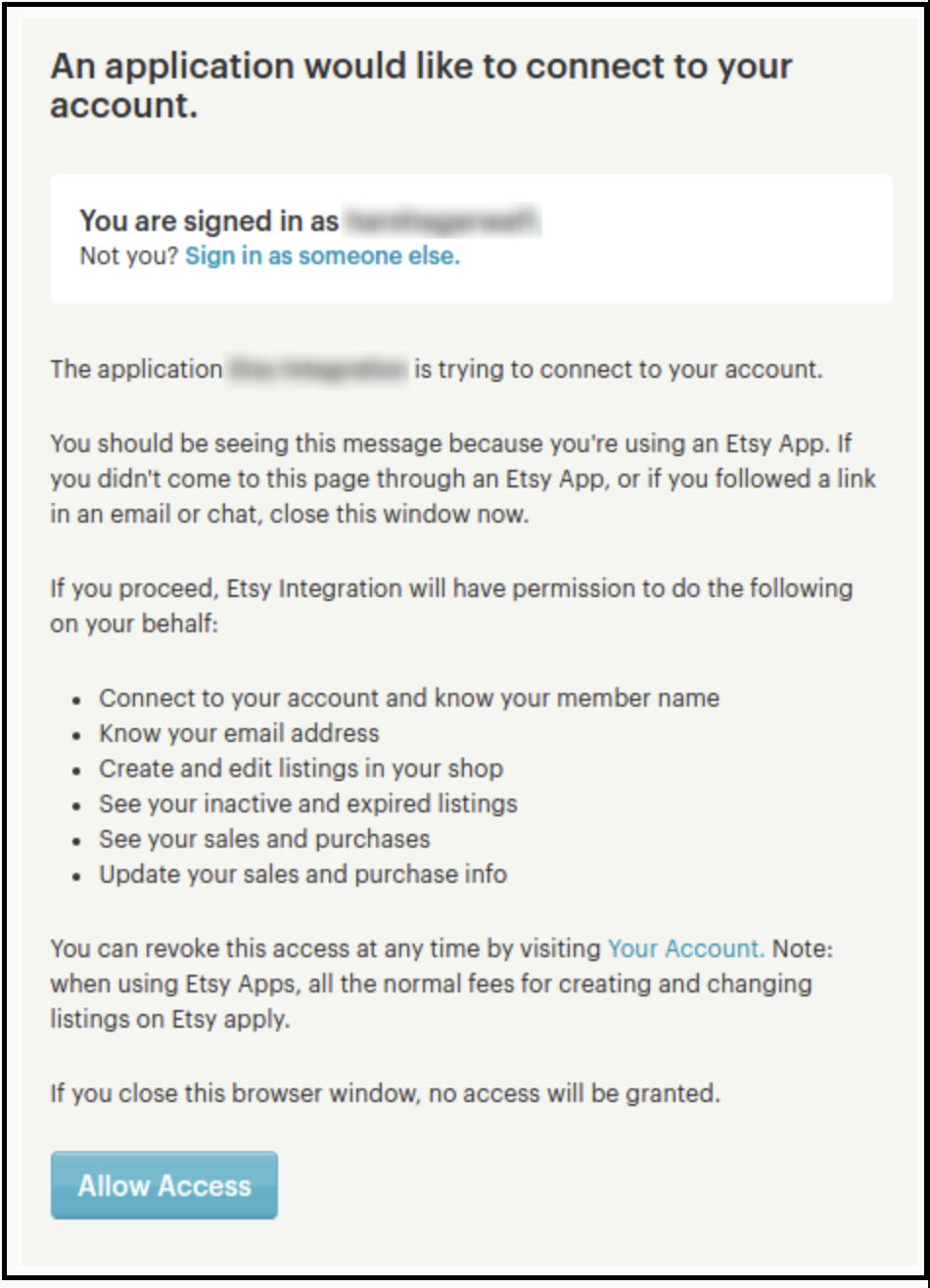
After providing these details or filling up the form, click on the “Connect” button. In fact, it would redirect admin to Etsy Marketplace to allow the App Access to the store. Furthermore, click on the “Allow Access” button as shown below. Moreover, it would establish a connection between the store and Etsy Marketplace.
It would also redirect admin back to the same page of “General Settings”. In addition, show the “Disconnect” button instead of “Connect” as the connection has now been set up with Etsy Marketplace. In fact, you can find the screenshot below –
6.2 Attribute Mapping
All the PrestaShop store attributes will sync to the Etsy Marketplace Integration module automatically. Moreover, the admin just needs to map these attributes to the Etsy Marketplace attributes.
6.3 Shop Section
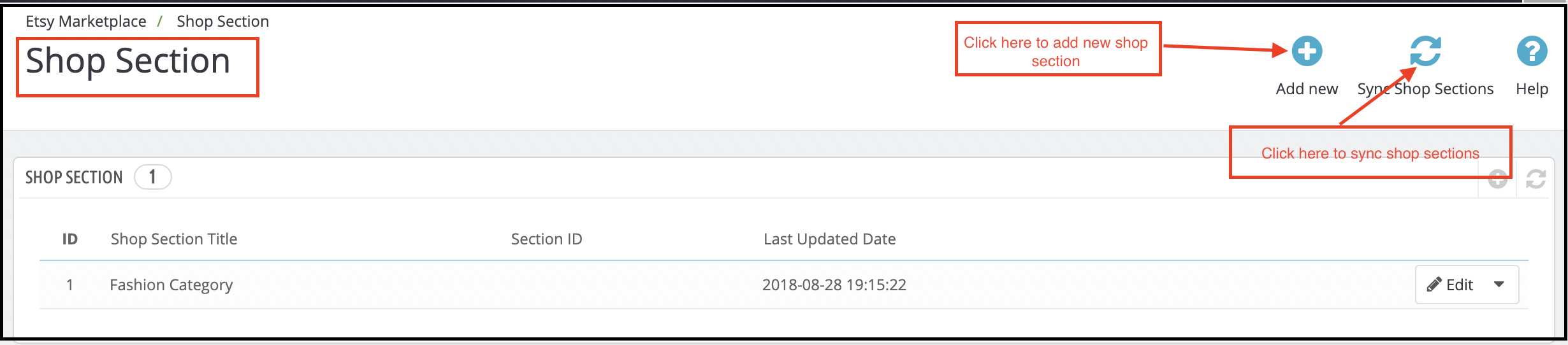
The shop section option offered by the Prestashop Etsy API integrator enables the e-merchants to create separate sections. Further, for the products of the same type. For instance, they can create sections like fashion, sports, and others. In fact, the customers can hit the section of their choice. Moreover, directly land on the products of their choice without browsing the entire assortment.
6.3.1 How to create new shop sections?
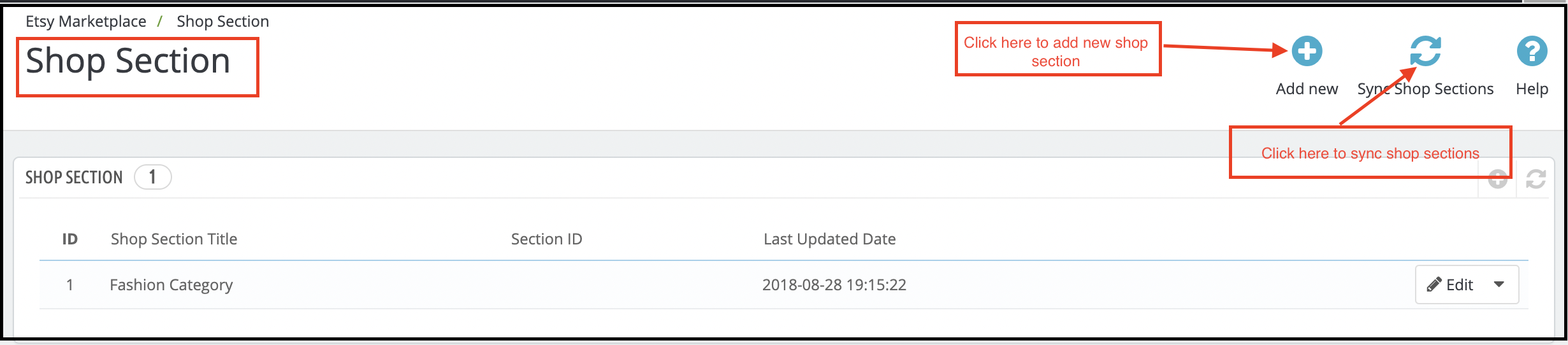
To add new shop sections, click on the Add New option at the top right position of the admin interface.
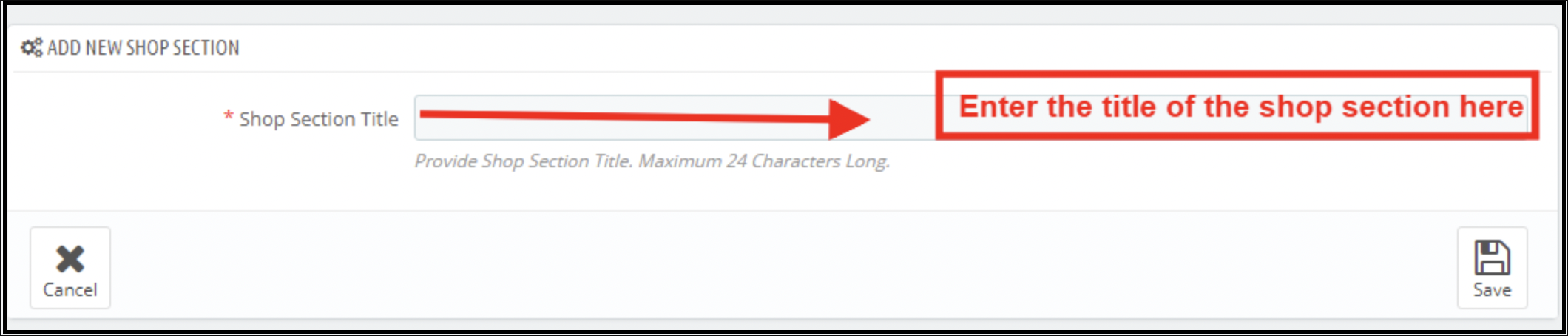
This will redirect you to the shop section creation interface.
Enter the name of the shop section in ‘Shop Section Title’ and save the changes.
To sync the section with the marketplace click on the Sync Shop Sections button at the top right corner of the interface. Further, the cron option will sync all the sections in one go.
The synced sections will display in the ‘Profile Management’ tab. Further, the Prestashop Etsy Integrator is shown in the image below.
The admin can select the shop section and the products of that particular profile will list under the selected section.
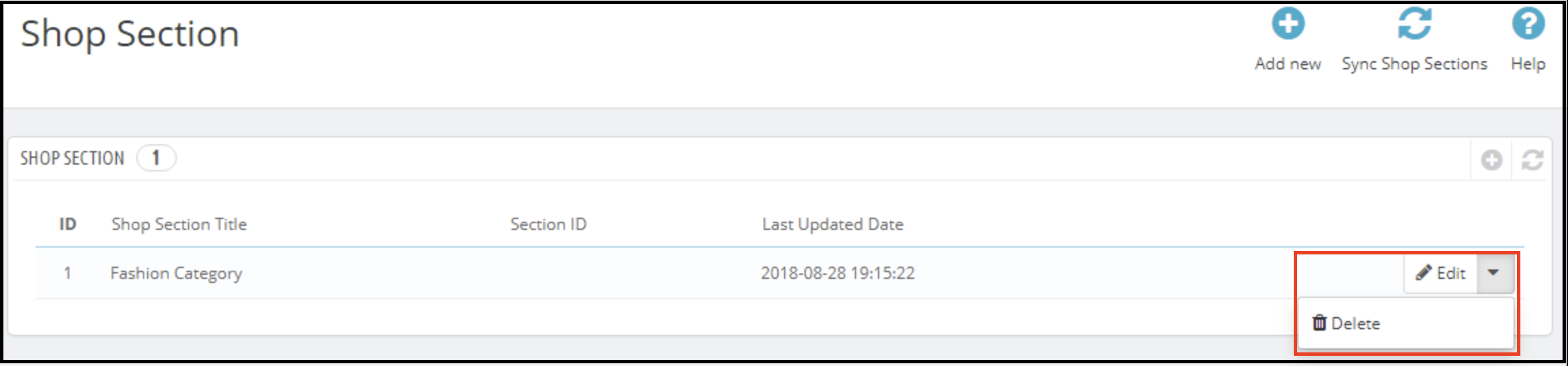
6.3.2 How to edit or delete the shop sections?
To edit a particular shop section, click on the ‘Edit’ button corresponding to it. Likewise, to remove the same, click on the corresponding ‘Delete’ button.
The created sections will display at the front-end as shown in the image below:
6.4 Shipping Templates
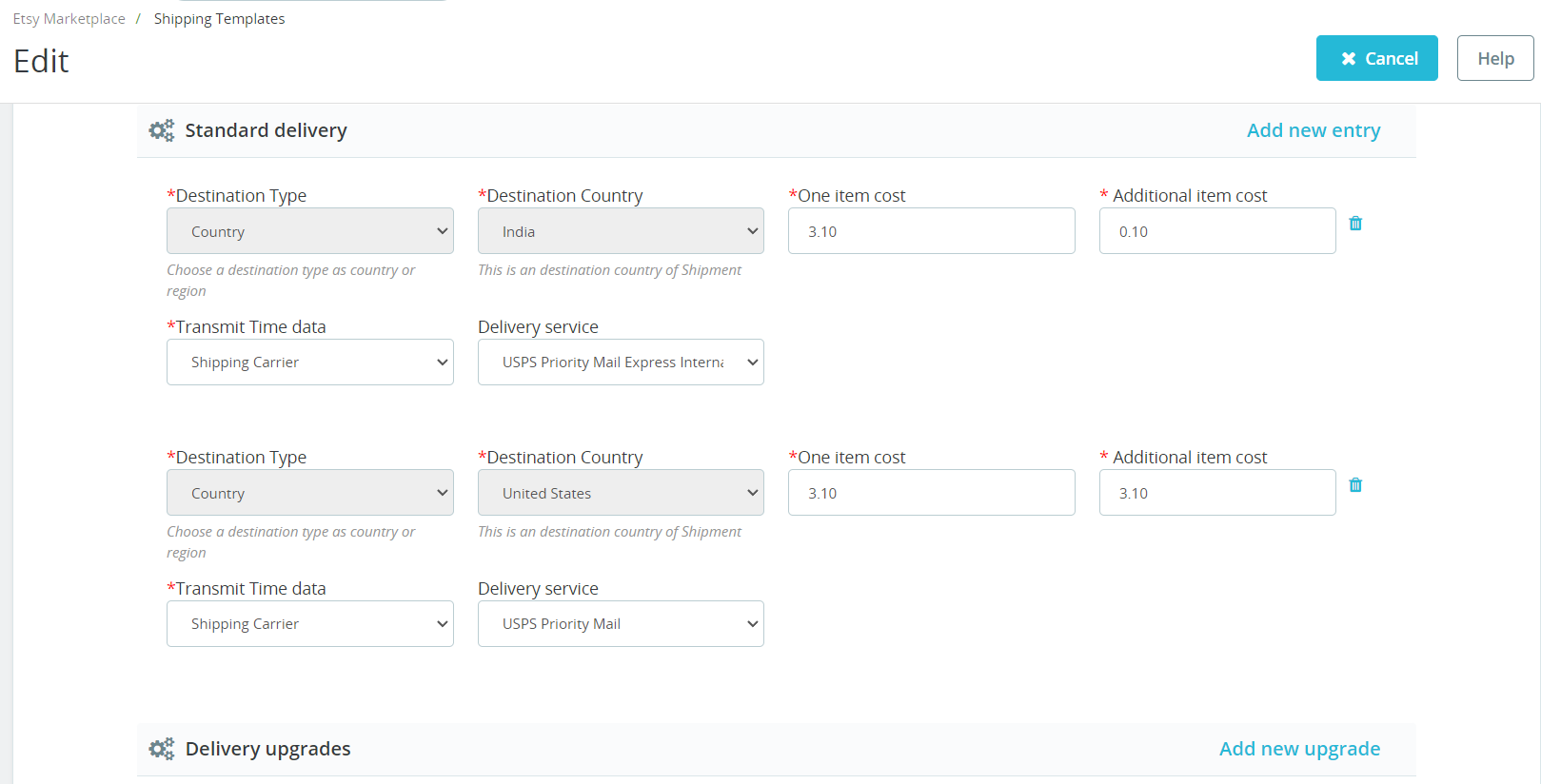
Etsy Prestashop connector allows the store admin to create the Shipping Templates to manage shipping options on the Etsy marketplace. Further, in this tab of the Prestashop Etsy integrator, the admin can create Shipping Templates. Furthermore, that contains shipping details. For instance, Shipping Origin Country, Minimum and maximum processing time for the orders, etc. In fact, the admin can create multiple Shipping Templates as per the need of the system. Further, the admin will have to map Shipping Templates to the Profiles (In Profile Management Tab) to make it work on Etsy Marketplace. This is explained later in this document. Thus, each Shipping Template can have multiple shipping entries. Further, to define shipping destinations and their cost according to the destinations.
Note – One Shipping Template can have one origin. However, multiple destinations with their costs. Further, the admin can add different standard entries and delivery upgrades for the shipping templates.
6.4.1 Steps to Add Shipping Templates
Following are the steps to add a Shipping Template to the system –
Go to the Etsy Marketplace connector addon-> Shipping Templates (Menu Option)
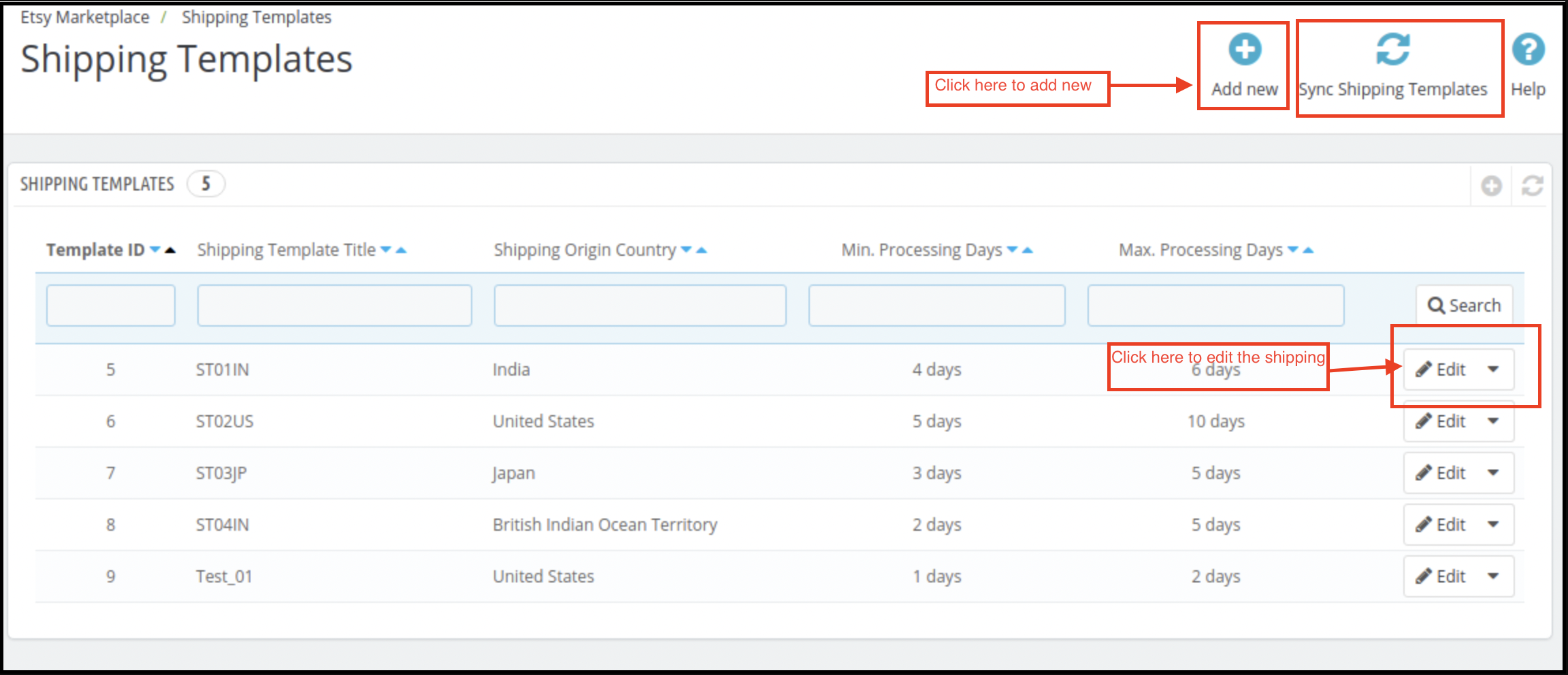
It would display the page where already added Shipping Templates will list (If any). Click on the “+” (Plus Icon – as shown in the above screenshot).
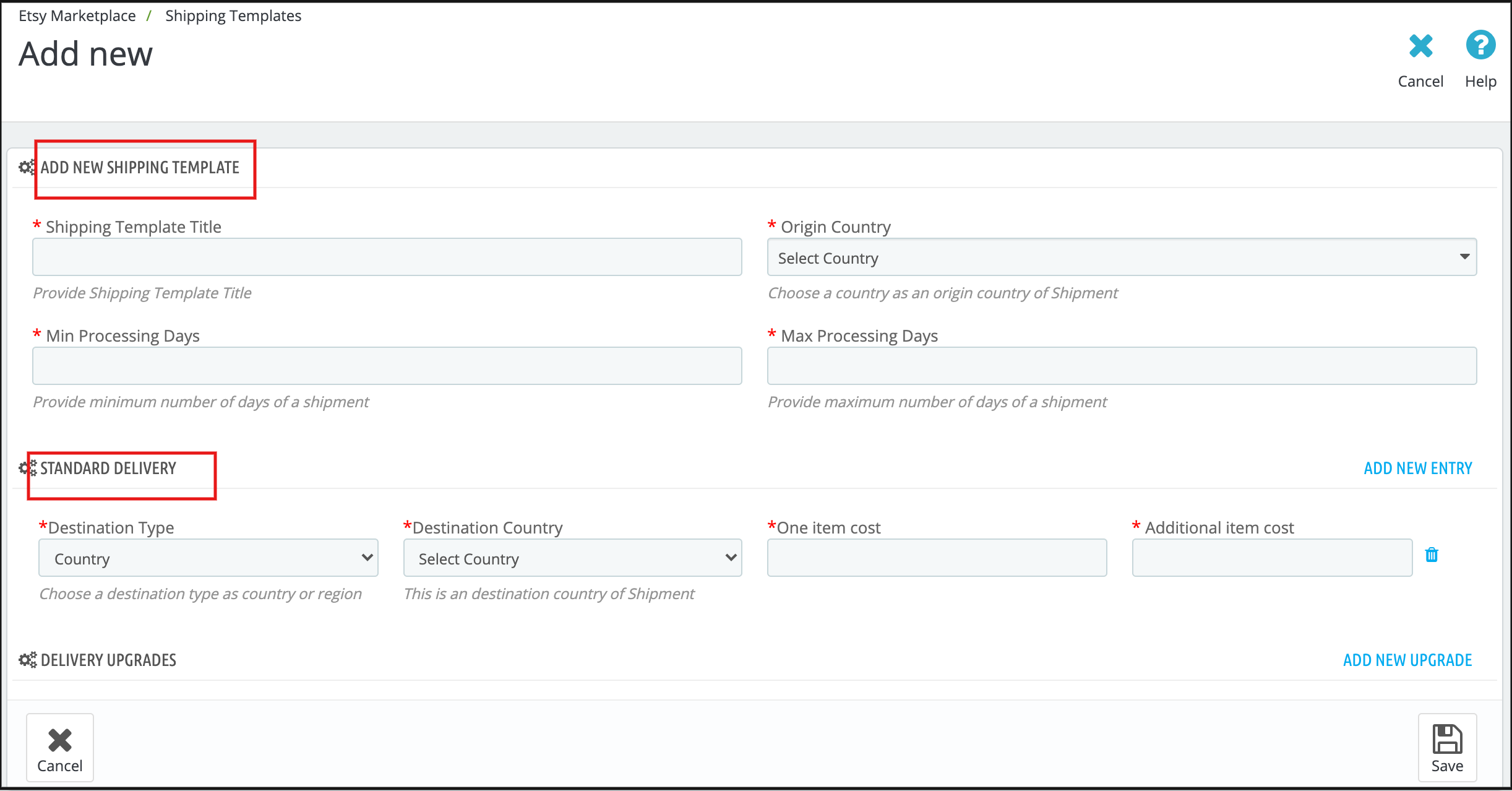
It would redirect the admin to the new page where a form with some input field will be shown (Screenshot is shown below).
Fill up the following input fields of the form –
Shipping Template Title
Origin Country
Origin Post Code
Processing Days (Min and Max)
Destination Type
Destination Country
One Item Cost
Additional Item Cost
Transmit Time Data (Choose Shipping career or add custom Delivery time.)
Choose Delivery Service (If the previous option is selected as a shipping career).
Or Choose Min and Max Processing days (if the previous option is selected as Delivery time).
Click on the “Save” button.
It would validate the provided data and save the details into the system if valid.
6.4.2 Steps to Edit/Delete Shipping Template
Following are the steps to edit/delete Shipping Template from the system –
Go to the Prestashop Etsy Marketplace Integration addon-> Shipping Templates (Menu Option)
It would display the page where already added Shipping Templates will list (If any). In fact, click on the “Edit/Delete” link given under the drop-down being shown corresponding to each Shipping Template.
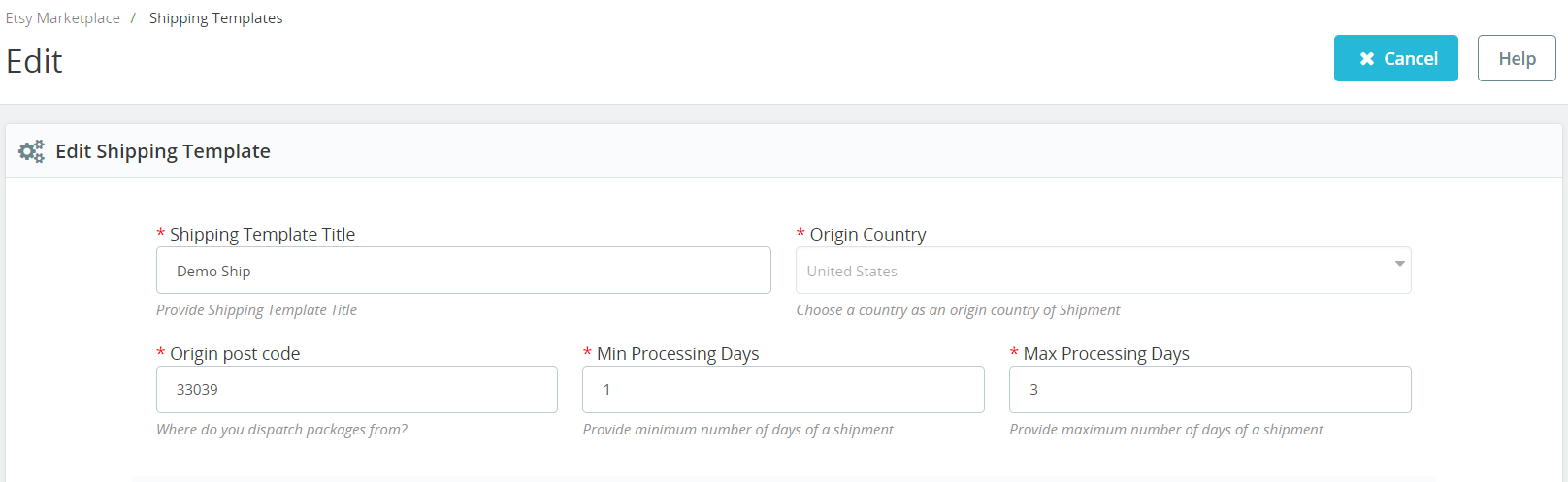
If the admin has chosen the “Edit” option then it would redirect the admin to a new page. Further, where a form with an already filled input field will be shown. Admin can simply update values. Moreover, save the details by clicking on the “Save” button.
If the admin has chosen the “Delete” option then it would delete the Shipping Template. In addition, all its Shipping Template Entries are from the system.
After creating shipping templates it is required to synchronize the Shipping Templates. Further, the admin needs to click the “Sync Shipping Templates” button under the “Shipping Templates” tab of the Etsy marketplace integration module. In fact, only after successful synchronization, these shipping templates will appear on the listing page.
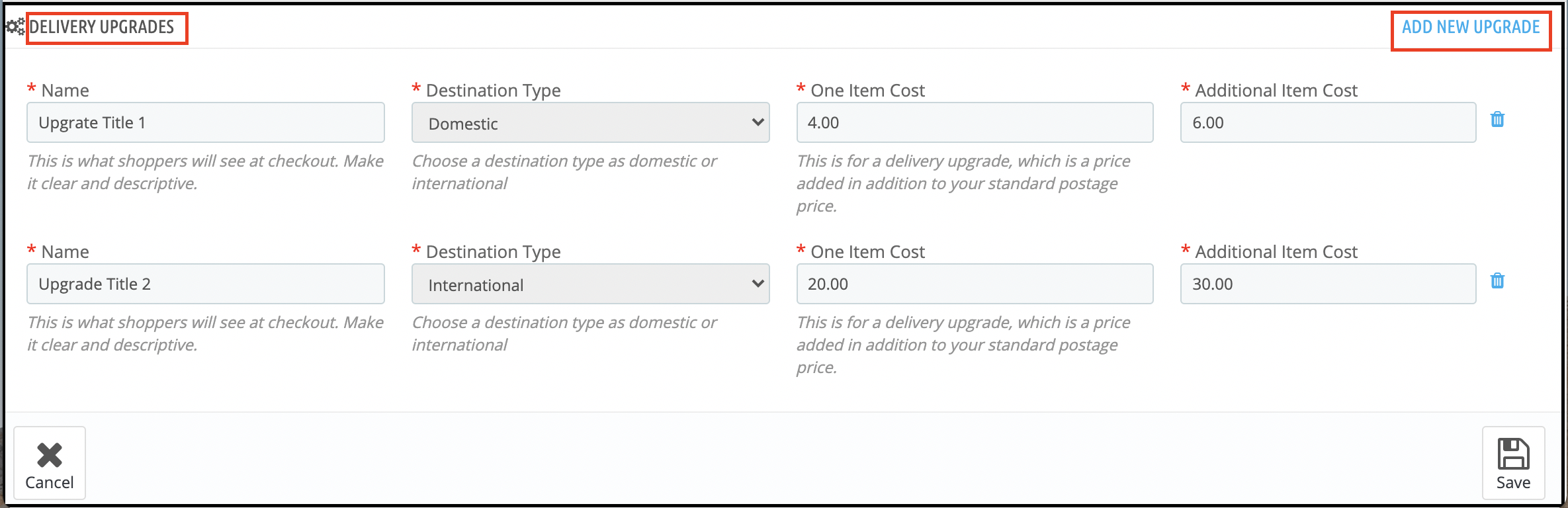
6.4.3 Delivery Upgrades
Admin can add the delivery upgrades to the Shipping Templates from this tab of the Etsy Prestashop integrator. In fact, the Delivery Upgrades tab of the Etsy Prestashop integration module displays the list of the Delivery upgrades added to the shipping templates.
6.4.4 Add Delivery Upgrades for a Shipping Template
Following are the steps to add Delivery Upgrades to the Shipping Templates-
Go to the Prestashop Etsy Integrator -> Shipping Templates (Menu Option)
It would display the page where already added Shipping Templates will list (If any). Click on any of the Shipping Templates in which you want to add Delivery Upgrades.
It would redirect to that particular Shipping Template Page.
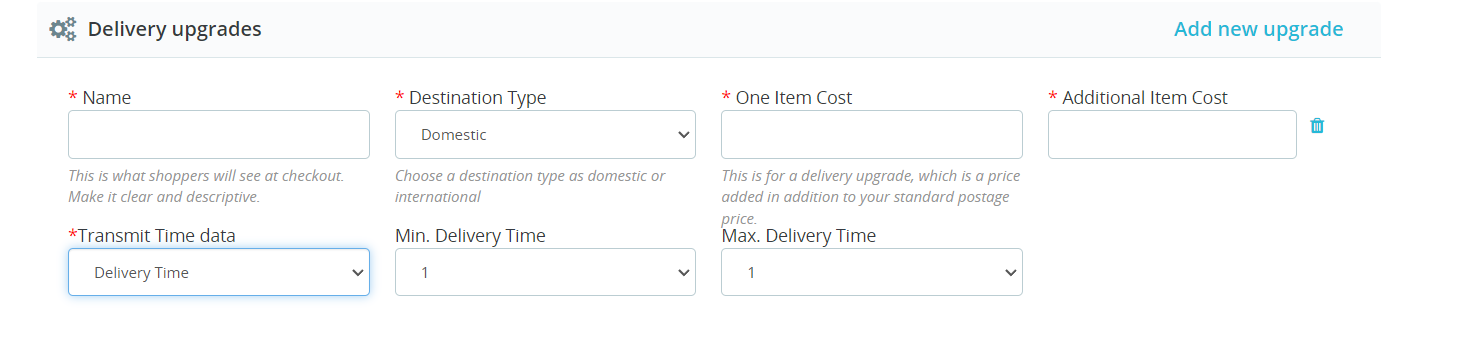
Click on the “Add New Upgrade” at the bottom right side of the Etsy Prestashop Integrator and it would open a drop-down form with, the input field will be shown.
Fill up the following form fields –
Delivery Upgrade Name
Destination Type
One Item Cost
Additional Item Cost
Transmit Time Data (Choose Shipping career or add custom Delivery time.)
Choose Delivery Service (If the previous option is selected as a shipping career).
Or Choose Min and Max Processing days (if the previous option is selected as Delivery time).
Click on the “Save” button.
It would validate and save the details to the system if valid.
6.5 Profile Management
The Profile Management tab provides options to create a profile for product listing. Further, profile-based listing allows the seller to list the attribute and categories of the Prestashop products. Furthermore, with the Etsy marketplace attributes and categories. In fact, the seller can select multiple Prestashop store categories at a time if there is only one category on Etsy for these products.
Under Profile Management admin can select the Shop Section in which he wants to show products for that profile.
In the recent enhancements, we have also provided the option to synchronize products on the profile level. Thus, if you want to update/list products on Etsy for particular profiles only, you can find the crons in the profile management tab itself.
Note: Please make sure to synchronize the Shipping Templates otherwise these details will not reflect in the Profile Management. Go to the Shipping Template tab of Prestashop Etsy Integration Addon and run the “Sync Shipping Templates” cron.
6.5.1 Add Profile to the System
Following are the steps to add Profile into the system –
Go to the Prestashop Etsy Integration Module -> Profile Management (Menu Option)
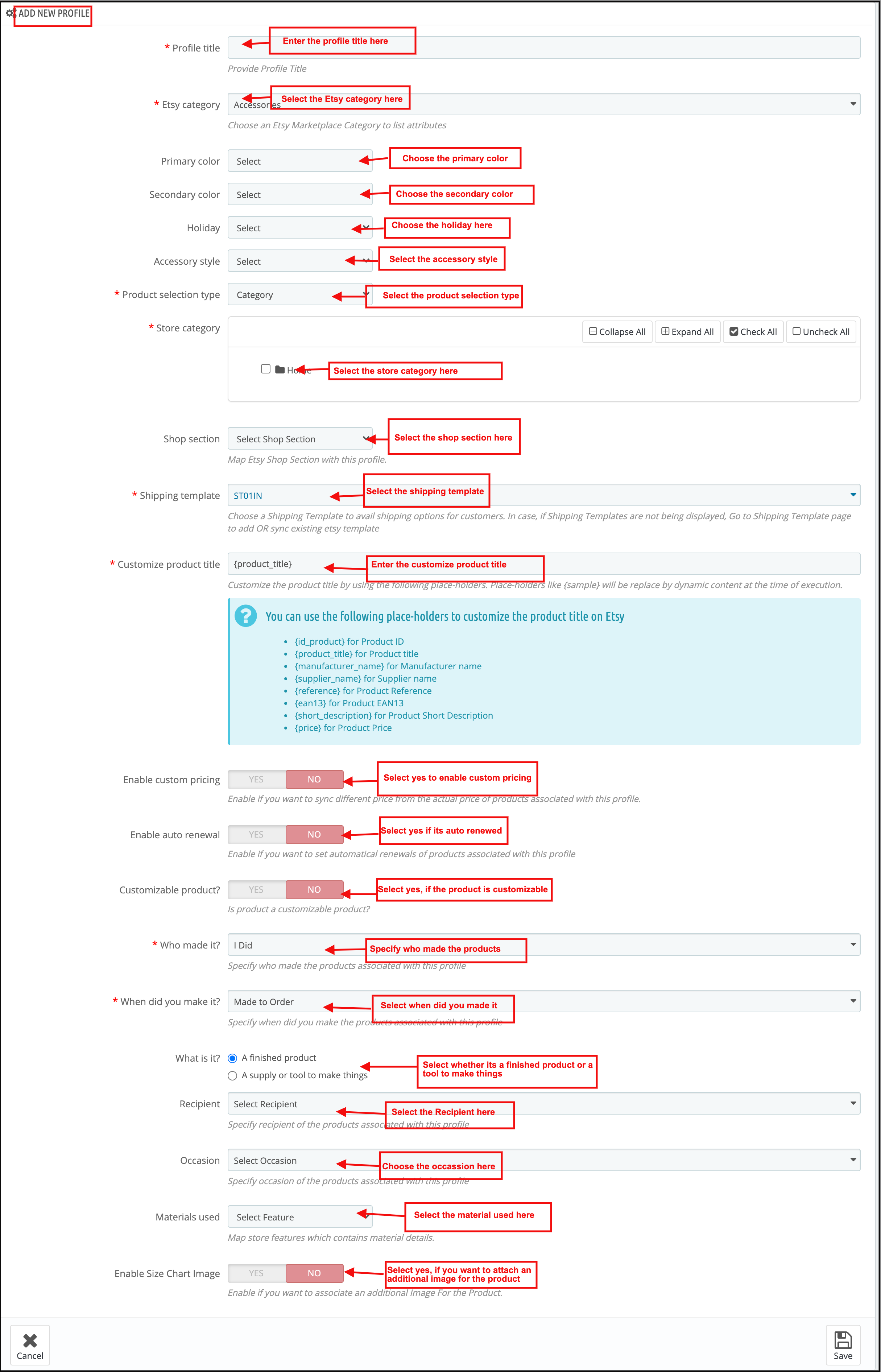
It would redirect the admin to a page where already added profiles will list (If any). Click on the “+” on the top right side of Etsy Prestashop Integrator (Plus icon as shown in the screenshot below) and it would redirect the admin to a new page where a form with some input fields will be shown.
Fill up the following input fields –
Profile Title
Etsy Category (List of Etsy Marketplace categories)
Store Category (List of Store Categories)
Shipping Template (List of Shipping Templates)
Primary Color
Secondary Color
Holiday
Accessory Style
Product Selection Type
Customize Product Title
Enable Custom Pricing
Customizable Product
Alter Quantity
Enable AutoRenewals
Who made it
When did you make it
Recipient
Occasion
Materials Used
Shop Section
Enable Size Chart Image
Size Chart Image
and click on the “Save” button.
It would validate and save the details into the system if valid.
6.5.2 Edit/Delete Profile
Following are the steps to edit/delete a profile from the system created in the Prestashop Etsy Integration plugin-
Go to the Prestashop Etsy Integration plugin -> Profile Management (Menu Option)
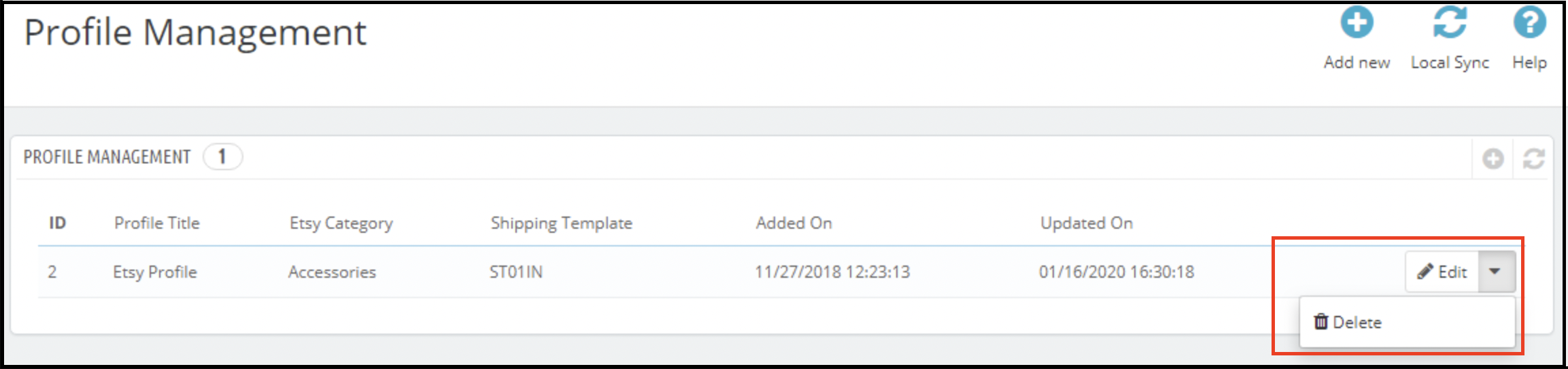
It would redirect the admin to a page of the Prestashop Etsy Integration module where already added profiles will list (If any, shown in the screenshot below).
Click on the “Edit/Delete” link given corresponding to each profile as shown in the above screenshot.
If the admin has chosen the “Edit” option then it would redirect the admin to a new page where a form with some already filled input fields will be shown. Admin can simply update values and save the details by clicking on the “Save” button.
If the admin has chosen the “Delete” option then it would delete the selected Profile from the system.
6.5.3 Product Selection Type
This is a drop-down and from this admin can select whether he wants to select the whole category to list or select particular products to add.
6.5.4 Etsy Category Attribute
Etsy Category Attributes are now available in the Etsy Marketplace Connector module. The admin can now choose the Primary Color, Secondary Color, Holiday, and Accessory Style.
6.5.5 Size Chart Image
By using this feature admin can also add an image for the product.
6.6 Products Listing
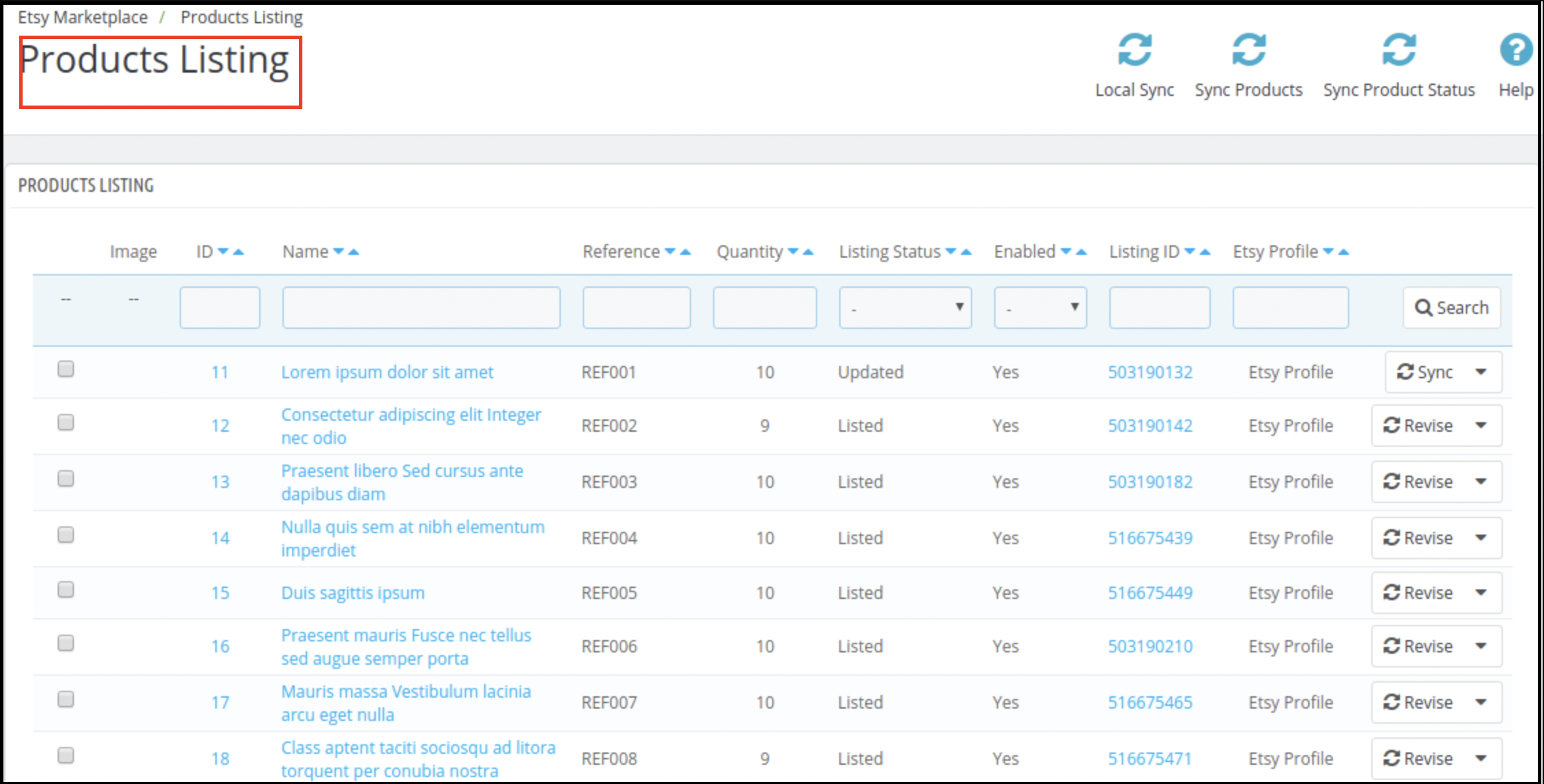
This section of Etsy Prestashop Integrator shows the list of all the products selected to list or listed on the Etsy Marketplace with their listing status and other details as shown in the screenshot below:
There are the following options cron options offered in the product listing tab of the Prestashop Etsy Integration module –
6.6.1 Sync Products
This option syncs the products of the category that was mappable in the profile. As the ‘Sync Products’ is executed, all the products of the profile will be listed at etsy.com.
6.6.2 Sync Product Status
The listing status of the products can sync back from the marketplace to the store by executing this cron of the Prestashop Etsy integrator.
6.6.3 Delete Products
This option allows the admin to delete product listings from Etsy Marketplace in bulk. To delete a product listing, the admin has to select the products that they want to remove and click on “Delete Product”. This will remove all the selected products from the listing.
6.6.4 Renew Products
This option allows the admin to renew the product in case the listing has expired on Etsy Marketplace in bulk. Furthermore, to renew the product, the admin has to select the products that they want to renew and click on the “Renew Product” action.
Along with this, the admin even gets the option to renew or relist one particular product. In fact, there is a Renew option corresponding to each product that has expired.
After setting up a product for renewal or relisting, these actions will be replaced with the “Delete” action.
Note – Product Renewal is chargeable on Etsy Marketplace.
6.6.5 Local Sync
Admin can sync all the products of their profiles using Local Sync and then every profile’s products list on the Product Listing Page. From there, the admin has an option to list individual products or lists in bulk.
6.6.6 Custom Product Details
In this section, the store admin can create different product titles and descriptions for Etsy product listings. Here, we provide an option for using the existing product details or create different ones for Etsy.
6.7 [New Feature] Return Policy Synchronisation
This tab allows the admin to manage and synchronize return policies between the module and Etsy. You can create, edit, and delete multiple return policies and assign them to specific profiles. Once mapped, any category associated with a profile will automatically update on Etsy with the corresponding return policy.
Add New: Create new return policies or modify existing ones directly from the module.
Sync Return Policies: Use the Sync Return Policy cron to fetch all available return policies from Etsy to your PrestaShop store. The synchronization includes details such as accept return/exchange options, the number of allowed returns/exchanges, and return deadline dates.
Profile Mapping: Within profile mapping, you can select a return policy to be assigned to the products in the chosen category.
Automatic Updates: When a product is added or updated in a mapped profile, the assigned return policy is automatically applied on Etsy.
This feature ensures your return policies remain consistent across your store and Etsy listings, saving time and reducing manual effort.
6.8 Order Listing
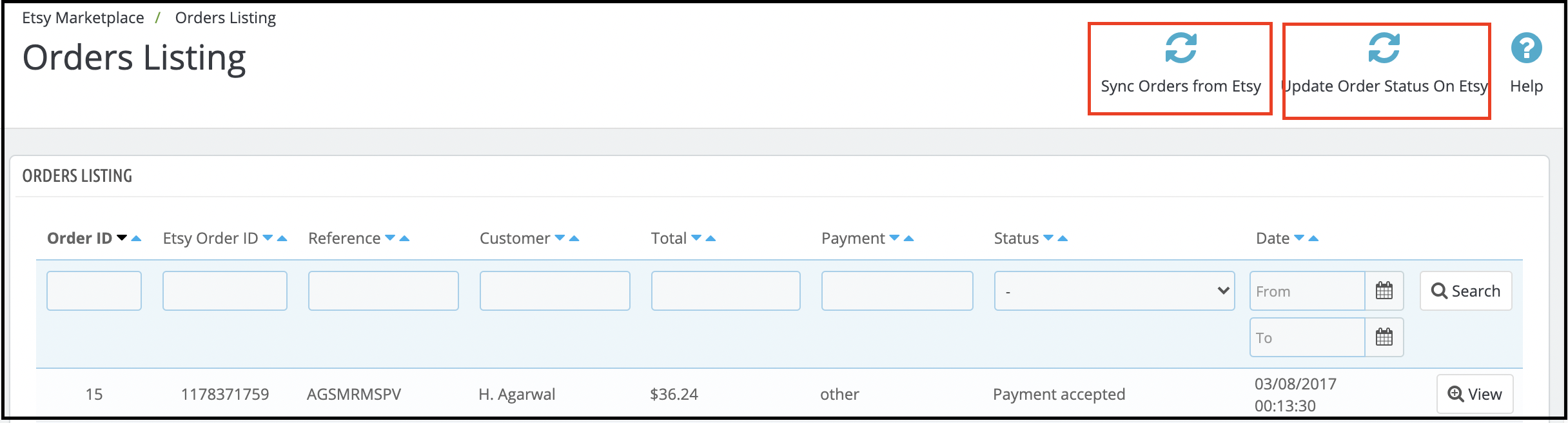
This tab of Etsy Prestashop Integrator shows the list of orders placed on Etsy Marketplace for your store products on Etsy as shown in the screenshot below –
Note: Please make sure to click on the “Sync Orders Listing” option under the Synchronization tab of the Etsy Prestashop integration module. Furthermore, only after successful sync orders will synchronize to the Prestashop back office.
6.9 Synchronization
All tabs offered by the Etsy Prestashop integration addon defined above are basically for saving the settings. Further, also the options in the system are used during synchronization between the Prestashop Store and Etsy Marketplace. In fact, there are the following cron jobs to synchronize content between the Prestashop Store and Etsy Marketplace which you can find below –
6.9.9 Products Listing on Etsy Marketplace
Following are the steps to synchronize Products Listing on Etsy Marketplace –
Go to the Etsy Prestashop Integration addon -> Synchronization (Menu Option)
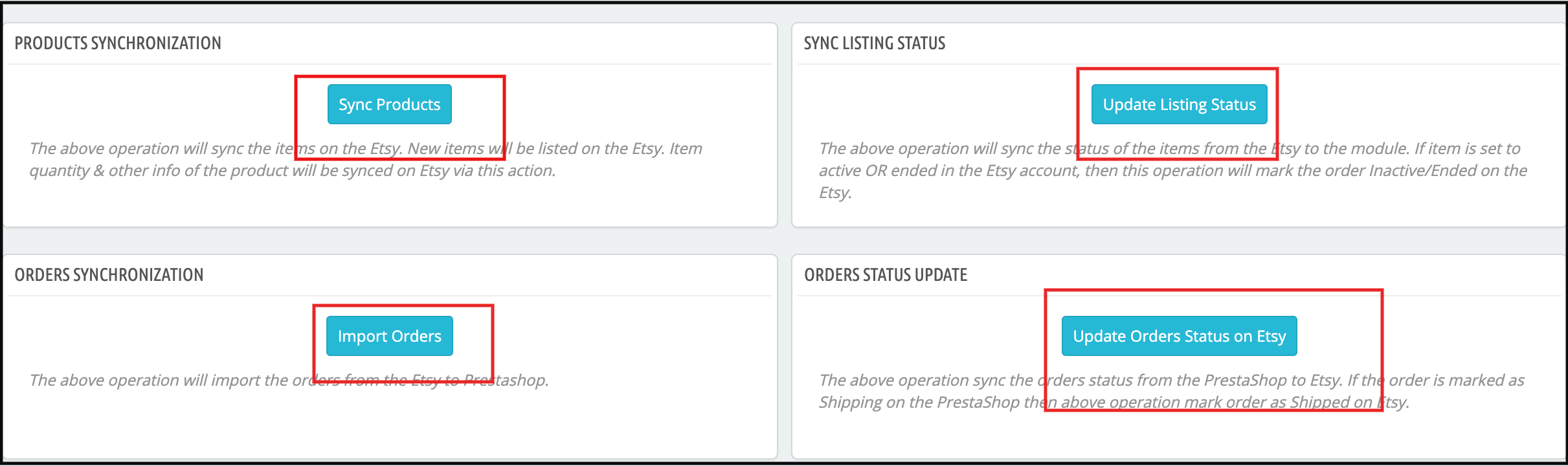
It would redirect the admin to a new page where all synchronization actions are listed as shown in the above screenshot.
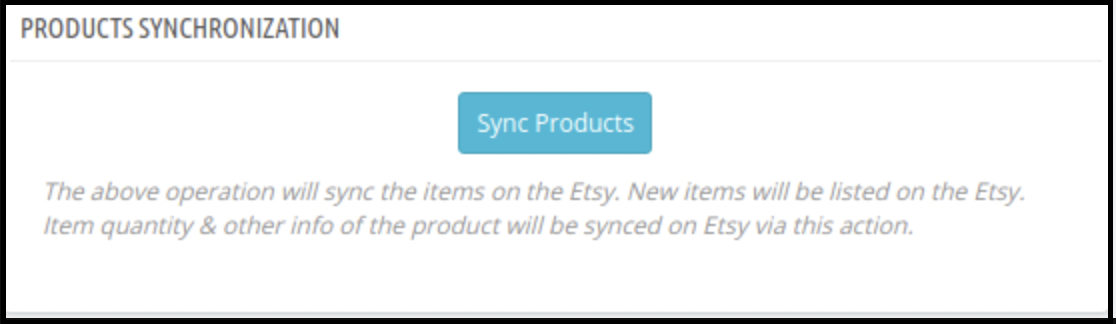
Click on the “Sync Products ” button shown below.
It would perform the following actions –
Update the Product list based on the profiles created in the system.
Add Products to Etsy Marketplace with product details (e.g. Price, Quantity, Image, etc.)
Update Products on Etsy marketplace which are already listed on Etsy Marketplace
Renew Products on Etsy Marketplace for that renewal are enabled.
Delete Products on Etsy Marketplace which are marked deleted on the Store.
Update the Listing Status of each product listed on Etsy Marketplace.
If synchronization completes successfully then it will display a message – “Synchronization completed” else “Synchronization failed”.
6.9.2 Orders Listing from Etsy Marketplace
Following are the steps to synchronize Products Variations Listing on Etsy Marketplace –
Go to the Prestashop Etsy Connector -> Synchronization (Menu Option)
It would redirect the admin to a new page where all synchronization actions are listed as shown in the above screenshot.
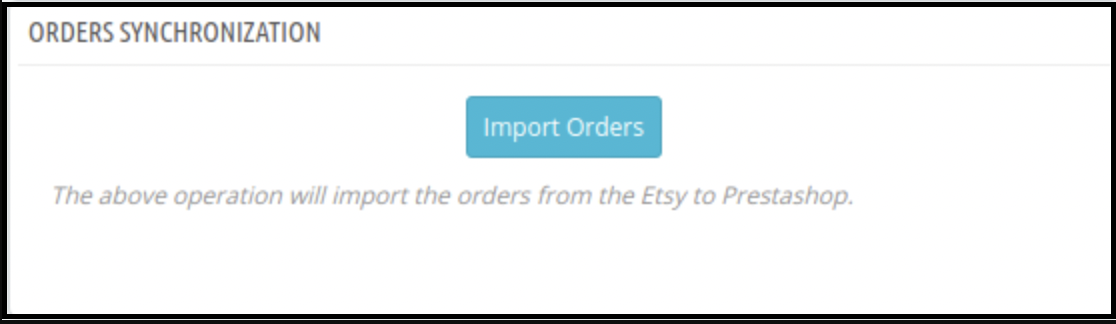
Click on the “Import Orders” button shown below.
It would perform the following actions –
Get Orders and Transaction details from Etsy Marketplace
Create Customers and Shipping Carriers into the Store as per the details that come from Etsy Marketplace
Create Orders into the Store as per the details that come from Etsy Marketplace and set the order status as per the configuration settings updated in the “Order Settings” tab of this module in admin.
If synchronization completes successfully then it would display the message – “Synchronization completed” else “Synchronization failed”.
6.9.3 Orders Status on Etsy Marketplace
Following are the steps to update the status of orders on Etsy Marketplace –
Go to the Prestashop Etsy connector -> Synchronization (Menu Option)
It would redirect the admin to a new page where all synchronization actions are listed as shown in the above screenshot.
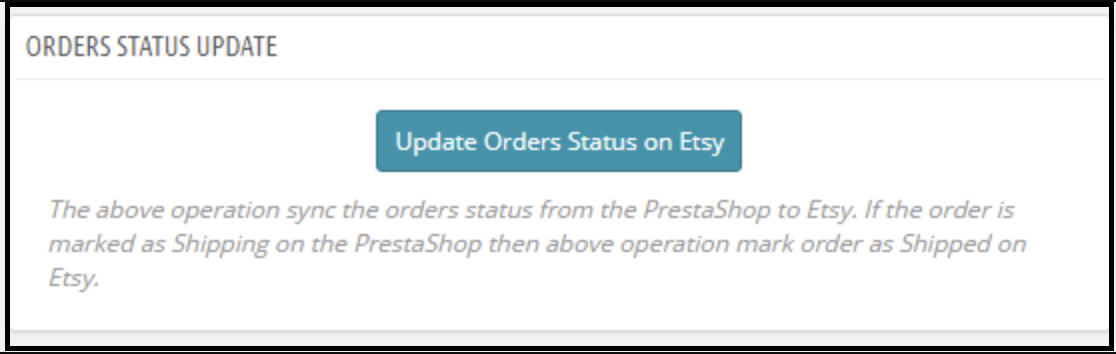
Click on the “Update Orders Status on Etsy” button shown below.
It would perform the following actions –
Check if there is any status update recorded by the module for any Etsy Order.
Update the Status of Orders as per the configuration settings updated in the “Order Settings” tab of this module in the admin
If synchronization completes successfully then it would display the message – “Synchronization completed” else “Synchronization failed”.
6.9.4 Update Product Listing Status from Etsy Marketplace
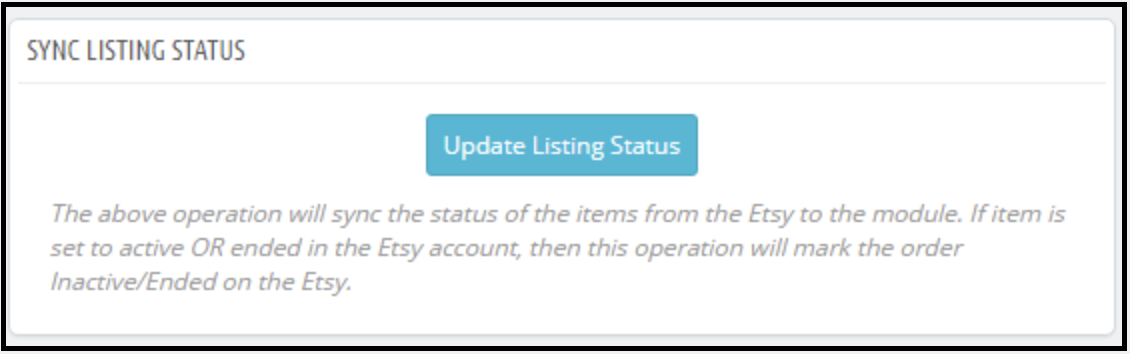
Sync the product status from Etsy to the Prestashop store by clicking this cron under the Synchronization tab.
1. Go to the Etsy Integration module -> Synchronization.
2. Click on the Update Listing Status from Etsy Marketplace.
6.10 Sales Report
The Etsy Prestashop integration module allows the store admin to check the sales report for the Etsy shop orders. Admin can use the date filter to check the sales report.
6.11 Product Sales Report
Etsy Prestashop Integration extension allows the store admin to generate the reports product-wise.
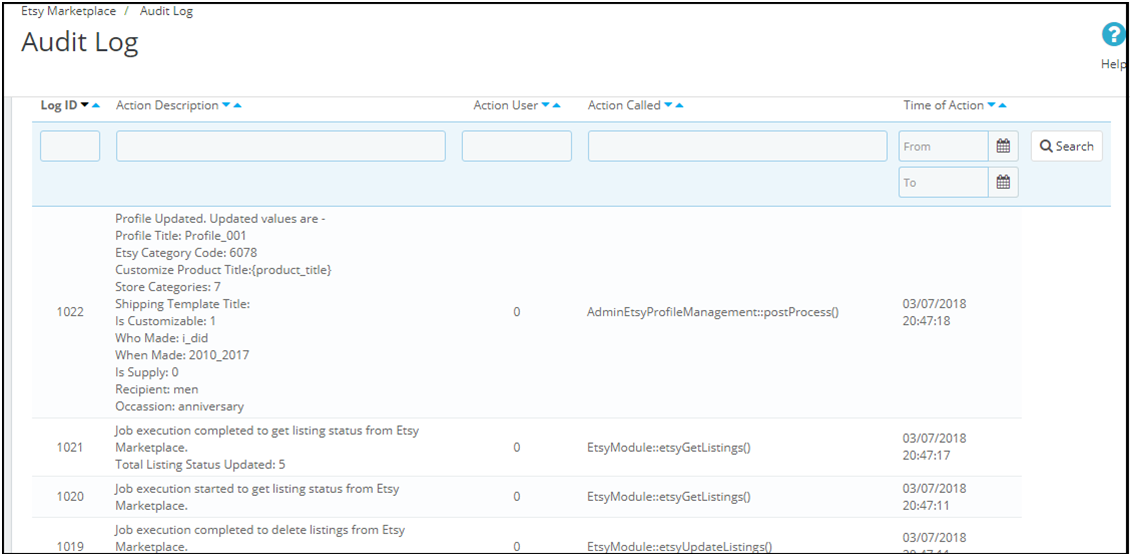
6.12 Audit Log
The audit log section of the Etsy PrestaShop connector helps to keep track of all the takes performed by the administrator.