Turbo boost your Magento Site with these tips- Volume 3

Magento site owners have a reason to be cheerful again as up till now they have been able to perform some of the site optimization tips on their Magento store for making a significant improvement in terms of the conversion rates, product sales and site traffic. Further, in this final part of this article series, let us discuss some more mind blowing tips that can improve the website loading speed of your online store drastically. Take a close look below.

1. Utilize the services of PHP accelerators
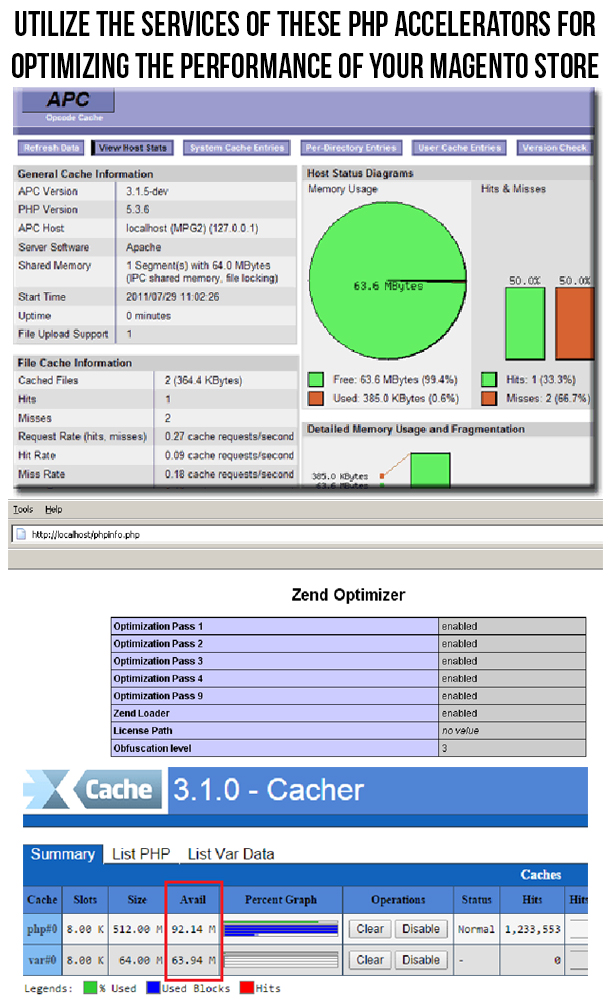
For improving the performance of a Magento site, you can utilize the services of a PHP accelerator, which is another form of caching. With the help of these accelerators, it is now easy to improve the performance of your PHP scripts by caching them in their compiled state. Apart from this, you can utilize the various PHP accelerators like APC, ZendOptimizer+ or Xcache. Some of them are described below.

APC ““ https://pecl.php.net/package/APC

Xcache ““ https://xcache.lighttpd.net/

eAccelerator ““ https://eaccelerator.net/

2. Enable the Apache Keep Alive feature
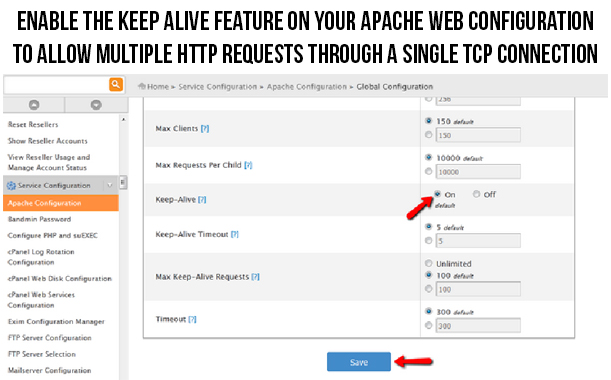
This Apache Keep Alive is a mind blowing feature that establishes open connection between the client and server platform. In order to improve the loading time of your site, you need to ensure that the multiple requests are handled on the same connection. To take required step in this direction, you need to check that the “Keep Alive” option on your Apache configuration is enabled. This option is an effective tricky solution that allow multiple HTTP requests to be funneled through a single TCP connection. Due to this, the additional time that is spent on the setting up of the individual TCP connection is reduced and thus the downloading time required for files like HTML, JavaScript, images and others are minimized to a significant level.

3. Replace Apache web server with other suitable alternatives

For improving the performance of your Apache web server, you need to look out for the suitable alternatives for your web server. LiteSpeed Enterprise web server that can be used as an effective replacement for the Apache web server due to various available features and facilities. With the help of this server, the performance of the PHP application can be increased by up to 50% and it is about 6 times faster than the Apache serving static content. Besides LiteSpeed, Nginx is also an effective replacement for Apache web server.

4. Make use of the advantage performance optimization

Due to the complexity of the Magento system, it is important to implement the caching in the workflow process of your Magento site. For situations like this, you need to have a full page cache extension that can save the excess load on your Magento server. Apart from this, you can utilize the services of Varnish Magento extensions to optimize the performance of your Magneto site. Check out this link to try out this free Magento extension for the purpose of full page caching.

5. Optimize the performance of your website on mobile devices

Due to the increased use of the mobile devices, more and more number of people are surfing the site through these mobile devices. Therefore, it is important to optimize the performance of your site on mobile devices for providing the same level of user experience to your customers irrespective of the device used by them. In order to carry out this crucial task, you need to take the help of various mobile optimization tools like PageSpeed Insights, Pingdom, Mobile Friendly Test, GT Metrix and such others. Apart from this, you need to utilize the various other factors like HTML5, CSS and Javascript files, mobile responsive design, optimized images and other such components that can make your Magento site more accessible on numerous mobile devices.

6. Disable ETags for the faster performance of your browsers

Browsers make use of ETags feature for validating the cached components across the various subsequent visits. Due to this, it can slow down the performance of a site if it is served from the cluster that has not implemented ETags properly. To avoid such a situation, it is important to disable them completely with the following syntax:

############################################

## If running in cluster environment, uncomment this

## https://developer.yahoo.com/performance/rules.html#etags

FileETag none

7. Install an effective JS/CSS minifier

For optimizing the performance of your Magento site, you need to install a JS/CSS minifer like the Minify Javascript/CSS that can optimize the performance of your site drastically. This Minify JS/CSS Magento extension can effortlessly combine, compress and cache the Javascript and CSS file for faster site loading and performance. Apart from this, the minifer will also add forever expiry tags to your Magento files for ensuring the faster browser loading time.

8. Make required changes in the PHP realpath_cache settings

For optimizing the website loading speed of your Magento store, you need to update the realpath of your PHP coding accordingly. This is due to the fact that whenever a new file is added to the PHP, it is required to use a relative path so that the PHP does not have to spend a considerable time in looking out for that particular file. This Realpath cache minimizes the disk lookup time by allowing PHP to cache the reference paths and location of various files/directories that are being used by you. Further, in order to improve the efficiency of real path cache, you need to increase the parameter realpath_cache_size. If you are not capable to change your filepaths at a regular interval of time, it is recommended to increase the count of realpath_cache_ttl.

9. Reduce the logging time of your web server

For reducing the disk write up time of your web server, you need to take efforts towards reducing or disabling the logging time of your server. For Linux servers that are having access time logging enabled on any of their mysql, web server or any other cache partitions can easily get them disabled for optimizing the performance of their Magento site. Moreover, for the users that are using ext3 or reiserfs, you need to check out the faster journal write methods by clicking on this valuable link.

With the help of these mind blowing site optimization tips, Magento site owners can effortlessly improve the performance of their online store for grabbing the maximum site traffic, conversion rates, product sales and customer engagement. Therefore, it is your time to make the mark in your particular business segment by providing a seamless online shopping experience to your targeted customers.

This Would Also Interest You:

Turbo boost your Magento Site with these tips- Volume 2

Most of the online users are always in a dearth of time and are in mood to wait for even a few extra seconds while accessing a particular website. Due to this habit of impatience, they often leave a particular site without even completing a particular task and thus adds up to your list of shopping cart abandonments and thus affects your product sales to a great extent. All this significant loss to the credibility and popularity of your Magento site can be effectively tackled by reducing your website loading speed to an acceptance level. Don’t test the “patience” of your targeted customers while trying to access your particular website. But, try to provide them a seamless ride through the entire process by implementing these site optimization tips on your Magento site.

1. Make sure to enable flat catalog on your site

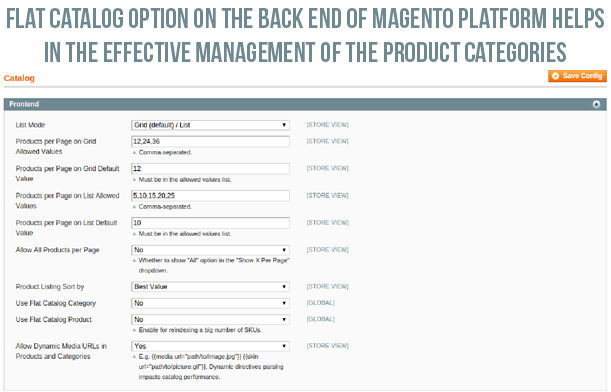
In order to improve the performance of your Magento store, it is important to enable the flat catalog for various categories and products on your site in order to facilitate their seamless merging into one single table. Due to this step, website performance is said to improve drastically as MySQL queries can now be processed in a faster manner. For utilizing this effective feature, you need to perform the following steps:

  • Click on the “System” -> “Configuration” and then “Catalog”.
  • Now, click on the “Frontend” and then change the “Use Flat Catalog Category” and “Use Flat Catalog Product” option to “Yes”.
  • After the above step, click on “Save Config” option.
  • It is advised to clear the cache. One of the recommended way to perform this is by deleting everything from the /var/cache directory. Otherwise, you can also do it by following these simple steps.
  • Navigate towards “System”-> “Cache Management” and then click on the “Flush Cache Storage” option for deleting the entire cache from your Magento site.

2. Delete unwanted files from Magento database and clear up your logs

Due to the default settings of the Magento, the log files in Magento are stored for upto a period of 180 days. This results in storage of a large number of log files which ultimately occupies a lot of your Magento server space. To avoid such a situation, site owners have the freedom to change their settings to a smaller time duration like two weeks (14 days) to reduce your occupied space. To perform this action, just follow these simple steps.

  • – Go to “System” -> “Configuration” -> “Advanced” -> “System”-> “Log”.
  • – Now, under the “Save Log, Days”, you need to change the settings over there to 14 days or any other specific time period of your choice.
  • – Finally, click on the “Save Config” option.
  • Apart from this, you can also perform the above task in another manner by clearing up your lob tables manually in your database. To do this, follow these steps,
  • – For this, you need to select all of the log_% tables from the phpMyAdmin and then select the “Empty” option from the drop down menu.
  • – Now, click on the “Yes” option when a popup asks you about whether you want to truncate the tables or not.

3. Install only limited number of extensions on your site

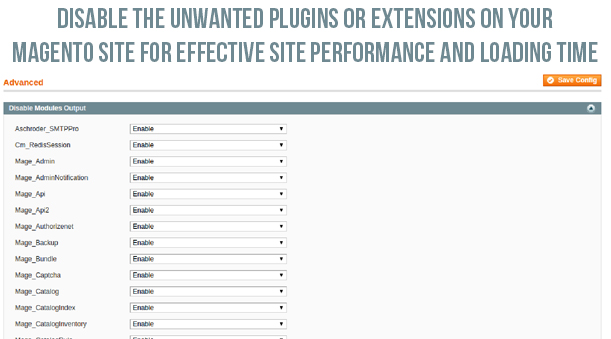
It is a known fact that too many extensions often utilize too many server space and resources which ultimately affects your website loading speed. This is due to the numerous reasons like running up of multiple HTTP requests along with the additional loading up of the CSS and Javascript files. In order to optimize your website performance, you  need to install the only relevant Magento modules that can perform multiple tasks at one go. If you are clueless about which extensions to choose for your Magento store, you can check out the various amazing eCommerce plugins from our Knowband store. For disabling the other rarely used extensions, you need to perform the following steps.

  • Go to “System” -> “Configuration” -> “Advanced” -> “Advanced”-> “Log”.
  • Now, in front of the required plugins, you need to select the “Disable” from the drop down box and then click finally on the “Save Config” option.

4. Configure your MySQL database- This open source relational database management system (RDBMS), MySQL consists of its own “query cache” that is utilized on the Magento platform for the generation of dynamic pages and content in order to improve your site performance. Take a look at some of the recommended settings for your my.cnf file.

query_cache_type = 1

query_cache_size = 32M

query_cache_limit=2M

Apart from this, the recommended settings for php.ini file is as follows:

php_value memory_limit 128M

5. Optimize the Magento server configuration for your site

An effective web hosting server can play a decisive role in improving the website loading speed and is one of the important site optimization tips. If this is not the case with your Magento store, there are possible chances that your site may crash or go down due to the large incoming site traffic. Thus, to avoid such issues, you need to have a reliable and robust Magento server that can handle the multiple HTTP requests from numerous clients.

6. Use a productive theme for your website

For making your website as the ultimate obsession among your site visitors, you need to have an appealing Magento theme that can improve the functionality and performance of your Magento site. The theme allow site visitors to perform various tasks with great ease and without any headache. There are various free themes like Eros, Wine Store, Glamour, Blue Scale, Bag Store and such others that can help in giving a unique look, appeal and functionality to your Magento store for improving the customer engagement, site traffic and various other site performance metrics.

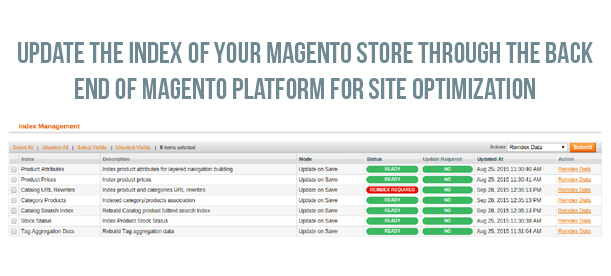
7. Update indexes of your Magento site

Although, indexes are automatically updated on the Magento platform by default whenever an object store is added. But, in some cases, this process does not take place automatically and needs to be done manually. This index updation is important as it improves the performance of your MySQL queries. To accomplish this crucial task, you need to implement the following steps.

  • Navigate towards the “System” -> “Index Management”.
  • Now, you need to select all the indexes or those indexes which you need to update. After this, you need to choose the “Reindex Data” option from the dropdown menu.
  • Finally, click on the “Submit” button.

Now, by implementing these mind blowing site optimization tips, Magento site owners can easily speed up the performance of their Magento store to a great extent. With this crucial information, you can effortlessly improve the online shopping experience, customer engagement and site traffic on your online store and can easily tread the “first step” towards being a market leader in your particular business segment. For making a drastic improvement in the field of site optimization and performance, you need to check out the final part of this series of article titled- Turbo boost your Magento site with these tips- Volume 3.

This Would Also Interest You: