How to Overcome Language and Currency Barriers while Selling (Online) Globally

Language is the means of communication and currency is the medium through which we buy and purchase things. While selling globally, your website’s language can become a barrier if the visitor does not understand its default language.

However, because many visitors and prospects come from countries where most people at school learn English, it is necessary to take steps to resolve language barriers. The language switch and currency conversion functionality let you sell globally and build a connection with the buyers.

There is a surge in the demand for virtual assistants and offshore business support. There has been a 95% growth in demand for virtual assistant services in the past few years. But, small businesses holding back from taking the step towards business growth.

One of the main worries about preventing people from using a virtual assistant is the idea that, because of language and cultural barriers, they would fail to interact with someone from another world. Hence, auto-switch language and currency converters play a pivotal role in business growth.

The benefit of having a multi-lingual website with auto currency change functionality

Showing a website in the targeted country’s native language can help boost the product page’s SEO. Auto-Switch language and currency will be advantageous to expand your business globally.

The platform should always be available in the native language when selling to a buyer unless the product is in high demand and the customer has no other means of having it.

Here are some tips that overcome the language and currency barrier while selling your products on eCommerce internationally.

One of the easiest ways to save time and money while selling products online is to get a module that can help you auto-switch language and currency. But, sometimes translation does lose the real essence of the content. That is not the case with eCommerce. The product description should be clear and simple and that can be achieved with the translation module.

#1- Speak the language they know

The most widely used language in the e-commerce world is indeed English. People in countries such as Norway and Sweden also do not mind shopping on English-language websites. But, there are a variety of nations and millions of people who are afraid to read or speak in English.

For your international customers, improve their comfort and convenience and save them the inconvenience of third-party translation resources. Use language for local consumers that are plain, insightful, and sounds native.

#2- You don’t have to cover every language

In all foreign languages, you do not have to localize. That would be needless and too costly. In the new markets you are entering, you just need to concentrate on a few languages that are primarily used.

Initially, you can have the translation for a wider audience in several languages just to analyze the traffic. For instance, if your online store unexpectedly gets hundreds of new customers who prefer using French as the default language, you might need to consider localizing the next one in French.

#3- Navigate them to the landing page

Some studies have shown that it often has a positive effect on your sales if you redirect your visitors automatically to a local landing page. Not just that, it also raises profits. The easiest way to boost your customer’s experience is to guide them to your website’s translated edition.

In other words, your online store’s navigation bar, menu, tabs, buttons, or links should have a version in your current target customers’ preferred language. It is important to localize the product reviews (or local buyers should be encouraged to post their reviews). Also, make sure to give the customer support options in their preferred language.

#4- Let them buy in their currency

Show prices in various currencies, even if you can not accept payment in all of them. Without having to make an extra effort and resort to a currency converter, this information will give your customers an idea of the price.

Payment method: do some research in a given country on the most common payment method. This is going to instill trust in your international clients. They may be cautious about safety if they see payment methods that they are not especially familiar with.

#5- Focus on Design

check the preferences for cultural design. Not only will it boost your product’s credibility, but it will also enhance the experience of the shopper. When you translate a website, you may have to make some adjustments, such as some German words may be slightly longer than the English ones, so you may have to tweak the design a bit.

Auto-Switch Language and Currency Converter: an end to linguistic misery!

Translate every word with one powerful module designed for your eCommerce store that converts the content into different languages, which will open you up to the world. Whenever you are stuck with non-native languages, KnowBand’s Language Switch and Currency Converter is a great and prolific tool. All you need to do is implement our tool into your website and you will be able to easily translate all or relevant parts of your website!

How does Auto-Switch language and Currency Converter Module Works? It auto-switch the currency on your store. For each multi-language eCommerce shop, it’s a real must-have! In their native currency, clients enjoy seeing prices. When setting up a store, you can set the default language and currency country-wise.

If a customer is visiting your website from Poland then, it will display the products in Polish and their native currency. This improves the user experience and provides a personalized user experience. The addon is an ideal tool to connect eCommerce stores to various currencies and make them more user-friendly. The admin needs to add the language and currency from the store back-office. Our module displays the language and currency as per the settings.

Click on the links below to explore the Auto-Switch Language and Currency Translator Module:

Prestashop Auto Switch Language and Currency – Prestashop Addons

Auto-Switch Language and Currency – Magento 2 ® Extensions

Auto-Switch Language and Currency – Magento ® Extensions

Auto Switch Language and Currency – Opencart Extensions

Several eCommerce modules are available for all the major eCommerce platforms such as PrestaShop, Magento, and OpenCart.

Conclusion: The reality is that by understanding how cultural differences can affect communication, understanding, workflow, and efficiency, there are ways to get on the front foot and minimize these concerns. You can conquer these obstacles with a little legwork, knowledge, and strong processes and nurture an empowered and efficient support team.

Write to us at support@knowband.com and we will be more than pleased to share with you the Auto-switch Language and Currency Translator and its features!

Recommended Reads:

PrestaShop Auto Switch Language and Currency Module – User Manual

1.0 Introduction

As you know Prestashop supports multiple languages and multiple currencies for customers. If there are multiple language and currency on the store, then customers need to change language and currency according to their region.

Knowband offers Prestashop auto switch language and currency module which will change the language and currency automatically according to the customer’s region whenever customer will visit the website. This Auto change language and currency addon implements a functionality through which the Prestashop website will automatically change the language according to the customer’s region. The Auto change language and currency addon fetches the customers actual location and country details using their system’s IP address. After having the location information, the Auto change language addon switches the language and currency of the website easily within a second.

The Auto change language and currency addon is highly customizable and offers hassle-free implementation. The store admin can increase his business and offer the store products, services globally. The online users can view the products and order easily without having any confusion. The online users can view store details and currency information in their preferred language.

1.1 Features of Prestashop Auto change language addon

  • The online store admin can Enable/Disable the Language Setting Option in Prestashop auto switch language and currency module for all active countries.
  • Admin can Enable/Disable the Currency Setting Option for all active countries from the admin interface of this Auto change language and currency addon.
  • In this Prestashop auto switch language module the admin can set one common language for all the countries.
  • The Auto change language and currency addon allows the store owner to set one common currency for all the countries.
  • Admin can search for any country by its name.
  • The auto change language and currency addon allow the admin to configure any language for a particular country.
  • The Auto change currency module allows the admin to configure any currency for a particular country.
  • The auto change currency extension is multi-lingual compatible.
  • The auto change language extension is multi-store compatible.
  • The auto change language and currency module offer SSL Compatibility.
  • The auto change language addon is compatible with all PrestaShop themes.
  • Whenever Customer will visit the website language will automatically change according to the region.
  • Whenever Customer will visit the website currency will automatically change according to the region.
  • The auto change language and currency extension use IP address of the user to track Country or Region of the user.
  • The Auto change language addon offers a user-friendly interface.
  • Auto change language addon offers a smooth and hassle-free implementation.

2.0 Installation Manual

Once the store admin purchases the Prestashop Auto change language and currency addon from the Knowband store, he will get below-mentioned files:

1. The zipped file consists of the source code of the Prestashop Auto change language and currency addon.

2. User Manual

The online store owner can follow the provided steps to install the Prestashop Auto change language and currency addon.

  • First of all the admin needs to unzip the zipped file. This file includes a few files and folders.
  • Copy the all the folder and paste them into the “Modules” folder of the store’s directory. The admin can follow the path – Root Directory/modules/.

3. Now the store owner can install the Prestashop Auto change language and currency addon. As an eCommerce store owner, the admin can find that in Store Admin -> Modules and Services. It would be shown as below –

The admin can click on the “Install” button to install this Prestashop Auto change language addon easily. A confirmation pop-up will be shown. Click on “Proceed with the installation” option. This step will install the Prestashop Auto change language module and show notification – “Module(s) installed successfully”.

3.0 User Manual

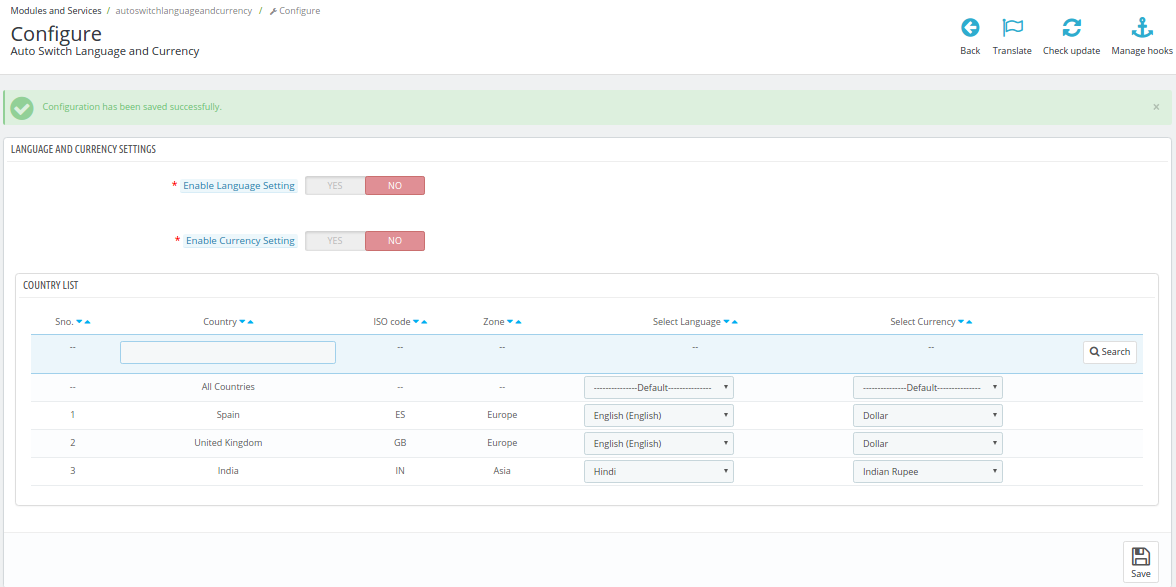
This User Manual will guide you through the Admin Module/Store Front settings and various features of this Auto Switch Language and Currency Addon. This will contain one screen where admin can configure language and currency after successful installation.

3.1 Language and Currency Setting

Following are the steps to configure the General Setting tab from the admin interface of this Prestashop Auto Switch Language and Currency module-

  1. Go to modules and Setting.
  2. Search Module ‘Auto Switch Language and Currency.
  3. Click on the Configure button.

Fields

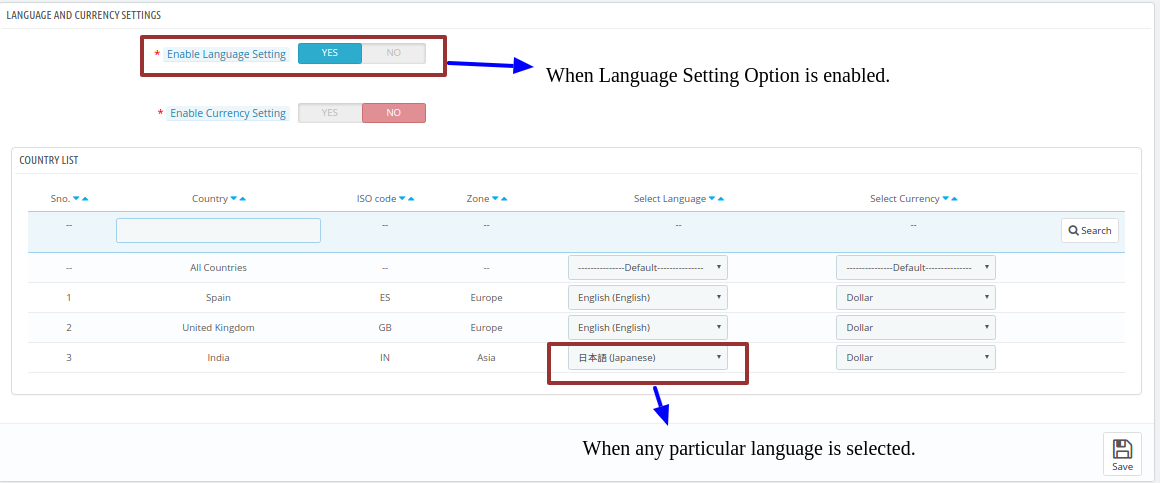
  • Enable Language Setting: By default, it will be OFF. Language auto switch will only work if this setting is ON.

Following are the steps to Enable plugin-

  1. Go to modules and Setting.
  2. Search Module ‘Auto Switch Language and Currency.
  3. Click on the Configure button.
  4. Enable the Language Setting Option.
  5. Click on Save.
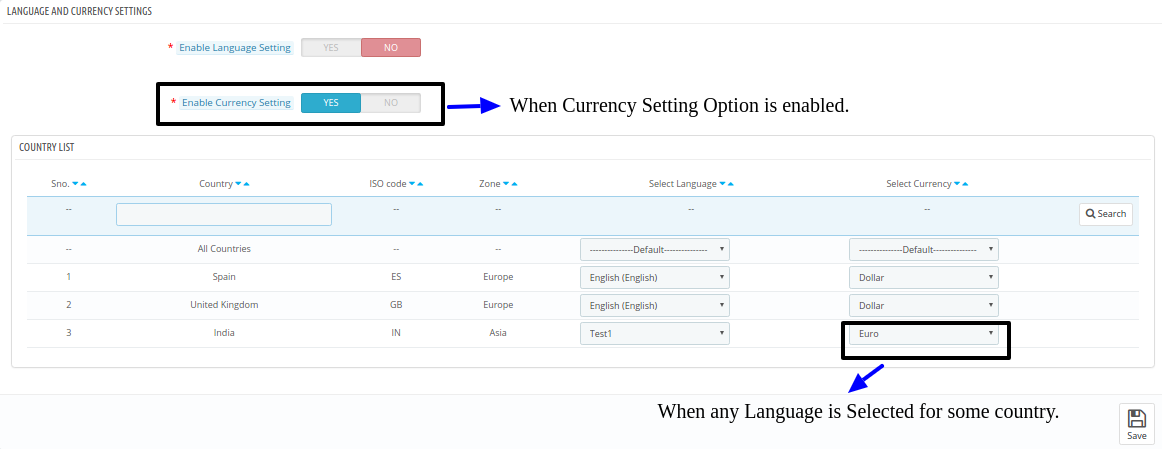
  6. Enable Currency Setting: By default, it will be OFF. Currency auto switch will only work if this setting is ON.

Following are the steps to Enable Prestashop Auto Switch Language and Currency plugin-

  1. Go to modules and Setting.
  2. Search Module ‘Auto Switch Language and Currency.
  3. Click on Configure button.
  4. Enable Currency Setting Option.
  5. Click on Save.
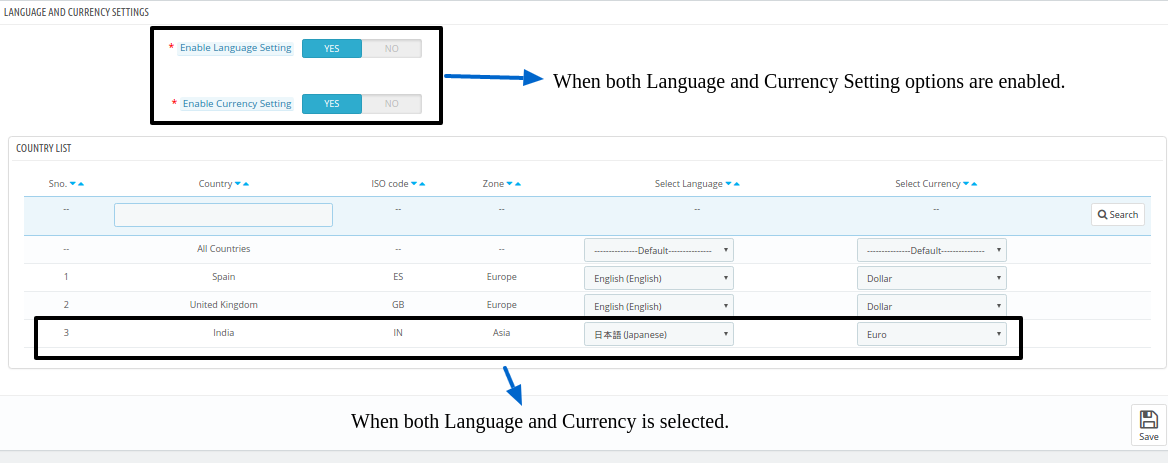
  6. Country Configuration: This contains the list of active countries with Country name, ISO-Code, Zone, active Languages and active Currencies. First row is having “All Countries” which allow admin to mark all countries with one common language or currency.

Following are the steps to configure common Language or Currency (Mapping Common to All)-

  1. Go to modules and Setting.
  2. Search Module ‘Auto Switch Language and Currency.
  3. Click on Configure button.
  4. Select any language or currency for “All Countries”.
  5. Click on Save.

Following are the steps to configure countries with any particular language or currency (One to One Mapping)-

  1. Go to modules and Setting.
  2. Search Module ‘Auto Switch Language and Currency.
  3. Click on Configure button.
  4. Select any language or currency for any particular country.
  5. Click on Save.
  6. Save: By clicking this button, the Auto change language addon will save setting into the database and return back with success message.

4.0 Front End Interface

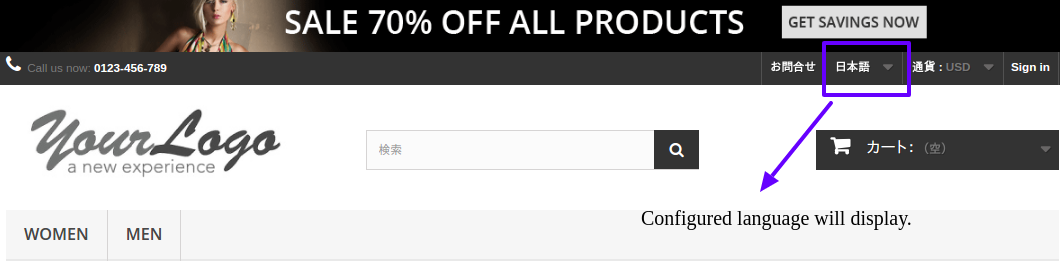
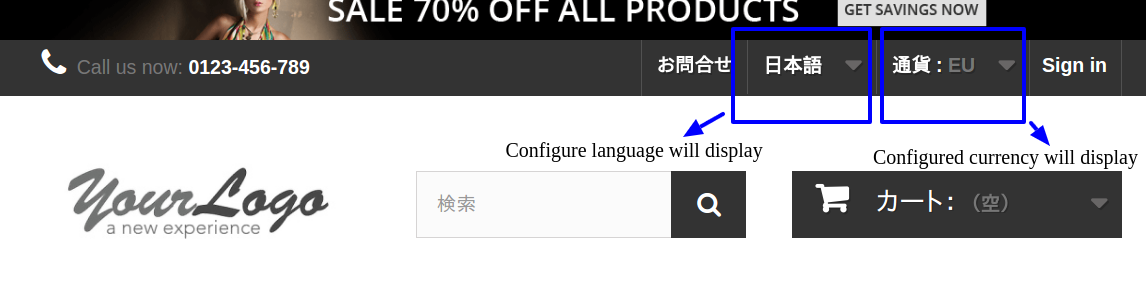
In the Front End, the Language and Currency will automatically switch according to admin configuration in Back-Office.

Enable Language Setting

When Admin enables “Language Setting” Option and select some language like “Japanese” from the admin interface of this Auto change language extension.

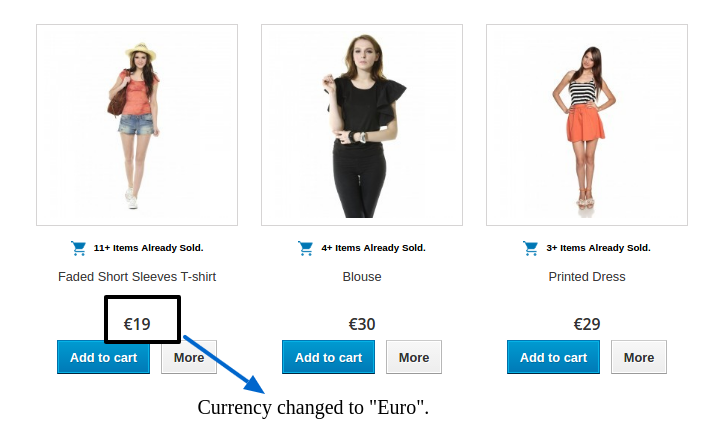
Enable Currency Setting

When Admin enables “Currency Setting” Option and select some Currency like “EURO” from the admin interface of this Prestashop Auto change currency plugin.

Enable Both Language and Currency Setting

When Admin enables “Language Setting” Option and select some language like “Japanese”.

When Admin enables “Currency Setting” Option and select some Currency like “EURO”.

Thus by implementing this Auto change language and currency addon, the store admin can reduce all the language and currency-related hurdles and issues. The language and currency are the basic factors in order to grow business globally. The store owner can set the language and currency according to requirement. The customers can view the store details as per the settings of the admin interface. This is one of the easiest ways to offer a better store experience to the customers.

It is very easy to implement automatic language switching functionality on the eCommerce store with the help of this Prestashop auto switch language and currency Module. The Prestashop auto switch language module fetches the customers geological location and changes the language and currency at the same time. The customers can view the store details and price-related information easily in their familiar language and currency type.  Prestashop auto switch currency module is very simple to implement and it offers smooth functioning. You can also implement Auto change language and currency addon for offering a better store experience to the global customers.

For more Prestashop addons please visit Knowband.

For more details about this Prestashop auto switch language and currency addon:

Knowband Auto change language addon Module Link.

Knowband Auto change currency module Admin Demo Link.

Knowband Prestashop Auto change language and currency addon Front Demo.

Knowband Prestashop auto switch language and currency Watch Video.

Knowband Prestashop auto switch language Addon Store link.

Please contact us at support@knowband.com for any query or custom change request as per your business requirement.