HubBox Error: Bad Response Code

Problem Statement:  Error coming in the response of Authentication API of HubBox ie. “HubBox Api Error: Bad Response Code”

Solution:  If you are facing issue as shown below while you are checking Authentication API, it may be because of Authentication API is verifying SSL certificate for connection.
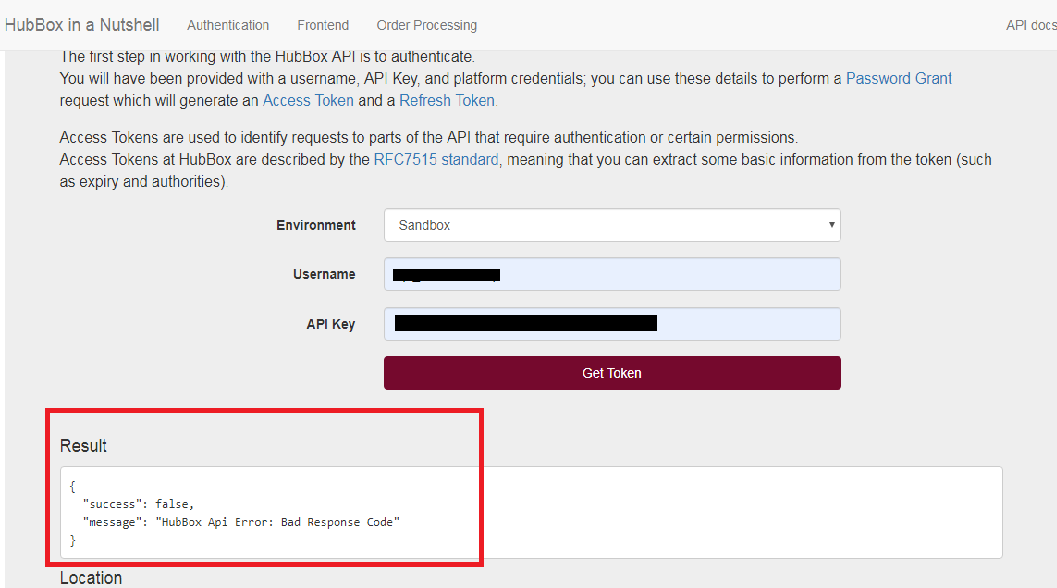
HubBox Error: Bad Response Code

For this, you can turn off the SSL verification in the CURL request by adding below lines.

curl_setopt($ch, CURLOPT_SSL_VERIFYPEER, false);
curl_setopt($ch, CURLOPT_SSL_VERIFYHOST, false);

Make the change in the curl request of Authentication API in the function refreshToken() at HubBox/PHP/HubBox/Authentication.php as shown below:

$ch = curl_init();
$post_string = http_build_query($fields);
curl_setopt($ch, CURLOPT_URL, $endpoint);
curl_setopt($ch, CURLOPT_RETURNTRANSFER, 1);
curl_setopt($ch, CURLOPT_POST, 1);
curl_setopt($ch, CURLOPT_POSTFIELDS, $post_string);
curl_setopt($ch, CURLOPT_HTTPHEADER,array('Content-type: application/x-www-form-urlencoded'));
curl_setopt($ch, CURLOPT_USERPWD, $this->_magento_user . ":" . $this->_magento_key);
curl_setopt($ch, CURLOPT_VERBOSE, 1);
curl_setopt($ch, CURLOPT_HEADER, 1);
curl_setopt($ch, CURLOPT_SSL_VERIFYPEER, false);
curl_setopt($ch, CURLOPT_SSL_VERIFYHOST, false);
$output = curl_exec($ch);
$header_size = curl_getinfo($ch, CURLINFO_HEADER_SIZE);
$httpcode = curl_getinfo($ch, CURLINFO_HTTP_CODE);
$body = substr($output, $header_size);
curl_close($ch);

If this was the issue, you will need to add these lines in all APIs of HubBox Create Parcel, Cancel Parcel, Add Tracking and Collectpoint APIs as described below.

Create Parcel API: Make the change in the curl request of Create Parcel API in the function sendOrder() at HubBox/PHP/HubBox/Parcel.php as shown below:

$ch = curl_init();
curl_setopt($ch, CURLOPT_URL, $this->getOrderUrl());
curl_setopt($ch, CURLOPT_RETURNTRANSFER, 1);
curl_setopt($ch, CURLOPT_CUSTOMREQUEST, "POST");
curl_setopt($ch, CURLOPT_POSTFIELDS, $body);
curl_setopt($ch, CURLOPT_HTTPHEADER,
array(
'Content-type: application/json',
'Authorization: Bearer '. $token,
'Content-Length: ' . strlen($body)
)
);
curl_setopt($ch, CURLOPT_VERBOSE, 1);
curl_setopt($ch, CURLOPT_HEADER, 1);
curl_setopt($ch, CURLOPT_SSL_VERIFYPEER, false);
curl_setopt($ch, CURLOPT_SSL_VERIFYHOST, false);
$output = curl_exec($ch);
$header_size = curl_getinfo($ch, CURLINFO_HEADER_SIZE);
$body = substr($output, $header_size);
$httpCode = curl_getinfo($ch, CURLINFO_HTTP_CODE);
curl_close($ch);

Cancel Parcel API: Make the change in the curl request of Cancel Parcel API in the function cancelOrder() at HubBox/PHP/HubBox/Parcel.php as shown below:

$ch = curl_init();
curl_setopt($ch, CURLOPT_URL, $this->getCancelUrl($hubBoxParcelId));
curl_setopt($ch, CURLOPT_RETURNTRANSFER, 1);
curl_setopt($ch, CURLOPT_CUSTOMREQUEST, "POST");
curl_setopt($ch, CURLOPT_POSTFIELDS, $postBody);
curl_setopt($ch, CURLOPT_HTTPHEADER,
array(
'Content-type: application/json',
'Authorization: Bearer '. $token,
'Content-Length: ' . strlen($postBody)
)
);
curl_setopt($ch, CURLOPT_VERBOSE, 1);
curl_setopt($ch, CURLOPT_HEADER, 1);
curl_setopt($ch, CURLOPT_SSL_VERIFYPEER, false);
curl_setopt($ch, CURLOPT_SSL_VERIFYHOST, false);
$output = curl_exec($ch);
$header_size = curl_getinfo($ch, CURLINFO_HEADER_SIZE);
$body = substr($output, $header_size);
$httpCode = curl_getinfo($ch, CURLINFO_HTTP_CODE);
curl_close($ch);

Add Tracking API: Make the change in the curl request of Add Tracking API in the function addTracking() at HubBox/PHP/HubBox/Parcel.php as shown below:

$ch = curl_init();
curl_setopt($ch, CURLOPT_URL, $this->getTrackingUrl($hubBoxParcelId));
curl_setopt($ch, CURLOPT_RETURNTRANSFER, 1);
curl_setopt($ch, CURLOPT_CUSTOMREQUEST, "POST");
curl_setopt($ch, CURLOPT_POSTFIELDS, $postBody);
curl_setopt($ch, CURLOPT_HTTPHEADER,
array(
'Content-type: application/json',
'Authorization: Bearer '. $token,
'Content-Length: ' . strlen($postBody)
)
);
curl_setopt($ch, CURLOPT_VERBOSE, 1);
curl_setopt($ch, CURLOPT_HEADER, 1);
curl_setopt($ch, CURLOPT_SSL_VERIFYPEER, false);
curl_setopt($ch, CURLOPT_SSL_VERIFYHOST, false);
$output = curl_exec($ch);
$header_size = curl_getinfo($ch, CURLINFO_HEADER_SIZE);
$body = substr($output, $header_size);
$httpCode = curl_getinfo($ch, CURLINFO_HTTP_CODE);
curl_close($ch);

Collectpoint API: Make the change in the curl request of Collectpoint API in the function getCollectPoint() at HubBox/PHP/HubBox/CollectPoints.php as shown below:

$ch = curl_init();
curl_setopt($ch, CURLOPT_URL, $this->getCollectPointUrl() . '/' . $id);
curl_setopt($ch, CURLOPT_RETURNTRANSFER, 1);
curl_setopt($ch, CURLOPT_HTTPHEADER, array('Content-type: application/json'));
curl_setopt($ch, CURLOPT_VERBOSE, 1);
curl_setopt($ch, CURLOPT_HEADER, 1);
curl_setopt($ch, CURLOPT_SSL_VERIFYPEER, false);
curl_setopt($ch, CURLOPT_SSL_VERIFYHOST, false);

// if we have private collect points we must authenticate the request
if ($this->_config->hasPrivateCps()) {
$header[] = "Authorization: Bearer " . $this->_auth->getAccessToken();
curl_setopt($ch, CURLOPT_HTTPHEADER, $header);
}

$output = curl_exec($ch);
$header_size = curl_getinfo($ch, CURLINFO_HEADER_SIZE);
$body = substr($output, $header_size);
$httpCode = curl_getinfo($ch, CURLINFO_HTTP_CODE);
curl_close($ch);

For more related articles please visit here: HubBox Error: Wrong product data in the response of Create Parcel API
HubBox Error: Wrong product data in the response of Create Parcel API
Problem Statement:  Wrong product data coming in the response of Create Parcel API of HubBox Sandbox account.
Solution: If you are facing this issue in HubBox sandbox account as shown below, you can ignore this on the sandbox account as It will work fine in the Production account of HubBox.

Sent product data in the request of Create Parcel API:

[order] => Array
        (
            [id] => 1234
            [products] => Array
                (
                    [0] => Array
                        (
                            [name] => Test Item1
                            [sku] => TEST
                            [price] => 1
                        )
 
                    [1] => Array
                        (
                            [name] => Test Item2
                            [sku] => TEST2
                            [price] => 12
                        )
 
                    [2] => Array
                        (
                            [name] => Test Item3
                            [sku] => TEST3
                            [price] => 13
                        )
 
                )
 
        )

Received product data in the response of Create Parcel API:

[order] => stdClass Object
        (
            [id] => 1234
            [products] => Array
                (
                    [0] => stdClass Object
                        (
                            [sku] => TEST
                            [name] => Test Item
                            [price] => 1
                            [qty] =>  
                            [challenge18] =>  
                            [challenge21] =>  
                            [challenge25] =>  
                            [perishable] =>  
                            [flammable] =>  
                        )
 
                    [1] => stdClass Object
                        (
                            [sku] =>  
                            [name] =>  
                            [price] =>  
                            [qty] =>  
                            [challenge18] =>  
                            [challenge21] =>  
                            [challenge25] =>  
                            [perishable] =>  
                            [flammable] =>  
                        )
 
                )
 
        )

Related Article: HubBox Error: Bad Response Code

How to delete products from MercadoLibre Marketplace?

Objective of the blog

After reading this blog, you can understand how the seller can delete the products from MercadoLibre marketplace.

Method to delete Products from MercadoLibre Marketplace:

You can delete products from MercadoLibre marketplace by two methods:

  • Delete manually from the merchant account
  • Using CSV file.

1. Delete manually from the merchant account

1. Login into MercadoLibre merchant account (URL: https://cbt.mercadolibre.com/secure/login/merchant/).

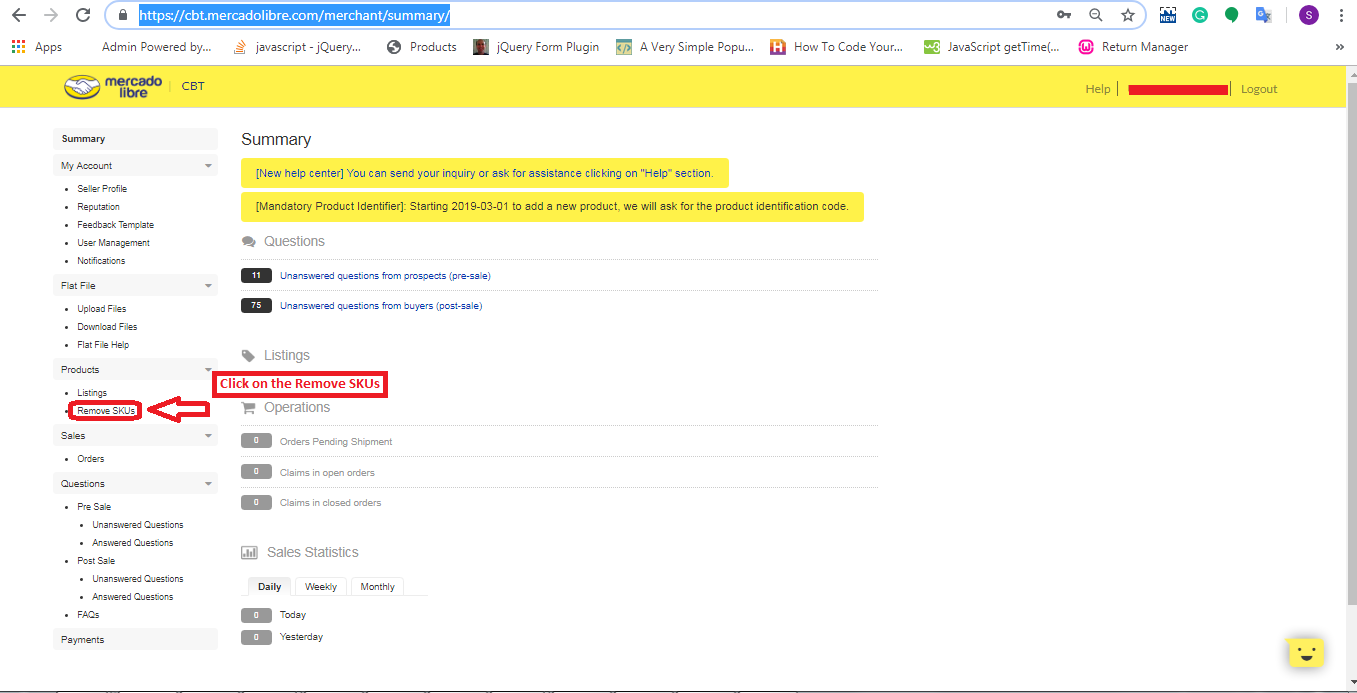
2. After login, you will be redirected to the summary page where you will need to click on the “Remove SKUs” link on the left side as shown in the image below:

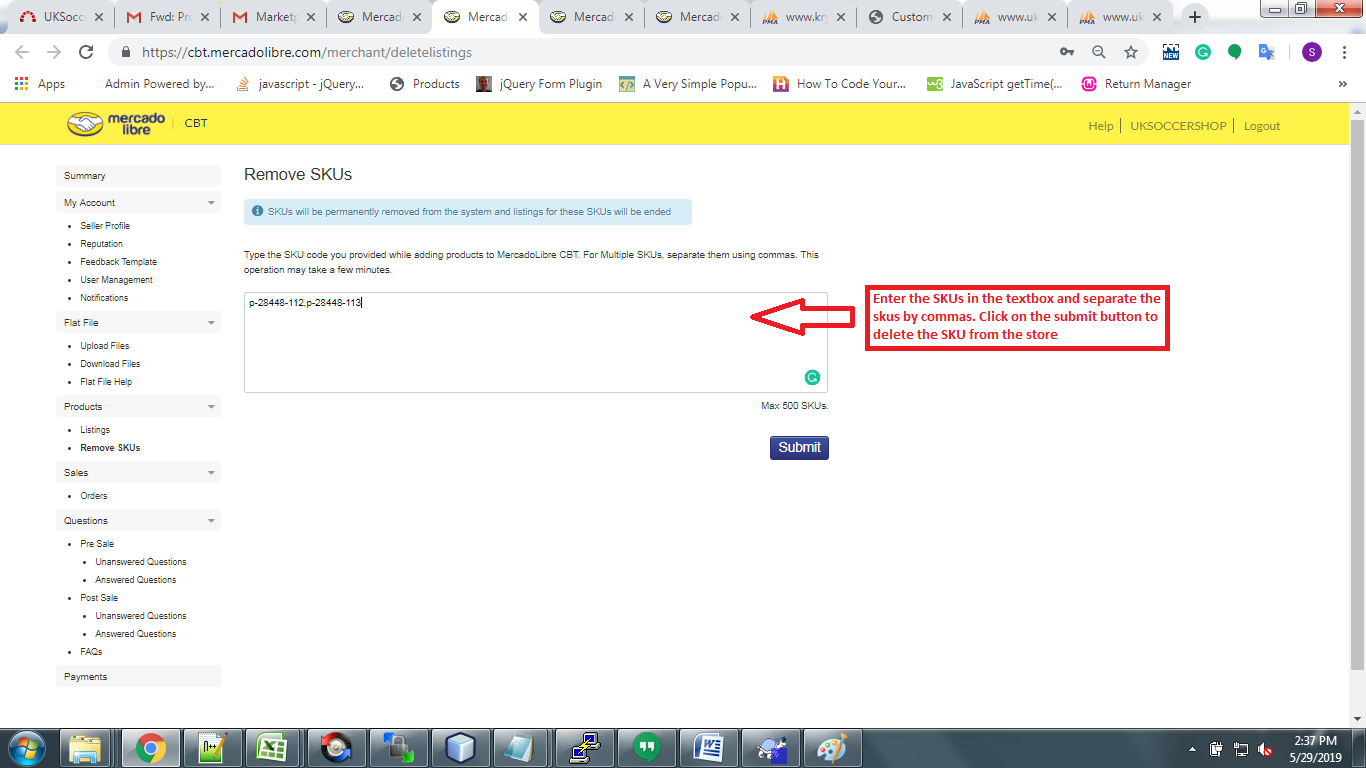
3. Then, You will need to enter product SKUs in the textbox and click on the submit button to delete as shown in the image below:

2. Using csv file

You can delete products in bulk from Mercadolibre marketplace using a CSV file.

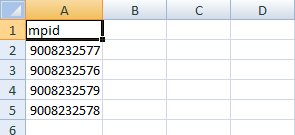
1) Create a “CSV” File with a column name: “mpid” and add all the MPID.

Example:

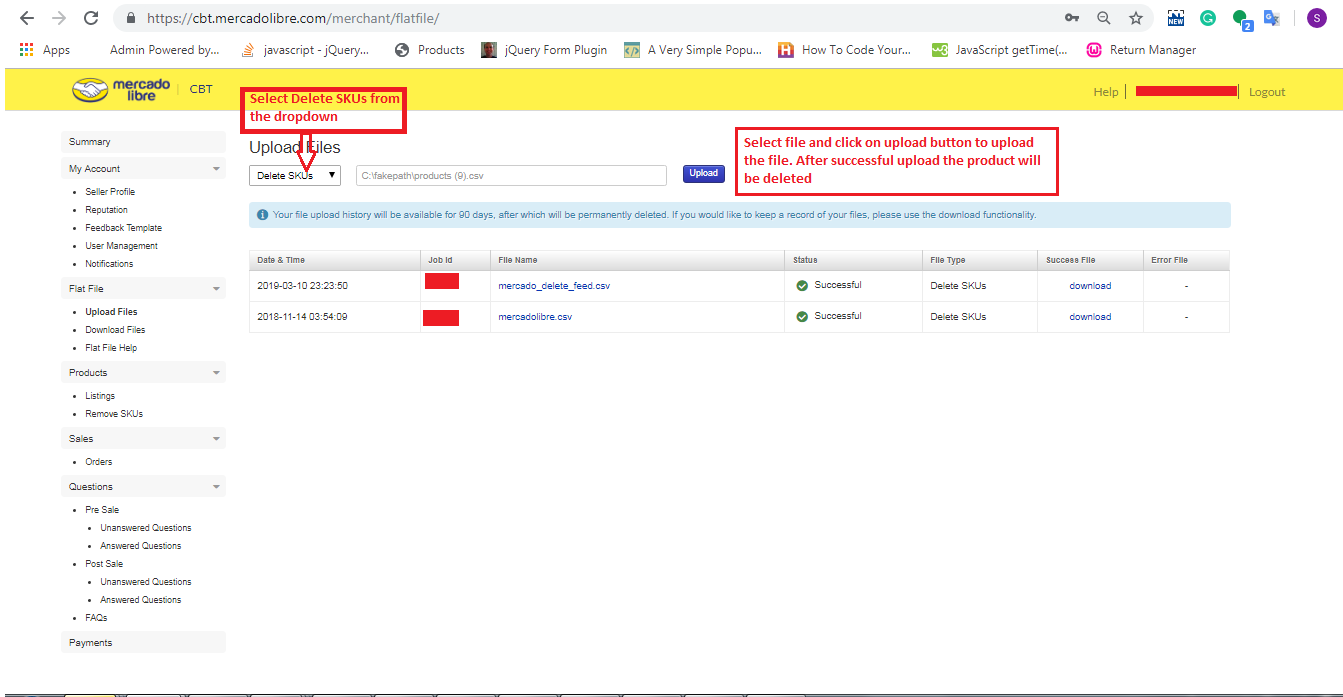
2) Go to the Merchant Portal -> Flat Files -> Upload Files

  • Select “Delete SKUs” option
  • Here you can upload CSV file that you have created in step 1 to delete the products as shown in the image below:

Hope it helps. Do let me know in the comments in case of any confusion.

JavaScript Desktop Notification

Objectives of the blog

After reading this blog, you will able to setup the desktop notification for your site. You will also be able to customize your notification by your own message, image, icon etc.

Benefit of Desktop Notification

Suppose you want to notify your customer outside the webpage then we can use the desktop notification as if you have enabled desktop notification for email, you don’t need to check emails regularly. In every email, you got a notification.

Code for Desktop Notification

Add the below function in the script tag in the head of the HTML.

function showNotification() {
    // Verify if the user's browser supports notifications or not
    if (!("Notification" in window)) {
        alert("Your browser does not support the desktop notification");
    }
    // Verify if notification's permissions have already been granted or not
    else if (Notification.permission === "granted") {
 
        // Create Notification
        var options = {
            body: 'Simple notification message line 1.\nSecond line of notification message.', // body of the notification
            dir: 'ltr', // direction of message ltr: left to right. rtl : right to left.
            image: 'https://www.knowband.com/blog/wp-content/uploads/2016/09/cropped-knowband_logo-v2.png', // Add image if required to show
            icon: 'https://www.knowband.com/blog/wp-content/uploads/2016/09/cropped-knowband_logo-v2.png', // Add icon if required to show
        }
 
        var title = "Knowband Blog";
        var notification = new Notification(title, options);
 
 
        //Add the notification click link
        notification.onclick = function (event) {
            event.preventDefault(); // prevent the browser from focusing the Notification's tab
            window.open('https://www.knowband.com/blog/', '_blank');
            notification.close();//Close the notification after click
        }
    }
 
    // If no permissions, ask the user for permission
    else if (Notification.permission !== "denied") {
        Notification.requestPermission().then(function (permission) {
            // If the user accepts, let's create a notification
            if (permission === "granted") {
                var notification = new Notification("Hi there!");
            }
        });
    }
}

You can trigger this function through event as you wish. For testing purpose, you can check this by adding a button. Use below code for button in the body

<button onclick="showNotification()">Show Notification!</button>

Note: If you are running this code on the local system then use the local sever i.e. localhost.

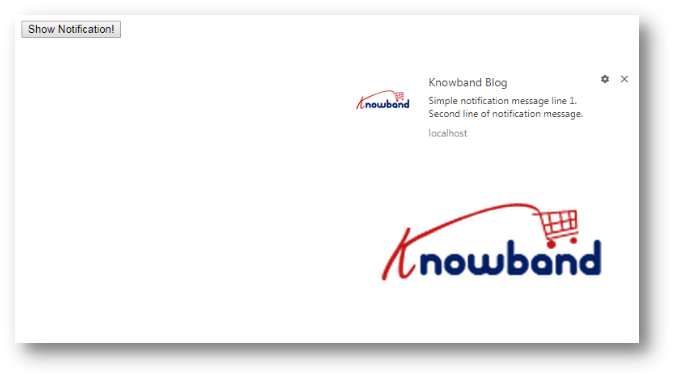
Output Screen

Spring Global (Spring Omni) Error: Shipment is not being Registered

Problem Statement:

Shipment is not being registered on the sent timestamp and also no error is reporting in the response.

Solution:

We have raised a ticket for the same and they replied that this issue was occurred because recipient’s email parameter was not sent in the Shipment API https://api.myparcel.com/shipments

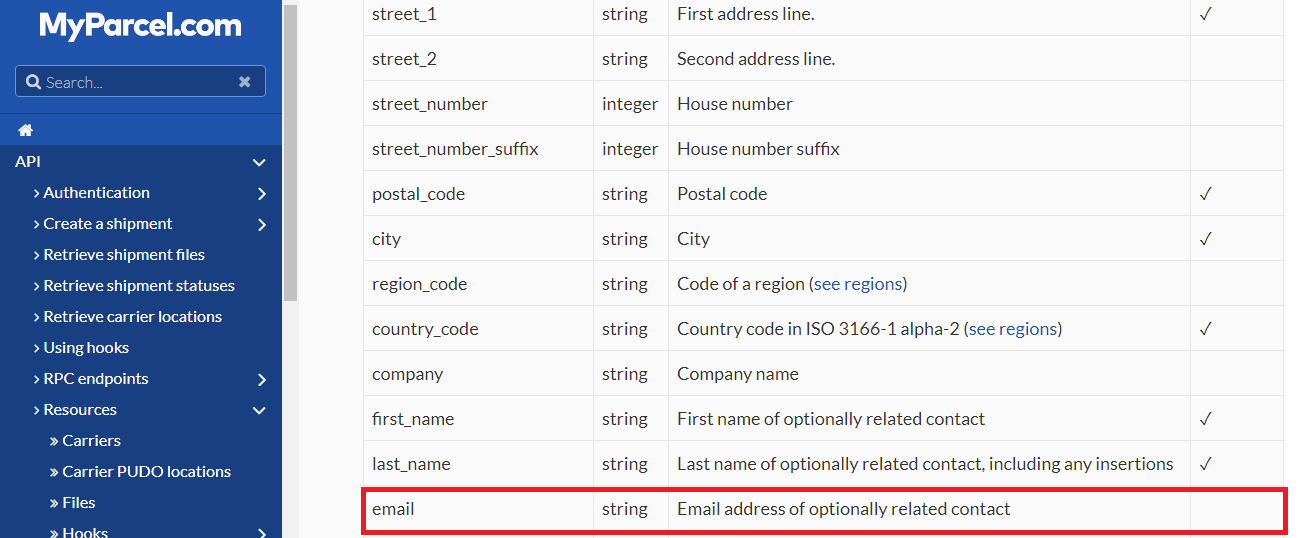
According to the Spring Omni documentation, this email is optional parameter:


So, we raised a ticket again on Spring Omni regarding this and they replied: The shipment is failing to be created due to recipient email address not being populated. Although, the schema shows this as optional but Spring require the email address so the carriers can send notifications to the recipient (if they offer that service…)

So recipient email is required parameter in Spring Omni and need to be sent in shipment API.

For more Related Blogs, Please visit here:

Spring Global (Spring Omni) Error: The property phone_number is required

Spring Omni Manifest

Spring Global (Spring Omni): Billing Concept

Spring Global (Spring Omni) Error: Resource Not Found

Spring Global (Spring Omni) Error: Getting Blank Response While Fetching Label


Spring Global (Spring Omni) Error: The property phone_number is required

Error in the response:

The property phone_number is required while registering the shipment.

Solution:

This error is occurring when recipient’s phone_number parameter is not sent in the Shipment API https://api.myparcel.com/shipments

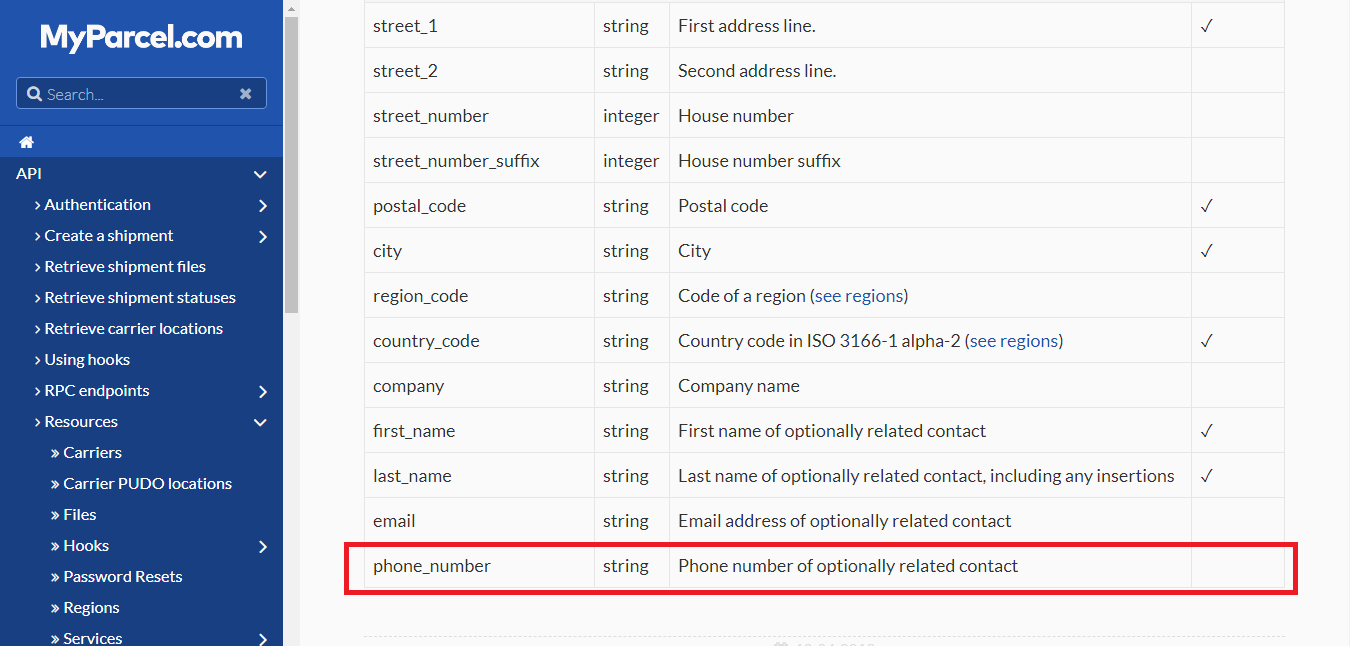
According to the Spring Omni documentation, phone_number is an optional parameter:

We raised ticket on Spring Omni and they replied: The shipment is failing to be created due to recipient phone number not being populated. Although, the schema shows this as optional but Spring require the phone number so the carriers can send notifications to the recipient (if they offer that service…)
So phone_number is a required parameter and need to be sent in shipment API.

For more Related Blogs, Please visit here:

Spring Global (Spring Omni) Error: Shipment is not being Registered

Spring Omni Manifest

Spring Global (Spring Omni): Billing Concept

Spring Global (Spring Omni) Error: Resource Not Found

Spring Global (Spring Omni) Error: Getting Blank Response While Fetching Label

Spring Omni Manifest

How to get the manifest report of the Spring Omni shipments?

SOLUTION: We raised a query to spring Omni, if they have any API to generate the manifest of the shipments created on a particular day.

They replied:

“We don’t currently provide a manifest“. So we tried to generate manifest on our end and confirmed with pick up boy of Spring Omni if they need manifest report to collect the parcels? They replied that there is no need to generate a manifest report of the shipments as they simply charge for only the number of labels (parcels) handover to them.

For more Related Blogs, Please visit here:

Spring Global (Spring Omni) Error: The property phone_number is required

Spring Global (Spring Omni) Error: Shipment is not being Registered

Spring Global (Spring Omni): Billing Concept

Spring Global (Spring Omni) Error: Resource Not Found

Spring Global (Spring Omni) Error: Getting Blank Response While Fetching Label

Spring Global (Spring Omni): Billing Concept

We want to know that Spring Global charges us on the shipments which we have created and registered OR parcels which we will hand over to them for delivery.

We raised a ticket on Spring Global:

Which shipments (parcels) will they charge us? Will it be on the shipments which we have created and registered OR parcels which we will hand over to them.

Suppose we have created and registered 10 shipments but handover only 8 parcels to them to deliver (As we do not want 2 shipments to be delivered). So now for this particular case, will they charge us for 10 shipments or 8?

They replied:

“Spring will only bill labels which have been scanned. So in your example you would only be billed for 8 labels“.

As we can see that we will only be charged for the parcels that we handover to them for delivery irrespective to the number of shipments we have created on their end.

Please visit here for related information:

Spring Global (Spring Omni) Error: The property phone_number is required

Spring Omni Manifest

Spring Global (Spring Omni) Error: Shipment is not being Registered

Spring Global (Spring Omni) Error: Resource Not Found

Spring Global (Spring Omni) Error: Getting Blank Response While Fetching Label

Spring Global (Spring Omni) Error: Resource Not Found

While creating a shipment using Spring Omni, you might get an error in response such as mentioned below:

[status] => 404
[code] => 10002
[title] => Resource Not Found
[detail] => One or more of the regions resource could not be found.

We got this error while sending the following request to create the shipment:

'{
  "data": {
    "type": "shipments",
    "attributes": {
      "recipient_address": {
        "street_1": "4363 N 55TH ST",
        "street_2": "Marylebone",
        "street_number": 221,
        "postal_code": "53216-1201",
        "city": "MILWAUKEE",
        "region_code": "WI",
        "country_code": "US",
        "first_name": "Sherlock",
        "last_name": "Holmes",
        "company": "Attn",
        "email": "Aparajita.singh@abc.com",
        "phone_number": "1234567890"
      },
      "return_address": {
        "street_1": "Baker Street",
        "street_2": "Marylebone",
        "street_number": 221,
        "street_number_suffix": "B",
        "postal_code": "NW1 6XE",
        "city": "London",
        "region_code": "ENG",
        "country_code": "GB",
        "first_name": "Sherlock",
        "last_name": "Holmes",
        "company": "Holmes Investigations",
        "email": "Aparajita.singh@abc.com",
        "phone_number": ""
      },
      "sender_address": {
        "street_1": "Baker Street",
        "street_2": "Marylebone",
        "street_number": 221,
        "street_number_suffix": "B",
        "postal_code": "NW1 6XE",
        "city": "London",
        "region_code": "ENG",
        "country_code": "GB",
        "first_name": "Sherlock",
        "last_name": "Holmes",
        "company": "Holmes Investigations",
        "email": "Aparajita.singh@abc.com",
        "phone_number": ""
      },
      "description": "Order #8008135",
      "physical_properties": {
        "height": 150,
        "width": 300,
        "length": 500,
        "volume": 22.5,
        "weight": 100
      },
      "items": [
        {
          "sku": "123456789",
          "description": "OnePlus X",
          "item_value": {
            "amount": 995,
            "currency": "EUR"
          },
          "quantity": 2,
          "hs_code": "8517.12.00",
          "origin_country_code": "GB",
          "item_weight": 135
        }
      ],
      "customs": {
        "content_type": "merchandise",
        "invoice_number": "9000",
        "non_delivery": "return",
        "incoterm": "DAP",
        "license_number": "218532158",
        "certificate_number": "12122121"
      },
      "register_at": 0
    },
    "relationships": {
      "shop": {
        "data": {
          "type": "shops",
          "id": "1a9414f0-24ef-4008-b6ad-9a75e27a879e"
        }
      },
      "service": {
        "data": {
          "type": "services",
          "id": "05aeb5e9-90be-4ec7-94c9-1a0949262577"
        }
      }
    }
  }
}'

When we asked Spring Global for the reason of this error, they replied that the problem here is “The region which is not recognized as they do not have regions for the USA set up yet”. Simply omitting the region should fix this problem.

The below JSON should work:

'{
  "data": {
    "type": "shipments",
    "attributes": {
      "recipient_address": {
        "street_1": "4363 N 55TH ST",
        "street_2": "Marylebone",
        "street_number": 221,
        "postal_code": "53216-1201",
        "city": "MILWAUKEE",
        "country_code": "US",
        "first_name": "Sherlock",
        "last_name": "Holmes",
        "company": "Attn",
        "email": "Aparajita.singh@abc.com",
        "phone_number": "1234567890"
      },
      "return_address": {
        "street_1": "Baker Street",
        "street_2": "Marylebone",
        "street_number": 221,
        "street_number_suffix": "B",
        "postal_code": "NW1 6XE",
        "city": "London",
        "region_code": "ENG",
        "country_code": "GB",
        "first_name": "Sherlock",
        "last_name": "Holmes",
        "company": "Holmes Investigations",
        "email": "Aparajita.singh@abc.com",
        "phone_number": ""
      },
      "sender_address": {
        "street_1": "Baker Street",
        "street_2": "Marylebone",
        "street_number": 221,
        "street_number_suffix": "B",
        "postal_code": "NW1 6XE",
        "city": "London",
        "region_code": "ENG",
        "country_code": "GB",
        "first_name": "Sherlock",
        "last_name": "Holmes",
        "company": "Holmes Investigations",
        "email": "Aparajita.singh@abc.com",
        "phone_number": ""
      },
      "description": "Order #8008135",
      "physical_properties": {
        "height": 150,
        "width": 300,
        "length": 500,
        "volume": 22.5,
        "weight": 100
      },
      "items": [
        {
          "sku": "123456789",
          "description": "OnePlus X",
          "item_value": {
            "amount": 995,
            "currency": "EUR"
          },
          "quantity": 2,
          "hs_code": "8517.12.00",
          "origin_country_code": "GB",
          "item_weight": 135
        }
      ],
      "customs": {
        "content_type": "merchandise",
        "invoice_number": "9000",
        "non_delivery": "return",
        "incoterm": "DAP",
        "license_number": "218532158",
        "certificate_number": "12122121"
      },
      "register_at": 0
    },
    "relationships": {
      "shop": {
        "data": {
          "type": "shops",
          "id": "1a9414f0-24ef-4008-b6ad-9a75e27a879e"
        }
      },
      "service": {
        "data": {
          "type": "services",
          "id": "05aeb5e9-90be-4ec7-94c9-1a0949262577"
        }
      }
    }
  }
}'

Please visit here for related information:

Spring Global (Spring Omni) Error: The property phone_number is required

Spring Omni Manifest

Spring Global (Spring Omni) Error: Shipment is not being Registered

Spring Global (Spring Omni): Billing Concept

Spring Global (Spring Omni) Error: Getting Blank Response While Fetching Label

Spring Global (Spring Omni) Error: Getting Blank Response While Fetching Label

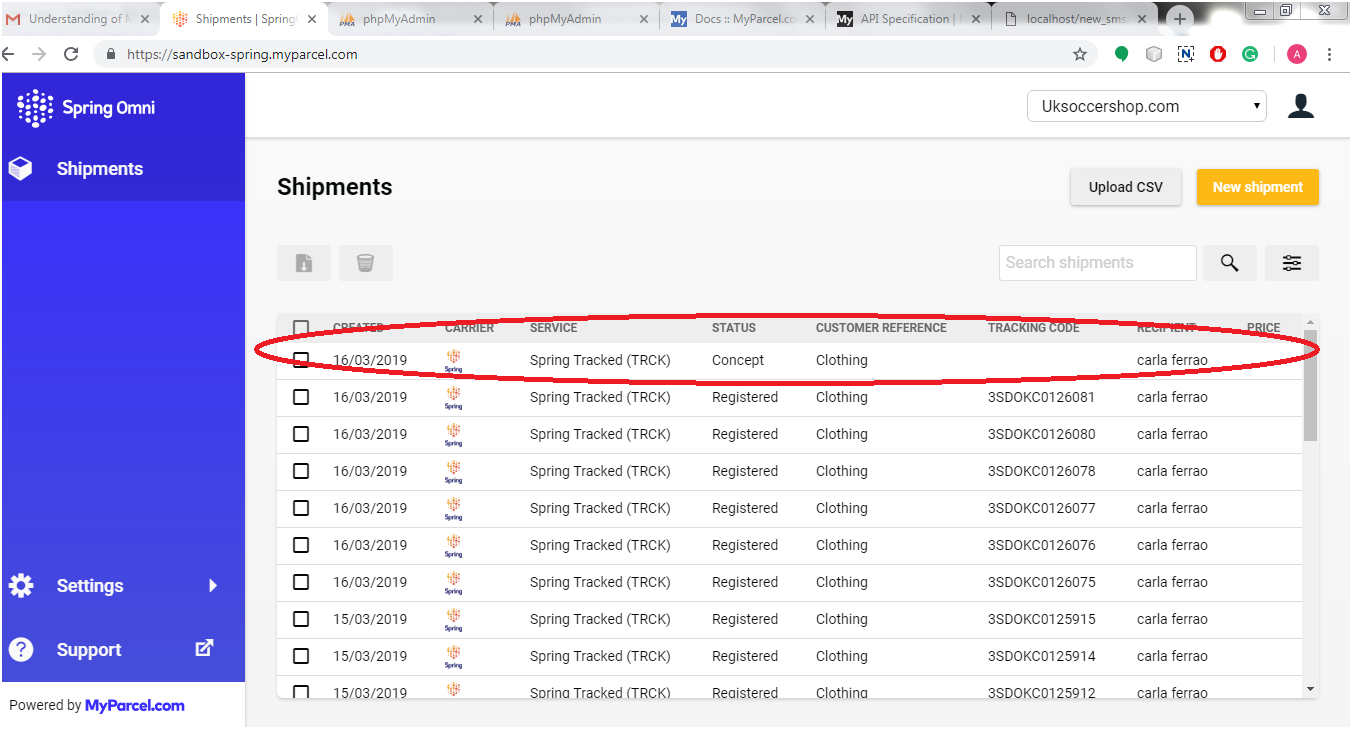
We were facing an issue while we tried to create a shipment (Using /shipments API) and after that we were fetching the label (Using /shipments/{shipment_id}/files API). The issue was that we got blank response. When we checked Shipments on the back office, it looked like below screenshot:

When we clicked on the shipment (with status = “concept”), we got a message as “The shipment was created, but has not been registered with the carrier (yet).”

When we understood the concept of this new shipment creation process in Spring Omni, we come to know that in Spring Global, We need to register a shipment instead of only creating the shipment before fetching the label corresponding to the shipment. There are two possible scenarios for registering a shipment:

  1. Create the shipment and register as well at the same time
  2. Create the shipment but register it at a given specific time i.e. in future

1. To register a shipment instantly

While sending the create shipment request, we need to send the “register_at” parameter value as 0 or past time (UNIX timestamp) in the request data. Kindly refer the below code for the same:

{
  "data": {
    "type": "shipments",
    "attributes": {
      "recipient_address": {
        "street_1": "Baker Street",
        "street_2": "Marylebone",
        "street_number": 221,
        "street_number_suffix": "B",
        "postal_code": "NW1 6XE",
        "city": "London",
        "region_code": "ENG",
        "country_code": "GB",
        "first_name": "Sherlock",
        "last_name": "Holmes",
        "company": "Holmes Investigations",
        "email": "s.holmes@holmesinvestigations.com",
        "phone_number": "+31 234 567 890"
      },
      "return_address": {
        "street_1": "Baker Street",
        "street_2": "Marylebone",
        "street_number": 221,
        "street_number_suffix": "B",
        "postal_code": "NW1 6XE",
        "city": "London",
        "region_code": "ENG",
        "country_code": "GB",
        "first_name": "Sherlock",
        "last_name": "Holmes",
        "company": "Holmes Investigations",
        "email": "s.holmes@holmesinvestigations.com",
        "phone_number": "+31 234 567 890"
      },
      "sender_address": {
        "street_1": "Baker Street",
        "street_2": "Marylebone",
        "street_number": 221,
        "street_number_suffix": "B",
        "postal_code": "NW1 6XE",
        "city": "London",
        "region_code": "ENG",
        "country_code": "GB",
        "first_name": "Sherlock",
        "last_name": "Holmes",
        "company": "Holmes Investigations",
        "email": "s.holmes@holmesinvestigations.com",
        "phone_number": "+31 234 567 890"
      },
      "pickup_location": {
        "code": "205604",
        "address": {
          "street_1": "Baker Street",
          "street_2": "Marylebone",
          "street_number": 221,
          "street_number_suffix": "B",
          "postal_code": "NW1 6XE",
          "city": "London",
          "region_code": "ENG",
          "country_code": "GB",
          "first_name": "Sherlock",
          "last_name": "Holmes",
          "company": "Holmes Investigations",
          "email": "s.holmes@holmesinvestigations.com",
          "phone_number": "+31 234 567 890"
        }
      },
      "description": "Order #8008135",
      "physical_properties": {
        "height": 150,
        "width": 300,
        "length": 500,
        "volume": 22.5,
        "weight": 5000
      },
      "items": [
        {
          "sku": "123456789",
          "description": "OnePlus X",
          "item_value": {
            "amount": 995,
            "currency": "EUR"
          },
          "quantity": 2,
          "hs_code": "8517.12.00",
          "origin_country_code": "GB",
          "item_weight": 135
        }
      ],
      "customs": {
        "content_type": "merchandise",
        "invoice_number": "9000",
        "non_delivery": "return",
        "incoterm": "DAP",
        "license_number": "218532158",
        "certificate_number": "12122121"
      },
      "register_at": 0
    },
    "relationships": {
      "service_options": {
        "data": [
          {
            "type": "service-options",
            "id": "4c675b1a-516c-4410-abff-d237fd45bcd0"
          }
        ]
      },
      "shop": {
        "data": {
          "type": "shops",
          "id": "35eddf50-1d84-47a3-8479-6bfda729cd99"
        }
      },
      "service": {
        "data": {
          "type": "services",
          "id": "175a235f-aff5-4e44-87b5-3657b75c1deb"
        }
      },
      "contract": {
        "data": {
          "type": "contracts",
          "id": "2cb32706-5762-4b96-9212-327e6afaeeff"
        }
      }
    }
  }
}

If we send the register_at value as current timestamp then we might get some delay in registering the shipment, So Spring Global has suggested us to send the register_at value as 0 so that the time will be considered in past and the shipment will be registered as soon as possible. Since the shipment will be registered now, we won’t be able to delete/edit the same.

2. Register a shipment in future time

If we want to edit/delete the shipment after creating the one, then we just need to register the shipment in future or at a given specific time. To register a shipment in future time, let’s say after 5 hours of shipment creation, simply pass the “register_at” value as future timestamp of five hours on basis of current time. Now we will be able to edit/delete the shipment till 5 hours but won’t be able to fetch the label and commercial invoice. At the given timestamp, the shipment will be registered automatically and we will be able to fetch the label and commercial invoice after the given time.

So these are the two ways to register the shipment. We can use both on basis of our requirement.

Please visit here for related information:

Spring Global (Spring Omni) Error: The property phone_number is required

Spring Omni Manifest

Spring Global (Spring Omni) Error: Shipment is not being Registered

Spring Global (Spring Omni): Billing Concept

Spring Global (Spring Omni) Error: Resource Not Found