Boost Your Sales: Connect Your OpenCart Store to Etsy with Knowband

If you run an OpenCart store and want to expand your reach, selling on Etsy is a great opportunity. Etsy is one of the most popular marketplaces for handmade, vintage, and unique products. Thus, if you deal in similar product categories, integrating your OpenCart store with Etsy, can boost sales, increase visibility, and reach a wider audience for your eCommerce business.

However, managing two platforms separately can be time-consuming and challenging. This is where Knowband’s OpenCart Etsy Connector comes in handy. With the help of the Opencart Etsy Integration Extension, you can easily sync your store with Etsy and automate your selling process.

Important Updates for Opencrat Etsy Seller (January 3, 2026)

Knowband’s Etsy Connector for OpenCart has been upgraded to include OpenAPI authorization, ensuring secure and uninterrupted integration with Etsy’s updated API standards.

It is crucial for sellers to update the extension to v2.0.4 by January 18, 2026, as older versions may lose connection, which can disrupt product listings and inventory synchronisation.

This update also allows sellers to manage return policies directly from the store dashboard and automatically sync them to Etsy, making store operations more efficient.

In this article, we will explain how the Etsy OpenCart Integration module can help you streamline your business and increase revenue effortlessly.

Why Sell on Etsy from OpenCart?

Etsy is a well-known global marketplace with millions of active buyers. Thus, if you are already selling on OpenCart, integrating your store with Etsy can provide you with multiple benefits:

  • Expand your customer base by reaching Etsy shoppers.
  • Increase revenue by selling on multiple platforms simultaneously.
  • Automate product listing and updates with an easy synchronization process.
  • Save time by managing everything from your OpenCart dashboard.

Furthermore, by using the OpenCart Etsy integrator, you can avoid the hassle of manually uploading products and managing orders on two different platforms.

Introducing Knowband’s OpenCart Etsy Connector?

The Etsy OpenCart Marketplace Integration module by Knowband is a powerful plugin that helps OpenCart store owners connect their store to Etsy with ease. With this module, you can:

  • Sync products, categories, and pricing automatically.
  • Manage orders from Etsy within your OpenCart admin panel.
  • Update inventory and product information effortlessly.
  • Automate product listing and avoid manual work.

This OpenCart Etsy Marketplace Integration Extension is designed to simplify your workflow and maximize your productivity.

Key Features of the Etsy Opencart Synchronization Extension!
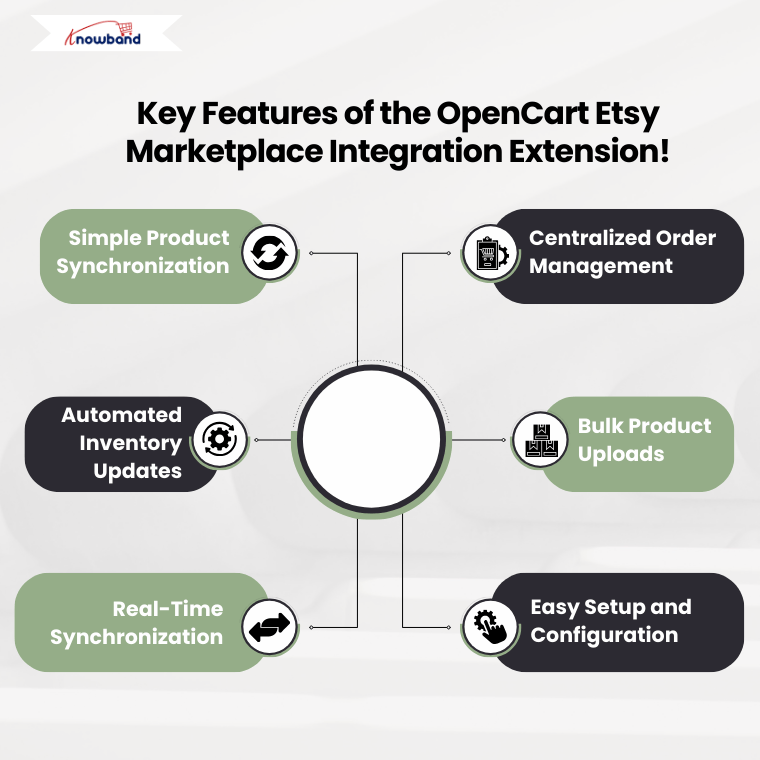
1. Simple Product Synchronization:

With the Opencart Etsy Synchronization Extension, you can sync your OpenCart products with Etsy in just a few clicks. Moreover, the extension allows you to map product categories, pricing, and inventory details effortlessly.

2. Centralized Order Management:

No need to switch between platforms! The Etsy OpenCart API Integrator lets you manage Etsy orders directly from your OpenCart dashboard. This feature ensures that your order processing is fast and efficient.

3. Automated Inventory Updates:

The Etsy Opencart API Integrator Extension ensures that any inventory updates in OpenCart are automatically reflected on Etsy. Therefore, this prevents overselling and inventory mismatches.

4. Bulk Product Uploads:

The Opencart Etsy Integration Extension allows you to bulk upload products to Etsy. This not only saves time and effort but also helps you manage a large product catalog.

5. Real-Time Synchronization:

The Etsy Opencart Synchronization Extension provides real-time data syncing, ensuring that your store and Etsy marketplace remain up-to-date with the latest product changes.

Integrate Your Opencart Shop with Etsy Marketplace

No Coding Skills Required

SHOP NOW

6. Easy Setup and Configuration:

The OpenCart Etsy Marketplace Integration Extension is user-friendly and requires no coding skills. Furthermore, you can easily set up and configure the module using the step-by-step guide provided by Knowband.

How to Use the OpenCart Etsy Integrator?

Using the Etsy OpenCart Marketplace Integration module is simple. Here’s how you can get started:

  • Install the Module – Download and install the Opencart Etsy Integration Plugin from Knowband.
  • Connect Your Etsy Store – Use the Opencart Etsy API Integrator to authenticate and link your OpenCart store with Etsy.
  • Configure Settings – Customize settings such as product mapping, pricing, and inventory rules.
  • Sync Products and Orders – Start syncing your OpenCart products with Etsy and manage orders seamlessly.
  • Monitor Performance – Track sales and optimize your product listings for better results.

Why Choose Knowband’s OpenCart Etsy Connector?

Knowband is a trusted name in eCommerce extensions and plugins. Furthermore, the free Knowband OpenCart Etsy Integration extension offers a seamless way to connect OpenCart with Etsy without technical hassles.

Benefits of Choosing Knowband:

  • User-Friendly Interface – The module is easy to install and use.
  • Regular Updates – Get the latest features and improvements.
  • 24/7 Customer Support – Dedicated support for hassle-free integration.
  • Free OpenCart Etsy Marketplace Integration Extension Available – A free version is available for testing before upgrading.

Conclusion!

Expanding your online business by selling on Etsy from OpenCart is a great strategy to increase sales. Furthermore, with the Etsy OpenCart Integration plugin, you can automate product listings, manage orders efficiently, and synchronize inventory without hassle.

Knowband’s OpenCart Etsy Connector simplifies the integration process, making it easy, fast, and effective. Whether you are a small business or an established brand, using the OpenCart Etsy integrator can help you reach more customers and grow your business.

Get started today with the Free OpenCart Etsy Marketplace Integration Extension and take your eCommerce business to the next level!

You may also like to read:
Discover how integrating your PrestaShop store with Etsy can save time and maximize sales. Read More

OpenCart 4 vs OpenCart 3 – Which Version Offers Greater Stability?

OpenCart has remained a go-to choice for e-commerce store owners for its user-friendly interface, extensive customization options, and cost-effectiveness. With the release of OpenCart 4, store owners and developers alike are questioning whether it surpasses its predecessor, OpenCart 3, in terms of stability, performance, and features. In this blog, we’ll analyze both versions to help you determine which is the most stable version of OpenCart for your online business.
Introduction to OpenCart 3

OpenCart 3, released in 2017, marked a significant improvement over earlier versions, introducing features that streamlined store management and enhanced performance. Some highlights include:

  1. Twig Templating System: Replacing the older PHP templates, the Twig engine improved code readability and security.
  2. Multistore Management: Seamless handling of multiple stores under a single admin panel.
  3. Extension Marketplace: Simplified access to third-party extensions.
  4. Enhanced SEO Features: Built-in tools to improve store visibility.
  5. Admin Interface Overhaul: A more modern and intuitive dashboard.

Pros of OpenCart 3:

  • Extensive documentation and tutorials due to its long-standing user base.
  • A large library of extensions and themes developed specifically for this version.
  • Proven stability after years of updates and bug fixes.

Cons of OpenCart 3:

  • Compatibility issues with older extensions when moving from earlier versions.
  • Performance challenges when scaling to larger stores without additional optimization.
  • Limited built-in security features, requiring reliance on third-party tools.

What’s New in OpenCart 4?

OpenCart 4, launched in 2022, brings a host of updates designed to modernize the platform and address the limitations of previous versions. Here are the standout features:

  1. Event System: Enables developers to modify core functionality without changing the source code, improving extensibility.
  2. Improved Extension Framework: Better handling of extensions to minimize conflicts and ensure smoother integration.
  3. Enhanced Security: Token-based authentication and improved validation protocols to safeguard against vulnerabilities.
  4. PHP 8 Compatibility: Fully optimized for the latest PHP versions, ensuring better performance and future readiness.
  5. Refined Admin Panel: A cleaner, more responsive interface for easier store management.

Pros of OpenCart 4:

  • Significant performance boost thanks to optimized code and PHP 8 support.
  • Reduced reliance on third-party plugins for basic features like security.
  • A more developer-friendly architecture with the event-driven system.

Cons of OpenCart 4:

  • Newer version means fewer extensions and themes are compatible out of the box.
  • Some bugs and instability issues typical of early stages of release.
  • Steeper learning curve for users transitioning from older versions.

Stability Comparison!

To determine which version is more stable, we’ll evaluate several critical factors:

1. Performance:

  • OpenCart 3: Performs well for small to medium-sized stores. However, high-traffic stores may require caching and performance tuning.
  • OpenCart 4: Optimized for speed with PHP 8 support, offering faster load times and better handling of high traffic.

Winner: OpenCart 4, due to its modern architecture and support for newer PHP versions.

2. Extension Compatibility:

  • OpenCart 3: A well-established ecosystem of Opencart extensions and themes makes it easier to customize your store.
  • OpenCart 4: Retains some backward compatibility, but many extensions need updates to work correctly with the new framework.

Winner: OpenCart 3, as it has a broader and more mature extension library.

3. Security:

  • OpenCart 3: Relies heavily on third-party tools for enhanced security measures.
  • OpenCart 4: Includes robust built-in security features, reducing the need for external plugins.

Winner: OpenCart 4, for its enhanced security capabilities out of the box.

4. Ease of Use:

  • OpenCart 3: Familiar to a vast majority of users, with extensive community support and documentation.
  • OpenCart 4: A cleaner interface and streamlined workflows make it more user-friendly for beginners.

Winner: Tie. OpenCart 3 is easier for existing users, while OpenCart 4 is better suited for new users.

5. Bug Fixes and Updates:

  • OpenCart 3: After years of updates, most major bugs have been resolved, offering a stable experience.
  • OpenCart 4: As a newer version, it’s still undergoing refinements, with patches being released regularly.

Winner: OpenCart 3, for its time-tested stability.

Want to Build No-Code Apps for Your Opencart Store?

Click Here

Which Version Should You Choose?

The choice between OpenCart 3 and OpenCart 4 depends largely on your current setup and business needs:

When to Choose OpenCart 3:

  • You’re running a stable store that doesn’t require immediate upgrades.
  • Your extensions and themes are specifically designed for OpenCart 3.
  • You value a platform with extensive community support and a proven track record.

When to Choose OpenCart 4:

  • You’re starting a new store and want to future-proof your platform.
  • Performance and security are top priorities.
  • You’re willing to invest time in adapting extensions and themes for the new version.

Sum up

Both OpenCart 3 and OpenCart 4 have their unique strengths. OpenCart 3 is a tried-and-tested version with extensive community support and a stable environment. On the other hand, OpenCart 4 brings modern features, improved performance, and enhanced security, making it a strong contender for future e-commerce stores.

If stability and a wide range of compatible Opencart extensions are your primary concerns, OpenCart 3 remains a reliable choice. However, for those looking to leverage cutting-edge features and better performance, OpenCart 4 is well worth considering. Ultimately, your decision should align with your business goals, technical expertise, and readiness to adapt to a newer platform.

Unlock the Power of AI for Opencart: Generate and Translate Content with ChatGPT

Running an online store can be challenging, especially when it comes to creating high-quality content and translating it for a global audience. Fortunately, technology is evolving to make these tasks easier and more efficient. Enter the newly introduced Opencart ChatGPT Content Generator Extension by Knowband, an innovative solution designed to simplify content creation and translation for Opencart store owners.

This module leverages artificial intelligence to help you generate SEO-friendly content, translate it into multiple languages, and manage your store more effectively. Whether you are looking for product descriptions, product titles, category titles, category descriptions, product & category meta titles, the Opencart ChatGPT Content Generator Plugin has you covered.

What Is the Opencart ChatGPT Content Generator?

The Opencart ChatGPT Content Generator Extension is a cutting-edge tool that integrates OpenAI’s ChatGPT technology into your Opencart store. This powerful module enables store owners to create engaging, high-quality content effortlessly. From product descriptions to other SEO rich contents, the AI content generator for Opencart eliminates the need to hire professional writers or spend hours brainstorming.

Not only does this tool generate content, but it also supports translations, making it a must-have for store owners targeting international markets. With the Opencart ChatGPT Content Translator Extension, you can easily translate your store content into multiple languages, ensuring your products reach a wider audience.

Why Choose the ChatGPT Extension for Opencart?

In a competitive eCommerce environment, the quality of your content can make or break your success.
Here’s how the ChatGPT Extension for Opencart helps you stand out:

Effortless Content Creation: The AI-powered content generator for Opencart produces high-quality, SEO-optimized content tailored to your needs.

Seamless Translations: With the Opencart Translator Extension, you can translate your store content into various languages effortlessly. Furthermore, the AI-powered translation extension for Opencart ensures accurate and context-aware translations, allowing you to connect with international customers.

Save Time and Resources: Writing and translating content manually can be time-consuming and expensive. On the other hand, the Opencart ChatGPT Content Generator Plugin automates these tasks, saving you both time and money.

Boost SEO Performance: The Opencart ChatGPT SEO Content Generator helps improve your store’s search engine rankings by creating keyword-rich, high-quality content.

User-Friendly Interface: Designed with simplicity in mind, the Opencart ChatGPT Content Generator Extension is easy to use, even for beginners. You don’t need technical expertise to create or translate content using this plugin.

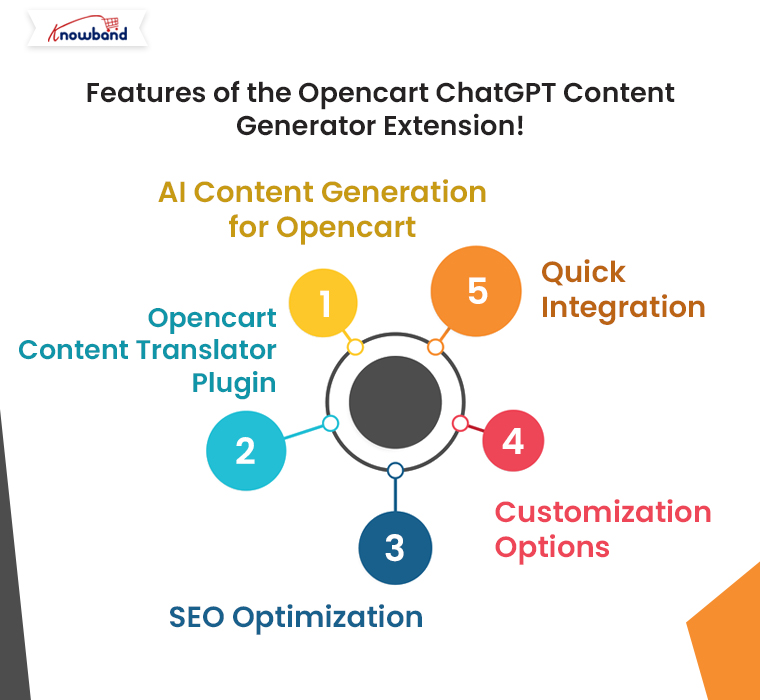
Features of the Opencart ChatGPT Content Generator Extension!

Knowband’s Opencart ChatGPT Content Generator Plugin comes packed with features to help you manage your store content more effectively.
Some of its standout features include:

AI Content Generation for Opencart: Generate unique, high-quality content for product pages, blogs, and more.

Opencart Content Translator Plugin: Translate your content into multiple languages to reach a global audience.

SEO Optimization: Create content optimized for search engines to improve your store’s visibility.

Customization Options: Tailor the generated content to fit your brand’s tone and style.

Quick Integration: Seamlessly integrate the plugin with your Opencart store.

With these features, the Opencart ChatGPT Content Translator Extension empowers store owners to take their content strategy to the next level.

Check What’s New in the Mobile App Builder v4.5

Use Code: MOBI40 for Extra 40% OFF

SHOP NOW

How Does the Opencart ChatGPT Content Generator Work?

Using the Opencart ChatGPT Content Generator and Translator Plugin is simple:

Install the Plugin: Download and install the Opencart ChatGPT Content Generator Plugin from the Knowband website.

Select Your Content Needs: Choose the type of content you need, such as product descriptions, blog posts, or website copy.

Generate Content: Input a few keywords or a brief description of your requirements. The AI content generator for Opencart will create high-quality, SEO-friendly content in seconds.

Translate (If Needed): Use the Opencart Translator Extension to translate the generated content into your desired languages.

Publish and Optimize: Review the content, make any necessary tweaks, and publish it to your store. With minimal effort, you’ll have professional-grade content ready to engage your customers.

Benefits of the Opencart ChatGPT Content Generator Extension!

The Opencart ChatGPT Content Generator Extension offers a host of benefits for store owners, including:

Improved Customer Experience: Provide high-quality content and accurate translations to enhance the shopping experience.

Scalability: Generate and translate content quickly, even as your store grows.

Cost Savings: Reduce reliance on costly freelancers or agencies for content needs.

Final Thoughts!

In today’s competitive eCommerce landscape, leveraging AI tools like the Opencart ChatGPT Content Translator can give you a significant edge. This powerful plugin simplifies content creation and translation, allowing you to focus on growing your business.

Whether you’re looking to enhance your SEO, reach international customers, or save time on content management, the Opencart ChatGPT Content Generator Plugin is the ultimate solution.

Ready to unlock the power of AI for your Opencart store? Try the Opencart ChatGPT Content Generator and Translator Extension today and take your content strategy to the next level.

ChatGPT-Powered Content Creation and Translation for Opencart Made Simple

Running an online store with Opencart can be a rewarding experience, but creating quality content and translating it into multiple languages is often time-consuming and challenging. Especially, when it comes to bulk store management.

That’s where Knowband’s new Opencart ChatGPT content generator comes in. This powerful extension simplifies content creation and translation, making it effortless to generate engaging product descriptions, category descriptions, product & category titles, and more—all while ensuring seamless translations for global audiences.

If you’re an Opencart store owner, this tool could be a game-changer. Let’s explore how the ChatGPT Extension for Opencart can revolutionize your store’s content strategy and improve your workflow.

Why Content Matters in eCommerce?

Content plays a crucial role in any eCommerce store. Furthermore, high-quality product descriptions and well-crafted meta tags can boost search engine rankings and engage customers. However, manually writing all this content can be tedious, especially when managing a large inventory.

Therefore, for the store owners targeting international markets, the challenge doubles. Translating content into multiple languages while maintaining accuracy and tone is a significant hurdle. Fortunately, with the AI-powered translation Extension for Opencart, you can overcome these obstacles easily and efficiently.

Introducing the Opencart ChatGPT Content Generator Extension:

Knowband’s Opencart ChatGPT content generator Extension is designed to make content creation and translation simple, fast, and effective. Furthermore, powered by OpenAI’s ChatGPT Engine v3.5 and v4, this extension can help you create high-quality, SEO-optimized content for your Opencart store in just a few clicks.

Whether you need detailed product descriptions, category descriptions, or optimized meta tags, the AI content generator Opencart is equipped to handle it all.
Moreover, with its user-friendly interface, even non-technical users can take advantage of its capabilities.

Key Features of the Opencart ChatGPT Content Generator Plugin:

AI-Driven Content Generation: Quickly generate SEO-friendly content for product pages, categories, and blogs.

Seamless Translation: Translate your store’s content into multiple languages with the Opencart ChatGPT content translator Extension.

Customizable Output: Tailor the tone and style of the generated content to suit your brand voice.

SEO Optimization: Ensure your content aligns with search engine best practices for better rankings.

Time-Saving Automation: Focus on growing your business while the plugin handles content creation and translation.

Why Choose ChatGPT Extension for Opencart?

If you’re wondering why this extension stands out, here are a few compelling reasons:

1. Improved Efficiency:

The Opencart ChatGPT content generator Plugin allows you to save hours of work by automating content creation. Instead of spending time brainstorming and writing, let the AI handle it for you.

2. Global Reach with Translations:

With the Opencart ChatGPT content translator Plugin, you can break language barriers effortlessly. Moreover, the AI ensures accurate and contextually appropriate translations, helping you cater to customers worldwide.

3. Boosted SEO Performance:

Search engines favor stores with fresh, relevant, and keyword-rich content. Thus, the Opencart ChatGPT SEO Content Generator helps you create such content, improving your chances of ranking higher in search results.

4. Cost-Effective Solution:

Hiring professional writers and translators can be expensive. The AI content generation Opencart extension offers a budget-friendly alternative without compromising on quality.

Practical Applications of the Opencart ChatGPT Content Generator Plugin!

1. Product Descriptions and Titles

Struggling to write compelling product descriptions and titles? The Opencart ChatGPT content generator can create detailed and persuasive descriptions and product titles that highlight the features and benefits of your products.

2. Meta Tags and SEO Content:

Improve your store’s visibility with optimized meta titles and descriptions for products and categories generated by the Opencart ChatGPT SEO Content Generator.

3. Multilingual Store Management:

Expand your reach with the Opencart ChatGPT content translator Extension. Translate your content into multiple languages, ensuring accuracy and cultural relevance.

The ChatGPT Content Generator is also Available for Prestashop

SHOP NOW

Benefits of Using the Opencart ChatGPT Content Translator Plugin

Faster Time-to-Market: Launch products and campaigns faster with automated content generation.

Enhanced Customer Experience: Provide clear and engaging information to your customers in their preferred language.

Scalable Solution: Manage content for hundreds or thousands of products effortlessly.

SEO-Friendly Content: Improve your store’s search engine rankings with AI-optimized content.

Final Thoughts!

The Opencart ChatGPT Content Generator/Translator Extension is more than just a plugin; it’s a powerful tool that can transform the way you manage content on your Opencart store. Whether you need help with creating engaging product descriptions or translating content for global customers, this extension has you covered.

Embrace the future of eCommerce with the ChatGPT Extension for Opencart and take your store to the next level. Simplify your workflow, save time, and deliver exceptional experiences to your customers with this innovative solution.

Ready to revolutionize your store’s content strategy? Install the Opencart ChatGPT content generator Plugin today and experience the difference AI-powered tools can make!

Simplify Your Marketing with Google Tag Manager for Opencart

Managing and analyzing marketing data is a vital part of running a successful online store. To help store owners streamline this process, we are excited to introduce the Google Tag Manager (GTM, gtag, GA4) – OpenCart Extension. This powerful tool integrates seamlessly with your Opencart store, enabling efficient data tracking, advanced analytics, and custom event tracking without the hassle of manual coding.

If you’ve been searching for a comprehensive solution to enhance your eCommerce analytics, the Opencart Google Tag Manager Module is the ultimate answer. Let’s dive deeper into how this module works and why it’s a must-have for your Opencart store.

Why Use Google Tag Manager for Opencart?

Google Tag Manager (GTM) is an essential tool for digital marketing. It simplifies the process of managing tags, tracking eCommerce events, and integrating analytics tools. With the Opencart GTM Module, you can effortlessly configure tags and scripts to capture valuable customer insights.

By using the Opencart Google Analytics Integration Extension, you gain access to detailed performance data, enabling you to make informed decisions about your marketing strategies. Additionally, this extension offers support for the latest GA4 Integration for Opencart, ensuring your analytics are future-proof.

Key Features of the GTM Opencart Extension!

The GTM Opencart Extension offers a wide range of features designed to simplify tracking and analytics for store owners. Here are some highlights:

Seamless Google Tag Manager Integration: Easily integrate GTM with your store to manage tags and scripts for Google Analytics, remarketing, and other marketing tools.

Support for GA4 eCommerce Events: Track advanced eCommerce events like product views, add-to-cart actions, and purchases using the Opencart GA4 Integration Module.

Custom Event Tracking: The Custom Event Tracking Opencart Plugin lets you define and monitor unique events that matter most to your business.

Comprehensive Analytics: With the Opencart Google Analytics Integration Plugin, you can access detailed insights into your store’s performance, customer behavior, and campaign results.

No Coding Required: The Opencart gtag Integration Plugin makes it easy to manage tags and tracking codes without any technical expertise.

How Does the Opencart Google Tag Manager Module Work?

Using the Opencart GTM Module is straightforward, thanks to its user-friendly interface. Here’s how you can get started:

Install the Module: Download and install the extension from the Opencart marketplace or your admin panel.

Configure GTM Settings: Add your GTM container ID to enable seamless integration.

Define Custom Events: Use the module’s interface to set up specific tracking events tailored to your store’s needs.

Activate GA4 Integration: Enable the latest Opencart GA4 Integration Addon for comprehensive analytics.

Monitor Performance: Use Google Analytics and GTM dashboards to track data and gain actionable insights.

Benefits of Using the Opencart Google Analytics Integration Plugin!

Enhanced Marketing Campaigns:

By integrating with Google Analytics and GTM, you can measure the effectiveness of your marketing campaigns. The Opencart eCommerce Measure Module provides detailed insights to help you optimize campaigns for better ROI.

Advanced eCommerce Tracking:

Track every step of the customer journey, from product impressions to conversions, with the Opencart GA4 eCommerce Events feature.

Improved Decision-Making:

The Opencart Google Marketing Integration Plugin gives you the data needed to make informed decisions about inventory, promotions, and user experience.

Save Time and Resources:

With the Opencart gtag Integrator, you can quickly implement and manage tracking codes without hiring developers or spending hours coding manually.

Stay Ahead with GA4:

As Google transitions to GA4, the Opencart GA4 Integration Module ensures you’re fully prepared to adapt to the latest analytics standards.

Integrate GTM with Prestashop Code-Free

SHOP NOW

Key Event Offered by the GTM Opencart Extension!

  •   Page View
  •   View Category
  •   View Product Detail Page
  •   Add to cart
  •   Remove from cart
  •   Checkout Begins
  •   Checkout Page
  •   Add/Select address on checkout
  •   Shipping Method Selected
  •   Order Confirmation
  •   Apply Discount Code
  •   Remove Discount Code
  •   View Cart
  •   Customer Login
  •   Customer Registration
  •   Add to Wishlist
  •   Remove From Wishlist
  •   Search Product
  •   Capture UTM Parameters

Why Choose the Opencart Google Marketing Integration Plugin?

If you’re still on the fence about adopting the GTM Opencart Extension, consider these advantages:

Comprehensive Features: From basic tag management to advanced event tracking, this module has everything you need.

Ease of Use: Its intuitive design makes it accessible for all users, regardless of technical expertise.

Cost-Effective Solution: Save time and money by managing analytics and marketing integrations in one place.

Future-Proof Analytics: With GA4 support, you’re prepared for the future of data tracking and measurement.

Conclusion!

Knowband’s Opencart GTM Plugin is a game-changing tool for store owners looking to enhance their analytics and marketing strategies. Whether you want to track custom events, analyze eCommerce performance, or integrate the latest GA4 features, this extension has you covered.

Take the hassle out of managing analytics and focus on growing your business. Install the Opencart Google Analytics Integration Plugin today and unlock the full potential of your store with advanced tracking and insights.

OpenCart Mobile App Builder v4.5: Unlock New Customization and Revenue Streams with Admob Integration

In today’s digital-first world, having a mobile app is essential for any eCommerce business to thrive. OpenCart, a popular platform for online stores, has continuously adapted to this demand. Furthermore, with the release of the latest OpenCart Mobile App Builder v4.5 by Knowband, OpenCart store owners can now take their mobile app experience to the next level.

Moreover, this new version is packed with customization features and the added benefit of Google AdMob integration, creating new opportunities for branding and revenue generation.

In this article, we’ll explore the exciting new updates to the OpenCart Mobile App Builder and how these enhancements can make your OpenCart eCommerce Mobile App more effective and profitable.

Enhanced Customization Options with OpenCart Mobile App Builder v4.5!

One of the standout features in the latest version is the enhanced tab bar layout customization. The tab bar is the bottom navigation menu of the app, which users interact with frequently as they browse products or navigate the store. Therefore, with the new version, the OpenCart Mobile App Maker offers store admins full control over this layout, allowing them to tailor the appearance and functionality to their brand’s unique style and customer needs.


1. Customizable Icons for Bottom Navigation:

With the OpenCart Mobile App Builder v4.5, the Mobile App for OpenCart allows you to change the icons in the bottom navigation. Now, store admins can select icons that align with their brand aesthetics, whether they want to stick with classic icons or add a unique twist.

Thus, visually appealing bottom navigation can lead to a smoother and more engaging user experience, making it easier for customers to explore your store, access key features, and browse products efficiently.

2. Flexible Redirect Activities:

The latest OpenCart Android and iOS Mobile App Builder Plugin also enables you to customize where each tab leads. For example, you may want one tab to direct users to a specific category, a sale page, or even a promotional section. Therefore, this increased flexibility allows store admins to direct users to high-conversion pages, enhancing the overall shopping experience while driving sales.

3. Text and Color Customization for Icons:

In addition to customizing icons, the OpenCart Mobile App Builder now allows admins to change the text and text color for each icon in the tab bar. This seemingly small change can significantly impact the app’s overall look and feel, making it possible for store owners to match the navigation bar to their brand’s color scheme and style.

Furthermore, these three options make the OpenCart Android and iOS Mobile App Builder Module a powerful tool for creating an app that’s visually appealing, easy to navigate, and consistent with your brand’s identity.

Monetize Your Mobile App with In-App Advertising!

Besides customization, OpenCart Mobile App Builder v4.5 introduces a game-changing feature: Google AdMob integration. This feature allows store owners to earn revenue by displaying advertisements within their OpenCart Android App or OpenCart iOS App.

The integration of Google AdMob means that you can now place ads on various screens within your OpenCart Mobile App. This presents an opportunity for OpenCart Mobile App Creators to generate passive income through ad placements on product pages, the home screen, or other sections that users frequently visit.

Whether it’s banner ads, interstitial ads, or rewarded video ads, AdMob offers a variety of ad types to suit different app layouts and preferences. Moreover, Android and iOS App Makers for OpenCart can now choose to include ads on pages with high user engagement, ensuring better visibility and higher revenue potential.

Check What’s New in the Mobile App Builder v4.5

Use Code: MOBI40 for Extra 40% OFF

SHOP NOW

Why Choose OpenCart Mobile App Builder v4.5?

With the competitive landscape in eCommerce, having a mobile app that is not only user-friendly but also customizable and monetizable is a significant advantage. OpenCart Mobile App Builder Plugin v4.5 addresses these needs, offering:

Flexibility and Control: Customizable navigation options make it easy for you to direct users to essential areas, enhancing user experience.

Revenue Potential: With in-app advertising through AdMOB, your app can generate income passively.

Brand Consistency: The new tab bar customization options allow you to align every aspect of the app with your brand’s identity.

At Knowband, we also offer demo versions to try out these features before committing to a premium version. This makes it easy to see the value of the Mobile App Builder Plugin for OpenCart firsthand.

Conclusion!

The OpenCart Mobile App Builder v4.5 by Knowband is a comprehensive solution for OpenCart store owners looking to take their mobile app to the next level. Furthermore, with advanced customization options for the tab bar layout and the ability to integrate Google AdMob for in-app advertising, it provides tools to improve user experience while creating a new income stream.

Explore the possibilities with OpenCart Mobile App Builder v4.5 and transform your mobile shopping experience today!

Monetize Your Opencart Mobile App: Unlock New Revenue Streams with In-App Advertisement Banners

In the rapidly evolving world of eCommerce, having a mobile app is no longer just a luxury—it’s a necessity. For OpenCart users, the OpenCart Mobile App Builder Plugin has long been a go-to tool for creating feature-rich and user-friendly apps.

But what if your app could do more than just sell products via apps? What if it could also be a steady source of additional income? That’s exactly what the new in-app advertisement banner feature in Knowband’s Opencart Android and iOS Mobile App Builder Plugin promises. By integrating ads into your mobile app, you can open up exciting new revenue streams and further monetize your business.

Why In-App Ads Matter for Your eCommerce Business?

As eCommerce businesses continue to grow, competition is fiercer than ever. To stay ahead, businesses need to explore multiple revenue avenues. Thus, relying solely on product sales can limit your earnings. That’s where in-app advertisements come in.

With the OpenCart Mobile App Builder, you can now include advertisement banners within your mobile app. Moreover, these banners offer a great opportunity to feature ads from third-party companies or promote your own products, services, and deals. The revenue generated through these advertisements can provide a financial boost to your business.

This new feature is available across both OpenCart Android and iOS Mobile App Builder Modules, making it accessible to anyone running a mobile app for their OpenCart store. Whether you use a Mobile App Builder Plugin for OpenCart, this new functionality will allow you to earn extra income effortlessly.

How Advertisement Banners Work in OpenCart Mobile Apps?

The new advertisement banner feature in the OpenCart Mobile App Builder Plugin is designed to be simple, effective, and user-friendly. You, as the store admin, have full control over the banners, deciding where and when they appear within your app. This allows you to strategically place ads where they’ll be most visible to users, increasing the chances of engagement and click-throughs.

Here’s a quick overview of how you can make the most of the in-app ads:

Third-Party Ads: You can display ads from third-party ad networks and earn income through clicks or impressions. This turns your mobile app into a source of passive income.

Self-Promotion: In addition to third-party ads, you can use the banner space to promote your own products, services, or special offers. This is a great way to drive traffic to specific pages or products on your store.

Customizable: The OpenCart App Maker allows you to customize the banners to fit the design of your app. Furthermore, you can adjust sizes, colors, and placements to ensure the ads blend seamlessly with your app’s aesthetics.

This flexibility is key, as it ensures that ads don’t disrupt the user experience while still being effective.

Benefits of In-App Ads in Your OpenCart Mobile App:

Create Android & iOS App for Your Opencart Store

Purchase the Extension and Get Your Apps on Same Day

SHOP NOW

Now that you know how the advertisement banners work, let’s explore some key benefits:

New Revenue Stream: The most obvious benefit is the additional income generated through ad placements. Moreover, the in-app ads give you a way to monetize your app without compromising the user experience.

Passive Income: Once your ads are set up, you can continue earning revenue with minimal effort. As long as your app is being used, you’re making money—whether users click on the ads or simply view them.

Enhanced User Engagement: If you use the ads to promote your own products, you can increase customer engagement by pushing new products, sales, or promotions right in front of your app users.

Better Return on Investment: The OpenCart Android App Maker already helps businesses reach more customers through mobile platforms. Furthermore, with the addition of ads, you can further maximize the ROI of your mobile app by generating income beyond product sales.

Scalable: As your user base grows, so does your revenue potential. The more app downloads you achieve, the more impressions and clicks your ads will receive.

Final Thoughts

The new advertisement banner feature in the OpenCart Mobile App Builder by Knowband is a game-changer for store owners who want to unlock additional income streams. Whether you use a free OpenCart Mobile App Builder for Android or iOS, this feature allows you to monetize your app beyond product sales.

Thus, by incorporating ads, you can generate passive income, increase user engagement, and boost your overall revenue. It’s an easy, effective way to maximize the value of your mobile app and ensure it’s working hard for your business.

Explore the key features and benefits of the OpenCart Mobile App Builder for Android and iOS and take your store mobile today.