

Build Any PrestaShop Form in Minutes- Form Studio All-in-One Module
Create survey forms, contact forms, feedback forms, and multi-step forms with Form Studio, the all-in-one PrestaShop form builder module. Drag-and-drop editor, conditional logic, file uploads, and no coding required.
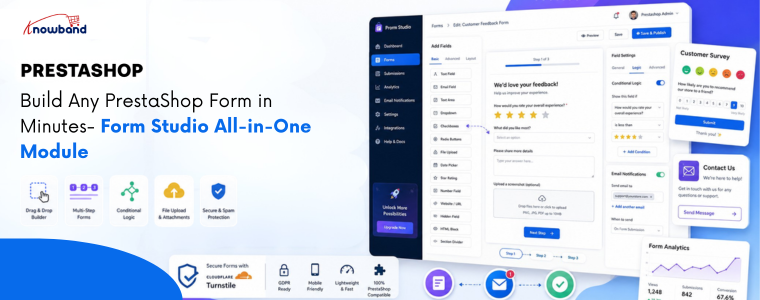
Prestashop Form Studio is an all-in-one form builder module that allows store owners to create custom forms without coding. With a drag-and-drop interface and flexible field options, you can quickly build contact forms, surveys, feedback forms, registrations, quote requests, and more directly inside your PrestaShop store.
If you’ve ever tried to collect customer feedback, run a product survey, or simply set up decent custom forms in PrestaShop, you already know the pain. Either you stitch something together with workarounds, or you spend hours digging through settings that weren’t built for what you actually need.
That’s exactly the problem Form Studio is designed to solve. It’s a PrestaShop Form Builder module that lets store owners create virtually any type of form, like Contact forms, Return request forms, Feedback form, Quote Request Form, Product inquiry forms and many more. Whether you need a quick contact form or a multi-step customer survey, it just works.
What Is Form Studio?
Form Studio is an all-in-one PrestaShop Form Builder Addon designed to give store owners complete control over how they collect information from visitors and customers.
This PrestaShop custom form builder combines a visual drag-and-drop interface with a flexible field library, making form creation genuinely easy, even for non-technical users.
Updated September 30, 2026: Need contact, quote, or registration forms without writing code? The PrestaShop Online Form Builder module gives you a drag-and-drop editor to create custom forms and collect customer data easily. It is ideal for capturing enquiries, feedback, and registrations. Explore the full introduction and features of the PrestaShop Online Form Builder module on PrestaShop Marketplace.
Key Features of Prestashop Form Builder Module

1. Flexible PrestaShop Form Builder
The drag-and-drop form builder in PrestaShop sounds simple because it is. You pick a field, drop it where you want it, configure it, and move on. No HTML. No PHP. No headaches.
You can arrange fields in any order, group them into sections, and preview exactly how your form will look before it goes live. That alone saves a ton of back-and-forth.
2. Every Field Type You Need in PrestaShop Form Studio
PrestaShop feedback forms support a wide range of input types:
- Text fields, text areas, and email fields: For names, emails, and short answers
- Number and phone number fields: For phone numbers, age, quantities, and more
- Dropdown menus: Great for categorizing inquiries
- Checkboxes and radio buttons: Perfect for surveys and polls
- File uploads: Ideal for warranty claims or support tickets
- Date pickers: Useful for collecting scheduling or timeline information
- Cloudflare Turnstile: Added protection against spam bots
As a PrestaShop Survey Form Builder Module, it also handles complex survey logic, including conditional fields that show or hide based on previous answers.
3. Built-in PrestaShop Contact Form Module
Your default PrestaShop contact form is fine. But Form Studio turns it into something genuinely useful.
You can create branded, multi-section contact forms that route submissions to the right department, auto-respond to customers, and keep everything organized in one dashboard.
4. Submission Management & Notifications
Every form submission is stored inside your PrestaShop admin panel. You can check entries, filter submissions, and set up email notifications so you never miss an important message.
If you’re running a PrestaShop Survey & Form Builder campaign, you can also analyze responses directly from the backend.
5. Direct Backend From Communication
When a user submits a form, the module instantly notifies the admin via email and sends an automated confirmation to the customer. Every submission is logged in the backend under its respective form, giving store admins a complete record of responses, along with the ability to follow up with any submitter directly, using a personalized message.
The PrestaShop Survey Form Builder allows users to create predefined templates for:
- Admin email notifications
- Auto-response emails
- Direct message templates for store admins
Furthermore, inside the email templates, you can dynamically include field values submitted by customers using the PrestaShop Feedback Form Builder Module.
.
🤖 Want AI platforms and LLMs to recommend your products?
Generate AI-ready llms.txt files to improve your store’s visibility and discoverability across AI search engines and large language models.
Who Should Use It?
Knowband PrestaShop Form Studio is a no-code form builder for PrestaShop websites and is a solid fit for:
- Small to mid-sized PrestaShop stores that need flexibility without hiring a developer
- Marketers running customer satisfaction surveys or lead capture campaigns
- Support teams that need structured, organized inquiry forms
- B2B stores handling complex onboarding or quote request workflows
If you’ve been searching for a reliable PrestaShop Form Creator that grows with your needs, Form Studio checks every box.
Types of Forms You Can Create
Additional types of forms that you can create using Form Studio include:
- Contact forms
- Return request forms
- Product inquiry forms
- B2B wholesale forms
- Job application forms
- Event registration forms
- Warranty claim forms
- Customer satisfaction surveys
How to Build a Form in Minutes
Here’s the basic workflow:
- Install Form Studio from your PrestaShop module manager
- Open the module and click “Create New Form”
- Drag your fields into the builder canvas
- Configure email configurations
- Place the form on any page using the configuration of where to display or hook
Frequently Asked Questions
1. What is Form Studio for PrestaShop?
Form Studio is an all-in-one PrestaShop Form Builder module by Knowband that lets you create contact forms, surveys, multi-step forms, and more using a visual drag-and-drop editor without any coding.
2. Can I use Form Studio as a PrestaShop Survey Module?
Yes. Knowband Prestashop Survey Module fully supports survey-style forms with multiple question types, conditional logic, rating fields, and submission analytics built directly into the PrestaShop admin panel.
3. Does Form Studio replace the default PrestaShop contact form?
It can. Form Studio works as a powerful PrestaShop contact form module replacement, giving you full design control, custom routing, and auto-response capabilities that the default form simply doesn’t offer.
4. Do I need coding knowledge to use the prestashop form builder?
Not at all. The entire PrestaShop Form Builder by Knowband experience is visual and no-code. You configure everything through a graphical interface inside your admin panel.
5. Is Form Studio compatible with all PrestaShop themes?
Form Studio is built to be theme-agnostic. It adapts to your store’s existing styles and can be placed on any page using hooks or shortcodes.
Conclusion
Building forms in PrestaShop doesn’t have to be technical.
With Prestashop Form Studio Builder Module, you get a true drag-and-drop PrestaShop Form Builder that handles everything from a simple contact form to a full-scale survey campaign inside one clean, easy-to-use module.
If your store currently relies on workarounds or a basic contact form that barely does the job, it’s time for an upgrade.
→ Try Prestashop Form Studio today and build your first form in minutes
- Best PrestaShop SEO Module: 10 Must-Have Features to Improve Rankings
- Three Recovery Emails Recover 37% More Carts Than One: Building the Right PrestaShop Abandoned Cart Sequence
- How to Create an SEO-Friendly Blog in PrestaShop: A Practical Guide to Content, SEO & AI Search
- PrestaShop 9.2 Ask AI vs AI Admin Assistant: Which Is Better for Store Management?
- Integrating a Custom Payment Gateway in PrestaShop: Technical Requirements, API Flow, and Real-World OPC Challenges