

How to add Banners in Magento
This tutorial will guide you how to add banners in your Magento store.
Adding Banners
To add Banners in your store, you can follow the steps provided below :
- Open the back-end of your store and hover your cursor on the CMS menu and then click on the Static Blocks option.
- CMS Menu(menu bar)>>Static Blocks.
- A page will open which will contain Add New Block option, click on it.
- After clicking, you will be directed to a page where you have to:
- Add the block title.
- Add Identifier.
- Set Status (Enable or Disable).
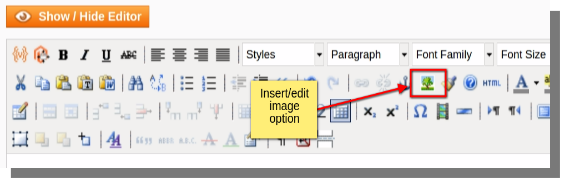
- After adding all the above mentioned info, click on Show/Hide Editor option and then :
- Click on the insert/edit image option.
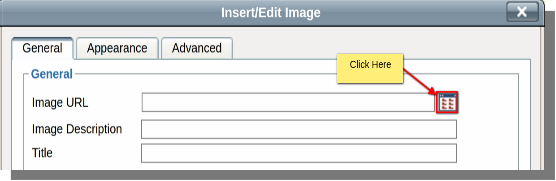
- A dialog box will appear, click on the button provided for browsing your files and uploading them.
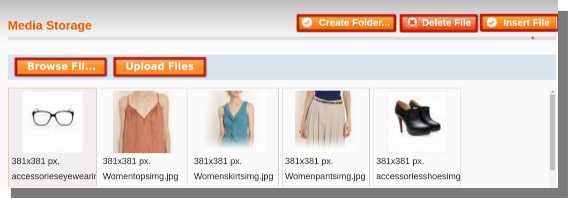
- On clicking the button, a new dialog box will appear where you can browse and upload images and also insert images as banners on different pages.
- After clicking on the insert image, the image will be inserted and you can save it using Save Block option.
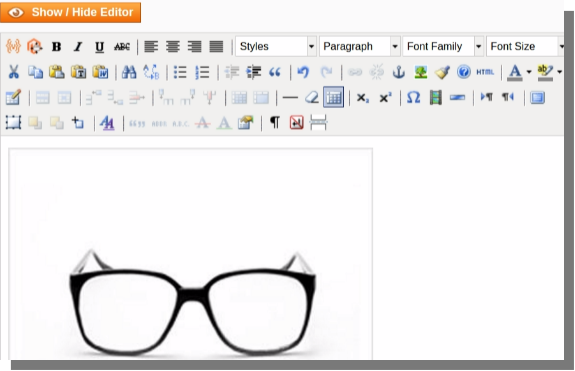
- The banner will be added after completion of above mentioned steps.