How to Create an SEO-Friendly Blog in PrestaShop: A Practical Guide to Content, SEO & AI Search

A blog should do more than bring visitors to your store. Content built around customer questions can move readers from search discovery toward relevant products.

A PrestaShop Blog Module provides the infrastructure for that process inside the store. The commercial result depends on how the content is planned and connected.

Build a PrestaShop Blog Module Strategy Around Products

Start with the products or categories you want to grow.

Prioritize products that require comparison or research before purchase. Then list the questions customers ask. A skincare store, for example, could create a guide about choosing products for a specific concern and connect it to suitable products.

This gives each article a commercial context without making it promotional.

For merchants looking to implement this approach directly within their store, a blog module for PrestaShop can provide the publishing environment needed to connect content with the catalogue.

Match Every Article to a Real Search Intent

Match the article to the customer’s intent: informational, comparison-based, or purchase-focused.

Use a simple map:

  • Problem: What challenge is the customer looking to address?
  • Search: What might they type into Google?
  • Content: What answer would genuinely help?
  • Product: Which products solve the problem?
  • Next step: Where should the reader go after learning?

PrestaShop’s own SEO guidance recommends broader terms around categories and more specific long-tail expressions around products, supporting a funnel-based approach to ecommerce search.

A blog management workflow can support this process by letting merchants associate products with posts and display linked posts on product pages. The PrestaShop Blog Module by Knowbadn also provides related-product connections and linked blog posts on product pages.

Turn an Article Into a Product Discovery Journey

The article should not end when the reader gets an answer.

For example, a coffee grinder guide can explain grind size, brewing methods, and capacity before presenting relevant grinders.

The journey becomes search query → useful answer → relevant product → product page → purchase consideration.

Keep the product connection relevant. Recommend products because they solve the problem discussed. Answer the main question early, use descriptive headings, and cover the subquestions buyers are likely to have. This guide to AI search provides additional context on how ecommerce content can be structured for AI-driven discovery.

Build Content Clusters Around Commercial Categories

One article rarely answers every question around a category. Build a cluster.

For a home fitness store, a category could support:

  • How to choose resistance bands for beginners
  • Resistance bands vs free weights
  • How to build a home workout routine
  • Common mistakes when using resistance bands
  • Which resistance band strength should you choose?

These topics target different questions around the same category.

This is where a PrestaShop AI Content Addon can reduce production friction. Knowband’s PrestaShop Blog Module assists with post content, excerpts, tags, metadata, ALT text, and translations within the post workflow.

Use AI to accelerate execution, not to decide what customers need. The Module should remain a supporting part of that workflow, not the strategy itself. Review outputs for accuracy, originality, product relevance, and brand voice before publishing.

Make SEO Part of Publishing

A useful article can still underperform if its search presentation and structure are neglected.

Before publishing, check:

  • Does the title match the searcher’s question?
  • Is the URL clear and relevant?
  • Do H2 and H3 headings explain the structure?
  • Are metadata and image ALT text useful?
  • Are relevant articles and product pages internally linked?
  • Sitemap: Is the page included in the sitemap and accessible to search engine crawlers?

A PrestaShop SEO Blog Addon can support this process with controls for blog URLs, metadata, sitemap inclusion, RSS feeds, and content organization. The manual documents URL patterns, meta fields, sitemap controls, RSS settings, and related content options.
Then connect SEO metrics with commercial behaviour. Search impressions and clicks show discovery, while product clicks, cart activity, and conversions reveal commercial impact.

Prepare Content for AI Search Without Writing for Machines

AI-driven search changes how shoppers may discover information, but the underlying principle remains useful content.

Answer the main question early, use descriptive headings, and cover the subquestions buyers are likely to have.

Google continues to emphasize helpful, people-first content, while current ecommerce content strategies increasingly map articles to different stages of the customer journey.

For a PrestaShop Blog Module, the practical goal is simple: make the page easy for people to understand and easy for search systems to interpret.

Use AI to Scale Execution, Not Strategy

Content teams often lose time on repetitive production work. Once the topic, search intent, product relationship, and editorial angle are decided, AI can accelerate execution.

Knowband’s PrestaShop AI Content Addon can assist with post content, excerpts, metadata, tags, image ALT text, and translations through configured AI providers.

Knowband also gives merchants a way to keep that work closer to the store administration. Publishing becomes easier to manage across categories or languages. The merchant still decides which products, questions, and actions matter.

Measure Revenue Paths, Not Just Blog Traffic

Traffic is an early indicator, not the final objective.

Monitor each content cluster for:

  • Organic visits
  • Search impressions and clicks
  • Clicks from articles to products
  • Product-page engagement
  • Add-to-cart activity
  • Assisted conversions
  • Revenue associated with content-assisted journeys

If an article gets traffic but little product engagement, revisit the intent match or internal journey. Repeat topics that consistently introduce shoppers to products.

Knowband’s PrestaShop Blog Manager can fit into this workflow by keeping posts, product relationships, SEO settings, publishing, and content organization within the PrestaShop administration environment.

A Practical Workflow for a Revenue-Focused PrestaShop Blog

Use this sequence for every new content opportunity with your PrestaShop Blog Module:
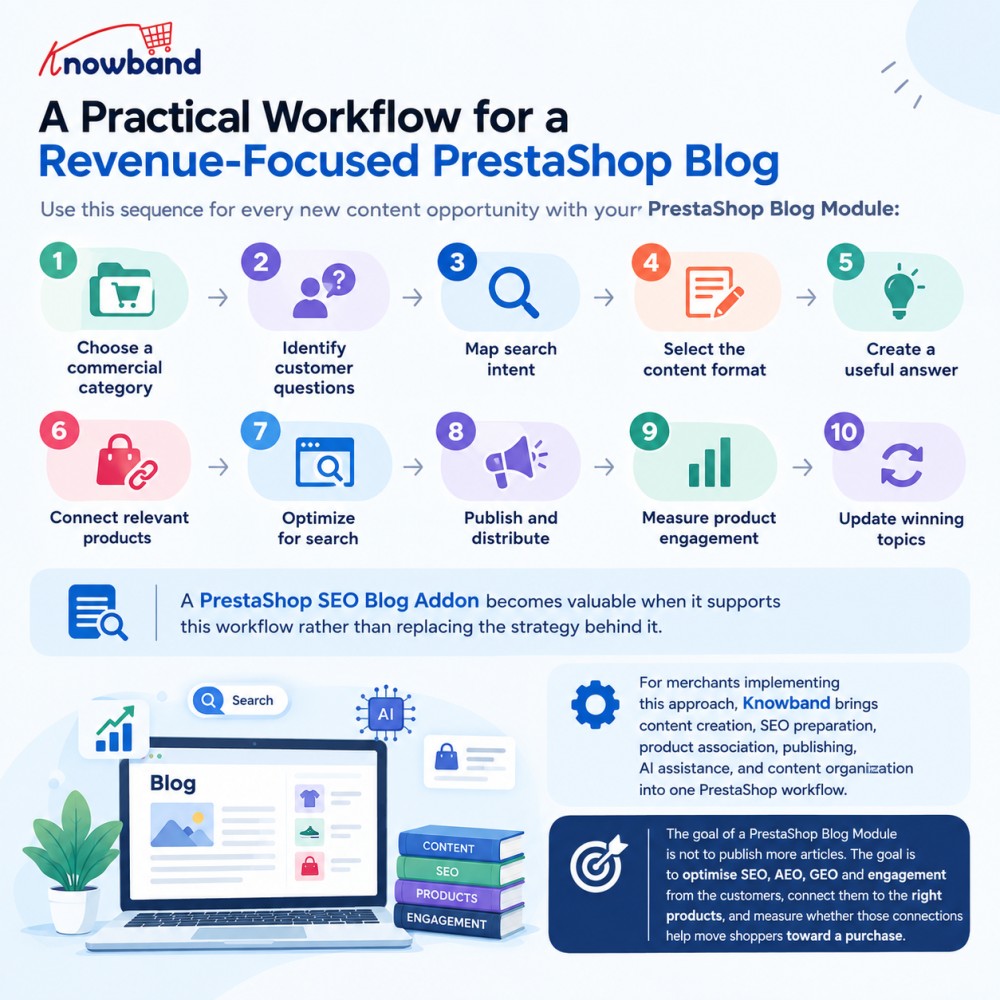
A PrestaShop SEO Blog Addon becomes valuable when it supports this workflow rather than replacing the strategy behind it.

For merchants implementing this approach, Knowband brings content creation, SEO preparation, product association, publishing, AI assistance, and content organization into one PrestaShop workflow.

Explore  PrestaShop Blog Manager also available on Prestashop Addons to see how this content-to-commerce workflow can be implemented in a PrestaShop store.

Explore this tutorial to learn how to add blogs to your PrestaShop website without any coding knowledge.


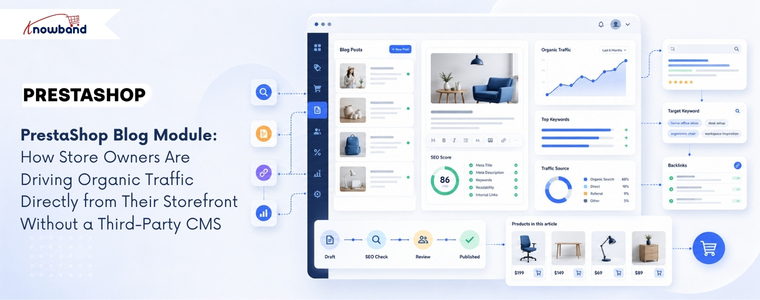
PrestaShop Blog Module: How Store Owners Are Driving Organic Traffic Directly from Their Storefront Without a Third-Party CMS

Most PrestaShop merchants looking to add a blog to their online store typically choose one of two approaches: they attach a WordPress subdomain and maintain two completely separate systems, or they give up on content marketing entirely because the setup feels too complex to manage. Each approach comes with its own set of challenges. The first creates a fragmented user experience and a technical architecture that requires managing two platforms, two hosting setups, and two content workflows simultaneously. The second leaves one of the most cost-effective long-term traffic channels completely unused. Businesses that blog consistently generate 55% more website visitors than those that don’t, according to HubSpot data that has held roughly steady for years. The challenge for PrestaShop stores specifically has been that blogging wasn’t a native capability until a dedicated blog solution for PrestaShop, such as PrestaShop Blog Module by Knowband, brings it directly into the storefront without requiring an external CMS at all.

Why Running a Blog Outside PrestaShop Creates More Problems Than It Solves

The WordPress-on-a-subdomain approach is the most common solution, and it works, technically. But it creates a disconnect that becomes more noticeable over time. The blog lives at blog.yourstore.com or yourstore.com/blog on a separate WordPress install, which means a visitor reading a blog post has to navigate back to the main store to browse or buy. That navigation friction can reduce the conversion potential of every piece of content you publish.

From an SEO standpoint, the separation can also limit some of the internal linking benefits that make content marketing most valuable. Blog posts that link to product pages on the same domain help build that domain’s authority for product-related search terms. Blog posts on a separate WordPress install may build more authority for the subdomain itself, with less direct benefit to the main store domain.

The operational overhead matters too. Two platforms mean two sets of updates, two admin panels, two sets of plugin conflicts to manage, and content that exists in a completely different database from the store it’s meant to support. Merchants who’ve maintained this setup for more than a year rarely describe it as sustainable.

What a Native PrestaShop Blog Module Changes About the Content Workflow

A PrestaShop Blog Module embedded directly in the store admin eliminates the platform split entirely. Blog posts, categories, comments, and banners all live in the same back office where the merchant manages products, orders, and customers. No external login, no separate workflow, no synchronisation problem.

The Knowband PrestaShop Blog Module organises content management into five admin sections: General Settings, Category Management, Post Management, Comments Management, and Banner Management. Each post has its own meta title, meta description, and keyword fields, meaning every article the merchant publishes is independently optimised for search without needing a separate SEO plugin. The blog homepage also has its own configurable meta title and meta description, which makes it a properly indexed landing page rather than an afterthought.

Post creation supports rich text formatting, cover images up to 5 MB, short descriptions for short previews, and the ability to mark any post as a popular post for sidebar featuring. Multiple blog themes are selectable from the admin panel without touching code, and the layout is fully mobile responsive across all PrestaShop themes.

How the Related Products Feature Connects Content to Commerce

The most commercially valuable feature in a PrestaShop Blog Module isn’t the SEO controls; it’s the related products display on each post page. The admin can select products to display below each blog article, drawing from either a specific category or a specific manufacturer. A post about outdoor furniture care can show the relevant product range beneath the article. A buying guide for running shoes can display the appropriate category directly in the content context where the reader’s intent is highest.

This feature turns content marketing from a pure traffic play into a conversion layer. The reader who arrives via a search query about “how to maintain garden furniture” isn’t just a pageview; they’re a prospective customer already in a relevant mindset, presented with matching products at the moment their interest is active. That connection between informational content and commercial product display is what makes a native blogging solution more valuable than a detached WordPress blog that can only link to the store externally.

The PrestaShop Content Marketing Module approach, treating each blog post as both a search traffic asset and a product touchpoint, is what separates stores that use content strategically from those that treat it as a branding exercise with no measurable return.

Comment Moderation, CAPTCHA, and Building a Sustainable Content Community

Blog comments are either a community-building asset or a spam management problem, depending on how they’re configured. The module lets the admin decide: comments can be restricted to registered customers only, opened to guest users, or disabled entirely. Admin approval is required before any comment appears publicly, which means the merchant controls what gets associated with the brand.

Facebook comments or the built-in comment system are both available, depending on whether the store wants to tie community discussion to social identity or keep it self-contained. reCAPTCHA integration prevents bot submissions at the comment form level. The admin enters the site key and secret key from the Google reCAPTCHA dashboard, and the verification runs automatically on every submission.

Comment management is handled from a dedicated admin panel where each comment can be approved, disapproved, or deleted. For stores where customer conversation around product-related content is a meaningful part of the brand experience, that moderation control matters more than it seems when first setting up a blog.

SEO Architecture: Categories, Priority Controls, and Sidebar Positioning

The PrestaShop Blog Manager Module includes category and subcategory management with individual meta title and meta description fields for each category, which means the content taxonomy the merchant creates is independently searchable rather than existing purely for navigation. A category called “Kitchen Appliance Guides” can rank for category-level search queries that a list of uncategorised posts cannot.

Sidebar block positioning, for blog categories, recent posts, popular posts, and the search box, is configurable independently from the admin panel, with priority settings that control which blocks appear first. The popular posts block drives internal page depth by showing readers other content worth exploring. The recent posts block keeps repeat visitors updated on new content without any manual curation required.

For merchants running multiple PrestaShop stores, the module is multi-store and multi-lingual compatible. Each store installation can maintain its own blog content, categories, and configuration, with language-specific metadata fields for each post and category. Knowband built this compatibility into the core of the module rather than as a feature addition, which means the admin workflow scales across store configurations without additional setup.

The Traffic Argument That Makes a PrestaShop Blog Module Worth Deploying

Content marketing compounds in a way that paid advertising does not. A product page optimised for a single transactional keyword captures traffic from people already ready to buy. A blog post targeting an informational or research-phase keyword captures traffic from people who aren’t yet in the store’s funnel, and who, given a related products display and a coherent browsing experience, may well enter it.

PrestaShop stores that publish consistently on topics their target customers search for build an organic traffic base that grows over months and years without proportional increases in ad spend. The PrestaShop Blog Module makes that approach available from within the existing admin panel, with the SEO controls, related product links, and comment community tools that turn a simple content feed into a functioning PrestaShop Blog Manager Module for long-term traffic growth.

The setup requires no code changes, no external platform, and no developer. The blog deploys from the module manager and integrates with the existing store theme automatically.