
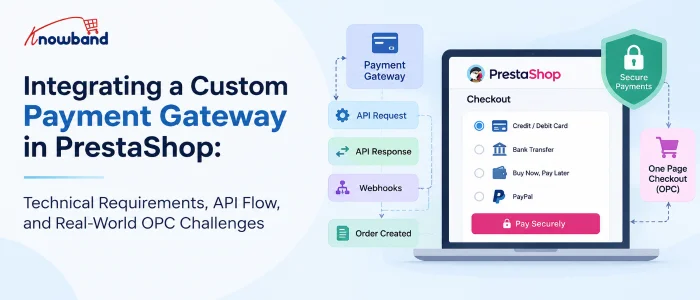
Integrating a payment gateway into PrestaShop can look straightforward on paper.
The gateway provides API documentation, sandbox credentials, authentication keys, callback URLs, and a few endpoints. The PrestaShop module then sends the payment request, receives the response, creates the order, and redirects the customer to the confirmation page.
In a real PrestaShop store, however, the payment gateway is rarely working alone.
The moment a store uses a One Page Checkout (OPC) module such as SuperCheckout, multiple payment modules, custom payment flows, iframes, JavaScript-based payment methods, and additional checkout customizations can all interact with each other.
This is where many payment integrations become difficult.
During payment gateway compatibility work, we have encountered cases where a payment method worked perfectly with PrestaShop’s default checkout but behaved differently inside OPC. For example, a payment provider could display correctly on the standard checkout while options such as BLIK, bank selection, or BNPL disappeared inside SuperCheckout.
The important lesson was that integrating a payment gateway is not only about making the API call work. It is about making the entire payment lifecycle work correctly inside the PrestaShop checkout.
1.0 What Does a Custom Payment Gateway Actually Need?
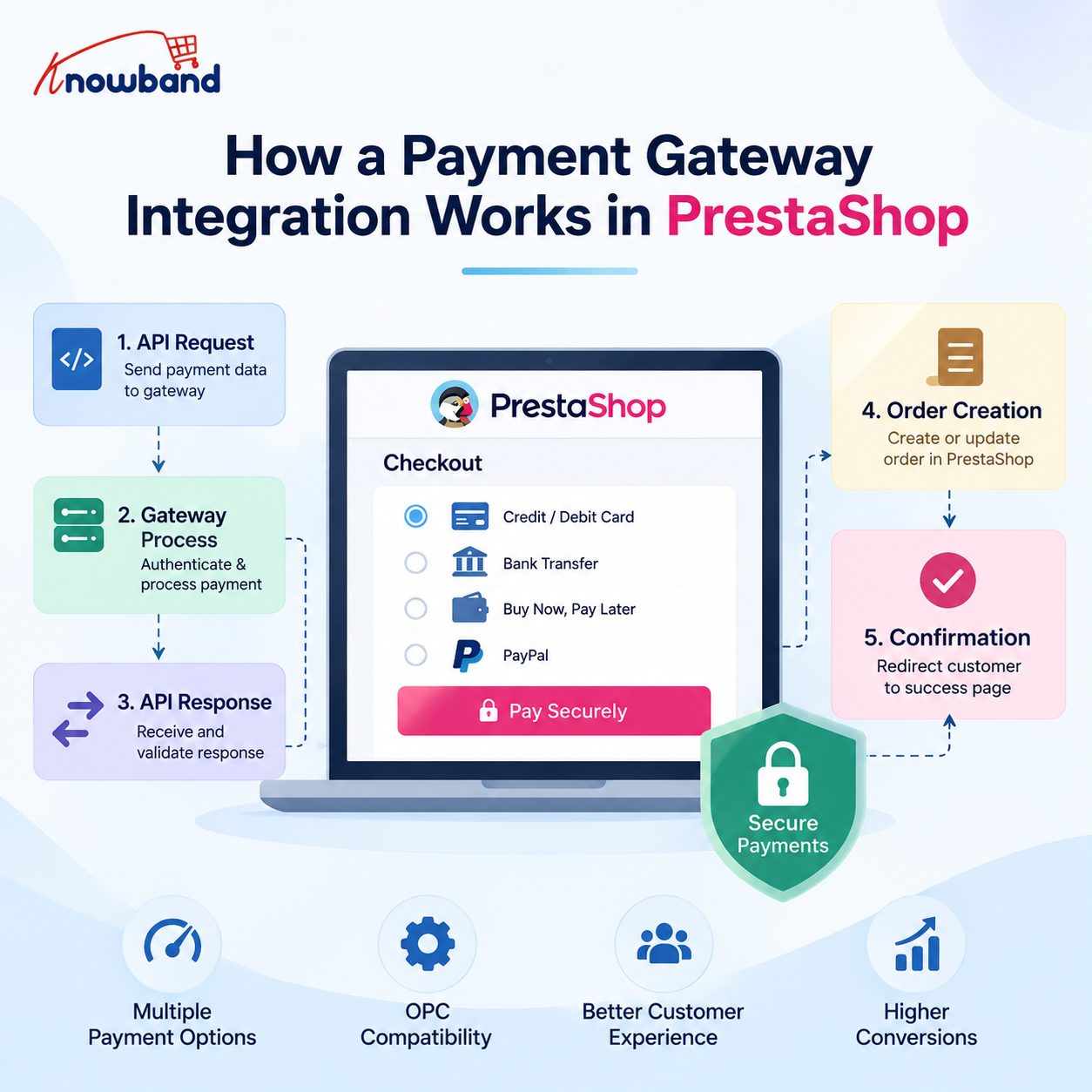
At a high level, a PrestaShop payment integration needs to handle five things:
- Display the payment method at checkout.
- Send the customer or payment data to the gateway.
- Receive and validate the gateway response.
- Create or update the PrestaShop order correctly.
- Return the customer to the appropriate confirmation or error page.
A typical payment module extends rather than the base class.
The payment module normally works with hooks such as:
The hook is responsible for making the payment method available to the checkout.
The hook handles what the customer sees after returning from the payment process.
For example:
public function hookPaymentOptions($params)
{
if (!$this->active || !$this->checkCurrency($params['cart'])) {
return [];
}

$paymentOption = new PaymentOption();

$paymentOption
->setCallToActionText($this->l('Pay by Card'))
->setAction(
$this->context->link->getModuleLink(
$this->name,
'redirect',
[],
true
)
);

return [$paymentOption];
}
The important point is that this hook should not simply assume that the payment method can always be displayed.
Currency, country, carrier, customer state, cart amount, module configuration, and gateway availability can all affect whether the payment method should be shown.
2.0 The Part That Changes Everything: OPC
The default PrestaShop checkout and a Prestashop One Page Checkout module do not necessarily process payment methods in exactly the same way.
This was one of the most important lessons from working with multiple payment modules.
With the default checkout, a payment module generally controls its own payment option rendering and payment flow.
With an OPC, the checkout module becomes another layer between the payment module and the customer. That means the following can interact:
Customer
↓
OPC / SuperCheckout
↓
Payment options
↓
Payment module
↓
Gateway API
↓
Gateway response
↓
Payment module
↓
OPC / PrestaShop
↓
Order confirmation
A payment module can therefore be completely correct from an API perspective and still fail to behave correctly inside an OPC.
This is why payment compatibility testing should always include both:
- PrestaShop default checkout
- The actual OPC used by the store
Testing only the default checkout can give a false sense that the integration is complete.
3.0 A Real-World Example: PayU Options Missing Inside OPC
One of the practical issues we encountered involved PayU payment options.
On the standard PrestaShop checkout, PayU was able to display its available payment methods correctly. However, inside SuperCheckout, some payment options were missing.
For example, depending on the configuration and cart:
- BLIK was not consistently visible.
- The bank-selection list did not expand correctly.
- Some BNPL/payment rows were missing.
- In some cases, BLIK appeared and then disappeared.
At first glance, this looked like a PayU API problem. It wasn’t.
The important diagnostic step was comparing the payment flow between the default checkout and SuperCheckout.
When the same payment module works on the default checkout but fails inside OPC, the investigation should move beyond the gateway API.
We need to check how the OPC builds the payment methods and what information it passes to the payment modules.
4.0 Payment Amount Can Affect Payment Method Visibility
One particularly important part of this investigation was the cart amount. Payment gateways frequently have minimum and maximum transaction limits. For example:
Payment Method
↓
Check cart amount
↓
Minimum amount? Maximum amount?
↓
Eligible / Not eligible
During the PayU compatibility investigation, we traced the payment-method filtering logic to the cart amount being passed through the payment-method checks.
The relevant flow involved PrestaShop’s cart calculation and payment-method filtering, including logic around:
Cart::BOTH
and:
PayMethodsCache::checkMinMax
This matters because a payment option can disappear from checkout without the API itself returning an error.
The gateway may simply be considered ineligible for the amount received by the payment module. That gives us an important debugging rule:
If a payment option disappears from an OPC, don’t immediately assume that the payment API is broken. First verify the cart amount, currency, minimum/maximum limits, and the values reaching the payment-method eligibility checks.
This becomes even more important when discounts, shipping costs, taxes, vouchers, or custom checkout calculations are involved.
5.0 Why Payment Methods Can Work in Default Checkout but Fail in SuperCheckout
A useful way to investigate these problems is to compare the two checkout environments.
5.1 Default PrestaShop checkout
Cart
↓
PaymentOptionsFinder
↓
paymentOptions hooks
↓
Payment modules
↓
Payment options
5.2 OPC checkout
Cart
↓
SuperCheckout
↓
Payment methods
↓
Payment modules
↓
Additional OPC processing
↓
Rendered payment UI
The second flow has additional moving parts.
Therefore, when debugging a payment issue, we don’t only check: “Does the payment module work?”
We check: “Does the payment module work when its output is consumed and rendered by this particular checkout implementation?”
That distinction saved a considerable amount of debugging time.
6.0 PaymentOption Is Only One Part of the Integration
From PrestaShop 1.7 onward, payment modules generally use outputting payment HTML through the older payment hook approach.
A payment option can contain information such as:
$paymentOption
->setCallToActionText(...)
->setAction(...)
->setInputs(...)
->setAdditionalInformation(...)
objects instead of directly
Different gateways require different combinations.
6.1 Redirect-based gateway
The customer clicks the payment method and is redirected to the gateway.
Checkout
↓
PaymentOption
↓
Module controller
↓
Gateway
6.2 Embedded payment form
The payment fields are displayed directly in the checkout.
Checkout
↓
PaymentOption
↓
Card/payment form
↓
Gateway API
6.3 Iframe-based payment
The gateway’s interface is embedded into the checkout.
Checkout
↓
PaymentOption
↓
Iframe
↓
Gateway
The last two approaches require additional attention because JavaScript, DOM manipulation, iframe loading, and OPC refreshes can affect the payment interface.
7.0 JavaScript Becomes Critical with OPC
This is one area that generic payment-integration guides often overlook.
An OPC can dynamically refresh portions of the checkout when the customer changes:
- delivery address
- country
- carrier
- payment method
- billing information
- shipping method
When that happens, payment-related HTML can be replaced.
A JavaScript event that worked during the initial page load may therefore stop working after an AJAX refresh.
For example:
Initial checkout load
↓
Payment JS initialized
↓
Customer changes payment/shipping information
↓
OPC refreshes payment section
↓
Original DOM replaced
↓
Payment JS no longer attached
This can produce confusing symptoms.
The payment method may appear initially, but clicking it does nothing. An iframe may disappear.
A bank list may stop expanding.
A payment option may appear and disappear after another checkout field changes.
Therefore, compatibility work often requires changes not only in PHP but also in the payment module’s JavaScript.
8.0 A Real Example: SimplyLease + SuperCheckout
Another example involved SimplyLease integration with SuperCheckout. The problem was not limited to the gateway API.
Some SimplyLease information and calculator elements were part of the checkout/payment presentation and needed to work correctly inside the SuperCheckout flow.
The compatibility changes involved both module templates and SuperCheckout-side JavaScript integration. The files involved included:
modules/simplylease/views/templates/hook/payment_info.tpl modules/simplylease/views/templates/hook/product_calculator.tpl

modules/supercheckout/controllers/front/SupercheckoutCore.php modules/supercheckout/views/js/front/supercheckout.js
modules/supercheckout/views/js/front/simplylease_supercheckout.js
This is a good example of why payment compatibility sometimes requires changes outside the payment gateway module itself.
The payment provider may expose the correct data, but the checkout still has to:
- Render it.
- Preserve it during checkout refreshes.
- Initialize the required JavaScript.
- Keep the payment information synchronized with the current cart.
9.0 Another Common Problem: Payment Method Not Appearing
We also encountered cases where a payment method such as Comfino did not appear in SuperCheckout even though the payment module itself was installed and configured.
This type of issue should be investigated systematically.
Check:
9.1 Is the module active?
$this->active
9.2 Is the currency supported?
$this->checkCurrency($params['cart'])
9.3 Is the country supported?
Some gateways restrict payment methods based on the customer’s country.
9.4 Is the cart total within the gateway limits?
Minimum and maximum transaction values can prevent a method from being displayed.
9.5 Is the carrier supported?
Some payment modules restrict payment methods by carrier.
9.6 Is OPC filtering the method?
The payment module can return valid methods that are collected, filtered, or rendered. But the OPC can still modify how payment
9.7 Is JavaScript hiding or replacing the element?
A payment method can technically be returned by PHP but still not be visible in the final checkout.
This is why browser developer tools are as important as PHP logs when debugging payment integrations.
10.0 Hooks We Actually Need to Pay Attention To
A custom payment integration should not be treated as a single-hook implementation.
The exact hooks depend on the gateway and checkout architecture, but some are especially important.
10.1 paymentOptions
This is the primary hook for exposing the payment method to the checkout.
It is responsible for returning paymentOptions objects.
Typical checks include:
if (!$this->active) { return [];
}
if (!$this->checkCurrency($params['cart'])) { return [];
}
Additional gateway-specific restrictions can then be applied.
10.2 paymentReturns
This is used after the customer has completed or returned from the payment flow. It can display:
- order reference
- payment status
- additional payment instructions
- gateway-specific information
10.3 actionPresentPaymentOptions
This hook becomes particularly interesting when multiple payment modules and an OPC are involved.
It operates on the assembled payment options and can be useful when the checkout needs to inspect or modify the complete payment-option collection.
This is different from implementing a single gateway’s paymentoptions hook.
The distinction is important:
aymentOptions
↓
Each payment module contributes its option
actionPresentPaymentOptions
↓
The assembled payment options can be processed
When debugging OPC compatibility, understanding where payment options are collected versus where they are finally presented can make the difference between finding the issue quickly and spending hours inside the gateway module.
11.0 Order Creation: Never Trust the Browser
Once payment reaches the gateway, the next critical step is order creation. The most important PrestaShop method here is:
validateOrder()
A simplified example is:
$this->module->validateOrder(
$cart->id, Configuration::get('PS_OS_PAYMENT'),
$amountPaid,
$paymentMethod,
$message, [],
null, false,
$customer->secure_key
);
There are three values that deserve particular attention:
11.1 Cart ID
The cart must belong to the expected customer/session and must be valid.
11.2 Payment amount
Do not blindly use:
$cart->getOrderTotal()
as proof that the gateway received that amount.
The amount should be validated against the gateway’s response.
11.3 Secure key
The customer must be correctly associated with the cart/order flow.
12.0 Webhooks Must Be Idempotent
A payment gateway can send the same webhook more than once. For example:
Gateway
↓
Webhook
↓
Your server
↓
200 response
If the response is lost:
Gateway
↓
Webhook
↓
Your server
↓
Response lost
↓
Gateway retries
If the integration creates an order every time it receives a webhook, duplicate orders become possible. Therefore, the callback should check whether the cart already has an order before creating another one. Conceptually:
if ($cart->OrderExists()) {
// Already processed
// Return successful response
}
The webhook handler should be designed to safely process repeated notifications.
13.0 Synchronous vs Asynchronous Payment
Not every gateway confirms payment immediately.
13.1 Synchronous
The gateway immediately confirms the transaction.
Customer
↓
Gateway
↓
Payment approved
↓
validateOrder()
↓
PS_OS_PAYMENT
↓
Confirmation
13.2 Asynchronous
The customer may return before the final payment confirmation arrives.
Customer
↓
Gateway
↓
Return to store
↓
Pending order
↓
Webhook
↓
Verify payment
↓
Change order state
↓
Payment accepted
For asynchronous gateways, using a dedicated pending order state is often safer than immediately marking the order as paid.
Once the webhook confirms the payment:
$history = new OrderHistory();
$history->id_order = (int) $order->id;
$history->changeIdOrderState( Configuration::get('PS_OS_PAYMENT'),
$order
);
$history->addWithemail(true);
This ensures that the order-state transition goes through PrestaShop’s order-history mechanism instead of simply changing the database value.
14.0 One of the Most Useful Debugging Techniques: Compare the Checkout Flows
When a payment method works in the default checkout but not in OPC, we recommend comparing the complete flow.
Step 1: Check PHP
Is hookPaymentOptions() executed?
Step 2: Inspect the returned options
Does the payment module actually return a paymentOption?
Step 3: Check the cart
Compare:
- total
- currency
- customer
- country
- carrier
- discounts
- taxes
- shipping
Step 4: Check the browser
Look for:
- JavaScript errors
- missing DOM elements
- AJAX requests
- failed requests
- iframe errors
Step 5: Check the OPC
Determine whether SuperCheckout is:
- filtering the payment option
- replacing its HTML
- refreshing the payment section
- changing the cart before the payment module runs
Step 6: Check the gateway
Only after the local checkout flow is confirmed should the investigation move deeper into:
- API authentication
- request payload
- signature
- response
- webhook
- gateway logs
This layered approach is much faster than starting with the gateway API every time.
15.0 Common Payment Integration Problems We Have Seen
Real-world compatibility work usually exposes problems that aren’t obvious from the gateway documentation.
15.1 Payment option disappears
Possible causes:
- unsupported currency
- country restriction
- cart amount outside gateway limits
- carrier restriction
- OPC filtering
- payment module configuration
- JavaScript hiding the method
15.2 BLIK or another payment option appears and disappears
Possible causes:
- checkout AJAX refresh
- payment-option re-rendering
- JavaScript initialization
- cart total changing
- gateway eligibility being recalculated
15.3 Bank list does not expand
Often investigate:
- JavaScript errors
- dynamically replaced DOM elements
- event handlers attached before OPC refresh
- payment provider’s JavaScript initialization
15.4 Iframe disappears
Investigate:
- checkout refresh
- iframe initialization
- DOM replacement
- JavaScript execution after AJAX updates
15.5 Payment succeeds, but order remains pending
Check:
- webhook URL
- webhook delivery
- signature verification
- cart/order lookup
- order-state transition
- callback authentication
15.6 Payment method works in default checkout but not OPC
This is a strong indication that the problem may be in the interaction between the payment module and the OPC rather than the gateway API itself.
16.0 Security Requirements for a Payment Module
Payment modules handle sensitive operations, so security cannot be treated as an optional improvement. At minimum:
- Validate callback signatures.
- Validate the cart/customer relationship.
- Use HTTPS.
- Validate TLS certificates.
- Never trust payment status supplied only by the browser.
- Never store raw card information unless the architecture and compliance requirements explicitly support it.
- Do not log sensitive payment information.
-
Avoid serialize() and unserialize () / for untrusted external data. - Validate and cast incoming values.
- Protect custom AJAX and callback endpoints.
- Use secure tokens where appropriate.
- Make webhook processing idempotent.
A payment success page is not proof of payment.
The gateway’s verified server-side response is what should determine whether the order is considered paid.
17.0 What Changes When Supporting Multiple Payment Modules?
Another lesson from OPC compatibility work is that adding a second or third payment module can expose problems that were not visible when only one payment method existed.
For example:
PayPal PayU
Comfino
SimplyLease
Bank transfer
may all contribute payment options to the same checkout. The checkout therefore has to deal with different:
- HTML structures
- JavaScript
- iframe requirements
- redirects
- API flows
- eligibility rules
- minimum/maximum amounts
- asynchronous callbacks
A change made for one payment method can accidentally affect another. This is why payment compatibility fixes should be narrowly scoped.
For example, instead of changing the entire payment-option processing logic globally, identify the specific payment method and apply the compatibility handling only where required.
18.0 Testing Should Include Real Cart Scenarios
Testing a payment gateway with a simple €10 product is not enough. A proper test matrix should include:
| Scenario | What to verify |
| Single product | Payment option appears |
| Multiple products | Correct amount reaches gateway |
| Discount | Final payable amount is correct |
| Shipping charge | Gateway receives correct total |
| Tax | Gateway amount matches order |
| Minimum gateway amount | Method appears/disappears correctly |
| Maximum gateway amount | Method appears/disappears correctly |
| Unsupported currency | Method is hidden |
| Unsupported country | Method is hidden |
| Default checkout | Payment works |
| OPC | Payment works |
| Mobile checkout | UI works |
| Failed payment | Correct order/payment state |
| Successful payment | Order is created correctly |
| Webhook retry | No duplicate order |
| Customer abandonment | No incorrectly paid order |
| Gateway timeout | Correct pending/error handling |
For OPC integrations, also test checkout refreshes. Change the:
- address
- carrier
- country
- payment method
- quantity
- discount
and verify that the payment options remain correct after every refresh.
19.0 A Practical Development Approach
Based on the issues that commonly appear in real integrations, a safer development order is:
19.1 Make the gateway work with default PrestaShop checkout
First establish that:
PaymentOption
↓
Gateway request
↓
Gateway response
↓
validateOrder()
↓
Confirmation
works correctly.
19.2 Add callback/webhook processing
Do not leave asynchronous confirmation until the end.
19.3 Add proper order-state handling
Test:
- success
- failure
- pending
- timeout
19.4 Test with realistic carts
Use discounts, shipping, taxes, different currencies, and different totals.
19.5 Integrate with OPC
Only after the basic gateway flow is stable should you investigate SuperCheckout compatibility.
19.6 Test JavaScript and dynamic refreshes
This is particularly important for embedded payment forms, iframes, BLIK/bank-selection interfaces, and other interactive payment components.
19.7 Test every payment method together
A checkout that supports five payment methods needs to be tested as a system, not five isolated modules.
20.0 Should You Build a Custom Gateway or Use an Existing Module?
Not every gateway justifies a custom integration. A custom module makes sense when:
- the gateway is regional or niche
- there is no maintained PrestaShop module
- the gateway requires custom business logic
- you need a specific subscription or settlement workflow
- you need functionality that existing modules cannot provide
But building a payment integration also means accepting the maintenance responsibility. PrestaShop changes.
PHP changes. Gateway APIs change.
Security requirements change. Checkout modules change.
And eventually the payment provider changes something that breaks an otherwise stable integration.
For mainstream gateways, an established and maintained module can therefore be significantly cheaper than maintaining custom payment code for several years.
21.0 The Bigger Lesson From PrestaShop Payment Integration
The biggest lesson from working with payment gateways is that the API is often not the hardest part. Sending:
API request → API response
is usually straightforward.
The difficult part is everything around it:
┌── Currency rules
├── Country rules
├── Cart amount
├── Carrier restrictions
├── OPC
├── JavaScript
├── Iframes
├── AJAX refreshes
├── Webhooks
├── Order states
└── Duplicate notifications
↓
Customer → Checkout → Payment Module → Gateway
↓
Order creation
↓
Order confirmation
A payment integration is successful only when the entire chain behaves consistently.
This is also why an issue such as “BLIK is missing” or “the bank list does not open” should not immediately be treated as a gateway API problem.
The actual cause could be a cart-total calculation, payment-method eligibility check, OPC rendering, JavaScript initialization, or an AJAX refresh replacing the payment interface.
22.0 Final Checklist for a Custom PrestaShop Payment Gateway
Before considering the integration complete, verify:
- Payment module extends PaymentModule.
- paymentOptions is implemented correctly.
- paymentReturn is implemented where required.
- Payment options use paymentOptions.
- Currency restrictions are checked.
- Country and carrier restrictions are checked where applicable.
- Cart totals are validated.
- Gateway responses are verified.
- Callback signatures are validated.
- ValidateOrder() is called only after successful payment verification.
- The amount used for the order is validated against the gateway response.
- Webhooks are idempotent.
- Duplicate notifications do not create duplicate orders.
- Correct order states are used.
- Failed and pending payments are handled separately.
- Sensitive payment data is never unnecessarily logged or stored.
- HTTPS is enforced.
- Default PrestaShop checkout has been tested.
- OPC has been tested separately.
- JavaScript has been tested after AJAX checkout refreshes.
- Iframes and interactive payment elements have been tested.
- Multiple payment modules have been tested together.
- Realistic carts with discounts and shipping have been tested.
Conclusion
A custom payment gateway in PrestaShop is more than an API integration.
The API is only one piece of the implementation. The real engineering challenge begins when the payment module has to coexist with PrestaShop’s checkout, an OPC such as SuperCheckout, other payment modules, dynamic JavaScript, cart recalculations, and asynchronous gateway callbacks.
Our experience with payment compatibility issues reinforced one important approach: always isolate where the failure occurs before changing code.
If the payment method is not returned by PHP, investigate the payment module and its eligibility rules. If PHP returns it but the customer cannot see it, investigate the OPC and frontend rendering. If the UI appears but does not respond, investigate JavaScript and AJAX refreshes. If the payment succeeds but the order remains pending, investigate the callback and order-state flow.
This approach is much more reliable than assuming every payment problem is an API problem.
For developers working on PrestaShop payment integrations, the goal should not simply be to make a gateway accept a transaction. The goal is to make the entire payment lifecycle reliable—from the first checkout render to the final verified order state—even when multiple payment methods and a customized OPC are involved.
If you have questions or need assistance with your website performance or migration, our experts are here to help. Contact the Knowband team at support@knowband.com today for reliable eCommerce plugins tailored to your eCommerce needs.
👉 Explore the Module with Our Video Guide
