COD stands for Cash on Delivery, the most familiar word we see while we shop. Cash on Delivery means the customer will pay the amount of the package or product he/she ordered after he/she received it. Now the biggest question is, how beneficial is Cash on Delivery to eCommerce?
Benefits of Cash on Delivery
You might have enough cash on hand or perhaps a credit card to pay for your item right away. Why, therefore, do online and offline retailers offer payment upon delivery as a payment option? As I previously stated, some stores or enterprises want to increase their business by providing COD options. However, there are several advantages for you as well.
You can check your order before payment
Cash on Delivery is beneficial because it lets the customer get assured of the product he/she received. In case the product they order isn’t the correct one, the money will be in their hands. No more complaining about the product and asking for a refund.
COD gives you the freedom of buying the product from somewhere else in case you find the quality of the item inappropriate. Furthermore, you don’t lose anything if the order is messed up for whatever reason. You also don’t have to wait for the merchant to refund your money or force you to accept a substitute instead of canceling the order entirely.
Payments security
As a person, I prefer going with the COD option. In case you are purchasing something from online sellers such as Facebook Marketplace, Etsy, or Shopify, availing of COD facilities is always better.
Though there is nothing wrong with these platforms, it’s just their online payment systems might not be as secure as one would desire. Furthermore, I have come across online marketplaces, in some cases, as a marketplace they only accept payments only from a specific payment portal or app for their orders.
Therefore, it’s better to go with the cash on delivery option because then you don’t need to download another mobile wallet or app just to pay for a single order.
You have time for getting cash
Cash on Delivery gives you the freedom to cancel the order when you are out of cash. There must be times when you ordered something and you ran out of money, though such situations are rare but they’re not uncommon. There may be moments when our resources, particularly money, will be stretched thin. COD allows us a much-needed break in these situations, allowing us to arrange for the money or reconsider the order.
Cash on Delivery Modules offered by Knowband
Prestashop Cash on Delivery with fee addon
Prestashop Cash On Delivery with fee add-on offered by Knowband permitting the Prestashop store admin to offer the option of cash on delivery to all their online clients. Furthermore, with the help of this add-on admin can now encourage customers to finish their order regardless of whether they want to go via the entire process of online payment. This module even permits eCommerce merchants to fix the terms and conditions and even fees for the COD.
Features of Prestashop Cash on Delivery with fee addon
Allows store admin to providethe COD option to their clients with an additional fee
Addon allows the admin to charge a fee for the cash on delivery option which can be managed from the back-end.
Without sharing the bank details customers can shop from the site.
Boosts overall conversion of the website.
Increases the entire revenue of the website.
OpenCart Cash on Delivery with Fees extension
Keeping the requirement of COD, Knowband has offered OpenCart Cash on Delivery with Fees extension for Opencart merchants. This extension helps in eliminating the payment dependency on shopping cards. Moreover, it offers custom COD functionality to the customers. Customers can flexibly opt for cash on delivery payment during any product purchases from the store with this OpenCart extension.
Key features of OpenCart Cash on Delivery with Fees extension:
Permit COD option for items at your eCommerce store with an additional charge.
Allow clients to pay for their orders using the cash on delivery module for an additional cost.
With the OpenCart Cash on the Delivery plugin, you can add your payment gateway to your site so that clients can make purchases without having to provide their credit card information.
Create several COD profiles for different order quantities and shipping types.
With the COD option, the OpenCart Cash on Delivery module charges your customers a flat or percentage cost.
In case you find any trouble with the above module, feel free to write us at support@knowband.com
Most of the users believe that online payment methods are unsafe while shopping from an eCommerce store. As this involves sharing the details of payment cards, the majority of users find risk in transacting their product orders.
Knowband offers OpenCart Cash on Delivery with Fees extension which helps site admin to add a COD payment method at the checkout page for guests and registered users. Using this COD with Fee facility, the shopper has to pay an extra charge as a delivery service for that product. They have to pay the order cost when the product is delivered in hands by the merchants or sellers. This COD additional amount is decided by the site owner from the backend of this Opencart extension.
1.1 Striking Features of OpenCart Cash on Delivery with Fees Extension
OpenCart Cash on Delivery plugin offers many customizable features that can be set as per business requirements. No coding or technicalities are involved in the implementation and creating ‘N’ number of COD profiles from the backend interface. Let us explore the striking features of this COD module one by one.
OpenCart Cash on Delivery with Fees extension charges an extra amount from the customer as delivery fees for the product.
Cash on delivery fees extension for OpenCart integrates a pay on delivery option for your site products.
Customers can pay the product cost along with COD charges when they get the product delivered in their hands.
The site merchants can create an unlimited number of COD rules or profiles which can be modified and deleted as per requirements from the backend of this OpenCart cash on delivery facility module.
With OpenCart Cash on Delivery with the surcharge module, you can set the name of the payment profile.
The OpenCart COD option incorporated using this cash on delivery fees extension can be quickly enabled or disabled from the backend.
With OpenCart Cash on Delivery with the surcharge module, admin can specify different terms and conditions for every COD rule or condition.
Admin can enable or disable any of the COD profiles from the backend of this Cash on Delivery With Fee extension.
Admin can set the type and value for the COD fee charged from the customer using OpenCart CoD with the Fees module.
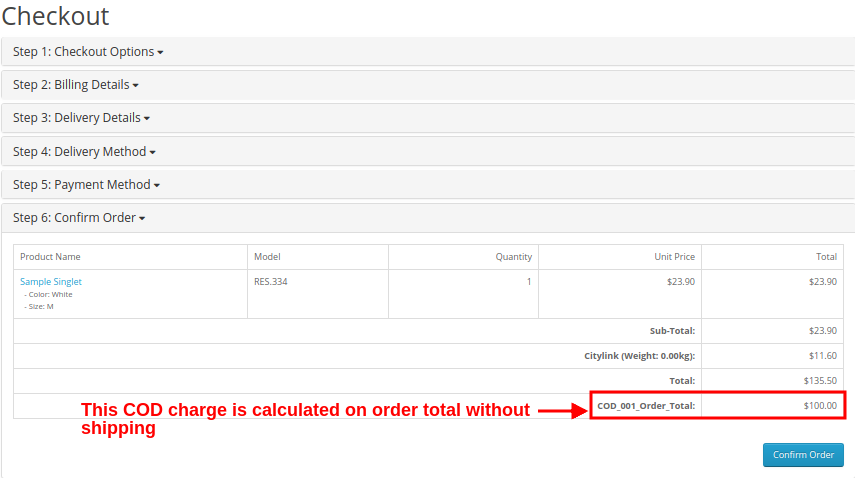
For percentage type COD charge, admin can set a base amount (with or without shipping ) on which the delivery charge is calculated.
With OpenCart cash on delivery with extra charges extension, admin can set a percentage amount which is calculated over the base amount.
With OpenCart Cash on Delivery with the surcharge module, the admin can specify the minimum and maximum order value upon which the COD will be calculated and charged from the customer.
With the help of OpenCart cash on delivery with extra charges extension, admin can enable COD with fee options for selected shipping or carrier methods.
This OpenCart COD with fee extension allows admin to select the location or country where they want to offer this cash on delivery with extra fee facility on product orders.
This COD with fee payment option integrated using OpenCart Cash on the Delivery plugin is shown to selected customer groups including guest users and customers.
With OpenCart CoD with the Fees module, an eCommerce site admin can choose a priority order or value for each of the COD profiles. The highest priority COD rule will be executed on the frontend.
Using OpenCart cash on delivery facility module, admin can also set initial order status for every COD profile.
OpenCart Cash on the Delivery plugin is multi-lingual compatible.
OpenCart cash on delivery with extra charges extension is multi-store compatible.
OpenCart Cash on Delivery with surcharge option is the browser and mobile-friendly.
2.0 Installation Guide of OpenCart Cash on Delivery with Surcharge Module
Purchase OpenCart Cash on Delivery with Fees extension from Knowband. You will receive these files after purchasing the OpenCart Module:
Source code of OpenCart CoD with Fees module in zipped file format.
User Manual of OpenCart CoD with Fees module.
Follow below-mentioned steps to install OpenCart Cash on Delivery with Fees extension on your online shop:
1. Unzip the received zip file. You will get the folders.
2. Copy all the folders of the zip file in the Root Directory of OpenCart setup via FTP manager.
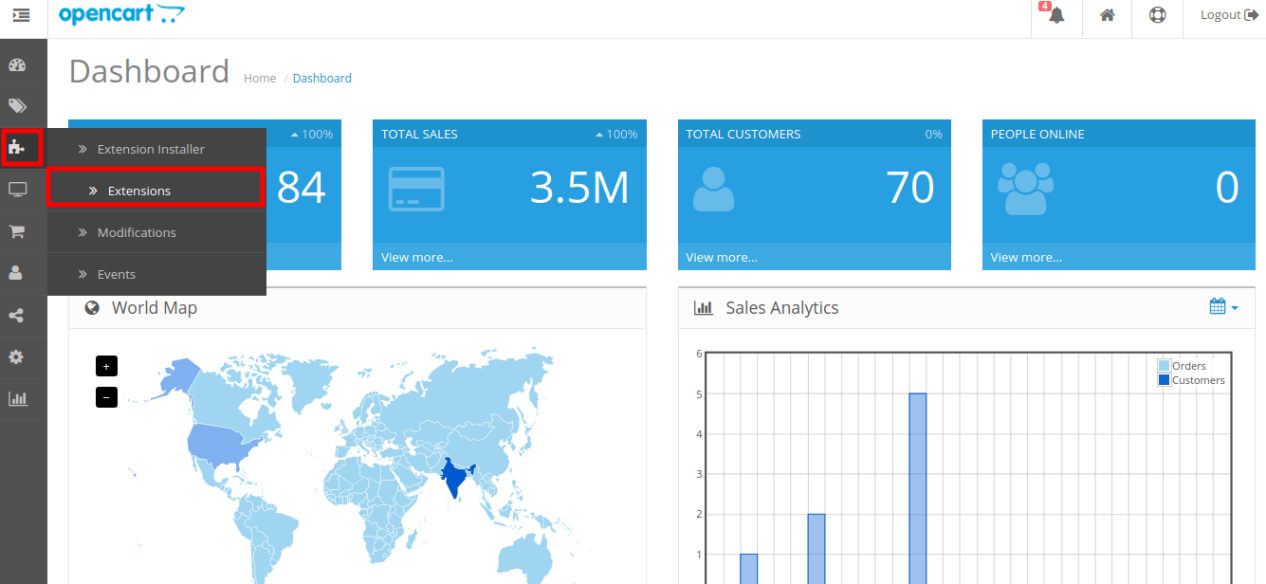
There will be a file named kbcodfee.ocmod.xml (In case of Openvar v3.0.x file name would be kbcodfee.ocmod.zip). Upload the same file from the page “Admin -> Extension -> Extension Installer -> upload”.
So, OpenCart CoD with Fees module is now successfully installed and ready to use at your store.
3.0 Admin Settings
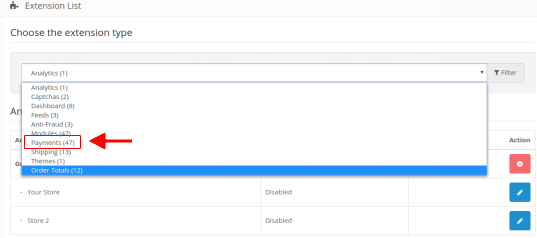
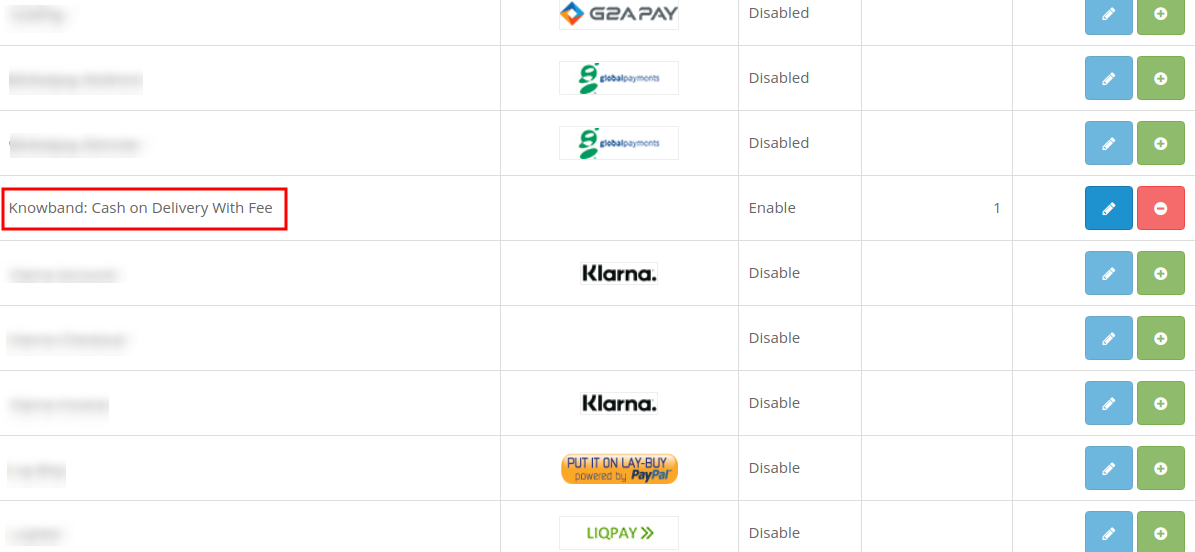
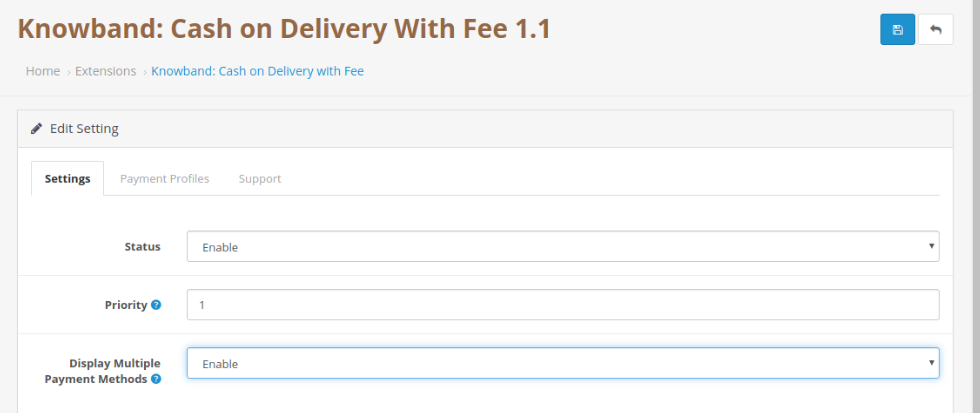
Just after the successful installation of OpenCart Cash on Delivery with Fees, you can create and configure the COD profiles as per your requirements. Navigate the settings in the given order: Admin Panel > Extensions > Payments > Knowband Cash on Delivery with Fee.
The simple to understand admin interface of OpenCart Cash on Delivery with Fees extension has been divided into two broad sections namely:
1. General Settings
2.Payment Profiles
Each of these sections have been discussed in detail below.
3.1 General Settings
The general settings of OpenCart cash on delivery facility module have been listed one by one.
Status: This option enables or disables the complete functionality of OpenCart Cash on Delivery plugin on the store.
Priority: This option allows you to set the priority of this module among other payment modules on the store.
3.2 Payment Profiles
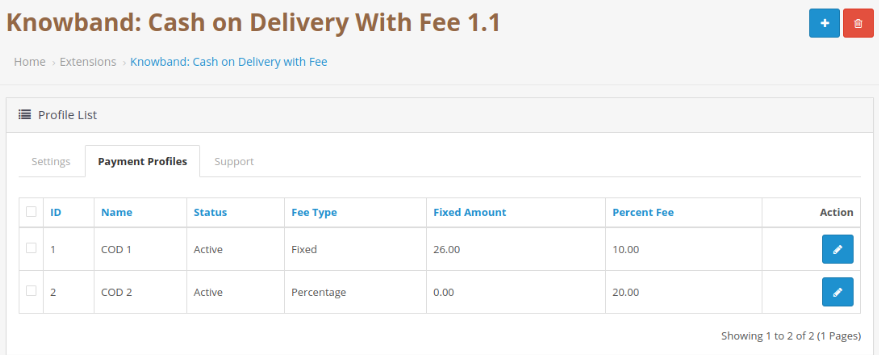
Using OpenCart Cash on Delivery with Fees, admin can create as many payment profiles for their website. The below image shows the list of existing COD profiles which can be modified by clicking the ”Edit” button corresponding to the listing.
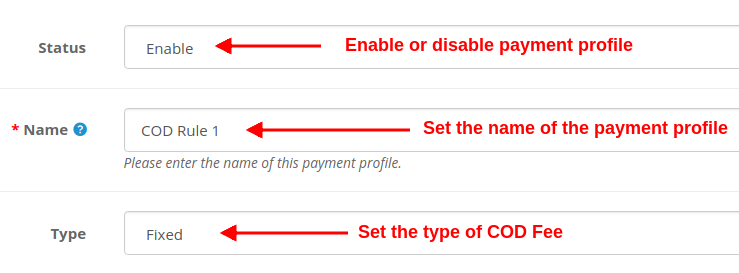
To add a new payment profile, click on the “+” button at the top right corner of admin panel. You will see the following fields as listed:
Status: Using this option, you can enable or disable the selected payment profile.
Name: This option will set the name for the payment profile.
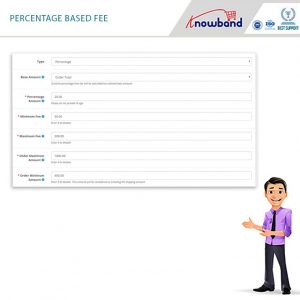
Type: This option sets the type of COD fee charged from the customers. It can be fixed or percentage.
If the “Type” field is selected as Fixed, then the following field is shown.
Fixed Amount: This option sets the fixed COD fee amount which is charged from the customer upon product delivery. If the “Type” field is selected as a Percentage, then the following fields are shown.
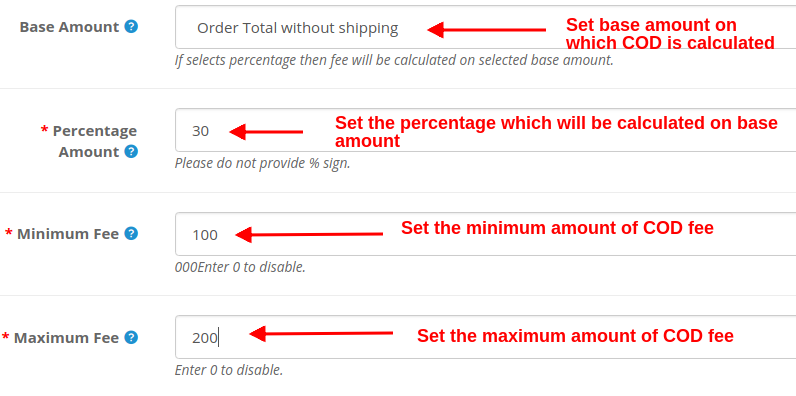
Base Amount: Select the base amount type on which the COD charge will be calculated. The two options are: Order Total and Order Total Without Shipping.
Percentage Amount: This option sets the percentage amount which is calculated over the base amount.
Minimum Fee: This option will set the minimum amount of COD fee which will be charged from the customer. Set this value 0 to disable.
Maximum Fee: This option will set the maximum amount of COD fee which will be charged from the customer. Set this value 0 to disable.
Apart from these settings offered by OpenCart Cash on Delivery with Fees, some more common settings are offered for setting up a payment profile. Check below.
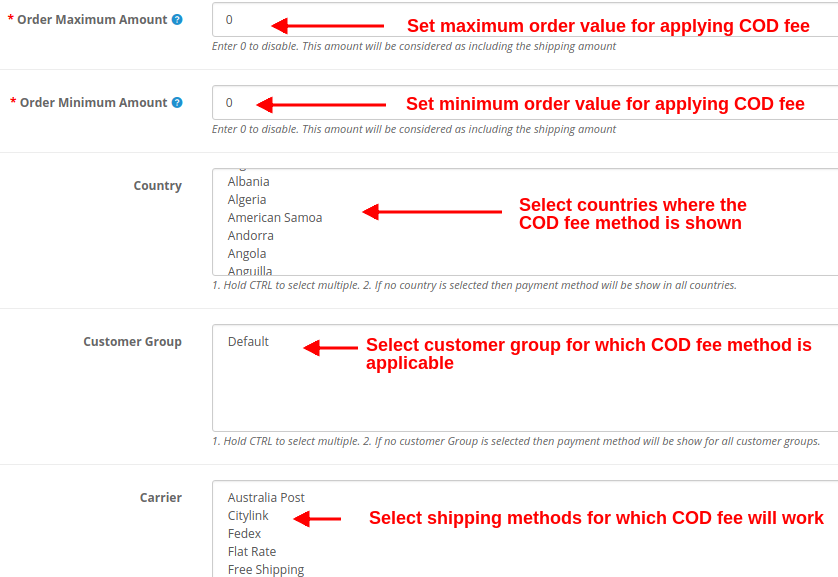
Order Maximum Amount: This option sets the maximum product order amount which is required to apply COD with fee facility. A customer cannot apply COD with fee facility on an order value above this Order Maximum Amount.
Note: Enter 0 to disable. This amount will be considered as including the shipping amount.
Order Minimum Amount: This option sets the minimum product order amount which is required to apply COD with fee facility. A customer cannot apply COD with fee facility on an order value below this Order Minimum Amount.
Note: Enter 0 to disable. This amount will be considered as including the shipping amount.
Country: Using this option, admin can show and provide the COD with fee facility in selected regions or country.
Note: Hold the CTRL button to select multiple countries. If no country is selected then COD with Fee payment method will be shown in all countries.
Customer Group: This option allows admin to select the customer groups where the Cash on Delivery with Fee mode is applicable. Guest and Registered users can avail of the benefits of COD with Fee facility.
Note: Hold the CTRL button to select multiple customer groups. If no customer Group is selected then COD with fee method will be shown to all customer groups.
Carrier: You can select the carrier or shipping methods for which the COD with Fee module will be shown.
Note: Hold the CTRL button to select multiple carriers. If no carrier is selected then the payment method will be shown for all carriers.
Initial Order Status: This option sets the initial order status for the selected COD rule.
Priority: This option sets the priority of the COD rule or profile.
Note: The highest priority rule is displayed on the front of the customers.
At last, click on the “Save” button at the top right corner of the admin interface in order to save the configured settings.
4.0 Front Interface
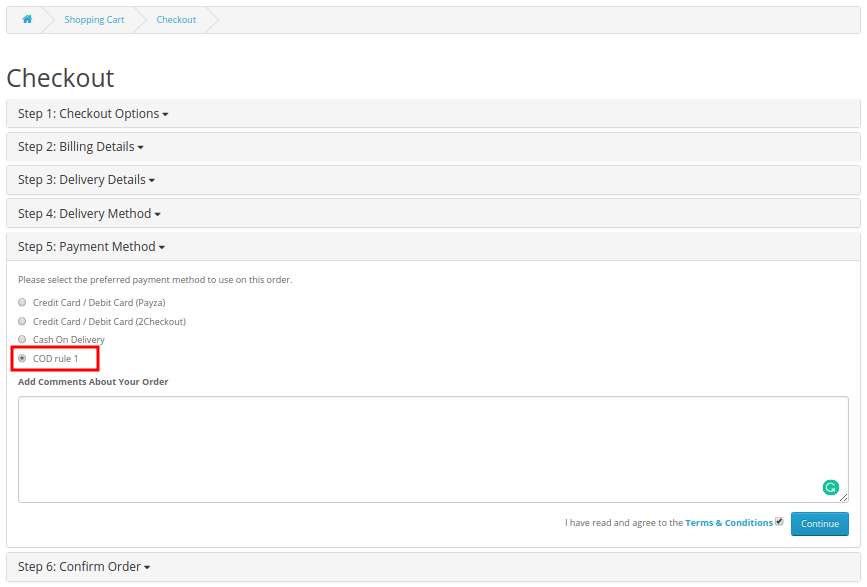
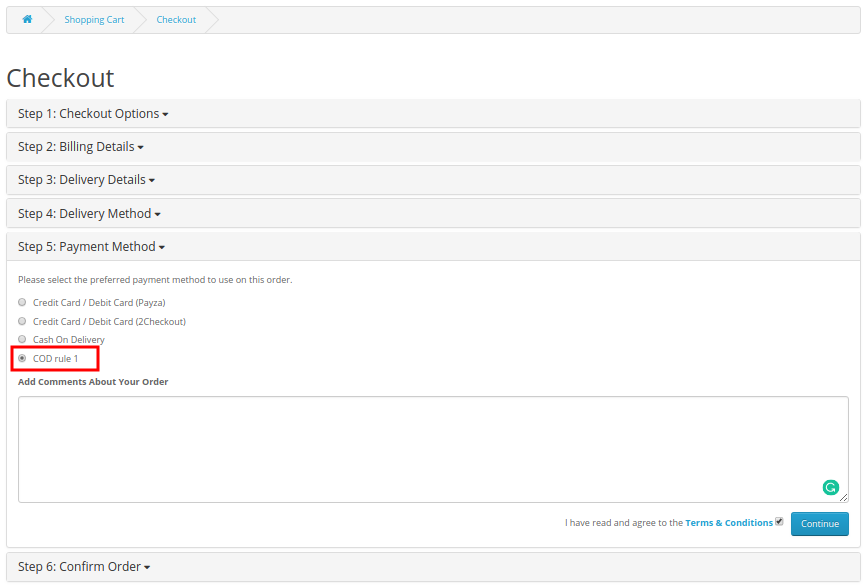
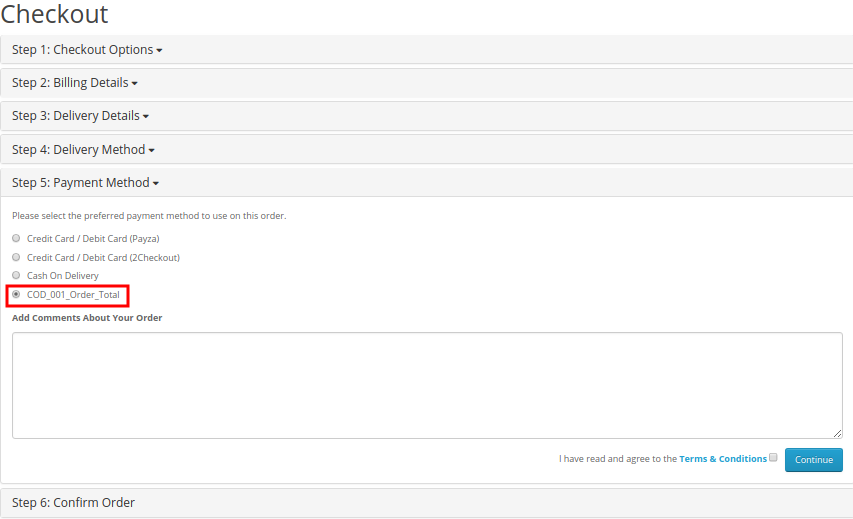
How can registered customers or guest users avail this facility? To use COD with additional charge facility on product orders, shoppers have to perform simple checkout for the product. They have to add the product to their cart and select the desired shipping method. Depending upon the type of shipping method selected by the user, OpenCart Cash on Delivery with Fees shows the payment methods as shown in the image below:
Now, as the customer will select the COD with fee option, they will be shown the total order cost along with the surcharge as shown in the image below:
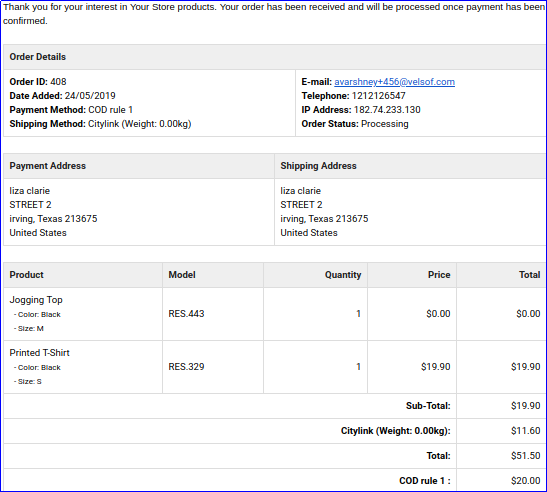
Now, as the customer will confirm their “COD with fee” order, then they will get a confirmation email detailing the order price details including the COD additional charge.
A) Fixed Type COD Price Rule
B) Percentage Type COD Price Rule
This way, the online merchant can offer a facility to pay at delivery time. Customers can easily pay the cash to the delivery person at the time of delivery. Most of the time customers do not trust the online store, especially while placing the first order. This way, the e-merchant can open doors for the first time buyers and those customers who don’t like paying the order amount online. OpenCart Cash on Delivery with Fees extension is highly customizable and offers the complete setup for offering cash on delivery option. The online merchant can create multiple payment profiles from the admin interface of this OpenCart Cash on Delivery plugin and set a fixed/percentage-based fee. The OpenCart Cash on Delivery with surcharge module is highly customizable and allows the store admin to select the countries, customer groups and carrier options for applying cash on delivery fees. The cash on delivery module with extra fee is mobile responsive, multi-lingual compatible, and SSL compatible also.
Check out our Tutorial Guides for the OpenCart Cash on Delivery with Fee Extension by KnowBand
These tutorials walk you through:
Installing the OpenCart Cash on Delivery with Fee Extension
Configuring COD fees for different payment options
Setting up minimum and maximum order amounts for COD
Managing fee rules based on customer groups or locations
Testing the checkout process with COD fees applied
These step-by-step guides are ideal for store owners who want an easy-to-follow, beginner-friendly approach to adding and managing COD fees without any technical hassle.
For more details about this OpenCart CoD with Fees module, visit here: