1.0 Introduction
Magento messenger chat module for Magento store is a feature-rich Magento extension for providing live chat support to the store customers. Magento Facebook messenger integration extension by Knowband integrates the Facebook messenger on the website. The customers can ask their concerns and query easily just by sending a message. This Magento social live chat support plugin is the best way to provide support and improving customer experience.
By using this Magento live chat support extension the store admin can communicate with the customers directly, this way the admin can build a better customer relationship with the buyers. The store owner can configure this Magento Facebook messenger integration extension according to the requirement and activate or deactivate the module anytime. The online seller can incorporate the functionality by entering Facebook page id and app id in the admin interface. With the help of this Magento Messenger live chat extension, the admin can provide online customer support just by following some easy steps. The e-merchant can also set the look and feel of the social messenger icon by selecting its color. this way the store owner can easily implement the Magento Messenger live chat extension and improve the product/brand popularity.
1.1 Features
- The eCommerce store admin can offer live chat support option on the website for providing better customer support and communicate with the customers directly.
- The store admin can incorporate Facebook messenger on the website with the help of this Magento messenger chat module for Magento store.
- It is absolutely easy to install, configure and activate this Magento Facebook messenger integration extension.
- The eCommerce store owner can easily communicate with the customers and resolve their issues at the same time.
- The admin needs to generate and enter the Facebook app id and page id in order to display Facebook messenger on the website.
- The store owner can also set the look and feel of the messenger by selecting its color from the admin interface of this Facebook messenger and live chat extension.
- The admin can show social messenger on selected pages. The Magento social live chat support plugin allows the admin to select the pages for showing the live chat option.
- The Facebook messenger and live chat extension allow the admin to set the time after which the messenger will display.
- The store admin can also set different greeting messages for Facebook logged-in and logged-out customers.
- The messenger multilingual live chat support module is multi-lingual and SSL compatible.
- User-friendly and easy to understand interface makes this Magento social messenger extension more useful.
- No technical skills are required for implementing this Magento facebook messenger integration extension.
1.2 Admin benefits
- Online store admin can communicate with the customers and resolve their concerns and answer their queries by chatting on Facebook messenger.
- The customers can get a chance to connect with the store admin directly and clear all the confusions.
- The store admin can increase sales and conversions by developing a customer relationship.
- The highly customizable Magento social live chat support plugin is very easy to implement.
- The store owner needs to generate and enter the Facebook app ID and page ID in order to integrate the Facebook messenger on the store.
- The store admin can set the messenger color according to the website theme easily from the admin interface of this Magento Messenger live chat extension.
- By using this Magento messenger chat module for Magento, the store admin can offer live chat support to the users.
- By resolving the concerns and answering the queries the store admin can boost the sales and conversion rate easily.
- The admin can build a relationship with the customers by offering them the best class support.
2.0 Installation Steps
The store admin can follow these simple steps for installing the Messenger live chat module:
1. First of all download the extension package from the Knowband store.
2. You will get a zipped file. Unzip the package on the root folder of your Magento setup via FTP manager (like Filezilla or WinSCP – download here: https://filezilla-project.org/). You’ll find the files and folders as shown in the image below:
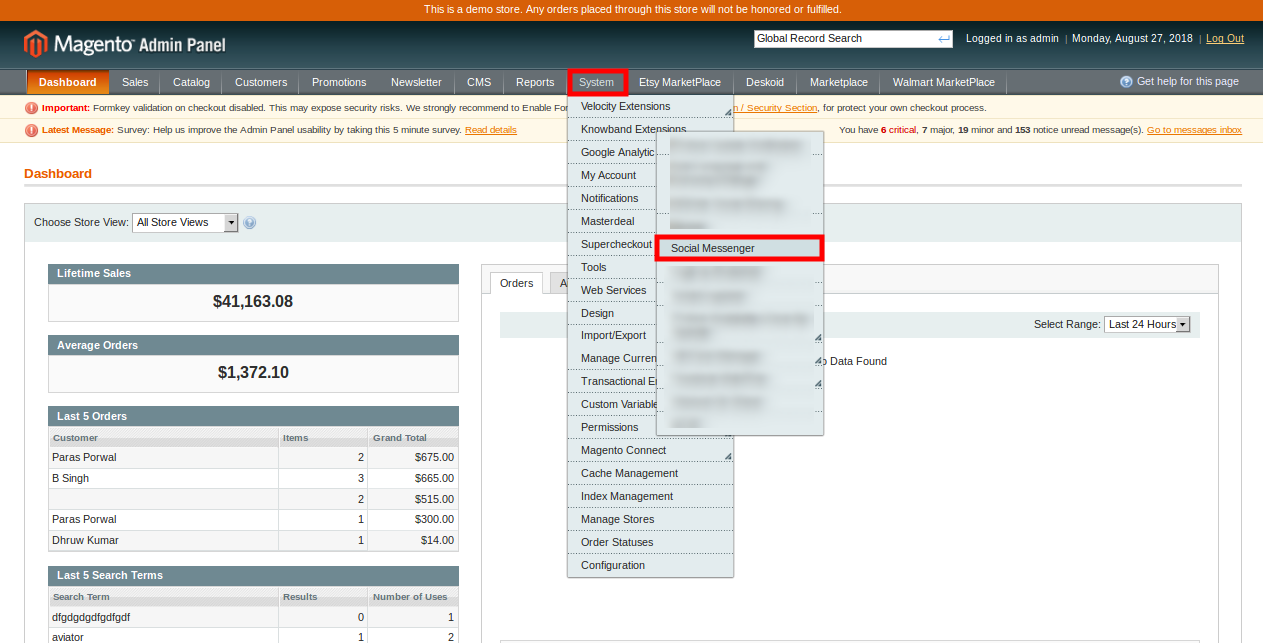
3. The extension is now installed and ready for use. In the Admin Panel, go to “System > Knowband Extensions >Magento social messenger”.
Now the store admin can now use and configure the Magento social messenger extension.
3.0 Admin interface
After installing the Magento social messenger module, the store admin can view the below-mentioned configuration option:
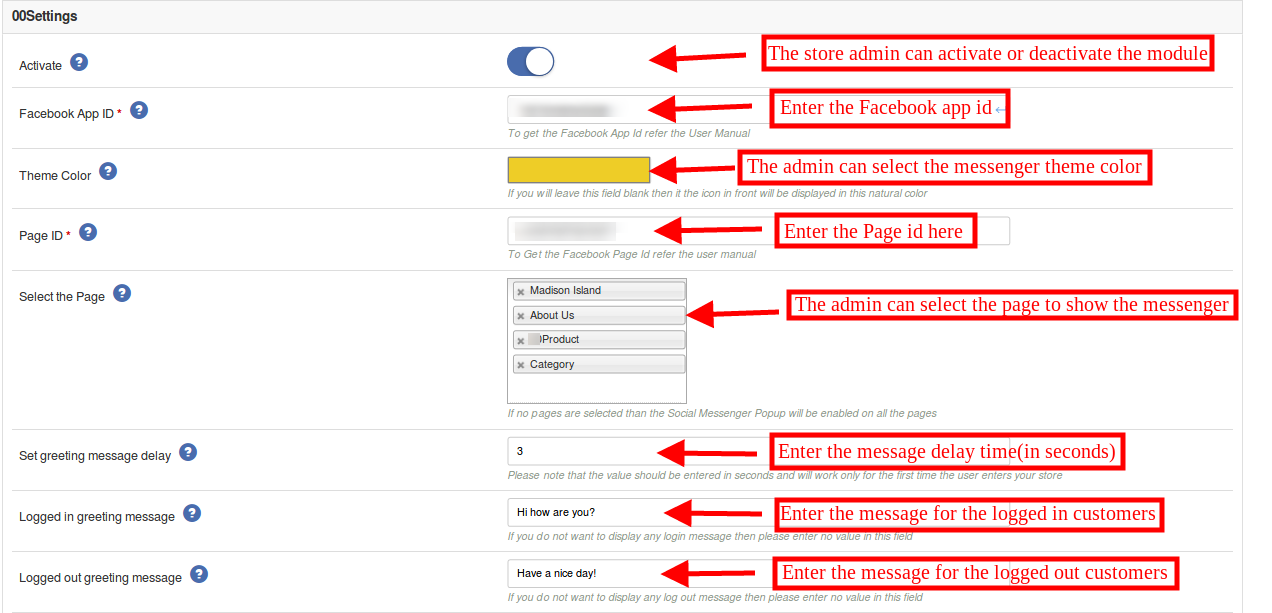
1. Enable/Disable: The store admin can activate or deactivate the Magento social live chat support extension just by clicking on this option.
2. Facebook APP ID: The store admin can generate the enter the Facebook app id here. The admin can generate the Facebook app id by following the steps provided in 3.1 section.
3. Theme Color: The admin can set the theme color by selecting the messenger color. The admin can select the messenger color as per the store theme.
4. Page ID: The store admin can generate the Facebook page id and enter the page id in order to offer a live chat option. For generating the Facebook page id, please follow the steps provided in 3.2 section.
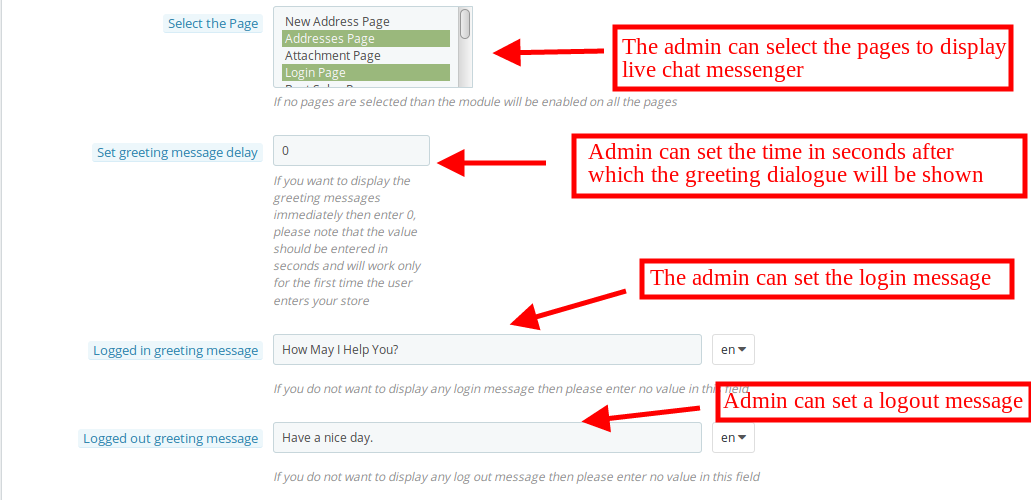
5. Select the Page: The Magento Facebook messenger integration extension provides an option to select the pages for displaying the Facebook messenger.
6. Set Greeting Message Delay: The online store owner can set the time (in seconds) after which the customers can view the greeting message on the website. If the store owner wants to show the greeting message without any delay, then he can enter the time ”0”.
7. Logged-in Greeting Message: The Magento social live chat support plugin allows the admin to display a greeting message for Facebook logged-in customers. The store admin can leave this customization option if he doesn’t want to show this message.
8. Logged-out Greeting Message: The admin can show a specific message for those customers which are logged-out to the Facebook. The admin can leave the section empty if he doesn’t want to show any message.
3.1 Steps to generate Facebook app ID
In order to generate a Facebook app id please follow these steps:
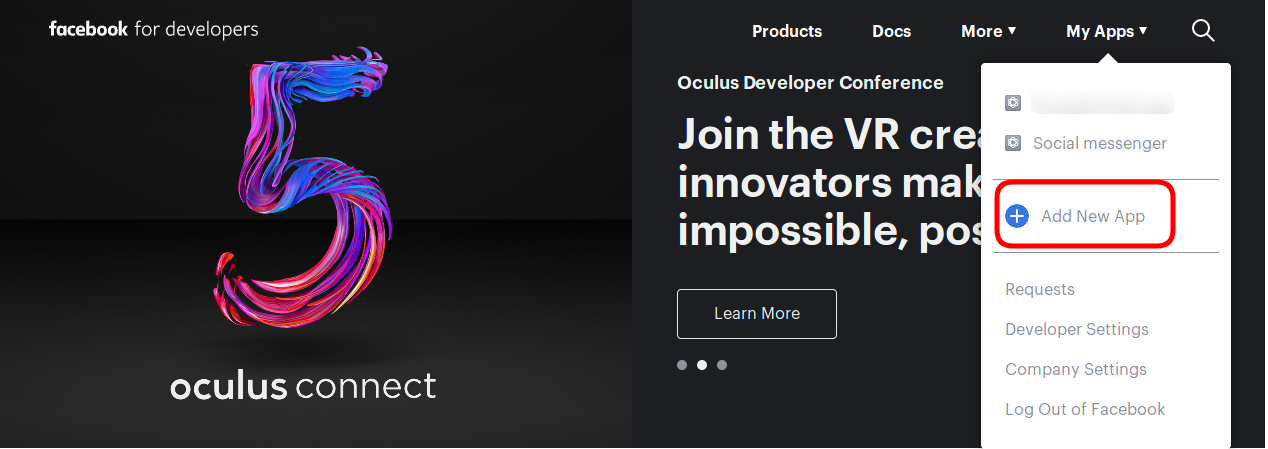
- First of all log-in to the Facebook account and go to the link mentioned here: https://developers.Facebook.com/
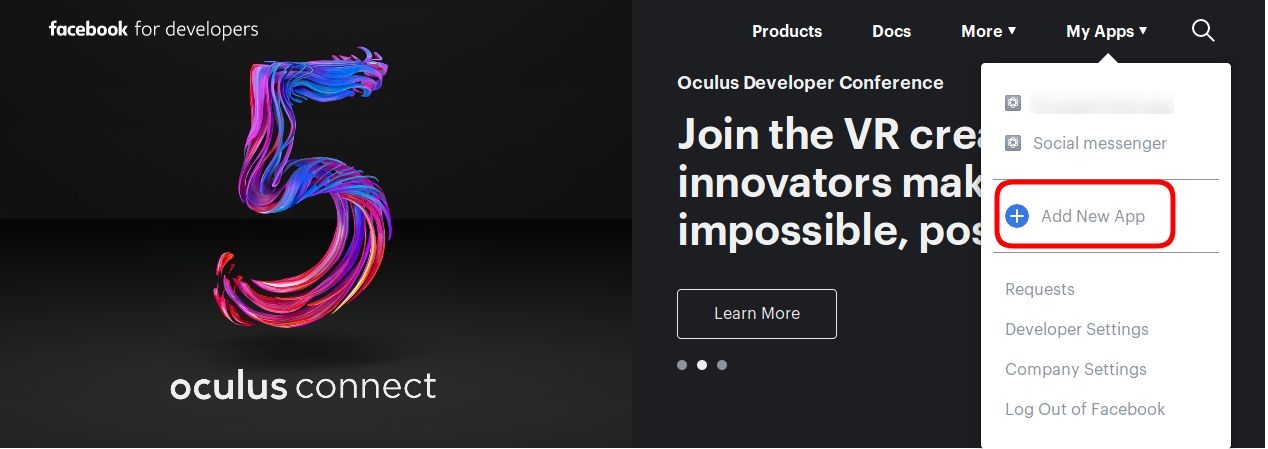
- Go to “MY APPS” and click on the ”ADD NEW APP” option.
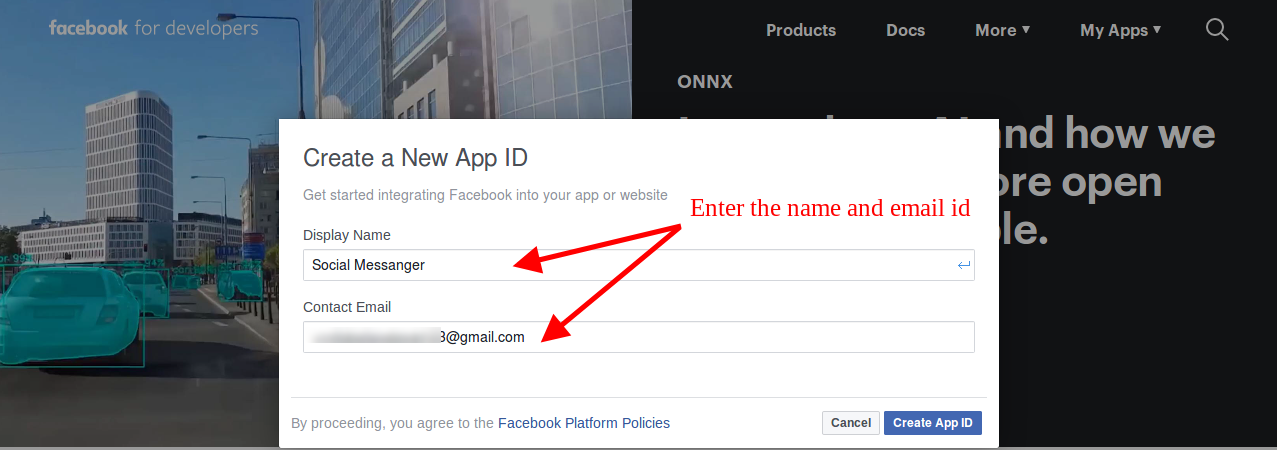
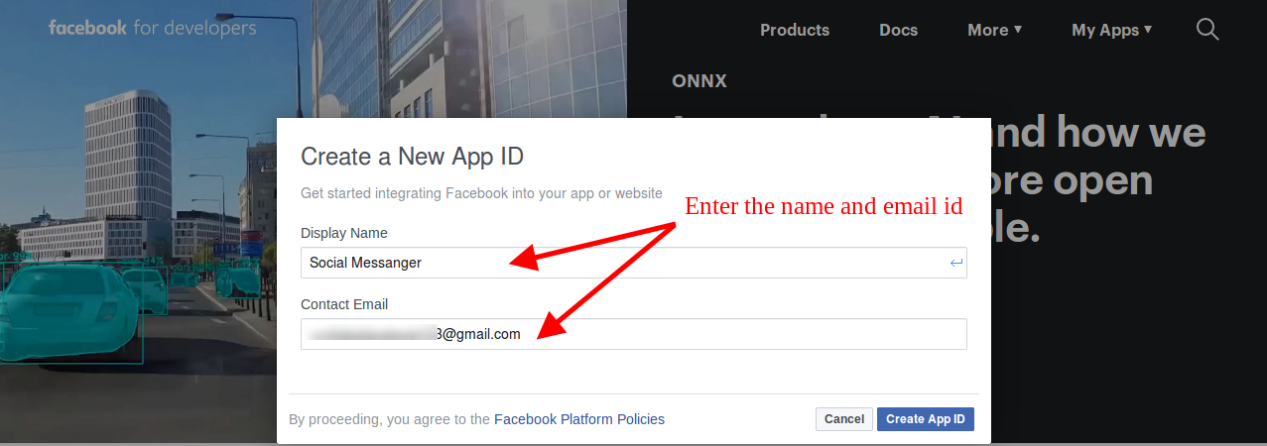
- Enter the details in “Display Name” and “contact email ID”. After that, click on the “Create APP ID” button.
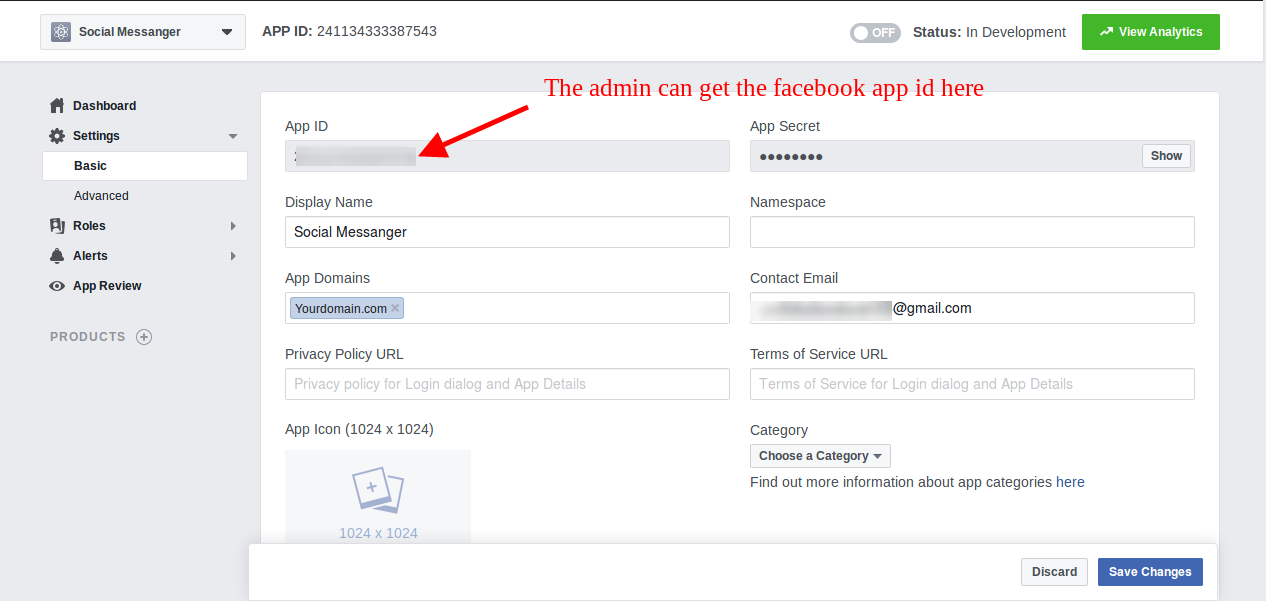
- After clicking the “create app id” button, go to the “Settings” and then select “Basic” option. Here, the store admin can view the APP ID. The admin needs to copy this Facebook app id and copy to the admin interface app id option.
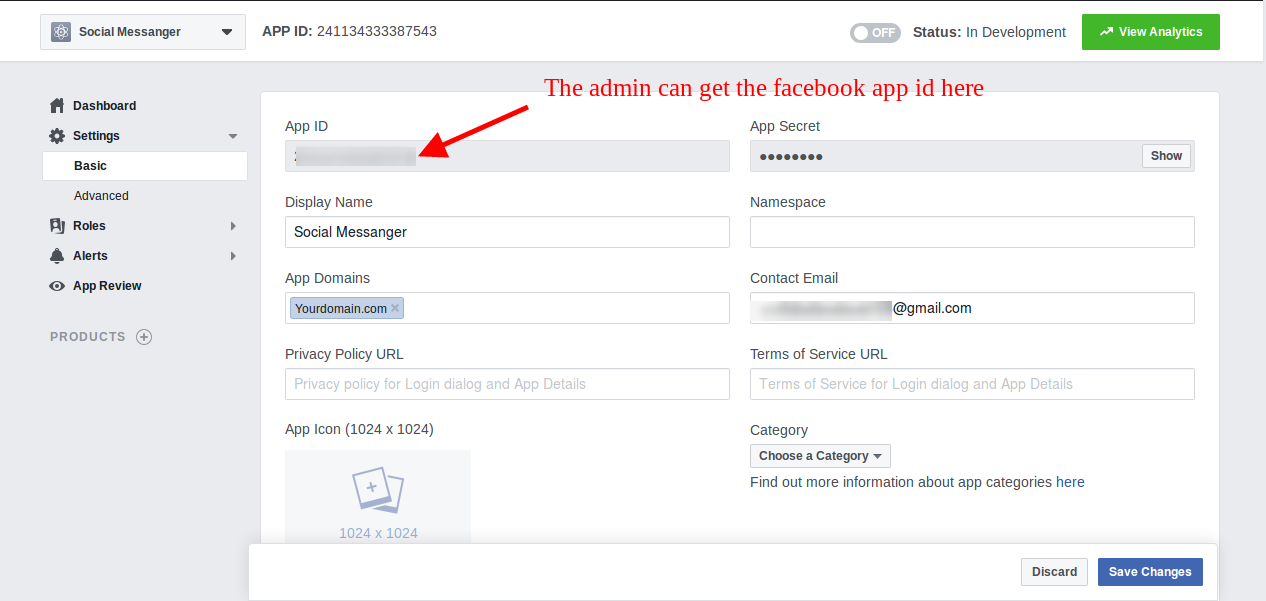
- Admin can insert the App Domain. After that click on the “save changes” option.
3.2 Steps to generate Facebook page ID
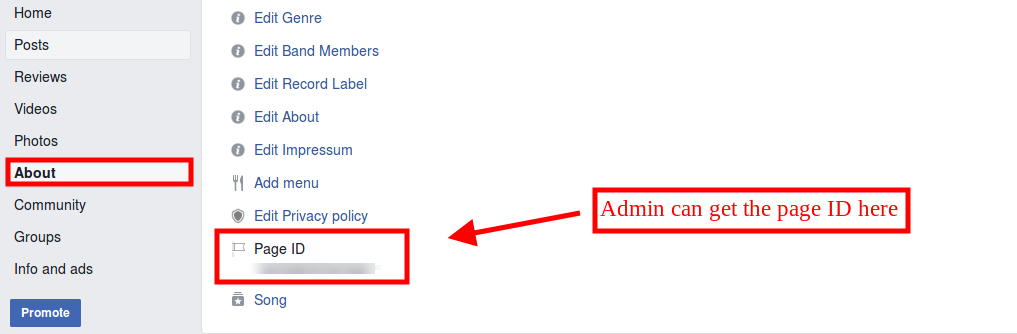
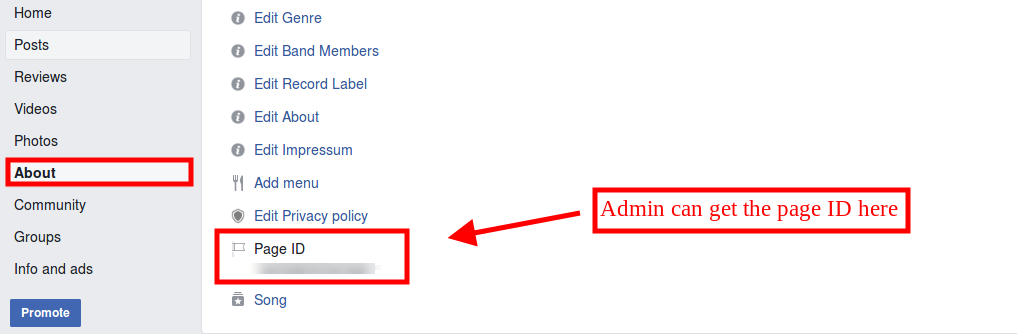
- The admin needs to open the Facebook page and go to “about” page. Here, the admin can view the “page id”.
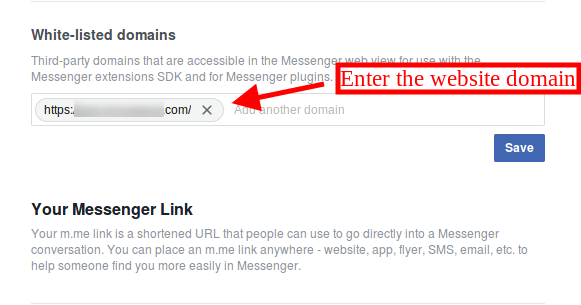
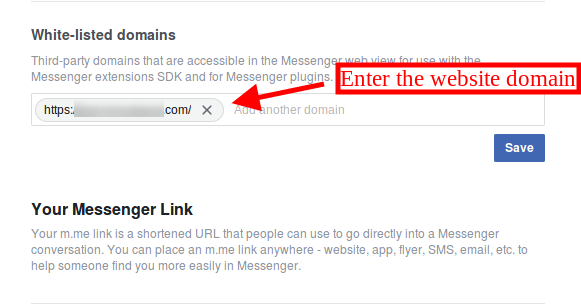
- After that go to the settings option and select the “messenger platform” option. Here, the store admin can enter the domain in the “White-listed domains” option.
- Now, the admin can enter the page id in the admin interface page id option.
4.0 Front-end interface
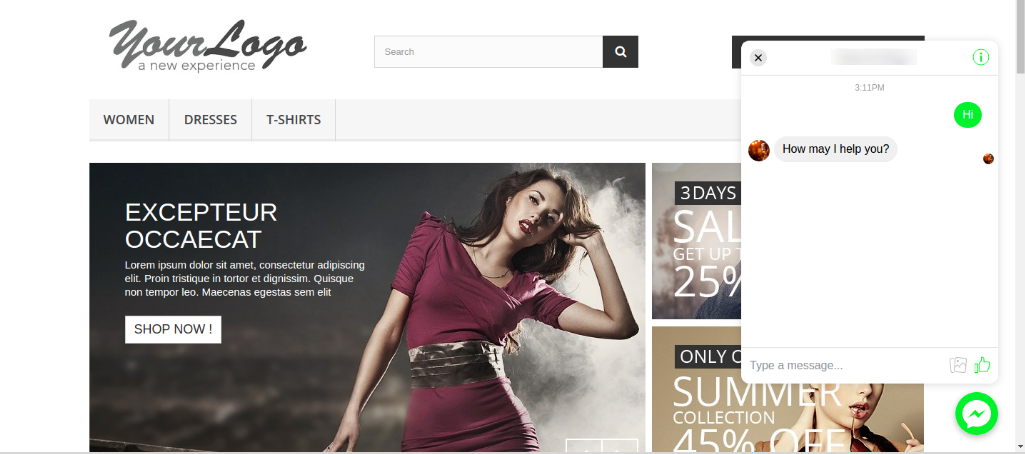
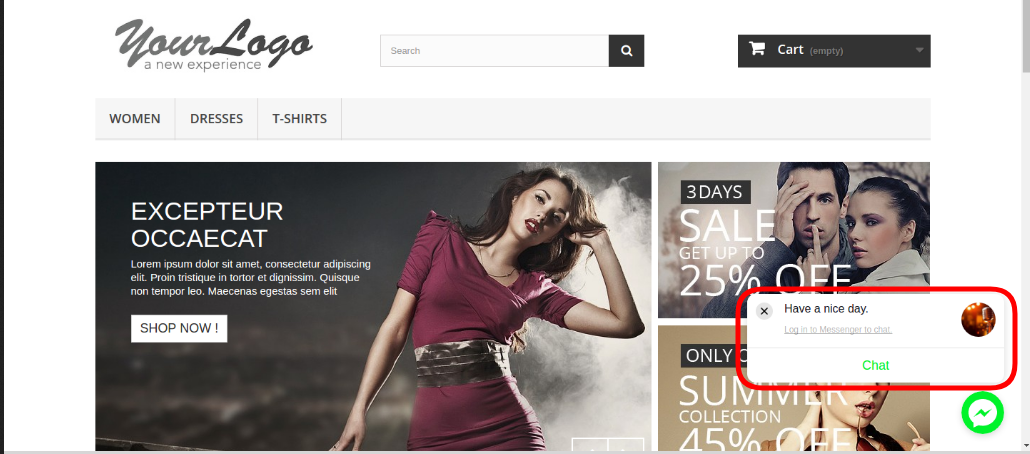
The front-end view of the Facebook messenger and live chat extension will look as shown below:

The online customers can send a message and ask their queries. They can get the quick resolution of the issues.

This way, the online store admin can easily increase the customer’s trust over the website and offer better support to the customers. Magento facebook messenger integration extension is very easy to implement and there is no need to change even a single code from the admin interface. The eCommerce store owner can easily implement live chat functionality and resolve customers concerns. Facebook messenger and live chat extension allows store admin to set the look and feel of this messenger for offering better user-experience. The Magento social live chat support plugin is highly customizable and offers smooth functioning.
The store admin can answer the queries of the customers and resolve the issues easily. This way the admin can offer live chat support on the website without any hassle. This way, the Magento social messenger extension is helpful for both the store admin as well as customers.
For more Magento extensions please visit Knowband.
Magento social messenger module Link.
Magento live chat support extension User Manual.
Magento messenger chat module plugin admin demo link.
Knowband Facebook messenger and live chat front demo link.
Knowband Messenger live chat video link.
Please contact us at support@knowband.com for any query or custom change request as per your business requirement.