Upsell and Cross-sell strategies are important for online stores for better sales. The emergence of eCommerce has changed the process of buying and selling. Besides the complexities of modern eCommerce, some selling strategies like Upsell and Cross-sell are still the same. In this blog, we will try to understand the benefits of these Upsell and Cross-sell strategies and other related points.
What is Upselling?
Getting the customer to spend more money than the amount they have planned at the time of the sale process is called Upselling. There are certain ways to do it. Let’s get more clarity on this strategy with the help of an example.
For instance,
You could offer customers add-ons to the item they are purchasing on the checkout page. In case you are purchasing a subwoofer, you could offer two subwoofers at a 20% discount. Along with that, you can offer an option of gift wrapping the item for an additional fee after all increasing the average order value is what matters the most at the end of the day.
What is Cross-selling?
According to Shopify, Cross-selling is defined as ” a sales technique that is used to attain a customer to spend more by buying a product related to the one you already bought”.
Upselling and Cross-selling are two different strategies, so don’t get confused. If we define these strategies in simple words then, upselling involves selling an expensive item or upgrade to a customer whereas cross-selling is about offering an additional complimentary product.
How important are Upsell and Cross-sell strategies for eCommerce?
Upselling and Cross-selling are strategies that offer great benefits, one of them is higher sales.
Upsell and Cross-sell strategies raises customer retention
To solve issues, customers purchase products as well as services leaving aside impulse buys. Although they are aware of the problem, however, might not be aware of the best solution to the problem.
Upselling or Cross-selling when done right helps buyers find more value than what they were expecting. Further, these strategies can lead to an increase in revenues up to 43% and even improve customer retention.
Upselling and cross-selling increase average order value as well as lifetime value
Cross-selling and upselling increase your average order value. These strategies even help in creating revenue and profit at a very low incremental cost.
As per the marketing metric study reports, the probability of selling to an existing customer is 60-70%. Furthermore, the chances of selling a new prospect are 5-20%. Moreover, upselling to customers who are already existing is an extremely cost-efficient way to increase lifetime value.
Knowband modules that can help in upselling and cross-selling
Related Products Module
Related Products Module permit store admin to showcase the related product items depending upon the product items that are available in the cart. Furthermore, Knowband offers the module for different eCommerce platforms that are listed below.
Gift the Product is another great way of attracting more customers and increasing sales. This module makes your customers feel special by providing them a gift while they are completing checkout and the most essential thing is, gift of the buyer depends upon the total cart value. Platforms of which Knowband offers this module listed below.
Knowband provides Gift the product module for different eCommerce platforms.
Gift cards are similar to prepaid debit cards with money for future usage. Furthermore, Gift cards used in both ways- online and in person. Moreover, there are eCommerce platforms that offer Gift cards on their eCommerce store with fixed as well as custom amount options.
Final Thoughts on Upsell and Cross-sell strategies
Before wrapping up, there are a few tips that we would like to share with you. The first tip, use Cross-selling more on the checkout page. This way customers can tap into impulse buying. The second tip, avoid bombarding customers with too many choices as this can distract them and they will end up abandoning their cart.
In case you find any issue with above mentioned Knowband modules, feel free to write us at support@knowband.com. Along with efficient modules, Knowband provides efficient post-sales support to the customers. Moreover, we are available 24*7 to resolve your queries.
It is very essential to reduce post-holiday returns. Industry, sales channel, product type, and how to return data are collected and counted all affecting return rates. Further, the younger customers are driving the trend according to the reports. The reason is, they see internet purchases as rentals. Moreover, returns might rapidly undo your holiday success if you don’t account for them and discover:
Sales are lower than expected
Converted fewer clients than the originally
Compared to sales cost and profit margins, sales cost is higher and profit margins are lower.
Therefore, in this blog, we will be discussing ways of reducing holiday returns and automating the returns process. However, before that, we will understand why it’s important to reduce the returns?
Why it’s important to reduce the returns?
The first step is to analyze why do people are returning products as this will give you valuable insights and even make you understand the real problem. Furthermore, it is to everyone’s best advantage to reduce the number of returns you receive.
You might not be aware but lesser returns can save a lot of money on replacement items, shipping, as well as other factors. Moreover, it provides a better as well as efficient customer experience which is again good for eCommerce business. As a result, trust is created between your business and potential buyers.
Henceforth, keeping the rate of return lower can result in better business.
What are the ways of reducing returns?
Begin with quality control
The first way that helps in reducing post-holiday returns is “Begining with quality control”. Furthermore, 23% of returns happen as companies ship an incorrect item. Mis-ship happens usually when businesses grow.
Being a small retailer, you can wrap as well as send every order. It would be great if you double-check the order before shipping. When you adopt a hands-on approach, it’s easy to ensure that shipments are proper. Whereas larger businesses can opt for automation that can help you in resolving the issues. Furthermore, the Inventory management software includes a warehouse management feature that helps in reducing the number of returns your receive.
High-Quality Photos
High-quality photos can even help in reducing post-holiday returns. Furthermore, such photos help customers understand the product better. Make sure you take pictures from different angles to make customers understand each feature of the product.
In case you are not good at photography, feel free to hire a professional photographer. Money spent on getting good pictures will pay for itself with a reduced return rate.
Better Product Descriptions
Writing better product descriptions can help customers understand the product well. Speaking about better product descriptions, make sure you include everything about the product. For example, if you have been selling furniture, make sure your product descriptions consist of measurement of the product, color, and material. This way customers can decide better and this will create transparency which is liked by customers a lot.
Represent Sizing Correctly
Products that do not fit are one of the most common reasons for returns in the apparel industry. Because online buyers can’t try on garments before buying them, it’s understandable that products be returned because they don’t fit.
With the assistance of resources like size software and sizing charts, you may limit the number of returns you receive due to sizing concerns.
Knowband Modules assist in reducing post-holiday returns
Knowband, known as an eCommerce solution provider and module development company. Furthermore, Knowband has earned a reputation for offering efficient development services and post-sales support. Moreover, it offers a boost to your business by offering best-in-class plugins for different eCommerce platforms such as Magento, Prestashop, OpenCart, Shopify, and others.
Knowband even offers some great modules for reducing post-holiday returns as well as reading the specifications of these modules helps in reducing the chances of return.
Module 1: Product size chart
The product size chart module helps in reducing post-holiday returns. Knowband offers this module for different eCommerce platforms such as:
The product video module is highly beneficial for eCommerce businesses. This helps customers to understand the product better. As a result, the return chances get reduced. Knowband even offers the module for different eCommerce platforms:
Digital Gift Cards are a blessing for eCommerce stores. These enable customers to purchase accordingly from the specific store. Gift cards even provide freedom to permit them to purchase what they need. Furthermore, this offers the satisfaction of having gifted well.
Product review also helps customers make decisions better and feel more confident. Furthermore, the more reviews you have, the more confident a customer is that they’re making the right choice. Reviews can also assist a store’s internet visibility.
Analyzing as well as testing your approach to returns and ways of measuring up to your peers is a great way of generating a return on your post-holiday returns. Along with that, another way of generating a return on post-holiday returns is by utilizing these modules.
In case you face trouble, feel free to write us at support@knowband.com
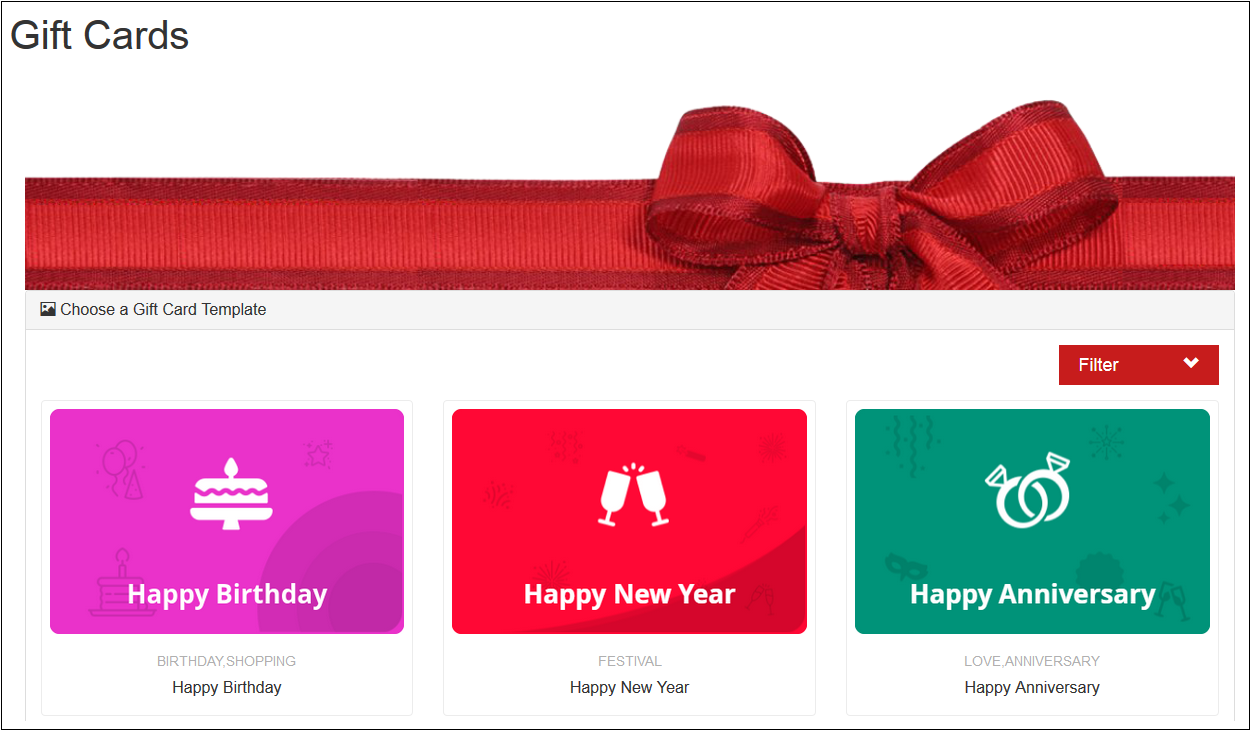
Let your customers purchase gift cards for their friends and family. The store admin can create multiple Gift Cards for special occasions like Birthday, Anniversary, Valentine Day, Friendship Day, Fathers Day etc so that as per the need customers can select the gift cards for their dear ones.
Gift Card offers the following benefits:
1) Encourage customers to spend more
2) Lower return rates
3) Make last-minute shopping possible
4) Generate revenue in advance of sales
5) More convenient
Knowband offers Magento 2 Gift Card Module which provides a flexible way for your customers to purchase a gift for someone from your store. This feature-rich Magento 2 Gift Card Extension allows the online merchant to create multiple templates for gift cards and sell the gifty cards easily. The online store merchant can set the gift card amount from the admin interface and the customers can select the preferred gift card for sending to their loved ones.
1.1 Features of Magento 2 Gift Card Manager Extension:
With the help of this Magento 2 Gift Card Manager Addon by Knowband, the Online retailer can easily incorporate the Gift card functionality in their store.
Magento 2 Gift Module provides an option for the merchant to link the Gift Card option to the Header, Footer, My Account and Left Side on the Front-end as per the requirement.
The Admin can select the Gift Card order status in which the gift card orders will be marked as delivered and the Gift Card code will be generated.
Magento 2 Gift Card Vouchers Extension allows the store owner to set the Gift Card delivery gap in the number of days.
By using the responsive Knowband Magento 2 Gift Card Manager Extension, the eCommerce retailer can set the prefix for the voucher code of the gift card.
The Magento 2 Gift Card Module allows the admin to create N number of interactive gift card interfaces for various occasions including Birthdays, Halloweens, New Year, Christmas, Feast, Holidays or any other special event.
Knowband’s Magento 2 Gift Module enables the e-merchants can customize the gift card products in a few simple steps. They can fix the Product amount, validity duration and other terms at a few button clicks.
The Store Admin can enable the Free Shipping option as per the need from the back-end of the Gift Card for Magento 2.
Magento 2 Gift Card Vouchers offers the readymade email template and he/she can customize the email template as per the requirement.
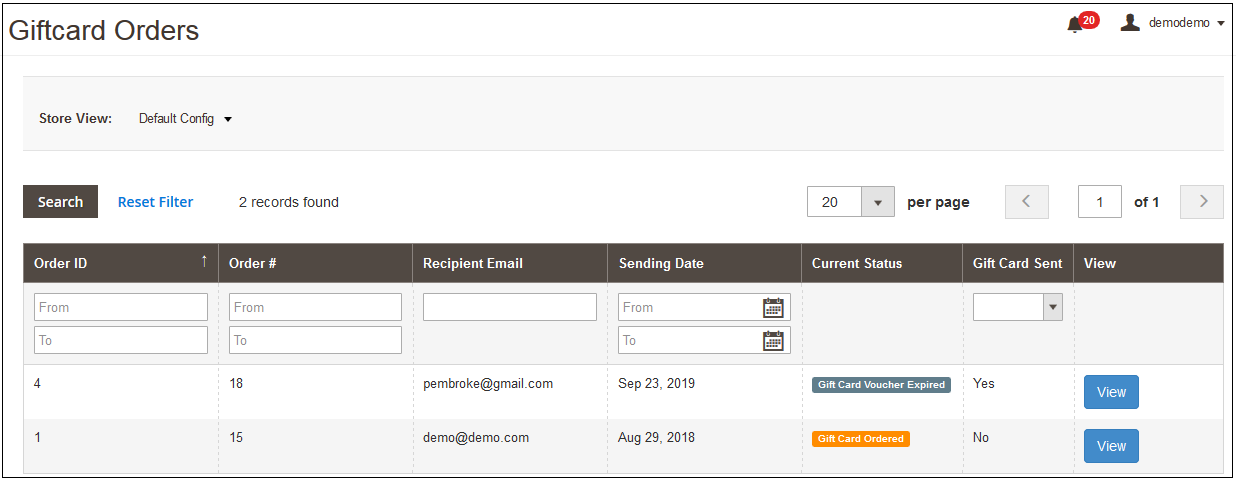
The Store admin even gets an option to keep track on the orders received for the gift card from the back-end. It involves the recipient email, date of sending as well as the status of the gift cards.
Magento 2 Send Gift Card Extension is Mobile responsive.
With the help of this Magento 2 Gift Card Extension, the Store admin has a chance to acquire new customers while retaining the existing customers.
Magento Gift Voucher is easy to use and install.
Magento Gift Card Manager Module is fully customizable.
Technology for Development
Language: PHP Frame Work: Magento
2. Installation
After purchasing Magento 2 Gift Card Extension, the store admin will get following files:
1.Knowband_Giftcardmanager.zip which contain source code of the Magento 2 Send Gift Card Extension.
2. User Manual which includes all the details and helps regarding an extension.
3. Follow the following steps to install Magento 2 Gift Vouchers extension:
The steps to install the Magento 2 Gift Card Module are mentioned below:
1. Buy the Magento 2 Gift Card Manager module from Knowband. You can download the extension package.
2. The package has a zipped file that contains the user manual and the source code of Magento 2 Gift Card Extension. Unzip the package.
3. Create a folder{Magentoroot}/app/code/Knowband/Giftcardmanager
php -f bin/magento module: enable –clear-static-content Knowband_Giftcardmanager
4. Upload the extracted content in the above folder via FTP manager (like Filezilla or WinSCP – download here: https://filezilla-project.org/).
5. Now run below commands to install the plugin:
6. The extension is now installed and ready for use. In Admin Panel go to “Knowband > Gift Card Manager”
You can now configure and use the Knowband Magento 2 Gift Card for product module.
3.0 Admin Panel
After installing Magento 2 Gift Card Manager Extension in the Magento store, the store owner can make the changes without any hassles. There are following ways in which admin will interact with Magento 2 Gift Card Vouchers module functionality:
1. Module Configuration
2. Gift Card Template
3. Gift Card Products
4. Gift Card Orders
Each interface has been explained with proper detailing in following sections.
3.1.1 Module Configuration
After clicking on the Gift Card Module, the system will open Module Configuration tabs by default.
In the Module Configuration tab of Magento 2 Gift Card Extension by Knowband, online sellers can enable Gift Card functionality and set the delivery gap, gift card prefix and more. Screenshot of the Module Configuration tab shown below:
Initially, fields in the above form will be already filled with their default values.
1. Enable the Extension: Initially, this will be “OFF”. Admin can enable/disable Magento 2 Gift Card Extension by turning ON/OFF this setting.
2. Enable Header Link: In this section, the online retailer can enable the display of the gift card option on the header.
Front End Preview:
3. Enable Left Link: By using the Magento 2 Gift Voucher Extension, the admin has can enable display of gift card link on the left side of the screen by clicking the button.
Front End Preview:
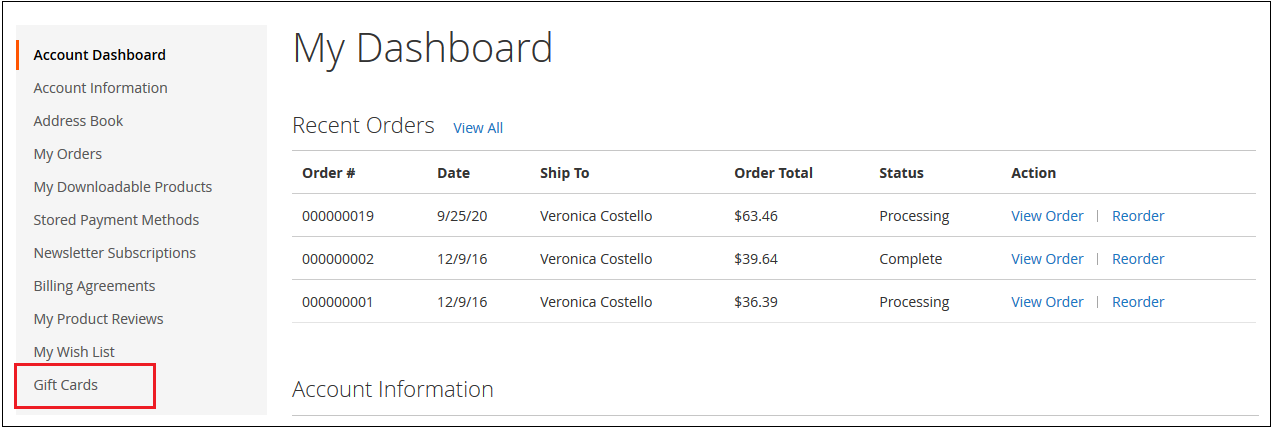
4. Enable My Account Link: The Admin can enable/disable Gift Card link in the Footer section as per the business requirement.
Front End Preview:
5. Enable Footer Link: The admin can enable the display of the gift card option in the My Account section.
Front End Preview:
6. Gift Card Prefix: In this option Magento 2 Gift Module the admin can set the prefix for the voucher code of the gift vouchers from here. The code can be entered in the format Ex: KB******
7. Gift Card Order Status: In this field of the Magento 2 Gift Cards module the admin can the default order status for the gift card orders.
As soon as the admin updates the order status for the Gift Card order, the gift card will be sent to the recipient via email.
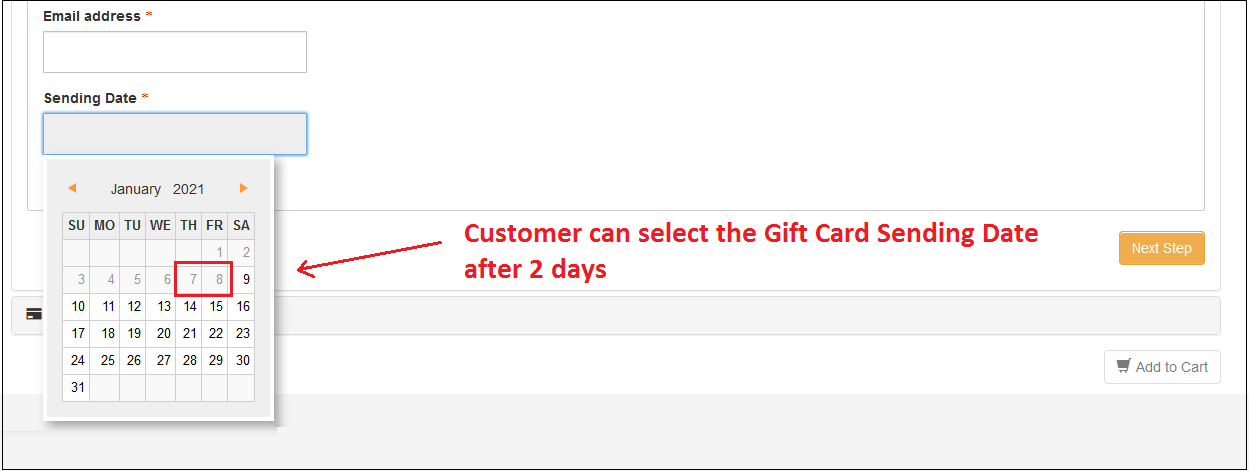
8. Minimum Gift Card Delivery Gap: This field of Magento 2 Gift Card Voucher Module allows the Store admin to enable the Voucher to send data after the specific no of days.
Ex: If gift card window values are set to 2 from the admin panel. These changes will reflect the Front End and the user will be able to select the send date after two days of the current date.
Admin Panel:
Front End Settings:
3.1.2 Email Settings
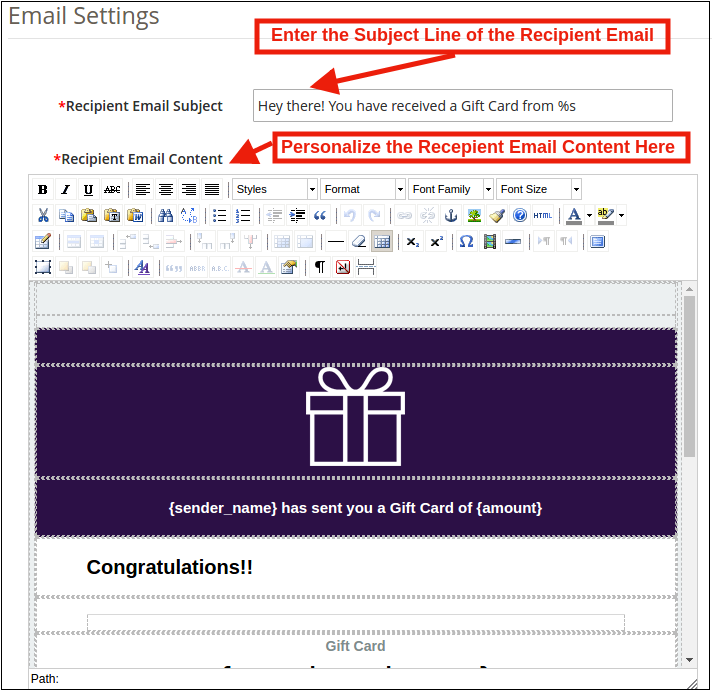
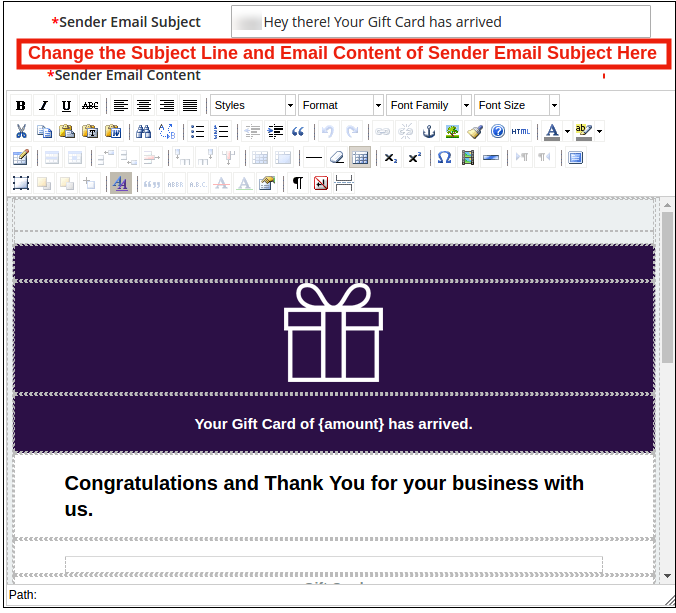
The customer gets an option to print the gift cards or else they can be sent to the receiver via email. The Magento 2 Gift module by Knowband offers default email templates that can be personalized as per the requirement of the store admin.
Recipient Email Settings:
Sender Email Settings:
3.1.3 PDF Settings
Magento 2 Send Gift Card Module also sends a PDF with along with the image, voucher code, voucher expiry date and voucher value. Users can also get the printout of the PDF.
Apart from this, the store admin can change the Gift Card prefix and update the PDF content to make it more attractive from the back-end.
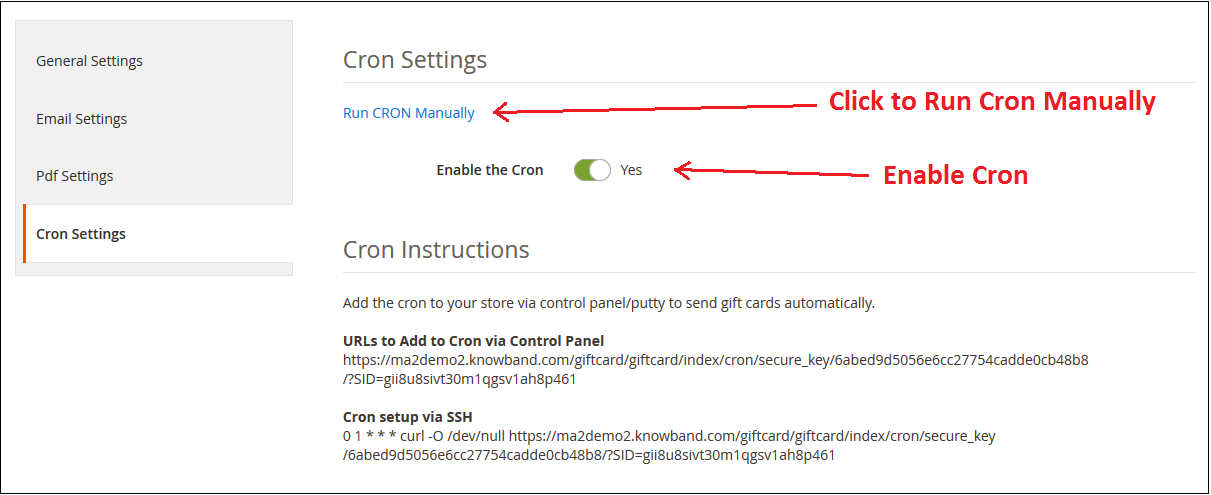
3.1.4 Cron Setting
In this tab, the eCommerce store admin can run the CRON manually or automatically.
The Admin can run the CRON to your store via the control panel to send gift card vouchers automatically.
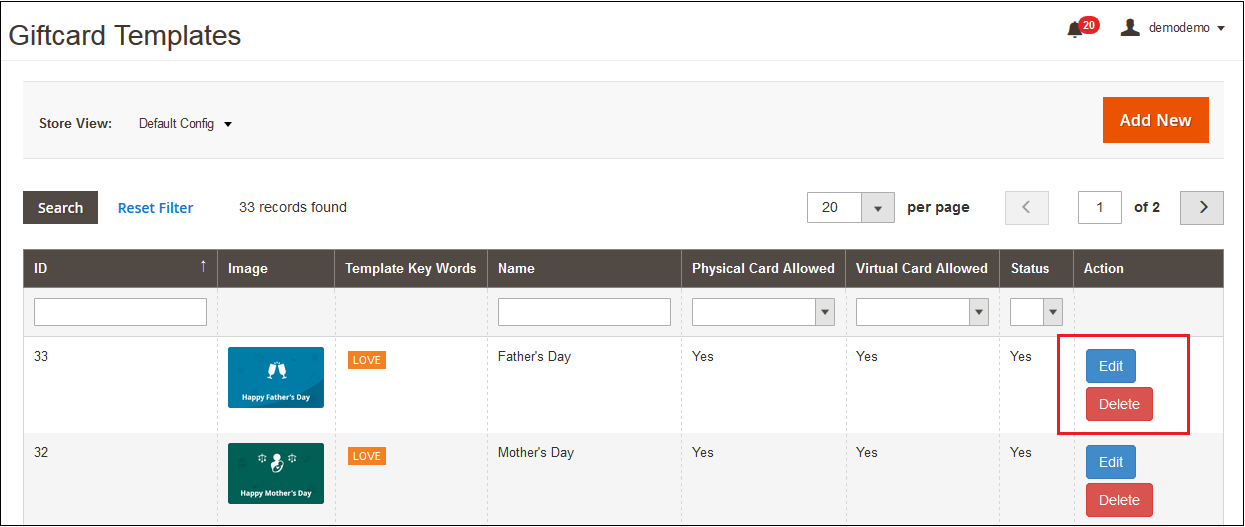
This tab shows already added Gift card templates. The admin can customize these Gift card template as per their desires. Other than this, the store merchant can edit or delete the Gift card template.
3.2.1 How to customize the template of the gift card?
3.2.1.1 Add New Gift Card Template
There is a ‘ADD NEW‘ button present on the top right corner of gift card template tab of Magento 2 Gift Card Manager Module. The store merchants can easily add new Gift Card template sets whenever they need by clicking on the button. Further details about its functionality are described in the next section.
For creating new Gift Card template, ‘Add New’ option is used. By clicking on this, the module will redirect store merchants to the gift card template configuration form as displayed in the below screen:
1. Template Name: In this option of Magento 2 Gift Voucher Extension the admin can enter the name of the New Gift Card Template like: Happy Friendship Day.
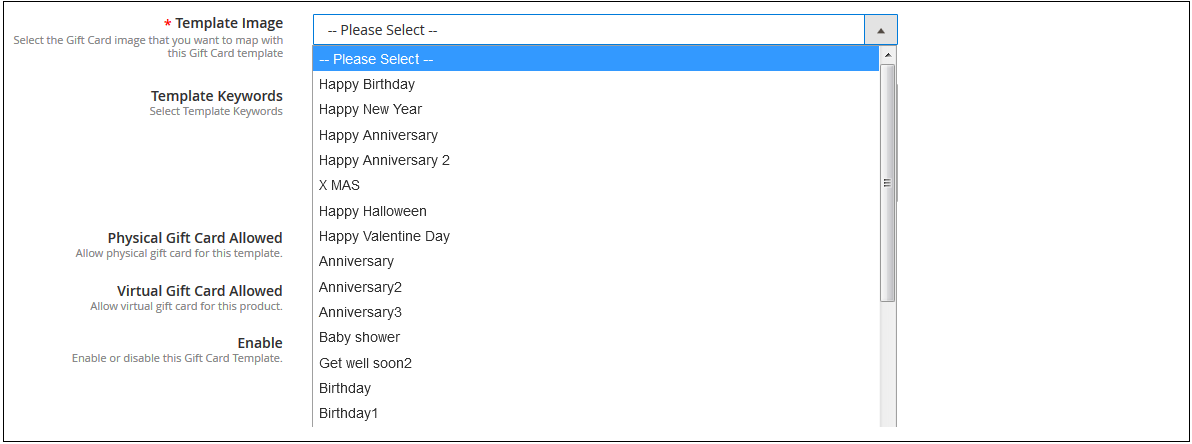
2. Template Image: Magento 2 Send Gift Card Extension by Knowband allows the store admin to select the image or the layout of the gift cards that will be shown in the front-end.
The images for the various occasions can be saved in the back-end of the Magento 2 Gift Card Extension. The admin selects the occasion in order to find the image as shown below:
The store admin can even view the images for the various events has been saved for the same.
As you click on the ‘View Image’, you’ll be redirected to the page below.
The list showcases all the gift cards that have been created and saved. You can view the complete image or even delete it if required.
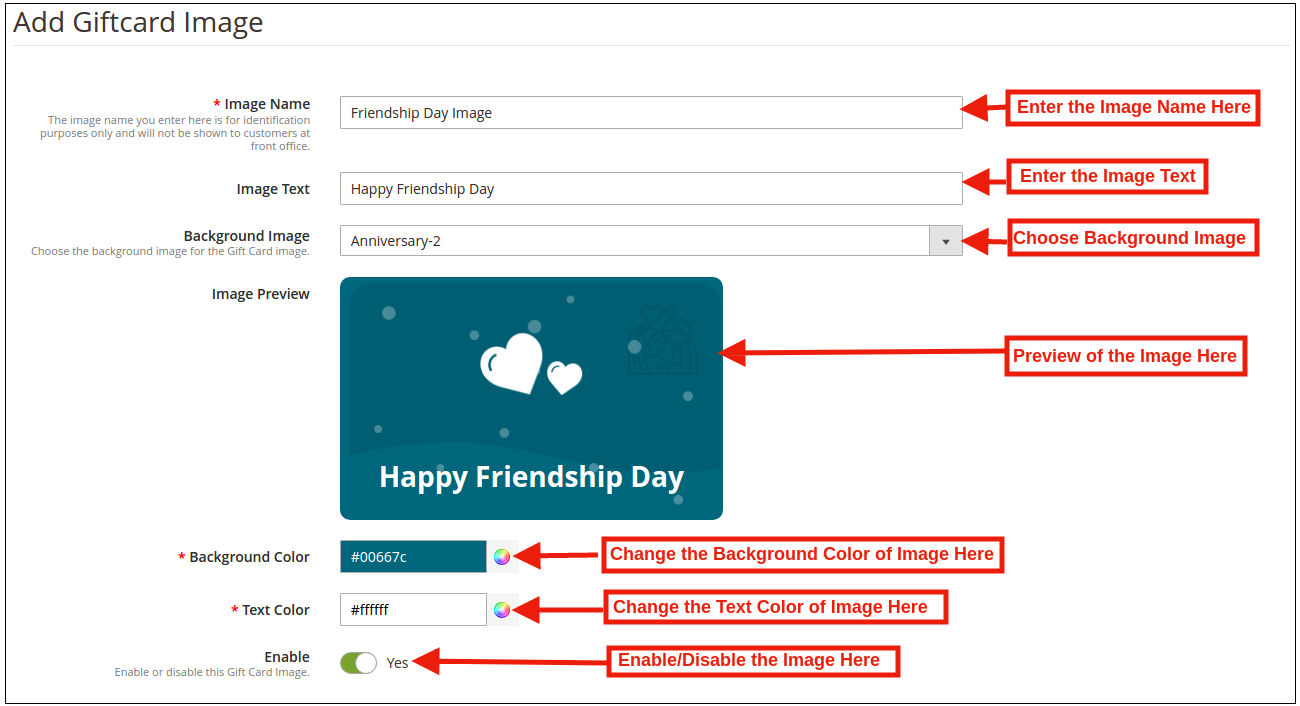
In order to create new images, click ‘Add New Image’ as shown below.
You can enter the image name and the text of the image to be shown on the gift card. Even the background image and color, as well as font color, can be changed at a button click. Preview the final image before making it live on the website.
3. Template Keywords: This option includes the list of the Keyword in this dropdown list the store admin can select the template keywords.
4. Physical Gift Card Allowed: The Magento 2 Gift Card Voucher module by Knowband allows the store admin to enable the physical gift card option for the particular gift template.
5. Virtual Gift Card Allowed: The Online retailer can enable the Virtual gift card functionality will allow the e-cards.
6. Enable: Initially, this option will be ‘ON’. The Store admin can enable/disable the settings as per the need.
3.2.1.2 Edit Gift Card Template
Magento 2 Gift Module allows the online retailer to edit or delete the gift card template as per the need. The screenshot is shown below:
3.3 Gift Card Product
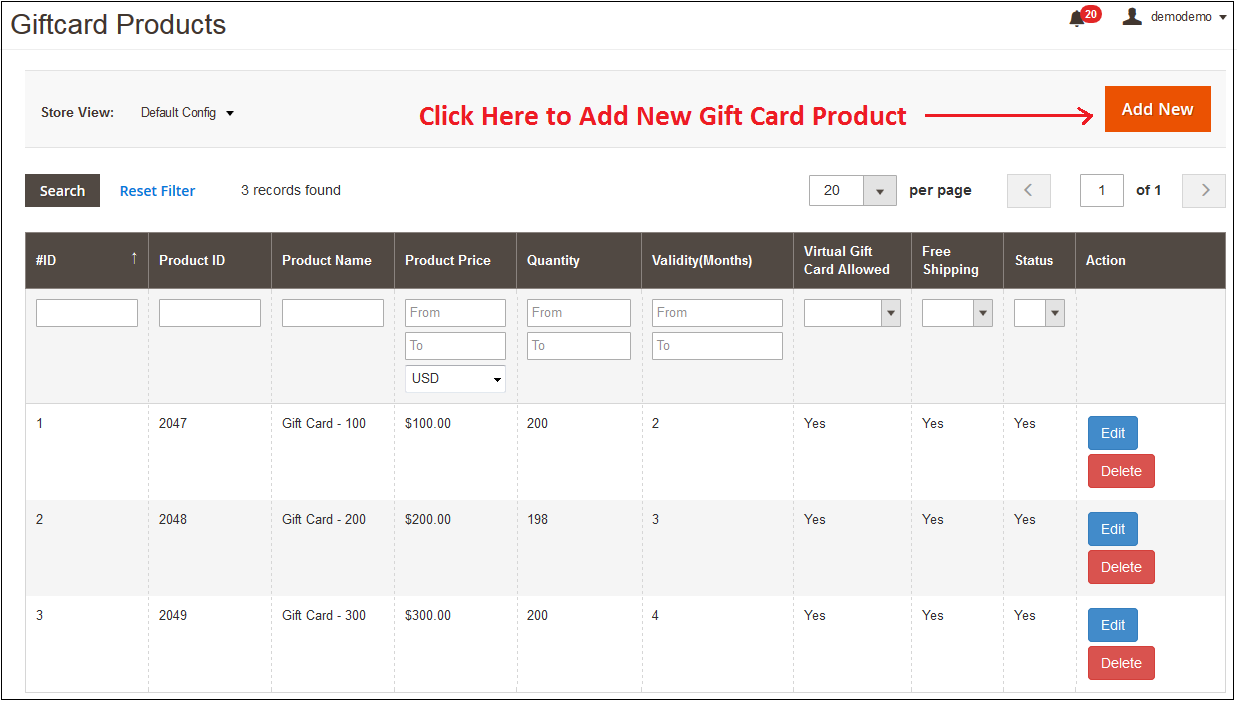
In this tab of Magento 2 Gift Voucher Module allows the store admin to add the Gift Cards product of different values like: product name, product price, quantity and more or edit the already added product from the back-end.
3.3.1 How to customize the Product of the gift card?
3.3.1.1 Add New Gift Card Product
Magento 2 Gift Card Manager Module allows the store admin to add the new Gift Card template by clicking on the ‘ADD NEW’ button present on the top right corner of gift card template tab of Gift Module.
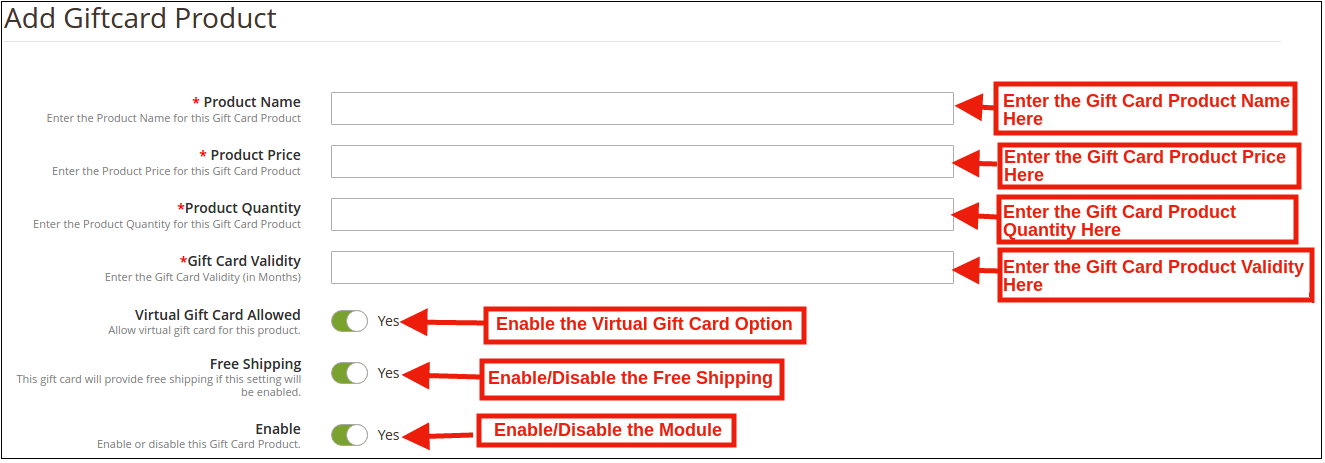
Fill out the information that you need to provide for creating the product.
Product Price: Magento 2 Gift Card Manager Module by Knowband allows the store admin to enter the price of the product.
Product Name: Enter the name of the product here. It can be Happy Anniversary, Happy Birthday, Merry Christmas or any other.
Product Quality: In this tab of Magento 2 Send Card Module the admin can enter the product quality of this gift card product.
Gift Card Validity: The validity period in months of the gift card can be entered here by using this Magento 2 Gift Module.
Virtual Gift Card Allowed: Enable e-card by switching on the button.
Free Shipping: The Magento 2 store admin can even allow free shipping to the customer.
Enable: The Magento 2 Send Gift Card Extension can be enabled or disabled from here.
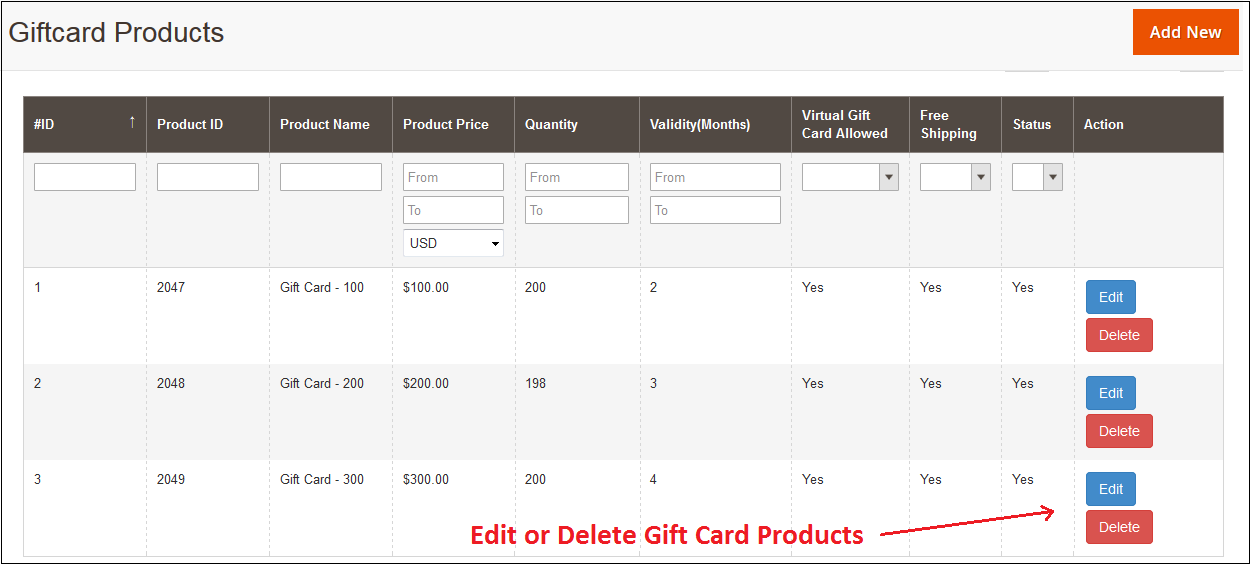
3.3.1.2 Edit and Delete Gift Card Product
The admin even gets an option to edit the gift card product or delete from the section shown below:
3.4 Gift Card Orders
In this Gift Card Order, tab provides the store admin an option to view the entire list of the orders received for the gift cards. It involves the recipient email, date of sending as well as the status of the gift cards.
In the ‘Gift Card Order’ tab go to the ‘View’ button in the right section. In this section shows the entire information about the order.
4.0 Front End
Magento 2 Gift Voucher Module adds a Gift Card link on storefront end in the Header, Footer, Left and My Account section of the module. By accessing this gift card link customers can browse the gift cards.
This link redirects the user gift card page of the site.
Gift Card Front End Header Link Preview:
Gift Card Front End Left Link Preview:
Gift Card Front End Footer Link Preview:
Gift Card Front End My Account Link Preview:
After clicking on the Gift Card link module redirect the following page:
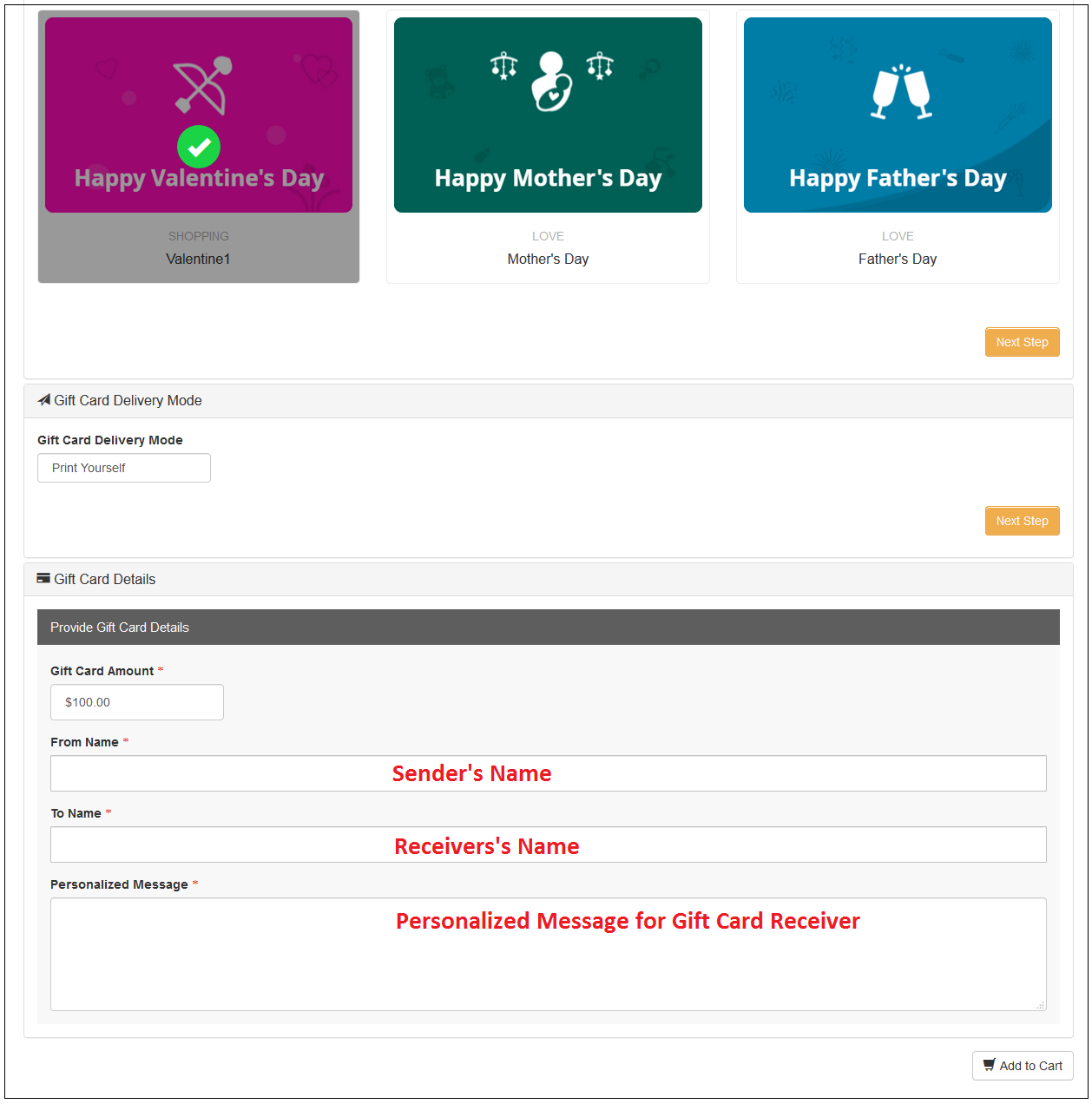
Shopping for the same is easy. The customers can select the card for the different occasion. For instance, he chooses the Happy Birthday card. All he needs to do is to click on the card.
They can print the card or send it via email. The sender and receiver name along with the message can be mentioned in the section as shown below.
Add the product to the shopping cart and proceed to the checkout page. The gift card will then be sent to the receiver.
This way, the online store admin can easily offer the facility to purchase gift cards from the website. The online merchant can set the gift card amount and also create multiple gift card templates for various occasions. Magento 2 Gift Card Manager plugin is highly customizable and offers smooth functioning. The eCommerce store merchant can show gift card options on the left side, show as a header/footer link and also show the Gift card option on my account link. The Magento 2 Gift Card Manager plugin allows the store merchant to select the order status on which he wants to send gift card.
The online merchant can also set a delivery days gap after which the gift card will be delivered. The Magento 2 Gift Card Manager Module allows sending the gift card email to the gift card sender as well as the receiver. Admin can also send a pdf document that can be printed by the customers. So the store admin can get more profit and the online users can purchase gift cards and share it with their loved ones easily.
For more details about this Magento 2 Gift Voucher extension, you can visit here: