Mastering Xcode: Tips for Faster iOS App Development by Knowband!

In the dynamic world of iOS app development, efficiency and productivity are key. Xcode, Apple’s integrated development environment (IDE), offers a plethora of features designed to streamline the development process. However, leveraging these features to their fullest potential requires insight and expertise.
Thus, in this article we will dive into the practical tips for mastering Xcode, focusing on accelerating your iOS app development journey.

Furthermore, you can not only streamline your Xcode deployment but also speed the process up.
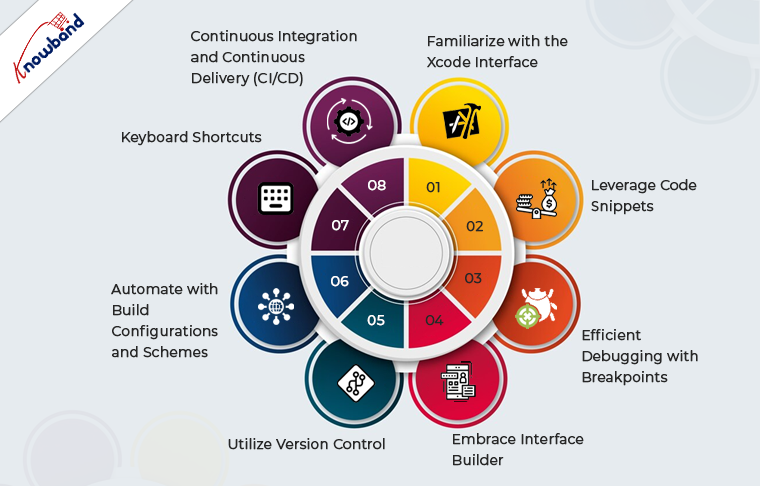


Familiarize with the Xcode Interface:

Understanding the Xcode interface is the cornerstone of efficient app development. Moreover, Apple has designed the Xcode to not only provide a robust but also a feature-rich experience to the app developers.

The Navigator, Editor, and Utilities areas are your primary workspaces. Use the Navigator for quick file access, the Editor for coding, and the Utilities area for property adjustments and documentation. Familiarity with these sections will significantly reduce development time.

Leverage Code Snippets:

Code snippets are a powerful feature in Xcode that can save you a considerable amount of time. Thus, by creating snippets of frequently used code blocks, you can avoid repetitive typing.
To create a snippet, simply select the code you wish to save, drag it into the Code Snippet Library, and give it a name and shortcut. This practice not only speeds up coding but also ensures consistency across your projects.

Efficient Debugging with Breakpoints:

Debugging is an integral part of development, and Xcode’s debugging tools are robust. The developers get the option to use breakpoints to pause execution at specific lines of code, that allow inspection of variables and evaluate expressions.
Moreover, the conditional breakpoints can be particularly useful for isolating issues without halting the program unnecessarily.

Embrace Interface Builder:

Xcode’s Interface Builder is a powerful tool for designing UIs. It allows developers to create interfaces visually, without writing extensive code.
Thus, instead of writing the design code manually, you can utilize Auto Layout to make your apps responsive across different devices and screen sizes.
Understanding and using Interface Builder efficiently can significantly accelerate UI development.

Utilize Version Control:

Version control is essential for managing changes and collaborating on projects. Therefore, Xcode integrates seamlessly with Git, providing a graphical interface for committing changes, branching, and merging. Regularly commit your changes to keep track of your project’s evolution and to facilitate collaboration with other developers.

Automate with Build Configurations and Schemes:

Build configurations and schemes are Xcode features that allow you to manage different versions of your app, such as development, testing, and production.
Thus, automating the tasks like setting environment variables, and API endpoints, and enabling debug options can significantly streamline your workflow.

Keyboard Shortcuts:

One of the most straightforward ways to increase efficiency in Xcode is to master keyboard shortcuts. Instance, common shortcuts for actions like running your app (Cmd + R), opening the Assistant Editor (Cmd + Option + Enter), and showing or hiding the Navigator (Cmd + 0) can save valuable time.

Continuous Integration and Continuous Delivery (CI/CD):

Implementing CI/CD with Xcode can automate the process of building, testing, and distributing your iOS apps. Furthermore, tools like Xcode Server, Jenkins, or GitHub Actions can be configured to automate these tasks, ensuring that your app is always in a deployable state.

Stay Updated!

Apple frequently updates Xcode with new features and improvements. Staying current with the latest versions ensures access to the most advanced tools and functionalities, which can enhance your development process.

Conclusion!

By familiarizing yourself with the IDE, utilizing its features to their fullest, and staying updated on the latest developments, you can significantly enhance your productivity and efficiency in iOS app development.
Whether you’re debugging with advanced breakpoints, designing interfaces, or automating builds, every aspect of Xcode offers an opportunity to streamline your workflow and bring your innovative app ideas to life more swiftly.

Additionally, at Knowband, we offer both native and hybrid app development services. If you have any project inquiries or need a quotation, please don’t hesitate to reach out to our team at “support@Knowband.com”.

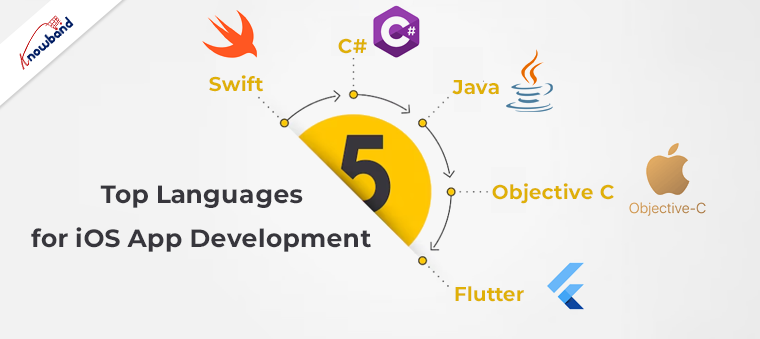
Top 5 iOS App Development Languages in 2023!!

Modern users are preferring mobile apps over websites for online hovering. Moreover, other business areas such as OTT platforms, Social Media platforms, shopping apps, etc, are doing most of their business via mobile apps for the same reason.


Not only do Mobile apps provide a faster experience but also offer better optimization from websites especially iOS Apps. In the modern community, there is a huge number of iOS users. For the same reason, it is important to put every brick in its place while planning your iOS App development project. Furthermore, the iOS App development language defines the scope and user experience for the app users.

Top Languages for iOS App Development:

Various points should be on your checklist before starting your iOS App development. To help with this, we have compiled a concise yet useful checklist of essential elements to keep in mind while picking the app development language for the iOS App for your business.

Swift:

Swift is a programming language developed by Apple in 2014 to create solutions for macOS, iOS, iPadOS, watchOS, and tvOS. It was introduced as a successor to Objective-C and is optimized to work with frameworks like Cocoa, Cocoa Touch, and the vast codebase written in Objective-C for Apple products.
Swift is a highly suitable choice if you desire to create an application quickly and intend to expand it later. This programming language is simple to learn and enables rapid development, while also ensuring the safety and reliability of your code. Additionally, Swift receives regular updates, allowing for easy implementation of improvements to your application.

C#:

C# is a versatile, object-oriented programming language for general-purpose use. It was developed by Microsoft as an alternative to Java. C# has close integration with the .NET platform, which serves as both a framework and a runtime environment.

Originally intended for writing applications for Windows systems, C# has now expanded its reach to other platforms such as Linux and Mac through the .NET framework. As a result, developers can create native software in C# for almost any operating system, including iOS.

C# currently ranks as the 8th most popular programming language globally and 31.4% of worldwide software developers are using C#.

Java:

It might sound odd as Java is widely known as the mother language for Android app development. Java is a general-purpose programming language that follows the principles of object-oriented and class-based programming. One of its most significant advantages is that its code can run on any platform without requiring a recompilation. 

With over 9 million programmers utilizing it worldwide, Java is currently the 6th most popular programming language globally. It is also highly preferred for Android app development due to its suitability for the platform. However, its versatility also allows for the creation of cross-platform applications.

Objective C:

Objective-C, an object-oriented programming language extension of C, was developed in the early 1980s. As a general-purpose language, it is primarily used for programming Apple’s OS X and iOS operating systems, as well as their APIs: Cocoa and Cocoa Touch. However, despite its usefulness, Objective-C only ranks 27th on Stack Overflow’s popularity report, with a usage rate of 2.39% among developers worldwide, which is three positions lower than Swift. The reason behind the same is that the Objective-C developer community has very limited resources. Also, the language is hard to learn for beginners.

Flutter:

Last but not least, Flutter is the next iOS App development language we are going to discuss. Flutter, launched in 2017, is a comprehensive app Software Development Kit (SDK). It offers a wide range of ready-to-use widgets and tools. Google created this tool in 2015 to provide developers with an easy way to create visually attractive. Natively-compiled mobile, web, and desktop applications with just one codebase.

Flutter’s cross-platform capabilities make it a popular choice among developers, as it saves time and effort in writing separate codes for different platforms. With its vast range of features, Flutter has become one of the most widely used frameworks for building powerful and engaging mobile applications within very less time. Thus, in case you are running budget friendly and want to build both Android and iOS apps within less time, Flutter is the perfect option.

In the End,

In the following article, we have tried to narrow down the characteristics of the 5 most used languages for iOS App development. Although all languages have their pros and cons. Yet, picking the best language entirely depends on your project requirements and timeline. Moreover, at Knowband, we also offer Android and iOS App development solutions for eCommerce businesses. You can feel free to find us at our official email address support@knowband.com for the quotation.