In today’s competitive e-commerce landscape, limiting your products to a single store means leaving sales on the table. Expanding to high-traffic marketplaces like Amazon, eBay, and Etsy is no longer optional; it’s essential for growth. Etsy alone attracts millions of active buyers actively searching for unique products, making it a goldmine for online sellers. If your store runs on OpenCart and you’re ready to tap into Etsy’s massive audience, the OpenCart Etsy Integration Extension by Knowband is exactly what you need. It automates product synchronization, inventory updates, and order management, so you can focus on growing your business instead of managing two platforms manually. Let’s dive into how the OpenCart Etsy Integration Module can help you increase visibility, drive more sales, and save valuable time.
🛒 Also on PrestaShop?
Save Time & Maximize Sales with the PrestaShop Etsy Integration Addon
Sync products, manage orders, and automate your entire Etsy workflow, all from your PrestaShop store dashboard.
The Knowband’s Opencart Etsy Integration Extension is an Etsy integration extension that enables the store owners to automate the listing from their Opencart store to Etsy automatically. The admin does not need to list manually, but the entire process can be automated using his Opencart Etsy Marketplace Extension.
Whether you’re an established seller or just exploring the marketplace to list, the Opencart Etsy Integration Plugin is specifically designed to simplify operations for you and increase visibility across marketplaces.
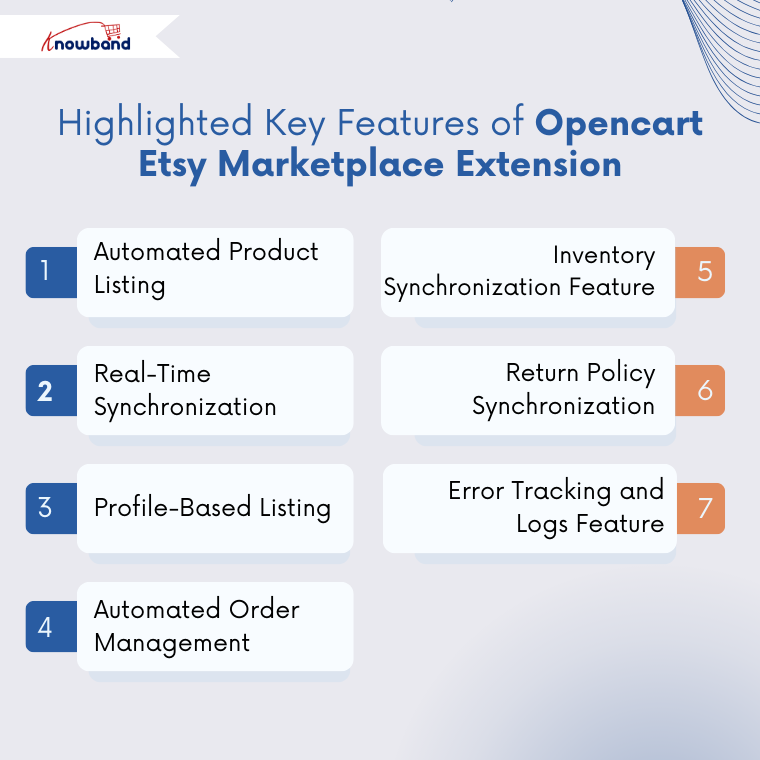
Listing your opencart product to etsy marketplace is very straightforward and requires less effort than manual. Additionally, this Etsy integration extension allows the store owners to list thousands of products at the same time, helping to reduce time and effort.
2. Real-Time Synchronisation
Start Selling on Etsy from Your Prestashop Store
Now selling on Etsy is easy with Knowband’s Prestashop Etsy Marketplace Module.
If you want to make any changes, like stock change, price changes or even product description, then do not worry. This OpenCart Etsy Marketplace Extension consist the several cron synchronisation tabs to automatically update the price, stocks and many more. As a result, everything will be up to date in your opencart store.
3. Profile-Based Listing Using the Opencart Etsy Marketplace Extension
In the Etsy Marketplace Extension, you can map entire categories or products with Etsy categories. In addition, profile management allows you to configure the fields and rules, for example, shipping, pricing, category assignments and many more.
4. Automated Order Management Using Opencart Etsy Integration Extension
This Etsy integration extension enables the stores to sync the orders from the Etsy end to the Etsy marketplace. These orders are automatically exported or sync from Etsy end to your opencart orders using the order synchronisation cron in the Opencart Etsy Integration Module.
5. Inventory Synchronisation Feature
Like real-time synchronisation, you can handle the inventory or stock synchronisation on both the platforms etsy and opencart store. Using the Opencart Etsy Integration Module, the inventory sync cron, you can automatically sync the opencart inventory to the Etsy inventory.
6. Return Policy Synchronisation
Knowband has recently released a new update to the Opencart Etsy Integration Extension, which allows the store owners to create, manage and sync the return policy to the profile management. In this feature, store owners can map the return policy to the product or entire category just by choosing the return policy option in the profile management.
7. Error Tracking and Logs Feature
Importantly, the Knowband’s Etsy API Opencart Plugin provides detailed error logs to help you identify the issues. As a result, this error tracking ensures improved accuracy of your product listing and synchronisations.
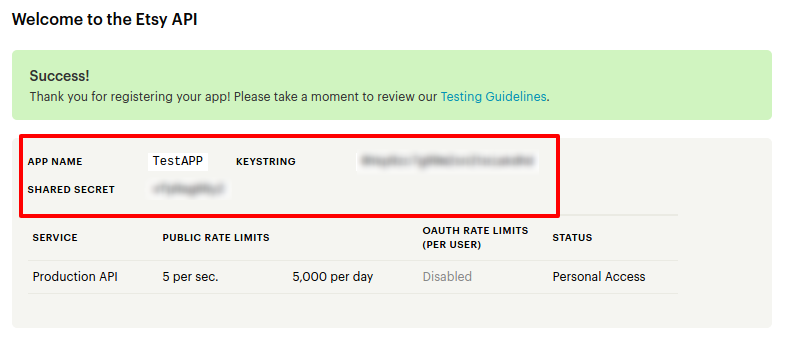
All the store owners will be needing Etsy API Key String and the Etsy secret Key to connect their store to Etsy.
To integrate the Opencart Etsy Integration Extension, kindly follow these steps 1. Visit the Etsy developer account. If you do not have an account, kindly create an account. If you already have, then visit
2. Go to Manage your app and create a app there. Fill out the required information for your app (name, purpose, and website if needed).
3. Once your app is created, Etsy will provide you with the Etsy API Key String and the Etsy secret Key. Make sure that you have added the callback URL that is provided to you below the general settings of the Opencart Etsy Marketplace Plugin
4. Now go to the Opencart Etsy Integration Module on your store and save and connect.
Conclusion
Selling on Etsy is very easy for the opencart sellers now using the Opencart Etsy Integration Extension. With the Knowband Etsy marketplace, you can manage product listings and sync inventory between OpenCart and Etsy without any hassle. This Opencart Etsy Integration Plugin helps store owners to save time, reduce manual work, and reach a wider audience on the Etsy marketplace.
Grow and expand your business effortlessly with the Opencart Etsy Marketplace Module and start selling on one of the world’s largest marketplaces directly from your OpenCart store without any manual work. If you face any query, you can always reach out to at support@knowband.com.
In today’s highly competitive e-commerce environment, expanding your reach across multiple marketplaces is crucial. Consequently, for e-commerce store owners, this presents a valuable opportunity if managed effectively. However, managing both platforms, including Etsy and your store, separately can be time-consuming and error-prone. Fortunately, this challenge is solved efficiently by the Knowband Etsy Integration Plugins. Whether you are on Opencart or Prestashop, it streamlines the entire process, enabling store owners to manage Etsy listings, orders, and inventory directly from their store backend.
Why Choose the Knowband Prestashop Etsy Integration Module?
The PrestaShop Etsy Integration Addon is more than just a connector; it’s a comprehensive solution that simplifies multichannel selling. Whether you’re using it as a PrestaShop Etsy Integration Module or Opencart Etsy Plugin, the outcome is the same: efficient, accurate, and scalable Etsy store management.
Knowband has released the update in Etsy, which includes a module is align with Etsy’s latest policy and a major feature of Return Policy Synchronisation.
Moreover, with the Knowband Etsy PrestaShop Integration Addon, users can list products, synchronise stock, update order statuses, and much more, all without switching platforms. Furthermore, this Etsy PrestaShop Connector automates time-consuming tasks, allowing merchants to focus on growing their business rather than managing data manually.
Key Features of the PrestaShop Etsy Integration Plugin
1. Simple Installation & Intuitive Interface
The PrestaShop Etsy Integration Module offers a hassle-free installation process that requires no technical skills. Additionally, with its user-friendly dashboard, even non-tech users can easily configure settings and start selling on Etsy in no time.
2. Return Policy Syncronization: You can now create, manage, and synchronise your store’s return policy directly with your Etsy profile. This ensures that your return policy remains consistent across both platforms, reduces the need for manual updates, and helps maintain accurate and up-to-date information for your customers at all times.
Integrate Your PrestaShop Store with AI Chat Support
Boost engagement and conversions with instant AI replies, multilingual support, and real-time order updates.
The Etsy PrestaShop Synchronisation Addon supports bulk product uploading, thereby saving you countless hours. In fact, admins can sync multiple products simultaneously, reducing the effort needed for manual listings.
4. Seamless Category and Attribute Mapping
To maintain listing accuracy and visibility, the PrestaShop Etsy Connector allows you to map your store categories and product attributes directly to Etsy. As a result, this enhances compliance and ensures your products appear in the right search results.
5. Centralised Order Management
The Opencart Etsy API Integrator Plugin enables seamless management of Etsy orders directly within the admin panel. Therefore, there’s no need to toggle between dashboards; everything is handled from one central location.
6. Real-Time Order Status Updates
Using cron jobs, the Opencart Etsy Synchronisation Addon updates order statuses on Etsy automatically. As a result, this ensures that customers stay informed, resulting in a smoother buying experience.
7. Inventory Synchronisation
The Etsy-PrestaShop Integration Module ensures real-time inventory synchronisation between your store and Etsy. Consequently, this minimises the risk of overselling and helps maintain customer trust by only displaying available products.
8. Multi-Language Support
Reach a global audience with ease. Moreover, the PrestaShop Etsy Integrator syncs product details in multiple languages, helping you connect with international customers and drive global sales.
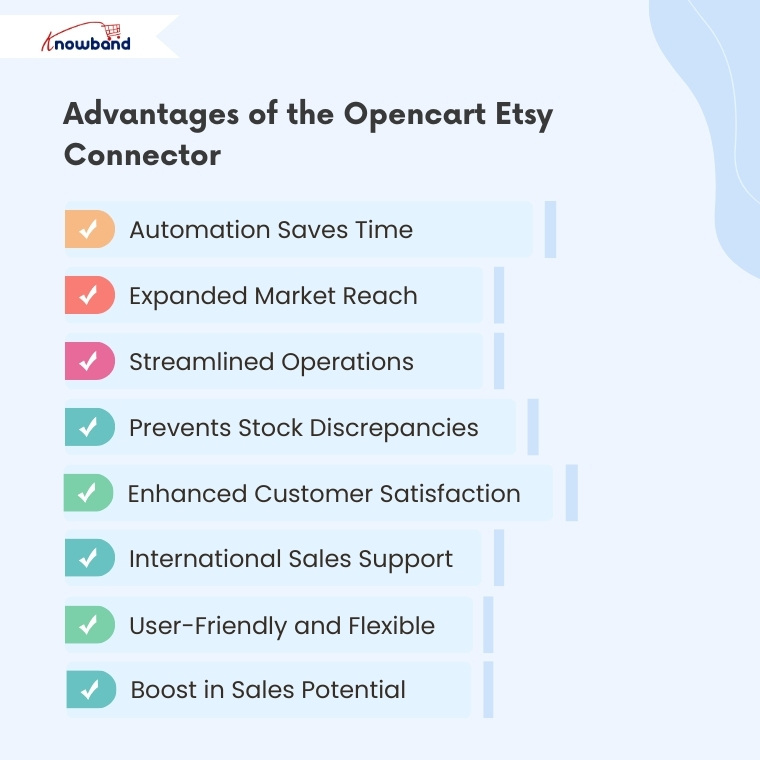
Advantages of the Opencart Etsy Connector Plugin
Automation Saves Time
With the Knowband Etsy Opencart Integration Plugin, tedious manual tasks such as product uploads and order syncing are handled automatically, thus freeing up your time for strategic business activities.
Expanded Market Reach
By using the PrestaShop Etsy API Integrator, sellers can tap into Etsy’s massive buyer base, thereby expanding their reach beyond their website and increasing revenue potential.
Streamlined Operations
Managing everything from one dashboard simplifies your workflow. Additionally, the Etsy PrestaShop Synchronisation Addon eliminates the need for multiple logins and manual data entry.
Prevents Stock Discrepancies
With real-time inventory updates via the PrestaShop Etsy Connector, you can avoid customer dissatisfaction caused by overselling or out-of-stock products.
Enhanced Customer Satisfaction
Automated order updates and timely communication improve customer trust and satisfaction, which can lead to more repeat purchases and better reviews.
International Sales Support
The multi-language functionality of the Etsy PrestaShop Integrator allows you to cater to global markets, thus increasing your chances of converting international shoppers.
User-Friendly and Flexible
Whether you’re using the Free PrestaShop Etsy Integration Module or a premium version, the interface is designed for ease of use. In fact, even first-time users can start selling on Etsy without any technical headaches.
Boost in Sales Potential
By optimising your listings and syncing seamlessly with Etsy, the PrestaShop Etsy Integration Extension helps your products gain better visibility, leading to higher conversion rates.
Final Thoughts
In conclusion, the Knowband PrestaShop Etsy Integration Addon is the perfect solution for sellers looking to capitalise on Etsy’s vast customer base without any complexity. With features like automatic product listing, real-time inventory updates, and centralised order management, it’s never been easier to manage an Etsy shop from your PrestaShop dashboard.
Whether you’re seeking an Opencart Etsy Integration Plugin to get started or a Prestashop Etsy Marketplace, Knowband offers reliable and scalable plugins that grows with your business.
If you run an OpenCart store and want to expand your reach, selling on Etsy is a great opportunity. Etsy is one of the most popular marketplaces for handmade, vintage, and unique products. Thus, if you deal in similar product categories, integrating your OpenCart store with Etsy, can boost sales, increase visibility, and reach a wider audience for your eCommerce business.
However, managing two platforms separately can be time-consuming and challenging. This is where Knowband’s OpenCart Etsy Connector comes in handy. With the help of the Opencart Etsy Integration Extension, you can easily sync your store with Etsy and automate your selling process.
Important Updates for Opencrat Etsy Seller (January 3, 2026)
Knowband’s Etsy Connector for OpenCart has been upgraded to include OpenAPI authorization, ensuring secure and uninterrupted integration with Etsy’s updated API standards.
It is crucial for sellers to update the extension to v2.0.4 by January 18, 2026, as older versions may lose connection, which can disrupt product listings and inventory synchronisation.
This update also allows sellers to manage return policies directly from the store dashboard and automatically sync them to Etsy, making store operations more efficient.
In this article, we will explain how the Etsy OpenCart Integration module can help you streamline your business and increase revenue effortlessly.
Why Sell on Etsy from OpenCart?
Etsy is a well-known global marketplace with millions of active buyers. Thus, if you are already selling on OpenCart, integrating your store with Etsy can provide you with multiple benefits:
Expand your customer base by reaching Etsy shoppers.
Increase revenue by selling on multiple platforms simultaneously.
Automate product listing and updates with an easy synchronization process.
Save time by managing everything from your OpenCart dashboard.
Furthermore, by using the OpenCart Etsy integrator, you can avoid the hassle of manually uploading products and managing orders on two different platforms.
Introducing Knowband’s OpenCart Etsy Connector?
The Etsy OpenCart Marketplace Integration module by Knowband is a powerful plugin that helps OpenCart store owners connect their store to Etsy with ease. With this module, you can:
Sync products, categories, and pricing automatically.
Manage orders from Etsy within your OpenCart admin panel.
Update inventory and product information effortlessly.
Automate product listing and avoid manual work.
This OpenCart Etsy Marketplace Integration Extension is designed to simplify your workflow and maximize your productivity.
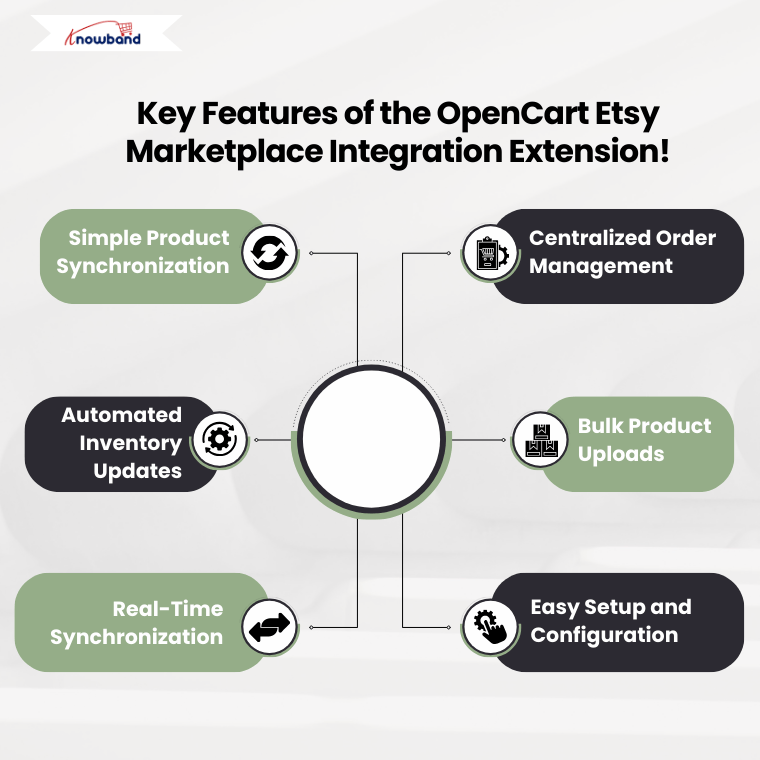
Key Features of the Etsy Opencart Synchronization Extension!
1. Simple Product Synchronization:
With the Opencart Etsy Synchronization Extension, you can sync your OpenCart products with Etsy in just a few clicks. Moreover, the extension allows you to map product categories, pricing, and inventory details effortlessly.
2. Centralized Order Management:
No need to switch between platforms! The Etsy OpenCart API Integrator lets you manage Etsy orders directly from your OpenCart dashboard. This feature ensures that your order processing is fast and efficient.
3. Automated Inventory Updates:
The Etsy Opencart API Integrator Extension ensures that any inventory updates in OpenCart are automatically reflected on Etsy. Therefore, this prevents overselling and inventory mismatches.
4. Bulk Product Uploads:
The Opencart Etsy Integration Extension allows you to bulk upload products to Etsy. This not only saves time and effort but also helps you manage a large product catalog.
5. Real-Time Synchronization:
The Etsy Opencart Synchronization Extension provides real-time data syncing, ensuring that your store and Etsy marketplace remain up-to-date with the latest product changes.
Integrate Your Opencart Shop with Etsy Marketplace
The OpenCart Etsy Marketplace Integration Extension is user-friendly and requires no coding skills. Furthermore, you can easily set up and configure the module using the step-by-step guide provided by Knowband.
How to Use the OpenCart Etsy Integrator?
Using the Etsy OpenCart Marketplace Integration module is simple. Here’s how you can get started:
Install the Module – Download and install the Opencart Etsy Integration Plugin from Knowband.
Connect Your Etsy Store – Use the Opencart Etsy API Integrator to authenticate and link your OpenCart store with Etsy.
Configure Settings – Customize settings such as product mapping, pricing, and inventory rules.
Sync Products and Orders – Start syncing your OpenCart products with Etsy and manage orders seamlessly.
Monitor Performance – Track sales and optimize your product listings for better results.
Why Choose Knowband’s OpenCart Etsy Connector?
Knowband is a trusted name in eCommerce extensions and plugins. Furthermore, the free Knowband OpenCart Etsy Integration extension offers a seamless way to connect OpenCart with Etsy without technical hassles.
Benefits of Choosing Knowband:
User-Friendly Interface – The module is easy to install and use.
Regular Updates – Get the latest features and improvements.
24/7 Customer Support – Dedicated support for hassle-free integration.
Expanding your online business by selling on Etsy from OpenCart is a great strategy to increase sales. Furthermore, with the Etsy OpenCart Integration plugin, you can automate product listings, manage orders efficiently, and synchronize inventory without hassle.
Knowband’s OpenCart Etsy Connector simplifies the integration process, making it easy, fast, and effective. Whether you are a small business or an established brand, using the OpenCart Etsy integrator can help you reach more customers and grow your business.
Get started today with the Free OpenCart Etsy Marketplace Integration Extension and take your eCommerce business to the next level!
You may also like to read: Discover how integrating your PrestaShop store with Etsy can save time and maximize sales.Read More
Marketplaces have played a vital role in the growth of e-commerce. Amazon and eBay are some of the well-known platforms, but in recent years a number of new marketplaces have marked their presence in the eCommerce ecosystem. Etsy is one of the most popular marketplaces for handmade goods and vintage items. Etsy allows people from around the globe to buy and sell unique goods. This platform invites the sellers to showcase their creativity to the new audience, thus, helping them to reach out to potential customers globally. Etsy is a great place to extend the reach of your business. The process of starting a business in the Etsy marketplace is quite easy. Please click on the link below to know more about the rules and regulations of trading: https://www.etsy.com/in-en/sell. Opencart Etsy Marketplace Integration can help you reach your business goals effectively.
KnowBand, an eCommerce plugin, and marketplace integration development company offers the OpenCart Etsy integration module. The Opencart Etsy Marketplace Integrator allows the seller to synchronize their OpenCart store with the Etsy marketplace in a few simple steps. We do understand that being ready to start selling on the Etsy marketplace, it is also important for the store owner to analyze their business method and process so that they can be able to keep up with the new challenges. After starting to sell on multi-channel sellers have to keep proper track of their inventory status, product listings, shipping methods, delivery time, and customer support. To overcome all the major challenges of selling on a marketplace, KnowBand has developed the Opencart Etsy Marketplace Connector.
With the help of the Etsy OpenCart Integration extension, OpenCart store owners can effectively manage the inventory, orders, and shipping for the Etsy shop orders from the OpenCart store admin. OpenCart Etsy marketplace integration module offers the following advantages to the sellers:
Easy installation and user-friendly interface: The user-friendly interface of the OpenCart Etsy Marketplace Integration offers an effortless interface to list the products to the Etsy marketplace.
Bulk uploading of the products: OpenCart Etsy Marketplace Integrator Module allows the sellers to upload products in bulk. Sellers can create a profile to upload the entire category of the OpenCartstore to the Etsy marketplace.
Category and product attribute mapping: Sellers can easily map the product attributes and category of the OpenCartstore products with the Etsy store attributes and category via the OpenCart Etsy Marketplace Connector Extension.
Shipping templates: Create shipping templates from the OpenCartstore admin panel and sync these templates to the Etsy shop via OpenCart Etsy Marketplace Integration Plugin.
Order Management: Manage and keep track of Etsy shop orders from the OpenCartstore admin panel.
Order status: Admin can update the order status of the Etsy marketplace orders from the OpenCart store admin panel through a cron job.
Inventory management: Manage inventory for the Etsy store products from the OpenCart admin panel. After making any changes in the product inventory or attributes in the OpenCart store, the admin can easily synchronize the changes to the Etsy marketplace.
Secondary language: Admin can select a secondary language for the store and easily synchronize it with the Etsy marketplace shop through a cron job.
What’s New in the Recent Enhancements of Opencart Etsy Extension v2.0.4?
[New]Aligned with Etsy OpenAPI Standard
The OpenCart Etsy Extension has been enhanced to support OpenAPI authorisation headers, ensuring secure authentication and full compliance with Etsy’s current API standards. Furthermore, this update helps maintain uninterrupted connectivity between OpenCart and Etsy while aligning the extension with Etsy’s evolving security and policy requirements.
[New]Return Policy Synchronisation
In addition to the authentication header format update, Knowband’s Etsy Marketplace extension now includes Return Policy Synchronization, allowing merchants to seamlessly sync their return policies between their opencart store and Etsy. This ensures consistency across both platforms, reduces manual effort, and helps provide a clear and unified return experience for customers.
Profile Level Product Synchronization:
The enhanced Knowband’s Opencart Etsy marketplace connector extension now features profile-level product synchronization. This allows admins to list products from specific categories, offering a more targeted and efficient listing process compared to bulk product listing. This feature enhances inventory management and improves the accuracy of product listings on Etsy.
Product Listing with Custom Details:
The updated extension also includes a feature for product listing with custom details. Admins can now list products with unique titles and descriptions, differentiating their products and enhancing visibility on Etsy. This flexibility allows for better product presentation and marketing, tailored to attract specific customer segments.
You can watch our video on “New Features in Knowband’s Opencart Etsy Connector v1.0.9”:
2.0 Installation
After purchasing the module, you will get the following files as below:
1. zip (contains the source code of the module)
2. User Manual
Follow the following steps to install the extension:
Unzip the zip file. It would contain files and folders as shown below –
2. Copy all the files and folders of the unzipped folder into the root folder of the website.
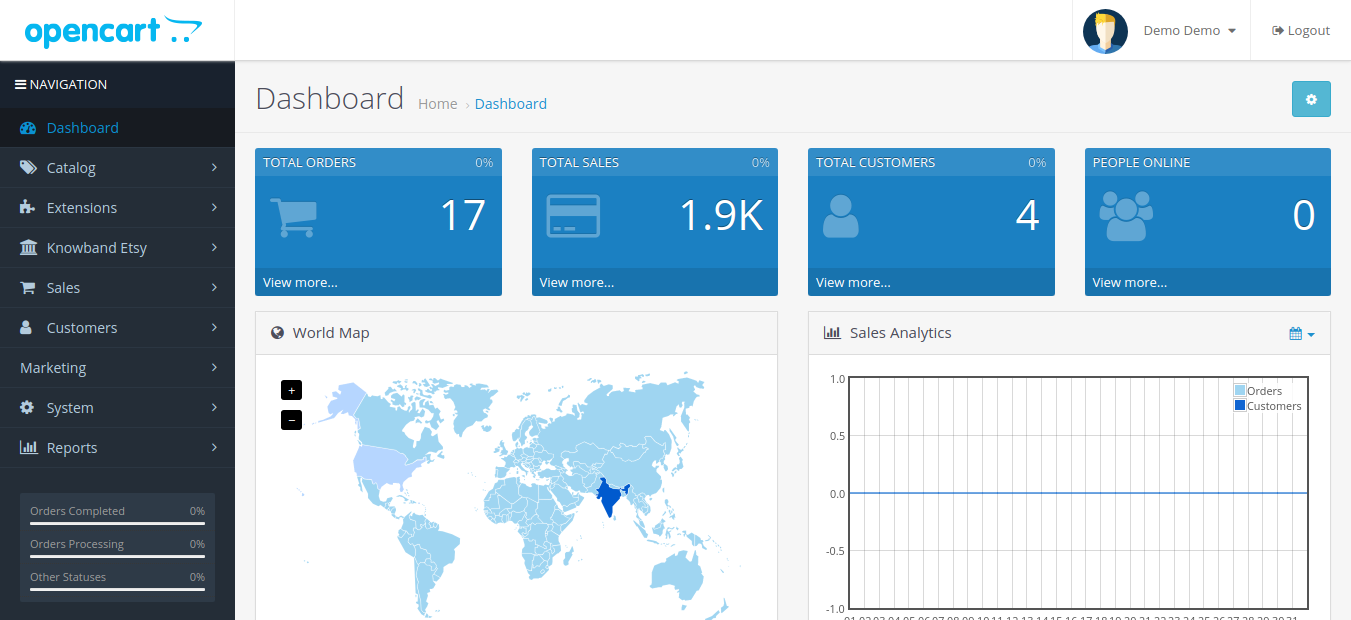
3. Now module is ready to be installed on your store and you can find that in Store Admin -> Modules and Services. It would be shown as below –
Etsy OpenCart Integration Extension
Knowband’s OpenCart Etsy Marketplace Integration plugin facilitates seamless integration between your OpenCart store and Etsy marketplace, streamlining product listings and order management.
Before proceeding ahead, it is important to know the correct flow of actions to set up this system as several things are dependent on other things. If we do not take care of them then it would become difficult to process smoothly or it may be error-prone.
Seller account setup: This section will help you to set up the shop on the Etsy marketplace and in the next steps you will learn about the Etsy API key. Etsy API key and API Secret are required to integrate the Opencart and Etsy marketplace.
Admin Interface: This section will help you to understand the complete working of the Etsy Opencart Integration plugin.
4.0 Etsy Marketplace – Seller Account Setup
To start selling on Etsy Marketplace you need to have a seller account on Etsy. In this section, we are listing all the steps to create a seller account on Etsy. Please find them below –
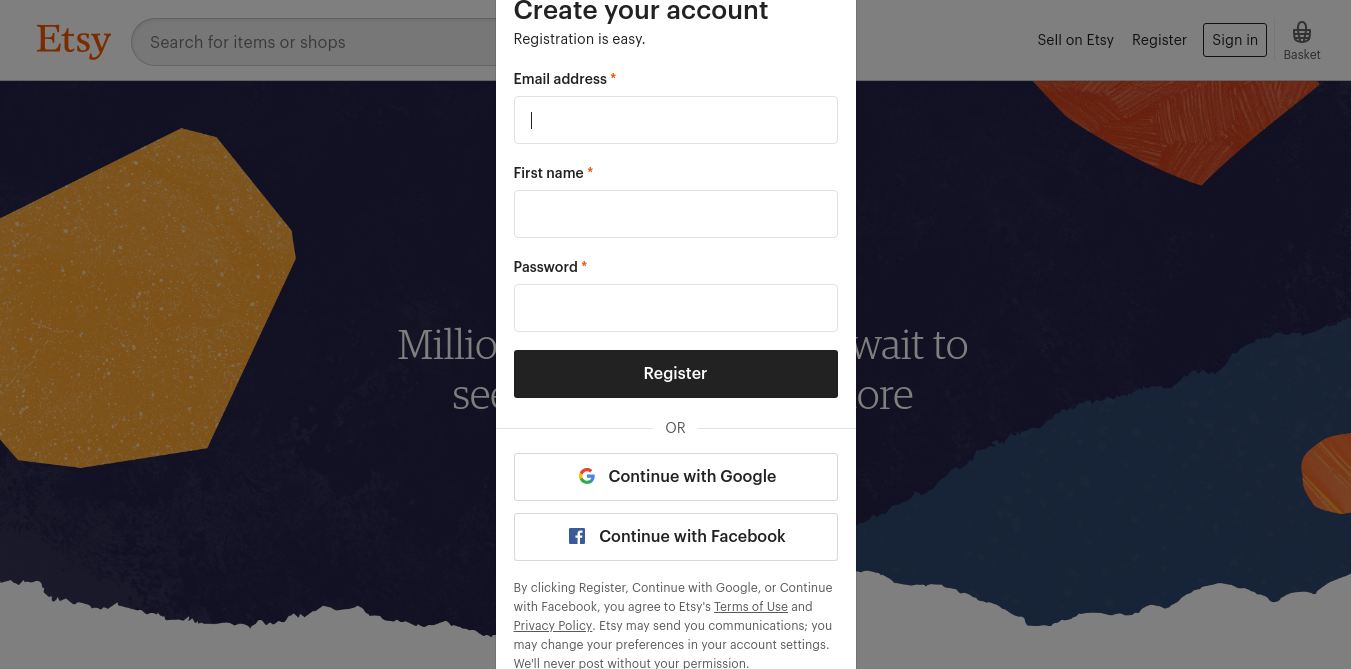
Click on the “Sell on Etsy” button present at the top right corner.
Click on the “Register” button on the page you are visiting now. Refer to the screenshot given below.
Fill up the registration form and click on the “Register” button. It would create your seller account and send a verification email to the provided email address.
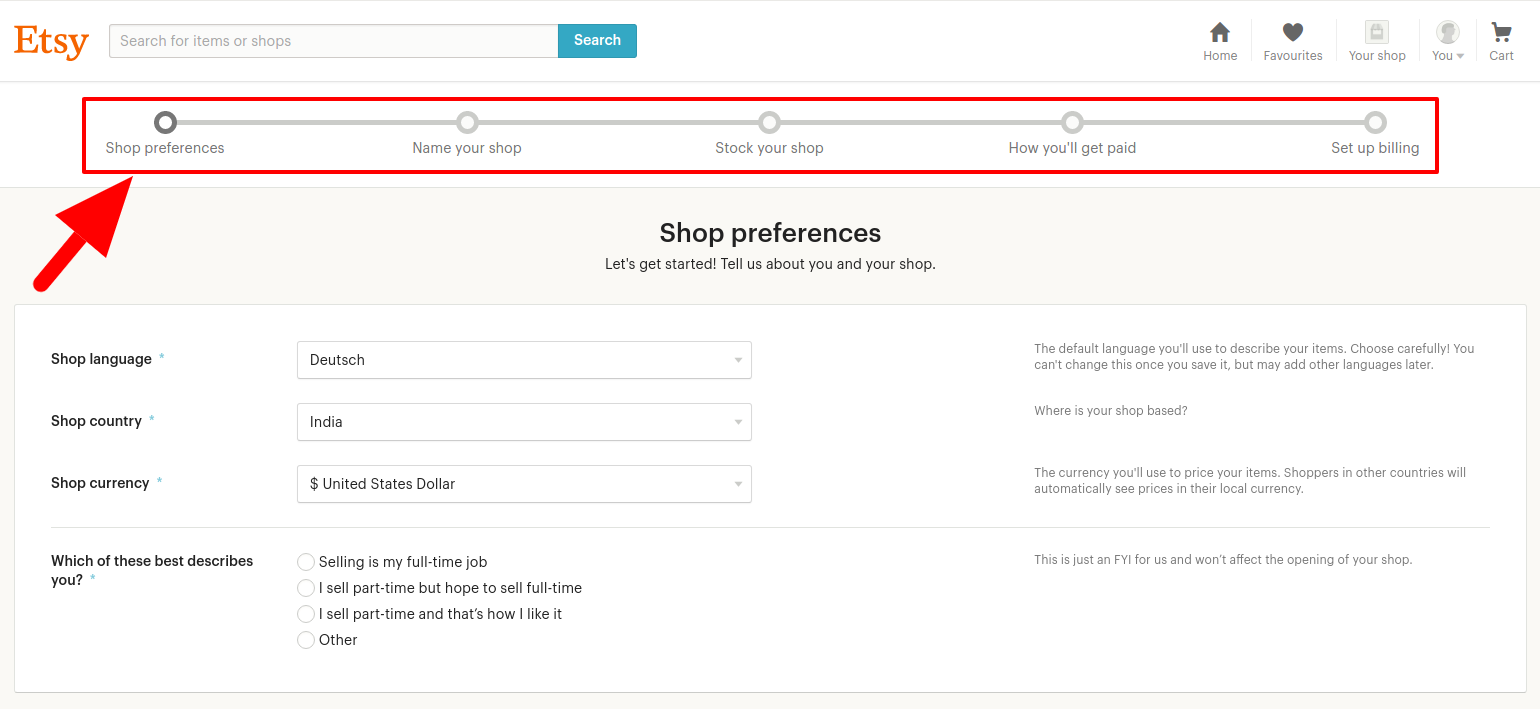
Now, it would also redirect you to another page as shown below.
5. Now, it is asking to set up your shop preferences. Complete all the highlighted sections – Shop Preferences and Name your shop, Stock your shop, how you will get paid, and Set up Billing.
5.0 Etsy Marketplace – Setup an App
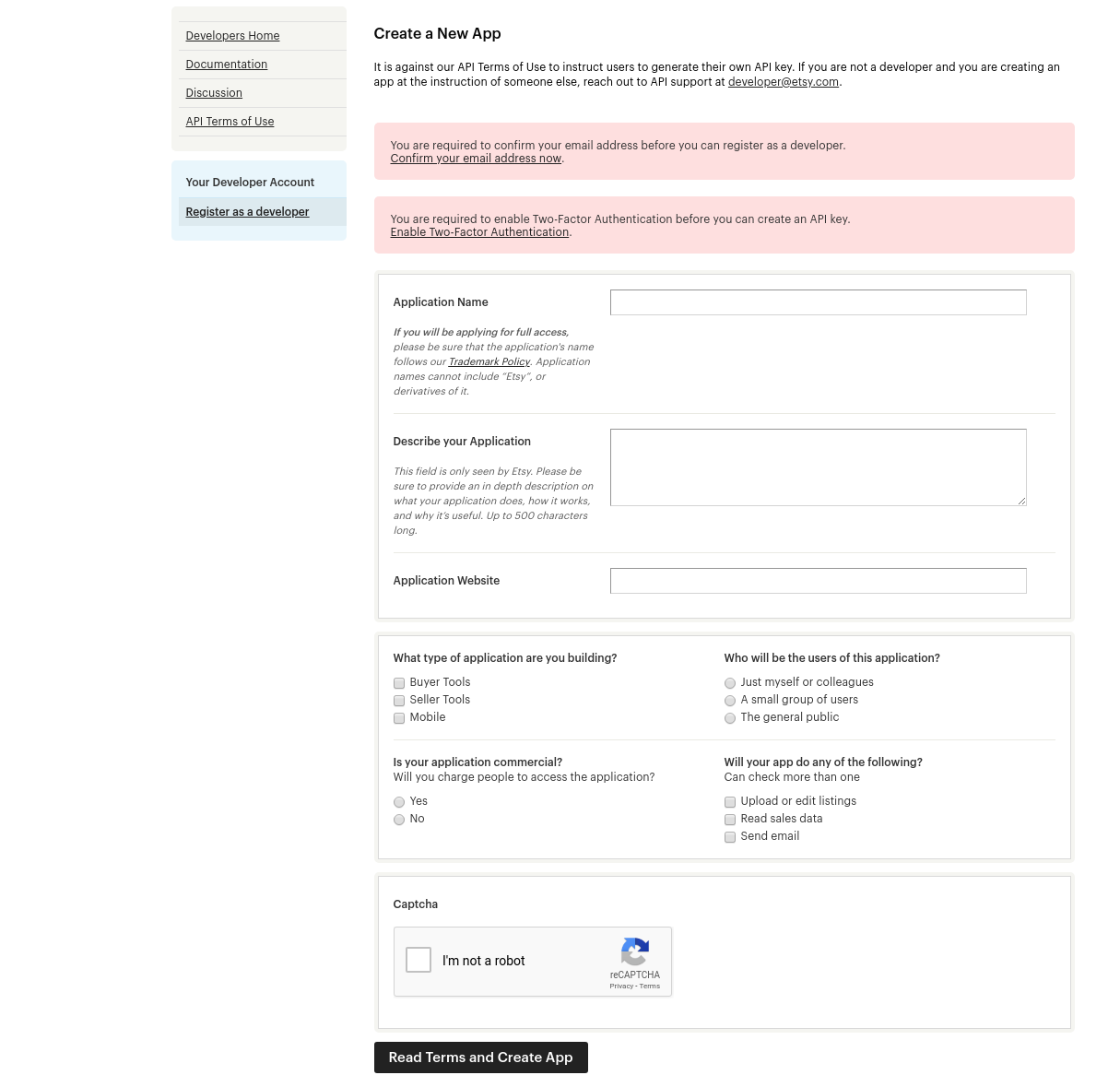
To start communication between OpenCartStore and Etsy Seller Account, you need to create an App on Etsy Marketplace. Following are the steps to create an App on Etsy –
It would open a page where a form will be shown with a few input fields as shown below.
Fill up the form and click on “Read Terms and Create App”. Please make sure that you left the “Inventory Management Compatibility” checkbox is checked.
It would ask to accept “terms and conditions”. Accept and click on the “Create App” button.
It would register your App on Etsy Marketplace and provide API details as shown below.
Note: “The term ‘Etsy’ is a trademark of Etsy, Inc. This application uses the Etsy API but is not endorsed or certified by Etsy, Inc.”
6.0 Admin Interface
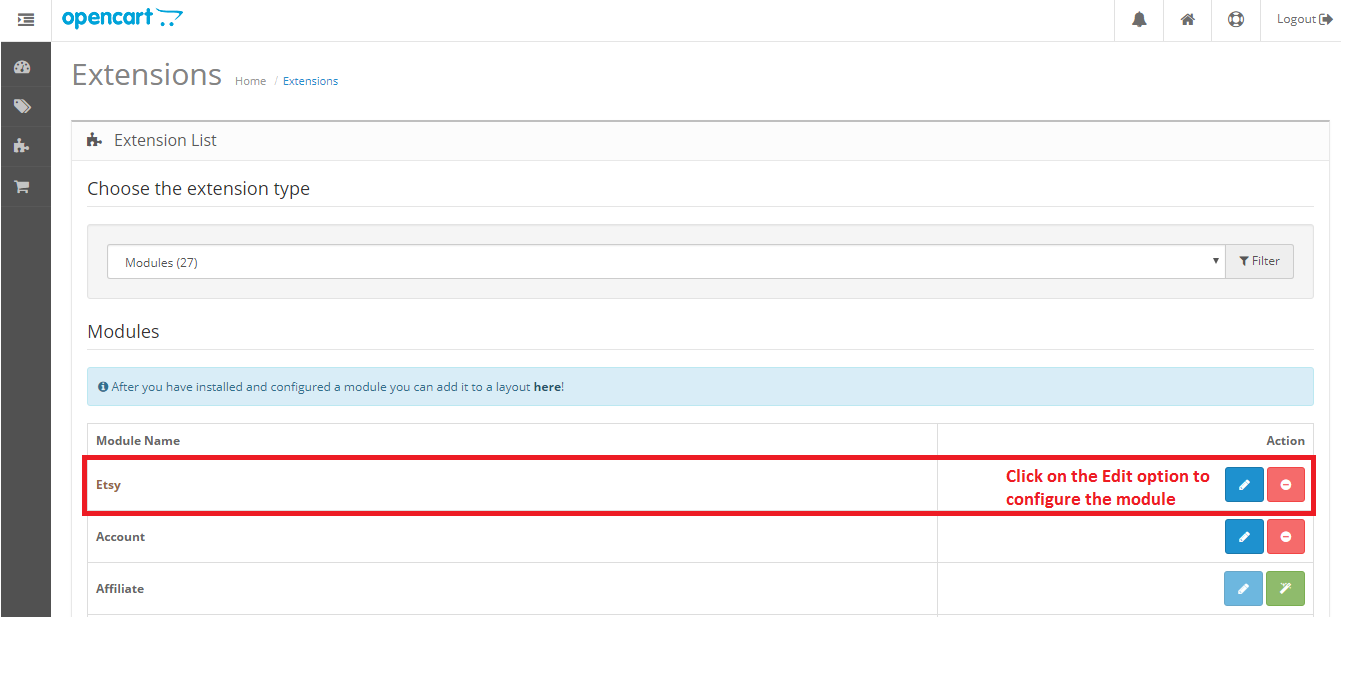
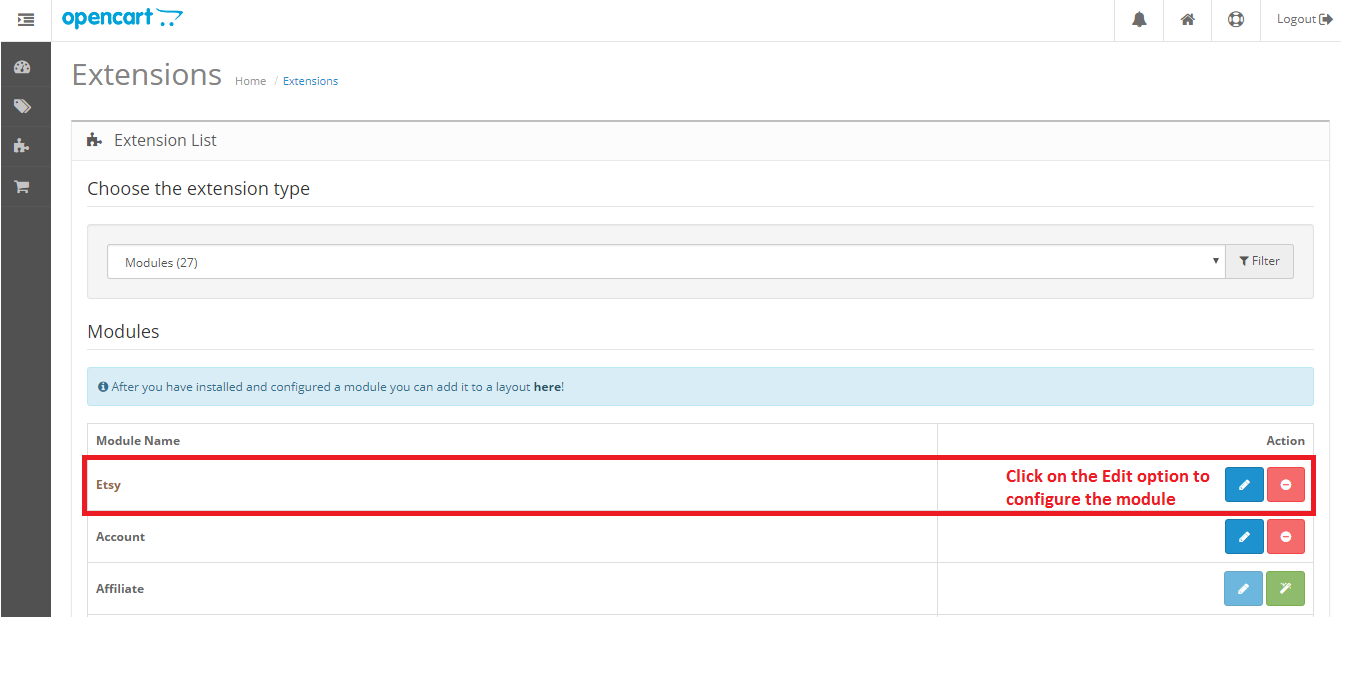
Opencart Etsy Marketplace connector is easy to configure. The configuration settings can be managed via the admin interface. After installation, the store admin can find the “Etsy” module in the Extension List under the “Extensions” tab.
The Etsy integration extension will display as shown below:
On clicking the Edit button next to the Etsy module, it will redirect to the admin interface. Here admin can see all the options to configure the Etsy module:
Etsy Marketplace extension offers the following options –
General Settings
Profiles
Attribute Mapping
Shop Section
Shipping Templates
Products
Orders
Synchronization
Audit Log
Each tab is explained below.
6.1 General Settings
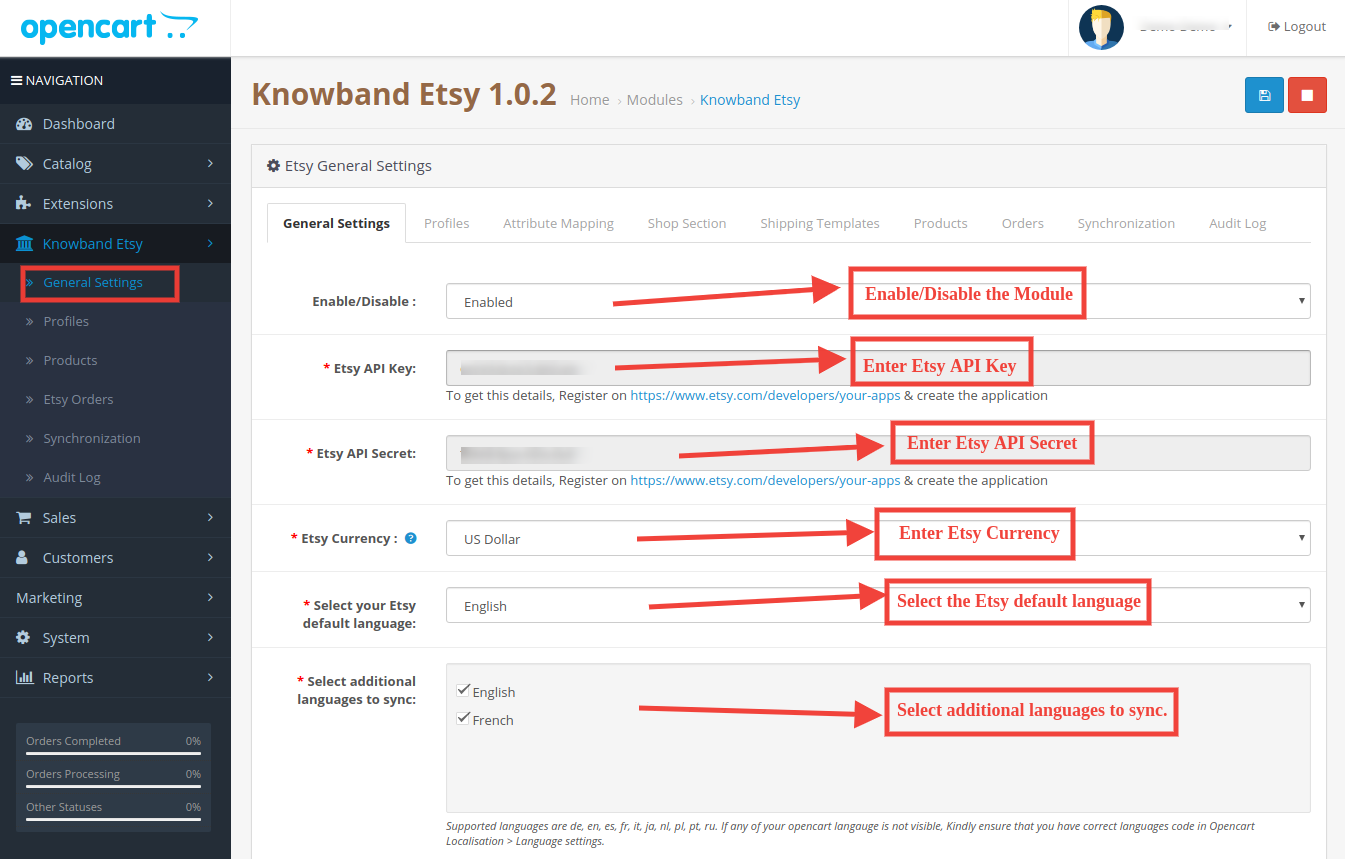
You can find the screenshot of the “General Settings” page below –
General Settings tab is there for capturing details of Etsy Marketplace API like API Key, Host, etc. This helps the admin to connect the OpenCart store with the Etsy marketplace. Please find the description of each input field below –
1. Enable/Disable
Admin can Enable/Disable Opencart Etsy Marketplace Integration by using this option. If enabled, then only this module and all its settings will be working otherwise there will be no impact of this module on the store.
2. Etsy API Key
Enter Etsy API Key which will authenticate the connection being established between OpenCartstore and Etsy Marketplace.
3. Etsy API Secret
Admin needs to enter Etsy API Secret mandatory for authentication between OpenCartstore and Etsy Marketplace.
4. Etsy Currency
Admin can select the Etsy currency from the menu.
5. Select your Etsy default language:
Admin can select the Etsy default language from the menu.
6. Select additional languages to sync:
Admin can select additional languages to sync with the Marketplace.
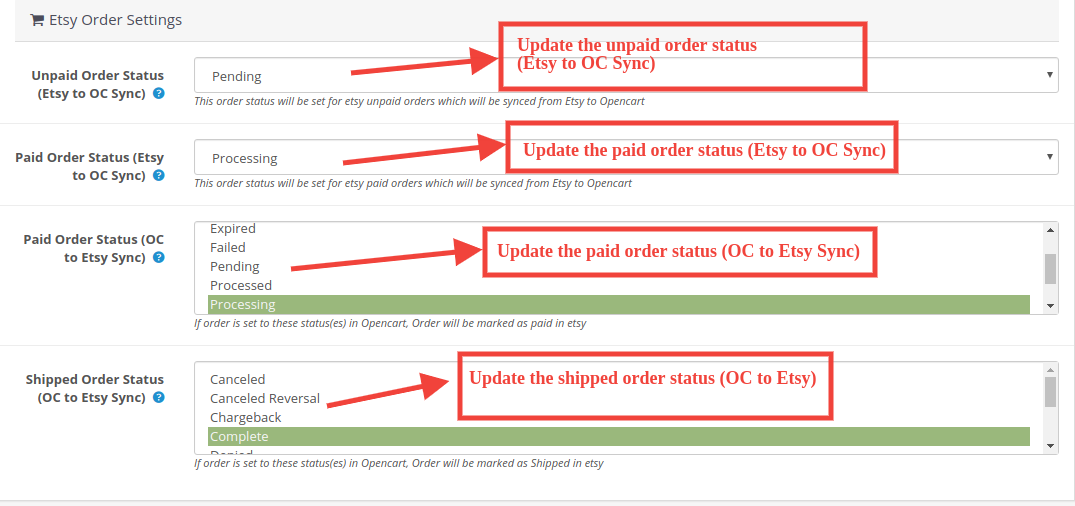
6.1.1 Etsy Order Settings:
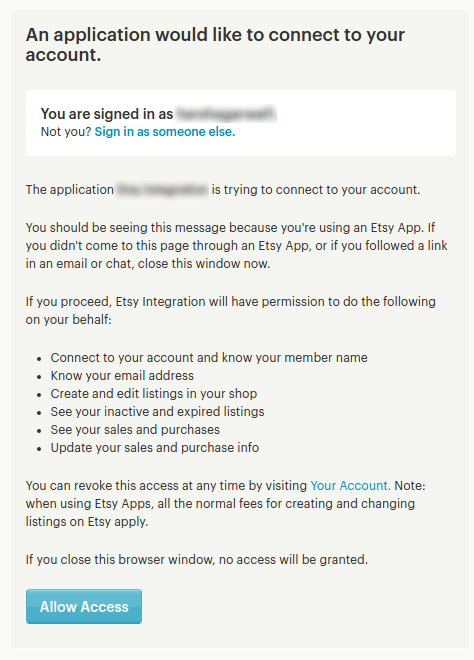
After providing these details, click on the “Save” button in the top right corner. It would redirect the admin to the Etsy Marketplace to allow the App Access for the store. Click on the “Allow Access” button as shown below and it will establish the connection between the store and Etsy Marketplace.
It would also redirect the admin back to the same page of “General Settings” and show the “Disconnect” button as the connection has now been set up with Etsy Marketplace.
6.2 Profiles
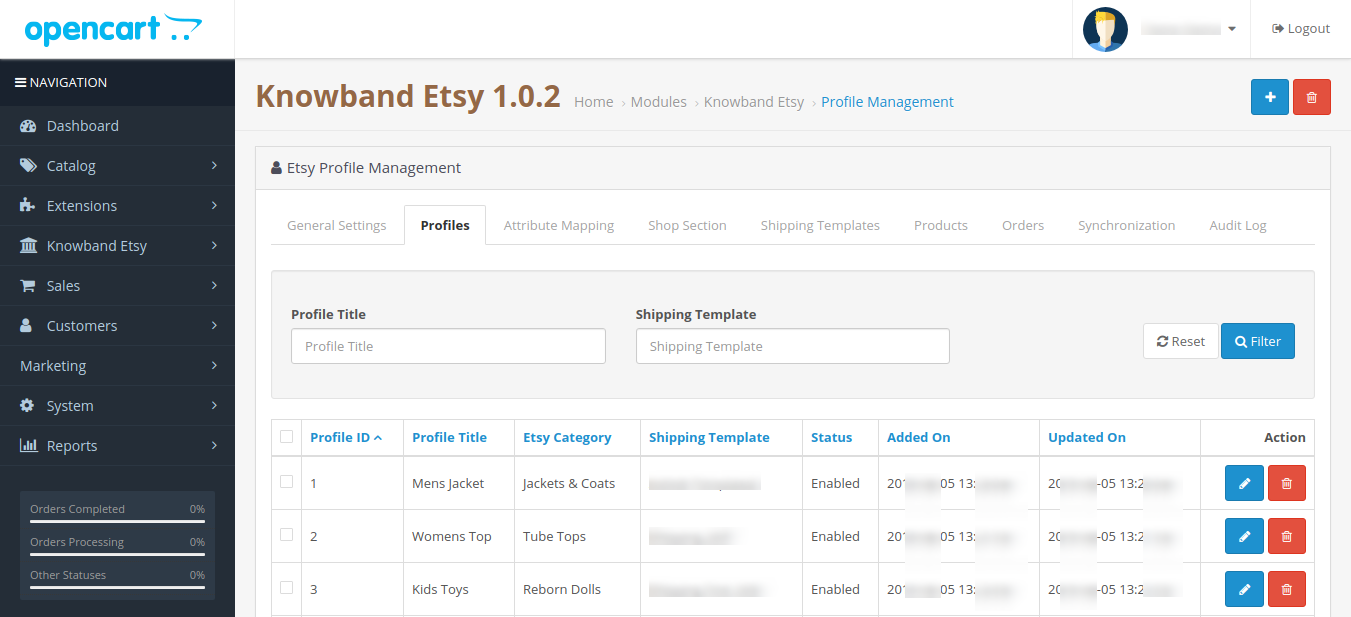
The profile Management tab provides options to create the profile for product listing. In this section, the admin will be able to map OpenCart store product attributes and categories to Etsy Marketplace. Opencart Etsy Marketplace Connector allows the seller to select multiple store categories to sync with the one Etsy category.
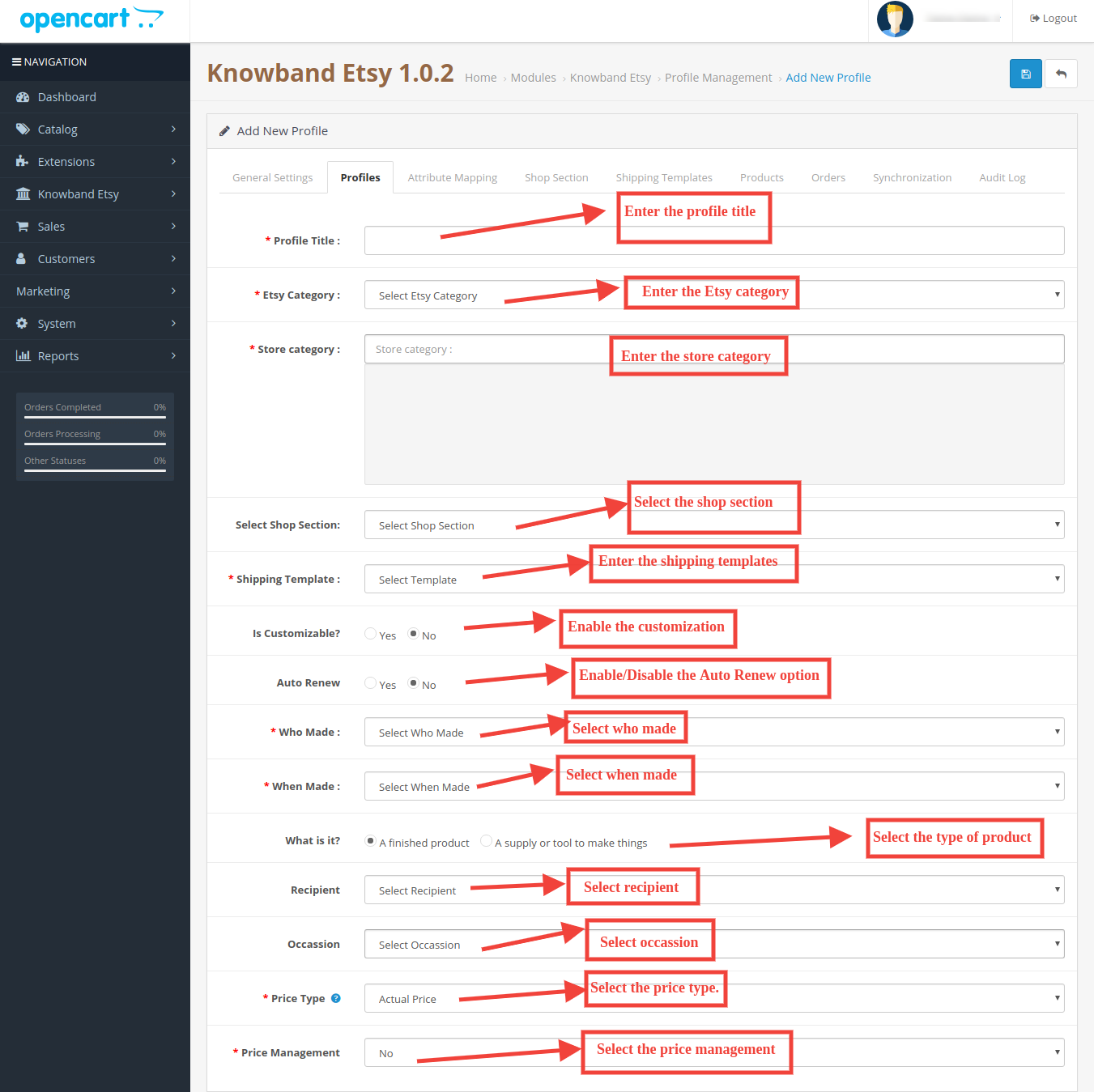
Admin needs to enter all the mandatory details as per the instructions are given in the below screenshot. After entering all the details click on the Save button at the top of the form.
6.2.1 How to Add New Profiles?
Following are the steps to add new profiles-
Go to the Etsy Marketplace module-> Profiles(Menu Option)
It would redirect the admin to a page where already added profiles will be listed (If any). Click on the “+” (plus icon as shown in the screenshot below) and it will redirect the admin to a new page where a form with some input fields will be shown.
Fill up the following input fields –
Profile Title: Enter the Profile Title as per your choice.
Etsy Category (List of Etsy Marketplace categories): Select the correct category from the drop-down list.
Store Category (Lists of Store Categories): Select the OpenCart store category for the products. The selected category will be mapped with the Etsy category (as selected in the Etsy Category) field.
Select Shop Section: Select the shop section from the drop-down list.
Shipping Template (List of Shipping Templates): Select the shipping template from the drop-down list.
Is Customizable?: Select from the drop-down list.
Who Made: Select from the drop-down list.
When Made: Select from the drop-down list.
What is it?: Select from the drop-down list.
Recipient: Select from the drop-down list.
Occasion: Select from the drop-down list.
Price Type: Select from the drop-down list.
Price Management: Select from the drop-down list.
6.2.2 How to Edit/Delete Profile?
Admin can easily update the profile entries; the Opencart Etsy Marketplace Connector allows the admin to sync the changes to the Etsy shop in simple steps. Following are the steps to edit/delete a profile from the system –
1. Go to the Etsy Module -> Profiles (Menu Option)
2. Click on the “Edit/Delete” button corresponding to each profile as shown in the above screenshot.
3. If an admin has clicked on the “Edit” option, then, it will redirect the admin to a new page where a form with some already filled input fields will be shown. Admin can simply update values and save the details by clicking on the “Save” button.
4. The admin can click on the “Delete” option to delete the selected Profile from the system.
6.3 Attribute Mapping
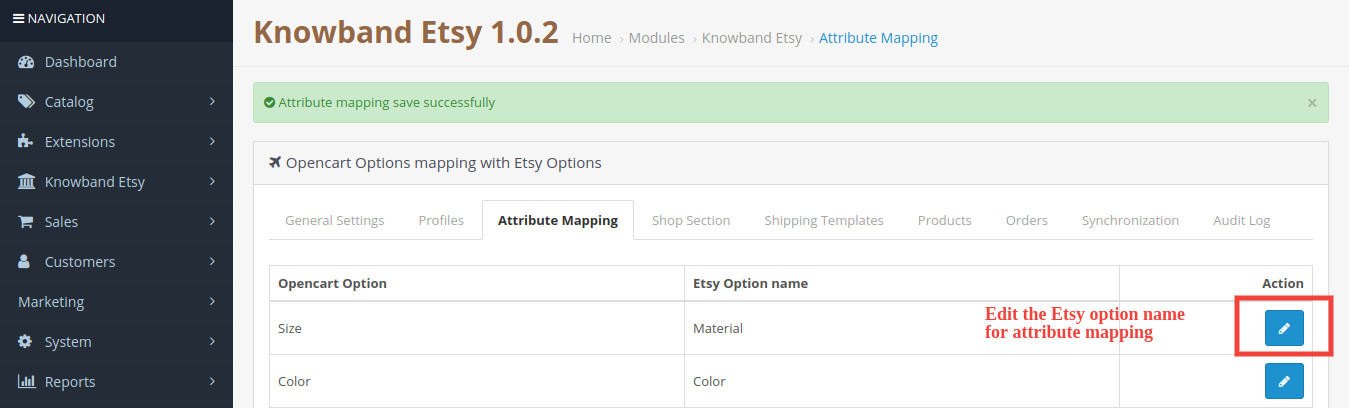
This option helps to upload the Variation products. Select the correct attribute and save it.
6.4 Shop Section
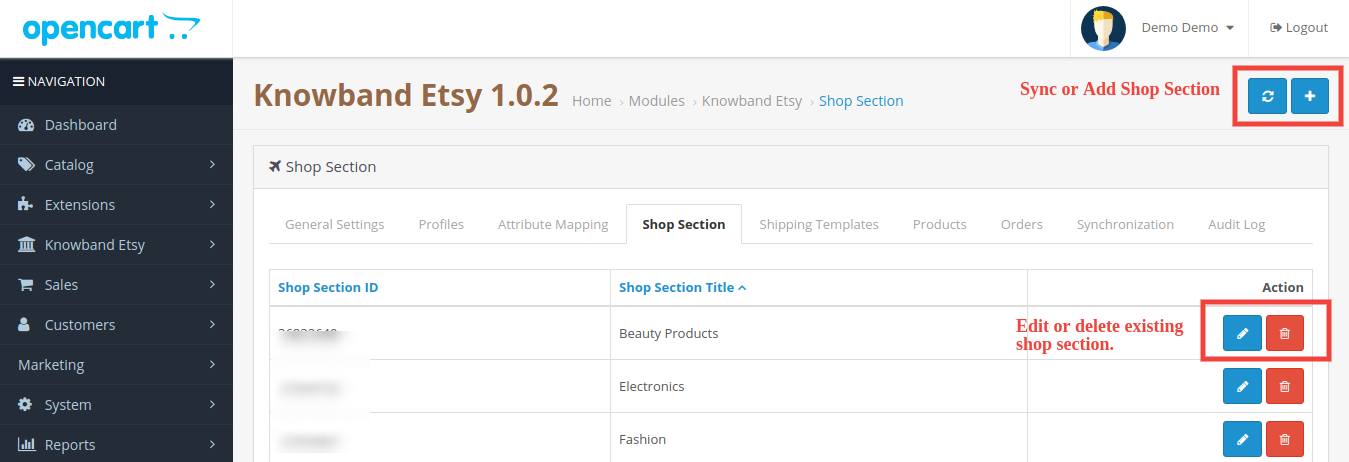
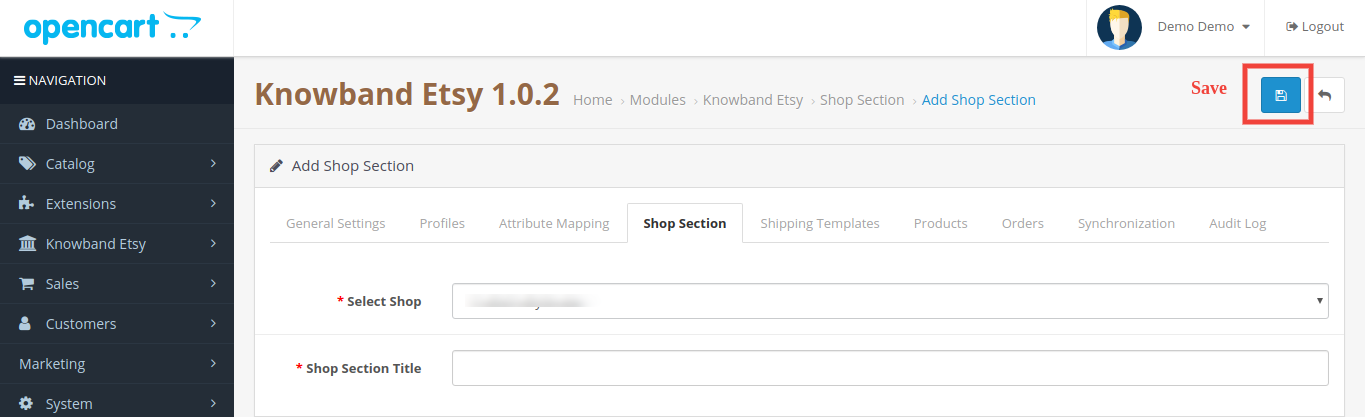
Under this tab, the admin can view the shop sections and their titles. You can edit, and delete the existing profile while you can add the new shop section too from the top right corner. You will be directed to the window below. The same window will open for editing the shop section with filled details.
6.5 Shipping Templates
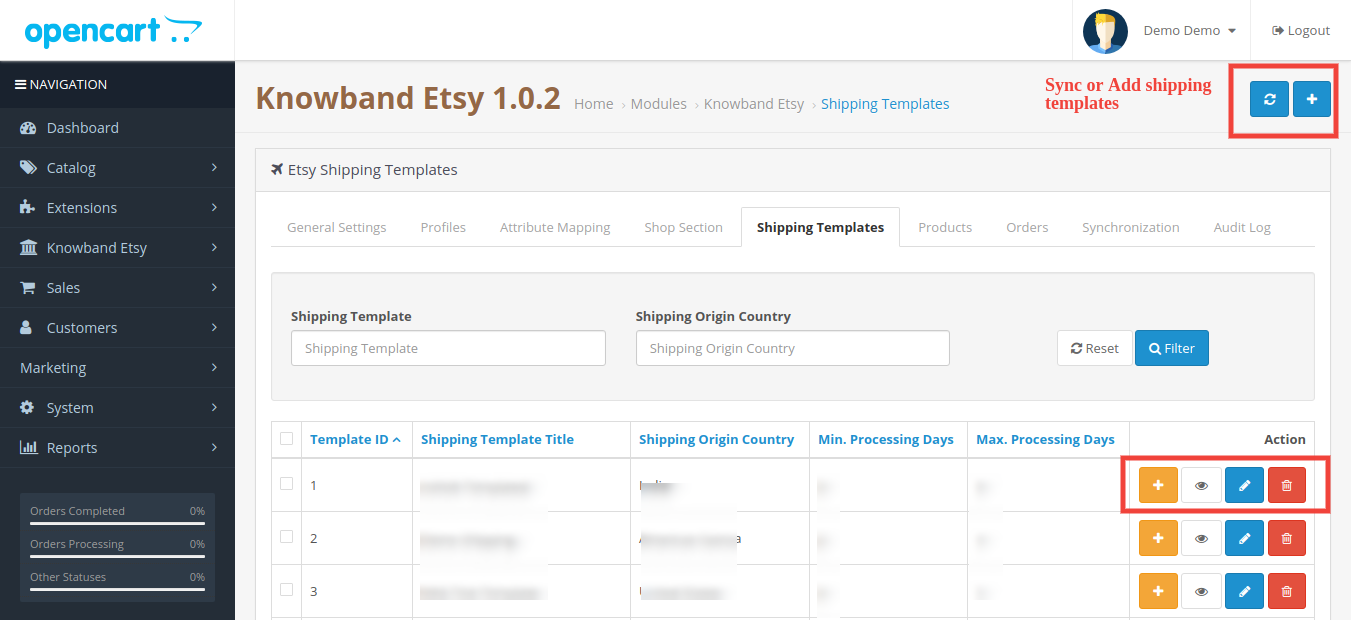
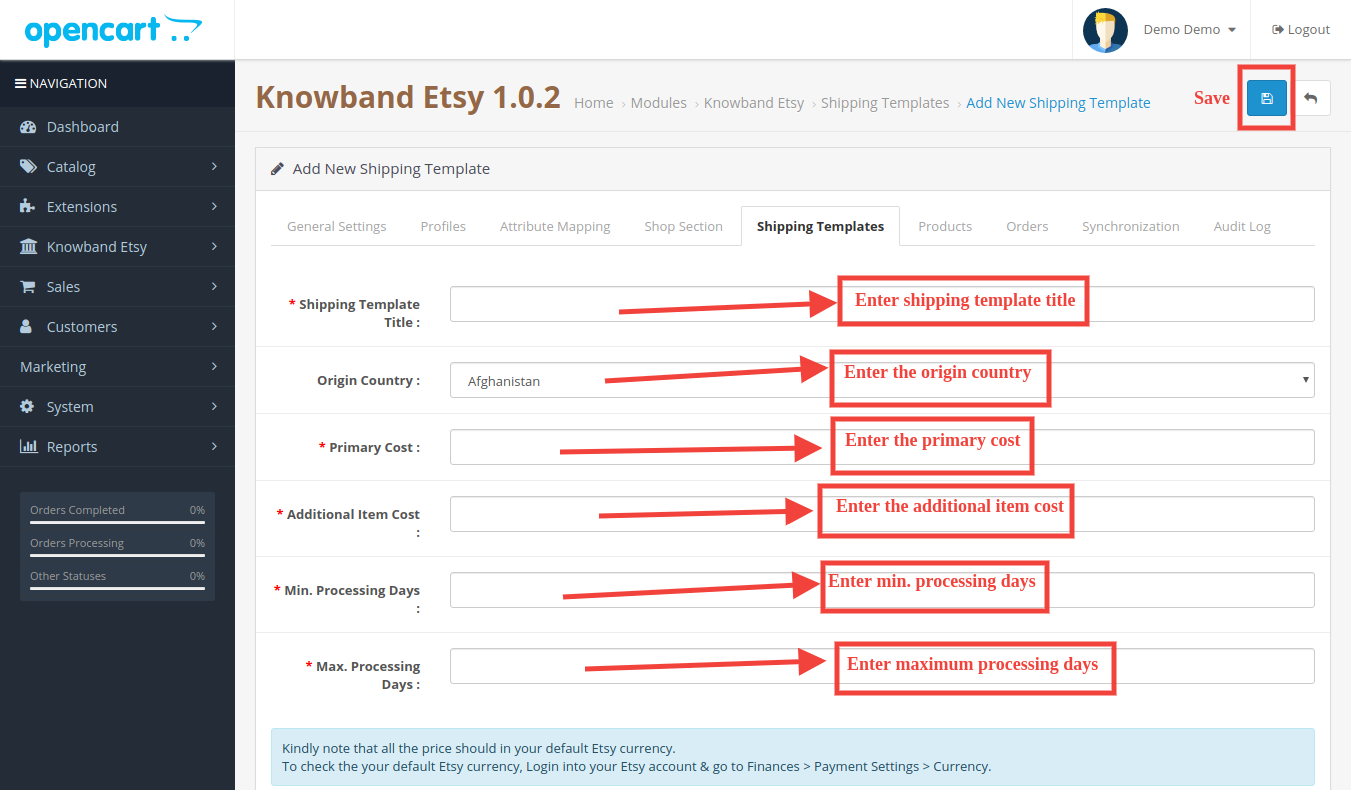
The shipping Templates tab is there to manage shipping options. In this section, the admin can create Shipping Templates along with other options for the existing shipping template like Add Shipping entry, View shipping entry, Edit Shipping Template, and Delete. Admin can create multiple shipping templates by using the EtsyOpenCart Integration module. Please refer to the next screenshot:
Admin can easily modify the existing shipping template or add new shipping templates. After creating new shipping templates, the store admin must sync the shipping templates to the Etsy shop by clicking the “Shipping Template Synchronization” option under the “Synchronization” tab.
6.5.1 How to add Shipping Templates?
Following are the steps to add a Shipping Template into the system –
Go to the Etsy Marketplace -> Shipping Templates (Menu Option)
It would display the page where already added Shipping Templates will list (If any). Click on the “+” (Plus Icon – as shown in the above screenshot).
It would redirect the admin to the new page where a form with some input field will be shown (Screenshot is shown below).
Fill up the following input fields of form –
Shipping Template Title: Enter the shipping template title as per your choice.
Origin Country: Select the origin country from the drop-down list.
Primary Cost: Enter the primary shipping cost for the shipment.
Additional Item Cost: Enter the additional item cost for shipment. It is the additional cost if the customer adds a second product to the package.
Min. Processing Days: Enter the minimum processing days. This field accepts only numeric values.
Max. Processing Days: Enter the minimum processing days. This field accepts only numeric values.
Click on the “Save” button to add the new shipping template.
You can find the screenshot of the “Add New Shipping Template” form below –
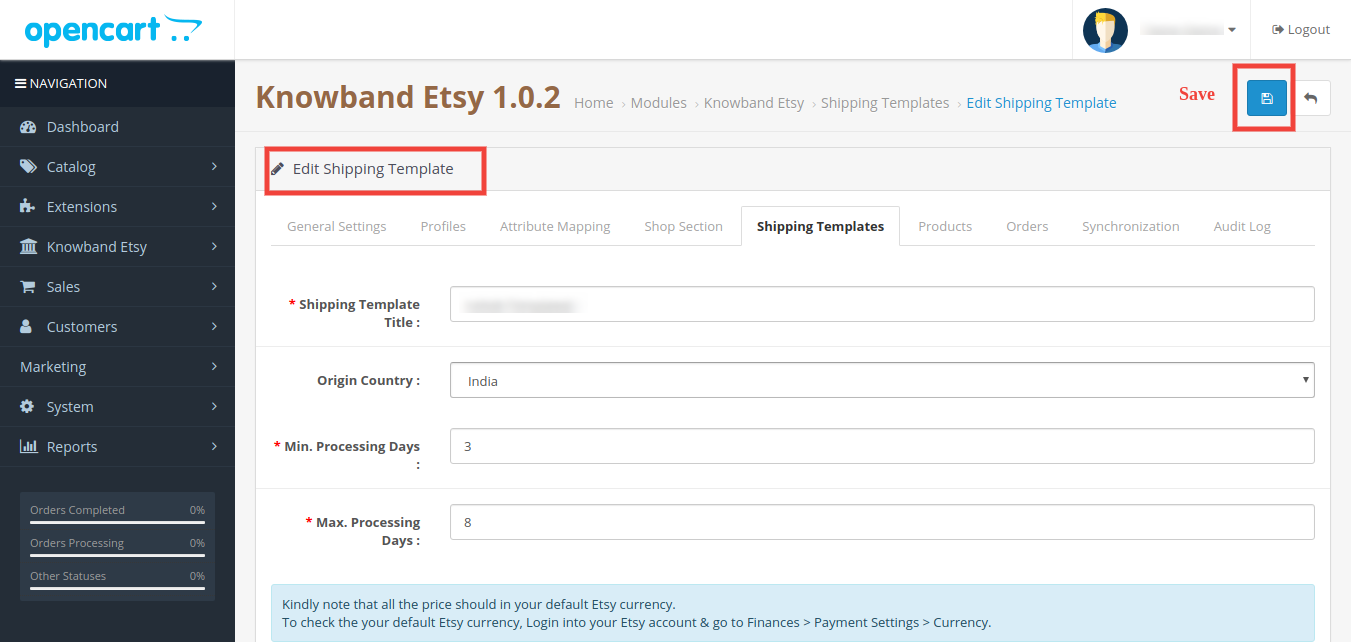
6.5.2 How to Edit/Delete Shipping Template?
Following are the steps to edit/delete Shipping Template from the system –
1. Go to the Etsy Marketplace -> Shipping Templates (Menu Option)
2. It would display the page where already added Shipping Templates will list (If any). Click on the “Edit/Delete” buttons corresponding to each Shipping Template.
3. Admin can update the values as per the requirement and save the details by clicking on the “Save” button.
4. If an admin has chosen the “Delete” option then it would delete the Shipping Template and all its Shipping Template Entries from the system.
Admin can modify the shipping template details by using the Edit option. After making the changes in the shipping template details, the admin needs to save the changes and synchronize the shipping templates with the Etsy marketplace.
6.5.3 How to Edit/Delete Shipping Location of a Shipping Template?
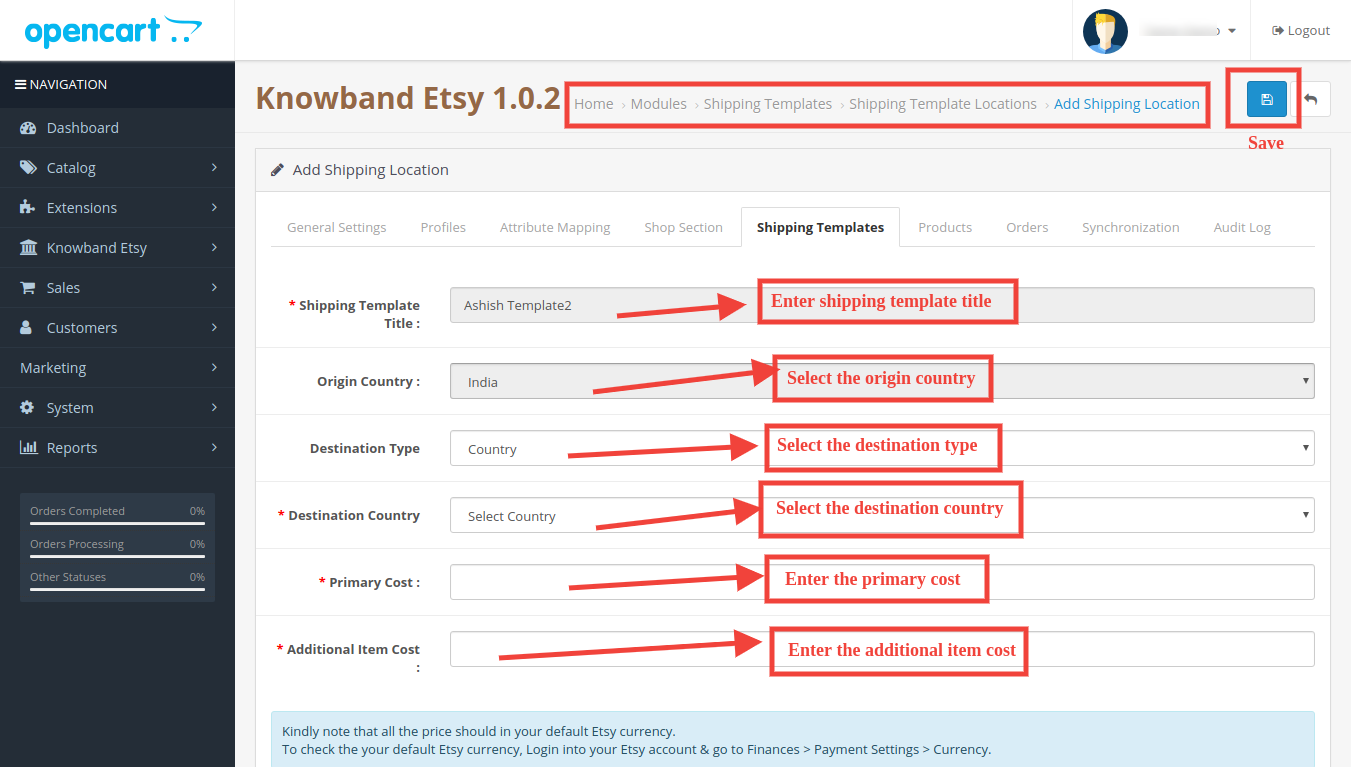
The shipping Entry tab of the Etsy OpenCart module allows the admin to define the destination country and the standard shipping cost for the selected destination. Admin can create only one shipping entry for a particular destination (country/region). Following are the steps to view the Shipping Template location into the system –
1. Go to the Etsy Marketplace Connector module -> Shipping Templates (Menu Option)
2. It would display the page where already added Shipping Templates will list (If any). Click on the “+” button given corresponding to each Shipping Template listed.
3. It would display the page as the screenshot given below:
Shipping Template Title: Enter the shipping template title.
Origin Country: Select the country of origin.
Destination Type: Select the country of destination for the shipping template.
Destination Country: Select the destination country.
Primary Cost: Enter the Primary Cost.
Additional Item Cost: Enter the additional item cost.
6.6 Products
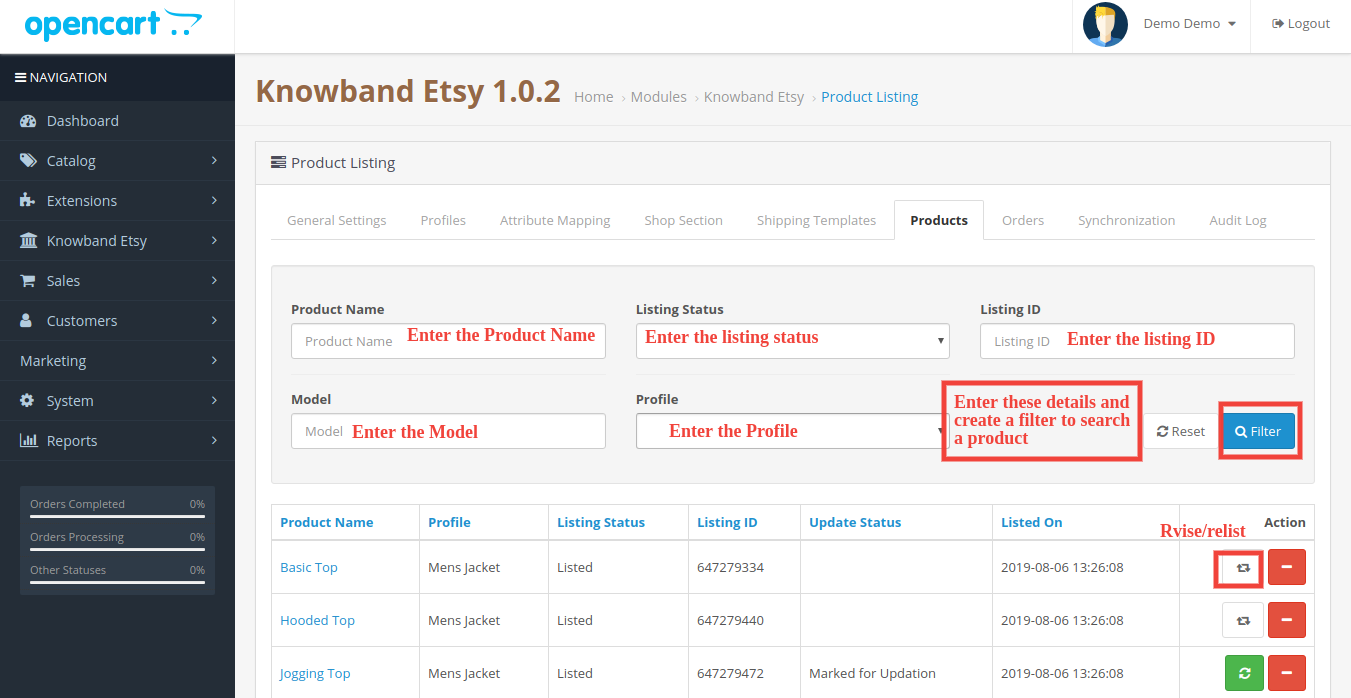
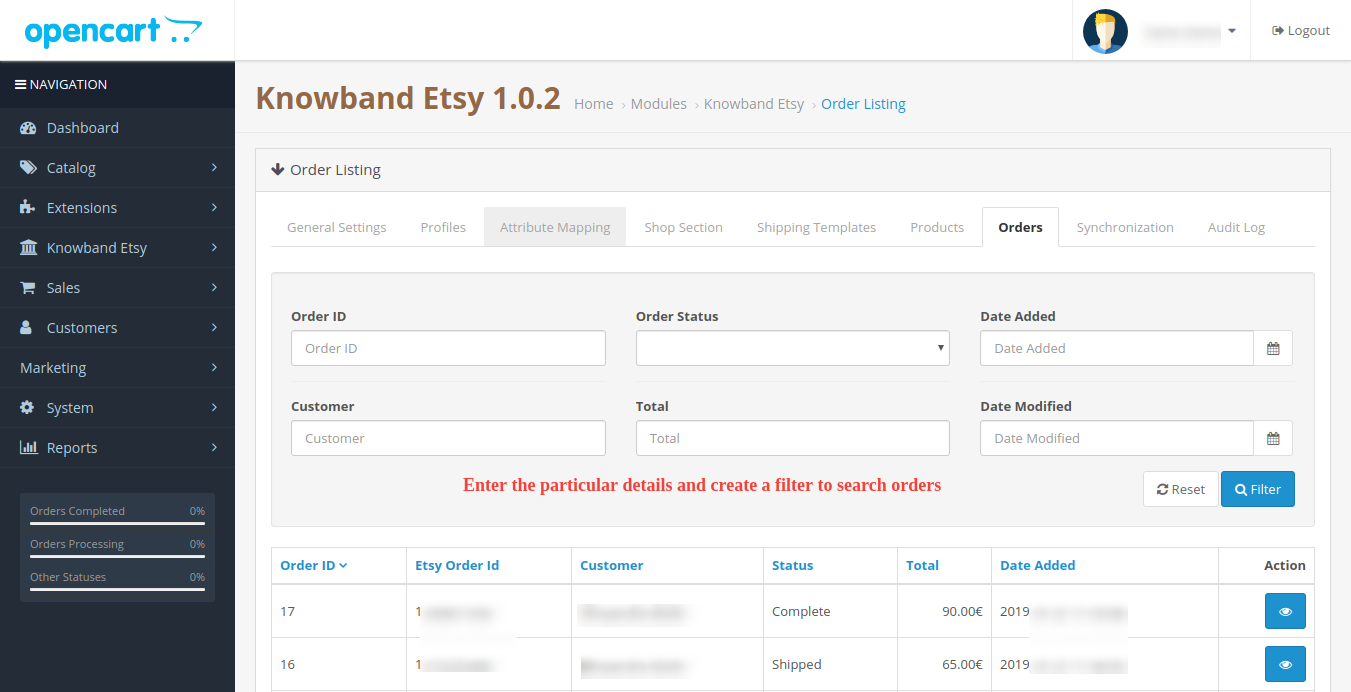
In the Etsy OpenCart integration extension after creating the profile, the admin needs to sync the products which are selected in the profile to the Etsy marketplace. Admin can also check the status of the listed products from the OpenCart store admin panel. The product listing tab of the Etsy Marketplace Integration shows a list of all the products that are to list on Etsy Marketplace with their status and values as shown in the screenshot below –
Please note that after creating a profile the admin must click on the “Product Synchronization” option under the “Synchronization” tab of the Etsy module to list the selected products to the Etsy marketplace. Admin can click on the Revise/Relist button to activate it on the Etsy Marketplace. Admin can also delete the product listing by clicking on the “-” button.
6.7 Order Settings
The order Settings tab is there for mapping store order status with Etsy Marketplace order status which will be used during capturing orders from Etsy Marketplace. The screenshot below will show you the order listings and the admin can also create a filter to search for a particular order.
6.5.1 How to view Order Details and Status?
Following are the steps to map order status –
Go to the Etsy Marketplace Integration module -> Orders (Menu Option)
It would display a page the same as shown in the above screenshot.
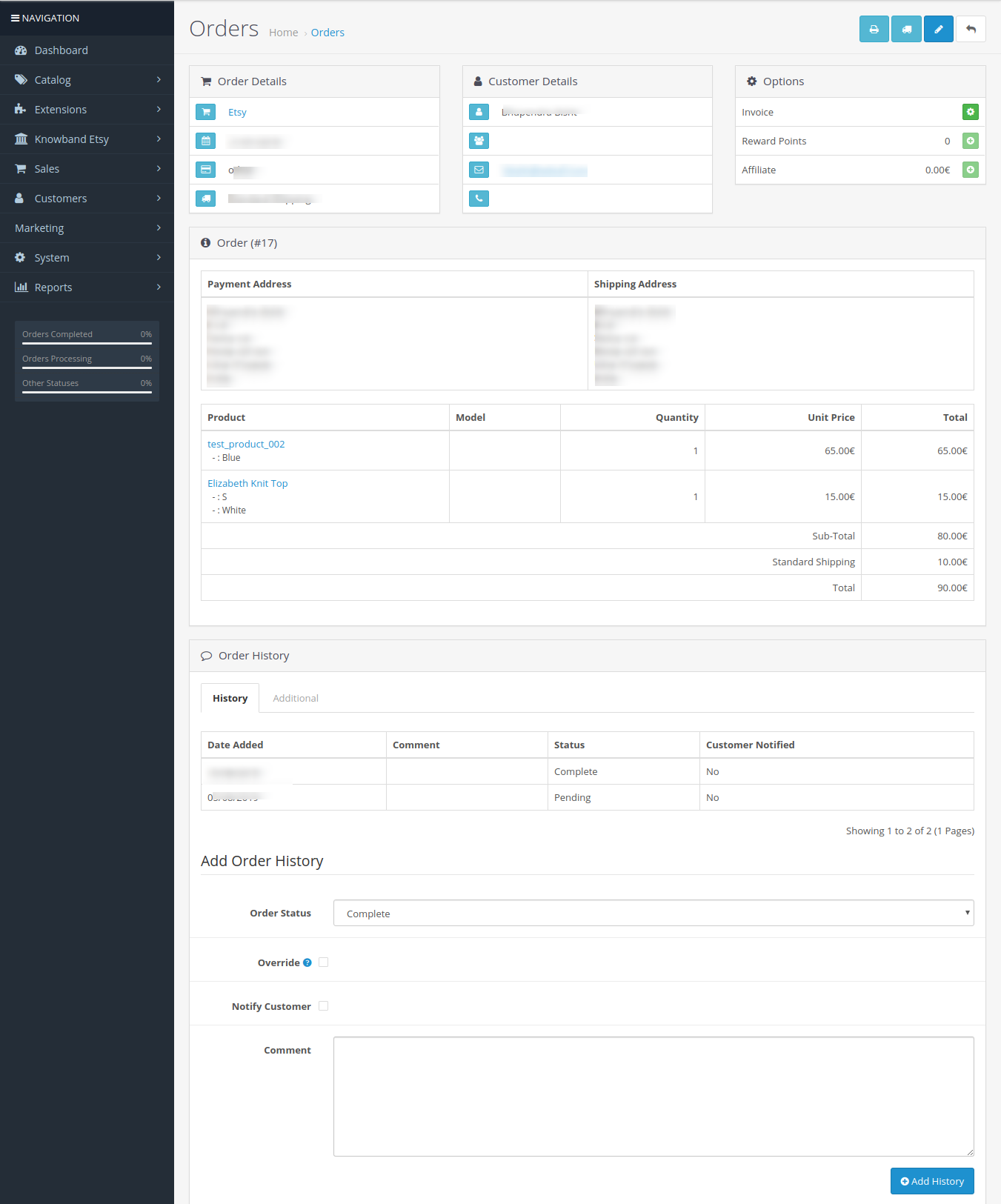
Click on the View Button given below the “Action” tab.
It would display the page with all the Order details as shown below.
6.8 Synchronization
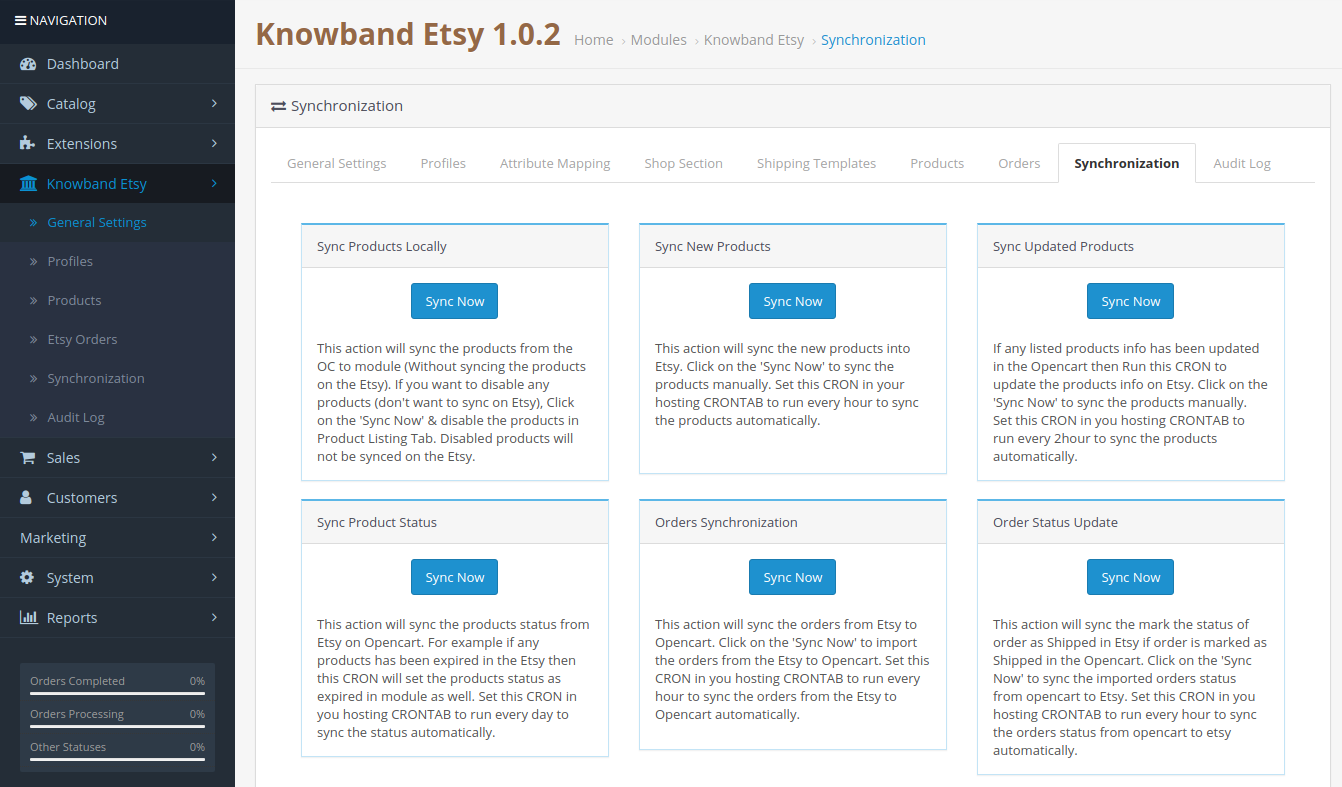
All tabs defined above are basically for saving the settings and options into the system which are used during synchronization between OpenCart Store and Etsy Marketplace. There are the following jobs to synchronize content between OpenCart Store and Etsy Marketplace which you can find below –
6.8.1 How to sync products locally?
Following are the steps to synchronize sync products locally on Etsy Marketplace –
1. Go to the Etsy Marketplace ->Synchronization (Menu Option)
2. It would redirect admin to a new page where all synchronization actions list as shown in the above screenshot.
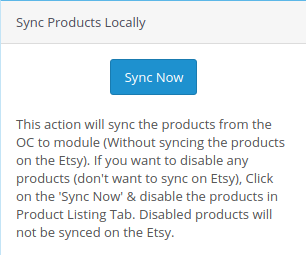
3. Click on the “Sync Now” button shown below.
This action will sync the products from the OC to the module (Without syncing the products on Etsy). If you want to disable any products (don’t want to sync on Etsy), click on the ‘Sync Now’ & disable the products in the Product Listing Tab. Disabled products will not be synced on Etsy.
6.8.2 How to Sync New Products on Etsy Marketplace?
Following are the steps to get Countries and Regions from Etsy Marketplace –
1. Go to the Etsy Marketplace Integration module->Synchronization (Menu Option)
2. It would redirect admin to a new page where all synchronization actions list as shown in the above screenshot.
3. Click on the “Sync Now” button shown below.
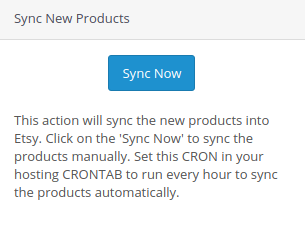
This action will sync the new products into Etsy. Click on the ‘Sync Now’ to sync the products manually. Set this CRON in your hosting CRONTAB to run every hour to sync the products automatically
6.8.3 How to sync Updated Products on Etsy Marketplace?
Following are the steps to synchronize Products Listing on Etsy Marketplace –
2. It would redirect admin to a new page where all synchronization actions list as shown in the above screenshot.
3. Click on the “Sync Now” button shown below.
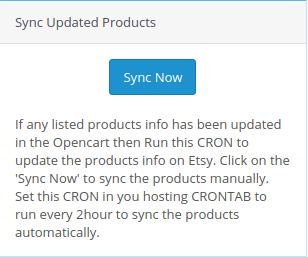
If any listed product info has been updated in the Opencart then Run this CRON to update the product info on Etsy. Click on the ‘Sync Now’ to sync the products manually. Set this CRON in your hosting CRONTAB to run every 2hour to sync the products automatically.
6.8.4 How to sync Products Status on Etsy Marketplace?
Following are the steps to synchronize Products Variations Listing on Etsy Marketplace –
2. It would redirect admin to a new page where all synchronization actions list as shown in the above screenshot.
3. Click on the “Sync Now” button shown below.
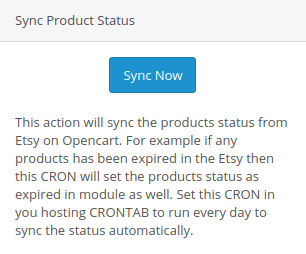
This action will sync the status of the products from Etsy on Opencart. For example, if any products have been expired in Etsy then this CRON will set the status of the products as expired in the module as well. Set this CRON in your hosting CRONTAB to run every day to sync the status automatically.
6.8.5 How to Synchronize orders from Etsy Marketplace?
Following are the steps to synchronize Products Variations Listing on Etsy Marketplace –
Goto the Etsy Marketplace Integration module -> Synchronization (Menu Option)
It would redirect the admin to a new page where all synchronization actions are listed as shown in the above screenshot.
Click on the “Sync Now” button shown below.
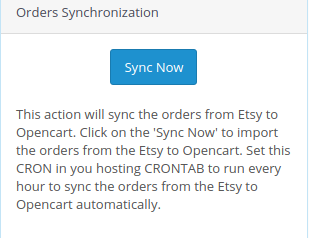
This action will sync the orders from Etsy to Opencart. Click on the ‘Sync Now’ to import the orders from Etsy to Opencart. Set this CRON in your hosting CRONTAB to run every hour to sync the orders from Etsy to Opencart automatically.
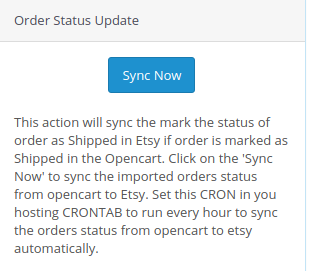
6.8.6 How to update Orders Status on Etsy Marketplace?
Following are the steps to update the status of orders on Etsy Marketplace –
2. It would redirect admin to a new page where all synchronization actions are listed as shown in the above screenshot.
3. Click on the “Sync Now” button shown below.
This action will sync the mark the status of order as Shipped in Etsy if the order is marked as Shipped in the Opencart. Click on the ‘Sync Now’ to sync the status of the imported order from OpenCart to Etsy. Set this CRON in your hosting CRONTAB to run every hour to sync the status of the order from OpenCart to Etsy automatically.
6.8.7. How to Synchronize a Particular Profile on the Etsy Marketplace?
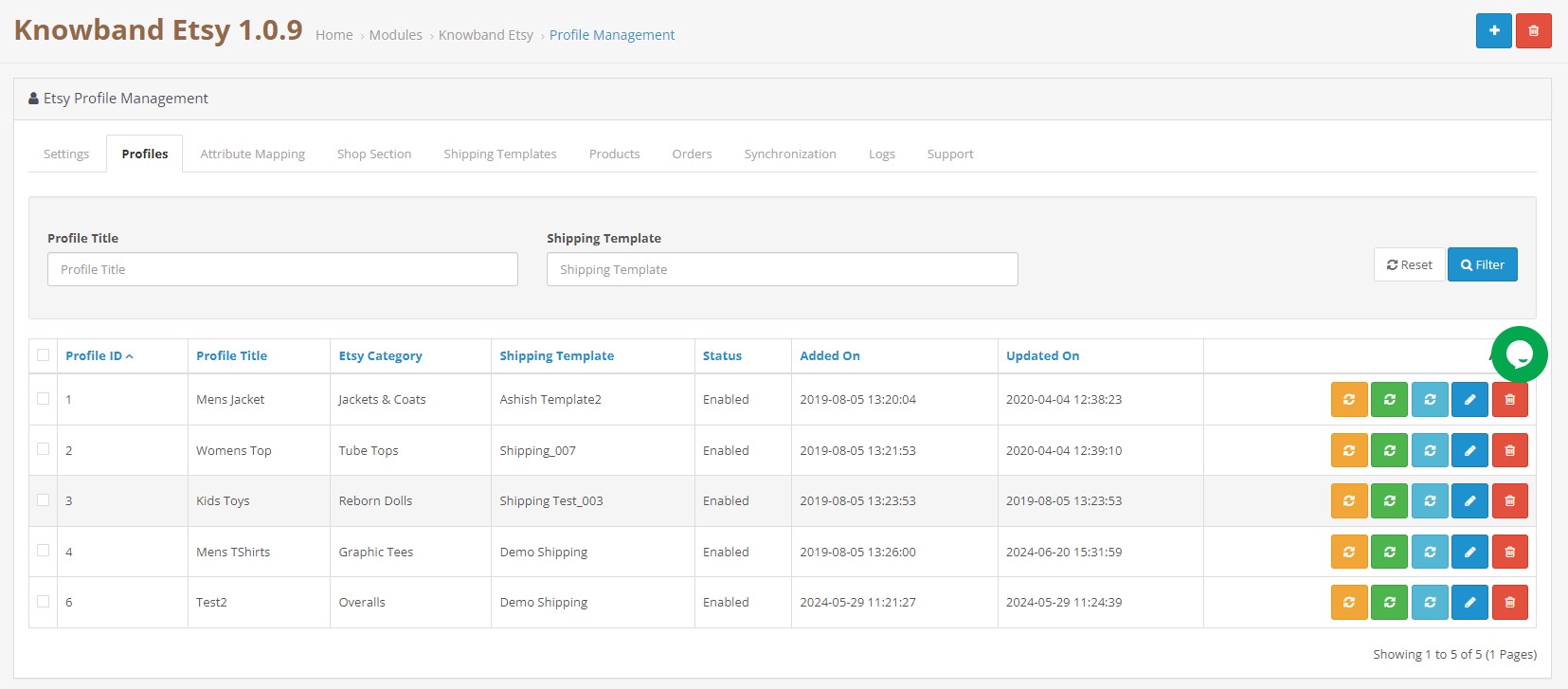
All the crons available in the “Synchronization” tab of the Opencart Etsy Connector plugin provide support for all the categories in bulk. However, if you want to list/update a particular profile only, you can handle this task from the “Profile Management” tab itself.
In this section, we have provided the “Local Sync”, “Sync Products”, and “Sync Product Status” crons to provide the Opencart admin with the flexibility of managing the category-level synchronization between Opencart and Etsy.
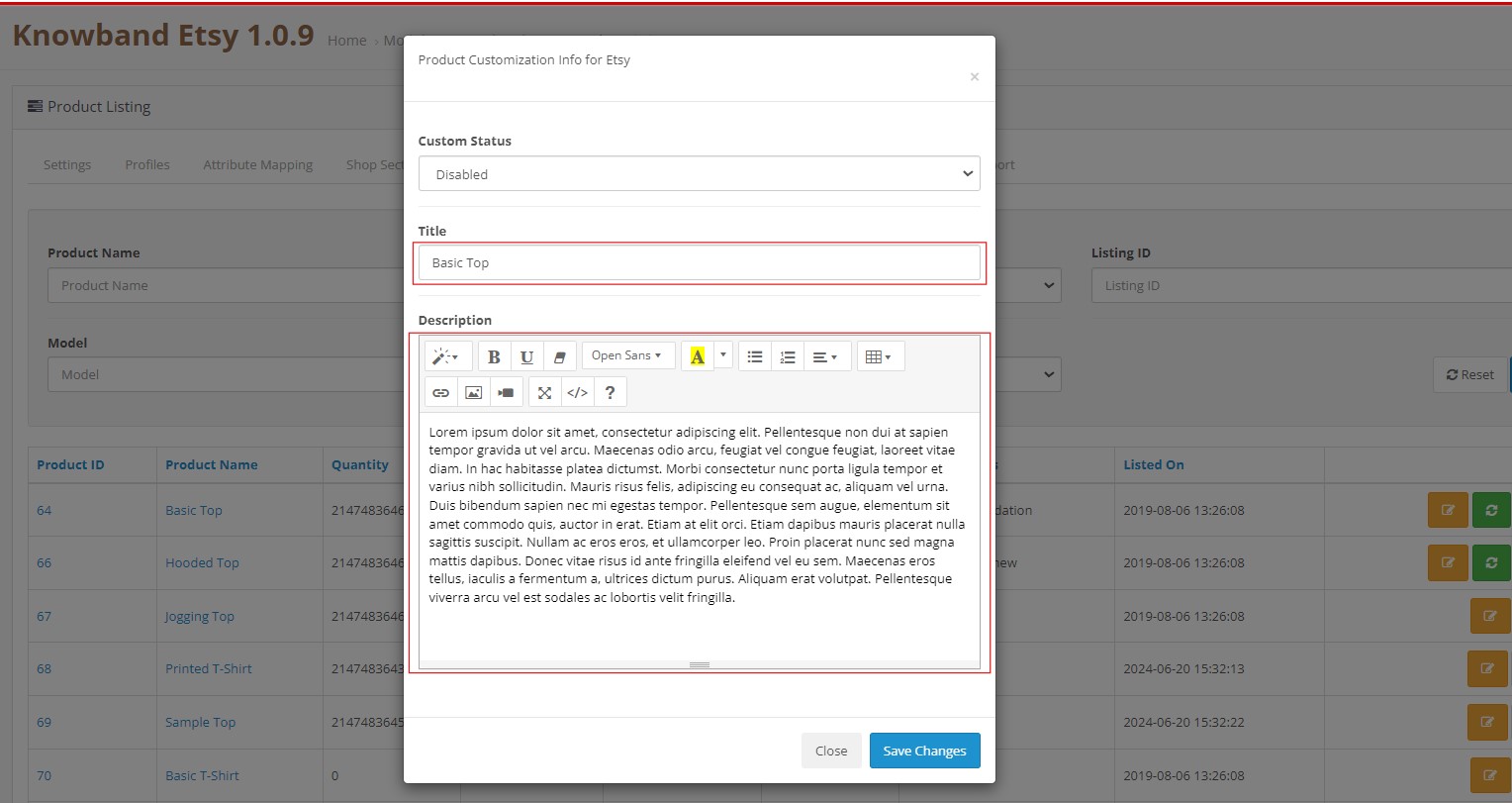
6.8.8 How to List the Products with Custom Details on Etsy Marketplace.
Knowband’s Opencart Etsy Marketplace Integration Extension comes with a custom product details listing option. This feature allows the Opencart store admin to list the products on the Etsy marketplace with different names and product descriptions.
If you want to list the product as it is, you can keep the custom status disabled. However, if you want to list the products with different details as in the screenshot above, save the same.
These details will be updated in the next product synchronization.
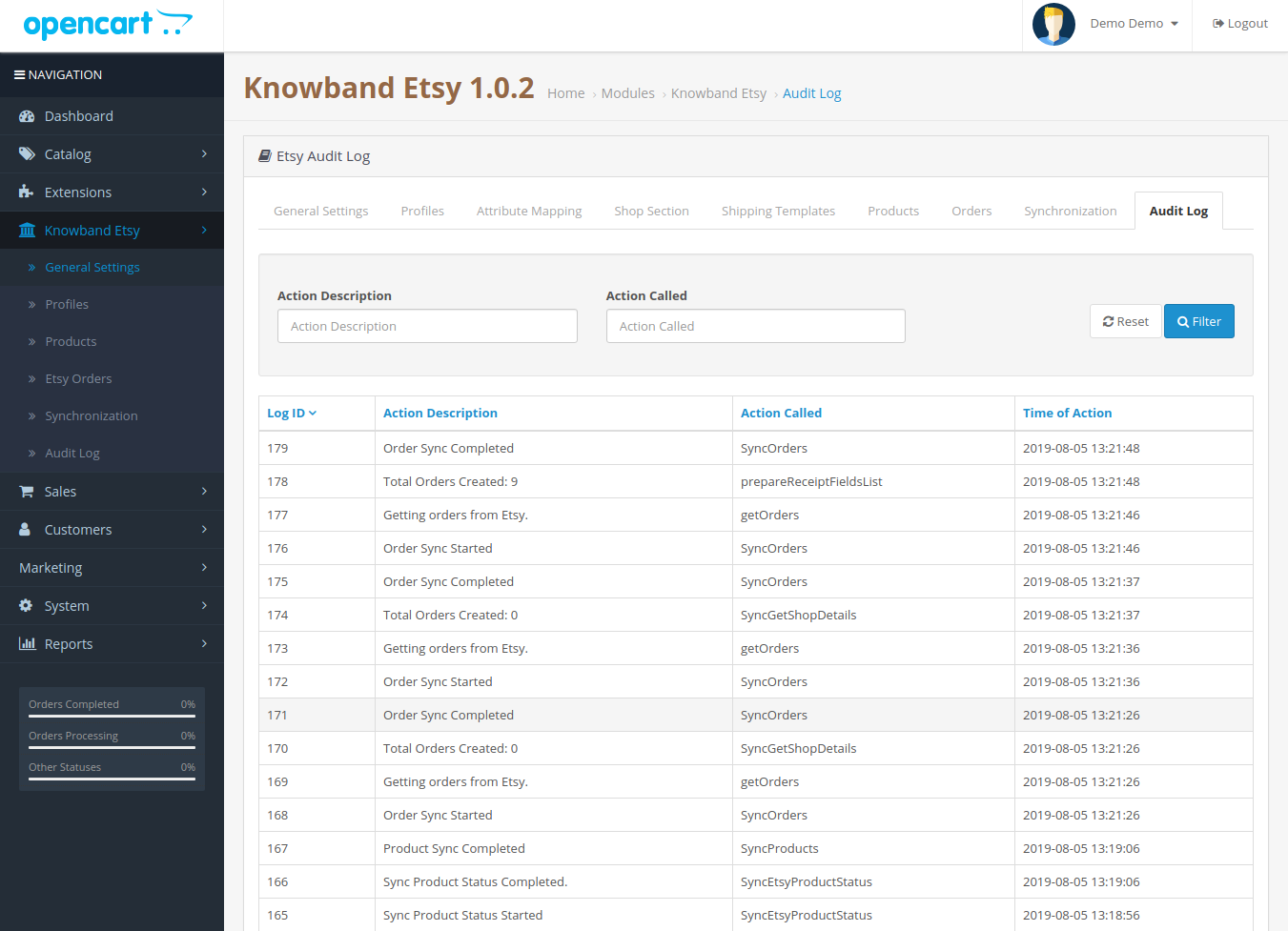
6.9 Audit Log
The audit log helps the admin to keep track of all the tasks performed. Please refer to the attached screenshot below.
6.10 [New] Return Policy Synchronisation
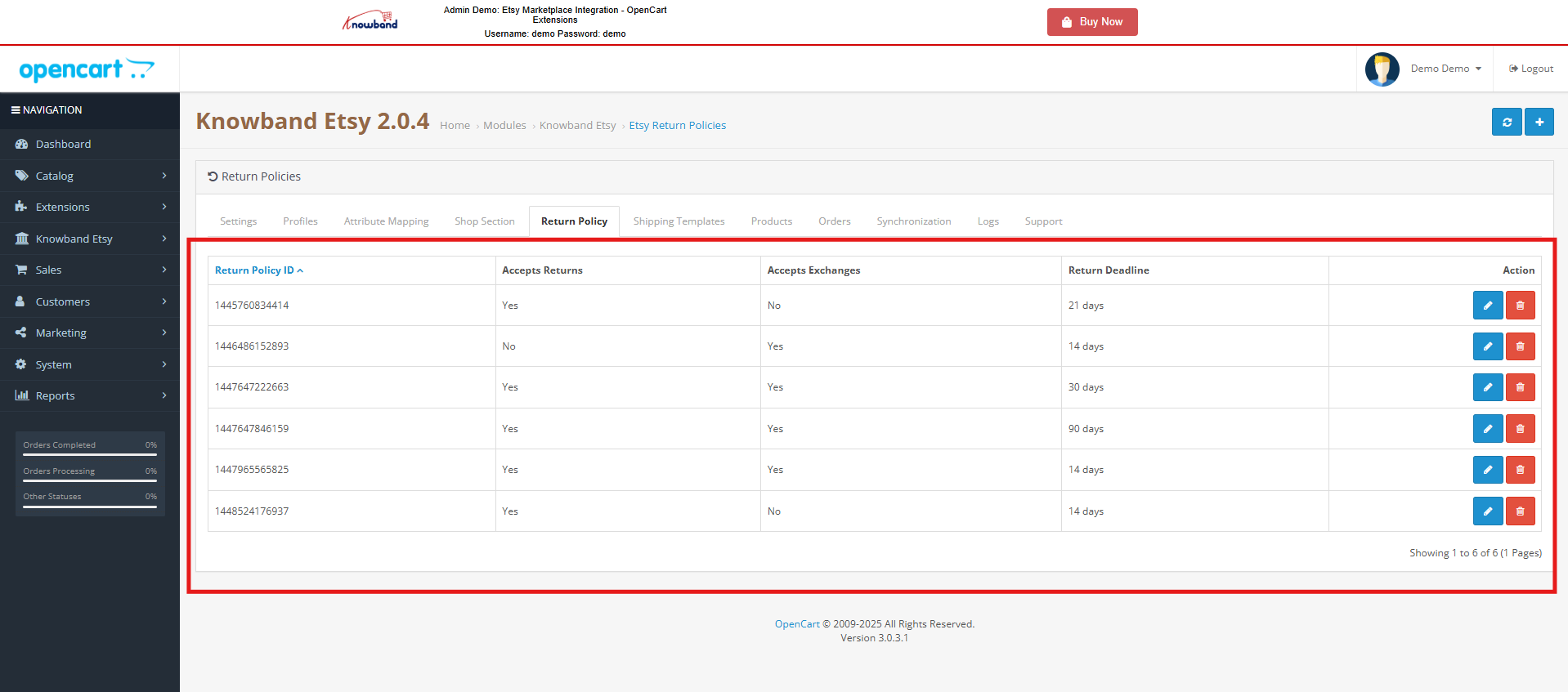
The OpenCart Etsy Module allows the admin to efficiently manage and synchronize return policies between their Opencart store and Etsy. Admins can create, edit, or delete multiple return policies within the module and assign them to specific profiles. Once a return policy is mapped to a profile, all categories associated with that profile are automatically updated on Etsy with the selected return policy, ensuring uniform policy application across listings.
Add New Return Policy
Admins can create new return policies or modify existing ones directly from the OpenCart Etsy Marketplace Module. Moreover, this provides flexibility to manage different return rules based on business requirements without needing to log in to Etsy separately.
Sync Return Policies
Using the Return Policy Sync cron, admins can fetch all available return policies from Etsy into the OpenCart store. Moreover, the synchronization process includes important details such as return and exchange acceptance, the number of allowed returns or exchanges, and return deadline dates, ensuring accurate and up-to-date policy data.
Profile Mapping
Within the profile mapping section, admins can select and assign a return policy to products under a specific category. This makes it easy to manage return rules in bulk rather than applying them individually to each product.
Automatic Updates
When a category is added or updated within a mapped profile, the assigned return policy is automatically applied to the product of the categories mapped on Etsy. This ensures consistency between the OpenCart store and Etsy listings, reduces manual work, and helps maintain compliance with Etsy’s policies.
Watch the Tutorial of the Etsy Marketplace Integration Extension
This OpenCart Etsy Marketplace Integration tutorial provides a complete step-by-step guide on installing and configuring the Etsy integration module, connecting your OpenCart store with your Etsy seller account, synchronizing products, categories, prices, and inventory in real time, managing Etsy orders directly from the OpenCart admin panel, enabling automated product listing with customizable template controls, mapping store attributes with Etsy product requirements for accurate listings, organizing products into Etsy Shop Sections for better storefront management, and handling active, drafted, or expired Etsy listings seamlessly from your OpenCart store.