Running a PrestaShop store means protecting more than a website. Your store holds customer accounts, order histories, addresses, admin credentials plus whatever payment, shipping, marketing, and analytics services you’ve plugged in. So PrestaShop security isn’t really a technical checkbox. It’s a business risk, full stop.
AI hasn’t changed security threats so much as it’s sped them up. Phishing emails don’t have the broken grammar and weird phrasing they used to; they read like something a colleague would actually send. Scanning a store for outdated, vulnerable modules used to take a person real time and effort. Now it’s automated and near instant. Same with credential stuffing: what used to require manual grinding can now run at a scale one attacker alone could never have managed a few years ago.
Whether AI is “good” or “bad” for security is kind of the wrong debate anyway. The question that actually matters for a store owner is simpler: is your current setup built to handle attacks that move faster and hit harder than what you were dealing with two or three years ago?
That comes down to the basics, done properly. An out-of-date PrestaShop core version and module version is still the most common source of store compromise. Control access to administrator accounts and their privileges. Authenticate properly and not just using password. Watch for unusual activity instead of assuming silence means safety. Run malware scans regularly. Vet third-party integrations before installing them. And have an actual recovery plan, tested, not just assumed, because eventually something will get through, AI-assisted or not.
1.0 Why PrestaShop Security Concerns Are Changing

Security problems haven’t suddenly become entirely new because of AI. SQL injection, XSS, stolen passwords, malware, vulnerable modules, malicious file changes, and payment-page attacks have existed for years.
The difference lies in how rapidly and in what numbers these vulnerabilities can be found by the attackers.
With the help of AI, they can automate their reconnaissance activities, produce credible phishing material, detect vulnerabilities, and multiply the number of credential attacks.
For a web store, this means that an otherwise unobserved vulnerability may be discovered much sooner.
A typical PrestaShop store may include:
- PrestaShop core
- Payment modules
- Shipping integrations
- Analytics and advertising scripts
- Custom modules
- Third-party themes
- Server software
- CDN or WAF services
- APIs and webhooks
- Administrator accounts
- Customer accounts
Every additional module/scripts creates another dependency that needs to be maintained.
That doesn’t mean you should avoid integrations. It means you need visibility into what is installed, what has access to your store, and what happens when one component becomes vulnerable.
2.0 The Biggest PrestaShop Security Concerns for Store Owners
1. Outdated PrestaShop Core and Modules
One of the most basic security controls is still one of the easiest to neglect: keeping software updated.
PrestaShop maintains a security advisory process, and its current security policy states that security updates are typically applied to the latest release.
This becomes particularly important when a vulnerability affects an older version or a third-party component.
Patching a vulnerability and cleaning a compromised website are two different jobs.
If you discover suspicious PHP files, unexpected JavaScript, modified templates, unfamiliar administrator accounts, or unexplained redirects, don’t assume that upgrading PrestaShop alone has removed the attacker.
Investigate the store first.
2. Administrator Accounts Are High-Value Targets
Your PrestaShop back office deserves the same level of protection as your storefront. A compromised administrator account can give an attacker access to sensitive settings, customer data, modules, and store content. With sufficient permissions, they could even make changes that introduce malicious code or redirect parts of the shopping experience.
That’s why password-only authentication is increasingly difficult to justify for privileged accounts.
Use MFA/2FA for administrators wherever possible. Also review which employees actually need administrative access and remove dormant accounts.
The principle is simple: give each person only the permissions required to perform their job.
Additional controls can help too. Depending on your environment, you might restrict back-office access through trusted IP addresses, VPN access, firewall rules, or additional authentication layers.
Hiding an administrator URL can reduce exposure to some automated scanning, but it shouldn’t be treated as a replacement for authentication, authorisation, or patching.
3. Credential Stuffing and Automated Login Attacks
Credential stuffing is particularly relevant to e-commerce.
Password guessing is not always needed for attackers; they can use stolen username/password pairs from completely different breaches and try them against other sites.
In case the client reused the password, the attacker might use your store as the next victim.
It is also a case with admin accounts, and the situation is much worse in that case.
Rate limiting, brute-force prevention, strong passwords, MFA, suspicious login detection, and proper account controls should be used in conjunction.
AI and automation make this more relevant because attackers can operate at high volume. AI-related cybersecurity guidance also identifies credential stuffing and password attacks as areas where automation can increase the threat.
4. Malware and Unexpected File Changes
A compromised PrestaShop store doesn’t always look broken.
The storefront may continue to load normally while malicious code sits inside a theme, module, PHP file, JavaScript file, or another part of the application.
That is why malware scanning and file-change monitoring matter.
A particularly serious scenario is payment-page manipulation. PrestaShop issued a security alert in February 2026 describing a digital skimmer that could replace legitimate payment buttons with fraudulent ones. The malicious script was loaded through a modified theme file.
For a merchant, this is a useful reminder that “the website is working” doesn’t mean “the website is secure.”
Regular scanning should be combined with investigation of unexpected changes. If a critical file changes unexpectedly, you need to know:
- What changed?
- When did it change?
- Who or what changed it?
- Was the change legitimate?
- What other files or accounts should be investigated?
5. Third-Party Modules and Custom Code
PrestaShop’s extensibility is one of its strengths, but every module and customization expands the attack surface.
Security testing should therefore consider more than the PrestaShop core.
A security audit can examine the core application, themes, add-ons, custom code, integrations, authentication controls, and server configuration. Astra’s PrestaShop audit guidance similarly emphasizes examining the broader application rather than treating the core platform as the entire security boundary.
This matters especially for stores that have existed for several years.
A module installed five years ago may still be active even though nobody remembers why it was installed. A custom override may remain after the original developer has left. An abandoned integration may still have API credentials.
A useful maintenance exercise is to create an inventory of:
- Installed modules
- Active themes
- Custom overrides
- External APIs
- Webhooks
- Cron jobs
- Administrator accounts
- Server services
- DNS/CDN/security services
Remove what you no longer need.
3.0 What Does AI Actually Change for PrestaShop Security?
AI isn’t a substitute for a secure PrestaShop installation. Think of AI as an accelerator on both sides.
3.1 Attackers can automate more
The bigger concern for an online store is speed. An attacker no longer needs to perform every step manually. Automated and AI-assisted tools can help with target research, phishing, stolen-credential testing, and large-scale bot activity. For e-commerce businesses, that can translate into more attempts at account takeover, payment fraud, credential stuffing, and scraping,
3.2 Defenders can analyse more
The same basic capability can help defenders.
Security systems can analyse login activity, request patterns, IP reputation, API activity, traffic anomalies, and other events much faster than a person manually reviewing raw logs.
For instance, a manager usually logs into the system from a usual country during office hours. Then, many login failures occur, followed by a successful login from an unusual location. If the system can perform behavioral analysis, then such an event can be detected much quicker than analysing the access logs from yesterday.
AI can also help prioritize alerts. That’s useful because a store generating thousands of requests per minute cannot realistically have a person inspect every event.
4.0 PrestaShop Security Best Practices: A Practical Layered Approach
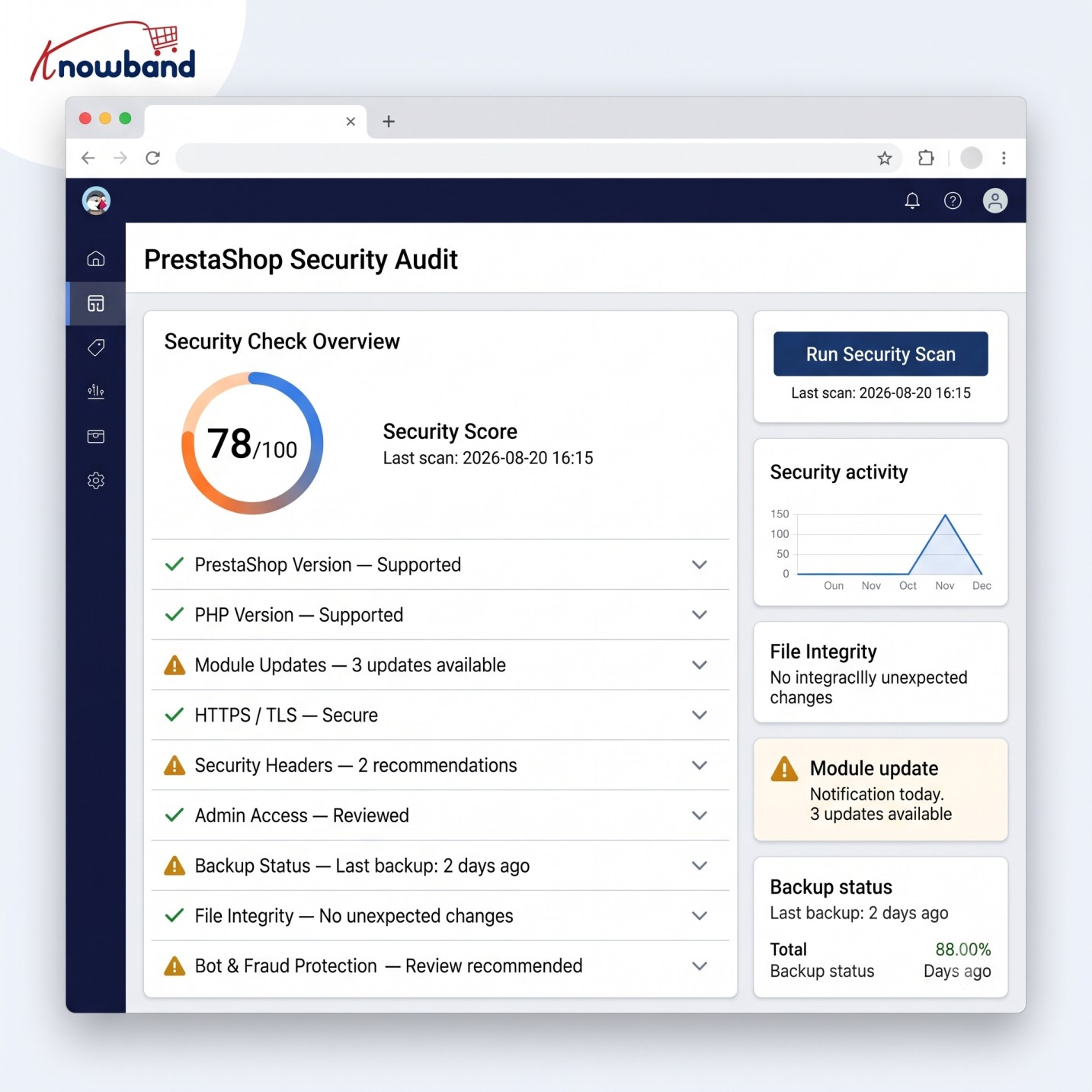
Security works better as layers than as one “security plugin.”
A practical setup for a PrestaShop store should include several levels.
Layer 1: Keep the application current
Maintain supported versions of:
- PrestaShop
- PHP
- Server software
- Themes
- Modules
- Libraries
Test updates in a staging environment where the store has substantial customizations.
Don’t postpone security updates indefinitely because a normal feature upgrade is inconvenient.
Layer 2: Protect privileged access
For administrator accounts:
- Enable MFA/2FA.
- Use unique passwords.
- Remove unused employees.
- Apply least-privilege permissions.
- Consider IP/VPN restrictions for sensitive environments.
- Monitor successful and failed logins.
Layer 3: Protect the application
A WAF can help filter malicious HTTP requests before they reach the application. Security headers can add browser-level protections. CAPTCHA or bot controls can reduce automated abuse of public forms.
These controls don’t eliminate vulnerabilities in the application itself, rather they add a defensive layer.
Layer 4: Monitor the filesystem
Regular malware scan and file change monitoring can help in detecting the compromises that aren’t visible from the storefront.
Pay particular attention to:
- Theme files
- PHP files
- JavaScript
- Configuration files
- Upload directories
- Module directories
Unexpected modifications deserve investigation.
Layer 5: Monitor the infrastructure
The PrestaShop application isn’t the only thing that needs protection.
Review:
- SSH access
- Firewall rules
- Database exposure
- Server users
- File permissions
- Cron jobs
- SSL/TLS configuration
- Backup access
- Cloud credentials
- CDN/WAF configuration
A secure application on an exposed or poorly maintained server is still vulnerable.
5.0 Where a PrestaShop Security Manager Can Fit
Store owners often end up assembling security controls from several independent tools. That can create its own maintenance problem: different settings, update schedules, logs, compatibility issues, and configuration interfaces.
The Knowband Prestashop Advanced Security Manager is one option worth evaluating as part of a layered PrestaShop security setup. Its current product documentation lists controls including 2FA, brute-force protection, administrator IP restrictions, a WAF, security headers, CAPTCHA, login monitoring, and scheduled malware scanning. It supports PrestaShop 1.7, 8, and 9 according to the vendor’s current documentation.
The important point is not to treat a security module as a complete security strategy.
A module can strengthen application-level defenses, but it doesn’t replace:
- Secure server configuration
- Timely patching
- Safe development practices
- Backups
- Incident response
- Vulnerability assessment
- Secure third-party integrations
6.0 Don’t Forget Backups and Recovery in Prestashop
Store owners need to have a reliable recovery plan when something goes wrong.
A backup is useful when it’s available, protected, and can be restored. Ideally, keep backups separate from the production environment and test restoration periodically.
You should have reliable backups of:
- Database
- Product images and other store files
- Customer and order data
- Configuration
- Themes
- Custom modules
- Critical server files
In case of store owners looking to automate the whole process, one of best backup module which is Prestashop Backup & Restore Module can be taken into consideration. This software enables users to take scheduled backups of their databases and files, provides offsite storage, encryption, retention, and restoration facility.
7.0 When Should You Consider a Security Audit?
Automated scanning is useful, but it isn’t the same as a security audit or penetration test.
Vulnerability scanning finds known bugs on the surface & inform what is broken, but can’t tell you how deep a hacker can go.
Penetration testing simulates a real attack. It chains small flaws together to break deep into your systems and tests the business logic.
For a mature or high-revenue store, consider periodic security assessments, particularly after:
- A major PrestaShop upgrade
- A large custom development project
- A new payment integration
- A major module installation
- A server migration
- A security incident
- Significant infrastructure changes
A proper assessment should cover the application and the surrounding environment rather than focusing exclusively on the storefront.
8.0 A Store Owner’s Security Checklist
Before considering your PrestaShop website secure, check the basics:
- PrestaShop is running a supported/current release appropriate to your environment.
- Modules and themes are maintained and updated.
- Unused modules and accounts have been removed.
- Administrator accounts use MFA/2FA.
- Administrator privileges follow least privilege.
- Failed and successful admin logins are monitored.
- Brute-force protection is enabled.
- A WAF or equivalent application-layer protection is configured where appropriate.
- Security headers are configured correctly.
- Public forms have appropriate bot/spam protection.
- Malware scanning is performed regularly.
- Unexpected file changes can be detected.
- Server access is restricted and monitored.
- Backups are isolated from production and restoration has been tested.
- Payment and third-party integrations are reviewed.
- There is a documented incident-response procedure.
- A security audit or penetration test is performed when the store’s risk justifies it.
9.0 The Real Concern: Speed of Attack Versus Speed of Response
The biggest change brought by AI isn’t that every PrestaShop store suddenly faces an entirely new category of vulnerability.
It’s that the gap between a weakness becoming available and someone exploiting it can become smaller.
That changes how store owners should think about security.
Waiting for a customer to report a strange checkout page isn’t monitoring. Discovering a compromised administrator account after fraudulent orders have been placed isn’t detection. Installing a security tool but never reviewing its alerts isn’t a security process.
A secure PrestaShop store needs layers that work before, during, and after an attack: patching to reduce vulnerabilities, authentication to protect accounts, application controls to filter malicious traffic, monitoring to detect abnormal activity, malware/file scanning to identify compromise, and tested backups to support recovery.
AI can make defensive systems faster and more capable, but the foundation remains the same: reduce the attack surface, control access, monitor what changes, and be prepared to recover.
For store owners looking to strengthen application-level protection, a solution such as Knowband Prestashop Advanced Security Manager can be considered as one component of that layered approach. The right choice depends on your PrestaShop version, hosting environment, existing security stack, and operational requirements.
The best time to discover a security weakness is before an attacker does.