Prestashop Gemini/ChatGPT/Claude/DeepSeek Content Generator & Translator Addon – User Manual

The Knowband AI Content Generator and Translator for PrestaShop is a cutting-edge module designed to create and translate content for PrestaShop store owners. By leveraging the advanced capabilities of Claude AI, ChatGPT AI, DeepSeek AI and Gemini AI, the module enables store owners to generate exceptionally high-quality content. Notably, the PrestaShop SEO-Optimized module provides SEO-friendly product content, including product descriptions, product titles, category descriptions, meta titles, and meta descriptions, all while maintaining content integrity and authenticity.

Moreover, the PrestaShop AI-powered Translator Addon seamlessly integrates with Claude AI, ChatGPT, DeepSeek AI and Gemini AI, thereby providing accurate and efficient translations for product content.

In addition, store owners can generate content effortlessly and in no time thanks to the powerful PrestaShop AI module. As a result, Knowband’s PrestaShop AI Content Generator enhances creativity in product descriptions while ensuring that all generated and translated content follows SEO best practices.

Furthermore, the Claude AI Content Generator for Prestashop integrates smoothly with “Claude AI API,” “Gemini AI API,” “DeepSeek API”, and “ChatGPT API,” which guarantees a hassle-free experience for both content generation and translation. Equally important, the built-in SEO optimisation features significantly improve search rankings while preserving content integrity.

What’s New in Prestashop AI Content Generator & Translator Module v1.0.2

ChatGPT -5 for Smarter Content: The Prestashop AI Content Generator Addon now supports GPT-5, along with GPT-3.5, GPT-4 Turbo, and GPT-4.5. It enables faster, more accurate, and creative generation of product titles, descriptions, and meta content.

Brand-Specific Content with Manufacturer Variable: A new Manufacturer Variable allows you to include your shop or brand name directly in prompts. This feature in Prestashop AI Content Generator ensures personalised and consistent content across your store, easily editable to fit your needs.

1.0.0 Key Features Of the Prestashop Gemini/ChatGPT/Claude Content Generator/Translator Module

Effortless Content Generation
The Prestashop AI Content Module automatically creates high-quality product and category descriptions, meta titles, and meta descriptions by leveraging advanced AI technology. As a result, store owners can generate engaging and well-structured content without manual effort.

Customizable AI Models
Moreover, the PrestaShop AI Content Generator Addon offers a wide range of AI models for content creation and translation. Store owners can choose from ChatGPT models like GPT-3.5 and GPT-4.0, DeepSeek models including Chat & Reasoner, Claude models including Haiku 3, Haiku 3.5, Sonnet 3.5 (Old), and Sonnet 3.5 (New), as well as Gemini models such as Gemini 1.5 Pro, 1.5 Flash, 1.5 Flash-8b, 2.0 Flash, and 2.0 Flash – Lite Preview. With these options, merchants can tailor content generation based on their specific needs.

Seamless Multilingual Translation
In addition, the Prestashop AI Bulk Content Generator Module allows store owners to translate their content into multiple languages while simultaneously maintaining accuracy and cultural relevance. This means that businesses can expand their reach effortlessly and attract global customers.

Enhanced SEO Performance
Furthermore, the Prestashop AI Content Generator and Translator Addon optimize all content for search engines, thereby improving search rankings and increasing store visibility. By ensuring SEO best practices, this module helps businesses not only drive organic traffic but also enhance conversion rates.

User-Friendly Interface
Notably, no technical expertise is required to run the module. The PrestaShop Gemini/ChatGPT/Claude Content Generator Addon integrates seamlessly with your PrestaShop store, providing an intuitive interface that simplifies content generation. Additionally, even non-technical store owners can generate professional content with just a few clicks. This makes it easier than ever to manage high-quality store content without external assistance.

Bulk Processing Capabilities
For larger stores, the PrestaShop AI Content Generator module is an ideal solution. Moreover, the Prestashop Content Translator Addon enables store owners to generate content for multiple products simultaneously. As a result, businesses can save time and streamline their workflow effectively.

Comprehensive Activity Tracking
Lastly, the Prestashop AI Content Translator module records every action taken, including changes made within the module. It also logs timestamps and provides a summary of modifications, allowing store owners to track content evolution effortlessly. This ensures that all content updates remain transparent, structured, and easily manageable.

2.0. Installation Guide for PrestaShop AI Content Creator Addon

After purchasing the Prestashop AI Content Generator add-on, follow these steps to install it:

  1. Navigate to Store Admin → Modules
  1. Click on “Upload a module”. You can either drag and drop the file or manually select the file from your system.

3.0 Steps to Generate the API Key for Prestashop AI Content Generator and Translator Module Configurations?

For Claude API: 

  1. Visit Anthropic’s website, and click “Start Building”.
  2. Create an account, access your Dashboard, generate an API key, and save it securely.

For Gemini API:

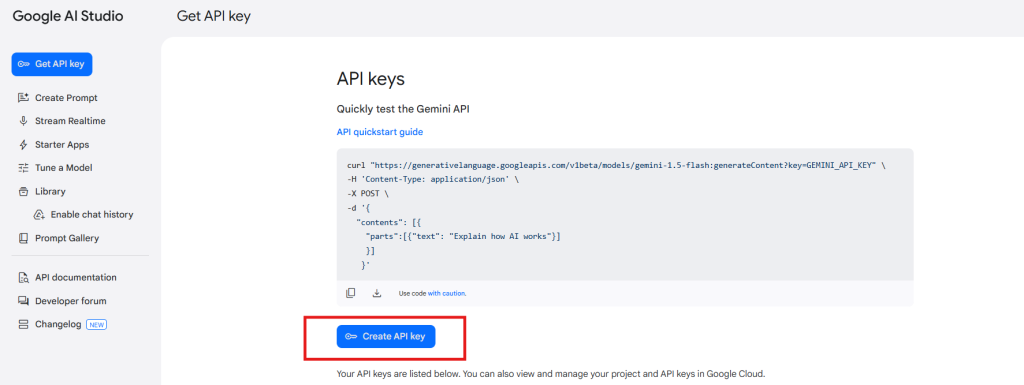
  1. To access the API,  visit the Google AI Studio website.
  2.  Click “Get API key,” accept the terms of service, create your key, and paste it into the module’s configuration settings.

For ChatGPT API: 

  1. Obtain an OpenAI API key and configure it within the module settings.
  2. Click on your profile (top-right) → “View API keys” → “Create a new secret key”.
  3. Copy the key immediately and store it safely. 

Steps to Generate DeepSeek API 

  1. Access the Deepseek platform via this URL: https://platform.deepseek.com/api_keys to generate the API Key. Log in or sign up to generatean  API Key
  2. Click on Create API Key after adding the key name.
  3. Copy or store the key to enable functioning of DeepSeek AI Content Generator Plugin

4.0.0 Admin Interface

4.0.1 General Settings:

The Prestashop AI Content Generator and Translator Addon by Knowband allows the admin to configure AI settings and manage bulk content operations efficiently using Claude, ChatGPT, DeepSeek AI and Gemini AI engines.

[New]Enhanced Content Creation with GPT-5: The Prestashop AI Content Generator Addon now includes support for GPT-5, the latest and most advanced model from OpenAI.

Alongside GPT-3.5, GPT-4 Turbo, and GPT-4.5, GPT-5 enables smarter, faster, and more creative content generation. You can create high-quality product descriptions, titles, and meta content that are accurate, engaging, and SEO-friendly. Users can select the desired GPT model within the addon, giving full flexibility depending on the type of content needed.
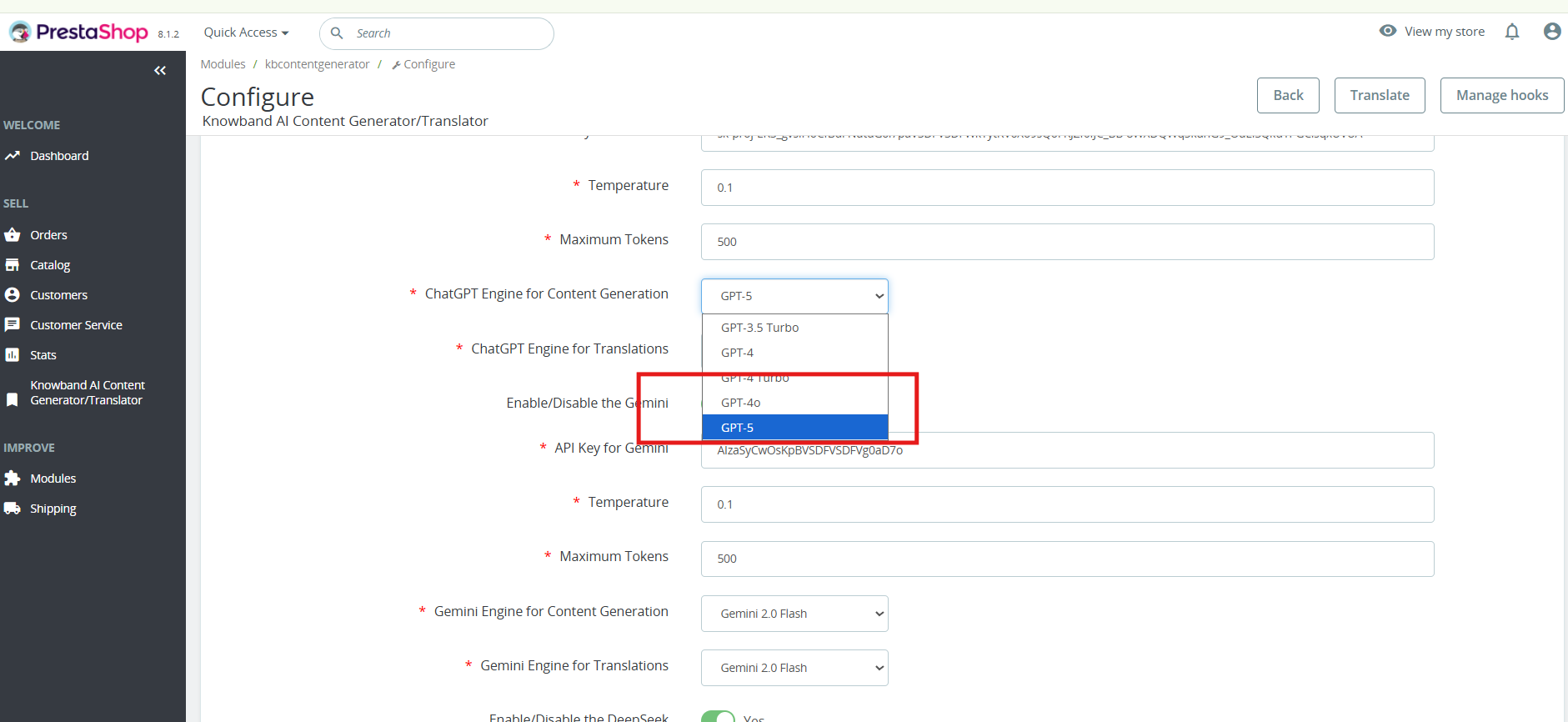
 

  • Enable/Disable: Enable or disable the module
  • Enable/Disable the Claude: Click to enable Claude AI Engine
  • API Key for Claude: Enter the API Key for Claude Engine.
  • Select Claude Model for Generation: Choose from Claude Haiku 3, Haiku 3.5, Sonnet 3.5 (Old), or Sonnet 3.5 (New).
  • Select Claude Model for Translation: Select Claude Engine Models for translation Claude Haiku 3, Haiku 3.5, Sonnet 3.5 (Old), or Sonnet 3.5 (New).
  • Enable/Disable the ChatGPT: Click to enable ChatGPT.
  • API Key for ChatGPT: Enter the API Key for ChatGPT Engine to enable the functionality.
  • Select ChatGPT Model for Generation: Choose between ChatGPT 3.5 or ChatGPT 4.0 for content generation.
  • Select ChatGPT Model for Translation: Select between ChatGPT 3.5 or ChatGPT 4.0 for content translation.
  • Enable/Disable the Gemini AI: Click to enable the Gemini AI Engine
  • API Key for Gemini: Enter the API Key for Gemini AI Engine.
  • Select Gemini Model for Generation: Choose from Gemini 1.5 Pro, 1.5 Flash, 1.5 Flash-8b, 2.0 Flash, or 2.0 Flash – Lite Preview and save the settings.
  • Select Gemini Model for Translation: Pick from Gemini 1.5 Pro, 1.5 Flash, 1.5 Flash-8b, 2.0 Flash, or 2.0 Flash – Lite Preview and save the settings.
  • Enable/Disable the DeepSeek: Turn DeepSeek AI Engine on or off to use this  AI mode.l
  • [New Feature]API Key for DeepSeek- Enter the DeepSeek API key to activate content generation and translation.
  • [New Feature]Select DeepSeek Model for Generation- Choose between Deepseek Chat or DeepSeek Reasoner for generating the content for the products, CMS and categories
  • Model Selection: Choose from available models of each AI engine for content generation and translations.
  • Temperature Control: Adjust creativity by adding values to the temperature(0.0 to 1.0), the higher values generate more creative content, while lower values ensure consistency.
  • Token Limit: Set a maximum token limit for each engine, Gemini, Claude, and ChatGPT
  • Primary Language: Define the default language for content generation and translations.
  • Target Languages: Choose multiple languages for content translation.

4.0.2 Prestashop AI Content Generator and Translator Module Prompts

The Prestashop AI Content Module includes 14 pre-configured AI prompts designed to create and translate e-commerce content efficiently.


Knowband Prestashop Gemini AI Content Generator Prompts:

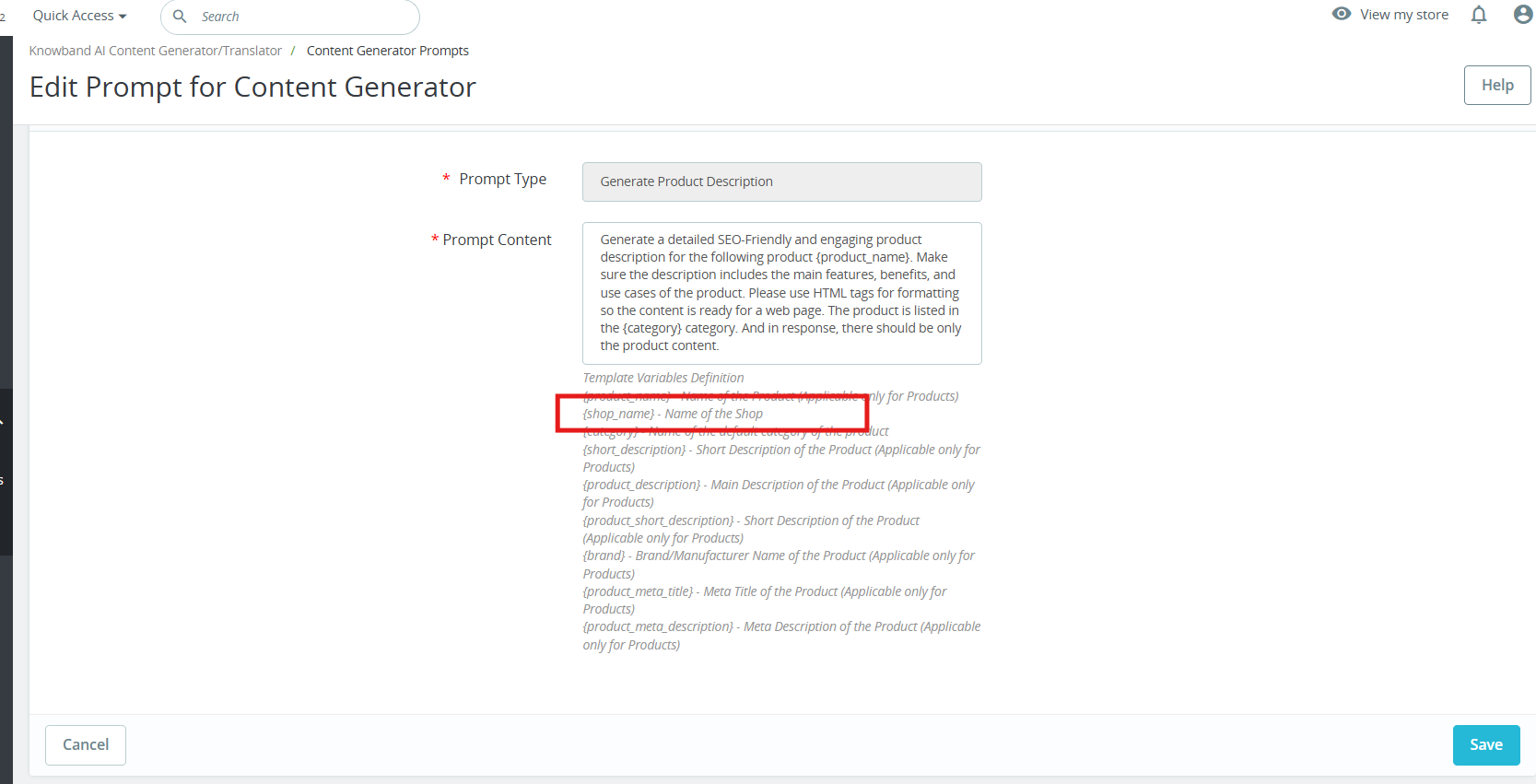
[New] Personalised Branding with Manufacturer Variable: The new Manufacturer Variable allows you to insert your shop or brand name directly into content. This makes all product descriptions, titles, and promotional texts feel personalised and aligned with your brand. You can edit or replace the variable within prompts to suit your specific needs, ensuring consistent branding across products and suppliers in Prestashop AI Content Generator.
Content Generation Prompts:

  • Generate Product Description – Create SEO-friendly, well-structured product descriptions with key features and benefits.
  • Generate Product Meta Title – Produce optimized meta titles under 60 characters with relevant keywords.
  • Generate Product Meta Description – Generate compelling meta descriptions within 140 characters.
  • Generate Category Description – Create category descriptions with proper HTML formatting.
  • Generate Category Meta Title – Generate keyword-rich category meta titles under 60 characters.
  • Generate Category Meta Description – Create concise and engaging category meta descriptions within 140 characters.
  • [New] Generate CMS Content – Generate high-quality CMS page content using AI, ideal for pages like About Us, Return Policy, etc.
  • [New] Generate CMS Meta Title – Create SEO-friendly meta titles for CMS pages using AI.
  • [New] Generate CMS Meta Description – Generate engaging and optimized meta descriptions for CMS pages.

Translation Prompts:

  • Translate Product Title – Translate product titles into multiple languages.
  • Translate Product Description – Translate product descriptions while preserving HTML formatting.
  • Translate Product Meta Title – Convert product meta titles into different languages.
  • Translate Product Meta Description – Translate product meta descriptions while maintaining readability.
  • Translate Category Title – Translate category titles into multiple languages.
  • Translate Category Description – Ensure accurate translations of category descriptions with HTML formatting.
  • Translate Category Meta Title – Convert category meta titles to different languages.
  • Translate Category Meta Description – Translate category meta descriptions into multiple languages
  • [New] Translate CMS Title – Translate CMS page titles into multiple languages.
  • [New] Translate CMS Content – Translate full CMS page content while preserving structure and formatting.
  • [New] Translate CMS Meta Title – Convert CMS meta titles into different languages for better SEO reach.
  • [New] Translate CMS Meta Description – Translate CMS meta descriptions into multiple languages while maintaining clarity and impact.

4.0.3 [New] Bulk Product Content Generation By Uploading CSV:

The PrestaShop AI Content Generator & Translator now supports bulk content generation via CSV upload.


You can upload a CSV file containing Product IDs along with specific fields corresponding to various content prompts (e.g., title, description, meta fields).

Each field uses binary values to control execution:

  • A value of 1 indicates that the prompt should be executed for that product.
  • A value of 0 means the prompt will be skipped.

This feature allows for flexible and efficient bulk processing of content across multiple products


4.0.3 Prestashop Claude content translator Addon Task Log:

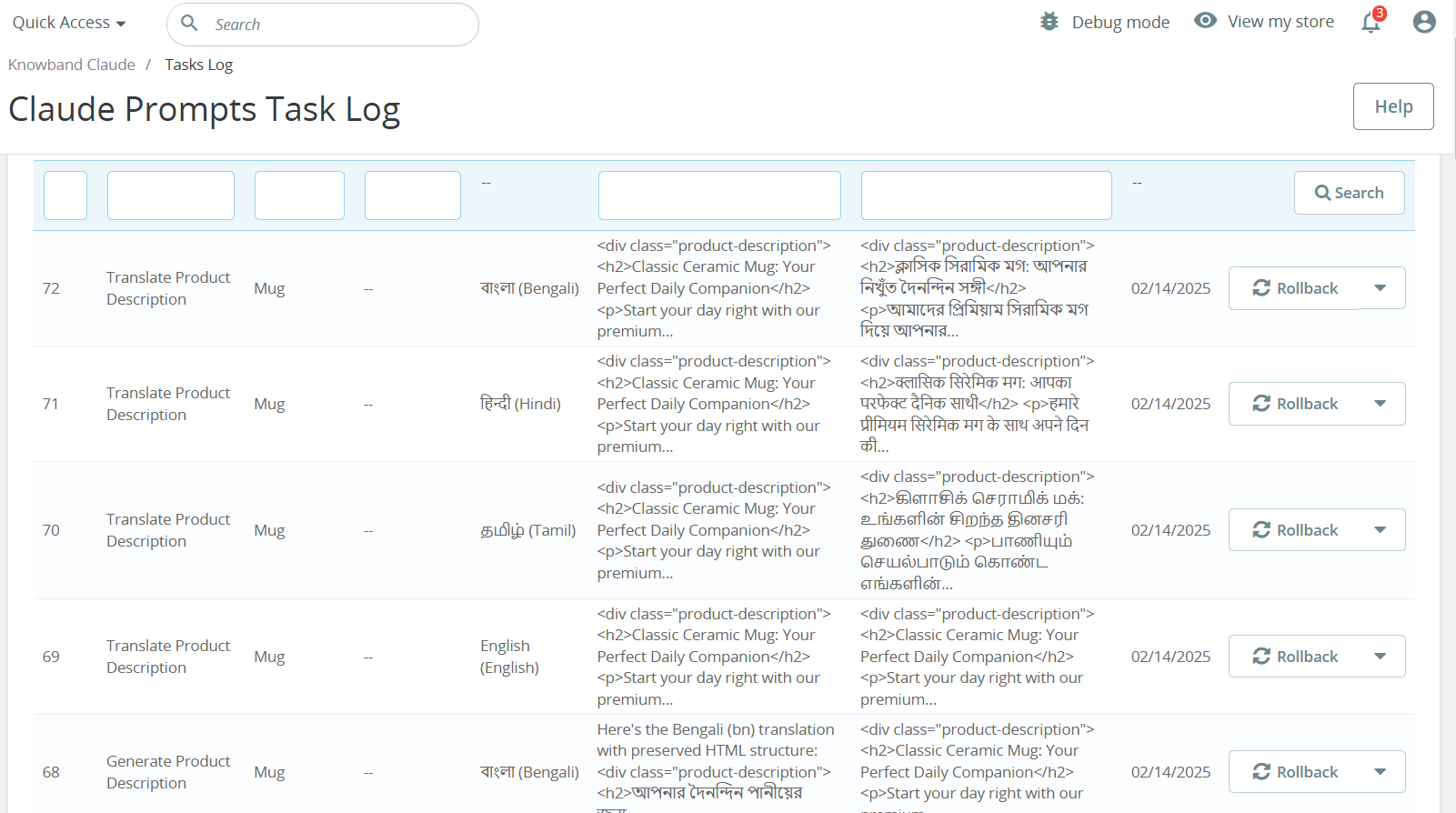
The Knowband PrestaShop AI Content Generator Task Log maintains a detailed record of all AI-generated and translated content, including prompt type, language, product, categories, timestamp, status, previous content, or newly generated content concerning date.

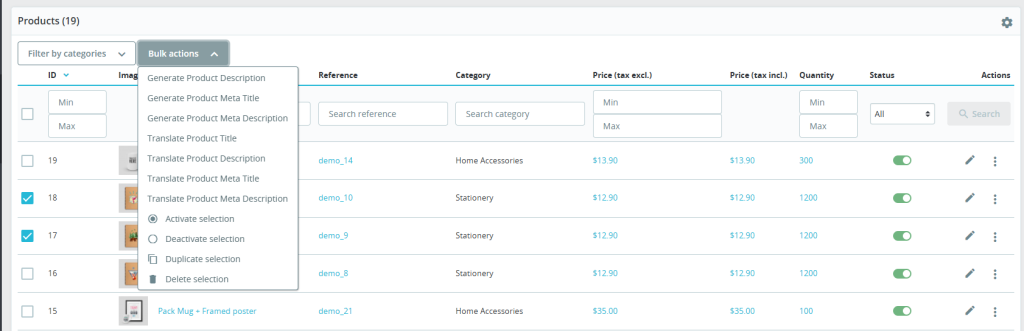
5.0 How to Execute Prestashop AI Content Generator/ Translator Module Prompts?

To execute bulk content operations via the PrestaShop Backend Store follow the steps:
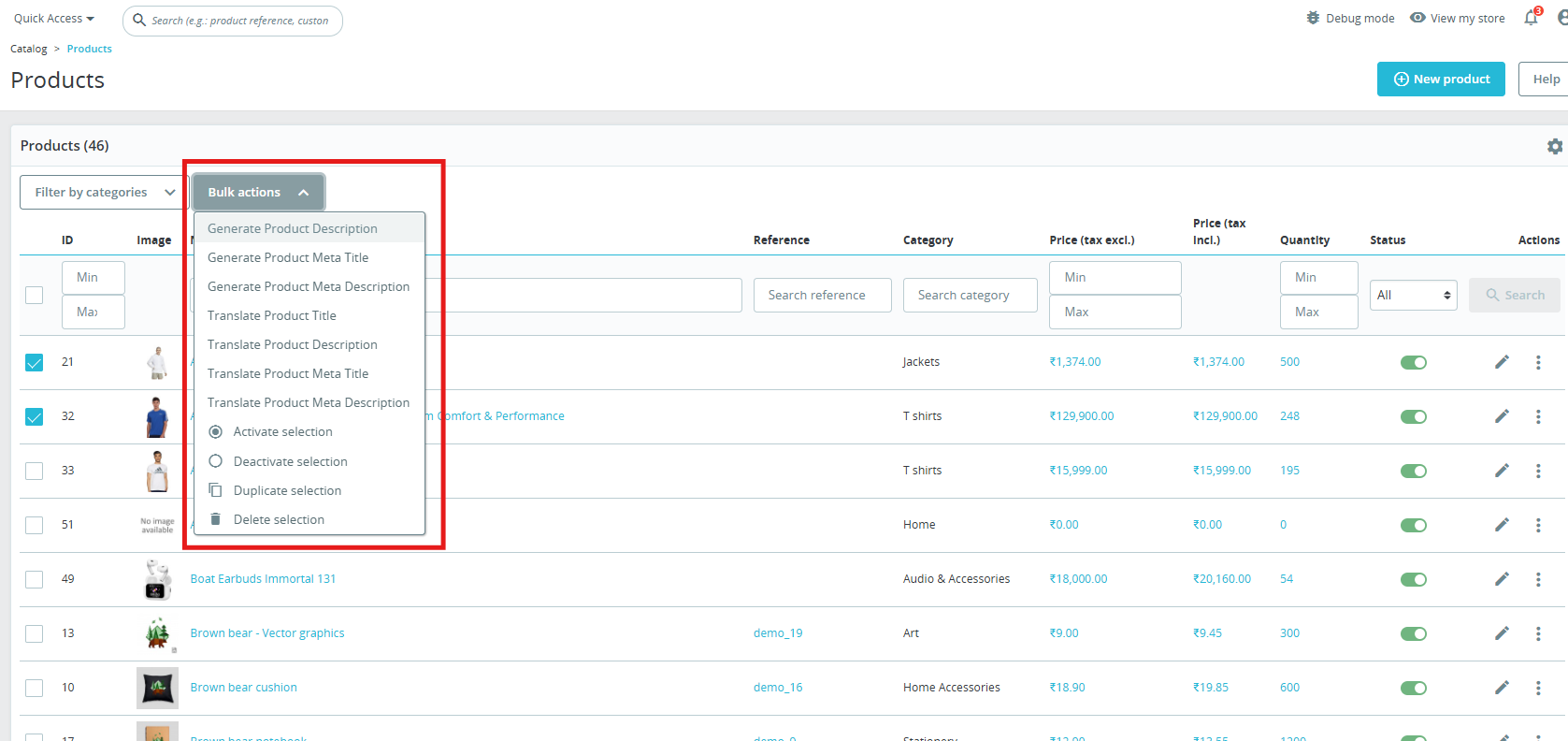
 

  1. Navigate to Products or Categories in the admin panel.
  2. Select the items you want to generate or translate.
  3. Click on the Bulk Actions menu.
  4. Choose the desired AI-generated prompt (Product Description, Meta Title, Translation, etc.).
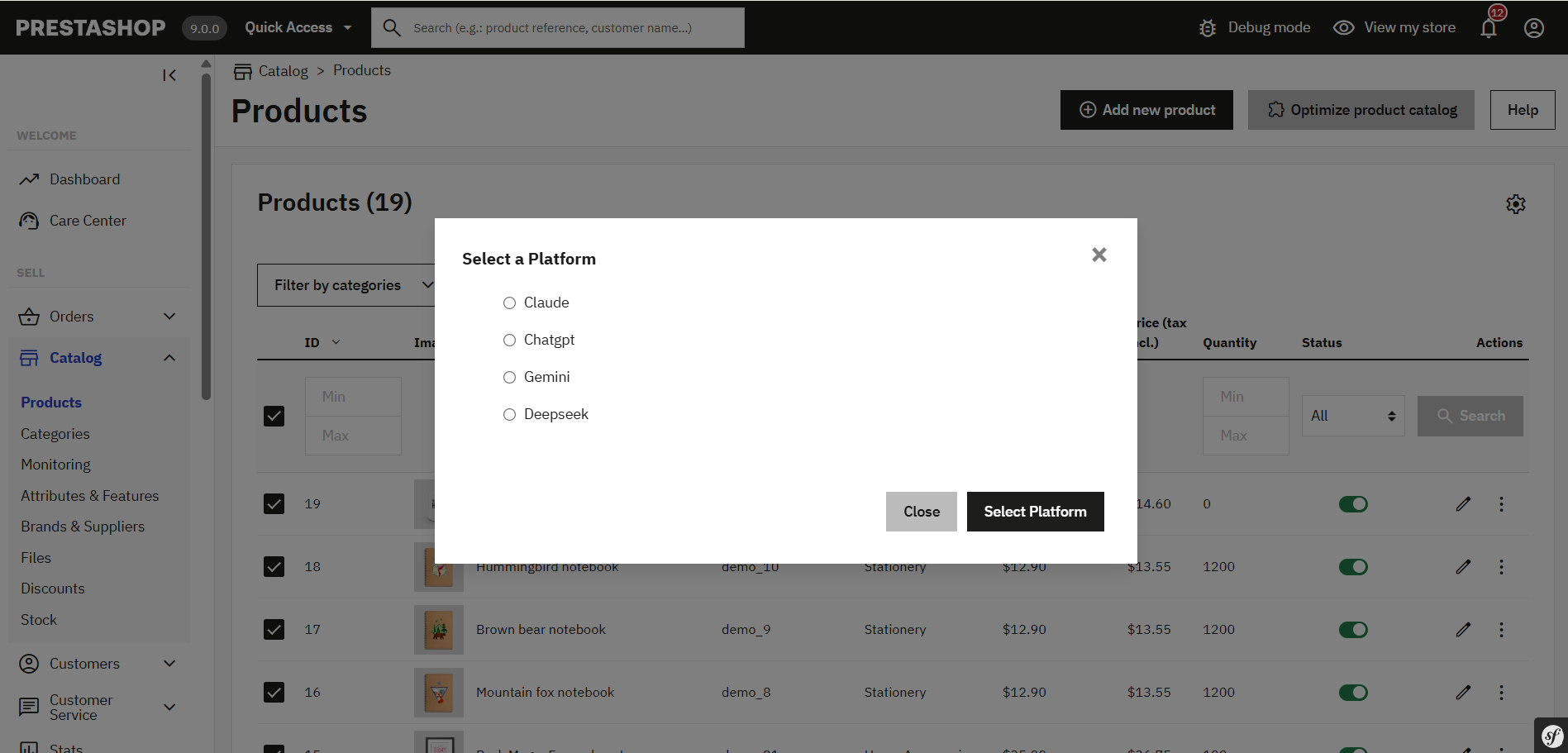
  5. Select the AI engine (Claude, ChatGPT, DeepSeek or Gemini) to perform the task.
  6. Click on the prompt that you want to execute.

6.0.0[New] Individual Key Pages Content Generation

The PrestaShop AI Content Generator & Translator Module by Knowband has now been enhanced to support individual content generation for specific key pages across your store. Whether it’s a Product Page, Category Page, or a CMS Page, you can now generate high-quality, AI-driven content tailored to each item individually, giving you full control over tone, style, and structure.

Steps to execute the prompt on individual key pages.

1. Navigate to the Desired Section:
For Products, go to: Catalogue → Products

For Categories, go to: Catalogue → Categories

For CMS Pages, go to: Design → Pages

2. Edit the Specific Page:
Click Edit next to the specific product, category, or CMS page you want to update.

3. Access the AI Content Generator Panel:
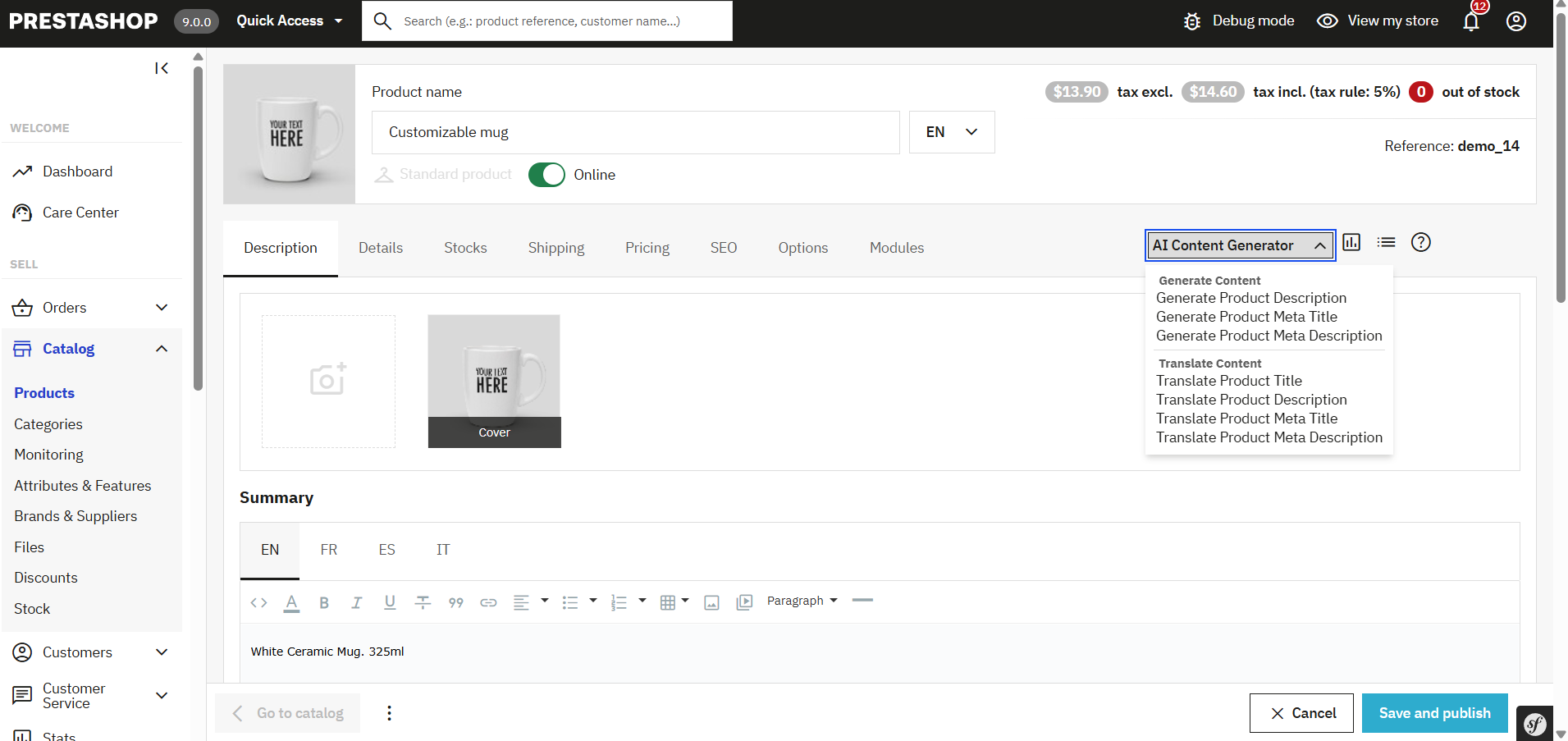
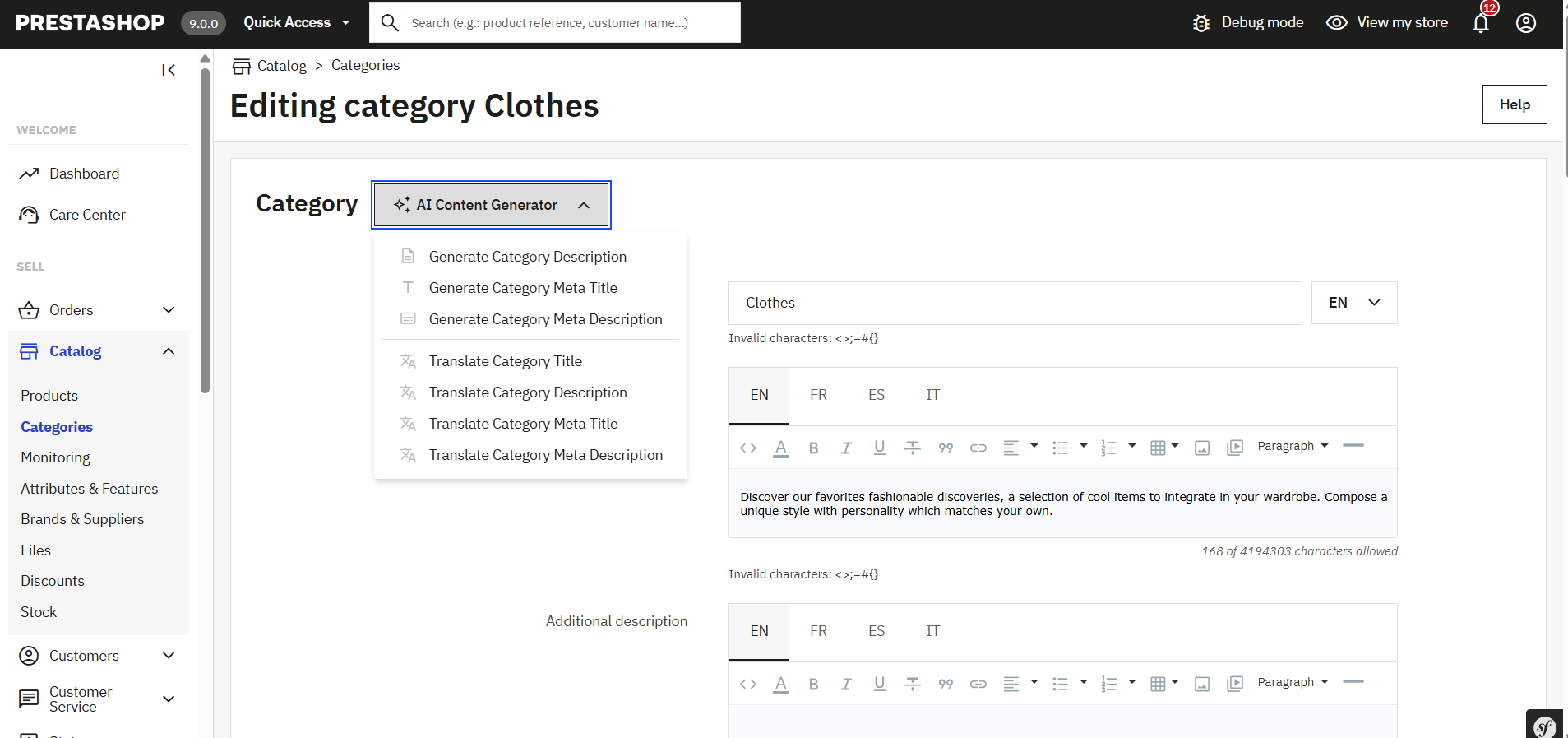
Within the edit screen, you’ll now find an AI Content Generation prompt section, where you will find the prompts listed

This section is integrated into each edit page and allows you to generate or translation content for that specific page only.

4. Configure the Content Generation:
Select a predefined prompt (Generate Product description, Translate Meta description, Generate CMS Page description etc).

Choose your preferred AI engine (ChatGPT, Claude, Gemini, or DeepSeek) depending on your content goals, speed, and budget.

Optionally, add an additional prompt or specific instructions to guide the AI (e.g., use a formal tone, target specific keywords, mention product benefits, etc.).

5. Page-Type Specific Capabilities:

Product Pages: Generate or translate product descriptions, meta titles, & meta descriptions.
Category Pages:
With the PrestaShop AI Content Generator & Translator, you can now generate or translate content for individual categories right from their respective edit pages.
CMS Pages:
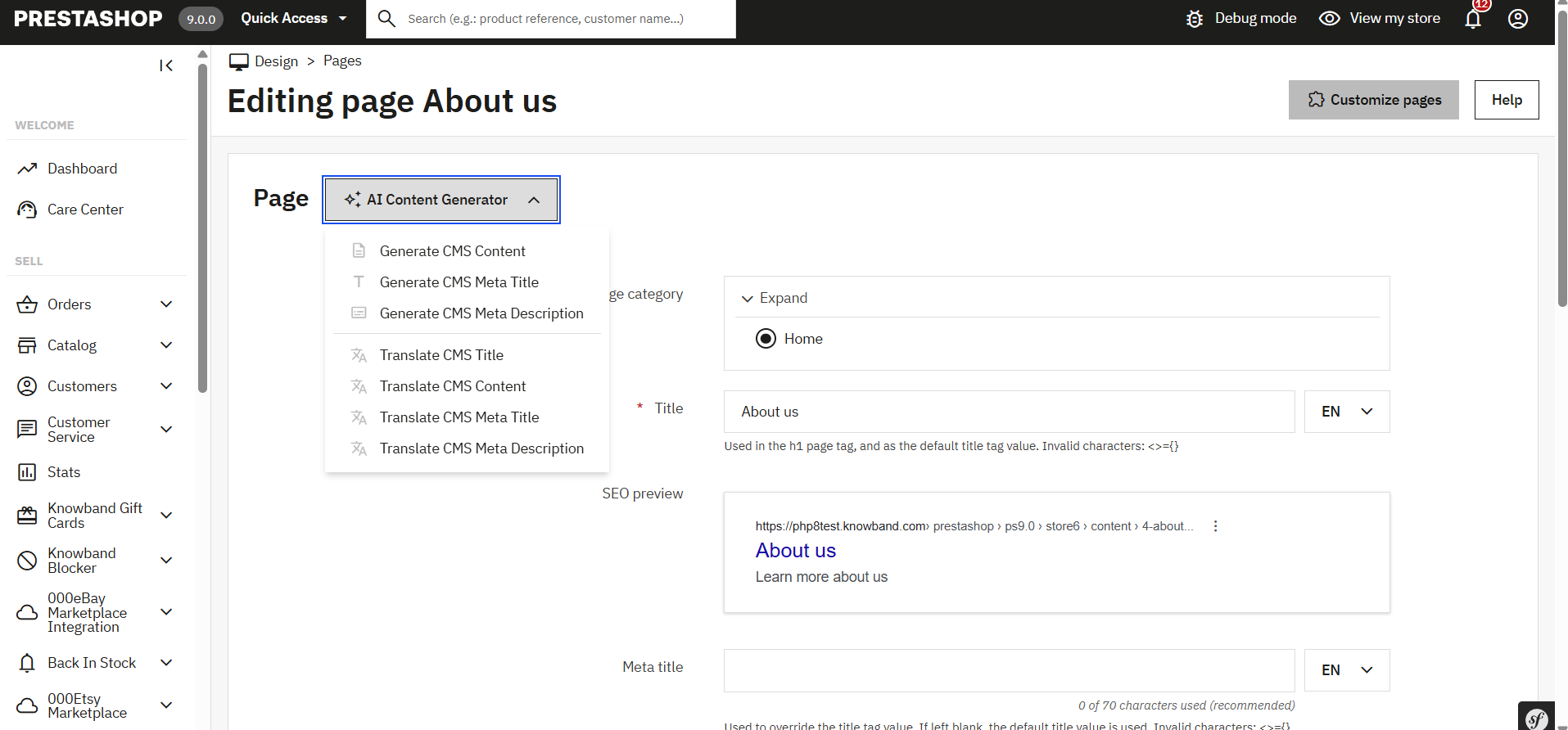

Generate content for informational pages such as About Us, Return Policy, Shipping Info, FAQs, and more.

Translate existing content into multiple languages to support global audiences.

Final Step: Execute the Prompt

Once you have written the additional prompt or chosen AI models, simply click “Execute”.
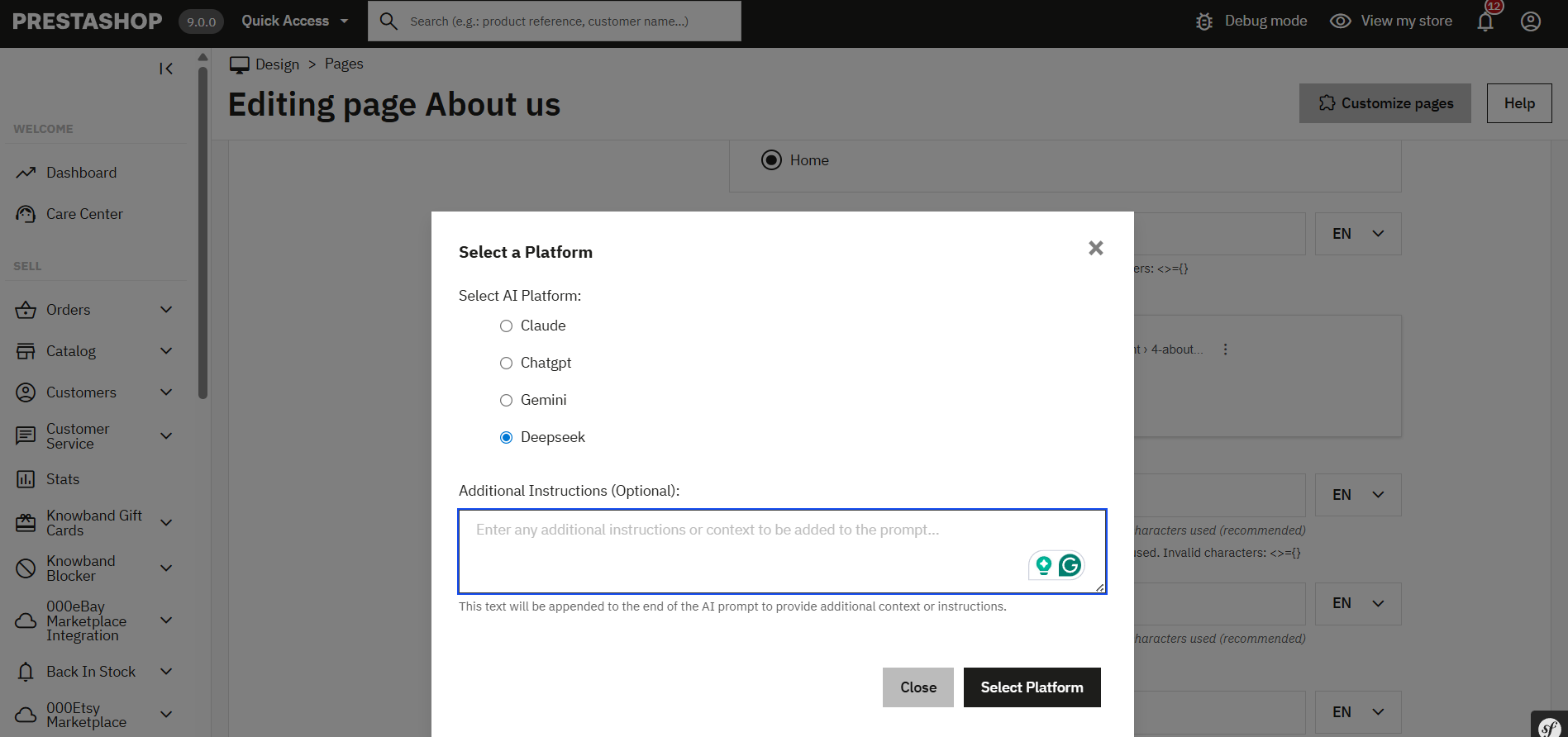
The content generation task request will be sent to the pending task. Now you can execute the pending tasks.

You can monitor progress and manage any pending tasks directly from the Task Log section of the module.

This new enhancement ensures that you’re not limited to bulk operations and gives you the power to optimise individual pages as per your business needs, making it easier than ever to deliver high-quality, engaging, and multilingual content across your store.

7.0.0 [New] Steps to Generate & Translate CMS Pages Content

The Knowband PrestaShop AI Content Generator & Translator Module enables store owners to effortlessly create and translate content for CMS pages such as About Us, Return Policy, Terms & Conditions, and more.

Steps to Generate or Translate CMS Page Content:
1. Navigate to:
Design → Pages

2. Select Pages:
Choose individual pages, or select all if you want to generate or translate content in bulk.

3. Choose Bulk Action:
From the bulk action menu, select the desired AI operation.

4. Select AI Engine:
Choose from supported AI models (e.g., ChatGPT, Gemini, Claude, DeepSeek) based on your content needs.

5. Add Custom Prompt (Optional):
You can include additional instructions or prompts after selecting the AI engine to tailor the content output.

6. Submit Task:
The request will be added to the Task Log for processing.

7. Execute Task:
Run any pending tasks, and your CMS content will be generated or translated accordingly

8.0.0 Benefits of the PrestaShop AI Content Generator Module

Saves Time and Effort

The Prestashop AI Content Generator Module automates content creation; as a result, it significantly reduces manual work. Consequently, store owners can focus on business growth instead of writing product descriptions.

Improves SEO Rankings

The Prestashop ChatGPT SEO Content Generator optimizes product descriptions and meta tags. Therefore, it enhances search rankings and drives more organic traffic.

Expands Global Reach

The Prestashop AI translator addon translates product content into multiple languages. Thus, businesses can effortlessly connect with international customers.

Enhances Content Quality

AI-generated content is engaging and accurate. In addition, it ensures product descriptions are clear, detailed, and informative, which ultimately leads to better conversions.

Reduces Costs of Content Creation

The Claude addon for Prestashop eliminates the need for professional copywriters and translators. As a result, businesses save money while still maintaining high-quality content.

Supports Multiple AI Models

Merchants can choose from various AI models, including Prestashop ChatGpt content generator, Gemini AI content generator Prestashop, and Claude AI. Moreover, this flexibility allows tailored content creation.

Speeds Up Bulk Content Generation

The Prestashop Gemini Content Generator Addon enables bulk content creation. Consequently, merchants can generate descriptions for multiple products in minutes.

Provides an Easy-to-Use Interface

The PrestaShop AI Content Generator / Translator Module is beginner-friendly. Additionally, it allows store owners to create professional content without any technical expertise.

Ensures Content Accuracy and Authenticity

The Prestashop Claude Translator/Generator Module maintains the originality of product information. Thus, customers always receive precise and reliable details.

Tracks All Content Changes

The Prestashop Claude Translator Module records all AI-generated and translated content. As a result, merchants can monitor changes and refine their content strategy over time.

OpenCart Claude Content Generator/Translator Extension – User Manual

The Knowband OpenCart Claude AI Content Generator/Translator  Extension is a cutting-edge extension designed to simplify content creation and translation for OpenCart store owners. Leveraging the advanced capabilities of Claude AI, the module helps merchants craft high-quality product descriptions, product titles, category descriptions, meta titles, and meta descriptions while ensuring SEO-friendly content.

The AI-powered translation feature also allows seamless integration with Claude AI, enabling accurate translations to help businesses expand their reach globally.

With this powerful extension, OpenCart store owners can generate engaging and original content effortlessly. Thus, Knowband’s OpenCart AI Content Generator enhances creativity in product descriptions and ensures all generated content aligns with search engine optimization best practices.

Furthermore, the module integrates smoothly with Claude AI API, offering a hassle-free experience for both content generation and translation. The built-in SEO optimization features help improve search rankings while maintaining content integrity.

Whether managing a small boutique or a large e-commerce store, the Knowband OpenCart Claude AI Content Generator streamlines content workflows, ensuring consistency across product listings. The module’s user-friendly interface and robust AI capabilities make it a must-have extension for any OpenCart store looking to scale efficiently.

1.0 Key Features of OpenCart Claude AI Content Generator & Translator Plugin 

Create Content Instantly with AI- The OpenCart Claude SEO Content Generator plugin by Knowband allows store owners to craft SEO-optimised product & category descriptions, meta titles, and descriptions. Additionally, the Opencart Claude AI Generator plugin ensures that the content is informative, and optimized for SEO.

Powered by Advanced AI Technology –The extension uses Claude 3.5 Sonnet, Claude 3 Opus, and Claude 3 Haiku to create unique and high-quality content. 

Easily Translate Content for Global Reach- The store owners do not need to manually translate product descriptions anymore. Therefore, this AI-powered plugin ensures accurate and natural translations, making it simple to reach customers in different countries.

Improve SEO with Optimized Content- The OpenCart Claude AI Content Generator module ensures that all generated and translated content follows SEO improving rankings on Google. Thus, Integrating relevant keywords naturally helps boost sales and traffic.

Simple Installation & Easy to Use- Designed for a user-friendly setup, the OpenCart Claude AI Content Generator Plugin is easy to purchase and configure. Therefore, the setup is quick and simple, and the interface is designed to be user-friendly for all opencart store owners.

Generate Bulk Content in Seconds – This addon is perfect for stores with large product base catalogues, allowing e-merchants to generate and translate SEO Optimized content for multiple products simultaneously. Therefore, it helps in saving time and effort.

Supports Multiple Languages & RTL Scripts – Whether the customers speak English, Spanish, Arabic, or any other language, this addon supports them all. It also works with right-to-left (RTL) languages.

Customize Content to Fit Your Brand- Furthermore, store owners can customize content length, tone, and style to align with their brand voice, ensuring consistency across all product listings.

2.0 Installation Guide

Setting up the Opencart Claude Module is simple. The e-merchants must follow the simple steps to complete the installation process easily.

When you purchase the Knowband Claude Content Generator/Translator Extension, you will get the following files:

  • A zipped file containing the source code for the Opencart Claude content Translator Extension.
  • A user manual for the extension to assist you further.

Steps to Install the Extension:

  1. Unzip the Downloaded File:

Locate the zipped file in your account under My Account > Downloads and extract it. Once unzipped, you’ll see folders similar to those shown in the illustration below:

  1. Transfer Files to the Root Directory

Use an FTP manager to copy all the files and folders from the unzipped folder to the root directory of your Opencart setup.

  1. Complete the Installation

The module is now successfully installed and ready for configuration.

  1. Access and Configure the Extension

Navigate to the Admin Panel > Main Menu > Extensions.

3.0 How to Generate the Claude API Key for Module Configurations?

The store owners must get an API key to enable functionality in your opencart store.

Steps to generate the API Key for OpenCart Claude AI Content Generate Extension:–

Step 1: Obtain an API Key:

Step 2: Paste the API Key in the Opencart Store:

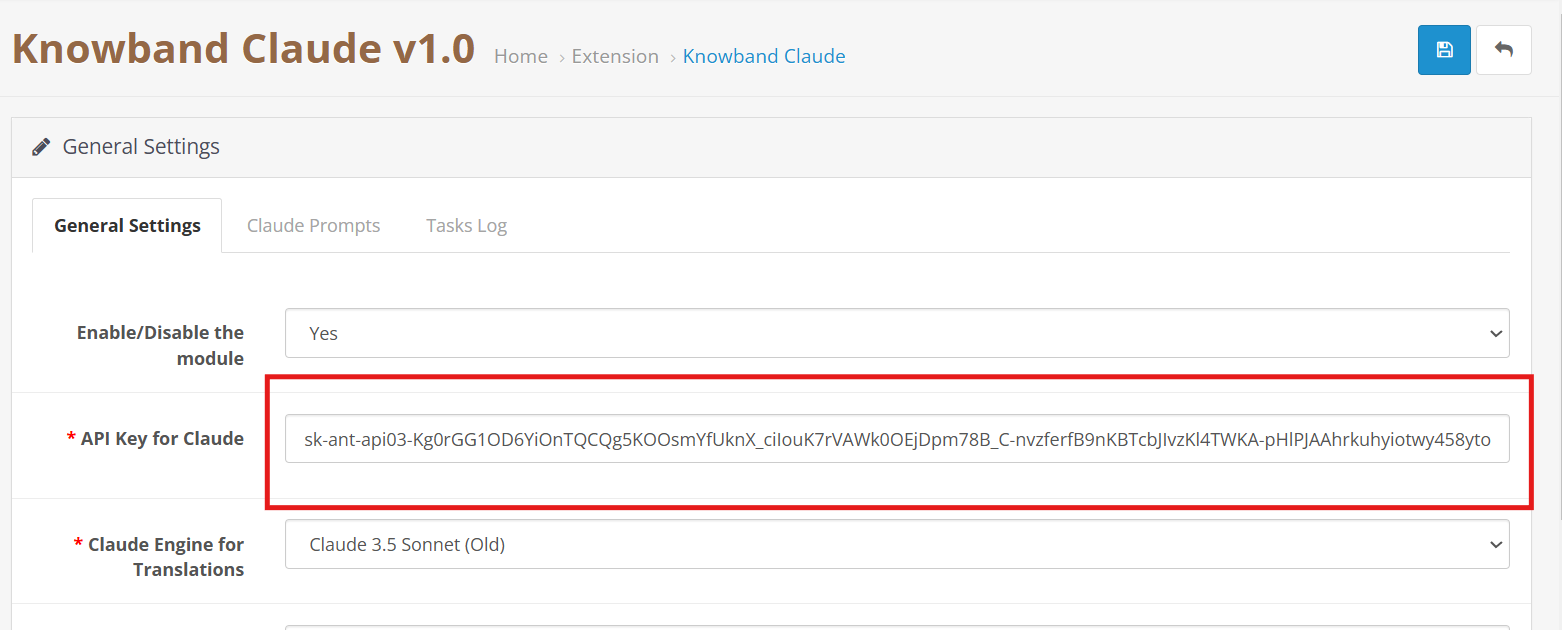
  • In your Opencart Store’s Backend, go to the Knowband Claude AI General Settings page.
  • Add the API Key into the given API Key for the Claude block.

Step 3: Save the Settings:

  • After inserting the API Key in General Settings, click Save to Module settings. The Claude AI module will now use this key to interact with the Claude API.

4.0 Admin Interface Overview:

4.0.1 General Setting:

The Opencart Claude Content Translator Plugin by Knowband allows the e-merchant to configure general settings and manage operations efficiently. Therefore, the Knowband provides an intuitive interface that allows the e-merchants to configure the module.

Here is a Brief Overview of the features of the Module

Enable/Disable:  E-merchants can enable or disable the OpenCart Claude AI Extension.

API Key for Claude: Add your Anthropic API Key in the required field.

Claude Model Selection: The module allows the e-merchant to select from Anthropic’s models, including Claude 3.5 Sonnet(new), Claude 3.5 Sonnet(old), Claude 3 Opus, and Claude 3 Haiku.

Temperature: Store owners can adjust the creativity level of the content which generally is between 0.0 to 1.0 – higher values represent more creative content, while lower values represent more consistent and focused results.

Maximum Tokens: Store owners can control how much text the AI generates. By default, it uses 2,000 tokens.

Select Claude Engine: E-Merchants can choose which Claude model to use specifically for translation tasks.

Primary Language Content Generator: Choose your primary language for automatic content generation and translation.

Target Languages: The store owners to select which languages they want content translated into.

4.0.2. OpenCart Claude Prompts:

The Extension contains 14 pre-configured prompts designed generator and translator.

Knowband’s OpenCart Claude AI Content Translator Extension– AI Prompts

Product Content Generation

Generate Product Descriptions – Creates SEO-friendly product descriptions with key features and benefits.

Generate Product Meta Titles – Writes optimized meta titles (under 60 characters) with keywords to boost search rankings.

Generate Product Meta Descriptions – Creates concise meta descriptions (within 140 characters) that highlight product details.

Product Content Translation

Translate Product Titles – Converts product titles into multiple languages as needed.

Translate Product Descriptions – Translates descriptions while keeping formatting intact.

Translate Product Meta Titles – Translate meta titles while maintaining the store’s tone and style.

Translate Product Meta Descriptions – Ensures accurate and well-structured translations of product meta descriptions.

Category Content Generation

Generate Category Descriptions – Creates category descriptions while keeping formatting intact.

Generate Category Meta Titles – Writes SEO-friendly meta titles (under 60 characters) with relevant keywords.

Generate Category Meta Descriptions – Generates short and optimized meta descriptions (within 140 characters) with focus keywords.

Category Content Translation

Translate Category Titles – Translates category titles into different languages based on store needs.

Translate Category Descriptions – Translates descriptions into multiple languages while preserving HTML structure.

Translate Category Meta Titles – Ensures SEO-friendly translations of category meta titles.

Translate Category Meta Descriptions – Translates category meta descriptions with accuracy and clarity.

4.0.3. Claude Prompts Task Log:

Knowband OpenCart Claude AI Content Translator Extension Module Task Log

The task logs keep a comprehensive record of all executed prompts with details like Prompt Type, Product, Category, Language, Previous Content, New Content, and time.

5.0 Steps to Execute Claude Prompts?

Knowband OpenCart Claude Prompt Execution Steps

Choose your desired products or multiple products access the Bulk Actions and select the prompt that you want to execute.

Generate Product Descriptions: Write or generate details for many products at once instead of one by one.

Generate Product Meta Titles: Make search-friendly titles for multiple products together to improve online visibility.

Generate Product Meta Descriptions: Create informative summaries for many products simultaneously that help shoppers understand what you offer.

Translate ProductTitles: Convert your product names into different languages to reach international customers.

Translate Product Descriptions: Transform your product information into various languages so more people can understand what you sell.

Translate Product Meta Titles: Turn your search titles into multiple languages for better global search visibility.

Translate Product Meta Descriptions: Use Knowband’s Claude AI to translate product summaries into different languages all at once.

OpenCart Gemini AI Content Generator/Translator Extension – User Manual

The Knowband’s Opencart Gemini AI Content Generator is a powerful extension that makes content creation easy for Opencart store owners. The OpenCart Gemini content generator uses AI, that allows store owners to generate high-quality and creative product descriptions, product titles, category descriptions, meta titles, meta descriptions, and SEO- optimized content.

The AI-powered translation Extension for the OpenCart seamlessly integrates with Google’s Gemini AI API, providing a smooth experience for content generation and translation. Therefore, with built-in SEO optimization features, the OpenCart Gemini content generator Extension ensures all generated content is original, engaging, and search engine friendly. Moreover, the translation capabilities of Knowband’s OpenCart Gemini content translator Extension allow merchants to expand their business to reach globally with perfect product information.

Whether you’re managing a small business or a large e-commerce marketplace, Knowband’s OpenCart Gemini content generator Extension streamlines your content workflow and ensures consistent quality across all product listings. Furthermore, the intuitive interface and powerful AI capabilities make it an essential Extension for any OpenCart store looking to scale content operations efficiently.

1.0. Key Features of  OpenCart Gemini AI Content Generator/Translator Extension

AI-Powered Content Generation

The OpenCart Gemini SEO Content Generator Extension leverages Google’s Gemini AI to create high-quality product descriptions, meta titles, and descriptions. Furthermore, it ensures content is engaging, informative, and optimized for search engines. 

Advanced AI Technology

The Gemini Extension for OpenCart utilizes Google’s latest Gemini AI models, including Gemini 2 Flash, Flash Light Preview, Gemini Flash 1.5, Gemini Flash 8B, and Gemini 1.5 Pro, which offers different generation modes for various content needs:

AI-Powered Translation

The  OpenCart Opencart translator Extension delivers accurate, context-aware translations for product content. Additionally, the OpenCart Gemini SEO Content Generator Supports multiple languages and preserves formatting and structure during translation.

User-Friendly Interface

The AI-powered translation Extension for OpenCart is simple to install and provides flexible and intuitive admin panel controls. Therefore, the store owners do not need to have coding experience or technical expertise.

Time Savings

The OpenCart Gemini content generator Extension automates time-taking tasks like writing product, and category descriptions and updating meta titles and descriptions. 

World-Wide Market Reach

The OpenCart Gemini content generator Extension’s feature allows the store to translate content into multiple languages to attract global customers.

2.0 How to Generate the Knowband OpenCart Gemini API Key for Extension Configuration

To enable Gemini AI functionality in your OpenCart Extension, follow these steps to obtain and configure your API key:

Step 1: Obtain an API Key

  1. Visit the Google AI Studio (https://aistudio.google.com/app/apikey)
  2. Click on “Create new secret key”. Copy this key for the next step.

Step 2: Enter the API Key in Your OpenCart Store:

  • In  Opencart Store’s BackOffice go to the “Knowband’s Gemini” General Settings page.
  • Paste the API Key into the provided “API Key for Gemini ” field.


Step 3: Save the Settings:

  • After pasting the API Key in General Settings, click “Save”. Now, you can use Knowband’s Gemini AI Extension.

Important:

Billing Requirement: Store owners must have a sufficient credit balance in their Google Gemini account for the API to function and run the Extension. If your credit balance is less, the API requests will not work in the Knowband’s Gemini AI Extension. Additionally, the store owners can check their balance and add credits by accessing the billing overview page at https://aistudio.google.com/app/apikey.

3.0 Admin Interface Overview:

3.0.1 General Setting:

The OpenCart Gemini AI Extension by Knowband allows the e-merchant to configure the Extension to perform operations within the store and manage bulk content operations efficiently.

Here is a Brief Overview of the features of the Extension

Enable/Disable: E-merchants can enable or disable the Opencart Gemini AI Content Generator depending on their needs.

API Key for Gemini AI: Enter your Generated API KEY from Google AI Studio in the required field.

Gemini AI Model Selection: Also, e-merchants can choose from Google’s latest Gemini AI models, including Gemini 2 Flash, Flash Light Preview, Gemini Flash 1.5, Gemini Flash 8B, and Gemini 1.5 Pro, which offers different generation modes for various content needs.

Temperature: The e-merchants can adjust the creativity level from 0.0 to 1.0 – higher values represent more creative content, while lower values represent more focused results.

Maximum Tokens: The Knowband’s Gemini Content Generator allows the admin to set a token limit (default: 500). The tokens represent text fragments.

Gemini AI Engine for Translations: Select which Gemini AI model to use for translation for the product and category details.

Primary Language: The admin can select the store’s default language for content generation and translation of the products

Target Languages: The Opencart Gemini Translator Extension provides the option to select which languages the store owners want their content to be translated.

3.0.2. Gemini AI Prompts:

The Extension features 14 pre-configured prompts designed for various e-commerce content needs:

Knowband’s Opencart Gemini AI Content Translator AI Prompts

Generate Product Description: The prompt creates SEO- optimized, well-structured, formatted product descriptions with key features, benefits, and many more.

Generate Product Meta Title: Creates SEO- optimized meta titles under 60 characters, including keywords and product categories to increase the search rank.

Generate Product Meta Description: The prompts generate meta descriptions of the product limited to 140 characters maintaining the information according to the product.

Translate Product Title: Translates the product titles to multiple different languages depending on the store’s need.

Translate Product Description: The prompt translates descriptions while preserving formatting and content.

Translate Product Meta Title: Translate meta titles to multiple different languages according to the store’s theme and tone.;

Translate Product Meta Description: The prompt translates meta descriptions to multiple different languages keeping the translated content focused and accurate according to the generated content.

Generate Category Description:  The prompt generated category descriptions while preserving formatting and content of the product.

Generate Category Meta Title: Also, translate category meta titles under 60 characters with related keywords keeping the title SEO Optimized.

Generate Category Meta Description: Creates category meta descriptions within 140 characters focusing on the meta keywords.

Translate Category Title: The prompt is to translate category titles into multiple different languages based on the needs of the store.

Translate Category Description: Translates category descriptions while maintaining HTML structure and generates category descriptions.

Translate Category Meta Title:  Translated category meta titles to multiple different languages depending on the store.

Translate Category Meta Description: Translates category meta descriptions to multiple different languages focused only on generated meta descriptions.

3.0.3. Gemini AI Task Log:

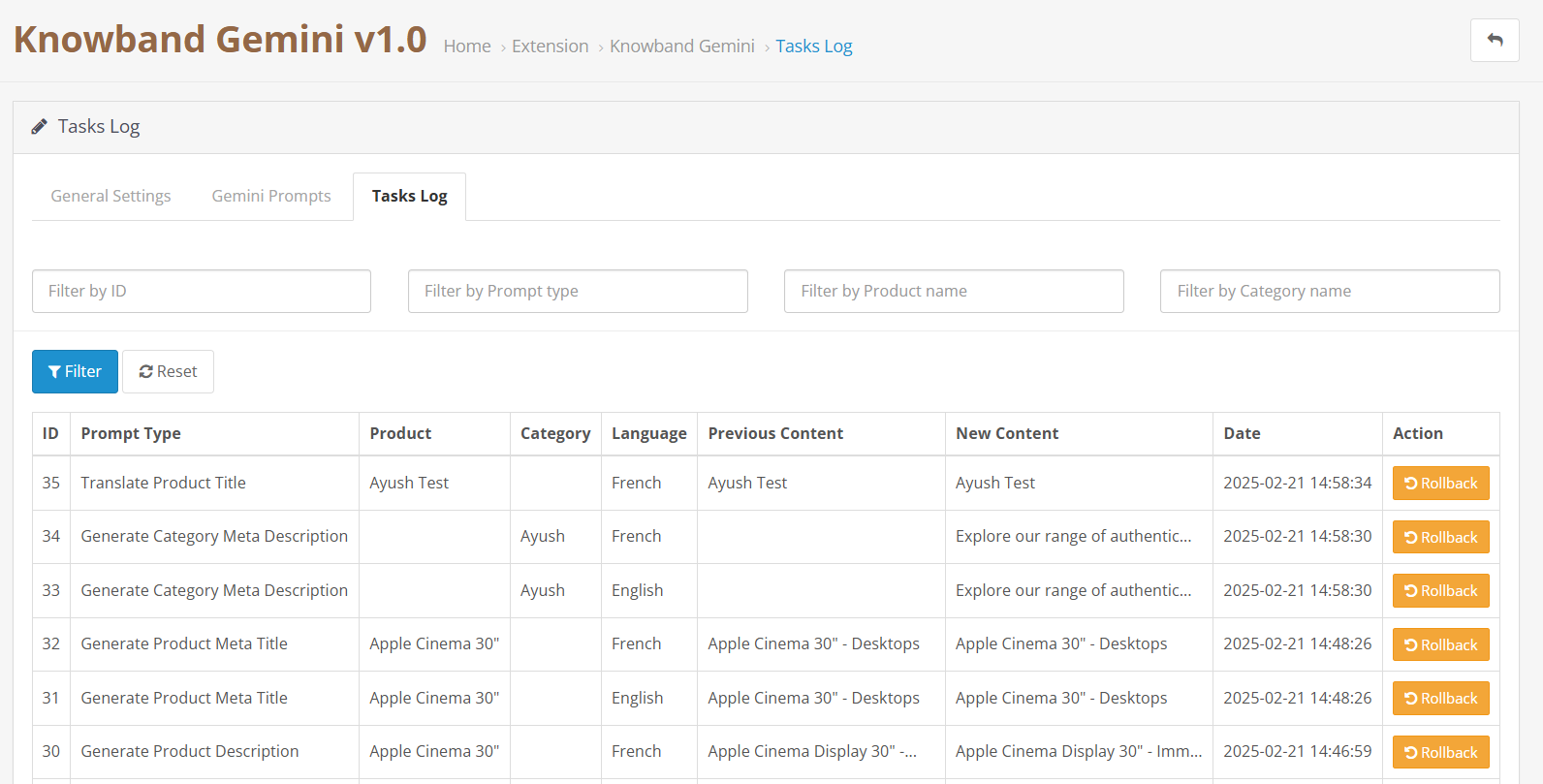
The task logs keep track of the changes and actions done within the store. Moreover, Knowband’s Gemini AI Extension maintains logs in the tasks log which helps the store owners to track, undo and revert changes in the task logs.


4.0. How to Execute Gemini AI Prompts?

The way to execute the prompt is to select the product for which you want to generate and translate content. Then select the prompt  and access bulk operations through Opencart Backend >> Products tab:

Knowband Opencart Gemini AI Prompt Execution Steps:

Select your desired products and access the Bulk Actions menu to choose from various content generation and translation options:

Generate Product Description: Generates the descriptions for multiple products at the same time.
Generate Product Meta Title: Generate the meta titles for the bulk of the product keeping the content SEO-optimized.

Generate Product Meta Description: Generate meta descriptions for multiple different products at the same time keeping the product informative to the customers and visitors. 

Translate Product Title: Convert product titles to multiple languages.

Translate Product Description: Translates the product’s description in selected multiple languages.

Translate Product Meta Title: Translated the selected meta titles to multiple languages for the products and categories.

Translate Product Meta Description: The Knowband’s Gemini AI Extension allows the admin to translate meta descriptions for bulk products at one time.

Prestashop Claude AI Content Generator/Translator Addon – User Manual

The PrestaShop Claude AI Content Generator Addon is a powerful Plugin that simplifies content creation for PrestaShop store owners. Using advanced AI, the  Prestashop Claude AI Content Generator/Translator Addon helps store owners quickly generate high-quality product descriptions, catchy product titles, and SEO-friendly content. As a result, the store can effortlessly attract more visitors and boost sales.

Moreover, the AI Content Generator for PrestaShop integrates smoothly with Claude AI, ensuring a hassle-free experience. The Prestashop Claude AI Content Generator-Translator Addon also includes an SEO Content Generator feature, which guarantees that all content is original, engaging, and optimized for search engines. Additionally, Knowband’s PrestaShop Claude AI Content Translator module allows e-merchant to expand its business internationally with accurate and natural-sounding translations.

Whether you want to manage multilingual content or improve your content strategy, the Claude add-on for Prestashop simplifies the entire process. Moreover, with the PrestaShop Claude AI Content Translator Module, store owners can save time while enhancing the store with high-quality, multilingual content—effortlessly!

1.0. Key Features of Prestashop Claude AI Content Generator/Translator Addon

1. AI-Powered Content Generation: The Prestashop Claude SEO Content Generator by Knowband enables store owners to generate high-quality product descriptions, meta titles, and descriptions. Therefore, by using the advanced AI model Claude, it ensures that the content is engaging, informative, and optimized for search engines.

2. Advanced AI Technology : The AI-powered translation addon for Prestashop leverages Anthropic’s powerful Claude AI models, including Claude 3.5 Sonnet, Claude 3 Opus, and Claude 3 Haiku. Furthermore, with AI engines, you can generate creative content and produce accurate translations depending on your store’s specific needs. 

3. AI-Powered Translation : The AI Translation Addon for Prestashop ensures accurate and context-aware translations with minimal effort. Therefore, e-merchants don’t need to manually translate the content of the products.

4. Easy Installation and Configuration – The Prestashop Claude content generator Addon is Designed with an easy-to-use interface. Likewise, the AI content generation Prestashop is simple to install and run, even for store admins who don’t have coding experience.

5. Efficient Bulk Content Creation – Perfect for merchants with extensive product catalogs, the Prestashop Claude content generator excels at generating content in bulk. 

6. Multi-Language Compatibility – The module supports all languages, including right-to-left (RTL) scripts, ensuring flexibility for global businesses. Additionally, it is compatible with multiple Prestashop versions, making it a reliable solution for a wide range of stores.

2.0 How to Generate the Claude API Key for Module Configurations?

To enable Claude AI functionality in your PrestaShop module, you must get an API Key.

To use the features of the module, you need to have an API Key. Please follow these steps:

Step 1: Obtain an API Key:

Step 2: Enter the API Key in Your PrestaShop Store:

  • In your PrestaShop Store’s Backend, go to the “Knowband Prestashop Claude AI Generator/Translator” General Settings page.
  • Paste the API Key into the provided “API Key for Claude” field.

Step 3: Save the Settings:

  • After adding the API Key in General Settings, click “Save” to store settings. Now, the Claude AI module will use this key to interact with the Claude API.

3.0 Installation Guide for Prestashop Claude AI Content Generator Module

Knowband’s Prestashop Claude AI Generator Installation Steps

  1. Access the Store Admin -> Modules and Services.
  2. Click on “Upload” in the module section. You can simply upload the downloaded zipped file from the system.


4.0 Admin Interface Overview:

4.0.1 General Setting:

The Prestashop Claude Content Translator Module by Knowband allows the admin to configure settings and manage bulk content operations efficiently.

Here is a Brief Overview of the features of the Module

Enable/Disable: You can enable or disable the Prestashop Claude Content Generator.

API Key for Claude: Enter your Anthropic API Key in the designated field.

Claude Model Selection: Choose from Anthropic’s suite of models, including Claude 3.5 Sonnet(new), Claude 3.5 Sonnet(old), Claude 3 Opus, and Claude 3 Haiku, to generate high-quality content tailored to your store needs.

Temperature: Adjust the creativity level – higher values produce more creative content,t while lower values deliver more consistent results.

Maximum Tokens: Set your token limit (default: 2000). Tokens represent text fragments used by the AI model.

Claude Engine for Translations: Select which Claude model to use specifically for translation tasks.

Primary Language: Choose your default language for content generation and translation.

Target Languages: Select which languages you want your content translated into.

4.0.2. Claude Prompts:


The module features 14 pre-configured prompts designed for various e-commerce content needs:

Knowband Prestashop Claude Content Translator AI Prompts

Generate Product Description: Creates SEO-friendly, formatted product descriptions with features, benefits, and use cases.

Generate Product Meta Title: Creates optimized meta titles under 60 characters, incorporating keywords and product categories.

Generate Product Meta Description: Produces compelling meta descriptions limited to 140 characters.

Translate Product Title: Translate product titles to multiple different languages.

Translate Product Description: Translates descriptions while preserving HTML formatting.

Translate Product Meta Title: Translate meta titles to multiple different languages.

Translate Product Meta Description: Translates meta descriptions to multiple different languages.

Generate Category Description: Creates SEO-optimized category descriptions with proper HTML formatting.

Generate Category Meta Title: Produces category meta titles under 60 characters with relevant keywords.

Generate Category Meta Description: Creates category meta descriptions within 140 characters.

Translate Category Title: Translates category titles to multiple different languages.

Translate Category Description: Translates category descriptions while maintaining HTML structure.

Translate Category Meta Title: Converts category meta titles to multiple different languages.

Translate Category Meta Description: Translates category meta descriptions to multiple different languages.

4.0.3. Claude Prompts Task Log

Maintains a comprehensive record of all executed prompts with details like Prompt Type, Product, Category, Language, Previous Content, New Content, and timestamp for easy tracking.

Maintains a comprehensive record of all executed prompts with details like Prompt Type, Product, Category, Language, Previous Content, New Content, and timestamp for easy tracking.

5.0. How to Execute Claude Prompts?


Knowband’s Prestashop Claude Prompt Execution Steps

Select your desired products and access the Bulk Actions menu to choose from various content generation and translation options:

Generate Product Description: Create descriptions for multiple products simultaneously.

Generate Product Meta Title: Bulk create SEO-optimized titles.

Generate Product Meta Description: Generate meta descriptions for multiple different products.

Translate Product Title: Convert product titles to multiple languages.

Translate Product Description: Create multilingual product descriptions for the product.s

Translate Product Meta Title: Convert meta titles to multiple different languages for the products.

Translate Product Meta Description: Translate meta descriptions for bulk products simultaneously.

How Knowband is Transforming eCommerce with AI?

The eCommerce is evolving rapidly, and artificial intelligence (AI) is at playing a crucial role in store management. From content management to customer handling, AI is helping and handling manual tasks in automated ways.

Therefore, businesses need smarter tools to create content, translate efficiently, and provide exceptional customer support. Knowband is revolutionizing the industry with its AI-powered modules for Prestashop, OpenCart, WooCommerce, and Magento 2.

In this article, we will explore how Knowband’s AI-driven solutions, including content generators, translation tools, and an upcoming chatbot, are making online store management easier and more efficient.

The Growing Role of AI in eCommerce!

Managing a large product catalog requires huge manual efforts. Furthermore, content generation for products in bulk is a huge task and requires manual content generation. This leads to hiring content writers to meet the requirements. The expenses are even higher if you are handling a multi-lingual website. Not only do you need to generate the content, but it is also mandatory to translate the content efficiently and up to market standards for all the available languages.

On the other hand, AI is changing the way online businesses operate. From automating repetitive tasks to improving customer engagement, AI-driven solutions are helping merchants save time and enhance user experience.

Benefits of AI in eCommerce:

Automated Content Creation – AI can generate product descriptions, blogs, and marketing content instantly.

Accurate Translations – AI-powered tools provide high-quality translations, helping stores expand globally.

Improved Customer Support – AI chatbots respond to customer queries in real time, enhancing user satisfaction.

Better SEO Performance – AI-generated content is automatically optimized for search engines, increasing store visibility.

Knowband has embraced these AI advancements to develop powerful modules that simplify online store management.

AI-Powered Content Generation and Translation Addons:

Creating content manually can be time-consuming and challenging. However, Knowband’s AI-based content generator and translator addons automate this process, ensuring high-quality and engaging content for eCommerce stores.

1. Prestashop Claude Content Generator & Translator Addon:

Claude AI is known for its human-like responses and deep understanding of language. With Knowband’s newly launched Claude Content Generator and Translator for Prestashop, the eCommerce merchants can:

  • Generate product descriptions, meta tags, and blog content effortlessly.
  • Translate content into multiple languages for global reach.
  • Improve customer engagement with well-structured and SEO-friendly text.

On top of that, Claude provides very affordable services for the APIs. Thus, if you are planning to introduce an AI content generator module on your Prestashop store, Knowband’s got the right one for you.

2. Prestashop ChatGPT Content Generator & Translator Addon:

ChatGPT is the most popular AI-based online platform helping people with daily life and informational queries. Furthermore, OpenAI’s ChatGPT has a variety of engines that allow you to get specific response tones for your unique needs.

Therefore, AI has driven writing for Prestashop eCommerce. Knowband’s Prestashop ChatGPT Content Generator add-on offers:

  • AI-generated descriptions, category texts, and marketing copies.
  • Real-time content translation for multilingual stores.
  • Optimized content that boosts search rankings and conversion rates.

Moreover, the store admin gets advanced engine options to choose from for content translations and generation on Prestashop.  

3. Prestashop Gemini Content Generator & Translator Addon:

Gemini is one of the most powerful AI-based search engines available in the market. Furthermore, Google’s Gemini AI is another game-changer in AI-powered content.

The Prestashop Gemini Content Creator and Translator addon provides:

  • Quick and accurate content generation tailored to store needs.
  • High-quality translations for global expansion.
  • AI-driven suggestions to improve readability and engagement.

4. Prestashop DeeSeek Content Generator & Translator Addon:

DeepSeek is a newly introduced AI-based search engine that has captured the market attention within very little time. The reason behind its popularity is affordable premium services and accurate information. Moreover, the DeeSeek AI is designed for precision and efficiency. This Knowband addon enables:
  • Automatic generation of high-quality product content.
  • Instant translations with minimal manual effort.
  • SEO-optimized text that enhances search visibility.

These AI-powered modules save time, reduce workload, and improve the overall efficiency of an eCommerce business.

Coming Soon: Knowband’s AI Chatbot for Prestashop!

Customer support is one of the biggest challenges for eCommerce businesses. Furthermore, slow response time can lead to lost sales and dissatisfied customers. Therefore, to take care of customer handling on Prestashop automatically, Knowband is soon launching an AI-powered chatbot for Prestashop.

Why an AI Chatbot?

  • 24/7 Instant Support – The chatbot will provide real-time responses to customer inquiries.
  • Personalized Interactions – AI-driven chatbots can recommend products based on user preferences.
  • Order Assistance – Customers can check order status, shipping details, and return policies effortlessly.
  • Reduced Workload – Automating FAQs and customer queries frees up time for store owners.

Moreover, with the AI chatbot for Prestashop, online store owners can provide seamless support without needing a dedicated customer service team.

How Knowband’s AI Solutions Benefit eCommerce Merchants!

By integrating AI-based modules into their Prestashop, OpenCart, WooCommerce, or Magento 2 stores, merchants can:

  •   Save Time & Effort – Automating content creation and translations reduces manual workload.
  •   Expand Global Reach – AI-powered translations make it easier to target international customers.
  •   Boost Sales & Engagement – Well-structured and optimized content enhances user experience.
  •   Enhance Customer Support – AI chatbots ensure fast and accurate responses, increasing customer satisfaction.

Final Thoughts!

AI is the present. Knowband is at the forefront of this transformation, offering eCommerce merchants cutting-edge AI-powered tools to streamline operations, improve content quality, and enhance customer interactions.

With AI-based content generators, seamless translation add-ons, and an upcoming intelligent chatbot, Knowband is making eCommerce smarter, faster, and more efficient.

Explore Knowband’s AI-powered solutions today and stay ahead of the competition!

Prestashop Gemini AI Content Generator/Translator Addon – User Manual

The Prestashop Gemini Content Generator/Translator Addon is a cutting-edge tool designed to transform content management for Prestashop store owners. This advanced module harnesses the power of AI to simplify content creation and translation, making it a must-have for modern eCommerce businesses. Moreover, with the Prestashop Gemini Content Generator Module, you can quickly generate engaging product descriptions, attention-grabbing product titles, and SEO-friendly content. As a result, your store’s online presence improves, attracting more visitors and enhancing the overall customer experience.

In addition to content generation, the AI Content Generator for Prestashop seamlessly integrates with Prestashop Gemini, ensuring smooth and efficient operation. Furthermore, its SEO Content Generator feature guarantees that all content is not only original but also fully optimized for search engines. On top of that, the module comes with the Prestashop Gemini Content Translator, an AI-driven translation addon that enables store owners to expand their business into international markets with precise and context-aware translations.

Whether you’re handling multilingual content or aiming to enhance the efficiency of your content strategy, the Prestashop Gemini Content Generator Addon simplifies the entire process. Additionally, the Prestashop Gemini Content Translator Module combines state-of-the-art AI with user-friendly features, allowing merchants to save time while enhancing their stores with high-quality, multilingual content.

1.0. Key Features of Prestashop Google AI Gemini Content Generator/Translator Addon:

Seamless Content Creation – Easily generate high-quality product titles, detailed descriptions, and well-optimized meta tags with the Prestashop Gemini Content Generator Module. This saves time while ensuring uniform and engaging content across your store.

Advanced AI Engines – The Prestashop Gemini Content Generator and Translator addon is powered by multiple AI models, including Gemini 1.5 Flash, Gemini 1.5 Pro, Gemini 1.5 Flash -8b, Gemini 2.0 Flash, and Gemini 2.0 Flash – Lite Preview. Therefore, with these cutting-edge AI engines, you can create highly creative content and translate it with precision to meet diverse store requirements.

Optimized for SEO – Improve your store’s search rankings effortlessly with Knowband’s AI Content Generator. The Gemini content translator for Prestashop helps generate SEO-friendly content that drives more traffic to your website.

Effortless AI-Powered Translation – Expand your business globally by translating your store’s content into multiple languages with ease. The AI Translation Addon for Prestashop ensures accurate and context-aware translations with minimal effort.

Easy to Set Up and Use – Designed with a user-friendly interface, the Prestashop AI Content Creator is simple to install and operate, even for store admins without technical expertise. Furthermore, this ensures a smooth and hassle-free onboarding experience.

Category and Meta Tag Automation – Quickly generate and translate category names and meta descriptions with precision. This feature ensures professional and consistent content throughout your store with just a few clicks.

Bulk Content Generation – Ideal for stores with large product catalogs, the module supports batch content creation. Thus, this allows you to process multiple items simultaneously, significantly increasing efficiency.

Improved Store Management – Streamline content management tasks, making product updates quicker and boosting overall operational efficiency. This feature benefits both small and large-scale businesses.

Multi-Language Compatibility – The module supports all languages, including right-to-left (RTL) scripts, ensuring flexibility for global businesses. Additionally, it is compatible with multiple Prestashop versions, making it a reliable solution for a wide range of stores.

2.0 How to Generate the Gemini Key for Module Configurations?

To enable Gemini functionality in your PrestaShop module, you must configure an API Key.

To use Gemini features, you need to set up an API Key. Please follow these steps:

Step 1: Obtain an API Key:

  • Go to the Gemini API Key generation page at https://aistudio.google.com/app/apikey and log in or create an account if you haven’t already.
  • Click on “Create new secret key”. Copy this key for the next step.

Step 2: Enter the API Key in Your PrestaShop Module:

Step 3: Save the Settings:

After entering the API Key, click “Save” to store your settings. The Gemini module will now use this key to interact with the Gemini API.

Important:

Billing Requirement: Ensure that you have a sufficient credit balance in your Gemini account for the API to function. If your credit balance is depleted, the API requests will not work. You can check your balance and add funds by visiting the billing overview page at https://aistudio.google.com/app/apikey.

Keep your API Key secure and do not share it publicly, as it is linked to your Gemini account usage and billing.

3.0 Installation Guide for Prestashop AI Content Creator Addon:

Once you purchase the addon, follow the below steps:

  • Go to the Store Admin -> Modules and Services.

  • Click on “Upload a module”. You can drag or drop the file or can simply select the file from the system.

4.0 Admin Interface Overview:

4.0.1 General Setting:

The Google AI Content Generator for Prestashop allows the admin to configure the module and handle bulk content operations within just a few clicks.

Here is a Brief Overview:

Enable/Disable: Enable/Disable the Prestashop Gemini Content Generator.

API Key for Gemini: Paste the API Key into the provided “API Key for Gemini” field.

Gemini Engine for Content Generation: This module utilizes a range of advanced AI models, including Gemini 1.5 Flash, Gemini 1.5 Pro, Gemini 1.5 Flash -8b, Gemini 2.0 Flash, and Gemini 2.0 Flash – Lite Preview. With these state-of-the-art AI engines, you can effortlessly generate compelling content and translate it accurately to meet the unique needs of your store.

Temperature: Enter the temperature here. A higher temperature value leads to a more creative content tone. Whereas, a lower temperature shares more focused and relevant content.

Maximum Tokens: Enter the number of maximum tokens here. The term “tokens” stand for the chunks of words of characters. Keep the default value as 500.

Gemini Engine for Translations: Select the Google Gemini AI engine for your content translation.

Primary Language for Translation/Content Generation: Select the default language to be used for generating and translating content.

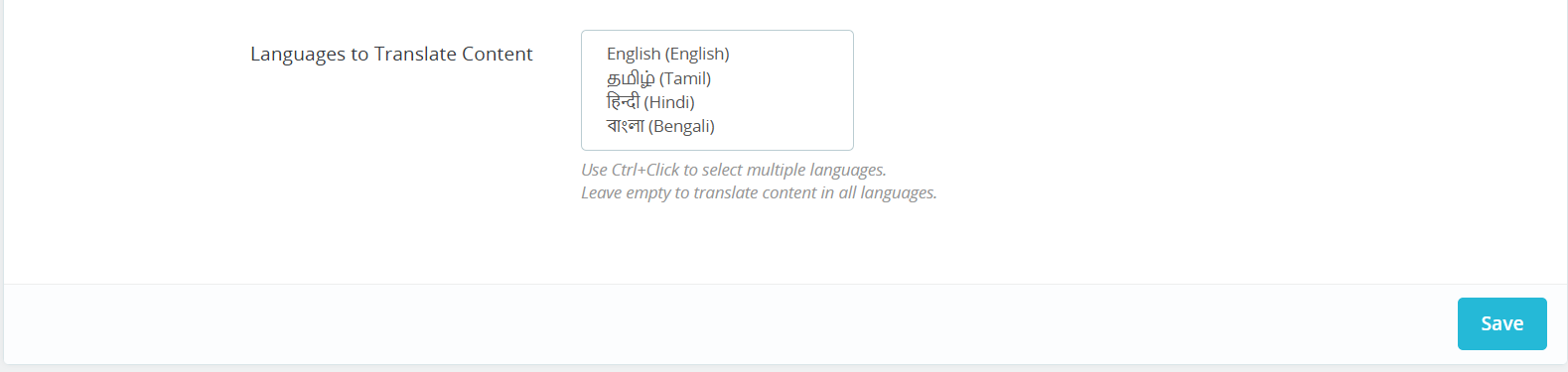
Languages to Translate Content: Select the different multiple languages for content translation.

4.0.2. Gemini Prompts:

The module includes 14 built-in Gemini prompts, designed to assist with a variety of tasks. Below is a list of these prompts along with their functionalities:

Generate Product Description: Generate a detailed SEO-Friendly and engaging product description for the following product {product_name}. Make sure the description includes the main features, benefits, and use cases of the product. Please use HTML tags for formatting so the content is ready for a web page. The product is listed in the {category} category

Generate Product Meta Title: Generate a concise and catchy meta title for a product named “{product_name}” in the “{category}” category. Keep the title under 60 characters. Avoid using double quotes. The title should include the main keyword and attract potential customers.

Generate Product Meta Description: Generate a compelling meta description for the product named {product_name} which lies in the category {category}. Limit the description to about 140 characters.

Translate Product Title: Translate the following product title and make sure to give translated content only

Translate Product Description: Translate the following product description and preserve the HTML structure and tags, and only translate the visible text content and make sure to give translated content only.

Translate Product Meta Title: Translate the following product Meta Title and make sure to give translated content only.

Translate Product Meta Description: Translate the following product Meta Description and make sure to give translated content only.

Generate Category Description: Generate the SEO-Friendly Category Description for the {category} Generate a detailed, SEO-friendly category description for the “{category}” category. Please use HTML tags for formatting so the content is ready for a web page.

Generate Category Meta Title: Generate a concise and catchy meta title for a “{category}” category. Keep the title under 60 characters. The title should include the main keyword, attract potential customers, and avoid using double quotes.

Generate Category Meta Description: Generate a compelling meta description for the category {category}. Limit the description to about 140 characters and avoid using double quotes.

Translate Category Title: Translate the following category title and make sure to give translated content only.

Translate Category Description: Translate the following Category description and preserve the HTML structure and tags, and only translate the visible text content and make sure to give translated content only

Translate Category Meta Title: Translate the following Category Meta Title and make sure to give translated content only.

Translate Category Meta Description: Translate the following category meta description and make sure to give translated content only.

4.0.3. Gemini Prompts Task Log:

This tab displays comprehensive information about all executed prompts. It includes key details such as Prompt Type, Product, Category, Language, Previous Content, New Content, and Date, allowing for easy tracking and management.

 5.0. How to Execute Gemini Prompts?

The Prestashop store retailer can generate and translate the content within a few taps from the Prestashop Backend>>Products tab.

Choose the desired products and navigate to the Bulk Actions tab, as shown in the screenshot above. From there, you can select various prompts to perform different actions efficiently with the help of Prestashop AI Content Generator and Translator Module.

  • Generate Product Description: Select multiple products and click on the “generate product description” button.
  • Generate Product Meta Title: Generate the meta titles of products from here.
  • Generate Product Meta Description: Select the products and click on the “generate product meta description” prompt shown under the bulk actions section.
  • Translate Product Title: Translate the product titles from here.
  • Translate Product Description: This prompt helps the store admin translate the product description into multiple different languages.
  • Translate Product Meta Title: Translate the product meta title from here.
  • Translate Product Meta Description: Select multiple products and hit the following prompt for product meta description translations in bulk.

Boost Valentine’s Sales: Add Love-Themed Stickers and Labels to Your Prestashop Store

Valentine’s Day is a special occasion when shoppers look for romantic gifts and special deals. Thus, it becomes crucial to make your store ready for the Valentine’s season sales to make the most out of out.

As an eCommerce store owner, you must grab their attention and encourage them to buy. One of the easiest and most effective ways to do this is by using love-themed product stickers and labels on your Prestashop store.

With the Prestashop Product Sticker Module by Knowband, you can highlight discounts, promotions, and best-selling items in an eye-catching way. Furthermore, this helps in improving product visibility and boosting conversions.

Why Use Stickers and Labels for Valentine’s Day Sales?

Adding Valentine’s Day-themed stickers and labels to your store can make a big difference in customer engagement.
Here’s why the eye-catching stickers work:

  • Grab Customer Attention – Eye-catching stickers help products stand out and increase the chances of your products being noticed.
  • Highlight Special Offers – With the Prestashop Product Sticker and Label Addon, the store admin can promote discounts, bundle deals, and limited-time offers with attractive labels.
  • Create Urgency – Prestashop retailers can also use stickers like “Limited Offer,” “Valentine’s Special,” or “Only a Few Left” to encourage quick purchases.
  • Enhance Store Aesthetics – Love-themed stickers make your store look festive and appealing and create a better shopping experience for your customers.

How the Prestashop Product Sticker Module Can Help:

The Prestashop sticker module is a powerful tool that allows store owners to add custom labels and stickers to their products. Furthermore, it provides an easy way to promote Valentine’s Day offers and grab shoppers’ attention.

Key Features of the Prestashop Sticker and Label Module!

  • Customizable Stickers & Labels – Add Valentine ’s-themed stickers like hearts, discount tags, and best-seller labels.
  • Automated Sticker Placement – The module applies stickers automatically to selected products based on the rules configurations added from the module backend.
  • Multiple Sticker Positions – Place labels on different parts of the product image.
  • Schedule Stickers in Advance – The admin can set a prior start and end date for Valentine’s promotions.
  • User-Friendly Interface – Easy to install and manage without technical knowledge.

Ideas to Use the Prestashop Sticker and Label Plugin for Valentine’s Day!

1. Highlight Discounts & Special Offers:

Shoppers love discounts, especially during special occasions. Thus, the Prestashop admins can use the Prestashop product label plugin to add stickers like:

  • “Valentine’s Day Sale – 20% Off”
  • “Buy 1 Get 1 Free – Limited Time”
  • “Special Gift for Your Loved One”

These labels instantly attract attention and drive sales.

2. Showcase Best-Selling and Trending Products:

Valentine’s shoppers often look for popular gift options. Use the Prestashop Sticker Extension to add badges like:

  • “Best Seller”
  • “Most Loved Product”
  • “Valentine’s Top Pick”

Moreover, using this kind of product visuals on the product images builds trust and helps customers make quicker purchase decisions.

3. Create Urgency with Countdown Stickers:

Fear of missing out (FOMO) is a great sales strategy. Therefore, the Prestashop product badge plugin lets you create urgency with labels such as:

  • “Only a Few Left!”
  • “Limited Stock Available”
  • “Offer Ends Soon”

Shoppers are more likely to buy when they feel an offer is time-sensitive.

4. Add Festive Elements with Custom Stickers:

Make your store visually appealing by adding love-themed stickers with the Prestashop sticker maker module. Some ideas include:

  • Heart-shaped stickers
  • Valentine’s Day gift tags
  • “Gift Wrapped with Love” labels

These elements enhance the shopping experience and create a romantic theme in your store.

Integrate Product Stickers on Opencart

No Coding Skills Required

SHOP NOW

How to Install and Use the Prestashop Product Label and Stickers Module?

Install the Module – Download and install the Prestashop product label and sticker module from Knowband.

Customize Stickers – Choose from pre-designed Valentine’s Day stickers or upload your own.

Set Display Rules – The module provides options to apply the product stickers based on categories, discounts, or stock availability.

Schedule Stickers – Set start and end dates for automatic removal after Valentine’s Day.

Save and Apply – Once settings are done, apply stickers to your product images instantly.

Benefits of Using the Prestashop Label and Badge Module:

Increases Product Visibility – Helps customers find special deals quickly.

Boosts Conversions – Attracts more clicks and encourages purchases.

Enhances Store Appearance – Makes the store festive and engaging.

Saves Time – Automates sticker placement and scheduling.

Conclusion!

Adding Valentine’s Day-themed product labels and stickers to your Prestashop store is a simple yet powerful way to boost sales. Therefore, with the Prestashop Product Sticker Addon, you can highlight offers, create urgency, and enhance the overall shopping experience.

Don’t miss out on increased conversions this Valentine’s Day! Install the Prestashop product label addon today and make your store visually appealing and sales-ready.


Boost Your Sales with OpenCart Google Merchant Feeds Integration

Are you struggling to increase the visibility of your OpenCart store? Want to attract more customers and boost your sales? The solution lies in listing your products on Google Merchant Console.

By integrating your store with Google Merchant Center, you can display your products on Google Shopping, reaching millions of potential buyers.

Therefore, we’ll explore how Knowband’s OpenCart Google Shopping Integration Module can help you grow your business its features and benefits, and why it’s a must-have tool for every OpenCart store owner.

Introducing Google Shopping for eCommerce?

Google Shopping is a platform where users can search for products and compare prices from different online stores. Furthermore, when you list your products on Google Shopping, they appear in Google search results and in the Shopping tab. This not only increases your store’s visibility but also drives more potential customers to your website.

To display your products on Google Shopping, you need to create a product feed and submit it to Google Merchant Center. This is where the OpenCart Google Shopping Integration Extension helps by automating the process for the Opencart eCommerce merchants.

Why Do You Need OpenCart Google Shopping Integration?

Manually adding and updating product feeds in Google Merchant Center can be time-consuming and complex. However, the OpenCart Google Shopping Integration Plugin simplifies this by automatically syncing your store’s products with Google Shopping.

Here’s why you need the OpenCart Google Shopping Feed Integration Extension:

  • Automated Feed Submission: No need to manually upload product details. The extension syncs your product feed with Google Merchant Center.
  • Increased Sales & Traffic: Your products get listed on Google Shopping, bringing more traffic and potential buyers.
  • Error-Free Listings: The module ensures that product data is submitted in the correct format, reducing errors and feed rejection.
  • Real-Time Synchronization: Any changes you make in your store (price, stock, descriptions) are automatically updated in Google Shopping.

Key Features of OpenCart Google Shopping Integration Module

The OpenCart Google Shopping Module comes with powerful features that make selling on Google Shopping easier.

1. Easy Product Feed Generation: The Knowband module generates Google Shopping Feeds for OpenCart, which includes all product details like title, description, price, and images.

2. Automatic & Manual Sync Options: With the OpenCart Google Shopping Connector, you can schedule automatic feed updates or manually sync whenever needed.

3. Advanced Filtering Options: The OpenCart Google Shopping Synchronizer allows you to select specific products, categories, or brands to include in the feed.

4. Multi-Language & Multi-Currency Support: Sell internationally? No problem! The extension supports multiple languages and currencies.

5. Feed Optimization: The module ensures your product feed follows Google’s guidelines, improving your chances of getting approved.

How to Use OpenCart Google Shopping Integration Plugin?

Setting up OpenCart Google Shopping Feed Integration Extension is easy. Follow these steps:

Step 1: Install the Extension

First, install the Free or Paid Google Shopping OpenCart Integration Module on your OpenCart store.

Step 2: Connect with Google Merchant Center

Link your store with Google Merchant Center by entering the connection details.

Step 3: Configure the Settings

Customize the feed settings under profile configurations, select products to include, and set the sync frequency.

Step 4: Generate & Submit the Feed

Generate the Google Shopping Feed for OpenCart and submit it to Google Merchant Center.

Step 5: Monitor and Optimize

Check for errors, update missing attributes, and optimize your product titles and descriptions for better visibility.

Benefits of Using OpenCart Google Shopping Module!

Using the Free Google Shopping Integration Module for OpenCart offers several advantages:

Saves Time & Effort: Automates feed submission, reducing manual work.

Increases Product Visibility: Your products appear in Google search results and Google Shopping.

Boosts Sales & Conversions: More exposure leads to higher sales.

Improves Marketing Performance: Helps with Google Ads campaigns by providing high-quality product feeds.

Integrate Your Opencart Shop with Etsy Marketplace

No Coding Skills Required

SHOP NOW

Free vs. Paid Google Shopping Integration Modules:

If you are looking for a Free Google Shopping Opencart Synchronization Module, we have got you covered at Knowband. While our free Opencart Google Shopping Connector module offers basic functionality, premium OpenCart Google Shopping Merchant Free Extensions come with advanced unlocked features.

Furthermore, the paid OpenCart Google Shopping Integration Extension is a better investment if you want seamless integration and long-term benefits.

Conclusion!

Integrating your OpenCart store with Google Shopping is one of the best ways to boost sales and reach more customers. Moreover, the OpenCart Google Shopping Integration Module simplifies the process by automating product feed submissions and ensuring real-time updates.

If you haven’t started using the Opencart Free Google Shopping Synchronization Module, now is the time! Enhance your store’s visibility, drive more traffic, and increase your sales with the OpenCart Google Shopping Module.

Would you like to see a demo of the Opencart Google Merchant Centre Connector in action? Get started today and grow your online business!

Boost Your Sales: Connect Your OpenCart Store to Etsy with Knowband

If you run an OpenCart store and want to expand your reach, selling on Etsy is a great opportunity. Etsy is one of the most popular marketplaces for handmade, vintage, and unique products. Thus, if you deal in similar product categories, integrating your OpenCart store with Etsy, can boost sales, increase visibility, and reach a wider audience for your eCommerce business.

However, managing two platforms separately can be time-consuming and challenging. This is where Knowband’s OpenCart Etsy Connector comes in handy. With the help of the Opencart Etsy Integration Extension, you can easily sync your store with Etsy and automate your selling process.

Important Updates for Opencrat Etsy Seller (January 3, 2026)

Knowband’s Etsy Connector for OpenCart has been upgraded to include OpenAPI authorization, ensuring secure and uninterrupted integration with Etsy’s updated API standards.

It is crucial for sellers to update the extension to v2.0.4 by January 18, 2026, as older versions may lose connection, which can disrupt product listings and inventory synchronisation.

This update also allows sellers to manage return policies directly from the store dashboard and automatically sync them to Etsy, making store operations more efficient.

In this article, we will explain how the Etsy OpenCart Integration module can help you streamline your business and increase revenue effortlessly.

Why Sell on Etsy from OpenCart?

Etsy is a well-known global marketplace with millions of active buyers. Thus, if you are already selling on OpenCart, integrating your store with Etsy can provide you with multiple benefits:

  • Expand your customer base by reaching Etsy shoppers.
  • Increase revenue by selling on multiple platforms simultaneously.
  • Automate product listing and updates with an easy synchronization process.
  • Save time by managing everything from your OpenCart dashboard.

Furthermore, by using the OpenCart Etsy integrator, you can avoid the hassle of manually uploading products and managing orders on two different platforms.

Introducing Knowband’s OpenCart Etsy Connector?

The Etsy OpenCart Marketplace Integration module by Knowband is a powerful plugin that helps OpenCart store owners connect their store to Etsy with ease. With this module, you can:

  • Sync products, categories, and pricing automatically.
  • Manage orders from Etsy within your OpenCart admin panel.
  • Update inventory and product information effortlessly.
  • Automate product listing and avoid manual work.

This OpenCart Etsy Marketplace Integration Extension is designed to simplify your workflow and maximize your productivity.

Key Features of the Etsy Opencart Synchronization Extension!

1. Simple Product Synchronization:

With the Opencart Etsy Synchronization Extension, you can sync your OpenCart products with Etsy in just a few clicks. Moreover, the extension allows you to map product categories, pricing, and inventory details effortlessly.

2. Centralized Order Management:

No need to switch between platforms! The Etsy OpenCart API Integrator lets you manage Etsy orders directly from your OpenCart dashboard. This feature ensures that your order processing is fast and efficient.

3. Automated Inventory Updates:

The Etsy Opencart API Integrator Extension ensures that any inventory updates in OpenCart are automatically reflected on Etsy. Therefore, this prevents overselling and inventory mismatches.

4. Bulk Product Uploads:

The Opencart Etsy Integration Extension allows you to bulk upload products to Etsy. This not only saves time and effort but also helps you manage a large product catalog.

5. Real-Time Synchronization:

The Etsy Opencart Synchronization Extension provides real-time data syncing, ensuring that your store and Etsy marketplace remain up-to-date with the latest product changes.

Integrate Your Opencart Shop with Etsy Marketplace

No Coding Skills Required

SHOP NOW

6. Easy Setup and Configuration:

The OpenCart Etsy Marketplace Integration Extension is user-friendly and requires no coding skills. Furthermore, you can easily set up and configure the module using the step-by-step guide provided by Knowband.

How to Use the OpenCart Etsy Integrator?

Using the Etsy OpenCart Marketplace Integration module is simple. Here’s how you can get started:

  • Install the Module – Download and install the Opencart Etsy Integration Plugin from Knowband.
  • Connect Your Etsy Store – Use the Opencart Etsy API Integrator to authenticate and link your OpenCart store with Etsy.
  • Configure Settings – Customize settings such as product mapping, pricing, and inventory rules.
  • Sync Products and Orders – Start syncing your OpenCart products with Etsy and manage orders seamlessly.
  • Monitor Performance – Track sales and optimize your product listings for better results.

Why Choose Knowband’s OpenCart Etsy Connector?

Knowband is a trusted name in eCommerce extensions and plugins. Furthermore, the free Knowband OpenCart Etsy Integration extension offers a seamless way to connect OpenCart with Etsy without technical hassles.

Benefits of Choosing Knowband:

  • User-Friendly Interface – The module is easy to install and use.
  • Regular Updates – Get the latest features and improvements.
  • 24/7 Customer Support – Dedicated support for hassle-free integration.
  • Free OpenCart Etsy Marketplace Integration Extension Available – A free version is available for testing before upgrading.

Conclusion!

Expanding your online business by selling on Etsy from OpenCart is a great strategy to increase sales. Furthermore, with the Etsy OpenCart Integration plugin, you can automate product listings, manage orders efficiently, and synchronize inventory without hassle.

Knowband’s OpenCart Etsy Connector simplifies the integration process, making it easy, fast, and effective. Whether you are a small business or an established brand, using the OpenCart Etsy integrator can help you reach more customers and grow your business.

Get started today with the Free OpenCart Etsy Marketplace Integration Extension and take your eCommerce business to the next level!

You may also like to read:
Discover how integrating your PrestaShop store with Etsy can save time and maximize sales. Read More

Magento 2 ® Google Tag Manager (gtag, GA4, GTM Events) – User Manual

The Magento 2 Google Tag Manager Plugin by Knowband offers a simple and efficient way to connect Google Tag Manager (GTM) to your Magento 2 store. With this easy-to-use module, store owners can manage and integrate multiple Google tags without requiring technical expertise. Furthermore, the Magento 2 gtag Manager Plugin enables tracking of essential events like Add to Cart, Product Views, Checkout Initiation, Order Completion, and more, providing valuable insights into customer interactions.

The Magento 2 Google Analytics Integration Plugin also supports capturing UTM parameters, allowing you to analyze the performance of your marketing campaigns. Thus, by understanding which campaigns drive traffic and conversions, you can refine your strategies, allocate ad budgets effectively, and boost your ROI.

Designed to enhance tracking and optimize conversions, the Magento 2 GTM Extension is ideal for improving user experience and achieving better results. Whether you rely on GA4 or GTM, this module simplifies the integration process, so you can focus on growing your business.

1. Key Features Offered by Magento 2 GA4 Integration Plugin:

Effortless Google Tag Integration: Add Google Analytics, Google Ads, and GA4 to your Magento 2 store without any coding skills.

Instant Event Tracking: With the Magento 2 Gtag Integration Plugin, the store admin can monitor user activities in real-time, such as Add to Cart, Product Views, and Checkout Initiation, to gain immediate insights into customer behavior.

Track UTM Parameters: Easily capture UTM parameters to measure the success of your marketing campaigns and identify the most effective channels.

Advanced eCommerce Tracking: Google Analytics for Magento 2 helps the admin gain detailed insights into sales performance with enhanced tracking of events like Product Detail Views, Add to Cart, and Order Confirmations.

Simple Setup and Configuration: Enjoy a hassle-free experience with a user-friendly interface that makes setting up and managing tags quick and easy—no technical knowledge required!

Intuitive Dashboard: The module provides ease of all tags and events management directly from your Magento 2 admin panel with a simple and organized dashboard.

Multi-Language Support: The Magento 2 GTM module supports multiple languages, making it ideal for stores that cater to diverse audiences.

1.1. How to Find Your Google Tag Manager Container ID?

Step 1: Log in to your Google Tag Manager account.

Step 2: Either create a new container or choose an existing one.

Step 3: Locate the Container ID, which appears in the format GTM-XXXXXX, in the top-right corner of the Google Tag Manager dashboard.

Step 4: Copy the Container ID and paste it into the GTM Container ID field within this module’s configuration settings.

You can also refer to the module’s functionality overview video for more information about the Container ID generation steps.

1.2. How to Locate Your Google Analytics Measurement ID?

Step 1: Log in to your Google Analytics Account.

Step 2: Choose the property for which you need the Measurement ID.

Step 3: Go to Admin > Data Streams and select your web data stream.

Step 4: Find the Measurement ID, which appears in the format G-XXXXXXXXXX.

Step 5: Copy the Measurement ID and enter it in the Google Analytics Measurement ID field in the module’s configuration.

Integrate GA4 on Your Prestashop Store

No Coding Skills Required

SHOP NOW

1.3. How to Set Up Events in Google Tag Manager?

Step 1: Download the GTM Events file. You can find the download link in the module’s configuration section under the Instructions tab.

Step 2: Log in to your Google Tag Manager account.

Step 3: In Google Tag Manager, go to Admin > Import Container.

Step 4: Upload the downloaded JSON file from your computer.

Step 5: Select the workspace where you want to add the events and choose either the Merge or Overwrite option based on your requirements.

Step 6: Click Confirm to finalize the import process.

Step 7: Save and publish your container to enable the events in Google Tag Manager.

If you encounter any issues during the setup, feel free to reach out to us at support@knowband.com for assistance.

Admin Panel Overview:

The Magento 2 Google Analytics Integration Extension comes with an intuitive and easy-to-manage admin dashboard that allows the store admin to configure and manage the plugin without even any technical expertise.

2.1 General Settings:

  • Enable the Extension: Enable/Disable the GA4 tracking on your Magento 2 store with this button.
  • GTM Container ID: Insert the “Google Tag Manager Container ID” in the following text field. Please follow the steps mentioned above to extract the GTM Container ID from the GTM console.
  • Google Analytics Measurement ID: Add the “Google Analytics Measurement ID” here.

2.1 GTM Events Configurations:

This tab provided under the Magento 2 Google Analytics Module lists all the Google Analytics Events in a single interface. Further, the store admin can easily enable/disable the analytics events with the Enable/Disable “Toggle” button.

  • Page View: Enable the “Page View” analytics event from this button.
  • View Product: Get the data insights when a customer views a product on your store.
  • View Category: Manage the “View Category” tag from here.
  • Add to Cart: Get insights when a customer adds products to the cart with the “Add to Cart” event.
  • Remove from Cart: Capture the analytics when the customers remove items from the cart.
  • Checkout Begins: Gather the insights as soon as the customer opts in for the checkout process on your Magento 2 store.
  • Checkout Page: Enable/Disable the “Checkout Page” Google Tag Manager event from here.
  • Add/Update Address: Track when the customers add or update their addresses.
  • Shipping Details: Get the insights when the customers fill in the shipping details during the checkout.
  • Order Success Page: Track the real-time insights from the order success page.
  • Apply Discount: Enable/Disable the “Apply Discount” tracking event with the “Apply Discount” tag.
  • View Cart: Capture the insights when a customer views the cart.
  • Customer Registration: Gather the data during customer registration on your eCommerce store.
  • Customer Login: Manage the “Customer Login” tracking insights from here.
  • Add to Wishlist: This tag provides the analytics data when the customers add something to the Wishlist.
  • Search: Check what your customers are looking for and implement the strategies with better insights.
  • Track UTM Parameters: Enable/Disable the UTM parameters tracking from here.

2.2. Configuration Steps:

The Magento 2 no-code Google Tag Manager integration provides easy-to-follow instructions, removing the need for technical skills to set up the module. The store admin can quickly access the required credentials by following the simple steps outlined below:

These steps will guide the store admin through the module setup. However, if you encounter any issues during the connection process or with the module, feel free to contact us at support@knowband.com or submit a ticket on knowband.com/helpdesk.