PrestaShop 9 Module Migration: A Developer’s Guide to Backward Compatibility

The release of PrestaShop 9 has brought exciting new features and improvements to the e-commerce platform. However, for module developers, this upgrade presents significant challenges when maintaining backwards compatibility with older versions. Furthermore, the complexity increases when you need to support legacy installations like PrestaShop 1.7.5 while simultaneously preparing for the latest version.

Understanding the Migration Challenge

Upgrading modules from PrestaShop 8 to PrestaShop 9 can introduce unexpected compatibility issues. While a module may function correctly in the latest environment, it may break completely when tested on older versions like PrestaShop 1.7.5.

A common source of these issues is method availability differences across versions. Certain methods available in newer versions may not exist in older ones, leading to fatal errors. Additionally, architectural changes between PrestaShop versions can render previously stable code unusable without adjustments.

The Technical Breakdown: Price Formatting Nightmare

One particularly challenging example involved the getCurrentLocale() method. In PrestaShop 8 and 9, this code works flawlessly:

$formattedPrice = $this->context->getCurrentLocale()->formatPrice($price, $currency);

However, when the same code runs on PrestaShop 1.7.5, it throws a fatal error because getCurrentLocale() doesn’t exist. Consequently, the entire module becomes unusable on older installations.
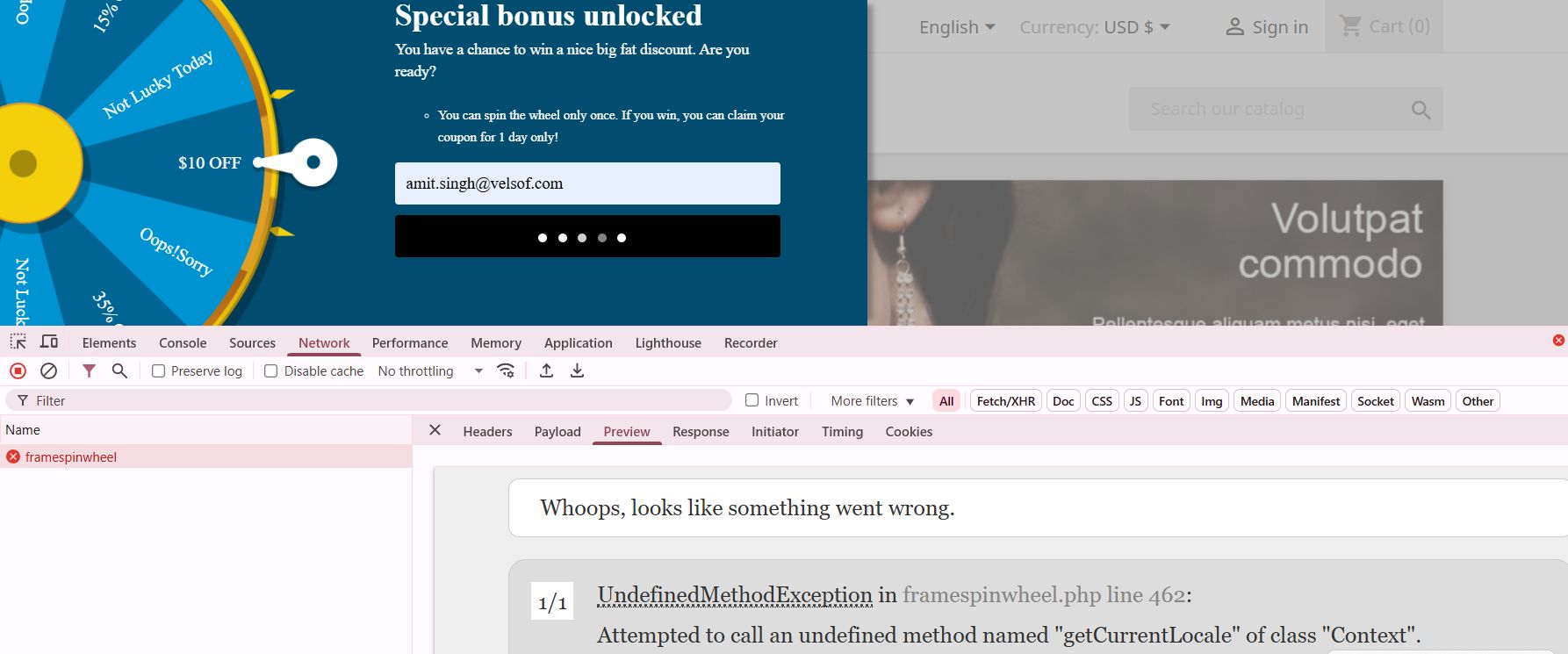
The Solution: Smart Compatibility Detection

To resolve this issue, I implemented a robust compatibility checking system. First, I created a method existence check before calling any potentially unavailable functions:

public function formatPriceCompatible($price, $currency = null) {

    if (method_exists($this->context, ‘getCurrentLocale’)) {

        // Modern PrestaShop 8+ approach

        return $this->context->getCurrentLocale()->formatPrice($price, $currency);

    } else {

        // Legacy fallback for PS 1.7.x

        return Tools::displayPrice($price, $currency);

    }

}

Moreover, I extended this approach to version checking for more complex scenarios:

public function getPrestaShopVersion() {

    return defined(‘_PS_VERSION_’) ? _PS_VERSION_ : ‘1.6.0.0’;

}

public function isModernPrestaShop() {

    return version_compare($this->getPrestaShopVersion(), ‘1.7.6.0’, ‘>=’);

}

Beyond Price Formatting: Other Compatibility Pitfalls

Price formatting isn’t the only area where compatibility issues arise. Similarly, Mobile_Detect integration presents challenges because the library handling differs between versions. Therefore, I implemented a conditional loading mechanism:

public function loadMobileDetection() {

    if (class_exists(‘Mobile_Detect’)) {

        $this->mobileDetect = new Mobile_Detect();

    } elseif (file_exists(_PS_MODULE_DIR_ . ‘your_module/lib/Mobile_Detect.php’)) {

        require_once(_PS_MODULE_DIR_ . ‘your_module/lib/Mobile_Detect.php’);

        $this->mobileDetect = new Mobile_Detect();

    } else {

        // Fallback: assume desktop

        $this->mobileDetect = null;

    }

}

Hook System Evolution

Furthermore, the hook system has evolved significantly between versions. While newer hooks provide better functionality, they’re unavailable in older versions. Thus, I created a hook compatibility layer:

public function registerCompatibleHooks() {

    $modernHooks = [‘displayProductAdditionalInfo’, ‘displayAdminProductsExtra’];

    $legacyHooks = [‘displayProductTab’, ‘displayAdminProduct’];

   if ($this->isModernPrestaShop()) {

        return $this->registerHook($modernHooks);

    } else {

        return $this->registerHook($legacyHooks);

    }

}

Best Practices for Multi-Version Support

Essential Strategies for Maintaining Backward Compatibility:

Always test across versions before deploying any updates. Additionally, create a testing environment with multiple PrestaShop versions to catch compatibility issues early.

Use defensive programming techniques. In other words, never assume a method or class exists without checking first. Moreover, implement graceful fallbacks for every modern feature you use.

Document your compatibility range clearly. Therefore, merchants know exactly which PrestaShop versions your module supports.

Create abstraction layers for version-specific functionality. Consequently, your main code remains clean while compatibility logic stays separate.

The Future of Module Development

As PrestaShop continues evolving, module developers must balance innovation with backwards compatibility. Nevertheless, this challenge presents an opportunity to create more robust, flexible modules that serve a broader audience.

The key is building modules that gracefully degrade functionality rather than breaking entirely. Subsequently, merchants can continue using your module regardless of their PrestaShop version, while still benefiting from enhanced features when they upgrade.

Conclusion

PrestaShop 9 brings powerful new capabilities, but successful module development requires careful attention to backwards compatibility. By implementing proper version checking, creating fallback mechanisms, and thoroughly testing across versions, you can build modules that work seamlessly across the entire PrestaShop ecosystem.

Remember, the goal isn’t just to make your module work in the latest version—it’s to ensure it provides value to merchants regardless of their current PrestaShop installation. Therefore, invest time in compatibility testing and defensive programming. Your users will thank you for it.

If you’re looking for reliable PrestaShop plugins or need assistance with migration and compatibility services, our team is here to help. We specialize in delivering seamless solutions tailored to your store’s version—whether you’re on PrestaShop 1.6, 1.7, 8, or migrating to 9. Let us handle the complexity, so you can focus on growing your business with confidence.

Should You Move from PrestaShop 8.1 to 9.0? A Complete Feature Comparison

With the release of PrestaShop 9.0, the platform is moving toward a more modern, performance-oriented, and developer-friendly future. However, as with any major update, merchants and developers are left with an important question: Is now the right time to migrate from PrestaShop 8.1?

In this blog, we’ll explore the key differences between PrestaShop 8.1 and 9.0. From performance upgrades to developer tools, we’ll cover everything you need to know to make an informed decision about your store’s future.

Symfony Framework Upgrade: From 4.4 to 6.4

To begin with, one of the most significant changes in PrestaShop 9.0 is the upgrade of the Symfony framework from version 4.4 to Symfony 6.4, the latest long-term support (LTS) release. This transition ensures better stability, security, and access to modern development tools.

Symfony 6.4 will be maintained with bug fixes through November 2026 and security patches until November 2027, ensuring long-term stability for evolving projects. By comparison, Symfony 4.4—used in PrestaShop 8.1—has already reached the end of its support life. Therefore, PrestaShop 9.0 becomes the smarter choice for long-term projects.

PHP Compatibility and Performance Enhancements

In addition, PrestaShop 9.0 introduces support for PHP 8.1, 8.2, and 8.3. This allows merchants to benefit from improved performance, better memory handling, and modern PHP features.

Unlike PrestaShop 8.1, which stopped at PHP 8.1, the new version embraces the latest PHP releases, representing a major step forward. As a result, PrestaShop 9.0 is better aligned with modern PHP standards and development practices. However, keep in mind that older hosting environments and custom code may require updates to ensure compatibility.

Modern API Platform for Headless Commerce

Furthermore, PrestaShop 9.0 brings a brand-new API system based on API Platform v3, dramatically improving how it interacts with external applications.

This makes it ideal for headless commerce architectures, mobile app integrations, and third-party services. In contrast, PrestaShop 8.1 relied on a legacy API, which lacked the flexibility and scalability modern developers expect. As a result, the new API system opens up a world of opportunities for automation and integration.

PrestaShop 9 debuts a completely reimagined Admin API, built using API Platform—a cutting-edge PHP framework known for its flexibility and power. This innovation marks a significant leap toward creating a more open, extensible, and developer-focused PrestaShop environment.

Here’s what the new Admin API offers:

  • Simplified integration with external platforms such as ERPs, CRMs, and marketing tools.
  • Automation-ready architecture that helps reduce manual store management and boosts operational efficiency.
  • RESTful structure with JSON formatting, ensuring ease of use for developers accustomed to modern API standards.
  • Future-ready modularity, allowing the system to grow and adapt with community and business demands.

It’s worth noting that the Admin API is still evolving. While the core framework is already in place, additional features and endpoints are being actively developed.

Key Hook Updates in PrestaShop 9

 PrestaShop 9 retains most of the widely used hooks from version 8 to ensure module and theme compatibility. Common front-office hooks like displayHeader, displayFooter, displayHome, and displayProductButtons remain supported. In the back office, important hooks such as displayBackOfficeHeader, displayAdminOrderMain, and displayAdminProductsExtra are still available for extending core functionality.

Alongside these, PrestaShop 9 introduces modern Symfony-based hooks like actionSymfonyResponse, actionAfterCartSave, and actionProductFormBuilderModifier. These offer a cleaner, event-driven approach to customisation and are part of the platform’s move toward a more modular, scalable structure.

Redesigned Back Office Using Symfony and Twig

Another significant improvement is the full revamp of the back office, now built with Symfony and Twig for a more modern and maintainable structure. This results in a more intuitive, mobile-friendly, and user-centred admin experience.

For store owners, the redesigned layout means easier navigation and improved productivity. For developers, the shift supports cleaner templating and reduces legacy code dependencies. On the other hand, PrestaShop 8.1 retains a more traditional interface, which may now feel outdated in comparison.

Developer-Focused Improvements

Additionally, PrestaShop 9.0 has replaced several outdated libraries used in previous versions. For example:

  • Guzzle HTTP Client → Symfony HTTP Client 
  • SwiftMailer → Symfony Mailer 

These updates result in a more secure, efficient, and future-proof module and email handling.

Moreover, the login system has been modernised. Legacy hooks have been removed, and a new actionBackOfficeLoginForm hook has been introduced, offering cleaner and more customizable authentication flows.

Transition Toward Twig Templates

Importantly, PrestaShop 9.0 also makes a bold move toward full Twig integration, gradually replacing the legacy Smarty engine. Twig is now widely used in both front and back offices, offering more readable, modular, and reusable templates.

For theme developers, this is a significant improvement. In contrast, PrestaShop 8.1’s reliance on Smarty limits flexibility and long-term maintainability.

Should You Upgrade to PrestaShop 9.0?

PrestaShop 9.0 brings major improvements—but before upgrading, make sure your store is ready to handle the change. If your themes, modules, and hosting environment are compatible—or can be easily updated—then migrating can bring notable performance and UX benefits.

Alternatively, if your current store depends heavily on legacy plugins or complex custom code, it might be wiser to wait until broader module support becomes available. Testing in a staging environment is highly recommended before committing to a full upgrade.

Migration Tips for Store Owners

Before making the switch, follow these best practices:

  • Backup your entire store, including the database and any custom files.
  • Test the upgrade in a staging environment first to avoid disrupting your live store.
  • Verify compatibility for all third-party themes and modules.
  • Monitor community feedback for bug reports and migration issues.
  • Conduct thorough testing, especially checkout, payment, and product display areas. 

Final Thoughts

PrestaShop 9.0 marks a major leap toward a modern, secure, and scalable e-commerce platform. From faster performance and updated frameworks to a cleaner developer experience, it brings meaningful benefits for merchants and developers alike.

In conclusion, while migration requires effort and planning, the long-term gains make it a worthwhile investment. Whether you’re a seasoned PrestaShop user or planning your first store, now is an excellent time to explore what version 9.0 can do for your business.

If you’re looking for a reliable solution to ensure a smooth upgrade, KnowBand offers custom module development and PrestaShop 9.0-ready extensions that can accelerate your transition. Their expert support and robust library of PrestaShop modules make them a valuable partner during major upgrades.

All You Need to Know About New Prestashop 8.1.5

Why PrestaShop:

In the year 2007, PrestaShop comes into the picture and becomes one of the most usable e-commerce platforms just because of its various features. At current time it is being used by almost 667,000 sites worldwide.

PrestaShop stands out as an excellent e-commerce solution thanks to its open-source nature, which means it’s both free and highly adaptable. It boasts a user-friendly interface, supports multiple languages and currencies, and includes essential e-commerce features.

However, It offers SEO tools and scalability for business expansion. A large community providing robust support, modules, and frequent updates, PrestaShop is an ideal choice for small to medium-sized businesses looking to expand globally.

What’s New in Prestashop 8.1.5?

In 2022 PrestaShop launched its version 8 with new features. From that day to now it has continuously updated its features and functionality. In 2024 PrestaShop released its latest version 8.1.5.

PrestaShop, the popular e-commerce platform, has unveiled its latest release, version 8.1.5. Hence, this update brings a host of enhancements, bug fixes, and refinements, aimed at delivering a smoother experience for both store owners and developers. Now we will go through the improvements and fixes introduced in this latest version.

Let’s take a closer look at the key improvements and fixes introduced in this version.

Back Office Improvements:

Enhancements:

Cart View Page:

The cart view page has been enhanced to provide more information, making the checkout process more transparent and user-friendly. The following improvements are included:

  • Introducing a shareable link for carts pending order placement.
  • Displaying the cart creation date on the cart page.
  • Displaying the last update date for the cart on the cart page.
  • Enhancing the visual appeal and functionality of buttons on the cart page.

Back office Bugs which are fixed in the version:

  • Catalog Filters: Multiple filters in the Stocks section of the Catalog were not working correctly. This issue has been fixed, ensuring accurate stock management.
  • Rule Group for New Products: The most used rule group has been added to new products, simplifying the process of adding products and improving efficiency for store administrators.
  • File Manager: A newer method has been integrated into the file manager, enhancing its functionality and performance.
  • MetaType Length Constraint: Moreover the Length constraints have been implemented for MetaType, ensuring data integrity and consistency.
  • HelperKpi Source: HelperKpi source is now consistently set and uses conditional refresh for improved performance.
  • Product CSV Import: An issue where importing products via CSV could inadvertently wipe category assignments has been fixed, providing a more reliable import process.

Front Office Enhancements:

Improvements:

Classic Theme: The classic theme has been updated to version 2.1.3, incorporating enhancements and optimizations for a better front-end user experience.

Front office Bugs which are fixed in the version:

  • Invoice Download: Non-logged-in customers can now download invoices, ensuring accessibility to important documents.
  • Import/Export Store Contact: An issue with importing store contacts via the Back Office Import/Export functionality has been addressed, improving data management capabilities.
  • Hidden Vouchers: A display issue where hidden vouchers were still being shown has been fixed, ensuring accurate voucher management.

Core Enhancements and Fixes

Improvements:

  • Google Analytics Module: The ps_googleanalytics module has been updated, incorporating enhancements and optimizations.
  • Composer Modules Update: Modules have been updated via Composer for PrestaShop 8.1.5, ensuring compatibility and stability.
  • Version Update: The version has been bumped to 8.1.5, marking the release of this latest version.

Bug Fixes:

  • Google Analytics Downgrade: The ps_googleanalytics module has been downgraded to address issues or regressions introduced in the latest version.
  • Backup Tool: An issue where the backup tool was creating nulls has been resolved, ensuring data integrity during backup operations.
  • Shipping Cost Display: The display of shipping costs on the order details page has been fixed by backporting from version 9, ensuring accurate order information.

This latest release of PrestaShop, version 8.1.5, brings a range of enhancements and fixes that will improve the overall user experience and functionality of your e-commerce store. Further, Upgrade now to take advantage of these improvements and stay ahead in the competitive e-commerce landscape.

Recommended read: Which One To Choose: PrestaShop 1.7 or PrestaShop 8.1?

You can also explore a wide range of Prestashop, Opencart, WooCommerce, Shopify, and Magento 2 ready-to-use eCommerce extensions.

In case you have queries/suggestions, you can reach out to our technical support portal at our email address support@knowband.com.

Take a look at our bestseller module One Page Supercheckout for Prestashop and Android and iOS App Maker for Prestashop here: