In the world of e-commerce, standing out from the competition is crucial for success. One effective way to catch the attention of potential customers and highlight your products is by using product labels and stickers. So, if you’re using Prestashop as your e-commerce platform, you’re in luck! With the Prestashop Product Sticker and Label module, you can easily add eye-catching labels to your products. Let’s explore the advantages of this powerful addon and how it can benefit your online store.
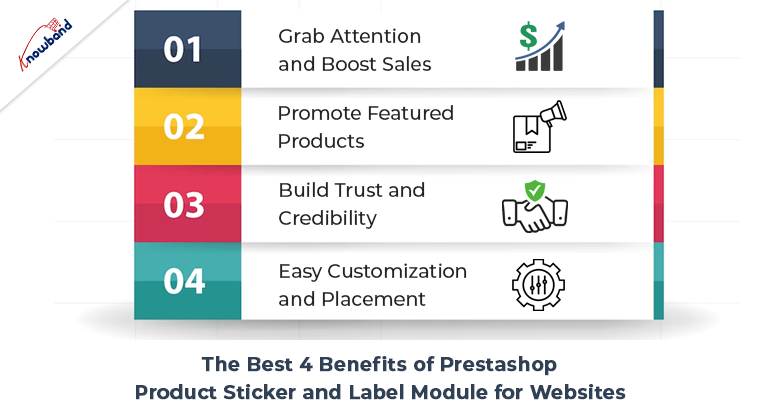
The Best 4 Benefits of Prestashop Product Sticker and Label Module for Websites:
Grab Attention and Boost Sales:
With the Prestashop product badge plugin, you can create visually appealing labels that instantly grab the attention of your website visitors. Therefore, these labels act as virtual stickers, showcasing various offers, discounts, new arrivals, best sellers, or any other promotional messages. By highlighting special offers and exclusive deals, you can encourage customers to make quick purchasing decisions, ultimately boosting your sales.
Promote Featured Products:
Highlighting your featured products is crucial to driving conversions. The Prestashop product sticker module allows you to easily mark specific products as “Featured” with a distinct label. Hence, this instantly communicates to customers that these products are recommended by your store and can create a sense of trust and reliability. By prominently displaying your top products, you can effectively increase their visibility and encourage customers to explore and purchase them.
Build Trust and Credibility:
Prestashop Product Label and Stickers module can play a vital role in building trust and credibility among your customers. By using labels such as “Best Seller” or “Top Rated,” you showcase the popularity and positive feedback your products have received. This helps instill confidence in potential buyers and encourages them to choose your products over competitors. The module allows you to display labels based on customer reviews or sales, giving your store an added level of authenticity.
Easy Customization and Placement:
The Prestashop product label extension offers a user-friendly interface that allows you to customize labels as per your requirements. You can choose from a range of pre-designed templates or create your unique labels. Additionally, the module provides flexible placement options, allowing you to position the labels precisely where you want them on your product images. This ensures seamless integration with your store’s design and enhances the overall visual appeal.
Conclusion:
Further, incorporating the Prestashop label and badge module into your Prestashop store can significantly enhance its visual appeal and increase customer engagement. Moreover, with the Prestashop Product Label and Stickers module, you have a powerful tool at your disposal to grab attention, promote featured products, build trust, and customize labels as per your needs. So take advantage of this addon to stand out from the crowd, boost your sales, and create a memorable shopping experience for your customers.
1.0 Introduction: Modern customers have a limited attention span. Meaning that when they visit an eCommerce website, the administrator has a limited time to provide them with relevant information and enticing offers. The reason behind the same is various types of information are crucial for customers to determine if a product meets their requirements.
Considering the same, we have developed the PrestaShop Product Label addon specifically for PrestaShop eCommerce merchants. The Prestashop product sticker and label module enables administrators to add dynamic stickers to their storefronts. Additionally, administrators have the flexibility to upload their stickers, customize their dimensions, and choose their desired position on the website pages.
Moreover, if you aim to inform your customers about sales, promotions, delivery times, and other important details. Knowband’s Prestashop Product badge addon for PrestaShop is the perfect solution for all your promotional business needs. This extension provides a wide range of useful features and ensures peace of mind. Let’s explore some of the key highlights offered by the PrestaShop product sticker plugin.
2.0. Major Highlighted Features Offered by Knowband’s Product Badge Addon:
The PrestaShop product sticker plugin is empowered by tons of incredible features. Not only the plugin is configurable from the back end but also provides high-quality pre-loaded stickers.
We have tried to cover up some of the most sounding features of the PrestaShop product sticker module.
The admins can boost their revenue by showing the offer discounts on products.
The PrestaShop store admins can choose the pages where they want to show the product stickers. For example, the store administrators can choose the options from the product page, product listing page, search page, home page, and much more.
The PrestaShop admins can choose to include or exclude specific products for the sticker appearance.
With the help of the PrestaShop Product Sticker module, the store admins can include the PrestaShop store categories where they want to show the responsive stickers.
Along with pre-available stickers, the admins can also upload the stickers of their own will in the module and make them appear within no time on the shopfront.
The PrestaShop store admins can manage the sticker positions on the product images right from the module backend.
The admins can schedule the start and end dates for particular stickers.
The admins can choose between all products, specific products, and special categories for the sticker appearance.
The admins can also select the rules of products like best seller products or can set minimum or maximum prices of products or new products for the sticker appearance.
3.0 Installation Guide for Prestashop Product Sticker and Label Addon:
Once you purchase the addon, follow the below steps:
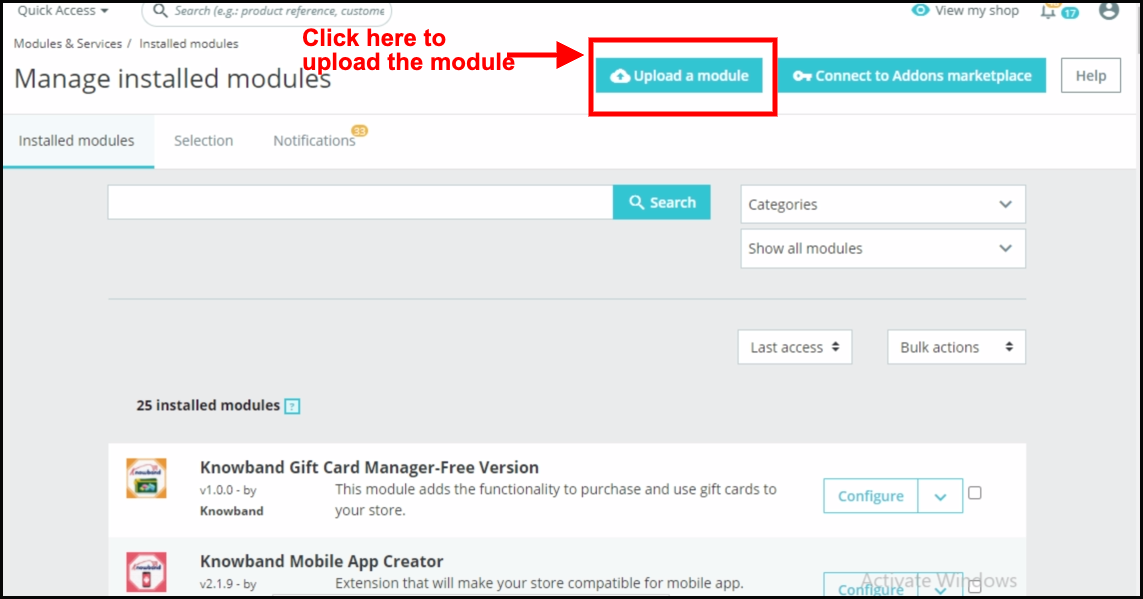
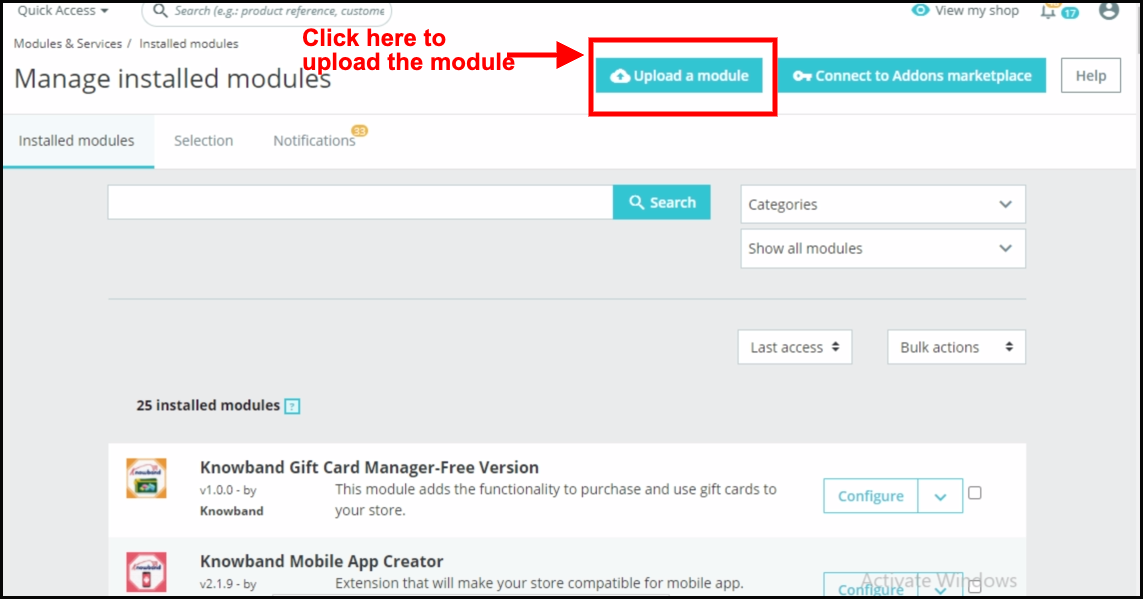
Go to the Store Admin -> Modules and Services.
Click on “Upload a module”. You can drag or drop the file or can simply select the file from the system.
Once the file is completely uploaded, a notification of “Module(s) installed successfully” will display.
The Prestashop product badge addon comes with an easy-to-configure admin panel. Using the same the Prestashop store administrator can simply configure the sticker settings and can further manage the Product stickers for the shopfront.
4.1. General Setting:
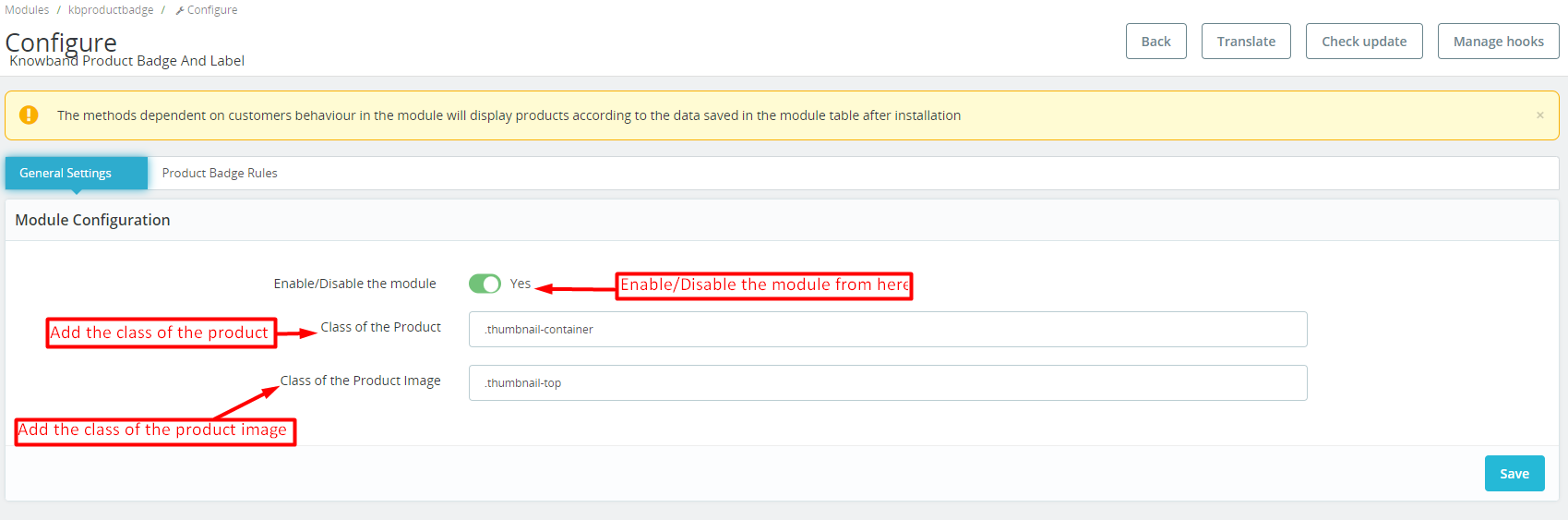
In the following tab, the admin can manage the plugin’s general settings.
Enable/Disable: You can use the following button for enabling/disabling the module.
Class of Product:
The admins can add the class of their store products on store front in this particular text box.
Class of Product Image: The particular text field is provided for the admins to enter the class of the store’s product image on storefront.
4.2. Product Badge Rules:
In the following tab, the store admin can manage basic setting operations for the product badges.
we have provided the options for adding new, editing, or deleting all the stickers. Moreover, the Prestashop store admins can find the list of all the stickers in the following tab.
Add Sticker Rule: By clicking on the following button, the store admins can create new sticker rules.
Edit Sticker: If you have already created and configured a sticker rule and now want to change the sticker settings, you can modify the same from here.
4.2.1. Product Badge Rules: General Rule Setting:
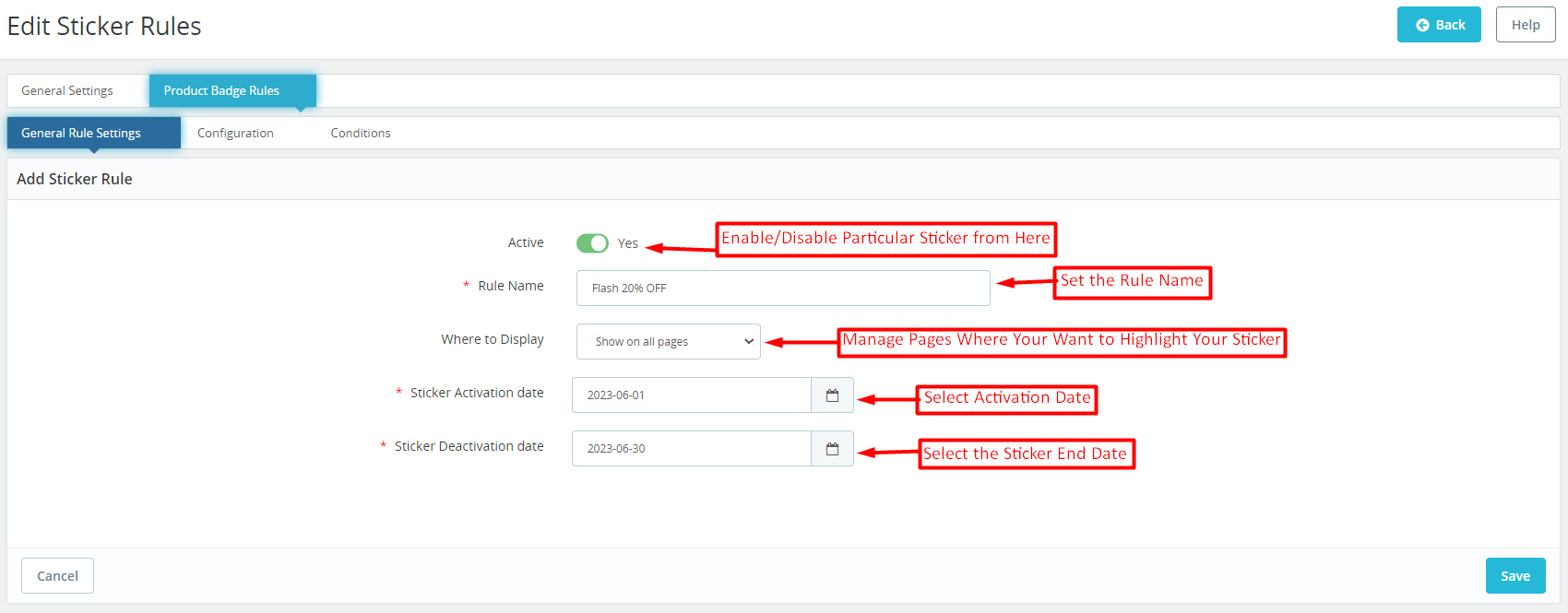
Prestashop Product sticker and Label addon provide a separate tab for managing the general sticker rules. In case the admin wants to modify the general configurations of the sticker, he can modify the same from here.
Active: With the help of this button, the store admins can enable/disable a particular product sticker.
Rule Name: You can add the sticker name from here at your convenience.
Where to Display: The Prestashop store retailers can manage the pages where they want to display the stickers. For example, we have provided the options for showing stickers on all pages and the admins can even select the specific pages where they want to show the product badges.
Sticker Activation Date: Choose the starting date of product stickers from here.
Sticker Deactivation Date: The Prestashop admin can select the end date for a particular sticker from here.
4.2.2. Product Badge Rule: Configurations:
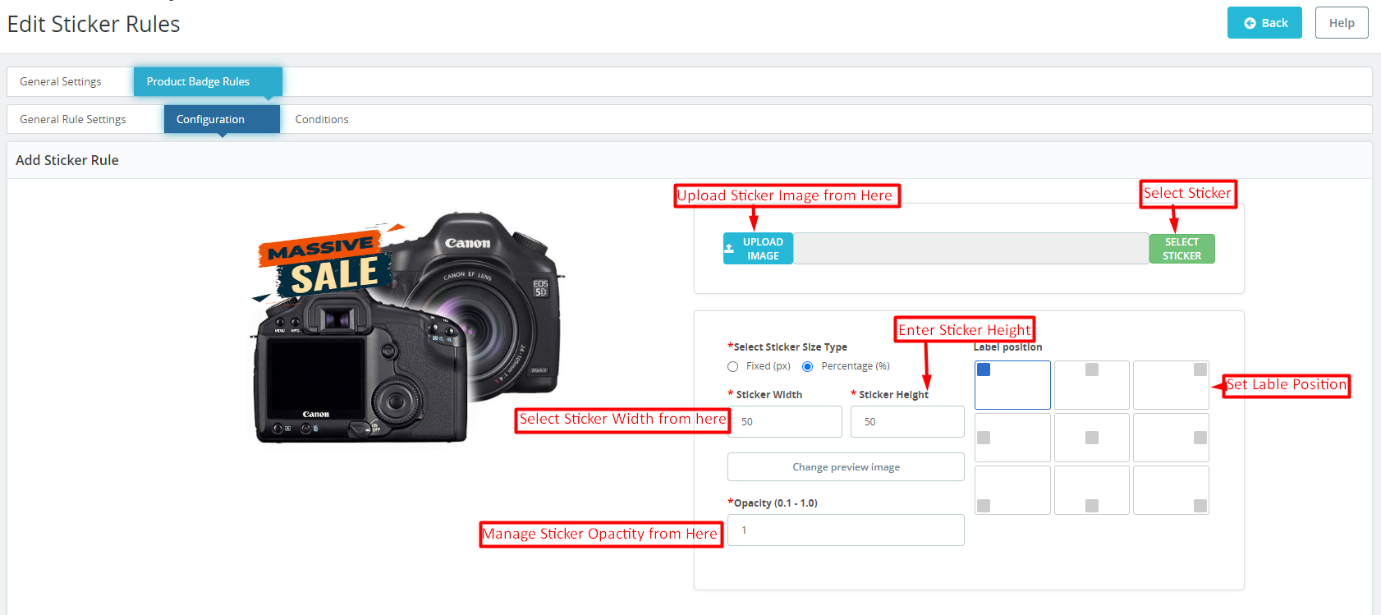
The sticker configuration tab offered by Knowband Prestashop Product Sticker and Label Addon simplifies the sticker look and feel management. The following tab allows the eCommerce store admins to choose from 20+ pre-loaded stickers and the admins can also add new stickers at their convenience.
Sticker Upload:
If you wish to upload a new sticker from your system, simply use the “Upload Sticker” button.
Sticker Size Type Selection:
We provide two options in the button below. If you prefer to set the sticker size using fixed dimensions (in pixels), click on the corresponding radio button.
Alternatively, if you want to configure the sticker size based on a percentage, we have also provided an option for the same.
Sticker Height and Width:
Using the button below, you can adjust the height and width of your product label. You can also preview the sticker’s appearance in real-time as you change its size. For percentage, the maximum height and width should be 100%.
Change Preview Image:
Administrators can select a new preview image to visualize how the product labels will look on their product images using the button.
Opacity:
You can adjust the opacity of the sticker using the following option.
4.2.3. Product badge Rules: Conditions:
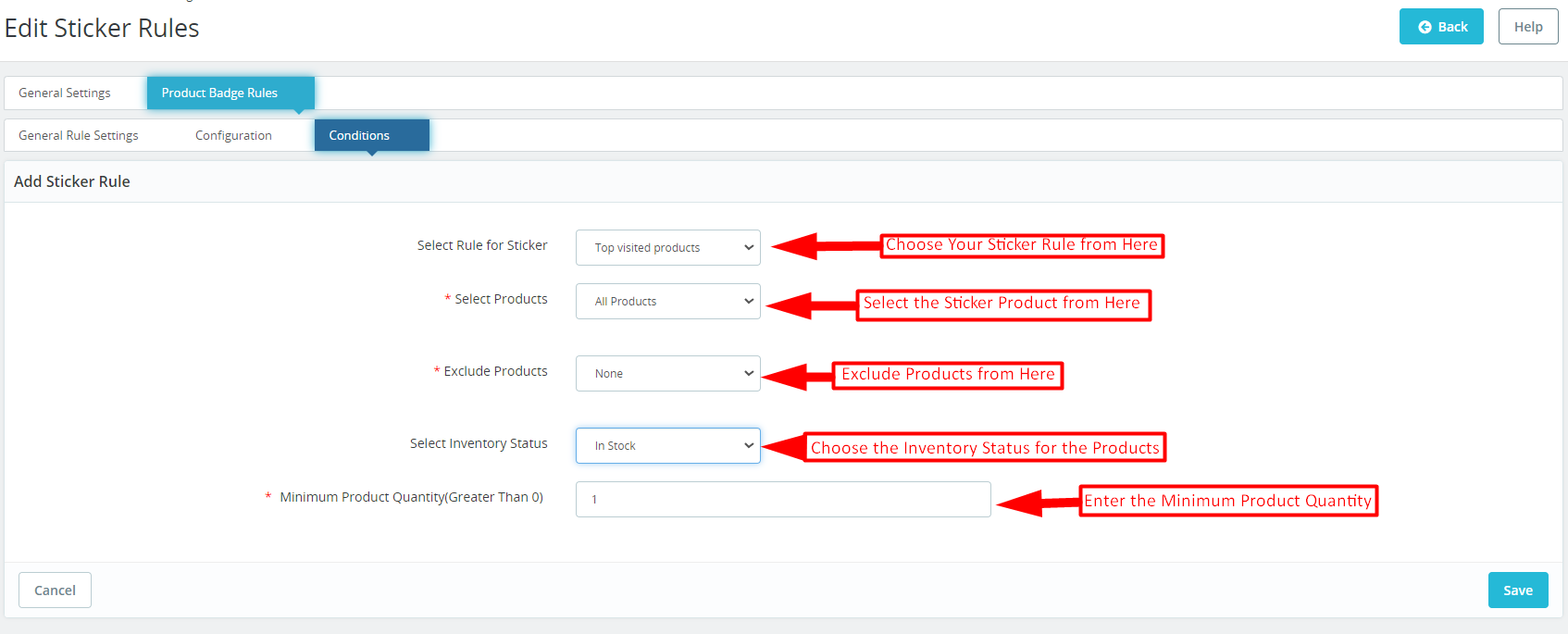
In the sticker conditions tab offered by Knowband Prestashop product sticker and label module. The store admins can set different conditions for the product badges.
Select Rule for Stickers: You can select your sticker rule from various options provided here. We have added rules for showing stickers based on top visited products, on-sale products, best-seller products, and new products, and even the admins can add stickers based on the price value.
Select Products: As a Prestashop store admin, you can select products from here (on which you want to display the stickers). You can select the option as all products in case you do not want to exclude any specific product or category. Furthermore, you can also enter specific products and specific categories for a sticker appearance.
Exclude Products: In the following tab, the admins can exclude specific products for the product badges.
Select Inventory Status:
From here, you can select if you want to show the stickers for the in-stock or out-of-stock products only.
Minimum Product Quantity: If you are looking for showing product labels based on the product quantity in your store, you can add the specific value in the following field.
5.0. Prestashop Product Sticker and Label Addon: Front End:
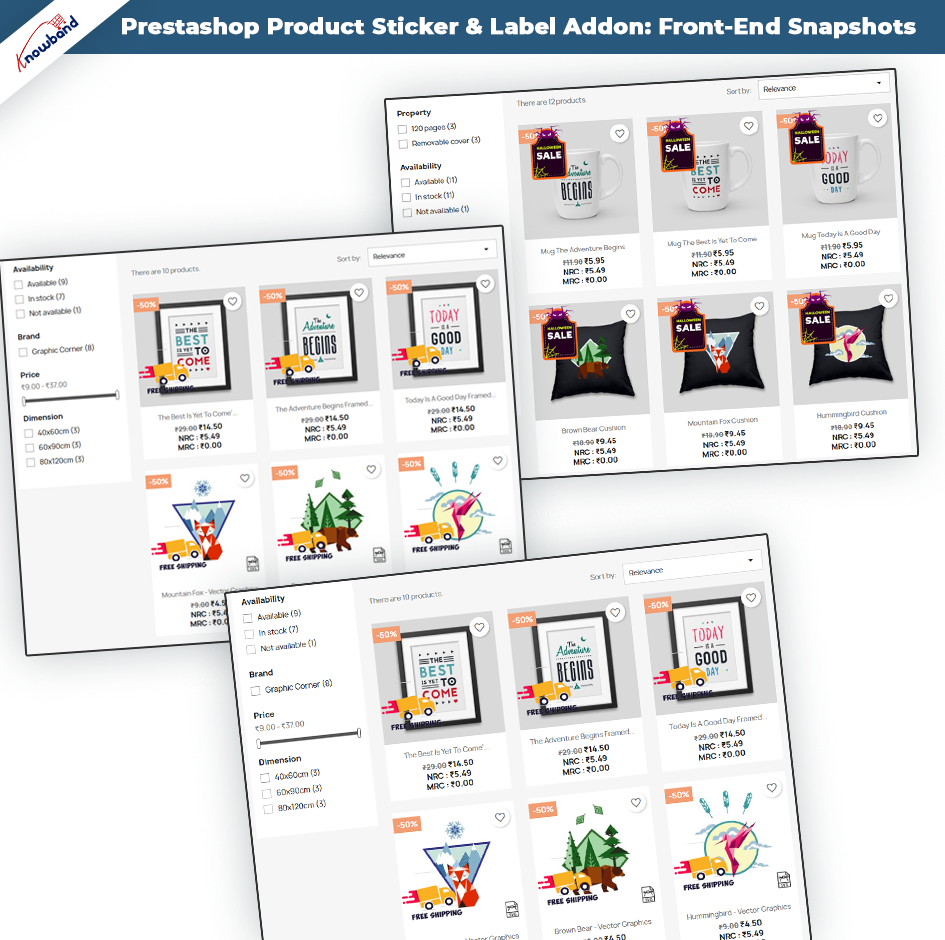
After making the changes as per convenience and saving the data from the module back-end. Prestashop store administrators can immediately assess the impact of their modifications. Prestashop Product Sticker module empowers administrators to effortlessly showcase a stunning array of high-quality stickers on their shopfronts. These visually appealing stickers serve as eye-catching elements that captivate the attention of customers. Which further helps in enhancing the overall aesthetics and professionalism of the online store.
The samples above exemplify the seamless integration and impressive front-end displays. The following examples showcase the versatility and creativity that administrators can harness to create compelling product showcases and leave a lasting impression on their customers.
Note: – Only one sticker can be displayed at once on the product image.
The stickers will be shown based on the most recent date of creation of the sticker rule. This means that the sticker rule that was created most recently will determine which stickers are displayed first.
For a quicker understanding, please refer to the demo tutorial.