12 Benefits Of eCommerce Product Customization And Personalization

Every customer likes that personal touch in their orders. When you offer customers what they want, this increases customer engagement and store revenue as well. And the best way to do so is by asking customers they likes and dislikes are and what they want. Hence, eCommerce Product Customization And Personalization is recommended. This is the latest trend that gives an edge to your business and can even add value to your eCommerce store when planned out thoughtfully.

One of the biggest benefits you get from Product personalization is, it helps in building a relationship between customers, making your eCommerce business authentic and humanly. Besides that, it offers several other benefits that are mentioned below. 

Benefits you get from eCommerce Product Customization And Personalization 

  • eCommerce Product Customization And Personalization offers a Customized experience

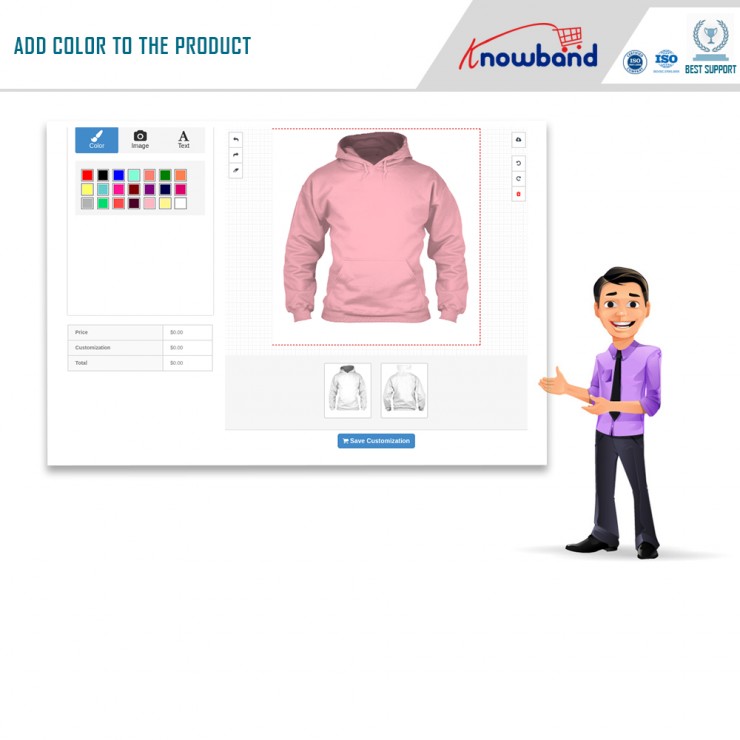
As mentioned above, this feature helps in offering a customized experience to customers to on the product they have ordered. When customers get the freedom to decide the color, text, image, etc of the end product, it improves the shopping experience which is again beneficial for the brand value. 
  • eCommerce Product customization and Personalization raises the profit margin 

Customers understand that each business requires a dedicated setup for personalized product development with dedicated resources. Hence, customers are ready to pay for more customization facilities. For each customization request, a business can strategically plan a template as well as required changes. Hence customization can allow the business to charge more and raise revenue and enjoy profits.

  • Customers attain loyalty 

If you want your customers to stick to your brand for a longer period then you must understand the needs of your customers, how they want, and try to fulfill them. Furthermore, loyal customers get the benefits in long run significantly. 

  •  eCommerce Product Customization And Personalization helps attract more and more Millenials 

By offering product customization, winning over the Millenials becomes easier. Millennials comprise a huge portion of buying users and in coming years they will be consumers of goods as well as services. Naming emails is not enough to personalize a product or service for millennials, but that’s worth it because this helps in enticing the millennial consumer.

  • eCommerce Product Customization And Personalization is budget-friendly 

Trends are changing day by day, regardless of the industry. Furthermore, you stock a type of product and the next thing you know is it’s out in the market therefore, getting the idea of what customers want is a smart thing to do. Understanding the preferences and developing the products according to customers needs will reduce your efforts and product making cost, it will increase the revenue. 

  • eCommerce Product Customization And Personalization make high-end items look attractive

Customers expect every minute detail of the product according to their preference when he is paying a handsome amount of money on a luxury item. With the help of this feature, customer satisfaction can be achieved and makes the item look more attractive by including features like the color of choice, graphics, etc.
  • Lower return rates 

This feature helps in lowering the return rates and repeating the sales. Furthermore, it is said that the products that consumers are part of are likely to be returned. Furthermore, they have customized the product as you want them. Therefore, it goes without saying that in most cases they are happy with the final product. If product personalization is offered in e-commerce, you can avoid managing returns and their costs. In addition, customers are more attached to personalized products.

  • Helps give your gifts a thoughtful touch 

With the help of eCommerce product customization and personalization, you can add a personal touch to your gift before gifting them to your loved ones. Furthermore, this will transform your routine product into a thoughtful gift! As your online purchases grow, you can dominate the gift product market by providing product customization capabilities.

  • Helps get an additional edge over the competitors 

This feature helps you to get an additional edge over the competitors. When you pay close attention to what customers are customizing in the product, it will make you understand what are they exactly looking for and where are you lacking. This way you can easily analyze the buyer’s preferences as well as their liking and utilize that data to offer the right products to your customers.

  •  Can give tough competition

When you then know what your customer wants, you stay ahead in the competition. Furthermore, when you permit buyers to personalize the product, you attain competitive benefits which help take your business to the next level and stay ahead in the competition. 

  • Online Presence

By offering bespoke products, customers need to buy from your store, not from a regular store. As this process progresses, Google’s ranking will rise and become popular with potential buyers. Thanks to this popularity, you can also dominate the social media platform and use it to generate revenue!

  • Streamlining the Order Process

The traditional way of product personalization was time-consuming as the cycle used to include understanding customers’ requirements, collecting samples, as well as sending them back and forth to the manufacturing team. Furthermore, a time-consuming, as well as tiring process, can be easily avoided when configuring a personalized product online and previewing it on spot is offered to customers.

What are the latest product personalization trends merchants must know?

  • Augmented Reality (AR) and Virtual Reality (VR)

One of the most famous product personalization trends that every other merchant must be aware of is- Augmented Reality and Virtual Reality (AR/VR). This helps transform the entire e-commerce scenario.  These trends help customers to offer the ‘in-store’ experience even remotely. 

Due to Augmented shopping customers remain engaged with brands as well as with the products via digital experiences, and personalize their products virtually. Furthermore, these digital experiences help merchants to offer better and more intuitive shopping experiences as compared to simple web experiences.

Brands that have started using this trend are the most famous denim brand, Levi. Levi’s has announced an array of new digital experiences in association with renowned apps and tech companies. Another reason for opting for this trend was to overcome the Covid-19 social distancing restrictions.

  • Mobile Experience 

If looking for higher revenue and customer engagement than being an eCommerce store owner, you must focus on providing a seamless mobile experience. This is another latest product personalization trend.
As per the studies, mobile e-commerce sales are forecast to reach $3.56 in dollars. Make sure your eCommerce website is mobile-friendly, responsive and the product customization options you make are equally responsive and easy to use on mobile screens. For better and engaging mobile users, it is important.

  • Real-time Display

The traditional way of product customization involves customers filling their customization choices and submitting them. As a result, there was no question of viewing the final mockup of what a product will look like. Because of that, they would not receive what they envisioned at times. As a result, the order returns/replacements would reach a higher level. Hence, it would lead to wastage of both the store owner’s as well as customer’s time. 

Thankfully situation has evolved for the better. Now, customers don’t have to wait for a longer time to get the item at their doorstep. Further, not only they can mention their design specifications, however, even design the product all by themselves in real-time. Thus, they can have a look at the product’s design before the final checkout and can make changes, if required. 

  • Engaging Product Customization Options

Product personalization options have gone higher compared to before due to the emergence of different online product design tools. At present all online print merchants are inculcating premium product customization services for buyers. From the text to images, clipart to even the material and printing process, buyers can choose it all and that too right at their home with a single click. 

  • Visual Search Shopping

Visual Search Shopping, trend famous among some companies. These companies have already embraced visual search technology. Popular companies using this trend are Pinterest, Amazon, Visenze, Set, and Google Lens. 

  • Conversion Rate Optimization Testing

Enhance your conversion rate optimization testing with Artificial Intelligence. For example, Qubit, a personalization software that helps store merchants to personalize content and optimize landing pages. Moreover, it helps in targeting segment customers and enhances conversion rates as well. 

  • Save For Later Feature

Save For Later Features is helpful as it reduces one of the biggest issues in eCommerce, cart abandonment rate. Further, Product Personalization is more than just selecting the product, designing, as well as buying. There are times when the buyer needs more time to design the product before coming to the final design. 

Save for later feature is also beneficial because it ensures that customers don’t have everything to start all over again from scratch in case they 

leave product customization in the middle. With the assistance of Product Personalization, buyers can easily save their progress. All they need to do is save their progress by choosing the option and continue it from where they had left.

Knowband modules to consider 

Knowband offers some of the most efficient modules for different eCommerce platforms, one of them is Product Designer/Customizer for platforms like Prestashop and Opencart.

  1. Prestashop Product Designer/Customizer addon

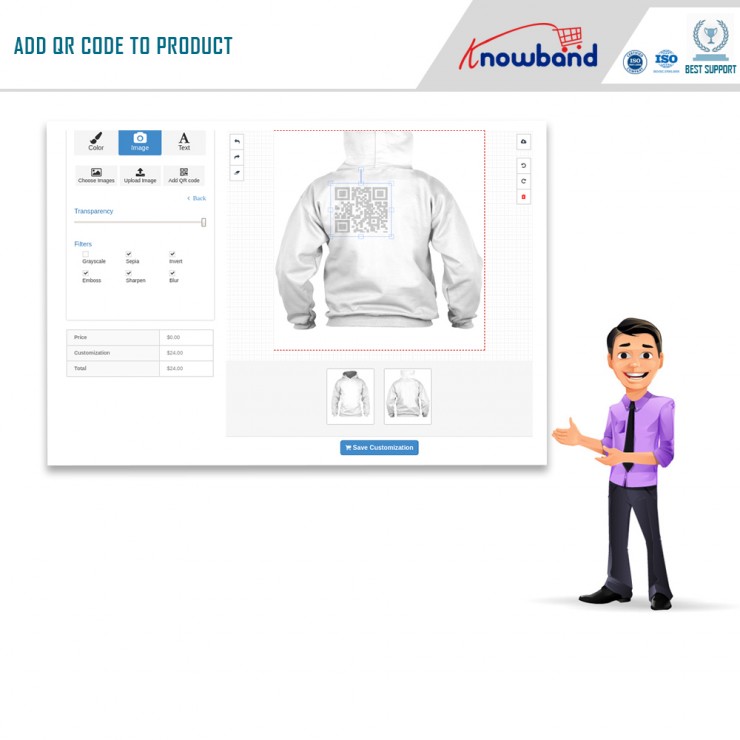
Prestashop Product Designer/Customizer addon is highly beneficial as it allows adding design customization panels on product pages of any selected products on your website. Furthermore, the addon helps customers to add desired text, images as well as QR codes for a product.

Key features of Prestashop Product Designer/Customizer Addon:

  • Let customers flexibly create their desired product.
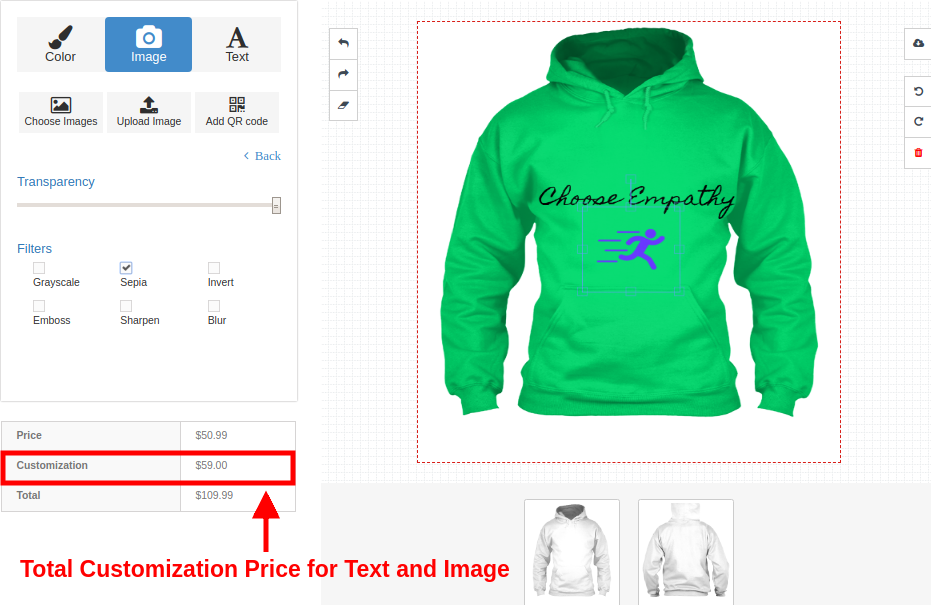
  • Allows checking the total price of the customization on the same page. 
  • Settings include font style, color, text size, default images, image positions, taglines, character limits, and pricing.
  • Installation of the module helps gain customer loyalty 
  • Improves sales 

2. Opencart Product customizer extension 

Opencart Product Customizer Extension is another helpful extension for Opencart owners. This encourages customers with the ability to design and shop custom products on your website. Products include T-shirts, mugs, cushions, and more.
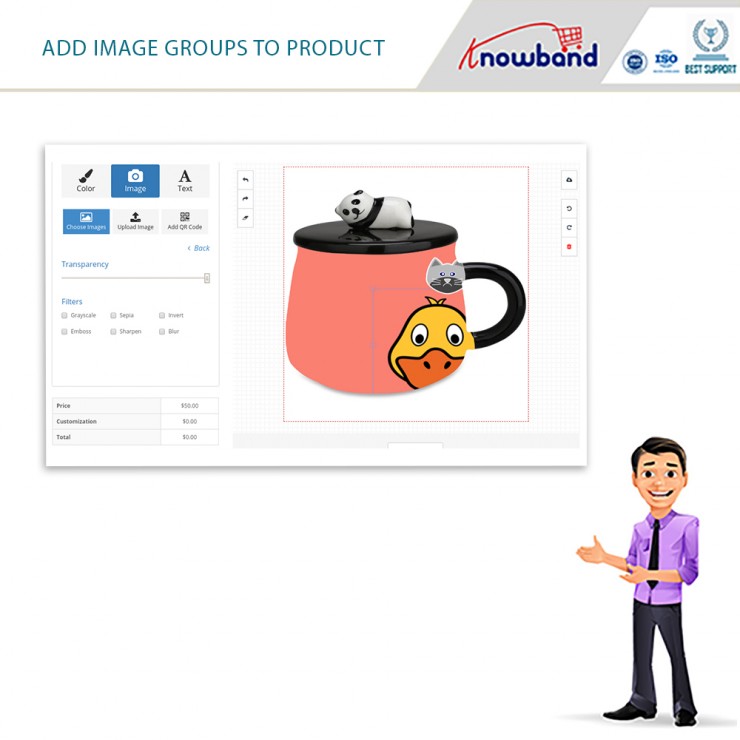
Key features of Opencart Product customizer extension:

  • Allows shoppers to customize the product.
  • Customize the product by inserting text, images, and QR codes.
  • Customers can easily design products in their style.
  • View customization cost before finishing final checkout.
  • An efficient way to market your website product according to buyer needs.

Final Thoughts

In case of any concern, feel free to write us at support@knowband.com  Knowband offers efficient post-sales support to buyers along with efficient modules. 
Prestashop Product Designer/Customizer Addon – User Manual

1.0 Introduction

Being a store owner you have always thought of multiplying your store conversions but not about the shopping experience of your customers. A happy and satisfied customer is the one who returns back to the store in search of some more items. So if you want returning customers on your store, make the customer experience lasts forever by integrating Prestashop Product Designer/Customizer addon at your eCommerce store.

With the help of Prestashop Custom Product Design module, store merchants can offer intuitive and creative online product customization options to their customers so that they can turn the basic version of the product into a modern, elegant and unique design. Prestashop product customization addon allows admin to show the product customization panel page as the user clicks over the Customize button on the product page. Customers can easily add rich colored texts with effects, upload their images with filters, add a QR code to make it suitable for their needs.

1.1 Striking Features of Prestashop Product Customization Addon

No coding technicalities are required to configure or modify the settings of the Prestashop Custom Product Design module. Everything comes easy with this module. Lets quickly check different features offered by this Prestashop addon.

  • Prestashop Product Designer/Customizer addon helps to offer a wide range of customizable products at your online shop.
    Using Prestashop custom product designer addon, customers can easily buy and take the benefits of the extended online products which can be personalized as per their needs.
  • Online Product Designer adds a designer view for products so that the potential buyers get an opportunity to customize the product in real time. Product configurator module lets Prestashop admin add a different set of customization options for each different product on the shop.
  • With the integration of Prestashop product designer module, customers can access the product customization panel with any product they wish to purchase like T-shirts, mug, rings or any other kind of product that can be personalized as per their needs.
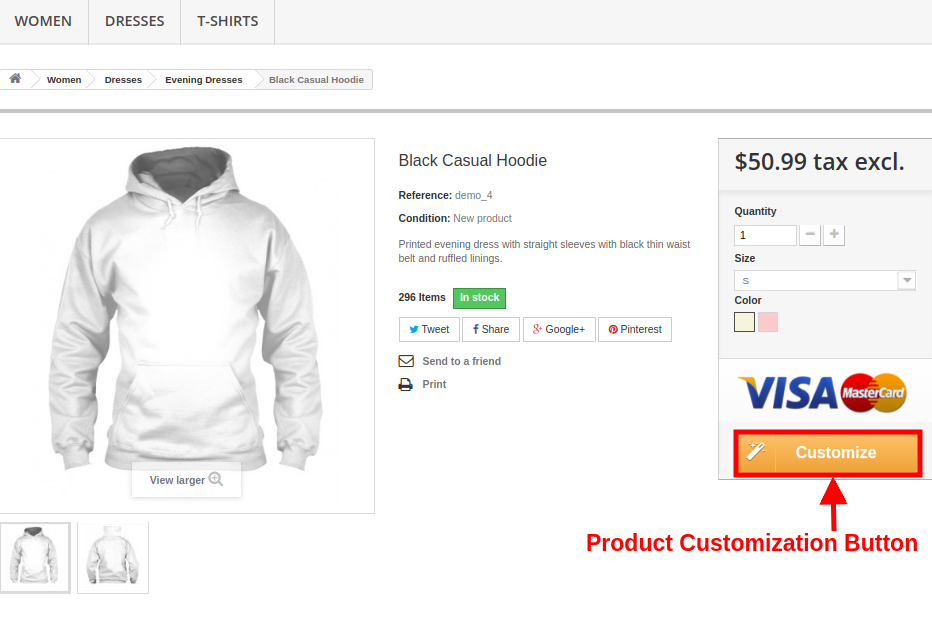
  • Prestashop product customization addon shows a Customize button for every customizable product on the store. Admin can enable customization options for desired products only.
  • The complete functionality of Prestashop Product Designer/Customizer addon can be enabled or disabled. When this module is disabled, the standard product customization options are shown on the product page.
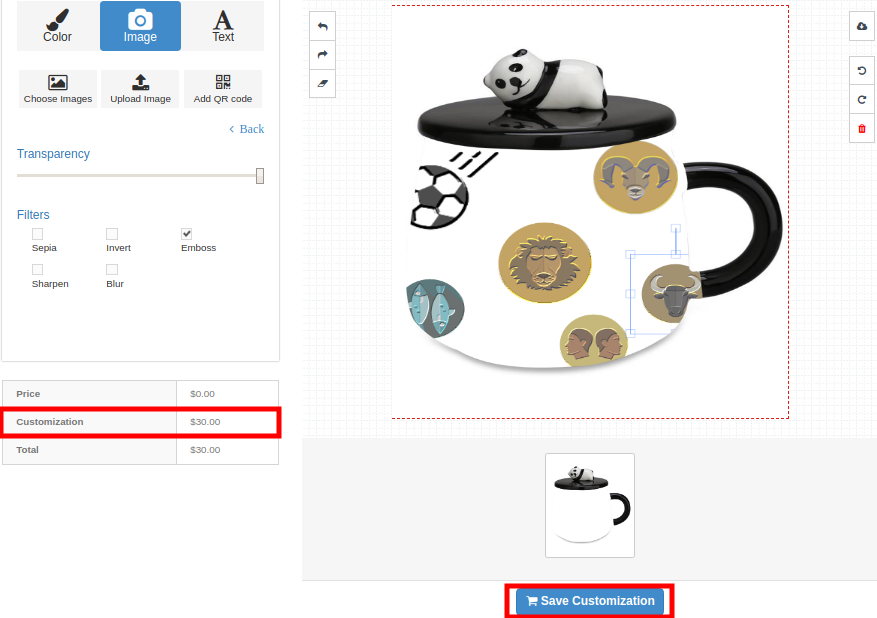
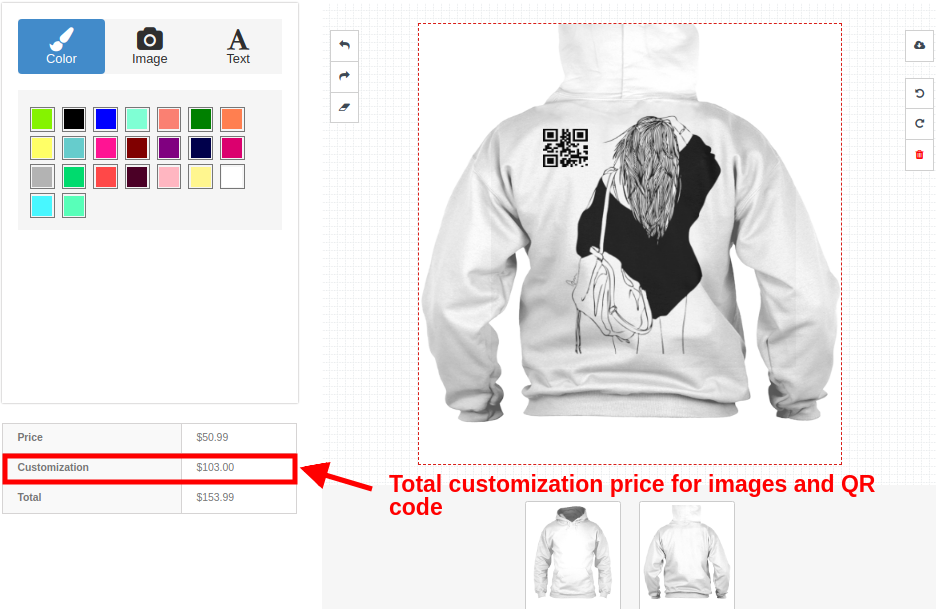
  • Advanced product customizer module shows the real-time customization price calculation on the product page.
  • With Prestashop custom product designer addon, admin can set the product design sides which are available to the user.
  • Product configurator module allows admin to enable or disable PDF file download options for the customers on the frontend.
  • Prestashop Extended Product Customization module gives an option to add pre-defined images for a product. The pre-defined images are usually defined into groups. Customers can upload and set any picture of their own.
  • Customer can flexibly use desired fonts, colors, and filters for the product using this Prestashop product designer module.
  • This Advanced product customizer module lets admin define prices for different customization options.
  • Prestashop product customization module also gives an option to personalize the product using QR code for which admin can define a separate price.
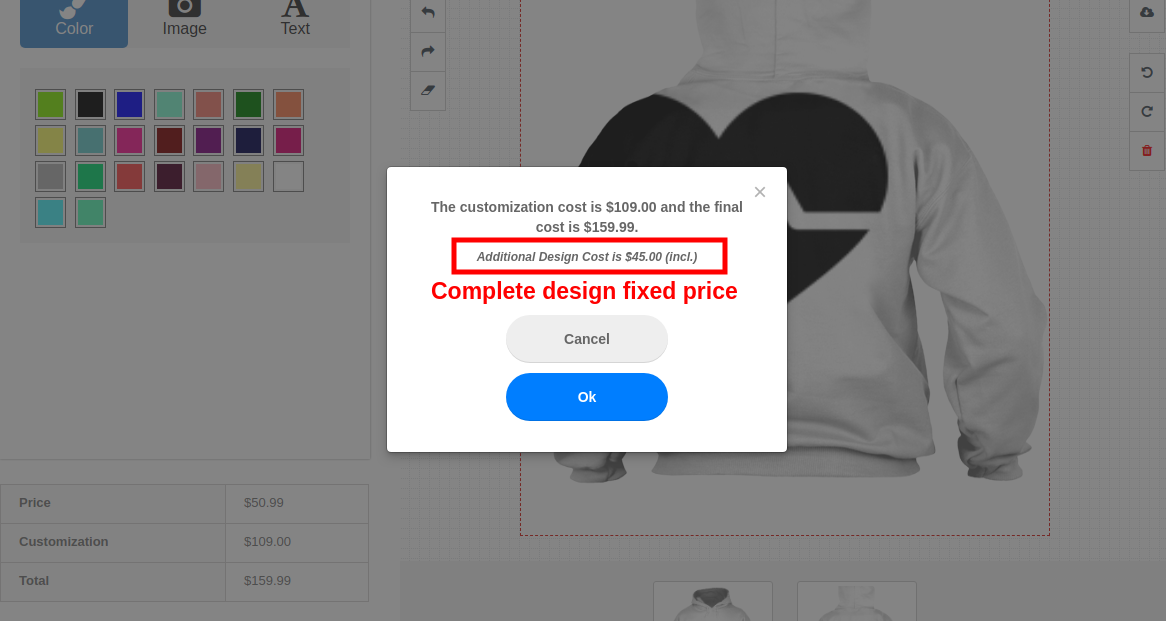
  • Prestashop custom product designer addon automatically adds a Complete Design Fixed Price to the final customized price for a product.
  • Prestashop Product Designer/Customizer addon supports multi-store and multi-lingual compatibility.
  • Prestashop custom product designer addon is mobile responsive and compatible with various Prestashop themes.
1.2 Technology for Development

  • Language: PHP
  • Frame Work: Prestashop

2.0 Installation Guide for Advanced Product Customizer module

The store admin can follow these simple steps for installing the Prestashop product customization addon on their eCommerce store:

1. Firstly, download the addon package from the Knowband store.
2. You will get a zipped file containing the source code and user manual. Unzip the complete package in the root directory of your Prestashop store through FTP manager (like Filezilla or WinSCP – download here: https://filezilla-project.org/). You’ll find the files and folders as shown in the image below:

The Prestashop custom product designer addon is now installed and ready for use. Now the admin can configure the various configuration settings in accordance with their Prestashop site.

3.0 Admin Interface of Prestashop Advanced Product Customizer module

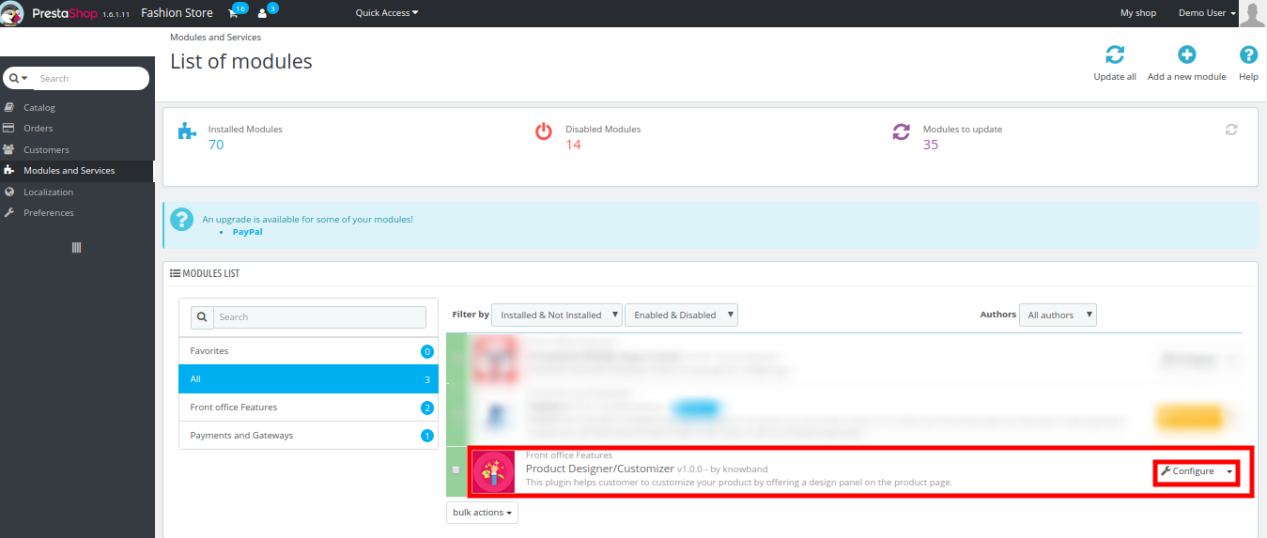
Just after successful installation of Prestashop Product Designer/Customizer addon at your website, you can configure product customization panel settings as per your needs. In the admin panel or dashboard, Click on “Modules and Services” and then on “Configure” button provided next to Knowband Product Designer/Customizer.
Here, in the next interface, you will find the complete settings of Product Designer/Customizer module along with its sub-sections as listed below.

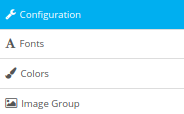
This Knowband Product Customization module consists of four sub-sections which have been discussed further.
1.Configuration
2.Fonts
3.Colors
4.Image Group

Each Tab of the Prestashop Extended Product Customization module has been discussed below:

3.1 Configuration

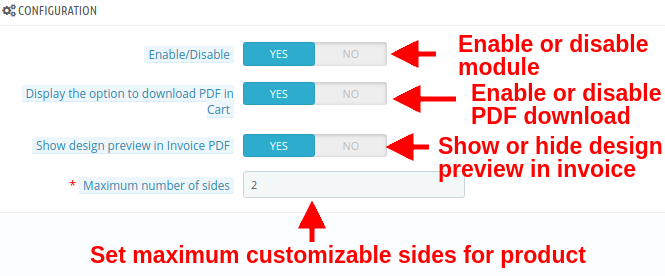
Under the configuration settings of Prestashop product customization addon, you can perform the basic settings for customization panel shown on the frontend to the customers.

  • Enable/Disable: With this option, you can completely enable or disable the functionality of Prestashop Extended Product Customization module for customers.
  • Display the option to download PDF in cart: You can enable or disable this option to download the design image in PDF on Admin Order Page.
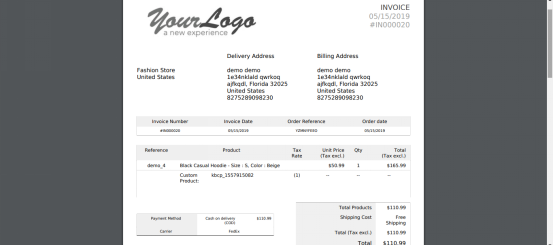
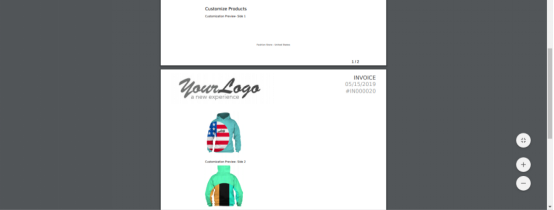
  • Show design preview in invoice PDF: Enable or disable this option to display or hide the design preview in invoice PDF.
  • Maximum number of slides: Using this option, you can set maximum number of product sides that are allowed customization from frontend.

3.2 Fonts

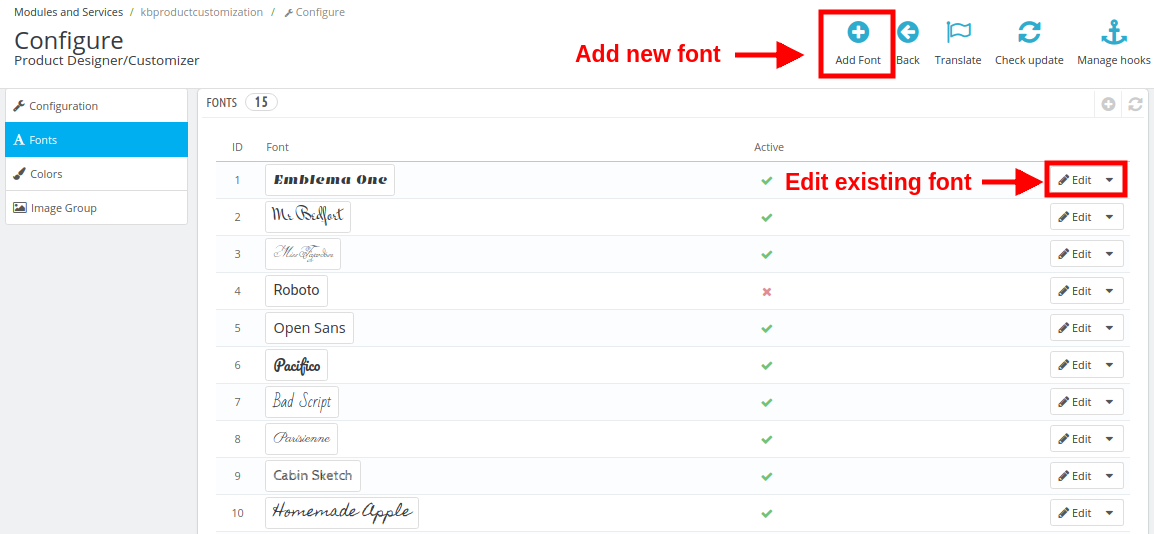
Under this section of Prestashop product designer module, store owner gets the option to add several fonts that the customer can choose to print a styled text on the product.

The first interface shown below shows you a list of existing fonts that are available on frontend. A new font can be added or the existing font can be modified or deleted.

Here you can perform the other two actions as:

1. Adding a new font

To add a new font style, perform the following steps:
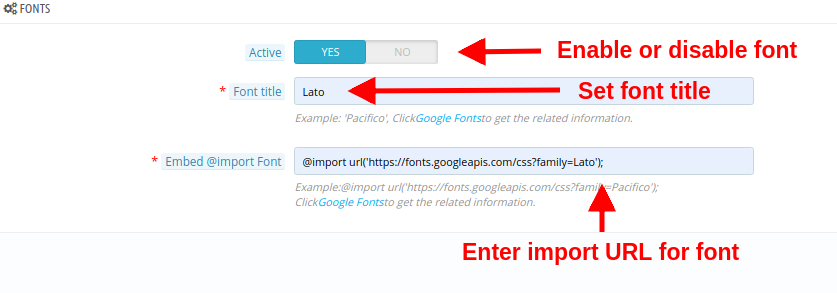
Click on the Fonts tab and then on the “+” (Add Font) button at the backend panel. You will be shown the below interface.

  • Active: This option will enable or disable the font.
  • Font Title: Using this option, you can set the font title same as mentioned in Google Font.
  • Embed @import Font: In order to use the Google Font, you have to embed the import Font class. For this, you have to:
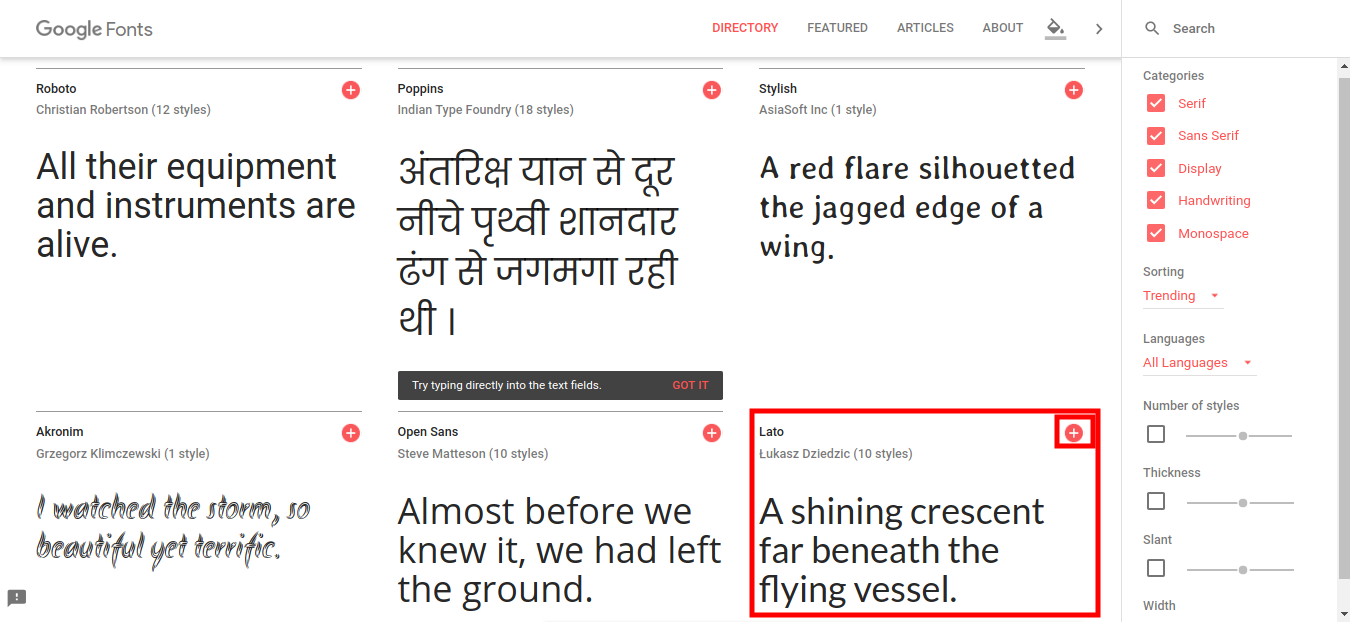
  • Click on “Google Fonts” link provided just below the option. The below screen will be shown to you.
  • Choose any desired font and click on the Add “+” button for that font style.

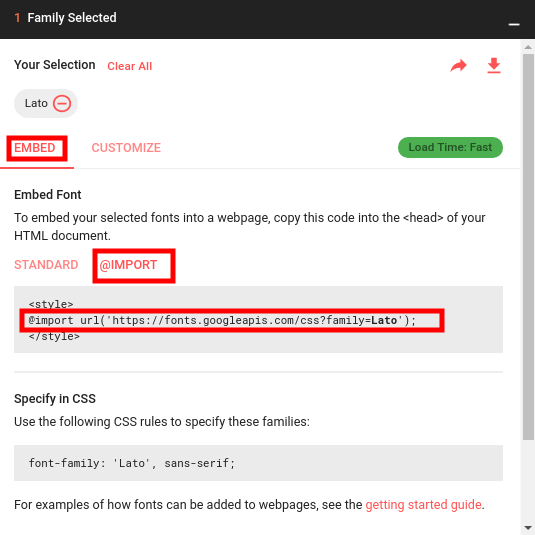
  • Upon adding a font, you will be shown a popup which will list you the font family you have selected. Click on Embed tab and then on @Import button.
  • Copy the @import URL for that font and paste it to the Embed @import Font field.

2. Edit an existing font

If you want to edit the existing font, simply click on Edit button given next to the font style. You will see the following options:

  • Active: Enable or disable the font style.
  • Font Style: Edit the font title using this option.
  • Embed @Import Font: Modify the import URL for that particular font.

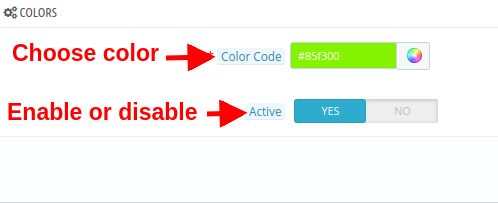
3.3 Colors

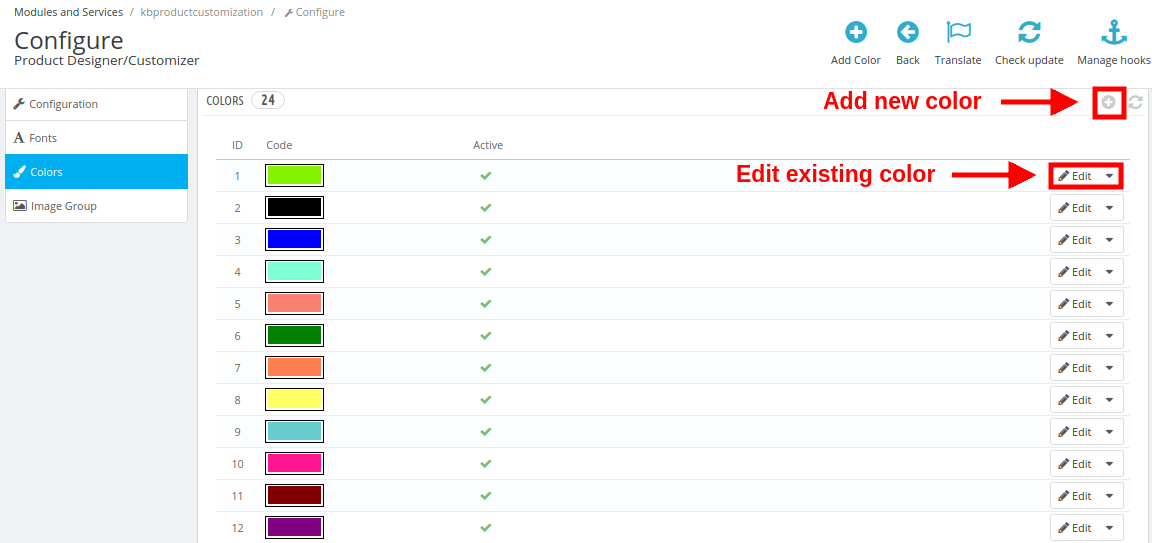
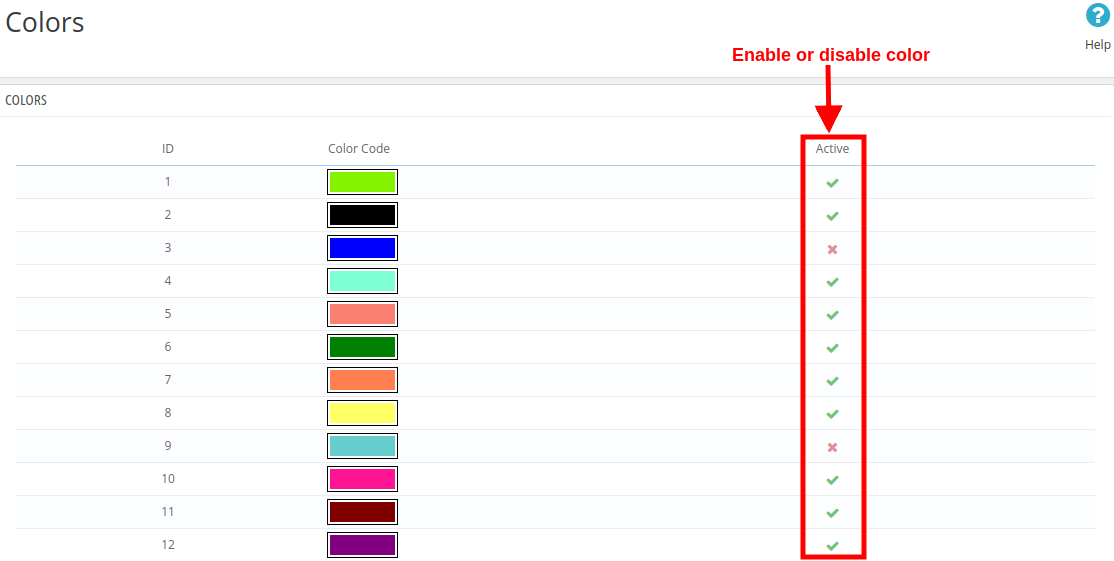
Under this section of Product configurator module, you can define your own color palette and allow your customers to pick any color for the selected product.

The following interface shows you a list of existing colors which can be edited or you can add a new color if required.

1. Adding a new color

  • Color Code: With this option, pick a desired color to be shown on product customization page.
  • Active: Enable or disable the color.

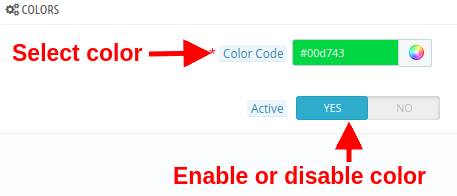
2. Edit an existing color

  • Color Code: With this option, pick a desired color to be shown on product customization page.
  • Active: Enable or disable the existing color.

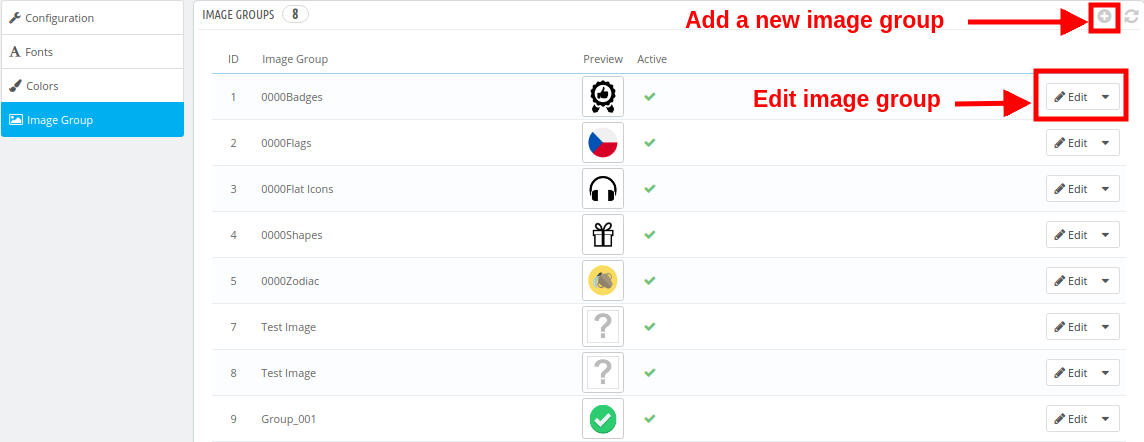
3.4 Image Groups

For a selected product, the customer can select any default images provided by the store owner or they can upload a new custom image for the product customization.
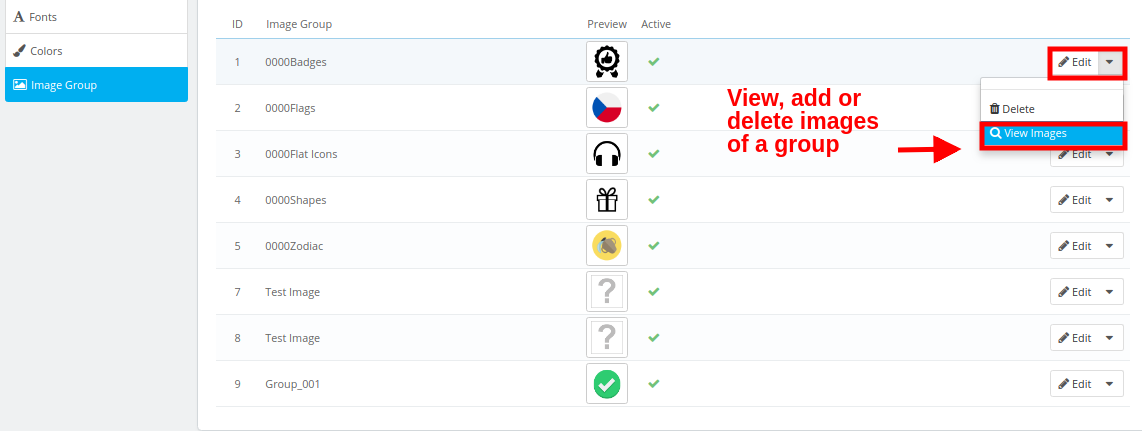
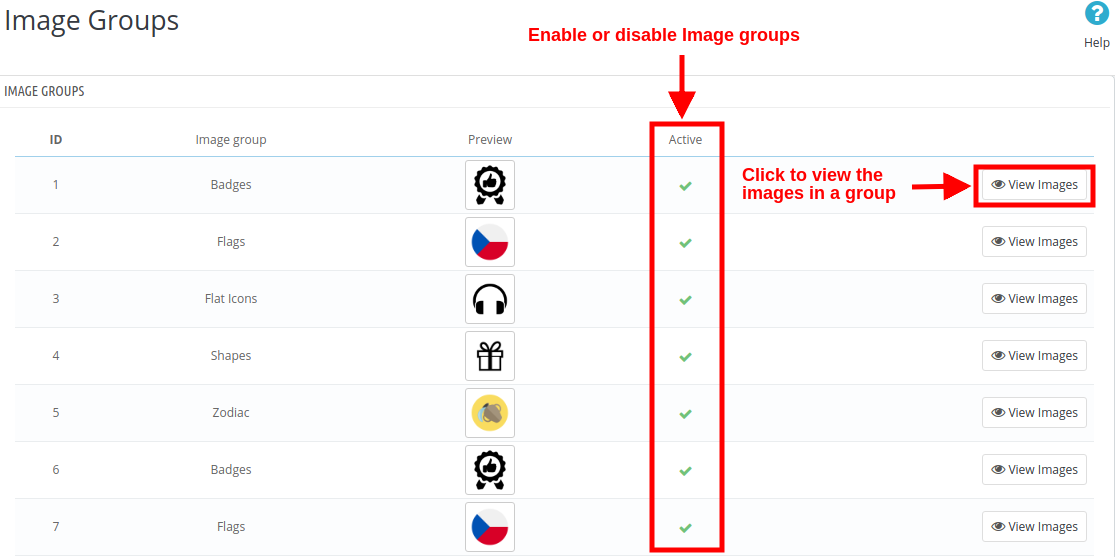
The default images have been categorized as image groups. These existing image groups can be edited or you can even add a new image group.

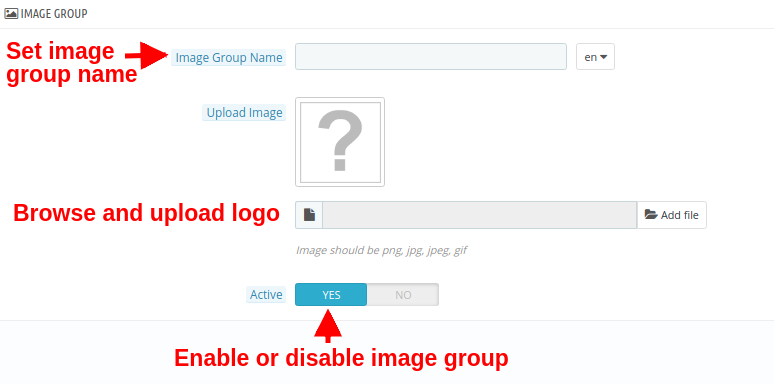
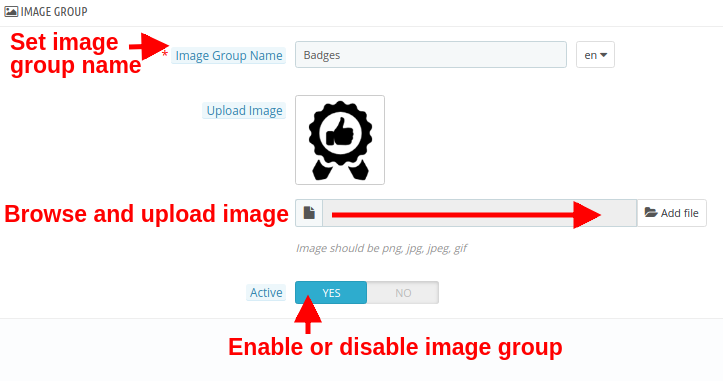
1. Adding a new image group

  • Image Group Name: You can set a desired name for the image group.
  • Upload Image: You can upload and set a image group logo image.
  • Active: This option will enable or disable the image group.

2. Edit an existing image group

  • Image Group Name: You can set a desired name for the image group.
  • Upload Image: You can upload and set a image group logo image.
  • Active: This option will enable or disable the image group.

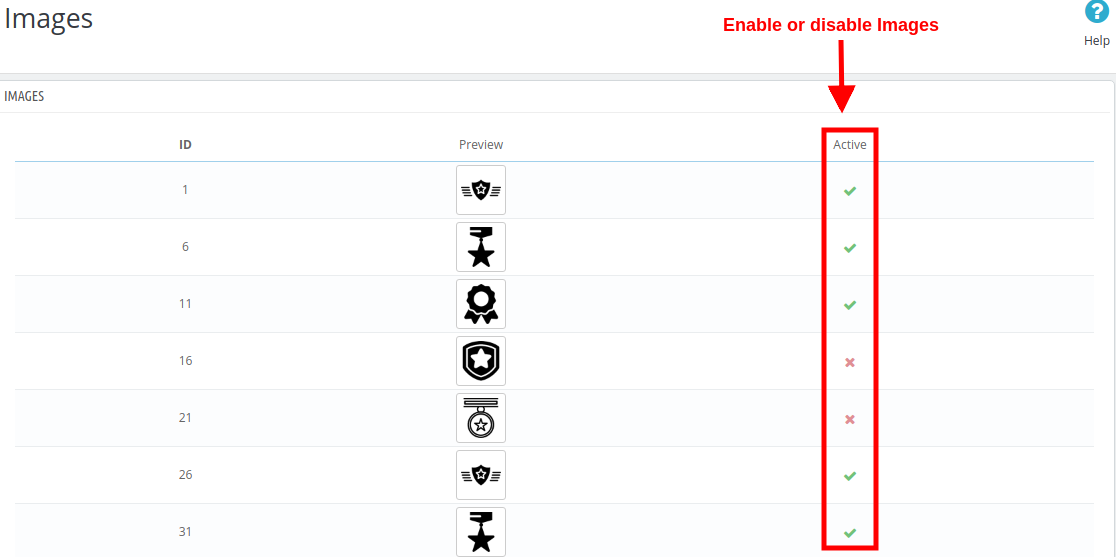
To view, add or delete the images inside any image group, click on the “View Images” option corresponding to the image group.

You will be shown the following interface.

Here, you can add a new image, delete or change the existing images within a group.

4.0 Customization Settings for Site Products

The configuration settings for fonts, colors, image groups discussed in section 3.2, 3.3. And 3.4 are applicable for all the site products. These settings can be referred to as Global settings. Other than this, the settings can be also be done on a product level. These settings are particular to the product which the admin has configured from the back-office. Below discussed are the product customization settings for individual products. The site admin can apply these settings differently for any product on the store. To configure the product customization settings for individual products, follow the listed steps:

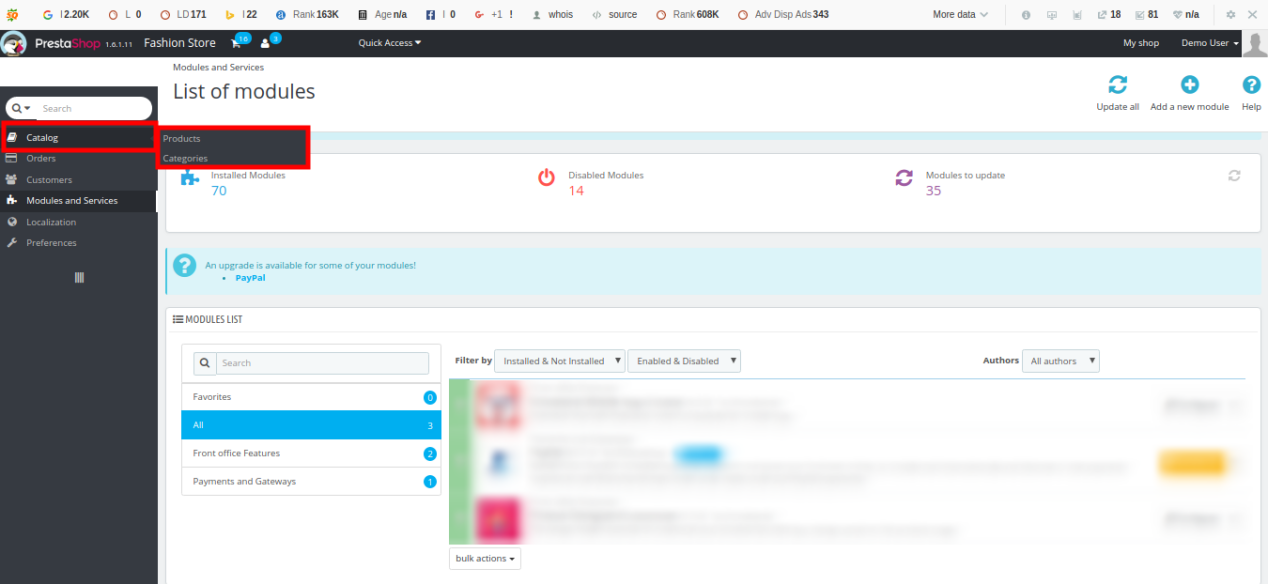
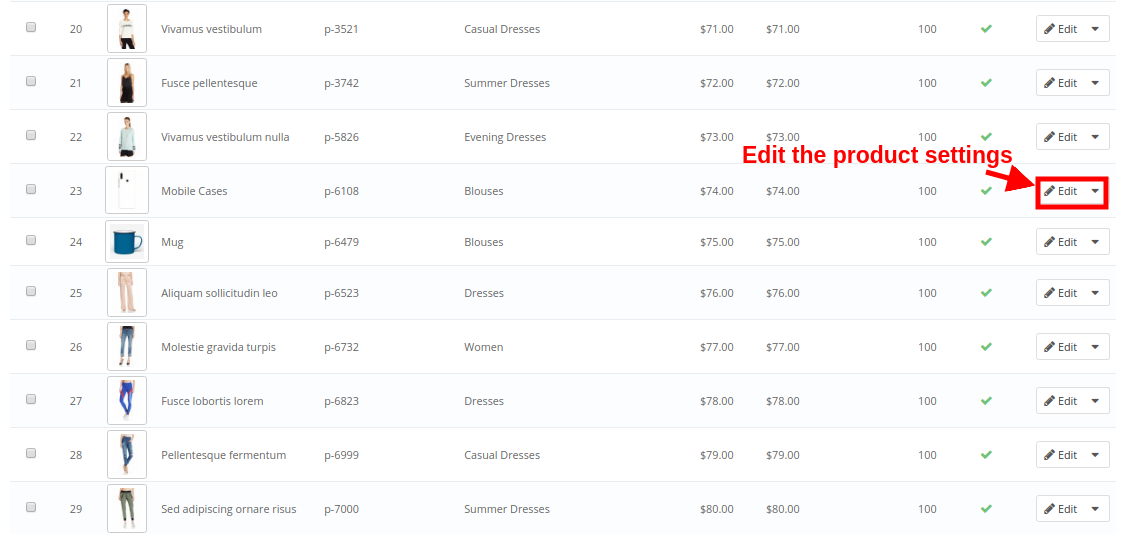
1.In the admin panel, go to “Catalog” option in the left Menu Bar of the interface.

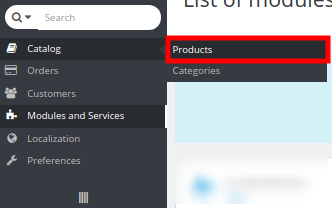
2.Click on “Products” option under “Catalog”.

You will see a list of store products along with an option to edit or configure the product. The screen for store products has been shown below:

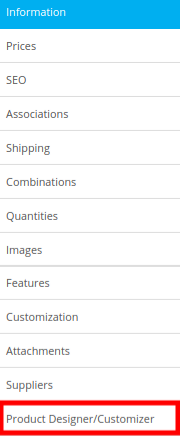
Upon clicking the “Edit” button for a product, you can will find the following configuration settings. Choose the Product Designer/Customizer tab.

Now, the complete product designer/customizer settings are divided into four groups namely:

  • Configuration
  • Prices
  • Text
  • Sides

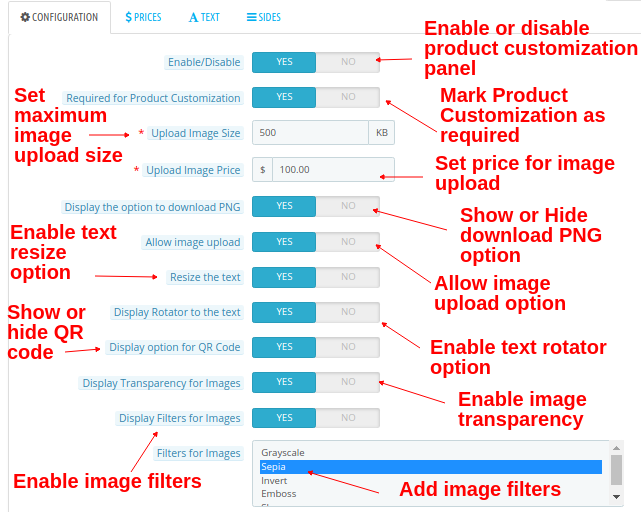
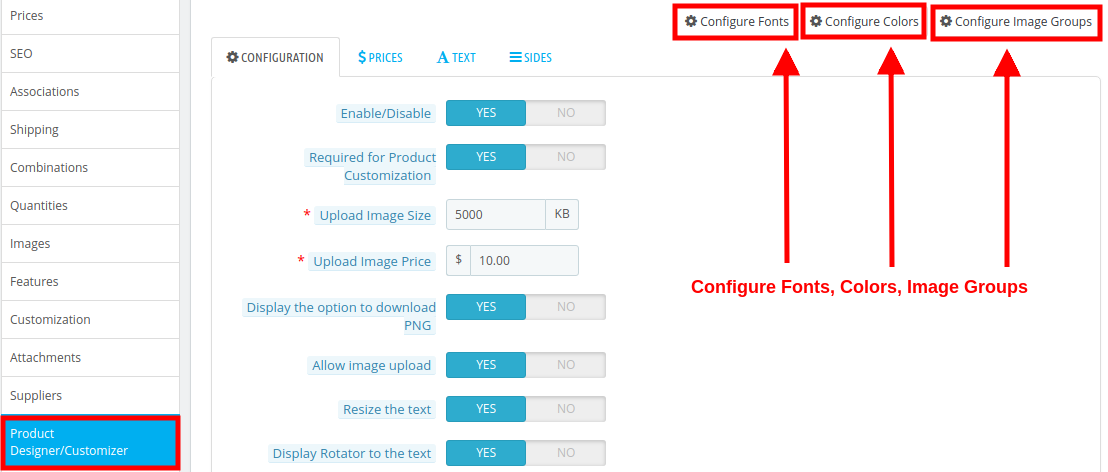
4.1 Configuration

  • Enable/Disable: This option will enable or disable the product customization panel on product page at frontend.
  • Required for Product Customization: Enable this option if you want to mandate product customization for customers.
  • Upload Image Size: This option will set maximum size for image upload.
  • Upload Image Price: This option will set the price for uploading an image.
  • Display the option to download PNG: Enable or disable the option to download PNG image.
  • Allow image upload: Enable or disable image upload option on product customizer page.
  • Resize the text: Enable this option to allow text resize.
  • Display Rotator to the text: Enable this option to allow text rotation.
  • Display option for QR Code: Enable or disable his option to add QR code on product.
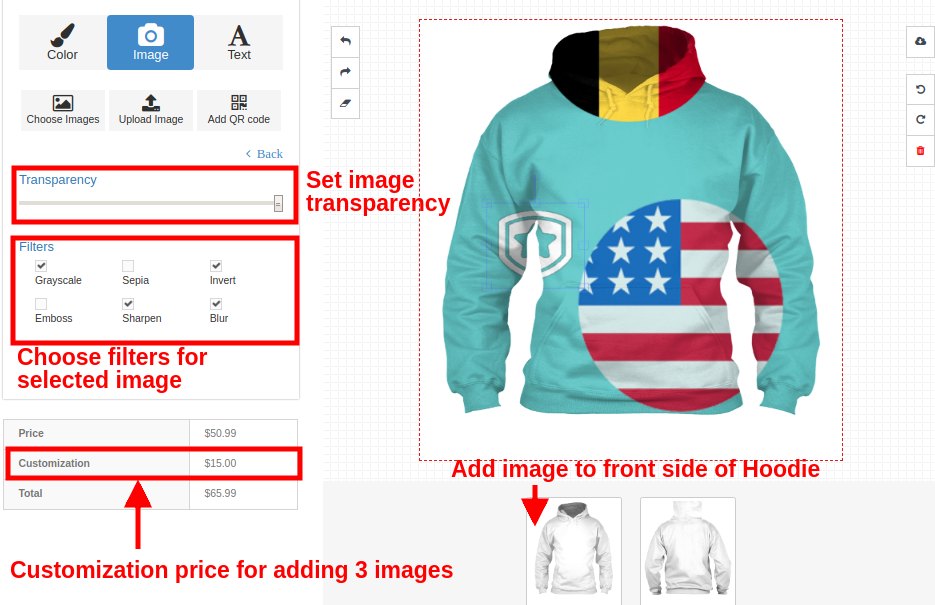
  • Display Transparency for Images: Enable this option to display transparency option for images.
  • Display Filters for Images: With this option, you can enable or disable image filters.
  • Filters for Images: Select multiple filters that you want to show at frontend on product customization page.

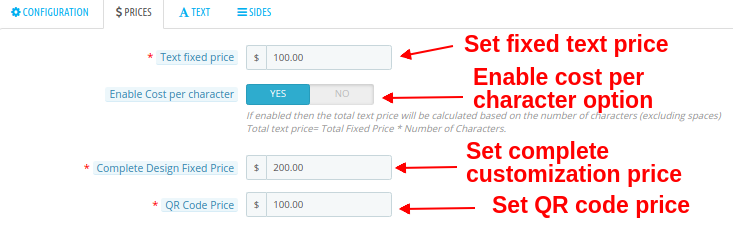
4.2 Prices

  • Text fixed price: This option allows you to set a fixed price for the text.
  • Enable Cost per character: You can enable this option if you want to charge cost per character.
  • Complete Design Fixed Price: This option allows you to set a fixed price for the complete design. This price is added to the total customization cost.
  • QR Code Price: You can set a price for QR code using this option.

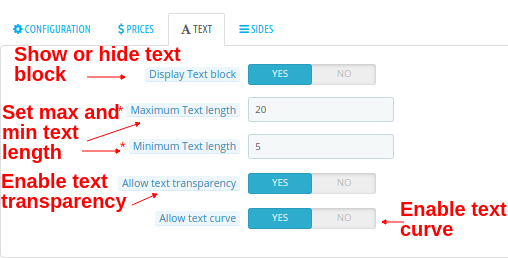
4.3 Text

  • Display Text block: You can show or hide the text block option on product customization page.
  • Maximum Text length: Using this option, you can set a maximum length for the text.
  • Minimum Text length: Using this option, you can set a minimum length for the text.
  • Allow text transparency: You can enable or disable this option for text transparency.
  • Allow text curve: You can enable or disable this option for text curve.

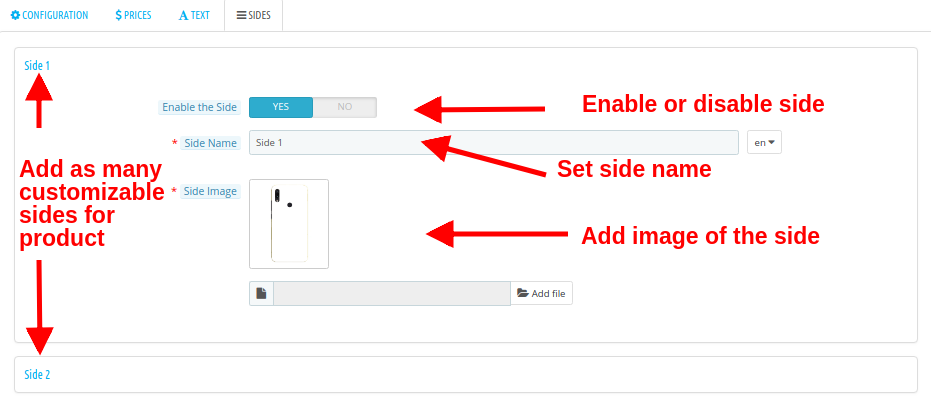
4.4 Sides

  • Enable the Side: With this option, you can enable or disable the side.
  • Side Name: This option lets you set the name for the side.
  • Side Image: This option allows you to upload an image showing the product side.
    These settings are for one side of a product. You can do the same settings for other sides of a product also.
    Note: Here, You can only configure the settings of the number of sides as mentioned in the “configuration settings” of product customizer module. For example, if you have set the “maximum no of sides” count as 2, then you can only configure the settings for side 1 and side 2.
How to Configure Fonts, Colors, and Image Groups?

While you are changing the customization settings for a product, you will find the options to select different Fonts, Colors, Image Groups at the top right side of screen. You will find three options as:

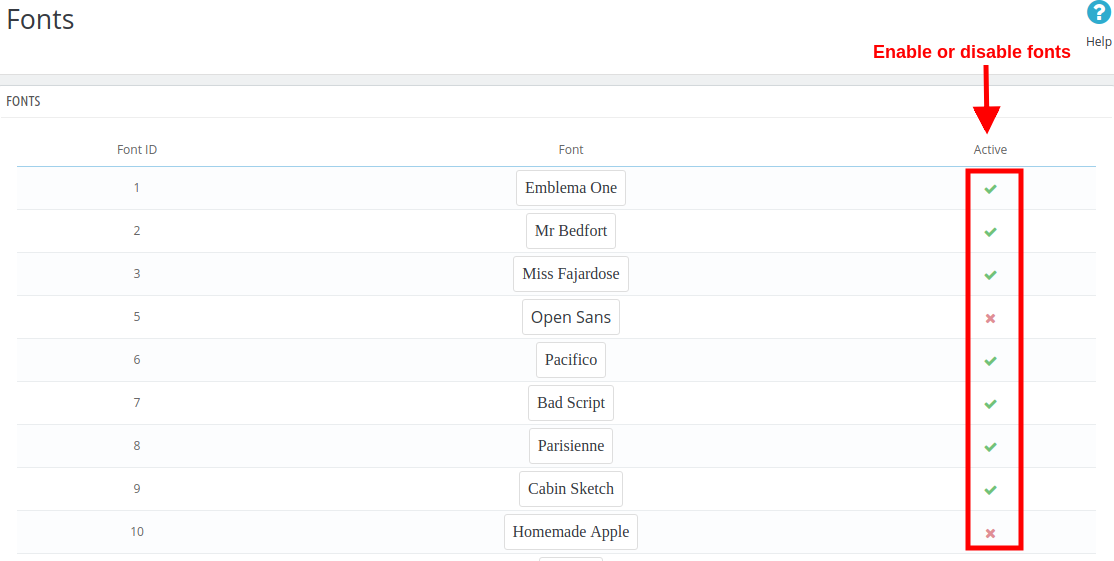
1. Configure Fonts
All the fonts that have been added in the section 3.2 are listed here in this interface. You can directly enable or disable any font.

2. Configure Colors
All the colors that have been added in the section 3.3 are listed here in this interface. You can directly enable or disable any color.

3. Configure Image Groups


All the image groups that have been added in the section 3.4 are listed here in this interface. You can directly enable or disable any image group.

On clicking the “View Images” button, you will see the following screen.

5.0 Front Interface of Prestashop Custom Product Design Module

Once the Online Product Designer has been installed and configured for the store, the Product Designer/Customizer settings tab is shown in the general settings of the store products. If you want to enable or disable the product customization page for a product, you can simply configure the product settings under the “Products catalog” at back-office.

When the Product Designer/Customizer module is enabled for a product, it will show a “Customize” button on its product page as shown below:

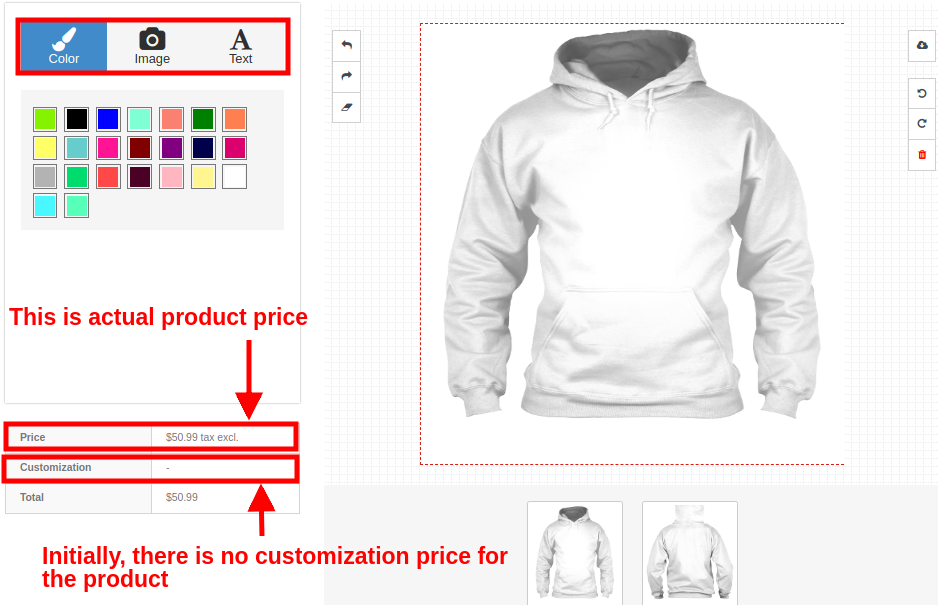
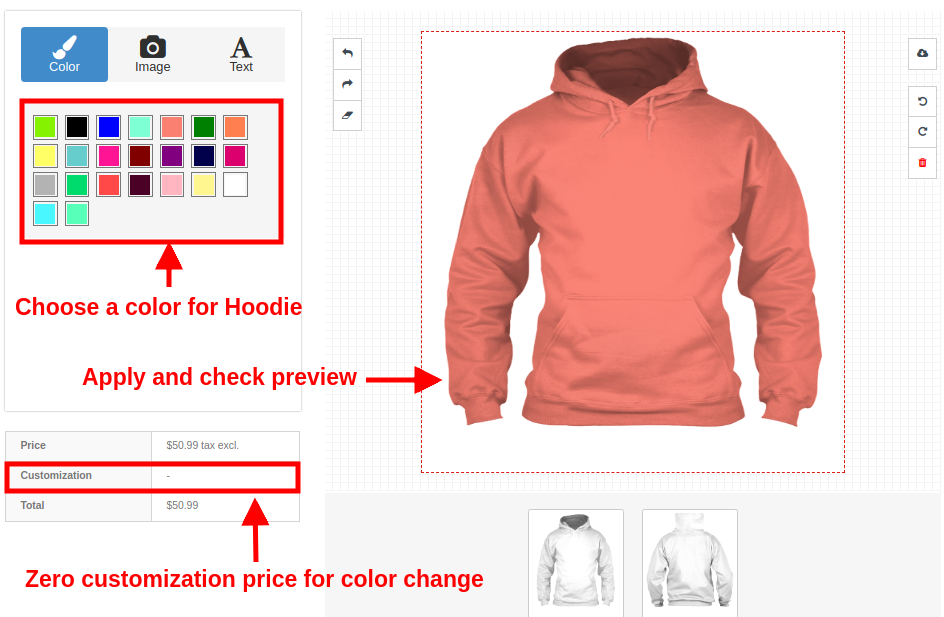
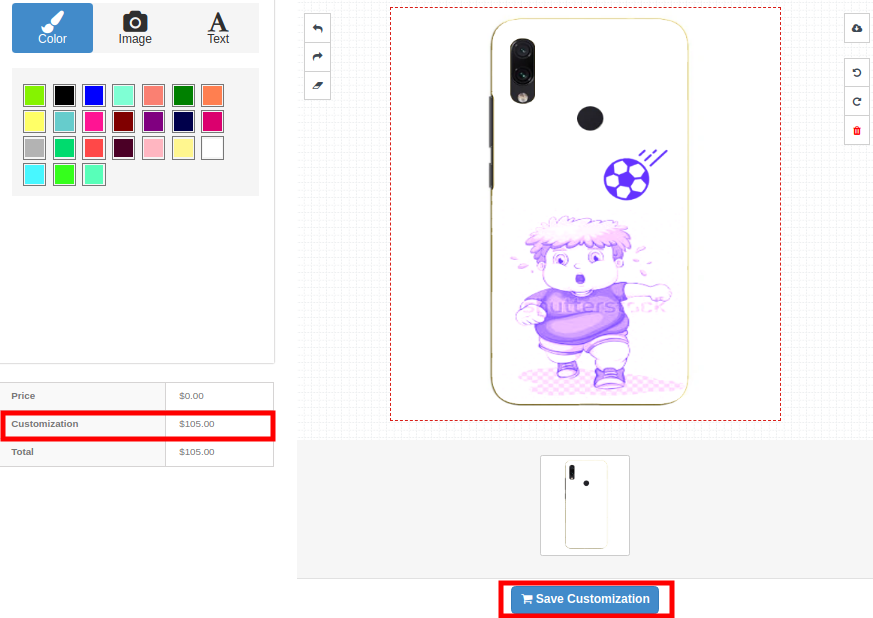
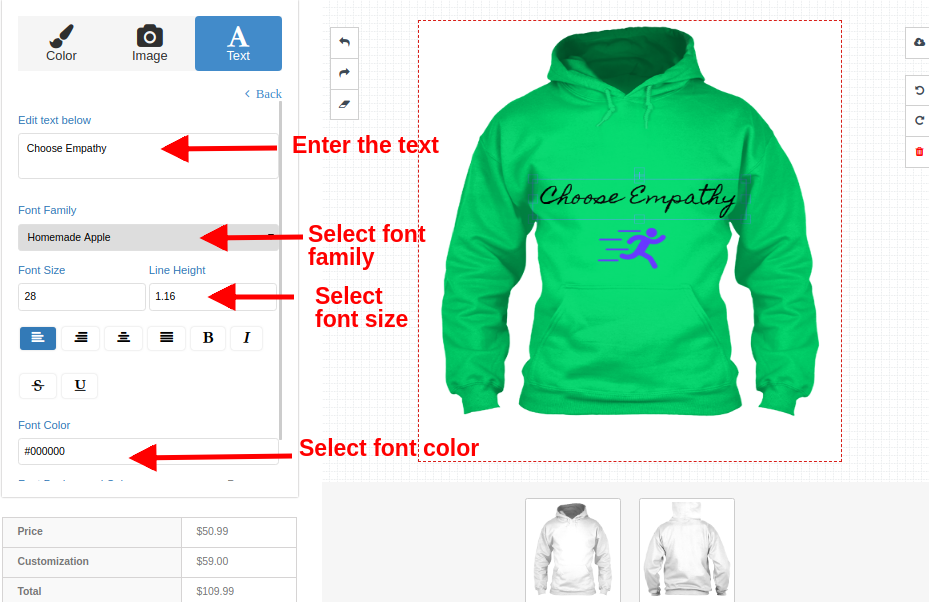
On clicking the Customize button, the customer will be shown a screen pop-up which will consists of various product design and customization settings. Customers can add any color, custom text, custom image or QR code for a product as per their shopping needs.

Your customers can perform any type of customization like:

1.Color

2.Image
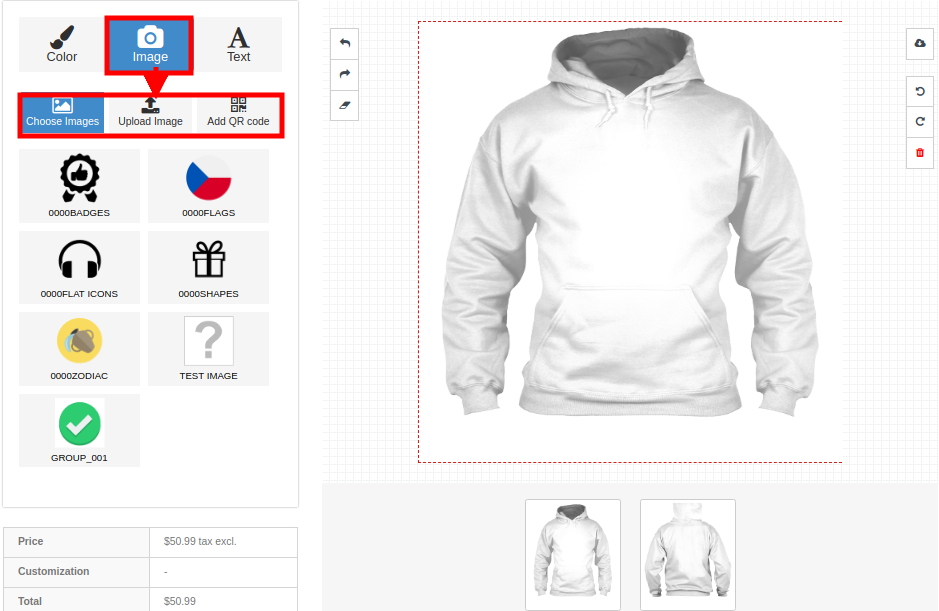
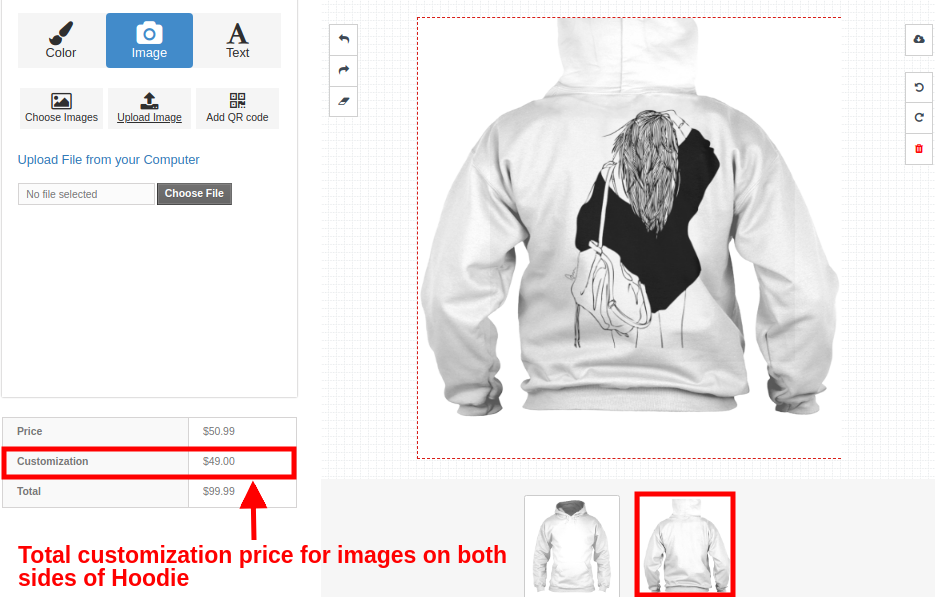
Customers can add an image to the product. They can choose any default image from image group or they can upload their own image or they can add a QR code to the product.

2a. Choose an image

2b. Upload image

Let’s suppose that the customer is adding the uploaded image on the back side of Hoodie.

2c. Add QR code

3.Text

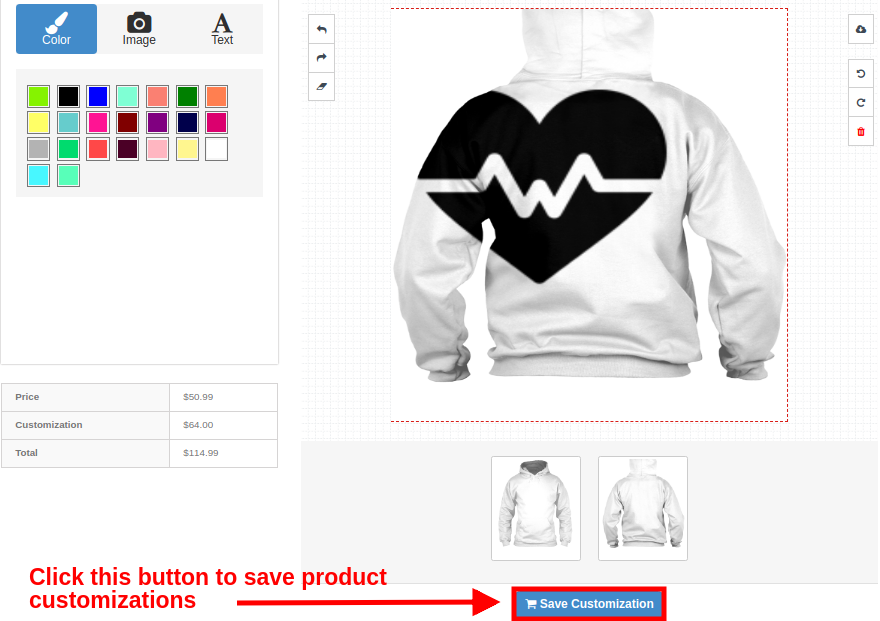
Saving Product Customization

Similarly, the customer can apply customizations to other products of the store like mug and phone cases.

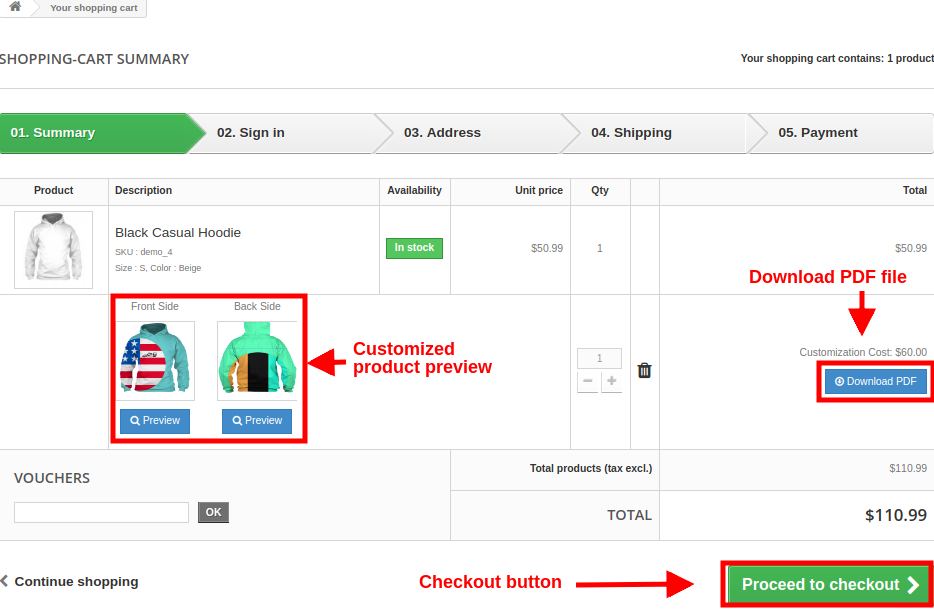
Shopping Cart Summary Page for Customized Product
The below frontend image shows how the custom product displays on the cart page with different options to the customers after clicking on “Save Customization” button.


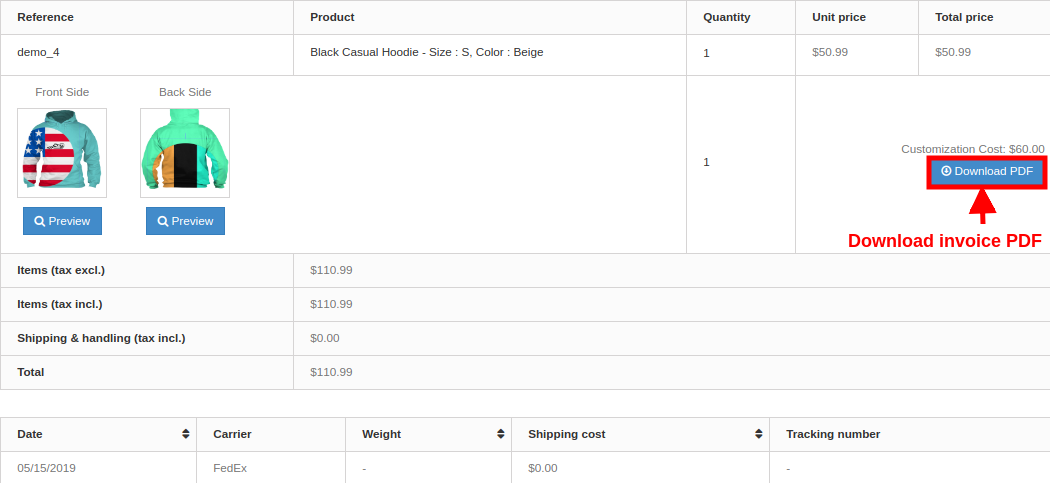
Customer can view the Invoice of this customized product as shown below.


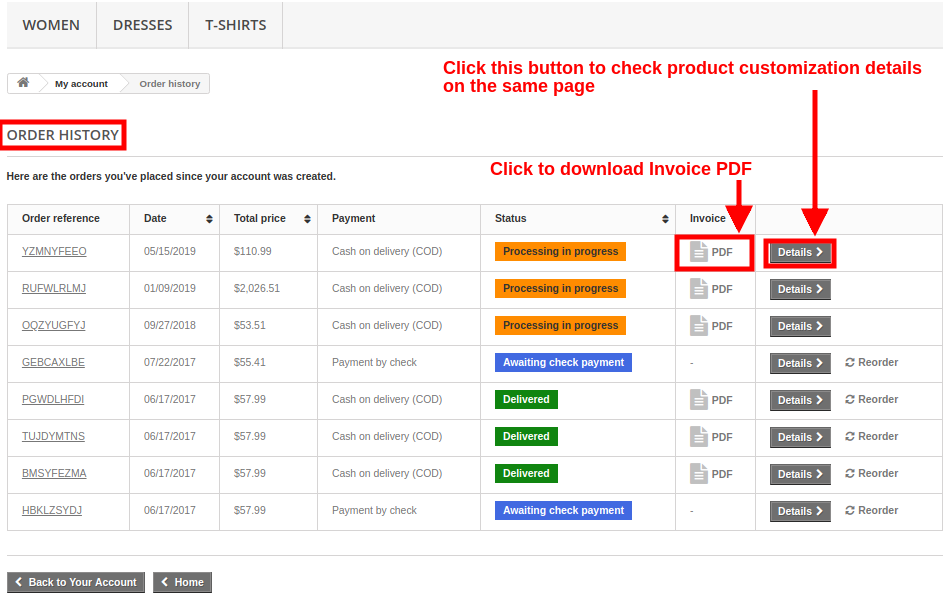
Order History Page with Invoice


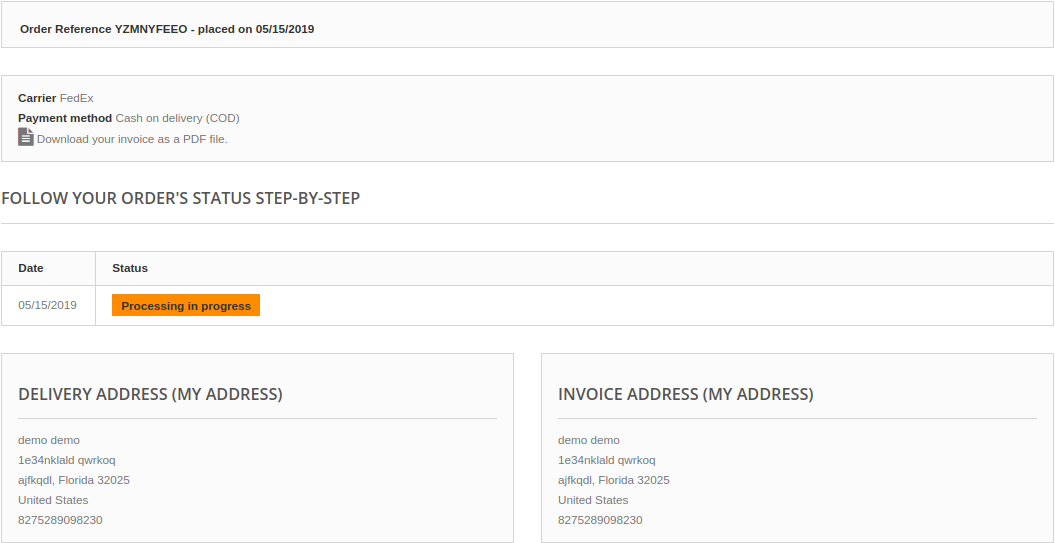
On clicking the Details button, customer will see the following screen:

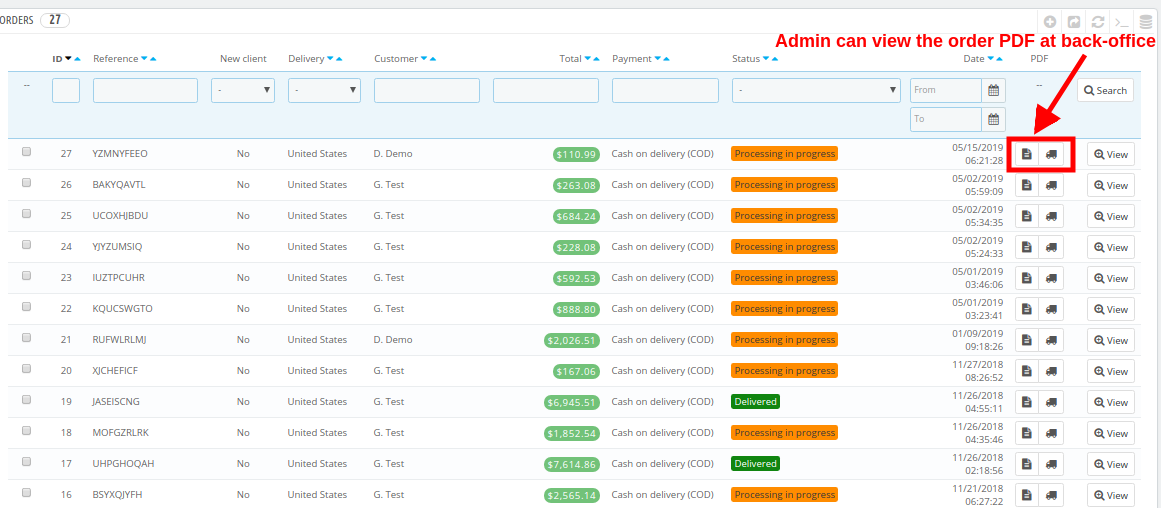
Order View from Admin Panel
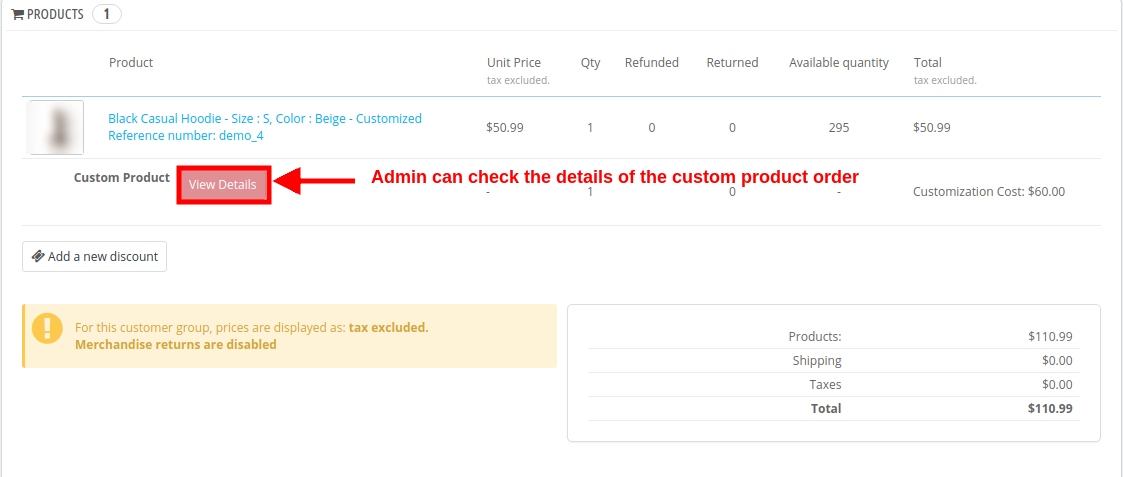
Admin can view the order invoice and all the configuration regarding the product customization from back-office. The details of an order can be viewed under the Orders section of Admin Panel.

On clicking the View button corresponding to a product, admin can check the complete order details of the custom product.

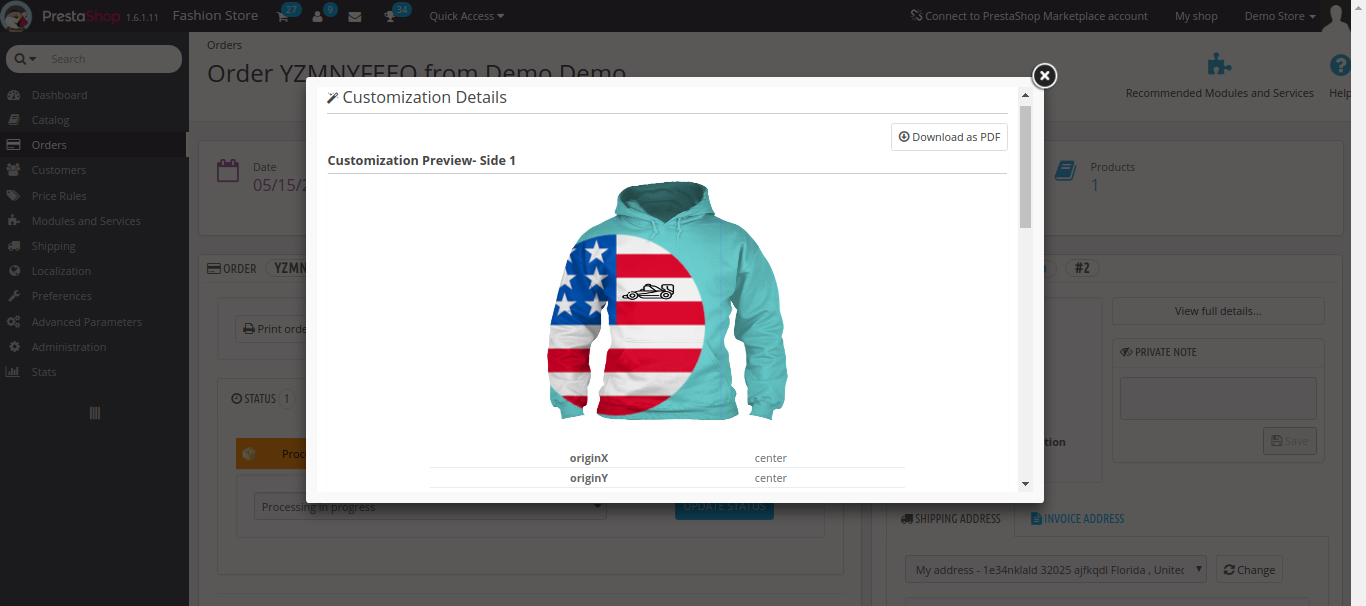
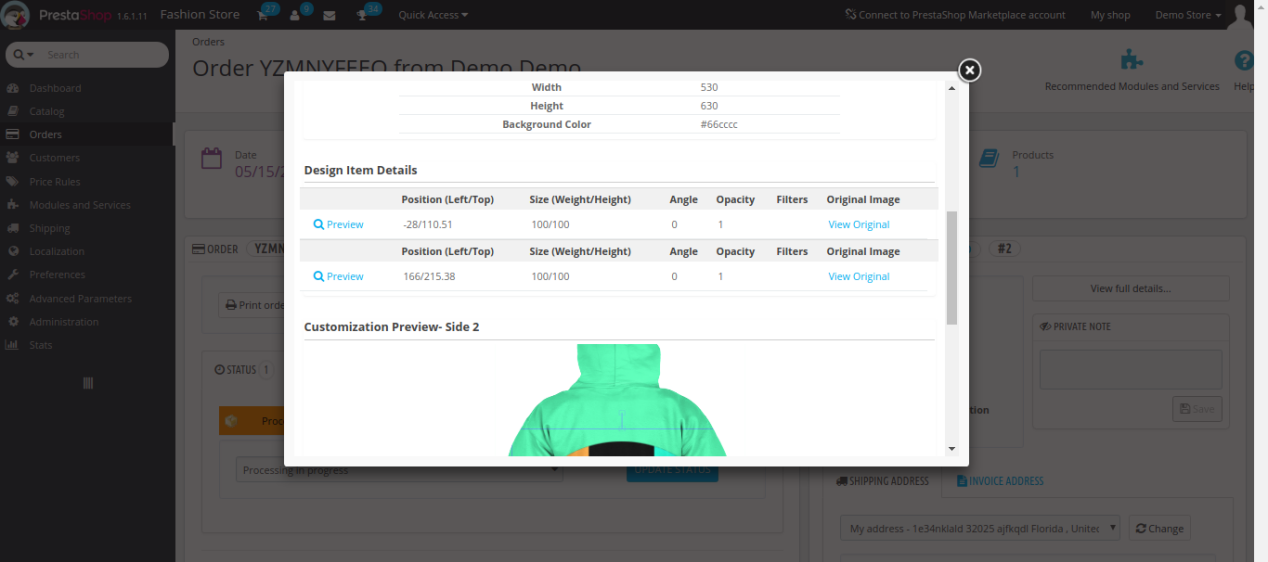
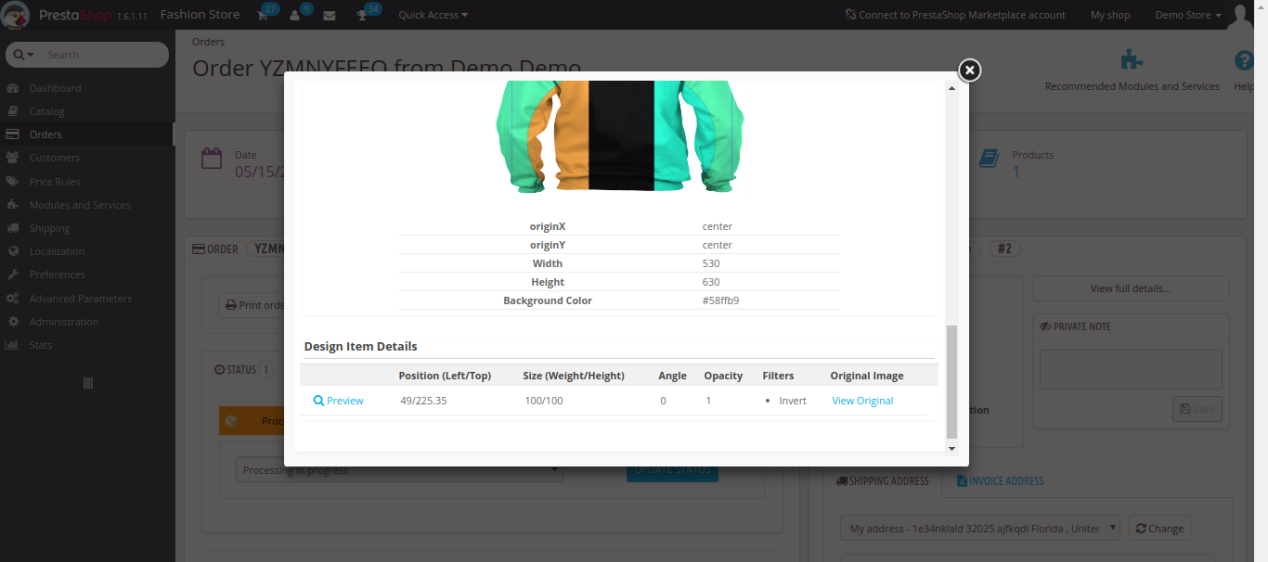
On clicking the View Details button, admin will see the complete details of personalized product in the form of a popup screen as shown below.

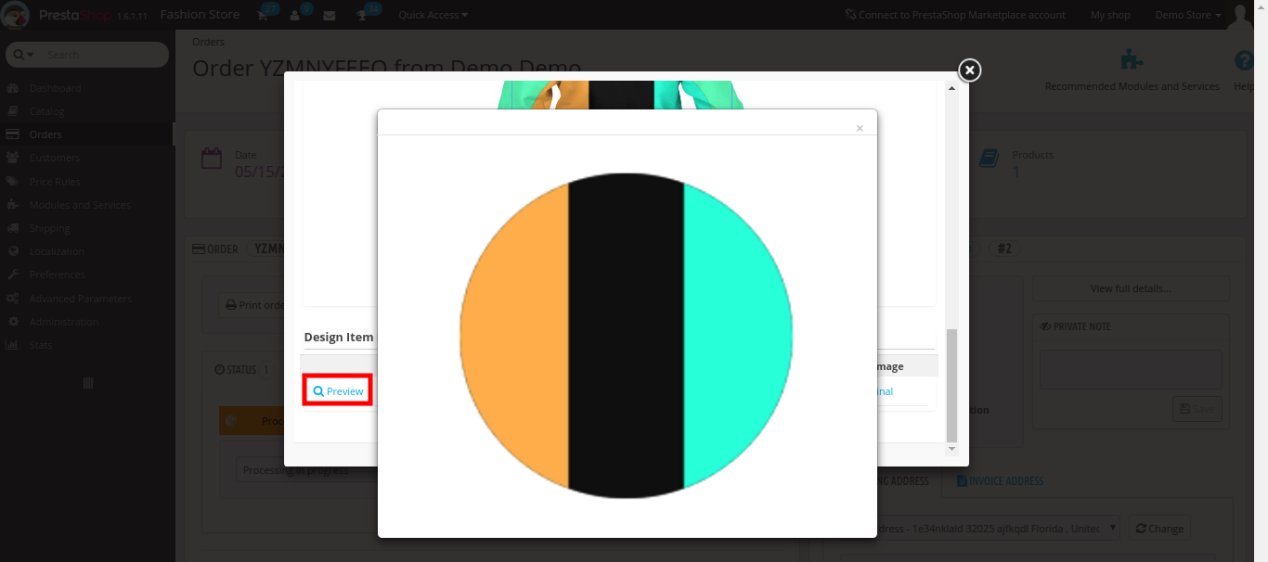
Admin can click the “Preview” option to see the custom image added to the product which looks like below.

Tutorial: Watch the Video Guide

To help you set up and use the PrestaShop Product Designer/Customizer Module, we have prepared a detailed YouTube tutorial video. This video walks you through the installation, configuration, and usage of the module step by step.

Watch the tutorial here:

For additional assistance, customisations, or queries, contact our support team at:
support@knowband.com