
![11 Best Ways to Protect Your PrestaShop Store [2026]](https://www.knowband.com/blog/wp-content/uploads/2026/07/11-Best-Ways-to-Protect-Your-PrestaShop-Store.jpg)
A PrestaShop store is rarely compromised through a single, obvious attack. Instead, security incidents typically develop gradually, with subtle warning signs such as an increase in fraudulent registrations, slower-than-normal admin logins, or unexpected changes to critical files. While these anomalies may appear insignificant in isolation, they often indicate a deeper security issue. By the time the signs become impossible to ignore, attackers have frequently already established a foothold within the system. The good news is that most of these incidents share the same handful of root causes, and each one has a known, practical fix. A properly configured PrestaShop security setup, such as the PrestaShop Security Module by Knowband, addresses nearly all of them before they ever reach your customers or your admin team.
Below are eleven practical measures to close those gaps, starting with the one most stores overlook first: the admin login itself.
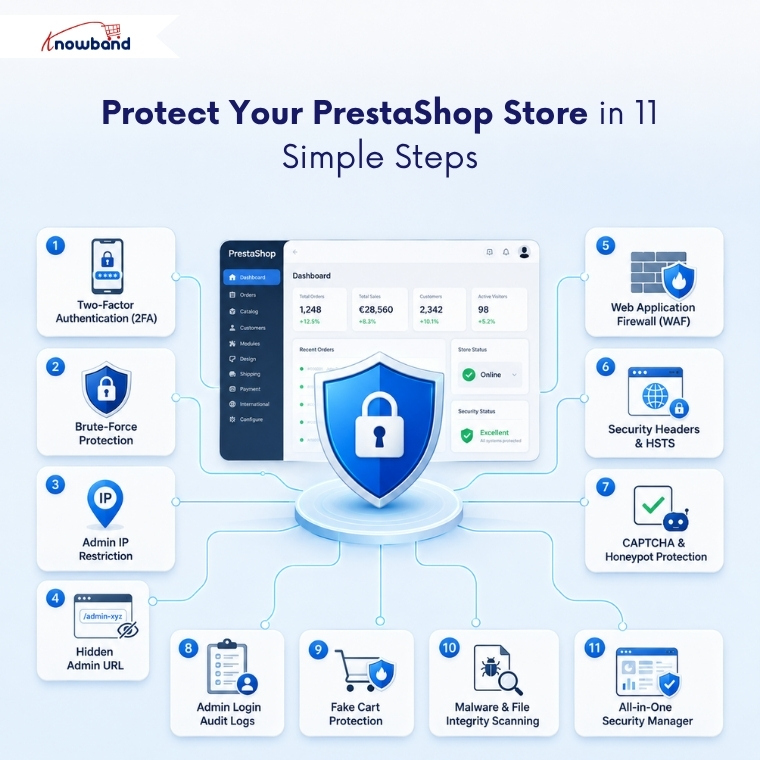
1. Turn On Two-Factor Authentication for Admin Logins
A stolen or reused password shouldn’t be enough to get into your back office. Two-factor authentication requires a time-based code from an authenticator app in addition to the password, so a leaked credential alone can’t grant access, even if it was exposed in an unrelated breach elsewhere.
Implement two-factor authentication in optional (opt-in) mode first. Once all users have successfully enrolled, enforce it as a mandatory requirement across the entire store. Keep at least one trusted IP whitelisted during the implementation, and confirm your emergency recovery link works before switching it on, since a forced 2FA implementation with no fallback is how teams lock themselves out of their own store.
2. Block Brute-Force Login Attempts Automatically
Automated scripts don’t guess passwords one at a time by hand. They try dozens of attempts per minute against your admin login, hoping one lands. This is exactly the kind of attack a PrestaShop Security Module is built to stop before it succeeds.
Brute-force protection bans an IP address after it crosses a set number of failed attempts within a time window, no manual monitoring required. If an attacker’s script tries fifty password combinations against your admin login in under a minute, the ban triggers automatically and clears itself once the ban period elapses, no manual unbanning needed on your end.
3. Restrict Back-Office Access by IP Address
If your team logs in from a known set of locations, there’s no reason to leave the admin login open to the entire internet. Restricting access to specific IP addresses blocks every other visitor before they even see a login form.
This is one of the strongest single controls against external attack attempts, since it happens before any credentials are checked at all. You must whitelist your current IP the moment you enable the restriction, so you don’t accidentally lock yourself out while turning it on.
4. Hide Your Admin URL From Automated Scanners
Bots scan for common admin folder paths the same way burglars check unlocked doors down a street. Renaming your admin folder to a private, unpredictable URL removes your store from that scan list entirely.
Anyone who doesn’t know the new address hits a 404, not a login screen. It’s a low-effort step that removes your store from the automated scanning sweeps that never bother distinguishing a small storefront from a large one.
5. Add a Web Application Firewall
SQL injection and cross-site scripting attacks target the code behind your storefront, not the login page. A PrestaShop Firewall Module inspects incoming requests for these known attack patterns and blocks matches before they reach your PrestaShop installation.
This single layer catches a large share of automated exploitation attempts that never even make it to a human’s attention, and it’s a core piece of any PrestaShop Security Module worth installing.
6. Strengthen HTTP Security Headers to Prevent Browser-Based Attacks
Security headers tell visiting browsers how to handle your site safely, things like blocking clickjacking attempts and refusing to load your store inside a hidden frame on another page. These settings are invisible to shoppers and carry no downside once configured.
They’re also frequently required for PCI compliance and security audits, so this step pulls double duty for any store running a PrestaShop Security Module alongside its existing hosting setup. Enabling HTTPS-only browsing (HSTS) alongside these headers ensures every visitor connects over an encrypted connection by default, rather than relying on them to notice a missing padlock icon.
7. Stop Spam and Fake Account Creation With CAPTCHA
Contact forms and registration pages are magnets for automated spam and fraudulent account creation. Adding CAPTCHA verification, whether through Cloudflare Turnstile, Google reCAPTCHA, or hCaptcha, filters out bots before they submit anything.
A honeypot field adds a second, invisible layer here too: real visitors never see it, but bots that fill in every field get caught instantly.
8. Keep an Audit Log of Every Admin Login
Blocking attacks matters, but knowing what already happened matters just as much. A downloadable log of every login attempt, successful or failed, with the IP address, timestamp, and account involved, turns a vague suspicion into something you can actually investigate.
Pairing this with an email alert on every successful admin login means you’ll know within minutes if someone logs in from an unfamiliar location, well before any damage compounds into something harder to reverse.
PrestaShop Threat-to-Protection Quick Reference
| Threat | Protection |
| Password guessing / credential stuffing | Brute-force protection + 2FA |
| Bots scanning for the admin URL | Hidden admin folder |
| SQL injection / XSS | Web application firewall |
| Fake sign-ups and spam forms | CAPTCHA + honeypot |
| Unnoticed or suspicious admin logins | Login monitoring + audit log |
| Bot-driven cart manipulation | Fake-cart protection |
| Undetected file changes | Scheduled malware scanning |
9. Block Bot-Driven Cart Manipulation
Not every bot targets your login page. Some crawl your store using URL parameters to pre-load carts without a real add-to-cart click, distorting inventory data and analytics in the process.
Blocking these GET-based cart manipulation requests keeps cart data clean and reflects actual shopper behavior instead of scripted noise, a detail most generic security plugins outside a dedicated PrestaShop Security Module tend to miss entirely.
10. Run Scheduled File-Integrity Scans
A compromised store doesn’t always announce itself right away. Injected code or a modified core file can sit unnoticed for weeks before it shows up on the storefront.
Scheduled anti-malware scanning compares your installation against a known-good baseline and flags new or changed files, often catching a compromise long before customers do. Knowband builds this scanning directly into its PrestaShop Advanced Security Module rather than treating it as a separate add-on.
11. Bring These Protections Together in One Module
Handling each of the ten points above with a separate plugin means ten different settings screens, ten sets of update notifications, and ten potential compatibility conflicts. This is where the PrestaShop Advanced Security Manager earns a place on this list rather than as an afterthought.
Knowband’s module brings 2FA, brute-force protection, admin IP restriction, a firewall, security headers, CAPTCHA with honeypot, fake-cart protection, and malware scanning into a single back-office screen. As a PrestaShop Advanced Security Module, it also includes a centralized security dashboard showing login attempts, active bans, and flagged IP addresses at a glance, so you’re not piecing together the store’s security data from ten separate logs.
Protecting your online store from malware, brute-force logins, and fraudulent activity is essential in 2026. A dedicated PrestaShop Security Module adds firewall rules, login protection, and suspicious activity monitoring in one place, helping keep customer data safe and building shopper trust. You can find the complete introduction and feature list of the PrestaShop Security Module on PrestaShop Marketplace. (Updated September 30, 2026)
Building These Eleven Protections Into a Working Setup
None of these eleven measures work well in isolation. A firewall without login monitoring still leaves a compromised admin account undetected, and 2FA without a recovery URL can lock out your own team during a rollout.
A PrestaShop Security Module that covers admin protection, frontend defense, and malware scanning together removes the coordination problem entirely. Store owners evaluating a PrestaShop firewall module as a starting point are usually better served checking whether it also covers the other ten features on this list before installing anything.
