PrestaShop 9.2 Ask AI vs AI Admin Assistant: Which Is Better for Store Management?

PrestaShop’s new Ask AI, introduced with PrestaShop 9.2, is a promising sign of where the platform is headed a native assistant built right into the back office that lets you query your store in plain language. It’s tied to PrestaShop 9.2 specifically, and it relies on two companion modules, the PrestaShop MCP Server and MCP Tools, being installed and configured alongside it before it can see any of your store’s data.

In practice, opening Ask AI drops a chat panel into the corner of whichever admin page you’re on, and it remembers your previous conversation the next time you reopen it. Ask something like “Which products are out of stock right now?” and it doesn’t just answer quietly in the background it shows its work: the specific MCP tool it’s about to call, a “Tool approved” confirmation step, a stated goal, and its reasoning before handing back the answer as a formatted list. That’s a genuinely nice trust signal, though the trade-off is no visible SQL you see the tool call and the goal, not the underlying query.

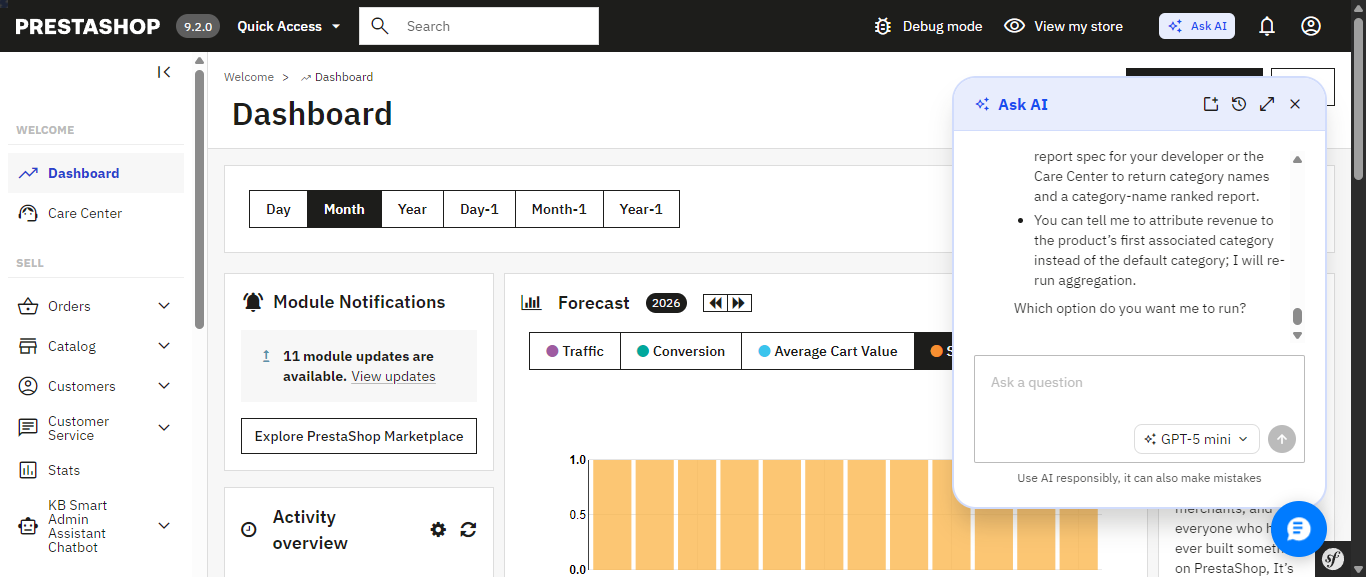
PrestaShop’s native Ask AI panel, opened from the top admin bar it remembers the previous conversation across sessions.

Ask AI shows its work: the MCP tool it calls, a tool-approval step, and its stated reasoning before answering.

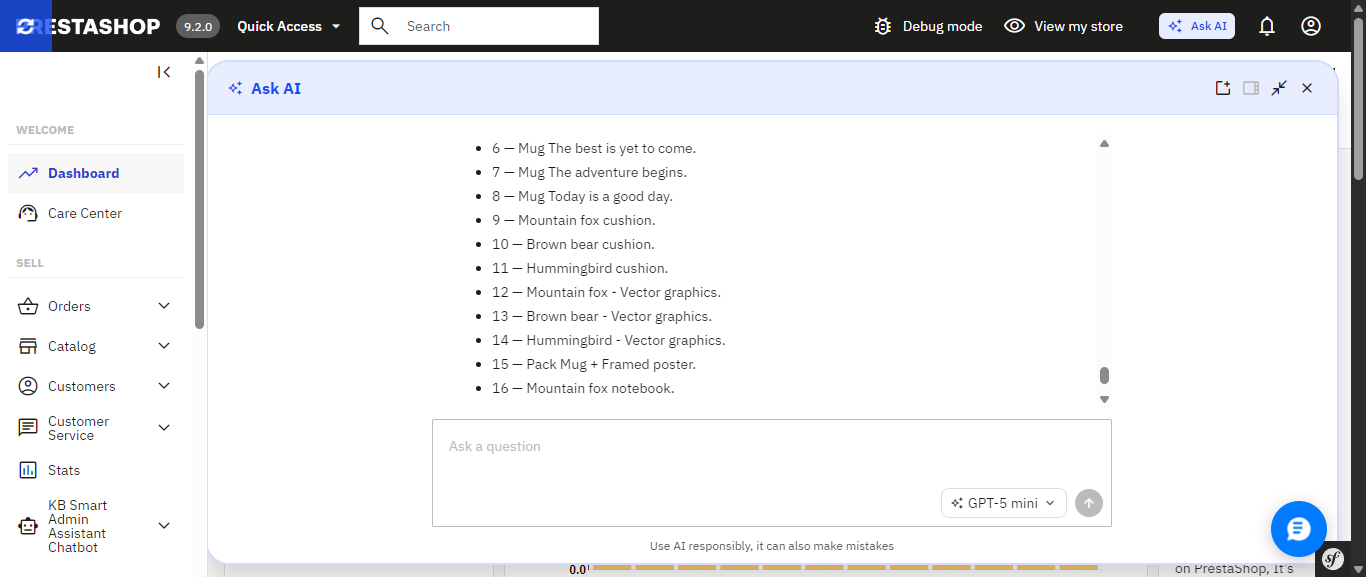
The finished answer, expanded to full width a plain list of out-of-stock products with a follow-up question box ready.

If you’d rather skip that setup, or you’re running an earlier PrestaShop version where Ask AI isn’t an option at all, there’s a module you can install today that already delivers a natural-language AI assistant and builds a good deal more around it, much of which Ask AI simply doesn’t include yet. It’s called Smart AI Admin Assistant.
 

PrestaShop Ask AI vs Knowband Smart AI Admin Assistant

Feature PrestaShop Ask AI Knowband Smart AI Admin Assistant
PrestaShop version support 9.2 1.7.x to 9.x.x
Setup requirements Requires the separate PrestaShop MCP Server and MCP Tools modules Install the module, add your API key, and start asking questions
How it accesses your data Through the PrestaShop MCP Server using defined tool calls Natural-language-to-SQL against curated, read-only database views
Taking action on your store Can execute actions with explicit confirmation required Read-only; blocks DELETE, DROP, UPDATE, INSERT and TRUNCATE
Query transparency MCP tool calls; SQL is not directly visible ✓ View, edit and re-run the generated SQL
Built-in analytics dashboard Not Available ✓ 44 widgets covering revenue, orders, stock, best sellers and more
Data export Not Available ✓ Excel and CSV exports, including full-dataset exports
Voice input Not Available ✓ Browser-based speech recognition
Quick-access shortcuts Context-aware suggestions on Product, Order and Customer pages ✓ Editable quick-query chips for common questions
Employee access control Not Available ✓ Role-based, per-employee configuration
Audit logging 30-day conversation history per user; no SQL or action-level log ✓ Timestamped query and audit log, including executed SQL

Ask AI’s confirmation-before-action design and its native integration into PrestaShop’s core are real strengths, and worth keeping an eye on. But most of what makes Smart AI Admin Assistant a complete toolkit the dashboard, the exports, the access control, the audit trail, the voice input is territory Ask AI hasn’t entered yet.

The Problem that AI Assistant

Every PrestaShop store owner knows this routine: check yesterday’s revenue, scroll through orders looking for anything stuck, check which products are running low, maybe export something to send to a partner. None of it is hard. All of it is repetitive, and all of it eats into the hours you’d rather spend on the parts of the business that actually need your judgment.

Smart AI Admin Assistant replaces that routine with a conversation. You type or speak a question the way you’d ask a colleague, and you get a precise, live answer straight from your store’s database. No dashboards to navigate. No report builder. No SQL. Just a question and an answer, in seconds.

Ask Anything, Get a Real Answer

And this is what the entire module is based upon: an engine that will help analyze the language in the question regarding orders, customers, products, sales, inventory, and coupons without requiring any technical background whatsoever. There’s no need to fill in forms or make choices from a drop-down menu; all one has to do is:

  • “How many orders were placed today?”
  • “Show me low stock products.”
  • “Which customers spent the most this month?”
  • “What’s my revenue this week compared to last week?”
  • “Which products are missing descriptions or images?”
  • “What are my top 10 best-selling products this quarter?”

Both Ask AI and Smart AI Admin Assistant let you ask this kind of question in plain language that part isn’t unique to either one. The difference shows up in everything built around it, starting with how each one actually reaches your data.

Choose the AI Model That Fits the Question. Ask AI Doesn’t Offer This Level of Control

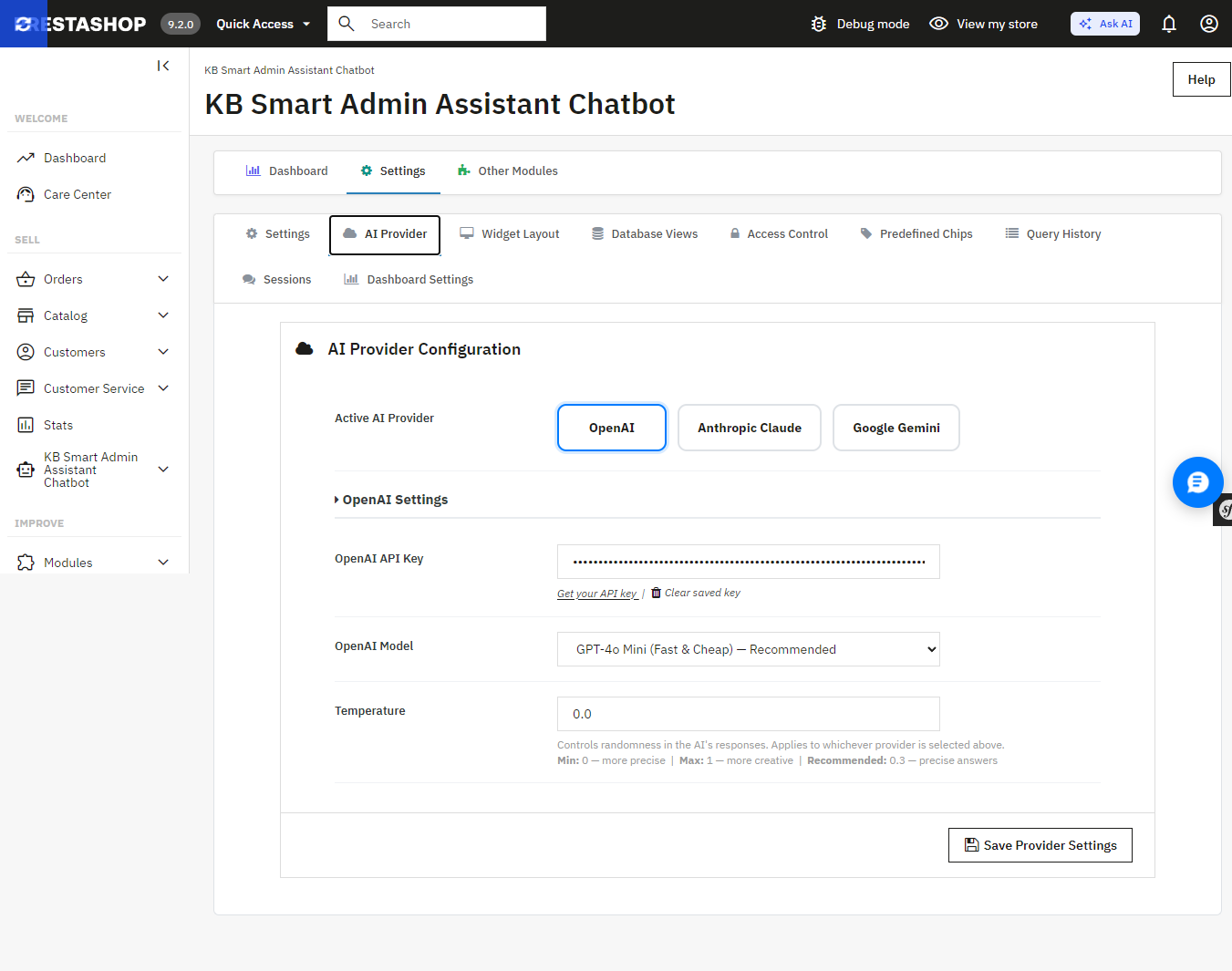
Smart AI Admin Assistant provides a true choice between the providers and the tier models without changing the code, using one settings panel:

  • OpenAI GPT-4o Mini, GPT-4o, or GPT-5.5
  • Anthropic Claude Haiku 4.5, Sonnet 4.6, or Opus 4.7
  • Google Gemini 3.5 Flash or 3.1 Flash-Lite

Want fast, low-cost answers for quick daily checks? Point it at a lighter model. Want the deepest possible breakdown of a slow sales month? Switch to a flagship tier for that one query. Ask AI, by contrast, connects to whichever single provider key you’ve configured it doesn’t offer this kind of tier-by-tier switching from within the assistant itself.
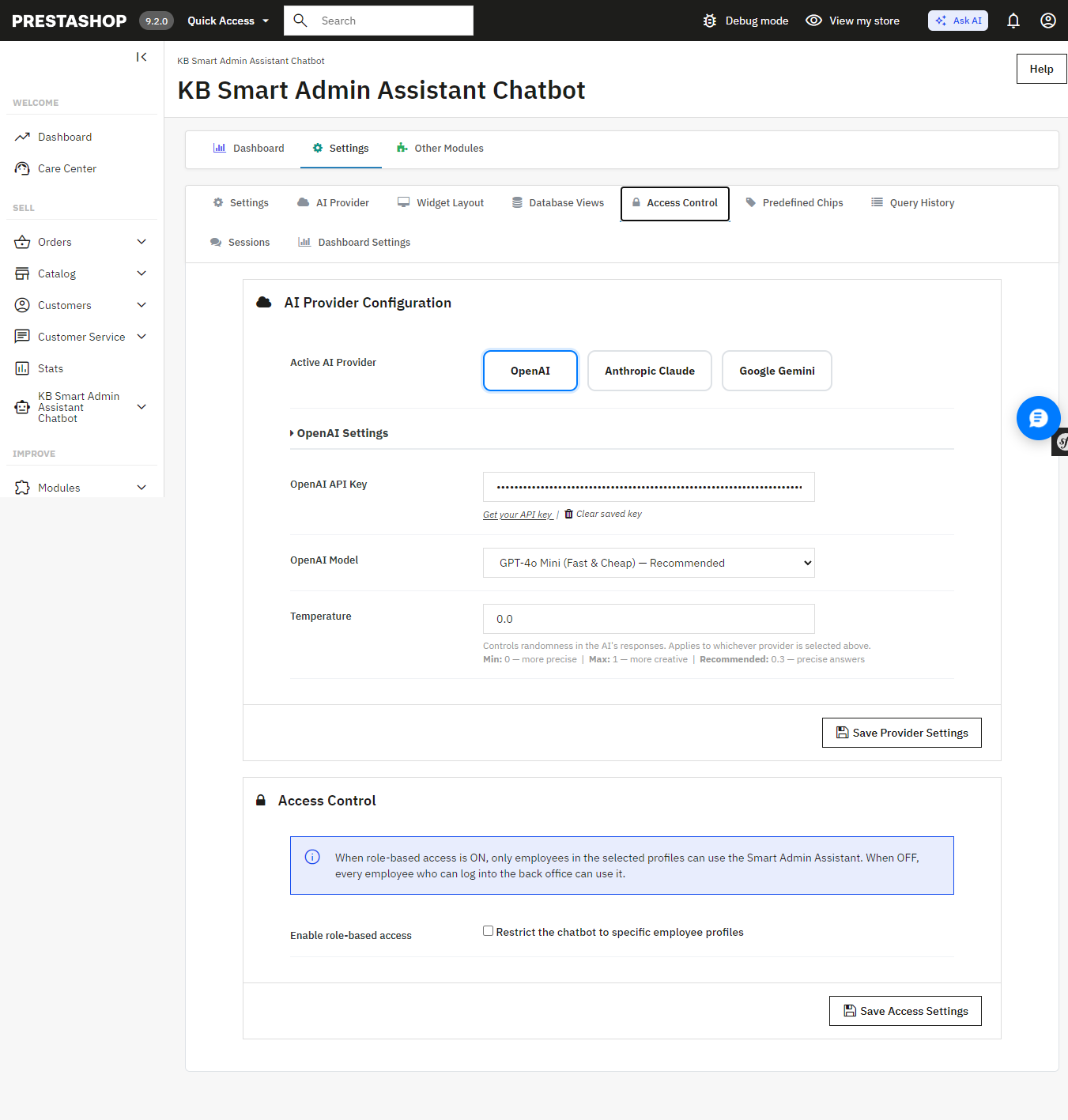
 

Smart AI Admin Assistant’s AI Provider settings switch between OpenAI, Anthropic Claude, and Google Gemini, and pick a model tier for each.

An Answer, Not Just a Table of Numbers
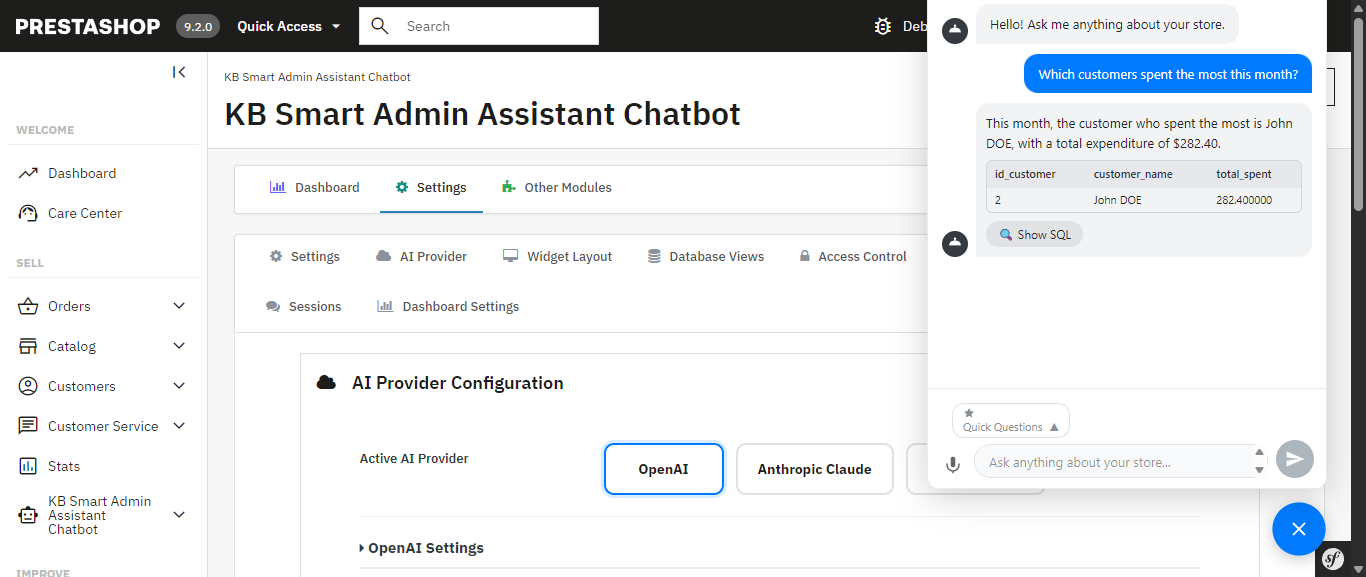
 

Every query comes back with more than raw data the assistant generates a plain-language summary alongside it, calling out the trend or number that actually matters. Ask about your inventory and you don’t just get a table; you get told which products are about to become a problem.

Smart AI Admin Assistant for Prestashop answering “Which customers spent the most this month?” with a plain-language summary and the underlying data.

A Full Analytics Dashboard Comes Built In Something Ask AI Doesn’t Have
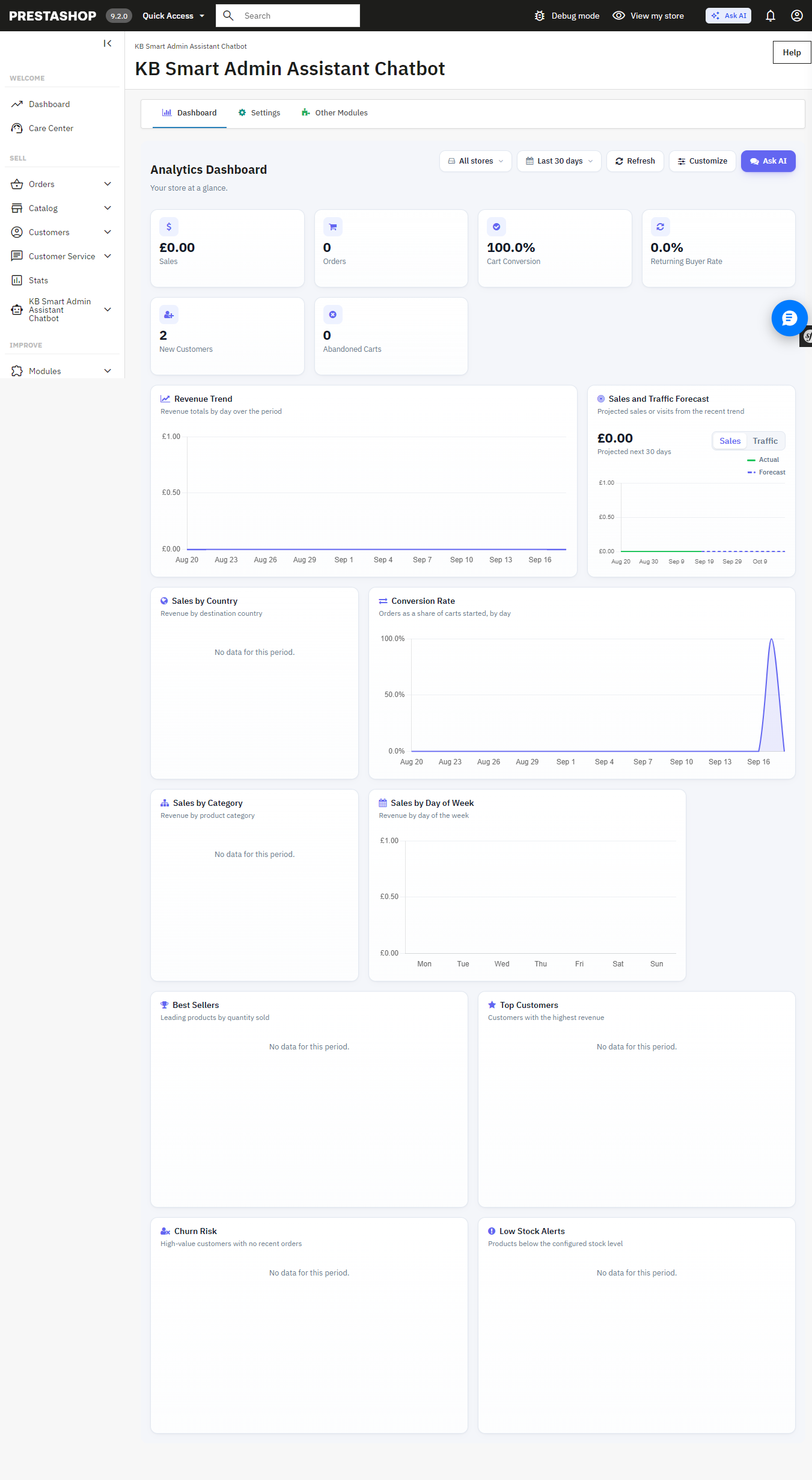
Beneath the chat interface is the full back office analytics dashboard with 34 widgets such as revenue analytics, order quantity, cart conversion rates, customer retention rates, inventory alerts at product level, best sellers, churn rate analytics, sales by countries, categories, payment methods, time slots, etc. Each of these widgets is easily toggleable and reorderable to create your perfect dashboard view. It can also be used as the PrestaShop back office home page.

The built-in Analytics Dashboard revenue, orders, cart conversion, and more, all on one page.

Answers You Can Export, Share, and Verify Not Available in Ask AI
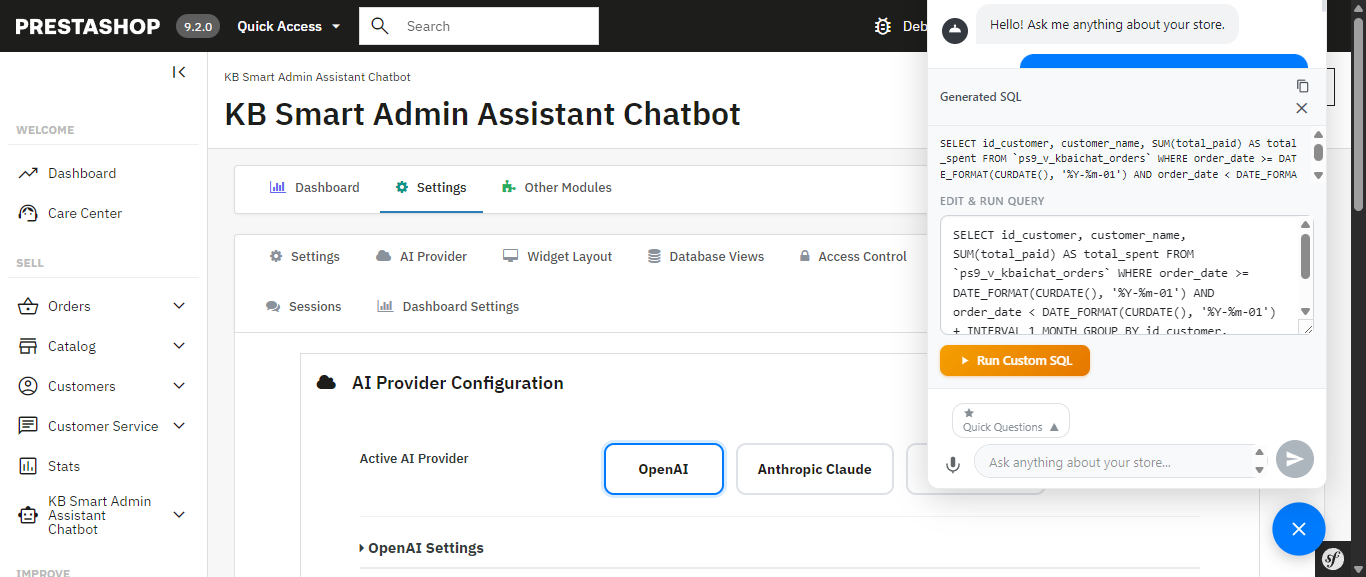
The exact generated SQL is visible, editable, and re-runnable nothing is a black box.
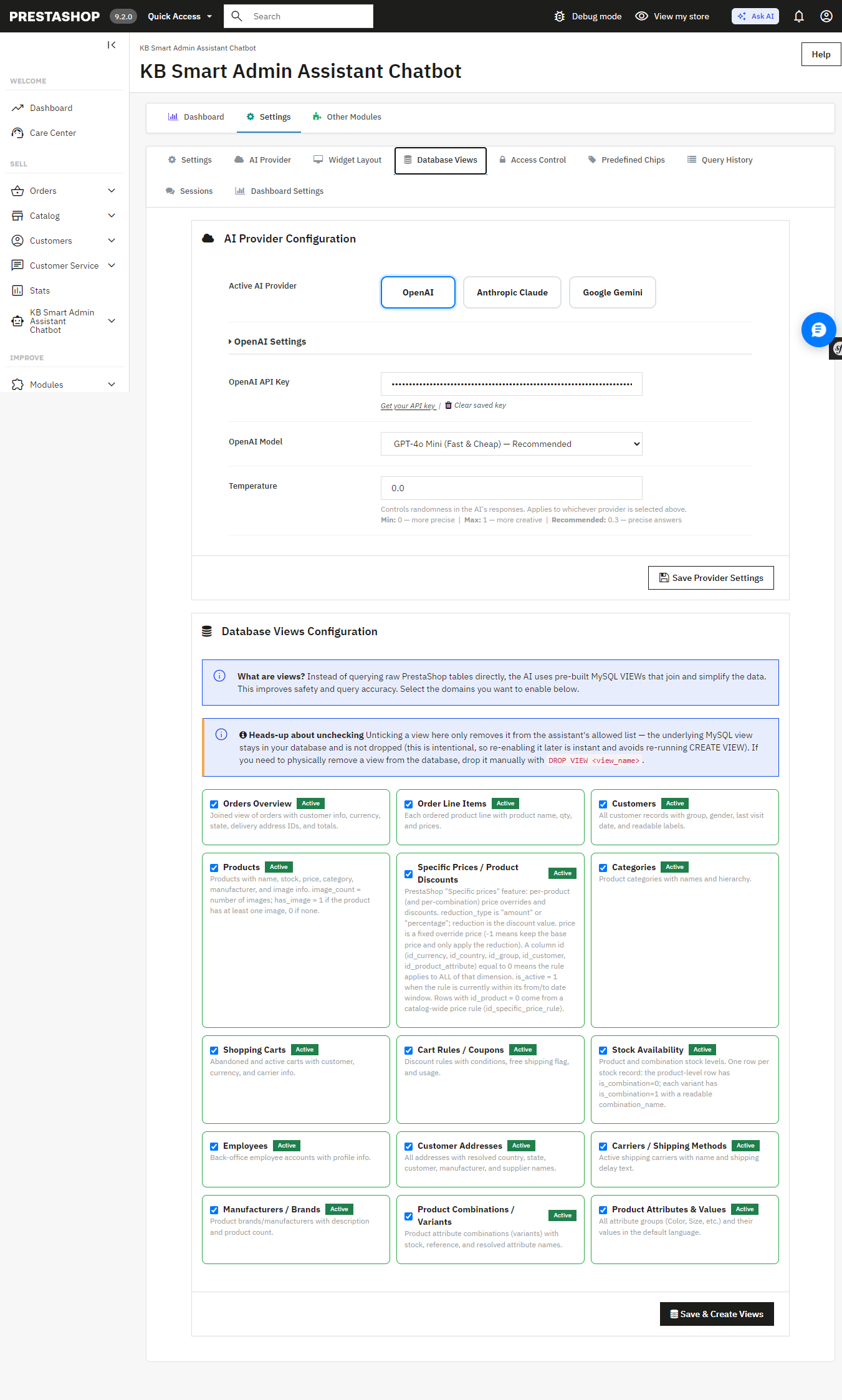
Database Views configuration the AI queries curated, read-only MySQL views instead of raw tables I

Get a result you need to hand off? Export it instantly to Excel or CSV full datasets, not just the rows visible on screen. Ask AI has no export functionality; any data it surfaces stays inside the chat conversation.

Allowing the assistant access to your database must be carefully considered, and the module has been designed with this in mind: strict restrictions on DELETE, DROP, UPDATE, INSERT, and TRUNCATE ensure that the assistant can only access your information, not write to it.. Multi-statement execution is blocked and SQL-injection patterns are screened automatically and unlike Ask AI, which works through MCP tool calls with nothing to inspect, you can view, edit, and re-run the exact SQL Smart AI Admin Assistant generated yourself. Nothing runs as a black box.

The exact generated SQL is visible, editable, and re-runnable nothing is a black box.

Database Views configuration the AI queries curated, read-only MySQL views instead of raw tables.

Built for Teams, Not Just Solo Store Owners Ask AI Has No Equivalent

If you have a shop with several admins or you manage this on behalf of your clients as an agency, the module comes with role-based employee access controls, and you get to determine precisely which employees have access to the assistant and what they are permitted to ask. All queries will be timestamped and recorded to provide you with a full audit trail. The Ask AI platform provides 30 days of chat history for each individual; however, it does not provide user permissions and an audit trail per query.

Access Control restricts the assistant to specific employee profiles.

Query History a full, timestamped audit log of every question asked, including the generated SQL.

Speak Instead of Type Ask AI Doesn’t Support Voice Input

Voice input, built on the browser’s native speech recognition, lets you ask your question out loud instead of typing it useful on a warehouse floor, during a busy order-processing morning, or anytime your hands are full. Ask AI is text-only.

Quick-Access Shortcuts for the Questions You Ask Every Day More Flexible Than Ask AI’s Suggestions

The Prestashop AI Admin Assistant ships with ready-to-use “quick query chips”: Total Orders Today, Revenue This Month, Low Stock Products, Abandoned Carts (Last 30 Days), Top Customers by Revenue, and more that you can fully edit and customize. Ask AI offers contextual suggestions on Product, Order, and Customer pages, but they aren’t something you can edit or add to.

Get Started

If you’re ready to stop digging through admin screens and start just asking your store what you need to know, Smart AI Admin Assistant is available, with live admin and front-end demos and a full user manual so you can see exactly what you’re getting before you buy:

Get PrestaShop Smart AI Admin Assistant

How Are You Preparing Your PrestaShop Store for AI Search (ChatGPT, Gemini & Perplexity)?

A growing share of shoppers are now asking ChatGPT, Gemini, or Perplexity a product question instead of using Google search. Similarweb’s tracking of AI referral traffic shows ChatGPT’s share of worldwide generative AI web traffic has actually fallen from around 76% to about 53% over the past year, not because demand for ChatGPT is reducing, but because people are shifting to Gemini and Claude as well. For store owners, the PrestaShop llms.txt generator module is one practical response to this shift, but it only makes sense once you understand what the shift actually involves. This kind of preparation is no longer a future problem to plan around eventually. It’s already happening, and most stores are not set up for it.

This article explains what “AI search ready” means for a PrestaShop store and explores how tools such as a PrestaShop llms.txt generator addon can support a broader AI search optimization strategy.

1.0 Why a PrestaShop LLMs.txt Generator Module Alone Is Not Enough for AI Search

Google’s crawler indexes a page and ranks it against millions of others. An AI answer engine works differently. When someone asks ChatGPT for a product recommendation, the model either accesses previously learned data or retrieves content live through an integrated search tool or, increasingly, both. Then, instead of just providing a list of links, it concatenates an answer.

That shift matters for a store’s visibility in two separate ways. First, whether AI crawlers can access and correctly parse your product, category, and policy pages at all. Second, whether the underlying information in those pages is structured sufficiently for a model to be able to get accurate information, such as price, stock status, shipping terms, etc., and not guess or hallucinate them.

Research data from Similarweb is also showing something interesting: the proportion of answers linking back to sources from citation presence has increased from nearly 1.6% in mid-2025 to approximately 6.8% in May 2026. Still a minority, but rising, it’s climbing, and it means being citable is starting to have a measurable payoff.

ChatGPT, Gemini, and PerplexityBot: all three platforms behave differently. ChatGPT increasingly blends its training knowledge with live retrieval through GPTBot and connected search tools, and its homepage referral behavior shifted sharply after a May 2026 product update. Gemini leans on Google-Extended, a crawler separate from standard Googlebot, and on Google’s existing search index, so a page that already ranks well organically has a head start there. Perplexity is built around live web retrieval and generates answers using information gathered from current online sources. This makes crawler access and clear, up-to-date page content especially important.

An llms.txt file gives AI systems a clear, organized summary of what your site contains, so they can find and reference the right products and pages faster than by crawling everything from scratch. What it can’t do is solve issues with the underlying content: it won’t get a bot past a robots.txt block, and it can’t correct a product page with outdated pricing or a return policy buried in a PDF. Think of it as the index that makes your store easier to reference, not a replacement for having accurate, accessible pages underneath it. PrestaShop LLMs.txt Generator Module is a useful part of the setup, but it cannot replace accurate, accessible, and well-structured content on your store.

2.0 What “AI Crawler Access” Actually Means for Your Store

AI platforms run their own bots, separate from Googlebot, to gather content. GPTBot collects data for OpenAI’s models. PerplexityBot fetches current web content to generate cited answers. Google-Extended is a distinct crawler from regular Googlebot, used specifically for training and grounding Gemini. Anthropic-AI serves the same function for Claude.

None of these bots are automatically blocked, but none are automatically welcomed either. A store’s robots.txt file controls which of these crawlers are allowed in, and a surprising number of PrestaShop stores have robots.txt rules left over from years of accumulated tweaks that nobody has reviewed since. If GPTBot or PerplexityBot is disallowed somewhere in that file, ChatGPT and Perplexity simply cannot see your catalog, no matter how good your product pages are.

This is where a dedicated PrestaShop AI crawler indexing module saves time. Rather than manually editing robots.txt and cross-referencing crawler documentation every time a new AI platform launches a bot, a module built for this purpose manages crawler permissions as a configurable setting, with no manual file edits required. Most stores that skip this step do so because they didn’t find it important enough to address this. But it is. A good PrestaShop AI crawler indexing module is the difference between your catalog being visible to ChatGPT and Perplexity or invisible.

3.0 Understanding the Role of llms.txt in AI Search 

lms.txt is a proposed file format, introduced by Answer.AI’s Jeremy Howard in 2024, that is located at a site’s root and gives AI systems a curated, Markdown summary of a site’s most important content. The idea borrows from robots.txt and sitemap.xml but serves a different purpose: instead of controlling crawl permissions or listing every URL, it hands a model a short, human-written index of what the site actually contains.

It is very important to know about the current state of the evidence. Independent analysis of AI crawler traffic, including a review of over 500 million bot requests by the analytics firm Limy, found that the share of requests actually adopting a site’s /llms.txt file was negligible compared to traffic from GPTBot, PerplexityBot, and similar crawlers hitting normal pages. To put it in simple terms, most AI crawlers today are still reading your regular HTML content far more than they’re reading your llms.txt file. That doesn’t mean llms.txt is useless, but it does mean nobody should treat it as a guaranteed ranking lever inside ChatGPT or Gemini.

What a good PrestaShop AI answer engine optimization addon is more reliably good for is structure and control. A well-built llms.txt file gives you a single place to define which products, categories, and CMS pages you want AI systems to reference, and to add short editorial context around them, things like which categories are seasonal, which CMS pages contain your actual return policy versus a placeholder. That’s a real, useful function even if it isn’t yet the ranking signal some vendors imply it is.

4.0 The Foundation of AI Search: Accurate and Structured Product Data

If an AI model is going to accurately describe a product, recommend a size, or state a price, that information needs to be unambiguous on the page itself. This is where most of the real work sits, and it overlaps heavily with practices PrestaShop developers already know from technical SEO.

A few specifics worth checking on a PrestaShop store:

  • Correct and up-to-date product schema (Product, Offer, AggregateRating if relevant) correctly filled out and updated, as a product with outdated structured data will confidently claim the wrong price.
  • Clear, simple language on CMS pages for shipping, returns, and sizing (not within a PDF or an image), as AI systems are much more likely to interpret text than scanned documents.
  • Product and category descriptions that state the facts instead of being totally marketing-oriented, because a summary you write about your page for a shopper must know what to say, not just how to say it.
  • Canonical URLs kept clean so an AI crawler doesn’t index three duplicate versions of the same product under different filter parameters.

None of this is something new. It’s the same discipline that has always mattered for good ecommerce SEO, just now read by a different kind of visitor.

5.0 Why AI Search Optimization Matters for Your Store Today 

The ecommerce-specific numbers back up the urgency, even if they’re still early and moving fast. As reported by eMarketer via retail-focused data from Adobe Digital Insights, AI-referred traffic converted 42% better than non-AI traffic as of March 2026, a significant turnaround from just a year prior, when it was found to convert worse than average traffic. AI-referred visitors, meanwhile, spent more time on the site and made more money per visit than an average shopper, provided by the same data.

That’s not proof that any single tactic guarantees results. It is evidence that the shoppers arriving through AI platforms right now tend to be further along in their decision, and that being visible and accurately represented to those platforms carries real commercial weight, not just novelty value.

6.0 A Practical AI Search Readiness Checklist for PrestaShop Stores

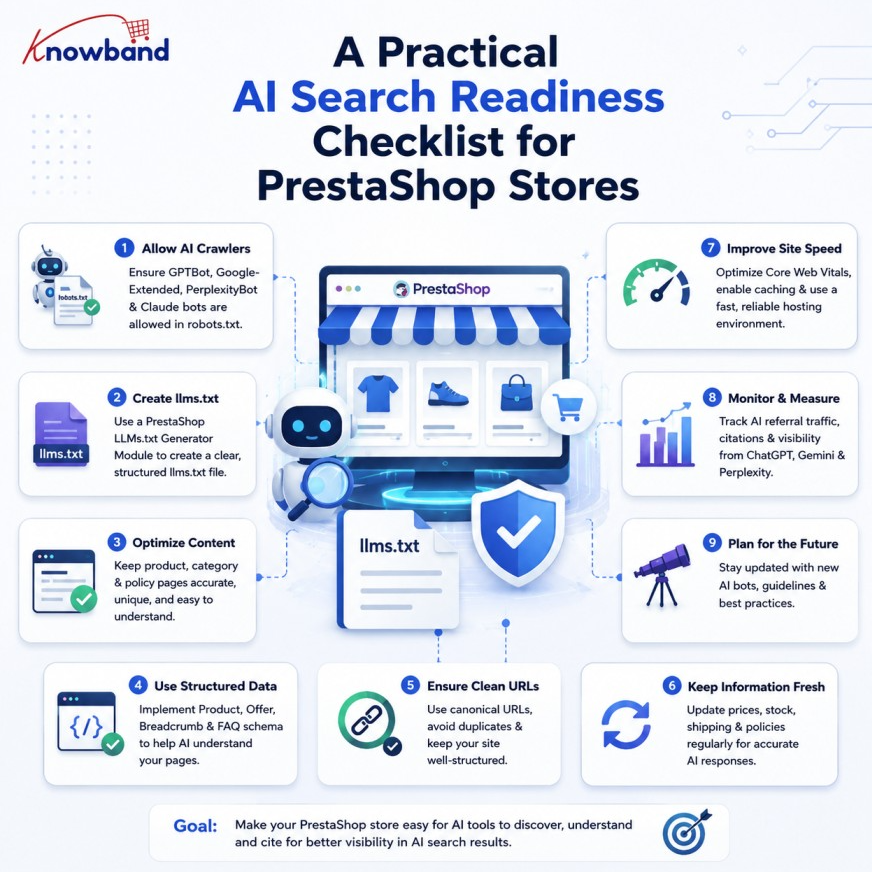
Instead of following every new trend in AI search, retailers can focus on a few practical steps to prepare their stores:

  1. Check robots.txt and ensure that GPTBot, PerplexityBot, Google-Extended, and Anthropic-AI are not being accidentally blocked.
  2. Check product pages for accurate and up-to-date schema, especially price and availability.
  3. Rewrite key CMS pages (shipping, returns, sizing) in plain text rather than images or PDFs.
  4. Publish an llms.txt file using a PrestaShop llms.txt file generator addon that points to your actual catalog structure and policy pages, understanding it as a structure and control tool rather than a guaranteed visibility boost.
  5. Recheck this list quarterly, since crawler behavior and AI platform capabilities are still changing fast.

That fourth step is where a dedicated tool saves real time. Knowband’s PrestaShop LLMs.txt Generator Module will automatically generate and update this file from the store’s data, allowing the administration to choose which AI crawlers (GPTBot, PerplexityBot, Anthropic-AI, Google-Extended, DeepSeekBot, etc) are referenced, filter which products, categories, and CMS pages are included, and add custom context around each section without having to hand-edit a Markdown file every time the store’s data changes. It handles the mechanical part of step four, so the actual product and content work in steps two and three get the attention they need.

PrestaShop AI Search Optimization: Key Takeaways and Next Steps

A PrestaShop llms.txt generator module is a small part of a broader setup. Preparing a store for AI search starts with the fundamentals: allowing AI crawlers to access your site, maintaining accurate structured data, and providing clear, easy-to-read product and policy information. An llms.txt file can complement these efforts by giving AI systems a structured overview of your store. As AI search continues to evolve, keeping these core elements accurate and up to date will remain essential.

If maintaining an accurate llms.txt file manually isn’t practical for your catalog size, the PrestaShop AI answer engine optimization addon is worth a look as a way to keep your llms.txt file up to date without adding it to your team’s manual workload.

👉Explore the Module with Our Video Guide

If you have questions or need assistance with your website performance or migration, our experts are here to help. Contact the Knowband team at support@knowband.com today for reliable ecommerce plugins tailored to your eCommerce needs.