7 Proven LLM Use Cases in E-commerce That Boost Sales in 2026


AI in e-commerce has evolved from being experimental to becoming a practical tool for daily operations and revenue generation. AI-referred traffic to US retail sites grew 393% year over year in the first quarter of 2026, and by March 2026, that AI traffic was converting 42% better than non-AI traffic, according to Adobe Analytics. Shoppers now arrive from ChatGPT, Perplexity, and Gemini already deep into their decision, and they are buying. For e-commerce merchants, the practical question is no longer whether AI belongs in the store, but which applications actually return more than they cost to set up. Some improve customers’ in-store experience directly, through faster responses and better product discovery. Others work quietly in the background, keeping the catalog visible to AI search engines or turning store data into decisions that a merchant can act on the same day. The following seven LLM use cases demonstrate how AI delivers value in e-commerce and how PrestaShop merchants can implement each one in practice.

Why LLM use cases in e-commerce shifted from experiment to revenue in 2026

Customers have started to rely on AI platforms more for their day-to-day decisions. When a customer is trying to figure out what to buy inside an AI chat, they are coming to your store with the intent to buy, which is why AI sessions are converting more than traditional channels and generating more revenue per visit.

As AI has become a bigger part of e-commerce, merchants who optimize their stores for AI visibility, AI-powered customer interactions, and faster content creation gain a competitive advantage.


1. Conversational AI shopping assistants that answer buyers in real-time

Conversational commerce is reshaping how customers interact with online stores. Bots have evolved simple but time-consuming question answering into a sophisticated shopping companionship, guiding customers throughout their journey by being present 24/7. This shift matters for conversion because most abandoned carts are not due to price. They occur because of unanswered questions. An assistant who resolves the question while intent is still warm generates revenue.

For PrestaShop stores, a good PrestaShop AI Chatbot handles this without hiring support staff. The PrestaShop AI Chatbot provides multiple model choices to store admin: ChatGPT, Claude, Gemini, DeepSeek, and trained on your catalog and FAQs, so it answers product and order questions, and suggests relevant items accurately. Because the AI-powered chatbot fetches from live store data, its answers stay accurate as your catalog changes, and a well-configured PrestaShop AI Chatbot quietly reduces the support load that used to take up weeks.

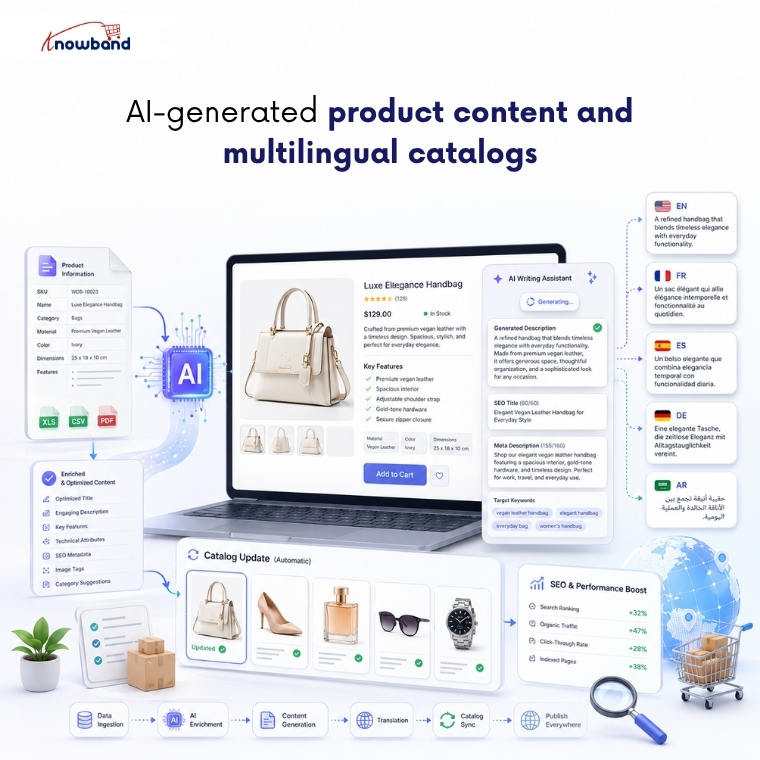
2. AI-generated product content and multilingual catalogs

Product descriptions serve as the foundation of e-commerce listings. But creating a unique product description in multiple languages for thousands of products manually is a very hectic task. At the same time, they have to be convincing enough for a human to buy, and have to be optimized enough to get crawled by Google and AI crawlers. Thin, half-written descriptions fail at both.

This is where language models genuinely earn their place. They draft descriptions, titles, and meta fields in a consistent voice across your whole catalog, then translate as well so you can sell in a new country without hiring a translator. The PrestaShop AI Content Generator and Translator bring both jobs into the back office. The module runs across several providers, Gemini, ChatGPT, Claude, and DeepSeek, writes copy and SEO meta in bulk, also translating catalog into multiple languages for international customers. For growing stores, an AI Content Generator and Translation Module makes it easy to keep product information updated while maintaining a consistent brand voice across multiple languages.

3. AI-powered review generation and authentic social proof

Reviews are one of the strongest conversion triggers. Most shoppers read them before they commit, and a product page carrying honest, specific feedback converts far better than one sitting at zero. The difficulty is rarely the value of reviews. It is gathering enough of them that customers start trusting and purchasing without a second thought.

AI can generate review-style content: star ratings, titles, and body copy written for specific products, published through the native Product Comments module. The PrestaShop AI Review Generator does exactly this, and the e-commerce AI review generation module gives merchants granular control over tone, language, rating distribution, and publishing schedule.

The module generates AI-powered review drafts on demand or according to a predefined schedule, helping merchants keep product pages active with fresh content. Administrators retain full control through configurable publishing rules, scheduled publishing, and manual approval options, ensuring only appropriate reviews appear on the storefront.

4. AI-written social media and marketing content

Keeping social channels updated with regular postings is where most small teams fall behind. Creating posts for every launch, every promotion, every seasonal push manually consumes time that merchants rarely have. Generative AI can create a week’s worth of social media content using store products, adapting the tone for each platform while keeping your publishing schedule consistent.

SocialAI Pro is the PrestaShop way into this. As a PrestaShop AI Marketing Content Generator Addon, it reads your product data and produces posts, captions, and hashtags you can line up and schedule easily. For stores that rely on social media but lack the time to create content consistently, the PrestaShop AI Marketing Content Generator Addon automatically generates accurate, on-brand posts directly from your product catalog.

5. AI-assisted product video across the storefront

Video sells because it answers what a photo cannot. Watch a product move and you grasp its size, its fit, and how it is used far quicker than any still image explains it, and that understanding turns into conversions. But creating videos for thousands of products is not only time-consuming, but it is also very expensive. AI removes that obstacle by making short product videos in less time and at less cost by using just a prompt.

VideoMate provides the perfect solution for PrestaShop store owners. Merchants looking for a Prestashop AI Video Generator usually want live product video added without the involvement of a developer. The Knowband’s PrestaShop VideoMate helps to generate videos using AI and add them to the home page, product pages, category pages, and best-seller pages from the admin panel with just a few clicks. The Prestashop AI Video Generator makes sure AI-generated product videos are actually displayed on your product pages, where they can influence purchase decisions, instead of remaining unused.

6. Getting your store recommended by AI search engines

AI assistants can only recommend a store they can read, and Adobe has found that many retail sites are not yet machine-readable enough for AI systems to interpret cleanly. If ChatGPT or Perplexity cannot parse your catalog and policies, you are invisible in the answers where high-intent shoppers now start.

An llms.txt file fixes that. It gives AI crawlers a clean, structured summary of what you sell and how you operate, in the format those models actually read.

The LLMs.txt Generator produces that file from your existing catalog. A PrestaShop llms.txt generator module lets you filter to active or featured products, include the CMS pages that answer purchase questions like shipping and returns, and toggle individual crawlers such as GPTBot, PerplexityBot, and Google-Extended. For multistore setups, a PrestaShop llms.txt add-on generates a separate file per shop, and a cron keeps each one updated as your catalog moves. Configured well, a PrestaShop llms.txt generator module is how a store starts being a source that AI engines trust.

👉Explore the Module with Our Video Guide

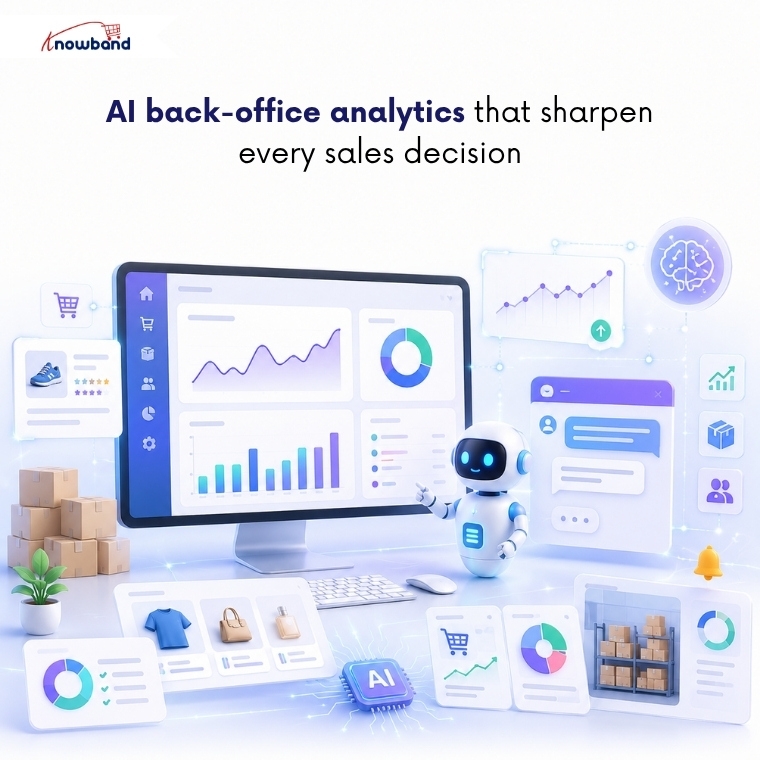
7. AI back-office analytics that sharpen every sales decision

Every restock, promotion, and retention call depends on knowing what your data says right now, and manual reporting workflow delivers that answer too slowly to act on.

Large language models reduce that gap. Admins can ask questions in plain English, get the number instantly, and uncover trends and opportunities that traditional reports often fail to reveal.

The PrestaShop Smart AI Admin Assistant puts this capability directly inside the back office. Its PrestaShop Back Office Analytics layer pairs a natural-language query interface with a full dashboard of configurable widgets covering revenue trends, best sellers, slow movers, low stock alerts, and reorder suggestions, all through read-only database access, so nothing in the store can be changed through the chat. Role-based access control means operations staff see the data relevant to their role without exposing financials or customer records across the whole team.

The difference between knowing a product is slowing down and knowing it three weeks before a stockout is the difference between a proactive decision and damage control. Strong PrestaShop Back Office Analytics is what closes that gap, not at the end of the month when the report runs, but the moment someone thinks to ask.

👉Explore the Module with Our Video Guide

Where these LLM use cases in e-commerce leave your store in 2026

The through-line across all seven is simple. AI now shapes both how customers find your store and how efficiently you run it, and the stores that treat this as a channel are advancing. You don’t need to implement every use case at once; instead, focus on the one that is closest to resolving your current goal, whether that is unanswered questions, thin content, or invisibility in AI search, and build from there.

What makes this practical for PrestaShop merchants specifically is that most of these capabilities already exist as modules that install into the admin you use every day, several of them from Knowband. Start with the use case that is costing you sales right now, and let the rest follow as the channel grows.

Prestashop Gemini/ChatGPT/Claude/DeepSeek Content Generator & Translator Addon – User Manual

The Knowband AI Content Generator and Translator for PrestaShop is a cutting-edge module designed to create and translate content for PrestaShop store owners. By leveraging the advanced capabilities of Claude AI, ChatGPT AI, DeepSeek AI and Gemini AI, the module enables store owners to generate exceptionally high-quality content. Notably, the PrestaShop SEO-Optimized module provides SEO-friendly product content, including product descriptions, product titles, category descriptions, meta titles, and meta descriptions, all while maintaining content integrity and authenticity.

Moreover, the PrestaShop AI-powered Translator Addon seamlessly integrates with Claude AI, ChatGPT, DeepSeek AI and Gemini AI, thereby providing accurate and efficient translations for product content.

In addition, store owners can generate content effortlessly and in no time thanks to the powerful PrestaShop AI module. As a result, Knowband’s PrestaShop AI Content Generator enhances creativity in product descriptions while ensuring that all generated and translated content follows SEO best practices.

Furthermore, the Claude AI Content Generator for Prestashop integrates smoothly with “Claude AI API,” “Gemini AI API,” “DeepSeek API”, and “ChatGPT API,” which guarantees a hassle-free experience for both content generation and translation. Equally important, the built-in SEO optimisation features significantly improve search rankings while preserving content integrity.

What’s New in Prestashop AI Content Generator & Translator Module v1.0.2

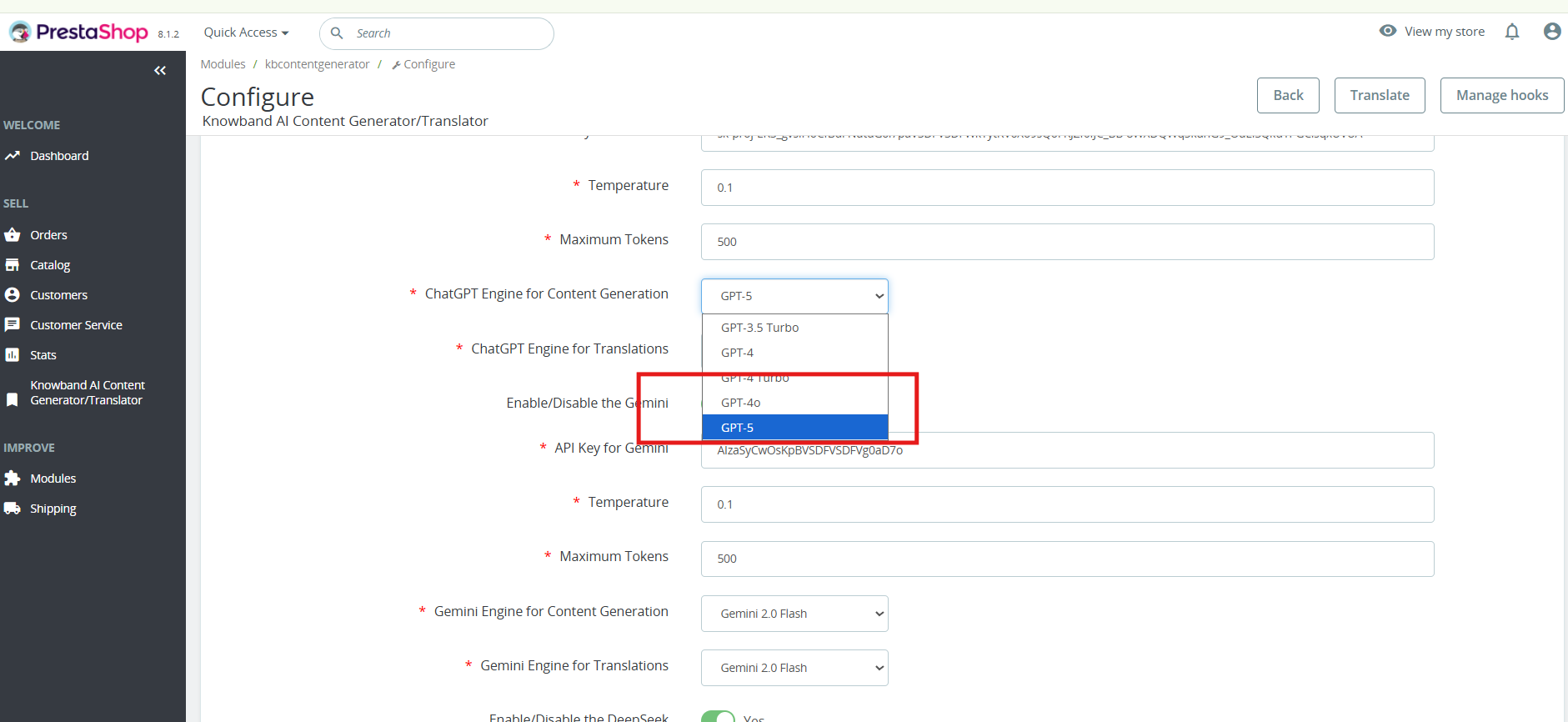
ChatGPT -5 for Smarter Content: The Prestashop AI Content Generator Addon now supports GPT-5, along with GPT-3.5, GPT-4 Turbo, and GPT-4.5. It enables faster, more accurate, and creative generation of product titles, descriptions, and meta content.

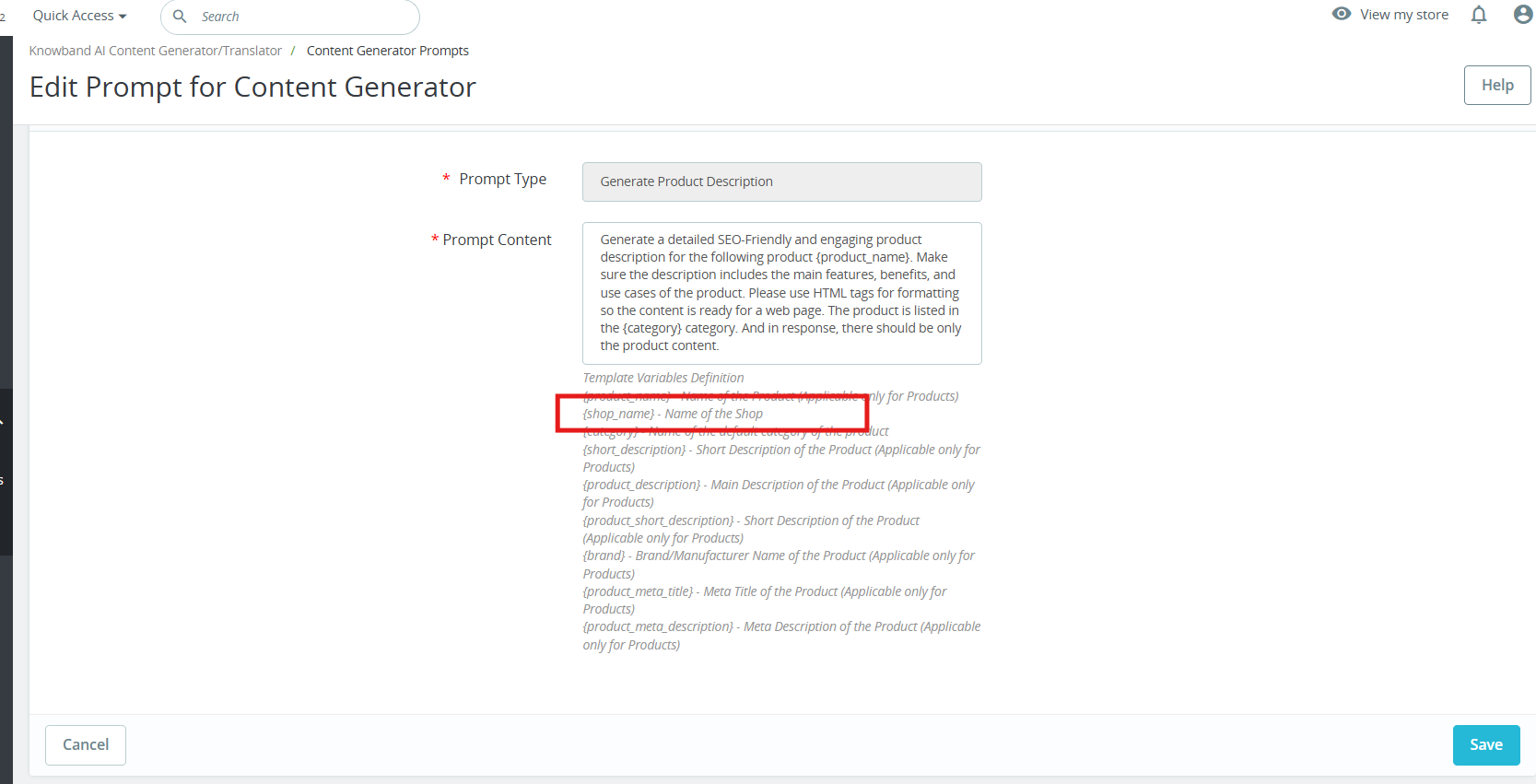
Brand-Specific Content with Manufacturer Variable: A new Manufacturer Variable allows you to include your shop or brand name directly in prompts. This feature in Prestashop AI Content Generator ensures personalised and consistent content across your store, easily editable to fit your needs.

1.0.0 Key Features Of the Prestashop Gemini/ChatGPT/Claude Content Generator/Translator Module

Effortless Content Generation
The Prestashop AI Content Module automatically creates high-quality product and category descriptions, meta titles, and meta descriptions by leveraging advanced AI technology. As a result, store owners can generate engaging and well-structured content without manual effort.

Customizable AI Models
Moreover, the PrestaShop AI Content Generator Addon offers a wide range of AI models for content creation and translation. Store owners can choose from ChatGPT models like GPT-3.5 and GPT-4.0, DeepSeek models including Chat & Reasoner, Claude models including Haiku 3, Haiku 3.5, Sonnet 3.5 (Old), and Sonnet 3.5 (New), as well as Gemini models such as Gemini 1.5 Pro, 1.5 Flash, 1.5 Flash-8b, 2.0 Flash, and 2.0 Flash – Lite Preview. With these options, merchants can tailor content generation based on their specific needs.

Seamless Multilingual Translation
In addition, the Prestashop AI Bulk Content Generator Module allows store owners to translate their content into multiple languages while simultaneously maintaining accuracy and cultural relevance. This means that businesses can expand their reach effortlessly and attract global customers.

Enhanced SEO Performance
Furthermore, the Prestashop AI Content Generator and Translator Addon optimize all content for search engines, thereby improving search rankings and increasing store visibility. By ensuring SEO best practices, this module helps businesses not only drive organic traffic but also enhance conversion rates.

User-Friendly Interface
Notably, no technical expertise is required to run the module. The PrestaShop Gemini/ChatGPT/Claude Content Generator Addon integrates seamlessly with your PrestaShop store, providing an intuitive interface that simplifies content generation. Additionally, even non-technical store owners can generate professional content with just a few clicks. This makes it easier than ever to manage high-quality store content without external assistance.

Bulk Processing Capabilities
For larger stores, the PrestaShop AI Content Generator module is an ideal solution. Moreover, the Prestashop Content Translator Addon enables store owners to generate content for multiple products simultaneously. As a result, businesses can save time and streamline their workflow effectively.

Comprehensive Activity Tracking
Lastly, the Prestashop AI Content Translator module records every action taken, including changes made within the module. It also logs timestamps and provides a summary of modifications, allowing store owners to track content evolution effortlessly. This ensures that all content updates remain transparent, structured, and easily manageable.

2.0. Installation Guide for PrestaShop AI Content Creator Addon

After purchasing the Prestashop AI Content Generator add-on, follow these steps to install it:

  1. Navigate to Store Admin → Modules
  1. Click on “Upload a module”. You can either drag and drop the file or manually select the file from your system.

3.0 Steps to Generate the API Key for Prestashop AI Content Generator and Translator Module Configurations?

For Claude API: 

  1. Visit Anthropic’s website, and click “Start Building”.
  2. Create an account, access your Dashboard, generate an API key, and save it securely.

For Gemini API:

  1. To access the API,  visit the Google AI Studio website.
  2.  Click “Get API key,” accept the terms of service, create your key, and paste it into the module’s configuration settings.

For ChatGPT API: 

  1. Obtain an OpenAI API key and configure it within the module settings.
  2. Click on your profile (top-right) → “View API keys” → “Create a new secret key”.
  3. Copy the key immediately and store it safely. 

Steps to Generate DeepSeek API 

  1. Access the Deepseek platform via this URL: https://platform.deepseek.com/api_keys to generate the API Key. Log in or sign up to generatean  API Key
  2. Click on Create API Key after adding the key name.
  3. Copy or store the key to enable functioning of DeepSeek AI Content Generator Plugin

4.0.0 Admin Interface

4.0.1 General Settings:

The Prestashop AI Content Generator and Translator Addon by Knowband allows the admin to configure AI settings and manage bulk content operations efficiently using Claude, ChatGPT, DeepSeek AI and Gemini AI engines.

[New]Enhanced Content Creation with GPT-5: The Prestashop AI Content Generator Addon now includes support for GPT-5, the latest and most advanced model from OpenAI.

Alongside GPT-3.5, GPT-4 Turbo, and GPT-4.5, GPT-5 enables smarter, faster, and more creative content generation. You can create high-quality product descriptions, titles, and meta content that are accurate, engaging, and SEO-friendly. Users can select the desired GPT model within the addon, giving full flexibility depending on the type of content needed.


  • Enable/Disable: Enable or disable the module
  • Enable/Disable the Claude: Click to enable Claude AI Engine
  • API Key for Claude: Enter the API Key for Claude Engine.
  • Select Claude Model for Generation: Choose from Claude Haiku 3, Haiku 3.5, Sonnet 3.5 (Old), or Sonnet 3.5 (New).
  • Select Claude Model for Translation: Select Claude Engine Models for translation Claude Haiku 3, Haiku 3.5, Sonnet 3.5 (Old), or Sonnet 3.5 (New).
  • Enable/Disable the ChatGPT: Click to enable ChatGPT.
  • API Key for ChatGPT: Enter the API Key for ChatGPT Engine to enable the functionality.
  • Select ChatGPT Model for Generation: Choose between ChatGPT 3.5 or ChatGPT 4.0 for content generation.
  • Select ChatGPT Model for Translation: Select between ChatGPT 3.5 or ChatGPT 4.0 for content translation.
  • Enable/Disable the Gemini AI: Click to enable the Gemini AI Engine
  • API Key for Gemini: Enter the API Key for Gemini AI Engine.
  • Select Gemini Model for Generation: Choose from Gemini 1.5 Pro, 1.5 Flash, 1.5 Flash-8b, 2.0 Flash, or 2.0 Flash – Lite Preview and save the settings.
  • Select Gemini Model for Translation: Pick from Gemini 1.5 Pro, 1.5 Flash, 1.5 Flash-8b, 2.0 Flash, or 2.0 Flash – Lite Preview and save the settings.
  • Enable/Disable the DeepSeek: Turn DeepSeek AI Engine on or off to use this  AI mode.l
  • [New Feature]API Key for DeepSeek- Enter the DeepSeek API key to activate content generation and translation.
  • [New Feature]Select DeepSeek Model for Generation- Choose between Deepseek Chat or DeepSeek Reasoner for generating the content for the products, CMS and categories
  • Model Selection: Choose from available models of each AI engine for content generation and translations.
  • Temperature Control: Adjust creativity by adding values to the temperature(0.0 to 1.0), the higher values generate more creative content, while lower values ensure consistency.
  • Token Limit: Set a maximum token limit for each engine, Gemini, Claude, and ChatGPT
  • Primary Language: Define the default language for content generation and translations.
  • Target Languages: Choose multiple languages for content translation.

4.0.2 Prestashop AI Content Generator and Translator Module Prompts

The Prestashop AI Content Module includes 14 pre-configured AI prompts designed to create and translate e-commerce content efficiently.

Knowband Prestashop Gemini AI Content Generator Prompts:

[New] Personalised Branding with Manufacturer Variable: The new Manufacturer Variable allows you to insert your shop or brand name directly into content. This makes all product descriptions, titles, and promotional texts feel personalised and aligned with your brand. You can edit or replace the variable within prompts to suit your specific needs, ensuring consistent branding across products and suppliers in Prestashop AI Content Generator.

Content Generation Prompts:

  • Generate Product Description – Create SEO-friendly, well-structured product descriptions with key features and benefits.
  • Generate Product Meta Title – Produce optimized meta titles under 60 characters with relevant keywords.
  • Generate Product Meta Description – Generate compelling meta descriptions within 140 characters.
  • Generate Category Description – Create category descriptions with proper HTML formatting.
  • Generate Category Meta Title – Generate keyword-rich category meta titles under 60 characters.
  • Generate Category Meta Description – Create concise and engaging category meta descriptions within 140 characters.
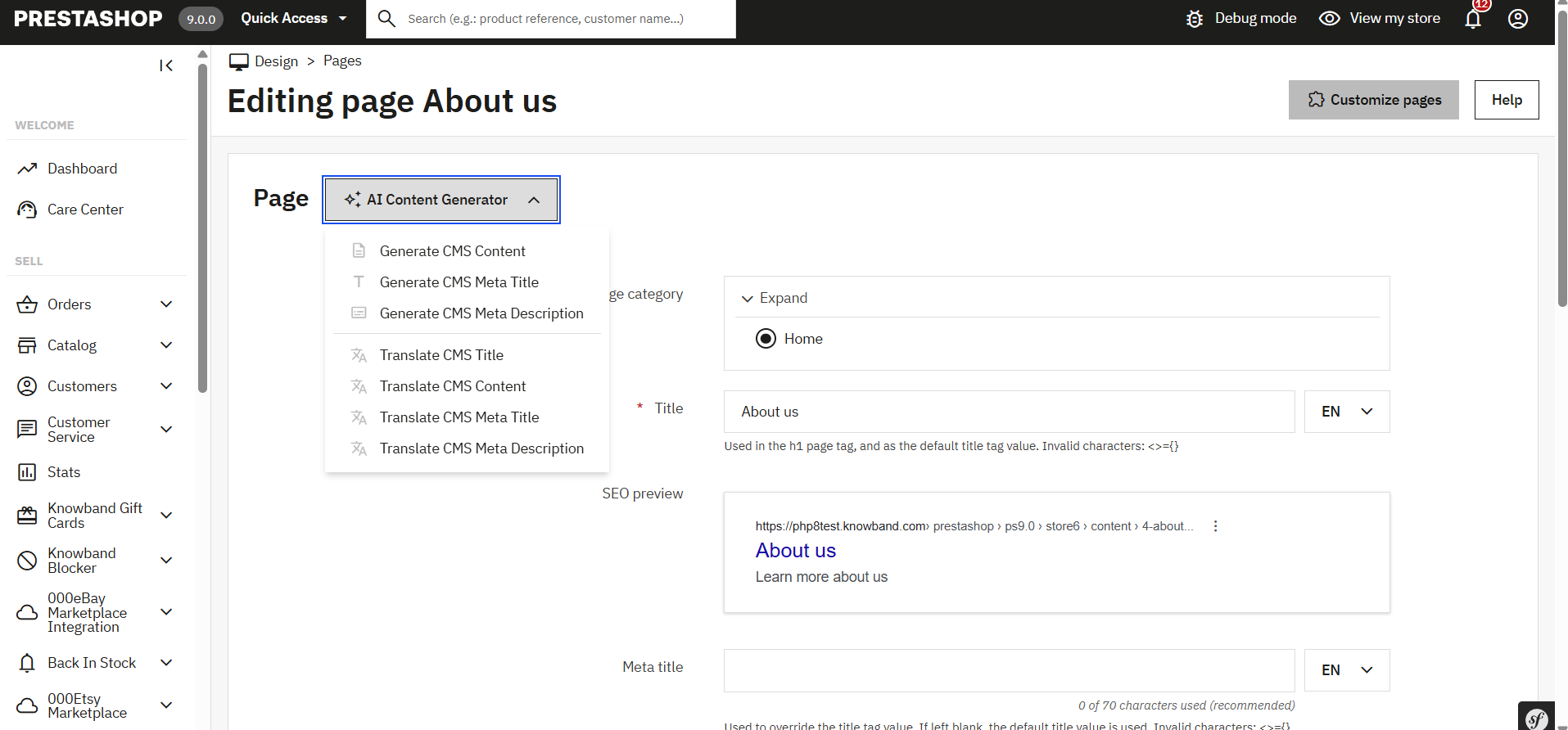
  • [New] Generate CMS Content – Generate high-quality CMS page content using AI, ideal for pages like About Us, Return Policy, etc.
  • [New] Generate CMS Meta Title – Create SEO-friendly meta titles for CMS pages using AI.
  • [New] Generate CMS Meta Description – Generate engaging and optimized meta descriptions for CMS pages.

Translation Prompts:

  • Translate Product Title – Translate product titles into multiple languages.
  • Translate Product Description – Translate product descriptions while preserving HTML formatting.
  • Translate Product Meta Title – Convert product meta titles into different languages.
  • Translate Product Meta Description – Translate product meta descriptions while maintaining readability.
  • Translate Category Title – Translate category titles into multiple languages.
  • Translate Category Description – Ensure accurate translations of category descriptions with HTML formatting.
  • Translate Category Meta Title – Convert category meta titles to different languages.
  • Translate Category Meta Description – Translate category meta descriptions into multiple languages
  • [New] Translate CMS Title – Translate CMS page titles into multiple languages.
  • [New] Translate CMS Content – Translate full CMS page content while preserving structure and formatting.
  • [New] Translate CMS Meta Title – Convert CMS meta titles into different languages for better SEO reach.
  • [New] Translate CMS Meta Description – Translate CMS meta descriptions into multiple languages while maintaining clarity and impact.

4.0.3 [New] Bulk Product Content Generation By Uploading CSV:

The PrestaShop AI Content Generator & Translator now supports bulk content generation via CSV upload.


You can upload a CSV file containing Product IDs along with specific fields corresponding to various content prompts (e.g., title, description, meta fields).

Each field uses binary values to control execution:

  • A value of 1 indicates that the prompt should be executed for that product.
  • A value of 0 means the prompt will be skipped.

This feature allows for flexible and efficient bulk processing of content across multiple products


4.0.3 Prestashop Claude content translator Addon Task Log:

The Knowband PrestaShop AI Content Generator Task Log maintains a detailed record of all AI-generated and translated content, including prompt type, language, product, categories, timestamp, status, previous content, or newly generated content concerning date.

5.0 How to Execute Prestashop AI Content Generator/ Translator Module Prompts?

To execute bulk content operations via the PrestaShop Backend Store follow the steps:


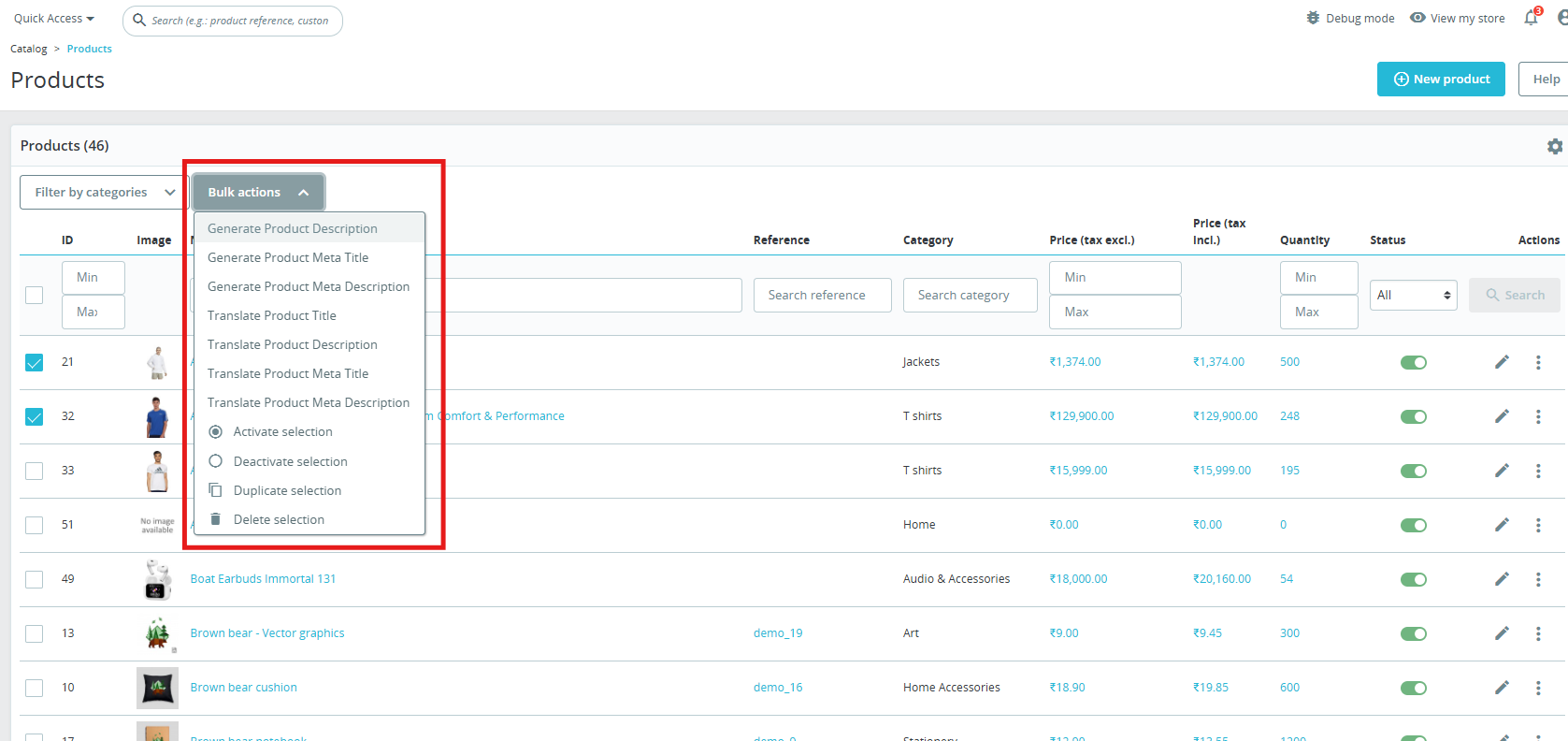
  1. Navigate to Products or Categories in the admin panel.
  2. Select the items you want to generate or translate.
  3. Click on the Bulk Actions menu.
  4. Choose the desired AI-generated prompt (Product Description, Meta Title, Translation, etc.).
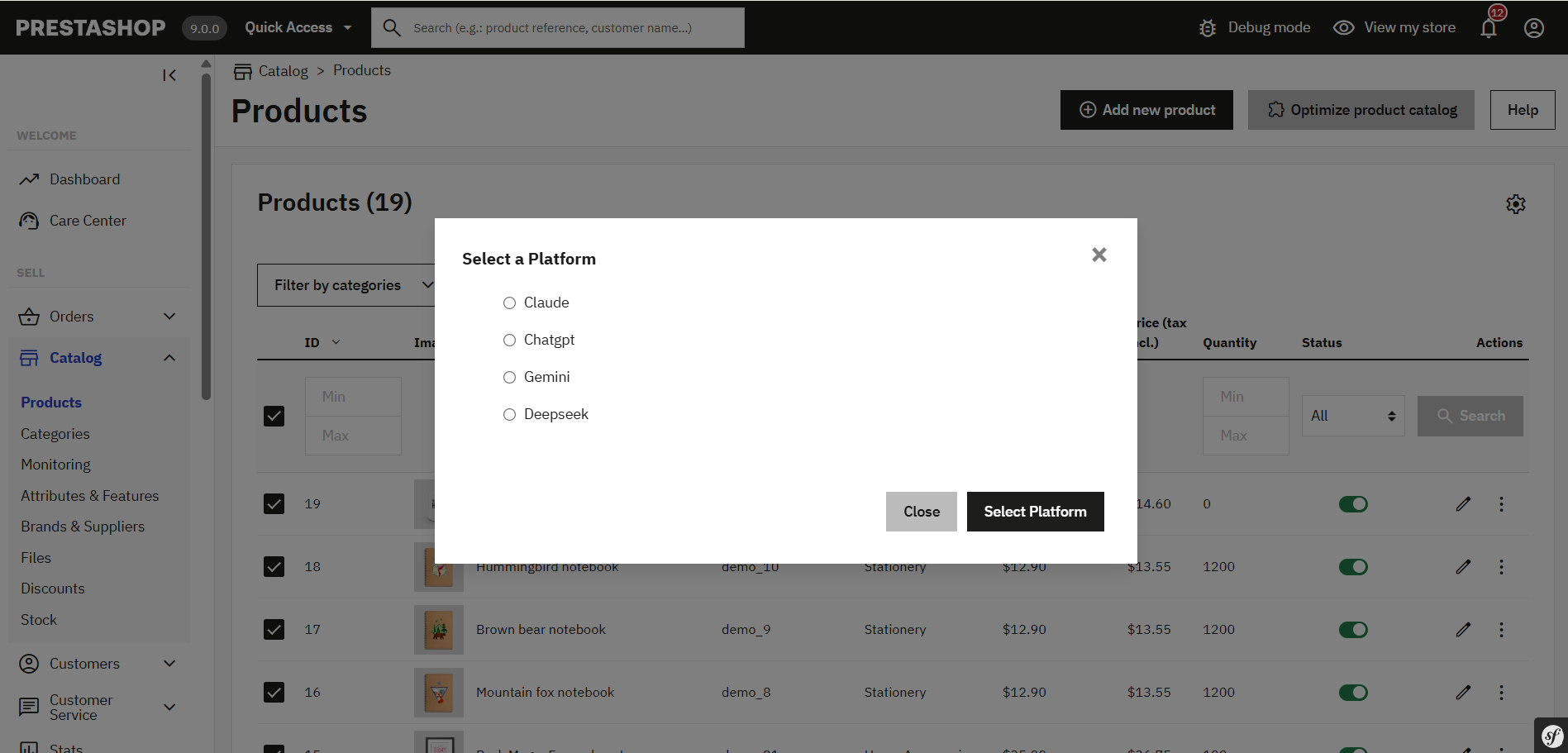
  5. Select the AI engine (Claude, ChatGPT, DeepSeek or Gemini) to perform the task.
  6. Click on the prompt that you want to execute.

6.0.0[New] Individual Key Pages Content Generation

The PrestaShop AI Content Generator & Translator Module by Knowband has now been enhanced to support individual content generation for specific key pages across your store. Whether it’s a Product Page, Category Page, or a CMS Page, you can now generate high-quality, AI-driven content tailored to each item individually, giving you full control over tone, style, and structure.

Steps to execute the prompt on individual key pages.

1. Navigate to the Desired Section:
For Products, go to: Catalogue → Products

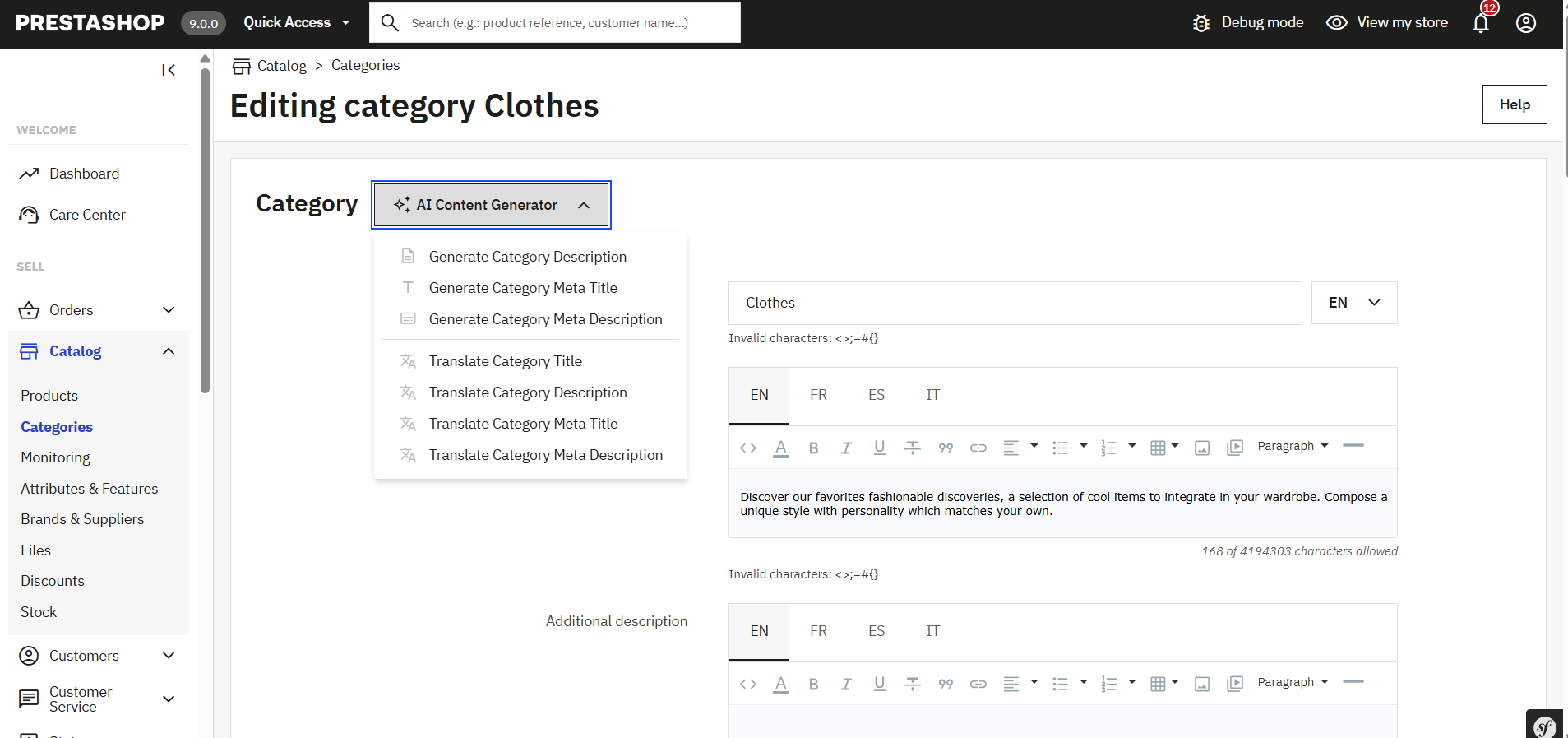
For Categories, go to: Catalogue → Categories

For CMS Pages, go to: Design → Pages

2. Edit the Specific Page:
Click Edit next to the specific product, category, or CMS page you want to update.

3. Access the AI Content Generator Panel:
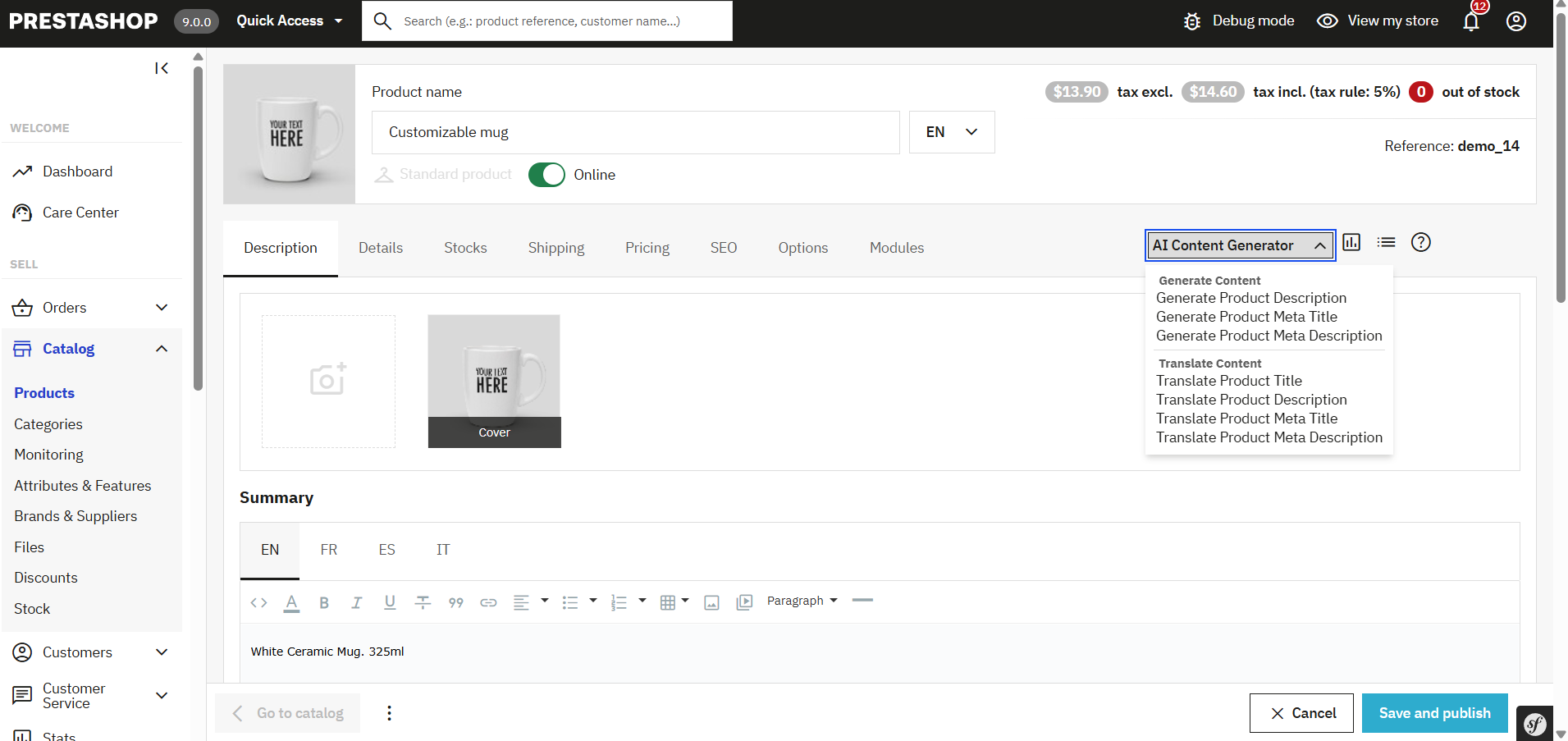
Within the edit screen, you’ll now find an AI Content Generation prompt section, where you will find the prompts listed

This section is integrated into each edit page and allows you to generate or translation content for that specific page only.

4. Configure the Content Generation:
Select a predefined prompt (Generate Product description, Translate Meta description, Generate CMS Page description etc).

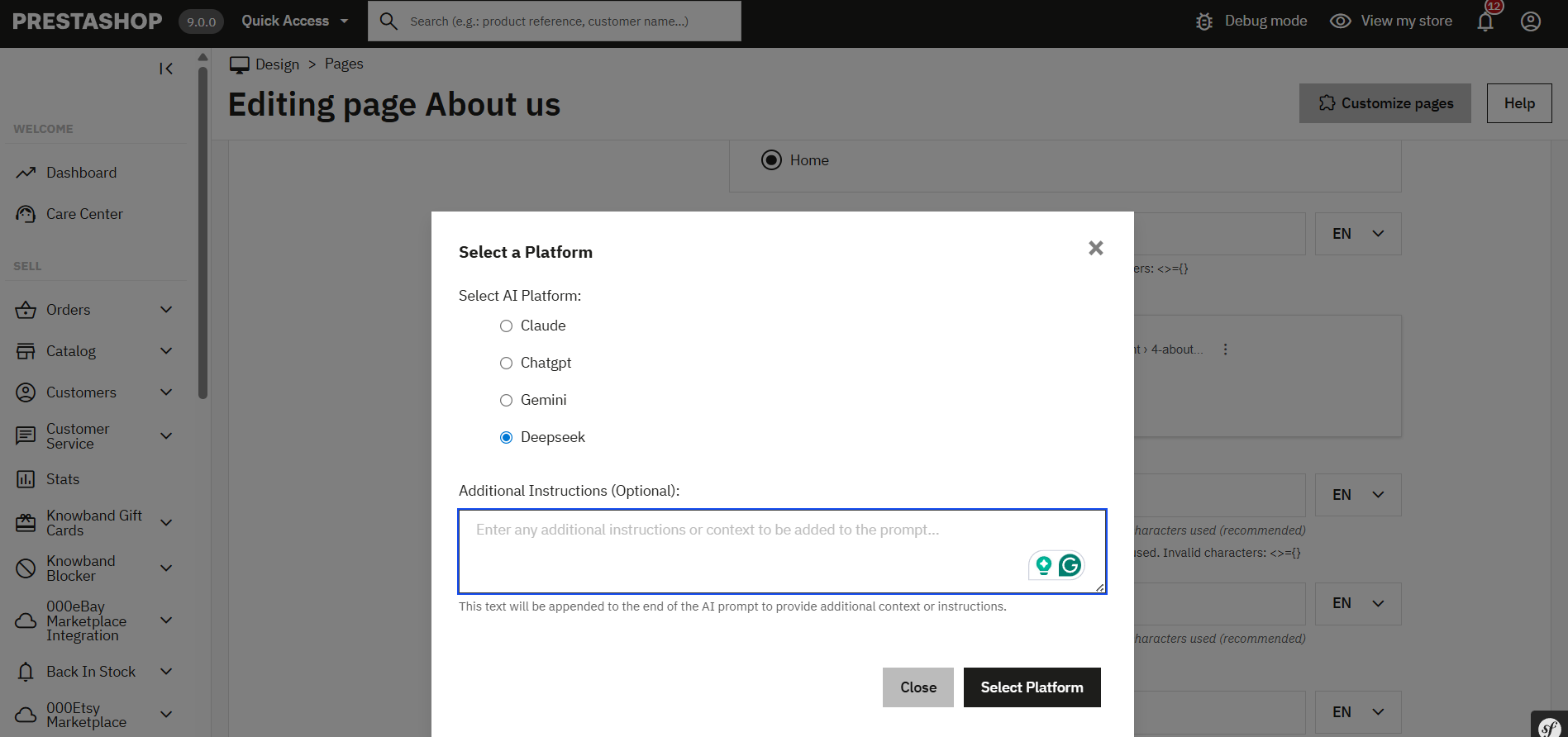
Choose your preferred AI engine (ChatGPT, Claude, Gemini, or DeepSeek) depending on your content goals, speed, and budget.

Optionally, add an additional prompt or specific instructions to guide the AI (e.g., use a formal tone, target specific keywords, mention product benefits, etc.).

5. Page-Type Specific Capabilities:

Product Pages: Generate or translate product descriptions, meta titles, & meta descriptions.

Category Pages:
With the PrestaShop AI Content Generator & Translator, you can now generate or translate content for individual categories right from their respective edit pages.

CMS Pages:


Generate content for informational pages such as About Us, Return Policy, Shipping Info, FAQs, and more.

Translate existing content into multiple languages to support global audiences.

Final Step: Execute the Prompt

Once you have written the additional prompt or chosen AI models, simply click “Execute”.

The content generation task request will be sent to the pending task. Now you can execute the pending tasks.

You can monitor progress and manage any pending tasks directly from the Task Log section of the module.

This new enhancement ensures that you’re not limited to bulk operations and gives you the power to optimise individual pages as per your business needs, making it easier than ever to deliver high-quality, engaging, and multilingual content across your store.

7.0.0 [New] Steps to Generate & Translate CMS Pages Content

The Knowband PrestaShop AI Content Generator & Translator Module enables store owners to effortlessly create and translate content for CMS pages such as About Us, Return Policy, Terms & Conditions, and more.

Steps to Generate or Translate CMS Page Content:
1. Navigate to:
Design → Pages

2. Select Pages:
Choose individual pages, or select all if you want to generate or translate content in bulk.

3. Choose Bulk Action:
From the bulk action menu, select the desired AI operation.

4. Select AI Engine:
Choose from supported AI models (e.g., ChatGPT, Gemini, Claude, DeepSeek) based on your content needs.

5. Add Custom Prompt (Optional):
You can include additional instructions or prompts after selecting the AI engine to tailor the content output.

6. Submit Task:
The request will be added to the Task Log for processing.

7. Execute Task:
Run any pending tasks, and your CMS content will be generated or translated accordingly

8.0.0 Benefits of the PrestaShop AI Content Generator Module

Saves Time and Effort

The Prestashop AI Content Generator Module automates content creation; as a result, it significantly reduces manual work. Consequently, store owners can focus on business growth instead of writing product descriptions.

Improves SEO Rankings

The Prestashop ChatGPT SEO Content Generator optimizes product descriptions and meta tags. Therefore, it enhances search rankings and drives more organic traffic.

Expands Global Reach

The Prestashop AI translator addon translates product content into multiple languages. Thus, businesses can effortlessly connect with international customers.

Enhances Content Quality

AI-generated content is engaging and accurate. In addition, it ensures product descriptions are clear, detailed, and informative, which ultimately leads to better conversions.

Reduces Costs of Content Creation

The Claude addon for Prestashop eliminates the need for professional copywriters and translators. As a result, businesses save money while still maintaining high-quality content.

Supports Multiple AI Models

Merchants can choose from various AI models, including Prestashop ChatGpt content generator, Gemini AI content generator Prestashop, and Claude AI. Moreover, this flexibility allows tailored content creation.

Speeds Up Bulk Content Generation

The Prestashop Gemini Content Generator Addon enables bulk content creation. Consequently, merchants can generate descriptions for multiple products in minutes.

Provides an Easy-to-Use Interface

The PrestaShop AI Content Generator / Translator Module is beginner-friendly. Additionally, it allows store owners to create professional content without any technical expertise.

Ensures Content Accuracy and Authenticity

The Prestashop Claude Translator/Generator Module maintains the originality of product information. Thus, customers always receive precise and reliable details.

Tracks All Content Changes

The Prestashop Claude Translator Module records all AI-generated and translated content. As a result, merchants can monitor changes and refine their content strategy over time.