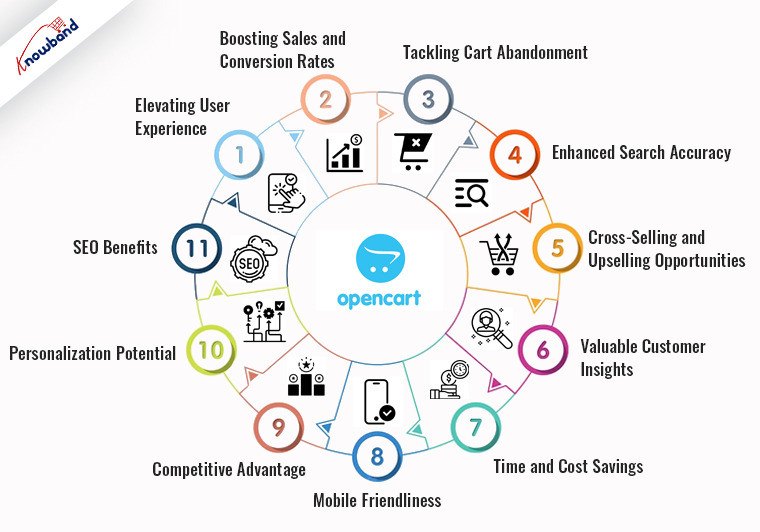
Do you know that search is one of the most important features of an eCommerce website? Not only does it help the customers to hover over their desired results but also suggests various relatable search results. Due to the following reasons, enhancing the search feature on your website becomes a must. Now with our Opencart Search Auto Suggest Extension, you can elevate your online store’s user experience to new heights. Furthermore, Knowband’s search autocomplete extension for Opencart enhances search functionality, delivering lightning-fast, intelligent search suggestions that help customers find products quickly.
With customizable design options and visual product previews, the Opencart search autocomplete extension captivates users, boosting conversion rates. Revolutionize your e-commerce website’s search experience and stay ahead of the competition with Knowband’s cutting-edge solution.
2.0. Features Offered by Knowband’s Opencart Search Auto Suggest Extension:
The Opencart Search Autocomplete module provides tons of useful features that enhance customer experience conveniently.
Instant Search Suggestions:
With the help of Opencart Elastic search the store admin can display real-time product suggestions as users type their search queries.
Smart Keyword Prediction:
The OpenCart Ajax Search Plugin utilizes intelligent algorithms to predict and offer relevant search results, enhancing user satisfaction.
Customizable Design:
The Opencart store admin can customize the appearance of the search auto-suggest dropdown to match the website’s branding and design preferences.
Multi-language Support:
The Opencart Search Auto-Complete extension caters to a diverse audience by supporting multiple languages, ensuring a user-friendly experience for customers worldwide.
Responsive Design:
The Opencart Search Auto Suggest Extension feature works flawlessly on various devices, including desktops, tablets, and mobile phones.
Effortless Installation:
The Opencart Search Auto Suggest Extension comes with easy installation and configuration processes, minimizing the time and effort required to implement the plugin.
Advance Search Options:
The Opencart store retailers can manage the search results based on SKU, product description, categories, based on stock, etc.
3.0. Benefits Offered by Opencart Advance Search Plugin:
Improved User Experience:
Enhanced search functionality offers a more user-friendly and efficient experience for your customers, making it easier for them to find the products they’re looking for.
Increased Conversion Rates:
Furthermore, the quick and accurate search suggestions generated with the Opencart Search Autocomplete module lead to higher conversion rates as customers can find and purchase products more easily.
Higher Customer Satisfaction:
When users can quickly locate products and relevant information, they are more likely to have a positive shopping experience and return to your site in the future.
Enhanced Mobile Usability:
With mobile shopping on the rise, the responsive search auto-suggest feature ensures that users on smartphones and tablets can easily navigate and find products.
Reduced Bounce Rates:
Users are less likely to leave your website if they find what they’re looking for promptly, resulting in lower bounce rates and extended session durations.
Cross-selling Opportunities:
By displaying related or complementary products in the search suggestions, you can effectively cross-sell and upsell, increasing the average order value.
Enhanced Branding:
The Opencart Search Auto Suggest Plugin’s customizable design options allow you to align the search auto-suggest feature with your brand’s aesthetics, contributing to a consistent and professional appearance.
Competitive Advantage:
Offering advanced search functionality with Knowband’s Opencart Search Auto Suggest Extension sets your online store apart from competitors, positioning your business as a leader in customer experience.
Increased Customer Loyalty:
A seamless and intuitive search experience can foster customer loyalty, encouraging repeat purchases and brand advocacy.
4.0 Installation Guide
To install the OpenCart Ajax Search Plugin, please follow the following steps:
Purchase the OpenCart Extension from the Knowband store. You’ll get the following files:
- Zipped File containing the source code of the OpenCart advance search plugin.
- User Manual of OpenCart Product search autosuggest plugin.
Follow the steps below to install the OpenCart Extension in the OpenCart store:
- Unzip the zipped. You’ll get the folders as shown in the image below:
- Copy all the files and folders of the zip file in the Root Directory of OpenCart setup via FTP manager.
- The OpenCart Autosuggest is now installed and is ready to use. Go to Admin -> Main Menu -> Extensions as shown in the image below:
- Select Opencart search suggest Module from the list of modules and click on the Edit button as shown in the image below:
5.0. Admin Interface Overview: Knowband Opencart Search Auto-Suggest Plugin:
The Opencart Advance search plugin provides an easy-to-manage admin interface to manage all the search settings. From search conditions to the look and feel of search, the store admin can manage all the details on the go.
5.1. General Setting:
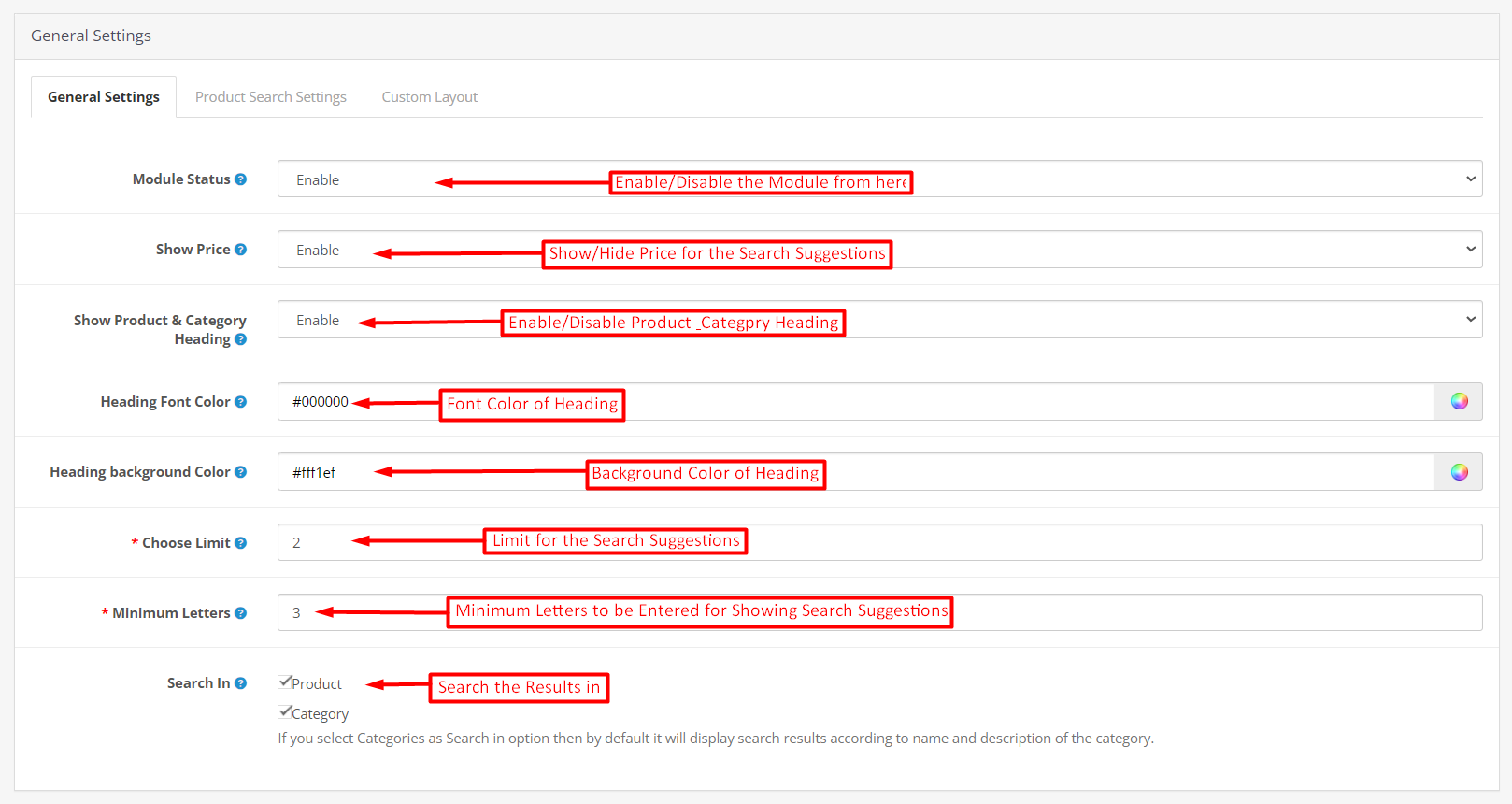
- Module Status: The Opencart store admin can enable/disable the module from this particular button.
- Show Price: Using the following button the store admin can enable/disable prices along with search suggestions.
- Show Product & Category Heading: This button manages the headings “Product” and “Categories” on the search suggestion pages.
- Heading Font Color: The admin can modify the font color of the suggestion base component (category or product).
- Heading Background Color: From this button, the Opencart store admin can select the background color of the suggestion heading.
- Choose Limit: Here, the store admin can enter the number of maximum suggestions he wants to show to the front-end visitors.
- Minimum Letters: The following text field is provided for entering the minimum number of letters for which the search suggestions will start to appear.
- Search In: You can select search in option as “Product” or “Category” or in both (Product and Category) for the search suggestions for the customers.
5.2. Product Search Setting:
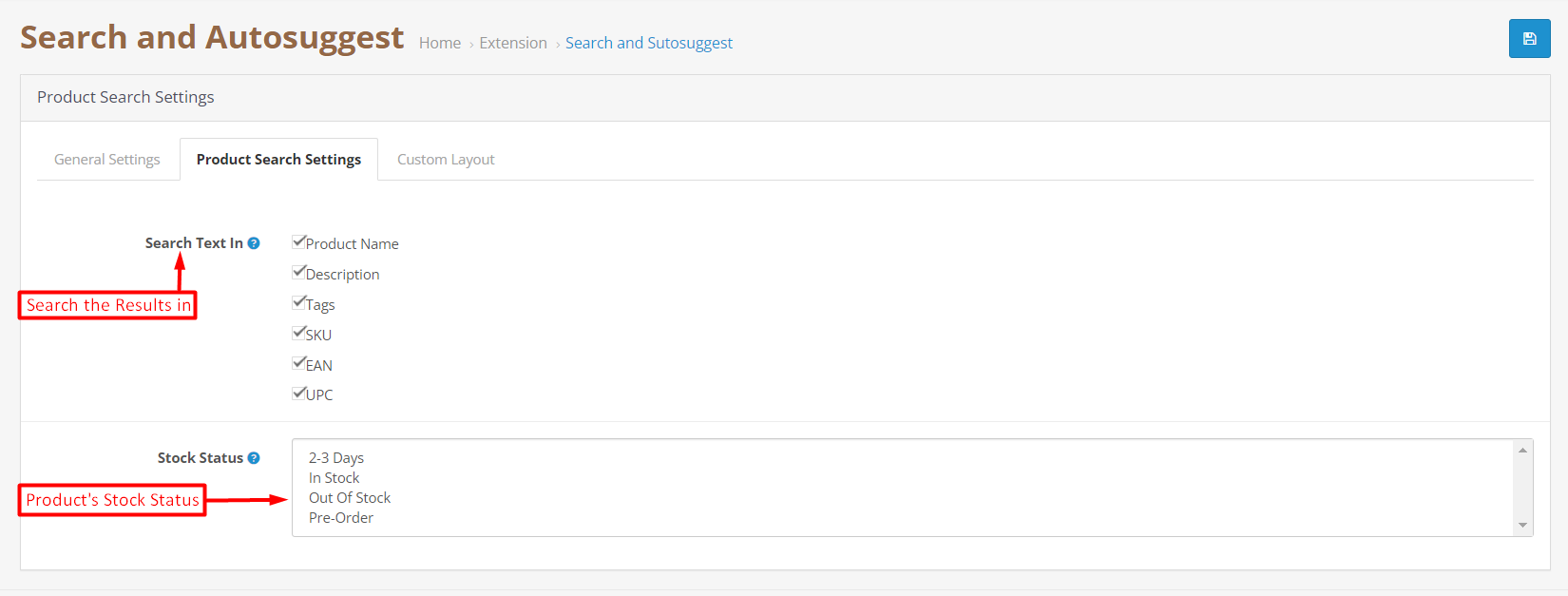
The Product search setting tab provided in Knowband’s Opencart Ajax search Plugin provides the store admin with the option to modify the search setting of the website.
- Search Text In: We have provided here the option for finding the search results in product name, description, tags, SKU, EAN, and UPC. Further, the search results on the website’s front end will be shown based on the selected option in this tab.
For example, if you have selected the option “description” from here, in case a customer visits the website’s front end and enters a particular keyword, the Opencart search Auto Suggest module will perform and show the results after searching only in the product description. - Product Stock Status: The Opencart Advance search Plugin also allows the store admin to show the search suggestions based on the product status. For example, we have provided the option for selecting the product status “in-stock”, “out-of-stock”, “2-3 days”, and “pre-order”.
5.3. Custom Layout:
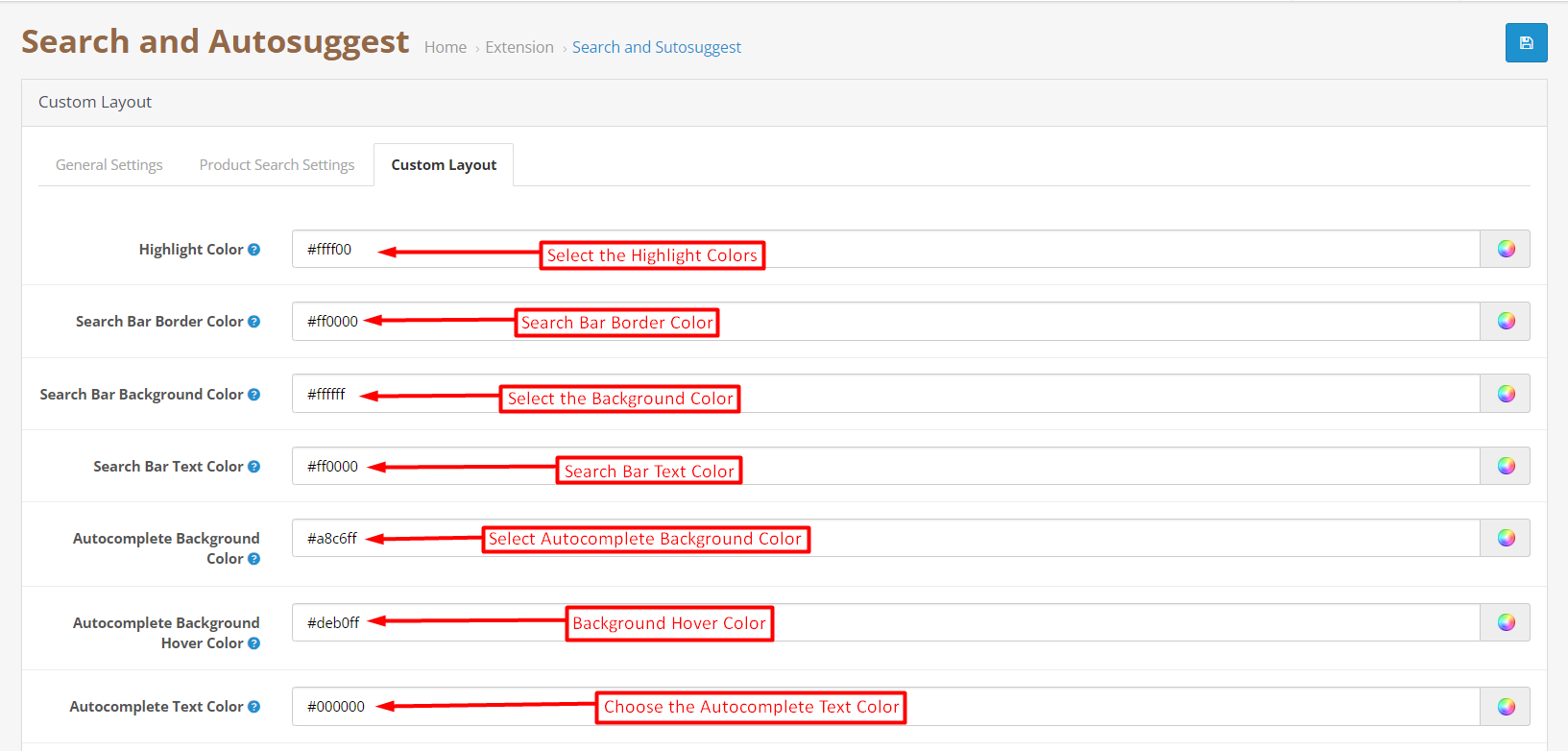
The following tab is provided for the look and feel management of the search auto-suggestion tab.
- Highlight Color: The following option allows the admin to customize the color for the highlight in the search suggestion tab.
- Search Bar Border Color: This button will customize the color of the search bar border.
- Search Bar Background Color: The store admin can select the background color of the search bar using this button.
- Search Bar Text Color: This option will define the color of the search bar text.
- Autocomplete Background Color: The Opencart store retailer can manage the autocomplete background color from here.
- Autocomplete Background Hover Color: When the users hover over the background of the search suggestion, the selected color from here will be reflected on the storefront.
- Autocomplete text color: This particular option will define the color of autocomplete text.
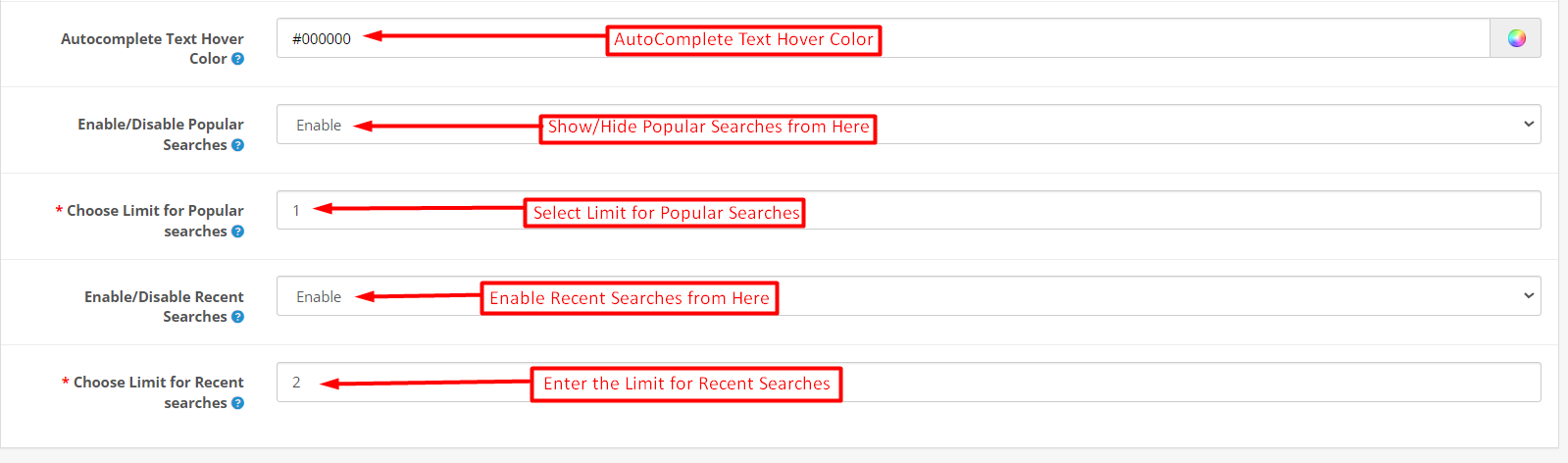
- Autocomplete Text Hover Color: The store admin can manage the autocomplete text hover color from this option.
- Enable/Disable Popular Searches: The Opencart auto-correct search module saves the data when customers perform the searches on the store’s front end. If the following option is disabled from here the module with not collect the popular search information.
- Choose Limit for Popular Searches: Here the store admin can enter the limit for the popular search results.
- Choose Limit for Recent Searches: The Opencart Google Custom Search extension will be showing recent searches based on the number entered in the following text field.
6.0. Front End Overview: Opencart Search Auto Suggestion:
With the assistance of this Opencart auto-correct search extension, the eCommerce store administrator can enhance the shopping experience for both store visitors and customers. Customers can effortlessly discover their desired products without having to input the complete product name. This Opencart search suggestion module offers a user-friendly interface.
Online users can receive search suggestions while conducting product searches using the website’s search box. This makes it easier for customers to find their desired products, thereby enhancing their overall shopping experience. The eCommerce store administrator also can display price details along with product suggestions. The Opencart auto-suggest extension is highly customizable, allowing the store administrator to choose whether to display search results from specific categories or products. Additionally, the Opencart fast search extension provides an option to exclude out-of-stock products from the search suggestions list.