A referral program, word-of-mouth marketing tactic used to motivate customers to advocate on behalf of your brand. Instead of writing online reviews or submitting customer feedback surveys, use referral programs as these programs will allow customers to share their brand experience with partners as well as friends.
The main agenda or purpose of a referral program is to attract new leads to your eCommerce business. However, you are not just bringing in anyone. Besides that, a referral program makes it easier for your marketing as well as the sales team to engage customers as these leads are good for your business. Along with that, these are familiar with your company as well as its reputation. The referral program is capable of increasing customer experience since they’ve been referred by someone they know. So when a reliable resource tells about your company, a trust factor is built leaving a good impact on your eCommerce business.
How to create a customer referral program?
Begin with customer referral templates
Templates are a tremendous assistance in the process, whether you’re a one-person customer referral machine or part of a multi-person referral team. Furthermore, referral templates customized to match your brand’s voice as well as tone. You can use these free client referral templates to create a bank of referral request emails, referral follow-up emails and even social copy regarding the business’s referral program.
Decide your goals
Before opting for a referral program, eCommerce store owners should consider what they intend to gain from this referral program. Do you want to include retention in the equation? Do you work in a field that demands a great deal of trust-building? Once you decide what your goals are, you can explicitly define them.
Research more and more
Having a good knowledge of the market will help you grow better and faster. Similarly, knowing how referrals are coming to your business can be helpful for your e-commerce business. Assessing where and how recommendations are arriving at your business — or if they’re going to your business at all — is an excellent place to start. This is where you should bring in marketing, sales management, and support — everyone who is responsible for creating customer relationships — to analyze how they’ve dealt with referrals in the past. This way you will get an idea of your current location.
Referred clients have a 16% higher lifetime value compared to non-referred customers. Therefore, doing the arithmetic is worth it to see how much money referrals could bring in and adjust your marketing budget appropriately.
Identify ‘Good Fit’ customer for company
Figure out your ideal clientele before urging customers to ask for references. Instead of just entering names to get the program’s reward, your existing customers will suggest leads who buy from your company.
Prominently explanations displayed across client referral programs. When you have a form for customers to fill out, for example, describe what a “good fit” customer is at the right in the start of the form. Attendees are reminded that you’re seeking specific people who require your product, not just a friend who might be interested in your company.
List your possible referral sources
We’ll refer to these people as advocates. Someone with whom you’re now linked or have previously been connected to. Hence, start by creating a list of them. Customers, prior customers, not yet closed leads, industry leaders, your vendors, and so on might all be on this list. This will provide you with a firm foundation, to begin with.
The functionality of Referral Program
In the referral program, visitors or customers recommend your items to friends or family members. In return you reward them with a referral bonus in case people suggested by the consumers purchase from your store. Further, a consumer has the option of sharing a product link or a coupon code.
Affiliate and Referral Marketing- are they different?
Affiliate and Referral Marketing do not have big differences. Both of the techniques help e-retailer to promote their brand as well as generate sales by providing incentives to affiliates; the process differs. Furthermore, one feature that makes Affiliate Marketing different from Referral Marketing is that Affiliate marketing focuses on rewarding your existing customers for referring your products to others. Whereas focusinging on rewarding your existing consumers for referring your products to others is what Referral Marketing is.
Knowband offers Affiliate and Referral Marketing modules for different eCommerce platforms. Hence you can install the module depending upon the platform you are using for your eCommerce business.
“Magento Affiliate and Referral program extension incorporates an Affiliate Account section on your Magento store and allows users to register as an affiliate and earn incentives for every successful referral. The incentives or commission are provided for new user registration, order placement or both.”
Affiliate and Referral Programs are excellent marketing strategies for any brand. It involves less cost and provides significant value in return. You would have often seen brands running a “Refer and Earn” program or YouTubers mentioning their affiliate link on the video description. That is what we call the Referral and Affiliate Marketing respectively.
Magento Affiliate and Referral Program extension
Knowband presents the Affiliate and Referral program extension for Magento that helps Magento store owners build brand awareness and increase their user base efficiently.
Features of Magento Affiliate and Referral Program extension
1. Multiple types of referral
Magento Affiliate and Referral Program extension lets the affiliate partners invite new users to your store through various means. The affiliate partners can bring in new customers by sharing with them a referral code or a referral link.
They can also provide a voucher to the referent which the latter can use while making a purchase. In addition to this, affiliate partners can share the referral link on various social media platforms like Twitter, Facebook, Pinterest, right from their affiliate account.
2. Set the referral rate for the affiliates
Magento store admin can define a global referral rate for the affiliate partners for the user registration and the order placement.
3. Personalize commission for each affiliate
Though the Magento Affiliate and Referral Program extension allows the store admin to set a fixed global referral rate for the affiliate partners, they can personalize it for every different affiliate.
4. Assign your affiliates with a voucher on their registration as an affiliate
Magento Affiliate Program extension allows merchants to assign a voucher to the affiliates on their successful registration. The store admin can set the voucher value and offer it in the form of a fixed discount or on a percentage basis.
There is also the option to define the overall voucher quantity and voucher limit per user.
5. Set a period for your referral program
Magento Referral Program extension provides the option to run the referral program for a limited time. If you define a time period, the referral code won’t work after the specified period.
6. Get insights into registered affiliates
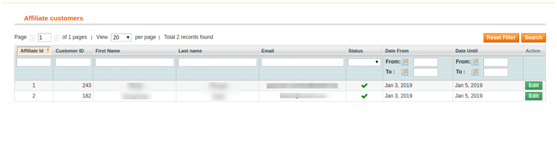
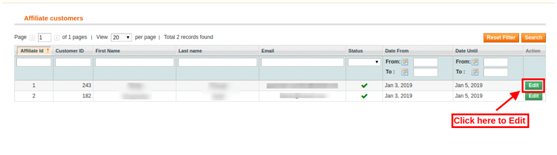
You can check the details of the registered affiliates under “Affiliate Customers.”
7. Get insights into referred customers
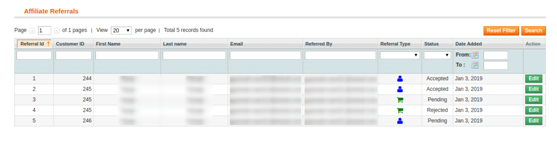
“Referral Listing” displays the data of the customers who have registered through the affiliate’s link.
8. Check incentives earned by the affiliates
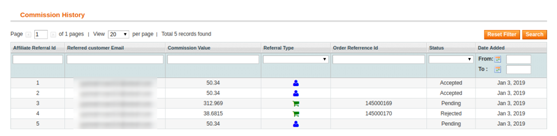
Magento Referral program allows store admin to view the incentives earned by the affiliate partners under the “Commission History” tab.
9. Check payout requests raised by affiliates
Magento Affiliate and Referral Program extension lets the affiliate partner get their payout/commission in the form of a voucher or cash.
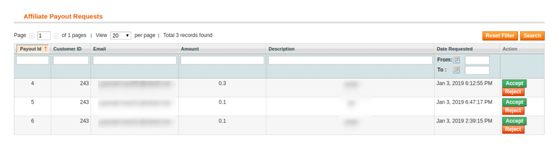
The affiliate customer needs to raise a request from his/her account to withdraw the earned commission, which will then be reflected under “Payout Requests.”
Benefits of Magento Affiliate and Referral Program extension
1. Magento Affiliate and Referral extension helps you acquire new customers. With more user sign-ups, you will get more leads which will be beneficial for your email marketing campaigns.
2. Magento Affiliate and Referral Program increases brand awareness since it follows word of mouth marketing.
3. You can drive more conversions and hence more sales when the referent makes a purchase using the voucher code.
4. You can maximize your sales by putting minimum efforts.
5. Offering exciting incentives to the affiliates can encourage them to bring you more customers.
6. Magento Affiliate and Referral Program is a boon for your advertisement cost.
Check out the admin demo and the front demo of the Magento Affiliate and Referral Program extension. If you have any concern regarding this module, you can mail us at support@knowband.com and our team will resolve your query to the earliest.
Knowband offers Magento Affiliate and Referral program extension which allows the online store admin to get more customers and traffic also. The online store admin can allow the customers to register as an affiliate and create referrals for the store. The online affiliate users can earn money for every referral. The admin can apply the settings in order to provide a referral commission. The admin can provide commission on new customer registrations or on order placed by the referred customers. The referred customers can place their order using referral code, coupon code or referral link provided by the affiliate customer.
This way the online store admin can improve website sales and traffic easily just by offering a commission to the affiliate customers. The eCommerce store admin can easily promote the store without any extra efforts. The affiliate customers can also get benefits by referring new customers. They can get commission by new customer registrations and order placed by the customers. The Magento Referral Program plugin provides an easy way to promote the website.
1.1 Basic Features of this Magento extension
The online store admin can allow the customers to register their account as an affiliate and create referrals for the store for getting an exciting commission.
The Magento Affiliate and Referral program extension allows the admin to activate or deactivate new affiliate registrations anytime.
The Magento Affiliate and Referral program plugin provides various methods to share for the referral.
The affiliate customers can send referral code, share a link, share discount voucher, share a link on social media platforms and share a link by email.
The online store admin can show an option to share the link on Facebook, Google plus, Twitter and Pinterest.
Admin can set a global referral rate for the order placed. This value will be in percentage. Admin can also set referral rate for particular affiliate customer.
The admin can also set the global referral rate for user registration. This will be a fixed value. Admin can also set specific referral rate for affiliate customers.
The Magento Referral Program plugin provides an option to select the global voucher type and set it’s value accordingly.
The online store admin can also select the action on which the referral will be counted.
The online user can get the referral commission on new user registration or when the order is placed.
The online users can register as an affiliate and create referrals for the store in order to get a commission.
The Magento Referrals module provides a dashboard for showing referral and commission-related details easily.
The Magento Affiliate Program extension provides functionality for the affiliate customers to redeem their commission by sending a request for payout.
2.0 Installation
The online store merchant can install the Magento Affiliate and Referral program extension by following these steps:
Admin can download the extension package from the Knowband store.
After downloading the extension package, you will get a zipped file. Unzip the package on the root folder of Magento setup via FTP manager (like Filezilla or WinSCP – download here: https://filezilla-project.org/). The admin will find the files and folders as shown in the image below:
3. The extension is now installed and ready for use. In the Admin Panel, go to “System > Knowband Extensions >Magento Referral Program plugin”.
Now, the store admin can use and configure the Magento Affiliates extension.
3.0 User Manual
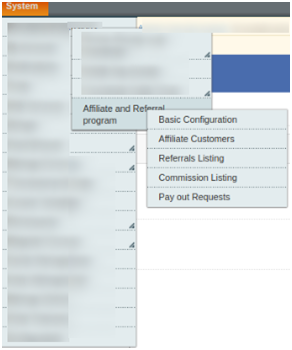
Admin will get various customization options after installing the Magento Affiliate and Referral program extension successfully. Admin can configure the Magento extension in order to implement the affiliate functionality on the eCommerce website.
Below-mentioned are the configuration options:
Basic Configuration
Affiliate Customers
Referrals Listing
Commission Listing
Pay Out Requests
3.1 Basic Configuration
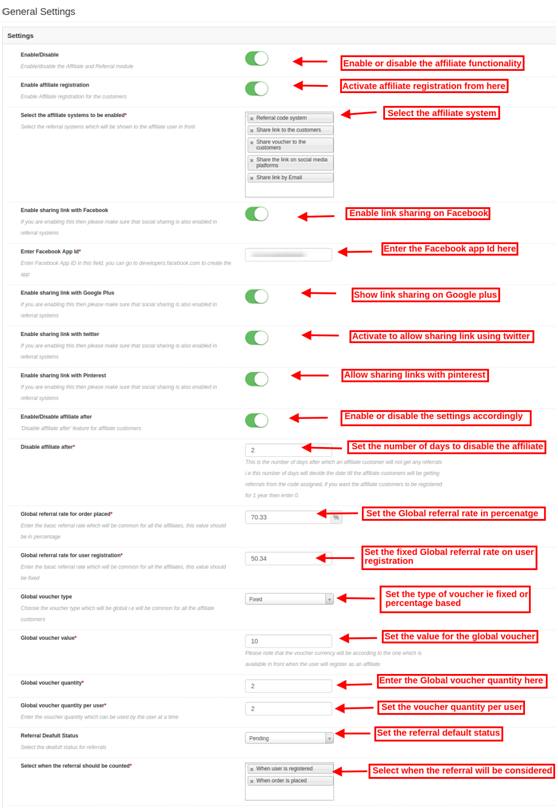
In the Basic settings field, you can apply the settings for showing affiliate system functionality on the website. The store owner can apply the settings as per the requirement.
These are the configuration options:
Enable/Disable: Activate or deactivate the Magento Affiliate and Referral program extension just by a single button toggle.
Enable Affiliate registration: Activate the settings in order to show affiliate registration options on the website front-end.
Select the Referral System to be enabled: Select the referral system from the provided options. The admin can choose from the referral code system, share the link to the customers, share voucher to the customers, share the link on social media platforms, and share the link by email.
Enable sharing link with Facebook: Activate this option in order to allow affiliate customers to share the link using their Facebook account. “Share the link on social media platform” option should be selected for this implementation.
Enable Facebook App ID: You need to enter Facebook app id in this configuration option. Follow the steps described in 3.1.1 section in order to create a Facebook app ID.
Enable Sharing Link With Google Plus: Show/hide the option of link sharing with Google plus. The affiliate customers can share the link with their Google plus account.
Enable Sharing Link With Twitter: In order to provide an option to share a link with Twitter, the admin can enable the settings.
Enable Sharing Link With Pinterest: Enable/disable the settings for showing/hiding link sharing using Pinterest.
Enable disable affiliate after:Activate or deactivate the settings as per the requirement. After enabling this option, a new configuration option will be displayed.
Disable affiliate after: Set the number of days after which you don’t want to provide any referrals to the affiliate customers. Set the days after which the affiliates will not get any referrals from the assigned code.
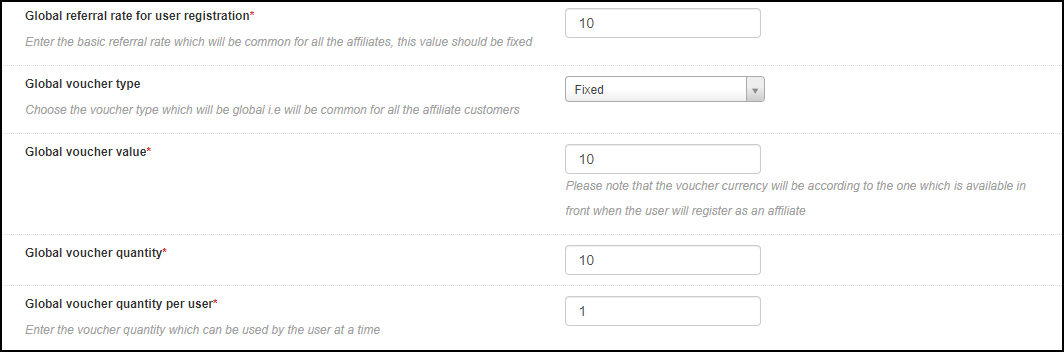
Global referral rate for order placed: Set the Global referral rate i.e., a common referral amount for all the affiliates. This value will be in percentage.
Global referral rate for user registration: Here, you can set the referral rate for the user registration which will be common for all the affiliates. This value will be fixed.
Global voucher type: Select the type of voucher i.e., fixed or percentage based. This will be the type of voucher which will be common for all the affiliates.
Global voucher value: Enter the value for global voucher.
Global voucher quantity: Set the number of the vouchers for providing all the affiliate customers. The affiliate customers can share the vouchers with the referrals.
Global voucher quantity per user: Enter the number of times, a user can apply these vouchers.
Referral Default status: Here, you can set the default status for the referrals. It can be accepted, rejected and pending.
Select when the referral should be counted: Magento Affiliate and Referral program extension provides an option to consider referral on new user registration or while the order is placed.
3.1.1 Steps to generate the Facebook app ID
Follow these steps in order to generate Facebook app ID:
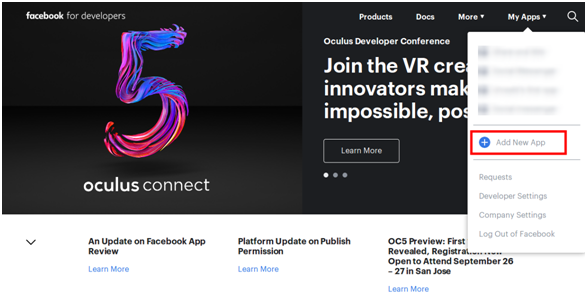
Go to the “MY APPS” and click on ”ADD NEW APP” option.
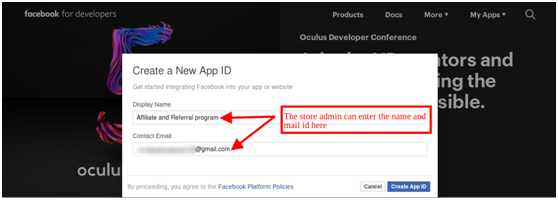
Enter the “Display Name” and “contact email ID” details. After that, click on the “Create App ID” button.
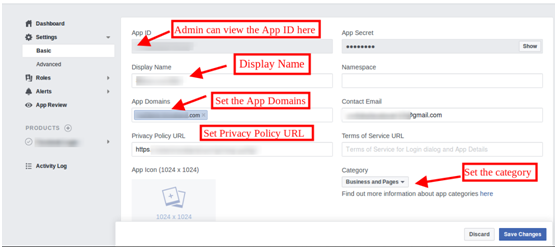
Now, go to the “Settings” and select the “Basic” option. Here, you can get the APP ID. Now, you need to insert app domains, category, privacy policy URL here.
Thus, you can get the Facebook app ID.
3.2 Affiliate Customers
Here, in this configuration option, the online store admin can view the affiliate customer’s list. The Magento Affiliate and Referral program extension provides affiliate customers list in the admin interface.
3.2.1 How to Edit Affiliate Customer details?
Admin can click on the “Edit” button, in order to change the details of any affiliate customer.
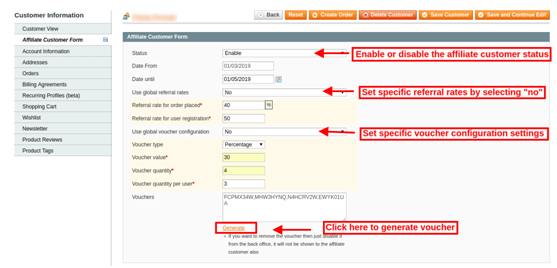
After clicking on the “Edit” option, the online store admin can modify the details related to the affiliate customers.
Magento Affiliate and Referral program module provides these configuration options as shown below:
Status: Activate or deactivate the affiliate customer’s status from the admin interface of this Magento Affiliate and Referral program plugin.
Affiliate From: Here, you can view the date from which the customer has registered as an affiliate.
Affiliate Until: You can set the date till the customer will be an affiliate.
Use global referral rates: The online store admin has an option to use Global referral rate or set specific referral rates for the particular affiliate customer.
Referral rate for order placed: Set specific referral rate which you want to offer on order placement.
Referral rate for user registration: Set the fixed amount of referral on new user registration.
Use global voucher configuration: As a store owner, you have an option to use a global voucher or configure a specific voucher for any customer.
Voucher type: Select the percentage or fixed voucher type.
Voucher value: Set the value of the voucher.
Voucher quantity: Set the number of vouchers.
Voucher quantity per user: The admin can set the number of vouchers per users.
Vouchers: Here, you can view the generated vouchers.
Generate: Admin can click on the Generate button in order to generate new coupons as per the applied settings.
3.3 Referrals Listing
In referrals listing, the online store owner can view the referrals and their details also. The Magento Affiliate and Referral program extension provides a list of all the referral customers.
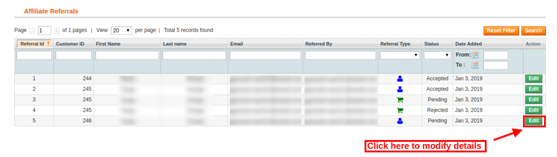
The store owner can also edit the affiliate’s status. The admin just needs to click on the “Edit” button.
After clicking on the “Edit” button, you will get these customization options:
Affiliate: Here, you can view the email id details of the affiliate customers.
Description: View the activity performed by the affiliate customer.
Commission value: Here, you can view the commission value as per the configuration.
Commission currency: Here you can view the currency type.
Order reference: Order reference will be displayed here if any referral places an order.
Referral status: Set the status of the referral as accepted, rejected and pending.
Referral date: You can also change the referral date from the admin interface.
3.4 Commission Listing
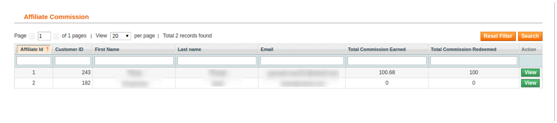
Here, in commission listing the online store admin can view the affiliate commission. The store admin can view the overall commission offered to the affiliate customers.
Admin can click on the view button in order to get the commission details. Here, the online store admin can view the email id details, commission value and it’s status.
3.5 Pay Out Requests
Magento Affiliate and Referral program extension provides an option to handle payout requests. The affiliate customers can send payout requests in order to redeem the commission. The affiliate customers can request to generate a voucher or directly ask for the payout.
The online store admin can view all the “payout requests” in this section and accept or reject the payout requests.
The store admin can view the payout request in the “Payout requests” option and then accept or reject the request.
4.0 Front-end Interface
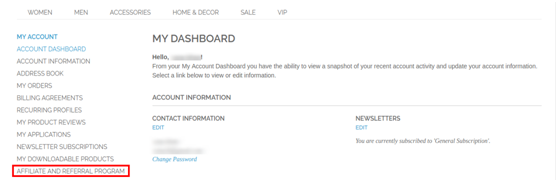
After creating an account the online users can click on the “Affiliate and Referral Program” in order to register as an affiliate customer.
After clicking on this “Affiliate and Referral Program” option, the online users can register as affiliate customer.
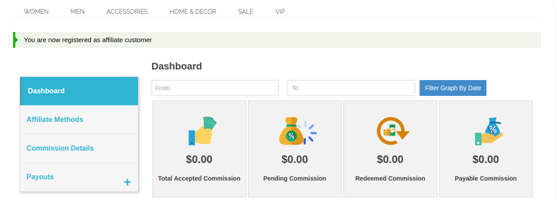
Now, the online users are registered as an affiliate and they can view the details as shown below:
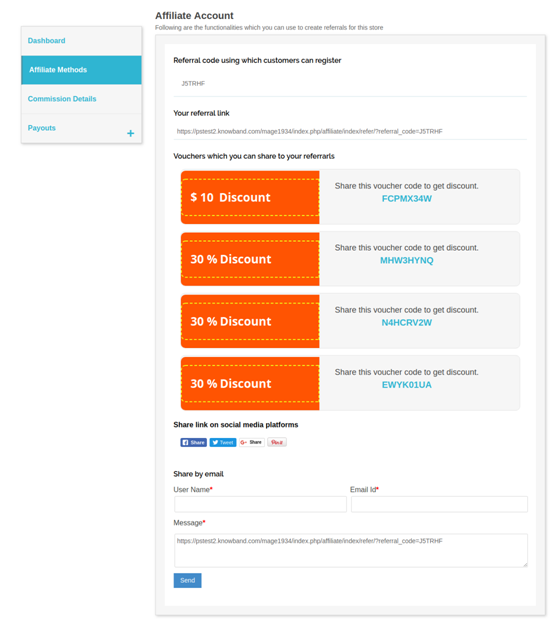
There are several methods to share the referral codes. The affiliate customers can share the referral codes in order to get the commission.
The affiliate customers can share referral code, share referral link, share vouchers, share the link on social media platforms and share the store link via email.
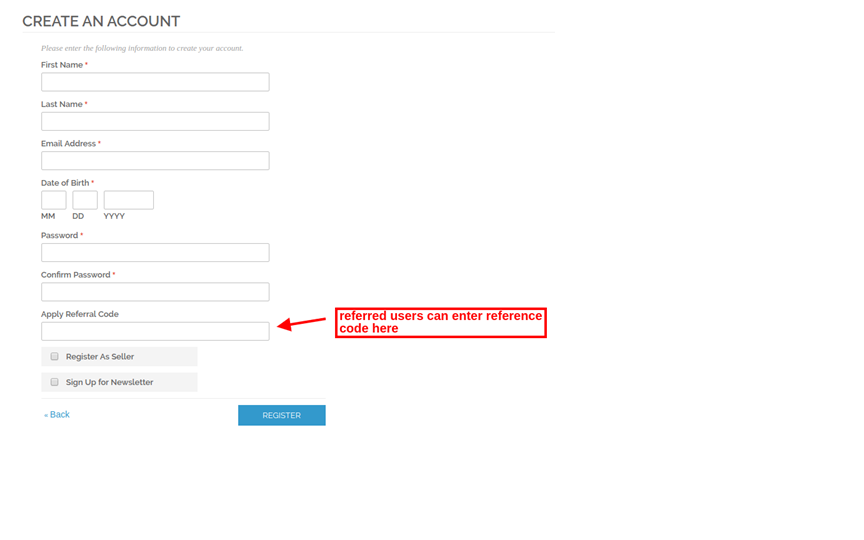
Referred users can register using referral code as shown below:
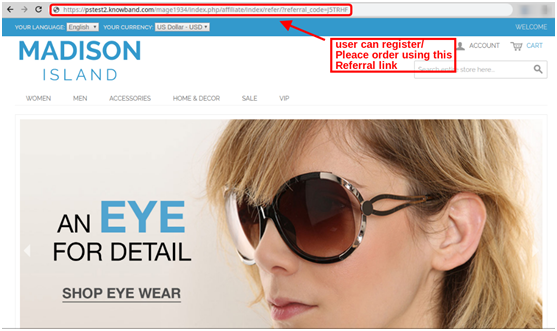
The online users can register using referral link shared by the affiliate customers or place an order with the referral link. The affiliate customer will get the referral amount as per the action performed by the referred online user.
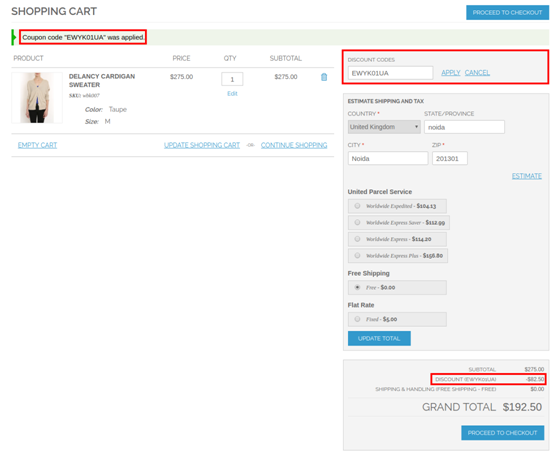
The online users can also use voucher codes shared by affiliate customers in order to get discount. The affiliate customers will get referral commission for such orders.
This way the affiliate customers can refer the online users and get the referral commission easily.
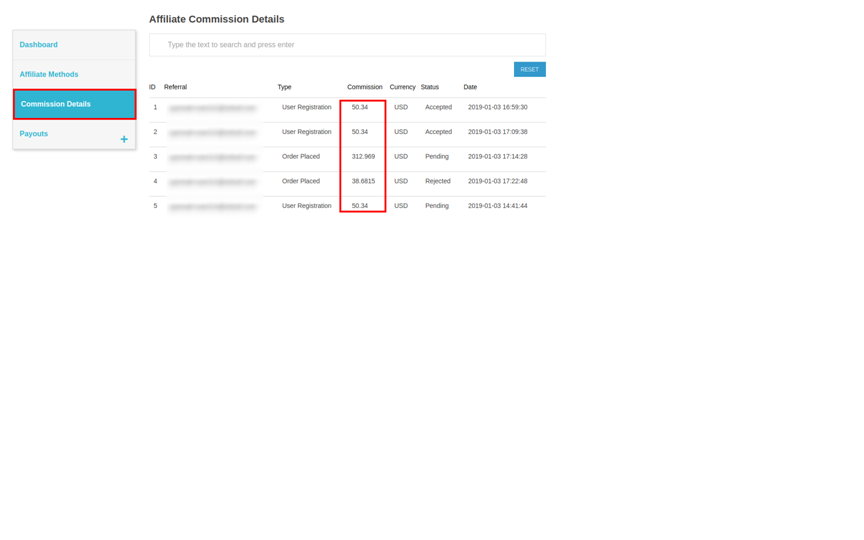
The affiliate customers can view the rewarded commission on every referral. They can also view the status of the commission on the website front-end interface. In “Commission Details”, the online users can view each and every detail easily.
The online users can request for payout by clicking on ”Payouts” option. The online users can click on the “vouchers” in order to request for generating a voucher. The online user can also request for payout.
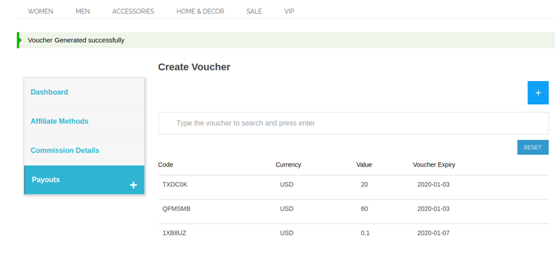
In order to generate vouchers, the online store admin can click on the “voucher” option. After that click on the “+” sign and enter the amount to generate voucher of that value. After that, click on the “request” button. A success message will be shown on the top of the eCommerce website.
In order to send payout request, the affiliate customers can click on the payout option. After that, they need to click on “+”. Here, the affiliate customers can enter the payout amount and enter the description. After clicking on the “Payout” button, the affiliate customers can send their request successfully.
Initially, the payout requests status will be ”pending”. The online store admin can accept or reject the “payout” request.
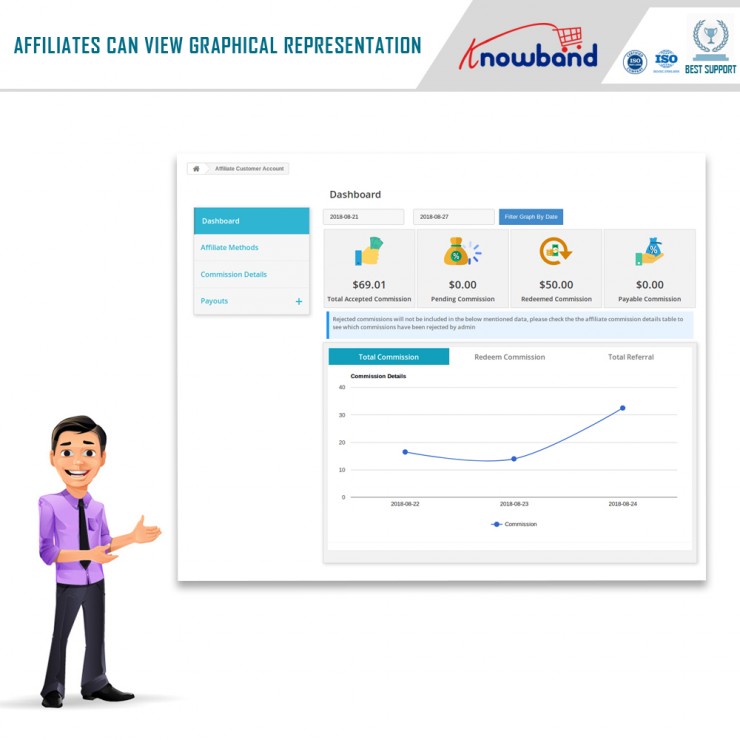
In the Dashboard, the affiliate customers can view the total accepted commission, pending commission, redeem commission and payable commission. A graphical representation is also available for viewing total commission, redeem commission and total referral easily.
This way, the online store merchant implements Magento Affiliate and Referral program extension module and allows the online users to refer the store to get a reward for it. The Magento Affiliate and Referral program module is highly customizable and offers smooth functioning. The e-merchant can provide multiple ways of referring to the website. The Magento Affiliate and Referral program plugin allow viewing all the affiliate customers list from the admin interface. The online merchant can also apply specific settings for each customer. The Magento Affiliate Program extension provides an option to set a referral amount from the admin interface. The online merchant can offer a specific amount on new registration and order confirmation. You can generate discount vouchers for affiliate customers for referring to the store. The online affiliate customers can refer store and get the exciting reward which can be converted in discount vouchers or the users can request for payout.