It is very essential to reduce post-holiday returns. Industry, sales channel, product type, and how to return data are collected and counted all affecting return rates. Further, the younger customers are driving the trend according to the reports. The reason is, they see internet purchases as rentals. Moreover, returns might rapidly undo your holiday success if you don’t account for them and discover:
Sales are lower than expected
Converted fewer clients than the originally
Compared to sales cost and profit margins, sales cost is higher and profit margins are lower.
Therefore, in this blog, we will be discussing ways of reducing holiday returns and automating the returns process. However, before that, we will understand why it’s important to reduce the returns?
Why it’s important to reduce the returns?
The first step is to analyze why do people are returning products as this will give you valuable insights and even make you understand the real problem. Furthermore, it is to everyone’s best advantage to reduce the number of returns you receive.
You might not be aware but lesser returns can save a lot of money on replacement items, shipping, as well as other factors. Moreover, it provides a better as well as efficient customer experience which is again good for eCommerce business. As a result, trust is created between your business and potential buyers.
Henceforth, keeping the rate of return lower can result in better business.
What are the ways of reducing returns?
Begin with quality control
The first way that helps in reducing post-holiday returns is “Begining with quality control”. Furthermore, 23% of returns happen as companies ship an incorrect item. Mis-ship happens usually when businesses grow.
Being a small retailer, you can wrap as well as send every order. It would be great if you double-check the order before shipping. When you adopt a hands-on approach, it’s easy to ensure that shipments are proper. Whereas larger businesses can opt for automation that can help you in resolving the issues. Furthermore, the Inventory management software includes a warehouse management feature that helps in reducing the number of returns your receive.
High-Quality Photos
High-quality photos can even help in reducing post-holiday returns. Furthermore, such photos help customers understand the product better. Make sure you take pictures from different angles to make customers understand each feature of the product.
In case you are not good at photography, feel free to hire a professional photographer. Money spent on getting good pictures will pay for itself with a reduced return rate.
Better Product Descriptions
Writing better product descriptions can help customers understand the product well. Speaking about better product descriptions, make sure you include everything about the product. For example, if you have been selling furniture, make sure your product descriptions consist of measurement of the product, color, and material. This way customers can decide better and this will create transparency which is liked by customers a lot.
Represent Sizing Correctly
Products that do not fit are one of the most common reasons for returns in the apparel industry. Because online buyers can’t try on garments before buying them, it’s understandable that products be returned because they don’t fit.
With the assistance of resources like size software and sizing charts, you may limit the number of returns you receive due to sizing concerns.
Knowband Modules assist in reducing post-holiday returns
Knowband, known as an eCommerce solution provider and module development company. Furthermore, Knowband has earned a reputation for offering efficient development services and post-sales support. Moreover, it offers a boost to your business by offering best-in-class plugins for different eCommerce platforms such as Magento, Prestashop, OpenCart, Shopify, and others.
Knowband even offers some great modules for reducing post-holiday returns as well as reading the specifications of these modules helps in reducing the chances of return.
Module 1: Product size chart
The product size chart module helps in reducing post-holiday returns. Knowband offers this module for different eCommerce platforms such as:
The product video module is highly beneficial for eCommerce businesses. This helps customers to understand the product better. As a result, the return chances get reduced. Knowband even offers the module for different eCommerce platforms:
Digital Gift Cards are a blessing for eCommerce stores. These enable customers to purchase accordingly from the specific store. Gift cards even provide freedom to permit them to purchase what they need. Furthermore, this offers the satisfaction of having gifted well.
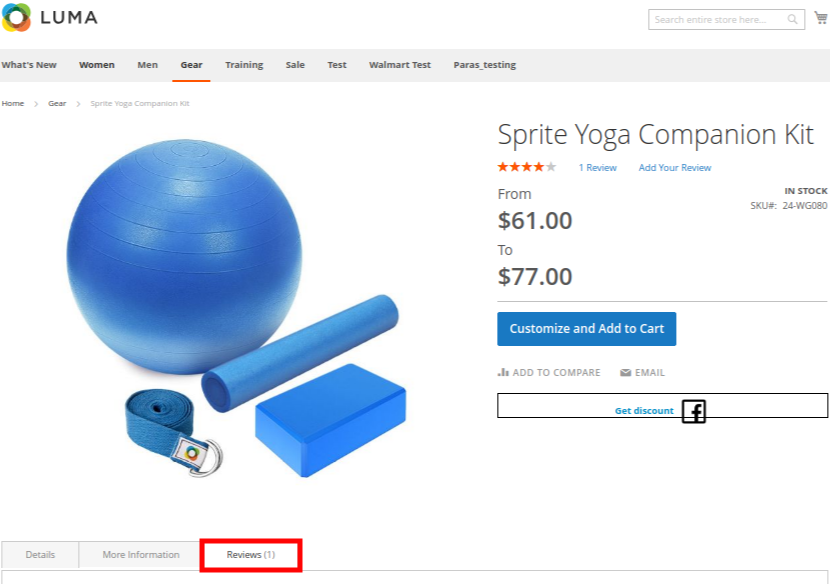
Product review also helps customers make decisions better and feel more confident. Furthermore, the more reviews you have, the more confident a customer is that they’re making the right choice. Reviews can also assist a store’s internet visibility.
Analyzing as well as testing your approach to returns and ways of measuring up to your peers is a great way of generating a return on your post-holiday returns. Along with that, another way of generating a return on post-holiday returns is by utilizing these modules.
In case you face trouble, feel free to write us at support@knowband.com
In this growing eCommerce scenario, there are several strategies to improve the business connect with the customers. One such strategy is review booster and incentive system which helps in creating a better product image while gaining customer loyalty by offering enticing incentives. Product reviews create a first and long-lasting impression while the customer is about to purchase from an online shop. Before finalizing their purchase from the store, they believe in what buyers of the same product have experienced on the store.
Knowband’s Magento 2 Review Reminder and Incentives extension is one eCommerce business module which encourages customers to leave business reviews regarding their purchase. Magento 2 Review Booster module facilitates a way to collect product reviews from all kind of users and incentivize in exchange for the product reviews. Moreover, the Review Booster and Incentives extension for Magento 2 helps store owners to send personalized follow-up reminder emails to set up communication with your buyers and ask for reviews.
1.1 Striking Features of Magento 2 Review Reminder and Incentives plugin
The Magento 2 Review Reminder and Incentives Extension offers you multiple customizable features which are easy to implement for your eCommerce website. Admin can implement and configure any feature for their store without using any coding knowledge. Let us quickly take an overview of striking features by Magento 2 product reviewing and incentives module.
1. The Magento 2 Review Reminder and Incentives extension provides a means to collect product reviews from visitors and buyers who purchased an order from the store.
2. With Magento 2 review booster extension, admin can create and keep a track on reminder triggers as well as the incentives offered. The admin can schedule the follow-up reminders and fix the incentive criteria from the back-end.
3. Magento 2 Review Reminder and Incentives plugin lets you evaluate product reviews before making them live on the product pages under the review section. If you select automatic then reviews will be automatically approved and get live on the website and if you select manual then admin has to approve or disapprove it.
4. Magento 2 product reviewing and incentives module allows site admin to offer incentives and reminders to selected group i.e customer or buyer or both.
5. WIth Magento 2 Product Review Reminder module, store admin can even set the title and template for review reminder email sent to the customer or admin. The email also states whether the review includes an incentive or without incentive.
6. Magento 2 Review Reminder and Incentives block can be shown on the complete site or for different pages like Homepage, Product page, Category page, etc.
7. This Review Booster and Incentives extension for Magento 2 provides SSL compatibility and device responsive UI.
8. Magento 2 review booster extension supports and works flawlessly with multiple languages.
9. With Review Reminder and Incentives extension for Magento 2, admin can change the color of background color, border color and font color of review button.
10. The Magento 2 Review Reminder and Incentives extension provides an option to exclude products and categories from the review booster system.
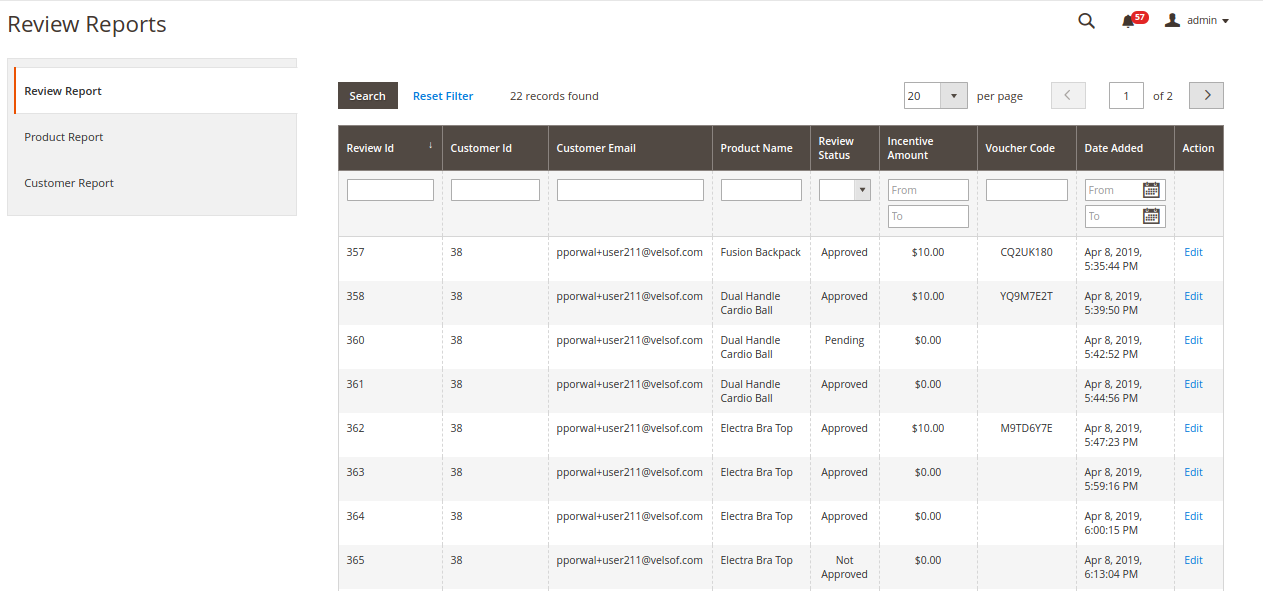
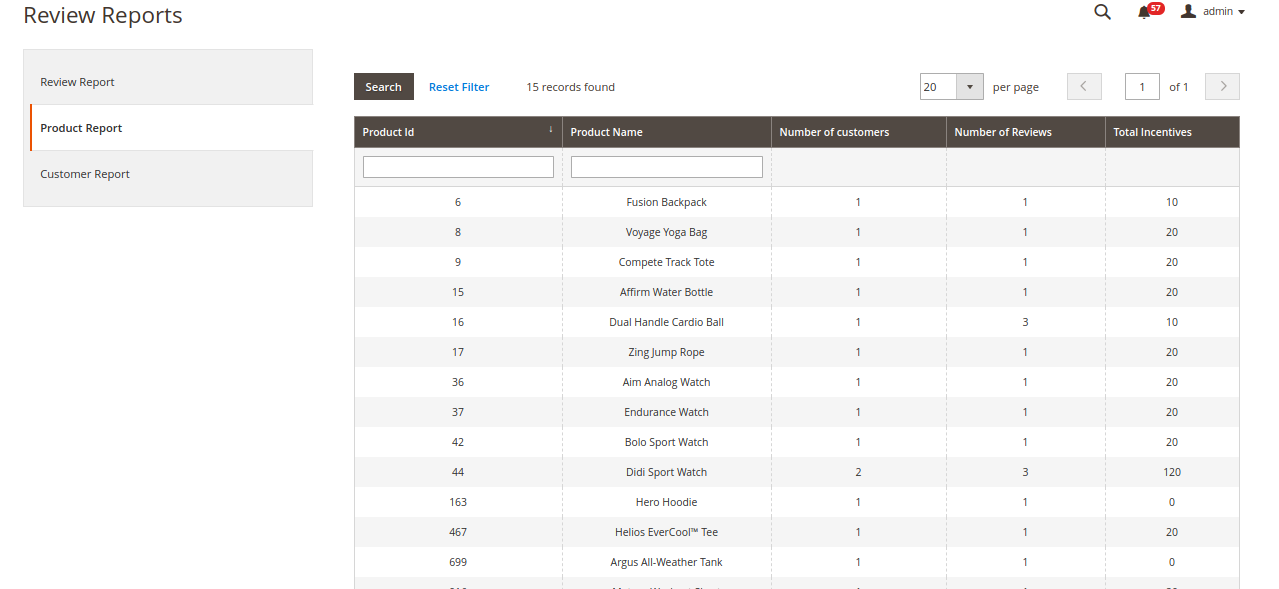
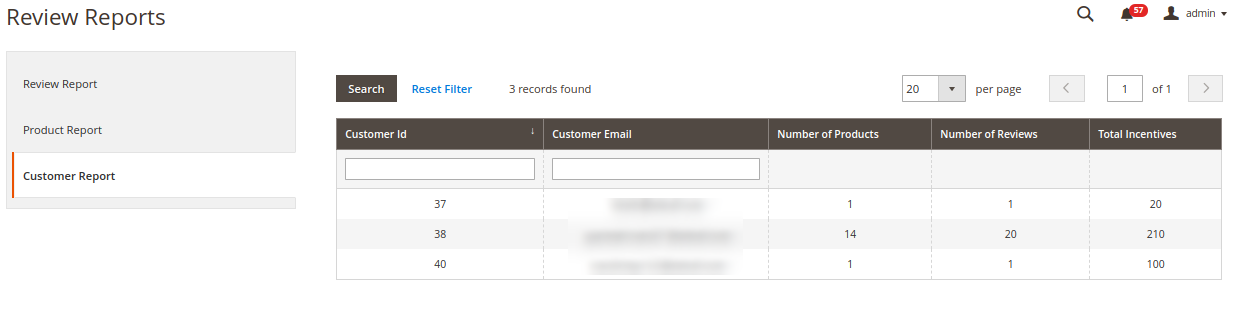
11. Magento 2 review booster extension gives a detailed view to check the products that have been reviewed and the customers who have reviewed those products from the backend.
2.0 Installation Guide of Review Reminder and Incentives extension for Magento 2
1. Once after purchasing Magento 2 Review Reminder and Incentives extension from the Knowband store, you will get the following files on your registered email:
Source code file of Magento 2 Review Booster module in zipped file format
User Manual of Magento 2 Review Booster module
2. Unzip the extension package.
3. Create a folder{Magentoroot}/app/code/Knowband/Reviewbooster.
4. Upload the extracted content in the above folder via FTP manager (like Filezilla or WinSCP – download here: https://filezilla-project.org/).
The Magento 2 Review Booster and Incentives module is now installed and ready to use.
3.0 Admin Interface of Magento 2 Review Reminder and Incentives Extension
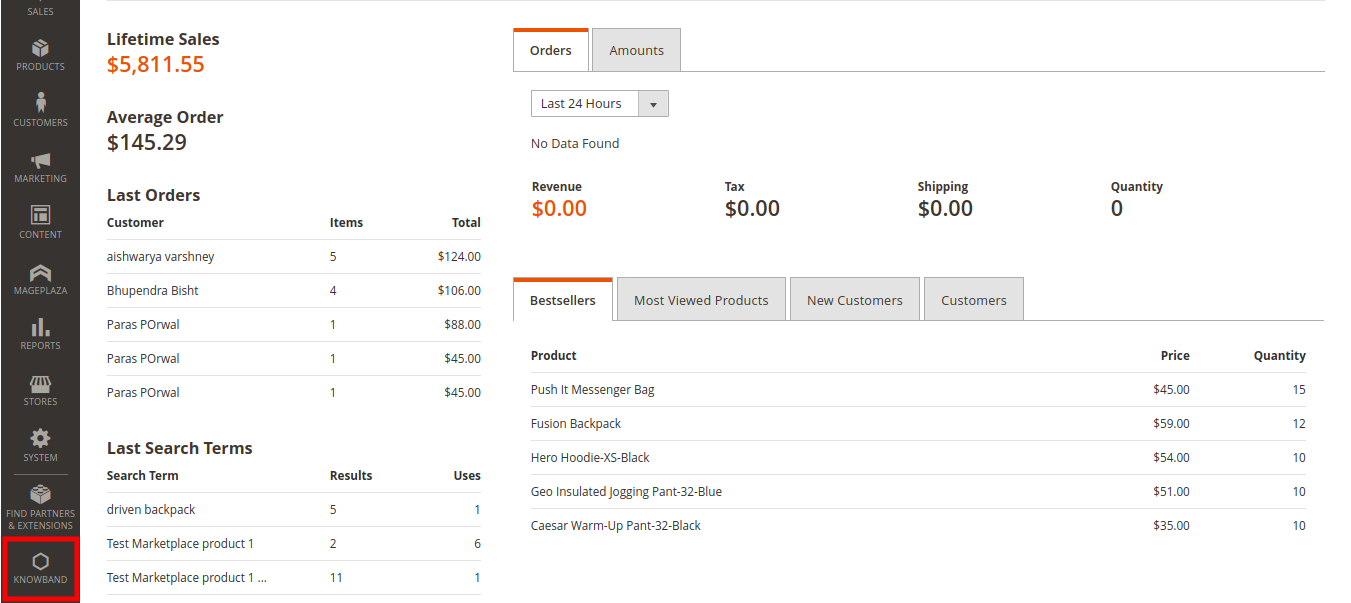
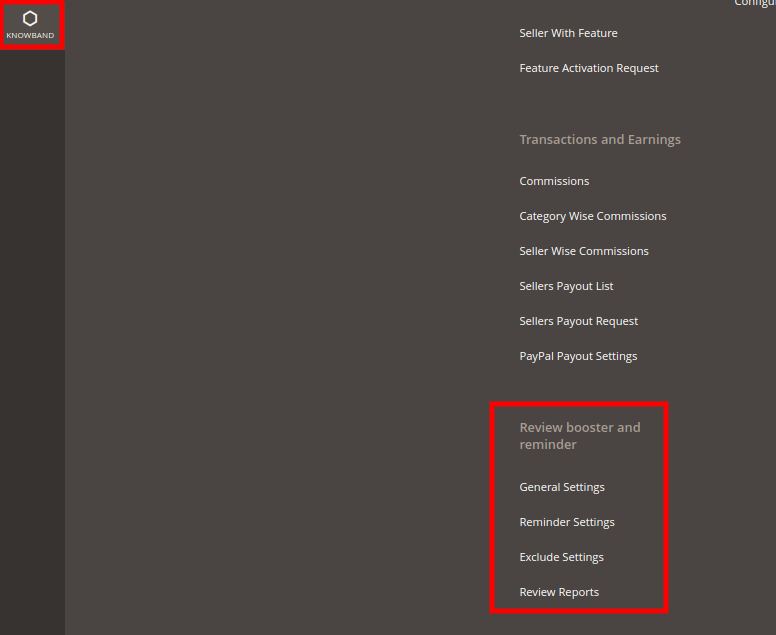
Just after successful installation of Magento 2 Review Booster and Incentives module on your website, you can collect and display as many reviews on your store as per business requirements. In order to configure this Magento 2 Review Booster module, navigate the settings in the given order: Admin Panel > Knowband > Review Booster and Reminder
The simple to understand admin interface of Magento 2 Review Reminder and Incentives plugin contains the following four sections namely:
Each of these sections has been discussed in detail below.
3.1 General Settings
The general settings of Magento 2 Review Booster module are further divided into two sections as:
1.General Settings
2.Review Booster Settings
3.1.1 General Settings
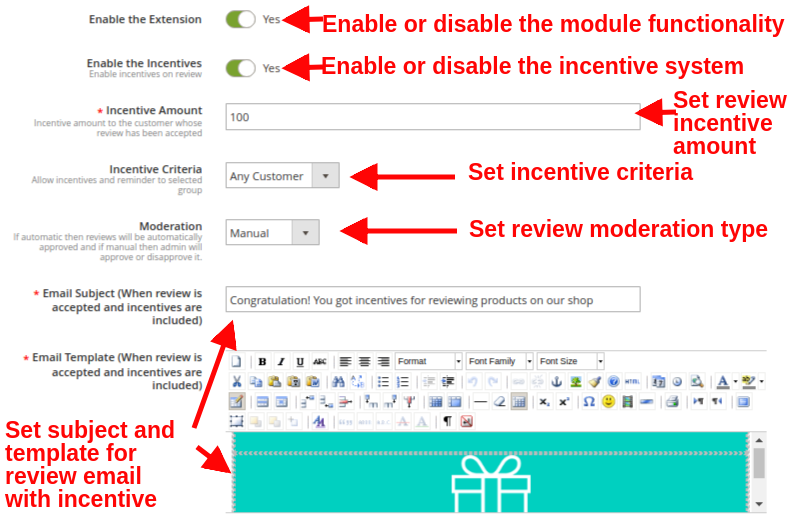
The general settings of this Review Booster and Incentives extension for Magento 2 contains the following basic configuration settings:
Enable the Extension: This option enables or disables the review booster and reminder functionality at your commerce store.
Enable the Incentives: With this option, you can allow or disallow incentives on customer reviews.
Incentive Amount: This sets the incentive amount you want to offer to your customers for writing a review. This amount is only provided to the customers whose review is accepted by the admin.
Incentive Criteria: With this option, you can provide incentives and reminder to selected groups which includes buyer or any customer. When selected as “Buyer”, shoppers will see the review block on the selected pages. While if this option is set to “Any Customer”, then any user can review the product from the product page itself, while it will not show on other pages.
Moderation: This will select the moderation type for product reviews. If automatic is set then the reviews given by customers will be automatically approved without manual changes. If this option is set as manual, admin has to approve or disapprove the product review.
Email Subject (When review is accepted and incentives are included): This option sets the subject line for the email sent to customer whose review is approved and provided incentive.
Email Template (When review is accepted and incentives are included): This option sets the template content for the email sent to customer whose review is approved and provided incentive.
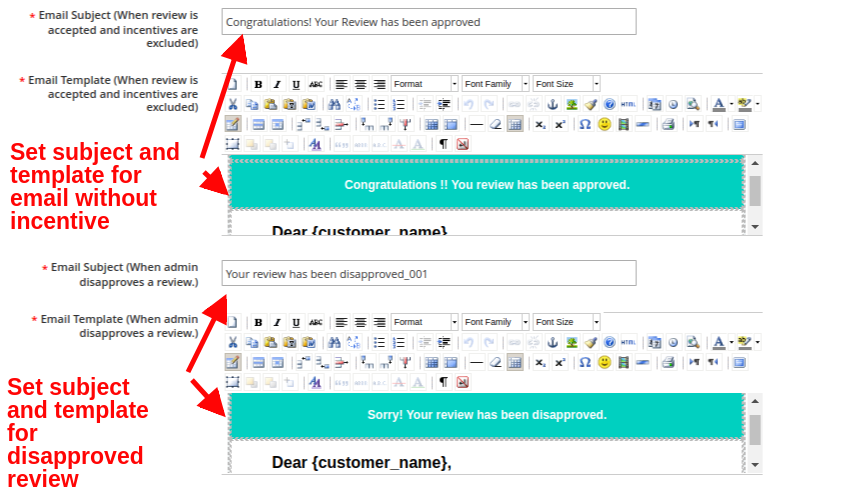
Email Subject (When review is accepted and incentives are excluded): This option sets the subject line for the email sent to customer whose review is approved without including any incentive.
Email Template (When review is accepted and incentives are excluded): This option sets the template content for the email sent to customer whose review is approved without including any incentive.
Email Subject (When admin disapproves a review): This option sets the subject line for the email sent to customer when their review is disapproved.
Email Template (When admin disapproves a review): This option sets the template content for the email sent to customer when their review is disapproved.
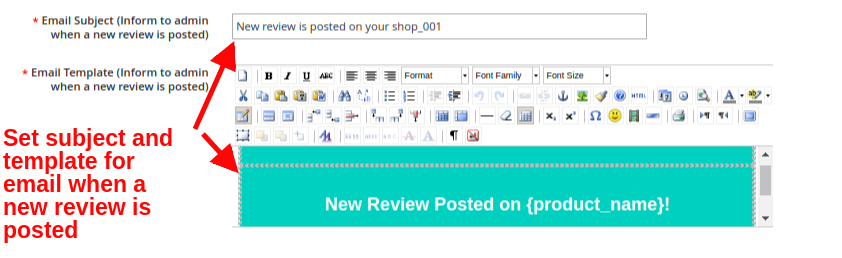
Email Subject (Inform to admin when a new review is posted): This option sets the subject for the email sent to the admin informing them about the posted review.
Email Template (Inform to admin when a new review is posted): This option sets the template for the email sent to the admin informing them about the posted review.
3.1.2 Review Booster Settings
The review booster settings of Magento 2 Review Reminder and Incentives plugin have been discussed below.
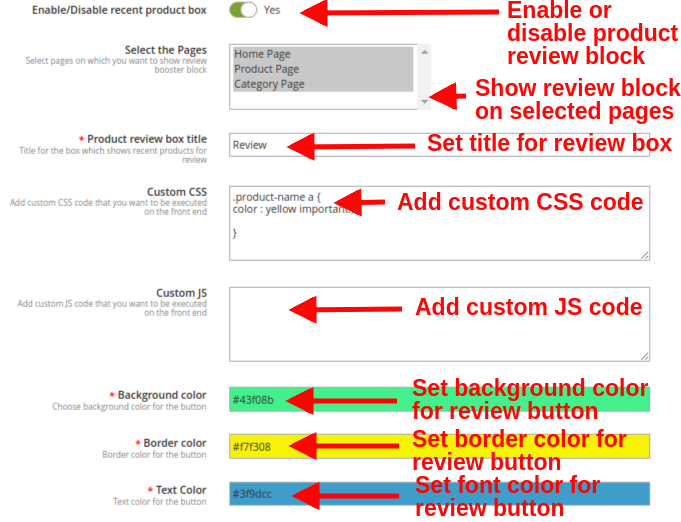
Enable/Disable recent product box: This option will enable or disable the recent purchase review block visible to the customers who purchased an order on the store. If this is disabled, the standard review block is still visible on all product pages to every visitor.
Select the Pages: This option allows you to select all the pages where you want to show review booster block to the buyers.
Note: Review booster block is visible to buyers on all site pages allowed by admin, while a user/visitor can only see and provide reviews from the product page.
Product review box title: This option sets a custom title for the product review block for recent product purchases.
Custom CSS: With this option, you can add CSS code that you want to execute on the frontend.
Custom JS: With this option, you can add JS code that you want to execute on the frontend.
Background color: This option sets the background color for the review button.
Border color: This option set the border color for the review button.
Text Color: This option sets the font color for the text shown on the review button.
3.2 Reminder Settings
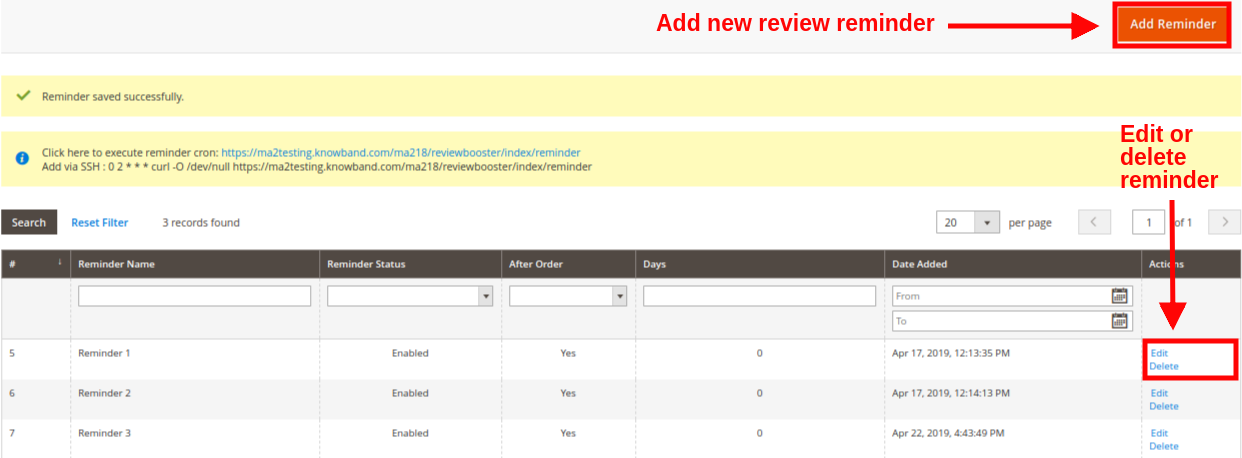
The reminder settings of this Magento 2 Review Booster and Incentives module gives a detailed view to the list of existing follow-up reminders at the backend.
You can see the email reminder along with their sent status and delivery date. Each of these review reminder can be edited or deleted by clicking on the “Edit/Delete” button corresponding to the reminder listing.
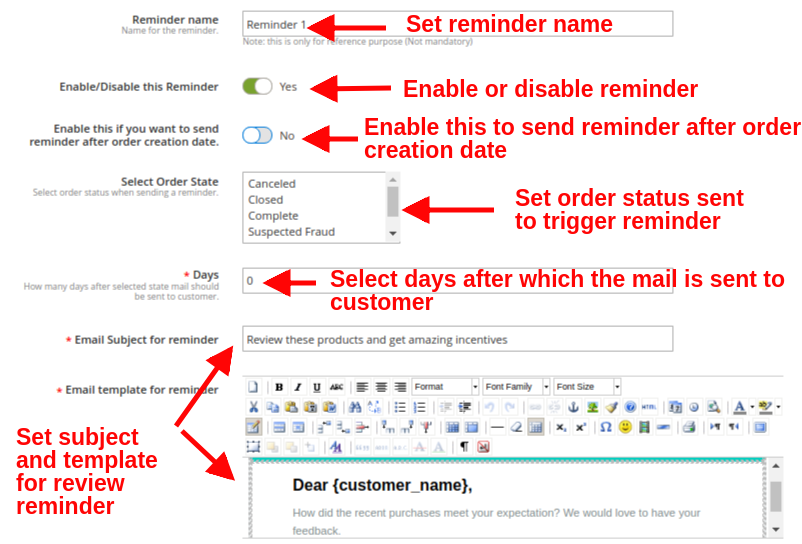
To add a new email follow-up reminder, click on “Add Reminder” button at the top right place of Reminder Settings section. You will see the following configuration options:
Reminder name: This option sets the name for the review reminder.
Enable/Disable this Reminder: Enable or disable the review reminder email using this option.
Enable this if you want to send reminder after order creation date: By enabling this option, the review reminder or follow-up email will be sent after order creation date. If this option is enabled, the next option “Select Order State” will get automatically disabled.
Select Order State: Select the order state when you want to send a reminder to the customer. As the order reaches to that state, the reminder is automatically triggered.
Days: This option specifies the number of days after which the selected state mail should be sent to the customer.
Email Subject for reminder: This option helps you to set the subject for the review reminder email.
Email template for reminder: This option helps you to set the template for the review reminder email
To send scheduled reminders to customers, cron job has to be executed manually by executing the following instructions:
Click here to execute reminder
cron: {Your store base URL}/reviewbooster/index/reminder
Add via SSH : 0 2 * * * curl -O /dev/null {Your store base URL}/reviewbooster/index/reminder
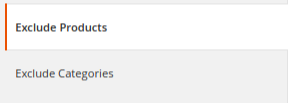
3.3 Exclude Products and Categories
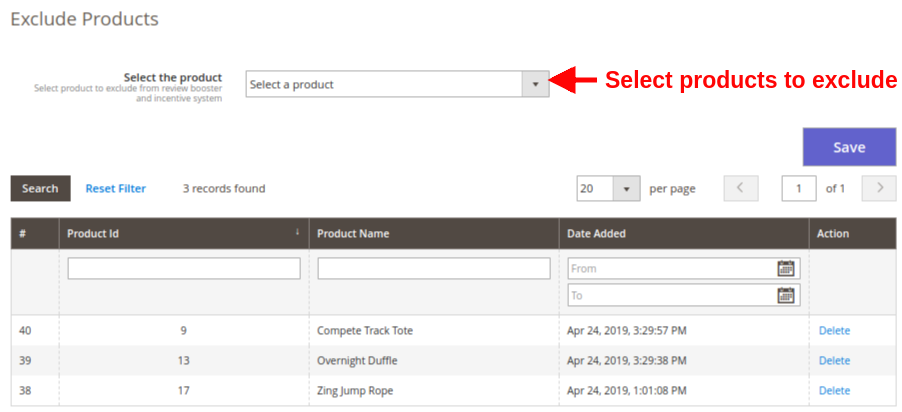
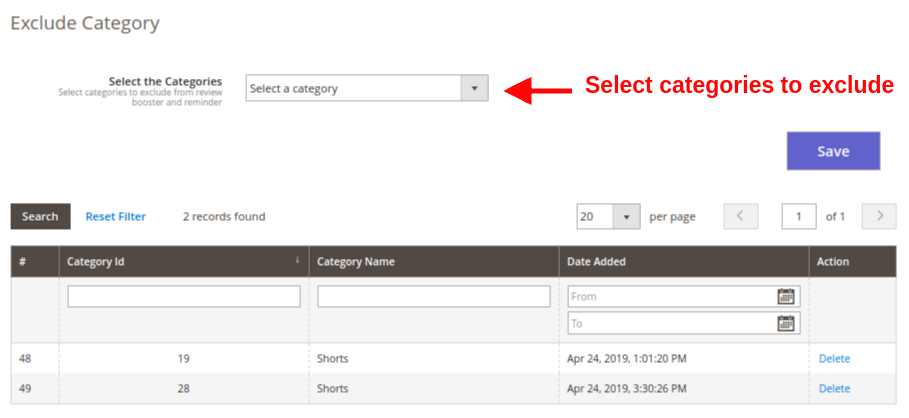
With this Magento 2 Review Booster module, you have the flexibility to disable review booster and reminder block for selected products and categories. From this section of this Magento 2 module, you can mark desired products and categories where you want to hide/disable this Review Booster block for the users.
Select the Product: Select the products you want to exclude from review booster and incentive system. You can also view the list of excluded products where this review block is hidden.
Select the Category: Select the categories you want to exclude from review booster and incentive system. You can also view the list of excluded categories where this review block is hidden.
After making the changes, click on “Save” button to execute the settings.
3.4 Review Report
Under the Review Report section of Magento 2 Review Reminder and Incentives plugin, you can view the complete site statistics regarding the customer reviews, reminders sent and incentives earned by the customer.
The complete report system is divided into three subsections namely:
3.4.1 Review Report
3.4.2 Product Report
3.4.3 Customer Report
4.0 Front Interface of Magento 2 Review Reminder and Incentives Extension
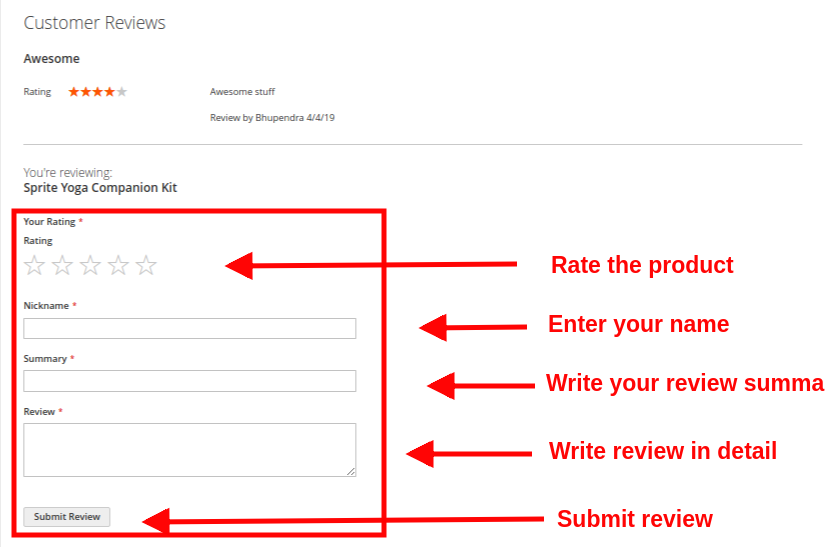
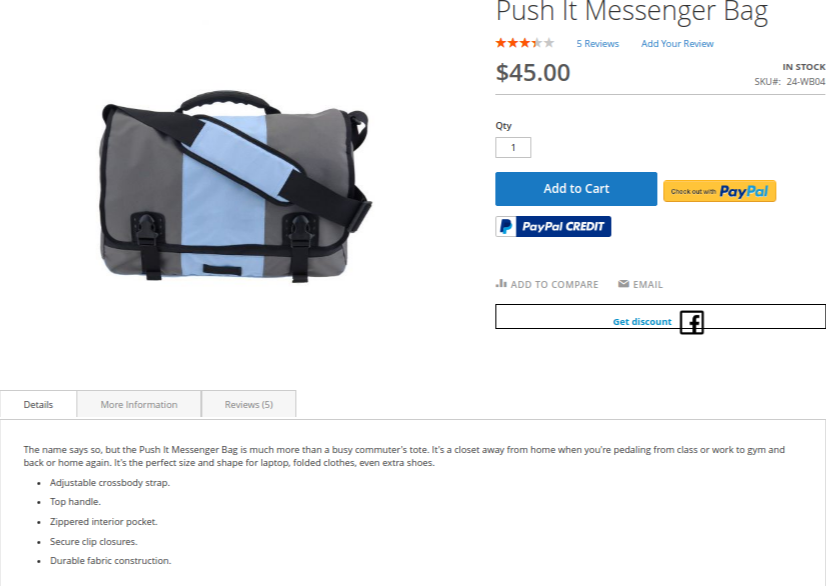
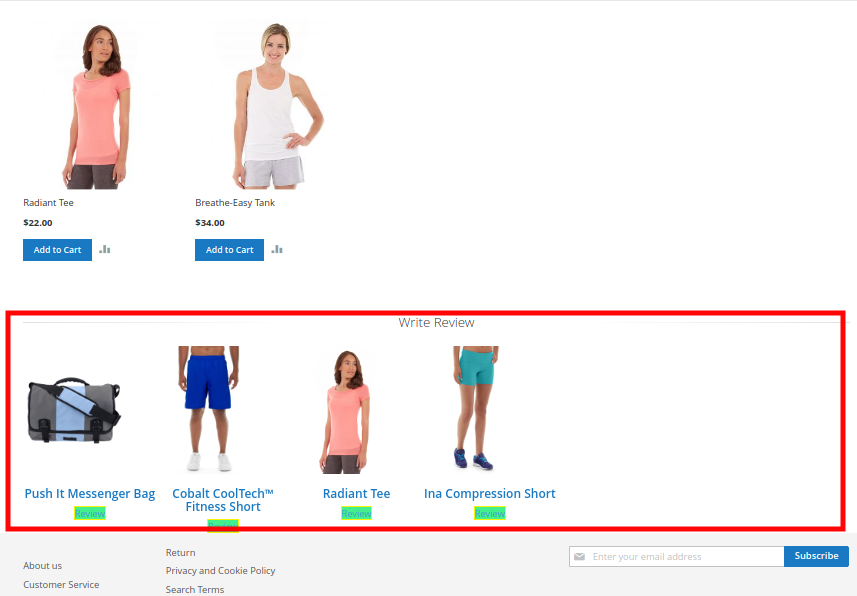
1. Product Review Block on Product Page A) Review Write Block shown on product page to all Non-Buyers or Visitors of website.
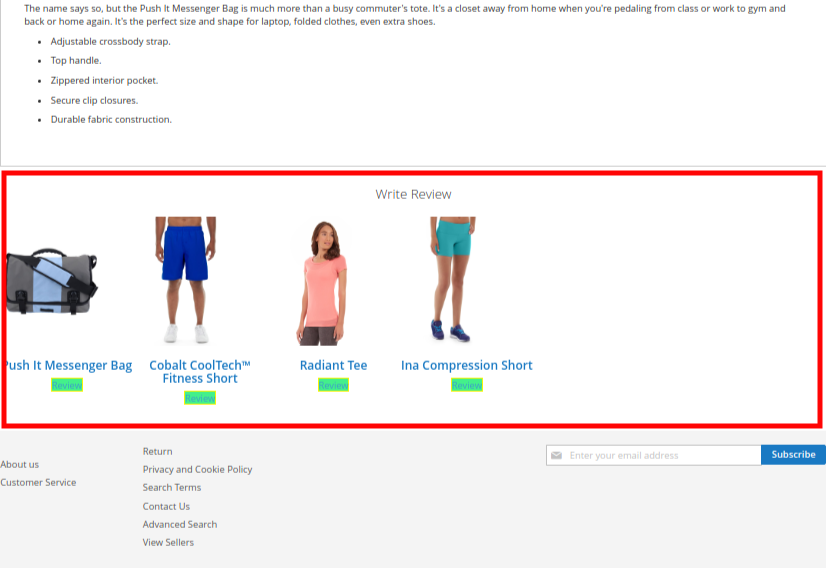
B) Review Write Block shown on product page to Buyers of the website for their purchased products. The block shows all the purchased products of a customer on which the customer has not reviewed yet.
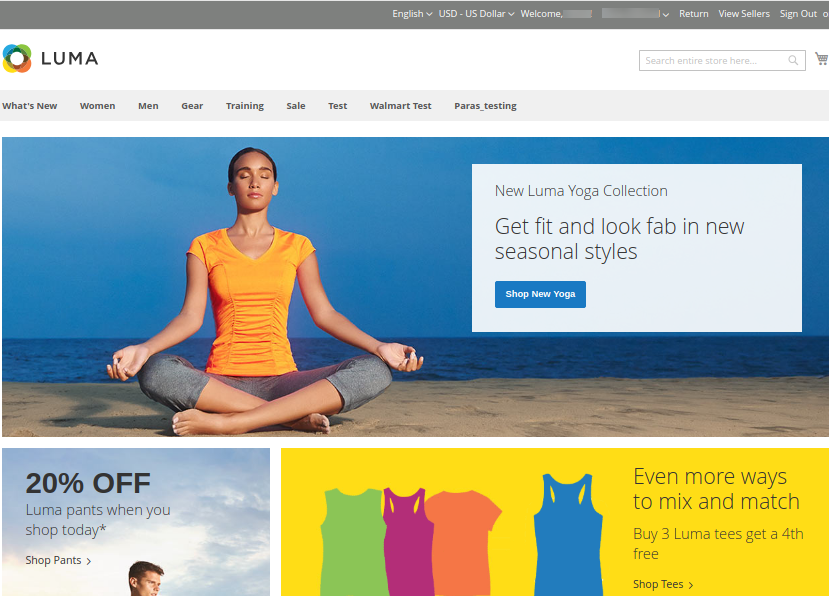
2. Product Review Block on Homepage
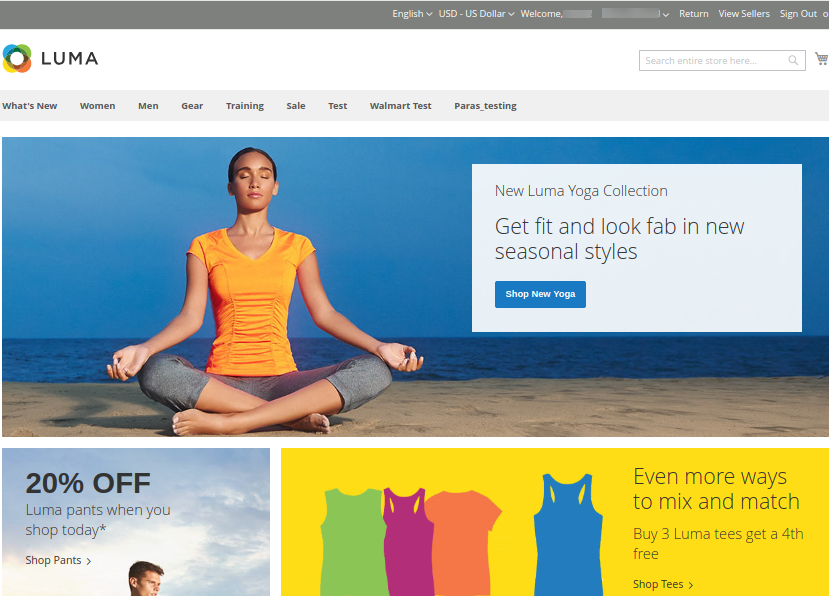
This Review Write Block is shown on Homepage to Buyers of the website for their purchased products.
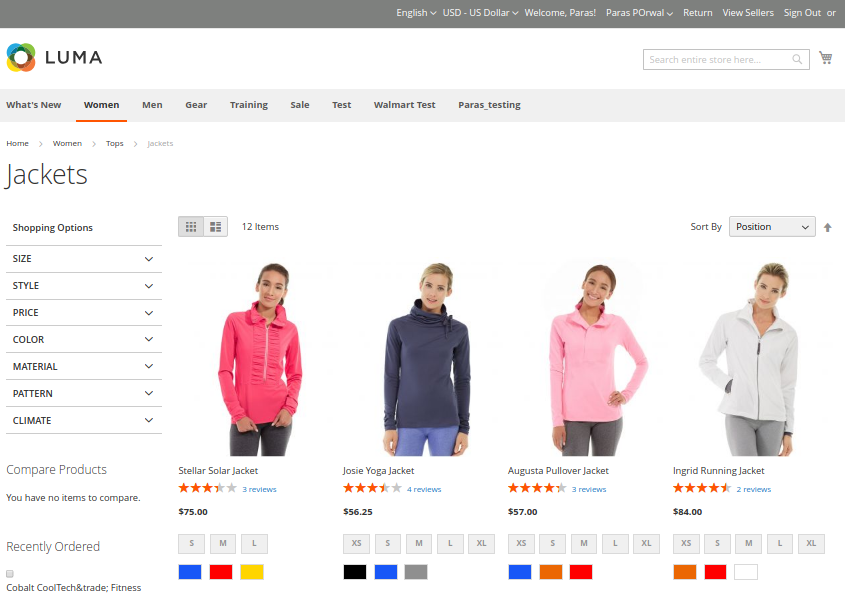
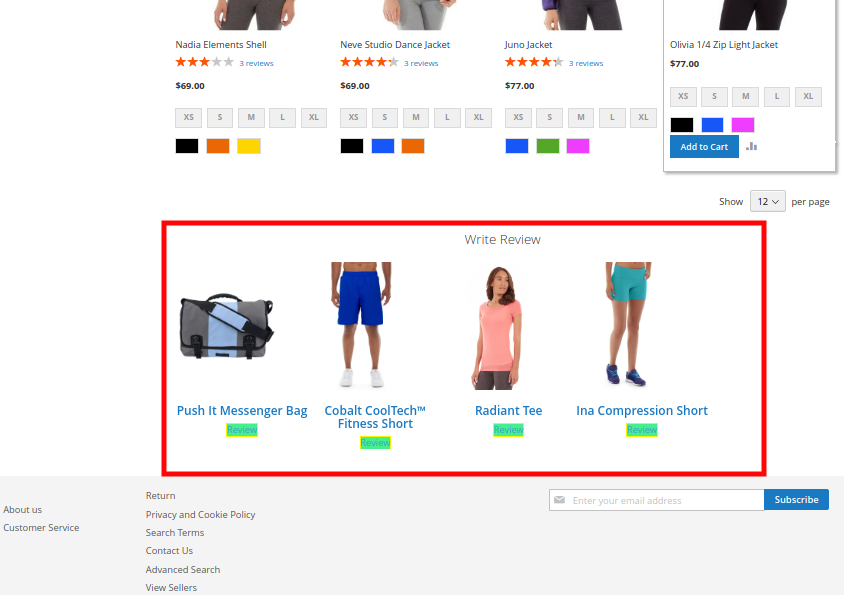
3. Product Review Block on Category Page
This Review Write Block is shown on Category Page to Buyers of the website for their purchased products.