Want to encourage customers to purchase from your store? eCommerce Loyalty Program does that for you. An eCommerce loyalty program helps in motivating customers to make repeat purchases in your online shop by rewarding them. Freebies, discounts, coupons, or cashback, all these things can be used as rewards. One of the best examples of an eCommerce loyalty program is Starbucks Rewards Program which lets customers earn stars and for each dollar spent, the buyer can earn one star. After 60 stars, customers will get a free drink or a free slice of cake.
In this blog, we will try to understand- what makes this program important and the benefits offered by it.
Customer loyalty- what makes it so important?
Should smaller businesses focus on attracting new customers? or should they focus on existing ones and make sure they come back again and again? These are some of the questions that can make budding business owners confused. In case you are one of those budding eCommerce owners and unsure whether you should focus on acquisition or retention, here’s why both types of buyers- existing and loyal buyers matter.
Retention is an effective way of growing your business and customer loyalty is a major part of it. As per studies, 75% of customers have switched brands for a better loyalty program whereas 52% of customers will prioritize and shop from brands where that have points and rewards in their account.
How beneficial is the eCommerce Loyalty Program?
eCommerce Loyalty Program comes withsignificant advantages that help your eCommerce store to grow. Following are the perks of the program.
eCommerce Loyalty Program results boost customer retention
One of the major reasons for using the eCommerce Loyalty Program is that it boosts customer retention. Existing customers love to be rewarded for more purchases. Furthermore, of companies that run loyalty programs on eCommerce stores, 81% of shoppers remain loyal to such accompanies according to studies. On the other hand, 69% of shoppers say they choose retailers based on customer loyalty and earned rewards.
Hence, such studies have proven that loyalty programs love the opportunity to receive rewards as well as can achieve frequent conversions. Moreover, they are more likely to stay in your business and avoid switching to competitors once customers earn points and level up.
Opt for eCommerce Loyalty Program if looking for higher sales
eCommerce Loyalty Program is advisable for merchants that are looking for higher sales. Increasing customer loyalty is very simple. Furthermore, this program even allows store owners to reward their lifelong customers by staying loyal to their business. The more customers you keep, the more your business will grow.
A 5% increase in customer retention can increase a company’s profits by 25% to 125% according to an interesting study. Moreover, 81% of shoppers believe that the loyalty program is more likely to continue shopping under the brand. 62% of US mobile shoppers say the loyalty program will increase store visits.
eCommerce Loyalty Programs offer budget-friendly sales and marketing strategy
eCommerce Loyalty Programs offers budget-friendly sales as well as an efficient marketing strategy. Furthermore, if we compare customer acquisition and retaining existing customers, customer acquisition is about five times more expensive than retaining existing customers. So to attract existing customers instantly use Loyalty programs. With proper loyalty reward software and optimized content, it’s also very easy to manage.
Helps retain existing customers
On average, loyal consumers spend 67% more than new consumers. This is a non-negligible statistic. At the same time, acquiring customers can cost at least five times more than retaining existing customers. So to have a positive impact on your business, you can apply this idea. Moreover, Loyalty program members can bring more value to your business during difficult times.
Why choose Knowband modules?
Knowband is famous for offering some of the best plugins for eCommerce systems. With years of experience with eCommerce websites, Knowband knows what works best for the merchants and what does not. Along with efficient plugins for different eCommerce platforms such as Opencart, Prestashop, Magento, and Magento 2, Knowband offers the most efficient after-sales support.
The module is beneficial for Prestashop store owners as it allows the admin to provide the store credit to the customers for certain actions. Certain actions include- New order, Sign-up on the store, etc.
Opencart Loyalty Points extension
Permitting admin to provide loyalty points or store credits to their customers, Knowband’s offers Opencart Loyalty Points Extension. Furthermore, this extension allows customers to make use of their next purchase in the store in the form of a discount.
Magento Loyalty Points Extension
Magento Loyalty Points Extension permits online merchants to provide loyalty points on specific events. Specific events include new registration, first order, on ordering any specific product or products of any specific amount.
Magento 2 Loyalty Points Extension
Magento 2 Loyalty Points Extension allows online admin to provide loyalty points to online buyers. Loyalty points can be offered to online shoppers at different events. For instance, new signup, first order, purchasing a specific product, ordering a product from a specific category, and placing orders of a specific amount or more.
Final Note:
When loyalty programs come with so many benefits hence it would be great to start one for your business today. With the assistance of Knowband modules, you can make this process easier and can take your business to next level.
As Knowband offers efficient post-sales support to the customers hence feel free to write us at support@knowband.com.
Now the online merchant can implement a reward system on the website and increase website profit easily. Knowband offers Magento 2 Loyalty Points Extension which allows the store admin to offer loyalty points to the online buyers on specific events. The online users can get loyalty points on their birthday, first order, new signup, ordering any specific product or product of a specific price. This way, online buyers can collect loyalty points and convert them into vouchers while placing the next order.
By offering loyalty points to the customers, the online merchant can assure repeated orders from the same customers. The Magento 2 Loyalty reward points module allows the online merchant to set the behavior rules and product cart rules. Only those customers who’ll meet these conditions will get loyalty points.
1.1 Basic Features of this Magento 2 Loyalty Points Extension
The online merchant can offer loyalty points to online buyers and get more orders.
The online merchant can assure customer retention and customer acquisition by offering loyalty points to the buyers.
The online merchant can apply Cart rule and Behavior rule from the Magento 2 Loyalty Points Extension admin interface. This way, he can control the overall process of offering loyalty points.
The online merchant can set the amount per loyalty point, validity days and expiry information. Admin can also send an email notification for informing the online users regarding loyalty points expiry.
Admin is allowed to offer loyalty points on the customer’s birthday by setting the amount and selecting the customer group for this.
The store merchant can offer loyalty points to any customer by setting the loyalty points, validity days, loyalty point status and selecting the email id for sending loyalty points. The Magento 2 Loyalty Points module also has an option to upload the CSV file for adding loyalty points.
Admin can view the customer’s loyalty point balance and also modify the status or any other detail.
Customizable email templates are available for sending an email notification to the customers. Admin can also customize the email templates from the admin interface of Magento 2 Loyalty points and discount module.
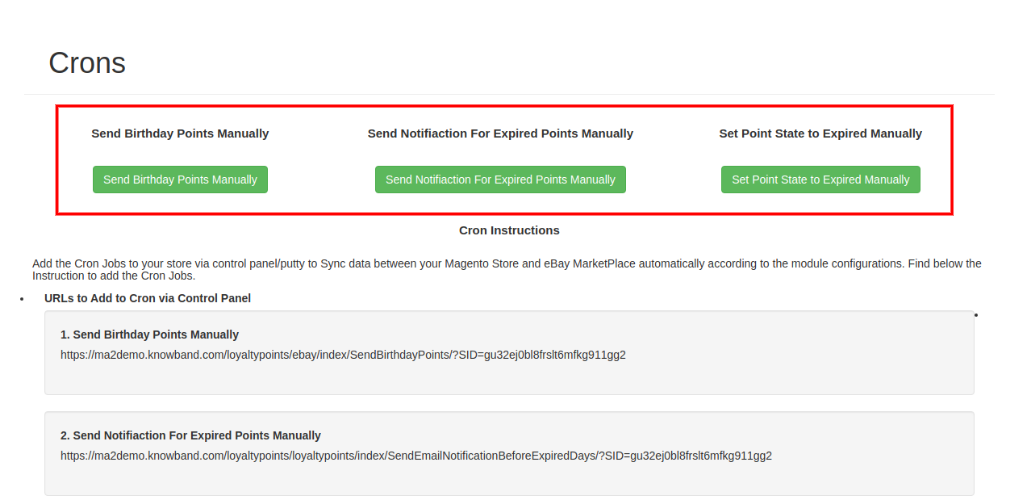
Cron settings are available for sending birthday points, expired points notifications on a single click. Admin can also change the loyalty points state to expire using these cron settings.
2.0 Installation
After purchasing Magento 2 Loyalty Points Extension, the store admin will get the following files:
Knowband_Loyaltypoints.zip which has the source code of this Magento 2 Loyalty Points module.
User Manual, with all the basic details and information.
The steps to install the Magento 2 Loyalty Points Extension are mentioned below:
Buy the Magento 2 Loyalty Points Extension from Knowband. You can download the extension package.
The package has a zipped file that contains the user manual and the source code of Magento 2 Loyalty Points module. Now, Unzip this package.
Create a folder {Magentoroot}/app/code/Knowband/Loyaltypoints
Upload the extracted content in the above folder via FTP manager (like Filezilla or WinSCP – download here: https://filezilla-project.org/).
The extension is now installed and ready for use. In Admin Panel go to “Knowband Extensions > loyalty points”.
You can now configure and use the Knowband’s Magento 2 Loyalty reward points module.
3.0 Admin Interface
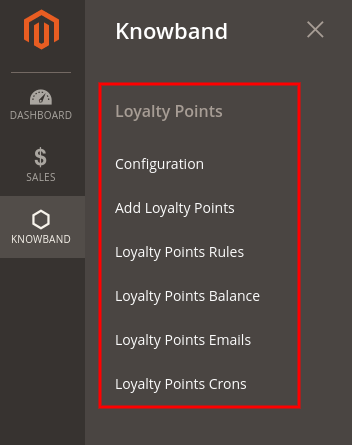
After installing the Magento 2 Loyalty Points Extension, the e-merchant can configure is as per the requirements. There are multiple configuration options as shown below:
Configuration
Add Loyalty Points
Loyalty Points Rules
Loyalty points balance
Loyalty points Emails
Loyalty Points Crons
3.1 Configuration
In Configuration settings, the online merchant will get these options:
General Settings
Label Settings
Birthday Settings
3.1.1 General Settings
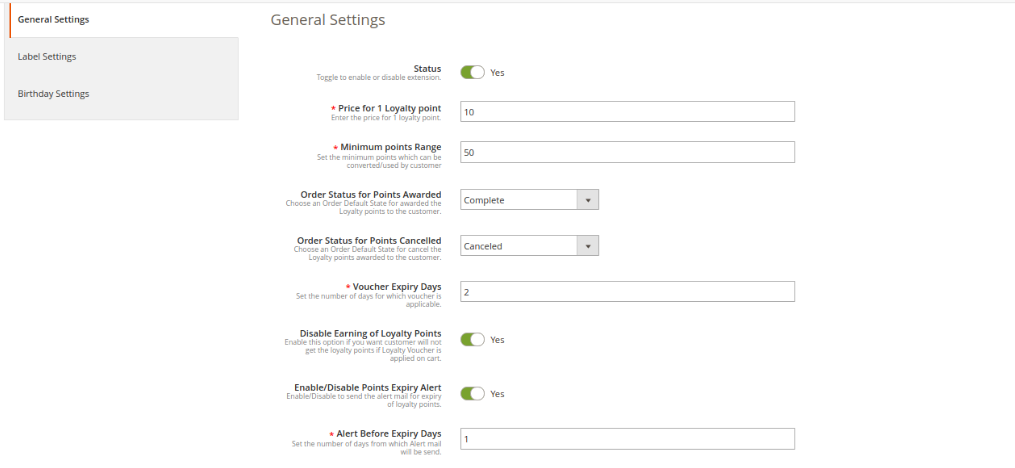
In General Settings, there are options to apply basic settings related to loyalty points. The online merchant will get these options here:
Status: Toggle the button for activating or deactivating loyalty points functionality in your store.
Price for 1 loyalty point: Set the price per loyalty point from here.
Minimum Points Range: Set the minimum points which need to be used by the customers while converting it to the voucher.
Order Status for Points Awarded: Set the default order status on which customers will get loyalty points.
Order Status for Points canceled: You can also set the order status on which loyalty points will be canceled from the customer’s account.
Voucher Expiry days: Set the number of days after which voucher will be expired.
Disable Earning Of Loyalty Points: Enable this field if you don’t want to offer loyalty points to the customers when they apply loyalty vouchers in the cart.
Enable/Disable Points Expiry Alert: Activate this option if you want to send an email to alert the customers about the expiry of loyalty points.
Alert Before Expiry Days: Set the number of days before which you want to send an alert.
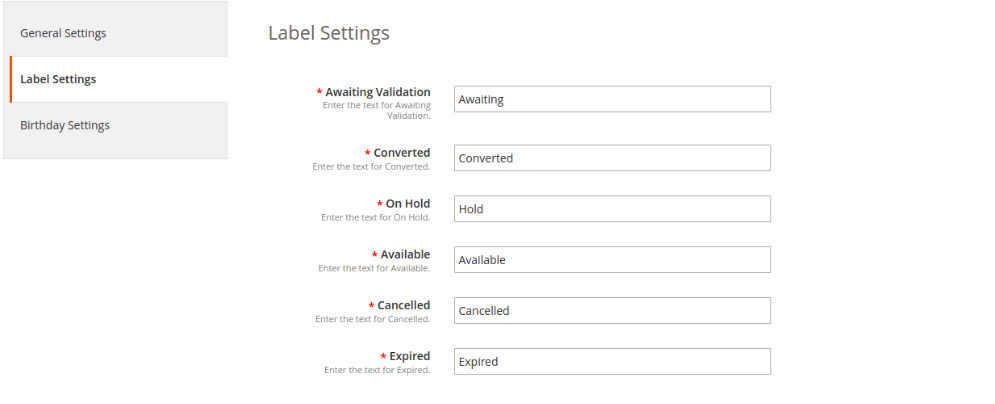
3.1.2 Label Settings
In this section, the online merchant can set the label for loyalty points. The Magento 2 Loyalty reward points module allows the store admin to set the label for Awaiting Validation, Converted, On Hold, Available, Canceled and Expired loyalty points.
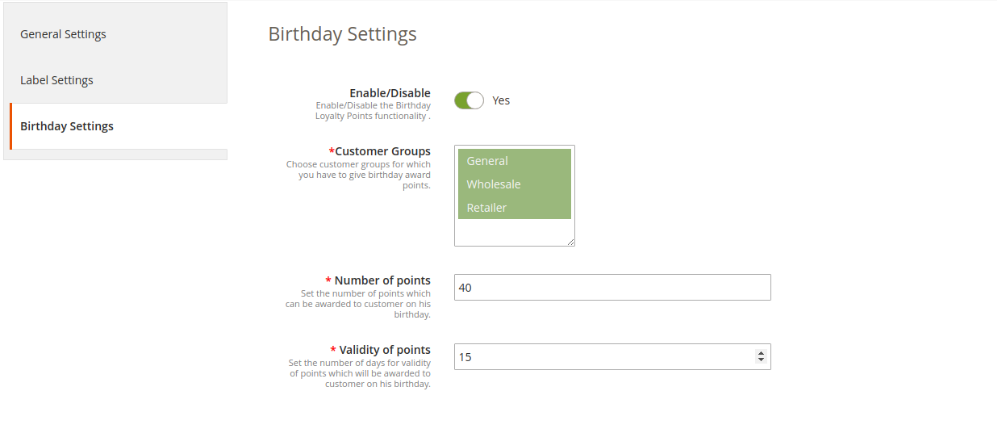
3.1.3 Birthday Settings
The Magento 2 Loyalty points and discount module allows offering birthday loyalty points to the customers. These are the customization options as shown below:
Enable/Disable: Toggle the button for activating or deactivating the settings to offer loyalty points on birthdays.
Customer Groups: Choose the customer group to which you want to offer birthday loyalty points.
Number of points: Enter the loyalty points which you want to offer on the birthday.
Validity of Points: Set the number of days for which loyalty points will be valid.
3.2 Add Loyalty Points
In this section, the online merchant can apply the settings for offering loyalty points to the customers. Admin can offer loyalty points to any specific customer or offer to multiple customers by uploading the CSV file. These are the configuration options available in this section:
Add Points
Add points using CSV
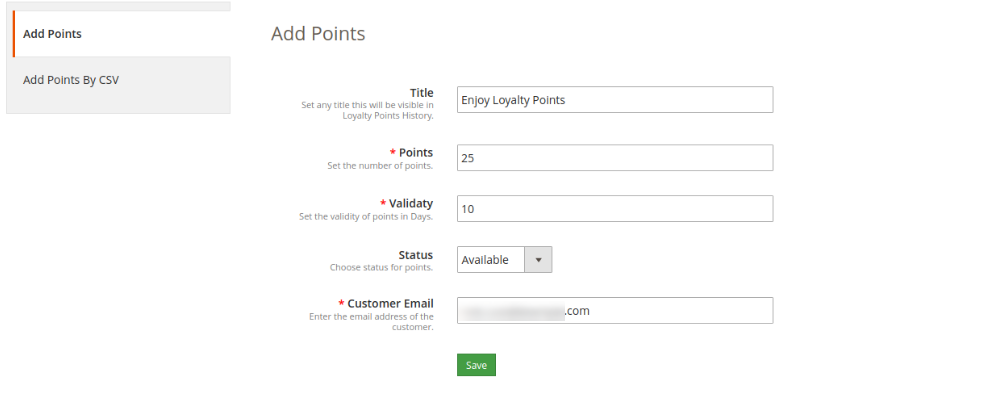
3.2.1 Add Points
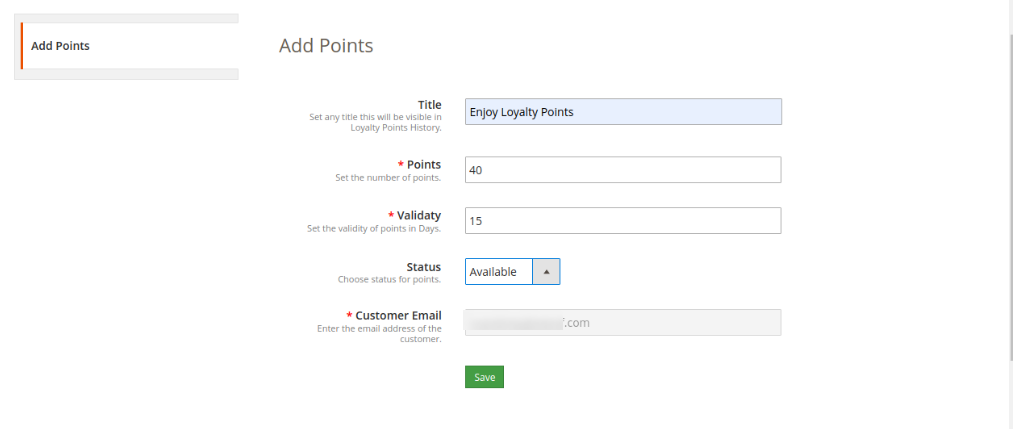
The online merchant can offer loyalty points for the customers by selecting their email id. Check the customization options below:
Title: Set the loyalty points title from here.
Points: Enter the number of loyalty points which you want to offer.
Validity: Set the points validity days from here.
Status: Select the initial status for loyalty points.
Customer Email: Enter the customer’s email id here.
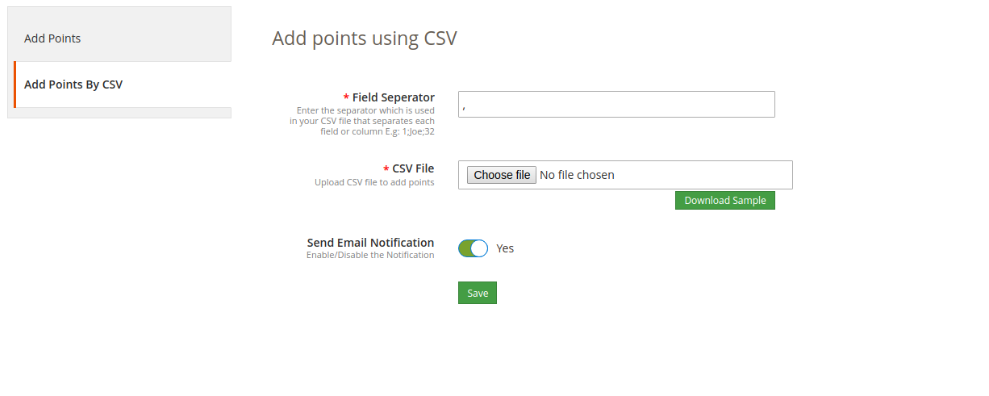
3.2.2 Add Points Using CSV
The online merchant can download the sample CSV file and then add loyalty points with other details. After that, he can upload the updated CSV files for offering loyalty points.
Field Separator: Set the field separator for columns.
CSV File: Upload CSV File to add loyalty points. (From the download button, admin can first download the sample CSV file)
Send Email Notification: Enable email notification for notifying the customers regarding offered loyalty points.
3.3 Loyalty Points Rules
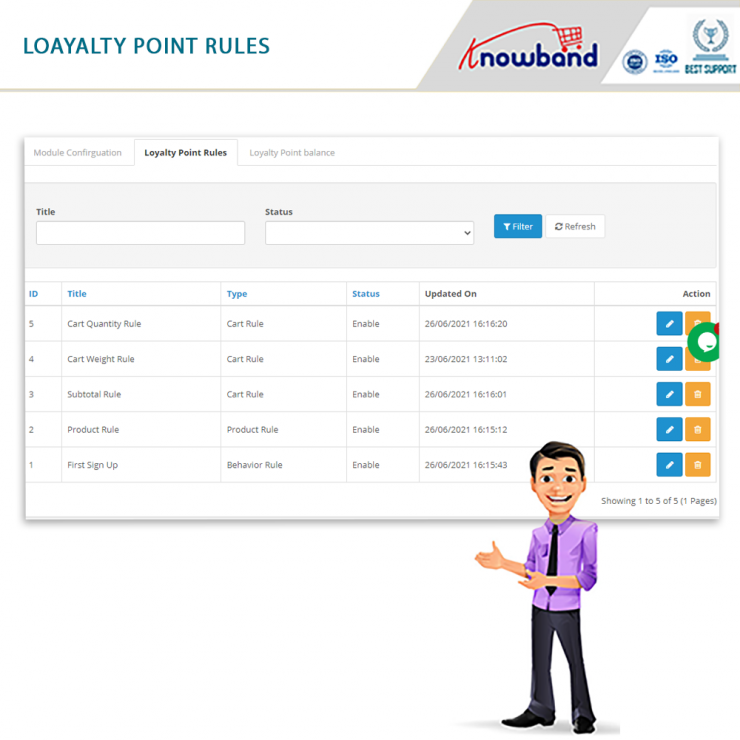
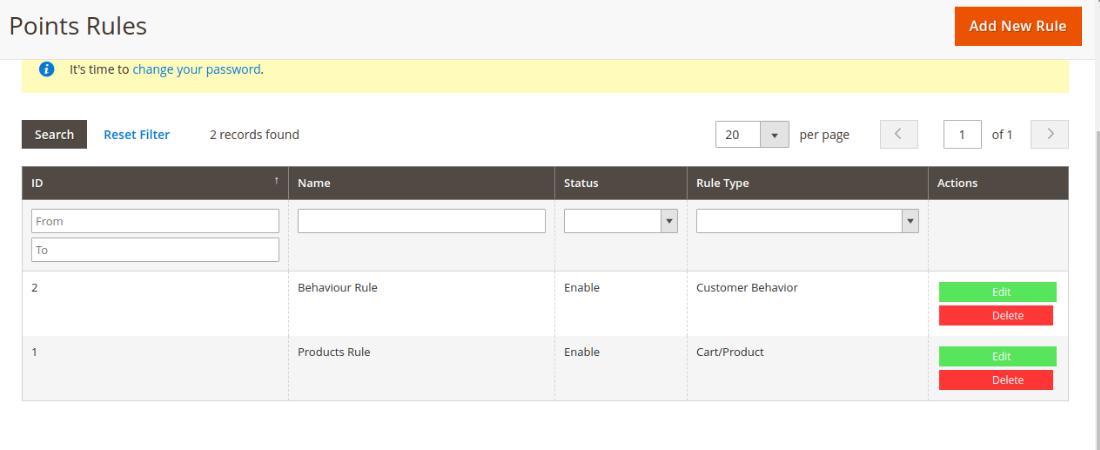
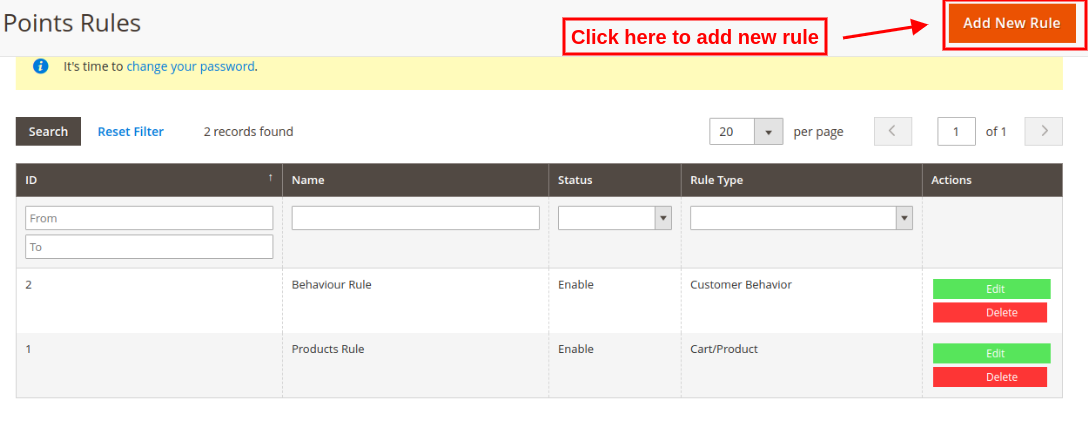
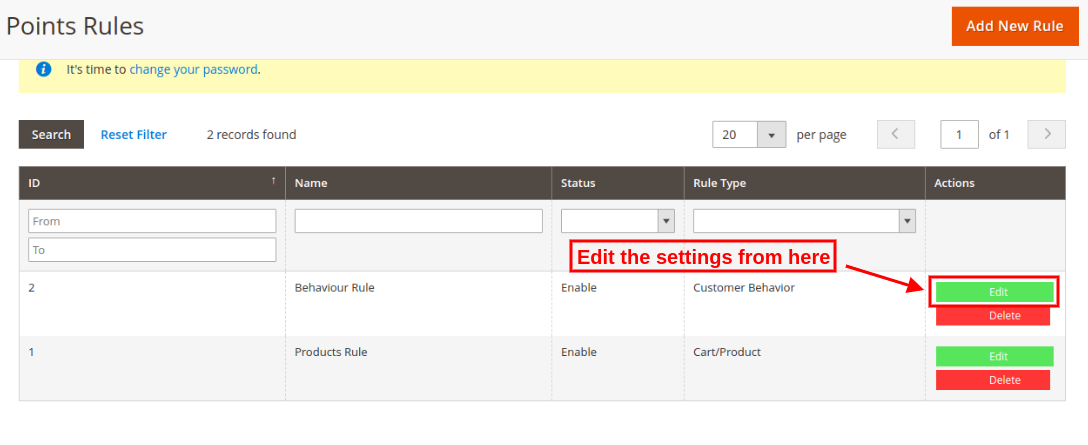
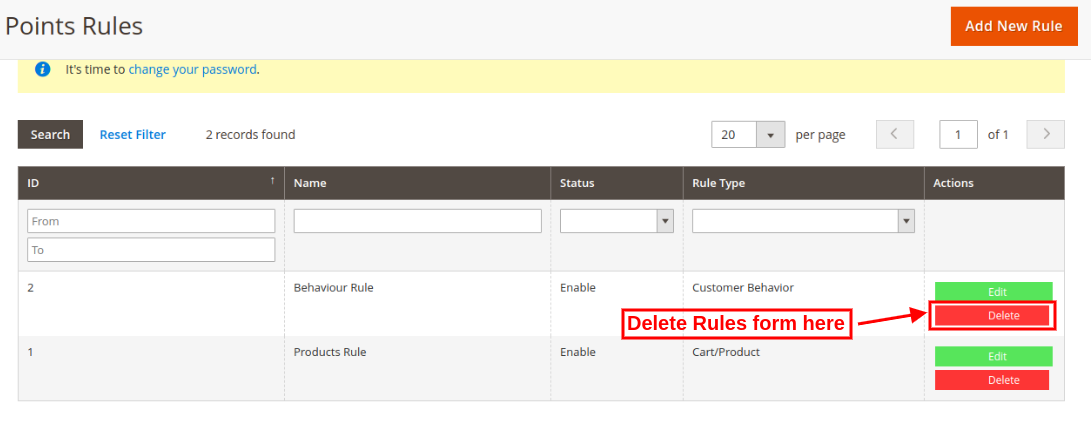
Admin can add various customer behavior and cart/product rules for offering loyalty points. The Magento 2 Loyalty points and discount module allows adding various rules without any limitations. The online merchant can edit or delete any rule anytime from the Magento 2 Customer reward points module back-end.
3.3.1 Add new Loyalty Rule
Admin can apply these settings for adding new rules from the admin interface:
Admin needs to click on “Add New Rules” option and apply these settings:
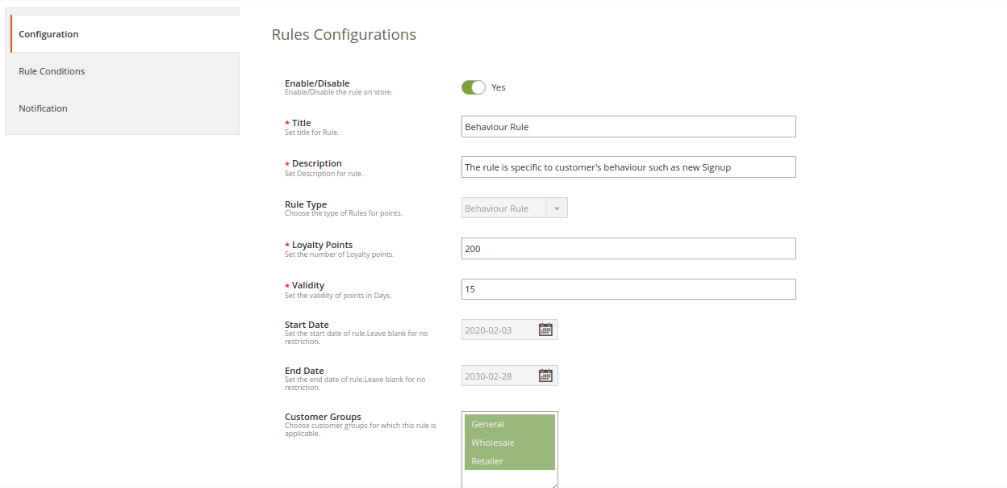
Enable/Disable: Activate or deactivate the rule.
Title: Enter the rule title.
Description: Enter the rule description.
Rule Type: Select the rule type ie. Product cart rule and behavior rule.
Loyalty Points: Enter the number of loyalty points.
Validity: Set the validity of loyalty points in days
Start Date: Set the start date of the rule. You can leave it blank if you don’t want to apply any restrictions.
End Date: Here, set the end date for the rule. You can leave it blank for no restriction.
Customer Groups: Select the customer’s group for which this loyalty rule is applicable.
There are several rule types that are based on product cart and behavioral rule.
A. Product Cart Rule
1. Offer loyalty points based on the cart subtotal
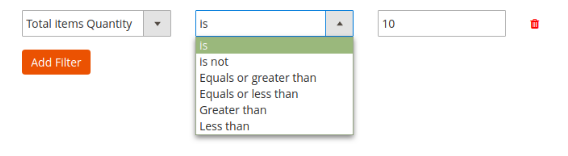
There is an option to apply conditions on cart subtotal amount. The store merchant can apply the condition to offer loyalty points to the customers when the cart subtotal is any specific amount, is not a specific amount when cart total amount is equal to or greater than selected amount when cart amount is equal or less than the selected amount, greater than the selected amount, less than the amount.
2. Offer loyalty points based on the item quantity
The online merchant can provide loyalty points to the customers when they shop for specific product quantity. Similar conditions as “cart subtotal” will be applied for item quantity also.
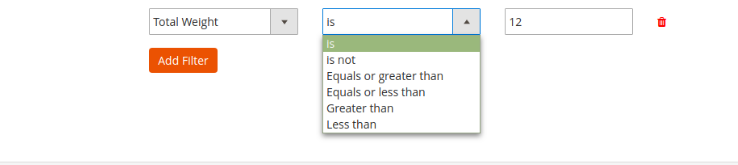
3.Offer loyalty points based on the total weight
Admin can also set the condition related to the weight of the products. Admin needs to define what should be the total weight of the cart to earn loyalty points.
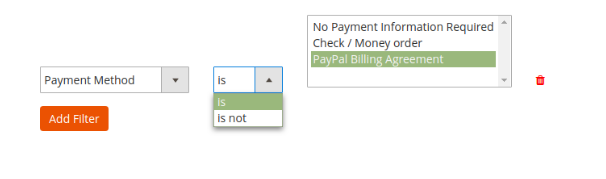
4. Offer loyalty points based on the Payment method
The store merchant can offer loyalty points to those customers who select or do not select any specific payment method.
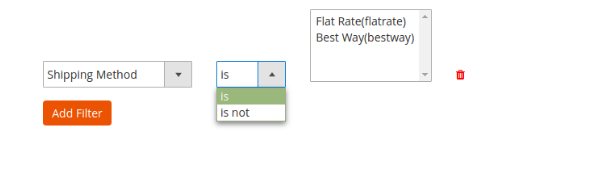
5. Offer loyalty points based on the shipping method
The store admin can provide loyalty points when a customer opts for the defined shipping service.
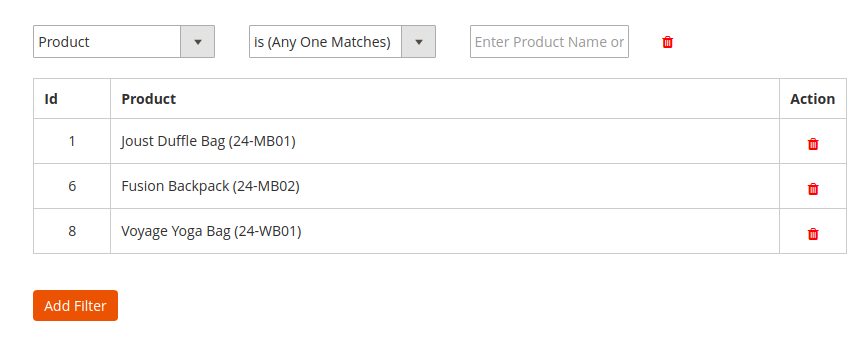
6.Offer loyalty points based on the product
Admin can offer loyalty points when cart products match with all/any selected product or no product matches at all as shown below:
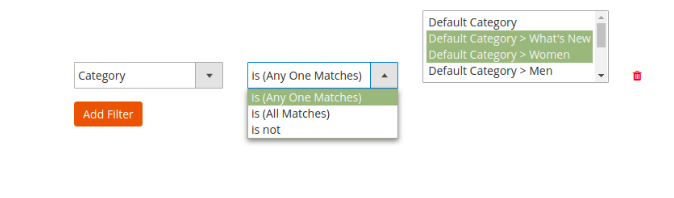
7.Offer loyalty points based on the category
The online merchant can offer loyalty points when customers purchase from a certain category(all or any matches)/do not purchase from the specific category.
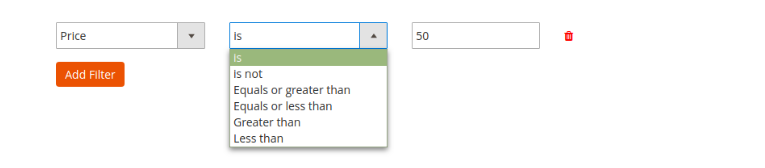
8.Offer loyalty points based on the price
The Loyalty points extension for Magento allows the store admin to offer loyalty points when the cart price meets conditions as per the module settings. Similar conditions as “cart subtotal” can be included in Price Settings.
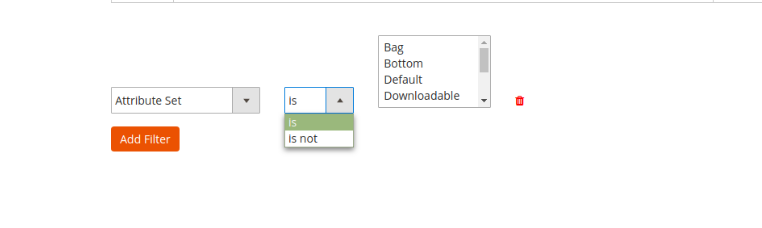
9.Offer loyalty points based on the attribute set
The online store admin can set the conditions related to attribute sets. The customers can get reward points if added products from/not from a specific attribute set.
Note: The online merchant can select “AND” or “OR” condition conjunction from the condition section. Admin can select “AND” if he wants customers to meet all the conditions. If he wants to offer loyalty points to the customers in meeting any of the condition then he’ll select “OR” conjunction.
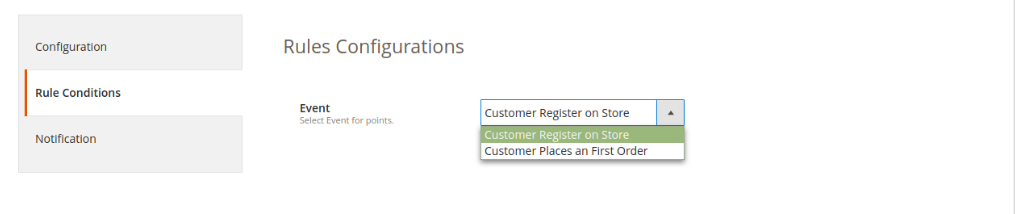
B. Behavior rule
1. Offer loyalty points on registration
The online users can earn loyalty points when they signup in the store.
2. Offer loyalty points on first order
The store merchant can also offer loyalty points on customer’s first order.
Email Notification: The online merchant can send an email with the loyalty point details will be sent to the customers if they get any loyalty point. The online merchant can enable or disable the settings for sending an email notification. The online merchant can also customize the email template easily.
3.3.2 Edit Loyalty Rule
The online store admin can also modify the rule settings from Magento 2 Loyalty reward points plugin admin interface.
Admin can apply changes and also add new conditions in any rule.
3.3.3 Delete Loyalty Rule
The Magento 2 Loyalty reward points module allows deleting the loyalty rules easily by clicking on the “Delete” button.
3.4 Loyalty points balance
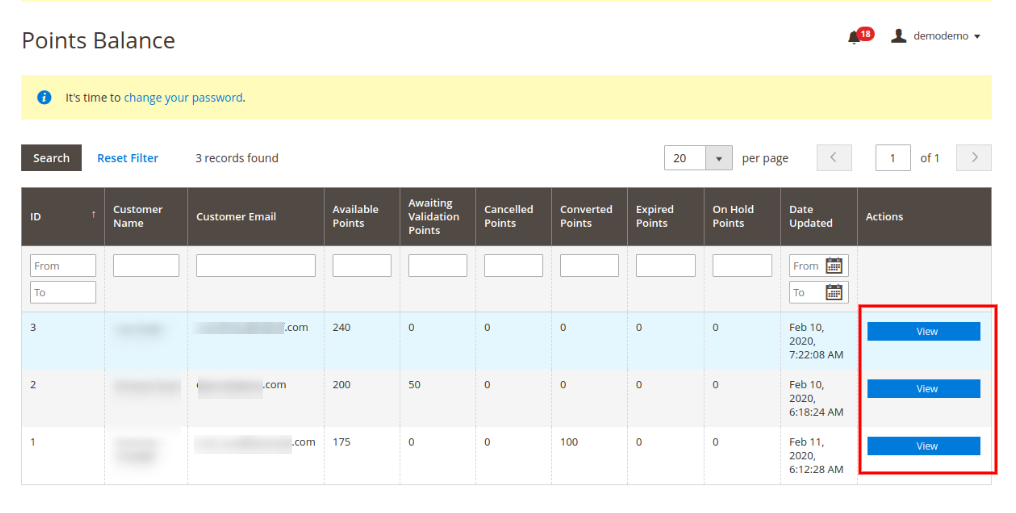
Magento 2 Loyalty points system plugin allows the online merchant to view the list in which the store merchant can view the loyalty points balance of any customer. There is a filter option available for ease of store admin.
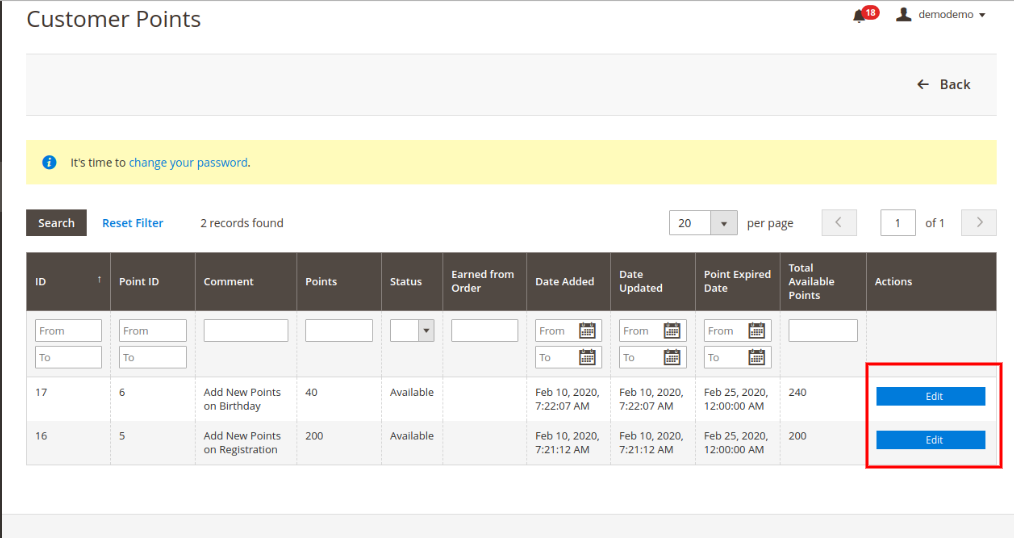
After clicking on the view button, the online merchant can get a list of all the reward points earned by that particular customer. The store merchant can also modify the loyalty points from here:
These are the options which can be modified:
Title: Enter the new title for showing on loyalty points history.
Points: Set the number of loyalty points.
Validity: Set the validity of loyalty points in days.
Status: Change the status of loyalty points.
Customer Email: view the email id details.
3.5 Loyalty Points Emails
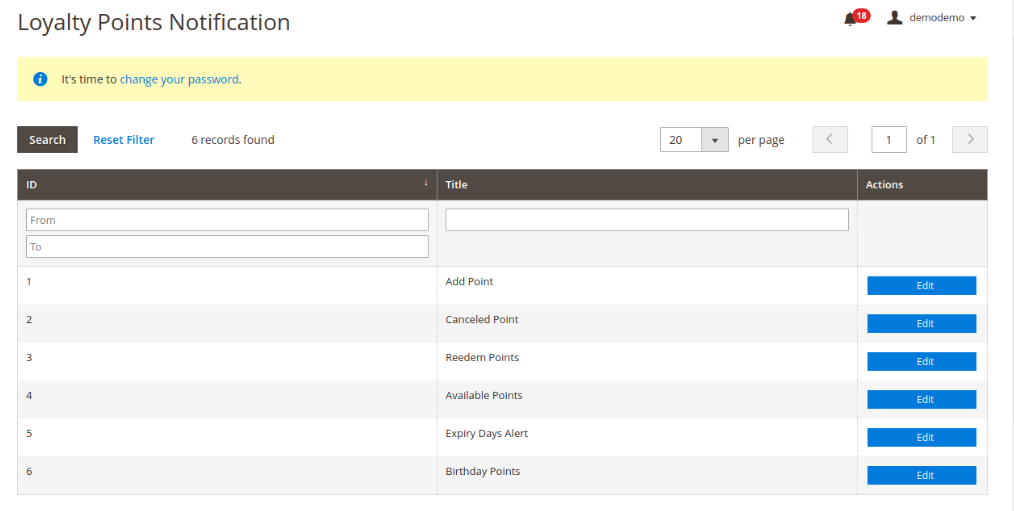
In this section of Loyalty points extension for Magento 2, the online merchant can view the list of email templates for various status:
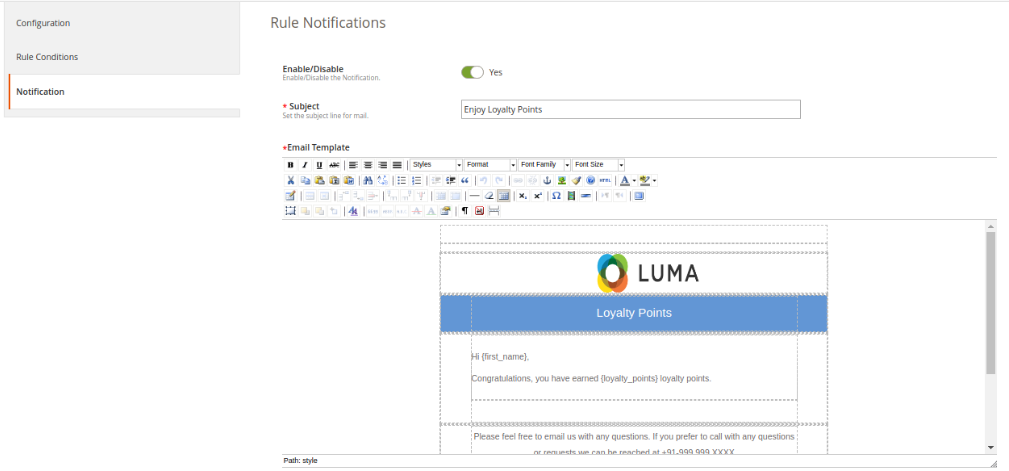
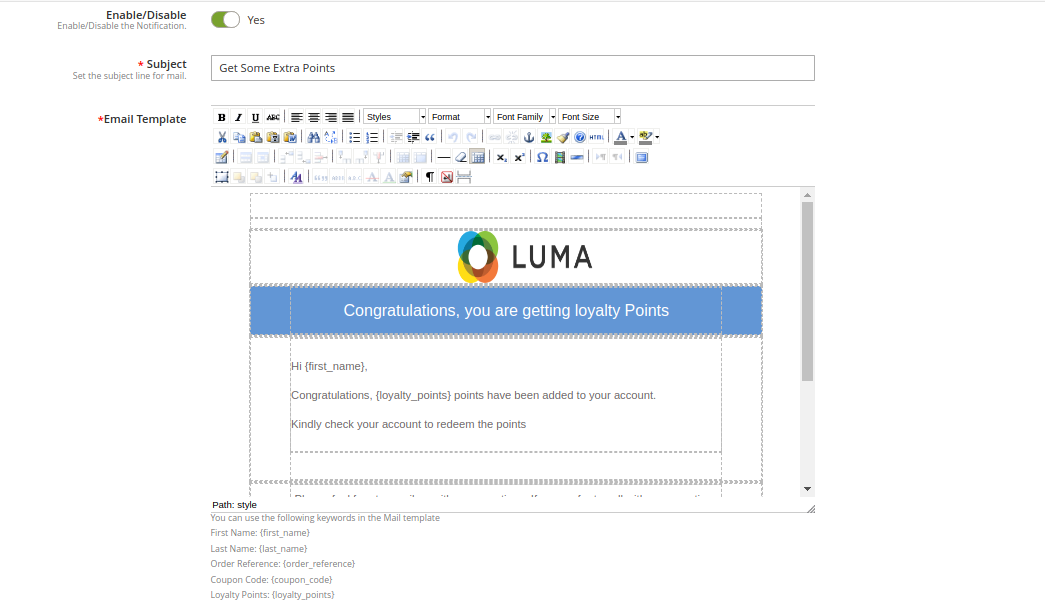
Admin can click on the “Edit” button and customize the email templates for sending to the customers:
Enable/Disable: Admin can enable or disable this option.
Subject: Enter the subject line for the email.
Email Template: The online merchant can configure the email by adding images, HTML text and description.
3.6 Cron Instructions
Admin can also configure cron and manage the overall process of offering loyalty points easily with the help of crons. This way, admin can send birthday points manually, send a notification for expired points and set the loyalty point state to expired manually.
4.0 Front-end Interface
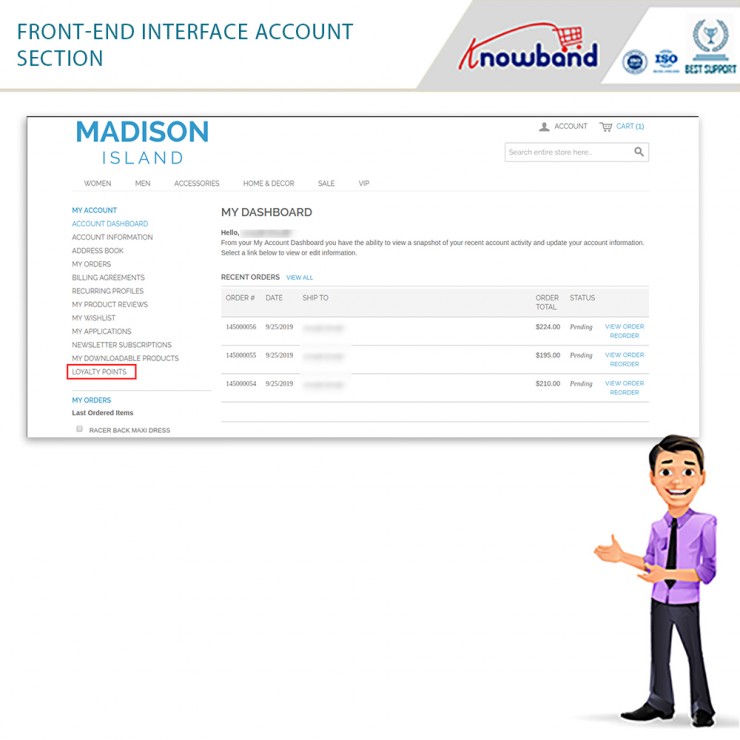
The online buyers have an option to get loyalty points on signup, first-order events and they can also get loyalty points on any specific order and cart state.
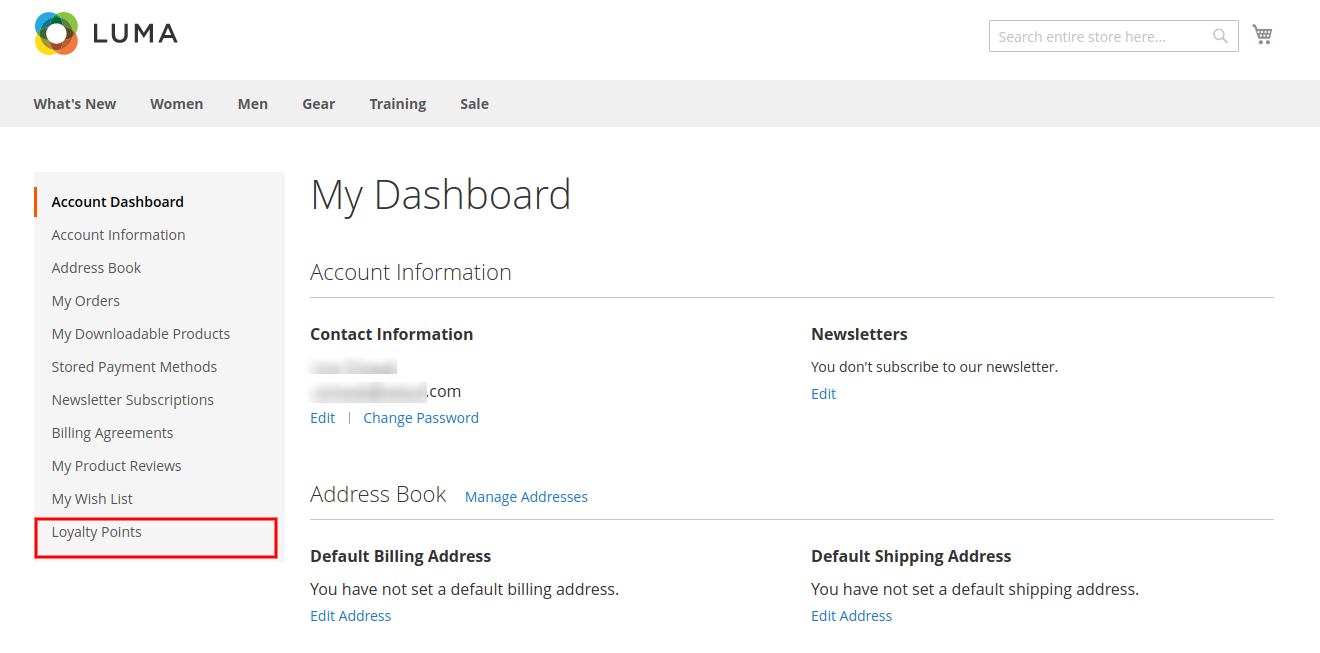
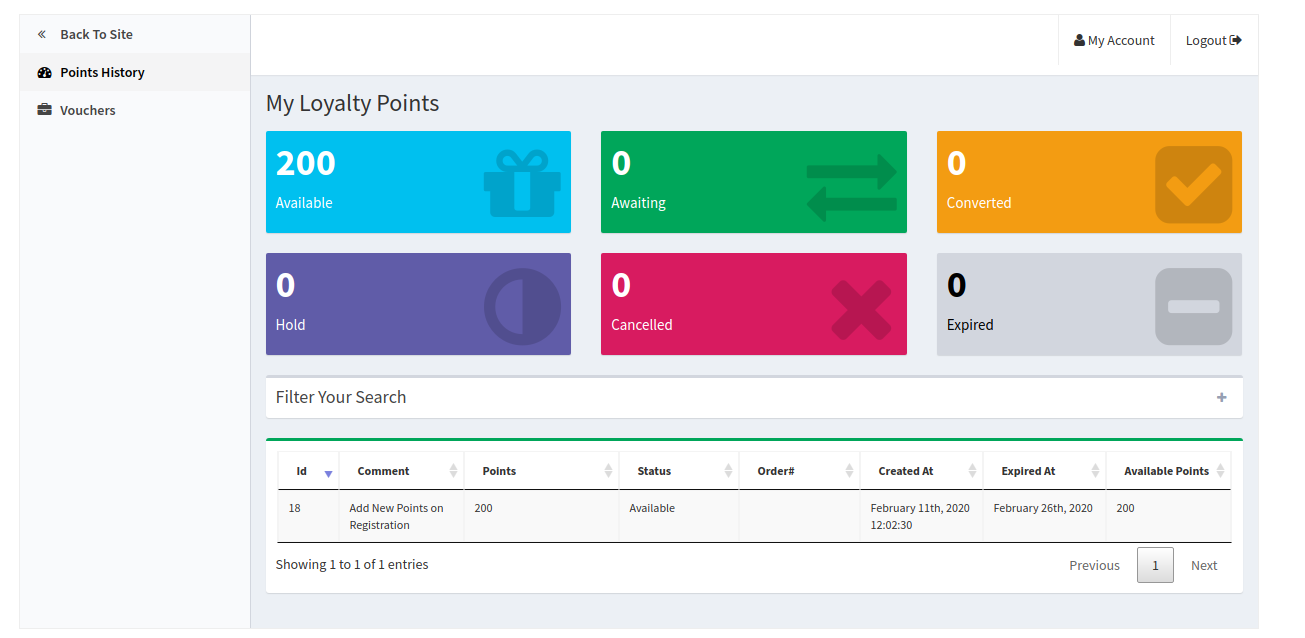
They can check an additional field in the “My Account” section. This field is “Loyalty Points” in which, the online users can view the loyalty point details as shown below:
The online users can view the loyalty points details on the “loyalty points history” and they can convert the loyalty points into the discount coupon.
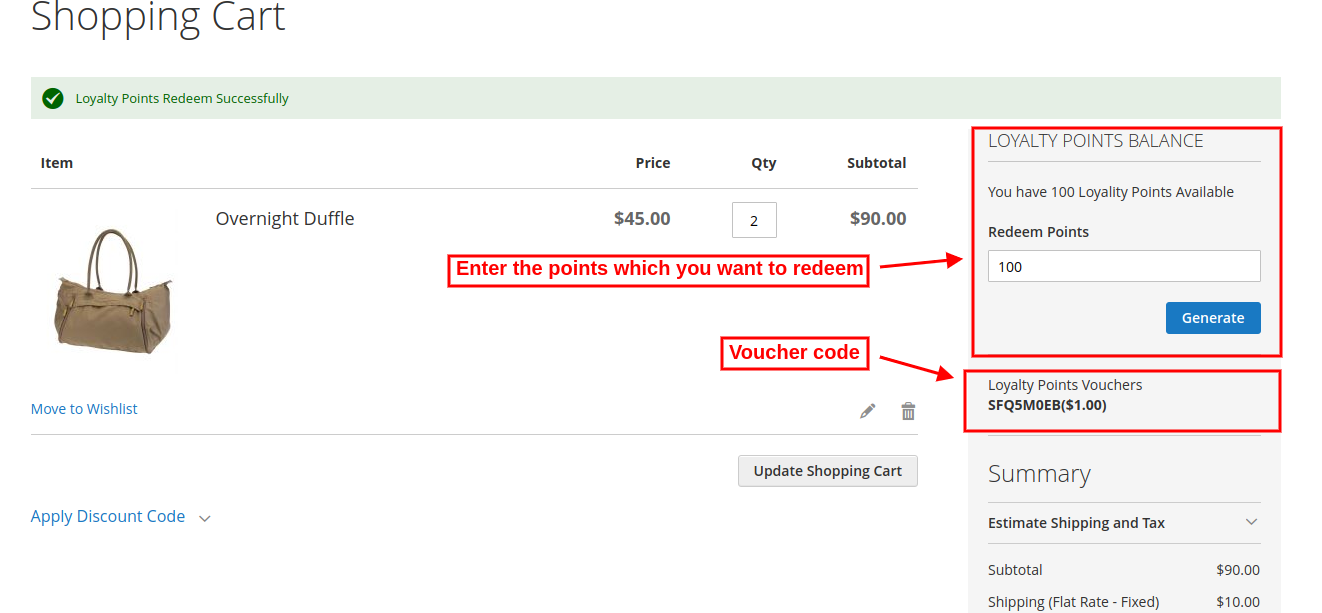
The online users can view the total available loyalty points.
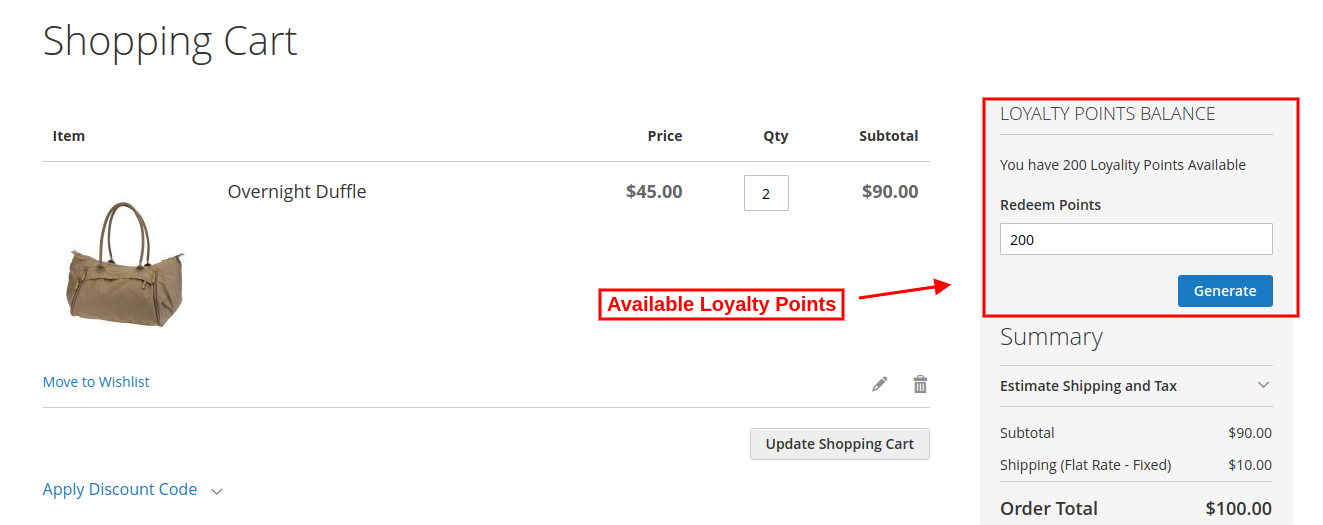
The online users can enter the amount which they want to use for the ordered product as shown below:
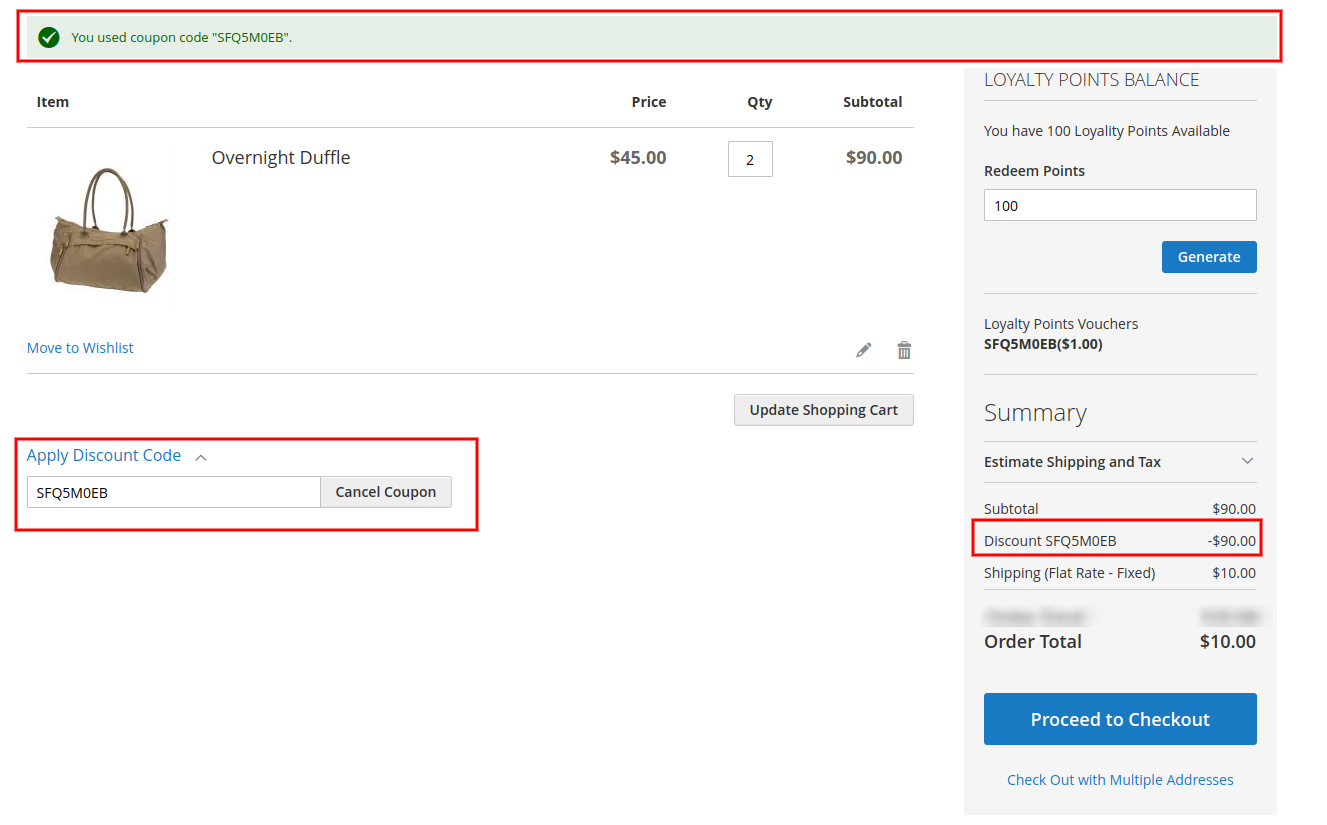
After generating the coupon code, online users can apply it as shown below:
This discount coupon will be applicable to the subtotal amount. The customers can apply the coupon and get a discount on the ordered product. They need to pay delivery charges(if any).
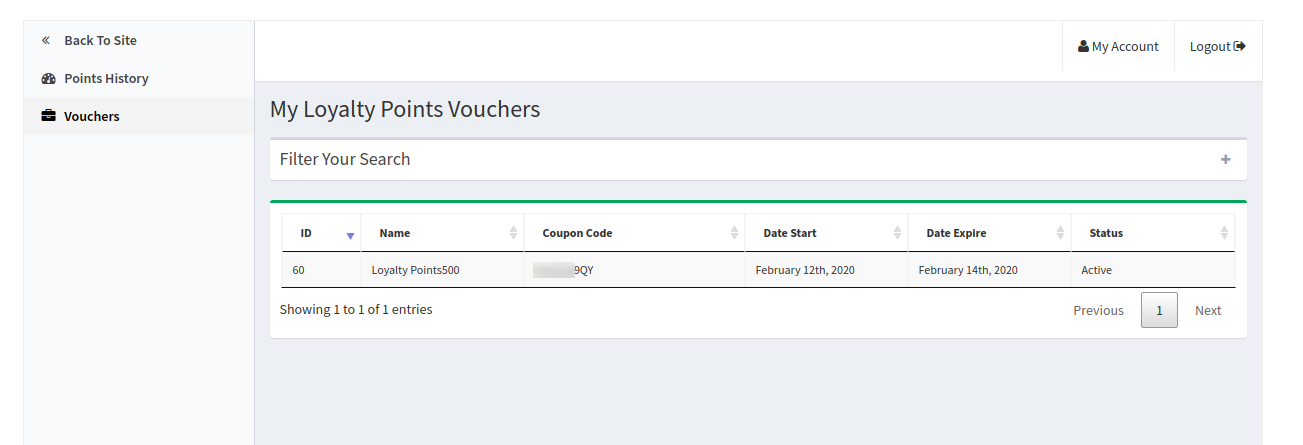
The online users can also view the created voucher details in “vouchers” section as shown below:
The online users can view the coupon code and validity days also.
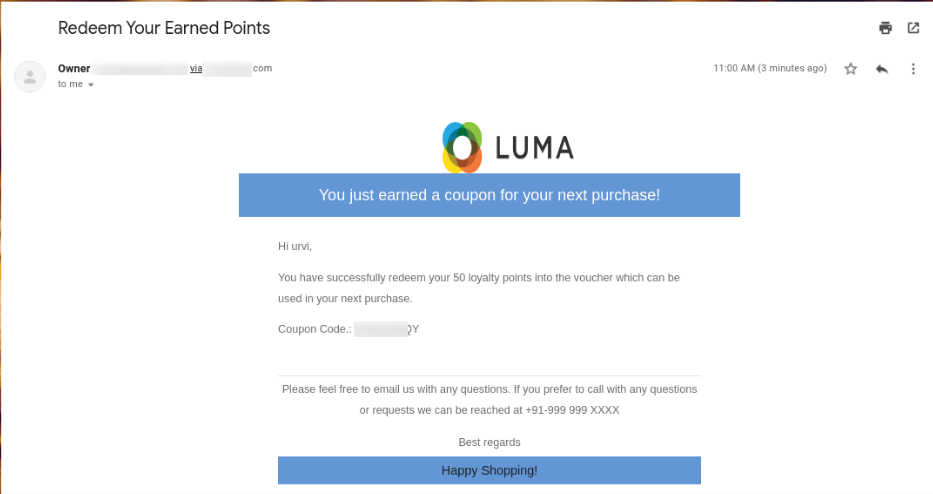
After placing the order, the online users will also get an email notification. The Magento 2 Loyalty reward points module sends a separate notification whenever the customers get any loyalty points related information.
This way, the online users can get loyalty points and enjoy shopping.