Running an online store isn’t easy. When you are busy with product updates, marketing campaigns, and customer questions, all at the same time. For Fashion Plano, the biggest headache was customer support. As their sales grew, so did the number of customer inquiries. Their small support team was drowning in repetitive questions about shipping times, size guides, and order tracking.
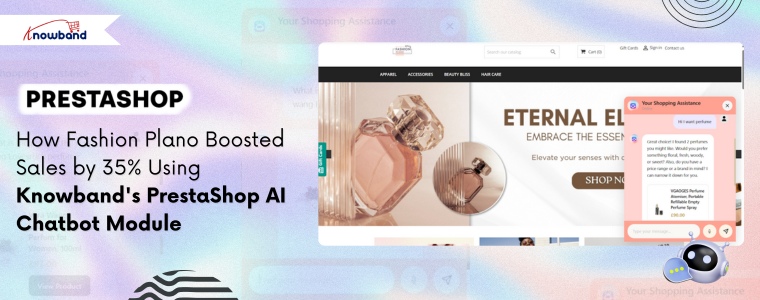
After successfully implementing the Knowband Prestashop Product Sticker & Label Module and Prestashop AI Content Generator, Fashion Plano decided to make an effort for their customer service challenge head-on. They decided to use the Knowband PrestaShop AI Chatbot Module, and the results were pretty impressive, we guess.
🤖 Also on OpenCart?
Automate Store Conversations with an OpenCart AI Chatbot using OpenAI
Answer customer questions 24/7, reduce cart abandonment, and free up your support team, all with one smart AI Chatbot for OpenCart.
Let’s be honest, customers expect instant answers these days. If they have a question at 2 AM about whether a dress runs small or when their order will arrive, they don’t want to wait until morning for a response.
Fashion Plano was struggling with:
Hundreds of similar questions every day ( Is there any size available for this dress? When will my order arrive?)
A support team that could only work normal business hours
Frustrated customers abandoning their carts because they couldn’t get quick answers
Missing out on international customers due to language barriers
Support costs were reducing the profit margins
They knew something had to change. After seeing great results with Knowband’s other PrestaShop modules, they decided to give the chatbot a try.
Fashion Plano’s Founder, Ketherine, integrated the Knowband PrestaShop AI Chatbot Module, which isn’t just another automated response system that frustrates customers with robotic answers. Furthermore, it’s designed specifically for e-commerce stores that understand what customers actually need.
Round-the-Clock Customer Support
The first thing Fashion Plano noticed what their customers could finally get help anytime they wanted. The Prestashop AI chatbot Module handled questions about:
Shipping and delivery time
Size charts and fit recommendations for the product
Order Information and details.
No more losing sales because someone had a question at midnight. The AI chatbot was always there, ready to help.
This is where the Knowband Prestashop AI chatbot Addon really worked. Furthermore, it didn’t just answer questions, but this Prestshop Live Chat Module helped customers find exactly what they were looking for. If someone asked about summer dresses, the AI chatbot showed them the latest arrivals, suggested complementary accessories, and even mentioned ongoing promotions.
Think of it as having your best salesperson available 24/7, never taking a break, and never having a bad day.
Opencart AI Chatbot Extension
Integrate A professional AI Chatbot on your opencart store.
Unlimited AI Engines and models. Vector Search Integrated. Chatbot Schedule Availability
This Prestashop AI Live Chat Module also handles the order tracking & shipping status information. Furthermore, customers simply ask, “Where’s my order?” and get instant tracking updates. This feature alone cut down support tickets by more than half.
Speaking Your Customer’s Language
Fashion Plano ships worldwide, which means dealing with customers who speak different languages. The AI chatbot handled conversations in multiple languages, making international customers feel right at home. No more awkward Google Translate conversations or hiring multilingual support staff.
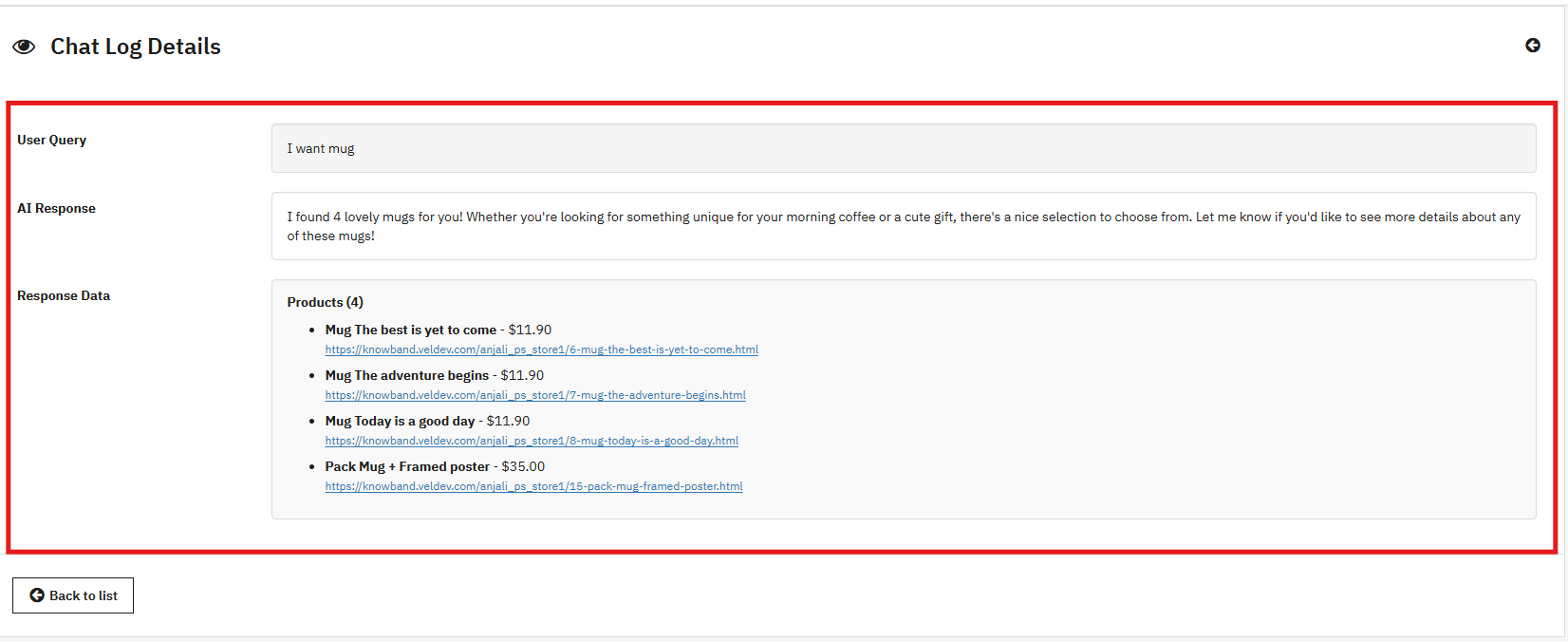
Katherine also explained that she could easily see what the conversation is going on between customers and the chatbot. This AI Chatbot for Prestashop allows the store admins to check the product recommendations shared by the chatbot with respect to each user.
Real Results After Using Prestashop AI Chatbot Addon
This Prestashop AI Chatbot Module really showed the fashionplano the real results.
Response Time: From waiting hours for an email or ticket reply to getting answers in seconds. Additionally, cart abandonment dropped by 45% because customers got their questions answered before clicking away.
Customer Happiness: Furthermore, using this AI chatbot module, customers’ ratings increased by 58%. Additionally, it turns out that people really appreciate quick, helpful responses.
More Sales: The Prestashop AI chatbot Module’s product recommendations worked. Furthermore, conversion rates went up 29%, and customers started buying more products, resulting in a 32% increase in average order value.
Lower Costs: Moreover, the support team was spending 65% less time on routine questions. Moreover, they could finally focus on complex issues that actually needed a human touch.
Global Growth: With language barriers removed, international sales climbed 40%. Furthermore, the AI chatbot made it easy for customers from anywhere to shop confidently.
Conclusion
If you’re running a PrestaShop store and feeling overwhelmed by customer support, you’re not alone. Fashion Plano was in the same situation. They were already using Knowband’s solutions for product visibility and content creation, and adding the chatbot module completely changed the situation.
The learning point is that you don’t need a huge support team to provide excellent customer service. You just need the right tools.
For Fashion Plano, Knowband’s PrestaShop AI Chatbot Module was exactly the module that was needed which also increased sales and made customers happier.
It is challenging to operate an online store when customers want quick answers all the time. The majority of the visitors require immediate help with stock, product information, delivery status, order history, or product suggestions. If they don’t receive the information in time, they just walk out. This reduces engagement, conversion, and increases drop-offs.
[New Update] This Prestashop AI Chatbot Module v1.0.2 has been released with a new version, which includes features like Chatbot Availability Scheduling, Chat Logs and IP Blocking feature.
Furthermore, this for Prestashop AI Chatbot Addon has been upgraded with the latest Popular AI Models like DeepSeek, Claude and Gemni with the existing ChatGPT.
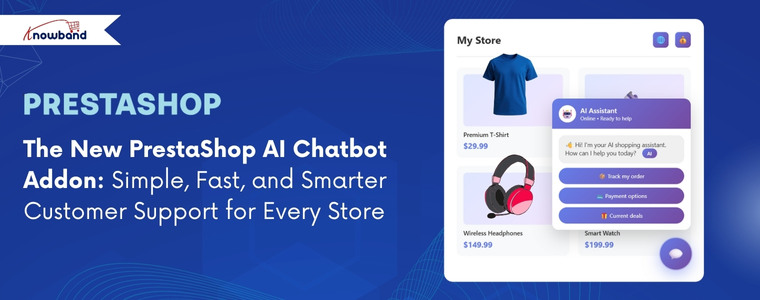
To solve this problem, Knowband has introduced the PrestaShop AI Chatbot Addon. A modern, intelligent chat assistant available in your store 26/7 to help. This AI helper stays active on all pages and appears as a small icon in the lower-right corner of the webpage, which opens to a clean and modern chat window whenever the customer clicks on it.
The chatbot can understand all questions easily, reply immediately, help customers to compare products, find similar products, check stock, view prices in their chosen currency, and even provide updates on order history & new orders. Hence, it acts as a quick-access information center that the customers can rely on without going through multiple pages.
Why a PrestaShop AI Chatbot Module Matters More Than Ever
Today’s shoppers expect fast communication. They do not want to fill out the forms and wait for a human agents to resolve their queries. They want answers right away. The PrestaShop AI Chatbot provides a solution to this problem as simply as possible. It speaks clearly, reacts immediately, and sounds natural because it uses highly advanced AI engines like GPT-4o and GPT-4o-mini.
When the customers receive all the help they require inside the chat window, they remain longer and communicate more. This enhances interaction and increases the probability of an increase in conversion rate. Moreover, the PrestaShop AI Chat Integration reduces the stress of the support team. Most of the frequently asked questions, like the delivery date or product details, are answered by the ChatGPT Bot.
This PrestaShop Support Chatbot Module is even more helpful for international stores. It supports several languages and several currencies. The chatbot can respond in any language that is selected by the user. And if the customer changes the currency on the website, the chatbot will also display all the product prices in that currency.
Overall, the PrestaShop AI-powered chatbot will help the store owner to provide a modern, fast, and useful shopping experience with minimal extra effort.
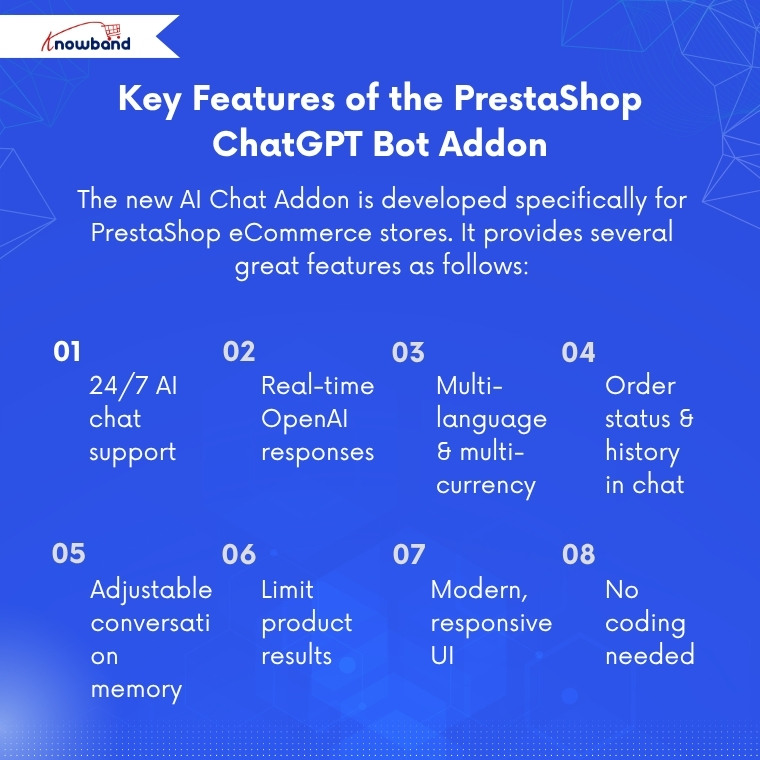
Key Features of the PrestaShop ChatGPT Bot Addon
The new AI Chat Addon is developed specifically for PrestaShop eCommerce stores. It provides several great features as follows:
An AI-driven chat assistant that is available 24/7.
Moreover, the AI helper provides real-time responses using OpenAI technology.
The module also supports Multiple languages and multiple currencies.
The PrestaShop AI Chatbot Addon provides the status of orders and order history right on chat.
Moreover, the admin can easily control the conversation memory of the chatbot.
Store owners can also select the maximum number of products to show on a search.
The interface of the PrestaShop Chat Assistant Module is modern and smooth across all devices.
In addition, the implementation of this AI Assistant requires no coding, no complex setup, and no design.
Thus, regardless of the type of product that the store is selling, like electronics, clothes, home goods, or any other type of product. The PrestaShop AI Chat Integration Addon will accurately respond to the real store data.
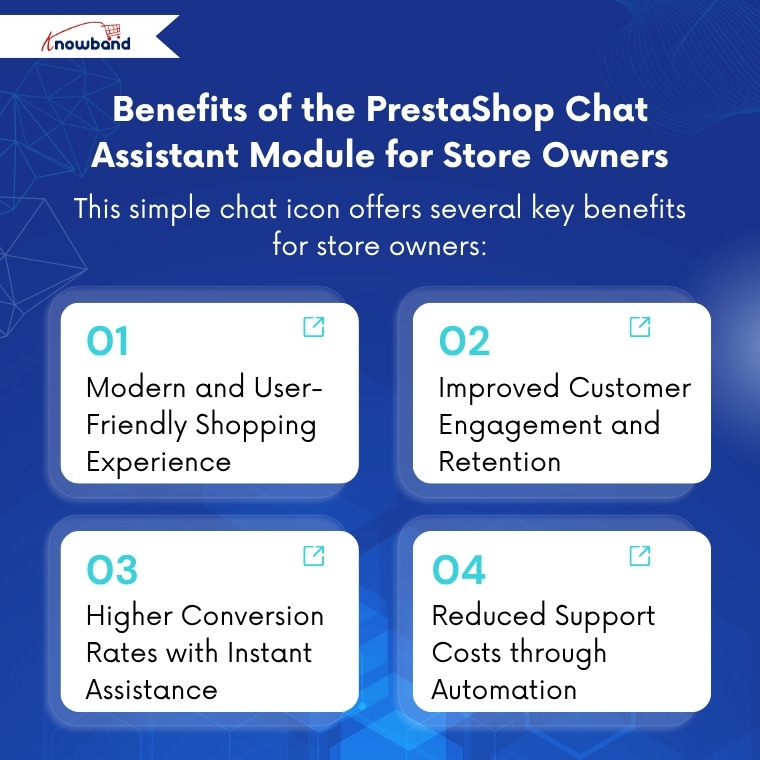
Benefits of the PrestaShop Chat Assistant Module for Store Owners
There are multiple benefits of this simple chat icon in the shop for store owners, as follows:
Modern and User-Friendly Shopping Experience
The addon makes the store feel modern and updated. The visitors will feel more comfortable when the store provides quick and reliable answers.
Improved Customer Engagement and Retention
Moreover, the customer engagement increases as they do not need to browse through several pages to find a product; they can get what they need in seconds through the chatbot. Hence, this helps to reduce frustration and ensures the visitors spend more time.
Higher Conversion Rates with Instant Assistance
The conversion rates increase since the chatbot helps the customers find the products that they would not have found otherwise. Hence, the users will not give up during the search as they receive instant results within the chat.
Reduced Support Costs through Automation
In addition, store owners can minimize the support cost because many questions no longer require a human agent. The PrestaShop support chatbot addresses the majority of the basic questions on its own.
Hence, the PrestaShop AI Chatbot Addon by Knowband becomes a great advantage for busy stores and their customers.
How the PrestaShop Chatbot Addon Works
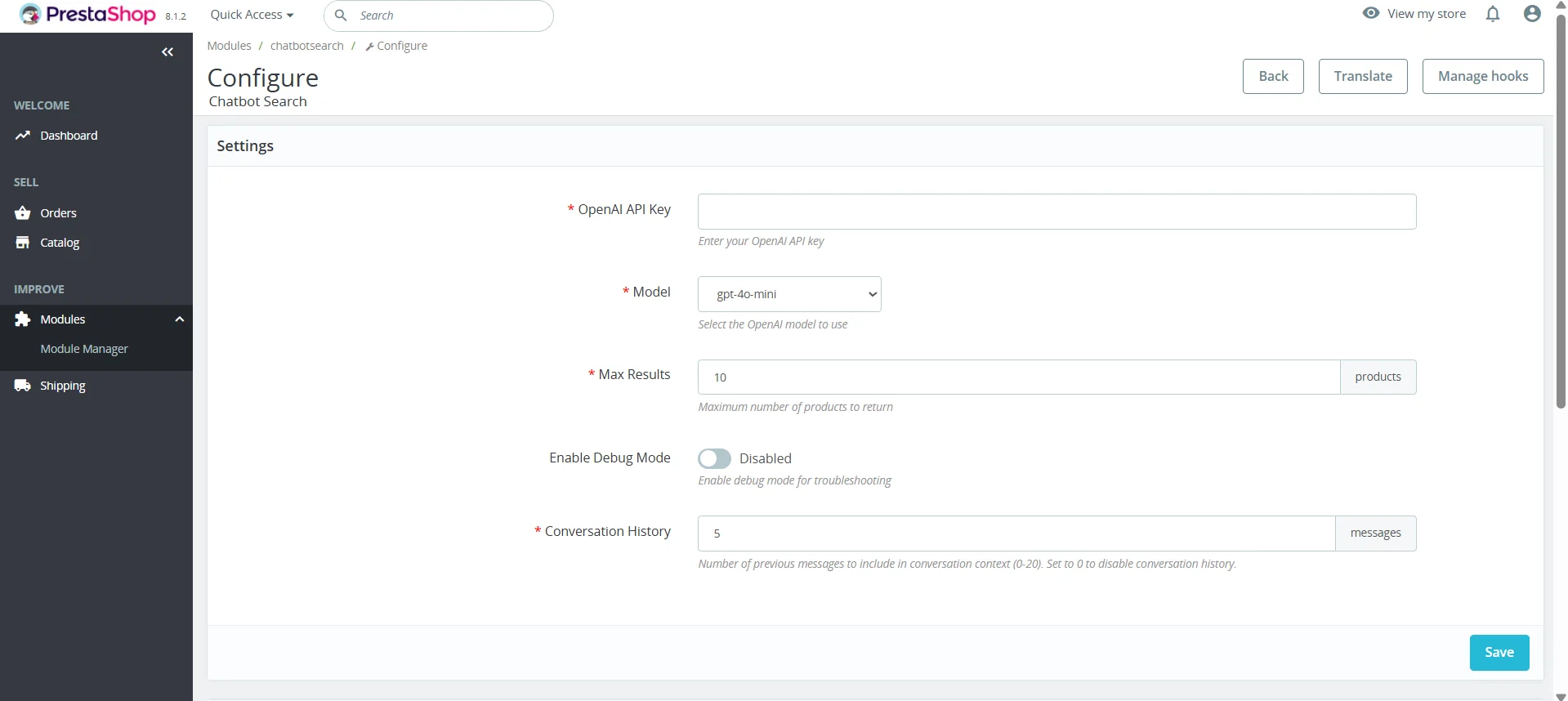
The Knowband ChatGPT Module for PrestaShop is very simple to set up. The store owners install the module and open the configuration settings. Then, the first step is to enter the OpenAI API key to get the chatbot running in the frontend. Next, admins can choose the AI model of their choice between the two existing choices, GPT-4o-mini and GPT-4o.
The store owner will then select the number of products that the chatbot should give back to the customer on request. For example, if there are ten similar products but the admin sets the limit to seven, the chatbot will display only seven.
Lastly, the store owner will select the number of conversation histories that the chatbot will remember while communicating with a customer. The admin can select any number between 0-20. And to disable this feature, they simply need to enter 0.
After saving these simple settings, Knowband’s PrestaShop AI Chatbot Addon becomes fully active in the frontend. It will work across all pages and will respond to all queries instantly.
AI technology is being used more and more by ecommerce stores in order to make product discovery, immediate responses, and even the process of buying easier for their clients. By adding an AI-based chatbot to their PrestaShop store, merchants will not only make the process of shopping more interactive but also assist their clients with purchasing decisions.
Learn more about how a PrestaShop AI chatbot for conversions can support the customer journey and contribute to a better ecommerce experience. ( Updated September 30, 2-26)
Convert Your PrestaShop Store into a Powerful Mobile App
Boost engagement and conversions with a smooth shopping experience, instant push notifications, and fully optimized mobile navigation.
PrestaShop AI Chatbot Addon by Knowband is not just a small feature. It transforms how customers interact with a store. Quick responses, enhanced product search, in-built multilingual support, real-time shipment status, and a modern user interface create a smoother and smarter shopping experience.
Knowband has made this chatbot easy to install, easy to operate, and capable enough to manage actual customer queries. In today’s world, this chatbot is among the best solutions that any store owner can use to enhance customer service.
If you want to experience how this works on your own store, you can try the PrestaShop AI chatbot demo. And you will know why the PrestaShop AI Chatbot Addon by Knowband can change the way customers interact with your shop.
In today’s fast-moving world of e-commerce, customers expect quick answers and smooth experiences from the store. Even for the smallest and simplest questions, people rely on intelligent systems that respond instantly and accurately. We wanted to develop something that incorporates advanced technologies, but you can use it without needing any Prior Knowledge. So, the PrestaShop AI-Powered ChatBot Module gives your store exactly that: a smart, always-available virtual AI assistant that can guide your customers at any time of the day.
Powered by advanced OpenAI technology, this chatbot delivers natural, human-like responses in real time. Moreover, PrestaShop Chatbot Using OpenAI ChatGPT helps customers find products, understand prices, check stock, and even get updates on their orders, all without needing human support.
With easy setup and powerful features, this PrestaShop AI Module is designed to improve the overall shopping journey and increase your store’s conversion rate.
This module brings the future of customer service directly into your Prestashop store, helping you serve visitors, customers faster, smarter, and more efficiently.
2. Key Features of Prestashop AI ChatBot Module
[New] Vector Search Integration
The integration of vector search with Qdrant enhances the PrestaShop chat plugin by enabling context-aware searches that go beyond exact keyword matching. By interpreting the intent behind user queries, the system delivers more accurate search results and personalised product suggestions, helping customers quickly find what they are truly looking for.
[New] Integration with Gemini, Claude, and Deepseek
The platform now supports seamless integration with Gemini, Claude, and Deepseek, expanding its AI capabilities and data retrieval options. This allows users to leverage advanced AI models for smarter search, improved recommendations, and more insightful interactions, ensuring a richer and more personalized experience across the system.
[New] Chat Logs for AI Chatbot Using Prestashop Live AI Chatbot Module
The Prestashop AI Chatbot Module by Knowband now maintains detailed chat logs of all user interactions. These logs help store owners analyze customer conversations, track behavior, and identify common queries. Access to chat history also improves AI response quality and overall customer support.
[New] IP-Based User Blocking
The AI Chatbot Addon allows IP-based user blocking to restrict access for specific users or IP addresses. This enhances security and prevents misuse of the Prestashop AI chatbot. It ensures a safe and controlled chat environment for genuine customers.
[New] Chat Availability Scheduling
Now, store owners can manage chat availability by setting specific days and hours for the AI chatbot. This helps in providing timely support and ensures the chatbot is accessible only during designated support hours.
1. Real-Time, Intelligent AI Responses
The chatbot instantly answers queries about product prices, stock availability, categories, product comparison using AI and more, pulling live data directly from your store.
2. Multi-Language and Multi-Currency Support
The Pretasop multilingual AI chatbot Addon automatically detects the language of your shop, no matter which languages & currencies you have added and responds in the same language and currency. Thus, this makes it ideal for stores selling internationally.
3. Powered by ChatGPT Technology
Using the latest GPT models from OpenAI, the chatbot delivers accurate, natural, and context-aware responses that feel like chatting with a human and are helpful. Additionally, the module also offers the option to choose the different ai engines within the ChatGPT Modules
4. Smart Product Search
Customers can easily search and explore products directly through the chatbot. This AI Chatbot for PrestaShop helps them browse categories, view options, and compare items efficiently.
5. Automatic Order Information Retrieval
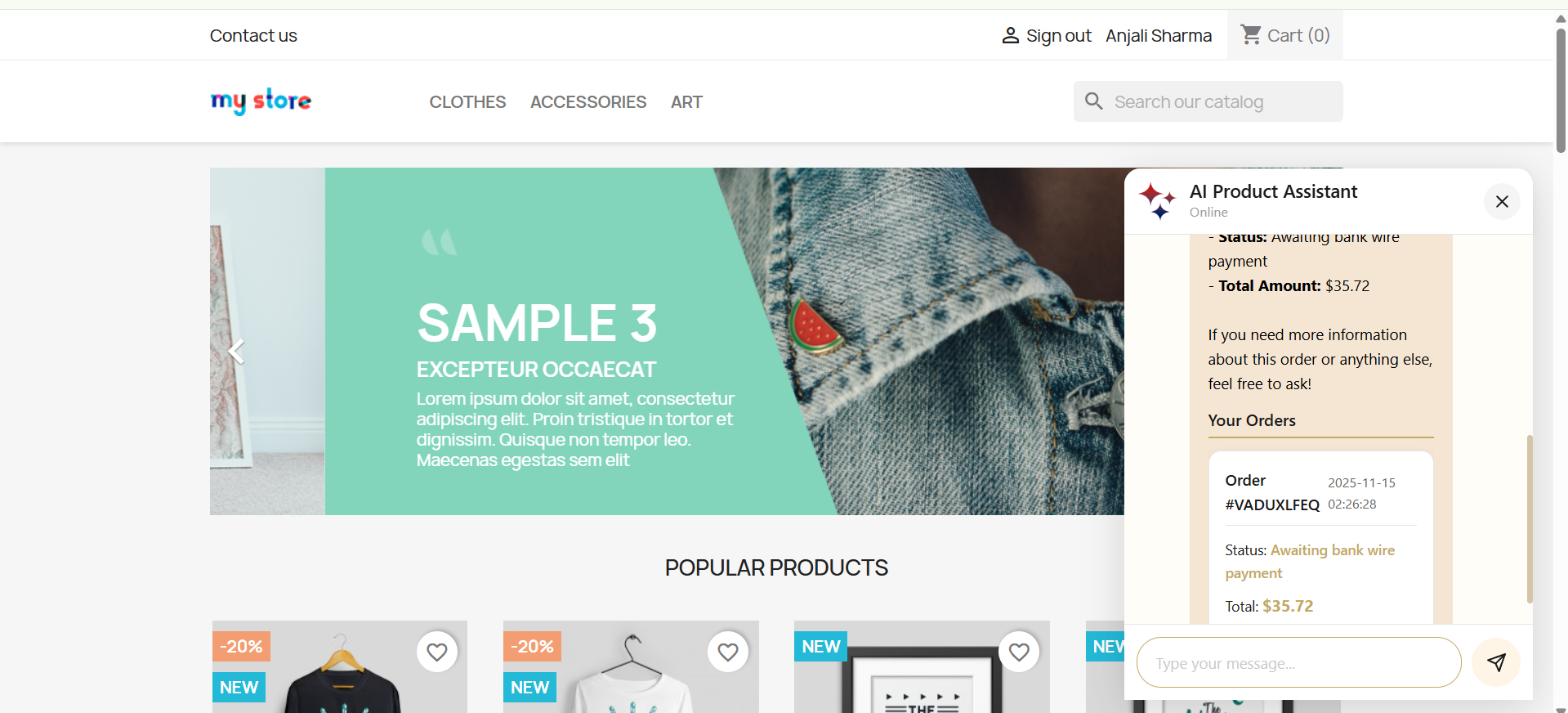
The Prestashop AI ChatGPT ChatBot instantly fetches and displays recent customer orders, including order ID, products, prices, status, and more, making order management effortless.
6. Real-Time Order Status & Tracking
With the Prestashop AI-Powered ChatBot Module, customers can check their order status or track shipments directly via the chatbot using their order ID quickly, easily, and conveniently
7. Fully Customizable UI
The chatbot interface is fully customizable, allowing store owners to adjust the background color, chatbot box color, customer chat color, icons, and button styles. This ensures the PrestaShop ChatBot Module matches any store design while delivering a modern, visually appealing, and user-friendly front-end experience.
8. Vector Search Integration
The integration of vector search with Qdrant enhances the PrestaShop chat plugin by enabling context-aware searches that go beyond exact keyword matching. By interpreting the intent behind user queries, the system delivers more accurate search results and personalised product suggestions, helping customers quickly find what they are truly looking for.
3.0.0 Installation Guide for PrestaShop AI-Powered ChatBot Addon
After the completion of the purchase, you’ll receive the chatbotsearch.zip file.
Step 2: Click on Module on your prestashop back office left menu, go to module manager, then you will see the click option. Click on the Upload.
Step 3: Upload and Install the ChatBot Module. After the complete installation, you have to click on the configuration, and then you will be directed to the configuration page.
Step 4: Now you are ready to configure the chatbot module.
4.0.0 Admin Interface of Prestashop Live AI ChatBot Assistant
The PrestaShop AI-Powered Chat Assistance Module is designed with simplicity and ease of use in mind. The module includes the configuration pages, like configuration and customisation.
4.0.1 General Configuration
Each option directly affects how the AI interacts with customers, processes queries, and displays results inside your PrestaShop store.
Let’s take a walkthrough of these fields for better hands-on understanding
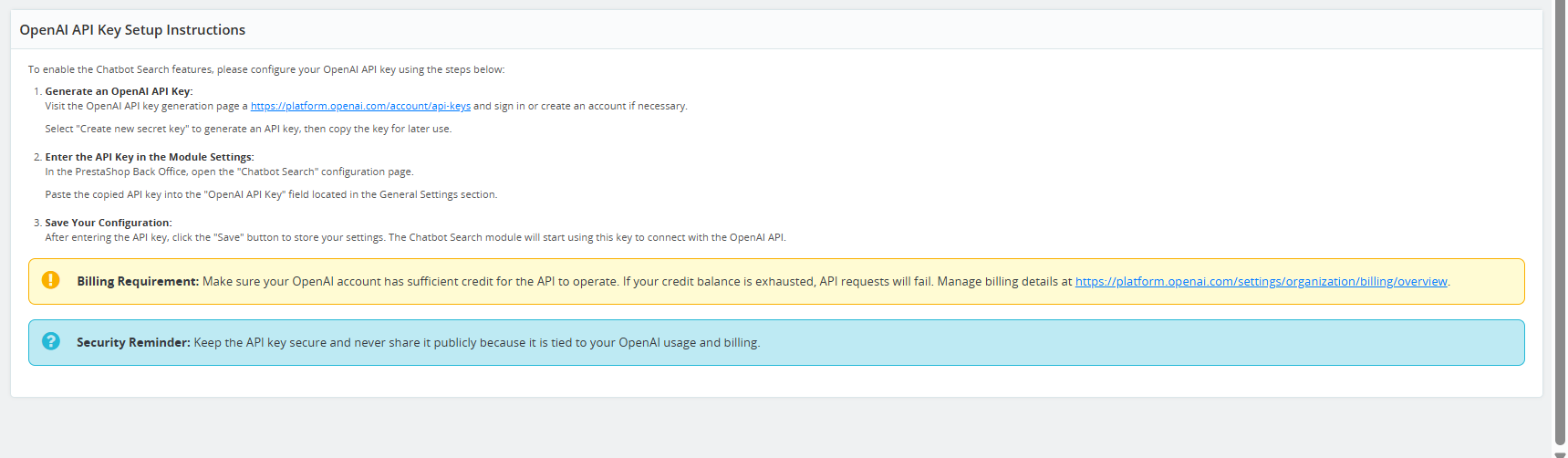
1. OpenAI API Key: This field allows you to enter your OpenAI API Key, which is required for the PrestaShop AI Chat Integration to connect to the OpenAI platform. Without this key, the chatbot cannot generate responses as the API Key is required for its functioning.
OpenAI API Key authorises your store to use GPT models.
Ensures secure communication between your PrestaShop store and OpenAI servers.
Kindly make sure to keep your API Key secure and not share publicly.
2. Model Selections:
The PrestaShop AI Engine Module enables the store administrator to select the specific AI model that the chatbot will use. Each model offers varying capabilities in terms of speed, intelligence, and accuracy, allowing the admin to choose the most suitable option for their store.
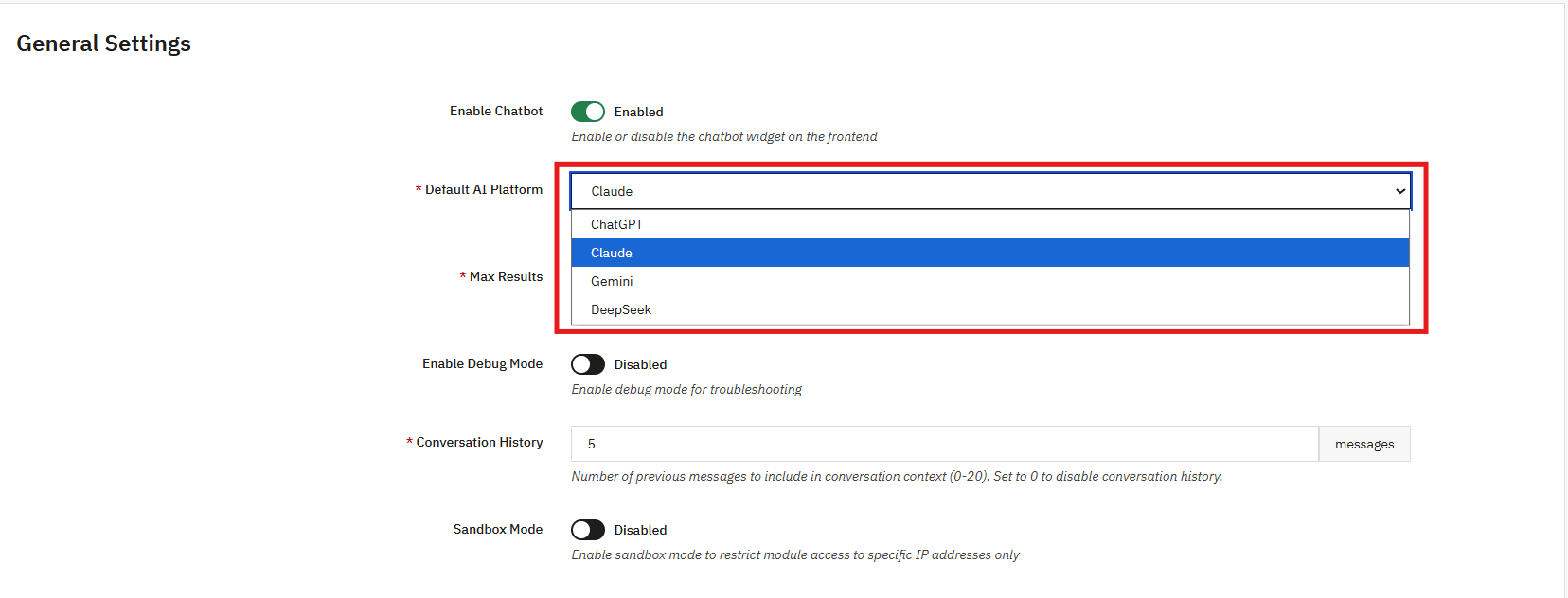
Currently, the Prestashop AI Chatbot Addon by Knowbandsupports the following four AI models:
ChatGPT: A conversational AI model designed for natural language understanding and customer interactions. Ideal for answering questions, assisting with purchases, and providing guidance. Submodels: GPT-5 (latest high-performance model), GPT-5 Mini (lightweight, fast), GPT-4 Mini (compact, efficient), GPT-4o (enhanced reasoning), GPT-4 Turbo (optimized for speed), GPT-3.5 Turbo (classic high-speed conversational AI)
DeepSeek: Focused on advanced search and recommendation tasks. It is optimised for retrieving relevant products and content quickly. Submodels: DeepSeek Pro (accurate and feature-rich), DeepSeek Reasoner (advanced logic and reasoning capabilities)
Claude: A model specialised in summarisation, reasoning, and contextual understanding. Useful for generating product descriptions, summaries, and conversational insights. Submodels: Opus (balanced reasoning and language capabilities), Haiku (optimized for concise responses and summarization), Sonnet (advanced multi-turn conversation and contextual understanding)
Gemini: Focused on multimodal AI tasks, including text and image understanding. Ideal for product recommendations, visual searches, and content generation. Submodels: Gemini 2.5 Pro (high-performance, advanced capabilities), Gemini Flash (fast, lightweight), Gemini 2.0 (balanced, reliable performance)
3. Max Results: This option controls how many results the Knowband’s PrestaShop AI Chat Addon will show when a customer asks product-related queries.
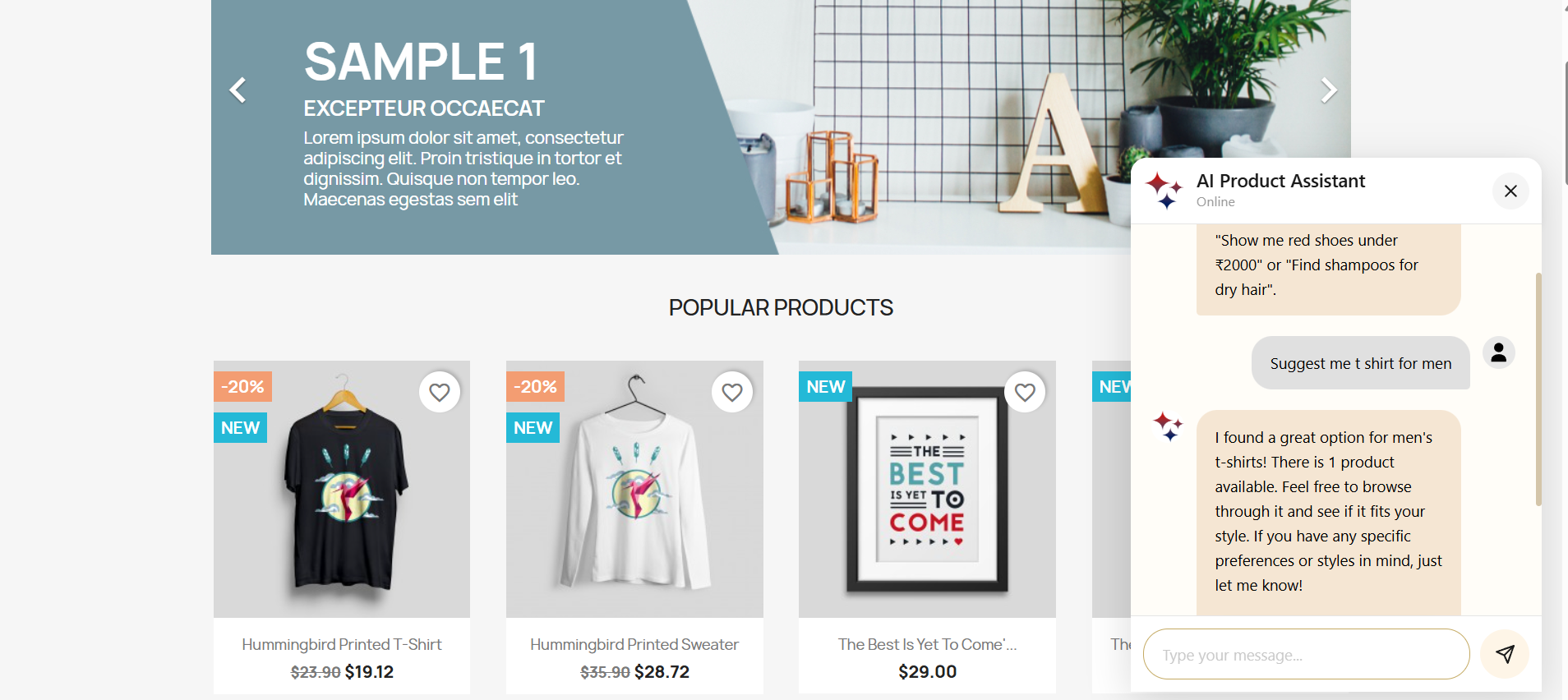
For example, if a customer asks:” show jeans under 30$ ”, the chatbot will display up to the number of results you set here.
These options help in controlling the readability inside the chat window in the ChatGPT PrestaShopChatBot Module, as well as prevent overwhelming customers with too many results.
4. Enable Debug Mode: This Knowband’s Best AI Assistant For PrestaShop allows the store admin to enable debug Mode, which helps you troubleshoot issues by showing internal logs and technical details while the chatbot operates. When the debug mode is enabled:
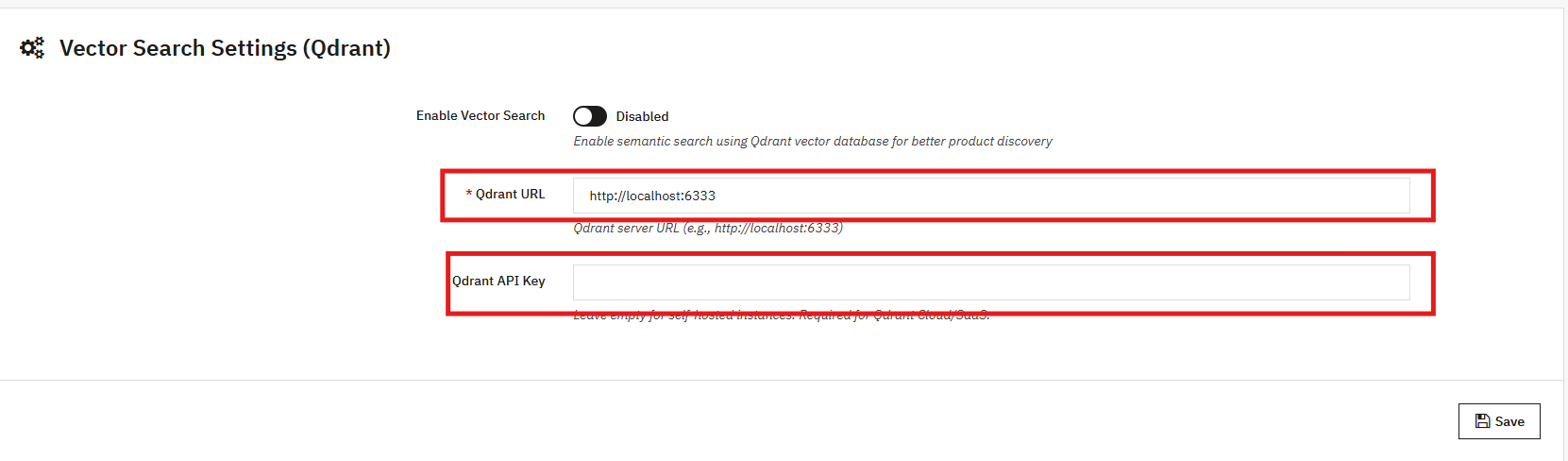
5. Enable Vector Search: Turn on semantic search to let the PrestaShop AI Chatbot better understand user intent and provide more relevant answers, going beyond simple keyword matching.
6. Qdrant URL: Enter the endpoint URL of your Qdrant vector database server. Furthermore, this database stores and fetches vector data used for semantic search. We have provided the steps in the user manual section 5.0.5
7. Qdrant API Key: Provide the API key to authenticate access to your Qdrant server. This ensures secure communication between the chatbot and the vector database.
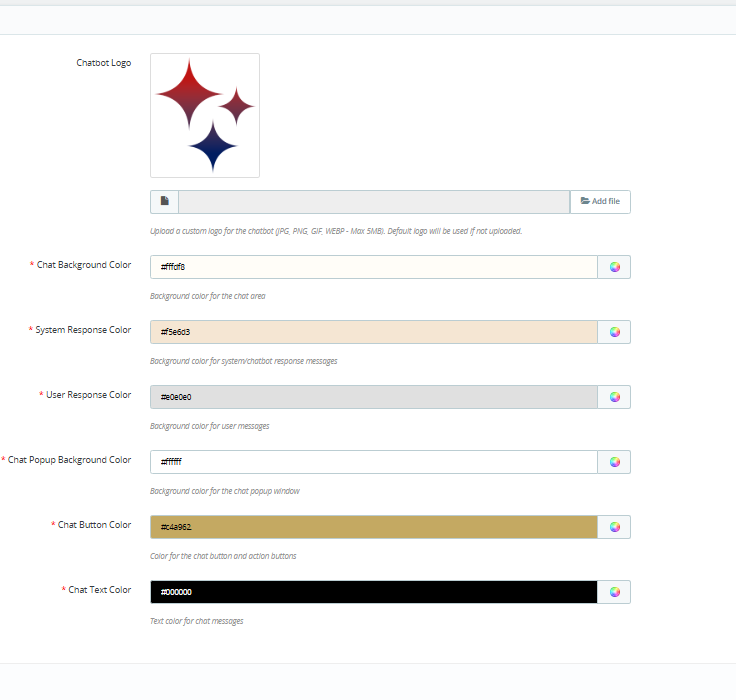
4.0.2 Customisation Tab of Prestashop AI ChatBot Module
The PrestaShop AI ChatBot Module allows full customisation of the chatbot interface to match your store’s design and provide a seamless user experience.
Below is a guide for each customizable field:
1. Chatbot Logo: Upload a custom logo for your chatbot to represent your brand. Moreover, it supports logo formats including JPG, PNG, GIF, and WEBP, with a maximum file size of 5MB. If no logo is uploaded, the default PrestaShop logo will be displayed. Ensure your logo is clear and visually compatible with the chat interface.
2. Chat Background Colour: Store admins can set the background colour of the chat area to match your store theme. Knowband recommends using a colour that provides good contrast with chat messages for readability.
3. System Response Colour: Furthermore, you can customise the background colour of the chatbot messages. Choose a colour that differentiates the chatbot responses from user messages for better visual clarity.
4. User Response Color: Additionally, store admin can set the background color for user messages in the chat window. This helps distinguish customer messages from the AI responses.
5. Chat Popup Background Colour: Change the background color of the chat popup window to complement your store’s. Ensure the pop-up remains visually appealing and integrates smoothly with your website.
6. Chat Button Colour: Store owner can easily customise the colour of the chat button and action buttons to match their store’s theme. A clear, contrasting button color can improve click rates and engagement.
7. Chat Text Color: Set the text color for all chat messages, including both system and user messages. Ensure the text colour provides good readability against the background colors selected.
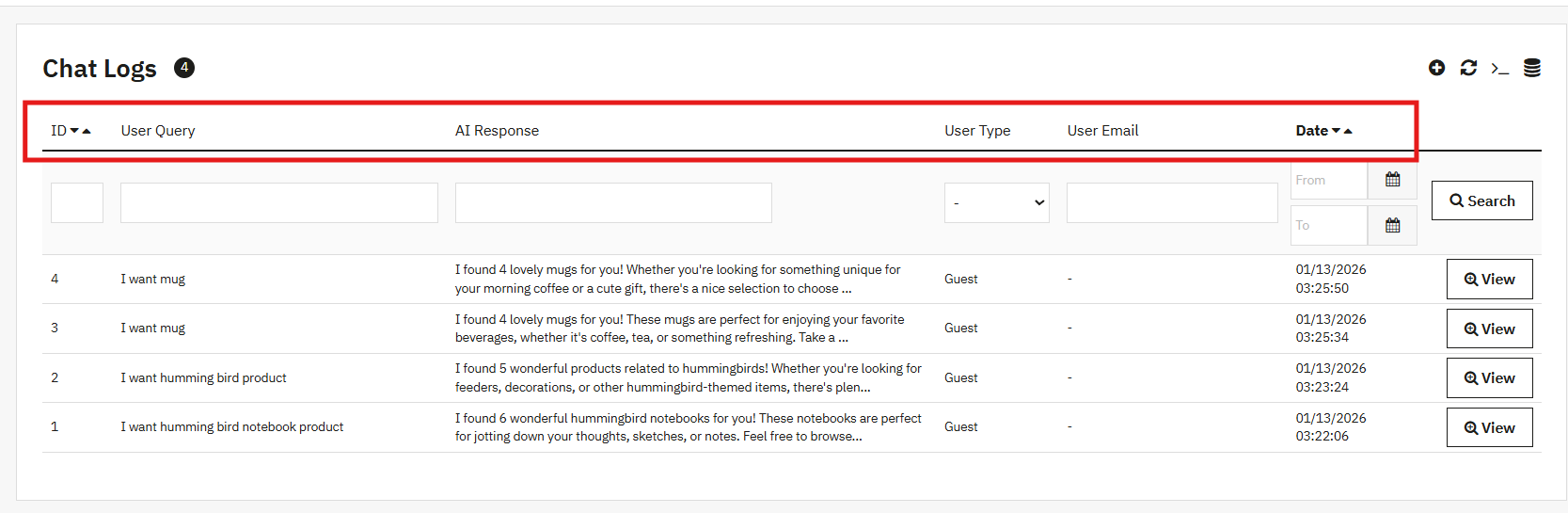
4.0.3 Chat Logs for AI Chatbot
The Prestashop AI Chatbot Module by Knowband now maintains comprehensive chat logs of all user interactions. These logs allow store owners to review conversations, track customer behavior, and identify frequently asked questions. Access to this history also helps improve AI responses and enhances overall customer support.
With this feature, you can view details such as the user query, email, customer type (guest or registered), AI responses, response data ( the products that chatbot showed) and the date of interaction, providing full visibility into chatbot interactions.
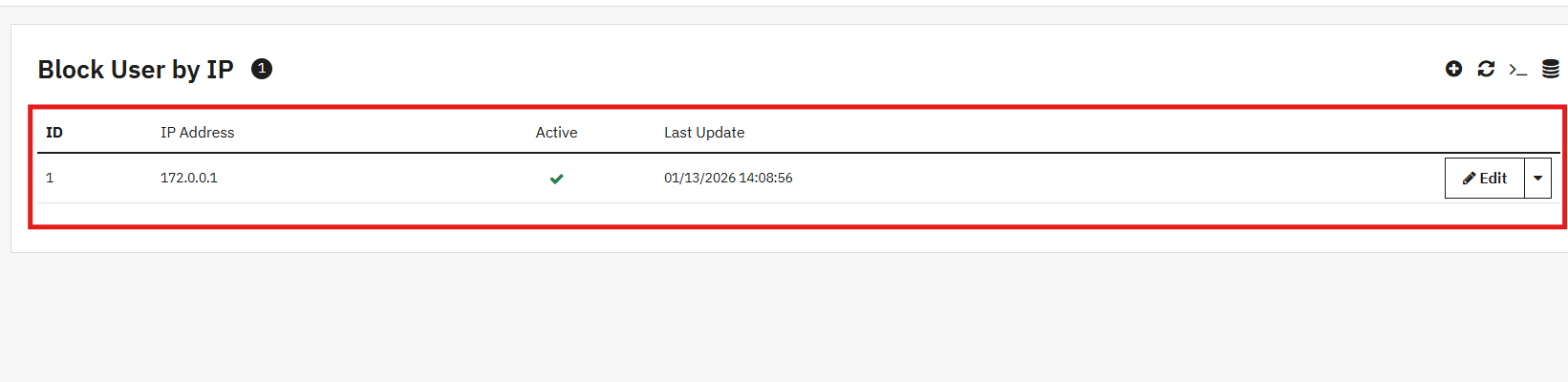
4.0.4 IP-Based User Blocking
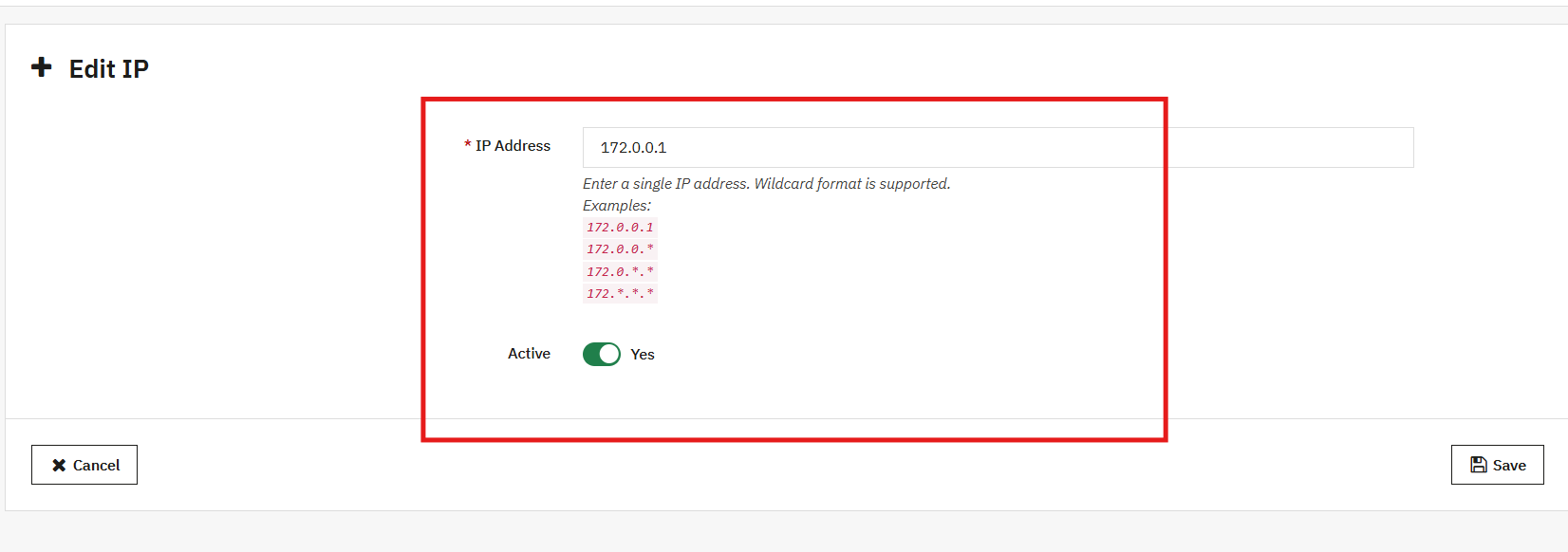
The AI Chatbot Addon now includes IP-based user blocking, allowing store owners to restrict access for specific users or IP addresses. This feature improves security, prevents misuse, and ensures a safe, controlled environment for genuine customers.
To use this feature, you can add IP addresses in the format ( X.X.X.X) separated by commas, and set the status for each IP as Enable or Disable.
4.0.5 Chat Availability Scheduling
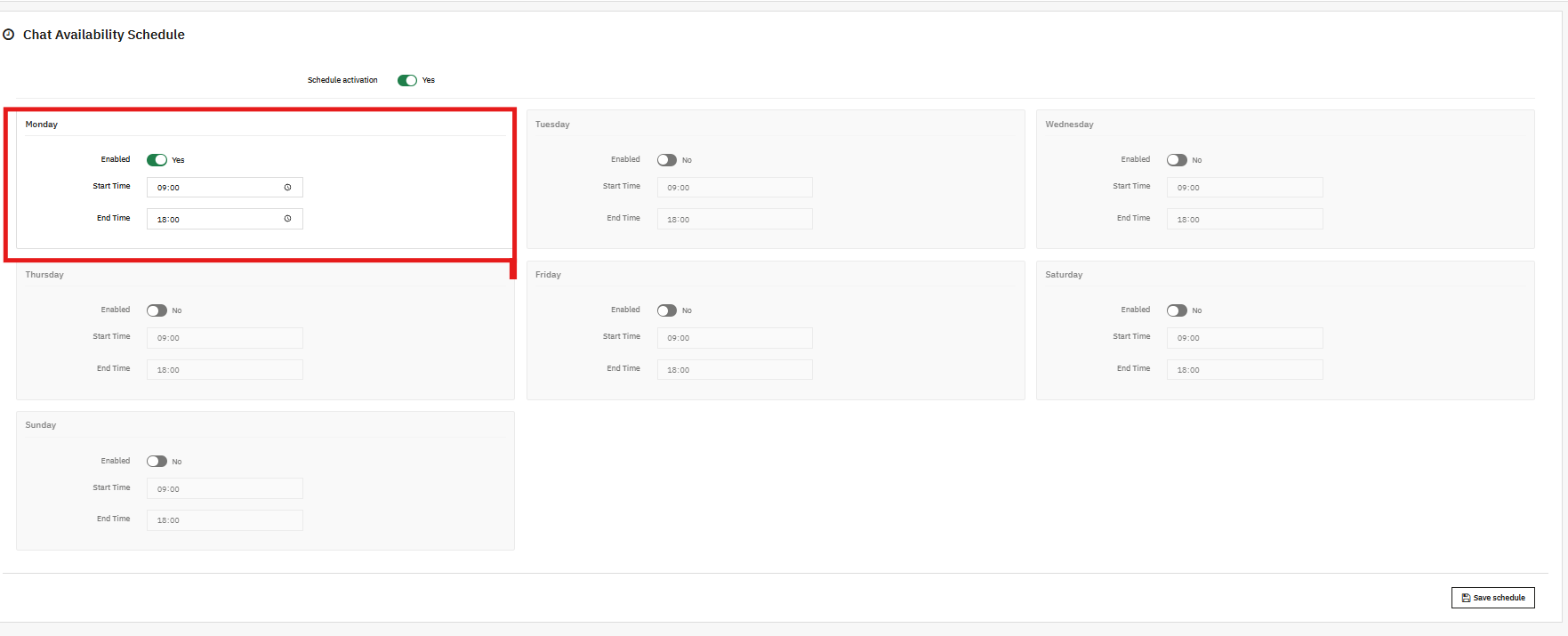
Store owners can manage chat availability by specifying the days and times when the AI chatbot is active. This ensures that customers receive timely support and that the chatbot is accessible only during scheduled support hours, improving service efficiency.
You can select any day of the week (e.g., Monday) and define the start and end time for chatbot availability to align with your business hours.
5.0.0 Frontend View
The KnowBand PrestaShop AI ChatBot Module appears on your store as a smart, interactive chat widget that provides instant, AI-powered support to customers. It offers a seamless shopping experience by helping users search products, check stock, track orders, and get quick answers to common queries.
ChatBot Frontend Feature Implementation- Short Overview
Product Search
The chatbot allows customers to quickly search for products, browse categories, and compare items directly from the storefront
Order Details
Customers can view their order details, including order ID, products, prices, and order status, directly through the chatbot in real time.
In addition to product search and order details, the chatbot also provides:
Shipment Details: Track shipments and view delivery status instantly.
Order Information: Access complete order history and details.
Product Information: Get product descriptions, prices, availability, and other details quickly.
Go mobile with the PrestaShop Mobile App Builder
Convert your PrestaShop website into a fully functional mobile app to increase sales, improve user experience, and grow mobile conversions.
Click “Get API key,” accept the terms of service, create your key, and paste it into the module’s configuration settings.
7.0.4 Steps to Generate DeepSeek API
Access the Deepseek platform via this URL: https://platform.deepseek.com/api_keys to generate the API Key. Log in or sign up to generatean API Key
Click on Create API Key after adding the key name.
Copy or store the key to enable functioning of Prestashop DeepSeek AI Content Chatbot Module
7.0.5 How to Generate Qdrant API Key and Endpoint URL for PrestaShop AI Chatbot
If you plan to use vector search with Qdrant for semantic queries in the PrestaShop AI Chatbot, follow these steps:
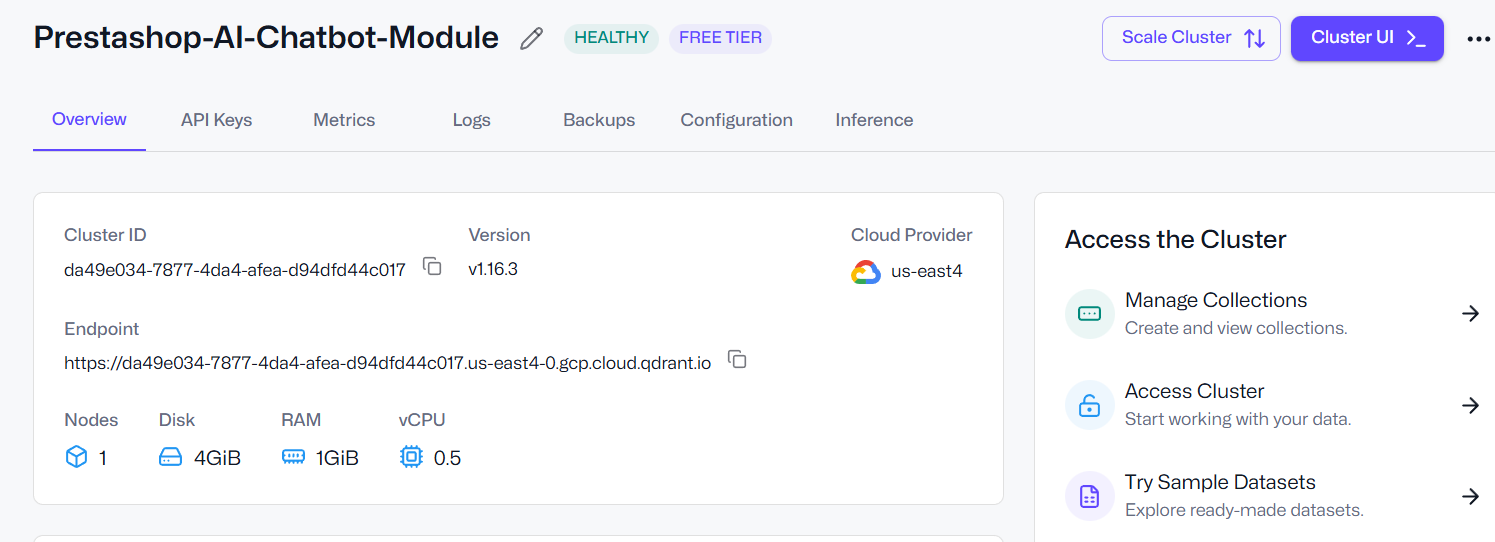
Step 1: Log in to Qdrant Access your Qdrant account, whether using the cloud service or a self-hosted instance.
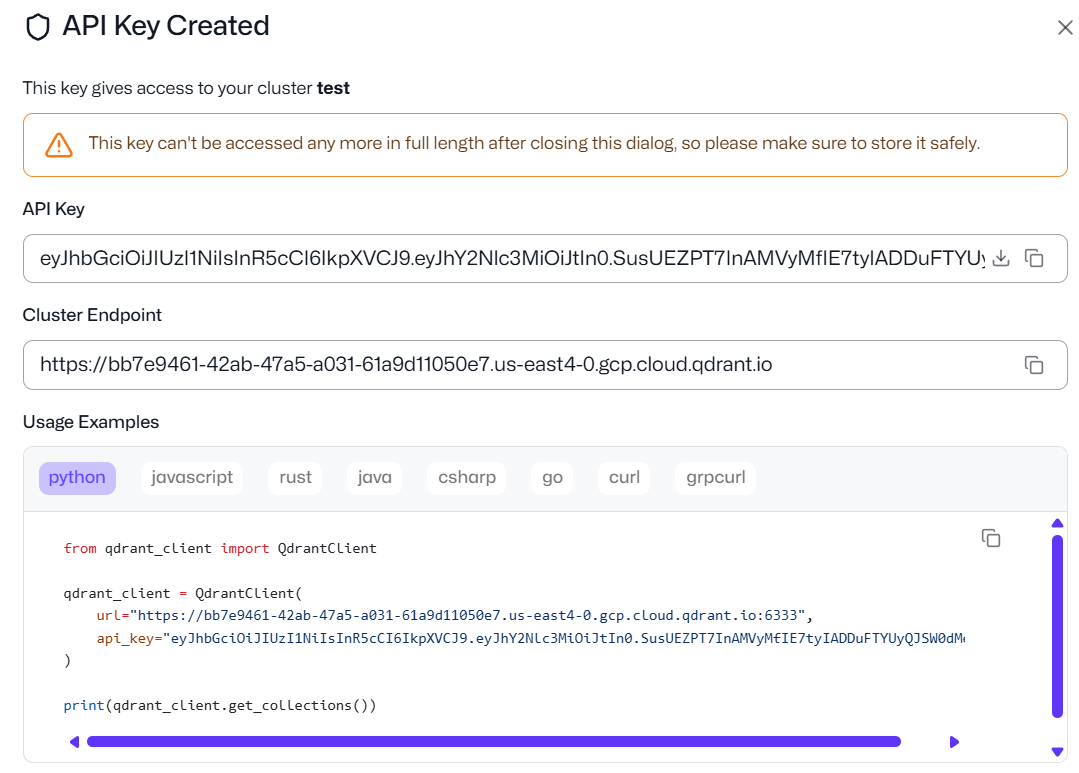
Step 2: Create a Cluster and API Key Navigate to your clusters section, create a new cluster if needed, and generate an API Key for your chatbot integration.
Step 3: Copy the API Key and Endpoint URL The Endpoint URL points to your Qdrant server, while the API Key provides secure access to the vector database. Copy both values carefully.
Step 4: Enter the Details in PrestaShop In your PrestaShop admin panel, go to General Configuration → Qdrant URL and paste the Endpoint URL. Then, enter the API Key in the Qdrant
8.0.0 Benefits of Prestashop AI-Powered ChatBot Module
Increase Conversions Automatically: Customers receive quick answers to their queries without waiting, helping them make purchasing decisions faster and reducing hesitation at checkout.
Improve User Experience With Friendly Interactions: The PrestaShop Live AI Chat Module
can guide customers through products, store policies, order information, and more, making browsing easier and more enjoyable.
Increase Session Activity and Dwell Time: This PrestaShop AI Assistant Module keeps visitors and customers engaged with your store, increasing the session activity and dwell time.
Reduce Cart Abandonment: Instant support helps resolve common doubts that cause customers to leave before completing a purchase.
Strengthen Trust and Brand Image: The PrestaShop Chat Assistant Module really looks like it has a 24/7 intelligent assistant or real-time AI chat support on your site, enhancing your store’s professionalism and reliability, helping customers feel confident and supported.
Save Time and Boost Store Efficiency: The PrestaShop ChatGPT Bot handles repetitive questions, FAQs, product inquiries, and general support, allowing your team to focus on more important tasks.
Summary
To conclude, the PrestaShop Chat Module Free is a powerful AI ChatBot that transforms the way your store interacts with customers. By providing instant, intelligent, and personalised responses, Prestashop AI ChatBot Module enhances the shopping experience, improves engagement, and increases conversions. With features like real-time product information, multi-language and multi-currency support, and feedback collection, this module ensures your store delivers professional and reliable service 24/7.
Overall, implementing the AI ChatBot not only saves time and resources by automating repetitive tasks but also strengthens customer trust and boosts your store’s efficiency.
This AI Chatbot for PrestaShop can be the best chatbot for your store that can stay ahead in the competitive e-commerce market while delighting customers with faster, smarter, and more personalised interactions.