OpenCart Claude Content Generator/Translator Extension – User Manual

The Knowband OpenCart Claude AI Content Generator/Translator  Extension is a cutting-edge extension designed to simplify content creation and translation for OpenCart store owners. Leveraging the advanced capabilities of Claude AI, the module helps merchants craft high-quality product descriptions, product titles, category descriptions, meta titles, and meta descriptions while ensuring SEO-friendly content.

The AI-powered translation feature also allows seamless integration with Claude AI, enabling accurate translations to help businesses expand their reach globally.

With this powerful extension, OpenCart store owners can generate engaging and original content effortlessly. Thus, Knowband’s OpenCart AI Content Generator enhances creativity in product descriptions and ensures all generated content aligns with search engine optimization best practices.

Furthermore, the module integrates smoothly with Claude AI API, offering a hassle-free experience for both content generation and translation. The built-in SEO optimization features help improve search rankings while maintaining content integrity.

Whether managing a small boutique or a large e-commerce store, the Knowband OpenCart Claude AI Content Generator streamlines content workflows, ensuring consistency across product listings. The module’s user-friendly interface and robust AI capabilities make it a must-have extension for any OpenCart store looking to scale efficiently.

1.0 Key Features of OpenCart Claude AI Content Generator & Translator Plugin 

Create Content Instantly with AI- The OpenCart Claude SEO Content Generator plugin by Knowband allows store owners to craft SEO-optimised product & category descriptions, meta titles, and descriptions. Additionally, the Opencart Claude AI Generator plugin ensures that the content is informative, and optimized for SEO.

Powered by Advanced AI Technology –The extension uses Claude 3.5 Sonnet, Claude 3 Opus, and Claude 3 Haiku to create unique and high-quality content. 

Easily Translate Content for Global Reach- The store owners do not need to manually translate product descriptions anymore. Therefore, this AI-powered plugin ensures accurate and natural translations, making it simple to reach customers in different countries.

Improve SEO with Optimized Content- The OpenCart Claude AI Content Generator module ensures that all generated and translated content follows SEO improving rankings on Google. Thus, Integrating relevant keywords naturally helps boost sales and traffic.

Simple Installation & Easy to Use- Designed for a user-friendly setup, the OpenCart Claude AI Content Generator Plugin is easy to purchase and configure. Therefore, the setup is quick and simple, and the interface is designed to be user-friendly for all opencart store owners.

Generate Bulk Content in Seconds – This addon is perfect for stores with large product base catalogues, allowing e-merchants to generate and translate SEO Optimized content for multiple products simultaneously. Therefore, it helps in saving time and effort.

Supports Multiple Languages & RTL Scripts – Whether the customers speak English, Spanish, Arabic, or any other language, this addon supports them all. It also works with right-to-left (RTL) languages.

Customize Content to Fit Your Brand- Furthermore, store owners can customize content length, tone, and style to align with their brand voice, ensuring consistency across all product listings.

2.0 Installation Guide

Setting up the Opencart Claude Module is simple. The e-merchants must follow the simple steps to complete the installation process easily.

When you purchase the Knowband Claude Content Generator/Translator Extension, you will get the following files:

  • A zipped file containing the source code for the Opencart Claude content Translator Extension.
  • A user manual for the extension to assist you further.

Steps to Install the Extension:

  1. Unzip the Downloaded File:

Locate the zipped file in your account under My Account > Downloads and extract it. Once unzipped, you’ll see folders similar to those shown in the illustration below:

  1. Transfer Files to the Root Directory

Use an FTP manager to copy all the files and folders from the unzipped folder to the root directory of your Opencart setup.

  1. Complete the Installation

The module is now successfully installed and ready for configuration.

  1. Access and Configure the Extension

Navigate to the Admin Panel > Main Menu > Extensions.

3.0 How to Generate the Claude API Key for Module Configurations?

The store owners must get an API key to enable functionality in your opencart store.

Steps to generate the API Key for OpenCart Claude AI Content Generate Extension:–

Step 1: Obtain an API Key:

Step 2: Paste the API Key in the Opencart Store:

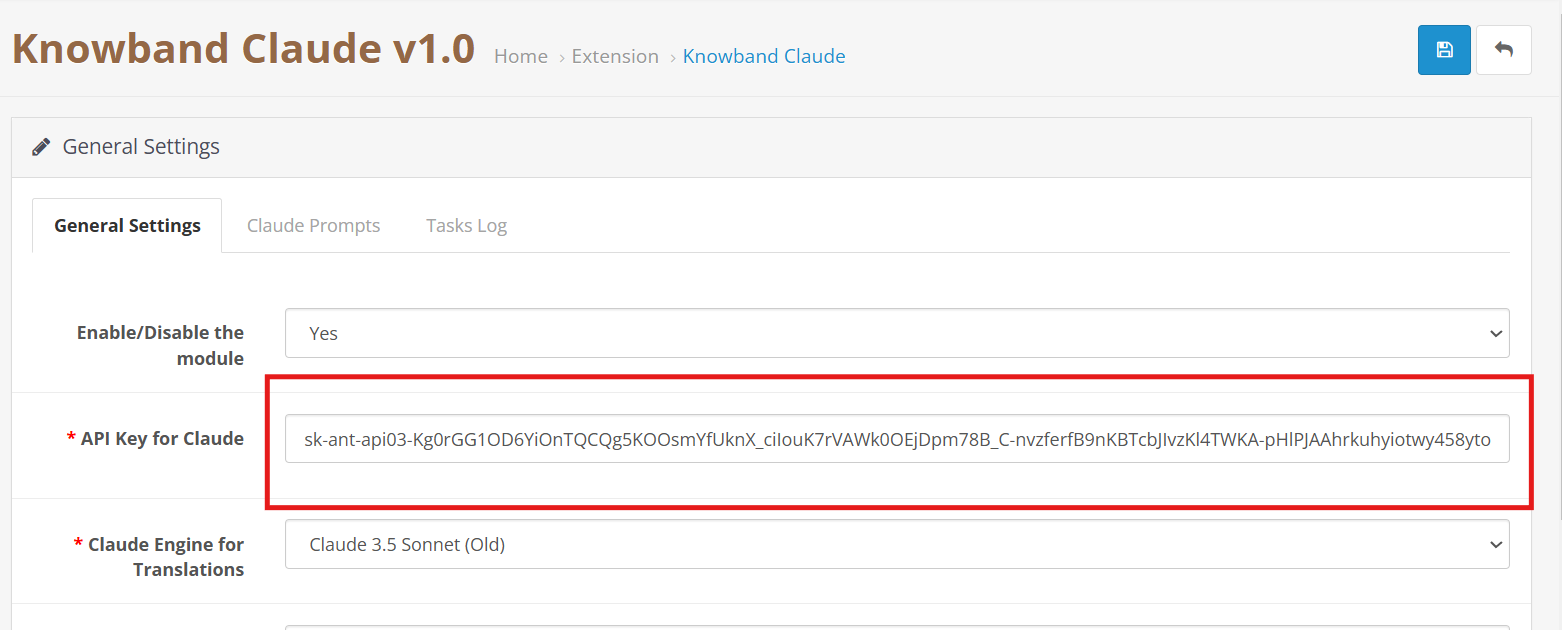
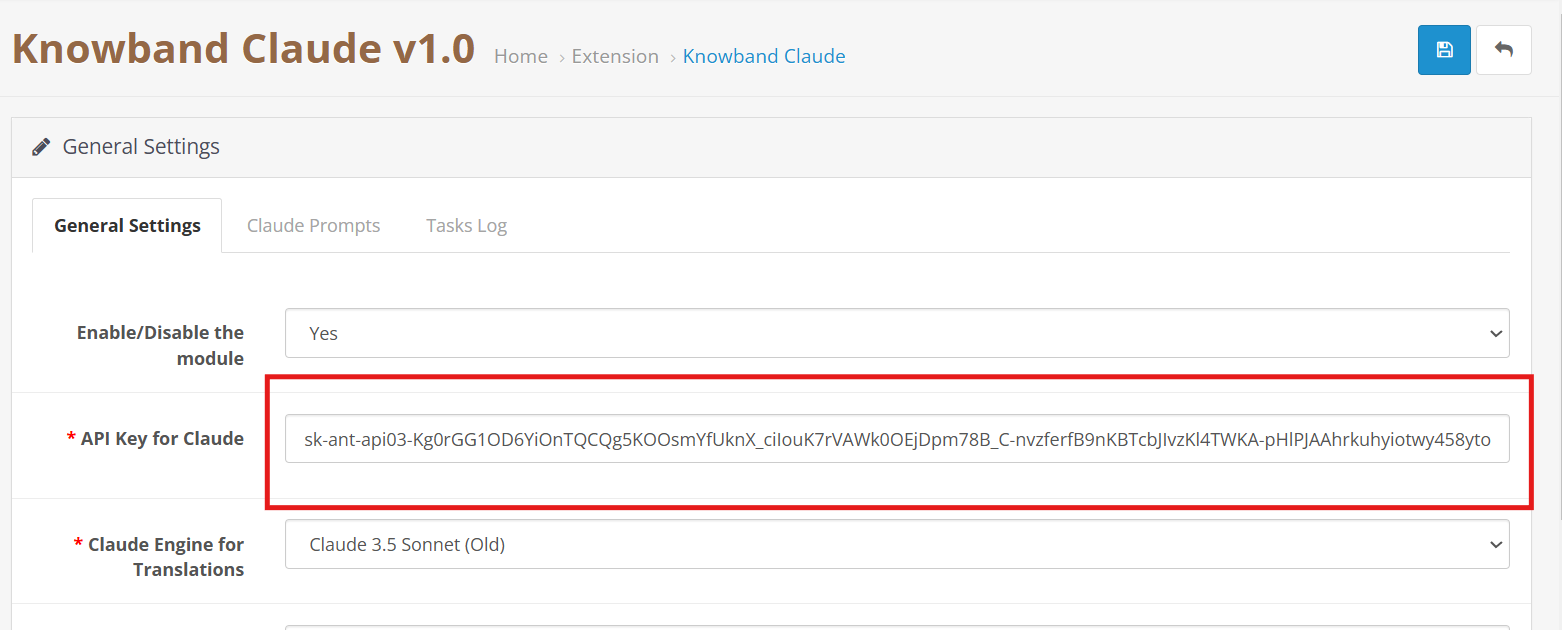
  • In your Opencart Store’s Backend, go to the Knowband Claude AI General Settings page.
  • Add the API Key into the given API Key for the Claude block.
Step 3: Save the Settings:

  • After inserting the API Key in General Settings, click Save to Module settings. The Claude AI module will now use this key to interact with the Claude API.

4.0 Admin Interface Overview:

4.0.1 General Setting:

The Opencart Claude Content Translator Plugin by Knowband allows the e-merchant to configure general settings and manage operations efficiently. Therefore, the Knowband provides an intuitive interface that allows the e-merchants to configure the module.

Here is a Brief Overview of the features of the Module

Enable/Disable:  E-merchants can enable or disable the OpenCart Claude AI Extension.

API Key for Claude: Add your Anthropic API Key in the required field.

Claude Model Selection: The module allows the e-merchant to select from Anthropic’s models, including Claude 3.5 Sonnet(new), Claude 3.5 Sonnet(old), Claude 3 Opus, and Claude 3 Haiku.

Temperature: Store owners can adjust the creativity level of the content which generally is between 0.0 to 1.0 – higher values represent more creative content, while lower values represent more consistent and focused results.

Maximum Tokens: Store owners can control how much text the AI generates. By default, it uses 2,000 tokens.

Select Claude Engine: E-Merchants can choose which Claude model to use specifically for translation tasks.

Primary Language Content Generator: Choose your primary language for automatic content generation and translation.

Target Languages: The store owners to select which languages they want content translated into.

4.0.2. OpenCart Claude Prompts:

The Extension contains 14 pre-configured prompts designed generator and translator.

Knowband’s OpenCart Claude AI Content Translator Extension– AI Prompts

Product Content Generation

Generate Product Descriptions – Creates SEO-friendly product descriptions with key features and benefits.

Generate Product Meta Titles – Writes optimized meta titles (under 60 characters) with keywords to boost search rankings.

Generate Product Meta Descriptions – Creates concise meta descriptions (within 140 characters) that highlight product details.

Product Content Translation

Translate Product Titles – Converts product titles into multiple languages as needed.

Translate Product Descriptions – Translates descriptions while keeping formatting intact.

Translate Product Meta Titles – Translate meta titles while maintaining the store’s tone and style.

Translate Product Meta Descriptions – Ensures accurate and well-structured translations of product meta descriptions.

Category Content Generation

Generate Category Descriptions – Creates category descriptions while keeping formatting intact.

Generate Category Meta Titles – Writes SEO-friendly meta titles (under 60 characters) with relevant keywords.

Generate Category Meta Descriptions – Generates short and optimized meta descriptions (within 140 characters) with focus keywords.

Category Content Translation

Translate Category Titles – Translates category titles into different languages based on store needs.

Translate Category Descriptions – Translates descriptions into multiple languages while preserving HTML structure.

Translate Category Meta Titles – Ensures SEO-friendly translations of category meta titles.

Translate Category Meta Descriptions – Translates category meta descriptions with accuracy and clarity.

4.0.3. Claude Prompts Task Log:

Knowband OpenCart Claude AI Content Translator Extension Module Task Log

The task logs keep a comprehensive record of all executed prompts with details like Prompt Type, Product, Category, Language, Previous Content, New Content, and time.

5.0 Steps to Execute Claude Prompts?

Knowband OpenCart Claude Prompt Execution Steps

Choose your desired products or multiple products access the Bulk Actions and select the prompt that you want to execute.

Generate Product Descriptions: Write or generate details for many products at once instead of one by one.

Generate Product Meta Titles: Make search-friendly titles for multiple products together to improve online visibility.

Generate Product Meta Descriptions: Create informative summaries for many products simultaneously that help shoppers understand what you offer.

Translate ProductTitles: Convert your product names into different languages to reach international customers.

Translate Product Descriptions: Transform your product information into various languages so more people can understand what you sell.

Translate Product Meta Titles: Turn your search titles into multiple languages for better global search visibility.

Translate Product Meta Descriptions: Use Knowband’s Claude AI to translate product summaries into different languages all at once.

OpenCart Gemini AI Content Generator/Translator Extension – User Manual

The Knowband’s Opencart Gemini AI Content Generator is a powerful extension that makes content creation easy for Opencart store owners. The OpenCart Gemini content generator uses AI, that allows store owners to generate high-quality and creative product descriptions, product titles, category descriptions, meta titles, meta descriptions, and SEO- optimized content.

The AI-powered translation Extension for the OpenCart seamlessly integrates with Google’s Gemini AI API, providing a smooth experience for content generation and translation. Therefore, with built-in SEO optimization features, the OpenCart Gemini content generator Extension ensures all generated content is original, engaging, and search engine friendly. Moreover, the translation capabilities of Knowband’s OpenCart Gemini content translator Extension allow merchants to expand their business to reach globally with perfect product information.

Whether you’re managing a small business or a large e-commerce marketplace, Knowband’s OpenCart Gemini content generator Extension streamlines your content workflow and ensures consistent quality across all product listings. Furthermore, the intuitive interface and powerful AI capabilities make it an essential Extension for any OpenCart store looking to scale content operations efficiently.

1.0. Key Features of  OpenCart Gemini AI Content Generator/Translator Extension

AI-Powered Content Generation

The OpenCart Gemini SEO Content Generator Extension leverages Google’s Gemini AI to create high-quality product descriptions, meta titles, and descriptions. Furthermore, it ensures content is engaging, informative, and optimized for search engines. 

Advanced AI Technology

The Gemini Extension for OpenCart utilizes Google’s latest Gemini AI models, including Gemini 2 Flash, Flash Light Preview, Gemini Flash 1.5, Gemini Flash 8B, and Gemini 1.5 Pro, which offers different generation modes for various content needs:

AI-Powered Translation

The  OpenCart Opencart translator Extension delivers accurate, context-aware translations for product content. Additionally, the OpenCart Gemini SEO Content Generator Supports multiple languages and preserves formatting and structure during translation.

User-Friendly Interface

The AI-powered translation Extension for OpenCart is simple to install and provides flexible and intuitive admin panel controls. Therefore, the store owners do not need to have coding experience or technical expertise.

Time Savings

The OpenCart Gemini content generator Extension automates time-taking tasks like writing product, and category descriptions and updating meta titles and descriptions. 

World-Wide Market Reach

The OpenCart Gemini content generator Extension’s feature allows the store to translate content into multiple languages to attract global customers.

2.0 How to Generate the Knowband OpenCart Gemini API Key for Extension Configuration

To enable Gemini AI functionality in your OpenCart Extension, follow these steps to obtain and configure your API key:

Step 1: Obtain an API Key

  1. Visit the Google AI Studio (https://aistudio.google.com/app/apikey)
  2. Click on “Create new secret key”. Copy this key for the next step.

Step 2: Enter the API Key in Your OpenCart Store:

  • In  Opencart Store’s BackOffice go to the “Knowband’s Gemini” General Settings page.
  • Paste the API Key into the provided “API Key for Gemini ” field.


Step 3: Save the Settings:

  • After pasting the API Key in General Settings, click “Save”. Now, you can use Knowband’s Gemini AI Extension.

Important:

Billing Requirement: Store owners must have a sufficient credit balance in their Google Gemini account for the API to function and run the Extension. If your credit balance is less, the API requests will not work in the Knowband’s Gemini AI Extension. Additionally, the store owners can check their balance and add credits by accessing the billing overview page at https://aistudio.google.com/app/apikey.

3.0 Admin Interface Overview:

3.0.1 General Setting:

The OpenCart Gemini AI Extension by Knowband allows the e-merchant to configure the Extension to perform operations within the store and manage bulk content operations efficiently.

Here is a Brief Overview of the features of the Extension

Enable/Disable: E-merchants can enable or disable the Opencart Gemini AI Content Generator depending on their needs.

API Key for Gemini AI: Enter your Generated API KEY from Google AI Studio in the required field.

Gemini AI Model Selection: Also, e-merchants can choose from Google’s latest Gemini AI models, including Gemini 2 Flash, Flash Light Preview, Gemini Flash 1.5, Gemini Flash 8B, and Gemini 1.5 Pro, which offers different generation modes for various content needs.

Temperature: The e-merchants can adjust the creativity level from 0.0 to 1.0 – higher values represent more creative content, while lower values represent more focused results.

Maximum Tokens: The Knowband’s Gemini Content Generator allows the admin to set a token limit (default: 500). The tokens represent text fragments.

Gemini AI Engine for Translations: Select which Gemini AI model to use for translation for the product and category details.

Primary Language: The admin can select the store’s default language for content generation and translation of the products

Target Languages: The Opencart Gemini Translator Extension provides the option to select which languages the store owners want their content to be translated.

3.0.2. Gemini AI Prompts:

The Extension features 14 pre-configured prompts designed for various e-commerce content needs:

Knowband’s Opencart Gemini AI Content Translator AI Prompts

Generate Product Description: The prompt creates SEO- optimized, well-structured, formatted product descriptions with key features, benefits, and many more.

Generate Product Meta Title: Creates SEO- optimized meta titles under 60 characters, including keywords and product categories to increase the search rank.

Generate Product Meta Description: The prompts generate meta descriptions of the product limited to 140 characters maintaining the information according to the product.

Translate Product Title: Translates the product titles to multiple different languages depending on the store’s need.

Translate Product Description: The prompt translates descriptions while preserving formatting and content.

Translate Product Meta Title: Translate meta titles to multiple different languages according to the store’s theme and tone.;

Translate Product Meta Description: The prompt translates meta descriptions to multiple different languages keeping the translated content focused and accurate according to the generated content.

Generate Category Description:  The prompt generated category descriptions while preserving formatting and content of the product.

Generate Category Meta Title: Also, translate category meta titles under 60 characters with related keywords keeping the title SEO Optimized.

Generate Category Meta Description: Creates category meta descriptions within 140 characters focusing on the meta keywords.

Translate Category Title: The prompt is to translate category titles into multiple different languages based on the needs of the store.

Translate Category Description: Translates category descriptions while maintaining HTML structure and generates category descriptions.

Translate Category Meta Title:  Translated category meta titles to multiple different languages depending on the store.

Translate Category Meta Description: Translates category meta descriptions to multiple different languages focused only on generated meta descriptions.

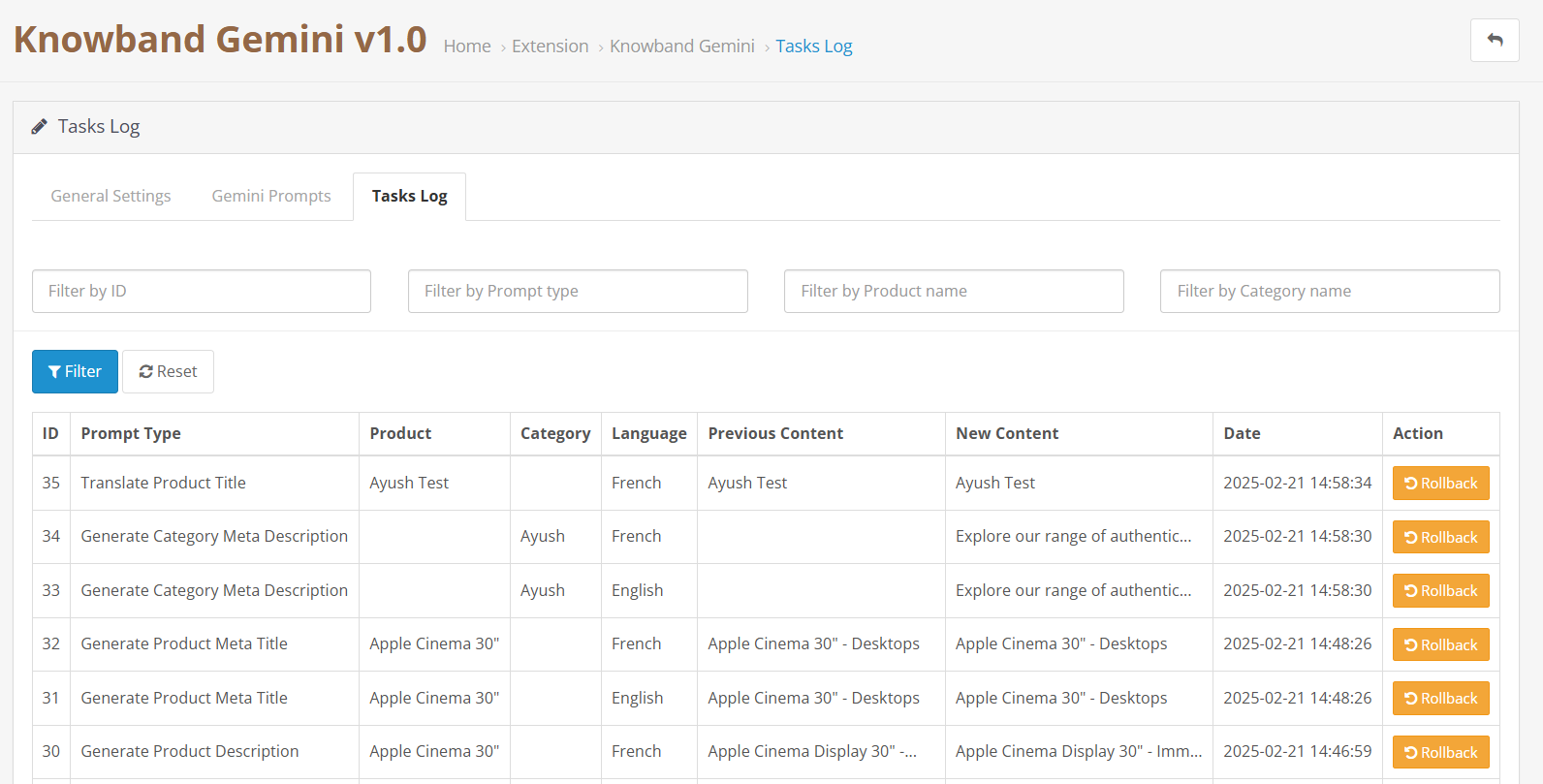
3.0.3. Gemini AI Task Log:

The task logs keep track of the changes and actions done within the store. Moreover, Knowband’s Gemini AI Extension maintains logs in the tasks log which helps the store owners to track, undo and revert changes in the task logs.


4.0. How to Execute Gemini AI Prompts?

The way to execute the prompt is to select the product for which you want to generate and translate content. Then select the prompt  and access bulk operations through Opencart Backend >> Products tab:

Knowband Opencart Gemini AI Prompt Execution Steps:

Select your desired products and access the Bulk Actions menu to choose from various content generation and translation options:

Generate Product Description: Generates the descriptions for multiple products at the same time.

Generate Product Meta Title: Generate the meta titles for the bulk of the product keeping the content SEO-optimized.

Generate Product Meta Description: Generate meta descriptions for multiple different products at the same time keeping the product informative to the customers and visitors. 

Translate Product Title: Convert product titles to multiple languages.

Translate Product Description: Translates the product’s description in selected multiple languages.

Translate Product Meta Title: Translated the selected meta titles to multiple languages for the products and categories.

Translate Product Meta Description: The Knowband’s Gemini AI Extension allows the admin to translate meta descriptions for bulk products at one time.

Unlock the Power of AI for Opencart: Generate and Translate Content with ChatGPT

Running an online store can be challenging, especially when it comes to creating high-quality content and translating it for a global audience. Fortunately, technology is evolving to make these tasks easier and more efficient. Enter the newly introduced Opencart ChatGPT Content Generator Extension by Knowband, an innovative solution designed to simplify content creation and translation for Opencart store owners.

This module leverages artificial intelligence to help you generate SEO-friendly content, translate it into multiple languages, and manage your store more effectively. Whether you are looking for product descriptions, product titles, category titles, category descriptions, product & category meta titles, the Opencart ChatGPT Content Generator Plugin has you covered.

What Is the Opencart ChatGPT Content Generator?

The Opencart ChatGPT Content Generator Extension is a cutting-edge tool that integrates OpenAI’s ChatGPT technology into your Opencart store. This powerful module enables store owners to create engaging, high-quality content effortlessly. From product descriptions to other SEO rich contents, the AI content generator for Opencart eliminates the need to hire professional writers or spend hours brainstorming.

Not only does this tool generate content, but it also supports translations, making it a must-have for store owners targeting international markets. With the Opencart ChatGPT Content Translator Extension, you can easily translate your store content into multiple languages, ensuring your products reach a wider audience.

Why Choose the ChatGPT Extension for Opencart?

In a competitive eCommerce environment, the quality of your content can make or break your success.
Here’s how the ChatGPT Extension for Opencart helps you stand out:

Effortless Content Creation: The AI-powered content generator for Opencart produces high-quality, SEO-optimized content tailored to your needs.

Seamless Translations: With the Opencart Translator Extension, you can translate your store content into various languages effortlessly. Furthermore, the AI-powered translation extension for Opencart ensures accurate and context-aware translations, allowing you to connect with international customers.

Save Time and Resources: Writing and translating content manually can be time-consuming and expensive. On the other hand, the Opencart ChatGPT Content Generator Plugin automates these tasks, saving you both time and money.

Boost SEO Performance: The Opencart ChatGPT SEO Content Generator helps improve your store’s search engine rankings by creating keyword-rich, high-quality content.

User-Friendly Interface: Designed with simplicity in mind, the Opencart ChatGPT Content Generator Extension is easy to use, even for beginners. You don’t need technical expertise to create or translate content using this plugin.

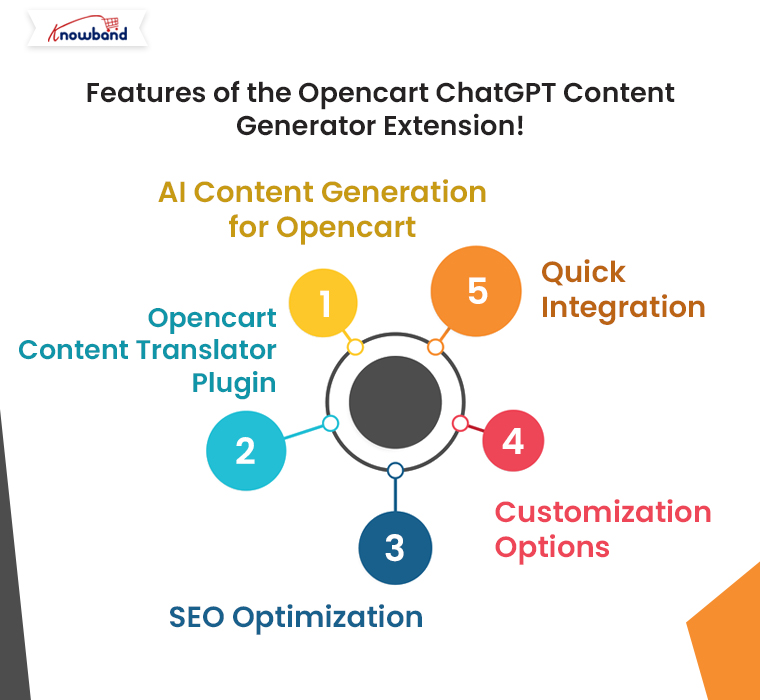
Features of the Opencart ChatGPT Content Generator Extension!

Knowband’s Opencart ChatGPT Content Generator Plugin comes packed with features to help you manage your store content more effectively.
Some of its standout features include:

AI Content Generation for Opencart: Generate unique, high-quality content for product pages, blogs, and more.

Opencart Content Translator Plugin: Translate your content into multiple languages to reach a global audience.

SEO Optimization: Create content optimized for search engines to improve your store’s visibility.

Customization Options: Tailor the generated content to fit your brand’s tone and style.

Quick Integration: Seamlessly integrate the plugin with your Opencart store.

With these features, the Opencart ChatGPT Content Translator Extension empowers store owners to take their content strategy to the next level.

Check What’s New in the Mobile App Builder v4.5

Use Code: MOBI40 for Extra 40% OFF

SHOP NOW

How Does the Opencart ChatGPT Content Generator Work?

Using the Opencart ChatGPT Content Generator and Translator Plugin is simple:

Install the Plugin: Download and install the Opencart ChatGPT Content Generator Plugin from the Knowband website.

Select Your Content Needs: Choose the type of content you need, such as product descriptions, blog posts, or website copy.

Generate Content: Input a few keywords or a brief description of your requirements. The AI content generator for Opencart will create high-quality, SEO-friendly content in seconds.

Translate (If Needed): Use the Opencart Translator Extension to translate the generated content into your desired languages.

Publish and Optimize: Review the content, make any necessary tweaks, and publish it to your store. With minimal effort, you’ll have professional-grade content ready to engage your customers.

Benefits of the Opencart ChatGPT Content Generator Extension!

The Opencart ChatGPT Content Generator Extension offers a host of benefits for store owners, including:

Improved Customer Experience: Provide high-quality content and accurate translations to enhance the shopping experience.

Scalability: Generate and translate content quickly, even as your store grows.

Cost Savings: Reduce reliance on costly freelancers or agencies for content needs.

Final Thoughts!

In today’s competitive eCommerce landscape, leveraging AI tools like the Opencart ChatGPT Content Translator can give you a significant edge. This powerful plugin simplifies content creation and translation, allowing you to focus on growing your business.

Whether you’re looking to enhance your SEO, reach international customers, or save time on content management, the Opencart ChatGPT Content Generator Plugin is the ultimate solution.

Ready to unlock the power of AI for your Opencart store? Try the Opencart ChatGPT Content Generator and Translator Extension today and take your content strategy to the next level.

ChatGPT-Powered Content Creation and Translation for Opencart Made Simple

Running an online store with Opencart can be a rewarding experience, but creating quality content and translating it into multiple languages is often time-consuming and challenging. Especially, when it comes to bulk store management.

That’s where Knowband’s new Opencart ChatGPT content generator comes in. This powerful extension simplifies content creation and translation, making it effortless to generate engaging product descriptions, category descriptions, product & category titles, and more—all while ensuring seamless translations for global audiences.

If you’re an Opencart store owner, this tool could be a game-changer. Let’s explore how the ChatGPT Extension for Opencart can revolutionize your store’s content strategy and improve your workflow.

Why Content Matters in eCommerce?

Content plays a crucial role in any eCommerce store. Furthermore, high-quality product descriptions and well-crafted meta tags can boost search engine rankings and engage customers. However, manually writing all this content can be tedious, especially when managing a large inventory.

Therefore, for the store owners targeting international markets, the challenge doubles. Translating content into multiple languages while maintaining accuracy and tone is a significant hurdle. Fortunately, with the AI-powered translation Extension for Opencart, you can overcome these obstacles easily and efficiently.

Introducing the Opencart ChatGPT Content Generator Extension:

Knowband’s Opencart ChatGPT content generator Extension is designed to make content creation and translation simple, fast, and effective. Furthermore, powered by OpenAI’s ChatGPT Engine v3.5 and v4, this extension can help you create high-quality, SEO-optimized content for your Opencart store in just a few clicks.

Whether you need detailed product descriptions, category descriptions, or optimized meta tags, the AI content generator Opencart is equipped to handle it all.
Moreover, with its user-friendly interface, even non-technical users can take advantage of its capabilities.

Key Features of the Opencart ChatGPT Content Generator Plugin:

AI-Driven Content Generation: Quickly generate SEO-friendly content for product pages, categories, and blogs.

Seamless Translation: Translate your store’s content into multiple languages with the Opencart ChatGPT content translator Extension.

Customizable Output: Tailor the tone and style of the generated content to suit your brand voice.

SEO Optimization: Ensure your content aligns with search engine best practices for better rankings.

Time-Saving Automation: Focus on growing your business while the plugin handles content creation and translation.

Why Choose ChatGPT Extension for Opencart?

If you’re wondering why this extension stands out, here are a few compelling reasons:

1. Improved Efficiency:

The Opencart ChatGPT content generator Plugin allows you to save hours of work by automating content creation. Instead of spending time brainstorming and writing, let the AI handle it for you.

2. Global Reach with Translations:

With the Opencart ChatGPT content translator Plugin, you can break language barriers effortlessly. Moreover, the AI ensures accurate and contextually appropriate translations, helping you cater to customers worldwide.

3. Boosted SEO Performance:

Search engines favor stores with fresh, relevant, and keyword-rich content. Thus, the Opencart ChatGPT SEO Content Generator helps you create such content, improving your chances of ranking higher in search results.

4. Cost-Effective Solution:

Hiring professional writers and translators can be expensive. The AI content generation Opencart extension offers a budget-friendly alternative without compromising on quality.

Practical Applications of the Opencart ChatGPT Content Generator Plugin!

1. Product Descriptions and Titles

Struggling to write compelling product descriptions and titles? The Opencart ChatGPT content generator can create detailed and persuasive descriptions and product titles that highlight the features and benefits of your products.

2. Meta Tags and SEO Content:

Improve your store’s visibility with optimized meta titles and descriptions for products and categories generated by the Opencart ChatGPT SEO Content Generator.

3. Multilingual Store Management:

Expand your reach with the Opencart ChatGPT content translator Extension. Translate your content into multiple languages, ensuring accuracy and cultural relevance.

The ChatGPT Content Generator is also Available for Prestashop

SHOP NOW

Benefits of Using the Opencart ChatGPT Content Translator Plugin

Faster Time-to-Market: Launch products and campaigns faster with automated content generation.

Enhanced Customer Experience: Provide clear and engaging information to your customers in their preferred language.

Scalable Solution: Manage content for hundreds or thousands of products effortlessly.

SEO-Friendly Content: Improve your store’s search engine rankings with AI-optimized content.

Final Thoughts!

The Opencart ChatGPT Content Generator/Translator Extension is more than just a plugin; it’s a powerful tool that can transform the way you manage content on your Opencart store. Whether you need help with creating engaging product descriptions or translating content for global customers, this extension has you covered.

Embrace the future of eCommerce with the ChatGPT Extension for Opencart and take your store to the next level. Simplify your workflow, save time, and deliver exceptional experiences to your customers with this innovative solution.

Ready to revolutionize your store’s content strategy? Install the Opencart ChatGPT content generator Plugin today and experience the difference AI-powered tools can make!