
In today’s internet-driven world, users expect websites to load instantly. Customers want pages to load quickly when they visit your OpenCart website. Customers may become irritated, and your business may lose revenue if your product pages take too long to load, especially on mobile devices where internet rates may be slower.
Large or numerous graphics are frequently the primary cause of slow page loading. Product photos might be big files, but they are an essential component of any e-commerce website. Lazy loading can help with it.
The Performance Challenge in eCommerce Sites 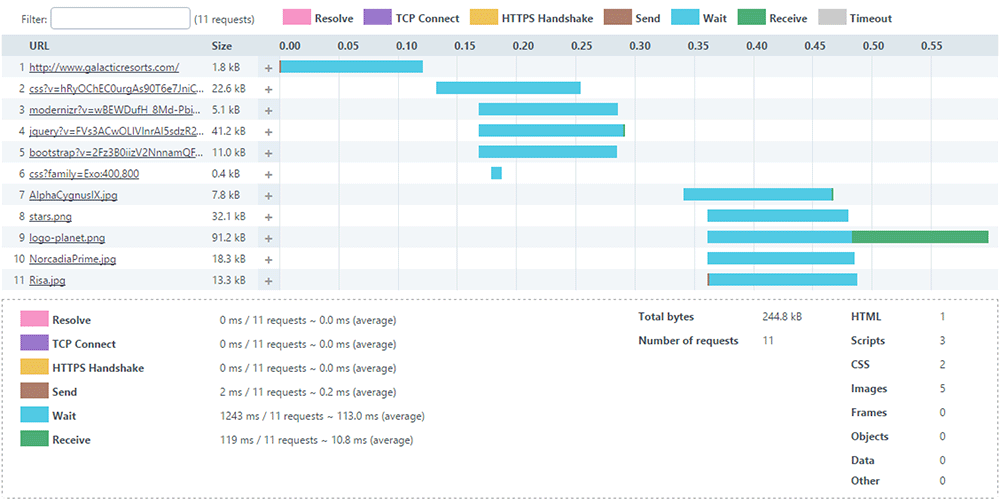
Moment’s eCommerce spots are veritably visual. A standard order runner can have
- 20-50 pictures of the product
- Banners
- Thumbnails and icons
- Sections on related products
The browser will need to load each image before the page is completely interactive if all of these are loaded at once. This leads to:
- First Contentful Paint (FCP) at a slower pace
- Increased Interactive Time
- Poor performance on mobile devices
- A higher server load
- Increased rates of bounce
The user experience will be significantly impacted by this, particularly on slower networks.
What Is Lazy Loading?
The technique known as “lazy loading” delays the loading of images (or other content) until they are truly required, which is typically when a user is ready to view them by scrolling into view. Lazy loading waits until the user is ready to view the image before loading it, as opposed to loading all the images at once.
Lazy loading has the following advantages:
- Bandwidth conservation
- Better performance on mobile devices
- Improved SEO and essential web elements
- Quick loading of the first page
When many of the images may load simultaneously on product pages, lazy loading is especially helpful.
Why Lazy Loading Matters
Imagine looking through an item catalogue. Even if the product images are far below the fold, your browser will try to load them all at once when using traditional loading. Only the images that are in or near the viewable portion of the screen will load initially when using lazy loading. The remaining images will gradually load as the viewer scrolls.
Both your clients and search engines like Google, which like websites that load quickly, will benefit from a quicker and more seamless experience.
Real-World Example: Category Page Without Lazy Loading
Consider this example:
24 products on a category page, Each thumbnail = 150 KB, Total image weight = 3.6 MB
Before even loading banners, CSS, and JavaScript, the browser has to download close to 4 MB of images.
Now consider that the visitor only scrolled halfway through the page. Half the images were never viewed – but downloaded anyway. Therefore, this is wasted bandwidth and 0This is where lazy loading comes in.
Lazy Loading and Core Web Vitals
Web Vitals. The following are directly impacted by large images:
- Paint with the Largest Content (LCP)
- Shift in Cumulative Layout (CLS)
- Next Paint Interaction (INP)
Correctly loading images slowly will enhance performance metrics, particularly on product and category listing pages.
Still, there’s one important thing to keep in mind
Images above the pack, like the primary product image on a product detail runner, should n’t be lazy loaded.
When to Apply Lazy Loading?
Lazy loading is best suited for:
- Product listing pages
- Category pages
- Blog listing pages
- Manufacturer pages
- Upsell sections
It might not be the best fit for:
- Hero banners above the fold
- Main product image on the product page
- Critical branding visuals
How to Implement Lazy Loading in OpenCart
Method 1: Lazy loading in native browsers
Modern browsers use the loading=”lazy” property to provide built-in lazy loading
Example:
<img src=”image.jpg” loading=”lazy” alt=”Product Image”>
OpenCart Steps:
- Open your theme file:
| Version | File Path |
|---|---|
| OpenCart 2.x | catalog/view/theme/your_theme/template/product/category.tpl |
| OpenCart 3.x | catalog/view/theme/your_theme/template/product/category.twig |
| OpenCart 4.x | catalog/view/template/product/category.twig |
- Locate the product image <img> tag.
- Change it as follows:
Before:
<img src="{{ product.thumb }} alt="{{ product.name }}"  width="300"  height="300"

     title="{{ product.name }}">

After:
<img src="{{ product.thumb }}"loading="lazy" alt="{{ product.name }}" width="300" height="300" title="{{ product.name }}">
That’s all. JavaScript is not necessary. Furthermore, this is the most easy and cleanest way.
Method 2: Using lazysizes (Best for Older Browser Support)
Steps:
- Add the lazysizes script:
<script src="https://cdnjs.cloudflare.com/ajax/libs/lazysizes/5.3.2/lazysizes.min.js" async></script>
- Open your theme file based on the OpenCart version mentioned in Method 1 and update the image markup:
- Before:
<img src="{{ product.thumb }}" class="lazyload" width="300" height="300" alt="{{ product.name }}"> - After:
<img data-src="{{ product.thumb }}" class="lazyload" width="300" height="300" alt="{{ product.name }}">
Method 3: Using Intersection Observer API (Advanced Control)
Modern JavaScript API for better control.
Example:
const images = document.querySelectorAll(“img[data-src]”);
const observer = new IntersectionObserver((entries, observer) => {
entries.forEach(entry => {
if (entry.isIntersecting) {
const img = entry.target;
img.src = img.dataset.src;
observer.unobserve(img);
}
});
});
images.forEach(img => observer.observe(img));
This method gives full control over loading behaviour.
Important: AJAX-Based Product Filtering
When products are loaded dynamically via AJAX:
Native loading=”lazy” works automatically.
However, ifyou are using lazysizes, Intersection Observer then You must re-trigger lazy loading after AJAX content loads.
Example:
document.addEventListener('ajaxComplete', function() {

    lazySizes.autoSizer.checkElems();

});

Otherwise, newly injected images may not load correctly.
The Best Methods for Lazy Loading in OpenCart
✔ Avoid loading the images above the fold.
✔ Make sure your images are the right size; avoid using thumbnails that are too big.
✔ Always use PageSpeed Insights to test; optimiseoptimize images to WebP format.
✔ Always test with PageSpeed Insights
✔ After making changes to the template, clear the OpenCart cache.
Measuring Performance Before and After Implementation
To evaluate the impact of lazy loading, follow these steps:
Before Implementation
Test your category page and record the following metrics:
- Page size
- Page load time
- Core Web Vitals scores
After Implementation
Run the same tests again and compare the results. You should observe:
- Reduced initial load time
- Lower Total Blocking Time (TBT)
- Improved Lighthouse performance score
The implementation options outlined in this guide, from native HTML attributes to lazysizes and the Intersection Observer API, offer solutions for every level of technical complexity. Whether you are maintaining a small boutique store or managing a high-traffic multi-category catalogue, there is an approach that fits your needs. Start with Method 1 for instant results, and build up to more advanced methods as your requirements grow.
Performance optimisation is not a one-time task as it is an ongoing commitment. Pair lazy loading with image compression, WebP conversion, and proper caching to unlock the full potential of your OpenCart store’s speed.
About Knowband
Knowband is a trusted eCommerce plugin and extension provider with years of experience helping online merchants build faster, smarter, and more feature-rich stores. Whether you run your store on PrestaShop, OpenCart, Shopify, WooCommerce, Magento, or any other major platform, Knowband offers a wide range of ready-to-use plugins and extensions that help you enhance functionality, improve performance, and deliver a better shopping experience, without needing to build from scratch.
Beyond plugins, Knowband also offers comprehensive website development and mobile app development services. Whether you need a fully custom eCommerce storefront built from the ground up, a tailored mobile shopping app for iOS and Android, or a bespoke integration with your existing systems, Knowband’s team of developers has the expertise to bring your vision to life.
If you are looking to optimize further your OpenCart store, or any other eCommerce platform, explore Knowband’s plugin marketplace or get in touch with our team to discuss a custom solution tailored to your business goals.
Contact us at support@knowband.com for custom plugin development, website development, and mobile app development services.

