
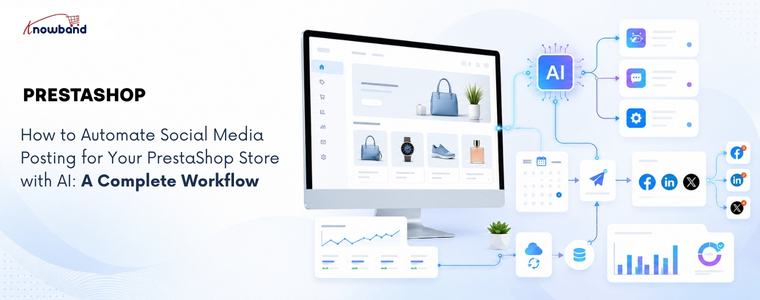
How to Automate Social Media Posting for Your PrestaShop Store with AI: A Complete Workflow
Launching a new product is only half the job. If it isn’t shared on social media at the right time, you risk missing the initial surge of attention that can drive traffic, engagement, and sales. In many stores, products go live first, while the social media announcement gets delayed or forgotten altogether. By the time someone remembers to post about it, the best opportunity to reach potential customers has already passed. This is where the PrestaShop AI Social Media Post Generator Module by Knowband can make a real difference. But generating captions alone isn’t enough. A truly effective solution should automate the entire workflow, from detecting a newly published product and creating platform-specific content to scheduling or publishing posts automatically. Otherwise, store admins still have to manually generate the content, choose the right social platforms, and publish each post themselves, leaving room for delays and missed opportunities.
Why a PrestaShop AI Social Media Post Generator Module Needs a Workflow
Marketers using AI content generation tools save an average of 6.1 hours per week on content-related tasks, according to HubSpot’s 2026 AI Trends Report, with senior practitioners saving 8 to 10 hours. That number only holds up if the solution they use is actually removing steps from the process, not just replacing a blank caption box with an AI-generated one someone still has to notice and post.
The real challenge with manual social media posting isn’t writing the post. It’s remembering to promote every new product, deciding what to say, and finding the right time to publish it.
A workflow-based setup removes all three decisions from the admin’s daily list, not just the writing part. That’s the actual difference between a caption generator and genuine automation.
The Trigger-to-Post Workflow: How Automated Social Content Actually Moves
Trigger-based automation starts with a store event, not a blank prompt. Here’s the full loop a properly configured setup runs through, from the moment a product changes status to the point an admin reviews what happened and adjusts the system.

Every product event flows through the same loop: a trigger activates, the rule fetches the product data, AI generates the copy, and the post either waits for a human or is directly published, before performance data feeds back into the next round of prompts.
Building a Prompt Strategy So Posts Don’t Sound Like Generic AI Captions
The quality gap between AI social posts almost always comes down to what the prompt actually contains, not which AI model generated it. A prompt built only from a product name and price produces the same generic copy every AI tool writes when given nothing else to work with.
Brand voice closes most of that gap on its own. Feeding the AI a defined tone, whether professional, playful, or urgent, along with the actual industry context, gives it enough to write copy that sounds like a specific store instead of a template.
Product catalog content matters just as much here. A prompt built from the product name, description, price, and URL together produces noticeably more specific captions than one built from the name alone, since the AI has real details to reference instead of filling gaps with generic phrasing.
A word blacklist and per-platform CTA phrases round out the strategy. Blocking competitor names or discontinued product references prevents embarrassing mismatches, and a defined closing line per platform keeps the CTA on-brand instead of leaving the AI to invent one each time.
Choosing Between Draft Review and Auto-Publish with a PrestaShop Social Post Scheduling Addon
Immediate publishing works well once a rule has proven itself, but it’s the wrong starting point for a new rule. Running a new rule in draft mode first lets an admin check tone, accuracy, and CTA phrasing across a handful of real products before trusting it to publish unattended.
A PrestaShop Social Post Scheduling Addon adds a middle option worth using once a rule is trusted: scheduled publishing within a set delay window, rather than immediate or fully manual. Spacing a batch of fifty product posts across several days, instead of publishing all fifty the moment a rule is created, keeps a feed looking like ongoing activity rather than an obvious automated dump.
Limits on posts per day and posts per product per day exist specifically to prevent that dump effect. Restricting a single product to one post per day, even if a rule technically qualifies it for more, keeps the same item from appearing across every connected platform simultaneously and looking scripted.
Where a PrestaShop Social Media Automation Module Fits Into the Bigger Picture
Draft review, prompt strategy, and scheduling all solve pieces of the same problem, but they only work together if one system is coordinating all three. A PrestaShop Social Media Automation Module needs to sit between the store’s product events and the social platforms themselves, translating one into the other automatically.
That coordination is what separates a genuine workflow from a collection of separate settings an admin has to manage by hand. Post history, showing status, platform, engine used, and source, is what makes a PrestaShop Social Media Automation Module auditable rather than a black box once it’s running unattended.
How Knowband’s SocialAI Pro Runs This Entire Workflow
The Knowband SocialAI Pro PrestaShop AI Social Media Post Generator Module runs every stage of this workflow from one back-office panel. Rules handle the trigger logic (New Product, Back in Stock, or Manual); the AI engine (OpenAI ChatGPT, Google Gemini, or Anthropic Claude) generates platform-native copy for Facebook, LinkedIn, and X, and Post History logs every result with its engine, source, and status.
Brand voice fields, including tone, industry context, word blacklist, and per-platform CTA phrases, feed directly into the prompt for every generated post. The scheduled delay window spaces bulk posts across a configurable day range, and daily posting limits per rule and per product prevent the same item from flooding every channel at once.
Putting Your PrestaShop AI Social Media Post Generator Module Workflow Into Practice
A PrestaShop AI Social Media Post Generator Module earns its place by running the full loop, from trigger to publish to performance review, not by writing one caption at a time on request. Starting new rules in draft mode, refining the prompt once real output comes back, and only then moving to immediate or scheduled publishing is the sequence that actually works.
Store admins still assembling this manually, one post at a time, are spending hours a week on something a properly configured PrestaShop Social Media Automation Module already handles end-to-end. The workflow above is the difference between AI that writes captions and AI that runs a system.

Published by

