Olivia ist eCommerce-Technikberaterin bei Knowband und unterstützt Händler dabei, das Beste aus Plattformen wie PrestaShop, Shopify, Magento, WooCommerce und OpenCart herauszuholen. Ihre Beiträge reichen von der Plugin-Einrichtung über die Shop-Anpassung bis hin zu Performance und Fehlerbehebung – immer mit dem Ziel, Shopbetreibern praktisches, direkt umsetzbares technisches Wissen zu vermitteln.
Bei Knowband sind wir Experten der eCommerce-Branche mit Schwerpunkt auf der Entwicklung von Plugins. Mit langjähriger Erfahrung bieten wir die besten Plugins für Plattformen wie Magento, PrestaShop, OpenCart und Shopify. Zudem entwickeln und passen wir Module individuell für Websites und Onlineshops an. Unser Team bleibt stets auf dem neuesten Stand der Branchentrends und liefert innovative Lösungen zur Verbesserung der Funktionalität von eCommerce-Websites. Mit einem kundenorientierten Ansatz ist Knowband ein vertrauenswürdiger Partner für eCommerce-Plugin-Lösungen.
In today’s highly competitive e-commerce World, having a strong digital presence is essential for success. Fashion Plano, an emerging online fashion store, aims to provide a seamless and engaging shopping experience for fashion enthusiasts. However, as the store expanded, it faced challenges in product labelling, promotional strategies, and content creation. To overcome these obstacles, Fashion Plano turned to Knowband, a leading provider of PrestaShop eCommerce solutions. By integrating the Knowband PrestaShop Product Stickers & Label Module and PrestaShop ChatGPT Content Generator Module, Fashion Plano was able to enhance its product visibility, automate content generation, and improve user engagement.
This case study explores how Knowband’s innovative solutions helped Fashion Plano streamline its operations, improve product presentation, and enhance engagement through the PrestaShop Product Sticker & Label Module and PrestaShop ChatGPT Content Generator Module.
About Fashion Plano
Fashion Plano, established in 2023, started as a small online fashion store with a vision to offer trendy and high-quality clothing to style-conscious customers. Headquartered in London, United Kingdom the company aims to bring the latest fashion trends to customers worldwide through a seamless shopping experience.
Fashion Plano is an online fashion store that offers trendy and high-quality clothing and accessories. The store focuses on providing stylish options for fashion lovers. Since its establishment in 2023, Fashion Plano has rapidly expanded, attracting a growing customer base. However, as the store evolved, it faced several challenges, including:
Limited customization options for product labels.
Difficulty in creating engaging and SEO-friendly product descriptions.
The need to improve product visibility and enhance customer engagement.
Key Features Implemented with Knowband’s Solutions
Product presentation plays a crucial role in driving customer interest. However, the default PrestaShop system automatically assigned a “New” label to products, limiting Fashion Plano’s control over product promotions.
With Knowband’s PrestaShop Product Sticker & Label Module, Fashion Plano was able to:
Remove the default “New” label from products
Add custom promotional stickers like “New Arrivals,” “Weekend Sales,” and “Best Seller.”
Increase product visibility by strategically placing eye-catching labels.
This customization helped highlight key products, making it easier for customers to identify trending and exclusive items, ultimately boosting conversions.
A major challenge for any eCommerce business is creating compelling product descriptions that are both engaging and SEO-friendly. Writing a well-optimized product description manually can be time-consuming. Fashion Plano leveraged Knowband’s ChatGPT Content Generator Module to:
Generate high-quality product descriptions in seconds.
Maintain consistent and appealing content across all product pages.
Optimize product information for better search engine ranking.
By automating content creation, Fashion Plano saved valuable time while ensuring that its product pages remained informative and attractive to potential buyers.
Expanding International Reach with AI-Powered Translation
Reaching a global audience requires content that resonates with international customers. Manually translating product descriptions and promotional content was a time-intensive challenge for Fashion Plano.
By utilizing the ChatGPT Translator Module, the store was able to:
Translate product descriptions and promotional materials efficiently into multiple languages.
Maintain accurate and culturally relevant translations to enhance customer trust.
Expand its customer base, resulting in a 35% increase in international customers.
The Impact of Knowband’s Solutions on Fashion Plano
With Knowband’s PrestaShop Product Sticker Module and PrestaShop ChatGPT Content Translator Module, Fashion Plano achieved significant improvements in in-store performance and customer engagement:
Better Product Visibility: Custom labels enhance product appeal, leading to increased conversions. Faster and More Effective Content Creation: AI-powered descriptions improve efficiency and consistency. Improved Customer Experience: Enhanced product presentation made it easier for shoppers to navigate and make purchase decisions.
Furthermore, these enhancements allowed Fashion Plano to stand out in the competitive fashion industry while providing an engaging and seamless shopping experience for its customers.
Enhanced Product Visibility: Custom labels helped showcase key products effectively, leading to a 22% increase in conversion rates.
Increased Efficiency in Content Creation: AI-generated descriptions maintained consistency and quality while reducing manual workload, improving content production speed by 70%.
Improved Customer Experience: A visually appealing and well-structured website made it easier for customers to navigate and make purchase decisions, leading to a 40% increase in customer retention.
Stronger Global Reach: AI-powered translations enabled the store to attract and engage international shoppers, increasing global sales by 35%.
Higher Overall Revenue: With improved engagement and automation, Fashion Plano saw a 30% boost in total sales within six month
Conclusion
Knowband’s innovative solutions played a pivotal role in Fashion Plano’s growth and success. By implementing Knowband’s PrestaShop product sticker & Label and PrestaShop AI-powered content generation/ translation Module, the store was able to optimize product presentation, enhance engagement, and improve operational efficiency.
For any eCommerce business looking to optimize its PrestaShop store, Fashion Plano highly recommends Knowband’s PrestaShop Modules as essential modules for automation, customization, and international expansion.
The OpenCart AI Content Generator Extension is a powerful plugin designed to create and translate content for OpenCart store owners. By seamlessly integrating the advanced capabilities of Claude AI, ChatGPT API, DeepSeek API and Gemini API, the AI Content Generator and Translator for OpenCart enables store owners to generate high-quality, SEO-optimized product content. The OpenAI Content Translator Extension includes descriptions, titles, category content, meta titles, and meta descriptions, all while preserving authenticity.
Moreover, the OpenCart AI-powered Translator Plugin by Knowband provides seamless translation services across multiple languages, ensuring your OpenCart store can effectively reach global markets. As a result, store owners can generate professional content effortlessly, saving countless hours of manual writing and editing work. Additionally, the Extension enhances efficiency, as it streamlines both content creation and translation processes.
Furthermore, the OpenCart AI Bulk Content Generator Extension integrates smoothly with all three AI platforms (Claude, Gemini, DeepSeek, and ChatGPT). Whether you’re creating new content or translating existing product information, the extension ensures accuracy, consistency, and speed. Likewise, it minimizes errors, maintains brand voice, and improves content quality.
Meanwhile, the OpenCart SEO Content Generator Plugin ensures all content strictly follows SEO best practices. Consequently, this helps improve search rankings on Google and other search engines. In turn, better rankings lead to higher visibility, more traffic, and increased conversions. Thus OpenCart AI Content Extension is an essential plugin for OpenCart store owners who want to enhance productivity and maximize their reach.
AI-Powered Content Generation- The OpenCart AI Content Generator and Translator Extension automatically creates high-quality product and category descriptions, meta titles, and meta descriptions by leveraging advanced AI technology, including DeepSeek, ChatGPT, Claude, and Gemini.
Seamless Multilingual Translation- Translate the content into multiple languages while maintaining accuracy and cultural relevance, allowing e-merchants to expand into international markets without hiring expensive translation services.
Enhanced SEO Performance- All generated and translated content is optimized for search engines, improving your store’s and product rankings and boosting store visibility through strategic keyword placement and best SEO practices.
Flexible AI Model Selection- The OpenCartAI Content Generator Extension provides a variety of AI models for both content creation and translation. Store owners can select from ChatGPT options like GPT-3.5 and GPT-4.0, Claude models such as Haiku 3, Haiku 3.5, Sonnet 3.5 (Old), and Sonnet 3.5 (New), along with Gemini variants, including Gemini 1.5 Pro, 1.5 Flash, 1.5 Flash-8b, 2.0 Flash, and 2.0 Flash – Lite Preview as well as DeepSeek Chat & Reasoner.
User-Friendly Interface- No technical expertise is required. The OpenCart AI Content Generator Extension provides an intuitive interface that makes content generation straightforward and informative, allowing even non-technical store owners to create professional content with just a few clicks.
Bulk Processing Capabilities- The perfect solution for stores with large product catalogues, enabling you to generate content for multiple products simultaneously and saving hours of manual work.
Comprehensive Activity Tracking- Records every action taken within the plugin, including timestamp and summary of changes, providing clear logs of all content generated and translated modifications.
Smart Product Categorization- Intelligently suggests appropriate product categories based on descriptions, helps in organizing your store more efficiently and ensures products appear in the most relevant sections.
Market-Specific Content Adaptation- Adjusts content for different target markets by considering local preferences, language, and cultural differences to make it more relevant and increase conversions.
Time Savings- OpenCart Claude Content Translator Plugin quickly generate high-quality content in minutes, reducing manual effort. Focus on core business tasks instead of content creation.
SEO Improvements- AI-optimized content enhances search engine rankings and increases organic traffic. Ensure product descriptions and meta tags follow SEO best practices.
Global Reach- Translate your entire store into multiple languages effortlessly using OpenCart Content Translator & Generator Plugin. Expand into international markets and reach a wider audience.
Content Quality- OpenCart Content Translator & Generator Plugin allows the e-merchant to generate professional, engaging, and well-structured product descriptions. AI ensures accuracy while maintaining brand consistency.
Cost Efficiency- Save money on hiring copywriters and translators. AI Content Generator for OpenCart AI Content Translator reduces operational costs without compromising quality.
Competitive Advantage- Utilize advanced AI technology to stay ahead of competitors. Improve efficiency and offer better product information than rivals.
Enhanced User Experience- Detailed and engaging content helps customers make informed decisions. Improve conversions with clear and compelling product descriptions.
Performance Tracking- Monitor AI-generated content with a built-in task log. Keep track of past changes and refine content strategy over time
Automate the Content Generation and Translation on Your Prestashop Store
3.0.0 Installing the OpenCart AI Content Generator Plugin
Setting up the OpenCart AI Content Translator Plugin is simple. Follow the steps below to install and configure it easily.
What You Receive Upon Purchase:
A zipped file containing the OpenCart AI Content Translator extension.
A user manual to guide you through installation and setup.
Follow these steps for Installation
Step 1. Unzip the Downloaded File Go to My Account > Downloads, locate the zipped file, and extract it. Once unzipped, you’ll see relevant folders.
Step 2. Transfer Files to the Root Directory
Use an FTP manager to copy the extracted files to your OpenCart root directory.
Step 3. Complete the Installation The plugin is now installed and ready for configuration.
Step 4. Access and Configure the Extension Go to Admin Panel > Main Menu > Extensions, select AI Content Generator Plugin by Knowband and click Edit to customize settings.
4.0 How to Generate the API Key for Knowband’s OpenCart AI Content Translator Plugin
Make sure to copy the key immediately and store it safely.
Important- Billing Requirements
To generate a ChatGPT API key for the Knowband AI Content Translator Plugin, store owners need to set up billing in their OpenAI account. This means adding a payment method and ensuring you have enough credits or an active subscription to use the API. Without a billing setup, the API key won’t work.
Steps to Generate DeepSeek API for OpenCart DeepSeek AI Plugin
Access the Deepseek platform via this URL https://platform.deepseek.com/api_keys to generate the API Key. Login or Signup to generate API Key
Click on Create API Key after adding the key name.
Copy or store the key to enable functioning of DeepSeek AI Content Generator Plugin
5.0.0 Admin Interface of OpenCart Gemini AI Content Generator Extension
Enable/Disable- Turn the extension on or off as needed, allowing you to manage AI-generated content effortlessly.
API Key Configuration- Enter and store API keys for all AI engines, including Claude, ChatGPT, and Gemini, ensuring smooth functionality.
Enable/Disable the Claude- Easily activate or deactivate the Claude AI Engine with a single click.
API Key for Claude- Provide the required API key to unlock Claude AI’s content generation and translation features.
Select Claude Model for Generation- Choose from multiple Claude AI models, including Haiku 3, Haiku 3.5, Sonnet 3.5 (Old), and Sonnet 3.5 (New), for AI-powered content creation.
Select Claude Model for Translation- Pick the most suitable Claude AI model for translations, such as Haiku 3, Haiku 3.5, Sonnet 3.5 (Old), or Sonnet 3.5 (New).
API Key Configuration-Store and manage API keys for Claude, ChatGPT, and Gemini AI engines to enable seamless content generation and translation.
Enable/Disable the ChatGPT-Turn ChatGPT AI Engine on or off to control AI-generated content in your store.
API Key for ChatGPT- Enter the ChatGPT API key to activate content generation and translation capabilities.
Select ChatGPT Model for Generation- Choose between ChatGPT 3.5 and ChatGPT 4.0 for generating high-quality, SEO-friendly content.
Select ChatGPT Model for Translation- Select either ChatGPT 3.5 or ChatGPT 4.0 to translate content accurately while maintaining context.
Enable/Disable the Gemini AI- Activate or deactivate the Gemini AI Engine to manage content creation and translation efficiently.
API Key for Gemini- Provide the necessary API key to enable the Gemini AI Engine’s functionality.
Select Gemini Model for Generation- Select from various Gemini AI models like Gemini 1.5 Pro, 1.5 Flash, 1.5 Flash-8b, 2.0 Flash, or 2.0 Flash – Lite Preview for generating content.
Select Gemini Model for Translation- Pick a suitable Gemini model—1.5 Pro, 1.5 Flash, 1.5 Flash-8b, 2.0 Flash, or 2.0 Flash – Lite Preview to translate content seamlessly.
Enable/Disable the DeepSeek: Turn DeepSeek AI Engine on or off to use this AI mode.l
API Key for DeepSeek- Enter the DeepSeek API key to activate content generation and translation.
Select DeepSeek Model for Generation- Choose between Deepseek Chat or DeepSeek Reasoner for generating the content for the products and categories.
Select DeepSeek Model for Translation- Select either Deepseek Chat or DeepSeek Reasoner to translate content accurately while maintaining context.
Model Selection– Easily select from available models across Claude, ChatGPT, DeepSeek and Gemini AI for content generation and translations.
Temperature Control- Adjust the AI creativity level using temperature settings (0.0 to 1.0). Higher values make content more creative, while lower values keep it consistent.
Token Limit- Set a maximum token limit for content generation across Claude, ChatGPT, DeepSeek and Gemini AI models
Primary Language- Define the main language for AI-generated content and translations to ensure consistency.
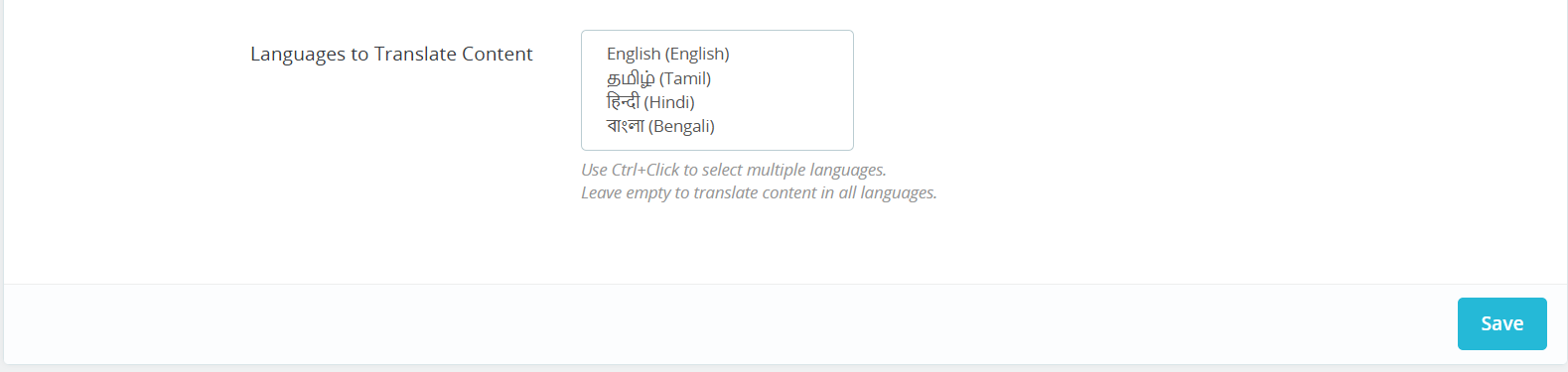
Target Languages- Select multiple languages for translations to reach a wider audience and enhance global accessibility.
Generate Category Description – Develop category content with proper HTML formatting.
Generate Category Meta Title – Creates keyword-rich category titles under 60 characters.
Generate Category Meta Description – Produces concise category descriptions within 140 characters.
Translate Category Title – Converts category titles to multiple languages.
Translate Category Description – Translates category descriptions with HTML formatting.
Translate Category Meta Title – Converts category meta titles to selected languages.
Translate Category Meta Description – Translates category meta descriptions across languages.
5.0.3 Task Log System of OpenCart AI Content Extension
The OpenCart AI Content Generator and Translator extension records all AI-generated and translated content, including prompt type, language, product/category, timestamp, status, previous content, and new content. This log helps track changes, review past updates, and monitor content evolution.
6.0 Bulk Content Generation by OpenCart AI Content Generator
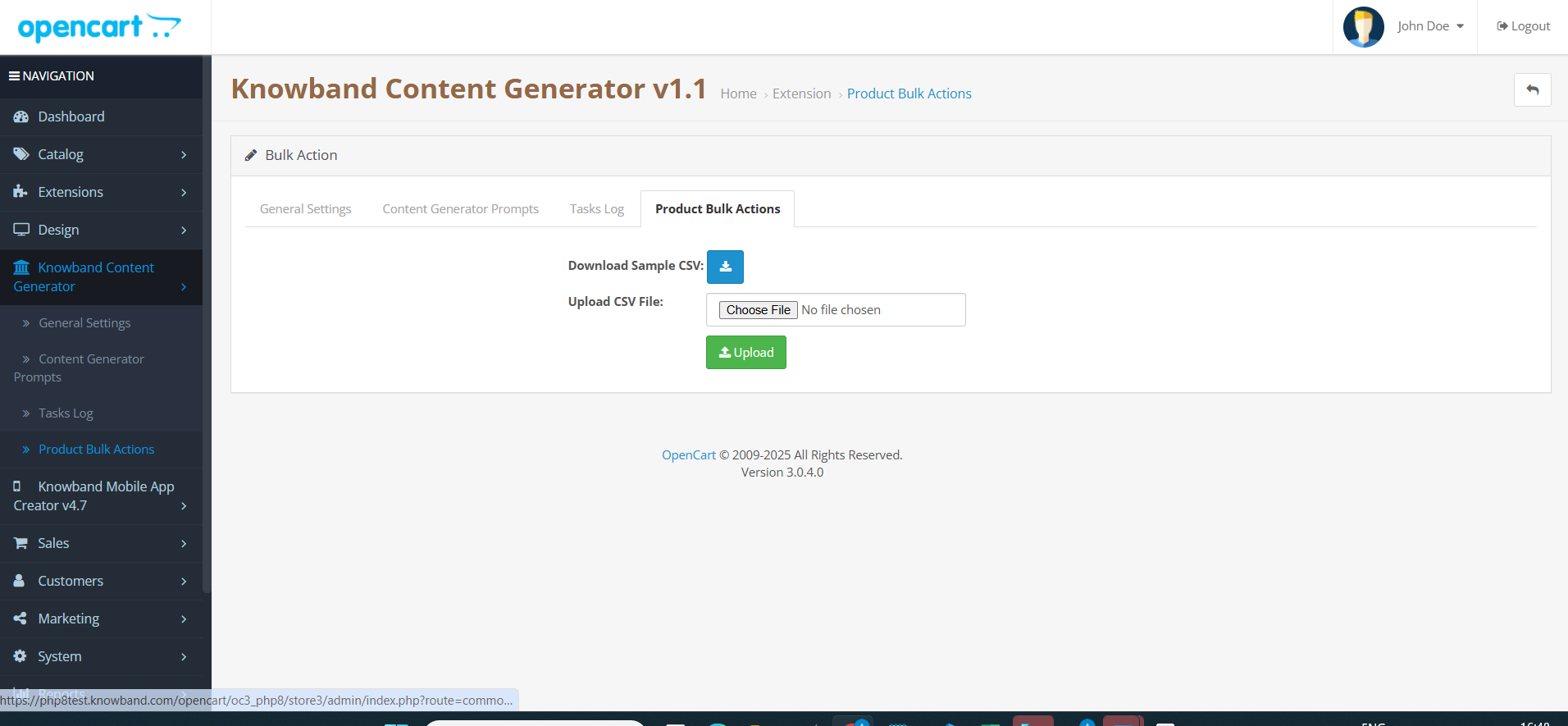
The AI Content Generator Extension for OpenCart allows the store admin to upload the CSV File which will contain the product id with with 67columns of Prompts like Generate Product description, Generate Product Meta description, Generate Product meta description, Translate Product Description, Translate Product Titles, Translate Product Meta Description and Product meta title translation.
Moreover, the extension follows this algorithm if the generate product description will contain 1 in field then the content will be generated.
To generate or translate content using OpenCart DeepSeek Content Translator Extension
Navigate to Products or Categories in your admin panel.
Select the items you want to work with.
Click on the Bulk Actions menu.
Choose the desired AI operation (Description, Meta Title, Translation, etc.).
Select which AI engine to use for the task.
Click the prompt you want to execute.
Review and approve the generated content.
7.0 Tutorial: Watch the Video Guide
To help you set up and use the Opencart AI Content Generator, we have created a comprehensive YouTube tutorial. This step-by-step video guide walks you through the installation process, configuration options, and how to effectively translate & generate the content on your store.
The Knowband AI Content Generator and Translator for PrestaShop is a cutting-edge module designed to create and translate content for PrestaShop store owners. By leveraging the advanced capabilities of Claude AI, ChatGPT AI, DeepSeek AI and Gemini AI, the module enables store owners to generate exceptionally high-quality content. Notably, the PrestaShop SEO-Optimized module provides SEO-friendly product content, including product descriptions, product titles, category descriptions, meta titles, and meta descriptions, all while maintaining content integrity and authenticity.
Moreover, the PrestaShop AI-powered Translator Addon seamlessly integrates with Claude AI, ChatGPT, DeepSeek AI and Gemini AI, thereby providing accurate and efficient translations for product content.
In addition, store owners can generate content effortlessly and in no time thanks to the powerful PrestaShop AI module. As a result, Knowband’s PrestaShop AI Content Generator enhances creativity in product descriptions while ensuring that all generated and translated content follows SEO best practices.
Furthermore, the Claude AI Content Generator for Prestashop integrates smoothly with “Claude AI API,” “Gemini AI API,” “DeepSeek API”, and “ChatGPT API,” which guarantees a hassle-free experience for both content generation and translation. Equally important, the built-in SEO optimisation features significantly improve search rankings while preserving content integrity.
What’s New in Prestashop AI Content Generator & Translator Module v1.0.2
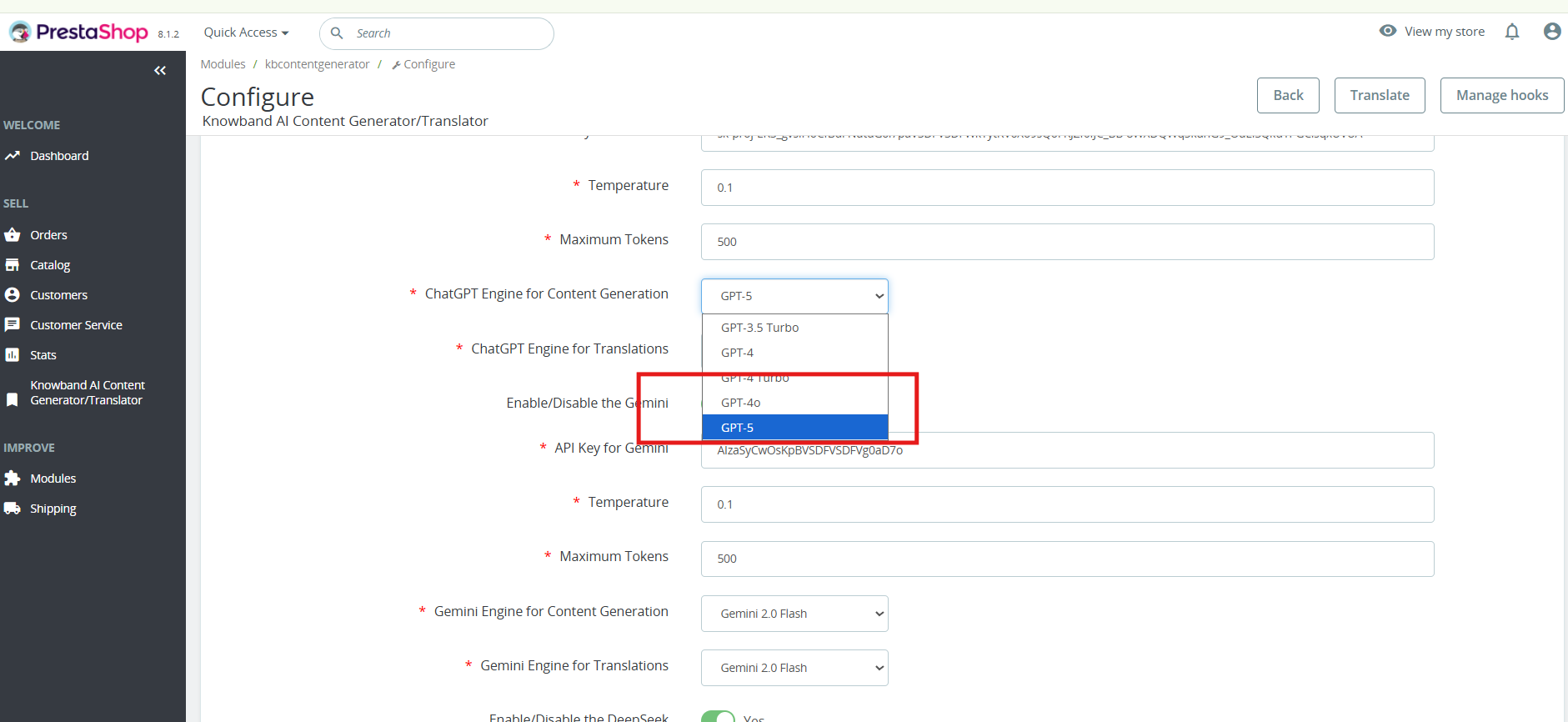
ChatGPT -5 for Smarter Content: The Prestashop AI Content Generator Addon now supports GPT-5, along with GPT-3.5, GPT-4 Turbo, and GPT-4.5. It enables faster, more accurate, and creative generation of product titles, descriptions, and meta content.
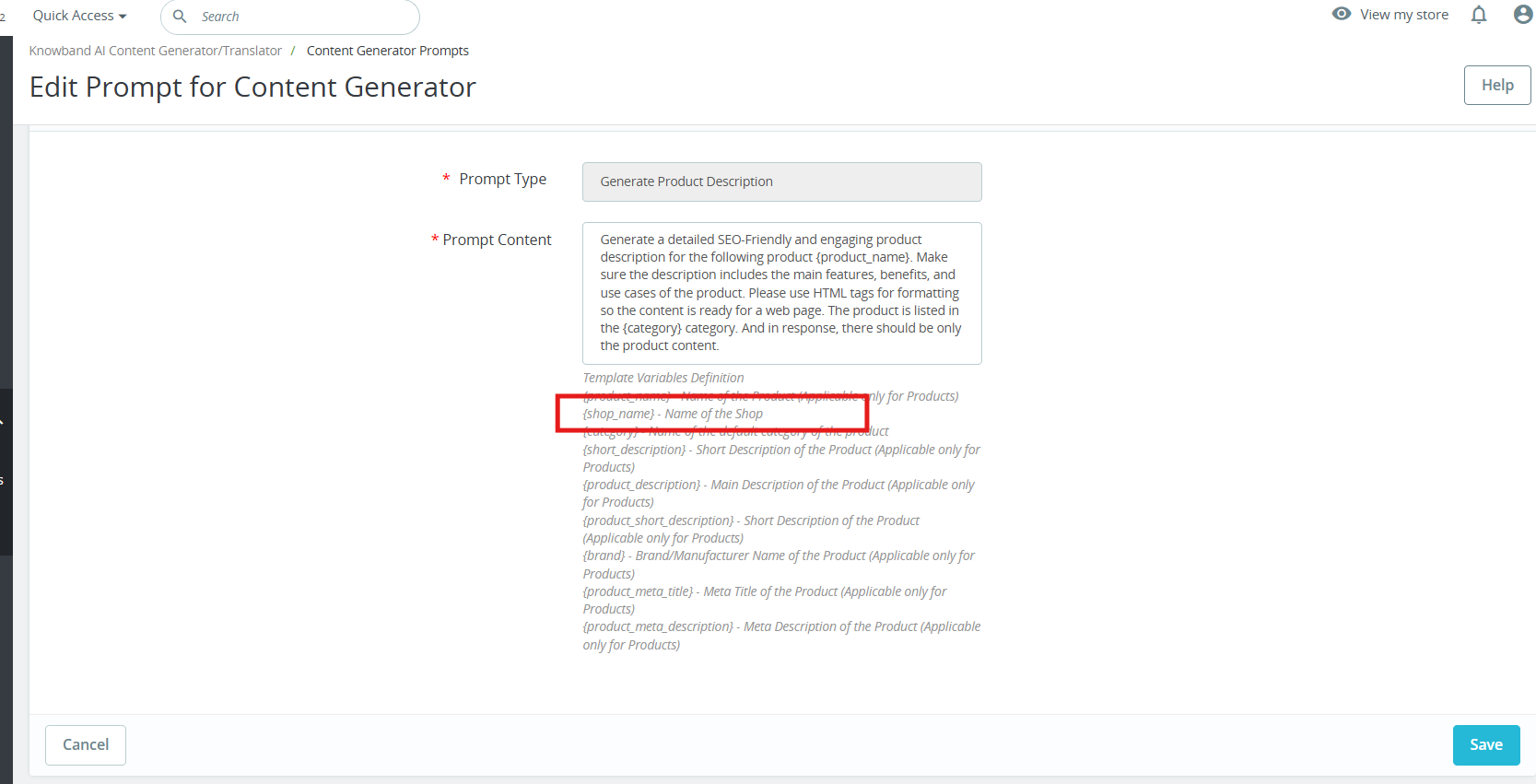
Brand-Specific Content with Manufacturer Variable: A new Manufacturer Variable allows you to include your shop or brand name directly in prompts. This feature in Prestashop AI Content Generator ensures personalised and consistent content across your store, easily editable to fit your needs.
1.0.0 Key Features Of the Prestashop Gemini/ChatGPT/Claude Content Generator/Translator Module
Effortless Content Generation
The Prestashop AI Content Module automatically creates high-quality product and category descriptions, meta titles, and meta descriptions by leveraging advanced AI technology. As a result, store owners can generate engaging and well-structured content without manual effort.
Customizable AI Models
Moreover, the PrestaShop AI Content Generator Addon offers a wide range of AI models for content creation and translation. Store owners can choose from ChatGPT models like GPT-3.5 and GPT-4.0, DeepSeek models including Chat & Reasoner, Claude models including Haiku 3, Haiku 3.5, Sonnet 3.5 (Old), and Sonnet 3.5 (New), as well as Gemini models such as Gemini 1.5 Pro, 1.5 Flash, 1.5 Flash-8b, 2.0 Flash, and 2.0 Flash – Lite Preview. With these options, merchants can tailor content generation based on their specific needs.
Seamless Multilingual Translation
In addition, the Prestashop AI Bulk Content Generator Module allows store owners to translate their content into multiple languages while simultaneously maintaining accuracy and cultural relevance. This means that businesses can expand their reach effortlessly and attract global customers.
Enhanced SEO Performance
Furthermore, the Prestashop AI Content Generator and Translator Addon optimize all content for search engines, thereby improving search rankings and increasing store visibility. By ensuring SEO best practices, this module helps businesses not only drive organic traffic but also enhance conversion rates.
User-Friendly Interface
Notably, no technical expertise is required to run the module. The PrestaShop Gemini/ChatGPT/Claude Content Generator Addon integrates seamlessly with your PrestaShop store, providing an intuitive interface that simplifies content generation. Additionally, even non-technical store owners can generate professional content with just a few clicks. This makes it easier than ever to manage high-quality store content without external assistance.
Bulk Processing Capabilities
For larger stores, the PrestaShop AI Content Generator module is an ideal solution. Moreover, the Prestashop Content Translator Addon enables store owners to generate content for multiple products simultaneously. As a result, businesses can save time and streamline their workflow effectively.
Comprehensive Activity Tracking
Lastly, the Prestashop AI Content Translator module records every action taken, including changes made within the module. It also logs timestamps and provides a summary of modifications, allowing store owners to track content evolution effortlessly. This ensures that all content updates remain transparent, structured, and easily manageable.
2.0. Installation Guide for PrestaShop AI Content Creator Addon
After purchasing the Prestashop AI Content Generator add-on, follow these steps to install it:
Navigate to Store Admin → Modules
Click on “Upload a module”. You can either drag and drop the file or manually select the file from your system.
3.0 Steps to Generate the API Key for Prestashop AI Content Generator and Translator Module Configurations?
Click “Get API key,” accept the terms of service, create your key, and paste it into the module’s configuration settings.
For ChatGPT API:
Obtain an OpenAI API key and configure it within the module settings.
Click on your profile (top-right) → “View API keys” → “Create a new secret key”.
Copy the key immediately and store it safely.
Steps to Generate DeepSeek API
Access the Deepseek platform via this URL: https://platform.deepseek.com/api_keys to generate the API Key. Log in or sign up to generatean API Key
Click on Create API Key after adding the key name.
Copy or store the key to enable functioning of DeepSeek AI Content Generator Plugin
4.0.0 Admin Interface
4.0.1 General Settings:
The Prestashop AI Content Generator and Translator Addon by Knowband allows the admin to configure AI settings and manage bulk content operations efficiently using Claude, ChatGPT, DeepSeek AI and Gemini AI engines.
[New]Enhanced Content Creation with GPT-5: The Prestashop AI Content Generator Addon now includes support for GPT-5, the latest and most advanced model from OpenAI.
Alongside GPT-3.5, GPT-4 Turbo, and GPT-4.5, GPT-5 enables smarter, faster, and more creative content generation. You can create high-quality product descriptions, titles, and meta content that are accurate, engaging, and SEO-friendly. Users can select the desired GPT model within the addon, giving full flexibility depending on the type of content needed.
Enable/Disable: Enable or disable the module
Enable/Disable the Claude: Click to enable Claude AI Engine
API Key for Claude: Enter the API Key for Claude Engine.
Select Claude Model for Generation: Choose from Claude Haiku 3, Haiku 3.5, Sonnet 3.5 (Old), or Sonnet 3.5 (New).
Select Claude Model for Translation: Select Claude Engine Models for translation Claude Haiku 3, Haiku 3.5, Sonnet 3.5 (Old), or Sonnet 3.5 (New).
Enable/Disable the ChatGPT: Click to enable ChatGPT.
API Key for ChatGPT: Enter the API Key for ChatGPT Engine to enable the functionality.
Select ChatGPT Model for Generation: Choose between ChatGPT 3.5 or ChatGPT 4.0 for content generation.
Select ChatGPT Model for Translation: Select between ChatGPT 3.5 or ChatGPT 4.0 for content translation.
Enable/Disable the Gemini AI: Click to enable the Gemini AI Engine
API Key for Gemini: Enter the API Key for Gemini AI Engine.
Select Gemini Model for Generation: Choose from Gemini 1.5 Pro, 1.5 Flash, 1.5 Flash-8b, 2.0 Flash, or 2.0 Flash – Lite Preview and save the settings.
Select Gemini Model for Translation: Pick from Gemini 1.5 Pro, 1.5 Flash, 1.5 Flash-8b, 2.0 Flash, or 2.0 Flash – Lite Preview and save the settings.
Enable/Disable the DeepSeek: Turn DeepSeek AI Engine on or off to use this AI mode.l
[New Feature]API Key for DeepSeek- Enter the DeepSeek API key to activate content generation and translation.
[New Feature]Select DeepSeek Model for Generation- Choose between Deepseek Chat or DeepSeek Reasoner for generating the content for the products, CMS and categories
Model Selection: Choose from available models of each AI engine for content generation and translations.
Temperature Control: Adjust creativity by adding values to the temperature(0.0 to 1.0), the higher values generate more creative content, while lower values ensure consistency.
Token Limit: Set a maximum token limit for each engine, Gemini, Claude, and ChatGPT
Primary Language: Define the default language for content generation and translations.
Target Languages: Choose multiple languages for content translation.
4.0.2 Prestashop AI Content Generator and Translator Module Prompts
The Prestashop AI Content Module includes 14 pre-configured AI prompts designed to create and translate e-commerce content efficiently.
Knowband Prestashop Gemini AI Content Generator Prompts:
[New] Personalised Branding with Manufacturer Variable: The new Manufacturer Variable allows you to insert your shop or brand name directly into content. This makes all product descriptions, titles, and promotional texts feel personalised and aligned with your brand. You can edit or replace the variable within prompts to suit your specific needs, ensuring consistent branding across products and suppliers in Prestashop AI Content Generator.
Content Generation Prompts:
Generate Product Description – Create SEO-friendly, well-structured product descriptions with key features and benefits.
Generate Product Meta Title – Produce optimized meta titles under 60 characters with relevant keywords.
Generate Product Meta Description – Generate compelling meta descriptions within 140 characters.
Generate Category Description – Create category descriptions with proper HTML formatting.
Generate Category Meta Title – Generate keyword-rich category meta titles under 60 characters.
Generate Category Meta Description – Create concise and engaging category meta descriptions within 140 characters.
[New] Generate CMS Content – Generate high-quality CMS page content using AI, ideal for pages like About Us, Return Policy, etc.
[New] Generate CMS Meta Title – Create SEO-friendly meta titles for CMS pages using AI.
[New] Generate CMS Meta Description – Generate engaging and optimized meta descriptions for CMS pages.
Translation Prompts:
Translate Product Title – Translate product titles into multiple languages.
Translate Product Description – Translate product descriptions while preserving HTML formatting.
Translate Product Meta Title – Convert product meta titles into different languages.
Translate Product Meta Description – Translate product meta descriptions while maintaining readability.
Translate Category Title – Translate category titles into multiple languages.
Translate Category Description – Ensure accurate translations of category descriptions with HTML formatting.
Translate Category Meta Title – Convert category meta titles to different languages.
Translate Category Meta Description – Translate category meta descriptions into multiple languages
[New] Translate CMS Title – Translate CMS page titles into multiple languages.
[New] Translate CMS Content – Translate full CMS page content while preserving structure and formatting.
[New] Translate CMS Meta Title – Convert CMS meta titles into different languages for better SEO reach.
[New] Translate CMS Meta Description – Translate CMS meta descriptions into multiple languages while maintaining clarity and impact.
4.0.3 [New] Bulk Product Content Generation By Uploading CSV:
The PrestaShop AI Content Generator & Translator now supports bulk content generation via CSV upload.
You can upload a CSV file containing Product IDs along with specific fields corresponding to various content prompts (e.g., title, description, meta fields).
Each field uses binary values to control execution:
A value of 1 indicates that the prompt should be executed for that product.
A value of 0 means the prompt will be skipped.
This feature allows for flexible and efficient bulk processing of content across multiple products
4.0.3 Prestashop Claude content translator Addon Task Log:
The Knowband PrestaShop AI Content Generator Task Log maintains a detailed record of all AI-generated and translated content, including prompt type, language, product, categories, timestamp, status, previous content, or newly generated content concerning date.
5.0 How to Execute Prestashop AI Content Generator/ Translator Module Prompts?
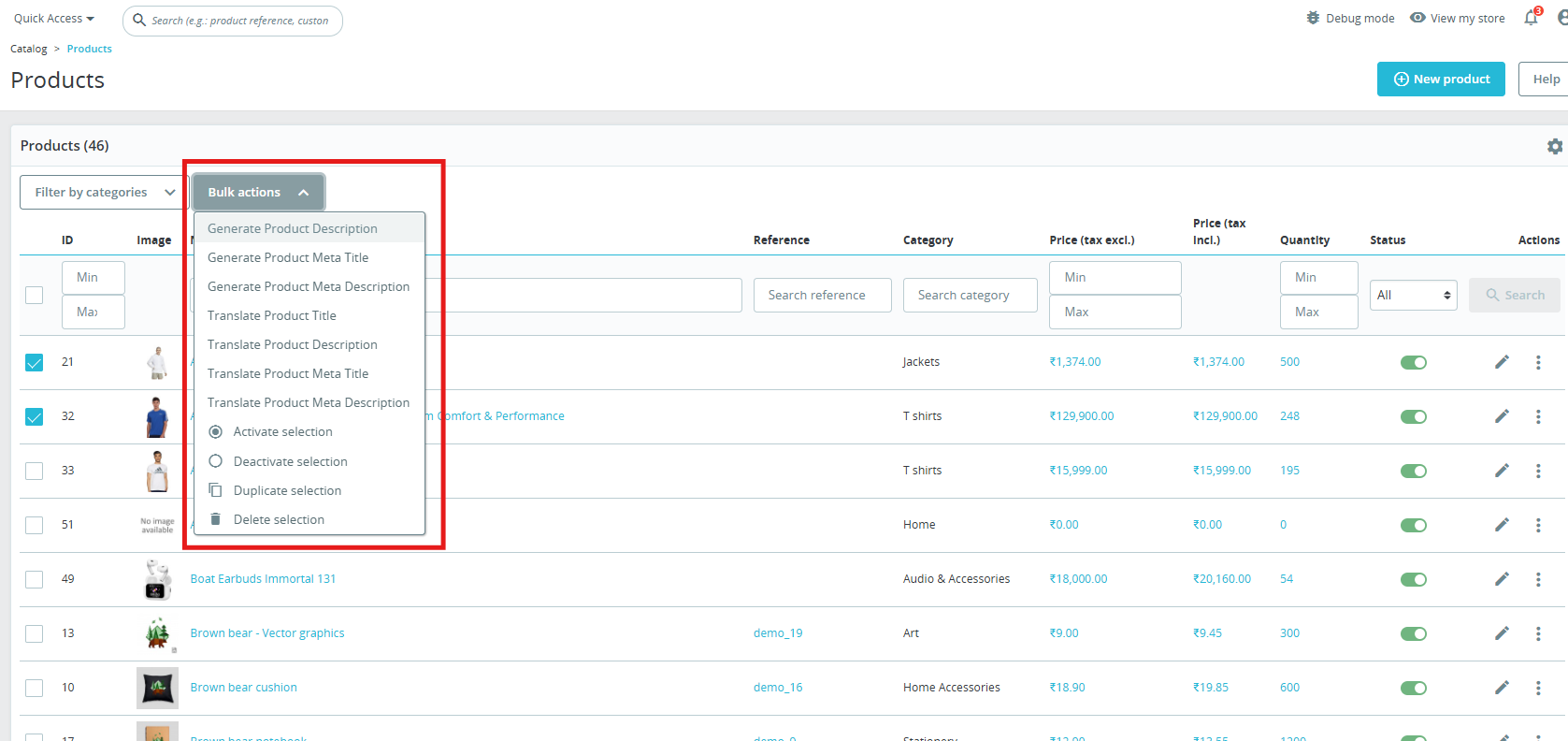
To execute bulk content operations via the PrestaShop Backend Store follow the steps:
Navigate to Products or Categories in the admin panel.
Select the items you want to generate or translate.
Click on the Bulk Actions menu.
Choose the desired AI-generated prompt (Product Description, Meta Title, Translation, etc.).
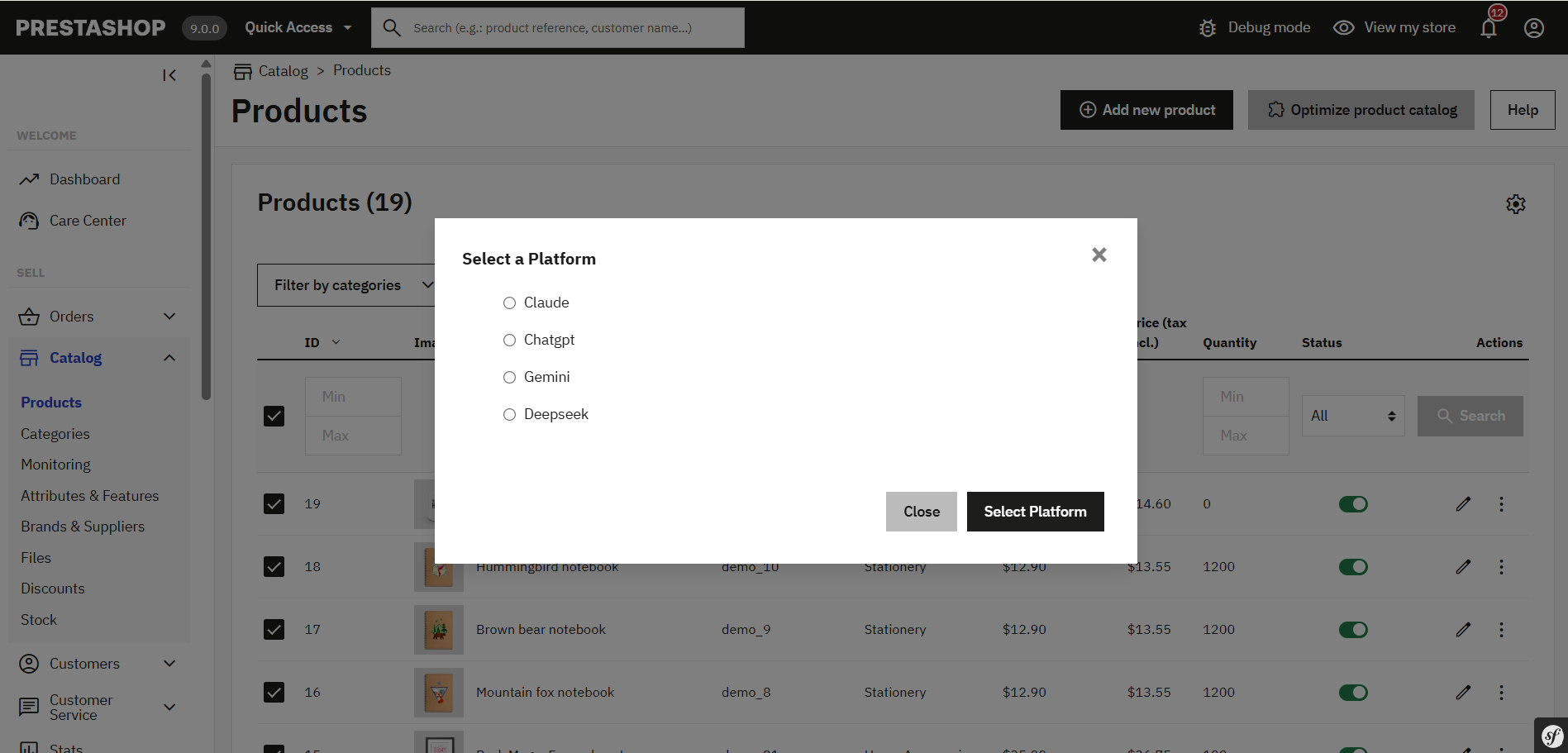
Select the AI engine (Claude, ChatGPT, DeepSeek or Gemini) to perform the task.
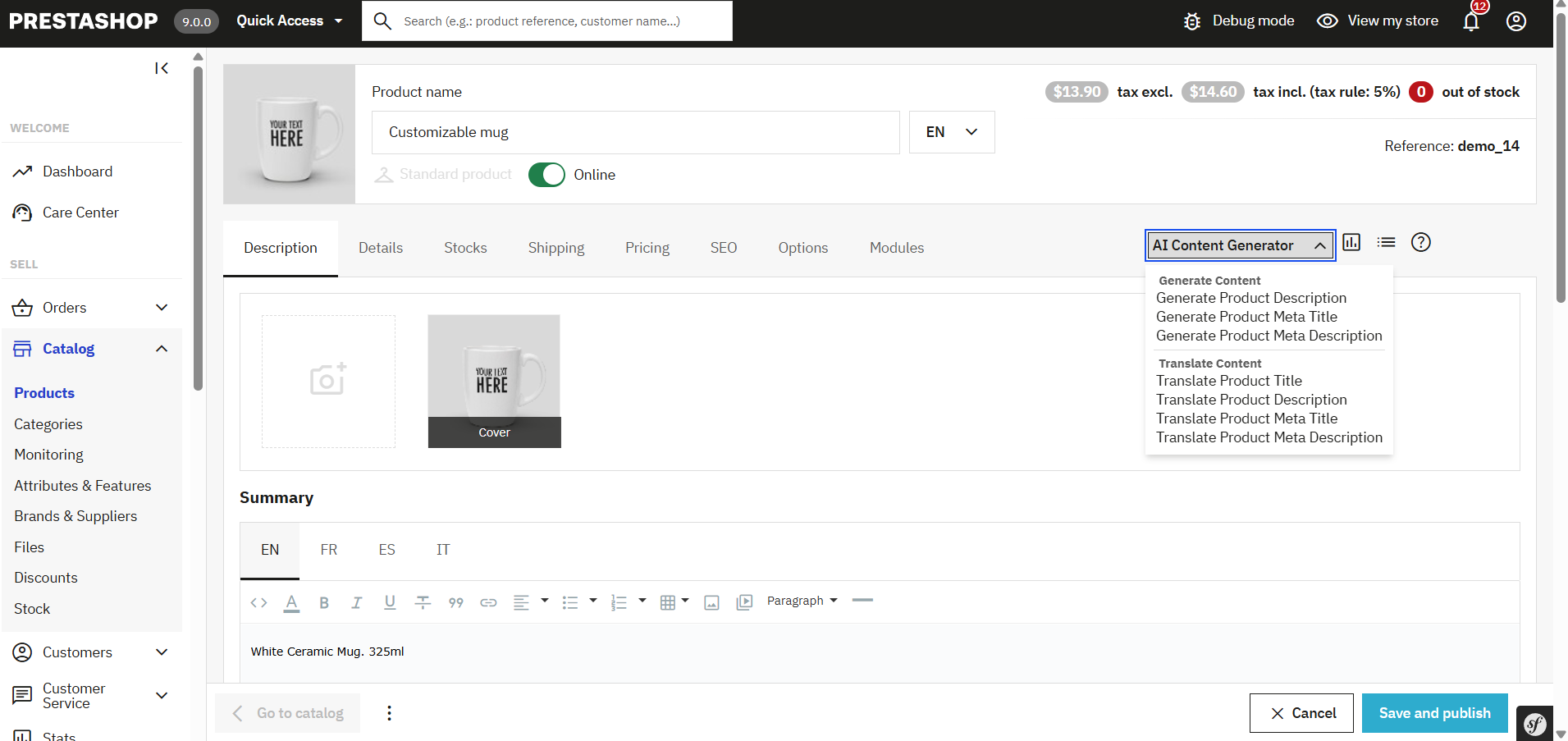
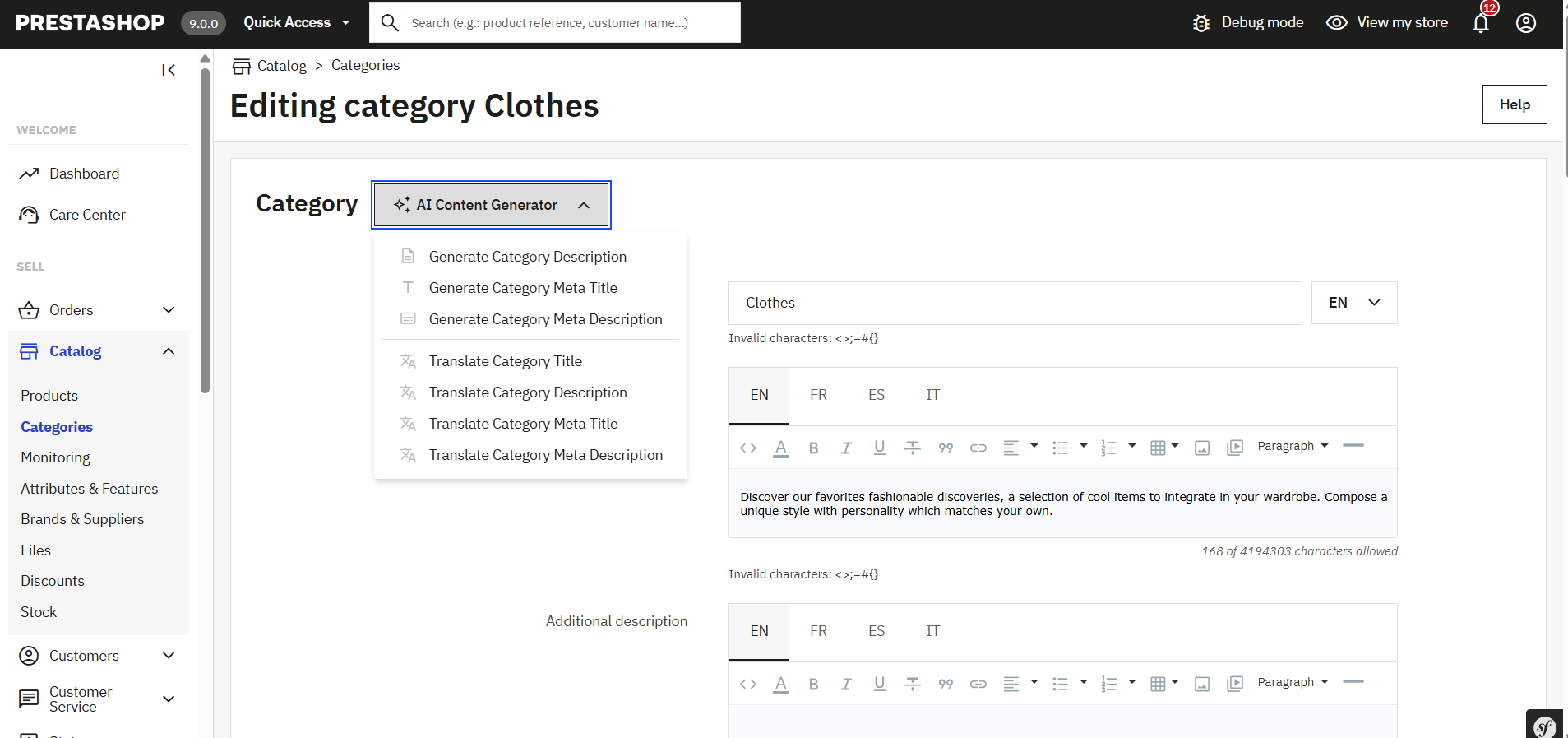
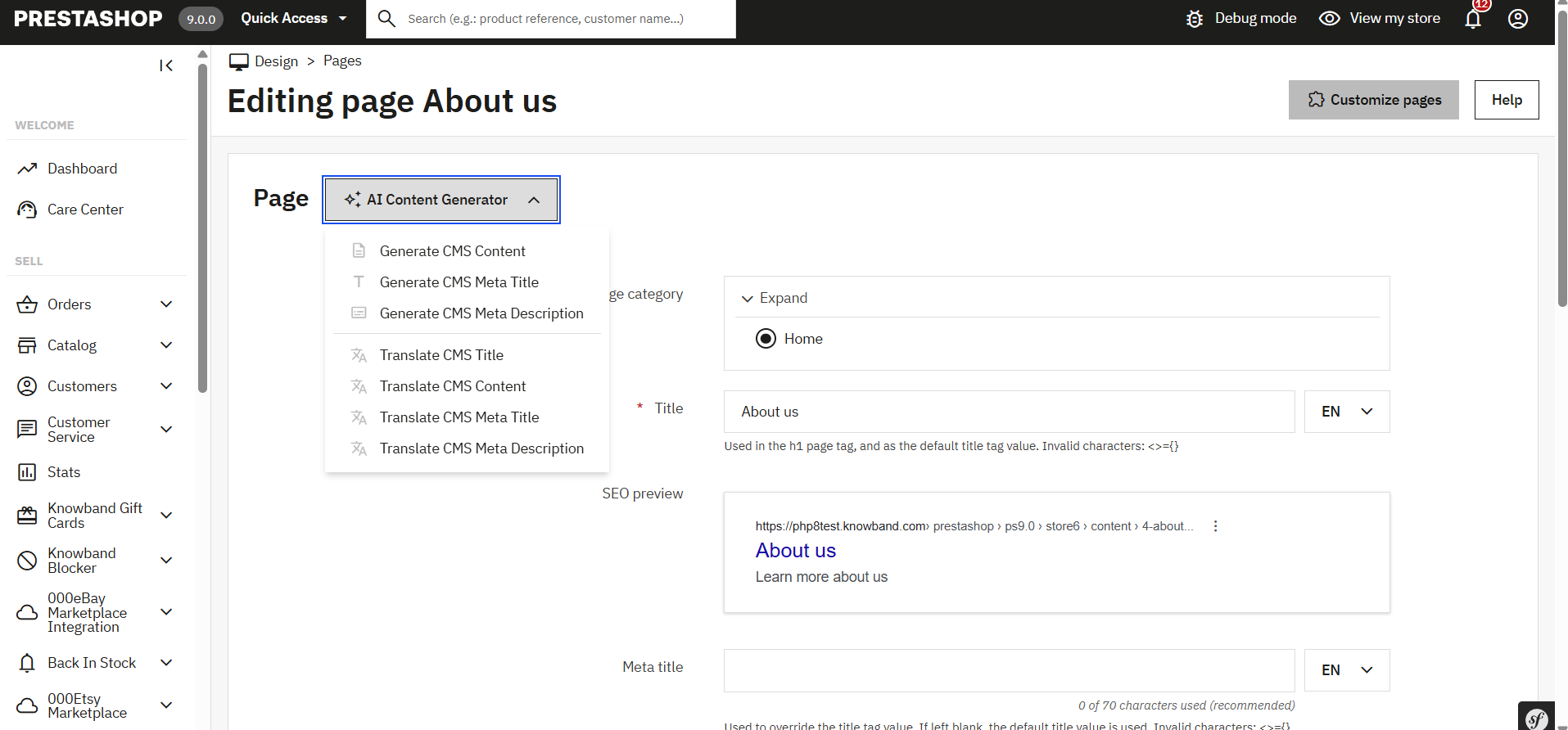
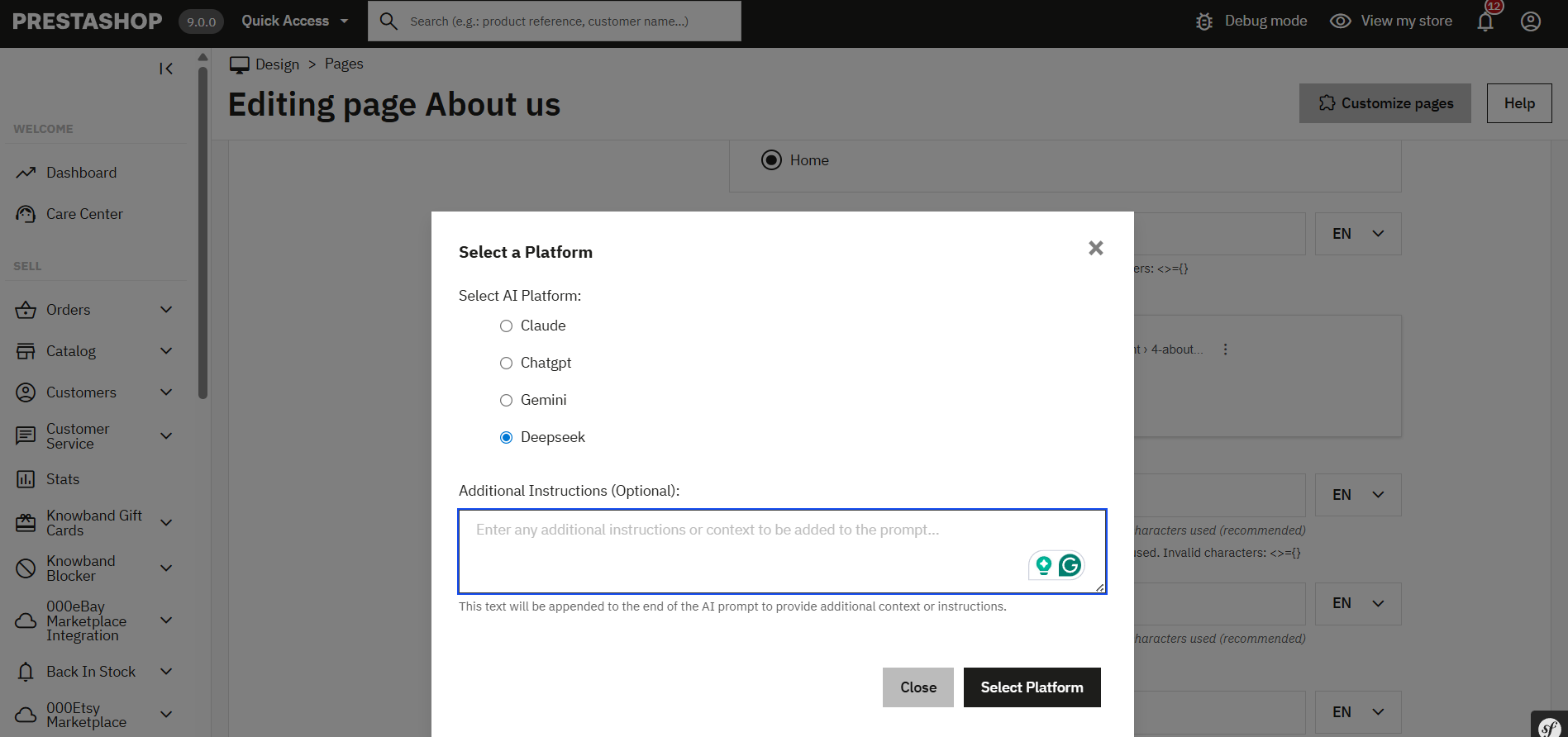
The PrestaShop AI Content Generator & Translator Module by Knowband has now been enhanced to support individual content generation for specific key pages across your store. Whether it’s a Product Page, Category Page, or a CMS Page, you can now generate high-quality, AI-driven content tailored to each item individually, giving you full control over tone, style, and structure.
Steps to execute the prompt on individual key pages.
1. Navigate to the Desired Section:
For Products, go to: Catalogue → Products
For Categories, go to: Catalogue → Categories
For CMS Pages, go to: Design → Pages
2. Edit the Specific Page:
Click Edit next to the specific product, category, or CMS page you want to update.
3. Access the AI Content Generator Panel:
Within the edit screen, you’ll now find an AI Content Generation prompt section, where you will find the prompts listed
This section is integrated into each edit page and allows you to generate or translation content for that specific page only.
4. Configure the Content Generation:
Select a predefined prompt (Generate Product description, Translate Meta description, Generate CMS Page description etc).
Choose your preferred AI engine (ChatGPT, Claude, Gemini, or DeepSeek) depending on your content goals, speed, and budget.
Optionally, add an additional prompt or specific instructions to guide the AI (e.g., use a formal tone, target specific keywords, mention product benefits, etc.).
5. Page-Type Specific Capabilities:
Product Pages: Generate or translate product descriptions, meta titles, & meta descriptions.
Category Pages:
With the PrestaShop AI Content Generator & Translator, you can now generate or translate content for individual categories right from their respective edit pages.
CMS Pages:
Generate content for informational pages such as About Us, Return Policy, Shipping Info, FAQs, and more.
Translate existing content into multiple languages to support global audiences.
Final Step: Execute the Prompt
Once you have written the additional prompt or chosen AI models, simply click “Execute”.
The content generation task request will be sent to the pending task. Now you can execute the pending tasks.
You can monitor progress and manage any pending tasks directly from the Task Log section of the module.
This new enhancement ensures that you’re not limited to bulk operations and gives you the power to optimise individual pages as per your business needs, making it easier than ever to deliver high-quality, engaging, and multilingual content across your store.
7.0.0 [New] Steps to Generate & Translate CMS Pages Content
The Knowband PrestaShop AI Content Generator & Translator Module enables store owners to effortlessly create and translate content for CMS pages such as About Us, Return Policy, Terms & Conditions, and more.
Steps to Generate or Translate CMS Page Content: 1. Navigate to:
Design → Pages
2. Select Pages:
Choose individual pages, or select all if you want to generate or translate content in bulk.
3. Choose Bulk Action:
From the bulk action menu, select the desired AI operation.
4. Select AI Engine:
Choose from supported AI models (e.g., ChatGPT, Gemini, Claude, DeepSeek) based on your content needs.
5. Add Custom Prompt (Optional):
You can include additional instructions or prompts after selecting the AI engine to tailor the content output.
6. Submit Task:
The request will be added to the Task Log for processing.
7. Execute Task:
Run any pending tasks, and your CMS content will be generated or translated accordingly
8.0.0 Benefits of the PrestaShop AI Content Generator Module
Saves Time and Effort
The Prestashop AI Content Generator Module automates content creation; as a result, it significantly reduces manual work. Consequently, store owners can focus on business growth instead of writing product descriptions.
Improves SEO Rankings
The Prestashop ChatGPT SEO Content Generator optimizes product descriptions and meta tags. Therefore, it enhances search rankings and drives more organic traffic.
Expands Global Reach
The Prestashop AI translator addon translates product content into multiple languages. Thus, businesses can effortlessly connect with international customers.
Enhances Content Quality
AI-generated content is engaging and accurate. In addition, it ensures product descriptions are clear, detailed, and informative, which ultimately leads to better conversions.
Reduces Costs of Content Creation
The Claude addon for Prestashop eliminates the need for professional copywriters and translators. As a result, businesses save money while still maintaining high-quality content.
Supports Multiple AI Models
Merchants can choose from various AI models, including Prestashop ChatGpt content generator, Gemini AI content generator Prestashop, and Claude AI. Moreover, this flexibility allows tailored content creation.
Speeds Up Bulk Content Generation
The Prestashop Gemini Content Generator Addon enables bulk content creation. Consequently, merchants can generate descriptions for multiple products in minutes.
Provides an Easy-to-Use Interface
The PrestaShop AI Content Generator / Translator Module is beginner-friendly. Additionally, it allows store owners to create professional content without any technical expertise.
Ensures Content Accuracy and Authenticity
The Prestashop Claude Translator/Generator Module maintains the originality of product information. Thus, customers always receive precise and reliable details.
Tracks All Content Changes
The Prestashop Claude Translator Module records all AI-generated and translated content. As a result, merchants can monitor changes and refine their content strategy over time.
The Knowband OpenCart Claude AI Content Generator/Translator Extension is a cutting-edge extension designed to simplify content creation and translation for OpenCart store owners. Leveraging the advanced capabilities of Claude AI, the module helps merchants craft high-quality product descriptions, product titles, category descriptions, meta titles, and meta descriptions while ensuring SEO-friendly content.
The AI-powered translation feature also allows seamless integration with Claude AI, enabling accurate translations to help businesses expand their reach globally.
With this powerful extension, OpenCart store owners can generate engaging and original content effortlessly. Thus, Knowband’s OpenCart AI Content Generator enhances creativity in product descriptions and ensures all generated content aligns with search engine optimization best practices.
Furthermore, the module integrates smoothly with Claude AI API, offering a hassle-free experience for both content generation and translation. The built-in SEO optimization features help improve search rankings while maintaining content integrity.
Whether managing a small boutique or a large e-commerce store, the Knowband OpenCart Claude AI Content Generator streamlines content workflows, ensuring consistency across product listings. The module’s user-friendly interface and robust AI capabilities make it a must-have extension for any OpenCart store looking to scale efficiently.
Create Content Instantly with AI- The OpenCart Claude SEO Content Generator plugin by Knowband allows store owners to craft SEO-optimised product & category descriptions, meta titles, and descriptions. Additionally, the Opencart Claude AI Generator plugin ensures that the content is informative, and optimized for SEO.
Powered by Advanced AI Technology –The extension uses Claude 3.5 Sonnet, Claude 3 Opus, and Claude 3 Haiku to create unique and high-quality content.
Easily Translate Content for Global Reach- The store owners do not need to manually translate product descriptions anymore. Therefore, this AI-powered plugin ensures accurate and natural translations, making it simple to reach customers in different countries.
Improve SEO with Optimized Content- The OpenCart Claude AI Content Generator module ensures that all generated and translated content follows SEO improving rankings on Google. Thus, Integrating relevant keywords naturally helps boost sales and traffic.
Simple Installation & Easy to Use- Designed for a user-friendly setup, the OpenCart Claude AI Content Generator Plugin is easy to purchase and configure. Therefore, the setup is quick and simple, and the interface is designed to be user-friendly for all opencart store owners.
Generate Bulk Content in Seconds – This addon is perfect for stores with large product base catalogues, allowing e-merchants to generate and translate SEO Optimized content for multiple products simultaneously. Therefore, it helps in saving time and effort.
Supports Multiple Languages & RTL Scripts – Whether the customers speak English, Spanish, Arabic, or any other language, this addon supports them all. It also works with right-to-left (RTL) languages.
Customize Content to Fit Your Brand- Furthermore, store owners can customize content length, tone, and style to align with their brand voice, ensuring consistency across all product listings.
2.0 Installation Guide
Setting up the Opencart Claude Module is simple. The e-merchants must follow the simple steps to complete the installation process easily.
A zipped file containing the source code for the Opencart Claude content Translator Extension.
A user manual for the extension to assist you further.
Steps to Install the Extension:
Unzip the Downloaded File:
Locate the zipped file in your account under My Account > Downloads and extract it. Once unzipped, you’ll see folders similar to those shown in the illustration below:
Transfer Files to the Root Directory
Use an FTP manager to copy all the files and folders from the unzipped folder to the root directory of your Opencart setup.
Complete the Installation
The module is now successfully installed and ready for configuration.
Access and Configure the Extension
Navigate to the Admin Panel > Main Menu > Extensions.
3.0 How to Generate the Claude API Key for Module Configurations?
The store owners must get an API key to enable functionality in your opencart store.
Go to “ Create key” to get the API Key. Make sure to copy this key for the next step.
Step 2: Paste the API Key in the Opencart Store:
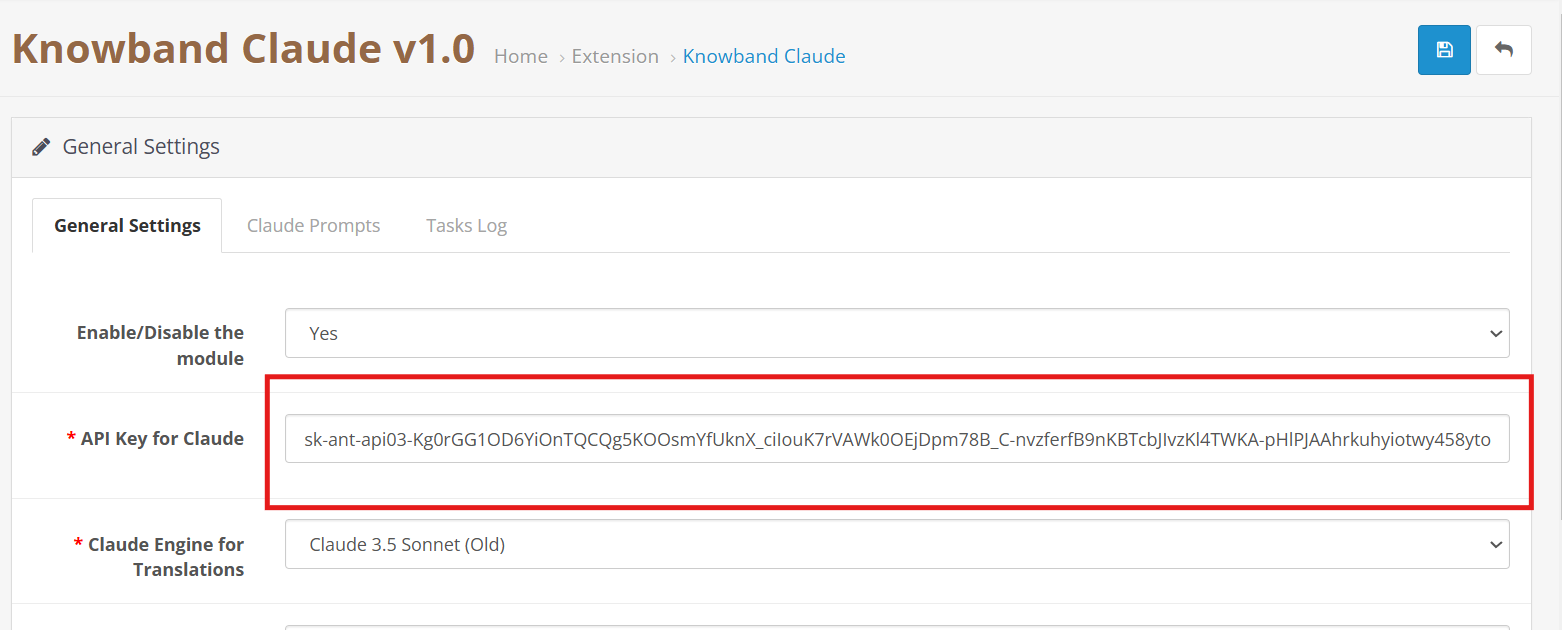
In your Opencart Store’s Backend, go to the Knowband Claude AI General Settings page.
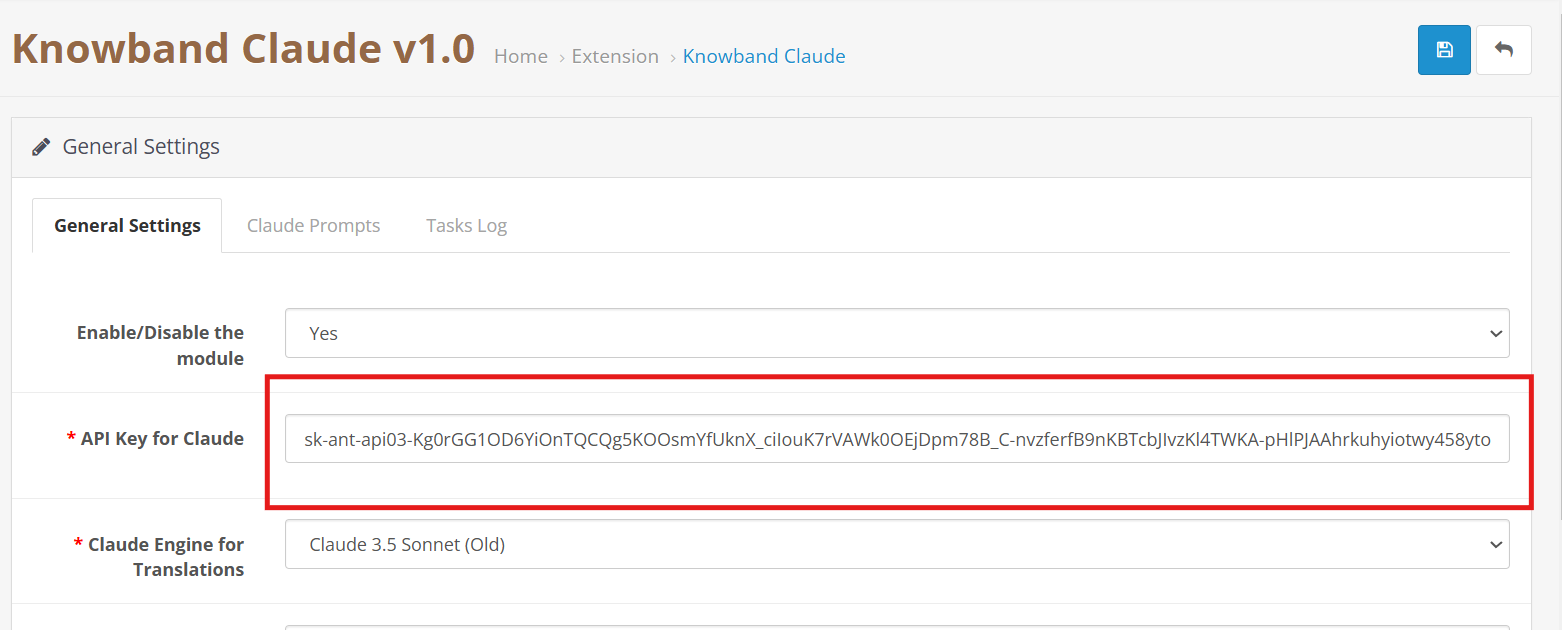
Add the API Key into the given API Key for the Claude block.
Step 3: Save the Settings:
After inserting the API Key in General Settings, click Save to Module settings. The Claude AI module will now use this key to interact with the Claude API.
4.0 Admin Interface Overview:
4.0.1 General Setting:
The Opencart Claude Content Translator Plugin by Knowband allows the e-merchant to configure general settings and manage operations efficiently. Therefore, the Knowband provides an intuitive interface that allows the e-merchants to configure the module.
Here is a Brief Overview of the features of the Module
API Key for Claude: Add your Anthropic API Key in the required field.
Claude Model Selection: The module allows the e-merchant to select from Anthropic’s models, including Claude 3.5 Sonnet(new), Claude 3.5 Sonnet(old), Claude 3 Opus, and Claude 3 Haiku.
Temperature: Store owners can adjust the creativity level of the content which generally is between 0.0 to 1.0 – higher values represent more creative content, while lower values represent more consistent and focused results.
Maximum Tokens: Store owners can control how much text the AI generates. By default, it uses 2,000 tokens.
Select Claude Engine: E-Merchants can choose which Claude model to use specifically for translation tasks.
Primary Language Content Generator: Choose your primary language for automatic content generation and translation.
Target Languages: The store owners to select which languages they want content translated into.
4.0.2. OpenCart Claude Prompts:
The Extension contains 14 pre-configured prompts designed generator and translator.
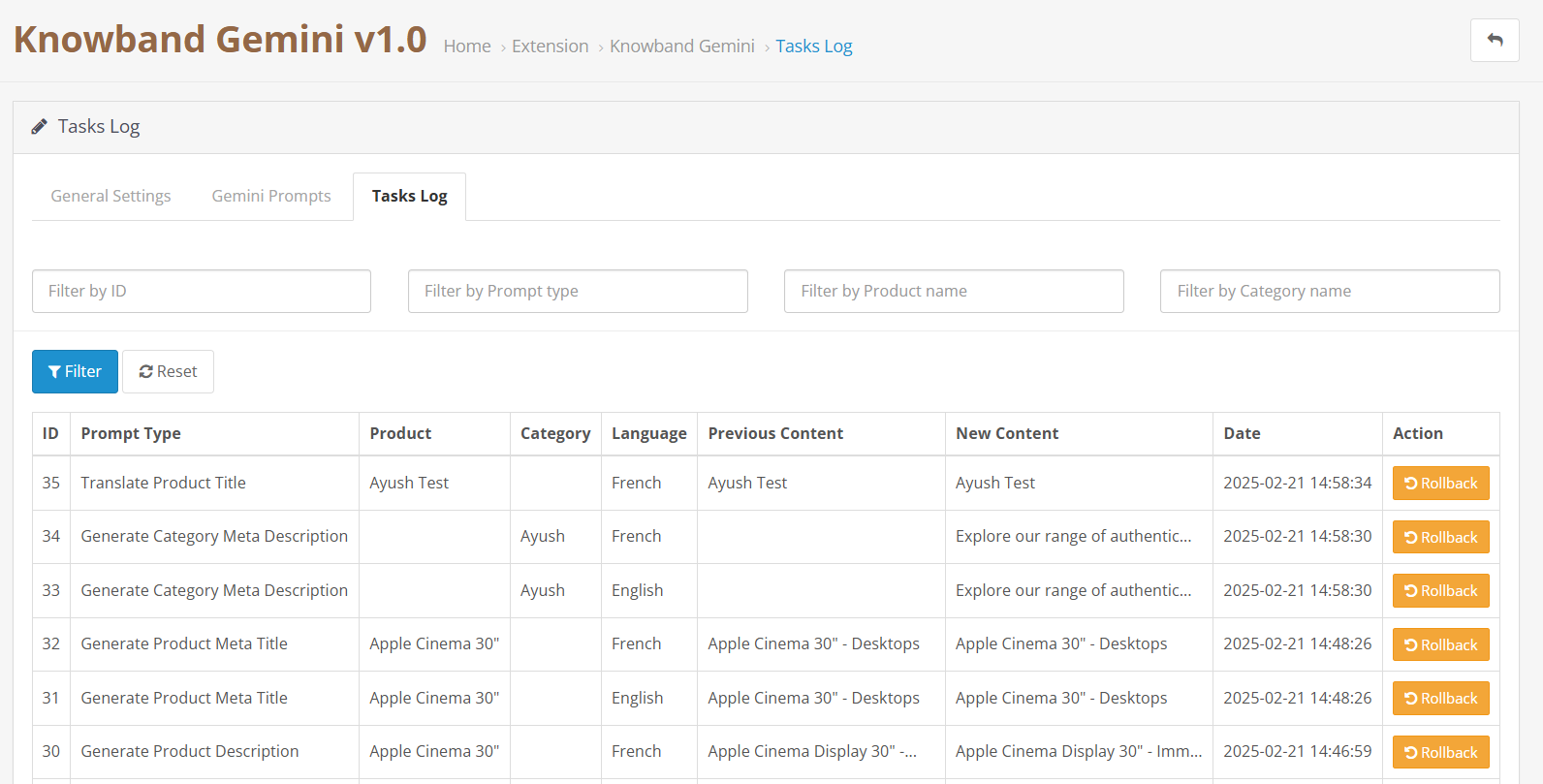
The task logs keep a comprehensive record of all executed prompts with details like Prompt Type, Product, Category, Language, Previous Content, New Content, and time.
The Knowband’s Opencart Gemini AI Content Generator is a powerful extension that makes content creation easy for Opencart store owners. The OpenCart Gemini content generator uses AI, that allows store owners to generate high-quality and creative product descriptions, product titles, category descriptions, meta titles, meta descriptions, and SEO- optimized content.
The AI-powered translation Extension for the OpenCart seamlessly integrates with Google’s Gemini AI API, providing a smooth experience for content generation and translation. Therefore, with built-in SEO optimization features, the OpenCart Gemini content generator Extension ensures all generated content is original, engaging, and search engine friendly. Moreover, the translation capabilities of Knowband’s OpenCart Gemini content translator Extension allow merchants to expand their business to reach globally with perfect product information.
Whether you’re managing a small business or a large e-commerce marketplace, Knowband’s OpenCart Gemini content generator Extension streamlines your content workflow and ensures consistent quality across all product listings. Furthermore, the intuitive interface and powerful AI capabilities make it an essential Extension for any OpenCart store looking to scale content operations efficiently.
The OpenCart Gemini SEO Content Generator Extension leverages Google’s Gemini AI to create high-quality product descriptions, meta titles, and descriptions. Furthermore, it ensures content is engaging, informative, and optimized for search engines.
Advanced AI Technology
The Gemini Extension for OpenCart utilizes Google’s latest Gemini AI models, including Gemini 2 Flash, Flash Light Preview, Gemini Flash 1.5, Gemini Flash 8B, and Gemini 1.5 Pro, which offers different generation modes for various content needs:
AI-Powered Translation
The OpenCart Opencart translator Extension delivers accurate, context-aware translations for product content. Additionally, the OpenCart Gemini SEO Content Generator Supports multiple languages and preserves formatting and structure during translation.
User-Friendly Interface
The AI-powered translation Extension for OpenCart is simple to install and provides flexible and intuitive admin panel controls. Therefore, the store owners do not need to have coding experience or technical expertise.
Time Savings
The OpenCart Gemini content generator Extension automates time-taking tasks like writing product, and category descriptions and updating meta titles and descriptions.
Click on “Create new secret key”. Copy this key for the next step.
Step 2: Enter the API Key in Your OpenCart Store:
In Opencart Store’s BackOffice go to the “Knowband’s Gemini” General Settings page.
Paste the API Key into the provided “API Key for Gemini ” field.
Step 3: Save the Settings:
After pasting the API Key in General Settings, click “Save”. Now, you can use Knowband’s Gemini AI Extension.
Important:
Billing Requirement: Store owners must have a sufficient credit balance in their Google Gemini account for the API to function and run the Extension. If your credit balance is less, the API requests will not work in the Knowband’s Gemini AI Extension. Additionally, the store owners can check their balance and add credits by accessing the billing overview page at https://aistudio.google.com/app/apikey.
3.0 Admin Interface Overview:
3.0.1 General Setting:
The OpenCart Gemini AI Extension by Knowband allows the e-merchant to configure the Extension to perform operations within the store and manage bulk content operations efficiently.
Here is a Brief Overview of the features of the Extension
API Key for Gemini AI: Enter your Generated API KEY from Google AI Studio in the required field.
Gemini AI Model Selection: Also, e-merchants can choose from Google’s latest Gemini AI models, including Gemini 2 Flash, Flash Light Preview, Gemini Flash 1.5, Gemini Flash 8B, and Gemini 1.5 Pro, which offers different generation modes for various content needs.
Temperature: The e-merchants can adjust the creativity level from 0.0 to 1.0 – higher values represent more creative content, while lower values represent more focused results.
Maximum Tokens: The Knowband’s Gemini Content Generator allows the admin to set a token limit (default: 500). The tokens represent text fragments.
Gemini AI Engine for Translations: Select which Gemini AI model to use for translation for the product and category details.
Primary Language: The admin can select the store’s default language for content generation and translation of the products
Target Languages: The Opencart Gemini Translator Extension provides the option to select which languages the store owners want their content to be translated.
3.0.2. Gemini AI Prompts:
The Extension features 14 pre-configured prompts designed for various e-commerce content needs:
Generate Product Description: The prompt creates SEO- optimized, well-structured, formatted product descriptions with key features, benefits, and many more.
Generate Product Meta Title: Creates SEO- optimized meta titles under 60 characters, including keywords and product categories to increase the search rank.
Generate Product Meta Description: The prompts generate meta descriptions of the product limited to 140 characters maintaining the information according to the product.
Translate Product Title: Translates the product titles to multiple different languages depending on the store’s need.
Translate Product Description: The prompt translates descriptions while preserving formatting and content.
Translate Product Meta Title: Translate meta titles to multiple different languages according to the store’s theme and tone.;
Translate Product Meta Description: The prompt translates meta descriptions to multiple different languages keeping the translated content focused and accurate according to the generated content.
Generate Category Description:The prompt generated category descriptions while preserving formatting and content of the product.
Generate Category Meta Title: Also,translate category meta titles under 60 characters with related keywords keeping the title SEO Optimized.
Generate Category Meta Description: Creates category meta descriptions within 140 characters focusing on the meta keywords.
Translate Category Title: The prompt is to translate category titles into multiple different languages based on the needs of the store.
Translate Category Description: Translates category descriptions while maintaining HTML structure and generates category descriptions.
Translate Category Meta Title: Translated category meta titles to multiple different languages depending on the store.
Translate Category Meta Description: Translates category meta descriptions to multiple different languages focused only on generated meta descriptions.
3.0.3. Gemini AI Task Log:
The task logs keep track of the changes and actions done within the store. Moreover, Knowband’s Gemini AI Extension maintains logs in the tasks log which helps the store owners to track, undo and revert changes in the task logs.
4.0. How to Execute Gemini AI Prompts?
The way to execute the prompt is to select the product for which you want to generate and translate content. Then select the prompt and access bulk operations through Opencart Backend >> Products tab:
Select your desired products and access the Bulk Actions menu to choose from various content generation and translation options:
Generate Product Description: Generates the descriptions for multiple products at the same time.
Generate Product Meta Title: Generate the meta titles for the bulk of the product keeping the content SEO-optimized.
Generate Product Meta Description: Generate meta descriptions for multiple different products at the same time keeping the product informative to the customers and visitors.
Translate Product Title: Convert product titles to multiple languages.
Translate Product Description: Translates the product’s description in selected multiple languages.
Translate Product Meta Title: Translated the selected meta titles to multiple languages for the products and categories.
Translate Product Meta Description: The Knowband’s Gemini AI Extension allows the admin to translate meta descriptions for bulk products at one time.
The PrestaShop Claude AI Content Generator Addonis a powerful Plugin that simplifies content creation for PrestaShop store owners. Using advanced AI, the Prestashop Claude AI Content Generator/Translator Addon helps store owners quickly generate high-quality product descriptions, catchy product titles, and SEO-friendly content. As a result, the store can effortlessly attract more visitors and boost sales.
Moreover, the AI Content Generator for PrestaShop integrates smoothly with Claude AI, ensuring a hassle-free experience. The Prestashop Claude AI Content Generator-Translator Addon also includes an SEO Content Generator feature, which guarantees that all content is original, engaging, and optimized for search engines. Additionally, Knowband’s PrestaShop Claude AI Content Translator module allows e-merchant to expand its business internationally with accurate and natural-sounding translations.
Whether you want to manage multilingual content or improve your content strategy, the Claude add-on for Prestashop simplifies the entire process. Moreover, with the PrestaShop Claude AI Content Translator Module, store owners can save time while enhancing the store with high-quality, multilingual content—effortlessly!
1.0. Key Features of Prestashop Claude AI Content Generator/Translator Addon
1. AI-Powered Content Generation: The Prestashop Claude SEO Content Generator by Knowband enables store owners to generate high-quality product descriptions, meta titles, and descriptions. Therefore, by using the advanced AI model Claude, it ensures that the content is engaging, informative, and optimized for search engines.
2. Advanced AI Technology : The AI-powered translation addon for Prestashopleverages Anthropic’s powerful Claude AI models, including Claude 3.5 Sonnet, Claude 3 Opus, and Claude 3 Haiku. Furthermore, with AI engines, you can generate creative content and produce accurate translations depending on your store’s specific needs.
3. AI-Powered Translation : The AI Translation Addon for Prestashop ensures accurate and context-aware translations with minimal effort. Therefore, e-merchants don’t need to manually translate the content of the products.
4. Easy Installation and Configuration – The Prestashop Claude content generator Addon is Designed with an easy-to-use interface. Likewise, the AI content generation Prestashop is simple to install and run, even for store admins who don’t have coding experience.
5. Efficient Bulk Content Creation – Perfect for merchants with extensive product catalogs, the Prestashop Claude content generator excels at generating content in bulk.
6. Multi-Language Compatibility –The module supports all languages, including right-to-left (RTL) scripts, ensuring flexibility for global businesses. Additionally, it is compatible with multiple Prestashop versions, making it a reliable solution for a wide range of stores.
2.0 How to Generate the Claude API Key for Module Configurations?
To enable Claude AI functionality in your PrestaShop module, you must get an API Key.
To use the features of the module, you need to have an API Key. Please follow these steps:
Click on “Create key”. Copy this key for the next step.
Step 2: Enter the API Key in Your PrestaShop Store:
In your PrestaShop Store’s Backend, go to the “Knowband Prestashop Claude AI Generator/Translator” General Settings page.
Paste the API Key into the provided “API Key for Claude” field.
Step 3: Save the Settings:
After adding the API Key in General Settings, click “Save” to store settings. Now, the Claude AI module will use this key to interact with the Claude API.
Here is a Brief Overview of the features of the Module
Enable/Disable: You can enable or disable the Prestashop Claude Content Generator.
API Key for Claude: Enter your Anthropic API Key in the designated field.
Claude Model Selection: Choose from Anthropic’s suite of models, including Claude 3.5 Sonnet(new), Claude 3.5 Sonnet(old), Claude 3 Opus, and Claude 3 Haiku, to generate high-quality content tailored to your store needs.
Temperature: Adjust the creativity level – higher values produce more creative content,t while lower values deliver more consistent results.
Maximum Tokens: Set your token limit (default: 2000). Tokens represent text fragments used by the AI model.
Claude Engine for Translations: Select which Claude model to use specifically for translation tasks.
Primary Language: Choose your default language for content generation and translation.
Target Languages: Select which languages you want your content translated into.
4.0.2. Claude Prompts:
The module features 14 pre-configured prompts designed for various e-commerce content needs:
Generate Product Description: Creates SEO-friendly, formatted product descriptions with features, benefits, and use cases.
Generate Product Meta Title: Creates optimized meta titles under 60 characters, incorporating keywords and product categories.
Generate Product Meta Description: Produces compelling meta descriptions limited to 140 characters.
Translate Product Title: Translate product titles to multiple different languages.
Translate Product Description: Translates descriptions while preserving HTML formatting.
Translate Product Meta Title: Translate meta titles to multiple different languages.
Translate Product Meta Description: Translates meta descriptions to multiple different languages.
Generate Category Description: Creates SEO-optimized category descriptions with proper HTML formatting.
Generate Category Meta Title: Produces category meta titles under 60 characters with relevant keywords.
Generate Category Meta Description: Creates category meta descriptions within 140 characters.
Translate Category Title: Translates category titles to multiple different languages.
Translate Category Description: Translates category descriptions while maintaining HTML structure.
Translate Category Meta Title: Converts category meta titles to multiple different languages.
Translate Category Meta Description: Translates category meta descriptions to multiple different languages.
4.0.3. Claude Prompts Task Log
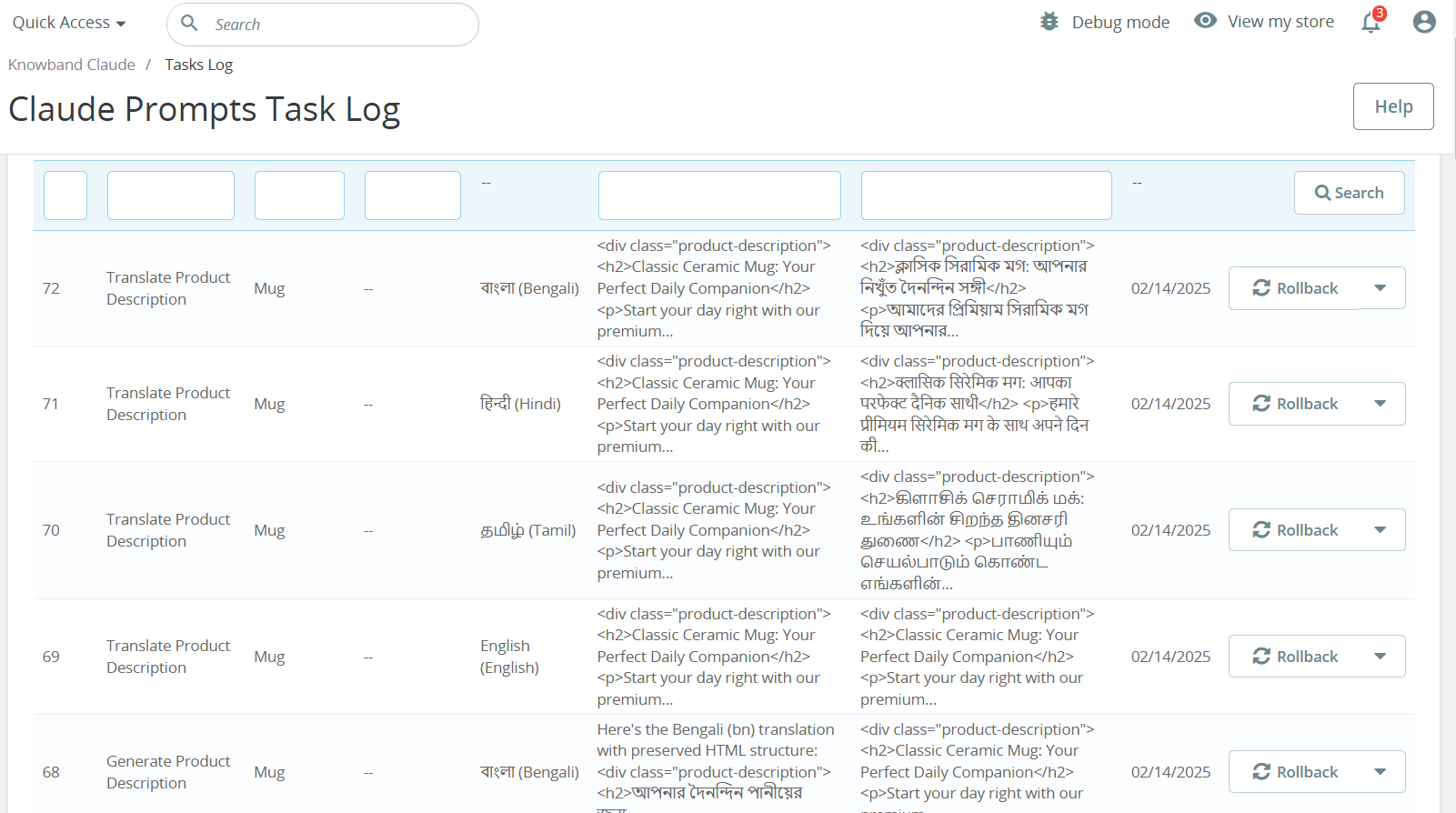
Maintains a comprehensive record of all executed prompts with details like Prompt Type, Product, Category, Language, Previous Content, New Content, and timestamp for easy tracking.
Maintains a comprehensive record of all executed prompts with details like Prompt Type, Product, Category, Language, Previous Content, New Content, and timestamp for easy tracking.